


CSIS 330
L
AB
10 A
NSWER
T
EMPLATE
Task 1:
Screenshot #1
Questions:
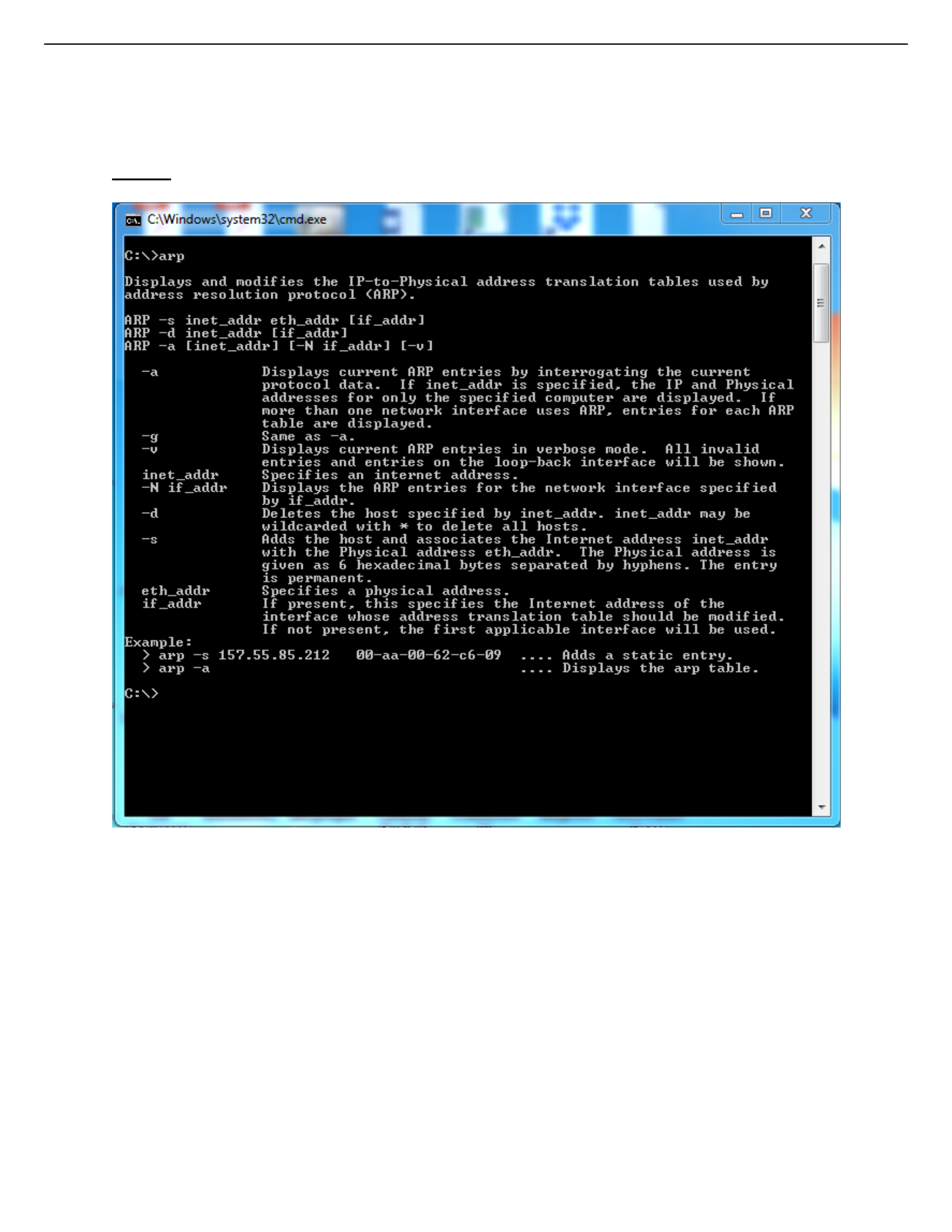
a. What command is used to display all entries in the ARP cache?
C:\>arp -a
b. What command is used to delete all ARP cache entries (flush the ARP cache)?
C:\>arp -d *
c. What command is used to delete a single ARP cache entry for a given IP address?
C:\>arp -d 192.168.0.2

CSIS 330
Task 3:
Questions:
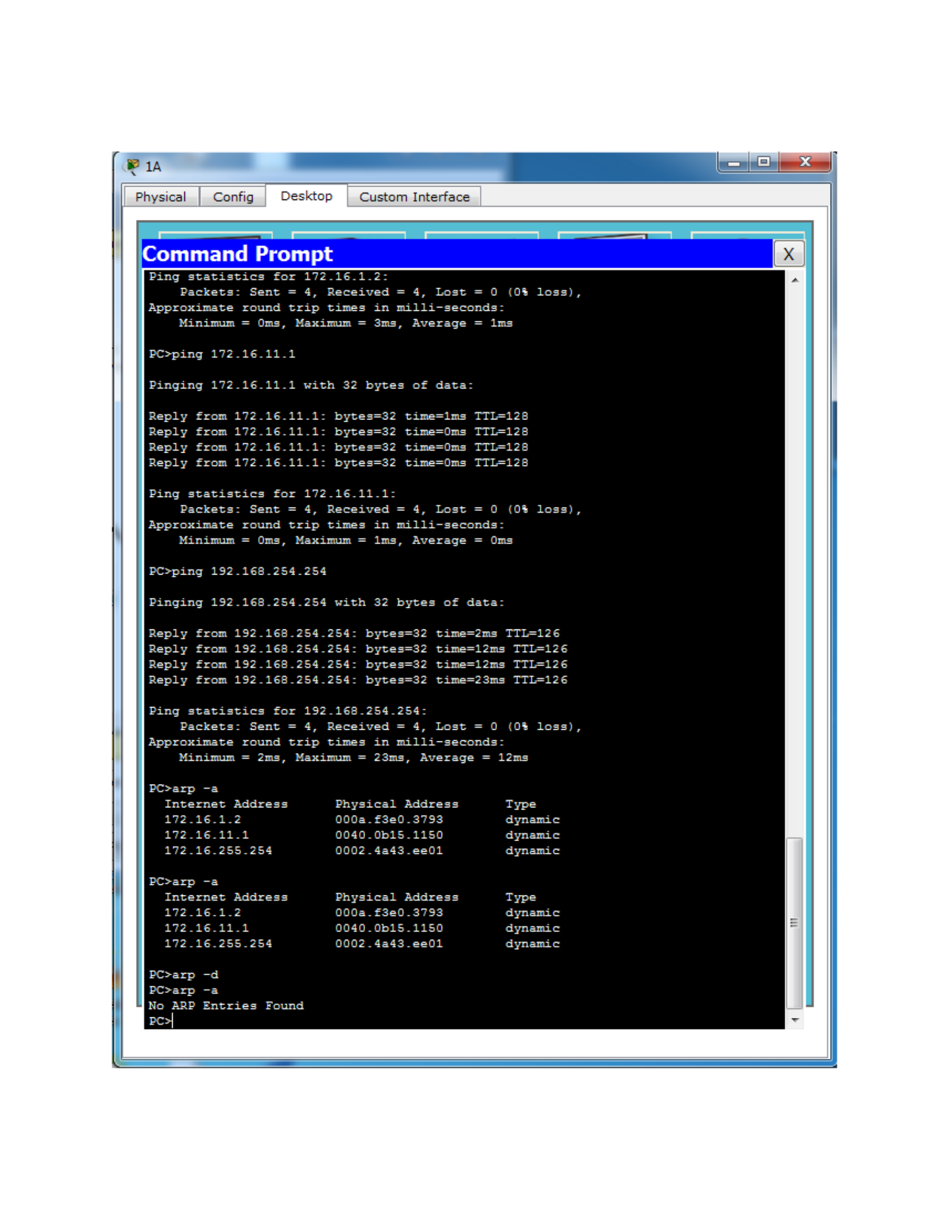
a. How many entries are displayed in your ARP cache?
PC>arp -a
No ARP Entries Found
b. Explain why you see these results.
Since there is no ARP request, no ARP entries in ARP table.
Task 5:
Screenshot #2

CSIS 330
Questions:
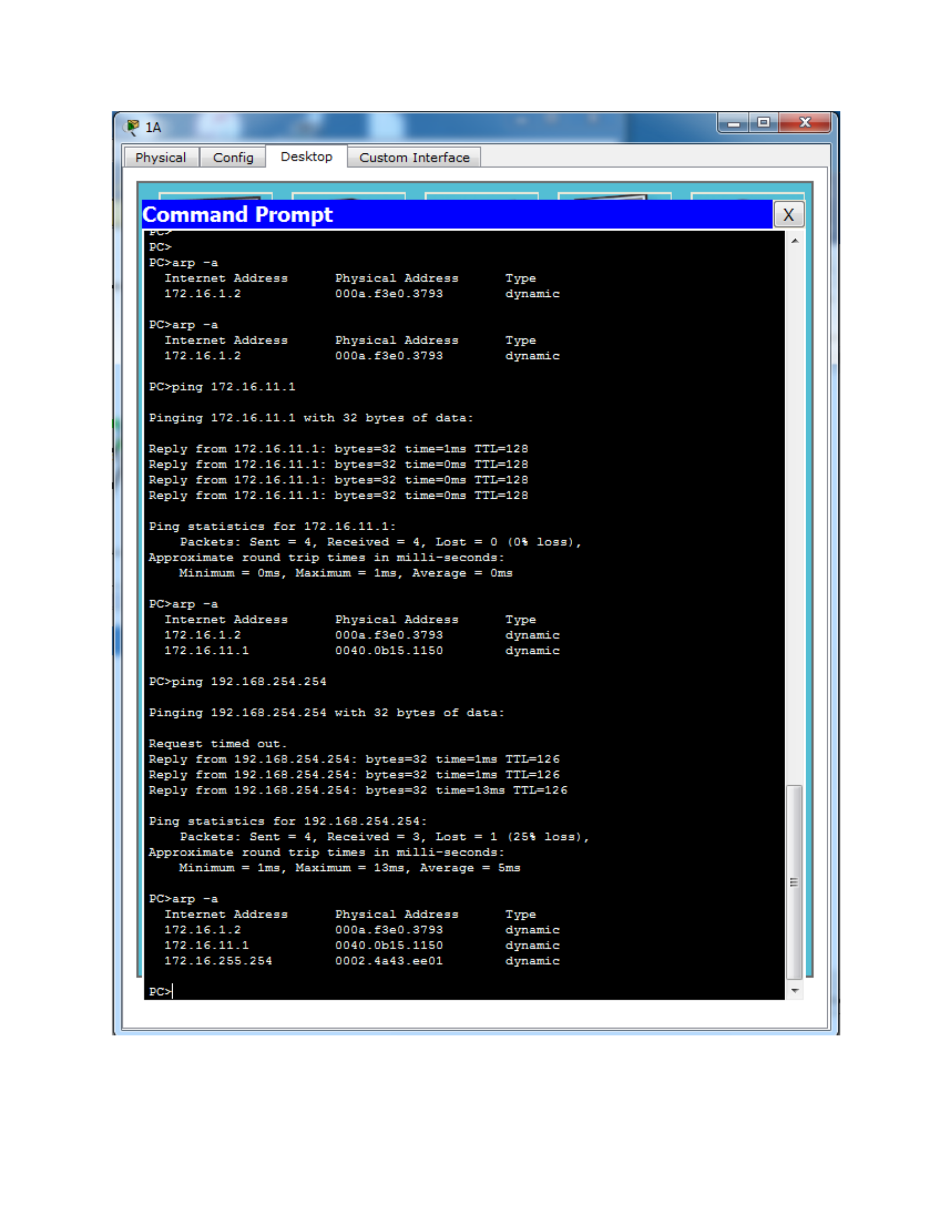
a. How was the ARP entry added to the ARP cache? [Hint: Look at the Type column.]
dynamic
b. What is the IP address of the destination computer?
172.16.1.2
c. What is the physical address of the destination computer?
000a.f3e0.3793
d. Do not send any traffic to the computer accessed previously. Wait between 2 and 3
minutes and check the ARP cache again. How many entries are now in your ARP
cache? (If the cache was not cleared, a couple of explanations are possible. First, you
did not wait 2 minutes, which is how long the ARP cache stores an initial entry.
Alternatively, you accessed the destination device more than once and caused the
ARP timeout for the entry to rise to 10 minutes.) One entry
PC>arp -a
Internet Address Physical Address Type
172.16.1.2 000a.f3e0.3793 dynamic
PC>
Task 6:
Screenshot #3
CSIS 330
Questions:

CSIS 330
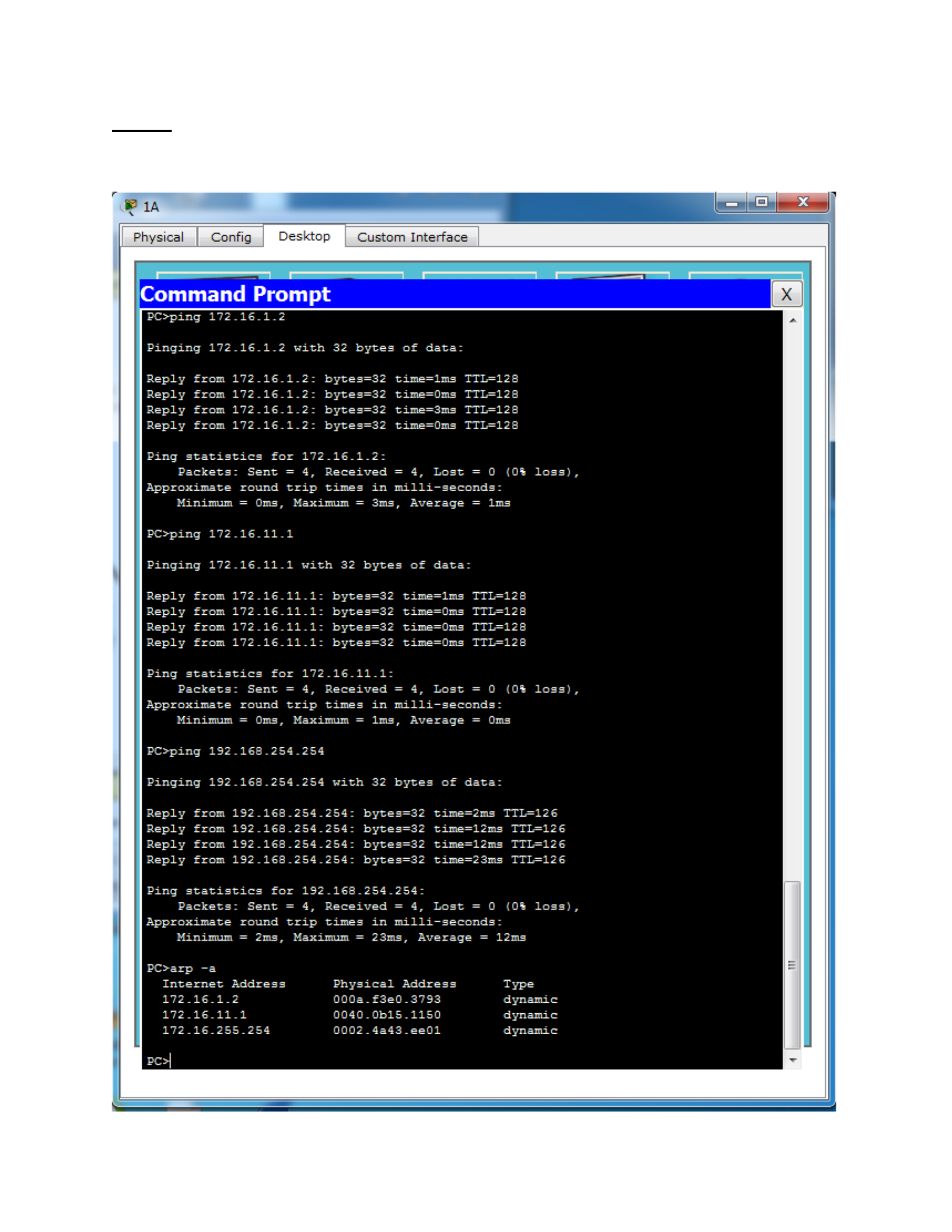
a. By looking at your ARP cache, what is the physical address of PC-PT (11A)?
0040.0B15.1150
b. By looking at your ARP cache, what is the physical address of the Eagle Server?
0002.4a43.ee01 X not correct
It is not possible to tell what the physical address of the Eagle Server is by
looking at the ARP cache because the E
agle
Server is in a different network.
c. Why do you see different results?
If the destination IPv4 address is on a different network than the source
IPv4address, the device will search the ARP table for the IPv4 address of the
default gateway.( 172.16.255.254). PC-PT (11A) and Server-PT (Eagle Server)
are not in the same network.
1A
Physical
|
Config
Desktop
Custom
Interface
Pinging
172.146
PC>ping
172.16
With
32
bytes
of
data:
~J
ee
a
|
ian
tan
y
tans
tan
y
BPR
ee
|
~J
Ping
statistic
Packets:
Sent
=
BC+ping
172.16.11.1
ee
a
|
yaa
eo
te
bytes=32
bytes=32
bytes=32
17Z.-16_1.2:
State
Piya)
a
age
eel
ee
a
ee
a
2
ee
Bia
et
ee
ee
Bt
to
it
C=)
rte
Bit
td
bd
|
time=3ms
rte
Bit
td
bd
|
=
4,
Lost
il
ea
il
ea
i
ea
il
ea
=O
(0%
1
milli-seconds:
Average
=
ims
=
or
Pinging
172.16.11.1
with
32
bytes
of
data:
~J
ata
ay
tan
y
tan
y
ian
PRR
|
oe
tee
tees)
~J
Ping
statistics
for
Packets:
Sent
=
-16.11-.1:
-16.11.1:
-16.11-
-16.11-:
al
1:
1:
al
bytes=32
bytes=32
bytes=32
bytes=32
172Z-16_.11_1-
4,
Received
=
4,
Lost
milli-seconds-
ee
id
ee
ma
=
i
be
iy
mtd
Mic)
i
be
iy
mtd
Mic)
i
be
iy
mtd
Mic)
ai
ee
TTIL=128
TTIL=128
TTIL=128
et
et
ee
Approximate
round
trip
times
in
pS
eg
ae
ee
Pinging
192.1%
tan
y
ian
tan
y
ata
ay
ee
(ee
Ae
ee
|
Ri
oR
Rd
RD
ns
ee
ta
Ping
statistics
Packets:
Sent
Ss
|
Internet
Address
2.16.1
_2
-16.11.1
oe
ee
|
P|
Minimum
=
Oms,
Maximum
=
ims,
Average
=
Oms
32
bytes
of
data:
ini
ini
ag
get
a
ee
et
bytes=32
time=-lims
TIL=126
bytes=32
time=lims
TTL=126
bytes=32
time=-23ms
TIL=126
ad
ad
en
oe
ta
Ce
Ce
a
a
An
nd
4,
Beceived
=
4,
Lost
=
0
(0%
loss)
Approximate
round
trip
times
in
milli-seconds:
Minimum
=
ims,
Maximum
=
73ms,
Average
=
1léms
Physical
Address
Type
000a_.f3e0_3793
dynamic
dynamic
dynamic
CSIS 330
Task 7:
Screenshot #4
De
Physical_|_
Config
yesktop
Custom
Interface
ers
paeeeeearees
a
eeeeeey
Pears
eceretL
Cee
ood
caorg
caorg
Paotg
erg
eee
tee:
coe
pee
Pears
SEC
aet
ee
Peet
cae
ood
caorg
caorg
Paotg
eee
paeeeeearees
coe
ponerse
C>arp
-2
rt
Pts
16
C>arp
-2
nn
rt
Pts
16
peceet
a
os
a
ARP
Entrie:
Sa
Cras
4
oe
puree
pane
oo
in
milli-:
Ens
Fry
Prt
Prt
Prt
coer
TL
TL
SECC
tee
4
a
a
eeeretetees
Maximum
Ims,
Average
arent
s
etree
cerry
a
coy
cere
eeereenetenencncrs
pcos
poaeeaeey
nn
eer
powered
02
powered
oraeerry
parents
pes
aze
Prey
Prey
cee
fe
CSIS 330
Screenshot #5

CSIS 330
Task 8:
Question:
a. What arp command adds a static ARP entry for the R2-Central router to your ARP cache
on PC 1A?
C:\>arp -s 172.16.255.254 00-02-4A-43-EE-01 (executed from my laptop)

