The Chatbot Implementation:
Use IBM Watson Assistant Service in IBM Cloud for Chatbot
Implementation
Introduction:
“It is quiet early for your case but just eat right, exercise often, and take your medication, you
will be fine.” The above was a medical advice given to me by the Doctor, sometime in
February of this year. It was like a fight, trying to stay healthy, to bring sugar level to a
normal range. I am just 42 years old with signs and symptoms of diabetes. This is no different
from the cases of many people in America, and the whole world. According to the Center for
Disease Control and Prevention (CDC), over hundred million people in America are, already,
diagnosed with diabetes or prediabetes while some are still undiagnosed. This is gradual, but
increasingly becoming prevalence. Most people are not aware of their health condition when it
comes to diabetes and sugar level monitoring. While many do not have the time or resources
to properly take care of their health. The immediate need for a poor person is to satisfy hunger
with any available food. Unfortunately, majority of the affordable meals are not healthy, they
are either filled with calories or fat. Continuous consumption of food with high calories (rich
in sugar) will result in high sugar level, which leads to diabetes. The process of digestion
involves breaking down of food into sugar (also called glucose). Eventually, these glucoses are
released into your bloodstream, thereby, leaving the sugar level in the blood either low,
normal, high, or in some extreme cases, ketoacidosis. The pancreas helps in regulating the
sugar level, by releasing them to used as energy, when they are high. “If you have diabetes,
your body either doesn’t make enough insulin or can’t use the insulin it makes as well as it
should” (CDC). Early detection and awareness will help anyone to manage the sugar in-take
and practice healthy living like exercising more. This is where Mr. Bot Diabetes (Chatbot)
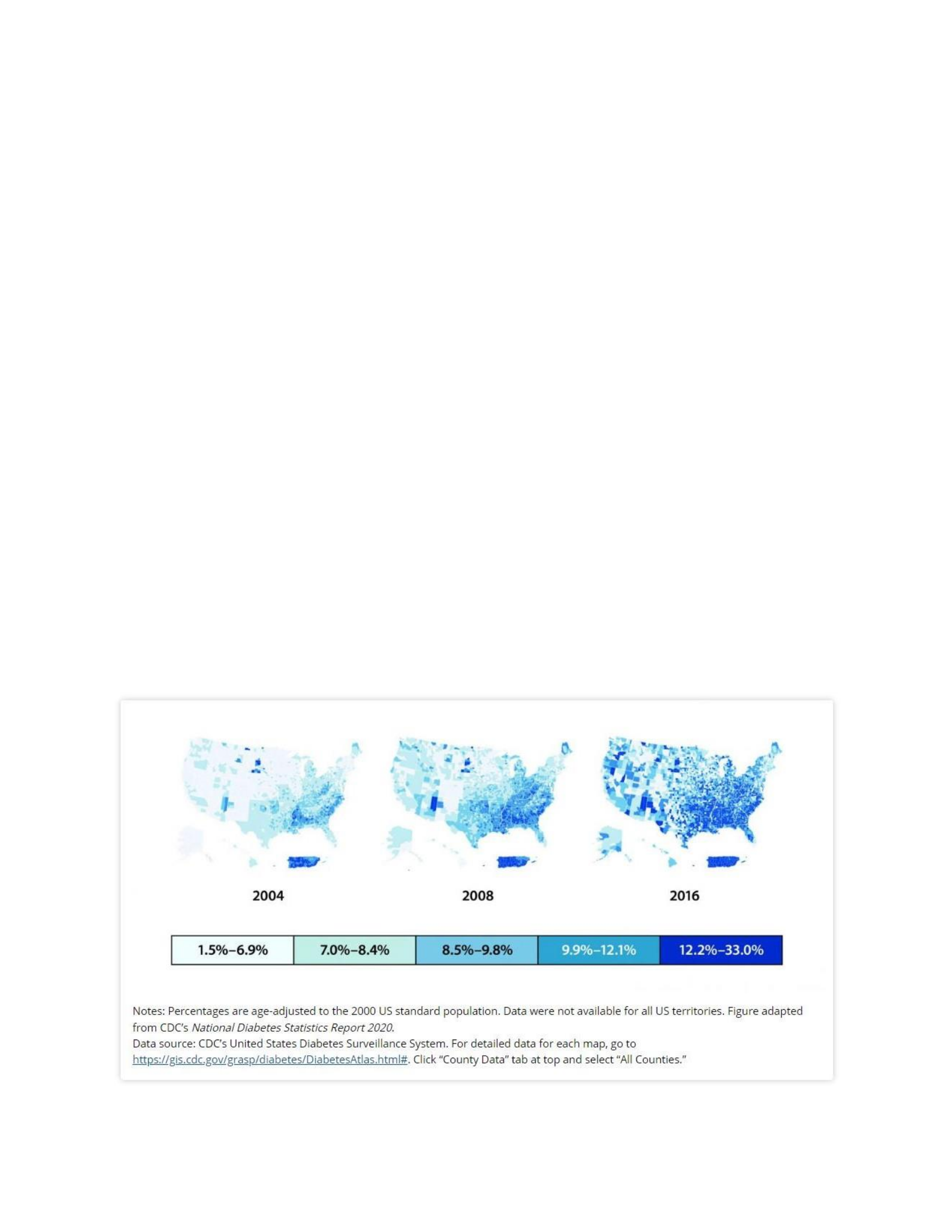
comes in to play. Figure 1 shows clearly that diabetes diagnoses are on the rise, having
compared the county-level distribution of diagnosed diabetes prevalence among US adults
aged 20 years or older, 2004, 2008, and 2016.
Figure 1: County-Level Distribution of Diagnosed Diabetes Prevalence Among US Adults
Aged 20 Years or Older, 2004, 2008, and 2016
Hence, the chatbot is an expert on sugar level, an assistant, who will welcome the user

(anyone) with the intention to advise its user on blood sugar level monitoring. It will start off
with an introduction, saying
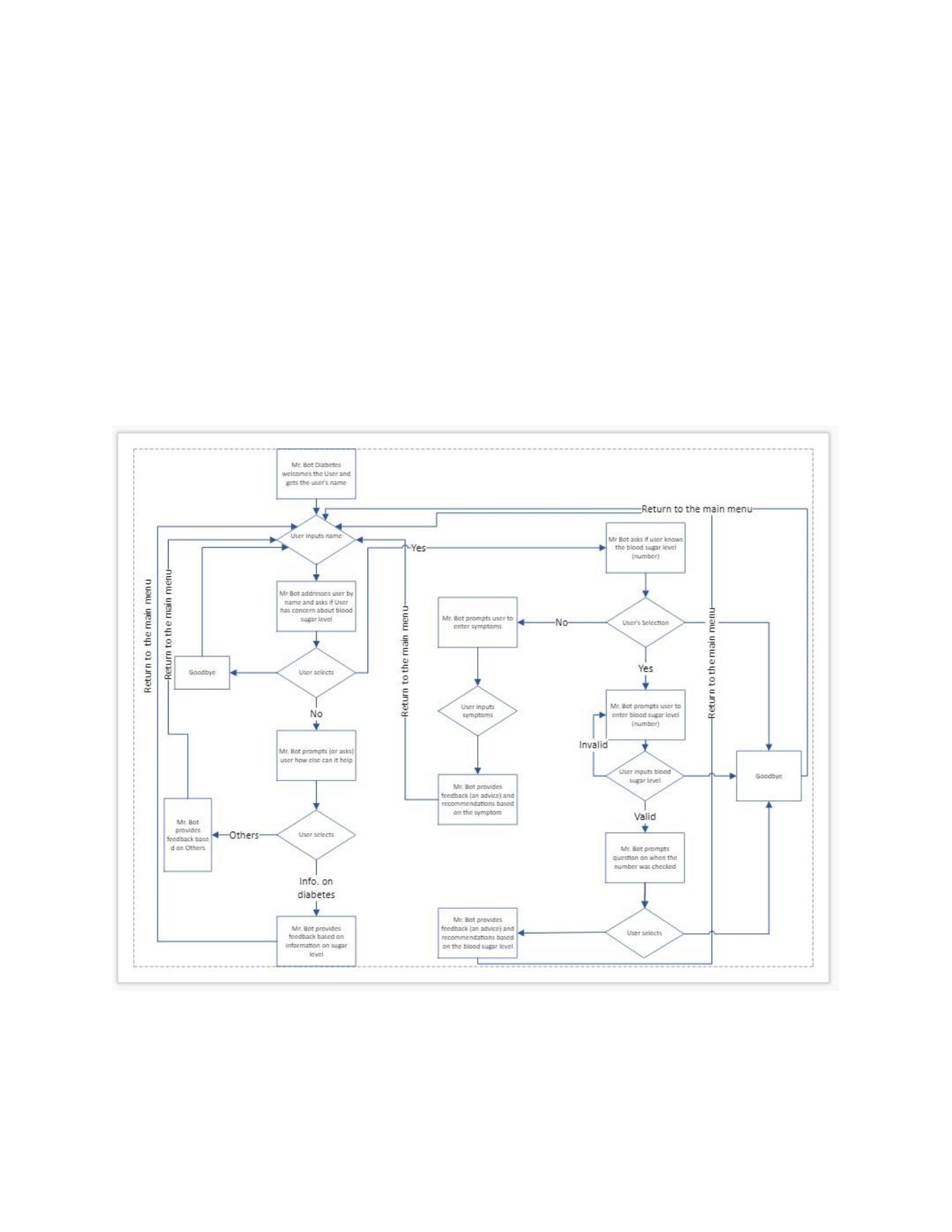
its name (Mr. Bot Diabetes), explaining to the user what it can do, and inquire for a name from
its user, so that it can address user by name. Moving forward, the chatbot will find out if the
user want have concerns about sugar level or just want some information of sugar level
management. If the user indicates interest in talking about sugar level, the chatbot will find out
if its user already knows the reading (sugar level – number) and the time when the number was
gotten. The time will be either before meal, during meal, 2 hours after meal, or at bedtime. If
the user knows the number and time, the chatbot will advise its user according to the number
of the reading and the time it was gotten. On the other hand, if the user does not know the
blood sugar reading, the chatbot will ask its user the symptoms noticed. Different symptoms
associated with different sugar level, low, high, or normal. However, the chatbot will advise
based on the signs and symptoms mentioned by its user. Similarly, if the user declines interest
in talking about sugar level, the chatbot will find out if user wants some information on blood
sugar monitoring. The flowchart below is the dialog flow diagram.
Figure 2: The Dialog Flow Diagram
Dialog Implementation:
Having completed the flowchart above, Watson Assistant service was used to build the
chatbot. The dialog implementation utilizes the user entities and 3 of the system entities,
intents, handlers, context variable and slots, the dialog nodes and flow. The purpose of the
chatbot is to chat with users and provide advice and/or information to them. The developmental

steps begin by creating the skill, using the dialog

skill template. The skill contains the training that will respond to the user intent. Provide the
name of the skill. In this case, the name of my skill is Mr. Bot Diabetes link: https://web-
chat.global.assistant.watson.cloud.ibm.com/preview.html?region=us-
south&integrationID=3781c303- 9c60-4a43-8c4e-
2e66894507d5&serviceInstanceID=d8e91774-4245-4873-91bc-e6a97c10c379 Then, followed
by the creation of the intents, entities, and the dialog nodes and child nodes.
An intent is a collection of user’s possible statement. This will help the assistant to easily
understand what the user has in mind. While on the other hand, entities are like keywords with
their synonyms. Within my skill, I created symptoms entity to collect information on the sugar
level signs and symptoms. The dialog nodes (or child nodes) are used to guide the discussion.
By default, assistant starts with “Welcome” and “Anything_Else” nodes. Different nodes and
child nodes are added based on the channels of the discussion. The higher-level topics are
treated at node level, while details are taken care of at the child node level. The dialog uses
intents, entities, and context variables to decide the interactions. The slots are used when
multiple entries are expected. Slots will receive user’s response and create context variable to
store it. Within a slot, assistant will have variety responses in case the user is not responding as
expected. Having said that, context variable is a placeholder within a slot. Context variables are
called in a dialog.
In the development of Mr. Bot, I created $name to hole a place for the name user will supply.
Dialog Scenarios:
The following scenarios will be discussed
• User has concern about blood sugar level = YES, and knows the reading of
sugar level = YES:
In this dialog scenario, once the assistant is lunched, Mr. Bot will welcome its user,
explain to the user its mission, and find out user’s name, then wait for reply. For
example, “Hello, my name is Mr. Bot Diabetes. I will talk with you about blood sugar
levels. May I know your name?” or “Greetings, I am an expert on blood sugar. I will
chat with you on the topic. What is your name?” After the user supplies a name for
the chat, the assistant will address the user by name and asks to know if the user has
concern about blood sugar. If the user selects yes from the options available, then
assistant will ask to know if the user already knows the sugar level. If yes is selected
again, from the options, the assistant will prompt the user to enter the number of the
sugar level reading. At this time, the @Sys-number entity will be used to check if
number value is entered, and the number will be saved in the $sugar_level_reading
context variable. Assistant will move to find out when the number was gotten e.g.,
before meal, during meal, after meal, 2 hours after meal, at bedtime etc. These intents
have their synonyms to accommodate different varieties of answers for different users.
When a valid blood sugar reading and the time it was gotten are received, assistant will
check through the eight conditions that were to be met before offering its findings and
recommendations. For example, a normal blood sugar range before meal is between 80
and 130. So, if user’s input is withing 80 and 130, and the time is in the morning
before meal, assistant response (advice) will be “Your blood sugar level is NORMAL.
Keep eating healthy and exercise more to maintain a normal blood sugar level.”
Other conditions will check for different blood sugar levels and time to decide whether
to categorize the level as “LOW” or “HIGH”, with corresponding recommendations.

ov
Figure 3 below shows the Try-it (testing) screen page.
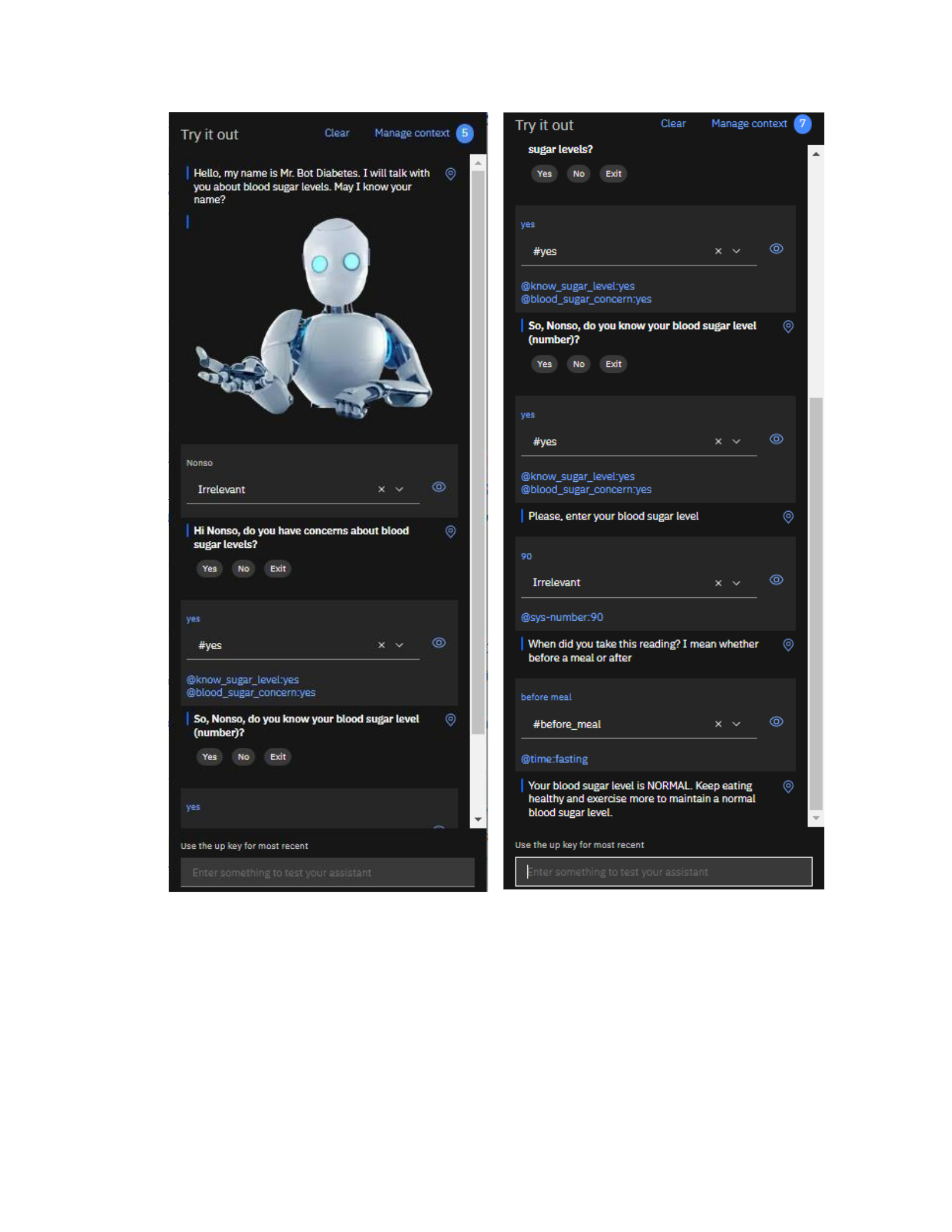
Figure 3: Try-it Page for Concern = Yes and Know Blood Sugar Level = Yes
• User has concern about blood sugar level = YES, and knows the reading of
sugar level = NO:
Similarly, if the user selects yes to the question, “Hi $name, do you have concerns
about blood sugar levels?”, but selects no to “So, $name, do you know your blood
sugar level (number)?”, the assistant will prompt the user a different question to find
out what symptoms the user has noticed. Again, different symptoms associated with
different sugar levels. With the symptoms the
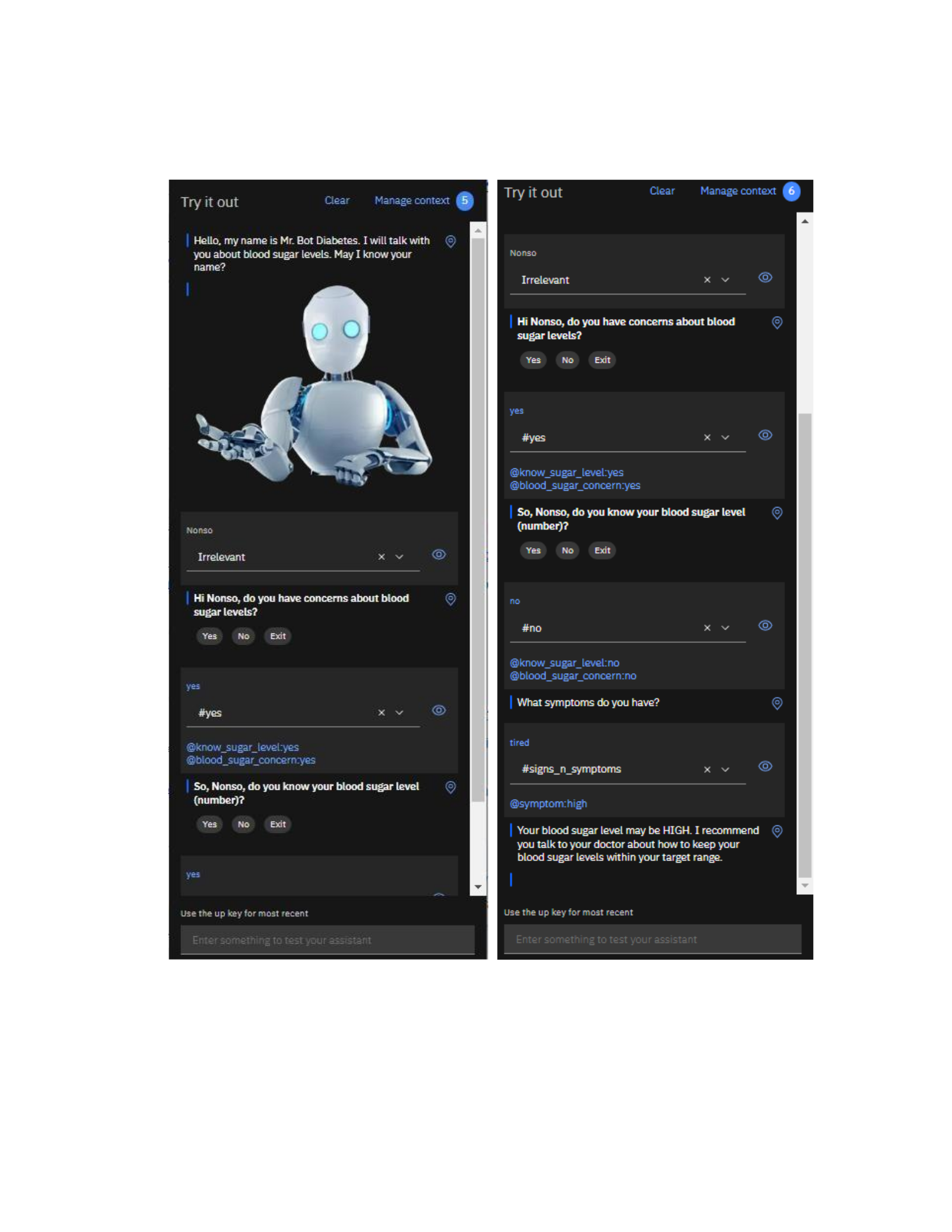
user supplies, assistant will match it with the corresponding advice. See the figure
below for the Try-it screen page.
Figure 4: Try-it Page for Concern = Yes and Know Blood Sugar Level = No
• User has concern about blood sugar level = YES, and knows the reading of
sugar level = EXIT:
While in this scenario, having asked about the sugar level reading, the user may opt
out of the conversation. The assistant will jump to goodbye node, thank the user with
response like,
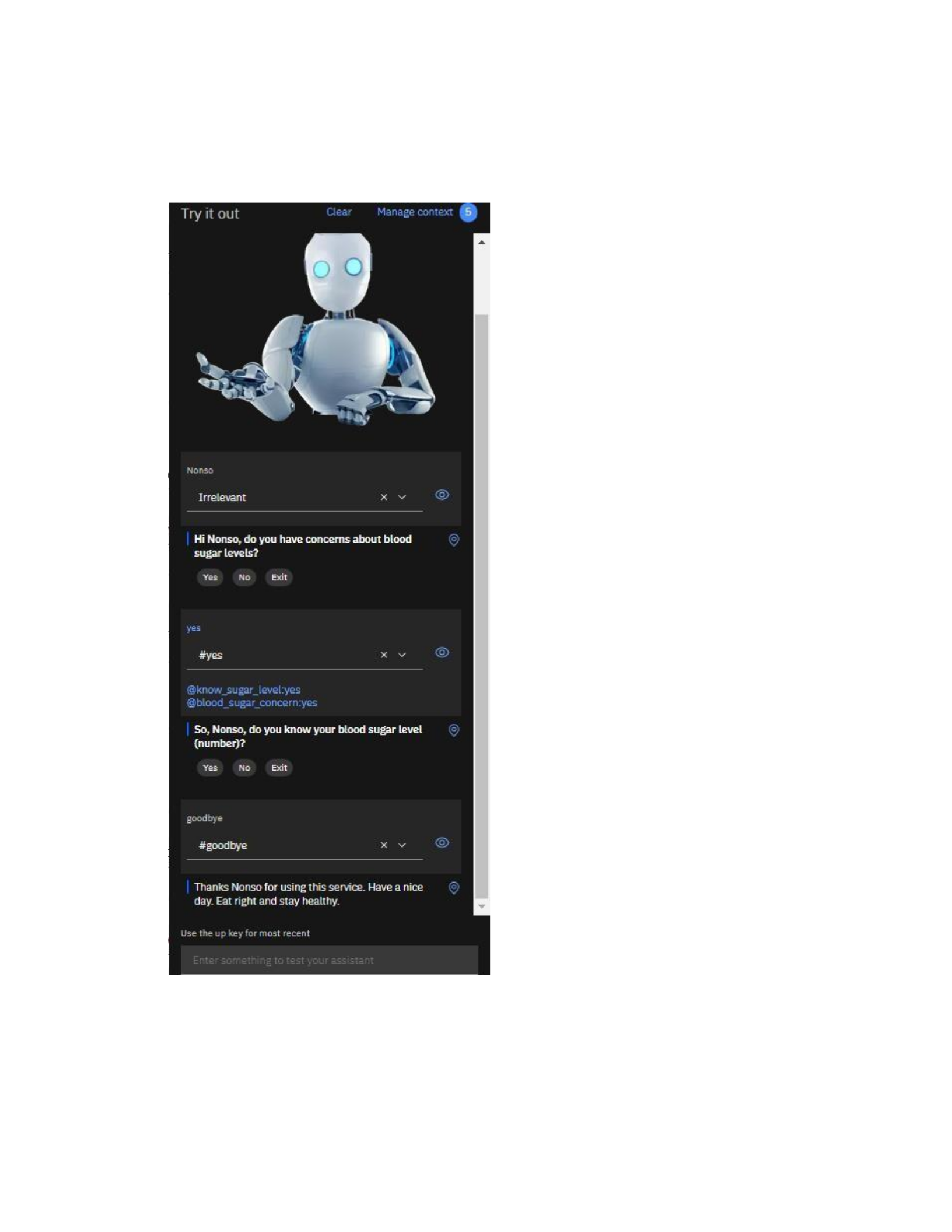
“Thanks $name for using this service. Have a nice day. Eat right and stay healthy”
and return to the main menu. The figure below shows the scenario in a Try-it screen
page.
Figure 5: Try-it Page for Concern = Yes and Know Blood Sugar Level = Exit
• User has concern about blood sugar level = NO:
However, if user does not have concern about blood sugar, that is the user shows no
interest at the beginning of the dialog, assistant will want to know if the user is
interested in more information about diabetes and prompt the user with options to select
from “Information on Diabetes” or “Exit”. If the user chooses to exit, the assistant will
jump to goodbye node and appreciate the
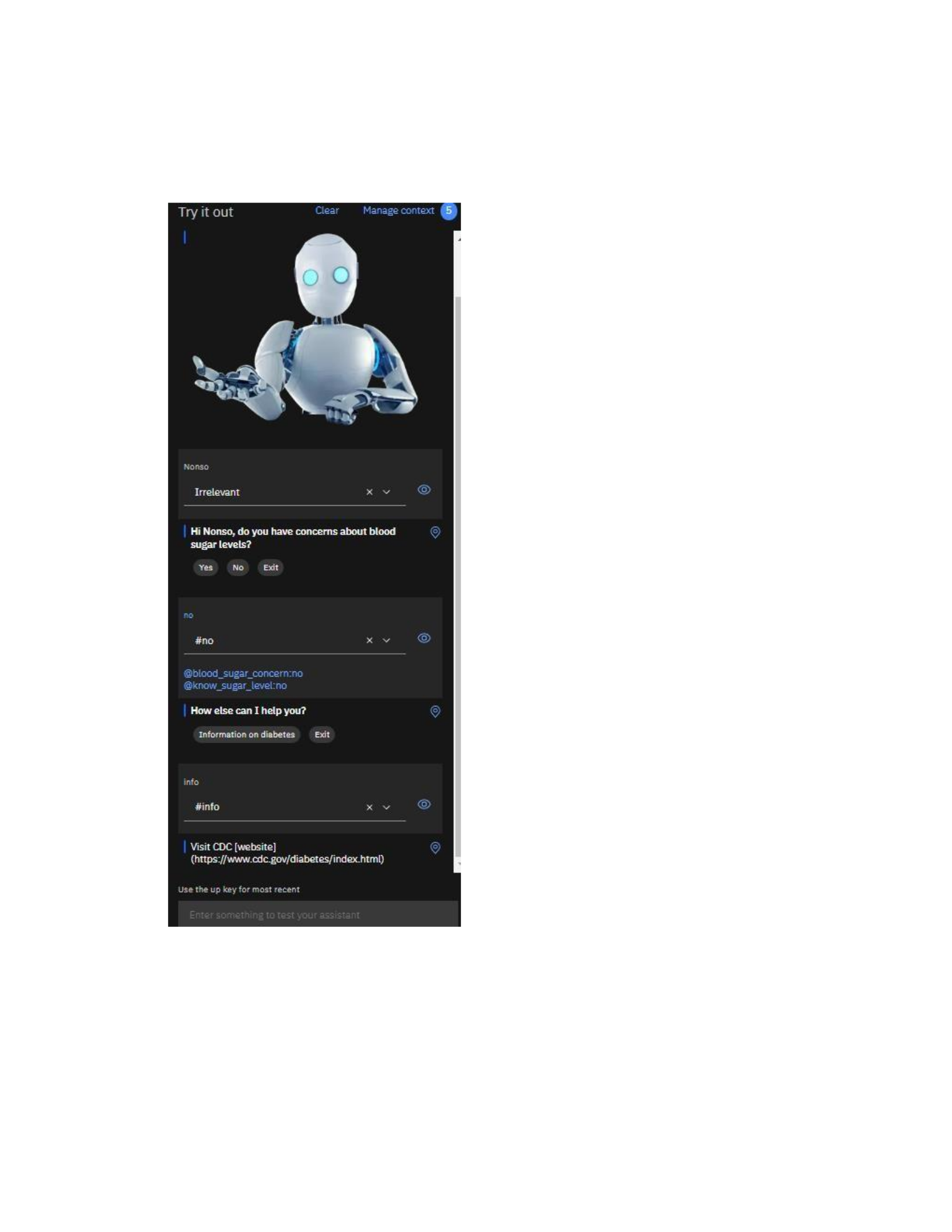
user for using the services. But if user goes for information on diabetes, the assistant
will prompt the user CDC link to redirect the user to read for more information on
diabetes and jump to the main menu. See the Try-it screen page below.
Figure 6: Try-it Page for Concern = No
• User has concern about blood sugar level = EXIT:
Finally, if the user gives name but decides to quit, the assistant will jump to goodbye
node to end the discussion. See the Try-it screen page below.
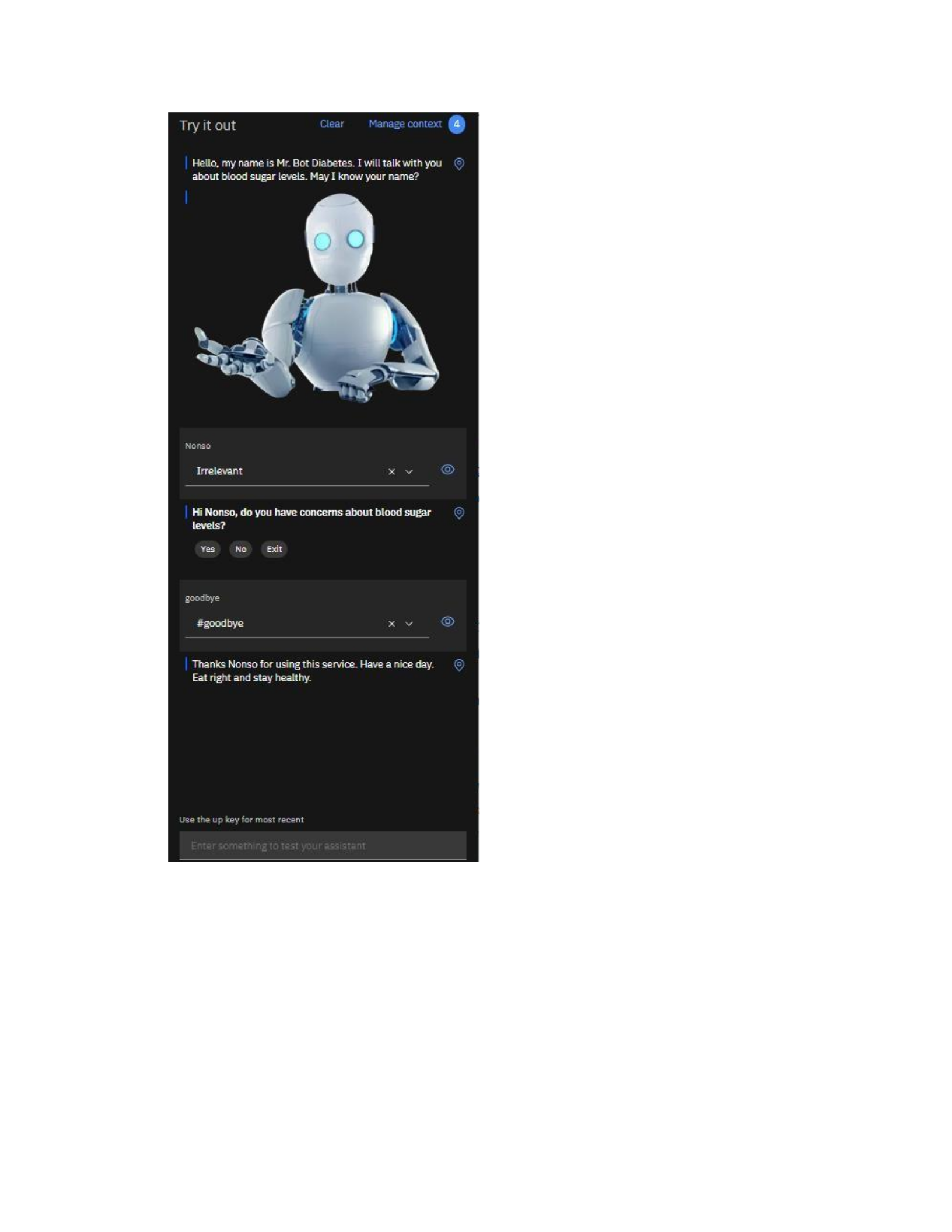
Figure 7: Try-it Page for Concern = Exit
Integration with Watson Discovery Service:
Watson Discovery services will serve as a repository. The purpose of the repository is to
house all the documents collected from different users. The Web Crawl connector was used
to build the repository. CDC website was provided to synchronize with my search skill.
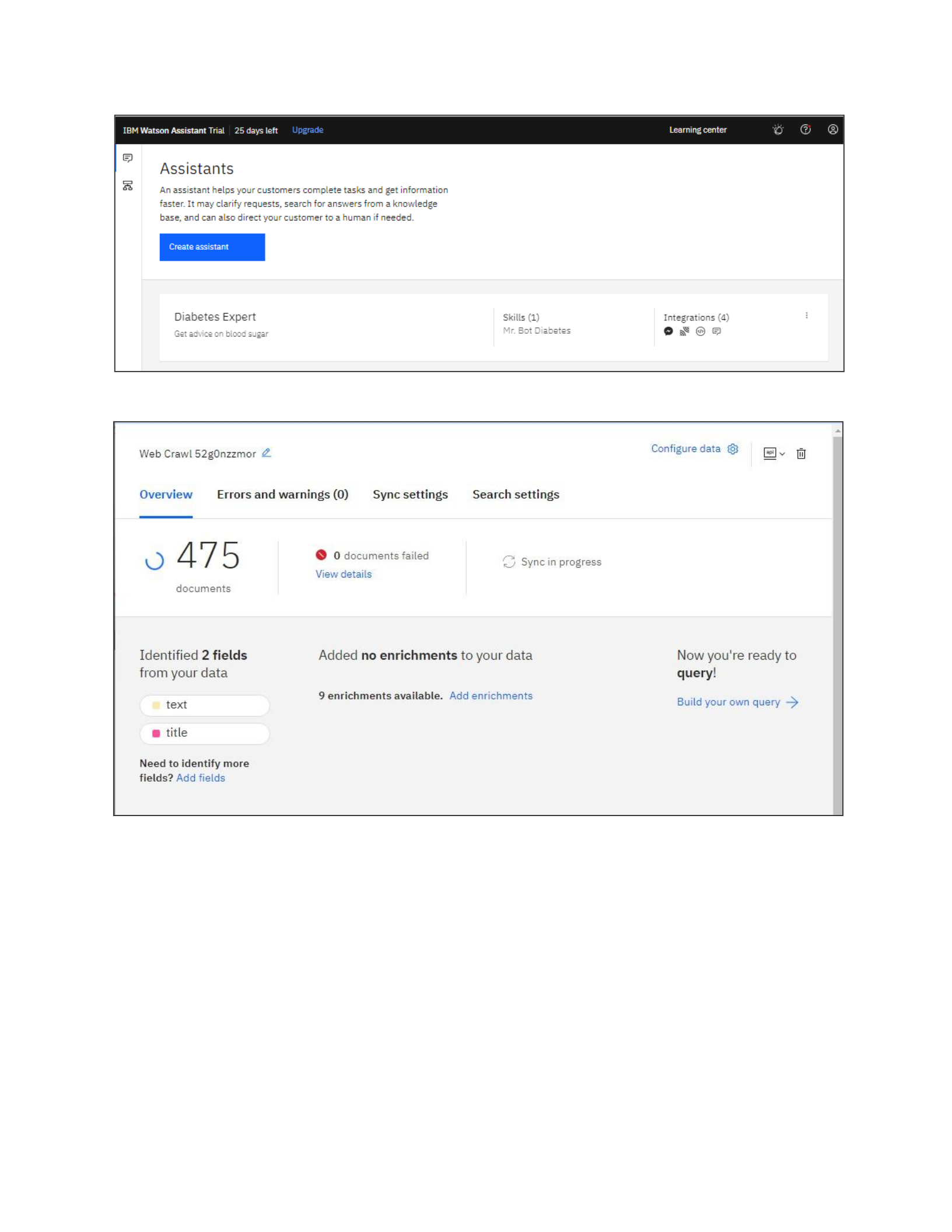
Figure 8: The Assistant Created
Figure 9: The Overview of the Assistant
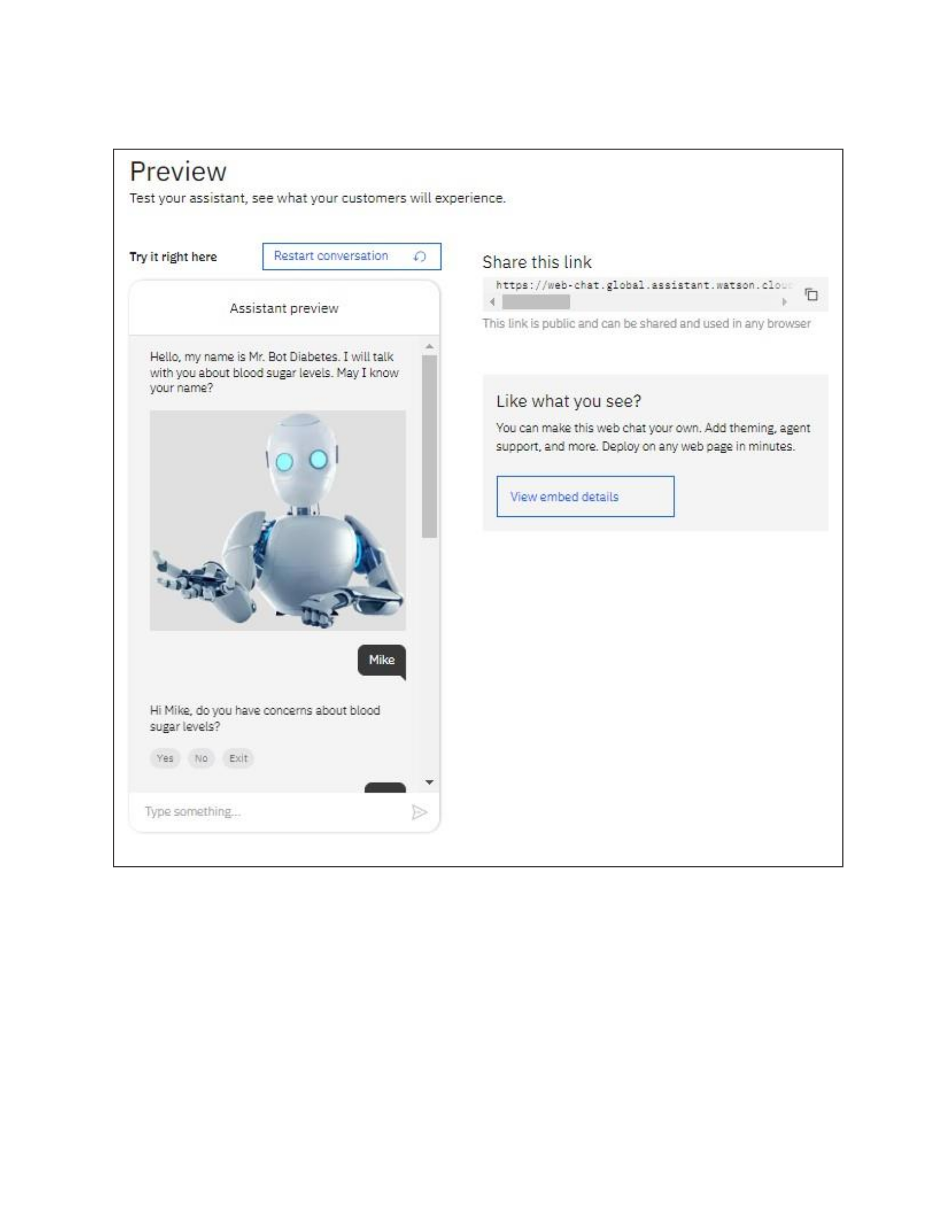
After deployment, the preview was tested. The figure below shows the preview page.
Figure 10: The Preview Page
Conversation Data Analysis (2-days experiment):
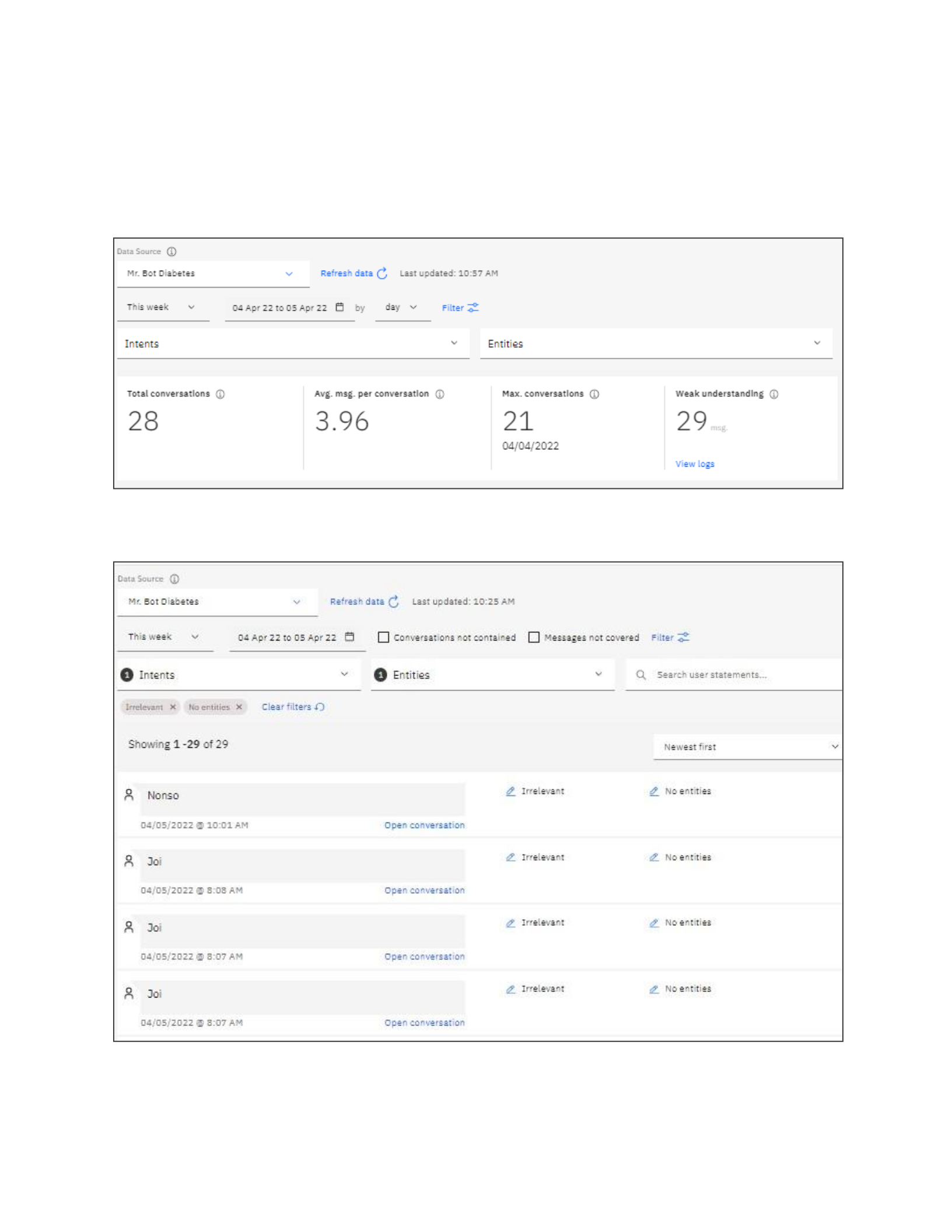
The link was shared with 5 friends and 2 days conversation was captured. Total of 29
conversations were captured and analyzed. The figure below shows the dashboard and log of
the conversation.
Figure 11: The Dashboard of the Conversation
Figure 12: The Conversation Log
From the analysis, total active users are 29, between 4/4/2022 and 4/5/2022. See the figure
below. Based on the name provided to the chatbot, an average of 7 names were part of the
conversation. There are 111
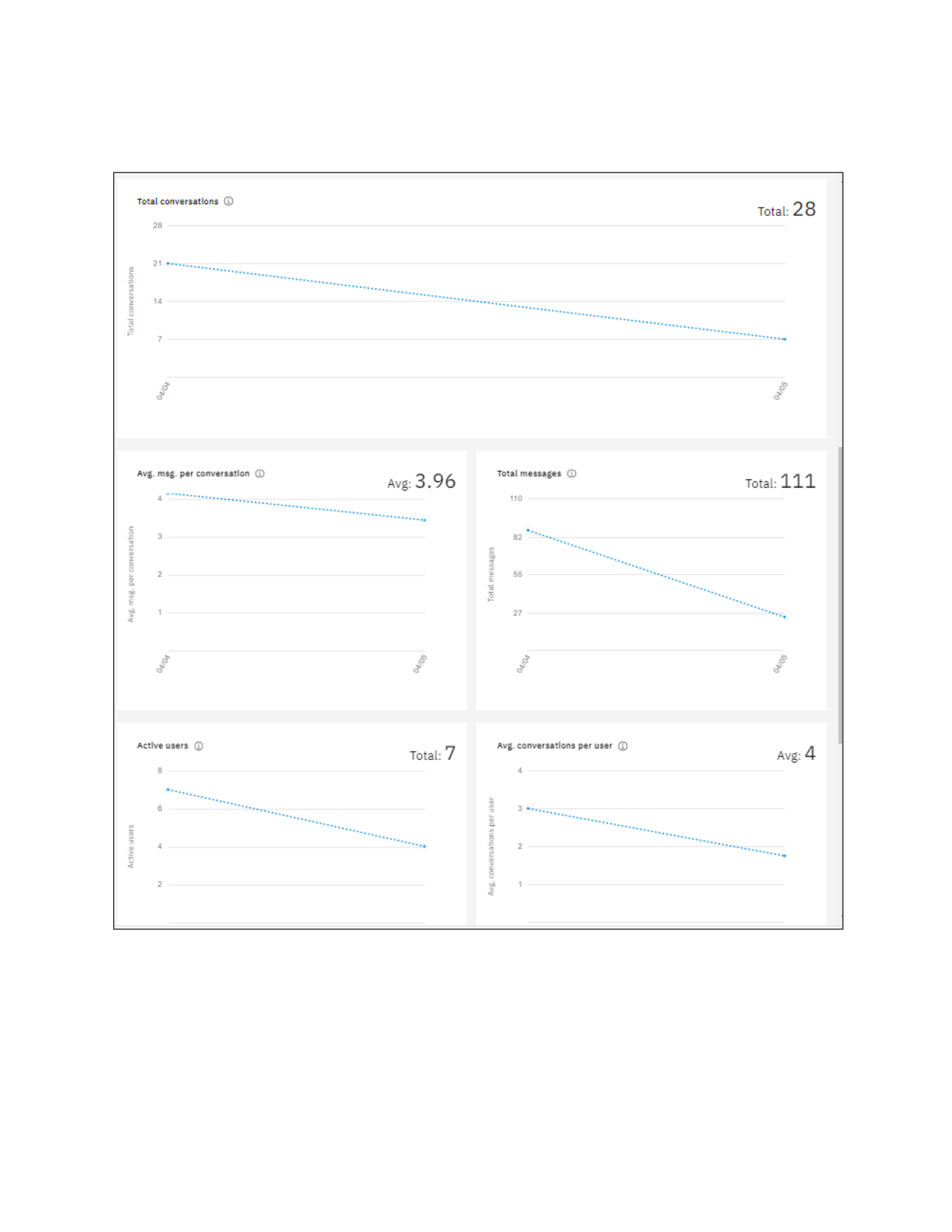
messages which gives an average of 3.96 messages per conversation, and an average of 4
conversation per user.
Figure 13: The Analysis of the Conversations
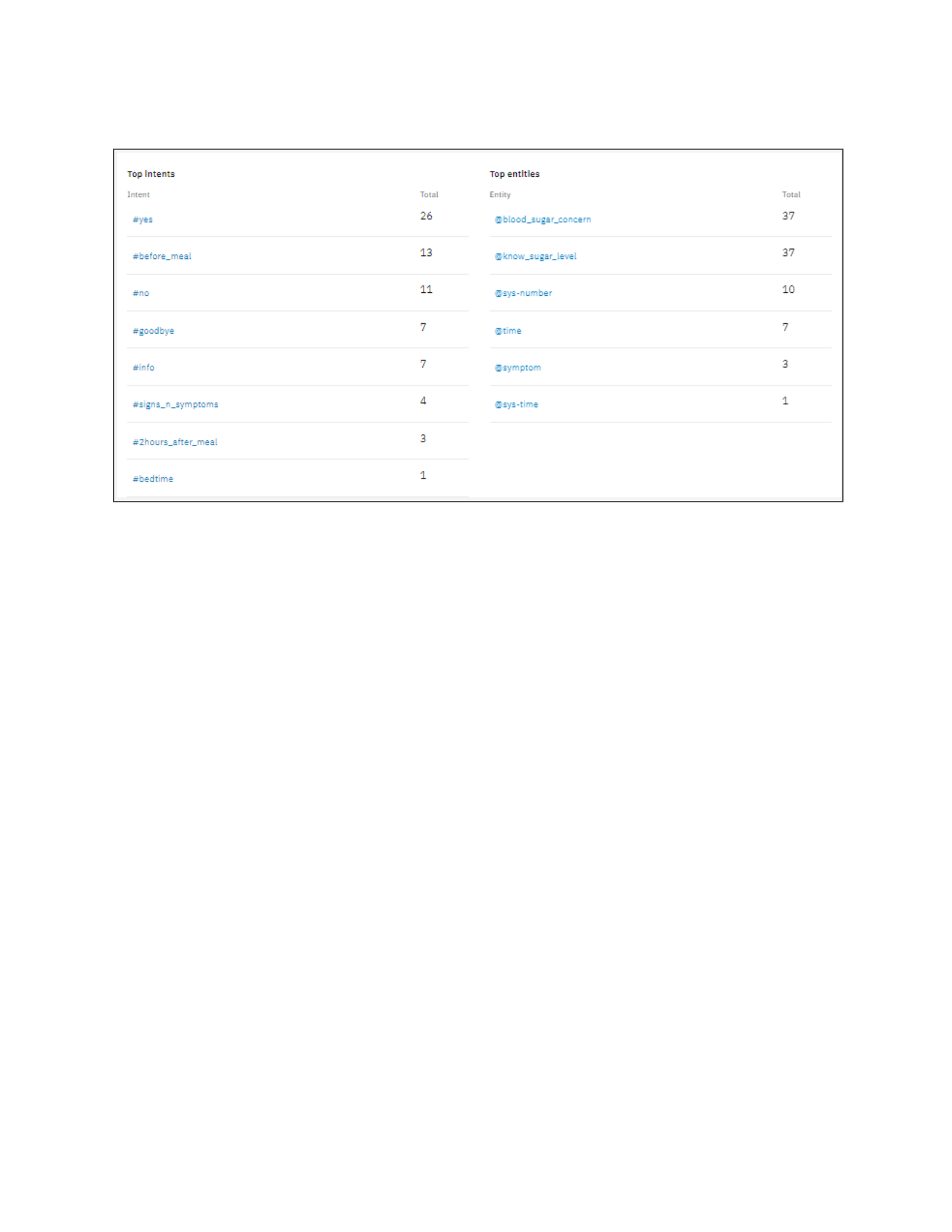
The last part of the analysis page shows the top intents and entities used.
Figure 14: The Top Intents and Entities
Chatbot Enhancement:
Speech-to-Text, Text-to-Speech, Language Translator, and Tone Analyzer can be integrated
to in the assistant to enhance user experience. For a user who is blind, Speech-to-Text can
help such visual- impaired person to dialog with the assistant, thereby, giving opportunity to
anyone who cannot write for any reason. Also, if Speech-to-Text is integrated, there will be
need to bring in the Text-to-Speech. For the case of a visually impaired, reading assistant’s
greetings and instruction will pose as another challenge. Therefore, Text-to-Speech will be
necessary to come onboard. Since Mr. Bot was developed using English language, Language
Translator will be integrated to be able to serve other languages not English. It will be a good
thing to monitor and analyze the tone of users. Therefore, Tone Analyzer will be good to
integrate to the assistant. This will help to encourage users if the problem of sugar level is
taking a toll on the user.
Diabetes diagnoses is trending high within and outside the United States, and has cut across
all age groups and race, therefore, I would consider using all messaging platforms available,
to reach out to as many as possible.
Conclusion:
The experience worth the time and exercise. Mr. Bot Diabetes was successfully executed
different user’s intent and provide advice and recommendations accordingly. In fact, I did not
prepare my sister beforehand, and when she got recommendation from Mr. Bot, she became
worried and reached out to me. See the screenshot of my WhatsApp chat with my sister.
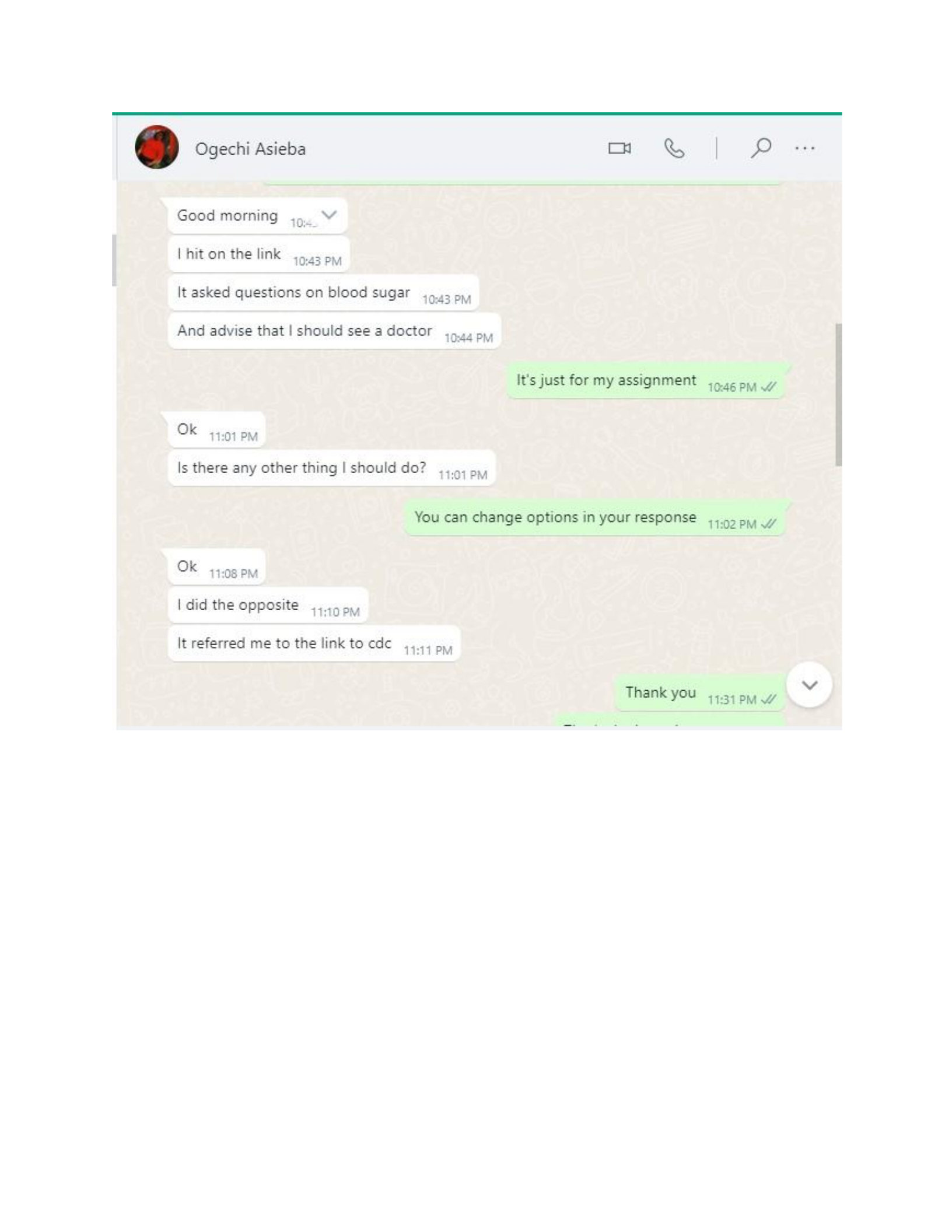
Figure 15: The WhatsApp Chat Between My Sister and I
It was that good. So, for different dialog scenarios when the user completes the conversation
with Mr. Bot, talking about blood sugar level and monitoring, the assistant will respond with
one of the following recommendations.
“Your blood sugar level is LOW. I recommend you taking 4oz of orange juice or any
regular cola drink”
“Your blood sugar level is NORMAL. Keep eating healthy and exercise more to maintain a
normal blood sugar level.”
“Your blood sugar level is HIGH. I recommend you talk to your doctor about how to keep
your blood sugar levels within the normal range. Consider using an over-the-counter
ketone test kit to check your urine for ketones and call your doctor if your ketones are high.
Quit eating or drinking any food that can affect blood sugar levels.”
“This number may be inaccurate due to the sugar content in the food since you check it
during meal. Best time to get an accurate reading will be 2 hours or more after meal or before
meal.”

However, the chatbot implementation comes with few challenges that I can classify as
personal. The development is more of software development that data analysis. Therefore,
experience in coding and most logic behind coding are required. Again, my instructor already
pointed out the number type. It will be perfect if one can program the assistant to receive any
number but do the necessary conversions internally. For example, inches to feet, Celsius to
Fahrenheit, as so on. Finally, Mr. Bot Diabetes has come to assist human being with sugar
level management and refer to the user to a live person, physicians. In fact, it will save the
user the cost for frequenting the doctor’s office just the get advice on blood sugar monitoring.