



CSIS 325
HEALTH CARE OPTIONS (HCO) PROJECT QUERIES
Write and execute queries to perform the following functions:
Criteria Output Format Your Answer: Type your query in this
column. The first one has been
done for you. Screenshots should be
pasted below this table. (Make sure
the number of rows that are
returned appears in the screenshot.)
1. Display a list
of all patients
who have a last
name beginning
with the letter
“P”.
Patient Last Name, followed by
a comma and a space,
followed by the patient’s first
name. (e.g. Smith, John)
Sort order: Patient Last Name
- ascending
select Lastname + ', ' +
FirstName as PatientName
from Patients where
lastname like 'P%' order
by lastname
2. Display a list
of all patients
who have an
alternate/cell
phone number
Patient First Name, followed by
a space, followed by the
patient’s last name. (e.g.
Melesa Poole), alternate/cell
phone number
Sort order: Patient First Name
– ascending
Patient Last Name
– ascending
Select FirstName + ' ' +
LastName + ' ' + Phone_Alternate
From Patients
Where Phone_Alternate is not null
Order by FirstName asc, LastName
asc
3. Display a list
of all patients
who do not
have an email
address.
Patient First Name, followed by
a space, followed by the
patient’s last name. (e.g.
Melesa Poole)
Sort order: Patient First Name
– ascending
Patient Last Name
Select FirstName + ' ' +
LastName
From Patients
Where Email is null
Order by FirstName asc, LastName
Asc
Page 1 of 42

CSIS 325
– ascending
4. Display a list
of all patients
who live in
zipcode 24551.
Patient Last Name, Address1,
Address2, City, State, Zip
Sort order: Patient Last Name
– descending
Select Patients.LastName,
Address_Line1, Address_Line2,
City, State, Patients.ZipCode
From Patients
Join ZipCodes on
Patients.ZipCode =
ZipCodes.ZipCode
Where ZipCodes.ZipCode = '24551'
Order by LastName desc
5. Display a list
of all physicians
whose specialty
is Internal
Medicine or
Orthopedics
Physician First Name, space,
last name (call this column
Physician), Specialty
Sort order: Physician First
Name – ascending
Physician Last
Name – descending
Select Physicians.FirstName + '
' + Physicians.LastName as
'Physician', SpecialtyName
From Physicians
Join PhysicianSpecialties
On Physicians.SpecialtyID =
PhysicianSpecialties.SpecialtyID
Where SpecialtyName = 'Internal
Medicine' or SpecialtyName =
'Orthopedics'
Order by FirstName asc, LastName
desc
6. Display a list
of all
physicians, their
specialties, and
their practices
Physician Last Name,
Specialty, Practice
Sort order: Physician Specialty
– ascending
Physician Last
Name – ascending
Practice –
ascending
Select LastName ,
PhysicianSpecialties.SpecialtyNa
me,
PhysicianPractices.PracticeName
From Physicians
Join PhysicianSpecialties On
Physicians.SpecialtyID =
PhysicianSpecialties.SpecialtyID
Join PhysicianPractices on
Physicians.PracticeID =
PhysicianPractices.PracticeID
Order by SpecialtyName asc,
LastName asc, PracticeName asc
7. Display a list
of all physicians
whose practices
are in
Lynchburg
Physician Last Name, Practice
Name, Address, City, State,
Zipcode, Phone
Sort order: Zipcode –
ascending
Practice Name –
Select LastName, PracticeName,
Address_Line1, City, State,
ZipCodes.ZipCode, Phone
From PhysicianPractices
Join Physicians on
Physicians.PracticeID =
PhysicianPractices.PracticeID
Join ZipCodes on
ZipCodes.ZipCode =
Page 2 of 42

CSIS 325
descending
Physician Last
Name – ascending
PhysicianPractices.ZipCode
Where ZipCodes.City =
'Lynchburg'
Order by ZipCodes.ZipCode asc,
PhysicianPractices.PracticeName
desc, Physicians.LastName asc
8. Display the
number of
physicians in
each specialty
Specialty, number of
physicians in each specialty
Sort order: Specialty
Select
PhysicianSpecialties.SpecialtyNa
me,
Count(Physicians.PhysicianID) as
'Number Of Physicians'
From PhysicianSpecialties
Join Physicians on
PhysicianSpecialties.SpecialtyID
= Physicians.SpecialtyID
Group by SpecialtyName order by
SpecialtyName
9. Display the
number of
physicians in
each practice,
broken out by
specialty
Practice, Specialty, number of
physicians in each Sort order:
Practice – ascending
Specialty --
ascending
Select
PhysicianPractices.PracticeName,
PhysicianSpecialties.SpecialtyNa
me,
count(Physicians.PhysicianID) as
'Number Of Physicians'
from Physicians
JOIN PhysicianPractices on
PhysicianPractices.PracticeID =
Physicians.PracticeID
JOIN PhysicianSpecialties on
PhysicianSpecialties.SpecialtyID
= Physicians.SpecialtyID
group by
PhysicianPractices.PracticeName,
PhysicianSpecialties.SpecialtyNa
me order
by
PhysicianPractices.PracticeName
asc,
PhysicianSpecialties.SpecialtyNa
me asc
Page 3 of 42

CSIS 325
10. Display the
list of
specialties that
have no
physicians
assigned to
them.
Specialty
Sort order: Specialty –
ascending
Select
PhysicianSpecialties.SpecialtyNa
me
From PhysicianSpecialties
Left Outer Join Physicians on
Physicians.SpecialtyID =
PhysicianSpecialties.SpecialtyID
Where
PhysicianSpecialties.SpecialtyID
not in (Select SpecialtyID from
Physicians)
Group by SpecialtyName order by
SpecialtyName asc
11. Display a list
of all referrals
whose start
date was in
2013.
Patient first name, followed by
a space, followed by patient
last name (Call this whole field
“Patient Name”), Referring
Physician Last Name (call this
field “Physician”), StartDate,
EndDate
Sort Order: StartDate –
ascending
Patient First Name
– ascending
Physician Last
Name - ascending
Select (Patients.FirstName + ' '
+ Patients.LastName) as 'Patient
Name', Physicians.LastName
As 'Physician',
Referrals.StartDate,
Referrals.EndDate
from Referrals Join
Physicians on
Physicians.PhysicianID =
Referrals.PhysicianID
Join Patients on
Patients.PatientID=
Referrals.PatientID
Where Referrals.StartDate like
'%2013%'
Order by Referrals.StartDate
asc, Patients.FirstName asc,
Physicians.LastName asc
Page 4 of 42

CSIS 325
12. Display a list
of all the
referrals whose
start date is
between
October 1, 2014
and November
5, 2014
Patient first name, followed by
a space, followed by patient
last name (Call this whole field
“Patient Name”), Referring
Physician Last Name (call this
field “Physician”), StartDate,
EndDate
Sort Order: StartDate –
ascending
Patient First Name
– ascending
Physician Last
Name - ascending
Select (Patients.FirstName + ' '
+ Patients.LastName) as 'Patient
Name', Physicians.LastName
As 'Physician',
Referrals.StartDate as
StartDate, Referrals.EndDate as
EndDate
From Referrals
Join Physicians on
Physicians.PhysicianID =
Referrals.PhysicianID
Join Patients on
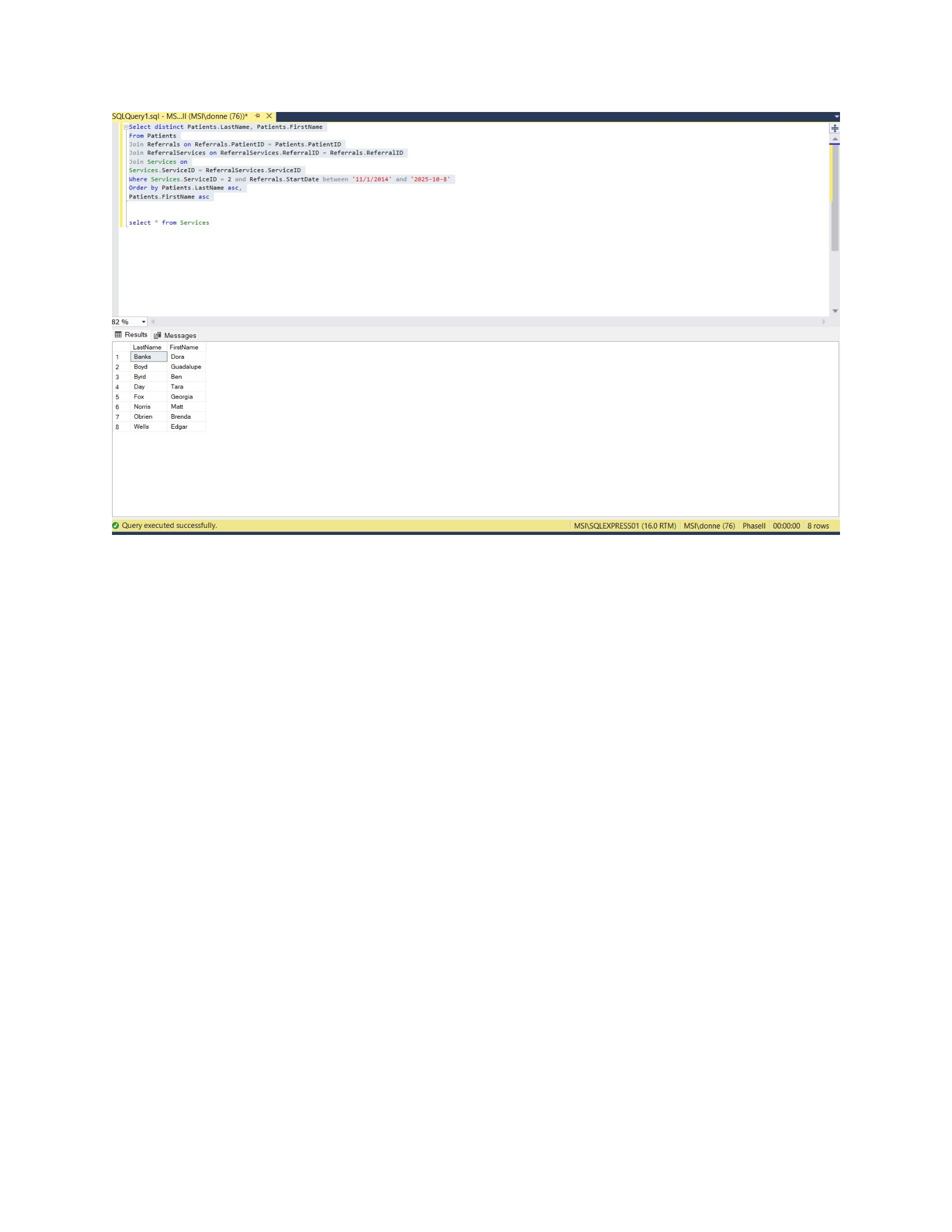
Patients.PatientID =
Referrals.PatientID
Where StartDate between '2014-
10-01' and '2014-11-05'
Order by Referrals.StartDate
asc, Patients.FirstName asc,
Physicians.LastName asc
13. Display the
number of
referrals given
by each
physician
Physician Last name, Physician
First Name, number of referrals
Sort Order: Physician Last
Name – ascending
Physician First
Name – ascending
Select Physicians.LastName,
Physicians.FirstName,
Count(Referrals.ReferralID) as
'Number Of Referrals'
From Physicians
Join Referrals on
Referrals.PhysicianID =
Physicians.PhysicianID
Group by Physicians.LastName,
Physicians.FirstName order by
Physicians.LastName
asc, Physicians.FirstName asc
14. List the
number of
referrals in
2014 for each
service
requested.
Service name, number of
referrals
Sort order: Service name
Select ServiceName,
Count(ReferralServices.ReferralI
D ) as 'Number Of Referrals'
From ReferralServices
Join Services on
ReferralServices.ServiceID =
Services.ServiceID
Join Referrals on
Referrals.ReferralID =
ReferralServices.ReferralID
Where Referrals.StartDate
BETWEEN '2014-01-01' AND '2014-
12-31'
Group by Services.ServiceName
Order by Services.ServiceName
Page 5 of 42

CSIS 325
15. Display a list
of all patients
requiring
exercise therapy
in 2013
Patient Last Name, Patient
First Name
Sort order: Patient last name
– ascending
Patient first name
– ascending
Select Patients.LastName,
FirstName
From Referrals
Join Patients on
Patients.PatientID =
Referrals.PatientID
Join ReferralServices on
ReferralServices.ReferralID =
Referrals.ReferralID
Where ServiceID = 8 and
Referrals.StartDate Between
'2013-01-01' and '2013-12-31'
Order by Patients.LastName asc,
Patients.FirstName asc
16. Display a list
of any referrals
that require
“Insulin
injections” and
“2x Daily” is
NOT listed as
their frequency.
Patient Last Name, Physician
Last Name, referral start date
Sort order: Physician Last
Name – ascending
Patient Last Name
– ascending
Referral Start Date
– ascending
Select Patients.LastName,
Physicians.LastName,
Referrals.StartDate
From Referrals
Join Patients on
Patients.PatientID =
Referrals.PatientID
Join Physicians on
Physicians.PhysicianID =
Referrals.PhysicianID
Join ReferralServices on
ReferralServices.ReferralID =
Referrals.ReferralID
Where ServiceID = 6 and
FrequencyID !=2
Order by Physicians.LastName asc,
Patients.LastName asc,
Referrals.StartDate asc
17. Display the
contracts and
Patient Last Name, Physician
Last Name, Referral Start Date,
Select Patients.LastName,
Physicians.LastName as
Physician, Referrals.StartDate
Page 6 of 42

CSIS 325
payment
methods
associated with
each referral
Contract Start Date, Payment
Method
Sort Order: Payment Method
- ascending
Physician Last
Name – ascending
Patient Last Name
– ascending
Referral Start Date
– ascending
Contract Start
Date – ascending
As Referral, Contracts.StartDate
as Contract,
PaymentTypes.PaymentType
From Referrals
Join Patients on
Patients.PatientID =
Referrals.PatientID
Join Physicians on
Physicians.PhysicianID =
Referrals.PhysicianID
Join Contracts on
Contracts.ReferralID =
Referrals.ReferralID
Join PaymentTypes on
PaymentTypes.PaymentTypeID =
Contracts.PaymentTypeID
Order by PaymentType asc,
Physicians.LastName asc,
Patients.LastName asc,
Referrals.StartDate asc,
Contracts.StartDate asc
18. Display the
number of
contracts whose
payment
method is
Insurance
Number of contracts (This is a
single value)
Select
count(Contracts.ContractID) as
'Number Of Contracts'
From Contracts
Where PaymentTypeID = 3
19. Display the
number of
contracts whose
payment
method is
Insurance,
broken out by
Insurance
Company
Insurance Company Name,
number of contracts Sort
order: Insurance company
name
Select
InsuranceCompanies.InsuranceComp
any, count(Contracts.ContractID)
As 'Number Of Contracts'
from Contracts
Join InsuranceCompanies on
InsuranceCompanies.InsuranceID =
Contracts.InsuranceID
Where PaymentTypeID = 3
Group by
InsuranceCompanies.InsuranceComp
any Order by
InsuranceCompanies.InsuranceComp
any
20. List the
Employees who
are Nurses
Employee First Name, followed
by a space, followed by
Employee Middle Initial,
followed by a space, followed
by Employee Last Name (call
this whole field “Nurses”)
Select Employees.FirstName + ' '
+ Employees.MiddleInitial + ' '
+ Employees.LastName as 'Nurse'
From Employees
Join EmployeeRanks on
EmployeeRanks.RankID =
Employees.RankID
Join EmployeeTypes on
EmployeeTypes.EmployeeTypeID =
EmployeeRanks.EmployeeTypeID
Page 7 of 42

CSIS 325
Where EmployeeType = 'Nurse'
21. Display the
average hourly
wage for all
employees who
are aides.
Average hourly wage (single
value)
Select
format(avg(Employees.HourlyWage)
, 'n13') as AverageHourlyWage
From Employees
Join EmployeeRanks on
EmployeeRanks.RankID =
Employees.RankID
Join EmployeeTypes on
EmployeeTypes.EmployeeTypeID =
EmployeeRanks.EmployeeTypeID
Where EmployeeType = 'Aide'
22. Display the
average hourly
wage for all
hourly
employees
broken out by
level.
Skill level, average wage
Sort order: Skill Level
Select
EmployeeSkillLevels.SkillLevel,
format(avg(Employees.HourlyWage)
, 'n2') as 'Average Hourly Wage'
From Employees
Join EmployeeRanks on
EmployeeRanks.RankID =
Employees.RankID
Join EmployeeSkillLevels on
EmployeeSkillLevels.SkillLevelID
= EmployeeRanks.SkillLevelID
Group by SkillLevel
Order by SkillLevel
23. Display the
total salary for
all salaried
employees.
Total salaries (single value) Select sum(convert(float,
Salary)) as 'Total Salaries'
From Employees
Where Salary IS NOT NULL;
24. Display the
number of
employees
assigned to
each rank.
RankID, Employee Type, Skill
Level, Employee Title, number
of employees
Sort Order: RankID –
ascending
Employee type –
ascending
Skill Level –
ascending
Employee Title –
ascending
Select Employees.RankID,
EmployeeTypes.EmployeeType,
EmployeeSkillLevels.SkillLevel,
EmployeeTitles.EmployeeTitle,
Count(Employees.EmployeeID) AS
'Number Of Employees'
From EmployeeRanks
Join Employees on
Employees.RankID =
EmployeeRanks.RankID
Join EmployeeTypes on
EmployeeTypes.EmployeeTypeID =
EmployeeRanks.EmployeeTypeID
Join EmployeeSkillLevels on
EmployeeSkillLevels.SkillLevelID
= EmployeeRanks.SkillLevelID
Join EmployeeTitles on
EmployeeTitles.EmployeeTitleID =
EmployeeRanks.TitleID
Page 8 of 42

CSIS 325
Group by Employees.RankID,
EmployeeTypes.EmployeeType,
EmployeeSkillLevels.SkillLevel,
EmployeeTitles.EmployeeTitle
Order by Employees.RankID asc,
EmployeeTypes.EmployeeType asc,
EmployeeSkillLevels.SkillLevel
asc,
EmployeeTitles.EmployeeTitle asc;
25. Display a list
of Employees
who are nurses
and were
available to
work on Sunday
evenings during
the week of
11/2/2014
Employee Last Name,
Employee First Name
Sort order: Last Name –
ascending
First Name –
ascending
Select Employees.LastName,
Employees.FirstName
From Employees
Join EmployeeRanks on
EmployeeRanks.RankID =
Employees.RankID
Join EmployeeTypes on
EmployeeTypes.EmployeeTypeID =
EmployeeRanks.EmployeeTypeID
Join Availability on
Availability.EmployeeID =
Employees.EmployeeID
Join DaysOfWeek on
DaysOfWeek.DayOfWeekID =
Availability.DayofWeekID
Where
EmployeeTypes.EmployeeType=
'Nurse' and Availability.ShiftID
= 3 and DaysOfWeek.DayOfWeek =
'Sunday' and Availability.WeekOf
= '2014-11-02'
Order by Employees.LastName
26. Display a list
of Employees
who were
available to
work during
morning shifts
during the week
of 11/2/2014
and had a skill
level of level 3.
Employee Last Name,
Employee First Name,
Employee Type, Employee
Title
Sort order: Employee Type –
ascending
Employee Title –
ascending
Employee Last
Name – ascending
Employee First
Name – ascending
Select distinct
Employees.LastName,
Employees.FirstName,
EmployeeTypes.EmployeeType,
EmployeeTitles.EmployeeTitle
From Employees
Join EmployeeRanks on
EmployeeRanks.RankID =
Employees.RankID
Join Availability on
Availability.EmployeeID =
Employees.EmployeeID
Join EmployeeTypes on
EmployeeTypes.EmployeeTypeID =
EmployeeRanks.EmployeeTypeID
Join EmployeeTitles on
EmployeeTitles.EmployeeTitleID =
EmployeeRanks.TitleID
Where Availability.ShiftID = 1
and Availability.WeekOf =
'2014-11-02' and
Page 9 of 42

CSIS 325
EmployeeRanks.SkillLevelID = 3
Order by Employees.LastName
asc,Employees.FirstName asc,
EmployeeTypes.EmployeeType asc,
EmployeeTitles.EmployeeTitle asc
27. Display the
total quantity of
catheters added
to inventory
during 2013.
Total catheters (single value) Select sum(Quantity) as 'Total
Catheters'
From SupplyInventory
Where SupplyID = 8 and
DateReceived between '2013-01-
01' and '2013-12-31'
28. Display the
total cost of
“sterile gloves –
small” provided
by Poole’s
Medical
supplies during
2013.
Total cost (single value) Select sum(Quantity * UnitCost)
As 'Total Cost'
From SupplyInventory
Where SupplierID = 3 and
DateReceived between '2013-01-
01' and '2013-12-31' and
SupplyID = 12
29. Display the
average cost of
supplies for
each supply
item broken out
by supplier.
Supply, Supplier, Average cost
per supply item
Sort order: Supply – ascending
Supplier –
ascending
Select Supplies.SupplyID,
MedicalSuppliers.SupplierName,
format(avg(SupplyInventory.UnitC
ost *
SupplyInventory.Quantity),'n2')
as 'Average Cost' From
SupplyInventory
Join Supplies on
Supplies.SupplyID =
SupplyInventory.SupplyID
Join MedicalSuppliers on
MedicalSuppliers.SupplierID =
SupplyInventory.SupplierID
Group by
MedicalSuppliers.SupplierName,
Supplies.SupplyID
Order by Supplies.SupplyID asc,
MedicalSuppliers.Suppliername asc
Page 10 of 42

CSIS 325
30. Display the
total cost of all
items
purchased from
suppliers
broken out by
supplier.
Supplier, Total cost of all items
provided by supplier Sort
order: Supplier – ascending
Select
MedicalSuppliers.SupplierName,
sum(SupplyInventory.UnitCost *
SupplyInventory.Quantity) as
'TotalCost'
From SupplyInventory
Join MedicalSuppliers on
MedicalSuppliers.SupplierID =
SupplyInventory.SupplierID
Group by
MedicalSuppliers.SupplierName
Page 11 of 42

CSIS 325
Order by
MedicalSuppliers.SupplierName asc
31. Display a list
of all the visits
that occurred
from March 20,
2014 to March
25, 2014
(including
March 20 and
March 25)
DateRendered, Patient Last
Name, Employee Last Name,
Start Time, End time
Sort order: DateRendered –
ascending
Patient Last Name
– ascending
Employee Last
Name – ascending
Start Time –
ascending
Select Visits.DateRendered,
Patients.LastName,
Employees.LastName,
Visits.StartTime, Visits.EndTime
From Visits
Join Patients on
Patients.PatientID =
Visits.PatientID
Join Employees on
Employees.EmployeeID =
Visits.EmployeeID
Where Visits.DateRendered
Between '2014-03-20' and '2014-
03-25'
Order by Visits.DateRendered asc,
Patients.LastName asc,
Employees.LastName asc,
Visits.StartTime asc
32. List the total
charges for the
visit that
occurred on
2/12/2014 for
Helen Ramirez
that was
provided by
Laura White.
Total charges (single value)
Select sum(VisitDetails.Charge)
as 'Total Charges'
From VisitDetails
Join Visits on Visits.VisitID =
VisitDetails.VisitID
Join Patients on
Patients.PatientID =
Visits.PatientID
Join Employees on
Employees.EmployeeID =
Visits.EmployeeID
Where Patients.FirstName =
'Helen' and Patients.LastName =
'Ramirez' and
Visits.DateRendered = '2012-02-
12'and Employees.FirstName =
'Laura' and Employees.LastName
='White'
Page 12 of 42

CSIS 325
33. List the
number of
patients who
received insulin
injections
during 2014
(Note this is the
number of
unique patients
Total number of patients
(single value)
Select count(distinct
Visits.PatientID) as 'Total
Patients'
From Visits
Join VisitDetails on
VisitDetails.VisitID =
Visits.VisitID
Where VisitDetails.ServiceID = 6
and Visits.DateRendered between
'2014.01-01' and '2014-12-31'
who ever
received insulin
injections – not
the number of
visits in which
insulin
injections were
provided).
34. List the total
number of 4”
self-adhesive
bandages that
were used in
2014
Total number of 4”
selfadhesive bandages (single
value)
Select count(Quantity) as
'Total Bandages'
From SupplyInventory
Where SupplyID = 5 and Quantity
is not null and
DateReceived between '2014-01-
01' and '2014-12-31'
35. List the
average charge
per visit per
month in 2014
broken out by
months
Month, average cost per visit
Sort order: month number -
ascending
Select
month(Visits.DateRendered) as
Month, format(avg(Charge), 'n2')
as 'Average Cost Per Visit'
From VisitDetails
Join Visits on Visits.VisitID =
VisitDetails.VisitID
Join Referrals on
Referrals.PatientID =
Visits.PatientID
Where Charge in (Select Distinct
VisitID from VisitDetails) and
Visits.DateRendered between
'2014-01-01' and '2014-12-31'
Group by
month(Visits.DateRendered)
Order by Month asc
Page 13 of 42
CSIS 325
36. Provide a
unique list of
patients who
received visits
for feeding from
November
1, 2014 until the
current date.
Patient Last Name, Patient
First Name
Sort order: Patient Last Name
– ascending
Patient First Name
– ascending
Select distinct
Patients.LastName,
Patients.FirstName
From Patients
Join Referrals on
Referrals.PatientID =
Patients.PatientID
Join ReferralServices on
ReferralServices.ReferralID =
Referrals.ReferralID
Join Services on
Services.ServiceID =
ReferralServices.ServiceID
Where Services.ServiceID = 2 and
Referrals.StartDate between
'11/1/2014' and '2025-10-8'
Order by Patients.LastName asc,
Patients.FirstName asc
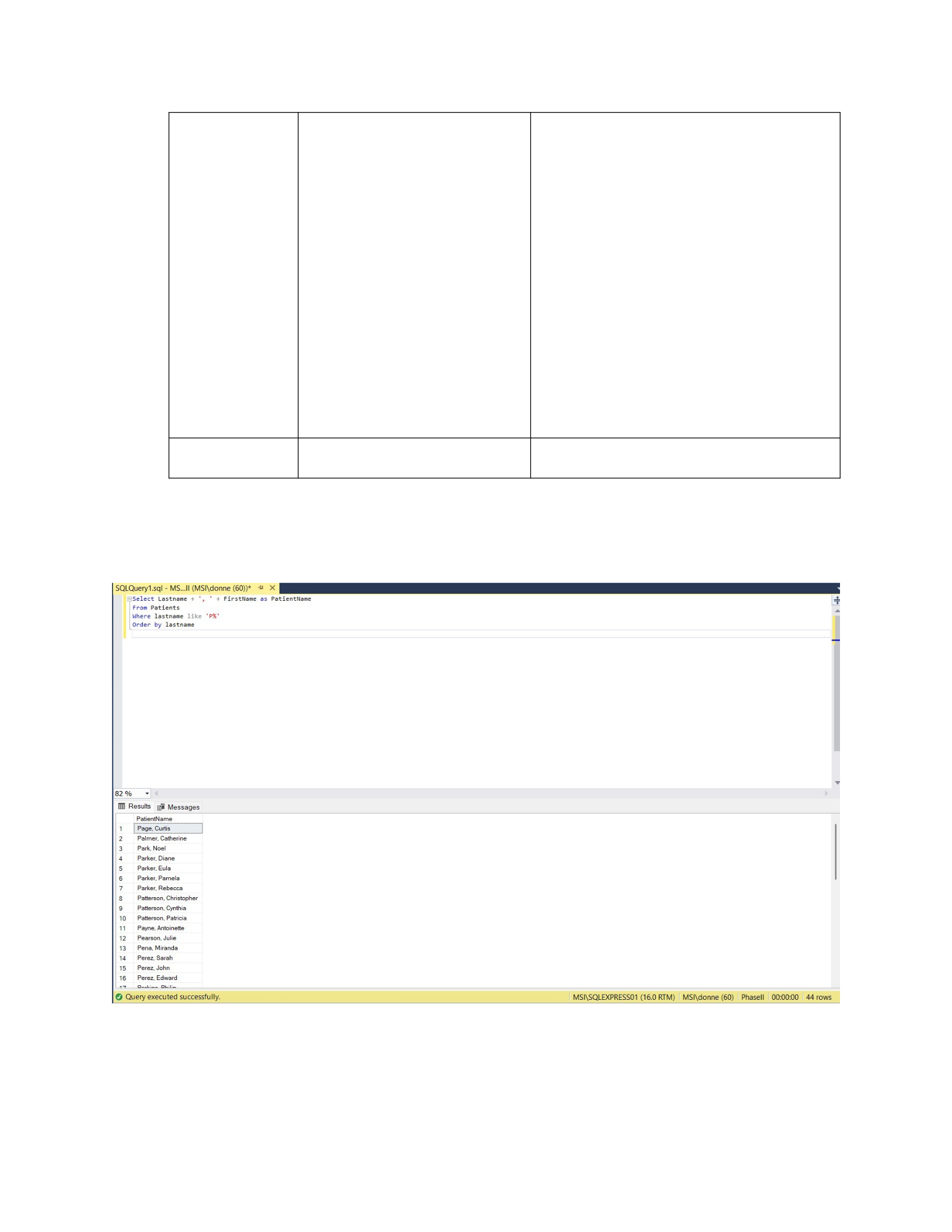
1. Display a list of all patients who have a last name beginning with the letter “P”.
Select Lastname + ', ' + FirstName as PatientName
From Patients
Where lastname like 'P%'
Order by lastname
Page 14 of 42
CSIS 325
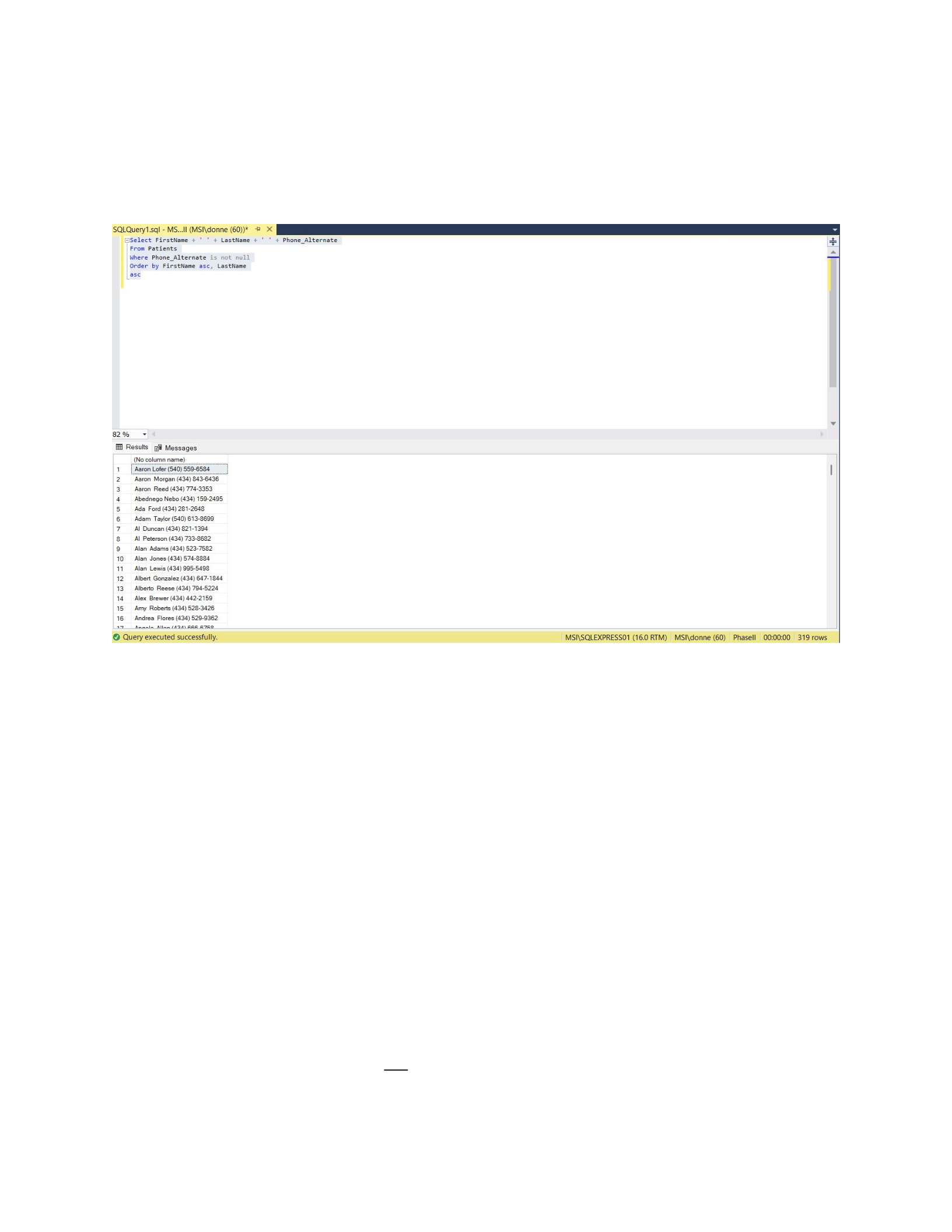
2. Display a list of all patients who have an alternate/cell phone number
Select FirstName + ' ' + LastName + ' ' + Phone_Alternate
From Patients
Where Phone_Alternate is not null
Order by FirstName asc, LastName
Asc
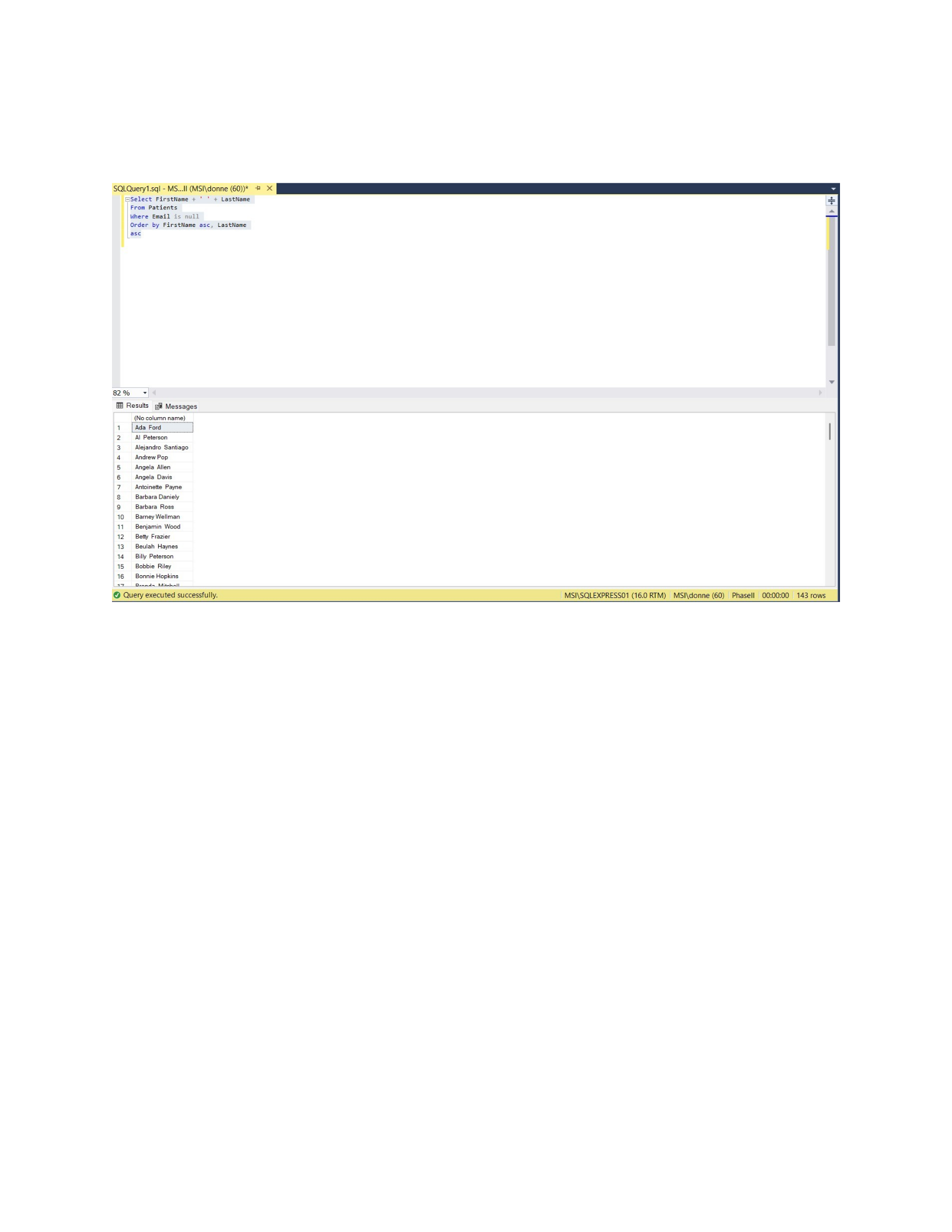
3. Display a list of all patients who do not have an email address.
Select FirstName + ' ' + LastName
Page 15 of 42
CSIS 325
From Patients
Where Email is null
Order by FirstName asc, LastName
Asc
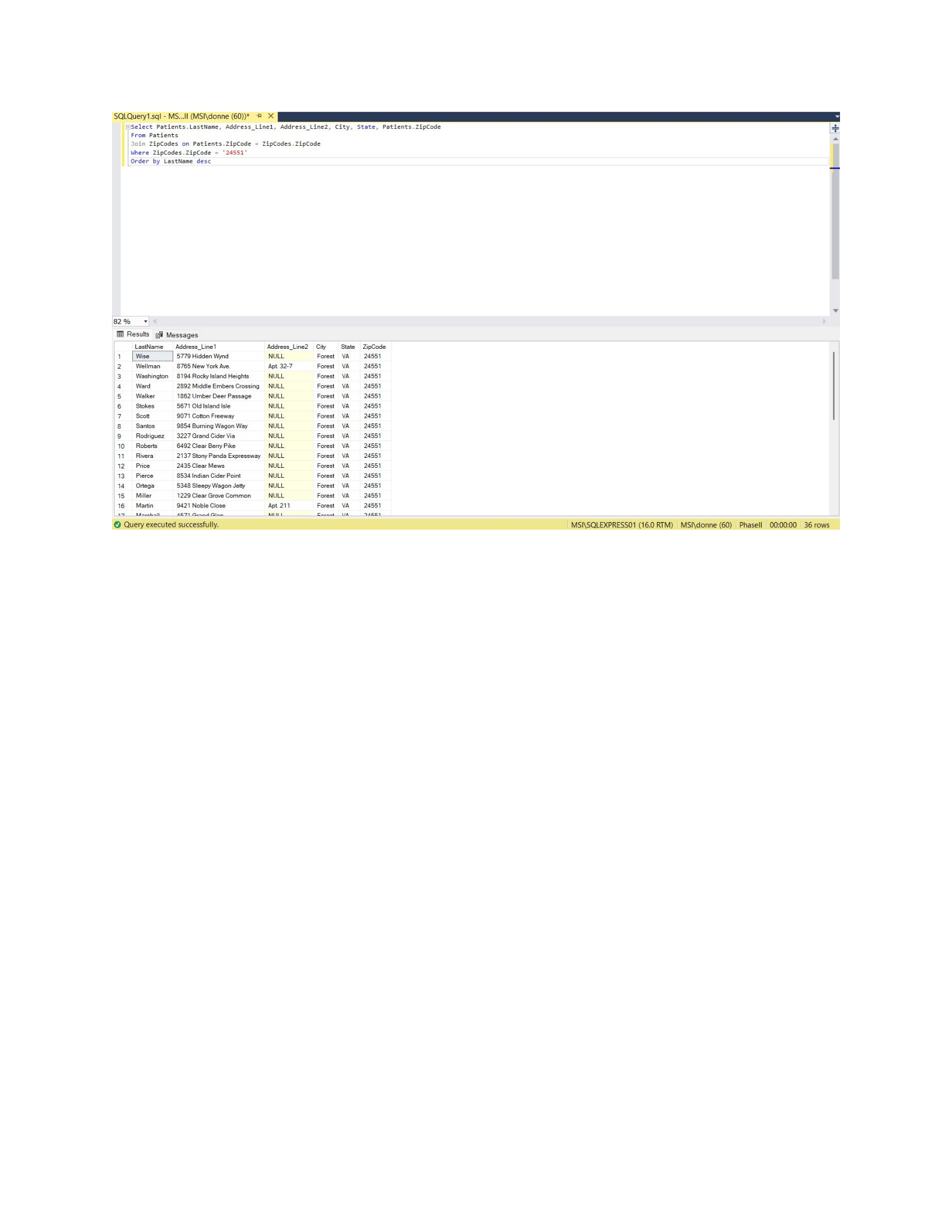
4. Display a list of all patients who live in zipcode 24551.
Select Patients.LastName, Address_Line1, Address_Line2, City, State,
Patients.ZipCode
From Patients
Join ZipCodes on Patients.ZipCode = ZipCodes.ZipCode
Where ZipCodes.ZipCode = '24551'
Order by LastName desc
Page 16 of 42
CSIS 325
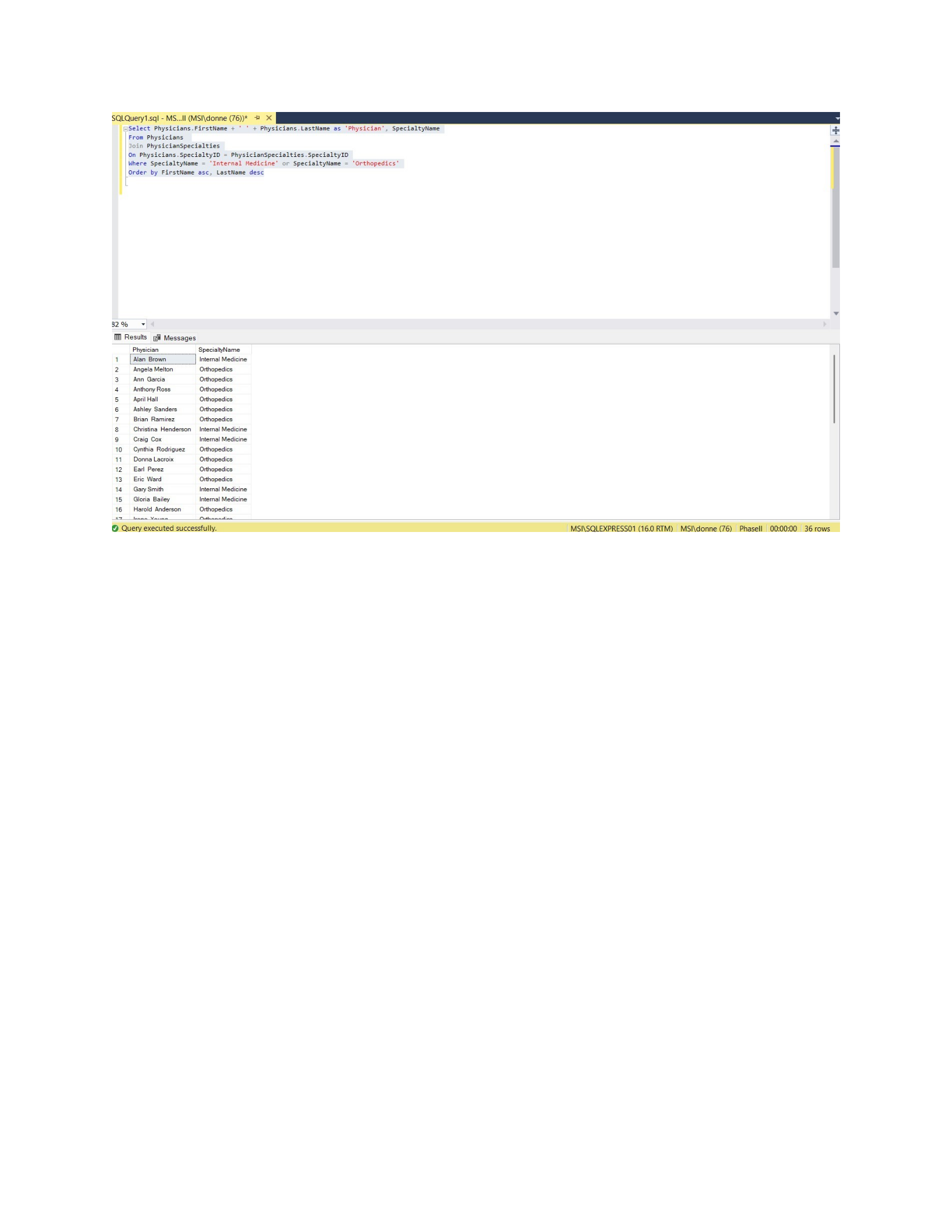
5. Display a list of all physicians whose specialty is Internal Medicine or Orthopedics
Select Physicians.FirstName + ' ' + Physicians.LastName as 'Physician',
SpecialtyName
From Physicians
Join PhysicianSpecialties
On Physicians.SpecialtyID = PhysicianSpecialties.SpecialtyID
Where SpecialtyName = 'Internal Medicine' or SpecialtyName = 'Orthopedics'
Order by FirstName asc, LastName desc
Page 17 of 42
CSIS 325
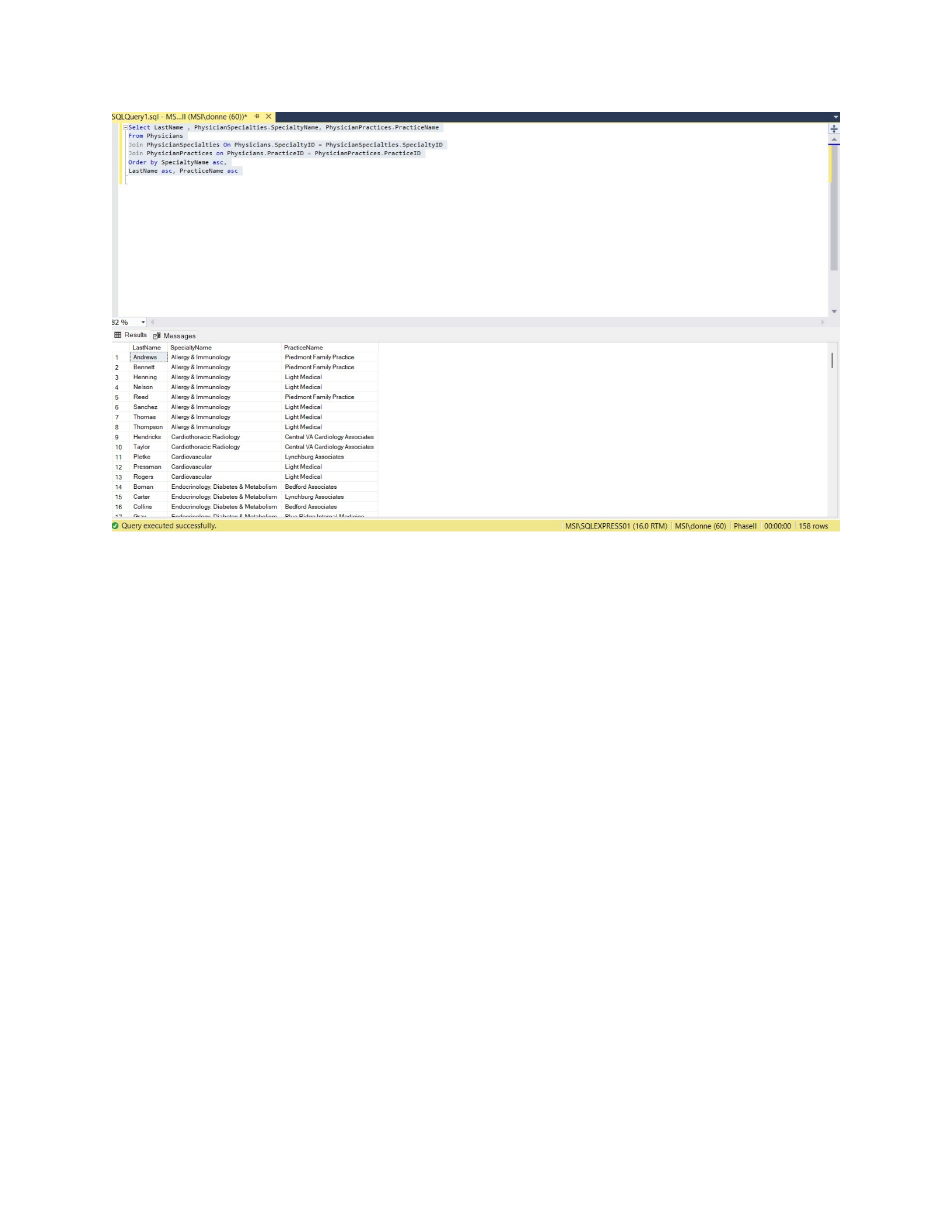
6. Display a list of all physicians, their specialties, and their practices
Select LastName , PhysicianSpecialties.SpecialtyName,
PhysicianPractices.PracticeName
From Physicians
Join PhysicianSpecialties On Physicians.SpecialtyID =
PhysicianSpecialties.SpecialtyID
Join PhysicianPractices on Physicians.PracticeID = PhysicianPractices.PracticeID
Order by SpecialtyName asc,
LastName asc, PracticeName asc
Page 18 of 42
CSIS 325
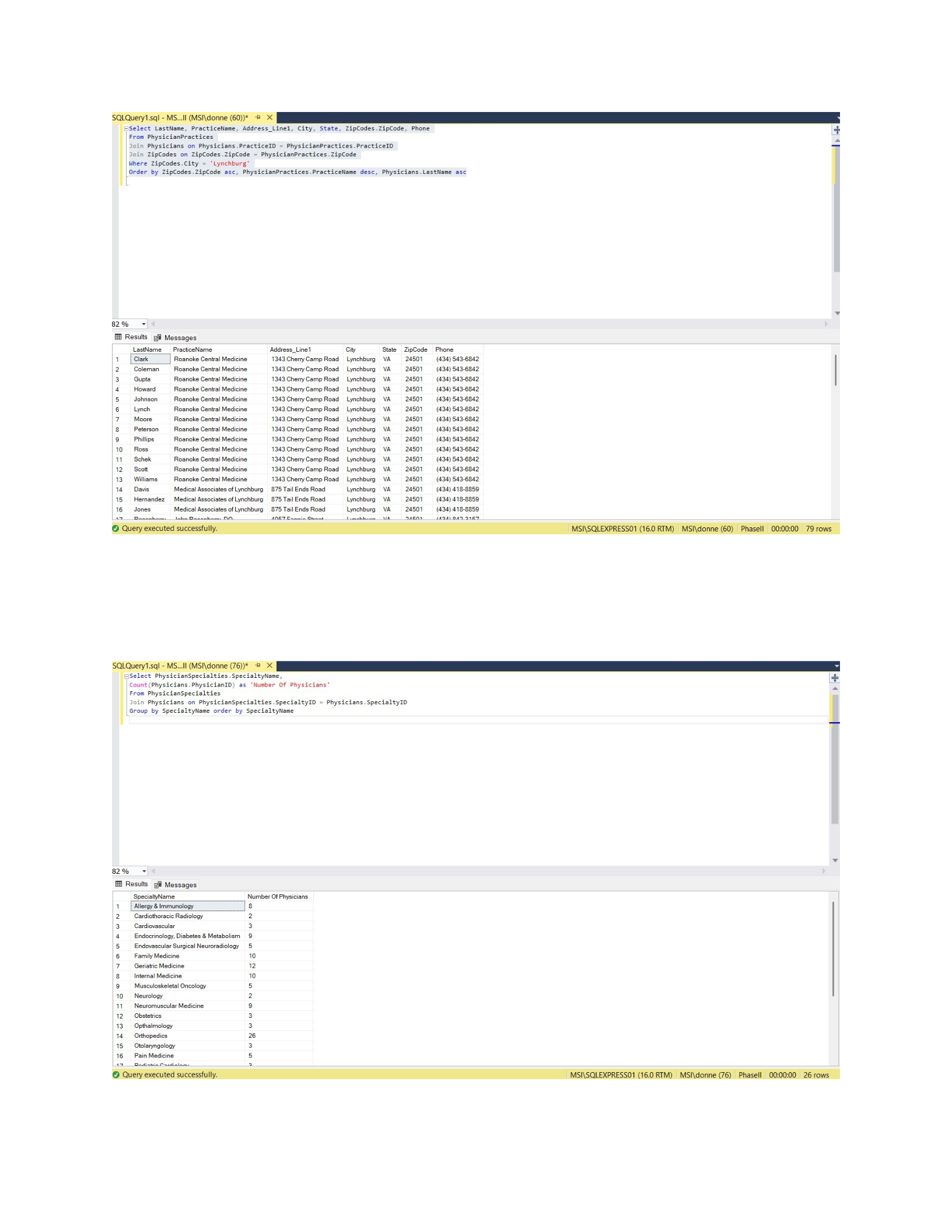
7. Display a list of all physicians whose practices are in Lynchburg
Select LastName, PracticeName, Address_Line1, City, State, ZipCodes.ZipCode,
Phone
From PhysicianPractices
Join Physicians on Physicians.PracticeID = PhysicianPractices.PracticeID
Join ZipCodes on ZipCodes.ZipCode = PhysicianPractices.ZipCode
Where ZipCodes.City = 'Lynchburg'
Order by ZipCodes.ZipCode asc, PhysicianPractices.PracticeName desc,
Physicians.LastName asc
Page 19 of 42
CSIS 325
8. Display the number of physicians in each specialty
Select PhysicianSpecialties.SpecialtyName,
Count(Physicians.PhysicianID) as 'Number Of Physicians'
From PhysicianSpecialties
Join Physicians on PhysicianSpecialties.SpecialtyID = Physicians.SpecialtyID
Group by SpecialtyName order by SpecialtyName
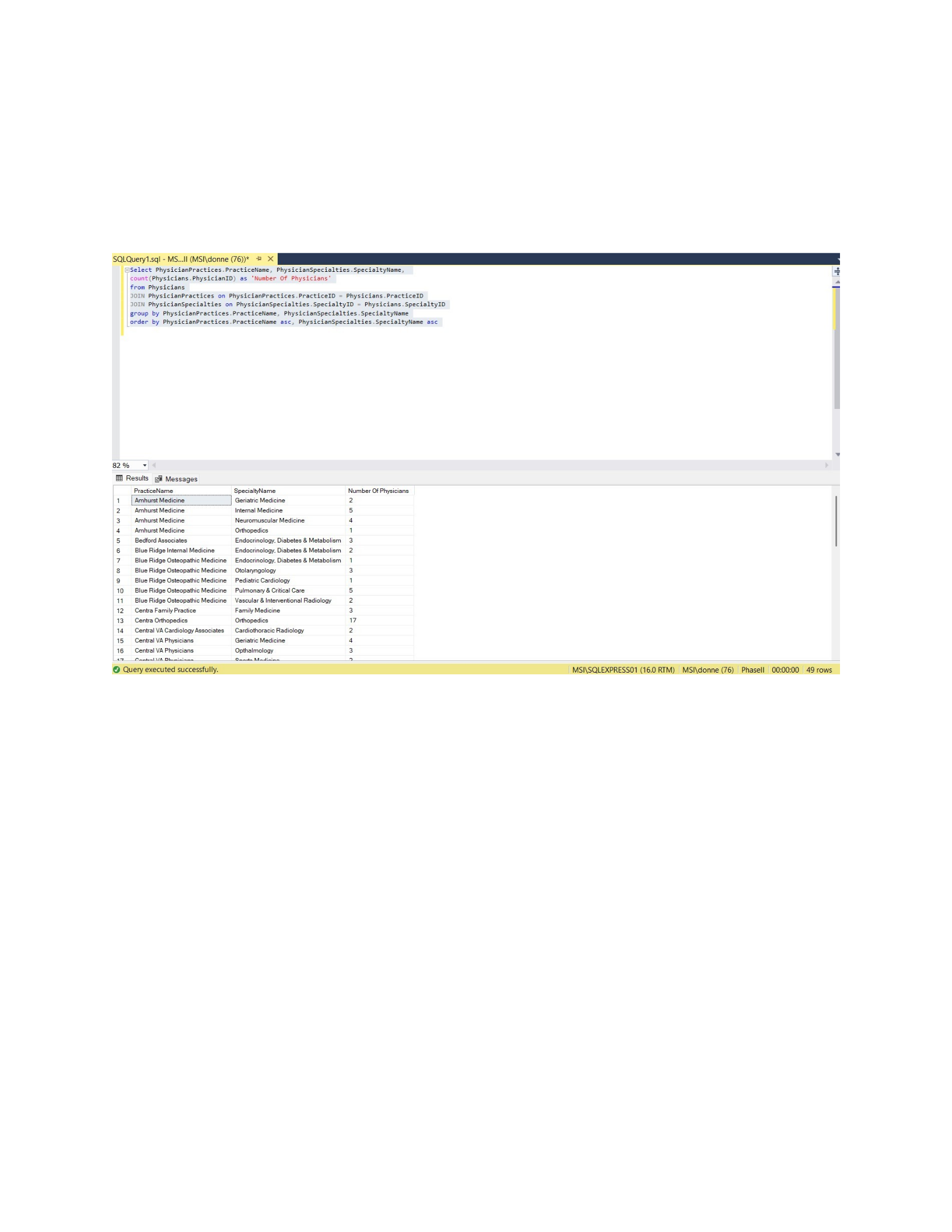
9. Display the number of physicians in each practice, broken out by specialty
Page 20 of 42
CSIS 325
Select PhysicianPractices.PracticeName, PhysicianSpecialties.SpecialtyName,
count(Physicians.PhysicianID) as 'Number Of Physicians' from Physicians
JOIN PhysicianPractices on PhysicianPractices.PracticeID = Physicians.PracticeID
JOIN PhysicianSpecialties on PhysicianSpecialties.SpecialtyID =
Physicians.SpecialtyID
group by PhysicianPractices.PracticeName, PhysicianSpecialties.SpecialtyName
order by PhysicianPractices.PracticeName asc, PhysicianSpecialties.SpecialtyName
asc
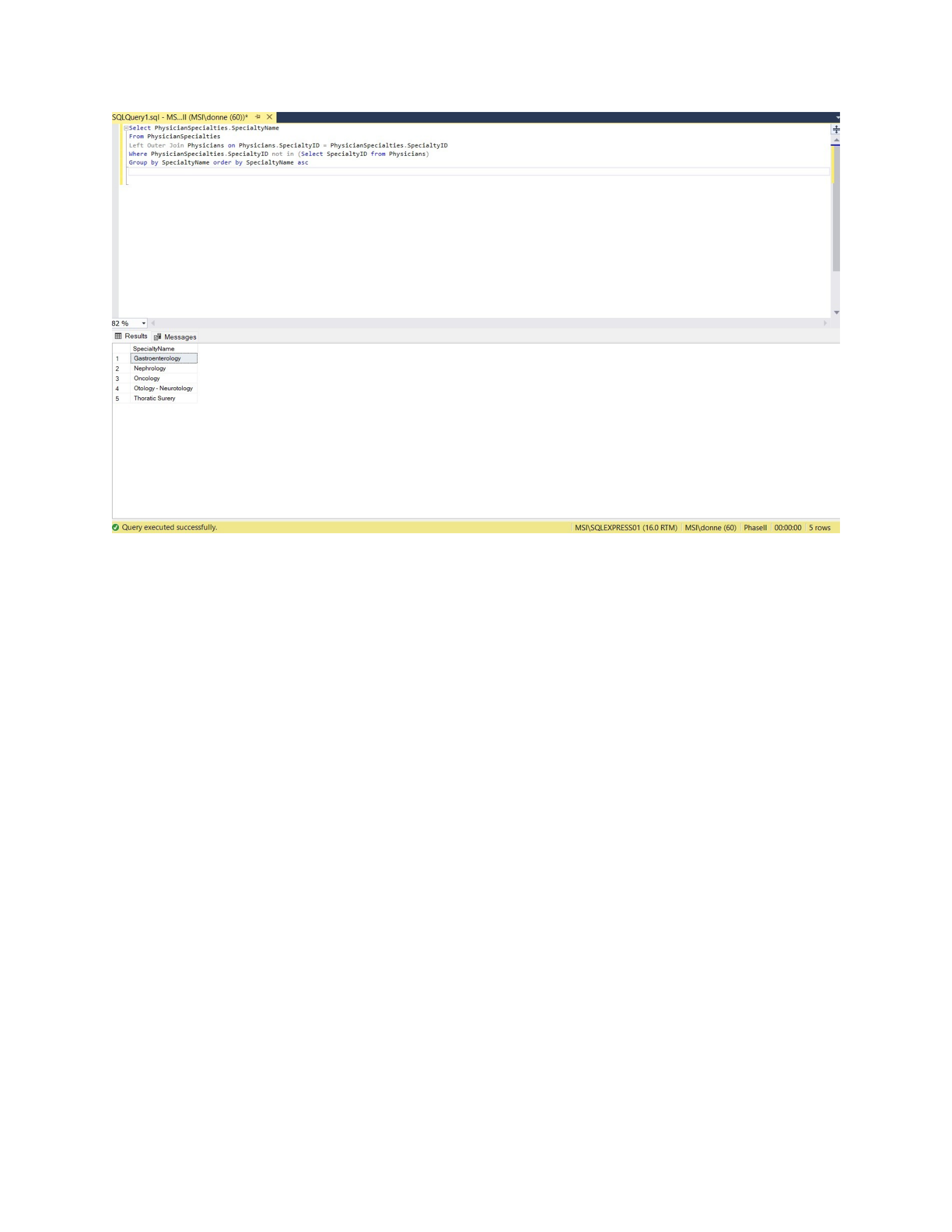
10. Display the list of specialties that have no physicians assigned to them.
Select PhysicianSpecialties.SpecialtyName
From PhysicianSpecialties
Left Outer Join Physicians on Physicians.SpecialtyID =
PhysicianSpecialties.SpecialtyID
Where PhysicianSpecialties.SpecialtyID not in (Select SpecialtyID from
Physicians)
Group by SpecialtyName order by SpecialtyName asc
Page 21 of 42
CSIS 325
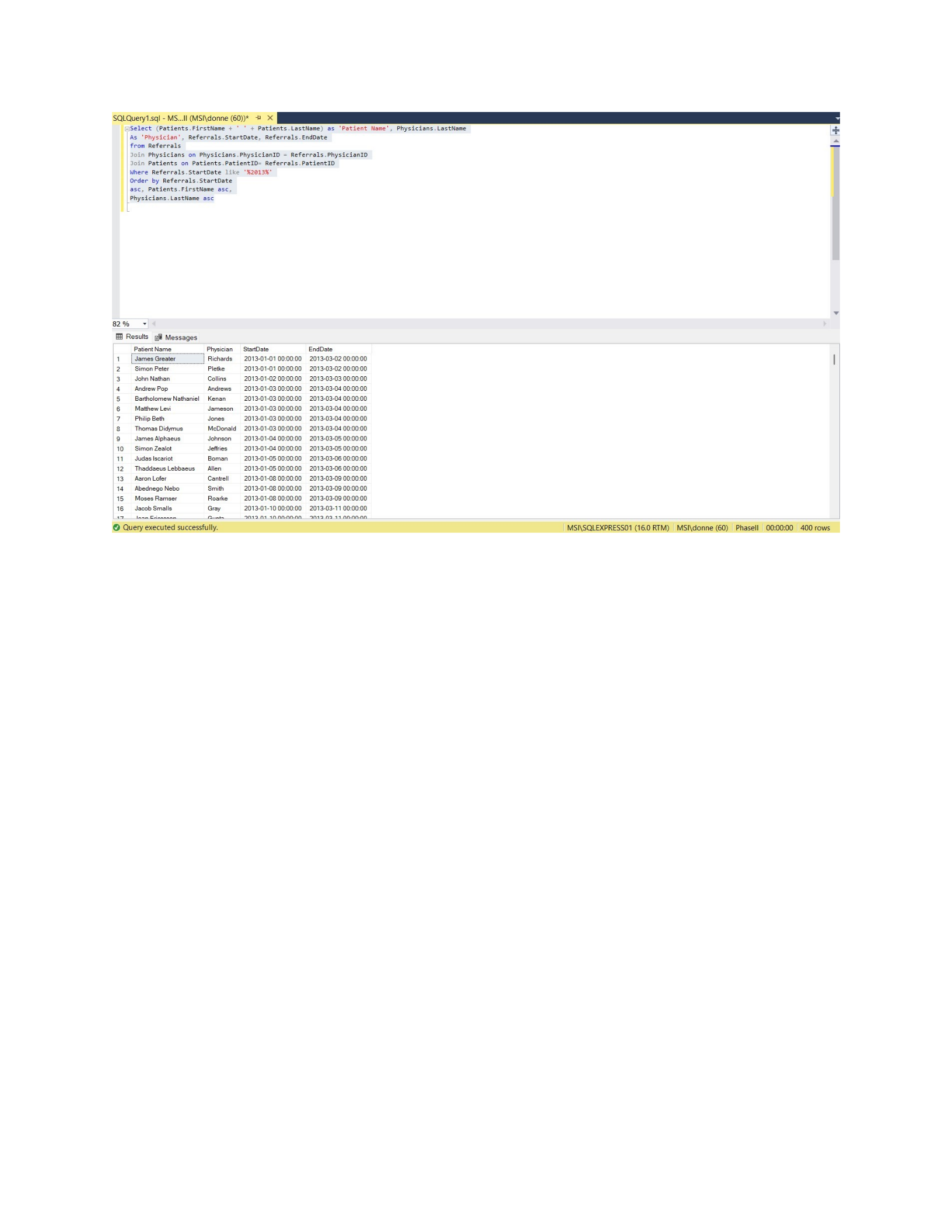
11. Display a list of all referrals whose start date was in 2013.
Select (Patients.FirstName + ' ' + Patients.LastName) as 'Patient Name',
Physicians.LastName
As 'Physician', Referrals.StartDate, Referrals.EndDate
from Referrals
Join Physicians on Physicians.PhysicianID = Referrals.PhysicianID
Join Patients on Patients.PatientID= Referrals.PatientID
Where Referrals.StartDate like '%2013%'
Order by Referrals.StartDate asc,
Patients.FirstName asc,
Physicians.LastName asc
Page 22 of 42
CSIS 325
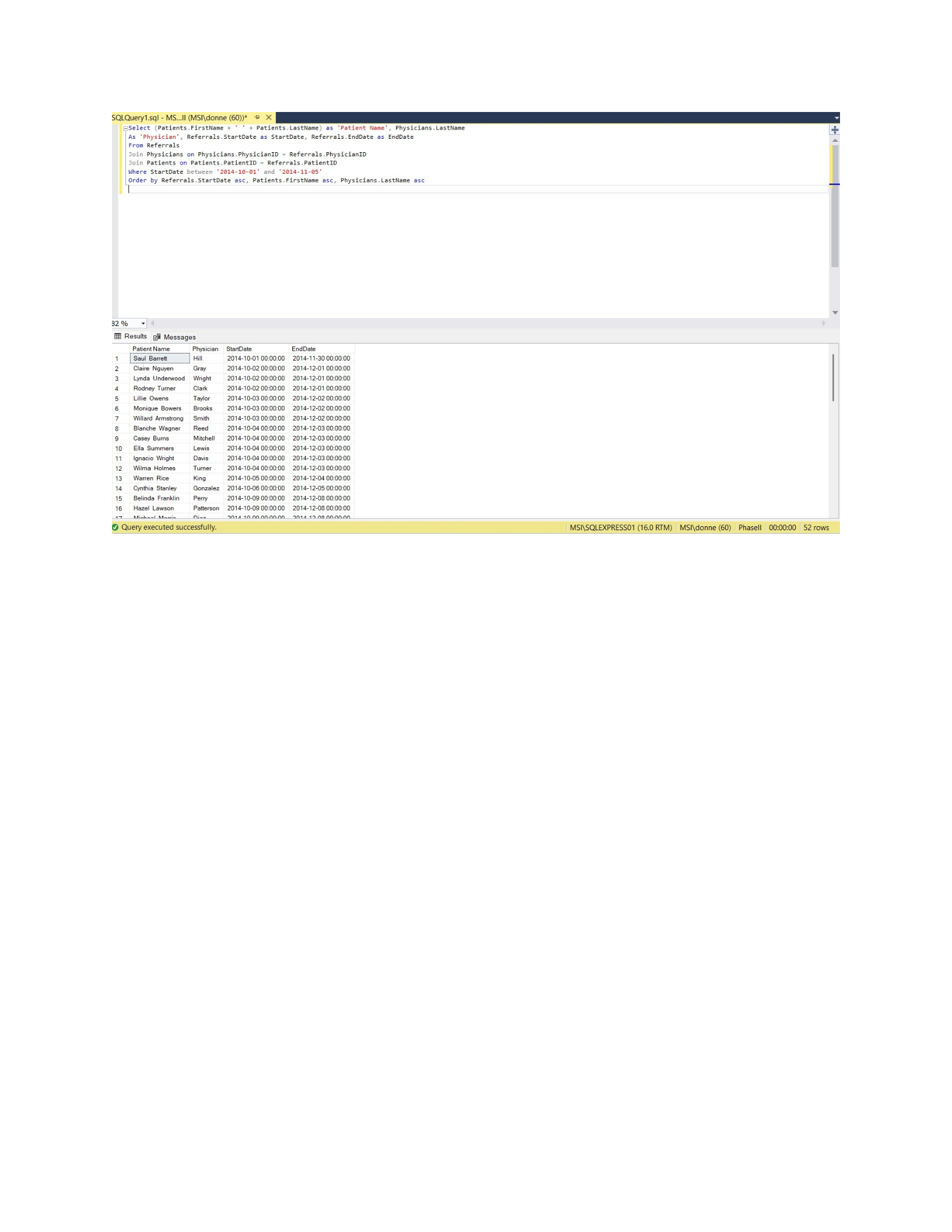
12. Display a list of all the referrals whose start date is between October 1, 2014 and November 5, 2014
Select (Patients.FirstName + ' ' + Patients.LastName) as 'Patient Name',
Physicians.LastName
As 'Physician', Referrals.StartDate as StartDate, Referrals.EndDate as EndDate
From Referrals
Join Physicians on Physicians.PhysicianID = Referrals.PhysicianID
Join Patients on Patients.PatientID = Referrals.PatientID
Where StartDate between '2014-10-01' and '2014-11-05'
Order by Referrals.StartDate asc, Patients.FirstName asc, Physicians.LastName asc
Page 23 of 42
CSIS 325
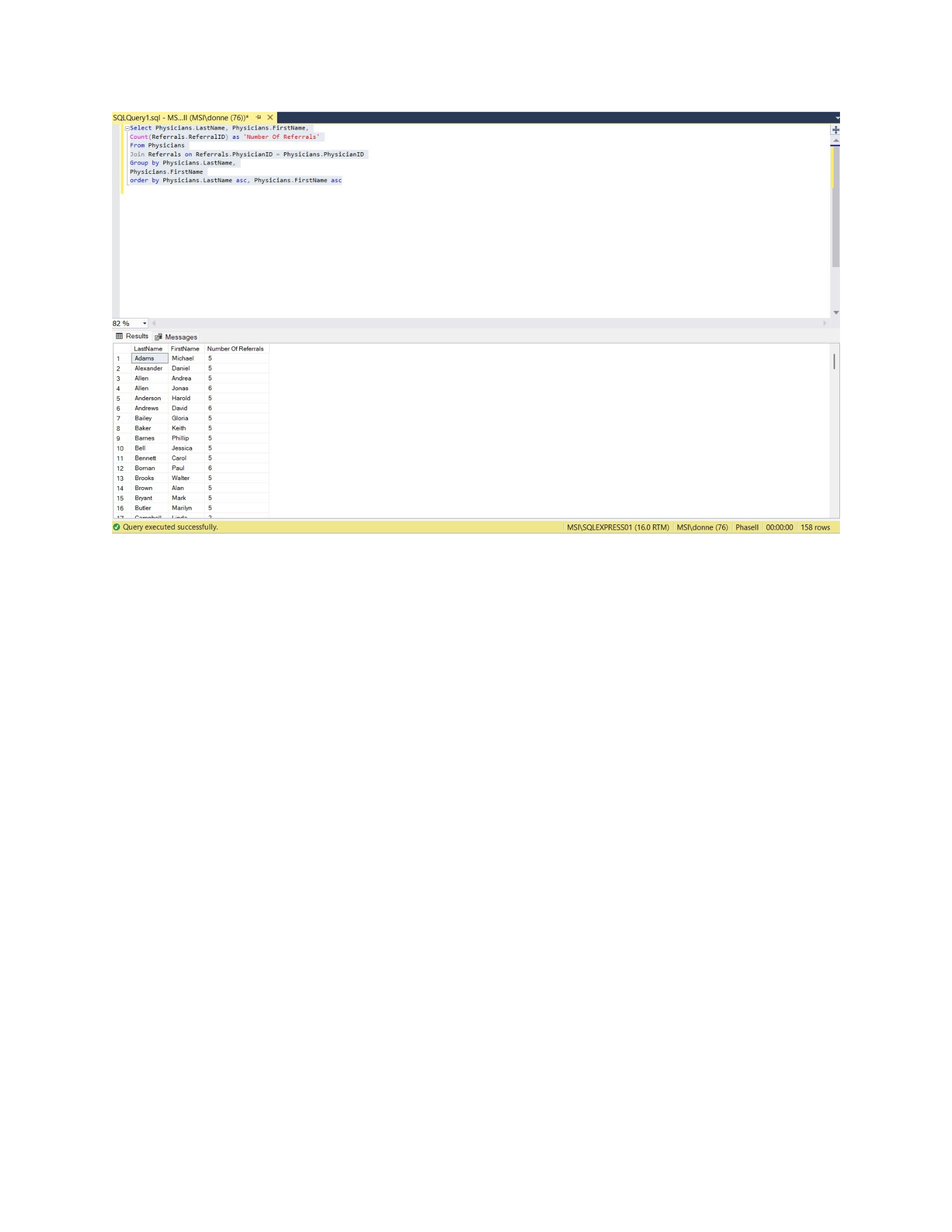
13. Display the number of referrals given by each physician
Select Physicians.LastName, Physicians.FirstName,
Count(Referrals.ReferralID) as 'Number Of Referrals'
From Physicians
Join Referrals on Referrals.PhysicianID = Physicians.PhysicianID
Group by Physicians.LastName,
Physicians.FirstName
order by Physicians.LastName asc, Physicians.FirstName asc
Page 24 of 42
CSIS 325
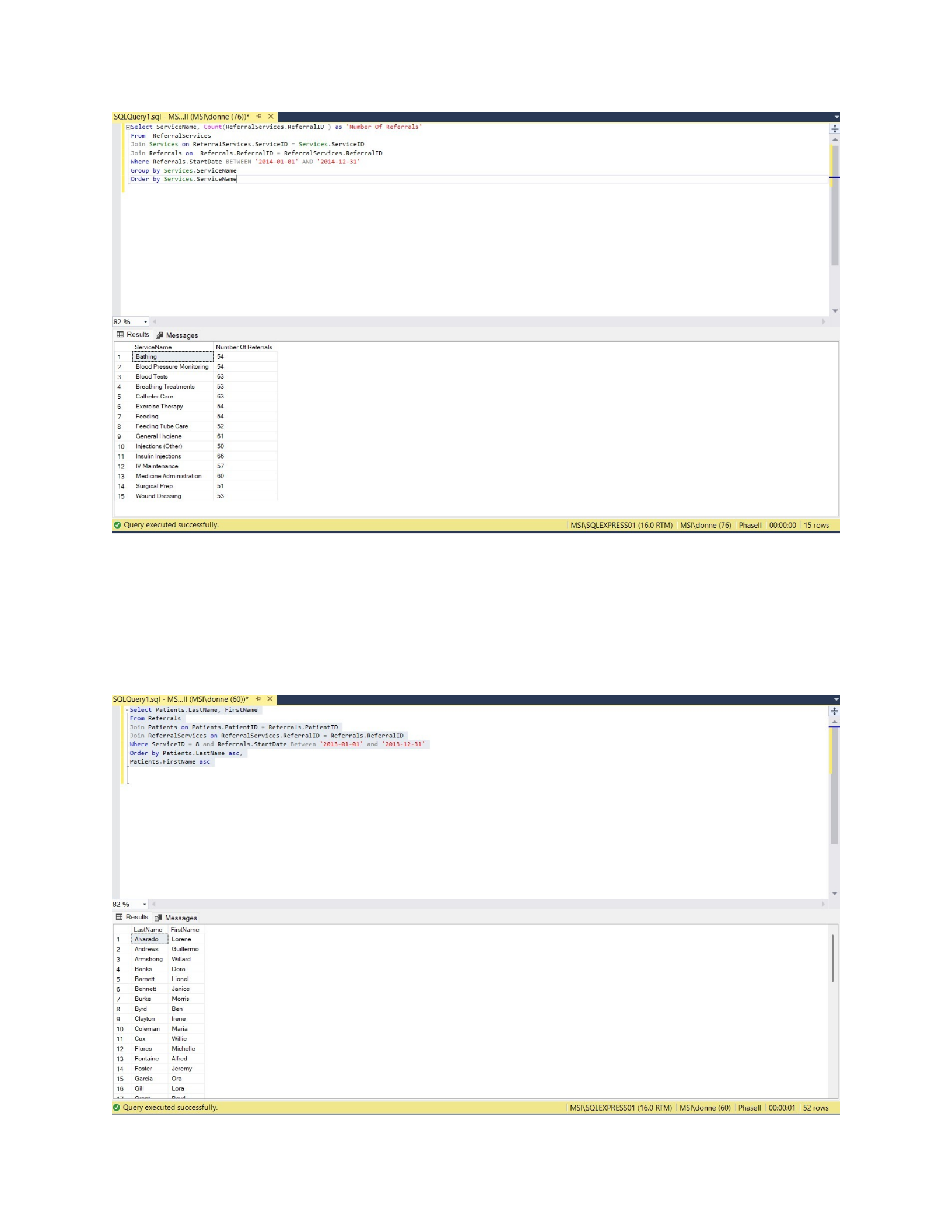
14. List the number of referrals in 2014 for each service requested.
Select ServiceName, Count(ReferralServices.ReferralID ) as 'Number Of Referrals'
From ReferralServices
Join Services on ReferralServices.ServiceID = Services.ServiceID
Join Referrals on Referrals.ReferralID = ReferralServices.ReferralID
Where Referrals.StartDate BETWEEN '2014-01-01' AND '2014-12-31'
Group by Services.ServiceName
Order by Services.ServiceName
Page 25 of 42
CSIS 325
15. Display a list of all patients requiring exercise therapy in 2013
Select Patients.LastName, FirstName
From Referrals
Join Patients on Patients.PatientID = Referrals.PatientID
Join ReferralServices on ReferralServices.ReferralID = Referrals.ReferralID
Where ServiceID = 8 and Referrals.StartDate Between '2013-01-01' and '2013-12-31'
Order by Patients.LastName asc,
Patients.FirstName asc
Page 26 of 42
CSIS 325
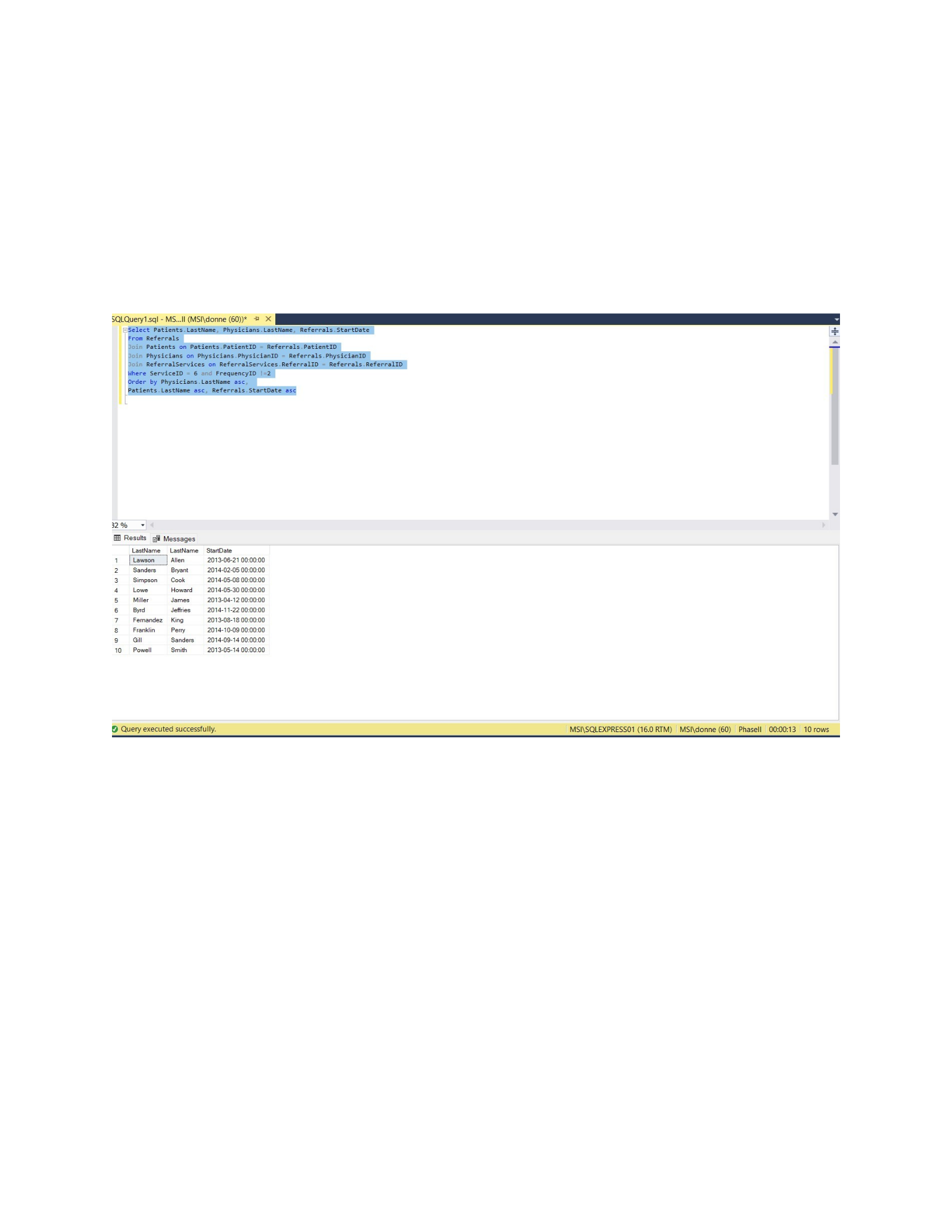
16. Display a list of any referrals that require “Insulin injections” and “2x Daily” is NOT listed as their
frequency.
Select Patients.LastName, Physicians.LastName, Referrals.StartDate
From Referrals
Join Patients on Patients.PatientID = Referrals.PatientID
Join Physicians on Physicians.PhysicianID = Referrals.PhysicianID
Join ReferralServices on ReferralServices.ReferralID = Referrals.ReferralID
Where ServiceID = 6 and FrequencyID !=2
Order by Physicians.LastName asc,
Patients.LastName asc, Referrals.StartDate asc
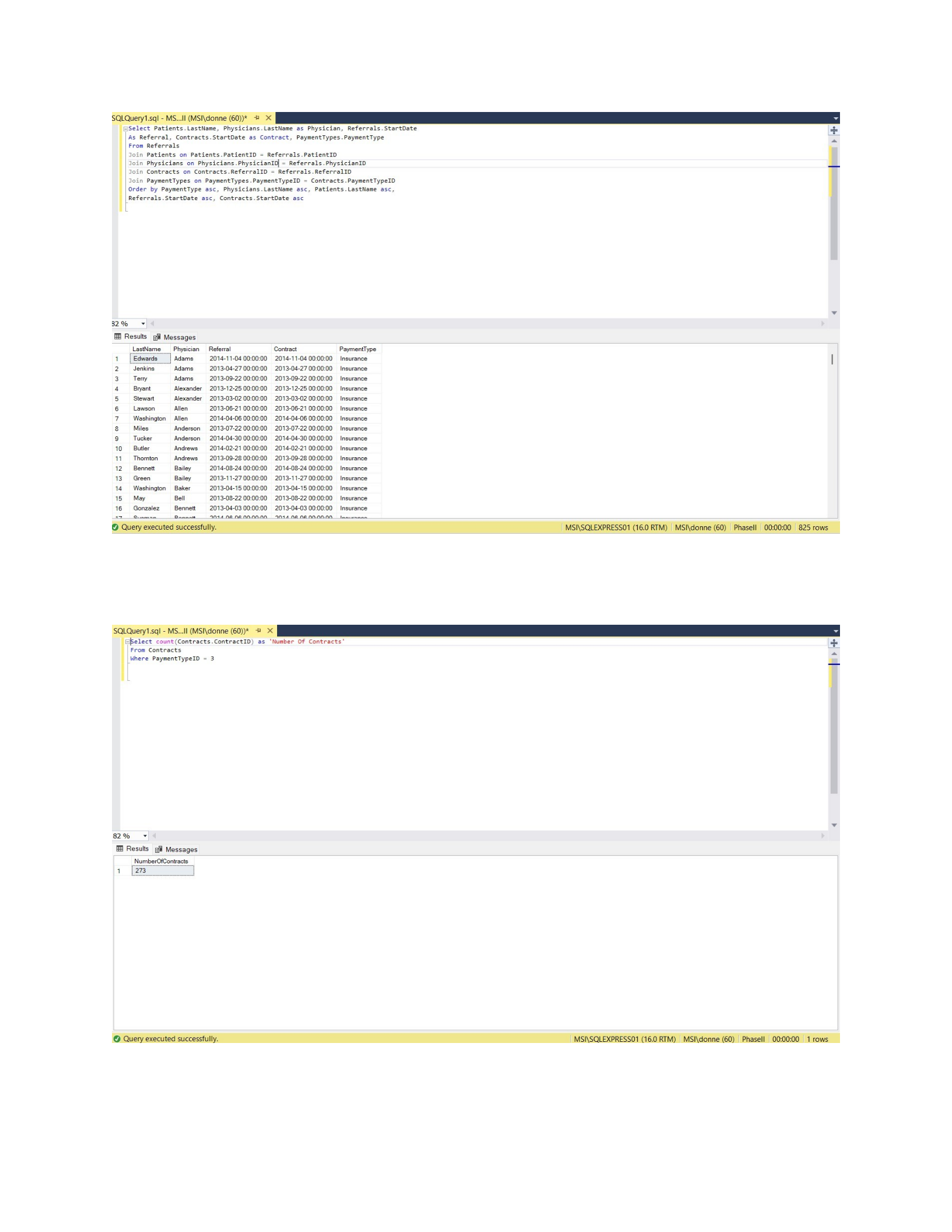
17. Display the contracts and payment methods associated with each referral
Select Patients.LastName, Physicians.LastName as Physician, Referrals.StartDate
As Referral, Contracts.StartDate as Contract, PaymentTypes.PaymentType
From Referrals
Join Patients on Patients.PatientID = Referrals.PatientID
Join Physicians on Physicians.PhysicianID = Referrals.PhysicianID
Join Contracts on Contracts.ReferralID = Referrals.ReferralID
Join PaymentTypes on PaymentTypes.PaymentTypeID = Contracts.PaymentTypeID
Order by PaymentType asc, Physicians.LastName asc, Patients.LastName asc,
Referrals.StartDate asc, Contracts.StartDate asc
Page 27 of 42
CSIS 325
18. Display the number of contracts whose payment method is Insurance
Select count(Contracts.ContractID) as 'Number Of Contracts'
From Contracts
Where PaymentTypeID = 3
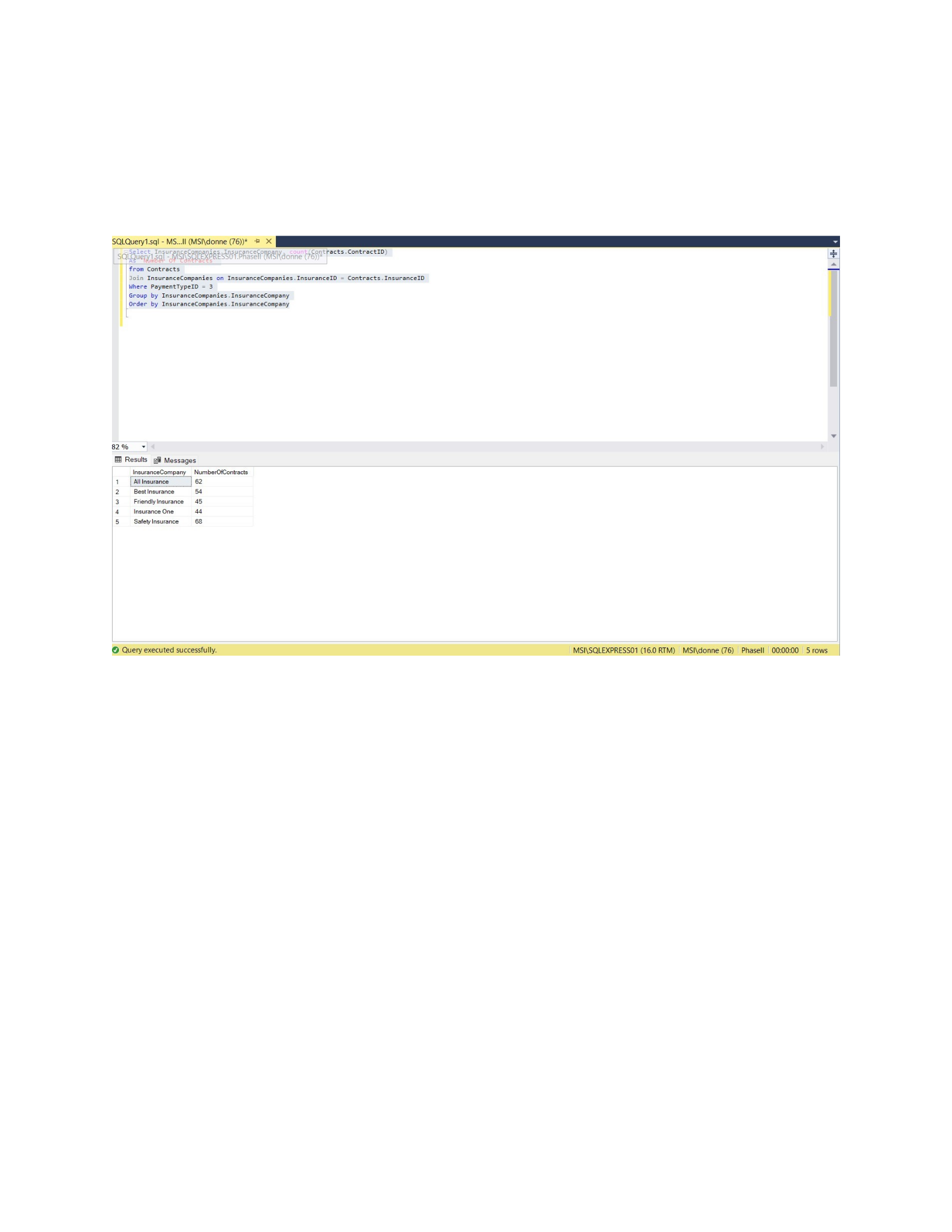
19. Display the number of contracts whose payment method is Insurance, broken out by Insurance
Company
Page 28 of 42
CSIS 325
Select InsuranceCompanies.InsuranceCompany, count(Contracts.ContractID)
As 'Number Of Contracts'
from Contracts
Join InsuranceCompanies on InsuranceCompanies.InsuranceID = Contracts.InsuranceID
Where PaymentTypeID = 3
Group by InsuranceCompanies.InsuranceCompany
Order by InsuranceCompanies.InsuranceCompany
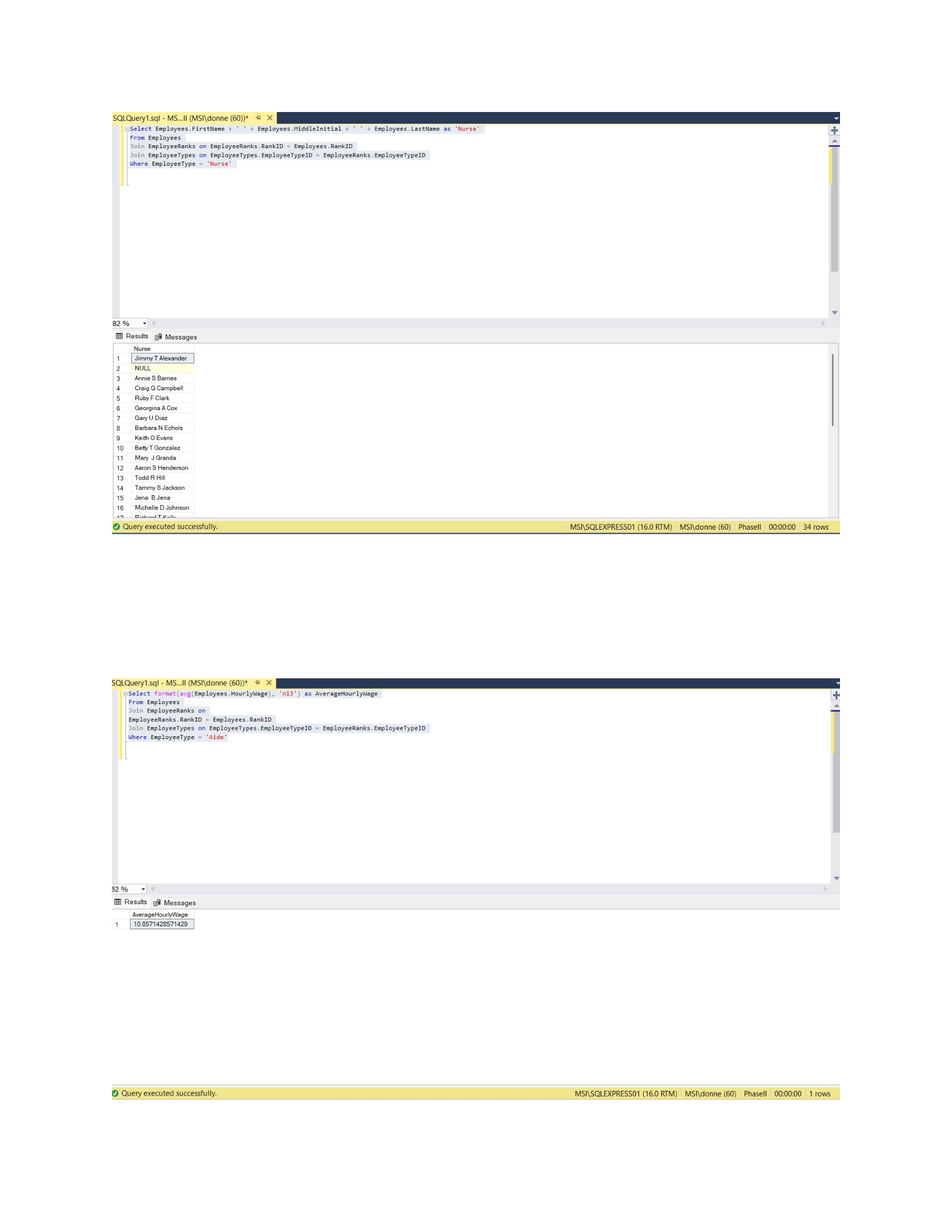
20. List the Employees who are Nurses
Select Employees.FirstName + ' ' + Employees.MiddleInitial + ' ' +
Employees.LastName as 'Nurse'
From Employees
Join EmployeeRanks on EmployeeRanks.RankID = Employees.RankID
Join EmployeeTypes on EmployeeTypes.EmployeeTypeID = EmployeeRanks.EmployeeTypeID
Where EmployeeType = 'Nurse'
Page 29 of 42
CSIS 325
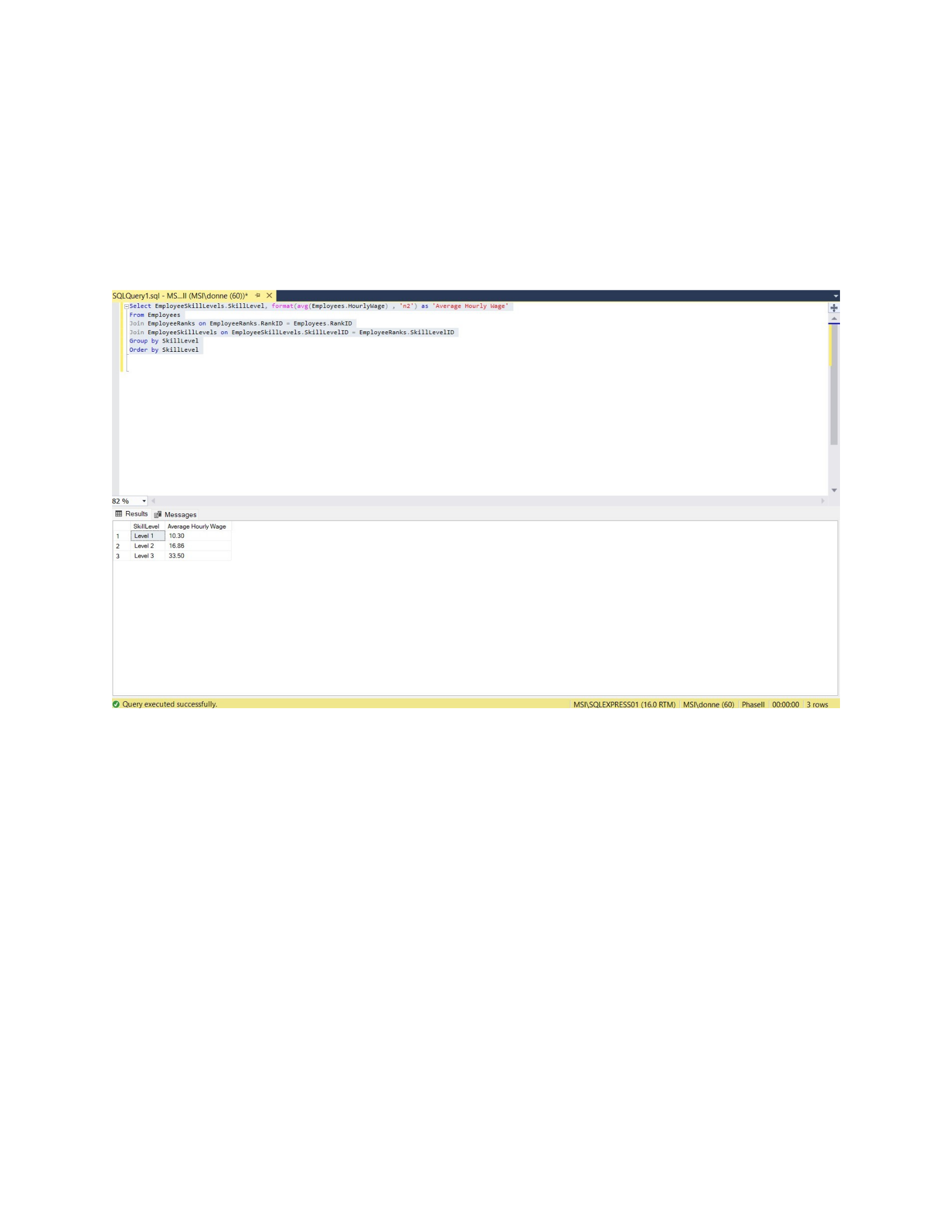
21. Display the average hourly wage for all employees who are aides.
Select format(avg(Employees.HourlyWage), 'n13') as AverageHourlyWage
From Employees
Join EmployeeRanks on
EmployeeRanks.RankID = Employees.RankID
Join EmployeeTypes on EmployeeTypes.EmployeeTypeID = EmployeeRanks.EmployeeTypeID
Where EmployeeType = 'Aide'
Page 30 of 42
CSIS 325
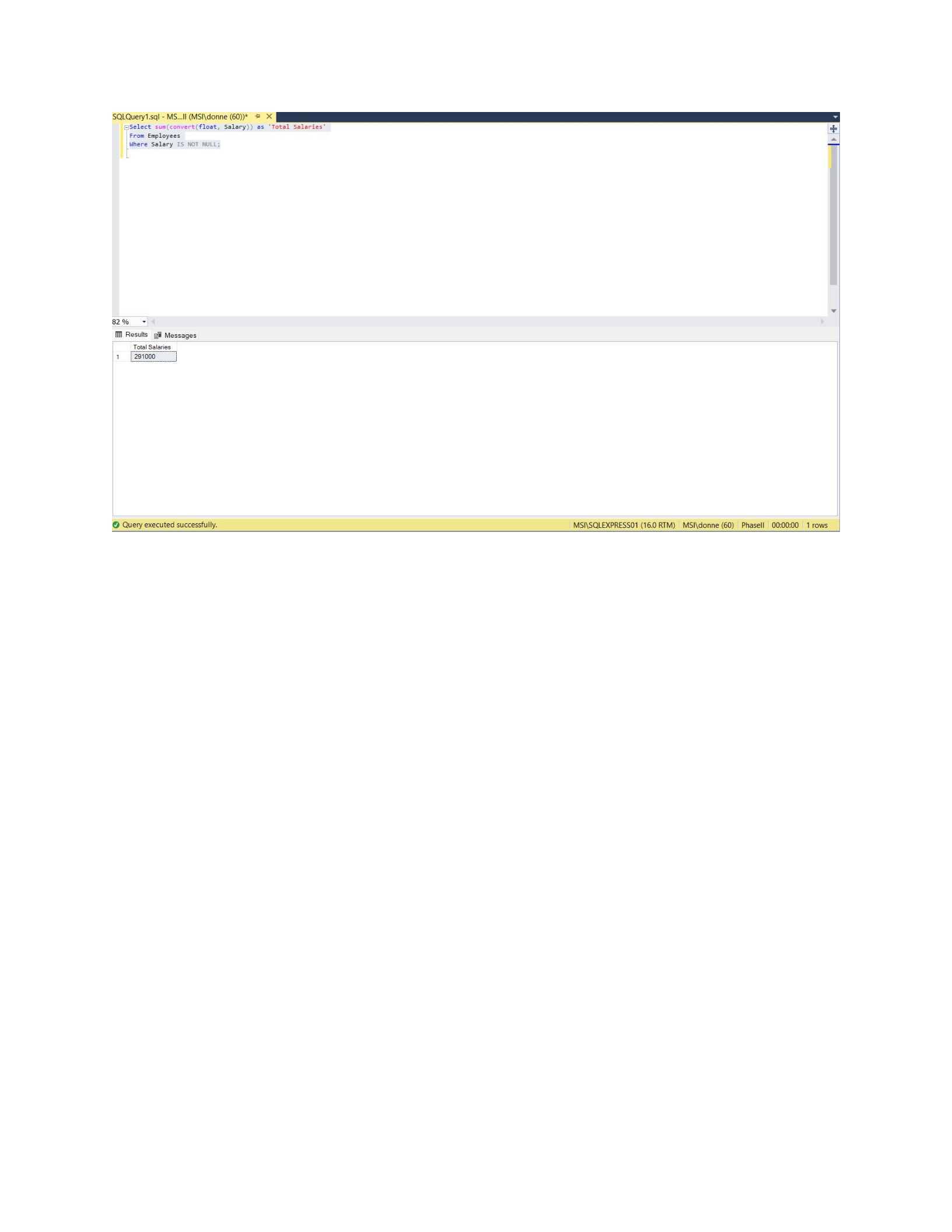
22. Display the average hourly wage for all hourly employees broken out by level.
Select EmployeeSkillLevels.SkillLevel, format(avg(Employees.HourlyWage) , 'n2')
as 'Average Hourly Wage'
From Employees
Join EmployeeRanks on EmployeeRanks.RankID = Employees.RankID
Join EmployeeSkillLevels on EmployeeSkillLevels.SkillLevelID =
EmployeeRanks.SkillLevelID
Group by SkillLevel
Order by SkillLevel
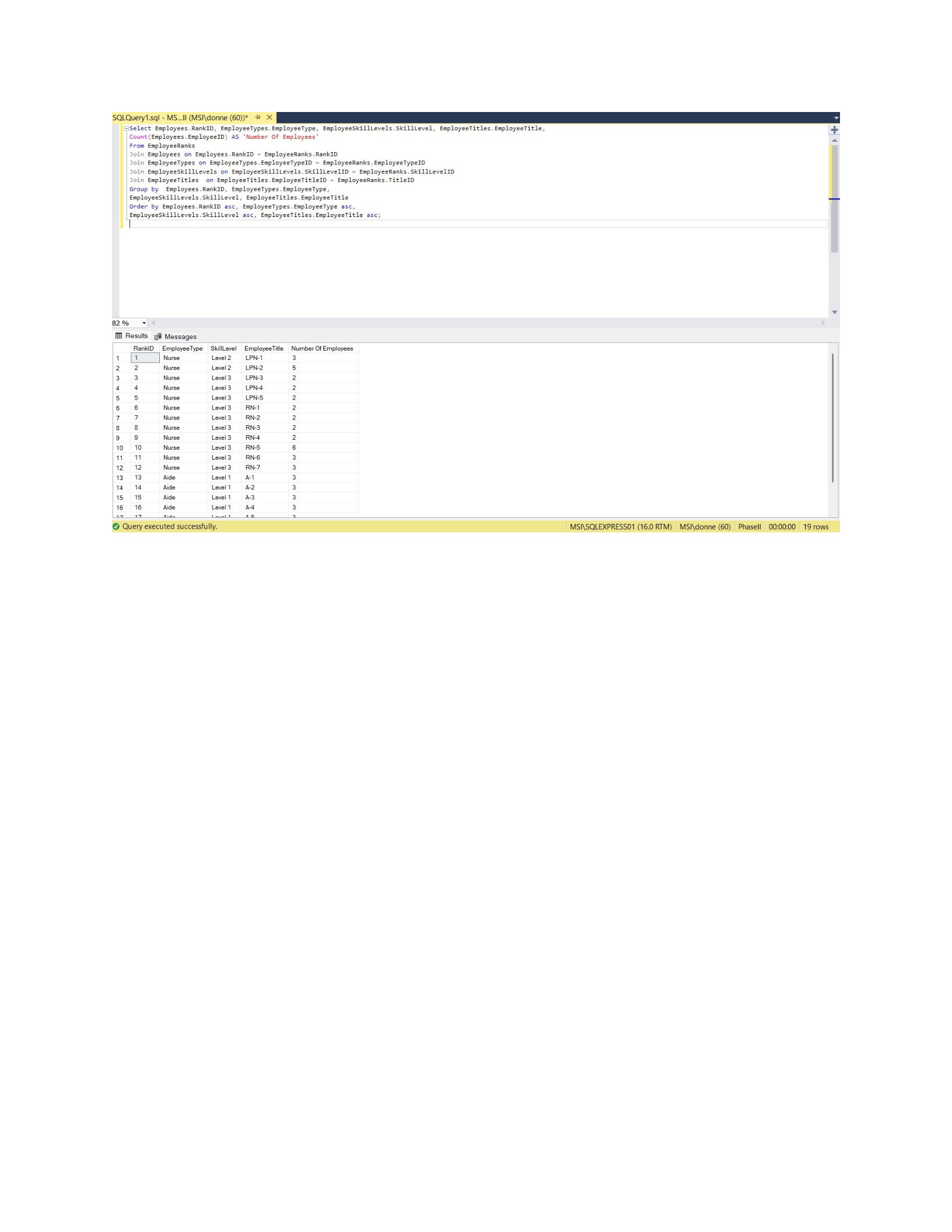
23. Display the total salary for all salaried employees.
Select sum(convert(float, Salary)) as 'Total Salaries'
From Employees
Where Salary IS NOT NULL;
Page 31 of 42
CSIS 325
24. Display the number of employees assigned to each rank.
Select Employees.RankID, EmployeeTypes.EmployeeType,
EmployeeSkillLevels.SkillLevel, EmployeeTitles.EmployeeTitle,
Count(Employees.EmployeeID) AS 'Number Of Employees'
From EmployeeRanks
Join Employees on Employees.RankID = EmployeeRanks.RankID
Join EmployeeTypes on EmployeeTypes.EmployeeTypeID = EmployeeRanks.EmployeeTypeID
Join EmployeeSkillLevels on EmployeeSkillLevels.SkillLevelID =
EmployeeRanks.SkillLevelID
Join EmployeeTitles on EmployeeTitles.EmployeeTitleID = EmployeeRanks.TitleID
Group by Employees.RankID, EmployeeTypes.EmployeeType,
EmployeeSkillLevels.SkillLevel, EmployeeTitles.EmployeeTitle
Order by Employees.RankID asc, EmployeeTypes.EmployeeType asc,
EmployeeSkillLevels.SkillLevel asc, EmployeeTitles.EmployeeTitle asc;
Page 32 of 42
CSIS 325
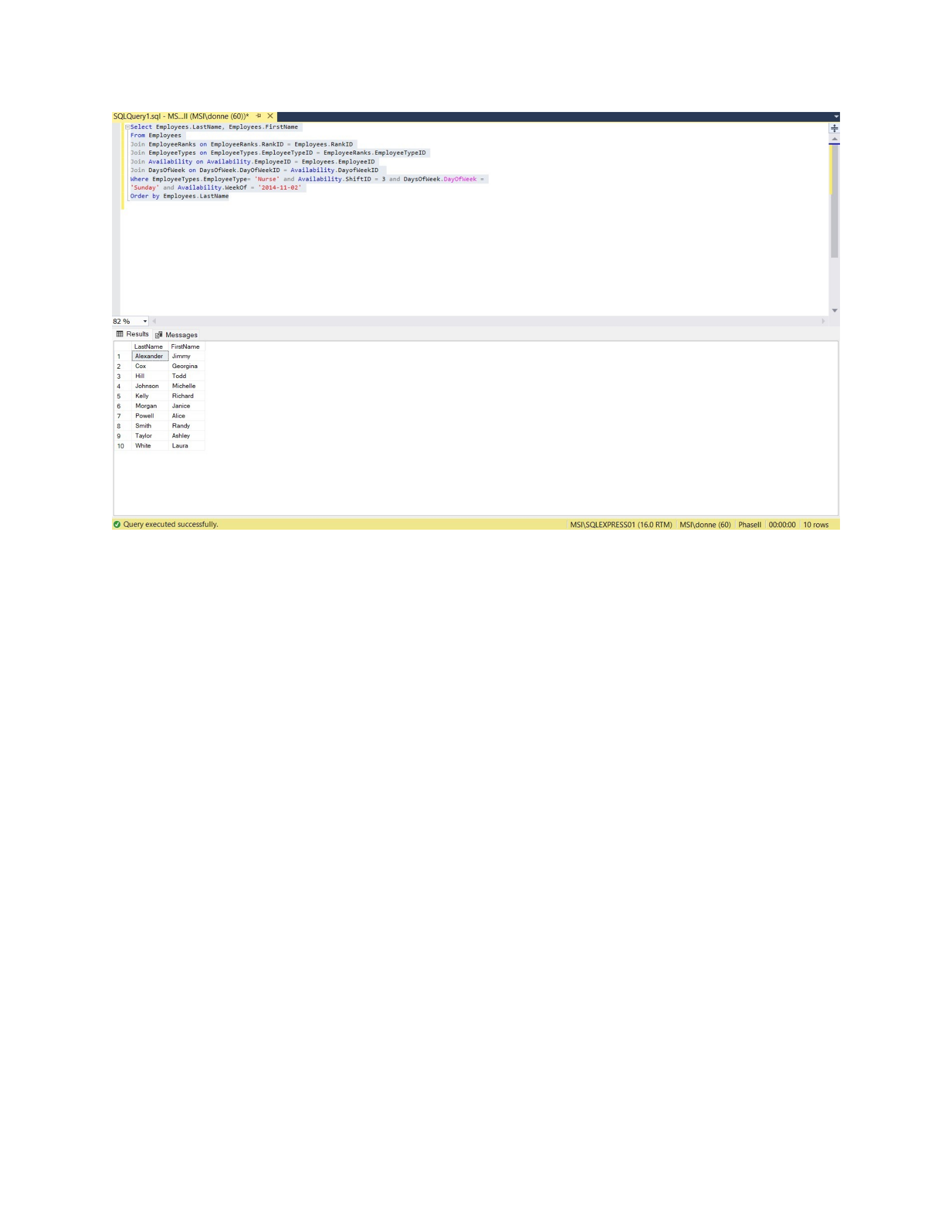
25. Display a list of Employees who are nurses and were available to work on Sunday evenings
during the week of 11/2/2014
Select Employees.LastName, Employees.FirstName
From Employees
Join EmployeeRanks on EmployeeRanks.RankID = Employees.RankID
Join EmployeeTypes on EmployeeTypes.EmployeeTypeID = EmployeeRanks.EmployeeTypeID
Join Availability on Availability.EmployeeID = Employees.EmployeeID
Join DaysOfWeek on DaysOfWeek.DayOfWeekID = Availability.DayofWeekID
Where EmployeeTypes.EmployeeType= 'Nurse' and Availability.ShiftID = 3 and
DaysOfWeek.DayOfWeek =
'Sunday' and Availability.WeekOf = '2014-11-02'
Order by Employees.LastName
Page 33 of 42
CSIS 325
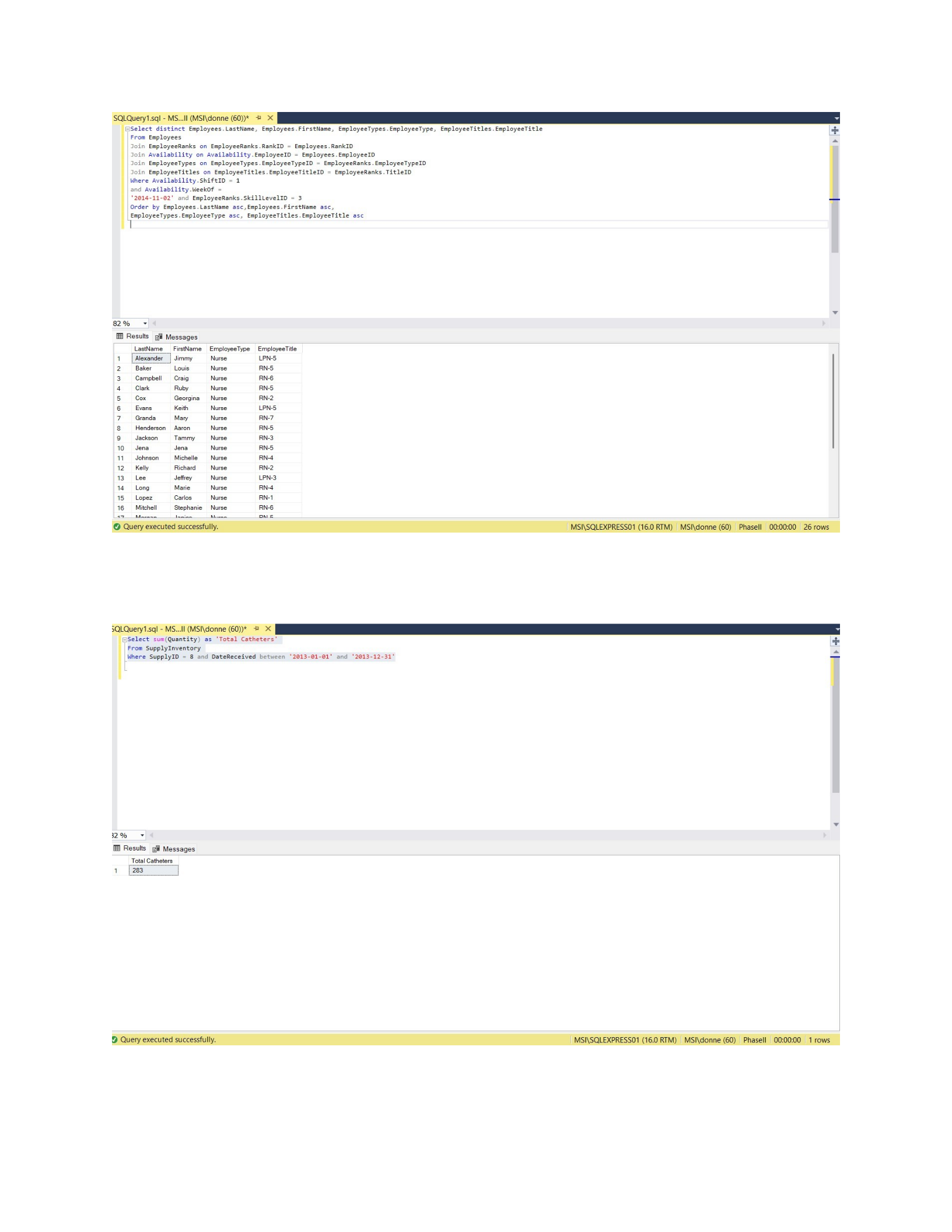
26. Display a list of Employees who were available to work during morning shifts during the week of
11/2/2014 and had a skill level of level 3.
Select distinct Employees.LastName, Employees.FirstName,
EmployeeTypes.EmployeeType, EmployeeTitles.EmployeeTitle
From Employees
Join EmployeeRanks on EmployeeRanks.RankID = Employees.RankID
Join Availability on Availability.EmployeeID = Employees.EmployeeID
Join EmployeeTypes on EmployeeTypes.EmployeeTypeID = EmployeeRanks.EmployeeTypeID
Join EmployeeTitles on EmployeeTitles.EmployeeTitleID = EmployeeRanks.TitleID
Where Availability.ShiftID = 1
and Availability.WeekOf =
'2014-11-02' and EmployeeRanks.SkillLevelID = 3
Order by Employees.LastName asc,Employees.FirstName asc,
EmployeeTypes.EmployeeType asc, EmployeeTitles.EmployeeTitle asc
Page 34 of 42
CSIS 325
27. Display the total quantity of catheters added to inventory during 2013.
Select sum(Quantity) as 'Total Catheters'
From SupplyInventory
Where SupplyID = 8 and DateReceived between '2013-01-01' and '2013-12-31'
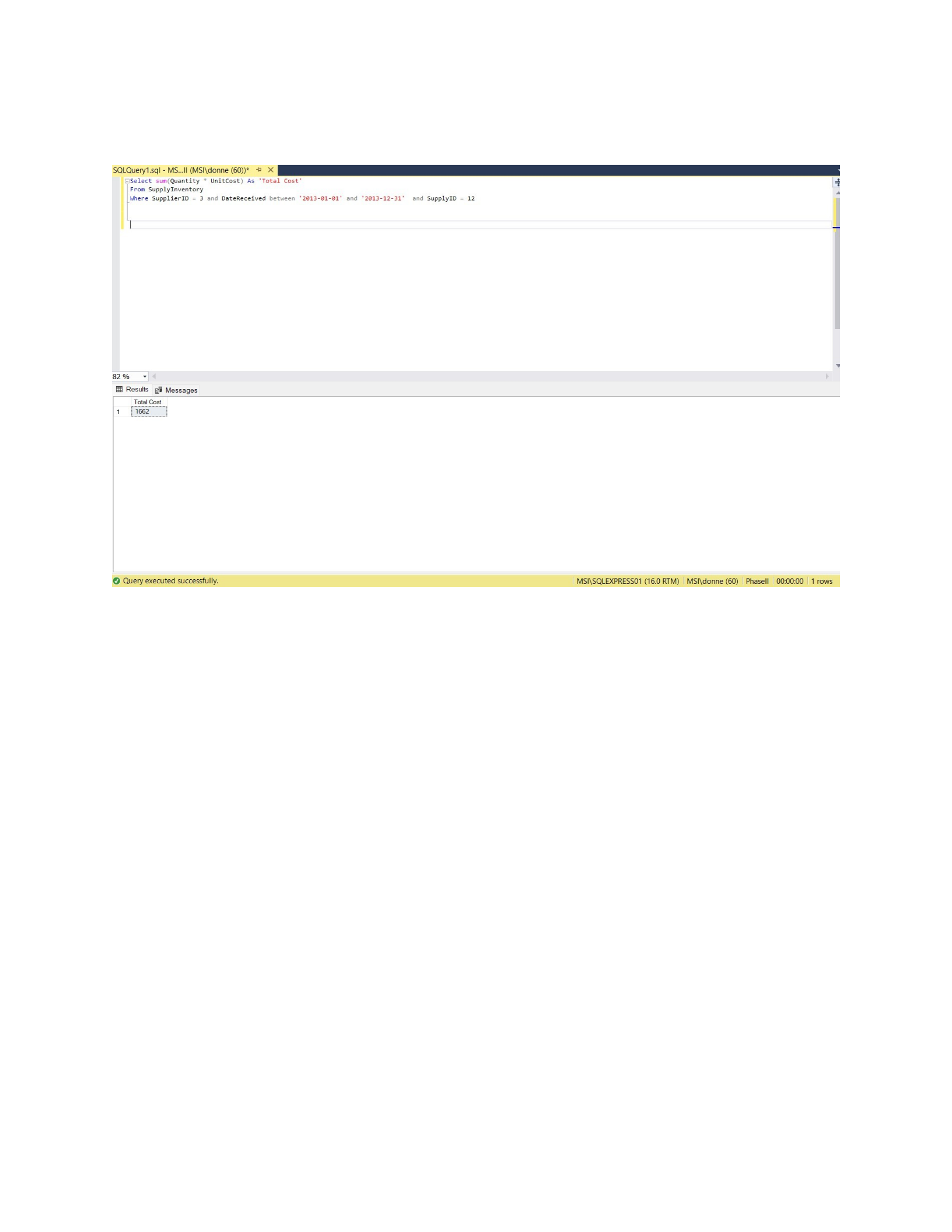
28. Display the total cost of “sterile gloves – small” provided by Poole’s Medical supplies during 2013.
Select sum(Quantity * UnitCost) As 'Total Cost'
Page 35 of 42
CSIS 325
From SupplyInventory
Where SupplierID = 3 and DateReceived between '2013-01-01' and '2013-12-31' and
SupplyID = 12
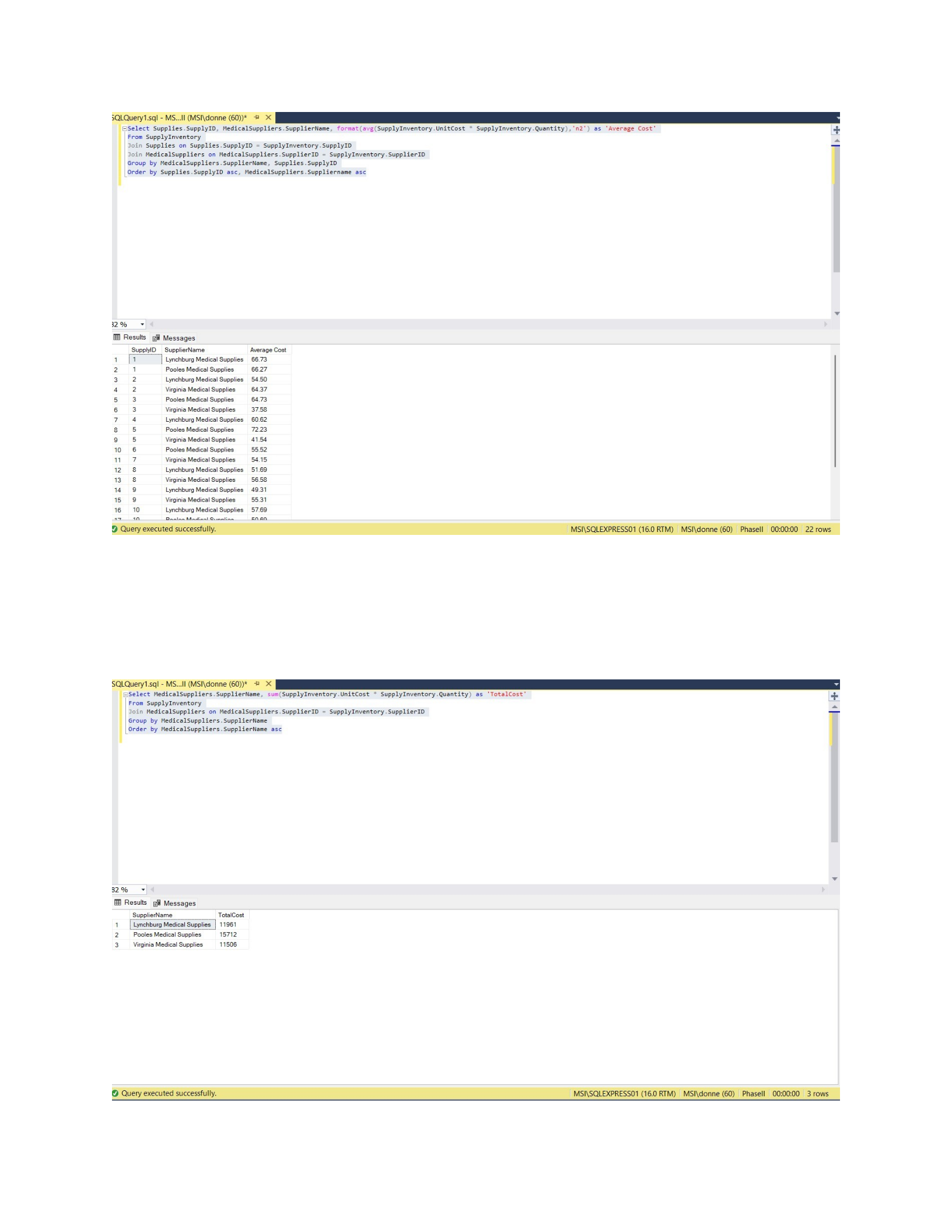
29. Display the average cost of supplies for each supply item broken out by supplier.
Select Supplies.SupplyID, MedicalSuppliers.SupplierName,
format(avg(SupplyInventory.UnitCost * SupplyInventory.Quantity),'n2') as 'Average
Cost'
From SupplyInventory
Join Supplies on Supplies.SupplyID = SupplyInventory.SupplyID
Join MedicalSuppliers on MedicalSuppliers.SupplierID = SupplyInventory.SupplierID
Group by MedicalSuppliers.SupplierName, Supplies.SupplyID
Order by Supplies.SupplyID asc, MedicalSuppliers.Suppliername asc
Page 36 of 42
CSIS 325
30. Display the total cost of all items purchased from suppliers broken out by supplier.
Select MedicalSuppliers.SupplierName, sum(SupplyInventory.UnitCost *
SupplyInventory.Quantity) as 'TotalCost'
From SupplyInventory
Join MedicalSuppliers on MedicalSuppliers.SupplierID = SupplyInventory.SupplierID
Group by MedicalSuppliers.SupplierName
Order by MedicalSuppliers.SupplierName asc
Page 37 of 42
CSIS 325
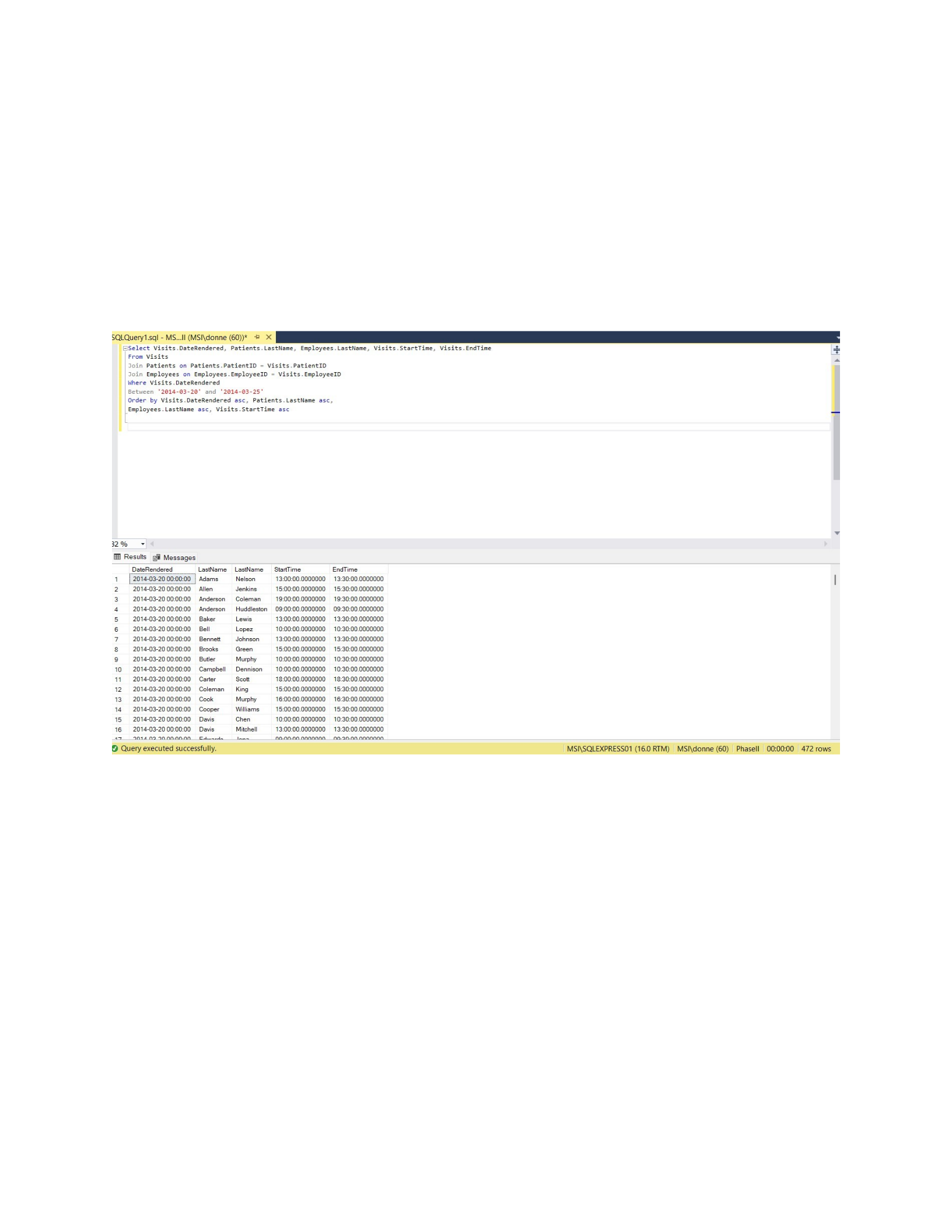
31. Display a list of all the visits that occurred from March 20, 2014 to March 25, 2014 (including March
20 and March 25)
Select Visits.DateRendered, Patients.LastName, Employees.LastName,
Visits.StartTime, Visits.EndTime
From Visits
Join Patients on Patients.PatientID = Visits.PatientID
Join Employees on Employees.EmployeeID = Visits.EmployeeID
Where Visits.DateRendered
Between '2014-03-20' and '2014-03-25'
Order by Visits.DateRendered asc, Patients.LastName asc,
Employees.LastName asc, Visits.StartTime asc
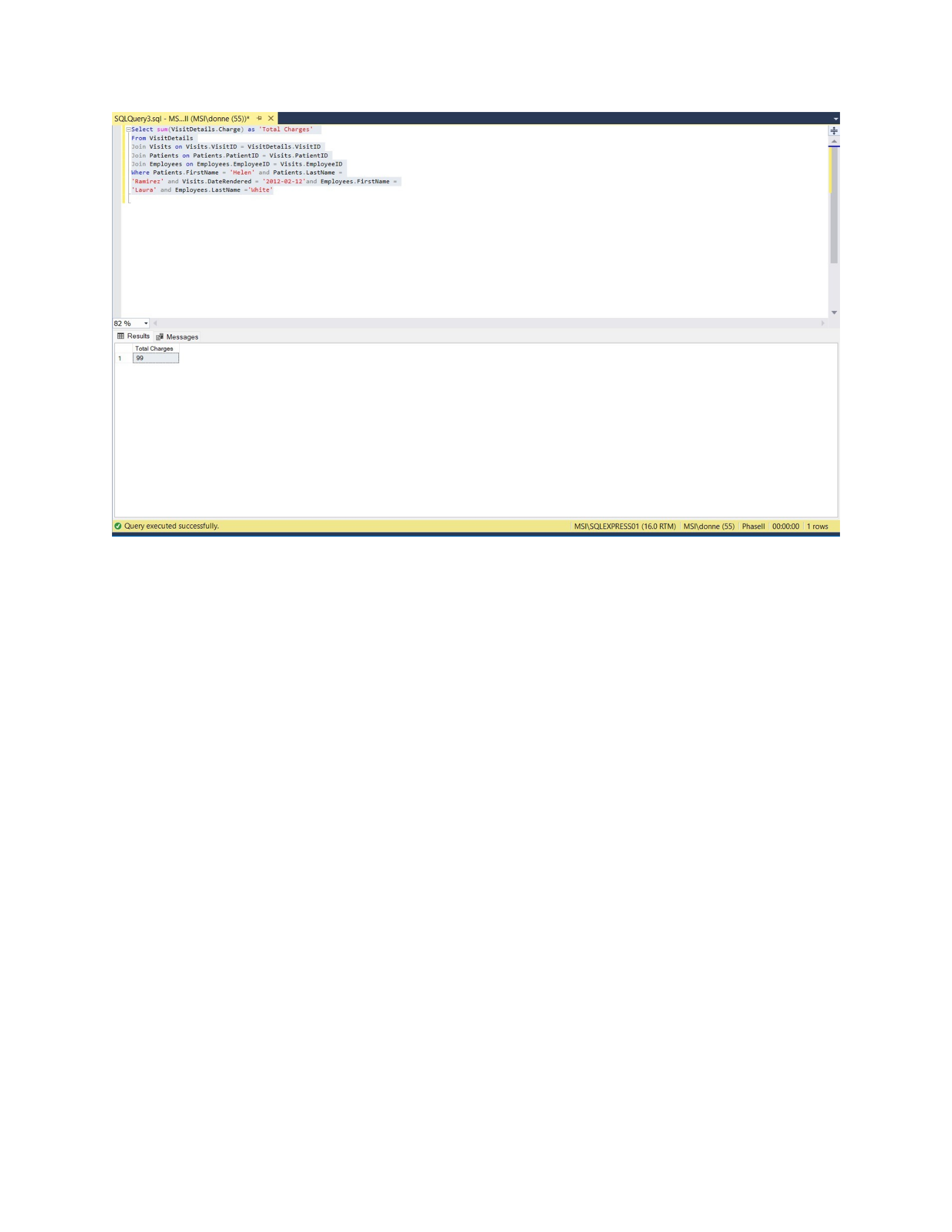
32. List the total charges for the visit that occurred on 2/12/2014 for Helen Ramirez that was provided
by Laura White.
Select sum(VisitDetails.Charge) as 'Total Charges'
From VisitDetails
Join Visits on Visits.VisitID = VisitDetails.VisitID
Join Patients on Patients.PatientID = Visits.PatientID
Join Employees on Employees.EmployeeID = Visits.EmployeeID
Where Patients.FirstName = 'Helen' and Patients.LastName =
'Ramirez' and Visits.DateRendered = '2012-02-12'and Employees.FirstName =
'Laura' and Employees.LastName ='White'
Page 38 of 42
CSIS 325
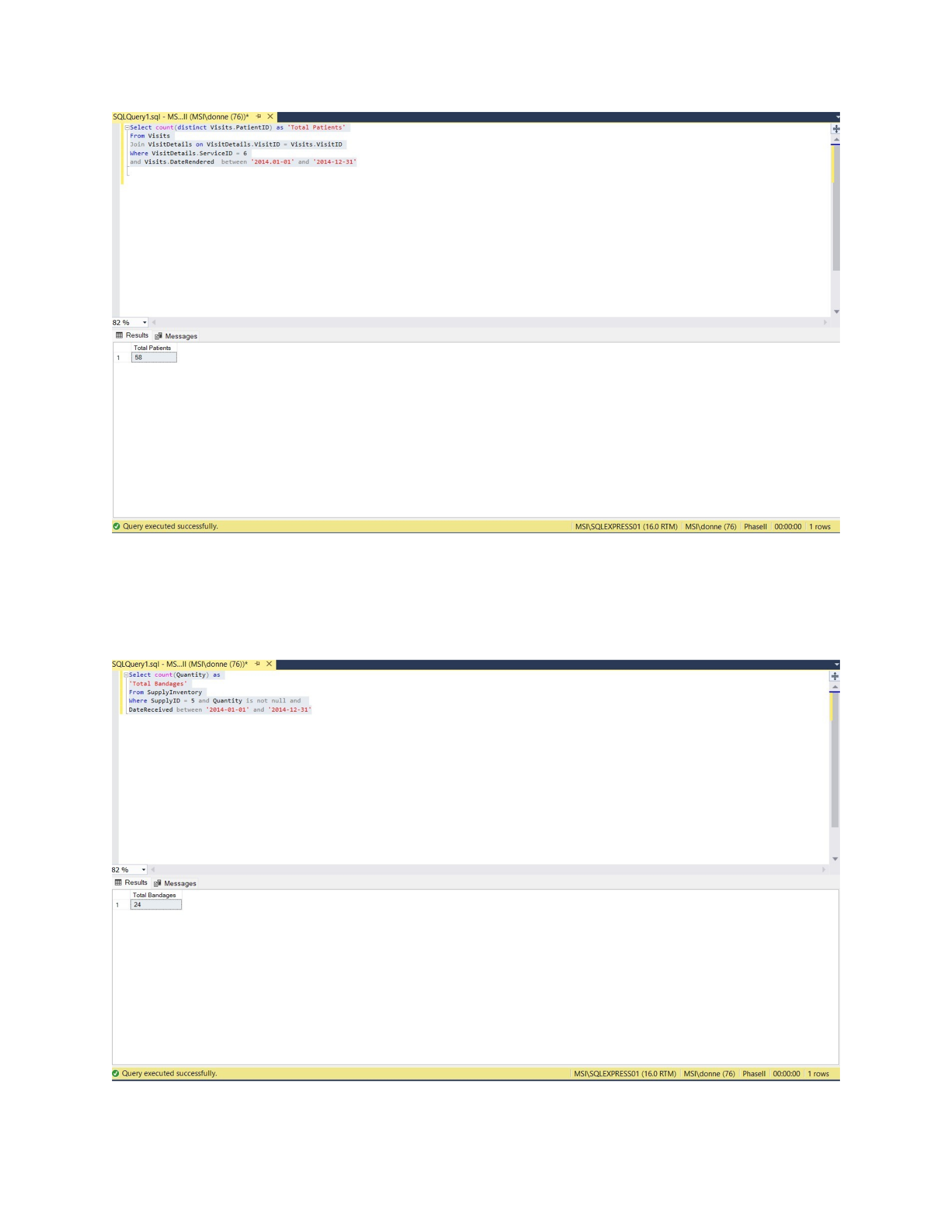
33. List the number of patients who received insulin injections during 2014 (Note this is the number of
unique patients who ever received insulin injections – not the number of visits in which insulin
injections were provided).
Select count(distinct Visits.PatientID) as 'Total Patients'
From Visits
Join VisitDetails on VisitDetails.VisitID = Visits.VisitID
Where VisitDetails.ServiceID = 6
and Visits.DateRendered between '2014.01-01' and '2014-12-31'
Page 39 of 42
CSIS 325
34. List the total number of 4” self-adhesive bandages that were used in 2014
Select count(Quantity) as
'Total Bandages'
From SupplyInventory
Where SupplyID = 5 and Quantity is not null and
DateReceived between '2014-01-01' and '2014-12-31'
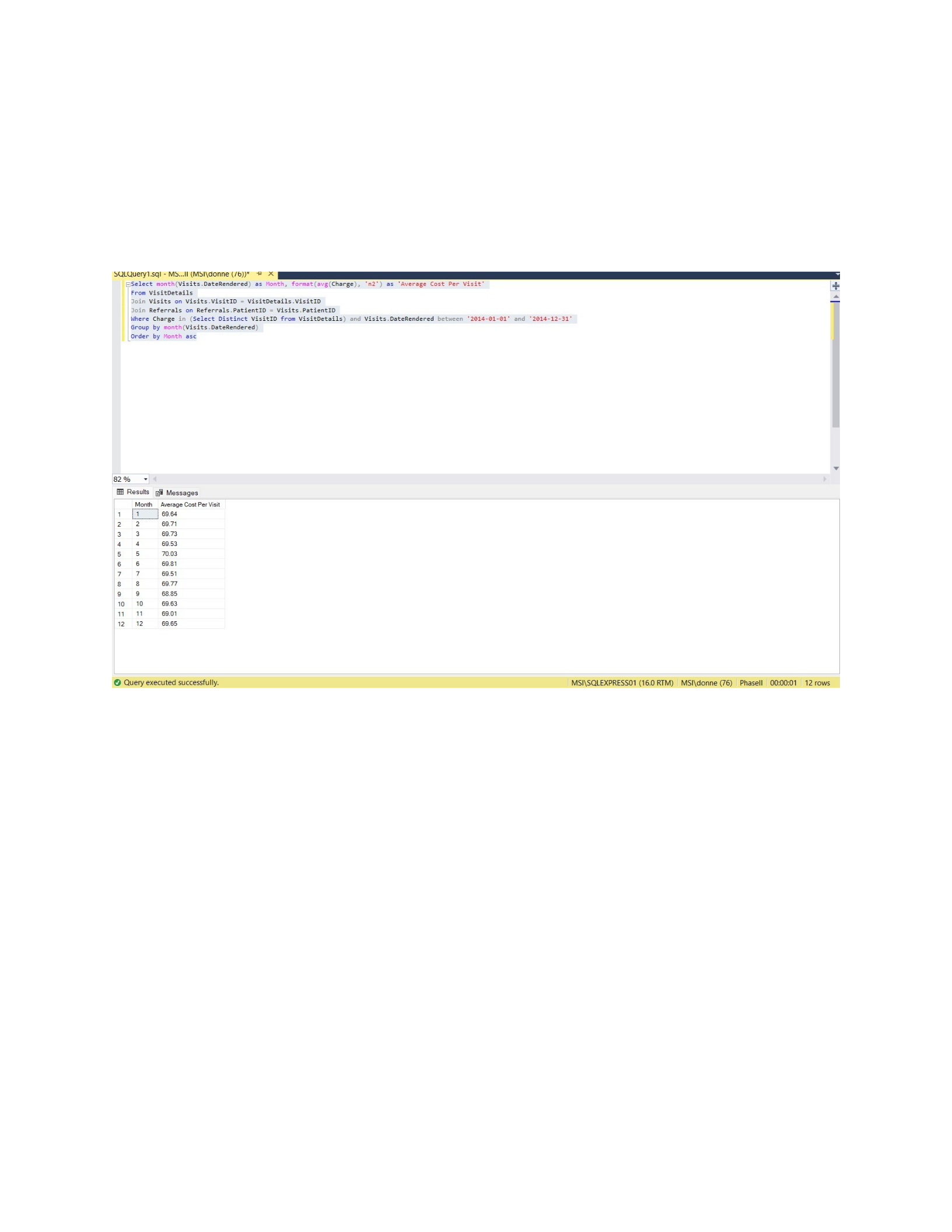
35. List the average charge per visit per month in 2014 broken out by months
Page 40 of 42
CSIS 325
Select month(Visits.DateRendered) as Month, format(avg(Charge), 'n2') as 'Average
Cost Per Visit'
From VisitDetails
Join Visits on Visits.VisitID = VisitDetails.VisitID
Join Referrals on Referrals.PatientID = Visits.PatientID
Where Charge in (Select Distinct VisitID from VisitDetails) and
Visits.DateRendered between '2014-01-01' and '2014-12-31'
Group by month(Visits.DateRendered)
Order by Month asc
36. Provide a unique list of patients who received visits for feeding from November 1, 2014 until the
current date.
Select distinct Patients.LastName, Patients.FirstName
From Patients
Join Referrals on Referrals.PatientID = Patients.PatientID
Join ReferralServices on ReferralServices.ReferralID = Referrals.ReferralID
Join Services on
Services.ServiceID = ReferralServices.ServiceID
Where Services.ServiceID = 2 and Referrals.StartDate between '11/1/2014' and
'2025-10-8'
Order by Patients.LastName asc,
Patients.FirstName asc
Page 41 of 42
CSIS 325
Page 42 of 42

