


Maximum points: 20 pts
Topics
•Loops (Chapter 4)
Use the following Guidelines:
Give identifiers semantic meaning and make them easy to read (examples numStudents,
grossPay, etc).
Keep identifiers to a reasonably short length.
User upper case for constants. Use title case (first letter is upper case) for classes. Use lower
case with uppercase word separators for all other identifiers (variables, methods, objects).
Use tabs or spaces to indent code within blocks (code surrounded by braces). This includes
classes, methods, and code associated with ifs, switches and loops. Be consistent with the
number of spaces or tabs that you use to indent.
Use white space to make your program more readable.
Important Note:
All submitted assignments must begin with the descriptive comment block. To avoid losing trivial
points, make sure this comment header is included in every assignment you submit, and that it is
updated accordingly from assignment to assignment. (If not, -1 Pt)
//***********************************************************
// Name: your name
// Title: title of the source file
// Description: Write the description in your words.
// Date: the date you programmed
//**********************************************************
Your programming assignments require individual work and effort to be of any benefit. Every
student must work independently on his or her assignments. This means that every student must
ensure that neither a soft copy nor a hard copy of their work gets into the hands of another student.
Sharing your assignments with others in any way is NOT permitted. Violations of the University
Academic Integrity policy will not be ignored. The university academic integrity policy is found at
http://www.asu.edu/studentlife/judicial/integrity.html . Don't use any paid tutoring service online .
We have strong connections to the world-wide proctors on the site, and if you use it, very serious
penalty (expel, cheating academic history, etc) will be given.
© 2019 Yoshihiro Kobayashi <ykobaya@asu.edu>
CSE 110 – Assignment #4
Part 1: Writing Exercise: (5 pts)
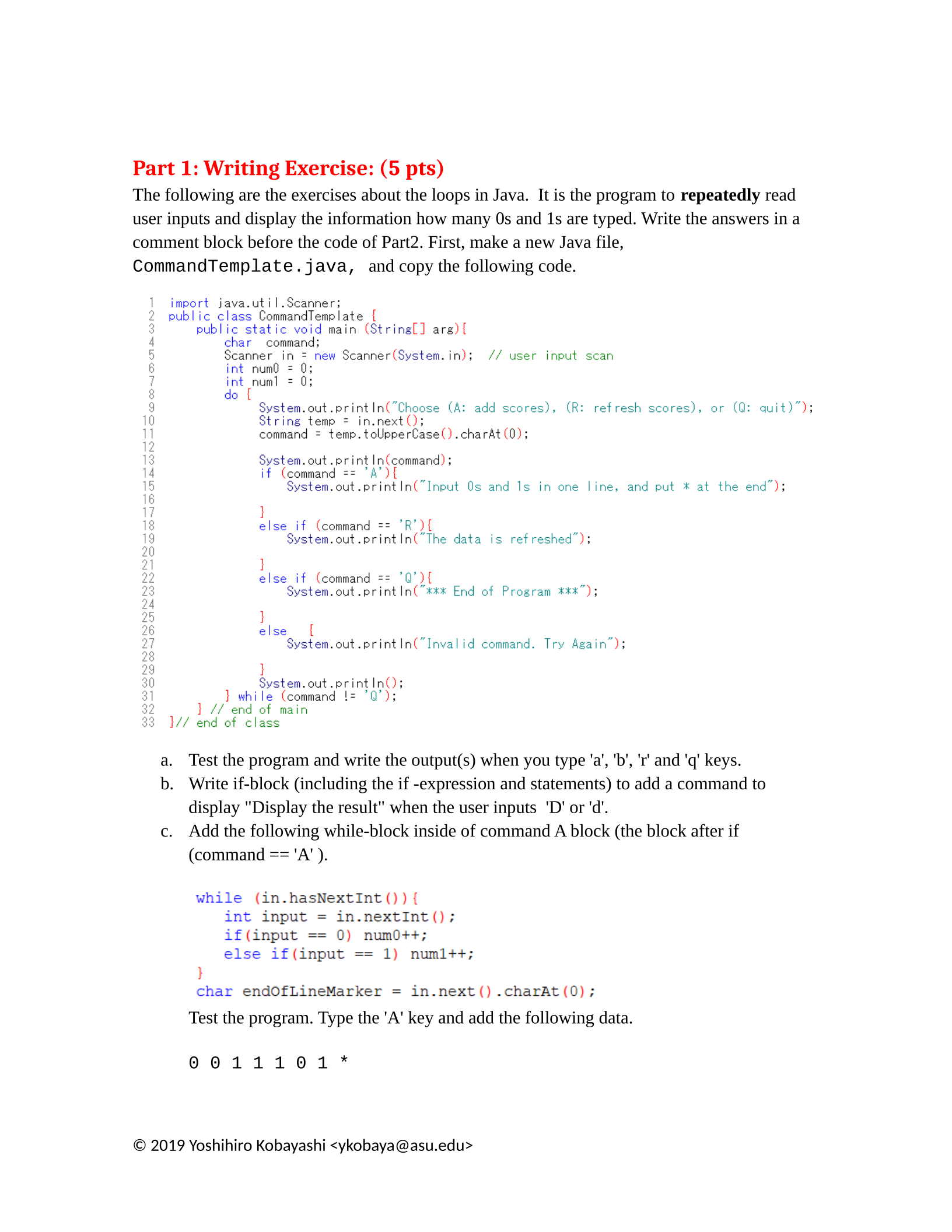
The following are the exercises about the loops in Java. It is the program to repeatedly read
user inputs and display the information how many 0s and 1s are typed. Write the answers in a
comment block before the code of Part2. First, make a new Java file,
CommandTemplate.java, and copy the following code.
a. Test the program and write the output(s) when you type 'a', 'b', 'r' and 'q' keys.
b. Write if-block (including the if -expression and statements) to add a command to
display "Display the result" when the user inputs 'D' or 'd'.
c. Add the following while-block inside of command A block (the block after if
(command == 'A' ).
Test the program. Type the 'A' key and add the following data.
0 0 1 1 1 0 1 *
© 2019 Yoshihiro Kobayashi <ykobaya@asu.edu>
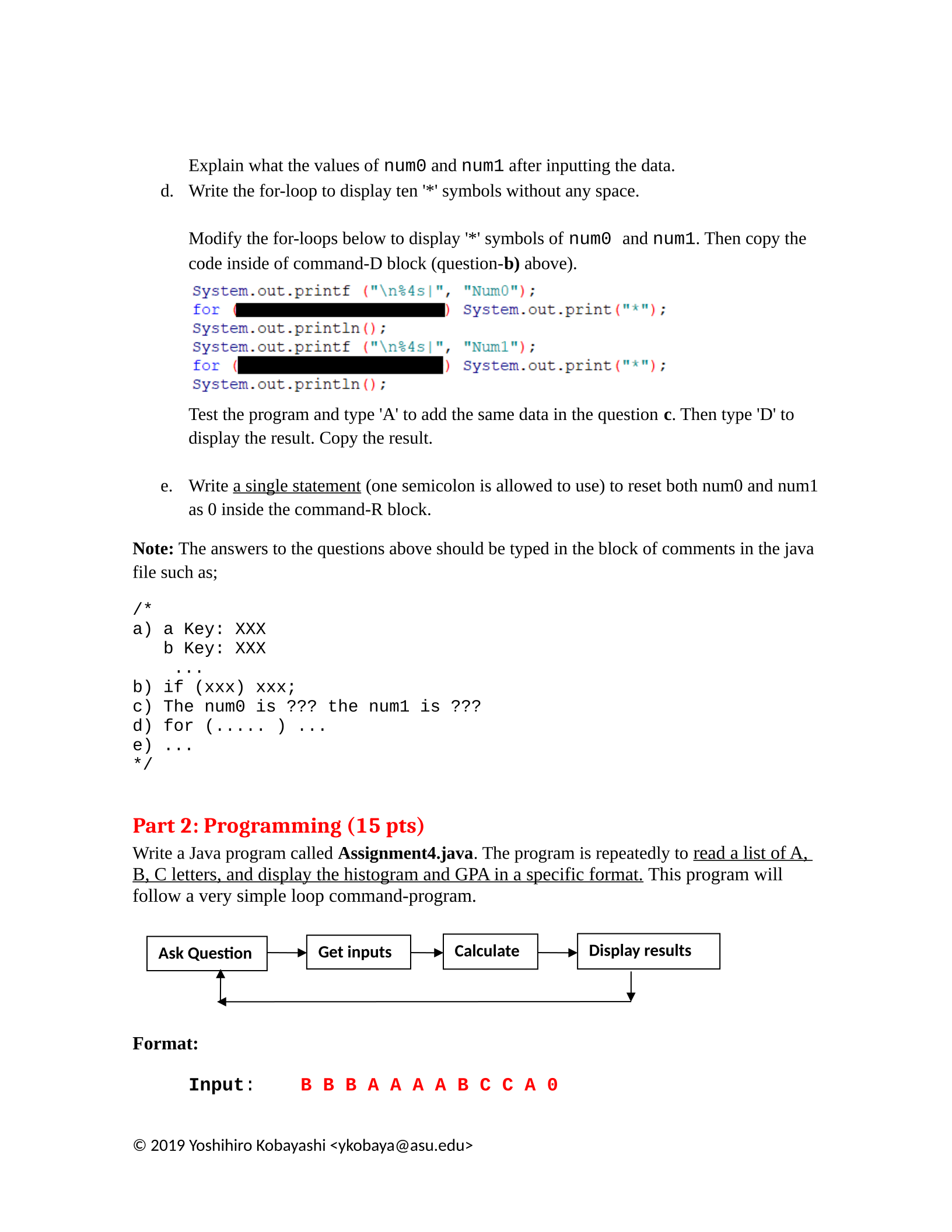
Explain what the values of num0 and num1 after inputting the data.
d. Write the for-loop to display ten '*' symbols without any space.
Modify the for-loops below to display '*' symbols of num0 and num1. Then copy the
code inside of command-D block (question-b) above).
Test the program and type 'A' to add the same data in the question c. Then type 'D' to
display the result. Copy the result.
e. Write a single statement (one semicolon is allowed to use) to reset both num0 and num1
as 0 inside the command-R block.
Note: The answers to the questions above should be typed in the block of comments in the java
file such as;
/*
a) a Key: XXX
b Key: XXX
...
b) if (xxx) xxx;
c) The num0 is ??? the num1 is ???
d) for (..... ) ...
e) ...
*/
Part 2: Programming (15 pts)
Write a Java program called Assignment4.java. The program is repeatedly to read a list of A,
B, C letters, and display the histogram and GPA in a specific format. This program will
follow a very simple loop command-program.
Format:
Input: B B B A A A A B C C A 0
© 2019 Yoshihiro Kobayashi <ykobaya@asu.edu>
Get inputs Display results
Ask Question Calculate
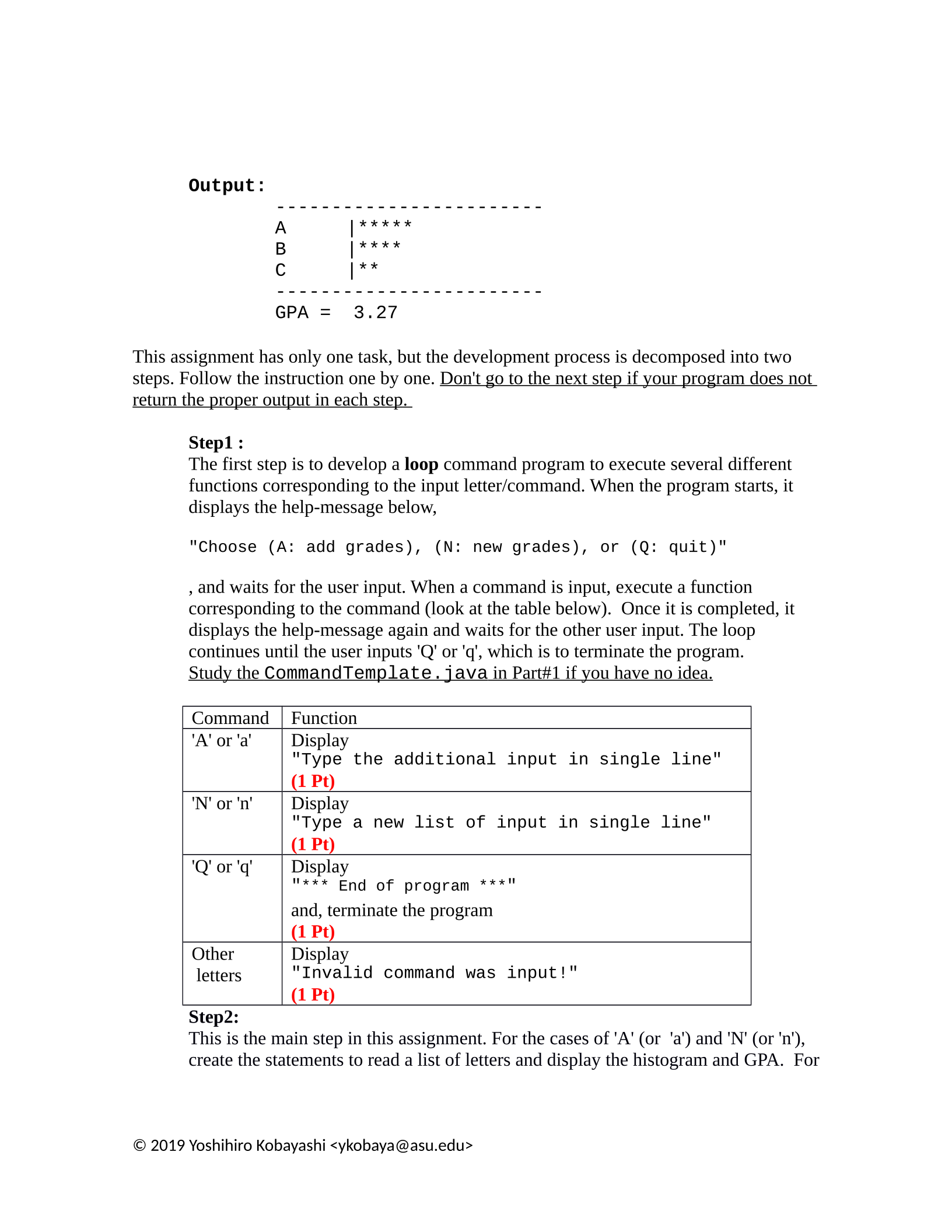
Output:
------------------------
A |*****
B |****
C |**
------------------------
GPA = 3.27
This assignment has only one task, but the development process is decomposed into two
steps. Follow the instruction one by one. Don't go to the next step if your program does not
return the proper output in each step.
Step1 :
The first step is to develop a loop command program to execute several different
functions corresponding to the input letter/command. When the program starts, it
displays the help-message below,
"Choose (A: add grades), (N: new grades), or (Q: quit)"
, and waits for the user input. When a command is input, execute a function
corresponding to the command (look at the table below). Once it is completed, it
displays the help-message again and waits for the other user input. The loop
continues until the user inputs 'Q' or 'q', which is to terminate the program.
Study the CommandTemplate.java in Part#1 if you have no idea.
Command Function
'A' or 'a' Display
"Type the additional input in single line"
(1 Pt)
'N' or 'n' Display
"Type a new list of input in single line"
(1 Pt)
'Q' or 'q' Display
"*** End of program ***"
and, terminate the program
(1 Pt)
Other
letters
Display
"Invalid command was input!"
(1 Pt)
Step2:
This is the main step in this assignment. For the cases of 'A' (or 'a') and 'N' (or 'n'),
create the statements to read a list of letters and display the histogram and GPA. For
© 2019 Yoshihiro Kobayashi <ykobaya@asu.edu>
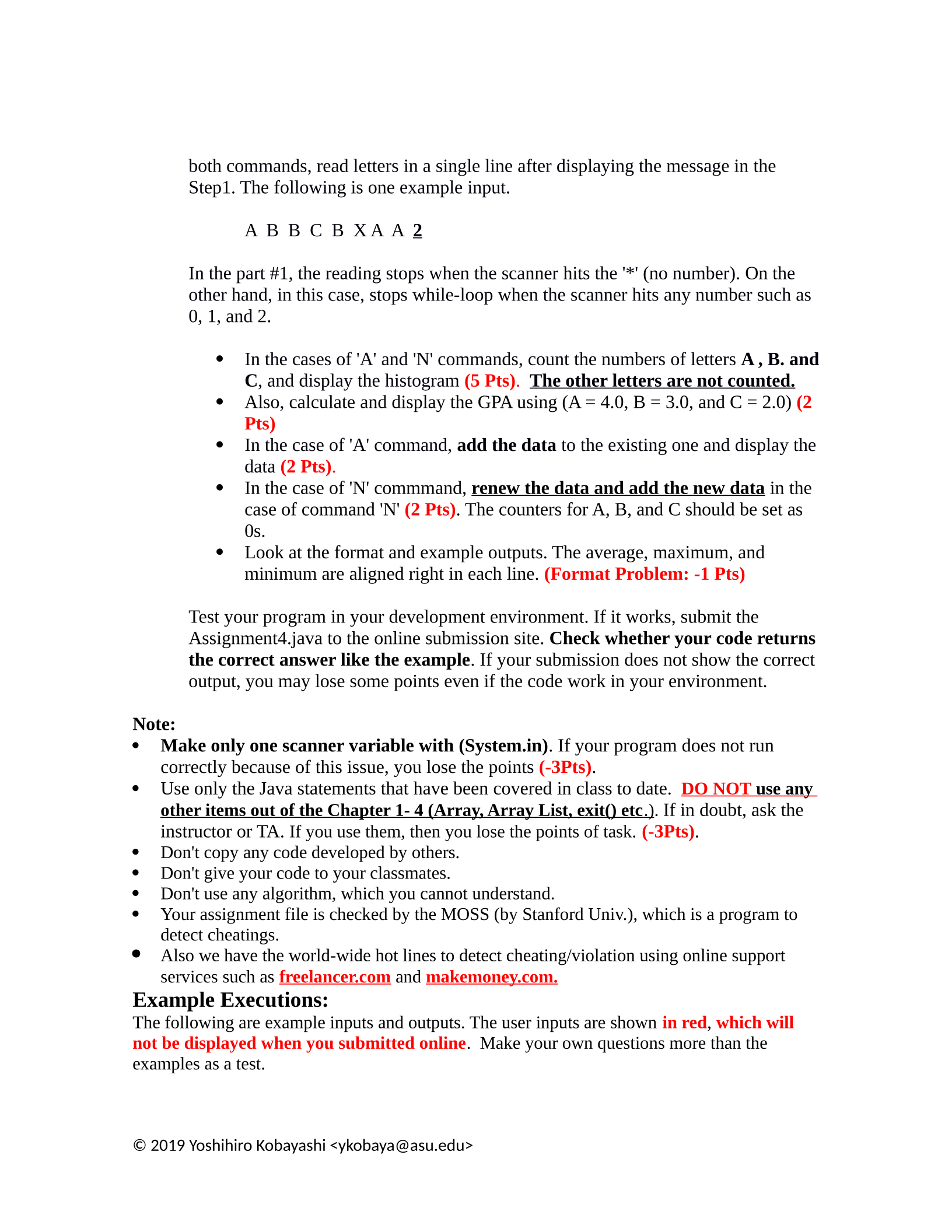
both commands, read letters in a single line after displaying the message in the
Step1. The following is one example input.
A B B C B X A A 2
In the part #1, the reading stops when the scanner hits the '*' (no number). On the
other hand, in this case, stops while-loop when the scanner hits any number such as
0, 1, and 2.
In the cases of 'A' and 'N' commands, count the numbers of letters A , B. and
C, and display the histogram (5 Pts). The other letters are not counted.
Also, calculate and display the GPA using (A = 4.0, B = 3.0, and C = 2.0) (2
Pts)
In the case of 'A' command, add the data to the existing one and display the
data (2 Pts).
In the case of 'N' commmand, renew the data and add the new data in the
case of command 'N' (2 Pts). The counters for A, B, and C should be set as
0s.
Look at the format and example outputs. The average, maximum, and
minimum are aligned right in each line. (Format Problem: -1 Pts)
Test your program in your development environment. If it works, submit the
Assignment4.java to the online submission site. Check whether your code returns
the correct answer like the example. If your submission does not show the correct
output, you may lose some points even if the code work in your environment.
Note:
Make only one scanner variable with (System.in). If your program does not run
correctly because of this issue, you lose the points (-3Pts).
Use only the Java statements that have been covered in class to date. DO NOT use any
other items out of the Chapter 1- 4 (Array, Array List, exit() etc .) . If in doubt, ask the
instructor or TA. If you use them, then you lose the points of task. (-3Pts).
Don't copy any code developed by others.
Don't give your code to your classmates.
Don't use any algorithm, which you cannot understand.
Your assignment file is checked by the MOSS (by Stanford Univ.), which is a program to
detect cheatings.
Also we have the world-wide hot lines to detect cheating/violation using online support
services such as freelancer.com and makemoney.com.
Example Executions:
The following are example inputs and outputs. The user inputs are shown in red, which will
not be displayed when you submitted online. Make your own questions more than the
examples as a test.
© 2019 Yoshihiro Kobayashi <ykobaya@asu.edu>
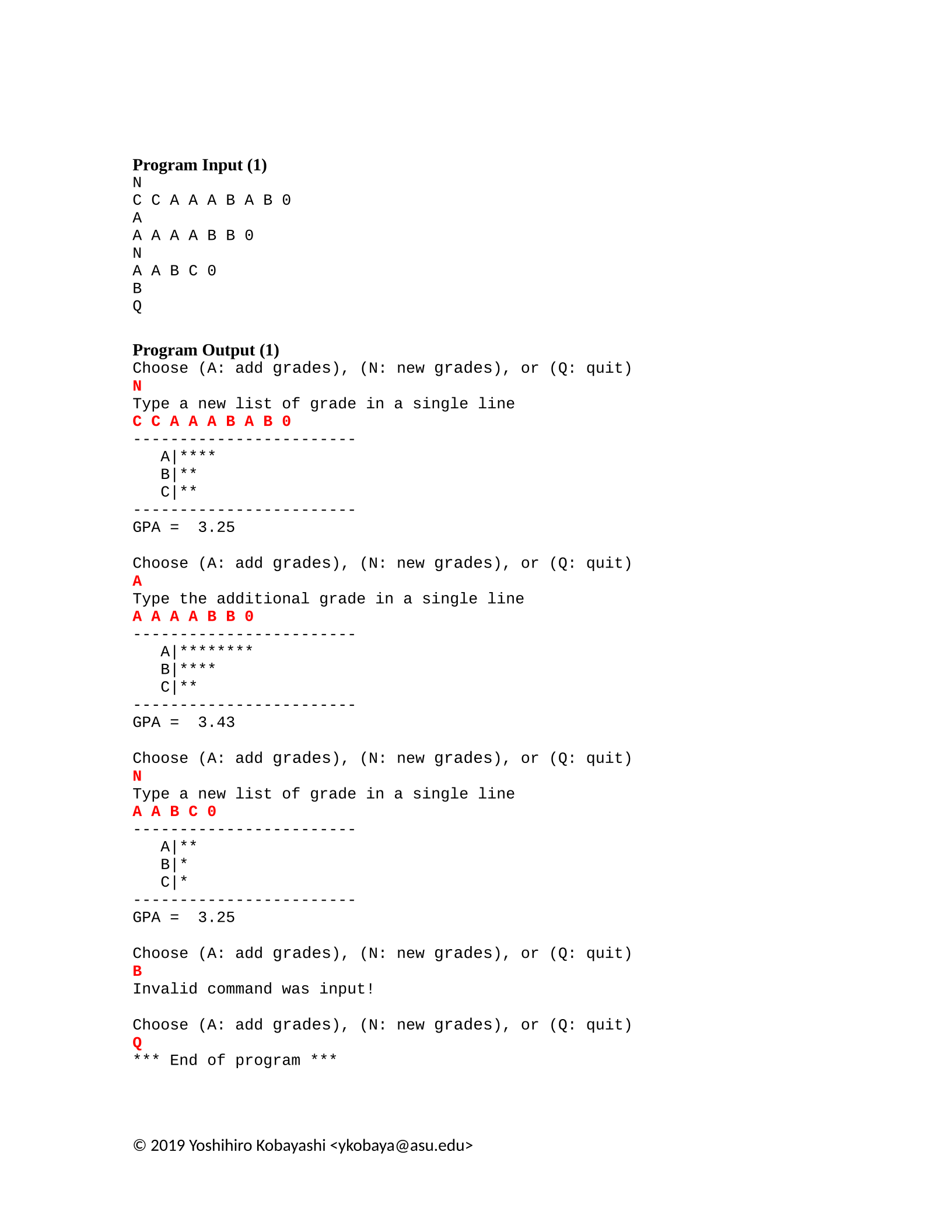
Program Input (1)
N
C C A A A B A B 0
A
A A A A B B 0
N
A A B C 0
B
Q
Program Output (1)
Choose (A: add grades), (N: new grades), or (Q: quit)
N
Type a new list of grade in a single line
C C A A A B A B 0
------------------------
A|****
B|**
C|**
------------------------
GPA = 3.25
Choose (A: add grades), (N: new grades), or (Q: quit)
A
Type the additional grade in a single line
A A A A B B 0
------------------------
A|********
B|****
C|**
------------------------
GPA = 3.43
Choose (A: add grades), (N: new grades), or (Q: quit)
N
Type a new list of grade in a single line
A A B C 0
------------------------
A|**
B|*
C|*
------------------------
GPA = 3.25
Choose (A: add grades), (N: new grades), or (Q: quit)
B
Invalid command was input!
Choose (A: add grades), (N: new grades), or (Q: quit)
Q
*** End of program ***
© 2019 Yoshihiro Kobayashi <ykobaya@asu.edu>
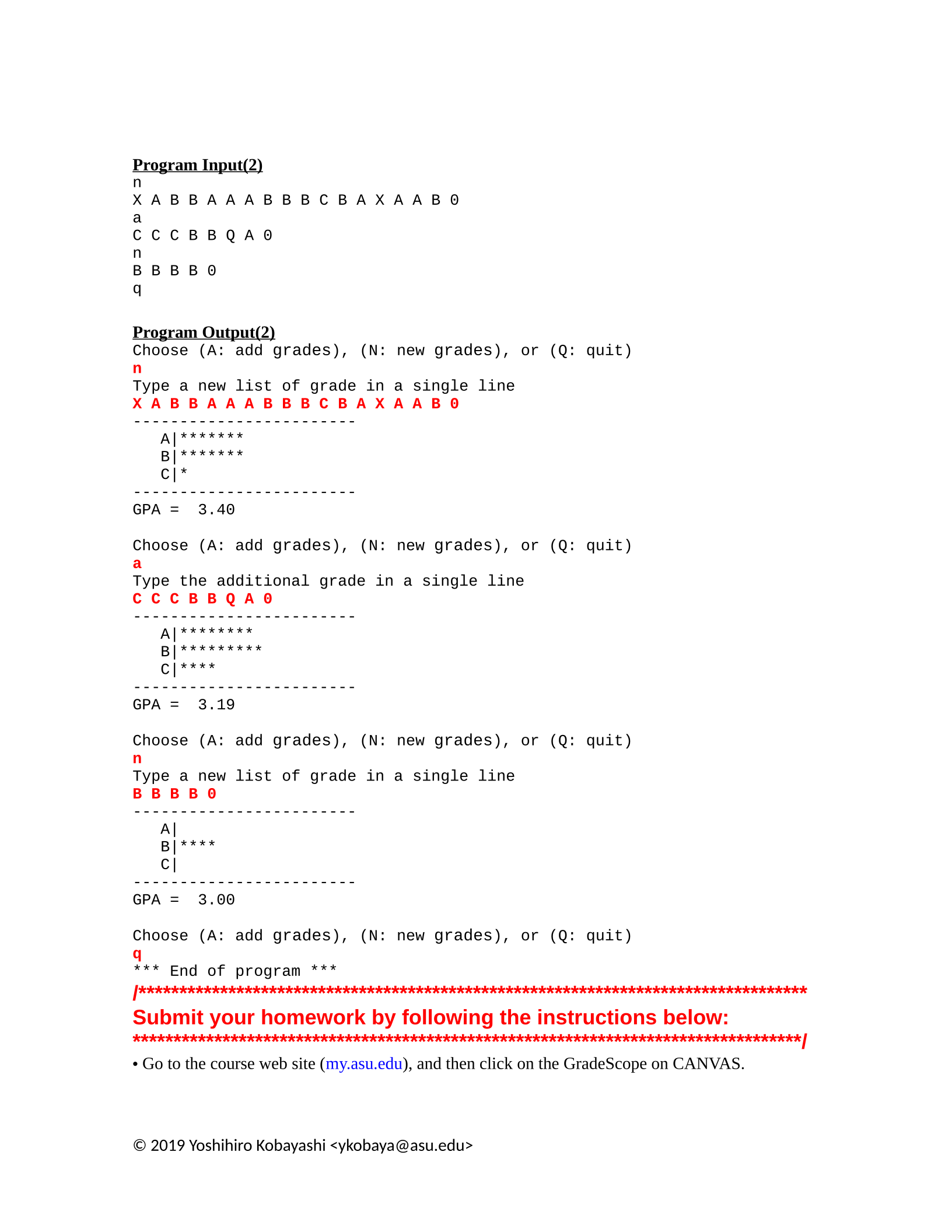
Program Input(2)
n
X A B B A A A B B B C B A X A A B 0
a
C C C B B Q A 0
n
B B B B 0
q
Program Output(2)
Choose (A: add grades), (N: new grades), or (Q: quit)
n
Type a new list of grade in a single line
X A B B A A A B B B C B A X A A B 0
------------------------
A|*******
B|*******
C|*
------------------------
GPA = 3.40
Choose (A: add grades), (N: new grades), or (Q: quit)
a
Type the additional grade in a single line
C C C B B Q A 0
------------------------
A|********
B|*********
C|****
------------------------
GPA = 3.19
Choose (A: add grades), (N: new grades), or (Q: quit)
n
Type a new list of grade in a single line
B B B B 0
------------------------
A|
B|****
C|
------------------------
GPA = 3.00
Choose (A: add grades), (N: new grades), or (Q: quit)
q
*** End of program ***
/**********************************************************************************
Submit your homework by following the instructions below:
**********************************************************************************/
• Go to the course web site (my.asu.edu), and then click on the GradeScope on CANVAS.
© 2019 Yoshihiro Kobayashi <ykobaya@asu.edu>
• Submit your Assignment4.java file on-line.
• The file should have the following, in order:
•In comments, the assignment Header described in "Important Note".
•In comments, the answers to questions presented in Part#1.
•The working Java code requested in Part #2.
•The Assignment4.java file must compile and run as you submit it. You can confirm this by
viewing your submission results.
Important Note: You may resubmit as many times as you like until the deadline, but we will only
mark your last submission. NO LATE ASSIGNMENTS WILL BE ACCEPTED.
© 2019 Yoshihiro Kobayashi <ykobaya@asu.edu>
Powered by TCPDF (www.tcpdf.org)

