


JavaFX Events

Events
Events are used to notify the application about the user interaction and enable the
application to respond
ex: Pressing a button, selecting a control
Events are defined inside javafx.event package.
An event is instance of javafx.event.Event class or its subclasses
Some of the events provided by JavaFX
KeyEvent, MouseEvent, ScrollEvent, DragEvent
User defined events can be defined by extending Event class.
Properties of Event:
Event type, Source and Target
Event type: type of event that occurred
Source: origin of the Event
Target: Node on which the action occurred
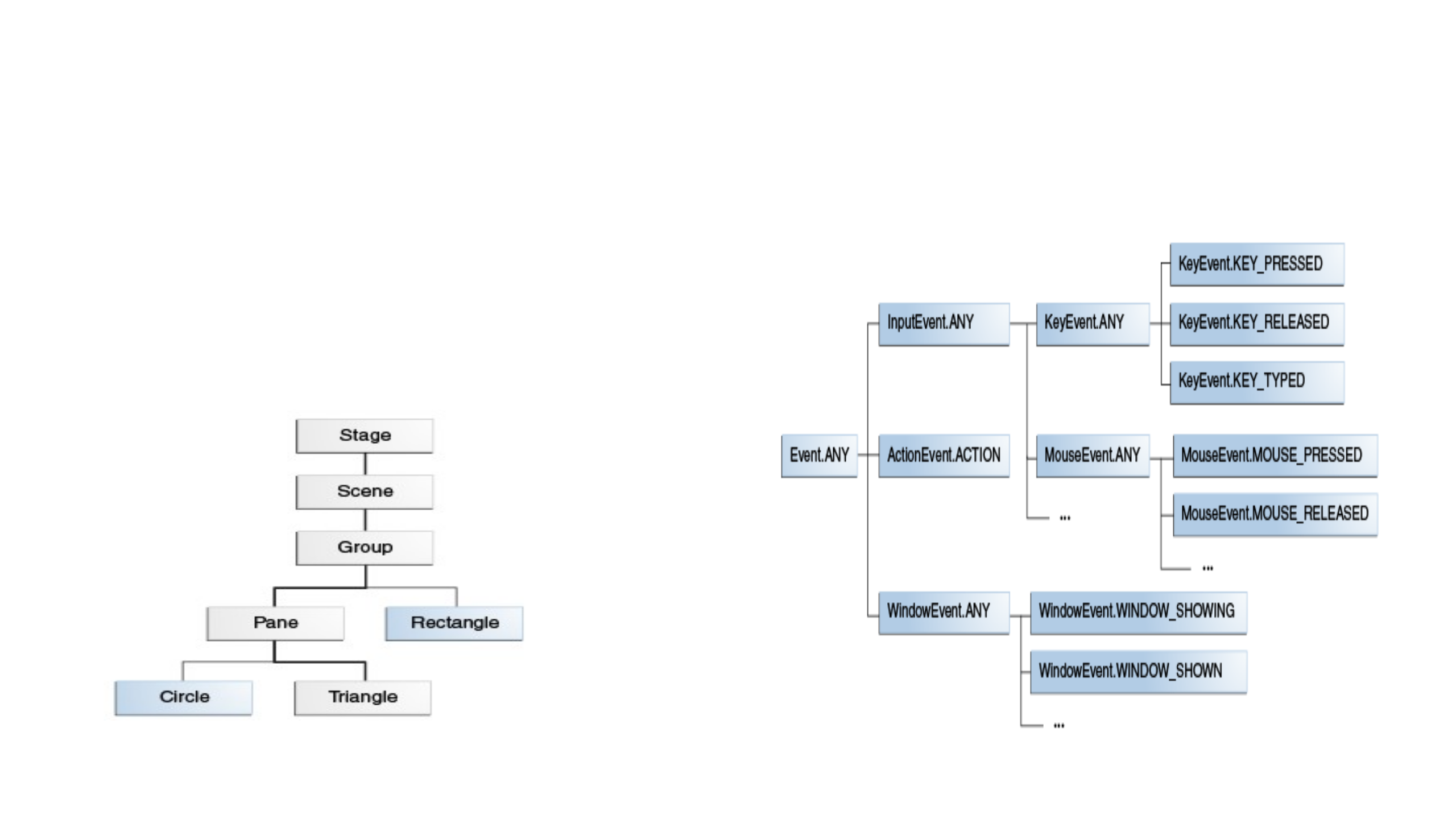
Event type classifies events of a single event class
Event Delivery Process
1. Target Selection
2. Route Construction
3. Event Capturing
4. Event Bubbling
Ref: https://docs.oracle.com/javafx/2/events/processing.htm
Event Type Hierarchy
Event Dispatch Chain

Event handling is the process that tells what action has to be performed by the
application
Event handling in javaFX is provided by Event Filters and Event Handlers.
Event Filters and Event Handlers implement EventHandler Interface.
Event Filter is executed during event capturing phase
Parent node can have common filter for multiple nodes.
Node can register more than one filter.
Filters are called based on the hierarchy of the event types

Event handler is executed during event bubbling phase
If a child node does not consume an event, event handler for parent node can handle
event
Node can register more than one event handler.
Some Events
KeyEvent, MouseEvent, MouseDragEvent, ActionEvent, InputMethodEvent,
WindowEvent
EVENT CLASS
KeyEvent Node, Scene
ActionEvent Button, TextField, MenuItem
EditEvent ListView
WindowEvent Window
MouseEvent Node, scene
InputMethodEvent Node, scene

Sample Code
Button btn=new Button(“Hello”)
btn.setOnAction(new EventHandler<ActionEvent>(){
public void handle(ActionEvent event) {
System.out.println("Hello World");
} });
MenuItem item1=new MenuItem("CS");
item1.setOnAction(new EventHandler<ActionEvent>(){
@Override
public void handle(ActionEvent e)
{
message.setText("You have selected: CS");
} });

CheckBox cb1= new CheckBox(“UnderGraduate”)
cb1.selectedProperty().addListener(new
ChangeListener<Boolean>()
{
@Override
public void changed(ObservableValue<? extends Boolean>
observable, Boolean oldValue, Boolean newValue) {
// TODO Auto-generated method stub
if(newValue != null && newValue)
{
message.setText("Your Selection: undergraduate");
}
}
});

cities.getSelectionModel().selectedItemProperty().addListener(
new ChangeListener<String>(){
public void changed(ObservableValue<? extends String> ov,
final String oldValue,
final String newValue)
{
selectionLbl.setText("Your Selection: "+newValue);
} });
ListView EditEvent

circle.setOnMouseEntered(new EventHandler<MouseEvent>() {
public void handle(MouseEvent me) {
System.out.println("Mouse entered");
}});
circle.setOnMouseExited(new EventHandler<MouseEvent>() {
public void handle(MouseEvent me) {
System.out.println("Mouse exited");
}});
circle.setOnMousePressed(new EventHandler<MouseEvent>() {
public void handle(MouseEvent me) {
System.out.println("Mouse pressed");
}});
Mouse Events

