


PERSISTENT MEMORY CHARACTERISTICS
As with every new technology, there are always new things to consider. Persistent
memory is no exception. Consider these characteristics when architecting and
developing solutions:
Performance (throughput, latency, and bandwidth) of persistent memory is
much better than NAND but potentially slower than DRAM.
Persistent memory is durable unlike DRAM. Its endurance is usually orders
of magnitude better than NAND and should exceed the lifetime of the server
without wearing out.
Persistent memory module capacities can be much larger than DRAM DIMMs
and can coexist on the same memory channels.
Persistent memory-enabled applications can update data in place without
needing to serialize/deserialize the data.
Persistent memory is byte addressable like memory. Applications can
update only the data needed without any read-modify-write overhead.
Data is CPU cache coherent.
Persistent memory provides direct memory access (DMA) and remote DMA
(RDMA) operations.
Data written to persistent memory is not lost when power is removed.
After permission checks are completed, data located on persistent memory
is directly accessible from user space. No kernel code, file system page
caches, or interrupts are in the data path.
Data on persistent memory is instantly available, that is:
Data is available as soon as power is applied to the system.
Applications do not need to spend time warming up caches. They can
access the data immediately upon memory mapping it.
Data residing on persistent memory has no DRAM footprint unless the
application copies data to DRAM for faster access.
Data written to persistent memory modules is local to the system.
Applications are responsible for replicating data across systems.
Platform Support for Persistent Memory
Platform vendors such as Intel, AMD, ARM, and others will decide how persistent
memory should be implemented at the lowest hardware levels. We try to provide a
vendor-agnostic perspective and only occasionally call out platform-specific details.
For systems with persistent memory, failure atomicity guarantees that systems can
always recover to a consistent state following a power or system failure. Failure
atomicity for applications can be achieved using logging, flushing, and memory store
barriers that order such operations. Logging, either undo or redo, ensures atomicity
when a failure interrupts the last atomic operation from completion. Cache flushing
ensures that data held within volatile caches reach the persistence domain so it will not
be lost if a sudden failure occurs. Memory store barriers, such as an SFENCE operation
on the x86 architecture, help prevent potential reordering in the memory hierarchy, as
caches and memory controllers may reorder memory operations. For example, a barrier
ensures that the undo log copy of the data gets persisted onto the persistent memory
before the actual data is modified in place. This guarantees that the last atomic

operation can be rolled back should a failure occur. However, it is nontrivial to add such
failure atomicity in user applications with low-level operations such as write logging,
cache flushing, and barriers. The Persistent Memory Development Kit (PMDK) was
developed to isolate developers from having to re-implement the hardware intricacies.
Failure atomicity should be a familiar concept, since most file systems implement
and perform journaling and flushing of their metadata to storage devices.
Cache Hierarchy
We use load and store operations to read and write to persistent memory rather than
using block-based I/O to read and write to traditional storage. We suggest reading the
CPU architecture documentation for an in-depth description because each successive
CPU generation may introduce new features, methods, and optimizations.
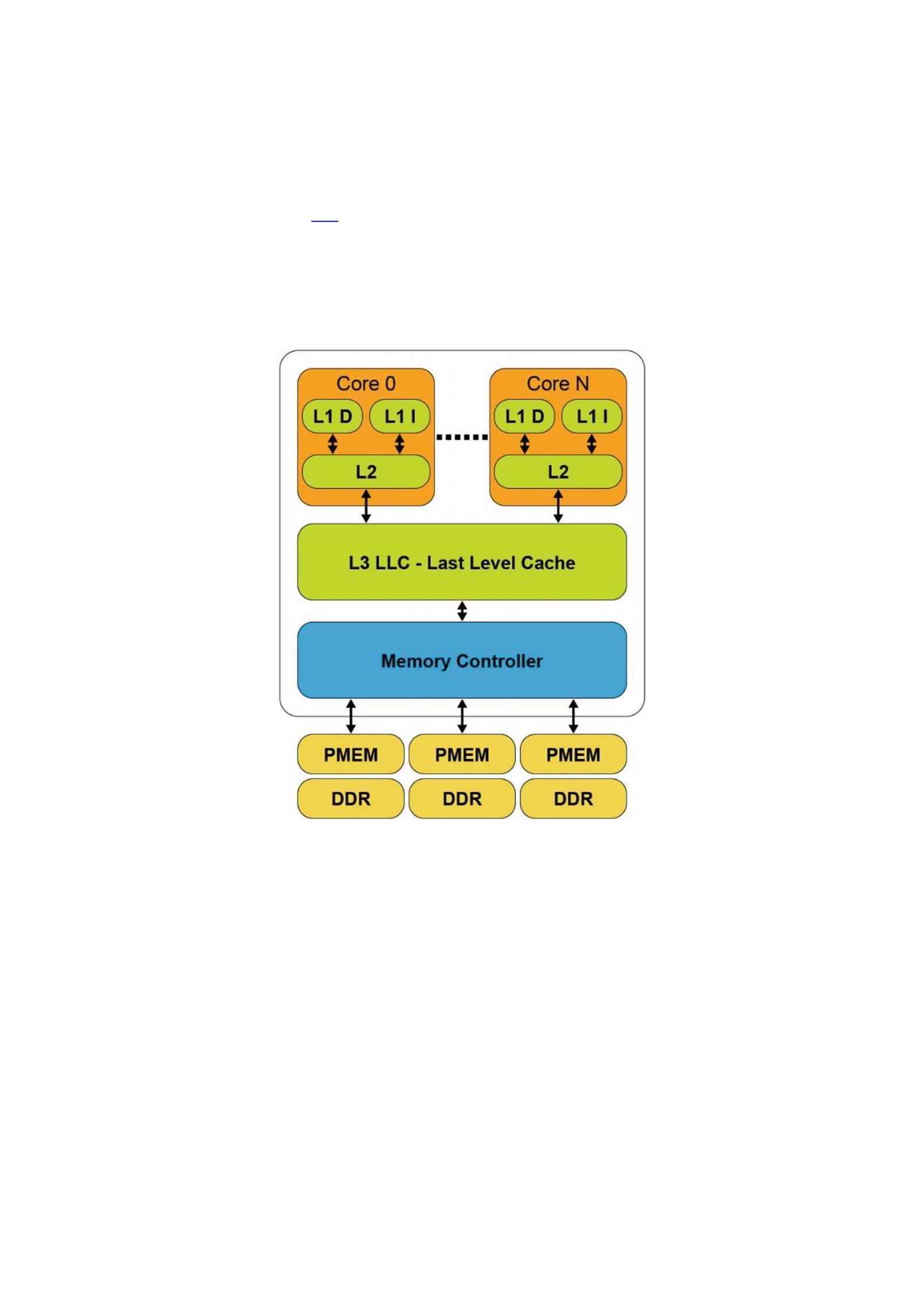
Using the Intel architecture as an example, a CPU cache typically has three distinct
levels: L1, L2, and L3. The hierarchy makes references to the distance from the CPU
core, its speed, and size of the cache. The L1 cache is closest to the CPU. It is extremely
fast but very small. L2 and L3 caches are increasingly larger in capacity, but they are
relatively slower. Figure 2-1 shows a typical CPU microarchitecture with three levels of
CPU cache and a memory controller with three memory channels. Each memory
channel has a single DRAM and persistent memory attached. On platforms where the
CPU caches are not contained within the power-fail protected domain, any modified
data within the CPU caches that has not been flushed to persistent memory will be lost
when the system loses power or crashes. Platforms that do include CPU caches in the
power-fail protected domain will ensure modified data within the CPU caches are
flushed to the persistent memory should the system crash or loses power. We describe
these requirements and features in the upcoming “Power-Fail Protected Domains”
section.
Figure 2-1CPU cache and memory hierarchy
The L1 (Level 1) cache is the fastest memory in a computer system. In terms of
access priority, the L1 cache has the data the CPU is most likely to need while
completing a specific task. The L1 cache is also usually split two ways, into the
instruction cache (L1 I) and the data cache (L1 D). The instruction cache deals with the
information about the operation that the CPU has to perform, while the data cache holds
the data on which the operation is to be performed.
The L2 (Level 2) cache has a larger capacity than the L1 cache, but it is slower. L2
cache holds data that is likely to be accessed by the CPU next. In most modern CPUs, the
L1 and L2 caches are present on the CPU cores themselves, with each core getting
dedicated caches.

The L3 (Level 3) cache is the largest cache memory, but it is also the slowest of the
three. It is also a commonly shared resource among all the cores on the CPU and may be
internally partitioned to allow each core to have dedicated L3 resources.
Data read from DRAM or persistent memory is transferred through the memory
controller into the L3 cache, then propagated into the L2 cache, and finally the L1 cache
where the CPU core consumes it. When the processor is looking for data to carry out an
operation, it first tries to find it into the L1 cache. If the CPU can find it, the condition is
called a cache hit . If the CPU cannot find the data within the L1 cache, it then proceeds
to search for it first within L2, then L3. If it cannot find the data in any of the three, it
tries to access it from memory. Each failure to find data in a cache is called a cache miss .
Failure to locate the data in memory requires the operating system to page the data into
memory from a storage device.
When the CPU writes data, it is initially written to the L1 cache. Due to ongoing
activity within the CPU, at some point in time, the data will be evicted from the L1 cache
into the L2 cache. The data may be further evicted from L2 and placed into L3 and
eventually evicted from L3 into the memory controller’s write buffers where it is then
written to the memory device.
In a system that does not possess persistent memory, software persists data by
writing it to a non-volatile storage device such as an SSD, HDD, SAN, NAS, or a volume in
the cloud. This protects data from application or system crashes. Critical data can be
manually flushed using calls such as msync(), fsync(), or fdatasync(), which
flush uncommitted dirty pages from volatile memory to the non-volatile storage device.
File systems provide fdisk or chkdsk utilities to check and attempt repairs on
damaged file systems if required. File systems do not protect user data from torn blocks.
Applications have a responsibility to detect and recovery from this situation. That’s why
databases, for example, use a variety of techniques such as transactional updates,
redo/undo logging, and checksums.
Applications memory map the persistent memory address range directly into its
own memory address space. Therefore, the application must assume responsibility for
checking and guaranteeing data integrity. The rest of this chapter describes your
responsibilities in a persistent memory environment and how to achieve data
consistency and integrity.
Power-Fail Protected Domains
A computer system may include one or more CPUs, volatile or persistent memory
modules, and non-volatile storage devices such as SSDs or HDDs.
System platform hardware supports the concept of a persistence domain, also called
power-fail protected domains . Depending on the platform, a persistence domain may
include the persistent memory controller and write queues, memory controller write
queues, and CPU caches. Once data has reached the persistence domain, it may be
recoverable during a process that results from a system restart. That is, if data is located
within hardware write queues or buffers protected by power failure, domain
applications should assume it is persistent. For example, if a power failure occurs, the
data will be flushed from the power-fail protected domain using stored energy
guaranteed by the platform for this purpose. Data that has not yet made it into the
protected domain will be lost.

Multiple persistence domains may exist within the same system, for example, on
systems with more than one physical CPU. Systems may also provide a mechanism for
partitioning the platform resources for isolation. This must be done in such a way that
SNIA NVM programming model behavior is assured from each compliant volume or file
system. (Chapter 3 describes the programming model as it applies to operating systems
and file systems. The “Detecting Platform Capabilities” section in that chapter describes
the logic that applications should perform to detect platform capabilities including
power failure protected domains. Later chapters provide in-depth discussions into why,
how, and when applications should flush data, if required, to guarantee the data is safe
within the protected domain and persistent memory.)
Volatile memory loses its contents when the computer system’s power is
interrupted. Just like non-volatile storage devices, persistent memory keeps its contents
even in the absence of system power. Data that has been physically saved to the
persistent memory media is called data at rest . Data in-flight has the following
meanings:
Writes sent to the persistent memory device but have not yet been
physically committed to the media
Any writes that are in progress but not yet complete
Data that has been temporarily buffered or cached in either the CPU caches
or memory controller
When a system is gracefully rebooted or shut down, the system maintains power
and can ensure all contents of the CPU caches and memory controllers are flushed such
that any in-flight or uncommitted data is successfully written to persistent memory or
non-volatile storage. When an unexpected power failure occurs, and assuming no
uninterruptable power supply (UPS) is available, the system must have enough stored
energy within the power supplies and capacitors dotted around it to flush data before
the power is completely exhausted. Any data that is not flushed is lost and not
recoverable.
Asynchronous DRAM Refresh (ADR) is a feature supported on Intel products which
flushes the write-protected data buffers and places the DRAM in self-refresh. This
process is critical during a power loss event or system crash to ensure the data is in a
safe and consistent state on persistent memory. By default, ADR does not flush the
processor caches. A platform that supports ADR only includes persistent memory and
the memory controller’s write pending queues within the persistence domain. This is
the reason data in the CPU caches must be flushed by the application using the CLWB,
CLFLUSHOPT, CLFLUSH, non-temporal stores, or WBINVD machine instructions.
Enhanced Asynchronous DRAM Refresh (eADR) requires that a non-maskable
interrupt (NMI) routine be called to flush the CPU caches before the ADR event can
begin. Applications running on an eADR platform do not need to perform flush
operations because the hardware should flush the data automatically, but they are still
required to perform an SFENCE operation to maintain write order correctness. Stores
should be considered persistent only when they are globally visible, which the SFENCE
guarantees.
Figure 2-2 shows both the ADR and eADR persistence domains.
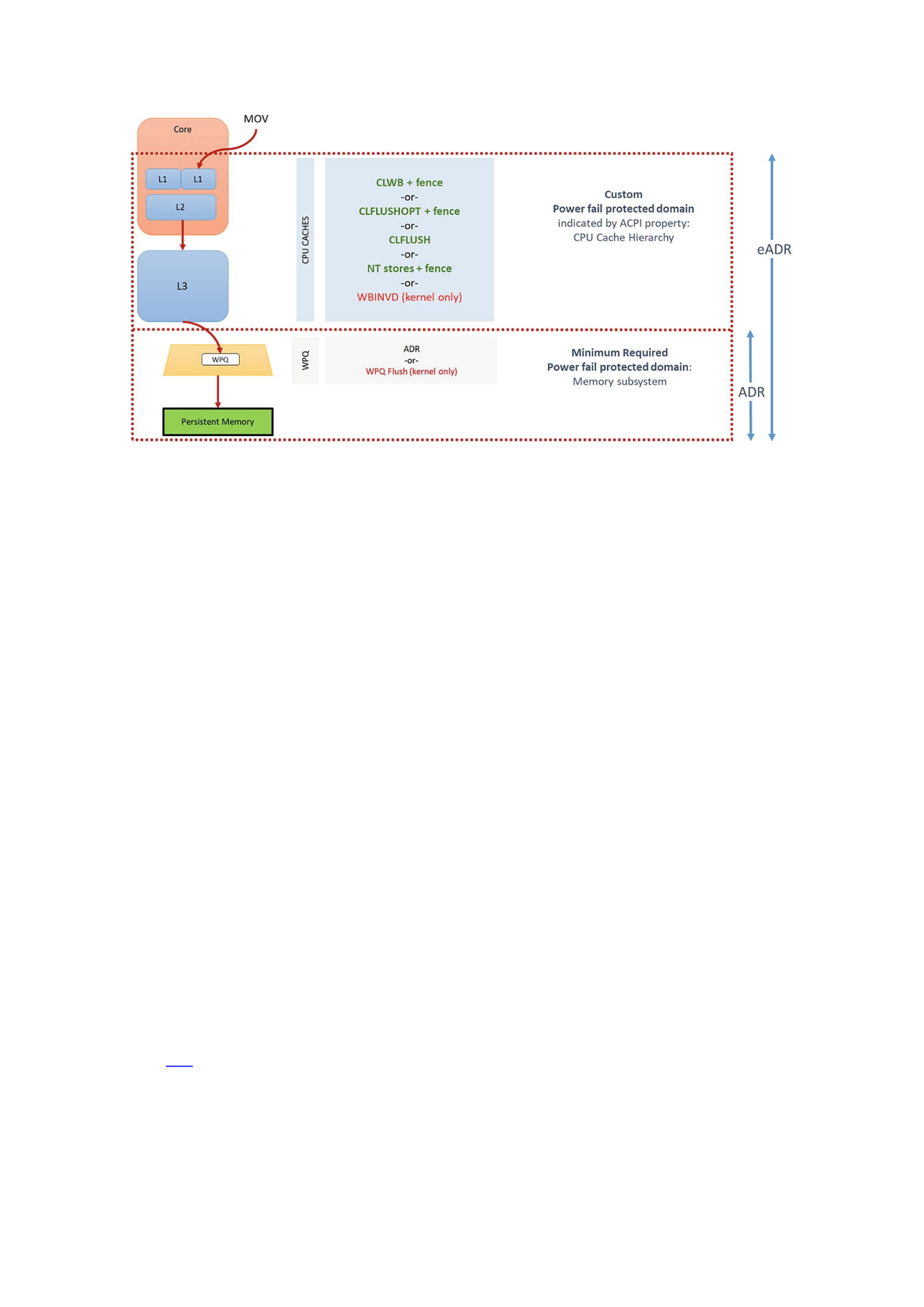
Figure 2-2ADR and eADR power-fail protection domains
ADR is a mandatory platform requirement for persistent memory. The write
pending queue (WPQ) within the memory controller acknowledges receipt of the data
to the writer once all the data is received. Although the data has not yet made it to the
persistent media, a platform supporting ADR guarantees that it will be successfully
written should a power loss event occur. During a crash or power failure, data that is in-
flight through the CPU caches can only be guaranteed to be flushed to persistent media
if the platform supports eADR. It will be lost on platforms that only support ADR.
The challenge with extending the persistence domain to include the CPU caches is
that the CPU caches are quite large and it would take considerably more energy than the
capacitors in a typical power supply can practically provide. This means the platform
would have to contain batteries or utilize an external uninterruptable power supply.
Requiring a battery for every server supporting persistent memory is not generally
practical or cost-effective. The lifetime of a battery is typically shorter than the server,
which introduces additional maintenance routines that reduce server uptime. There is
also an environmental impact when using batteries as they must be disposed of or
recycled correctly. It is entirely possible for server or appliance OEMs to include a
battery in their product.
Because some appliance and server vendors plan to use batteries, and because
platforms will someday include the CPU caches in the persistence domain, a property is
available within ACPI such that the BIOS can notify software when the CPU flushes can
be skipped. On platforms with eADR, there is no need for manual cache line flushing.
The Need for Flushing, Ordering, and Fencing
Except for WBINVD, which is a kernel-mode-only operation, the machine instructions in
Table 2-1 (in the “Intel Machine Instructions for Persistent Memory” section) are
supported in user space by Intel and AMD CPUs. Intel adopted the SNIA NVM
programming model for working with persistent memory. This model allows for direct
access (DAX) using byte-addressable operations (i.e., load/store). However, the
persistence of the data in the cache is not guaranteed until it has entered the
persistence domain. The x86 architecture provides a set of instructions for flushing

cache lines in a more optimized way. In addition to existing x86 instructions, such as
non-temporal stores, CLFLUSH, and WBINVD, two new instructions were added:
CLFLUSHOPT and CLWB. Both new instructions must be followed by an SFENCE to
ensure all flushes are completed before continuing. Flushing a cache line using CLWB,
CLFLUSHOPT, or CLFLUSH and using non-temporal stores are all supported from user
space. You can find details for each machine instruction in the software developer
manuals for the architecture. On Intel platforms, for example, this information can be
found in the Intel 64 and 32 Architectures Software Developer Manuals
(https://software.intel.com/en-us/articles/intel-sdm).
Non-temporal stores imply that the data being written is not going to be read again
soon, so we bypass the CPU caches. That is, there is no temporal locality , so there is no
benefit to keeping the data in the processor’s cache(s), and there may be a penalty if the
stored data displaces other useful data from the cache(s).
Flushing to persistent memory directly from user space negates calling into the
kernel, which makes it highly efficient. The feature is documented in the SNIA persistent
memory programming model specification as an optimized flush . The specification
document1 describes optimized flush as optionally supported by the platform,
depending on the hardware and operating system support. Despite the CPU support, it
is essential for applications to use only optimized flushes when the operating system
indicates that it is safe to use. The operating system may require the control point
provided by calls like msync() when, for example, there are changes to file system
metadata that need to be written as part of the msync() operation .
To better understand instruction ordering, consider a very simple linked list
example. Our pseudocode described in the following has three simple steps to add a
new node into an existing list that already contains two nodes. These steps are depicted
in Figure 2-3.
1.
Create the new node (Node 2).
2. Update the node pointer (next pointer) to point to the last node in the list (Node 2 →
Node 1).
3. Update the head pointer to point at the new node (Head → Node 2).
Figure 2-3 (Step 3) shows that the head pointer was updated in the CPU cached
version, but the Node 2 to Node 1 pointer has not yet been updated in persistent
memory. This is because the hardware can choose which cache lines to commit and the
order may not match the source code flow. If the system or application were to crash at
this point, the persistent memory state would be inconsistent, and the data structure
would no longer be usable.
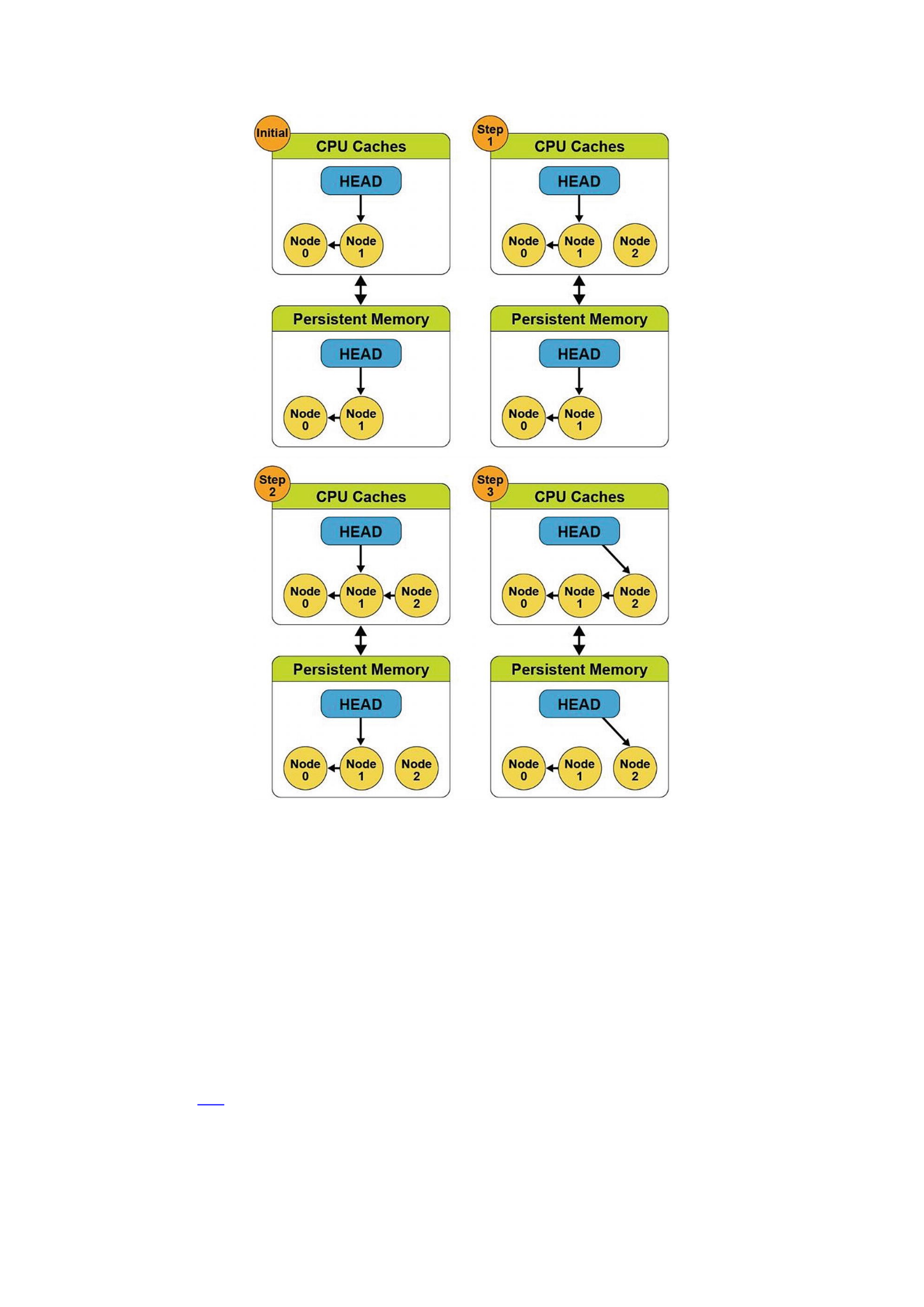
Figure 2-3Adding a new node to an existing linked list without a store barrier
To solve this problem, we introduce a memory store barrier to ensure the order of
the write operations is maintained. Starting from the same initial state, the pseudocode
now looks like this:
1.
Create the new node.
2. Update the node pointer (next pointer) to point to the last node in the list, and
perform a store barrier/fence operation.
3. Update the head pointer to point at the new node.
Figure 2-4 shows that the addition of the store barrier allows the code to work as
expected and maintains a consistent data structure in the volatile CPU caches and on
persistent memory. We can see in Step 3 that the store barrier/fence operation waited
for the pointer from Node 2 to Node 1 to update before updating the head pointer. The
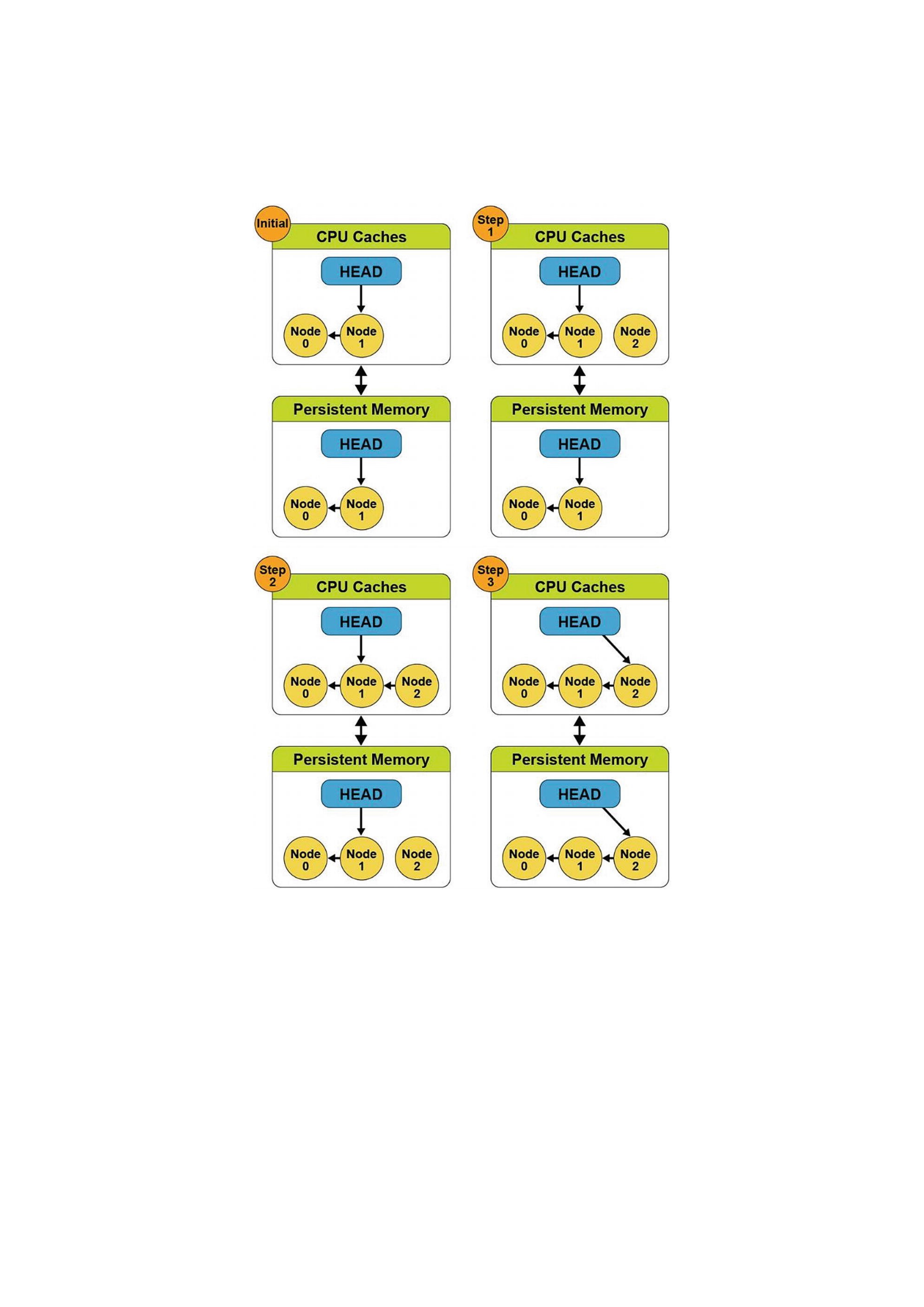
updates in the CPU cache matches the persistent memory version, so it now globally
visible. This is a simplistic approach to solving the problem because store barriers do
not provide atomicity or data integrity. A complete solution should also use transactions
to ensure the data is atomically updated.
Figure 2-4Adding a new node to an existing linked list using a store barrier
The PMDK detects the platform, CPU, and persistent memory features when the
memory pool is opened and then uses the optimal instructions and fencing to preserve
write ordering. (Memory pools are files that are memory mapped into the process
address space; later chapters describe them in more detail.)
To insulate application developers from the complexities of the hardware and to
keep them from having to research and implement code specific to each platform or
device, the libpmem library provides a function that tells the application when
optimized flush is safe to use or fall back to the standard way of flushing stores to
memory-mapped files.
To simplify programming, we encourage developers to use libraries, such as
libpmem and others within the PMDK. The libpmem library is also designed to detect

the case of the platform with a battery that automatically converts flush calls into
simple SFENCE instructions . Chapter 5 introduces and describes the core libraries
within the PMDK in more detail, and later chapters take an in-depth look into each of
the libraries to help you understand their APIs and features.
Data Visibility
When data is visible to other processes or threads, and when it is safe in the persistence
domain, is critical to understand when using persistent memory in applications. In the
Figure 2-2 and 2-3 examples, updates made to data in the CPU caches could become
visible to other processes or threads. Visibility and persistence are often not the same
thing, and changes made to persistent memory are often visible to other running
threads in the system before they are persistent. Visibility works the same way as it
does for normal DRAM, described by the memory model ordering and visibility rules for
a given platform (for example, see the Intel Software Development Manual for the
visibility rules for Intel platforms). Persistence of changes is achieved in one of three
ways: either by calling the standard storage API for persistence (msync on Linux or
FlushFileBuffers on Windows), by using optimized flush when supported, or by
achieving visibility on a platform where the CPU caches are considered persistent. This
is one reason we use flushing and fencing operations.
A pseudo C code example may look like this:
open() // Open a file on a file system
...
mmap() // Memory map the file
...
strcpy() // Execute a store operation
... // Data is globally visible
msync() // Data is now persistent
Developing for persistent memory follows this decades-old model.
Operating System Support for Memory and Storage
Figure 3-1 shows a simplified view of how operating systems manage storage and
volatile memory. As shown, the volatile main memory is attached directly to the CPU
through a memory bus. The operating system manages the mapping of memory regions
directly into the application’s visible memory address space. Storage, which usually
operates at speeds much slower than the CPU, is attached through an I/O controller.
The operating system handles access to the storage through device driver modules
loaded into the operating system’s I/O subsystem.
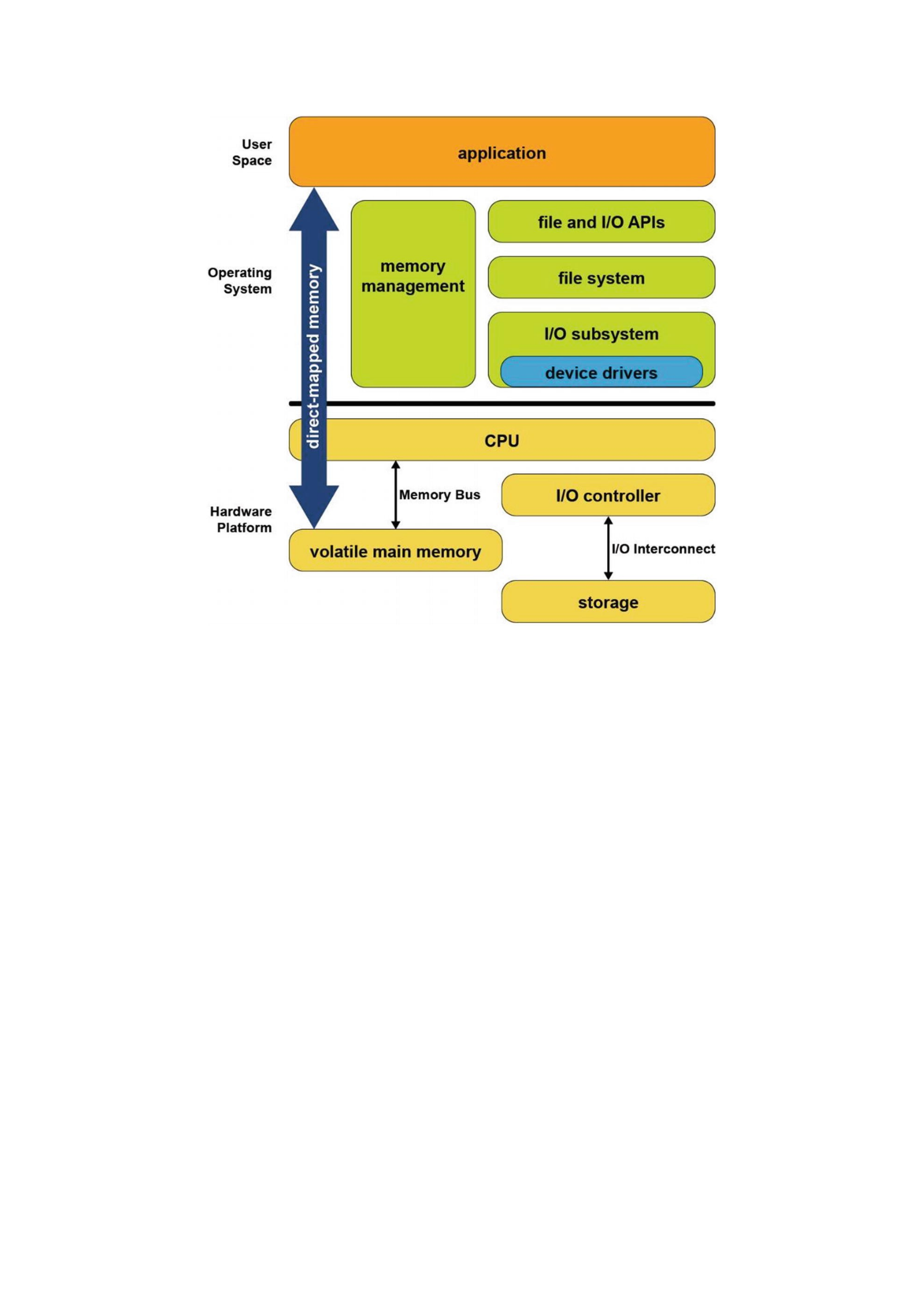
Figure 3-1Storage and volatile memory in the operating system
The combination of direct application access to volatile memory combined with the
operating system I/O access to storage devices supports the most common application
programming model taught in introductory programming classes. In this model,
developers allocate data structures and operate on them at byte granularity in memory.
When the application wants to save data, it uses standard file API system calls to write
the data to an open file. Within the operating system, the file system executes this write
by performing one or more I/O operations to the storage device. Because these I/O
operations are usually much slower than CPU speeds, the operating system typically
suspends the application until the I/O completes.
Since persistent memory can be accessed directly by applications and can persist
data in place, it allows operating systems to support a new programming model that
combines the performance of memory while persisting data like a non-volatile storage
device. Fortunately for developers, while the first generation of persistent memory was
under development, Microsoft Windows and Linux designers, architects and developers
collaborated in the Storage and Networking Industry Association (SNIA) to define a
common programming model, so the methods for using persistent memory described in
this chapter are available in both operating systems. More details can be found in the
SNIA NVM programming model specification
(https://www.snia.org/tech_activities/standards/curr_standards/
npm).
Persistent Memory As Block Storage
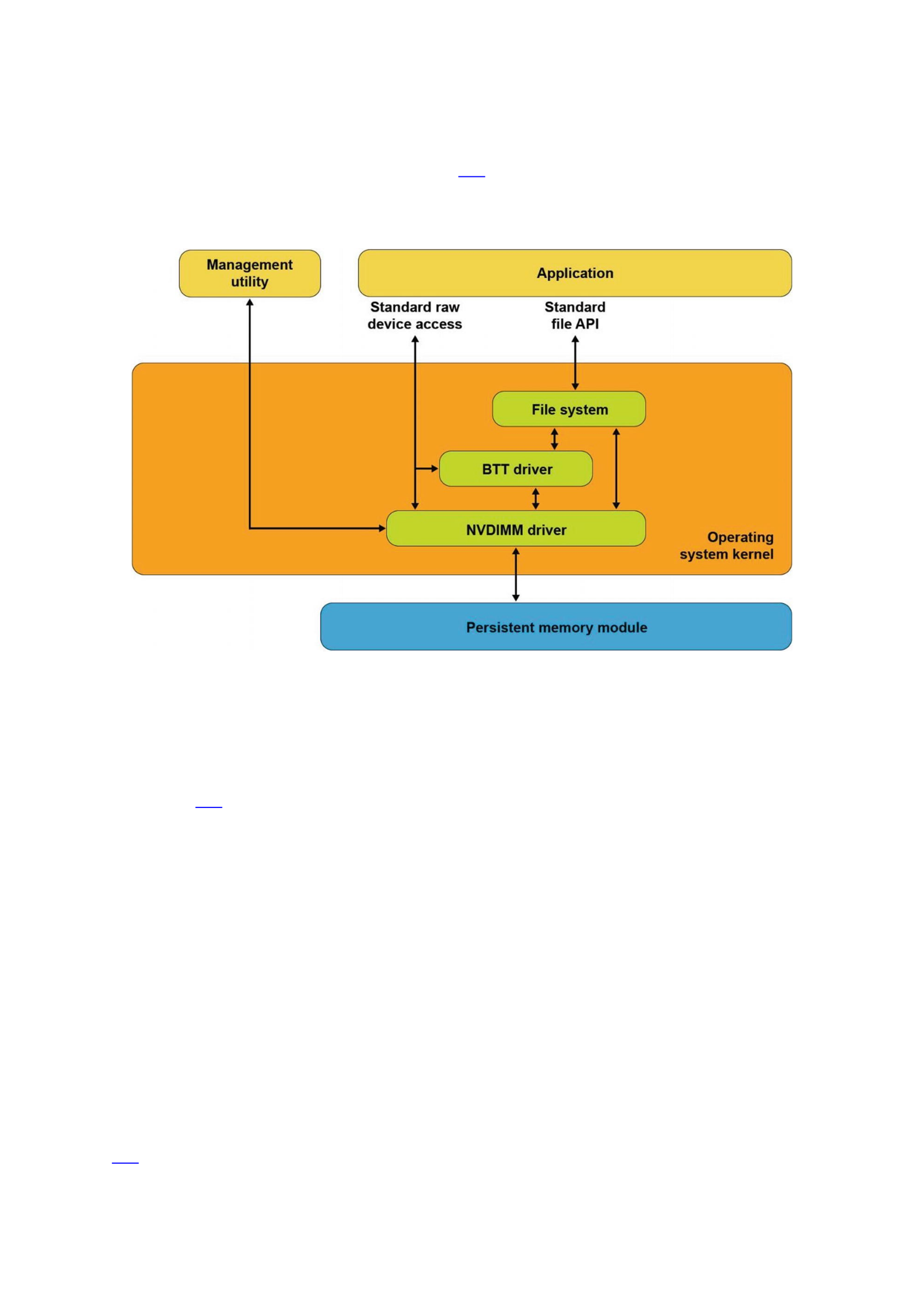
The first operating system extension for persistent memory is the ability to detect the
existence of persistent memory modules and load a device driver into the operating
system’s I/O subsystem as shown in Figure 3-2. This NVDIMM driver serves two
important functions. First, it provides an interface for management and system
administrator utilities to configure and monitor the state of the persistent memory
hardware. Second, it functions similarly to the storage device drivers.
Figure 3-2Persistent memory as block storage
The NVDIMM driver presents persistent memory to applications and operating
system modules as a fast block storage device. This means applications, file systems,
volume managers, and other storage middleware layers can use persistent memory the
same way they use storage today, without modifications.
Figure 3-2 also shows the Block Translation Table (BTT) driver, which can be
optionally configured into the I/O subsystem. Storage devices such as HDDs and SSDs
present a native block size with 512k and 4k bytes as two common native block sizes.
Some storage devices, especially NVM Express SSDs, provide a guarantee that when a
power failure or server failure occurs while a block write is in-flight, either all or none
of the block will be written. The BTT driver provides the same guarantee when using
persistent memory as a block storage device. Most applications and file systems depend
on this atomic write guarantee and should be configured to use the BTT driver, although
operating systems also provide the option to bypass the BTT driver for applications that
implement their own protection against partial block updates.
Persistent Memory-Aware File Systems
The next extension to the operating system is to make the file system aware of and be
optimized for persistent memory. File systems that have been extended for persistent
memory include Linux ext4 and XFS, and Microsoft Windows NTFS. As shown in Figure
3-3, these file systems can either use the block driver in the I/O subsystem (as
described in the previous section) or bypass the I/O subsystem to directly use
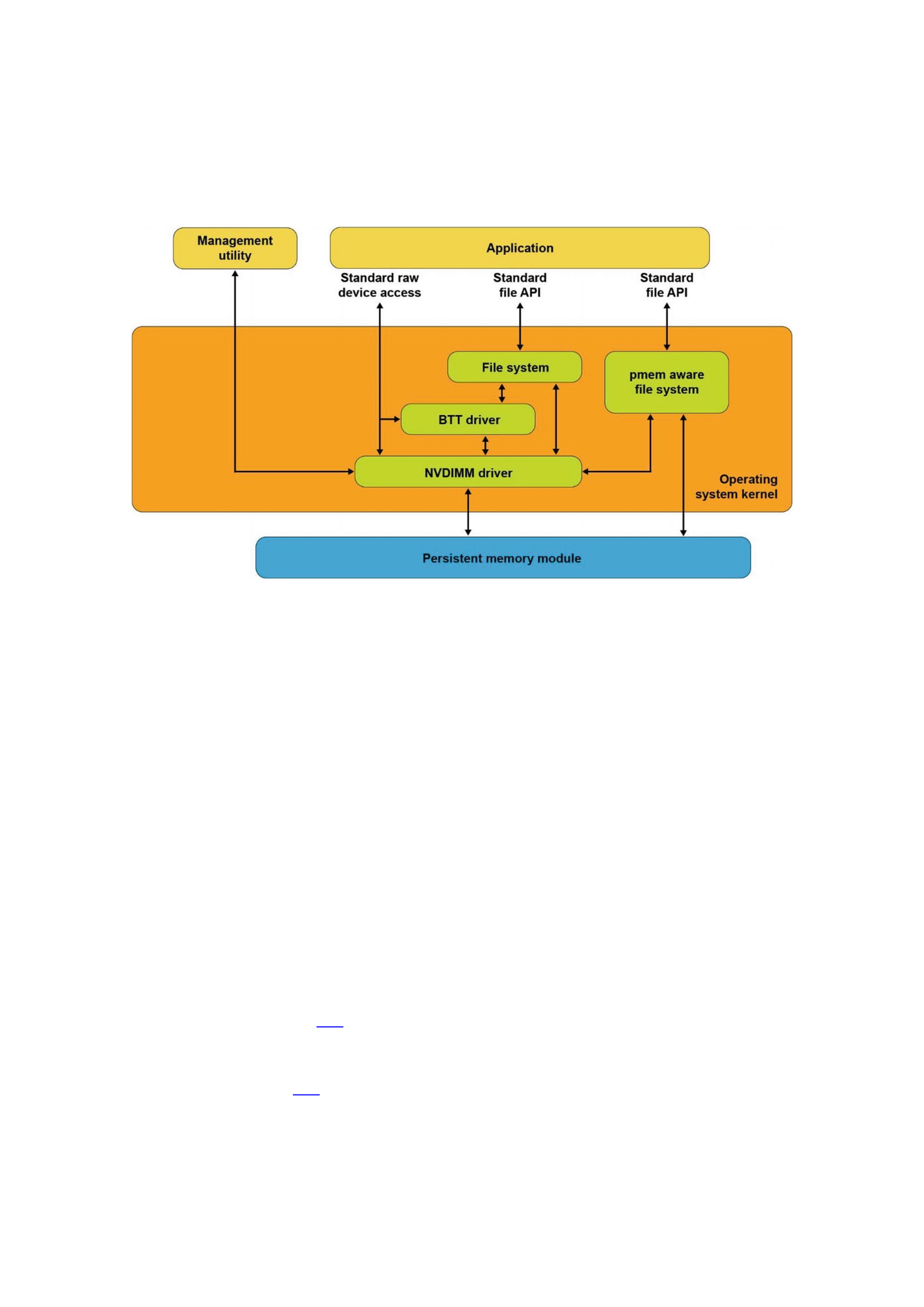
persistent memory as byte-addressable load/store memory as the fastest and shortest
path to data stored in persistent memory. In addition to eliminating the I/O operation,
this path enables small data writes to be executed faster than traditional block storage
devices that require the file system to read the device’s native block size, modify the
block, and then write the full block back to the device.
Figure 3-3Persistent memory-aware file system
These persistent memory-aware file systems continue to present the familiar,
standard file APIs to applications including the open, close, read, and write
system calls. This allows applications to continue using the familiar file APIs while
benefiting from the higher performance of persistent memory.
Memory-Mapped Files
Before describing the next operating system option for using persistent memory, this
section reviews memory-mapped files in Linux and Windows. When memory mapping a
file, the operating system adds a range to the application’s virtual address space which
corresponds to a range of the file, paging file data into physical memory as required.
This allows an application to access and modify file data as byte-addressable in-memory
data structures. This has the potential to improve performance and simplify application
development, especially for applications that make frequent, small updates to file data.
Applications memory map a file by first opening the file, then passing the resulting
file handle as a parameter to the mmap() system call in Linux or to
MapViewOfFile() in Windows. Both return a pointer to the in-memory copy of a
portion of the file. Listing 3-1 shows an example of Linux C code that memory maps a
file, writes data into the file by accessing it like memory, and then uses the msync
system call to perform the I/O operation to write the modified data to the file on the
storage device. Listing 3-2 shows the equivalent operations on Windows. We walk
through and highlight the key steps in both code samples.
50 #include <err.h>
51 #include <fcntl.h>
52 #include <stdio.h>

53 #include <stdlib.h>
54 #include <string.h>
55 #include <sys/mman.h>
56 #include <sys/stat.h>
57 #include <sys/types.h>
58 #include <unistd.h>
59
60 int
61 main(int argc, char *argv[])
62 {
63 int fd;
64 struct stat stbuf;
65 char *pmaddr;
66
67 if (argc != 2) {
68 fprintf(stderr, "Usage: %s filename\n",
69 argv[0]);
70 exit(1);
71 }
72
73 if ((fd = open(argv[1], O_RDWR)) < 0)
74 err(1, "open %s", argv[1]);
75
76 if (fstat(fd, &stbuf) < 0)
77 err(1, "stat %s", argv[1]);
78
79 /*
80 * Map the file into our address space for read
81 * & write. Use MAP_SHARED so stores are visible
82 * to other programs.
83 */
84 if ((pmaddr = mmap(NULL, stbuf.st_size,
85 PROT_READ|PROT_WRITE,
86 MAP_SHARED, fd, 0)) == MAP_FAILED)
87 err(1, "mmap %s", argv[1]);
88
89 /* Don't need the fd anymore because the mapping
90 * stays around */
91 close(fd);
92
93 /* store a string to the Persistent Memory */
94 strcpy(pmaddr, "This is new data written to the
95 file");
96
97 /*
98 * Simplest way to flush is to call msync().
99 * The length needs to be rounded up to a 4k page.
100 */

101 if (msync((void *)pmaddr, 4096, MS_SYNC) < 0)
102 err(1, "msync");
103
104 printf("Done.\n");
105 exit(0);
106 }
Listing 3-1mmap_example.c – Memory-mapped file on Linux example
Lines 67-74: We verify the caller passed a file name that can be opened. The
open call will create the file if it does not already exist.
Line 76: We retrieve the file statistics to use the length when we memory
map the file.
Line 84: We map the file into the application’s address space to allow our
program to access the contents as if in memory. In the second parameter, we
pass the length of the file, requesting Linux to initialize memory with the full
file. We also map the file with both READ and WRITE access and also as
SHARED allowing other processes to map the same file.
Line 91: We retire the file descriptor which is no longer needed once a file is
mapped.
Line 94: We write data into the file by accessing it like memory through the
pointer returned by mmap.
Line 101: We explicitly flush the newly written string to the backing storage
device.
Listing 3-2 shows an example of C code that memory maps a file, writes data into the
file, and then uses the FlushViewOfFile() and FlushFileBuffers() system
calls to flush the modified data to the file on the storage device.
45 #include <fcntl.h>
46 #include <stdio.h>
47 #include <stdlib.h>
48 #include <string.h>
49 #include <sys/stat.h>
50 #include <sys/types.h>
51 #include <Windows.h>
52
53 int
54 main(int argc, char *argv[])
55 {
56 if (argc != 2) {
57 fprintf(stderr, "Usage: %s filename\n",
58 argv[0]);
59 exit(1);
60 }
61
62 /* Create the file or open if the file exists */
63 HANDLE fh = CreateFile(argv[1],
64 GENERIC_READ|GENERIC_WRITE,
65 0,
66 NULL,
67 OPEN_EXISTING,

68 FILE_ATTRIBUTE_NORMAL,
69 NULL);
70
71 if (fh == INVALID_HANDLE_VALUE) {
72 fprintf(stderr, "CreateFile, gle: 0x%08x",
73 GetLastError());
74 exit(1);
75 }
76
77 /*
78 * Get the file length for use when
79 * memory mapping later
80 * */
81 DWORD filelen = GetFileSize(fh, NULL);
82 if (filelen == 0) {
83 fprintf(stderr, "GetFileSize, gle: 0x%08x",
84 GetLastError());
85 exit(1);
86 }
87
88 /* Create a file mapping object */
89 HANDLE fmh = CreateFileMapping(fh,
90 NULL, /* security attributes */
91 PAGE_READWRITE,
92 0,
93 0,
94 NULL);
95
96 if (fmh == NULL) {
97 fprintf(stderr, "CreateFileMapping,
98 gle: 0x%08x", GetLastError());
99 exit(1);
100 }
101
102 /*
103 * Map into our address space and get a pointer
104 * to the beginning
105 * */
106 char *pmaddr = (char *)MapViewOfFileEx(fmh,
107 FILE_MAP_ALL_ACCESS,
108 0,
109 0,
110 filelen,
111 NULL); /* hint address */
112
113 if (pmaddr == NULL) {
114 fprintf(stderr, "MapViewOfFileEx,
115 gle: 0x%08x", GetLastError());

116 exit(1);
117 }
118
119 /*
120 * On windows must leave the file handle(s)
121 * open while mmaped
122 * */
123
124 /* Store a string to the beginning of the file */
125 strcpy(pmaddr, "This is new data written to
126 the file");
127
128 /*
129 * Flush this page with length rounded up to 4K
130 * page size
131 * */
132 if (FlushViewOfFile(pmaddr, 4096) == FALSE) {
133 fprintf(stderr, "FlushViewOfFile,
134 gle: 0x%08x", GetLastError());
135 exit(1);
136 }
137
138 /* Flush the complete file to backing storage */
139 if (FlushFileBuffers(fh) == FALSE) {
140 fprintf(stderr, "FlushFileBuffers,
141 gle: 0x%08x", GetLastError());
142 exit(1);
143 }
144
145 /* Explicitly unmap before closing the file */
146 if (UnmapViewOfFile(pmaddr) == FALSE) {
147 fprintf(stderr, "UnmapViewOfFile,
148 gle: 0x%08x", GetLastError());
149 exit(1);
150 }
151
152 CloseHandle(fmh);
153 CloseHandle(fh);
154
155 printf("Done.\n");
156 exit(0);
157 }
Listing 3-2Memory-mapped file on Windows example
Lines 45-75: As in the previous Linux example, we take the file name passed
through argv and open the file.
Line 81: We retrieve the file size to use later when memory mapping.
Line 89: We take the first step to memory mapping a file by creating the file
mapping. This step does not yet map the file into our application’s memory
space.
Line 106: This step maps the file into our memory space.
Line 125: As in the previous Linux example, we write a string to the
beginning of the file, accessing the file like memory.
Line 132: We flush the modified memory page to the backing storage.
Line 139: We flush the full file to backing storage, including any additional
file metadata maintained by Windows.
Line 146-157: We unmap the file, close the file, then exit the program.
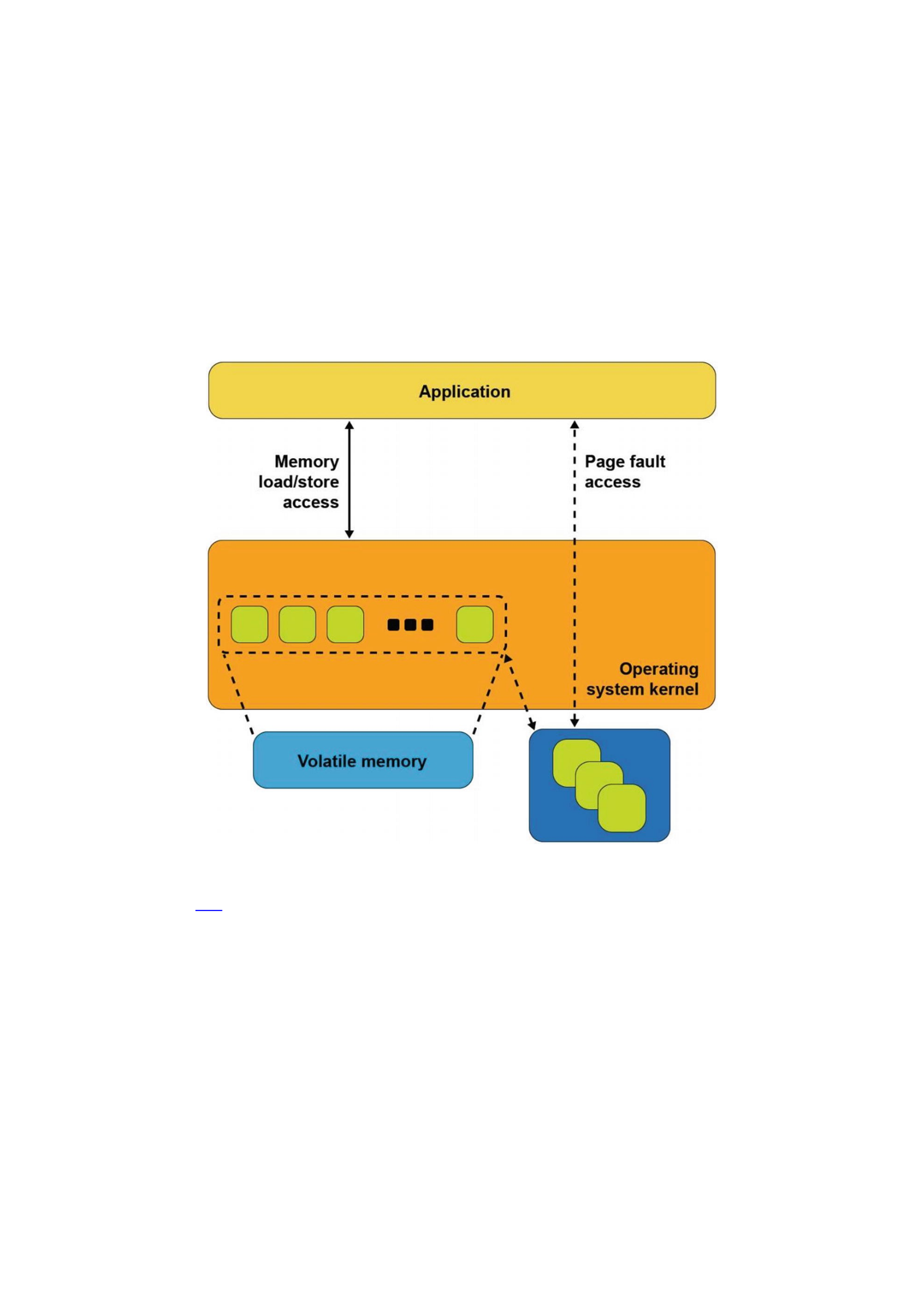
Figure 3-4Memory-mapped files with storage
Figure 3-4 shows what happens inside the operating system when an application
calls mmap() on Linux or CreateFileMapping() on Windows. The operating
system allocates memory from its memory page cache, maps that memory into the
application’s address space, and creates the association with the file through a storage
device driver.
As the application reads pages of the file in memory, and if those pages are not
present in memory, a page fault exception is raised to the operating system which will
then read that page into main memory through storage I/O operations. The operating
system also tracks writes to those memory pages and schedules asynchronous I/O
operations to write the modifications back to the primary copy of the file on the storage
device. Alternatively, if the application wants to ensure updates are written back to
storage before continuing as we did in our code example, the msync system call on
Linux or FlushViewOfFile on Windows executes the flush to disk. This may cause

the operating system to suspend the program until the write finishes, similar to the file-
write operation described earlier.
This description of memory-mapped files using storage highlights some of the
disadvantages. First, a portion of the limited kernel memory page cache in main
memory is used to store a copy of the file. Second, for files that cannot fit in memory, the
application may experience unpredictable and variable pauses as the operating system
moves pages between memory and storage through I/O operations. Third, updates to
the in-memory copy are not persistent until written back to storage so can be lost in the
event of a failure.
Persistent Memory Direct Access (DAX)
The persistent memory direct access feature in operating systems, referred to as DAX in
Linux and Windows, uses the memory-mapped file interfaces described in the previous
section but takes advantage of persistent memory’s native ability to both store data and
to be used as memory. Persistent memory can be natively mapped as application
memory, eliminating the need for the operating system to cache files in volatile main
memory.
To use DAX, the system administrator creates a file system on the persistent
memory module and mounts that file system into the operating system’s file system
tree. For Linux users, persistent memory devices will appear as /dev/pmem* device
special files. To show the persistent memory physical devices, system administrators
can use the ndctl and ipmctl utilities shown in Listings 3-3 and 3-4.
# ipmctl show -dimm
DimmID | Capacity | HealthState | ActionRequired | LockState |
FWVersion
==============================================================
================
0x0001 | 252.4 GiB | Healthy | 0 | Disabled | 01.02.00.5367
0x0011 | 252.4 GiB | Healthy | 0 | Disabled | 01.02.00.5367
0x0021 | 252.4 GiB | Healthy | 0 | Disabled | 01.02.00.5367
0x0101 | 252.4 GiB | Healthy | 0 | Disabled | 01.02.00.5367
0x0111 | 252.4 GiB | Healthy | 0 | Disabled | 01.02.00.5367
0x0121 | 252.4 GiB | Healthy | 0 | Disabled | 01.02.00.5367
0x1001 | 252.4 GiB | Healthy | 0 | Disabled | 01.02.00.5367
0x1011 | 252.4 GiB | Healthy | 0 | Disabled | 01.02.00.5367
0x1021 | 252.4 GiB | Healthy | 0 | Disabled | 01.02.00.5367
0x1101 | 252.4 GiB | Healthy | 0 | Disabled | 01.02.00.5367
0x1111 | 252.4 GiB | Healthy | 0 | Disabled | 01.02.00.5367
0x1121 | 252.4 GiB | Healthy | 0 | Disabled | 01.02.00.5367
# ipmctl show -region
SocketID | ISetID | PersistentMemoryType | Capacity |
FreeCapacity | HealthState
==============================================================
=============================
0x0000 | 0x2d3c7f48f4e22ccc | AppDirect | 1512.0 GiB | 0.0 GiB
| Healthy

0x0001 | 0xdd387f488ce42ccc | AppDirect | 1512.0 GiB | 1512.0
GiB | Healthy
Listing 3-3Displaying persistent memory physical devices and regions on Linux
# ndctl list -DRN
{
"dimms":[
{
"dev":"nmem1",
"id":"8089-a2-1837-00000bb3",
"handle":17,
"phys_id":44,
"security":"disabled"
},
{
"dev":"nmem3",
"id":"8089-a2-1837-00000b5e",
"handle":257,
"phys_id":54,
"security":"disabled"
},
[...snip...]
{
"dev":"nmem8",
"id":"8089-a2-1837-00001114",
"handle":4129,
"phys_id":76,
"security":"disabled"
}
],
"regions":[
{
"dev":"region1",
"size":1623497637888,
"available_size":1623497637888,
"max_available_extent":1623497637888,
"type":"pmem",
"iset_id":-2506113243053544244,
"mappings":[
{
"dimm":"nmem11",
"offset":268435456,
"length":270582939648,
"position":5
},
{
"dimm":"nmem10",
"offset":268435456,
"length":270582939648,

"position":1
},
{
"dimm":"nmem9",
"offset":268435456,
"length":270582939648,
"position":3
},
{
"dimm":"nmem8",
"offset":268435456,
"length":270582939648,
"position":2
},
{
"dimm":"nmem7",
"offset":268435456,
"length":270582939648,
"position":4
},
{
"dimm":"nmem6",
"offset":268435456,
"length":270582939648,
"position":0
}
],
"persistence_domain":"memory_controller"
},
{
"dev":"region0",
"size":1623497637888,
"available_size":0,
"max_available_extent":0,
"type":"pmem",
"iset_id":3259620181632232652,
"mappings":[
{
"dimm":"nmem5",
"offset":268435456,
"length":270582939648,
"position":5
},
{
"dimm":"nmem4",
"offset":268435456,
"length":270582939648,
"position":1

},
{
"dimm":"nmem3",
"offset":268435456,
"length":270582939648,
"position":3
},
{
"dimm":"nmem2",
"offset":268435456,
"length":270582939648,
"position":2
},
{
"dimm":"nmem1",
"offset":268435456,
"length":270582939648,
"position":4
},
{
"dimm":"nmem0",
"offset":268435456,
"length":270582939648,
"position":0
}
],
"persistence_domain":"memory_controller",
"namespaces":[
{
"dev":"namespace0.0",
"mode":"fsdax",
"map":"dev",
"size":1598128390144,
"uuid":"06b8536d-4713-487d-891d-795956d94cc9",
"sector_size":512,
"align":2097152,
"blockdev":"pmem0"
}
]
}
]
}
Listing 3-4Displaying persistent memory physical devices, regions, and namespaces on Linux
When a file system is created and mounted using /dev/pmem* devices, they can be
identified using the df command as shown in Listing 3-5.
$ df -h /dev/pmem*
Filesystem Size Used Avail Use% Mounted on
/dev/pmem0 1.5T 77M 1.4T 1% /mnt/pmemfs0

/dev/pmem1 1.5T 77M 1.4T 1% /mnt/pmemfs1
Listing 3-5Locating persistent memory on Linux.
Windows developers will use PowerShellCmdlets as shown in Listing 3-6. In either
case, assuming the administrator has granted you rights to create files, you can create
one or more files in the persistent memory and then memory map those files to your
application using the same method shown in code Listings 3-1 and 3-2.
PS C:\Users\Administrator> Get-PmemDisk
Number Size Health Atomicity Removable Physical device IDs
Unsafe shutdowns
------ ---- ------ --------- --------- -------------------
----------------
2 249 GB Healthy None True {1} 36
PS C:\Users\Administrator> Get-Disk 2 | Get-Partition
PartitionNumber DriveLetter Offset Size Type
--------------- ----------- ------ ---- ----
1 24576 15.98 MB Reserved
2 D 16777216 248.98 GB Basic
Listing 3-6Locating persistent memory on Windows
Managing persistent memory as files has several benefits:
You can leverage the rich features of leading file systems for organizing,
managing, naming, and limiting access for user’s persistent memory files and
directories.
You can apply the familiar file system permissions and access rights
management for protecting data stored in persistent memory and for
sharing persistent memory between multiple users.
System administrators can use existing backup tools that rely on file system
revision-history tracking.
You can build on existing memory mapping APIs as described earlier and
applications that currently use memory-mapped files and can use direct
persistent memory without modifications.
Once a file backed by persistent memory is created and opened, an application still
calls mmap() or MapViewOfFile() to get a pointer to the persistent media. The
difference, shown in Figure 3-5, is that the persistent memory-aware file system
recognizes that the file is on persistent memory and programs the memory
management unit (MMU) in the CPU to map the persistent memory directly into the
application’s address space. Neither a copy in kernel memory nor synchronizing to
storage through I/O operations is required. The application can use the pointer
returned by mmap() or MapViewOfFile() to operate on its data in place directly in
the persistent memory. Since no kernel I/O operations are required, and because the
full file is mapped into the application’s memory, it can manipulate large collections of
data objects with higher and more consistent performance as compared to files on I/O-
accessed storage.
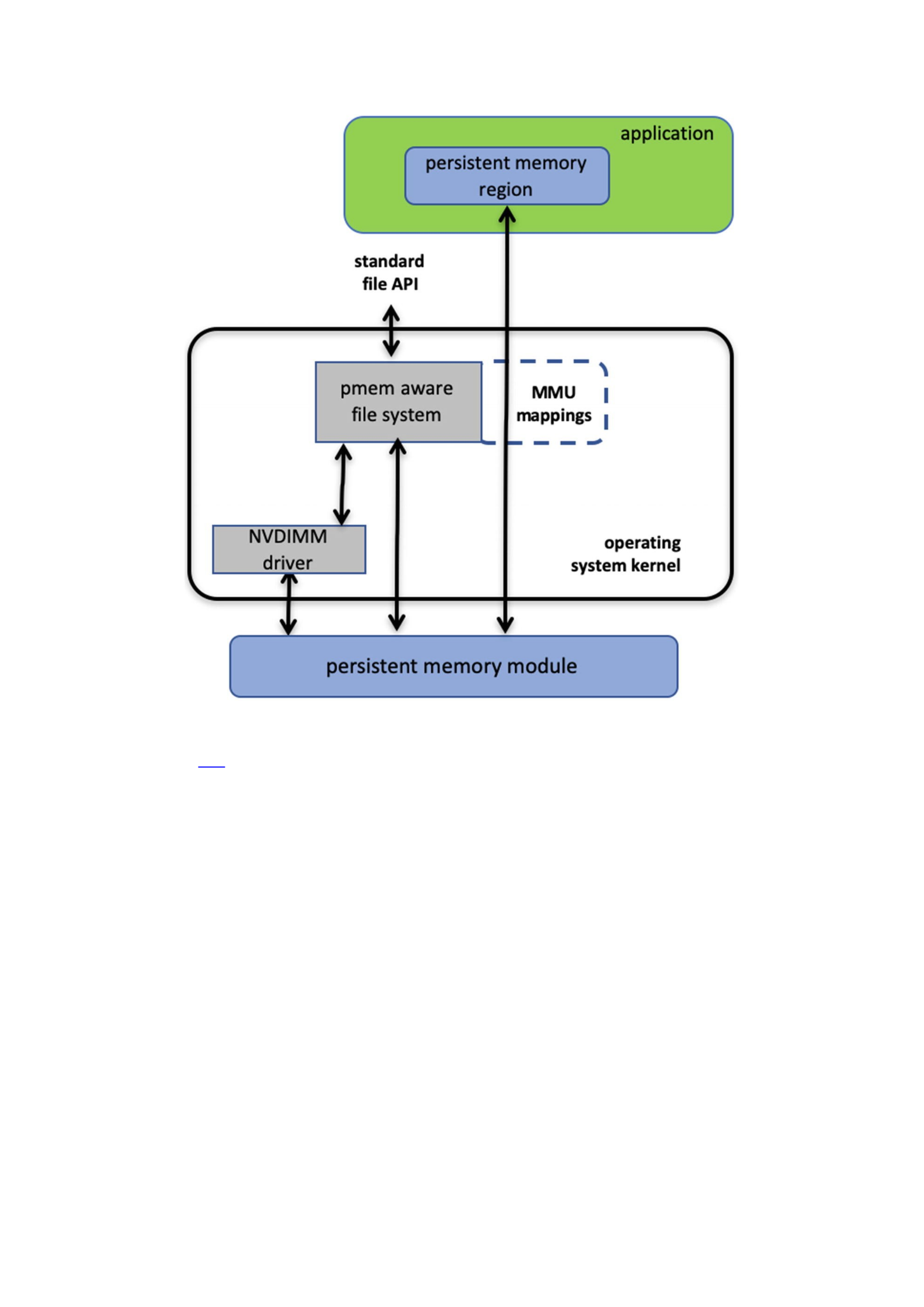
Figure 3-5Direct access (DAX) I/O and standard file API I/O paths through the kernel
Listing 3-7 shows a C source code example that uses DAX to write a string directly
into persistent memory. This example uses one of the persistent memory API libraries
included in Linux and Windows called libpmem . Although we discuss these libraries
in depth in later chapters, we describe the use of two of the functions available in
libpmem in the following steps. The APIs in libpmem are common across Linux and
Windows and abstract the differences between underlying operating system APIs, so
this sample code is portable across both operating system platforms.
32 #include <sys/types.h>
33 #include <sys/stat.h>
34 #include <fcntl.h>
35 #include <stdio.h>
36 #include <errno.h>
37 #include <stdlib.h>
38 #ifndef _WIN32
39 #include <unistd.h>
40 #else
41 #include <io.h>
42 #endif
43 #include <string.h>

44 #include <libpmem.h>
45
46 /* Using 4K of pmem for this example */
47 #define PMEM_LEN 4096
48
49 int
50 main(int argc, char *argv[])
51 {
52 char *pmemaddr;
53 size_t mapped_len;
54 int is_pmem;
55
56 if (argc != 2) {
57 fprintf(stderr, "Usage: %s filename\n",
58 argv[0]);
59 exit(1);
60 }
61
62 /* Create a pmem file and memory map it. */
63 if ((pmemaddr = pmem_map_file(argv[1], PMEM_LEN,
64 PMEM_FILE_CREATE, 0666, &mapped_len,
65 &is_pmem)) == NULL) {
66 perror("pmem_map_file");
67 exit(1);
68 }
69
70 /* Store a string to the persistent memory. */
71 char s[] = "This is new data written to the file";
72 strcpy(pmemaddr, s);
73
74 /* Flush our string to persistence. */
75 if (is_pmem)
76 pmem_persist(pmemaddr, sizeof(s));
77 else
78 pmem_msync(pmemaddr, sizeof(s));
79
80 /* Delete the mappings. */
81 pmem_unmap(pmemaddr, mapped_len);
82
83 printf("Done.\n");
84 exit(0);
85 }
Listing 3-7DAX programming example
Lines 38-42: We handle the differences between Linux and Windows for the
include files.
Line 44: We include the header file for the libpmem API used in this
example.

Lines 56-60: We take the pathname argument from the command line
argument.
Line 63-68: The pmem_map_file function in libpmem handles opening
the file and mapping it into our address space on both Windows and Linux.
Since the file resides on persistent memory, the operating system programs
the hardware MMU in the CPU to map the persistent memory region into our
application’s virtual address space. Pointer pmemaddr is set to the
beginning of that region. The pmem_map_file function can also be used for
memory mapping disk-based files through kernel main memory as well as
directly mapping persistent memory, so is_pmem is set to TRUE if the file
resides on persistent memory and FALSE if mapped through main memory.
Line 72: We write a string into persistent memory.
Lines 75-78: If the file resides on persistent memory, the pmem_persist
function uses the user space machine instructions (described in Chapter 2)
to ensure our string is flushed through CPU cache levels to the power-fail
safe domain and ultimately to persistent memory. If our file resided on disk-
based storage, Linux mmap or Windows FlushViewOfFile would be used
to flushed to storage. Note that we can pass small sizes here (the size of the
string written is used in this example) instead of requiring flushes at page
granularity when using msync() or FlushViewOfFile().
Line 81: Finally, we unmap the persistent memory region.
Summary
Figure 3-6 shows the complete view of the operating system support that this chapter
describes. As we discussed, an application can use persistent memory as a fast SSD,
more directly through a persistent memory-aware file system, or mapped directly into
the application’s memory space with the DAX option. DAX leverages operating system
services for memory-mapped files but takes advantage of the server hardware’s ability
to map persistent memory directly into the application’s address space. This avoids the
need to move data between main memory and storage. The next few chapters describe
considerations for working with data directly in persistent memory and then discuss
the APIs for simplifying development.
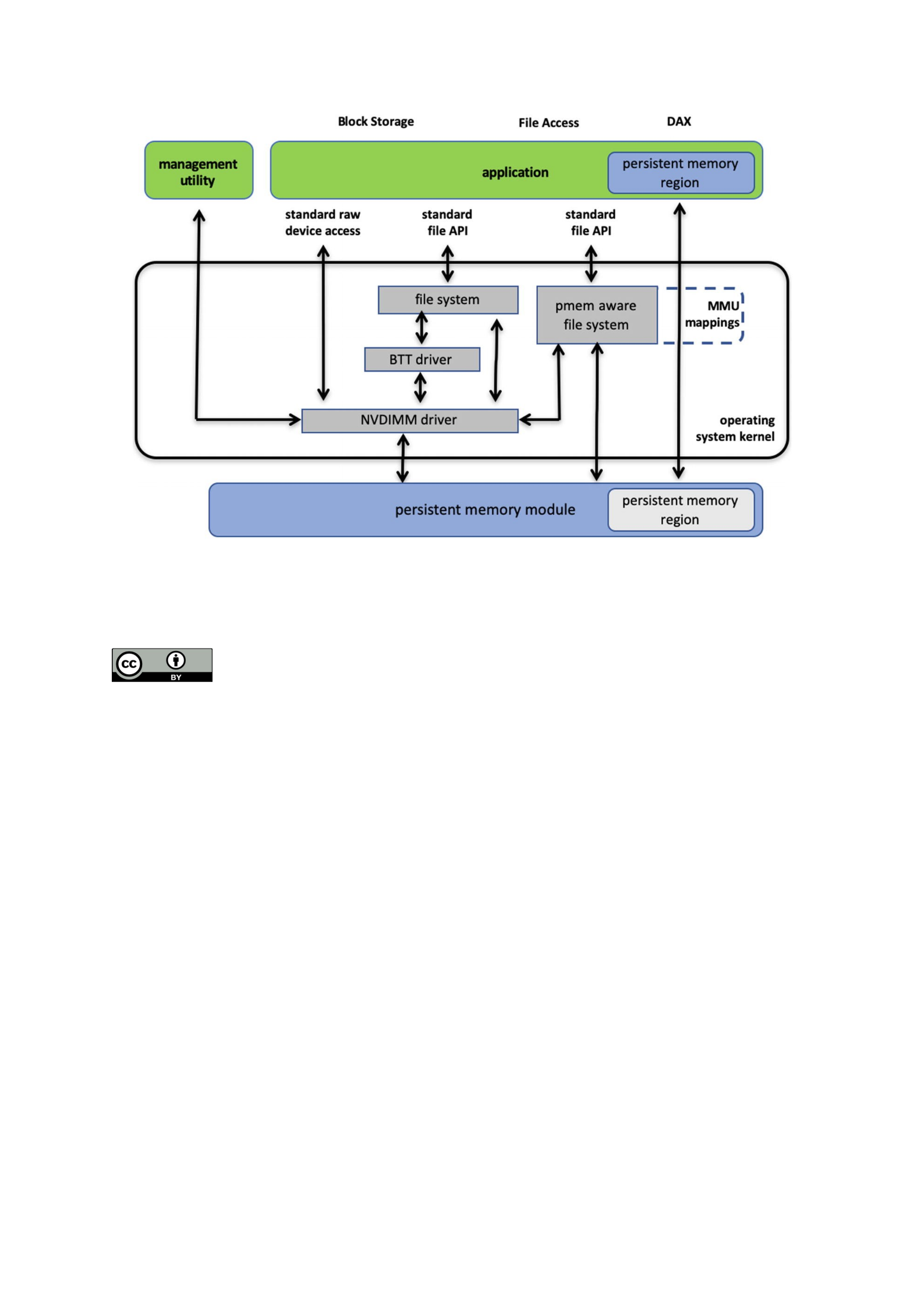
Figure 3-6Persistent memory programming interfaces
pen Access This chapter is licensed under the terms of the Creative Commons Attribution 4.0
International License (http://creativecommons.org/licenses/by/4.0/), which permits use, sharing,
adaptation, distribution and reproduction in any medium or format, as long as you give appropriate credit
to the original author(s) and the source, provide a link to the Creative Commons license and indicate if changes were
made.
O
The images or other third party material in this chapter are included in the chapter's Creative Commons license,
unless indicated otherwise in a credit line to the material. If material is not included in the chapter's Creative
Commons license and your intended use is not permitted by statutory regulation or exceeds the permitted use, you
will need to obtain permission directly from the copyright holder.

© The Author(s) 2020
S. ScargallProgramming Persistent Memory
https://doi.org/10.1007/978-1-4842-4932-1_4
4. Fundamental Concepts of Persistent Memory
Programming
Steve Scargall1
(1)Santa Clara, CA, USA
In Chapter 3, you saw how operating systems expose persistent memory to applications
as memory-mapped files. This chapter builds on this fundamental model and examines
the programming challenges that arise. Understanding these challenges is an essential
part of persistent memory programming, especially when designing a strategy for
recovery after application interruption due to issues like crashes and power failures.
However, do not let these challenges deter you from persistent memory programming!
Chapter 5 describes how to leverage existing solutions to save you programming time
and reduce complexity.
What’s Different?
Application developers typically think in terms of memory-resident data structures and
storage-resident data structures. For data center applications, developers are careful to
maintain consistent data structures on storage, even in the face of a system crash. This
problem is commonly solved using logging techniques such as write-ahead logging,
where changes are first written to a log and then flushed to persistent storage. If the
data modification process is interrupted, the application has enough information in the
log to finish the operation on restart. Techniques like this have been around for many
years; however, correct implementations are challenging to develop and time-
consuming to maintain. Developers often rely on a combination of databases, libraries,
and modern file systems to provide consistency. Even so, it is ultimately the application
developer’s responsibility to design in a strategy to maintain consistent data structures
on storage, both at runtime and when recovering from application and system crashes.
Unlike storage-resident data structures, application developers are concerned about
maintaining consistency of memory-resident data structures at runtime. When an
application has multiple threads accessing the same data structure, techniques like
locking are used so that one thread can perform complex changes to a data structure
without another thread seeing only part of the change. When an application exits or
crashes, or the system crashes, the memory contents are gone, so there is no need to
maintain consistency of memory-resident data structures between runs of an
application like there is with storage-resident data structures.
These explanations may seem obvious, but these assumptions that the storage state
stays around between runs and memory contents are volatile are so fundamental in the
way applications are developed that most developers don’t give it much thought. What’s

different about persistent memory is, of course, that it is persistent, so all the
considerations of both storage and memory apply. The application is responsible for
maintaining consistent data structures between runs and reboots, as well as the thread-
safe locking used with memory-resident data structures.
If persistent memory has these attributes and requirements just like storage, why
not use code developed over the years for storage? This approach does work; using the
storage APIs on persistent memory is part of the programming model we described in
Chapter 3. If the existing storage APIs on persistent memory are fast enough and meet
the application’s needs, then no further work is necessary. But to fully leverage the
advantages of persistent memory, where data structures are read and written in place
on persistence and accesses happen at the byte granularity, instead of using the block
storage stack, applications will want to memory map it and access it directly. This
eliminates the buffer-based storage APIs in the data path.
Atomic Updates
Each platform supporting persistent memory will have a set of native memory
operations that are atomic. On Intel hardware, the atomic persistent store is 8 bytes.
Thus, if the program or system crashes while an aligned 8-byte store to persistent
memory is in-flight, on recovery those 8 bytes will either contain the old contents or the
new contents. The Intel processor has instructions that store more than 8 bytes, but
those are not failure atomic, so they can be torn by events like a power failure.
Sometimes an update to a memory-resident data structure will require multiple
instructions, so naturally those changes can be torn by power failure as well since
power could be lost between any two instructions. Runtime locking prevents other
threads from seeing a partially done change, but locking doesn’t provide any failure
atomicity. When an application needs to make a change that is larger than 8 bytes to
persistent memory, it must construct the atomic operation by building on top of the
basic atomics provided by hardware, such as the 8-byte failure atomicity provided by
Intel hardware.
Transactions
Combining multiple operations into a single atomic operation is usually referred to as a
transaction. In the database world, the acronym ACID describes the properties of a
transaction: atomicity, consistency, isolation, and durability.
Atomicity
As described earlier, atomicity is when multiple operations are composed into a single
atomic action that either happens entirely or does not happen at all, even in the face of
system failure. For persistent memory, the most common techniques used are
Redo logging, where the full change is first written to a log, so during
recovery, it can be rolled forward if interrupted.
Undo logging, where information is logged that allows a partially done
change to be rolled back during recovery.

Atomic pointer updates, where a change is made active by updating a single
pointer atomically, usually changing it from pointing to old data to new data.
The preceding list is not exhaustive, and it ignores the details that can get relatively
complex. One common consideration is that transactions often include memory
allocation/deallocation. For example, a transaction that adds a node to a tree data
structure usually includes the allocation of the new node. If the transaction is rolled
back, the memory must be freed to prevent a memory leak. Now imagine a transaction
that performs multiple persistent memory allocations and free operations, all of which
must be part of the same atomic operation. The implementation of this transaction is
clearly more complex than just writing the new value to a log or updating a single
pointer.
Consistency
Consistency means that a transaction can only move a data structure from one valid
state to another. For persistent memory, programmers usually find that the locking they
use to make updates thread-safe often indicates consistency points as well. If it is not
valid for a thread to see an intermediate state, locking prevents it from happening, and
when it is safe to drop the lock, that is because it is safe for another thread to observe
the current state of the data structure.
Isolation
Multithreaded (concurrent) execution is commonplace in modern applications. When
making transactional updates, the isolation is what allows the concurrent updates to
have the same effect as if they were executed sequentially. At runtime, isolation for
persistent memory updates is typically achieved by locking. Since the memory is
persistent, the isolation must be considered for transactions that were in-flight when
the application was interrupted. Persistent memory programmers typically detect this
situation on restart and roll partially done transactions forward or backward
appropriately before allowing general-purpose threads access to the data structures.
Durability
A transaction is considered durable if it is on persistent media when it is complete. Even
if the system loses power or crashes at that point, the transaction remains completed.
As described in Chapter 2, this usually means the changes must be flushed from the CPU
caches. This can be done using standard APIs, such as the Linux msync() call, or
platform-specific instructions such as Intel’s CLWB. When implementing transactions on
persistent memory, pay careful attention to ensure that log entries are flushed to
persistence before changes are started and flush changes to persistence before a
transaction is considered complete.
Another aspect of the durable property is the ability to find the persistent
information again when an application starts up. This is so fundamental to how storage
works that we take it for granted. Metadata such as file names and directory names are
used to find the durable state of an application on storage. For persistent memory, the

same is true due to the programming model described in Chapter 3, where persistent
memory is accessed by first opening a file on a direct access (DAX) file system and then
memory mapping that file. However, a memory-mapped file is just a range of raw data;
how does the application find the data structures resident in that range? For persistent
memory, there must be at least one well-known location of a data structure to use as a
starting point. This is often referred to as a root object (described in Chapter 7). The
root object is used by many of the higher-level libraries within PMDK to access the data.
Flushing Is Not Transactional
It is important to separate the ideas of flushing to persistence from transactional
updates. Flushing changes to storage using calls like msync() or fsync() on Linux
and FlushFileBuffers() on Windows have never provided transactional updates.
Applications assume the responsibility for maintaining consistent storage data
structures in addition to flushing changes to storage. With persistent memory, the same
is true. In Chapter 3, a simple program stored a string to persistent memory and then
flushed it to make sure the change was persistent. But that code was not transactional,
and in the face of failure, the change could be in just about any state – from completely
lost to partially lost to fully completed.
A fundamental property of caches is that they hold data temporarily for
performance, but they do not typically hold data until a transaction is ready to commit.
Normal system activity can cause cache pressure and evict data at any time and in any
order. If the examples in Chapter 3 were interrupted by power failure, it is possible for
any part of the string being stored to be lost and any part to be persistent, in any order.
It is important to think of the cache flush operation as flush anything that hasn’t already
been flushed and not as flush all my changes now.
Finally, we showed a decision tree in Chapter 2 (Figure 2-5) where an application
can determine at startup that no cache flushing is required for persistent memory. This
can be the case on platforms where the CPU cache is flushed automatically on power
failure, for example. Even on platforms where flush instructions are not needed,
transactions are still required to keep data structures consistent in the face of failure.
Start-Time Responsibilities
In Chapter 2 (Figures 2-5 and 2-6), we showed flowcharts outlining the application’s
responsibilities when using persistent memory. These responsibilities included
detecting platform details, available instructions, media failures, and so on. For storage,
these types of things happen in the storage stack in the operating system. Persistent
memory, however, allows direct access, which removes the kernel from the data path
once the file is memory mapped.
As a programmer, you may be tempted to map persistent memory and start using it,
as shown in the Chapter 3 examples. For production-quality programming, you want to
ensure these start-time responsibilities are met. For example, if you skip the checks in
Figure 2-5, you will end up with an application that flushes CPU caches even when it is
not required, and that will perform poorly on hardware that does not need the flushing.
If you skip the checks in Figure 2-6, you will have an application that ignores media
errors and may use corrupted data resulting in unpredictable and undefined behavior.

Tuning for Hardware Configurations
When storing a large data structure to persistent memory, there are several ways to
copy the data and make it persistent. You can either copy the data using the common
store operations and then flush the caches (if required) or use special instructions like
Intel’s non-temporal store instructions that bypass the CPU caches. Another
consideration is that persistent memory write performance may be slower than writing
to normal memory, so you may want to take steps to store to persistent memory as
efficiently as possible, by combining multiple small writes into larger changes before
storing them to persistent memory. The optimal write size for persistent memory will
depend on both the platform it is plugged into and the persistent memory product itself.
These examples show that different platforms will have different characteristics when
using persistent memory, and any production-quality application will be tuned to
perform best on the intended target platforms. Naturally, one way to help with this
tuning work is to leverage libraries or middleware that has already been tuned and
validated.
Intel Machine Instructions for Persistent Memory
Applicable to Intel- and AMD-based ADR platforms, executing an Intel 64 and 32
architecture store instruction is not enough to make data persistent since the data may
be sitting in the CPU caches indefinitely and could be lost by a power failure. Additional
cache flush actions are required to make the stores persistent. Importantly, these non-
privileged cache flush operations can be called from user space, meaning applications
decide when and where to fence and flush data. Table 2-1 summarizes each of these
instructions.
Developers should primarily focus on CLWB and Non-Temporal Stores if
available and fall back to the others as necessary. Table 2-1 lists other opcodes for
completeness.
Table 2-1Intel architecture instructions for persistent memory
OPCODE Description
CLFLUSH This instruction, supported in many generations of CPU, flushes a single cache line. Historically,
this instruction is serialized, causing multiple CLFLUSH instructions to execute one after the
other, without any concurrency.
CLFLUSHOPT
(followed by an
SFENCE)
This instruction, newly introduced for persistent memory support, is like CLFLUSH but without
the serialization. To flush a range, the software executes a CLFLUSHOPT instruction for each 64-
byte cache line in the range, followed by a single SFENCE instruction to ensure the flushes are
complete before continuing. CLFLUSHOPT is optimized, hence the name, to allow some
concurrency when executing multiple CLFLUSHOPT instructions back-to-back.
CLWB (followed by
an SFENCE)
The effect of cache line writeback (CLWB) is the same as CLFLUSHOPT except that the cache line
may remain valid in the cache but is no longer dirty since it was flushed. This makes it more
likely to get a cache hit on this line if the data is accessed again later.
Non-temporal
stores (followed by
an SFENCE)
This feature has existed for a while in x86 CPUs. These stores are “write combining” and bypass
the CPU cache; using them does not require a flush. A final SFENCE instruction is still required to
ensure the stores have reached the persistence domain.

SFENCE Performs a serializing operation on all store-to-memory instructions that were issued prior to
the SFENCE instruction. This serializing operation guarantees that every store instruction that
precedes in program order the SFENCE instruction is globally visible before any store instruction
that follows the SFENCE instruction can be globally visible. The SFENCE instruction is ordered
with respect to store instructions, other SFENCE instructions, any MFENCE instructions, and any
serializing instructions (such as the CPUID instruction). It is not ordered with respect to load
instructions or the LFENCE instruction.
WBINVD This kernel-mode-only instruction flushes and invalidates every cache line on the CPU that
executes it. After executing this on all CPUs, all stores to persistent memory are certainly in the
persistence domain, but all cache lines are empty, impacting performance. Also, the overhead of
sending a message to each CPU to execute this instruction can be significant. Because of this,
WBINVD is only expected to be used by the kernel for flushing very large ranges (at least many
megabytes).
Detecting Platform Capabilities
Server platform, CPU, and persistent memory features and capabilities are exposed to
the operating system through the BIOS and ACPI that can be queried by applications.
Applications should not assume they are running on hardware with all the
optimizations available. Even if the physical hardware supports it, virtualization
technologies may or may not expose those features to the guests, or your operating
system may or may not implement them. As such, we encourage developers to use
libraries, such as those in the PMDK, that perform the required feature checks or
implement the checks within the application code base.
Figure 2-5 shows the flow implemented by libpmem, which initially verifies the
memory-mapped file (called a memory pool), resides on a file system that has the DAX
feature enabled, and is backed by physical persistent memory. Chapter 3 describes DAX
in more detail.
On Linux, direct access is achieved by mounting an XFS or ext4 file system with the
"-o dax" option. On Microsoft Windows, NTFS enables DAX when the volume is
created and formatted using the DAX option. If the file system is not DAX-enabled,
applications should fall back to the legacy approach of using msync(), fsync(), or
FlushFileBuffers(). If the file system is DAX-enabled, the next check is to
determine whether the platform supports ADR or eADR by verifying whether or not the
CPU caches are considered persistent. On an eADR platform where CPU caches are
considered persistent, no further action is required. Any data written will be considered
persistent, and thus there is no requirement to perform any flushes, which is a
significant performance optimization. On an ADR platform, the next sequence of events
identifies the most optimal flush operation based on Intel machine instructions
previously described.
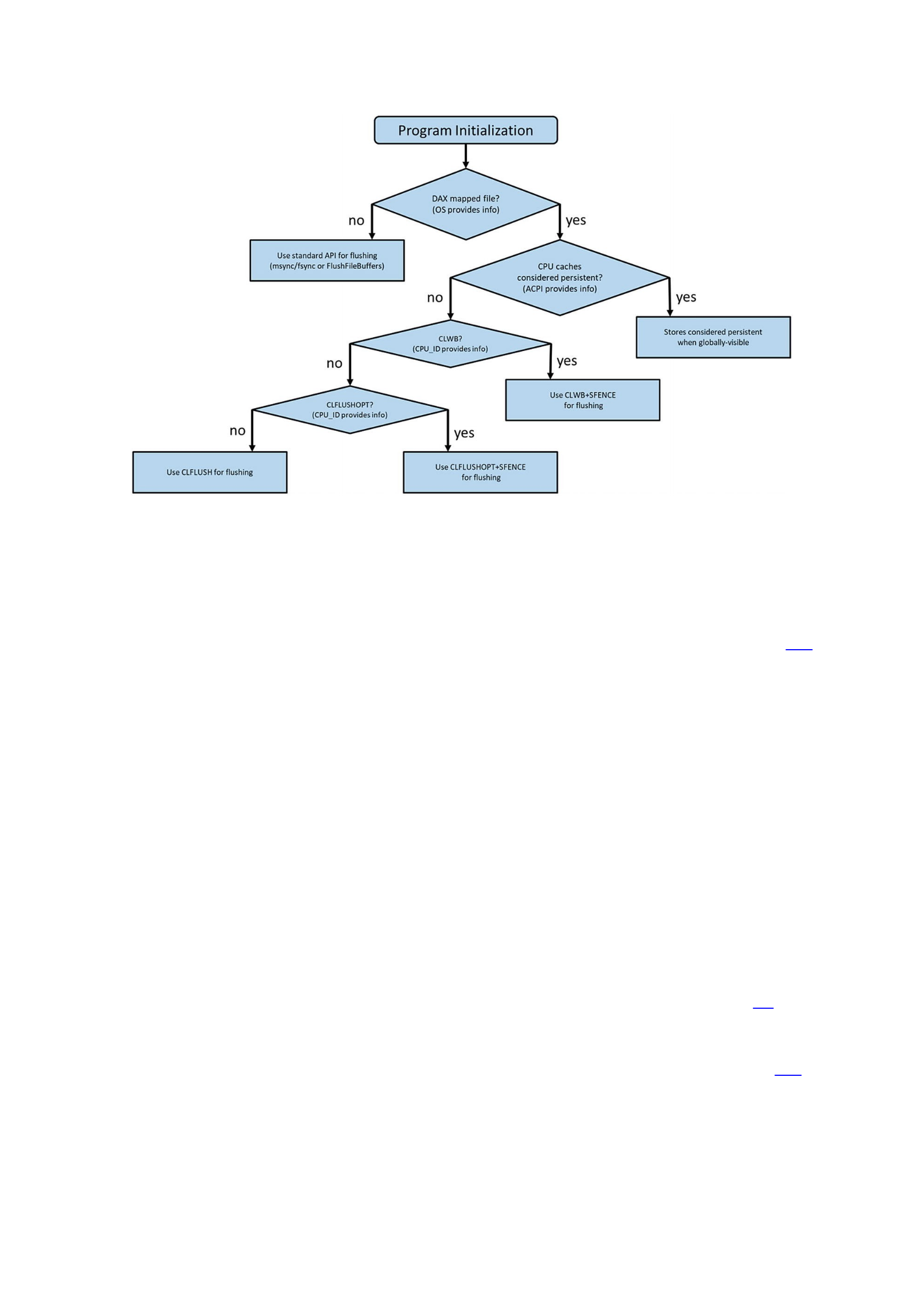
Figure 2-5Flowchart showing how applications can detect platform features
Application Startup and Recovery
In addition to detecting platform features, applications should verify whether the
platform was previously stopped and restarted gracefully or ungracefully. Figure 2-6
shows the checks performed by the Persistent Memory Development Kit.
Some persistent memory devices, such as Intel Optane DC persistent memory,
provide SMART counters that can be queried to check the health and status. Several
libraries such as libpmemobj query the BIOS, ACPI, OS, and persistent memory
module information then perform the necessary validation steps to decide which flush
operation is most optimal to use.
We described earlier that if a system loses power, there should be enough stored
energy within the power supplies and platform to successfully flush the contents of the
memory controller’s WPQ and the write buffers on the persistent memory devices. Data
will be considered consistent upon successful completion. If this process fails, due to
exhausting all the stored energy before all the data was successfully flushed, the
persistent memory modules will report a dirty shutdown. A dirty shutdown indicates
that data on the device may be inconsistent. This may or may not result in needing to
restore the data from backups. You can find more information on this process – and
what errors and signals are sent – in the RAS (reliability, availability, serviceability)
documentation for your platform and the persistent memory device. Chapter 17 also
discusses this further.
Assuming no dirty shutdown is indicated, the application should check to see if the
persistent memory media is reporting any known poison blocks (see Figure 2-6).
Poisoned blocks are areas on the physical media that are known to be bad.
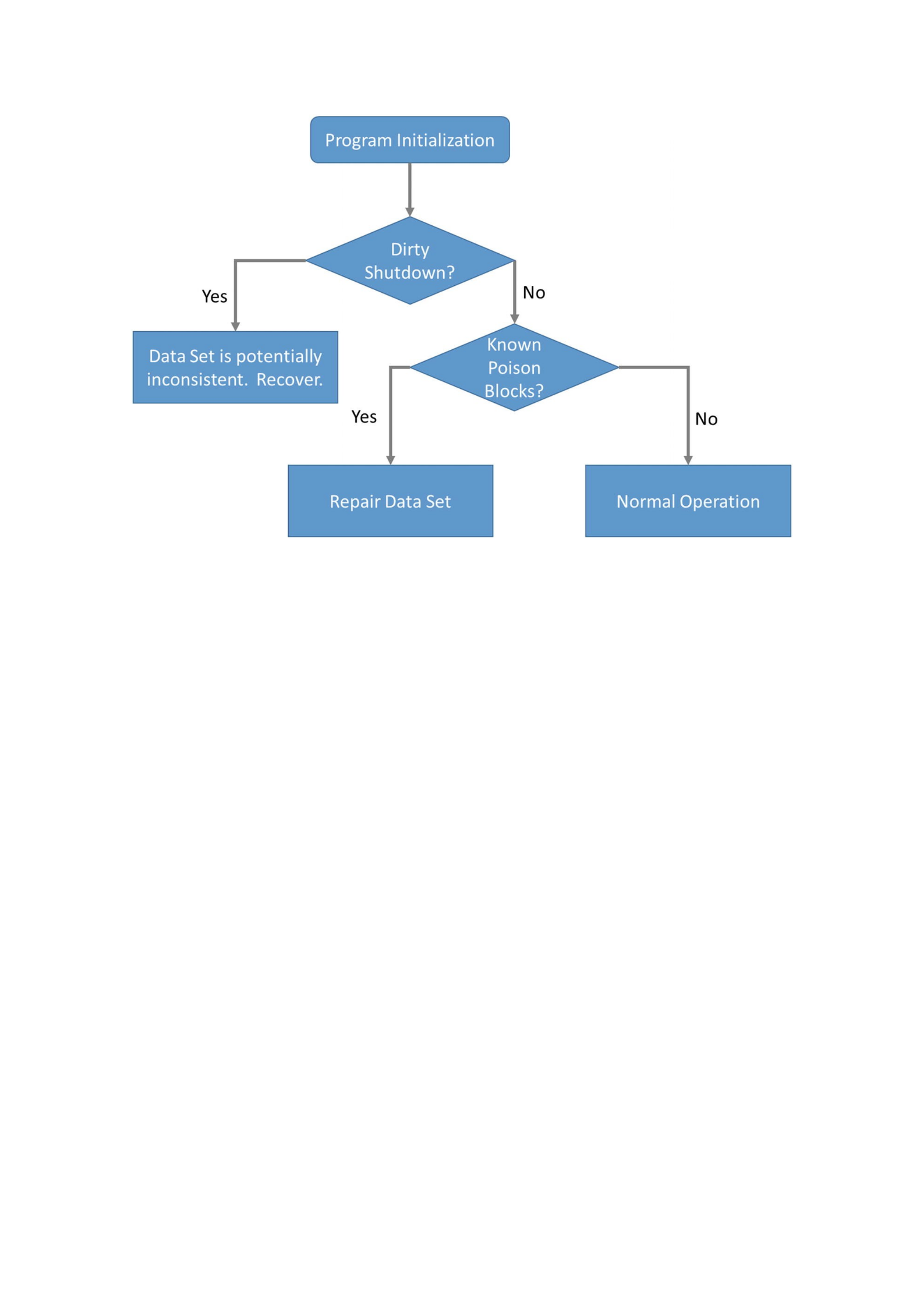
Figure 2-6Application startup and recovery flow
If an application were not to check these things at startup, due to the persistent
nature of the media, it could get stuck in an infinite loop, for example:
1.
Application starts.
2. Reads a memory address.
3. Encounters poison.
4. Crashes or system crashes and reboots.
5. Starts and resumes operation from where it left off.
6. Performs a read on the same memory address that triggered the previous
restart.
7. Application or system crashes.
8. …
9. Repeats infinitely until manual intervention.
The ACPI specification defines an Address Range Scrub (ARS) operation that the
operating system implements. This allows the operating system to perform a runtime
background scan operation across the memory address range of the persistent memory.
System administrators may manually initiate an ARS. The intent is to identify bad or
potentially bad memory regions before the application does. If ARS identifies an issue,

the hardware can provide a status notification to the operating system and the
application that can be consumed and handled gracefully. If the bad address range
contains data, some method to reconstruct or restore the data needs to be implemented.
Chapter 17 describes ARS in more detail.
Developers are free to implement these features directly within the application code.
However, the libraries in the PMDK handle these complex conditions, and they will be
maintained for each product generation while maintaining stable APIs. This gives you a
future-proof option without needing to understand the intricacies of each CPU or
persistent memory product.
A High-Level Language Program
To illustrate how persistent memory is used, we start with a sample program
demonstrating the key-value store provided by a library called libpmemkv. Listing 1-1
shows a full C++ program that stores three key-value pairs in persistent memory and
then iterates through the key-value store, printing all the pairs. This example may seem
trivial, but there are several interesting components at work here. Descriptions below
the listing show what the program does.
37 #include <iostream>
38 #include <cassert>
39 #include <libpmemkv.hpp>
40
41 using namespace pmem::kv;
42 using std::cerr;
43 using std::cout;
44 using std::endl;
45 using std::string;
46
47 /*
48 * for this example, create a 1 Gig file
49 * called "/daxfs/kvfile"
50 */
51 auto PATH = "/daxfs/kvfile";
52 const uint64_t SIZE = 1024 * 1024 * 1024;
53
54 /*
55 * kvprint -- print a single key-value pair
56 */
57 int kvprint(string_view k, string_view v) {
58 cout << "key: " << k.data() <<
59 " value: " << v.data() << endl;
60 return 0;
61 }

62
63 int main() {
64 // start by creating the db object
65 db *kv = new db();
66 assert(kv != nullptr);
67
68 // create the config information for
69 // libpmemkv's open method
70 config cfg;
71
72 if (cfg.put_string("path", PATH) != status::OK) {
73 cerr << pmemkv_errormsg() << endl;
74 exit(1);
75 }
76 if (cfg.put_uint64("force_create", 1) != status::OK) {
77 cerr << pmemkv_errormsg() << endl;
78 exit(1);
79 }
80 if (cfg.put_uint64("size", SIZE) != status::OK) {
81 cerr << pmemkv_errormsg() << endl;
82 exit(1);
83 }
84
85
86 // open the key-value store, using the cmap engine
87 if (kv->open("cmap", std::move(cfg)) != status::OK) {
88 cerr << db::errormsg() << endl;
89 exit(1);
90 }
91
92 // add some keys and values
93 if (kv->put("key1", "value1") != status::OK) {
94 cerr << db::errormsg() << endl;
95 exit(1);
96 }
97 if (kv->put("key2", "value2") != status::OK) {
98 cerr << db::errormsg() << endl;
99 exit(1);
100 }
101 if (kv->put("key3", "value3") != status::OK) {
102 cerr << db::errormsg() << endl;
103 exit(1);
104 }
105
106 // iterate through the key-value store, printing them
107 kv->get_all(kvprint);
108
109 // stop the pmemkv engine
110 delete kv;
111
112 exit(0);
113 }
Listing 1-1A sample program using libpmemkv
Line 57: We define a small helper routine, kvprint() , which prints a key-
value pair when called.
Line 63: This is the first line of main() which is where every C++ program
begins execution. We start by instantiating a key-value engine using the
engine name "cmap". We discuss other engine types in Chapter 9.
Line 70: The cmap engine takes config parameters from a config structure.
The parameter "path" is configured to "/daxfs/kvfile", which is the
path to a persistent memory file on a DAX file system; the parameter
"size" is set to SIZE. Chapter 3 describes how to create and mount DAX
file systems.
Line 93: We add several key-value pairs to the store. The trademark of a key-
value store is the use of simple operations like put() and get(); we only
show put() in this example.
Line 107: Using the get_all() method , we iterate through the entire key-
value store, printing each pair when get_all() calls our kvprint()
routine.
What’s Different?
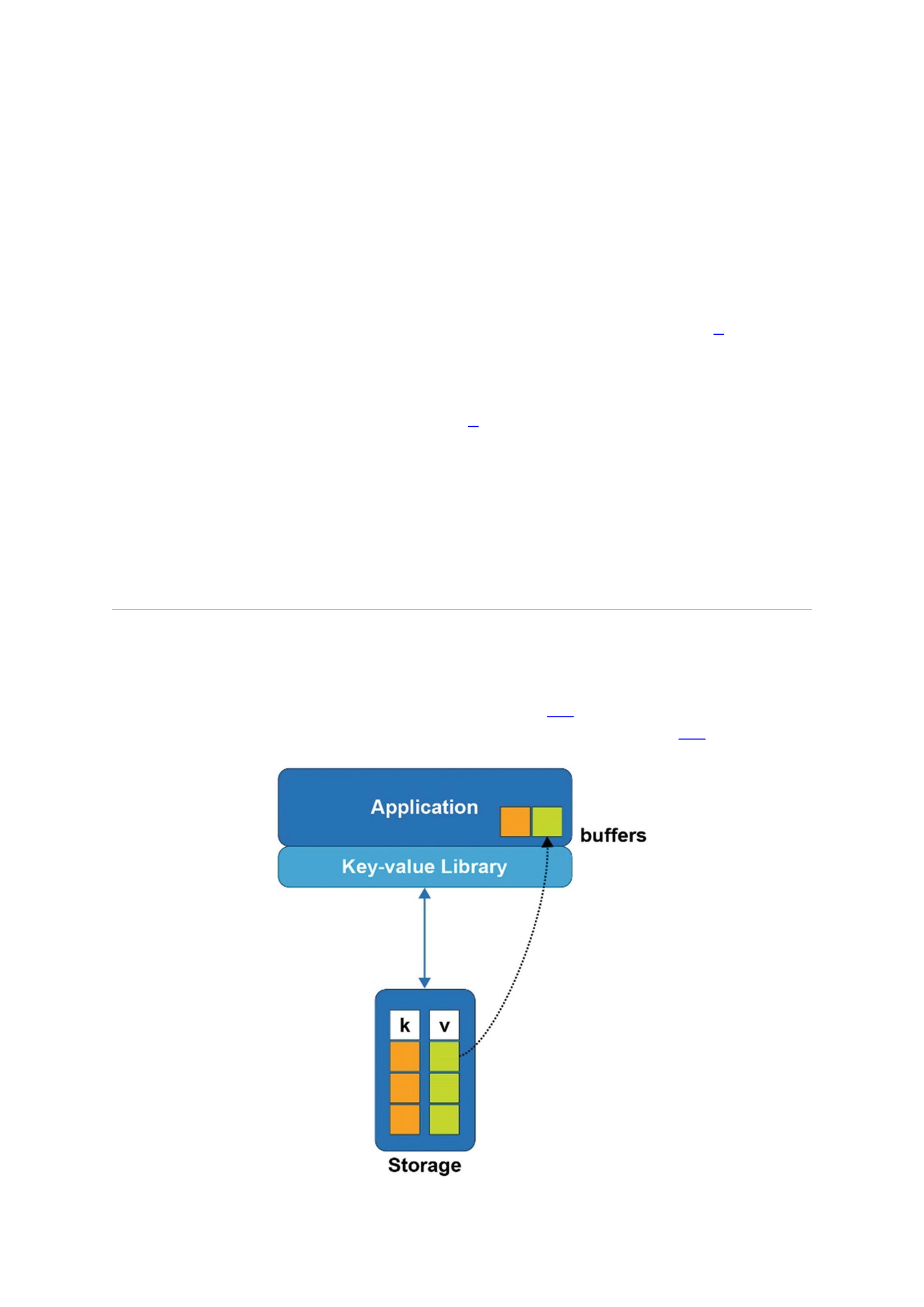
A wide variety of key-value libraries are available in practically every programming
language. The persistent memory example in Listing 1-1 is different because the key-
value store itself resides in persistent memory. For comparison, Figure 1-1 shows how a
key-value store using traditional storage is laid out.
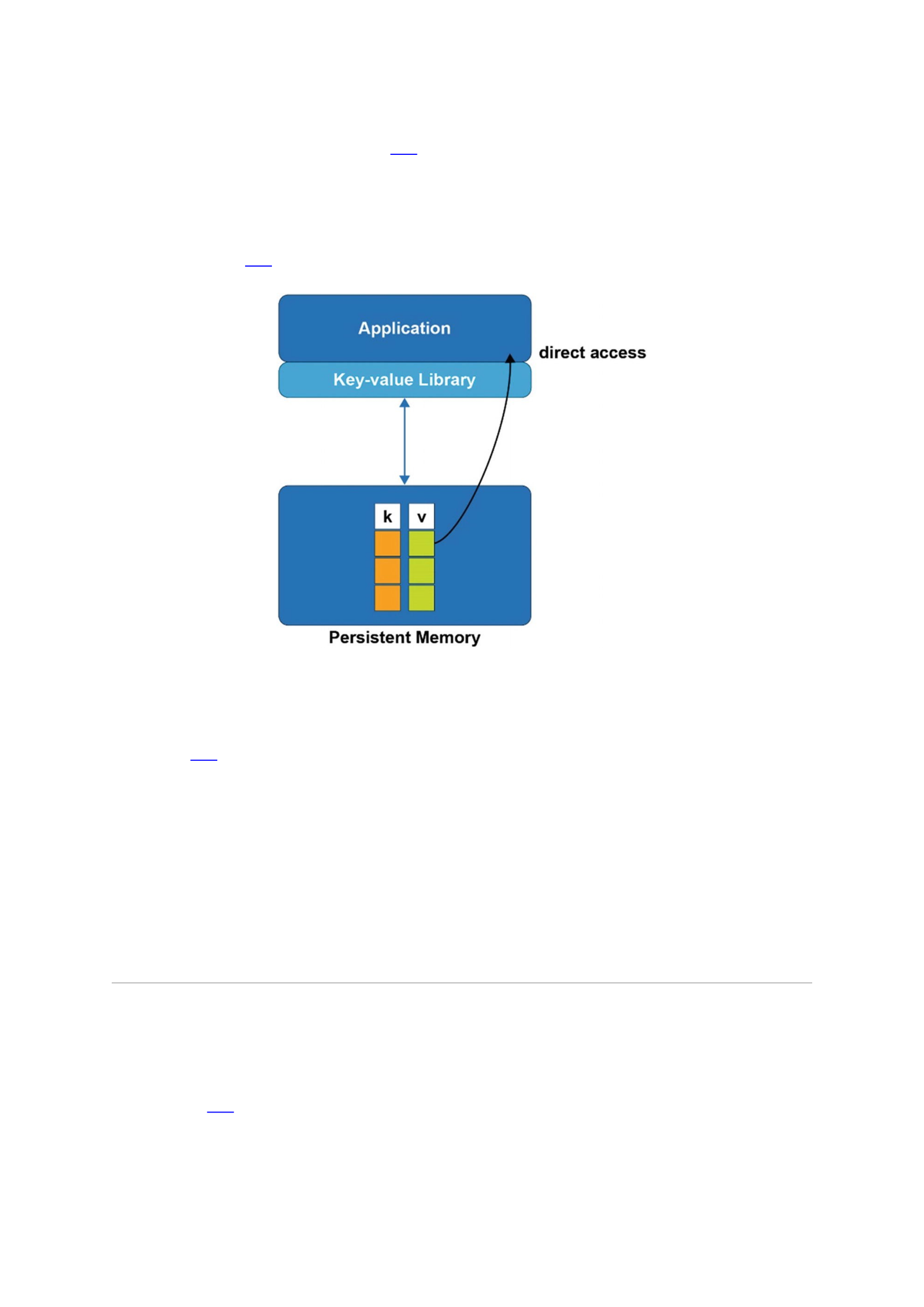
Figure 1-1A key-value store on traditional storage
When the application in Figure 1-1 wants to fetch a value from the key-value store, a
buffer must be allocated in memory to hold the result. This is because the values are
kept on block storage, which cannot be addressed directly by the application. The only
way to access a value is to bring it into memory, and the only way to do that is to read
full blocks from the storage device, which can only be accessed via block I/O. Now
consider Figure 1-2, where the key-value store resides in persistent memory like our
sample code.
Figure 1-2A key-value store in persistent memory
With the persistent memory key-value store, values are accessed by the application
directly, without the need to first allocate buffers in memory. The kvprint() routine
in Listing 1-1 will be called with references to the actual keys and values, directly where
they live in persistence – something that is not possible with traditional storage. In fact,
even the data structures used by the key-value store library to organize its data are
accessed directly. When a storage-based key-value store library needs to make a small
update, for example, 64 bytes, it must read the block of storage containing those 64
bytes into a memory buffer, update the 64 bytes, and then write out the entire block to
make it persistent. That is because storage accesses can only happen using block I/O,
typically 4K bytes at a time, so the task to update 64 bytes requires reading 4K and then
writing 4K. But with persistent memory, the same example of changing 64 bytes would
only write the 64 bytes directly to persistence.
The Performance Difference
Moving a data structure from storage to persistent memory does not just mean smaller
I/O sizes are supported; there is a fundamental performance difference. To illustrate
this, Figure 1-3 shows a hierarchy of latency among the different types of media where
data can reside at any given time in a program.
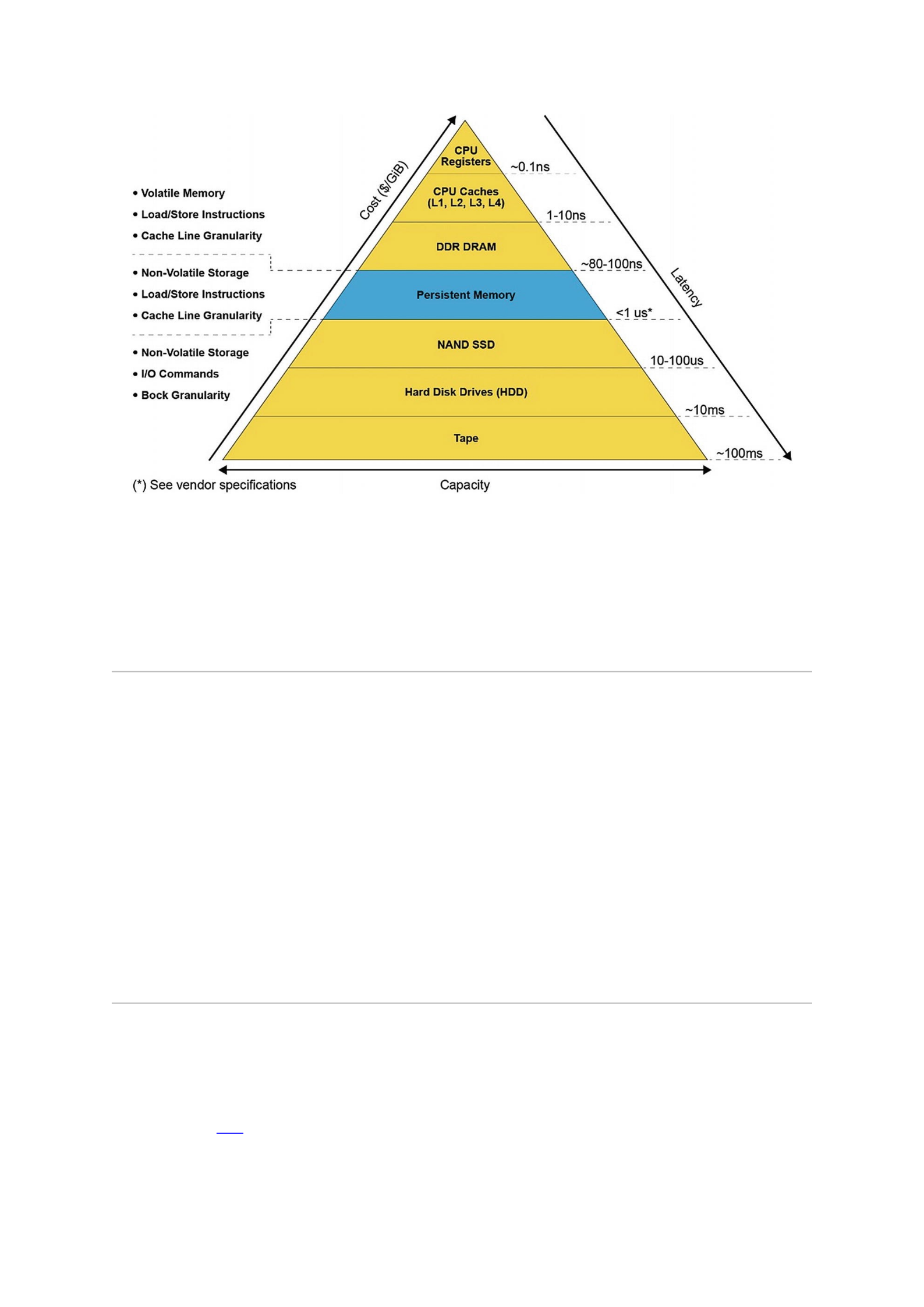
Figure 1-3The memory/storage hierarchy pyramid with estimated latencies
As the pyramid shows, persistent memory provides latencies similar to memory,
measured in nanoseconds, while providing persistency. Block storage provides
persistency with latencies starting in the microseconds and increasing from there,
depending on the technology. Persistent memory is unique in its ability to act like both
memory and storage at the same time.
Program Complexity
Perhaps the most important point of our example is that the programmer still uses the
familiar get/put interfaces normally associated with key-value stores. The fact that the
data structures are in persistent memory is abstracted away by the high-level API
provided by libpmemkv. This principle of using the highest level of abstraction
possible, as long as it meets the application’s needs, will be a recurring theme
throughout this book. We start by introducing very high-level APIs; later chapters delve
into the lower-level details for programmers who need them. At the lowest level,
programming directly to raw persistent memory requires detailed knowledge of things
like hardware atomicity, cache flushing, and transactions. High-level libraries like
libpmemkv abstract away all that complexity and provide much simpler, less error-
prone interfaces.
How Does libpmemkv Work?
All the complexity hidden by high-level libraries like libpmemkv are described more
fully in later chapters, but let’s look at the building blocks used to construct a library like
this. Figure 1-4 shows the full software stack involved when an application uses
libpmemkv.
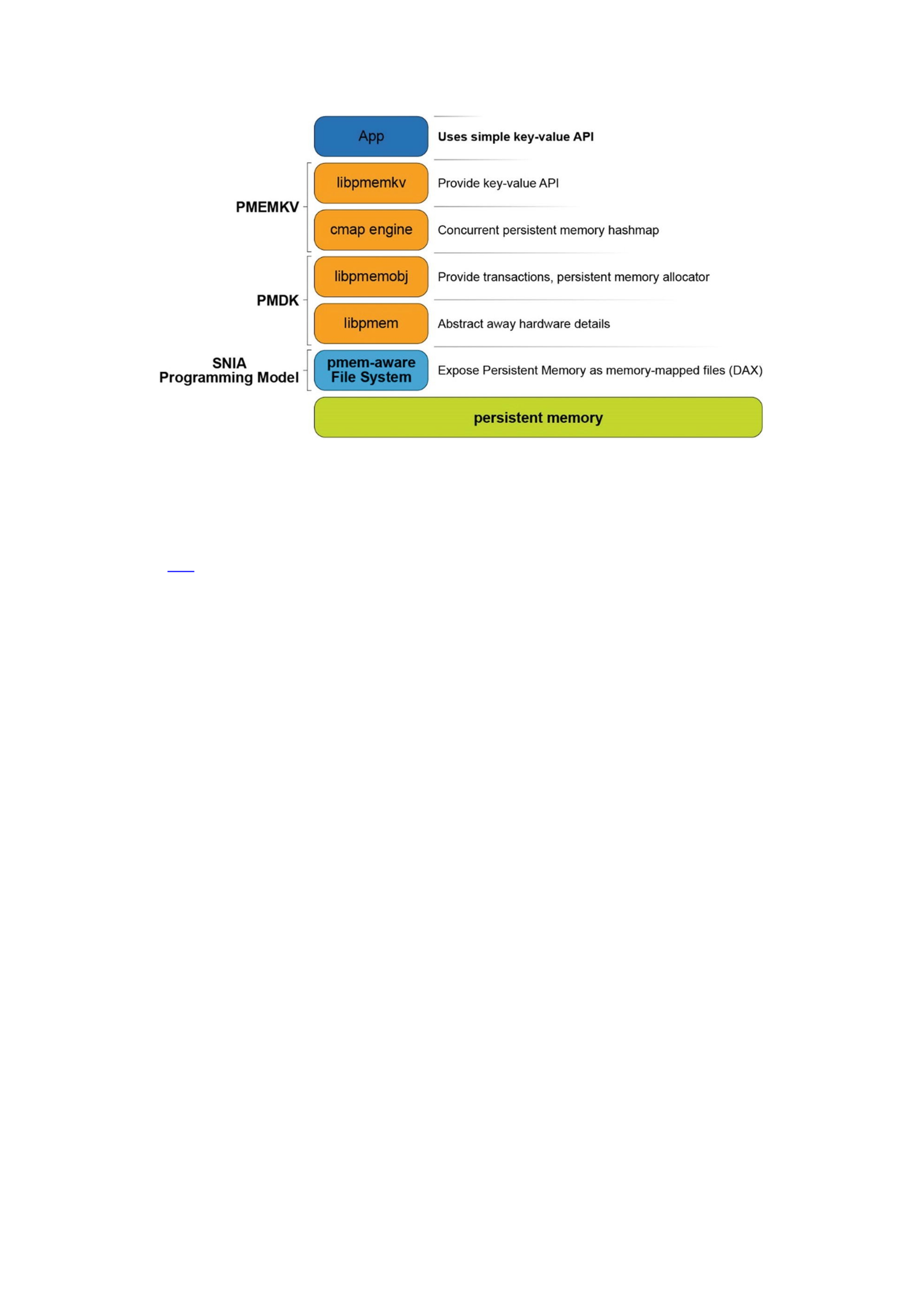
Figure 1-4The software stack when using libpmemkv
Operating System Support for Memory and Storage
Figure 3-1 shows a simplified view of how operating systems manage storage and
volatile memory. As shown, the volatile main memory is attached directly to the CPU
through a memory bus. The operating system manages the mapping of memory regions
directly into the application’s visible memory address space. Storage, which usually
operates at speeds much slower than the CPU, is attached through an I/O controller.
The operating system handles access to the storage through device driver modules
loaded into the operating system’s I/O subsystem.
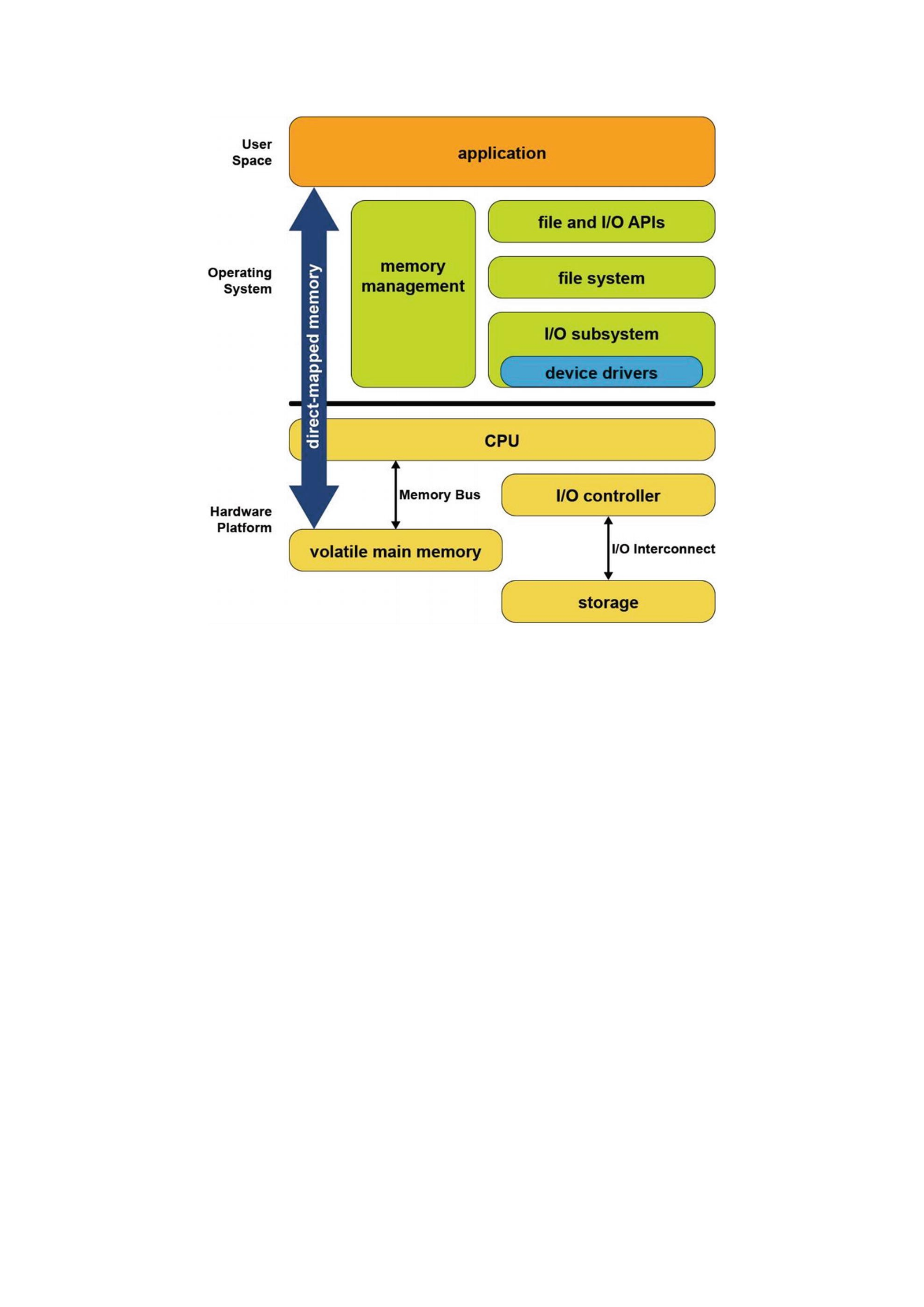
Figure 3-1Storage and volatile memory in the operating system
The combination of direct application access to volatile memory combined with the
operating system I/O access to storage devices supports the most common application
programming model taught in introductory programming classes. In this model,
developers allocate data structures and operate on them at byte granularity in memory.
When the application wants to save data, it uses standard file API system calls to write
the data to an open file. Within the operating system, the file system executes this write
by performing one or more I/O operations to the storage device. Because these I/O
operations are usually much slower than CPU speeds, the operating system typically
suspends the application until the I/O completes.
Since persistent memory can be accessed directly by applications and can persist
data in place, it allows operating systems to support a new programming model that
combines the performance of memory while persisting data like a non-volatile storage
device. Fortunately for developers, while the first generation of persistent memory was
under development, Microsoft Windows and Linux designers, architects and developers
collaborated in the Storage and Networking Industry Association (SNIA) to define a
common programming model, so the methods for using persistent memory described in
this chapter are available in both operating systems. More details can be found in the
SNIA NVM programming model specification
(https://www.snia.org/tech_activities/standards/curr_standards/
npm).
Persistent Memory As Block Storage
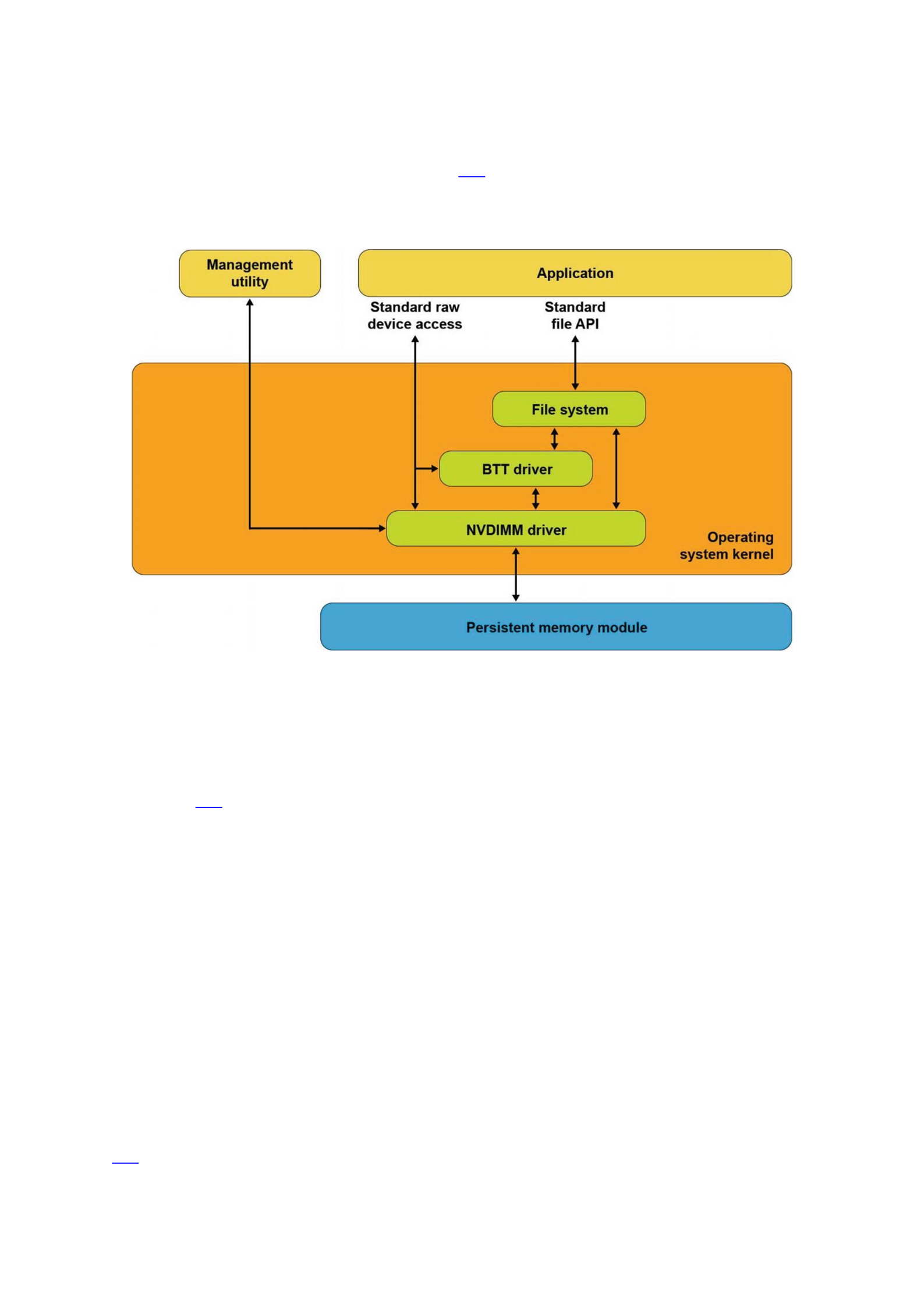
The first operating system extension for persistent memory is the ability to detect the
existence of persistent memory modules and load a device driver into the operating
system’s I/O subsystem as shown in Figure 3-2. This NVDIMM driver serves two
important functions. First, it provides an interface for management and system
administrator utilities to configure and monitor the state of the persistent memory
hardware. Second, it functions similarly to the storage device drivers.
Figure 3-2Persistent memory as block storage
The NVDIMM driver presents persistent memory to applications and operating
system modules as a fast block storage device. This means applications, file systems,
volume managers, and other storage middleware layers can use persistent memory the
same way they use storage today, without modifications.
Figure 3-2 also shows the Block Translation Table (BTT) driver, which can be
optionally configured into the I/O subsystem. Storage devices such as HDDs and SSDs
present a native block size with 512k and 4k bytes as two common native block sizes.
Some storage devices, especially NVM Express SSDs, provide a guarantee that when a
power failure or server failure occurs while a block write is in-flight, either all or none
of the block will be written. The BTT driver provides the same guarantee when using
persistent memory as a block storage device. Most applications and file systems depend
on this atomic write guarantee and should be configured to use the BTT driver, although
operating systems also provide the option to bypass the BTT driver for applications that
implement their own protection against partial block updates.
Persistent Memory-Aware File Systems
The next extension to the operating system is to make the file system aware of and be
optimized for persistent memory. File systems that have been extended for persistent
memory include Linux ext4 and XFS, and Microsoft Windows NTFS. As shown in Figure
3-3, these file systems can either use the block driver in the I/O subsystem (as
described in the previous section) or bypass the I/O subsystem to directly use
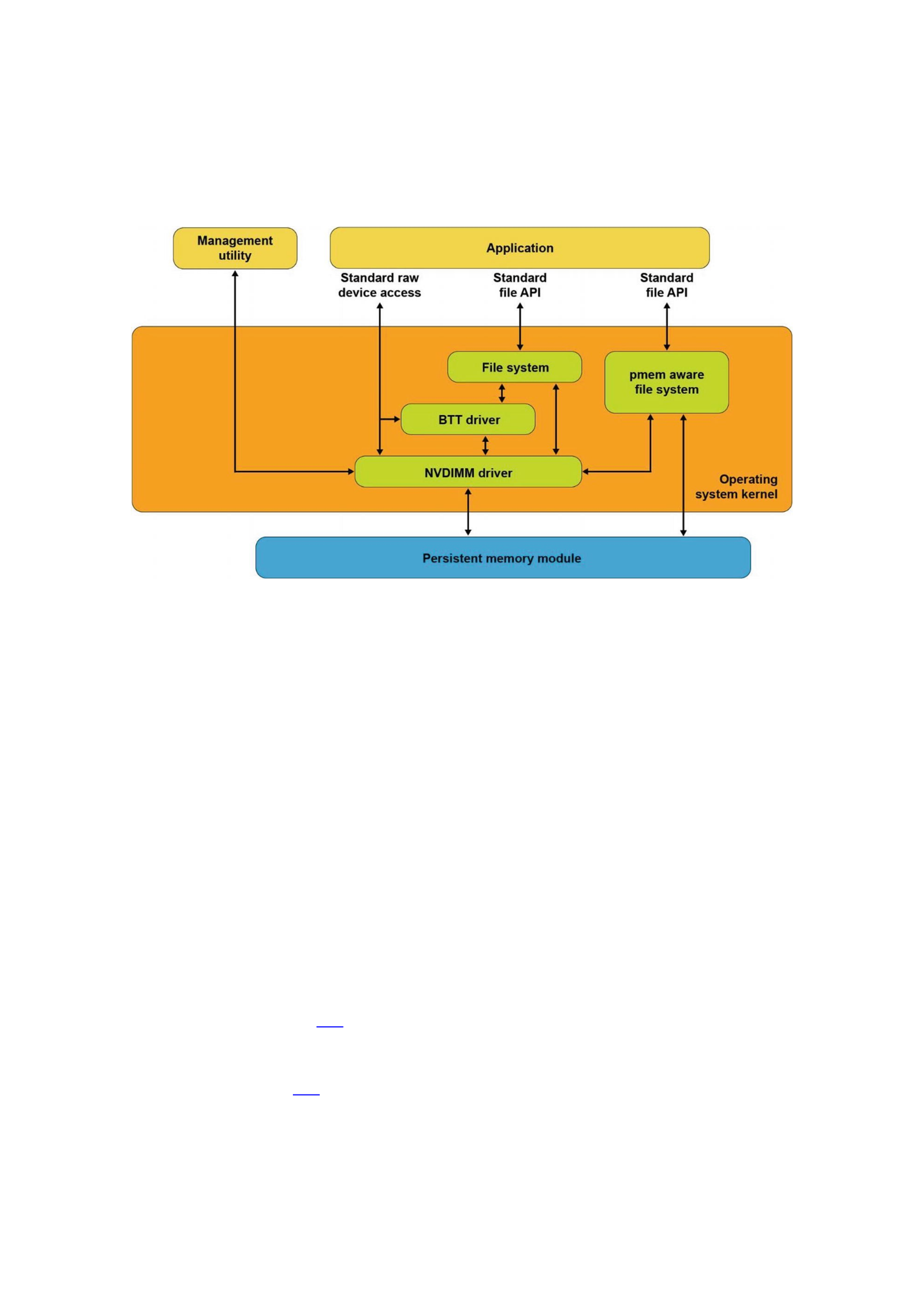
persistent memory as byte-addressable load/store memory as the fastest and shortest
path to data stored in persistent memory. In addition to eliminating the I/O operation,
this path enables small data writes to be executed faster than traditional block storage
devices that require the file system to read the device’s native block size, modify the
block, and then write the full block back to the device.
Figure 3-3Persistent memory-aware file system
These persistent memory-aware file systems continue to present the familiar,
standard file APIs to applications including the open, close, read, and write
system calls. This allows applications to continue using the familiar file APIs while
benefiting from the higher performance of persistent memory.
Memory-Mapped Files
Before describing the next operating system option for using persistent memory, this
section reviews memory-mapped files in Linux and Windows. When memory mapping a
file, the operating system adds a range to the application’s virtual address space which
corresponds to a range of the file, paging file data into physical memory as required.
This allows an application to access and modify file data as byte-addressable in-memory
data structures. This has the potential to improve performance and simplify application
development, especially for applications that make frequent, small updates to file data.
Applications memory map a file by first opening the file, then passing the resulting
file handle as a parameter to the mmap() system call in Linux or to
MapViewOfFile() in Windows. Both return a pointer to the in-memory copy of a
portion of the file. Listing 3-1 shows an example of Linux C code that memory maps a
file, writes data into the file by accessing it like memory, and then uses the msync
system call to perform the I/O operation to write the modified data to the file on the
storage device. Listing 3-2 shows the equivalent operations on Windows. We walk
through and highlight the key steps in both code samples.
50 #include <err.h>
51 #include <fcntl.h>
52 #include <stdio.h>

53 #include <stdlib.h>
54 #include <string.h>
55 #include <sys/mman.h>
56 #include <sys/stat.h>
57 #include <sys/types.h>
58 #include <unistd.h>
59
60 int
61 main(int argc, char *argv[])
62 {
63 int fd;
64 struct stat stbuf;
65 char *pmaddr;
66
67 if (argc != 2) {
68 fprintf(stderr, "Usage: %s filename\n",
69 argv[0]);
70 exit(1);
71 }
72
73 if ((fd = open(argv[1], O_RDWR)) < 0)
74 err(1, "open %s", argv[1]);
75
76 if (fstat(fd, &stbuf) < 0)
77 err(1, "stat %s", argv[1]);
78
79 /*
80 * Map the file into our address space for read
81 * & write. Use MAP_SHARED so stores are visible
82 * to other programs.
83 */
84 if ((pmaddr = mmap(NULL, stbuf.st_size,
85 PROT_READ|PROT_WRITE,
86 MAP_SHARED, fd, 0)) == MAP_FAILED)
87 err(1, "mmap %s", argv[1]);
88
89 /* Don't need the fd anymore because the mapping
90 * stays around */
91 close(fd);
92
93 /* store a string to the Persistent Memory */
94 strcpy(pmaddr, "This is new data written to the
95 file");
96
97 /*
98 * Simplest way to flush is to call msync().
99 * The length needs to be rounded up to a 4k page.
100 */

101 if (msync((void *)pmaddr, 4096, MS_SYNC) < 0)
102 err(1, "msync");
103
104 printf("Done.\n");
105 exit(0);
106 }
Listing 3-1mmap_example.c – Memory-mapped file on Linux example
Lines 67-74: We verify the caller passed a file name that can be opened. The
open call will create the file if it does not already exist.
Line 76: We retrieve the file statistics to use the length when we memory
map the file.
Line 84: We map the file into the application’s address space to allow our
program to access the contents as if in memory. In the second parameter, we
pass the length of the file, requesting Linux to initialize memory with the full
file. We also map the file with both READ and WRITE access and also as
SHARED allowing other processes to map the same file.
Line 91: We retire the file descriptor which is no longer needed once a file is
mapped.
Line 94: We write data into the file by accessing it like memory through the
pointer returned by mmap.
Line 101: We explicitly flush the newly written string to the backing storage
device.
Listing 3-2 shows an example of C code that memory maps a file, writes data into the
file, and then uses the FlushViewOfFile() and FlushFileBuffers() system
calls to flush the modified data to the file on the storage device.
45 #include <fcntl.h>
46 #include <stdio.h>
47 #include <stdlib.h>
48 #include <string.h>
49 #include <sys/stat.h>
50 #include <sys/types.h>
51 #include <Windows.h>
52
53 int
54 main(int argc, char *argv[])
55 {
56 if (argc != 2) {
57 fprintf(stderr, "Usage: %s filename\n",
58 argv[0]);
59 exit(1);
60 }
61
62 /* Create the file or open if the file exists */
63 HANDLE fh = CreateFile(argv[1],
64 GENERIC_READ|GENERIC_WRITE,
65 0,
66 NULL,
67 OPEN_EXISTING,

68 FILE_ATTRIBUTE_NORMAL,
69 NULL);
70
71 if (fh == INVALID_HANDLE_VALUE) {
72 fprintf(stderr, "CreateFile, gle: 0x%08x",
73 GetLastError());
74 exit(1);
75 }
76
77 /*
78 * Get the file length for use when
79 * memory mapping later
80 * */
81 DWORD filelen = GetFileSize(fh, NULL);
82 if (filelen == 0) {
83 fprintf(stderr, "GetFileSize, gle: 0x%08x",
84 GetLastError());
85 exit(1);
86 }
87
88 /* Create a file mapping object */
89 HANDLE fmh = CreateFileMapping(fh,
90 NULL, /* security attributes */
91 PAGE_READWRITE,
92 0,
93 0,
94 NULL);
95
96 if (fmh == NULL) {
97 fprintf(stderr, "CreateFileMapping,
98 gle: 0x%08x", GetLastError());
99 exit(1);
100 }
101
102 /*
103 * Map into our address space and get a pointer
104 * to the beginning
105 * */
106 char *pmaddr = (char *)MapViewOfFileEx(fmh,
107 FILE_MAP_ALL_ACCESS,
108 0,
109 0,
110 filelen,
111 NULL); /* hint address */
112
113 if (pmaddr == NULL) {
114 fprintf(stderr, "MapViewOfFileEx,
115 gle: 0x%08x", GetLastError());

116 exit(1);
117 }
118
119 /*
120 * On windows must leave the file handle(s)
121 * open while mmaped
122 * */
123
124 /* Store a string to the beginning of the file */
125 strcpy(pmaddr, "This is new data written to
126 the file");
127
128 /*
129 * Flush this page with length rounded up to 4K
130 * page size
131 * */
132 if (FlushViewOfFile(pmaddr, 4096) == FALSE) {
133 fprintf(stderr, "FlushViewOfFile,
134 gle: 0x%08x", GetLastError());
135 exit(1);
136 }
137
138 /* Flush the complete file to backing storage */
139 if (FlushFileBuffers(fh) == FALSE) {
140 fprintf(stderr, "FlushFileBuffers,
141 gle: 0x%08x", GetLastError());
142 exit(1);
143 }
144
145 /* Explicitly unmap before closing the file */
146 if (UnmapViewOfFile(pmaddr) == FALSE) {
147 fprintf(stderr, "UnmapViewOfFile,
148 gle: 0x%08x", GetLastError());
149 exit(1);
150 }
151
152 CloseHandle(fmh);
153 CloseHandle(fh);
154
155 printf("Done.\n");
156 exit(0);
157 }
Listing 3-2Memory-mapped file on Windows example
Lines 45-75: As in the previous Linux example, we take the file name passed
through argv and open the file.
Line 81: We retrieve the file size to use later when memory mapping.
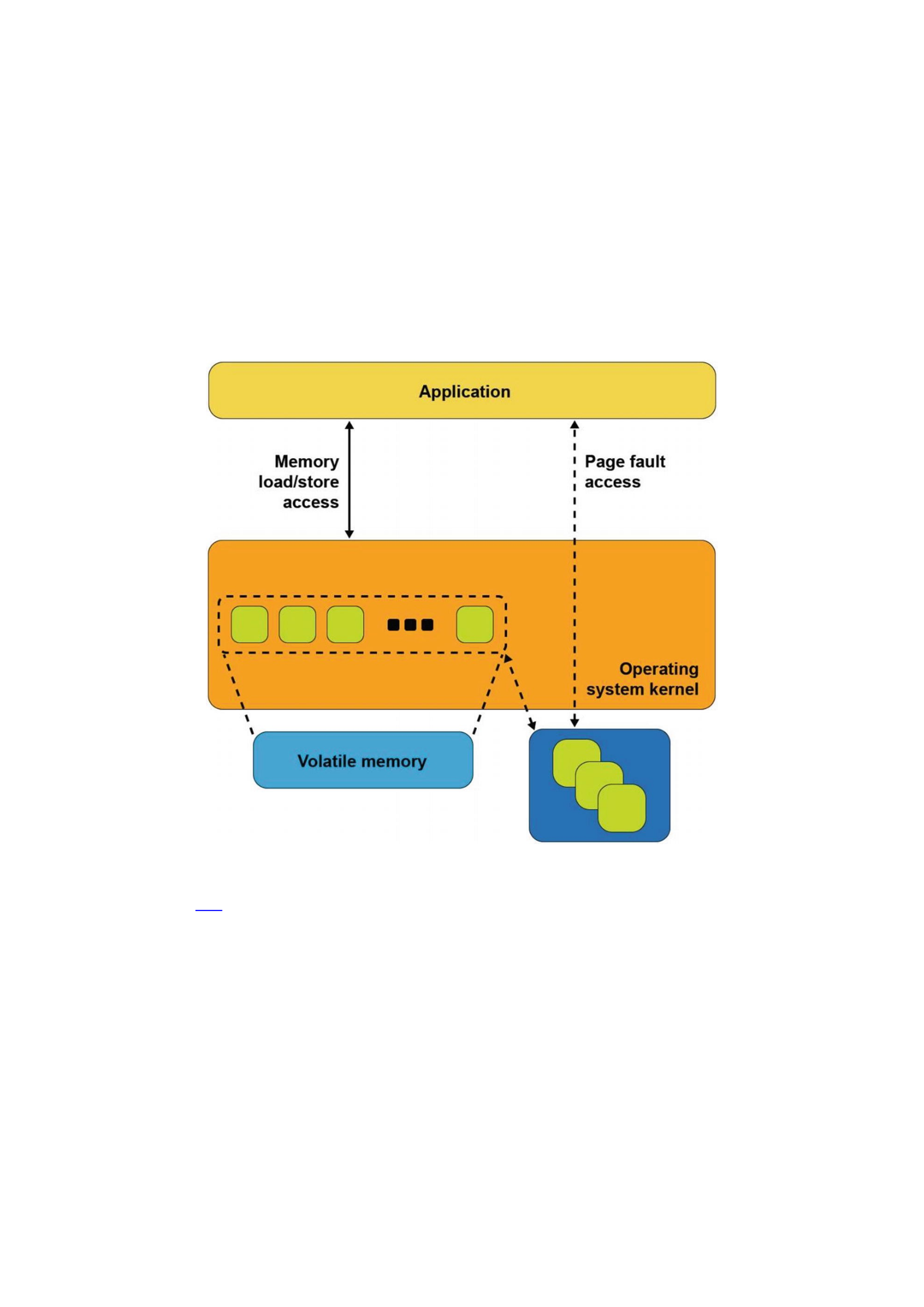
Line 89: We take the first step to memory mapping a file by creating the file
mapping. This step does not yet map the file into our application’s memory
space.
Line 106: This step maps the file into our memory space.
Line 125: As in the previous Linux example, we write a string to the
beginning of the file, accessing the file like memory.
Line 132: We flush the modified memory page to the backing storage.
Line 139: We flush the full file to backing storage, including any additional
file metadata maintained by Windows.
Line 146-157: We unmap the file, close the file, then exit the program.
Figure 3-4Memory-mapped files with storage
Figure 3-4 shows what happens inside the operating system when an application
calls mmap() on Linux or CreateFileMapping() on Windows. The operating
system allocates memory from its memory page cache, maps that memory into the
application’s address space, and creates the association with the file through a storage
device driver.
As the application reads pages of the file in memory, and if those pages are not
present in memory, a page fault exception is raised to the operating system which will
then read that page into main memory through storage I/O operations. The operating
system also tracks writes to those memory pages and schedules asynchronous I/O
operations to write the modifications back to the primary copy of the file on the storage
device. Alternatively, if the application wants to ensure updates are written back to
storage before continuing as we did in our code example, the msync system call on
Linux or FlushViewOfFile on Windows executes the flush to disk. This may cause

the operating system to suspend the program until the write finishes, similar to the file-
write operation described earlier.
This description of memory-mapped files using storage highlights some of the
disadvantages. First, a portion of the limited kernel memory page cache in main
memory is used to store a copy of the file. Second, for files that cannot fit in memory, the
application may experience unpredictable and variable pauses as the operating system
moves pages between memory and storage through I/O operations. Third, updates to
the in-memory copy are not persistent until written back to storage so can be lost in the
event of a failure.
Persistent Memory Direct Access (DAX)
The persistent memory direct access feature in operating systems, referred to as DAX in
Linux and Windows, uses the memory-mapped file interfaces described in the previous
section but takes advantage of persistent memory’s native ability to both store data and
to be used as memory. Persistent memory can be natively mapped as application
memory, eliminating the need for the operating system to cache files in volatile main
memory.
To use DAX, the system administrator creates a file system on the persistent
memory module and mounts that file system into the operating system’s file system
tree. For Linux users, persistent memory devices will appear as /dev/pmem* device
special files. To show the persistent memory physical devices, system administrators
can use the ndctl and ipmctl utilities shown in Listings 3-3 and 3-4.
# ipmctl show -dimm
DimmID | Capacity | HealthState | ActionRequired | LockState |
FWVersion
==============================================================
================
0x0001 | 252.4 GiB | Healthy | 0 | Disabled | 01.02.00.5367
0x0011 | 252.4 GiB | Healthy | 0 | Disabled | 01.02.00.5367
0x0021 | 252.4 GiB | Healthy | 0 | Disabled | 01.02.00.5367
0x0101 | 252.4 GiB | Healthy | 0 | Disabled | 01.02.00.5367
0x0111 | 252.4 GiB | Healthy | 0 | Disabled | 01.02.00.5367
0x0121 | 252.4 GiB | Healthy | 0 | Disabled | 01.02.00.5367
0x1001 | 252.4 GiB | Healthy | 0 | Disabled | 01.02.00.5367
0x1011 | 252.4 GiB | Healthy | 0 | Disabled | 01.02.00.5367
0x1021 | 252.4 GiB | Healthy | 0 | Disabled | 01.02.00.5367
0x1101 | 252.4 GiB | Healthy | 0 | Disabled | 01.02.00.5367
0x1111 | 252.4 GiB | Healthy | 0 | Disabled | 01.02.00.5367
0x1121 | 252.4 GiB | Healthy | 0 | Disabled | 01.02.00.5367
# ipmctl show -region
SocketID | ISetID | PersistentMemoryType | Capacity |
FreeCapacity | HealthState
==============================================================
=============================
0x0000 | 0x2d3c7f48f4e22ccc | AppDirect | 1512.0 GiB | 0.0 GiB
| Healthy

0x0001 | 0xdd387f488ce42ccc | AppDirect | 1512.0 GiB | 1512.0
GiB | Healthy
Listing 3-3Displaying persistent memory physical devices and regions on Linux
# ndctl list -DRN
{
"dimms":[
{
"dev":"nmem1",
"id":"8089-a2-1837-00000bb3",
"handle":17,
"phys_id":44,
"security":"disabled"
},
{
"dev":"nmem3",
"id":"8089-a2-1837-00000b5e",
"handle":257,
"phys_id":54,
"security":"disabled"
},
[...snip...]
{
"dev":"nmem8",
"id":"8089-a2-1837-00001114",
"handle":4129,
"phys_id":76,
"security":"disabled"
}
],
"regions":[
{
"dev":"region1",
"size":1623497637888,
"available_size":1623497637888,
"max_available_extent":1623497637888,
"type":"pmem",
"iset_id":-2506113243053544244,
"mappings":[
{
"dimm":"nmem11",
"offset":268435456,
"length":270582939648,
"position":5
},
{
"dimm":"nmem10",
"offset":268435456,
"length":270582939648,

"position":1
},
{
"dimm":"nmem9",
"offset":268435456,
"length":270582939648,
"position":3
},
{
"dimm":"nmem8",
"offset":268435456,
"length":270582939648,
"position":2
},
{
"dimm":"nmem7",
"offset":268435456,
"length":270582939648,
"position":4
},
{
"dimm":"nmem6",
"offset":268435456,
"length":270582939648,
"position":0
}
],
"persistence_domain":"memory_controller"
},
{
"dev":"region0",
"size":1623497637888,
"available_size":0,
"max_available_extent":0,
"type":"pmem",
"iset_id":3259620181632232652,
"mappings":[
{
"dimm":"nmem5",
"offset":268435456,
"length":270582939648,
"position":5
},
{
"dimm":"nmem4",
"offset":268435456,
"length":270582939648,
"position":1

},
{
"dimm":"nmem3",
"offset":268435456,
"length":270582939648,
"position":3
},
{
"dimm":"nmem2",
"offset":268435456,
"length":270582939648,
"position":2
},
{
"dimm":"nmem1",
"offset":268435456,
"length":270582939648,
"position":4
},
{
"dimm":"nmem0",
"offset":268435456,
"length":270582939648,
"position":0
}
],
"persistence_domain":"memory_controller",
"namespaces":[
{
"dev":"namespace0.0",
"mode":"fsdax",
"map":"dev",
"size":1598128390144,
"uuid":"06b8536d-4713-487d-891d-795956d94cc9",
"sector_size":512,
"align":2097152,
"blockdev":"pmem0"
}
]
}
]
}
Listing 3-4Displaying persistent memory physical devices, regions, and namespaces on Linux
When a file system is created and mounted using /dev/pmem* devices, they can be
identified using the df command as shown in Listing 3-5.
$ df -h /dev/pmem*
Filesystem Size Used Avail Use% Mounted on
/dev/pmem0 1.5T 77M 1.4T 1% /mnt/pmemfs0

/dev/pmem1 1.5T 77M 1.4T 1% /mnt/pmemfs1
Listing 3-5Locating persistent memory on Linux.
Windows developers will use PowerShellCmdlets as shown in Listing 3-6. In either
case, assuming the administrator has granted you rights to create files, you can create
one or more files in the persistent memory and then memory map those files to your
application using the same method shown in code Listings 3-1 and 3-2.
PS C:\Users\Administrator> Get-PmemDisk
Number Size Health Atomicity Removable Physical device IDs
Unsafe shutdowns
------ ---- ------ --------- --------- -------------------
----------------
2 249 GB Healthy None True {1} 36
PS C:\Users\Administrator> Get-Disk 2 | Get-Partition
PartitionNumber DriveLetter Offset Size Type
--------------- ----------- ------ ---- ----
1 24576 15.98 MB Reserved
2 D 16777216 248.98 GB Basic
Listing 3-6Locating persistent memory on Windows
Managing persistent memory as files has several benefits:
You can leverage the rich features of leading file systems for organizing,
managing, naming, and limiting access for user’s persistent memory files and
directories.
You can apply the familiar file system permissions and access rights
management for protecting data stored in persistent memory and for
sharing persistent memory between multiple users.
System administrators can use existing backup tools that rely on file system
revision-history tracking.
You can build on existing memory mapping APIs as described earlier and
applications that currently use memory-mapped files and can use direct
persistent memory without modifications.
Once a file backed by persistent memory is created and opened, an application still
calls mmap() or MapViewOfFile() to get a pointer to the persistent media. The
difference, shown in Figure 3-5, is that the persistent memory-aware file system
recognizes that the file is on persistent memory and programs the memory
management unit (MMU) in the CPU to map the persistent memory directly into the
application’s address space. Neither a copy in kernel memory nor synchronizing to
storage through I/O operations is required. The application can use the pointer
returned by mmap() or MapViewOfFile() to operate on its data in place directly in
the persistent memory. Since no kernel I/O operations are required, and because the
full file is mapped into the application’s memory, it can manipulate large collections of
data objects with higher and more consistent performance as compared to files on I/O-
accessed storage.
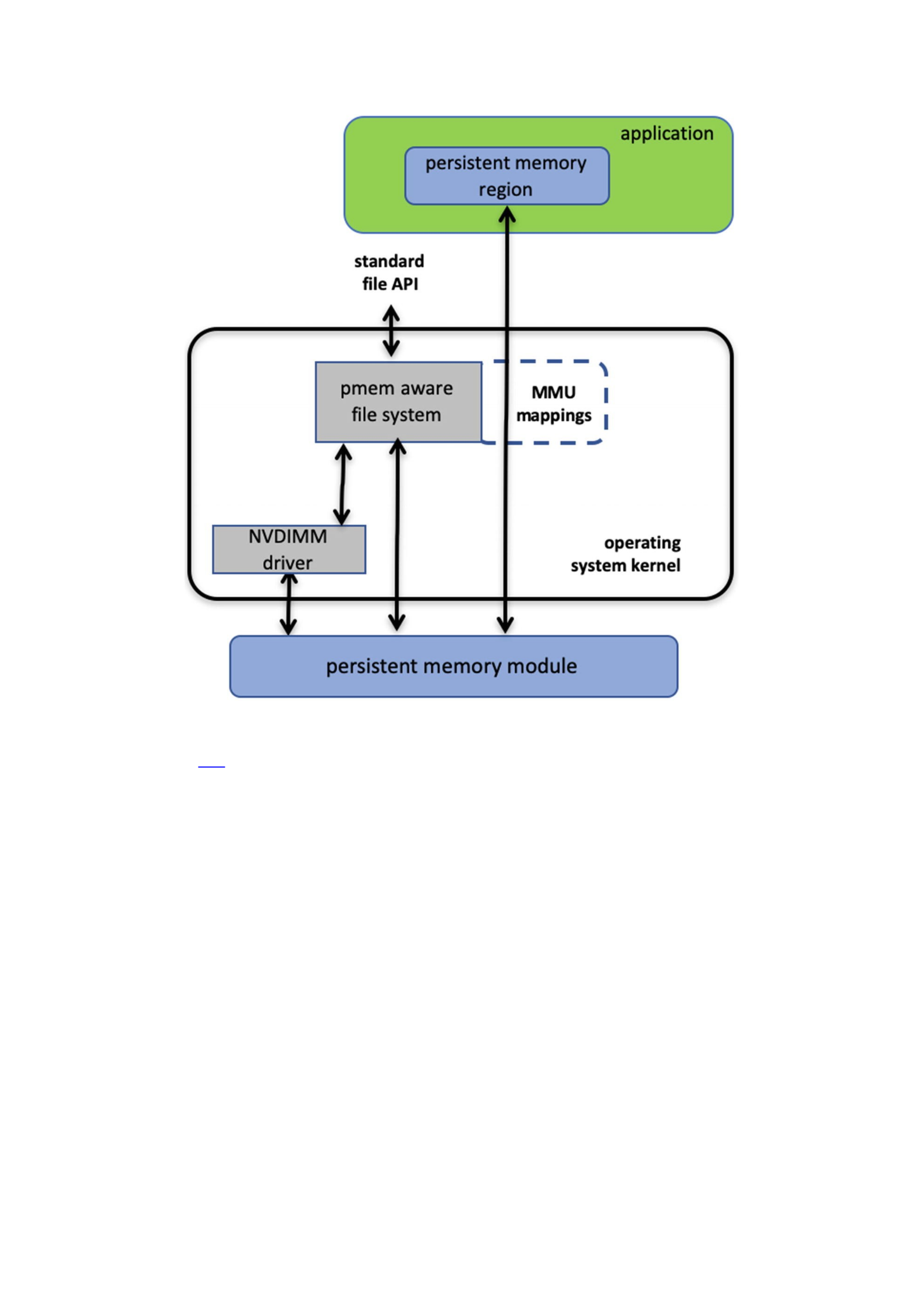
Figure 3-5Direct access (DAX) I/O and standard file API I/O paths through the kernel
Listing 3-7 shows a C source code example that uses DAX to write a string directly
into persistent memory. This example uses one of the persistent memory API libraries
included in Linux and Windows called libpmem . Although we discuss these libraries
in depth in later chapters, we describe the use of two of the functions available in
libpmem in the following steps. The APIs in libpmem are common across Linux and
Windows and abstract the differences between underlying operating system APIs, so
this sample code is portable across both operating system platforms.
32 #include <sys/types.h>
33 #include <sys/stat.h>
34 #include <fcntl.h>
35 #include <stdio.h>
36 #include <errno.h>
37 #include <stdlib.h>
38 #ifndef _WIN32
39 #include <unistd.h>
40 #else
41 #include <io.h>
42 #endif
43 #include <string.h>

44 #include <libpmem.h>
45
46 /* Using 4K of pmem for this example */
47 #define PMEM_LEN 4096
48
49 int
50 main(int argc, char *argv[])
51 {
52 char *pmemaddr;
53 size_t mapped_len;
54 int is_pmem;
55
56 if (argc != 2) {
57 fprintf(stderr, "Usage: %s filename\n",
58 argv[0]);
59 exit(1);
60 }
61
62 /* Create a pmem file and memory map it. */
63 if ((pmemaddr = pmem_map_file(argv[1], PMEM_LEN,
64 PMEM_FILE_CREATE, 0666, &mapped_len,
65 &is_pmem)) == NULL) {
66 perror("pmem_map_file");
67 exit(1);
68 }
69
70 /* Store a string to the persistent memory. */
71 char s[] = "This is new data written to the file";
72 strcpy(pmemaddr, s);
73
74 /* Flush our string to persistence. */
75 if (is_pmem)
76 pmem_persist(pmemaddr, sizeof(s));
77 else
78 pmem_msync(pmemaddr, sizeof(s));
79
80 /* Delete the mappings. */
81 pmem_unmap(pmemaddr, mapped_len);
82
83 printf("Done.\n");
84 exit(0);
85 }
Listing 3-7DAX programming example
Lines 38-42: We handle the differences between Linux and Windows for the
include files.
Line 44: We include the header file for the libpmem API used in this
example.

Lines 56-60: We take the pathname argument from the command line
argument.
Line 63-68: The pmem_map_file function in libpmem handles opening
the file and mapping it into our address space on both Windows and Linux.
Since the file resides on persistent memory, the operating system programs
the hardware MMU in the CPU to map the persistent memory region into our
application’s virtual address space. Pointer pmemaddr is set to the
beginning of that region. The pmem_map_file function can also be used for
memory mapping disk-based files through kernel main memory as well as
directly mapping persistent memory, so is_pmem is set to TRUE if the file
resides on persistent memory and FALSE if mapped through main memory.
Line 72: We write a string into persistent memory.
Lines 75-78: If the file resides on persistent memory, the pmem_persist
function uses the user space machine instructions (described in Chapter 2)
to ensure our string is flushed through CPU cache levels to the power-fail
safe domain and ultimately to persistent memory. If our file resided on disk-
based storage, Linux mmap or Windows FlushViewOfFile would be used
to flushed to storage. Note that we can pass small sizes here (the size of the
string written is used in this example) instead of requiring flushes at page
granularity when using msync() or FlushViewOfFile().
Line 81: Finally, we unmap the persistent memory region.
Summary
Figure 3-6 shows the complete view of the operating system support that this chapter
describes. As we discussed, an application can use persistent memory as a fast SSD,
more directly through a persistent memory-aware file system, or mapped directly into
the application’s memory space with the DAX option. DAX leverages operating system
services for memory-mapped files but takes advantage of the server hardware’s ability
to map persistent memory directly into the application’s address space. This avoids the
need to move data between main memory and storage. The next few chapters describe
considerations for working with data directly in persistent memory and then discuss
the APIs for simplifying development.
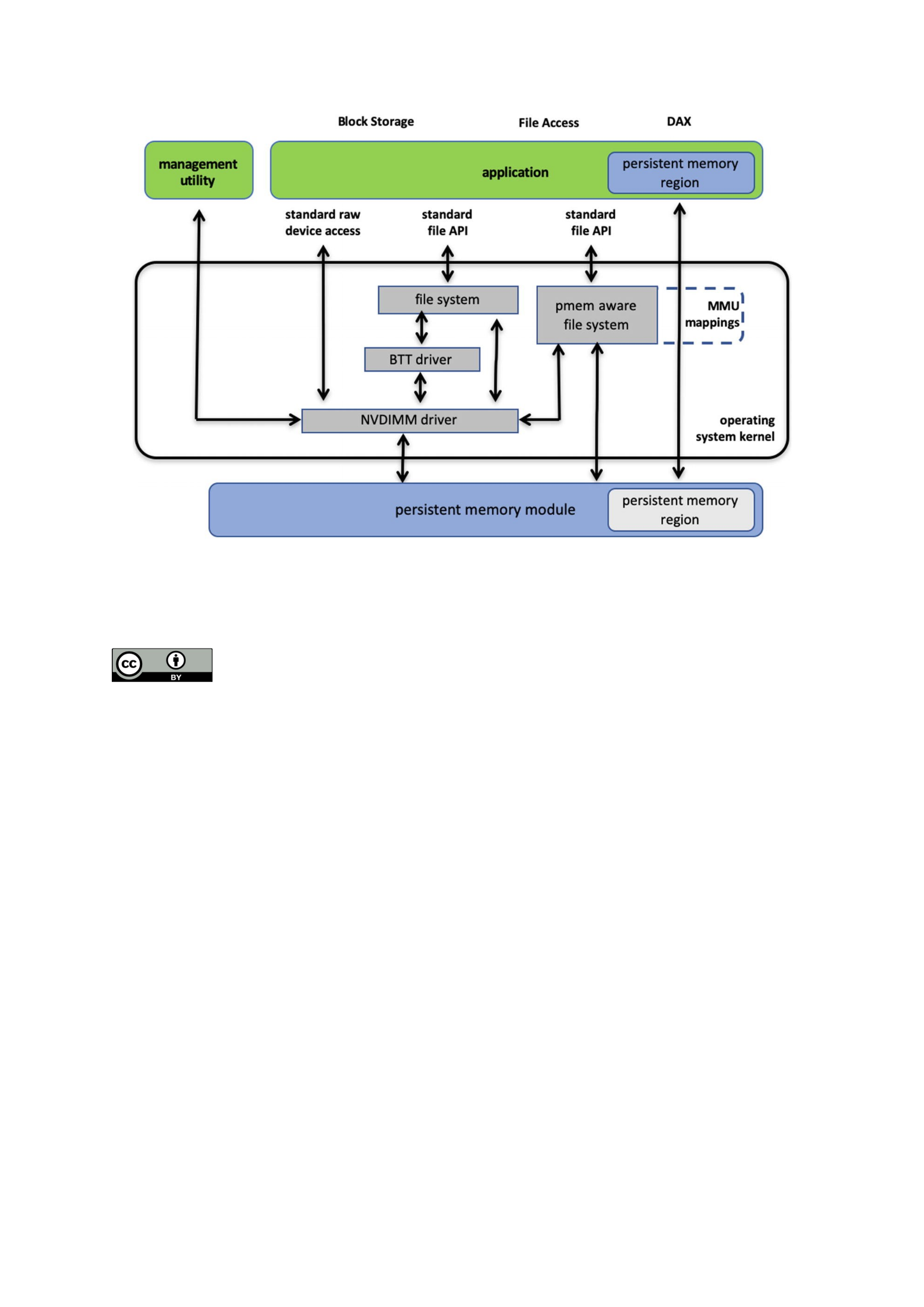
Figure 3-6Persistent memory programming interfaces
pen Access This chapter is licensed under the terms of the Creative Commons Attribution 4.0
International License (http://creativecommons.org/licenses/by/4.0/), which permits use, sharing,
adaptation, distribution and reproduction in any medium or format, as long as you give appropriate credit
to the original author(s) and the source, provide a link to the Creative Commons license and indicate if changes were
made.
O
The images or other third party material in this chapter are included in the chapter's Creative Commons license,
unless indicated otherwise in a credit line to the material. If material is not included in the chapter's Creative
Commons license and your intended use is not permitted by statutory regulation or exceeds the permitted use, you
will need to obtain permission directly from the copyright holder.

© The Author(s) 2020
S. ScargallProgramming Persistent Memory
https://doi.org/10.1007/978-1-4842-4932-1_4
4. Fundamental Concepts of Persistent Memory
Programming
Steve Scargall1
(1)Santa Clara, CA, USA
In Chapter 3, you saw how operating systems expose persistent memory to applications
as memory-mapped files. This chapter builds on this fundamental model and examines
the programming challenges that arise. Understanding these challenges is an essential
part of persistent memory programming, especially when designing a strategy for
recovery after application interruption due to issues like crashes and power failures.
However, do not let these challenges deter you from persistent memory programming!
Chapter 5 describes how to leverage existing solutions to save you programming time
and reduce complexity.
What’s Different?
Application developers typically think in terms of memory-resident data structures and
storage-resident data structures. For data center applications, developers are careful to
maintain consistent data structures on storage, even in the face of a system crash. This
problem is commonly solved using logging techniques such as write-ahead logging,
where changes are first written to a log and then flushed to persistent storage. If the
data modification process is interrupted, the application has enough information in the
log to finish the operation on restart. Techniques like this have been around for many
years; however, correct implementations are challenging to develop and time-
consuming to maintain. Developers often rely on a combination of databases, libraries,
and modern file systems to provide consistency. Even so, it is ultimately the application
developer’s responsibility to design in a strategy to maintain consistent data structures
on storage, both at runtime and when recovering from application and system crashes.
Unlike storage-resident data structures, application developers are concerned about
maintaining consistency of memory-resident data structures at runtime. When an
application has multiple threads accessing the same data structure, techniques like
locking are used so that one thread can perform complex changes to a data structure
without another thread seeing only part of the change. When an application exits or
crashes, or the system crashes, the memory contents are gone, so there is no need to
maintain consistency of memory-resident data structures between runs of an
application like there is with storage-resident data structures.
These explanations may seem obvious, but these assumptions that the storage state
stays around between runs and memory contents are volatile are so fundamental in the
way applications are developed that most developers don’t give it much thought. What’s

different about persistent memory is, of course, that it is persistent, so all the
considerations of both storage and memory apply. The application is responsible for
maintaining consistent data structures between runs and reboots, as well as the thread-
safe locking used with memory-resident data structures.
If persistent memory has these attributes and requirements just like storage, why
not use code developed over the years for storage? This approach does work; using the
storage APIs on persistent memory is part of the programming model we described in
Chapter 3. If the existing storage APIs on persistent memory are fast enough and meet
the application’s needs, then no further work is necessary. But to fully leverage the
advantages of persistent memory, where data structures are read and written in place
on persistence and accesses happen at the byte granularity, instead of using the block
storage stack, applications will want to memory map it and access it directly. This
eliminates the buffer-based storage APIs in the data path.
Atomic Updates
Each platform supporting persistent memory will have a set of native memory
operations that are atomic. On Intel hardware, the atomic persistent store is 8 bytes.
Thus, if the program or system crashes while an aligned 8-byte store to persistent
memory is in-flight, on recovery those 8 bytes will either contain the old contents or the
new contents. The Intel processor has instructions that store more than 8 bytes, but
those are not failure atomic, so they can be torn by events like a power failure.
Sometimes an update to a memory-resident data structure will require multiple
instructions, so naturally those changes can be torn by power failure as well since
power could be lost between any two instructions. Runtime locking prevents other
threads from seeing a partially done change, but locking doesn’t provide any failure
atomicity. When an application needs to make a change that is larger than 8 bytes to
persistent memory, it must construct the atomic operation by building on top of the
basic atomics provided by hardware, such as the 8-byte failure atomicity provided by
Intel hardware.
Transactions
Combining multiple operations into a single atomic operation is usually referred to as a
transaction. In the database world, the acronym ACID describes the properties of a
transaction: atomicity, consistency, isolation, and durability.
Atomicity
As described earlier, atomicity is when multiple operations are composed into a single
atomic action that either happens entirely or does not happen at all, even in the face of
system failure. For persistent memory, the most common techniques used are
Redo logging, where the full change is first written to a log, so during
recovery, it can be rolled forward if interrupted.
Undo logging, where information is logged that allows a partially done
change to be rolled back during recovery.

Atomic pointer updates, where a change is made active by updating a single
pointer atomically, usually changing it from pointing to old data to new data.
The preceding list is not exhaustive, and it ignores the details that can get relatively
complex. One common consideration is that transactions often include memory
allocation/deallocation. For example, a transaction that adds a node to a tree data
structure usually includes the allocation of the new node. If the transaction is rolled
back, the memory must be freed to prevent a memory leak. Now imagine a transaction
that performs multiple persistent memory allocations and free operations, all of which
must be part of the same atomic operation. The implementation of this transaction is
clearly more complex than just writing the new value to a log or updating a single
pointer.
Consistency
Consistency means that a transaction can only move a data structure from one valid
state to another. For persistent memory, programmers usually find that the locking they
use to make updates thread-safe often indicates consistency points as well. If it is not
valid for a thread to see an intermediate state, locking prevents it from happening, and
when it is safe to drop the lock, that is because it is safe for another thread to observe
the current state of the data structure.
Isolation
Multithreaded (concurrent) execution is commonplace in modern applications. When
making transactional updates, the isolation is what allows the concurrent updates to
have the same effect as if they were executed sequentially. At runtime, isolation for
persistent memory updates is typically achieved by locking. Since the memory is
persistent, the isolation must be considered for transactions that were in-flight when
the application was interrupted. Persistent memory programmers typically detect this
situation on restart and roll partially done transactions forward or backward
appropriately before allowing general-purpose threads access to the data structures.
Durability
A transaction is considered durable if it is on persistent media when it is complete. Even
if the system loses power or crashes at that point, the transaction remains completed.
As described in Chapter 2, this usually means the changes must be flushed from the CPU
caches. This can be done using standard APIs, such as the Linux msync() call, or
platform-specific instructions such as Intel’s CLWB. When implementing transactions on
persistent memory, pay careful attention to ensure that log entries are flushed to
persistence before changes are started and flush changes to persistence before a
transaction is considered complete.
Another aspect of the durable property is the ability to find the persistent
information again when an application starts up. This is so fundamental to how storage
works that we take it for granted. Metadata such as file names and directory names are
used to find the durable state of an application on storage. For persistent memory, the

same is true due to the programming model described in Chapter 3, where persistent
memory is accessed by first opening a file on a direct access (DAX) file system and then
memory mapping that file. However, a memory-mapped file is just a range of raw data;
how does the application find the data structures resident in that range? For persistent
memory, there must be at least one well-known location of a data structure to use as a
starting point. This is often referred to as a root object (described in Chapter 7). The
root object is used by many of the higher-level libraries within PMDK to access the data.
Flushing Is Not Transactional
It is important to separate the ideas of flushing to persistence from transactional
updates. Flushing changes to storage using calls like msync() or fsync() on Linux
and FlushFileBuffers() on Windows have never provided transactional updates.
Applications assume the responsibility for maintaining consistent storage data
structures in addition to flushing changes to storage. With persistent memory, the same
is true. In Chapter 3, a simple program stored a string to persistent memory and then
flushed it to make sure the change was persistent. But that code was not transactional,
and in the face of failure, the change could be in just about any state – from completely
lost to partially lost to fully completed.
A fundamental property of caches is that they hold data temporarily for
performance, but they do not typically hold data until a transaction is ready to commit.
Normal system activity can cause cache pressure and evict data at any time and in any
order. If the examples in Chapter 3 were interrupted by power failure, it is possible for
any part of the string being stored to be lost and any part to be persistent, in any order.
It is important to think of the cache flush operation as flush anything that hasn’t already
been flushed and not as flush all my changes now.
Finally, we showed a decision tree in Chapter 2 (Figure 2-5) where an application
can determine at startup that no cache flushing is required for persistent memory. This
can be the case on platforms where the CPU cache is flushed automatically on power
failure, for example. Even on platforms where flush instructions are not needed,
transactions are still required to keep data structures consistent in the face of failure.
Start-Time Responsibilities
In Chapter 2 (Figures 2-5 and 2-6), we showed flowcharts outlining the application’s
responsibilities when using persistent memory. These responsibilities included
detecting platform details, available instructions, media failures, and so on. For storage,
these types of things happen in the storage stack in the operating system. Persistent
memory, however, allows direct access, which removes the kernel from the data path
once the file is memory mapped.
As a programmer, you may be tempted to map persistent memory and start using it,
as shown in the Chapter 3 examples. For production-quality programming, you want to
ensure these start-time responsibilities are met. For example, if you skip the checks in
Figure 2-5, you will end up with an application that flushes CPU caches even when it is
not required, and that will perform poorly on hardware that does not need the flushing.
If you skip the checks in Figure 2-6, you will have an application that ignores media
errors and may use corrupted data resulting in unpredictable and undefined behavior.

Tuning for Hardware Configurations
When storing a large data structure to persistent memory, there are several ways to
copy the data and make it persistent. You can either copy the data using the common
store operations and then flush the caches (if required) or use special instructions like
Intel’s non-temporal store instructions that bypass the CPU caches. Another
consideration is that persistent memory write performance may be slower than writing
to normal memory, so you may want to take steps to store to persistent memory as
efficiently as possible, by combining multiple small writes into larger changes before
storing them to persistent memory. The optimal write size for persistent memory will
depend on both the platform it is plugged into and the persistent memory product itself.
These examples show that different platforms will have different characteristics when
using persistent memory, and any production-quality application will be tuned to
perform best on the intended target platforms. Naturally, one way to help with this
tuning work is to leverage libraries or middleware that has already been tuned and
validated.

