


C Training Manual
N Star Software Developers

N Star Software Developers
C Training Manual
Prepared by:
Carlos Delapaz

DRA FT
CYBERLEET TRAINING MANUAL
MANUAL OVERVIEW 4
MANUAL LAYOUT 4
EXECUTIVE SUMMARY AND PURPOSE 5
0.1 EXECUTIVE SUMMARY.......................................................................................................................5
0.2 PURPOSE OF THIS MANUAL................................................................................................................5
SECTION ONE: TRAFFIC ANALYSIS 6
1.1 SIGNIFICANCE OF TRAFFIC ANALYSIS.....................................................................................................6
1.2 TRAFFIC ANALYSIS TOOLS AND METHODOLOGY......................................................................................6
SECTION TWO: FIREWALLS 7
2.1 SIGNIFICANCE OF FIREWALLS..............................................................................................................7
2.2 FIREWALL TOOLS AND METHODOLOGY.................................................................................................7
SECTION THREE: INTRUSION DETECTION AND PREVENTION 8
3.1 SIGNIFICANCE OF INTRUSION DETECTION AND PREVENTION SYSTEMS (IDPS)..............................................8
3.2 IDPS TOOLS AND METHODOLOGY.......................................................................................................8
SECTION FOUR: VULNERABILITY ASSESSMENT 9
4.1 SIGNIFICANCE OF VULNERABILITY ASSESSMENT......................................................................................9
4.2 VULNERABILITY ASSESSMENT TOOLS AND METHODOLOGY.......................................................................9
SECTION FIVE: NETWORK SCANNING AND ASSESSMENT 10
5.1 SIGNIFICANCE OF NETWORK SCANNING AND ASSESSMENT.....................................................................10
5.2 NETWORK SCANNING AND ASSESSMENT TOOLS AND METHODOLOGY......................................................10
SECTION SIX: AUDITING AND LOG COLLECTION 11
6.1 SIGNIFICANCE OF AUDITING AND LOG COLLECTION...............................................................................11
6.2 AUDITING AND LOG COLLECTION TOOLS AND METHODOLOGY................................................................11
SECTION SEVEN: TOOLS USED 12
7.1 A BRIEF OVERVIEW OF TOOLS USED IN THIS MANUAL..........................................................................12
SECTION EIGHT: REFERENCES 13
Company Manual P a g e | 3

DRA FT
CYBERLEET TRAINING MANUAL
Executive Summary and Purpose
0.1 Executive Summary
In the technology-driven times, all the business undertakings have to be on their toes
at all times. This is because online threats and cyber-attacks can arise from anywhere without
warning. The lack of preparedness by an organization in the cyber setting can have a
detrimental impact on the very existence and sustainability of the business. The research
fundamentally captures North Star Software Developers’ cyber incident. The severity of the
cyber-attack is high as it has led to the probable loss of confidential information such as
personal information as well as credit card numbers of the purchasers of the firm’s software
products. This incident is one of the many cyber-attack occurrences that are happening in the
dynamic and uncertain business setting.
In the present times, cyber criminals and online hackers use a wide range of
sophisticated techniques so that they can gain unauthorized access into the computer systems
and networks of business entities and individuals. On most of the occasions, they have
malicious intent. The training manual that primarily focuses on North Star Software
Developers’ captures various vital cyber security components such as the need to conduct
proper online traffic analysis. It can help to identify any kind of abnormal behavior in
computer networks. ‘Firewalls’ which act as vital security components have been
highlighted. The IT professionals need to get a thorough insight into firewalls so that they can
be used to keep unauthorized users and online criminals at a distance. In addition to this, the
organization also has the scope to employ Intrusion Detection and Prevention Systems. It can
strengthen the security model of its IT ecosystem. The IT professionals also need to make
sure that they carry out frequent Vulnerability assessments. Such an approach will enable
them to identify security weaknesses that can be compromised by cyber hackers. Such
assessments must be supported by Network Scanning and Assessment to capture the presence
of an uninvited user. The professionals working in the IT department of NSSD also gain
knowledge on having a tab on online activities. In order to do so there is the need to carry out
proper auditing and collection of logs. A number of network security tools have been
recommended that can be used by North Star Software Developers to prevent similar attacks
from taking place.
Company Manual P a g e | 4

DRA FT
CYBERLEET TRAINING MANUAL
0.2 Purpose of This Manual
The manual is extremely important for information technology employees at NSSD as it
discusses a vital issue relating to NSSD firm’s network servers that have been compromised.
Due to this, unauthorized individuals or groups might have got access into the firm’s
computer systems and stolen confidential data and information. As the cyber incident has
taken place, the business faces a major IT risk that might not just impact its work processes
but also its brand reputation in the competitive business. The cyber-attack that has crippled
the business has basically led to the most likely loss of confidential and sensitive data and
information. Unauthorized used have got access to various kinds of information such as
personal information and credit card numbers of buyers of NSSD’s software products. It has
not been disclosed whether this cyber-attack took place from inside or outside of the
organization. Suitable recommendations have been made so that NSSD can employ suitable
cyber security tools which can strengthen the level of security of its IT ecosystem. In addition
to the recommendations, a number of vital security concepts have been captured in the
training manual so that the Information Technology professionals can be empowered to
prevent or mitigate online threats that could cripple their IT infrastructure.
The report basically acts as a training manual for the employees of North Star
Software Developers. It captures some of the vital cyber security elements that the
Information Technology professionals of the organization need to be aware of the latest
network security tools that can safeguard the Information security system of the organization.
The fundamental purpose of the training manual is to help the IT professionals of the
organization so that they can be well prepared to defend their IT infrastructure against such
attacks and threats in the near future. The purpose of the training manual is to help NSSD IT
professionals to employ necessary and updated network security tools and techniques so that
similar cyber-attacks will not take place.
Company Manual P a g e | 5

DRA FT
CYBERLEET TRAINING MANUAL
Section One: Traffic Analysis
1.1 Significance of Traffic Analysis
Network Traffic Analysis can be defined as the process that is conducted for recording,
reviewing, and evaluating the network traffic. This analysis is done to keep a tab on the
performance, security and other network operations. It is a new security product that utilizes
network communication for the purpose of detecting and investigating security threats that
could arise and compromise the IT infrastructure (What is Network Traffic Analysis? -
Definition from Techopedia, 2019). One of the most popular network analyzers that are
gaining high popularity in the current times is Microsoft Message Analyzer. This tool
basically allows a network administrator to capture, display and critically analyze the
protocol messaging traffic (Download Microsoft Message Analyzer from Official Microsoft
Download Center, 2019).
In the existing digitalized era, the role of Network Traffic Analytical tools is of critical
importance. Network Traffic analyzers are important as they help to avoid bottlenecks
relating to bandwidth and server performance, identify the applications that hog the
bandwidth, proactively deliver improved quality of service to the end users, and monitor the
traffic trends and usage patterns. Due to the diverse functions of network traffic analysis, it is
considered to be a core activity of network defense and cybersecurity (Network Traffic
Monitor | Benefits of Network Traffic Monitoring, 2019). In the business setting, this process
can help to identify the areas from where threats and risks can arise which have the potential
to jeopardize the entire business operations. By carefully analyzing the various kinds of
activities that are undertaken in the network setting, a business will be in a position to
identify suspicious behavior patterns of unauthorized users (Hassan, 2019).
Traffic analysis has become an indispensable procedure that is carried out to have a better
security system in place. The traffic analysis procedure can be followed in various settings
such as military intelligence to strengthen the computer security. Various elements can be
analyzed such as the participants that are involved in communication, the duration of the
online interaction, and the exact date when the communication took place. A unique feature
of traffic analysis is that the analyzer gets empowered as he can keep a tab on the particular
size of the packets that are being exchanged between the hosts. For example, when huge
packets are involved, it indicates that file transfer is taking place between the hosts. The
analyzer can also determine which host is sending and which host is receiving the file. This
process is vital as it enables to examine messages and thus minimize the chances of security
threats.
Company Manual P a g e | 6
DRA FT
CYBERLEET TRAINING MANUAL
1.2 Traffic Analysis Tools and Methodology
The key company-approved tools that can be used for conducting traffic analysis in the
organizational setting include Wireshark Network Analyzer and Snort. Wireshark
Network Analyzer is an open-source packet analyzer that helps to thoroughly assess the
network by troubleshooting the network and inspecting numerous protocols. It is
considered to be extremely useful traffic analyzing tool that can capture live packet data
from the network interface. It can also import packets from the text files that contain hex
dumps of packet data. This security tool helps to display the packets with high detailed
information relating to protocol (Wireshark · Go Deep, 2019).
Snort is another lightweight network intrusion detection tool that can help to conduct
real-time analysis of the network traffic. This powerful traffic detection software can help
business organizations to carefully scrutinize all the packets so that the suspicious
elements on the network can be identified in the process (Snort - Network Intrusion
Detection & Prevention System, 2019).
It is important to select these traffic analyzing tools as they can help to identify abnormal
traffic elements or traffic participants. They will conduct a thorough examination of the
network traffic and will notify the network administrator about any suspicious activities
or patterns.
Snort can carry out the thorough examination of the network traffic and it can be
configured in three main modes namely sniffer, packet logger, and network intrusion
detection. In the sniffer mode, Snort can sniff around and read the contents of the network
packets. It can then display them on the console. In the packet logger mode, Snort will be
able to log the packets to the desk. Ultimately in the network intrusion detection model,
the tool can carefully monitor the online traffic and assess it based on the rules that have
been provided by the user. Snort is a popular tool that can be used by business
undertakings to improve the level of security of the network. Thus the Snort tools work at
various levels for analyzing the traffic on the network (1.2 Sniffer Mode, 2019).
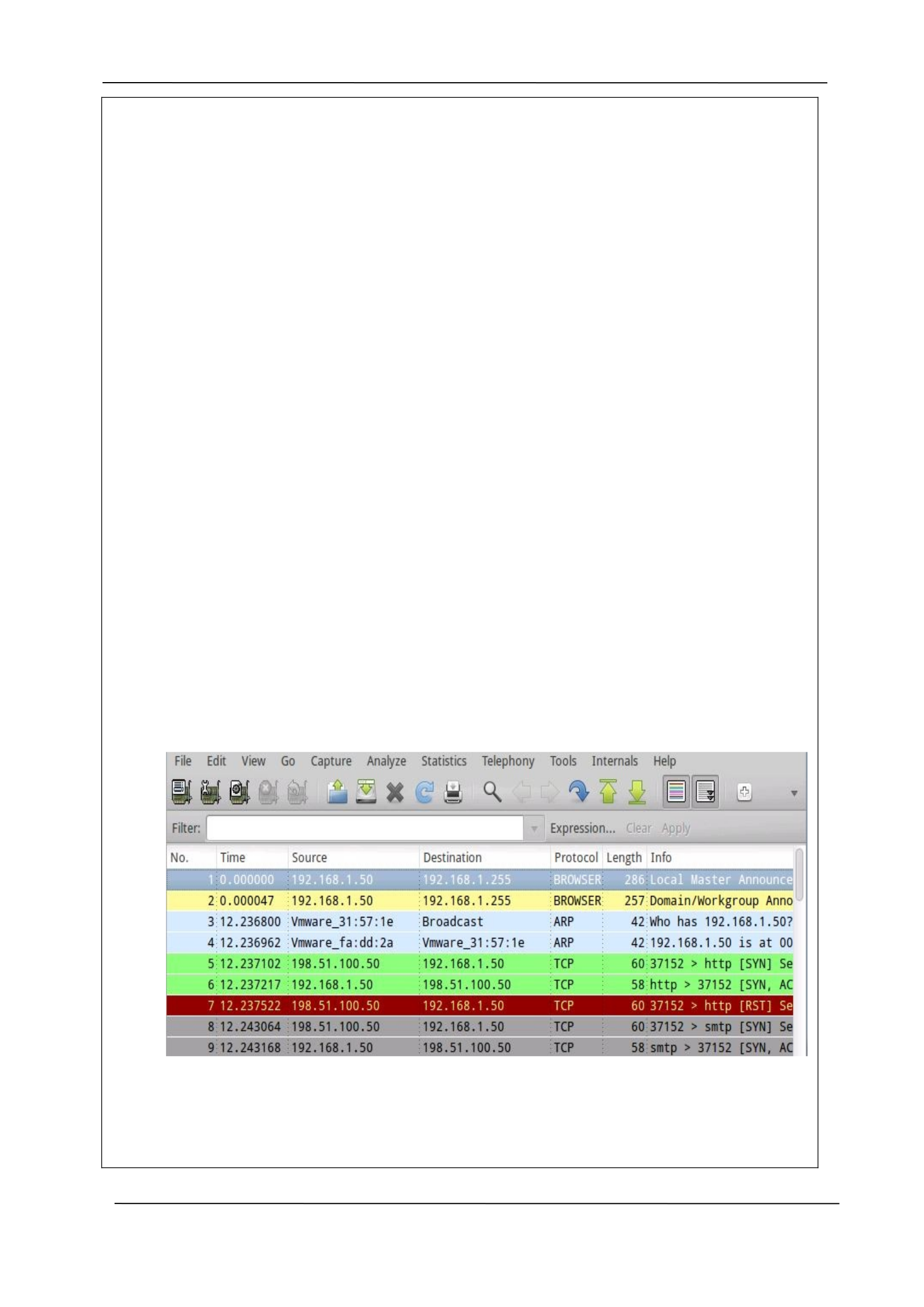
Wireshark allow filtering as well. Below see ftp traffic captured and filtered
Company Manual P a g e | 7

DRA FT
CYBERLEET TRAINING MANUAL
Company Manual P a g e | 8

DRA FT
CYBERLEET TRAINING MANUAL
Section Two: Firewalls
2.1 Significance of Firewalls
In network defense and cybersecurity, the firewall is considered to be a core component. Firewall
can be defined as software that is used for the purpose of monitoring the incoming and outgoing
traffic on a network. It can permit as well as block the data packets based on the set security rules
and regulations. In order to safeguard a network, it is extremely important to have a firewall as it
will help to prevent unauthorized access that can compromise the security of the network. A firewall
is rightly said to be the very first line of defense when it comes to securing confidential and sensitive
information (What is a Firewall? - Definition from Techopedia, 2019). Firewall can be categorized
into a hardware firewall and software firewall. A hardware firewall can be used in the business
context as it will safeguard and monitor the entire network traffic. A software firewall can act as a
security net that can protect the activities that are conducted on the system where the firewall has
been installed. Large business entities must use hardware firewalls as the security system will take
care of the huge system and network requirements in terms of security (Differences Between
Hardware & Software Firewalls - Webopedia, 2019).
In order to effectively function, there is a need to establish specific rules and guidelines that the
firewall will follow. The network administrator of a business undertaking must set the rules so that
the firewall can allow data packets that meet the specifications and block the data packets that do
not meet the requirements. In many instances, it has been seen that administrators block all the
ports other than ports 80 (HTTP) and 443 (HTTPS) which are considered to be important. This is
because both these ports are linked to the internet. Such a strategy is used as the limiting of the
active ports can restrict the openings that can be exploited by online attackers (Cyber
Security Awareness Month - Day 25 - Port 80 and 443 - SANS Internet Storm Center, 2019).
Business concerns not only limit the number of active ports to strengthen the security of the
network, but other strategies are also introduced. For example, if employees on the firm’s LAN need
to gain access into a perimeter network, suitable configurations can be introduced so that users
using the Local Area Network of the organization can gain entry into the specific space. The
effectiveness of a firewall depends on the rules that have been set (What is DMZ (networking)? -
Definition from WhatIs.com, 2019). So in order to secure the computing environment, it is extremely
important to lay down the firewall rules by taking into consideration the high level of risk and
uncertainty that exists in the virtual setting (Firewall Rules for DMZ-Based Security Servers, 2019).
Company Manual P a g e | 9

DRA FT
CYBERLEET TRAINING MANUAL
2.2 Firewall Tools and Methodology
A. The specific firewall that can be used in the organizational setting is pfsense which is an
open source firewall. It has been selected as it is one of the company-approved tools which
can strengthen the level of security of the entire network. The firewall could be used to
power desktops, in-built platforms, and the latest servers. This security tool could be used as
it would enable better security along with an improved level of connectivity. The rationale
for selecting this tool is that it would enable North Star Software Developers (NSSD) to
connect its employees, partners, customers, and other parties without compromising the
security of the network. Pfsense would make sure that various functionalities such as VPN,
firewall, and router could effectively function by using this tool. The installation process
would be simple and in the organizational context, different kinds of embedded platforms
could be used such as ALIX. After securing the device, the firewall could be installed and the
necessary configurations could be done (pfSense® - World's Most Trusted Open Source
Firewall, 2019).
B. Pfsense software would function with a package system and protect the network of the
organization as it would not be restricted by any artificial obstacles. As it has a web
interface, it could be used for configuration of all the integrated components. A user would
not have to manually make changes to the firewall rules. The users that have knowledge of
commercial firewalls could easily understand how the firewall functions. Pfsense could be
deployed by using the hardware that can meet the specific requirements of the entity. So
the various deployment section that the firm could select from include hardware, and cloud.
The installation of the firewall on the firm’s hard drive would be very simple. It would also
be easy to set up the personal demo in the virtual setting (pfSense® - World's Most Trusted
Open Source Firewall, 2019).
The configuration of the Pfsense software would primarily depend on the specific network
security needs of North Star Software Developers. The network segregation option could be
selected if there is a need to split the existing organizational network into small network
segments. Mostly, in a business setting, almost all the workstations and servers exist on a
single local area network. This increases the vulnerability of the network as intruders have
the opportunity to gain unauthorized access into the system. In order to deal with this issue,
the Pfsense firewall can be used so that networks can be categorized or split and their
vulnerability can be curtailed.
C
Company Manual P a g e | 10
DRA FT
CYBERLEET TRAINING MANUAL
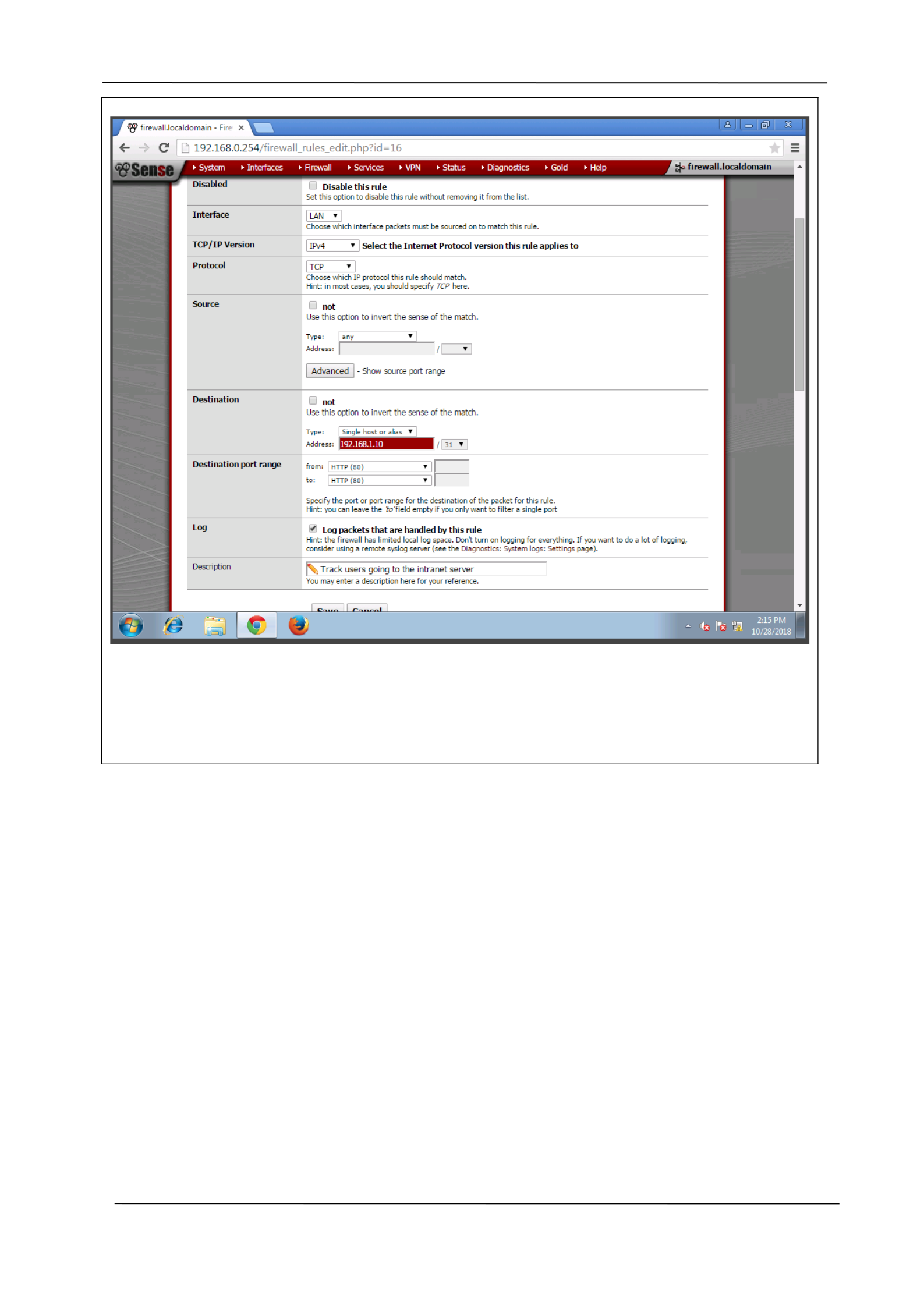
The first example shows how we can configure pfsense to track users who are trying to gain
access to a particular host
Company Manual P a g e | 11
DRA FT
CYBERLEET TRAINING MANUAL
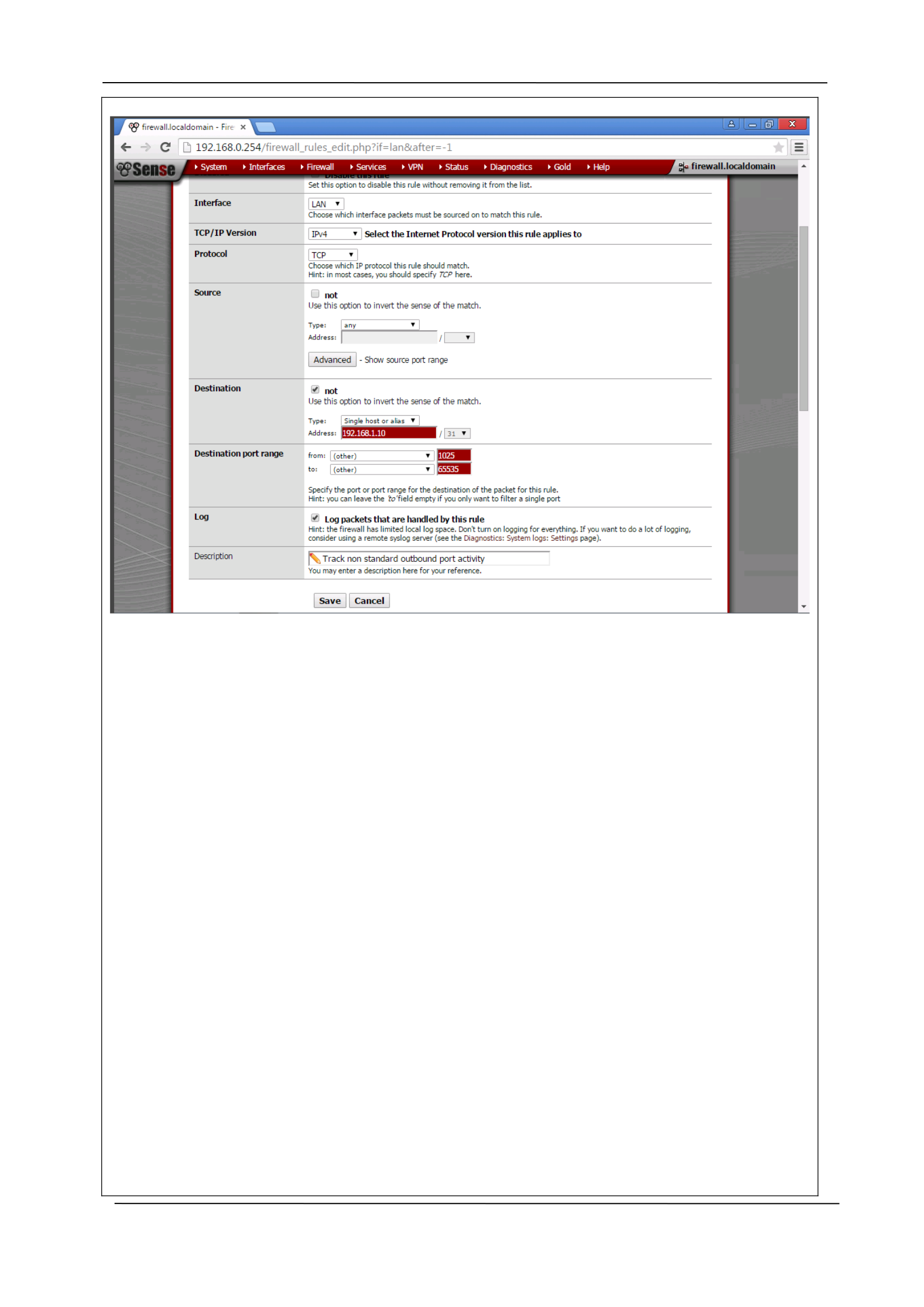
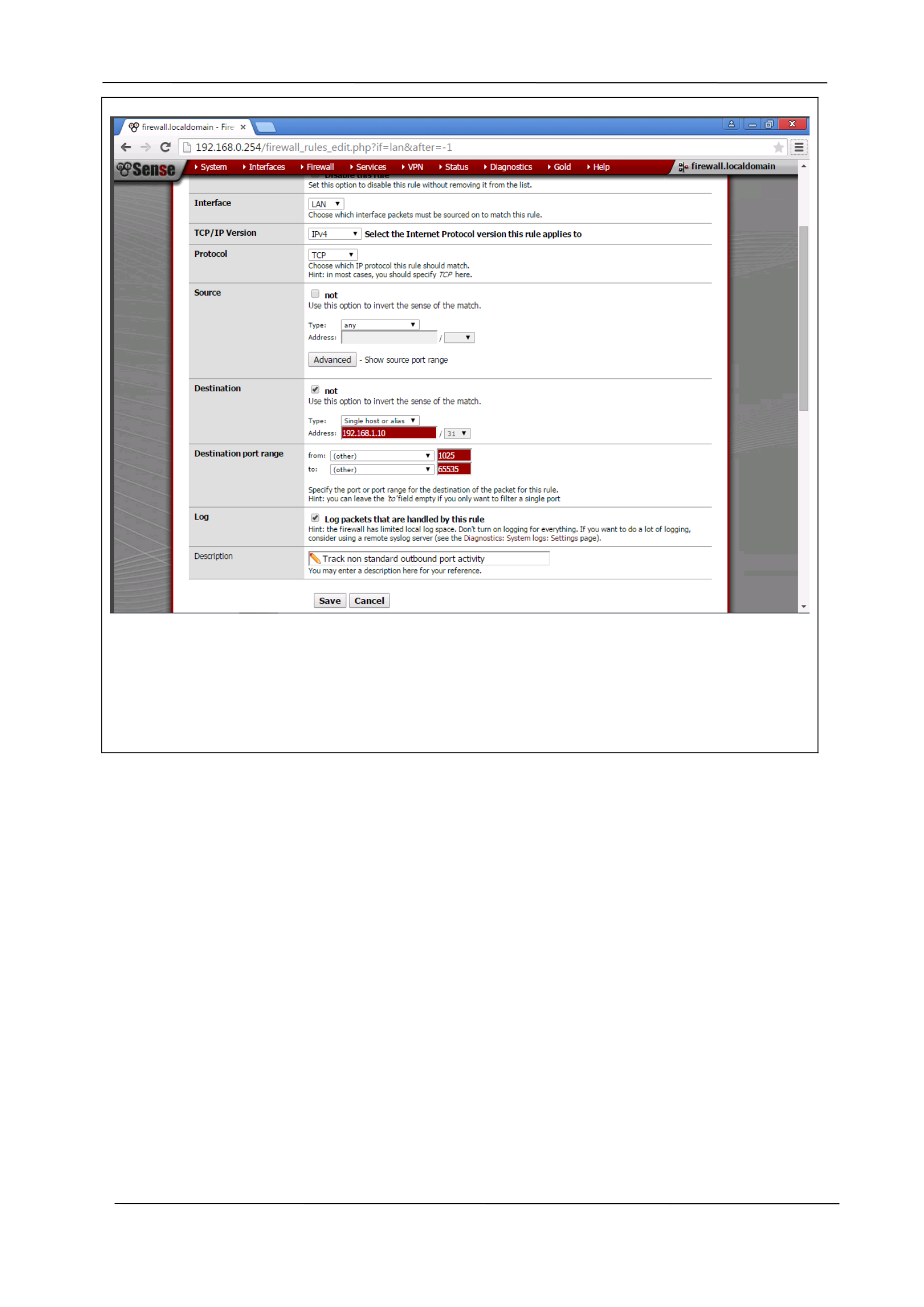
The above shows how to track non-standard outbound port activity.
Company Manual P a g e | 12
DRA FT
CYBERLEET TRAINING MANUAL
Enabled logging by configuring Pfsense.We now tested it by watching traffic from a host.
Company Manual P a g e | 13
DRA FT
CYBERLEET TRAINING MANUAL
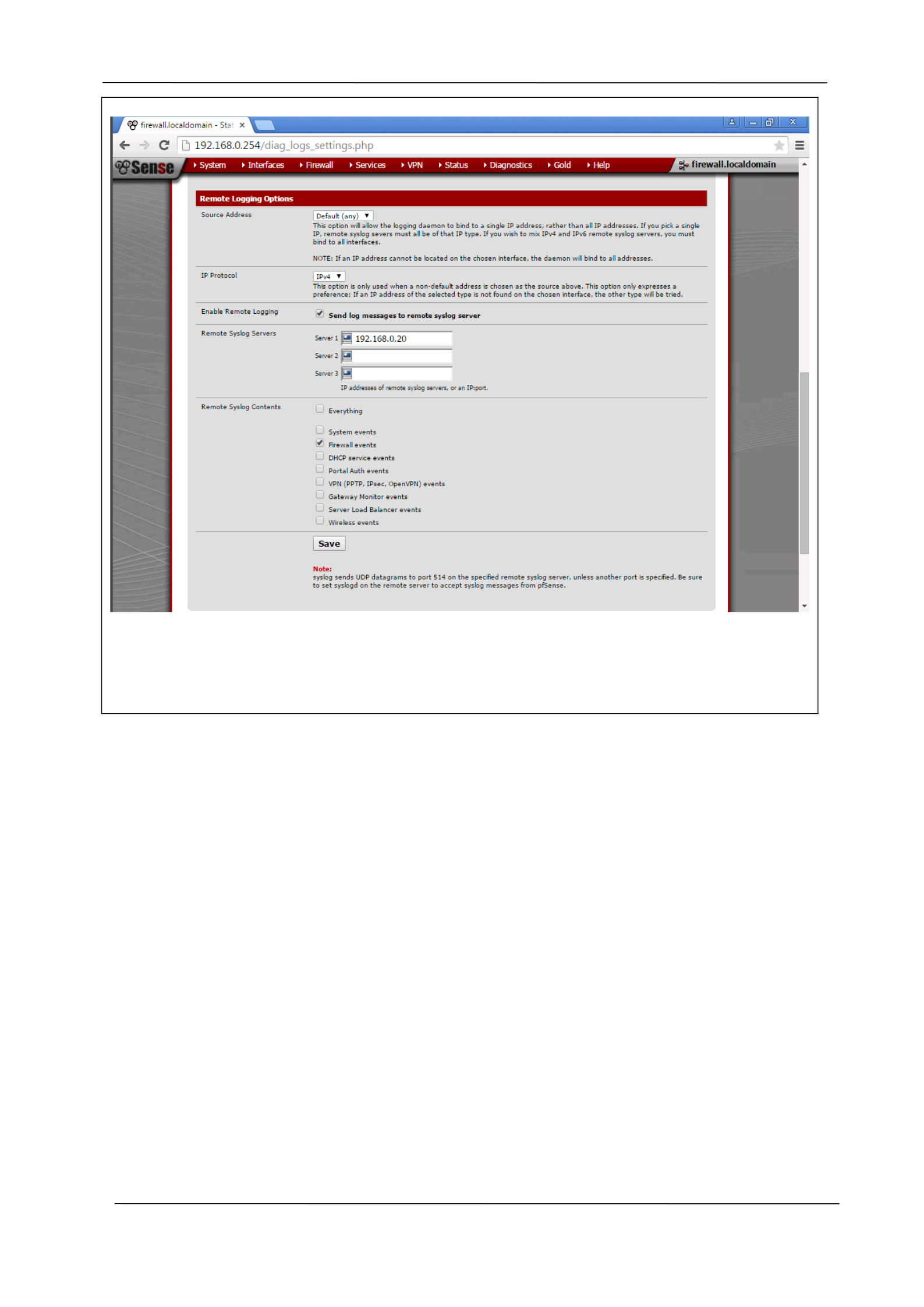
We have to set the host from which we will be viewing our rules. This will forward our logs
to the host which in this case is 192.168.0.20.
Company Manual P a g e | 14

DRA FT
CYBERLEET TRAINING MANUAL
Delete all prompts containing the following language prior to submitting this section:
Delete this prompt language when you are finished writing your response.
Section Three: Intrusion Detection and Prevention
3.1 Significance of Intrusion Detection and Prevention Systems (IDPS)
Intrusion detection is the process of checking the events that occur in a computer network. It
analyzes the signs of any possible incidents which violates the security policies of the system. An
intrusion detection system primarily is responsible for automating the intrusion detection process.
Similarly, an intrusion prevention system can be defined as software which has the necessary
capabilities of an intrusion detection system to stop any possible incidents in the network. Thus the
intrusion detection and prevention technologies act as the core security tools that can be used by a
network administrator for the purpose of strengthening the network defense and cybersecurity
(Intrusion Detection and Prevention Systems, 2019).
The intrusion detection and prevention systems are considered to be of extreme importance in an
organizational setting as they help to detect cyber attacks such as malware, phishing, Trojans, and
rootkits. After the detection, the system takes the necessary measures to prevent the attacks that
could compromise the network or computer security. An IDC has the potential to critically analyze
the data packets that are present in the network traffic. The IDPS can report a serious security
incident as well as the log information to the network administrator so that a thorough investigation
can be undertaken.
Some of the key functions of the intrusion detection and prevention technology include recording
the necessary information pertaining to observed events on the network, notifying the network
administrators of the observed occurrence, generating reports that can assist the investigation
process, and taking the necessary measures to prevent the security incident. The technology can
primarily recognize reconnaissance activity which could be linked to an impending cybersecurity
attack. In the technology-driven era, IDPS technology is considered to be an indispensable security
tool as it helps to take suitable actions against an attack by dropping connections and blocking IPs or
ports (Hassan, 2019).
Company Manual P a g e | 15

DRA FT
CYBERLEET TRAINING MANUAL
3.2 IDPS Tools and Methodology
The Intrusion Detection and Prevention System can employ a number of techniques and approaches
for identifying and preventing attacks that could compromise the security of a network. This
technology, in fact, makes the use of a combination of detection methodologies so that it can offer a
robust and effective detection platform (Hassan, 2019).
Signature-based detection – This process basically involves the thorough comparison of threat
patterns or signatures against the data packets. The objective is to identify the possible attacks or
incidents that could compromise the security of the system. The Signature based detection
methodology is known to be the simplest forms of detection method as it just compares a data
packet with a list of signatures by making use of a string comparison operation. Example – An email
which has .exe attachment file name.
Anomaly-based detection – This detection methodology is based on rules or heuristics and not on
signatures. It makes use of the profiles that represent the common or normal behavior patterns of
entities like network k connections, applications, and users. It compares these elements against
observed events so that they can identify evident deviations. In order to develop the profiles, it is
necessary that the system must be taught about normal behavior patterns. The profiles are
designed or developed by monitoring the attributes of the typical activities that are conducted over
a specific time (Intrusion Detection and Prevention Systems, 2019).
Stateful protocol – The Stateful protocol analysis is responsible to identify any deviations of the
protocol. It is similar to the anomaly based detection methodology but it utilizes the predetermined
universal profiles that are based on the “accepted definition of benign activity” which have been
developed by the vendors. The IDPS system is capable to track and understand the state of the
network, transport as well as application protocols which have a notion of state (Intrusion Detection
and Prevention Systems, 2019).
B According to the National Institutes of Standards and Technology, there are numerous ways to
detect intrusions on a network.
Network-based monitoring – It monitors and checks network traffic for specific network devices or
segments. It reads all the inbound packets so that it can identify any suspicious pattern. When any
threat is discovered, the system will take necessary actions based on its severity. The action could be
notifying the network administrator of the happening (Intrusion Detection and Prevention Systems,
2019).
Wireless – It basically monitors the wireless network traffic and evaluates its wireless networking
protocols. The objective is to identify any kind of suspicious behavior in the application or protocols
such as Transmission Control Protocol or User Datagram Protocol.
Network Behavior Analysis – It is responsible for examining the network traffic so that it can identify
threats that give rise to unusual traffic flow like DDOS attacks. NBA technique can strengthen the
security of a network by monitoring the traffic and noting unusual behavior. It can monitor as well as
record trends relating to protocol use and bandwidth.
Host-based monitoring – This system can monitor a computer system on which it has been installed
to detect any kind of intrusion or misuse. This method acts as an agent that can monitor and
analyzes whether anyone or anything has circumvented the security policy of the system.
Company Manual P a g e | 16
DRA FT
CYBERLEET TRAINING MANUAL
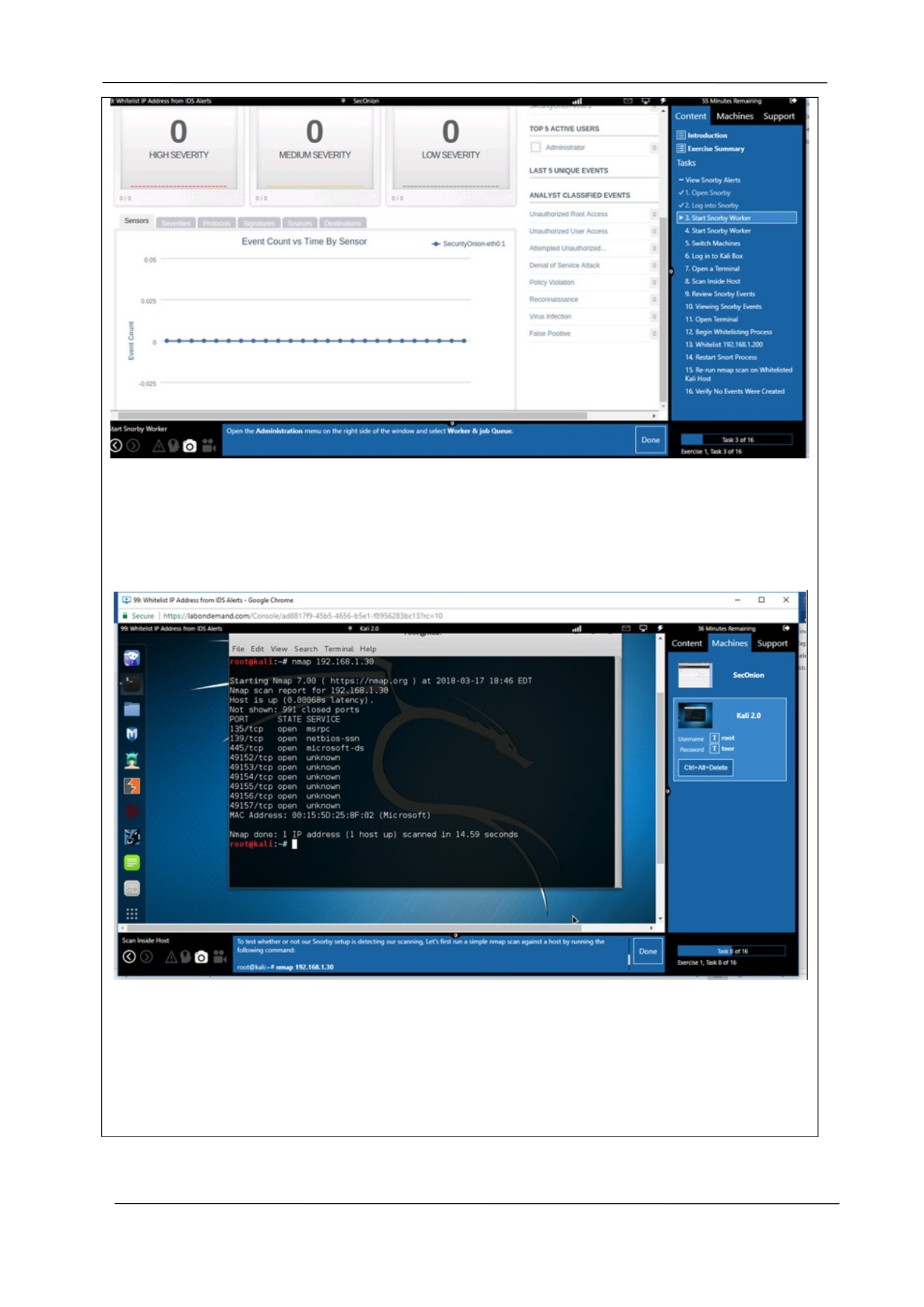
Fig 3.1: This is figure show the log in to monitor job queue
Figure 3.2: run a simple nmap scan against a host
Company Manual P a g e | 17
DRA FT
CYBERLEET TRAINING MANUAL
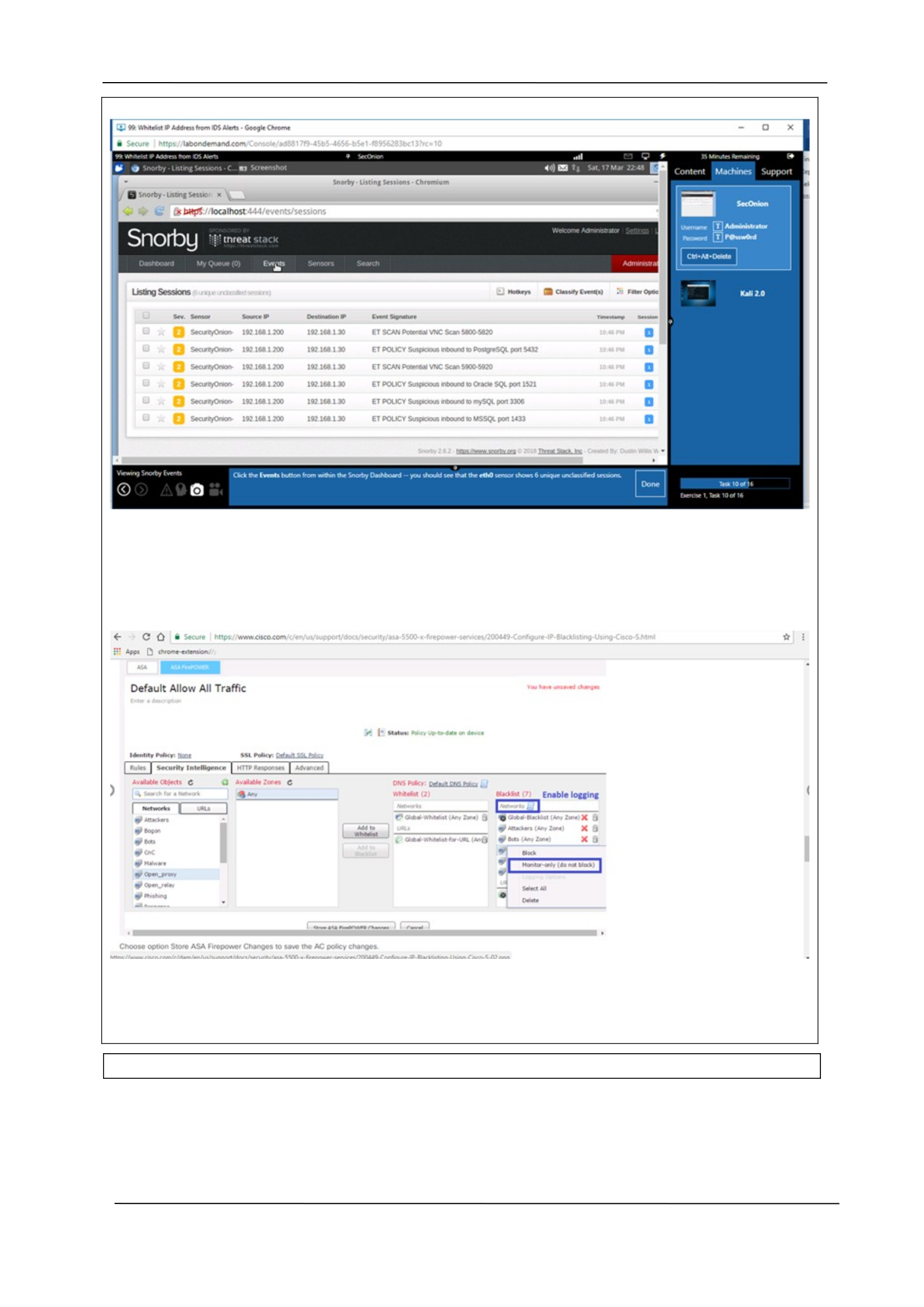
Figure 3.3: the eth0 sensor shows 6 unique unclassified sessions
Figure 3.4: Whitelisting configuration show the traffic
Company Manual P a g e | 18

DRA FT
CYBERLEET TRAINING MANUAL
Section Four: Vulnerability Assessment
4.1 Significance of Vulnerability Assessment
Vulnerability assessment can be defined as the process of defining, recognizing, classifying and
allocating priority to the vulnerabilities in the computer system, the network infrastructure, and
applications. This process basically helps a business entity to get a detailed insight into the threats
and vulnerabilities that can arise in the unpredictable technological environment. It even helps the
organization to equip itself so that it can react in the best possible manner. Vulnerability assessment
is considered to be a core activity of network defense and cybersecurity as its objective is to identify
threats and the risks that they pose to the IT ecosystem of the firm (What is a Vulnerability
Assessment (Vulnerability Analysis)? - Definition from WhatIs.com, 2019).
This testing process is extremely useful in the business context as it helps to identify as well as assign
the severity levels to various security defects that exist in the IT scenario. The security technique
involves a varying degree of standards and it emphasizes on the integrated coverage so that the
loopholes in the security can be identified and effectively managed. In the organizational setting of
North Star Software Developers, the vulnerability assessment can assist to detect vulnerabilities in
its software as well as supporting infrastructure before the security can get compromised (What is a
vulnerability assessment? | Synopsys, 2019).
Some of the key functions of vulnerability scanning technologies include not just identifying
vulnerability points in the network but also fixing the identified security loopholes. These
technologies evaluate the vulnerabilities and help in treating and reporting them. The technology
can basically help entities to stay ahead of online hackers (Vulnerability Management and
Vulnerability Scanning | Rapid7, 2019). It will allow business entities to recognize the security
exposures and form an inventory of devices on the firm's network. It plays an extremely important
role to plan suitable security measures so that the security will not be adversely affected. The main
steps that are followed by vulnerability assessment are as follows:
Planning
Scanning
Analysis
Remediation and
Repeat (How to Conduct a Vulnerability Assessment: 5 Steps toward Better Cybersecurity, 2019).
4.1 Significance of Vulnerability Assessment
Company Manual P a g e | 19

DRA FT
CYBERLEET TRAINING MANUAL
4.2 Vulnerability Assessment Tools and Methodology
A. The key company-approved tool that can be used is Zenmap. It is a cross-platform Graphical
User Interface (GUI) that has been designed for the Nmap Security Scanner. This open source
application has been designed with the intention to carry out frequent scans. It is designed in
such a manner so that it will be easy for beginners to use and the experienced users can also
use the advanced features. The scans that are done by Zenmap can be saved for later
assessment and compared as well (Zenmap - Official cross-platform Nmap Security Scanner GUI,
2019).
Network Mapper or Nmap is also a free and popular tool that is used for the purpose of
scanning. The security scanner can be used for security auditing as well as network
discovery purpose. In addition to these uses, Nmap can also be used to manage network
inventory, monitoring host or service uptime and handling the schedules relating to service
upgrades. This tool was designed with the intention to quickly scan large networks but can
also efficiently function against single hosts. Some of the unique features of Nmap include
high flexibility, powerful features, and well-documented procedure (Nmap: the Network
Mapper - Free Security Scanner, 2019).
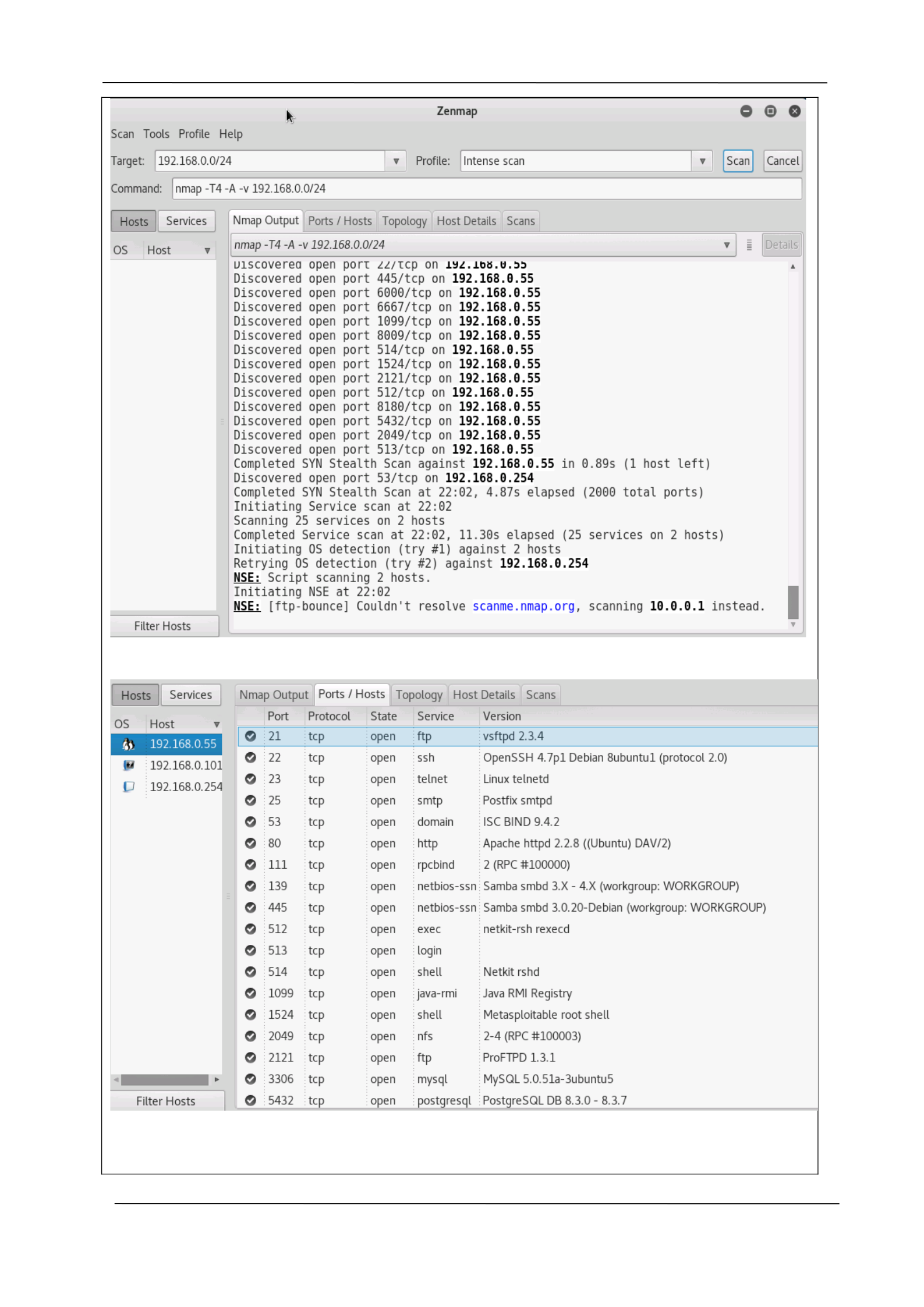
B. Zenmap has the ability to arrange the displays to show all the ports on the host or all the hosts
that run on a specific service. It can even summarize the details relating to a single host as well
as the complete scan results in a simple and convenient display. It even has the ability to draw a
topography map relating to the discovered networks. The users can combine a number of scans
together so that they can be analyzed at a time. Zenmap safely keeps the track of the scan
results until they have been thrown away or disposed of by the user (Chapter 12. Zenmap GUI
Users' Guide | Nmap Network Scanning, 2019).
The Nmap security scanner can carry out a wide range of security functions. Some of the
most powerful security tools are password audits, web scanners, packet crafters,
vulnerability scanners and sniffers. All these tools are designed to strengthen the level of
security of the system so that unauthorized users can be kept at a distance. It supports a
broad range of advanced technologies that can be used for mapping the networks that are
filled with various obstacles such as firewalls, IP filters and routers (Nmap: the Network
Mapper - Free Security Scanner, 2019). This tool has the ability to scan large volumes of
networks comprising of thousands of systems. It offers a rich set of innovative features for
users so that the security can be strengthened.
C
Company Manual P a g e | 20
DRA FT
CYBERLEET TRAINING MANUAL
Company Manual P a g e | 21

DRA FT
CYBERLEET TRAINING MANUAL
Company Manual P a g e | 22

DRA FT
CYBERLEET TRAINING MANUAL
Section Five: Network Scanning and
Assessment
5.1 Significance of Network Scanning and Assessment
Network scanning can be defined as the process that involves the use of a computer network for
collecting information relating to the computer systems. It is regarded as an important security
measure that helps to assess the quality of security. It also helps in system maintenance. Network
scanning and assessment is considered to be a core activity of network defense and cybersecurity as
it is able to identify filtering systems between the targeted host and the user and ascertain the
operating systems that are in use by analyzing their IP responses. This process is considered to be of
paramount importance as it has the potential to reveal important details about the network which
could be previously overlooked such as rogue devices (What is Network Scanning? - Definition from
Techopedia, 2019).
In an organizational context where the business can face threat from various online hackers, it is
necessary to carry out a number of network scanning procedures. Such a process can help them to
identify any rogue devices that might be lurking quietly in the network. In layman’s words, network
scanning basically involves the identification of active hosts on the network by carrying out an
evaluation of the IP addresses. Network scanning must be conducted at regular intervals as the
technological setting in which North Star Software Developers functions is evolving like never before.
This process can help to keep a tab on the traffic that is in the network (How does network scanning
work, 2019).
Network scanning as a security blanket which enhances the safety of the network. It is a necessity in
the digitalized era as it will help to conduct a thorough scanning of IT infrastructure. The regular and
active monitoring of the network will enable the organization to strengthen the quality of the
security system. The security procedure can be quite valuable for the entity as it will shed light on
the endpoints of the network. The two types of network scanning that are done are active network
scanning and passive network scanning (Security, 2019). Active scanning basically transmits active
packets of information and listens to data response for the endpoints. The passive network scanning
is carried out by listening to all the activities that are carried out on the network. Active network
scanning must be implemented in the organizational context for effectively dealing with high-risk
vulnerabilities.
Company Manual P a g e | 23

DRA FT
CYBERLEET TRAINING MANUAL
5.2 Network Scanning and Assessment Tools and Methodology
A. The approved tools that can be introduced in the network environment of North Star Software
Developers (NSSD) are Windows Firewall and SANS Investigative Forensic Toolkit (SIFT)
Workstation. Windows firewall is a well-known security element that has been designed by
Microsoft. It is built into the Windows operating system. The purpose of the firewall is to filter
the data transmissions from and to the Windows system. It also intends to block any hazardous
communication which could compromise the security (SIFT Workstation Download, 2019). SANS
Investigative Forensic Toolkit (SIFT) Workstation is the free and open source tools which can
perform highly detailed digital forensic tests in varying settings. This set of tool primarily uses
state of art technology and showcases advanced incidence response ability as well as innovative
forensic techniques .
By introducing these tools on the network environment of the organization, the network
could be stabilized and the security posture could be strengthened to a significant extent.
B. Windows firewall would function just like other firewalls. It would be able to function and carry
out the security activities by following a set of pre-determined rules and guidelines. One of the
main advantages of using the Windows firewall in the Windows environment is that it can
regularly be updated and receive threats that can adversely impact the security of the network
(SIFT Workstation Download, 2019). The built-in alert system could be used to identify threats
that could exist in the network such as rogue devices. The SANS Investigative Forensic Toolkit
(SIFT) Workstation functions by matching any prevailing incident response and the forensic tool
suite. It makes the use of the advanced ‘incidence response capabilities’ to identify any rogue
devices that might be present in the network environment of the business entity. Both the tools
could provide immense benefit to the organization as the quality of security of the network
environment could be improved. The tools would not only help to identify unauthorized devices
in the network but also help to deal with them in an effective manner.
Company Manual P a g e | 24
DRA FT
CYBERLEET TRAINING MANUAL
5.2 Network Scanning and Assessment Tools and Methodology
A. The first tool approved by the company is used in identifying malicious connections. This
tool is called Volatility. Volatility is used to extract information from volatile memory (RAM)
samples (Kali Tools, 2014). It provides visibility into the state of the system at the time of the
snapshot, and is completely independent of the system being investigated (Kali Tools,
2014b).
The second tool used for network scanning is Zenmap, described in detail in Section 4.2. To
recap, Zenmap is a free, open source user interface for Nmap. Zenmap will display Nmap’s
output in a more user-friendly way. Nmap is used to determine hosts on a network, what
services those hosts are offering, what operating systems the hosts are running, what type
of packet filters/firewalls are in use, and more (Kali Tools, 2014a).
B. Volatility is used to review which network connections were occurring on the host in
question at the time of the snapshot. This tool allows administrators to identify malware or
other malicious connections running on the host in question. Because it runs against a
snapshot, the host will not be affected and any attacker watching the host will not see this
research being conducted. If an administrator is made aware of malware running on a
machine that is not being identified by the company’s antivirus solution, Volatility can be
used to assist. Further in this section will be screenshots illustrating the usage of this tool
and this example.
Zenmap is used to identify all hosts connected to the network or subnet in question.
Network traffic to any unknown hosts that are found in this scan can then be blocked
through inbound and outbound firewall rules, as illustrated further in this section.
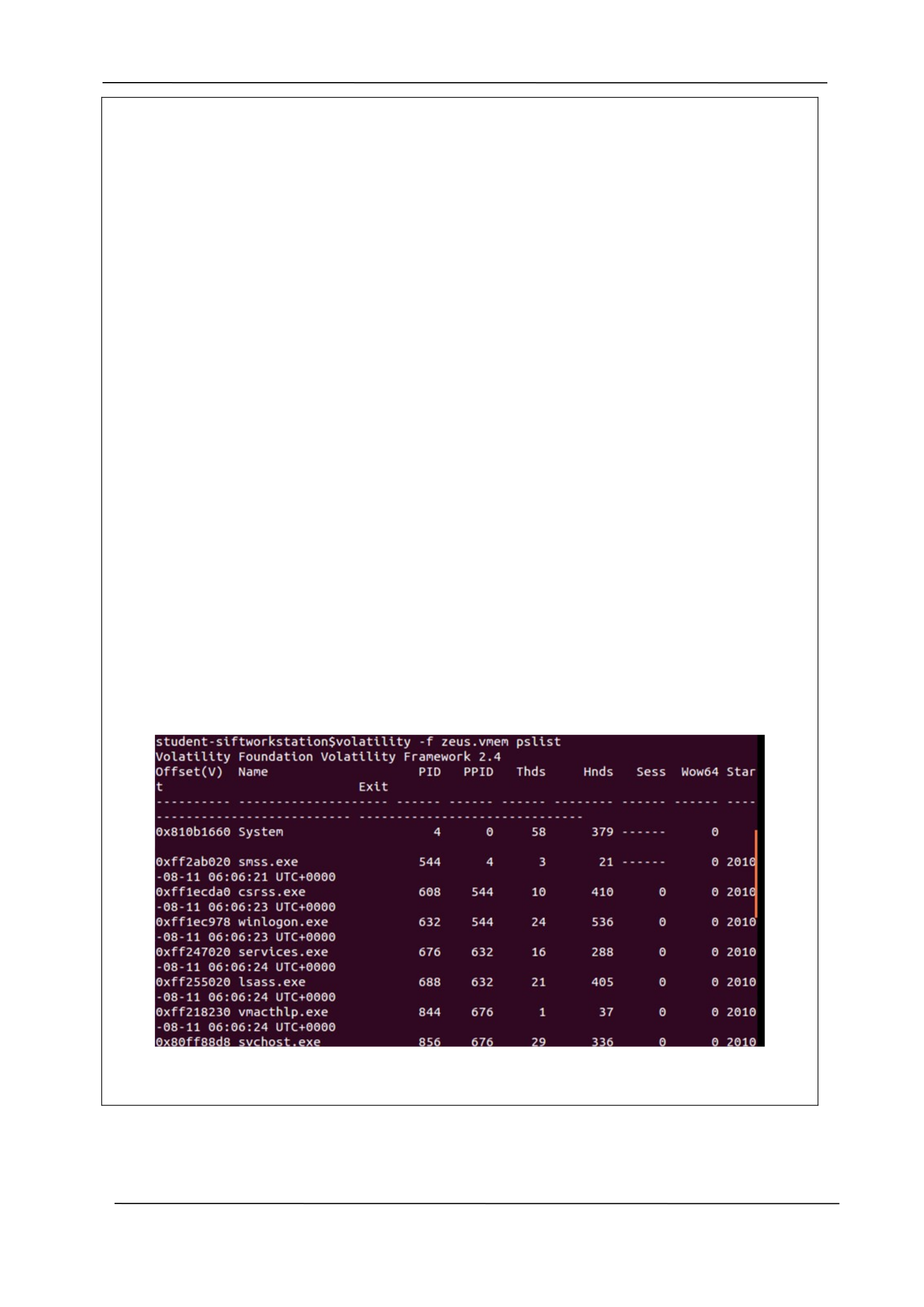
C. The first step in our assessment was to identify the processes running on the host in
question at the time of the snapshot:
Next, we review the connections being made by the host:
Company Manual P a g e | 25
DRA FT
CYBERLEET TRAINING MANUAL
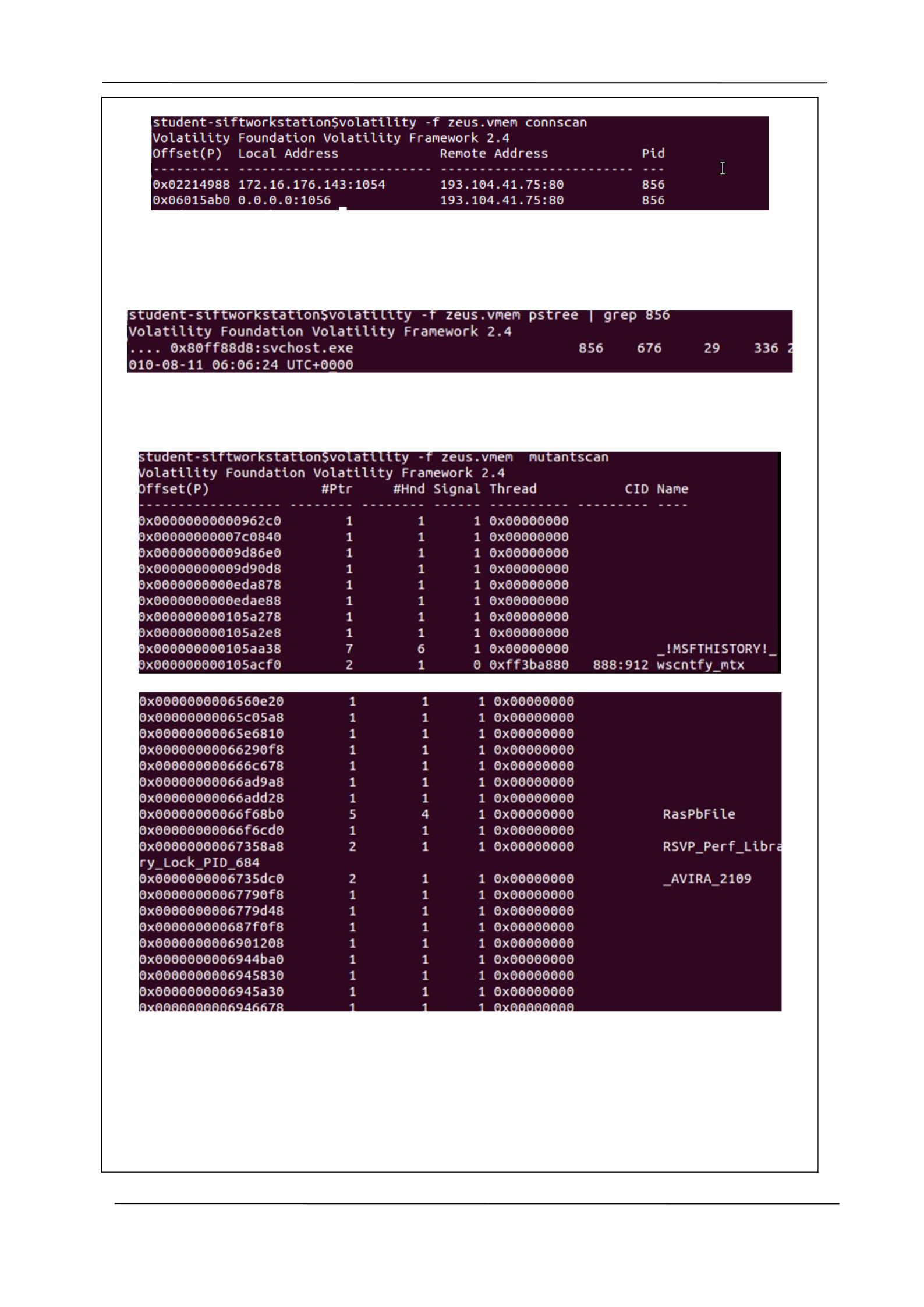
As we can see in this example, the host is connecting to remote address 193.104.41.75 on
port 80, using PID 856. Port 80 is associated with the http protocol. Next, we review the
process tree for PID 856:
The process in question is svchost.exe. This process should never be connected to port 80.
The final step in our review is to identify all mutex objects associated with this PID:
After doing some research, we determined that _AVIRA_2109 is associated with the
W32/Zbot.AA!tr malware.
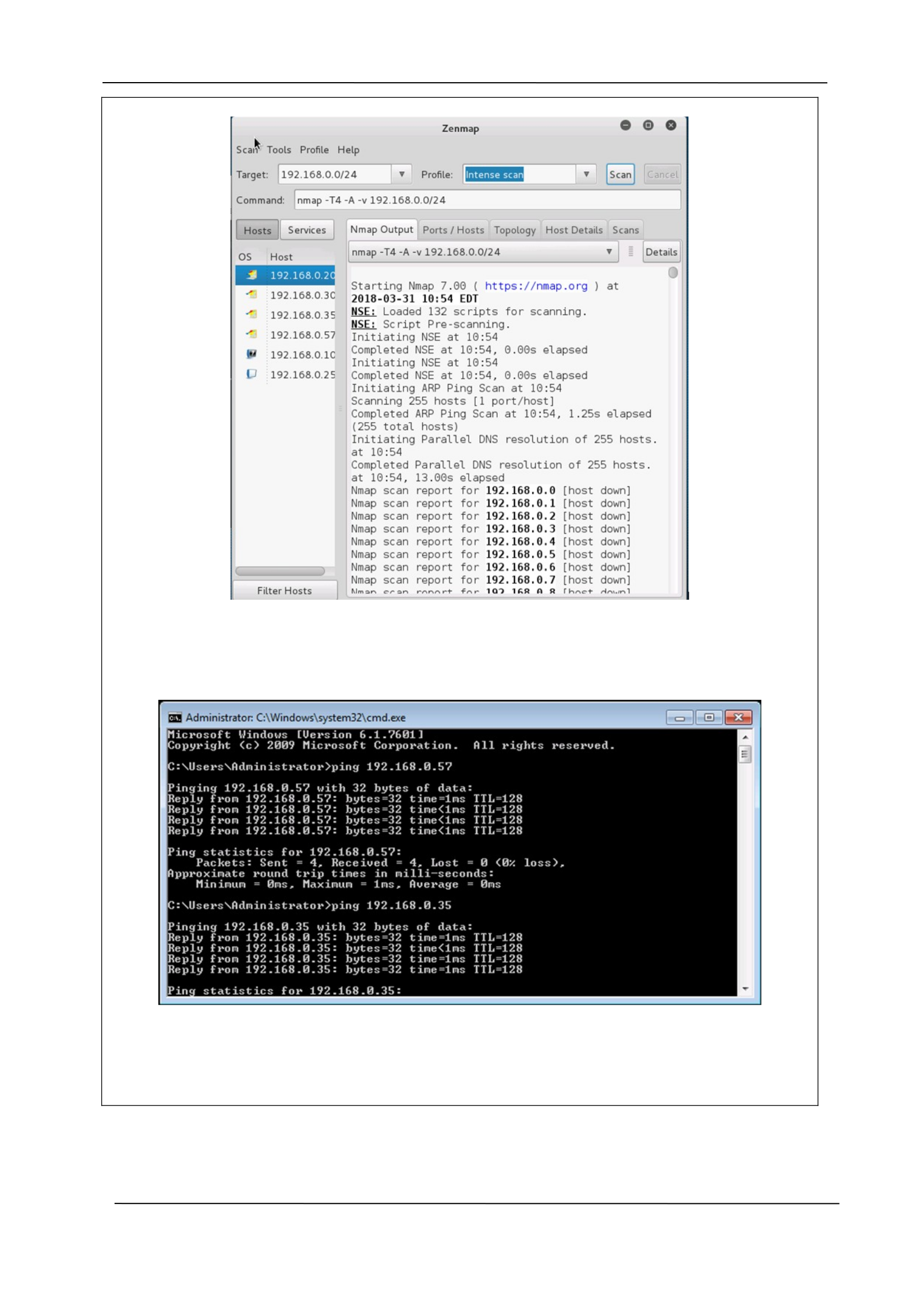
Rogue device identification can be difficult without a good topology of the network. This is
why regular scans are so important. The following screenshot illustrates an Nmap scan of a
particular subnet (using Zenmap):
Company Manual P a g e | 26
DRA FT
CYBERLEET TRAINING MANUAL
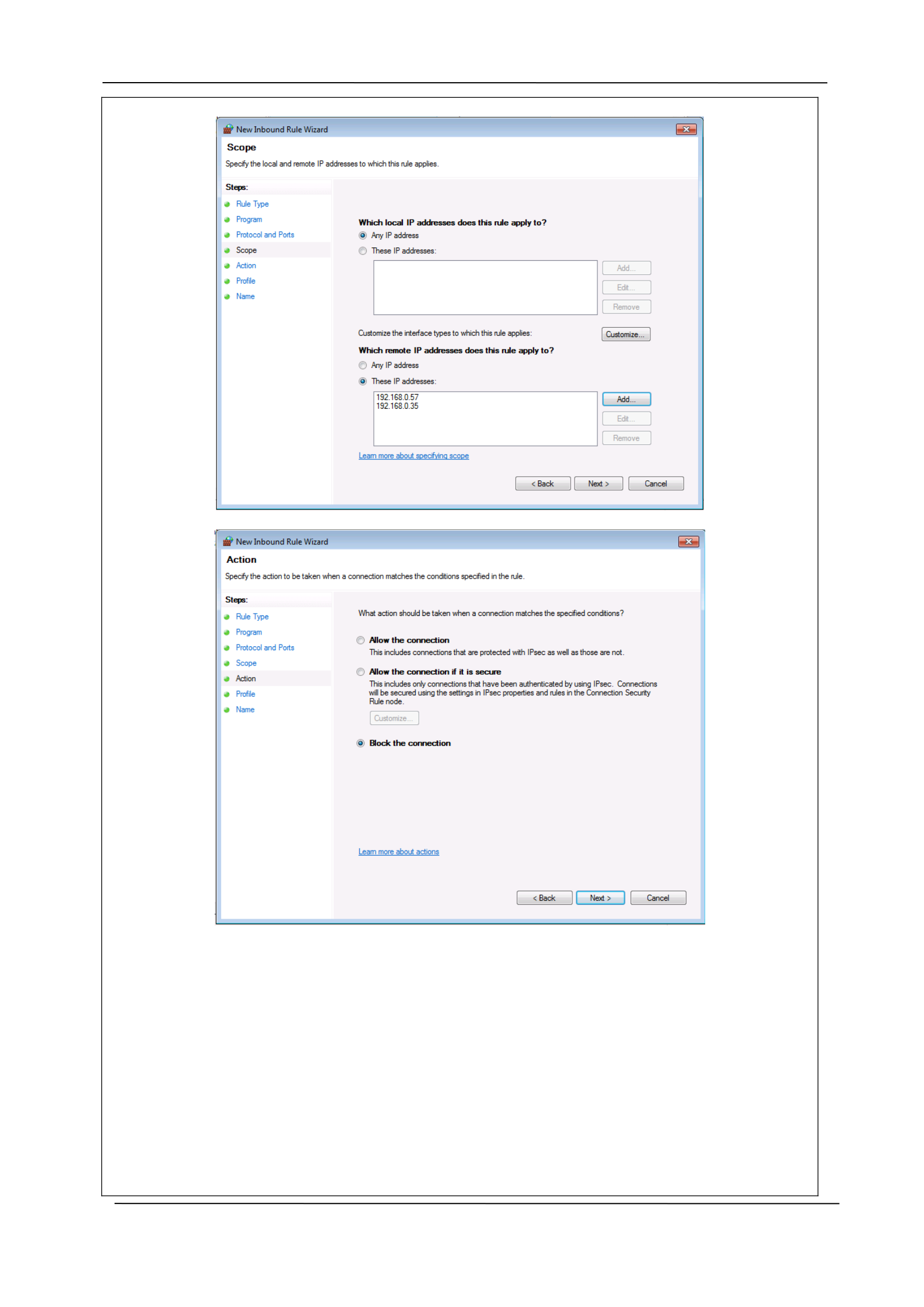
On the left-hand side you can see the hosts connected to this subnet. Hosts 192.168.0.57
and 192.168.0.35 are rogue devices. To verify connection to these devices, we can use a
simple ping:
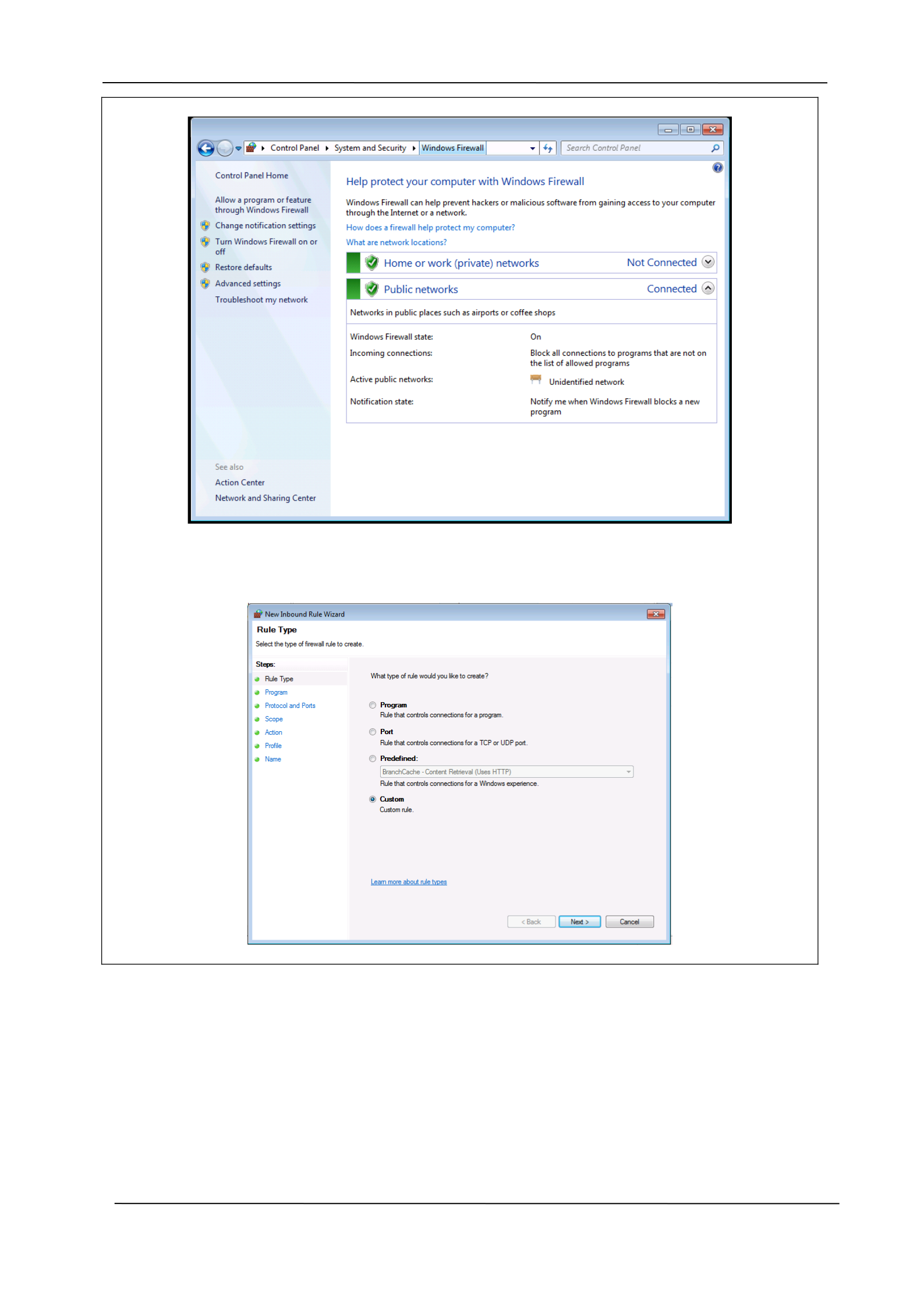
As you can see, the reply indicates that the connection is successful. To disable this
connection, we must first ensure the Windows firewall on the device we are using is
enabled:
Company Manual P a g e | 27
DRA FT
CYBERLEET TRAINING MANUAL
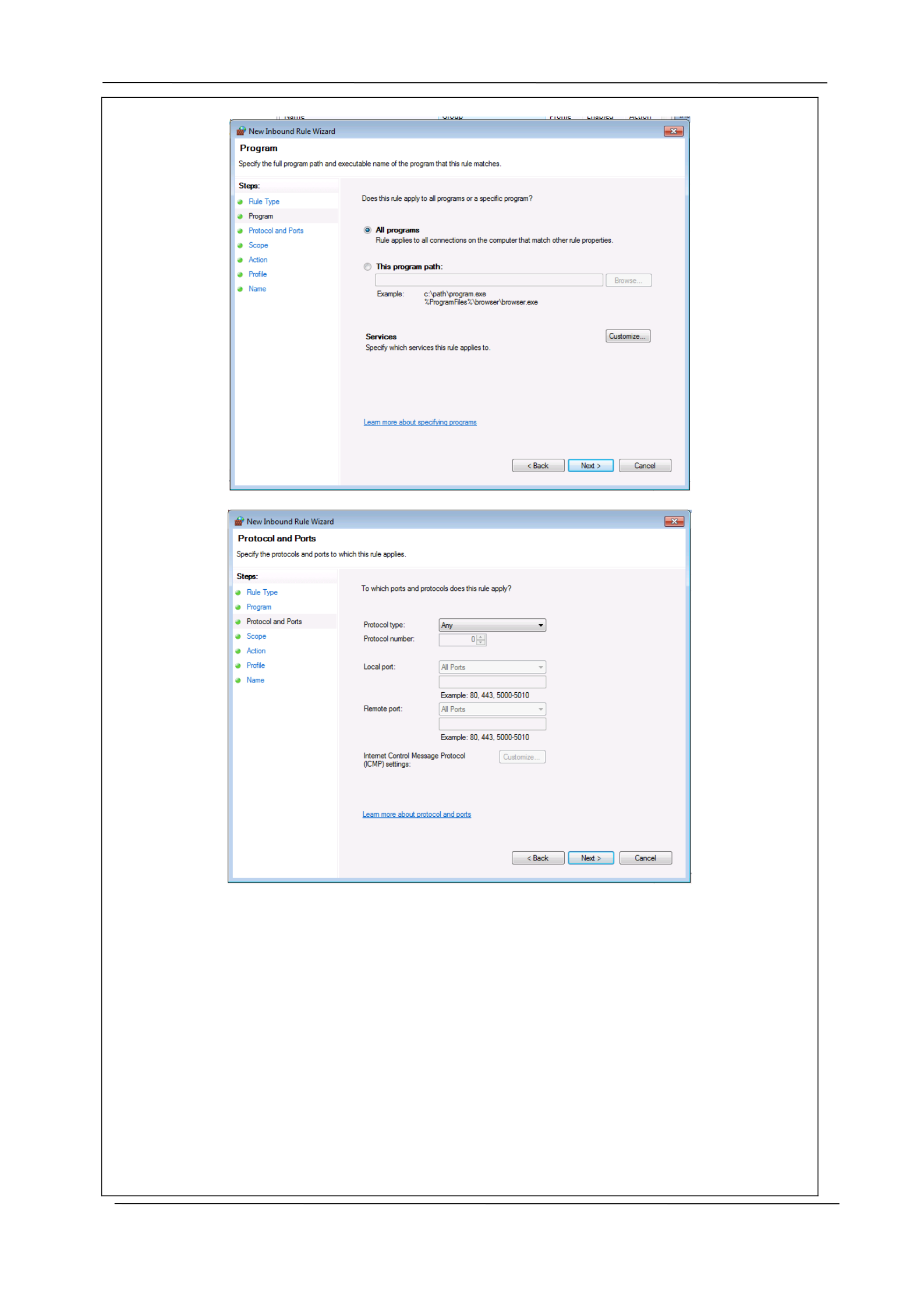
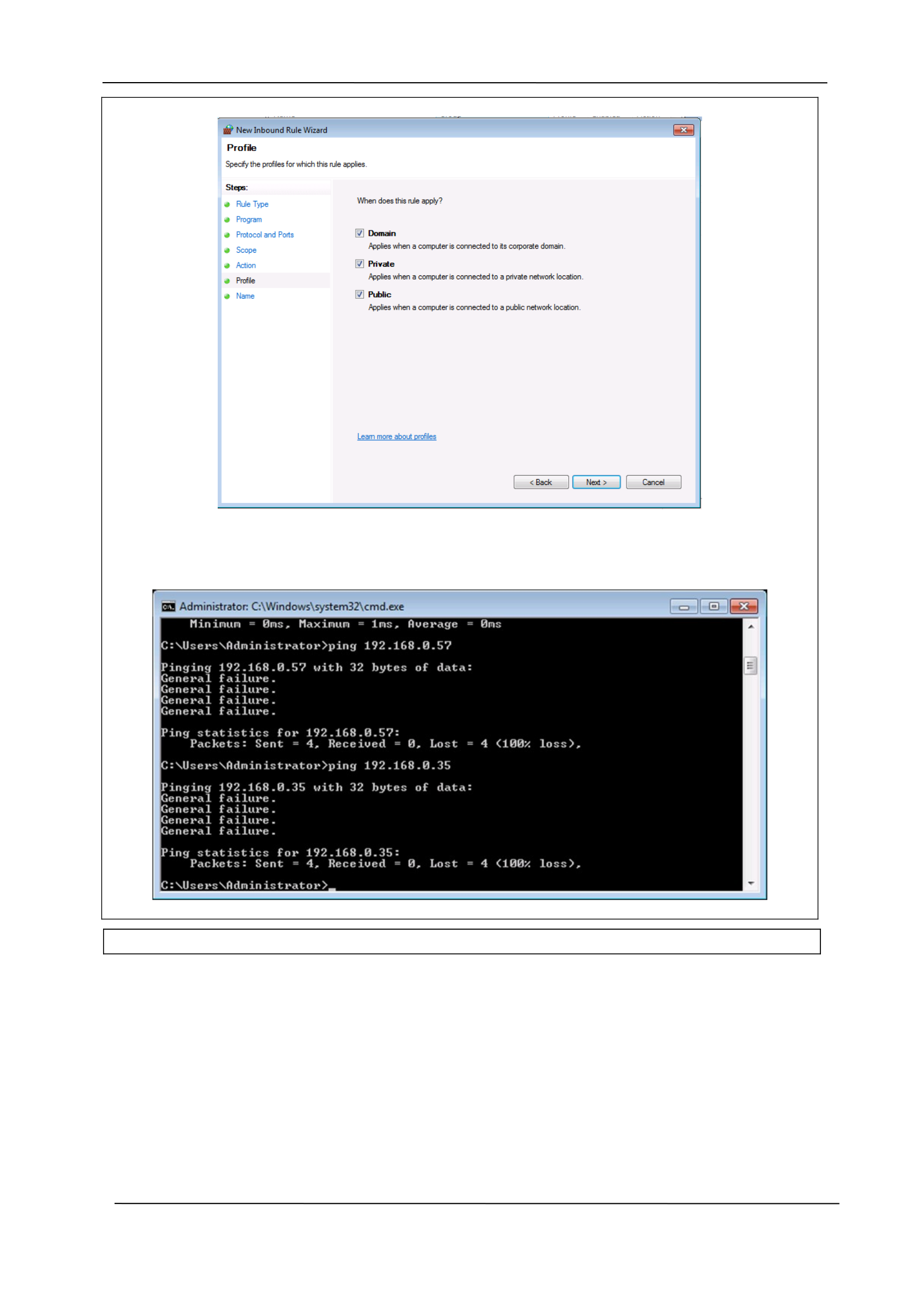
We will now develop inbound and outbound firewall rules to block connections to these two
rogue devices:
Company Manual P a g e | 28
DRA FT
CYBERLEET TRAINING MANUAL
Company Manual P a g e | 29
DRA FT
CYBERLEET TRAINING MANUAL
Company Manual P a g e | 30
DRA FT
CYBERLEET TRAINING MANUAL
We repeat this exact same process for an outbound rule as well. Now, when we attempt to
ping the two rogue devices, the connection is blocked:
Company Manual P a g e | 31

DRA FT
CYBERLEET TRAINING MANUAL
Section Six: Auditing and Log Collection
6.1 Significance of Auditing and Log Collection
In order to enhance the quality of security of the network of North Star Software Developers (NSSD),
auditing and log collection can play an extremely vital role. In the prevailing times when security
threats in the unpredictable cyber setting have become extremely common, there is the need to
introduce a wide range of security tools which can strengthen the security system of the undertaking
(What is audit log (AL)? - Definition from WhatIs.com, 2019). An audit log can be defined as the
document which records a happening or an event that might arise in an Information Technology
ecosystem. In addition to maintaining the records and documenting the resources that have been
accessed, these security tools can help to identify any security threats that might arise and
negatively impact the security posture of a business entity. The regulations that have been
introduced by Health Insurance Portability and Accountability Act of 1996 (HIPPA), the Sarbanes
Oxley Act and the Gramm-Leach-Bliley Act have introduced a number of mandates that are related
to audit logs.
In the digitalized era when security threats are constantly evolving, audit logs play an extremely
crucial role to keep a tab on the various kinds of activities that take place on the network of the
business entity. The security tools have become an invincible security tool as they encompass all the
security-related events that take place within the scope of the organization’s network. Audit logging
basically helps the business entity to create an audit trail or a security-relevant set of records which
documents the digital footprint of the organization (Macdonald, 2019). The detailed records that are
maintained by the audit log can assist the network administrator of the business undertaking to
keep a tap on the actions of the organizational personnel on the online platform. For instance, audit
logs can act as the detective control which can assist in finding evidence in case a hacker is inside the
network of the organization or an employee is involved in some kind of unauthorized activity. Since
the security posture of NSDD is low in the current times, the introduction of auditing and log
collection can play a crucial role to enhance the security posture (Macdonald, 2019).
Some of the key data that must be included in audit logs include the User ID of individuals who are
inside the organizational network, the date and time of logging on and logging off by the network
traffic members, the terminal identity of the users, the networks that are being accessed and any
modifications that are made to the system configurations (Best practices for audit, log review for IT
security investigations, 2019). By collecting these elements in the audit log, best practices can be
implemented which can improve the quality of the security model. The security tool will make sure
that it can add value to the access control monitoring that is in place in the organizational setting.
The log files that are recorded and maintained can act as a valuable source of information which can
help in recognizing probable security threats that could jeopardize the security of the IT
infrastructure of North Star Software Developers (Best practices for audit, log review for IT security
investigations, 2019).
Company Manual P a g e | 32

DRA FT
CYBERLEET TRAINING MANUAL
6.2 Auditing and Log Collection Tools and Methodology
A. A broad range of auditing and log collection tools have been approved that can be introduced
in North Star Software Developers for enhancing the security system. These tools include
Windows PowerShell and Kiwi Syslog Server. Windows PowerShell is a popular task-based
command-line shell as well as scripting language which can assist professionals in the
Information Technology arena to effectively control and automate the overall administration
of the Windows operating system. It can even help to manage and control the applications
and software that run on the operating system. This tool has been used because of its simple
and effective nature (PowerShell, 2019). Kiwi Syslog Server has been selected as it is known
for its effective and highly functional network configuration management and IT monitoring
techniques. The powerful product is known to offer the best possible assistance so that the
quality of the security of the network will not get compromised easily.
These set of auditing and logging tools will play an extremely role in the IT setting of NSSD as
they can keep a real-time tab on the network traffic of the organization. Thus they will help to
alert the network administrator in case they identify or find any abnormal or unauthorized
activity in the IT network of the business entity. The thorough assessment that will be carried
out by these security tools will basically help the network administrator to be on his toes so
that the most suitable actions can be taken so that the security posture of the North Star
Software Developers organization will not get compromised due to the unauthorized activities
of cyber attackers and hackers.
B. Windows PowerShell and Kiwi Syslog Server tools would play an extremely crucial role to
carry out the auditing of the network and generate necessary reports that could help in the
security process.
The session of PowerShell.exe could be started in the Command Prompt window. While
using this auditing tool, the administrator could make the use of a number of optional
parameters so that the session could be customized as per the exact needs and
requirements. For example, PowerShell can be used for carrying out the audit of the
Administrator account. It can assist to determine the exact services that were being run on
the specific host of the Administrator account. The reports can be generated by entering a
single command line in the PowerShell interface.
The Kiwi Syslog Server tool will enable a user to enter the exact IP address of the system
from which the application would be accepting logs. It makes the use of the latest
encryption standards so that the centralization of the log message management will be
possible (Success Center, 2019).
This tool has been designed for the Windows platform. It receives Syslog messages from the
network devices including routers, switches and firewalls so that a proper record of log data
can be maintained in a single place. The simple customization and configuration of the tool
make it highly popular among network administrators as it helps to enhance the quality of
the security posture in the uncertain cyber environment (Kiwi Syslog Server Administrator
Guide, 2019).
C .
A. The first step in determining which services were running as the Administrator account was
to enter the following command in PowerShell
Company Manual P a g e | 33
DRA FT
CYBERLEET TRAINING MANUAL
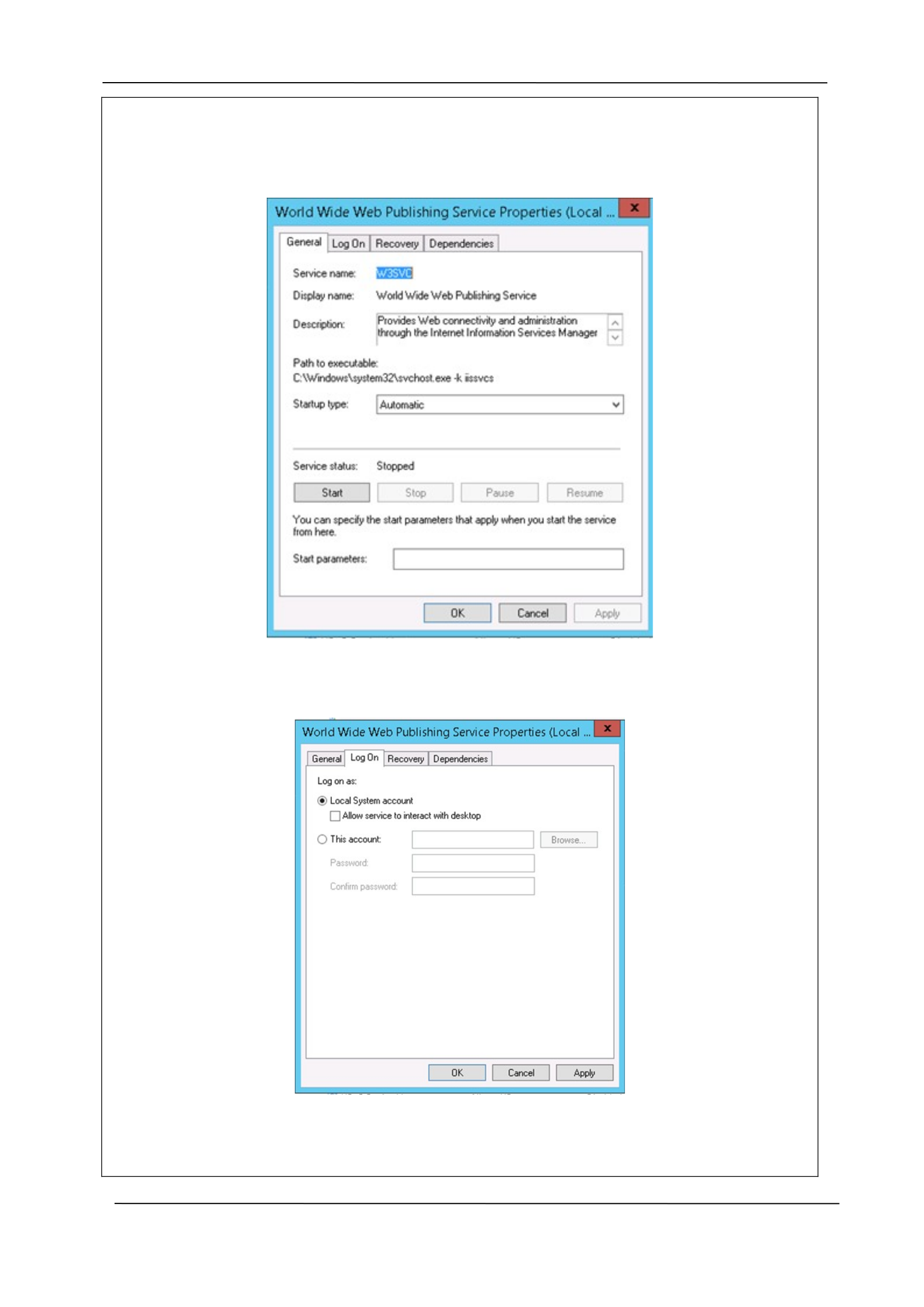
This created a file that we could review manually. Upon review, we determined that two
services were running as this account. The next step is to open the Services window on the
host and locate the service in question:
We then navigated to the Log On tab and changed the Log on as: setting from the
Administrator account to the Local System Account:
This process was repeated for each service running as Administrator. To verify our changes,
we ran the same PowerShell script again, wrote the information to a separate document,
and reviewed the document. It now showed that there were no services running as the
Company Manual P a g e | 34
DRA FT
CYBERLEET TRAINING MANUAL
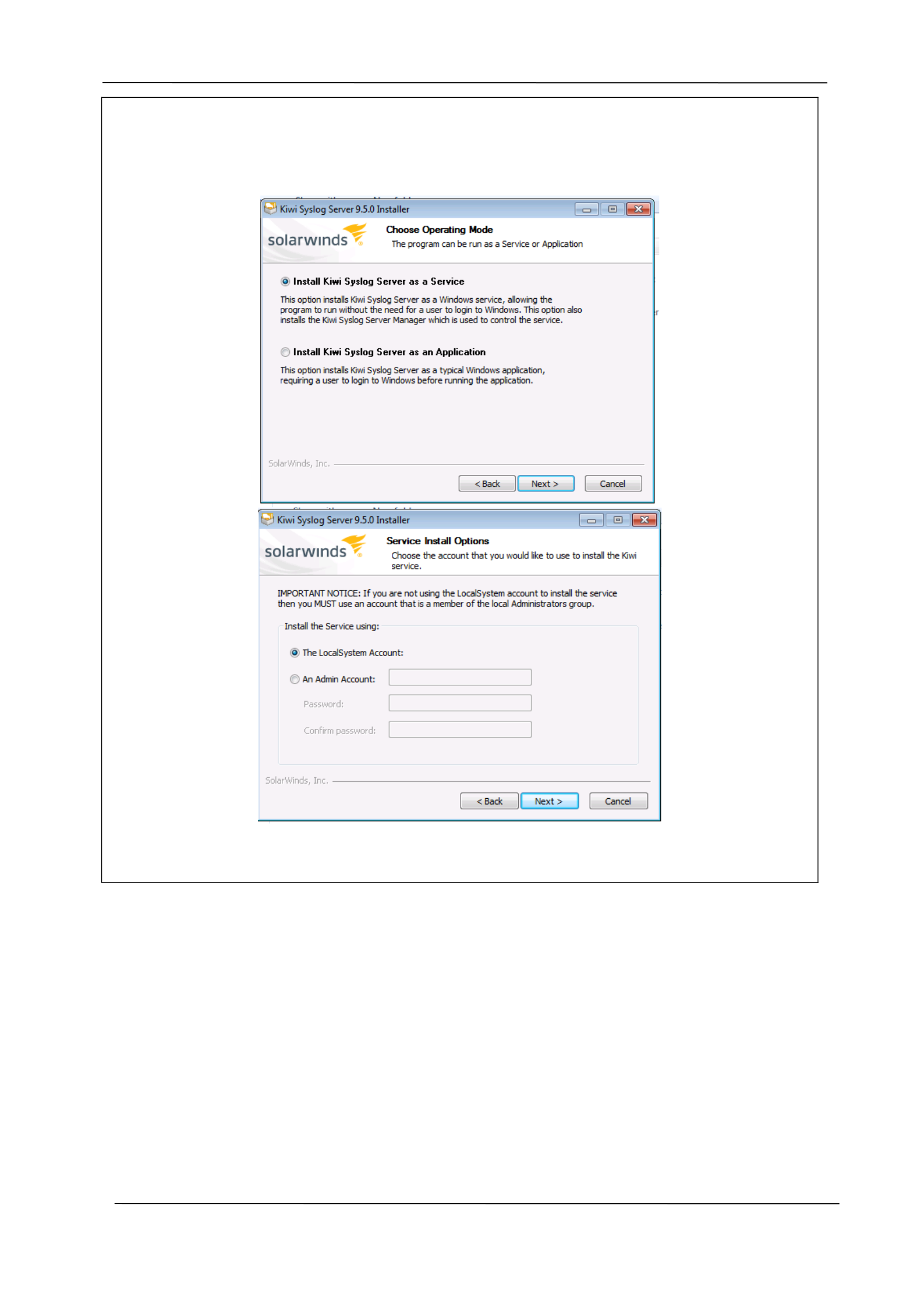
Administrator account.
The first step in log collection was to install Kiwi Syslog Server:
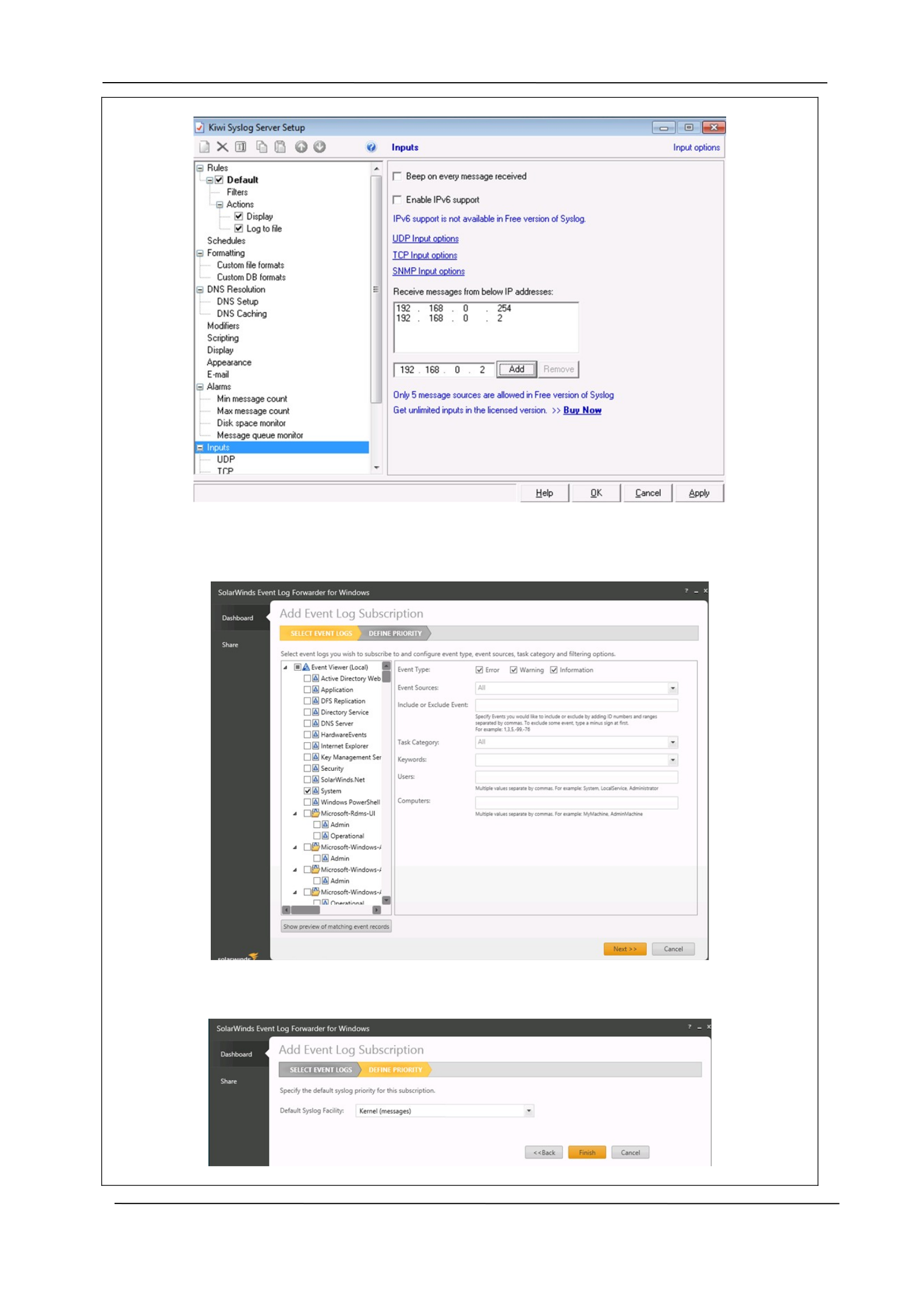
Once installed, we configured the IP addresses from which logs will be collected:
Company Manual P a g e | 35
DRA FT
CYBERLEET TRAINING MANUAL
We then set up the SolarWinds Event Log Forwarder on our Windows host. To do this, we
first chose the type of event to capture:
Followed by the priority:
Company Manual P a g e | 36
DRA FT
CYBERLEET TRAINING MANUAL
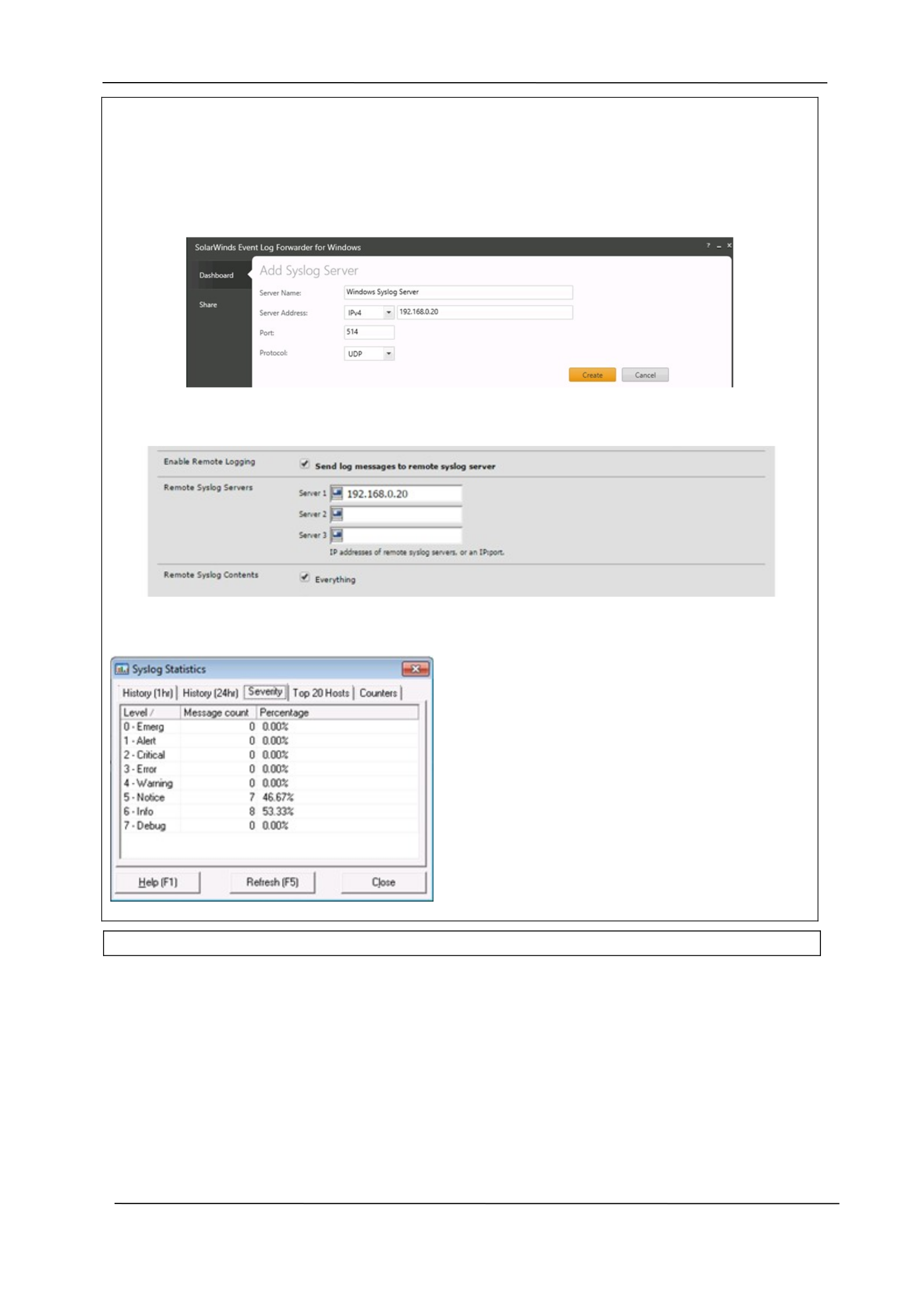
This process was repeated for the following events: Security, System, Application, and
Microsoft-Windows-Application-Experience/Program-inventory. Next, we added the syslog
server to send these events to:
Next we set up our pfSense firewall to forward log messages to the syslog server:
The Kiwi syslog server also offers some statistics:
Company Manual P a g e | 37

DRA FT
CYBERLEET TRAINING MANUAL
Section Seven: Tools Used
7.1 A Brief Overview of Tools Used in This Manual
The tools that have been used in the manual have been highlighted below:
Nmap – It is a free scanning tool that helps to conduct scanning activity to identify threats. The tool
helps to discover hosts as well as services on the computer system (Nmap: the Network Mapper -
Free Security Scanner, 2019).
pfSense – It is a free and open-source firewall which helps to address security concerns of a computer
network (pfSense - Your Next-generation Secure Network, 2019).
Snort – It is a lightweight and free network intrusion detection system which has been designed for
Windows and Linux operating systems. It helps to identify emergency threats and risks (Snort -
Network Intrusion Detection & Prevention System, 2019).
Windows Firewall – It is a Microsoft Windows application that is designed to filter the data and
information that is coming in the way of the computer system. It has the ability to block the
programs that could be potentially harmful in nature (What is Windows Firewall? Webopedia
Definition, 2019).
Wireshark – Wireshark is an open-source packet analyzer which helps in network troubleshooting. It
is also referred to as a network sniffer which has the ability to critically assess the structure of the
network and strengthen the security posture of the network (Porup, 2019).
Snorby – It is the network monitoring tool which helps to view the outcome that has been produced
by the Snort Network Intrusion Detection System (Snorby/snorby, 2019).
Company Manual P a g e | 38

DRA FT
CYBERLEET TRAINING MANUAL
Section Eight: References
Cyber Security Awareness Month. (2019). Retrieved from
https://isc.sans.edu/forums/diary/Cyber+Security+Awareness+Month+Day+25+Port+8
0+and+443/7450/
Differences Between Hardware & Software Firewalls - Webopedia. (2019). Retrieved from
https://www.webopedia.com/DidYouKnow/Hardware_Software/firewall_types.asp
Download Microsoft Message Analyzer from Official Microsoft Download Center. (2019).
Retrieved from https://www.microsoft.com/en-in/download/details.aspx?id=44226
Hassan, W. (2019). The Importance of Network Traffic Analysis. Retrieved from
https://menaentrepreneur.org/2017/02/importance-network-traffic-analysis/
Intrusion Detection and Prevention Systems. (2019). Retrieved from
https://ws680.nist.gov/publication/get_pdf.cfm?pub_id=901146
Network Traffic Monitor | Benefits of Network Traffic Monitoring. (2019). Retrieved from
https://www.applicationperformancemanagement.org/network-monitoring/network-
traffic-monitor/
Snort - Network Intrusion Detection & Prevention System. (2019). Retrieved from
https://www.snort.org/
VMware View 5.0 Documentation Center. (2019). Retrieved from
https://pubs.vmware.com/view-50/index.jsp?topic=
%2Fcom.vmware.view.planning.doc%2FGUID-B8D3225D-0CB2-42D3-B2B8-
EB7DED0F3B5E.html
What is Network Traffic Analysis? - Definition from Techopedia. (2019). Retrieved from
https://www.techopedia.com/definition/29976/network-traffic-analysis
Company Manual P a g e | 39

