


1
Windows Server and NRPT Lab Assignment
School of Business, Liberty University
CSIS 352_D02: System Administration
Joe Breeden
July 14, 2025

2
Abstract
This lab was a great starting point for learning how to get a Windows Server up and
running. I got hands-on experience installing the server, turning it into a Domain Controller, and
setting up an initial Name Resolution Policy Table (NRPT) rule. It really drove home how
important it is to have a clear plan and understand each step when deploying and managing a
Windows Server. I learned how to promote the server to a Domain Controller using the GUI,
which was straightforward but also highlighted how much there is to learn. The part about using
PowerShell to add and check NRPT rules was eye-opening—showing me just how valuable
scripting skills are for making server management more efficient and automatable. This
experience made me realize that while you can follow guides and get the basics down,
becoming truly proficient takes ongoing effort and real practice. It also made clear that good
strategic planning, knowing the different server roles, and being comfortable with scripting are
key skills in IT and cybersecurity. Overall, this first step has sparked my curiosity to dive deeper
into advanced setup techniques and scripting, which I know are essential as I continue to grow
in this field.
Table of Contents
Introduction………………………………………………………………………………………..4
Method............................................................................................................................................4
Results.............................................................................................................................................6
Conclusion.......................................................................................................................................6
References.......................................................................................................................................8

3
Appendix A......................................................................................................................................9
Appendix B....................................................................................................................................14
Appendix C....................................................................................................................................21

4
This lab assignment is set up to help teach how to install a Windows Server, configure
that server as a new Domain Controller and to also set up an initial Name Resolution Policy
Table (NRPT) rule. This is set up to help demonstrate one of the many possible roles that a
system administrator would have to perform, as well as the steps and procedures needed to
complete the setup of a server. In my case it helped show that I have many more things to learn
to become proficient in to be able to work efficiently in the world of IT and cybersecurity. I also
realize that I will need to learn how to use PowerShell more as it seems to be one of the more
useful tools in operating in the Windows server environment, especially if a version of a server
that is not the GUI desktop version.
Method
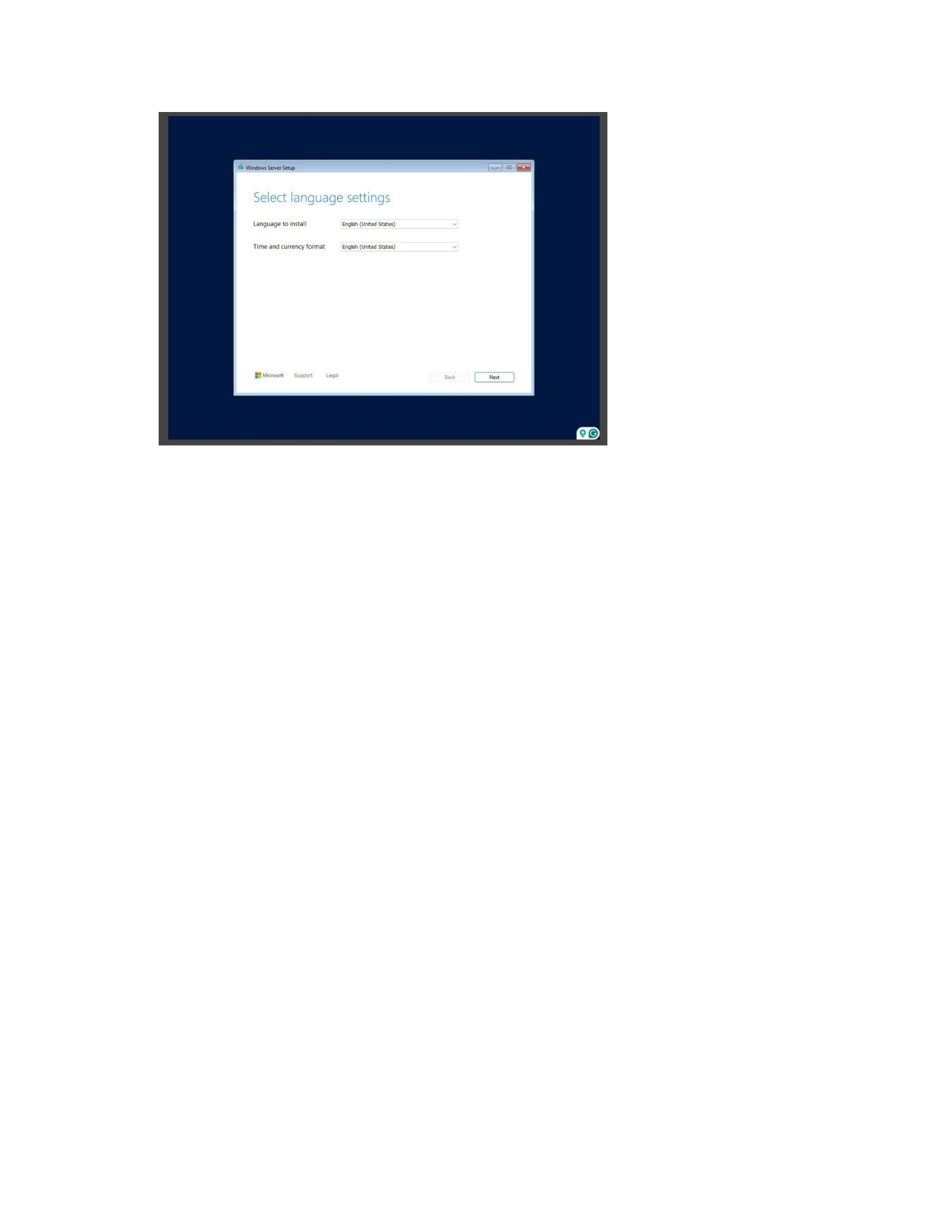
Before anything can be accomplished and a Domain Controller can be configured, the
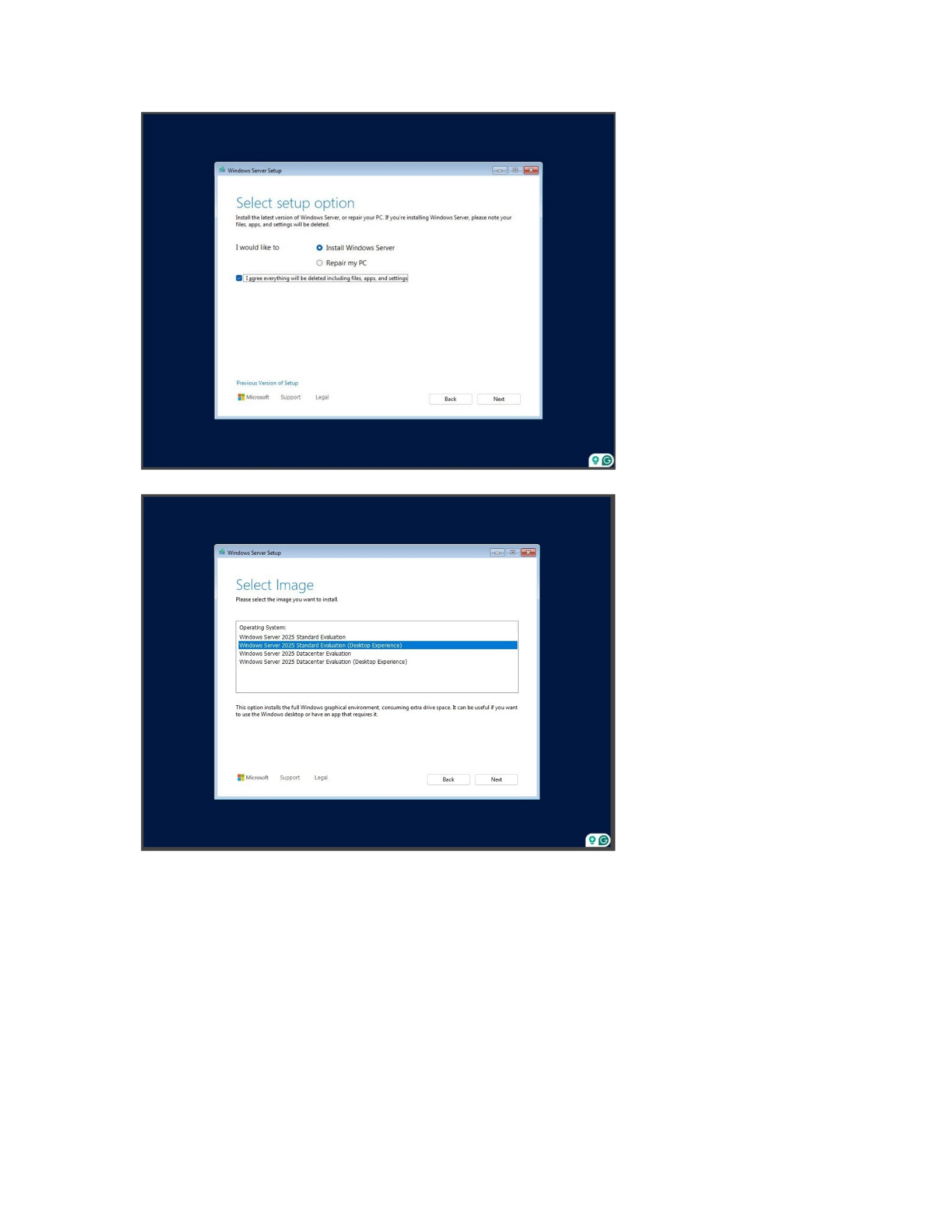
server needs to be installed. Once the image is selected it needs to be decided if the desktop
experience is going to be chosen or an image without a GUI (Appendix A5). After the image is
selected the disk location that will house the image needs to be chosen as well, if there is only
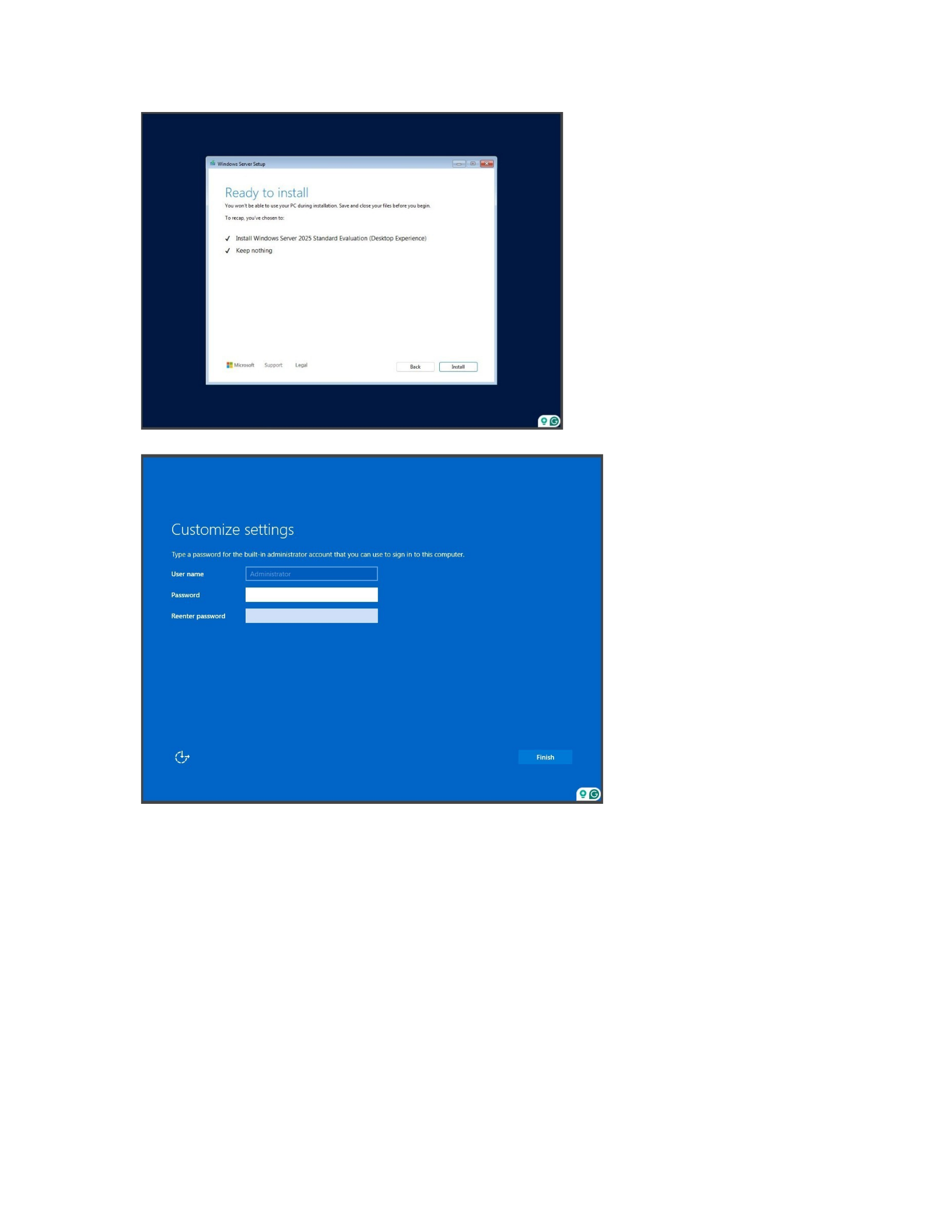
one hard drive then that is where the image will be located (Appendix A7). After this is done the
installation can be started and the initial admin password can be set up, this initial password
should be something simple so that the initial configurations can be completed quickly and
easily (Appendix A9). After all the set up and configurations are completed the password can be
changed to something more appropriate to follow security guidelines.
After the server image is installed, the server can be changed to a Domain Controller so
that it can be used as one. There are two main methods used to set up an Active Directory
Domain Service (AD DS), one method is to use a PowerShell cmdlet that installs the AD DS
server role along with the server administration tools which includes the GUI-based tools

5
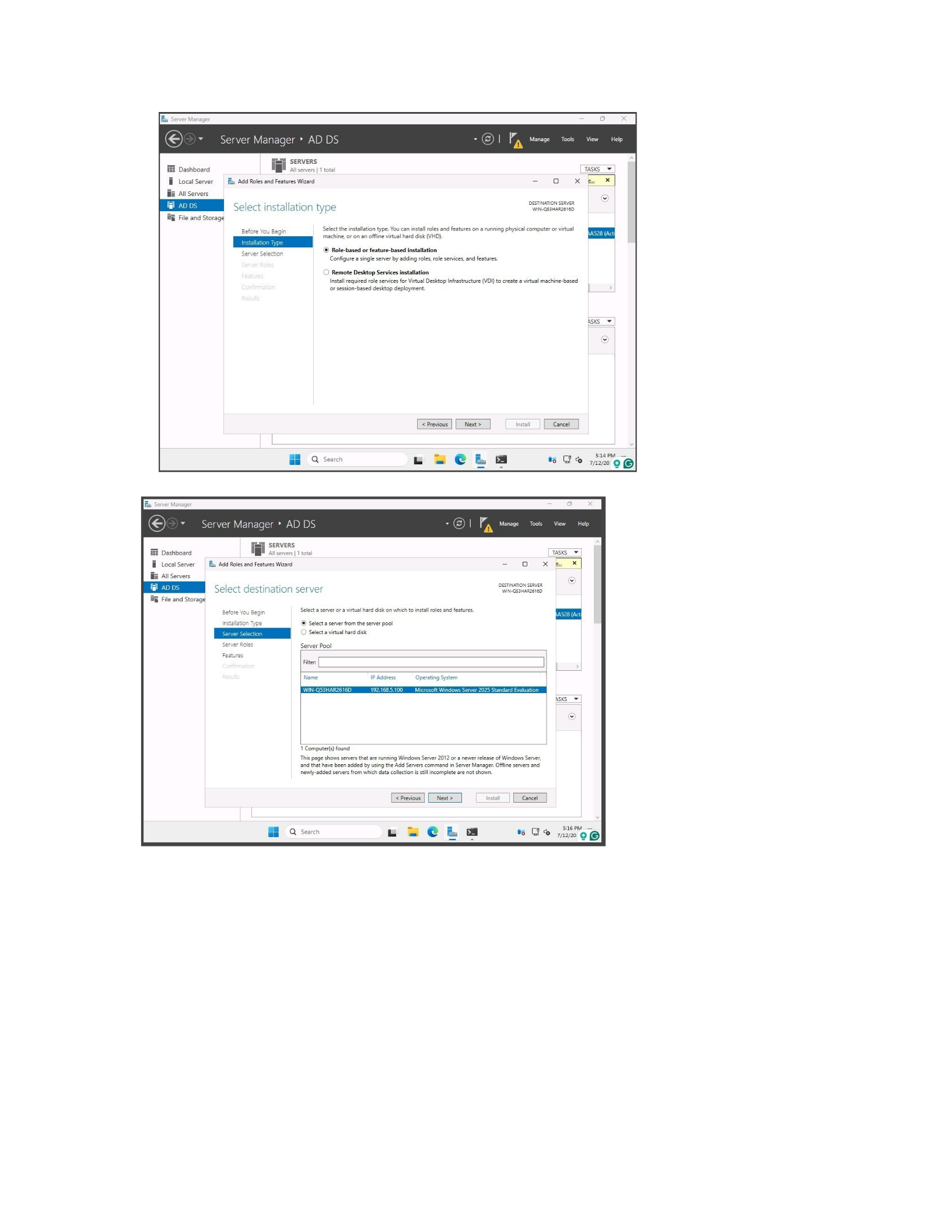
(Appendix B1). But for the purposes of this lab, I chose to use the GUI based method and used
the Server Manager to use the Add Roles wizard that has an Active Directory Domain Services
Configuration Wizard (Appendix B1). Once the installation type is selected, the server from the
server pool needs to be selected to perform the change over to an AD DS (Appendix B3) The
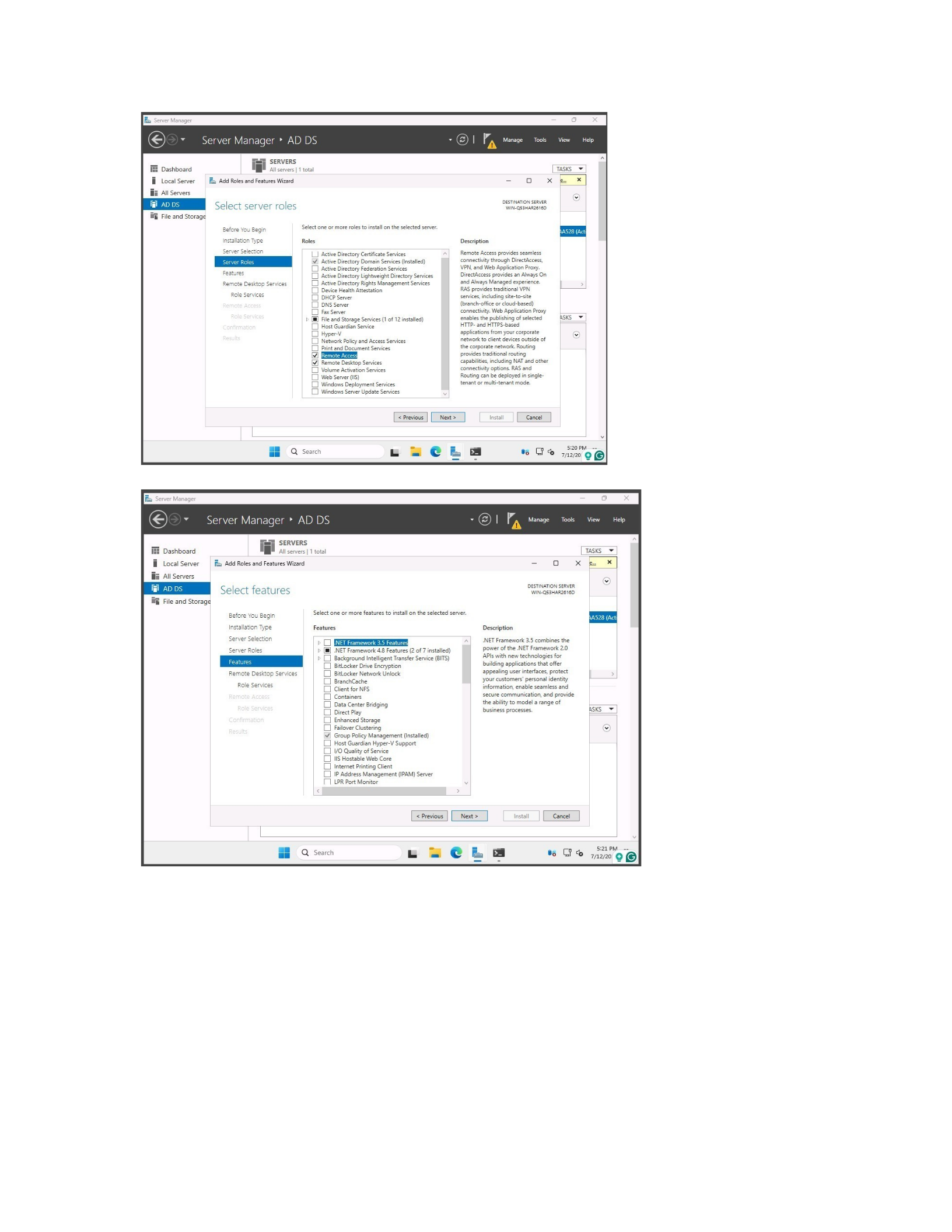
next step is to select the roles that you want the server to perform, for this lab we want the AD
DS with no other services or features added on but if wanted they could be added later
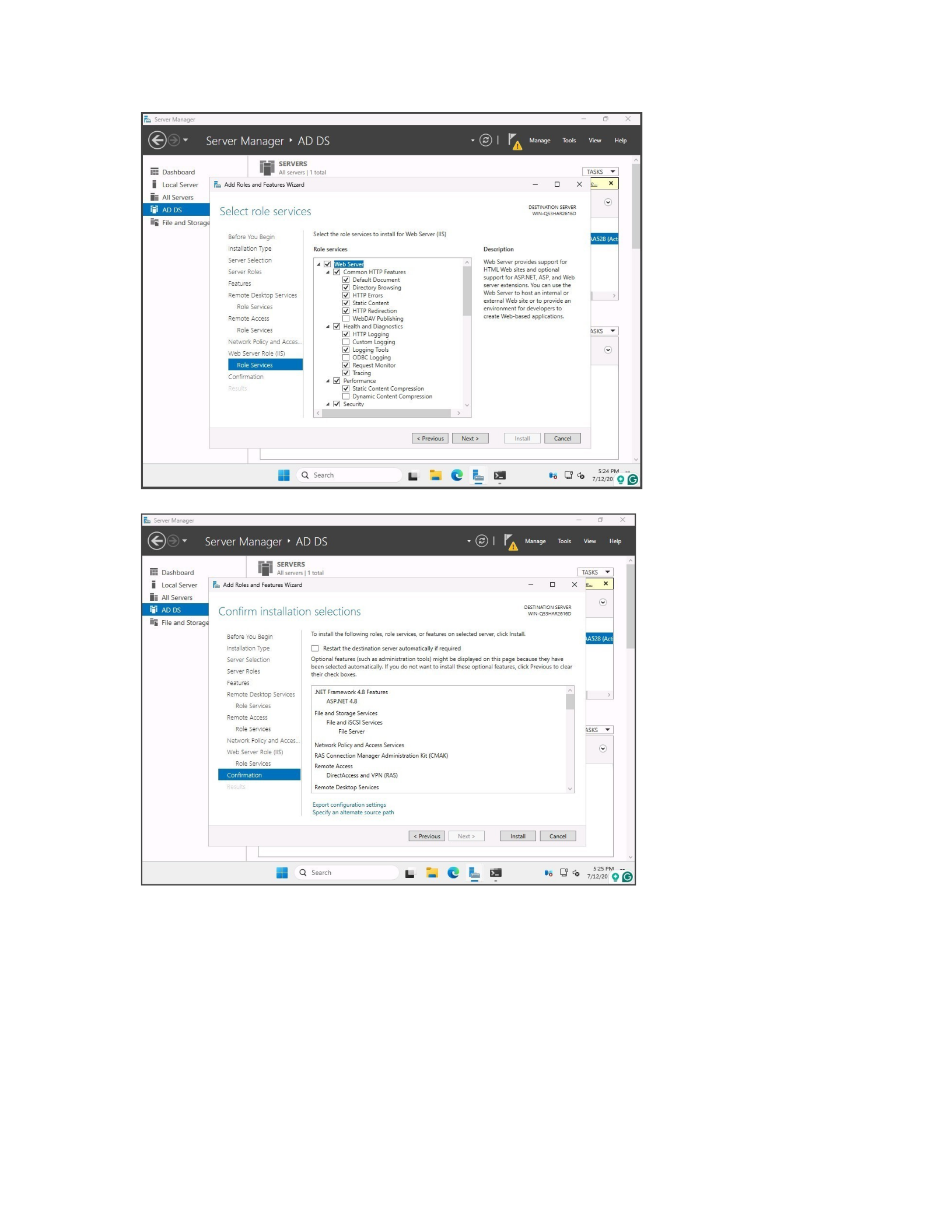
(Appendix B4). Once all the roles are selected and confirmed and installed, I promoted the
server to a Domain Controller.
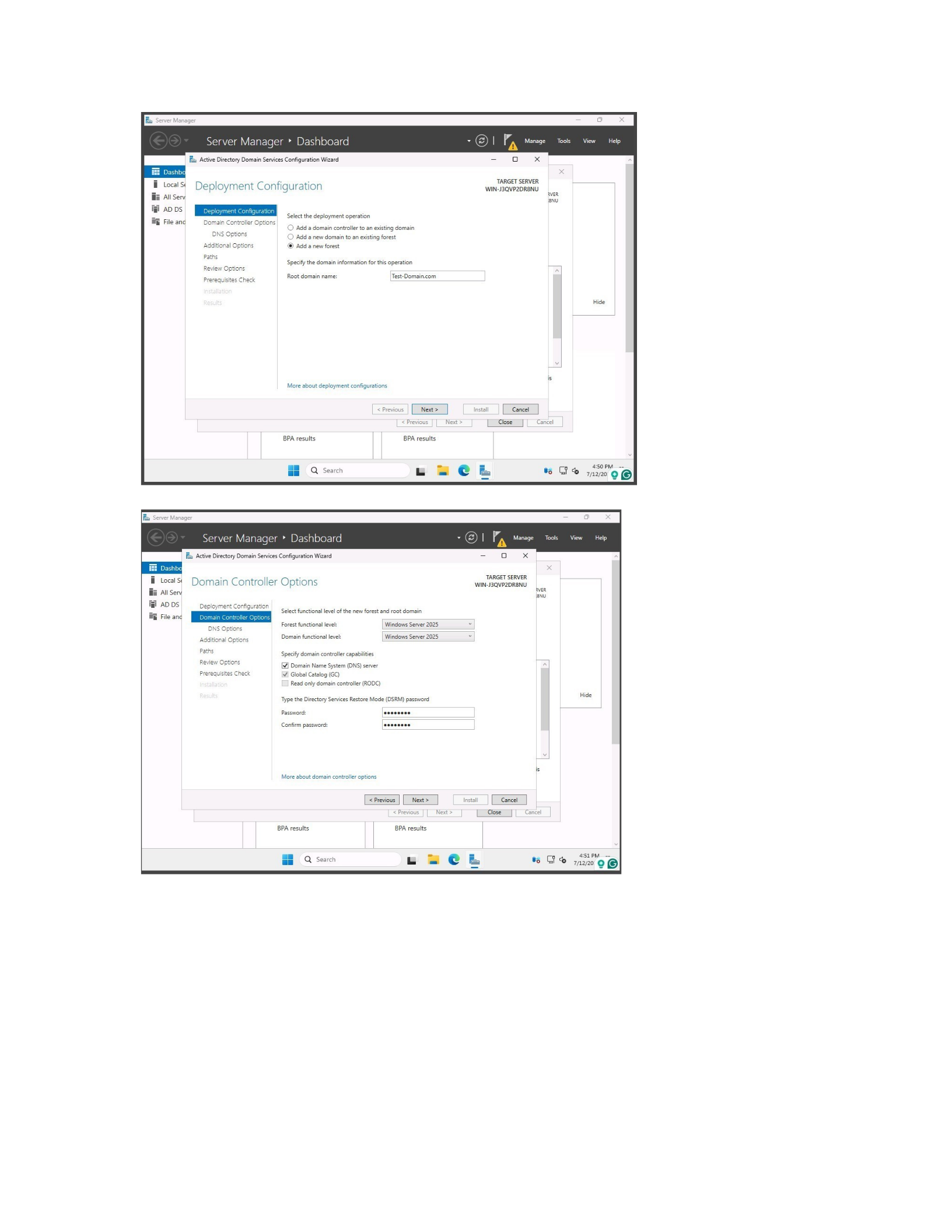
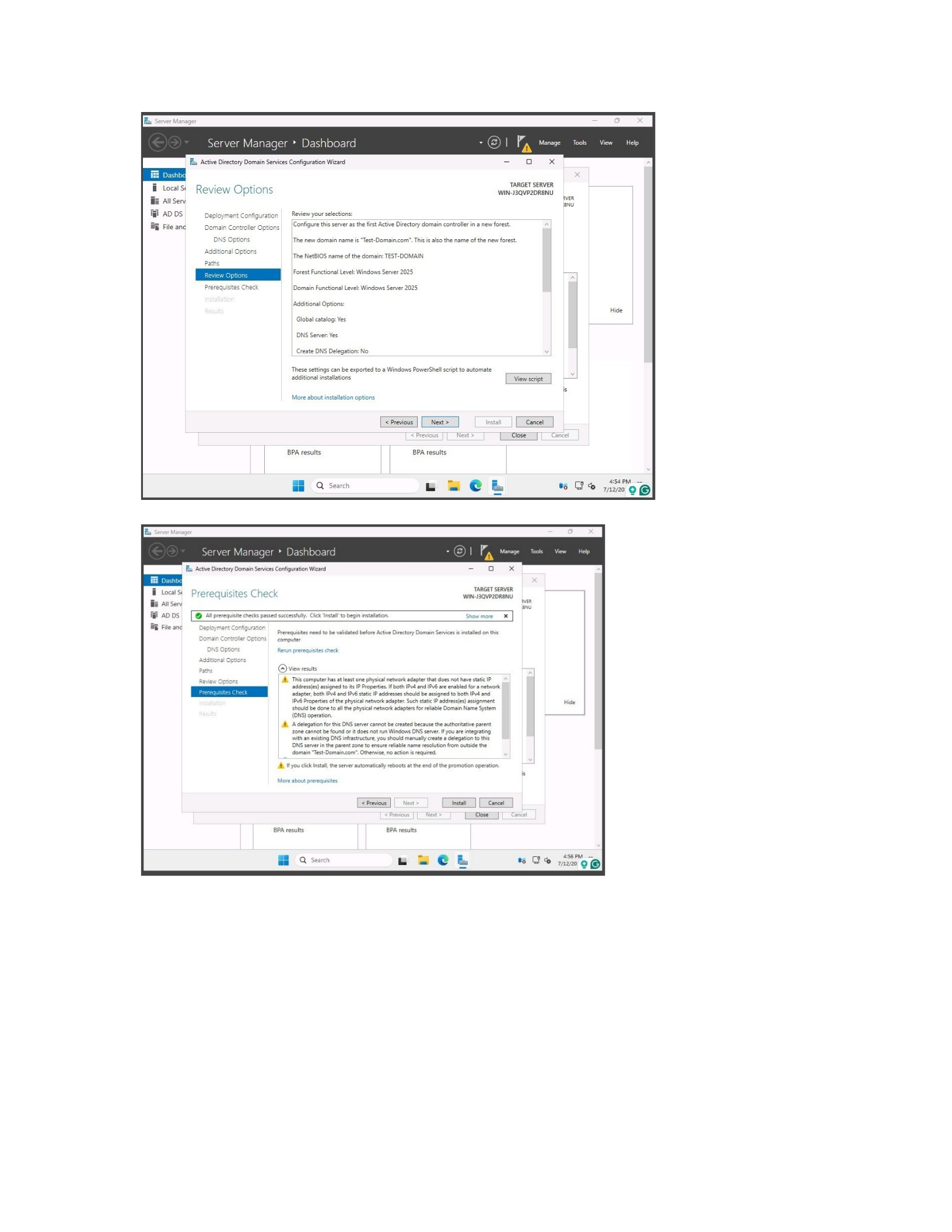
Once the AD DS is installed it needs to be configured for use by starting a new forest
(Appendix B8). A domain name will need to be devised and then a Directory Services Restore
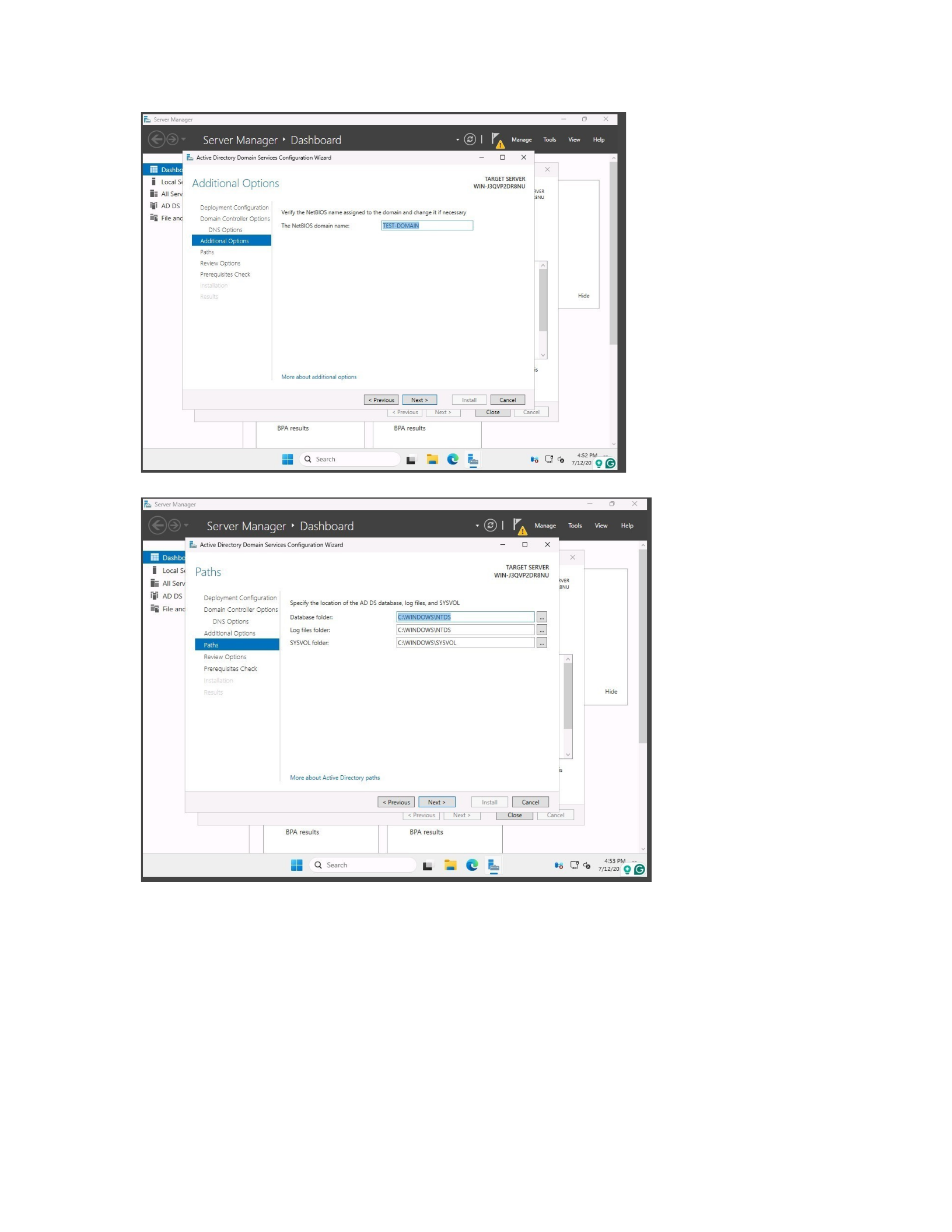
Mode (DSRM) password will need to be made (Appendix B9). The next steps include setting up
the NetBIOS domain name and the location paths, once all this is done the selections will be
reviewed and a check will be ran by the wizard to make sure everything is in order to complete
configuration (Appendix B10).
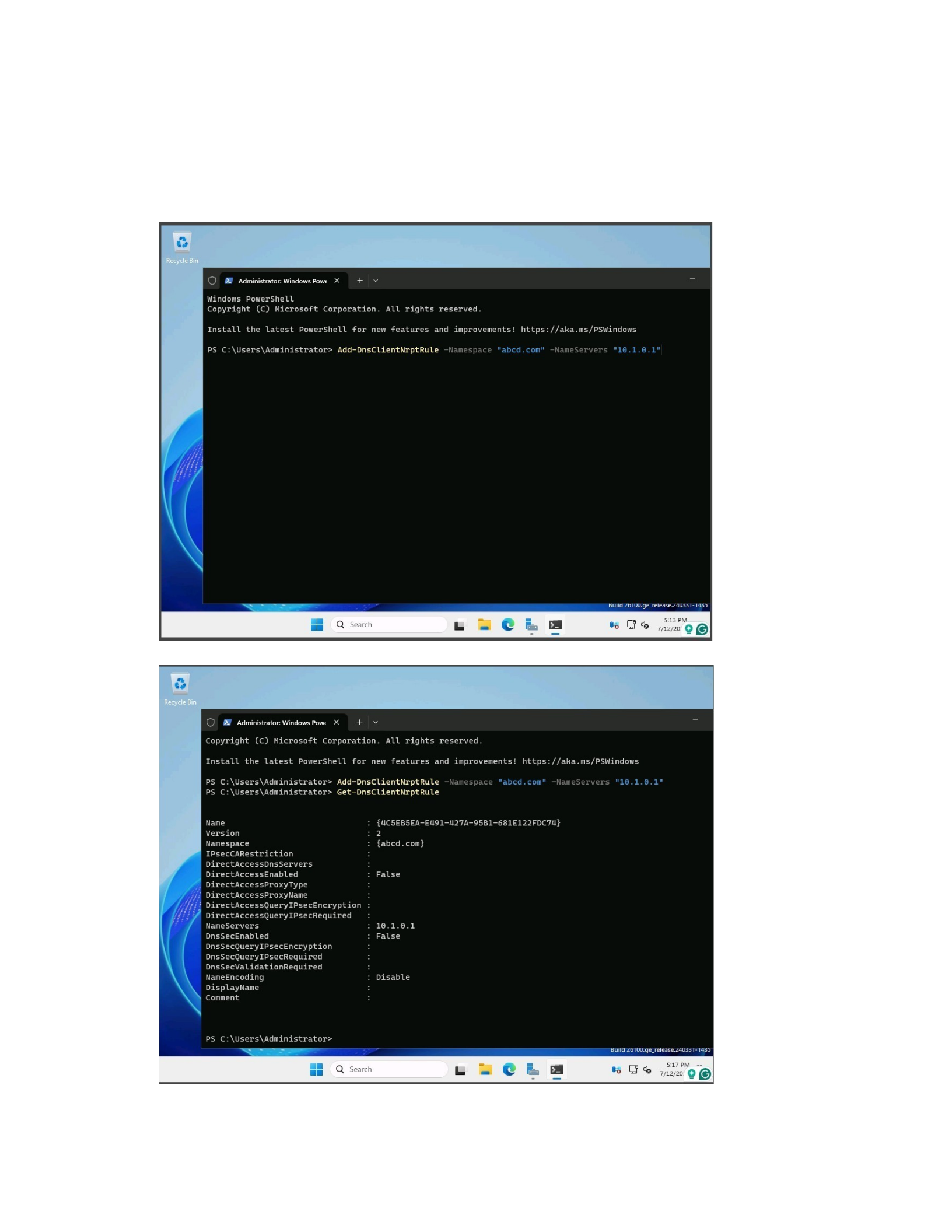
The last part of the lab requires that an NRPT rule be added and retrieved using power
shell. This is the part of the lab that I had to do more research on how to accomplish this, I am
at best a novice at using PowerShell cmdlets and at worst a complete and total beginner. I am
learning more about it and learning about how it can be utilized to its full effectiveness in both
this class and others that I am taking. The first step is to make sure to open PowerShell on the
server and input the cmdlet that would add the rule to the server, in this case it is ‘Add-
DnsClientNrptRule -Namespace “abcd.com” -NameServers “10.1.0.1”’(Appendix C1). To retrieve
the rule that was just added, in other words make sure it was added correctly and showing
correctly, I used the cmdlet ‘Get-DnsClientNrptRule’(Appendix C2). This pulls up all the

6
information that was just added on another note if there had already been a rule using either
the namespace or nameserver as it is in the cmdlet it would have been changed to what was
just inputted in PowerShell.
Results
I believe that this lab is meant to give a glimpse of a very basic part of being a system
administrator. The lab showed me that without previous knowledge of setting up a server and
then changing it to a Domain Controller, without a plan in place and choices pre-selected then it
would take longer than necessary to complete. Without any type of plan or real direction I did
not make any real changes or role add-ons that would normally be added. The lab also shows
how PowerShell needs to be not necessarily mastered but be at least a journeyman to be able
to navigate and configure in a Windows server environment.
Conclusion
In conclusion, this lab provided a valuable foundational understanding of setting up and
configuring a Windows Server as a Domain Controller, emphasizing the importance of planning
and procedural knowledge in system administration. It highlighted the critical steps involved in
installing the server, choosing between GUI and non-GUI options, and promoting the server to
an Active Directory Domain Controller through the GUI method. Additionally, the exercise of
adding and retrieving NRPT rules via PowerShell underscored the significance of scripting skills
in managing Windows Server environments efficiently, especially as systems move toward
command-line and automation-focused workflows. The experience reinforced that acquiring
proficiency in PowerShell is essential for effective server management and cybersecurity tasks.
Overall, the lab demonstrated that while foundational skills can be developed with guided steps,
true mastery of these processes requires continual learning and hands-on experience. It also

7
revealed that strategic planning and understanding of the roles and features of Windows Server
are crucial for optimizing system deployment and maintenance. This initial exposure has
motivated a deeper exploration of more advanced configuration techniques and scripting
capabilities necessary for future success in IT and cybersecurity roles.

8
References
Lewis, M. (2025, April 21). Install Active Directory Domain Services on windows server. on
Windows Server | Microsoft Learn.
https://learn.microsoft.com/en-us/windows-server/identity/ad-ds/deploy/install-
active directory-domain-services--level-100-
Harwood, R. (n.d.). Add-dnsclientnrptrule (DnsClient). (DnsClient) | Microsoft Learn.
https://learn.microsoft.com/en-us/powershell/module/dnsclient/add-dnsclientnrptrule?
view=windowsserver2025-ps
Harwood, R. (n.d.-b). Get-dnsclientnrptrule (DnsClient). (DnsClient) | Microsoft Learn.
https://learn.microsoft.com/en-us/powershell/module/dnsclient/get-dnsclientnrptrule?
view=windowsserver2025-ps
Wheeler, S. (2021, September 17). Cmdlet Overview - PowerShell. PowerShell | Microsoft
Learn. https://learn.microsoft.com/en-us/powershell/scripting/developer/cmdlet/
cmdlet overview?view=powershell-7.5
Tomsho, G. (2018). Mcsa Guide to installation, storage, and compute with Windows Server
2016: Mcse/Mcsa: Exam #70-740. Cengage.
Mike in the Clouds (2021, March 21). From Server to Domain Controller, Promoting to a Domain
Controller on Windows Server 2022. YouTube. https://www.youtube.com/watch?
v=97nVgIQww-I
Appendix A
Windows Server 2025
Install Pictures
9
1.

10
2. 3.
4.
11
5.
6.

12
7.
8.
13
9.

14
Appendix B
Set up Server as Domain Controller Pictures
1.
15
2. 3.
4.
16
5.
6.
17
7.
8.
18
9.
10.
19
11.
12.
20
13.
21
Appendix C
Add and Retrieve a Name Resolution Policy Table Pictures
1.
2.

