


1
Window Server and NRPT Assignment: Reflection
Trissa Santel
Liberty University
CSIS 352: Integrative Programming and Technologies (B01)
Professor Michael Peterson
September 12, 2022

2
Window Server and NRPT Assignment: Reflection
This lab was a challenge for me, I made multiple mistakes and had to backtrack a lot
which made me want to give up. There are several versions of Windows Server. Windows Server
is an operating system that allows several users to share the same resources such as files,
services, and storage space. During this lab, the requirements were to install a virtual case of
Windows inside our lab shell, a domain controller, and lastly use PowerShell to add DNS NRPT
rules to my server. There are several versions of Windows Server, and each can be used
efficiently if a firm requires them. Windows Server 2016 is available in three separate editions:
Standard, Datacenter, and Essentials. This configuration would make use of the Windows Server
2016 Standard edition of WindowsServer. This paper will go over how to correctly install
Windows Server on a virtual machine, how to configure Windows Server as a domain controller,
and a challenge with a working solution. A Bible verse that helps encourage me whenever I start
a new assignment is Isaiah 40:31 “But those who hope in the Lord will renew their
strength. They will soar on wings like eagles; they will run and not grow weary, they
will walk and not be faint” (1991).
Installation of the Virtual Windows Server
The beginning step to installing an operating system is to look into the hardware
requirements, this will be helpful to make sure that you have a device that will meet the
hardware conditions for it to be fully operational. These can be found by doing a simple google
search for whatever operating system you will be installing (Kranjac, 2019)

3
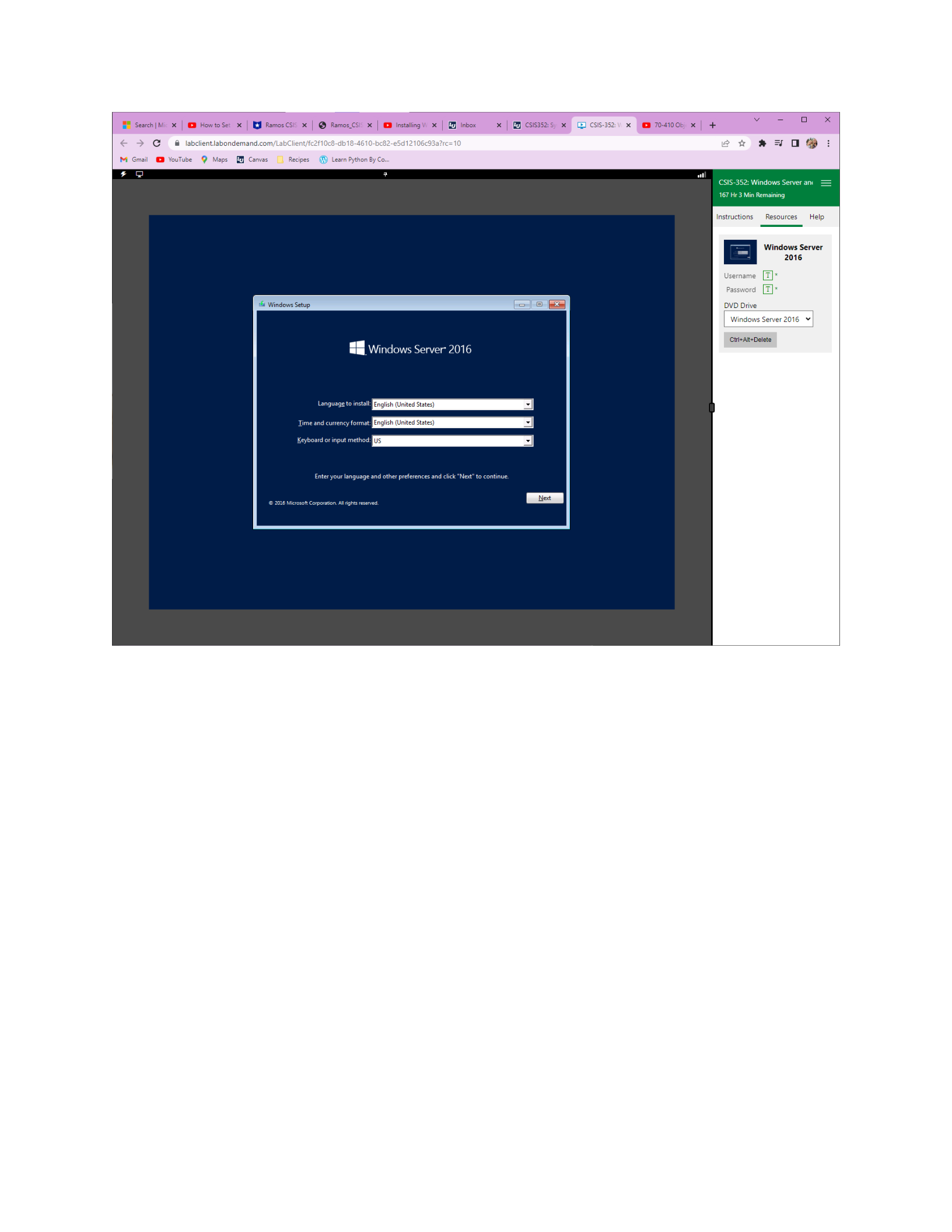
Going into Cybrscore Lab shell, the first screen that shows up is “windows setup” here
you have the option to select the language, time and currency format, and the keyboard or
input method. I selected the US for all of them. On the second screen you can then install or
repair the computer, I selected “install now” because we are trying to get windows 2016 on the
computer. On the third screen, it gives you the option to select an operating system for
installation. After many failed attempts at the installation, I finally selected the Windows Server
2016, Standard Evaluation, Desktop Experience which will give you the gooey or GUI software.
You can then accept the license terms and conditions and continue. The next step is to select
the kind of installation you want since this is an empty server and there are no windows servers
installed, I selected custom over upgrade (Krause, 2016) Since the machine is empty there will
be no partitions on the next screen, and a 60.0 GB disk will be available for you to select or a
second option of selecting “new”. I selected this option so that partition 1 is system reserved
and partition 2 will be what is used to install the operating system. After clicking next windows
will start installing, once this is done it will automatically restart or you can choose “restart
now” before the 10 seconds are up. This will then bring us to the booting phase, which will take
a few minutes and another restart. Once booted up you can choose a password for the
username aka administrator, after putting in your password you can then log in as administrator
on the new windows server. This is the complete process of installing the windows 2016 server
from scratch (Krause, 2016)
Configure the Server as a Domain Controller
After completing the installation phase, the server can then be configured as a domain
controller. I used “How to setup a domain controller on windows server” By Abid (2022) for help

4
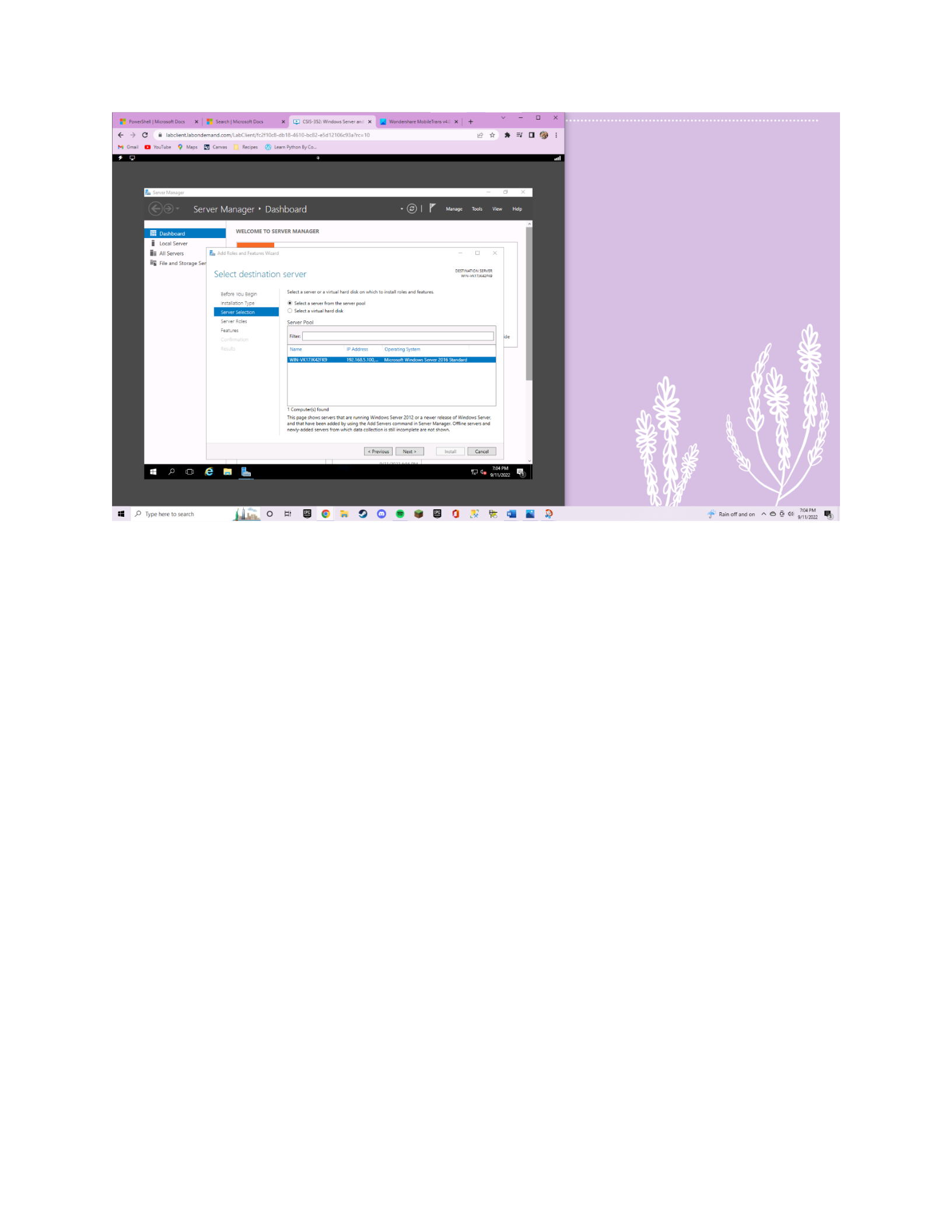
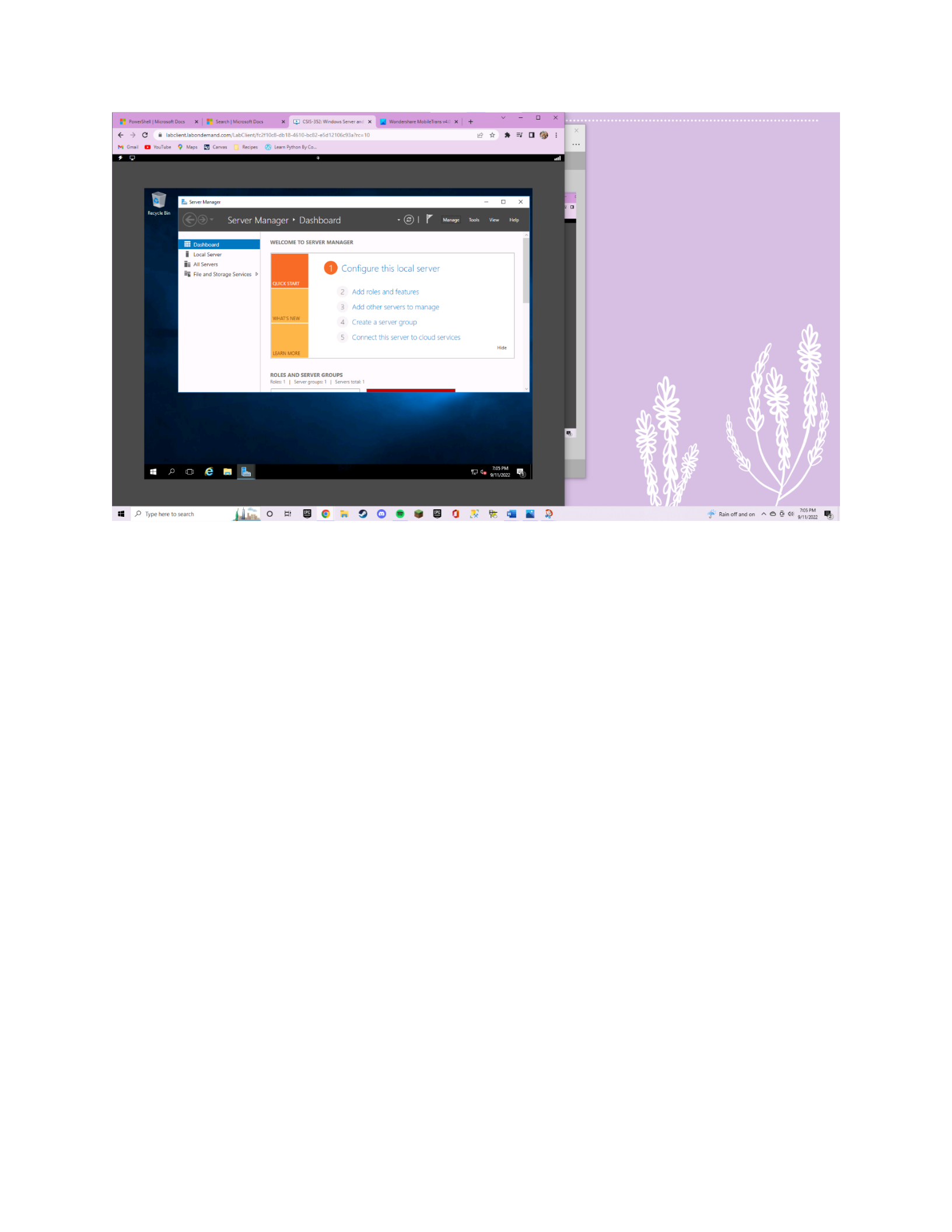
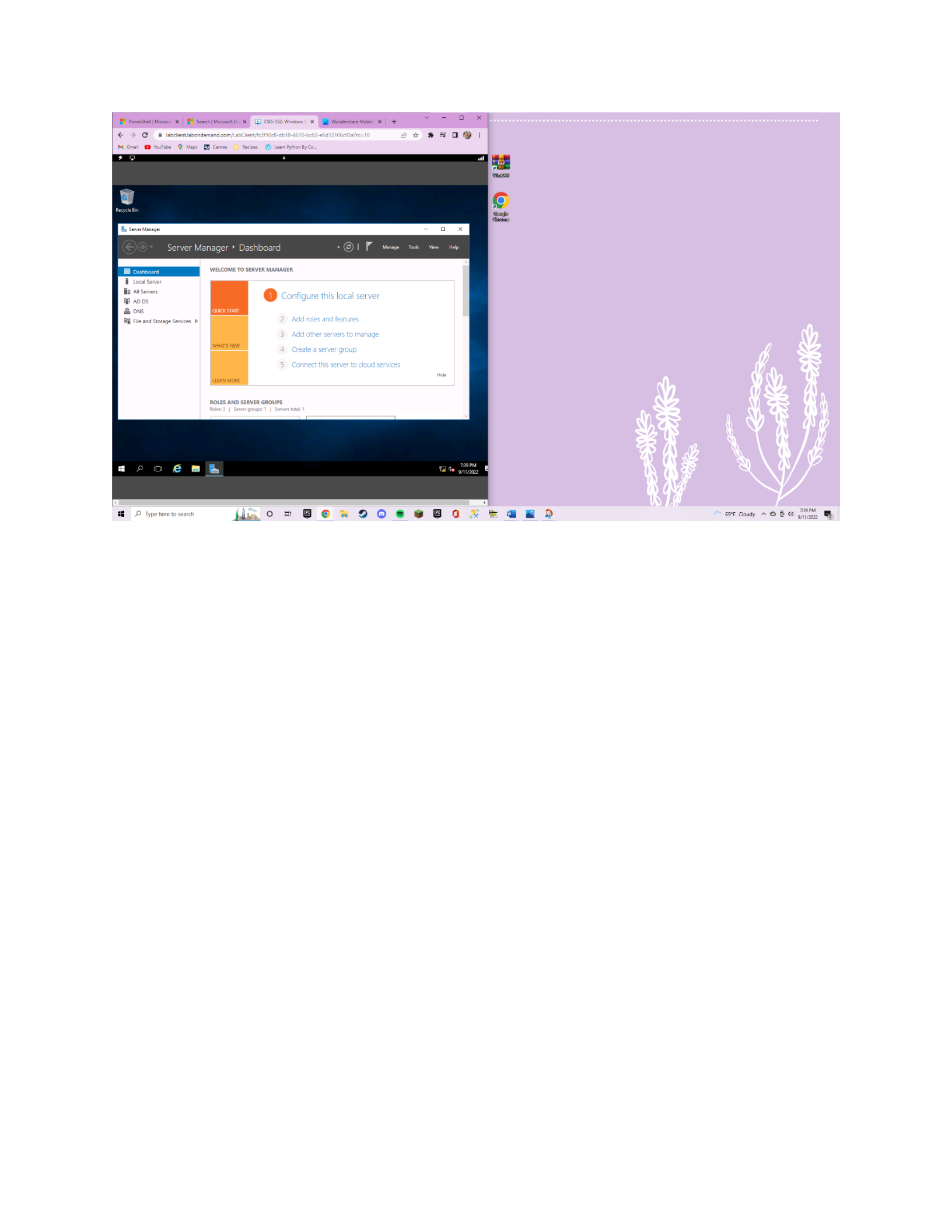
with this configuration. Open up the service manager and go to manage on the right corner,
then click add roles and features, click next and select role-based installation. Click on the server
that shows up, there should only be one since this is the only server we have created. Then
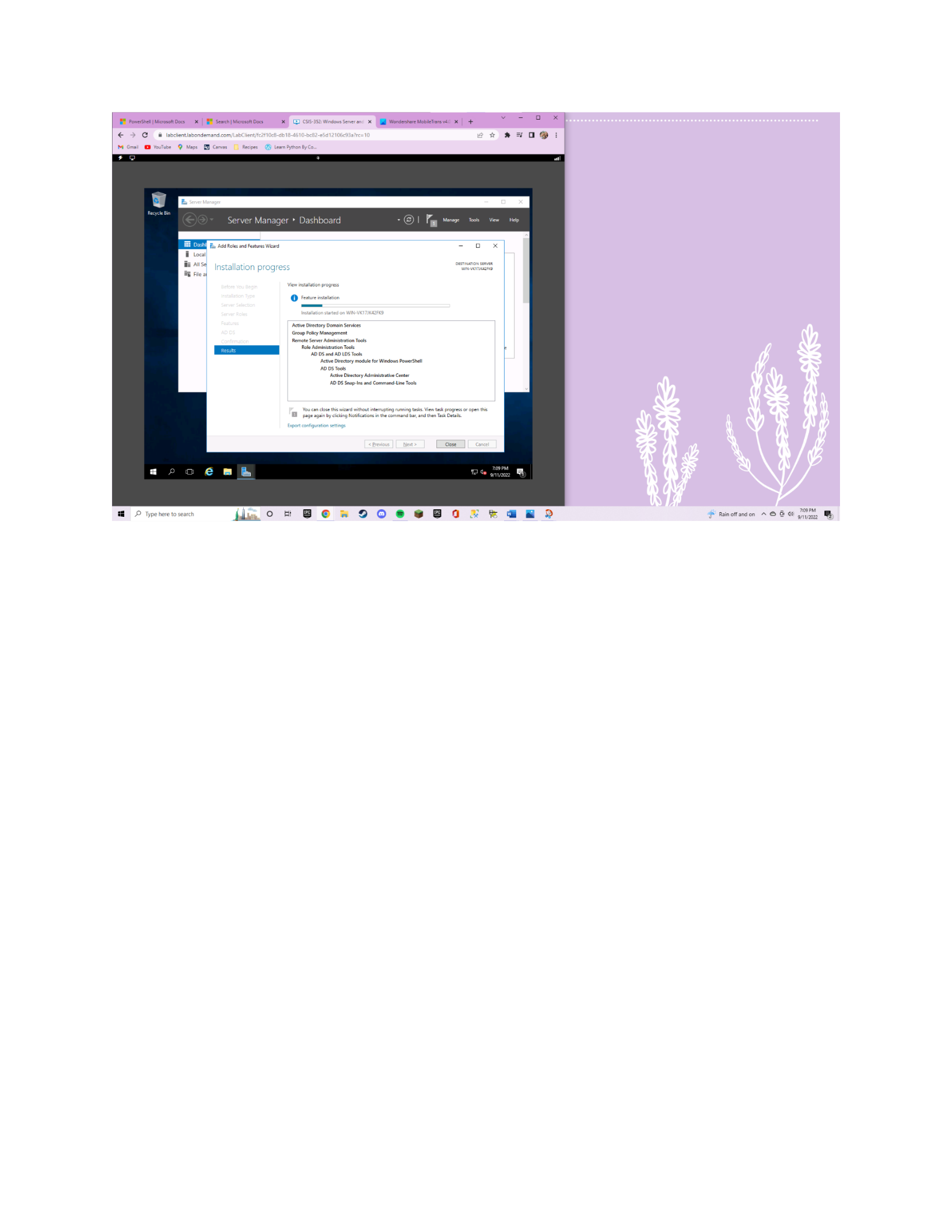
select the “active domain directory services” on the next screen. Since this lab was only asking
for the domain there is no need to select any other features. Once the process is finished you
can then see that it will give you the option to promote to a domain server which is the next
step. It will then check to see if there is an existing domain, but this is the first server so there
will not be any other domain other than the one we are creating. Click on “Add a new forest”
since the lab does not have any domain currently. Then you can create a name for your domain
and move on to the next step and select windows server 2016. You can then choose a
password: this password will be used to log into the server and will also be used if you need to
log in and fix issues in your active directory. You can then click next and that brings you to the
screen “additional options” the computer will then check and verify the name you created for
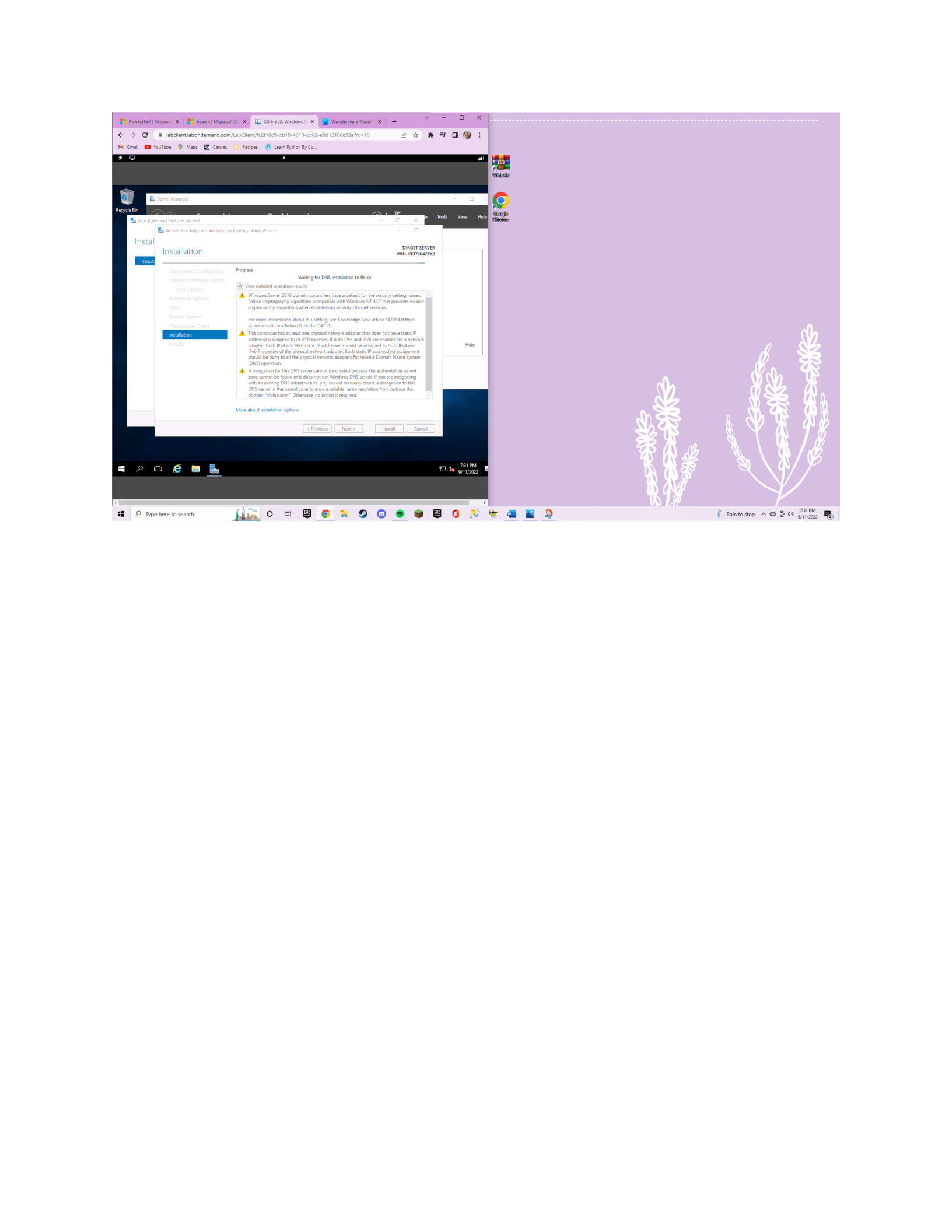
the domain controller. This will bring you to the installation, and after a few minutes, you will be
signed out. Once the server is back up and running you can see the changes that happened.
Such as AD DS is an option in the dashboard and when “tools” is selected you can view all the
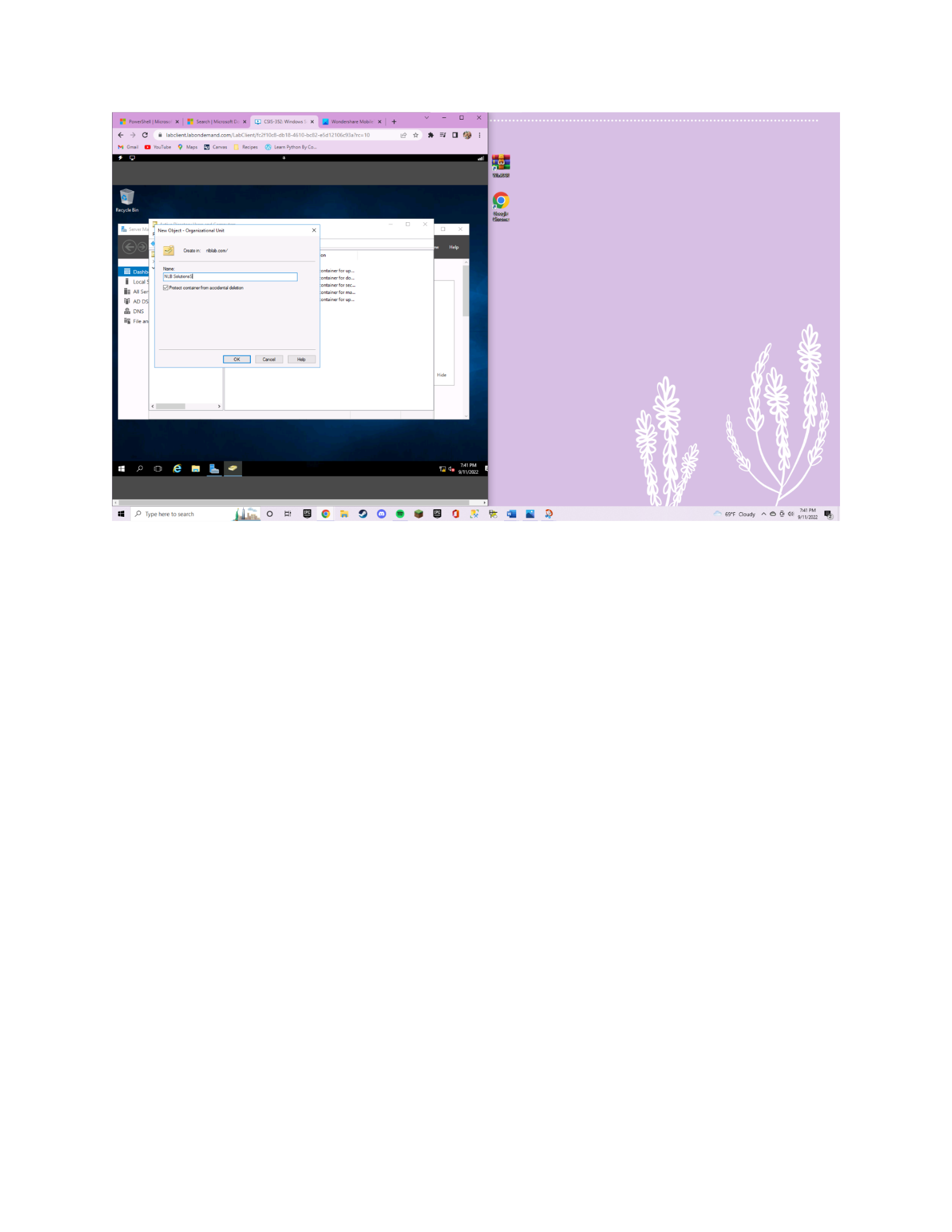
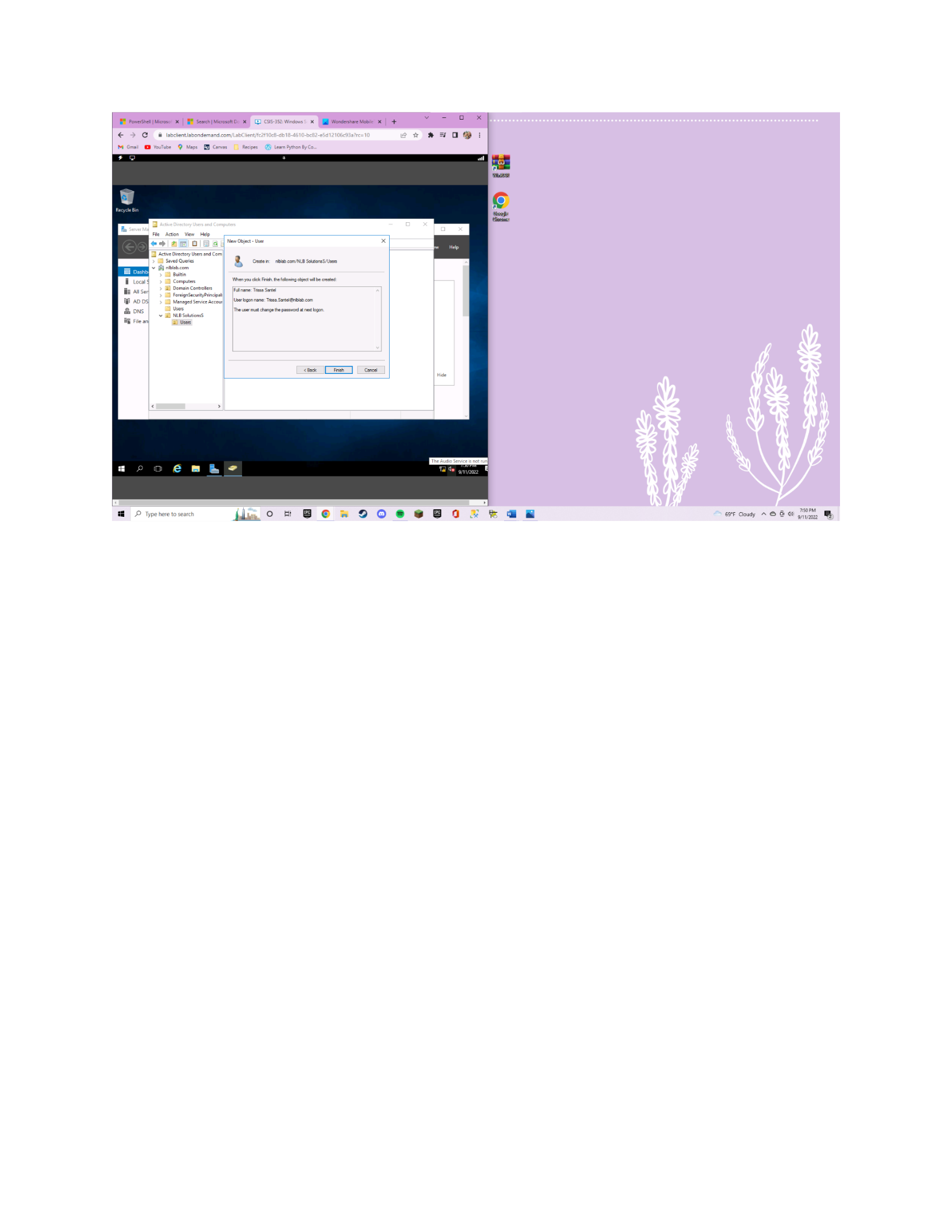
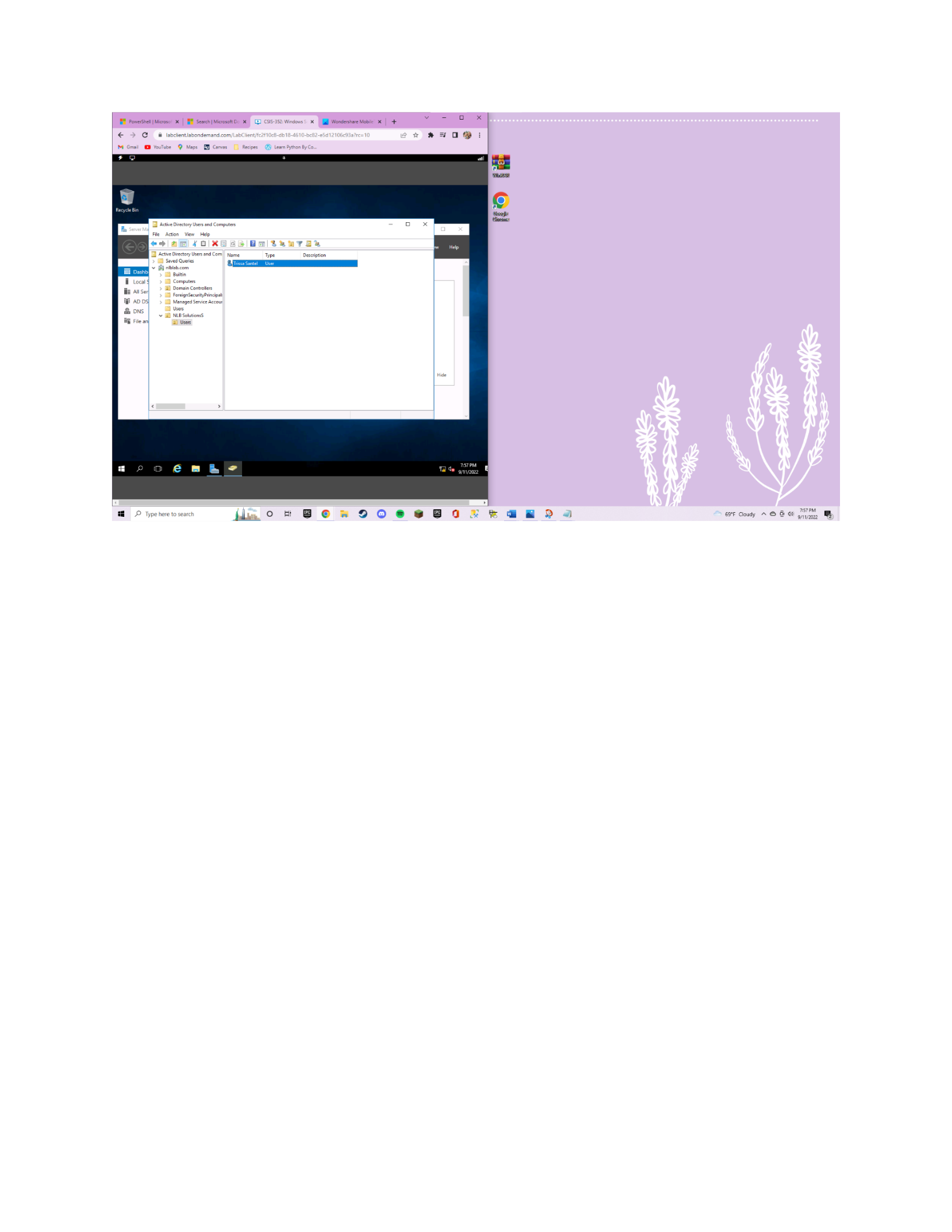
new active directory options that are able to be modified. I then opened up “active directory
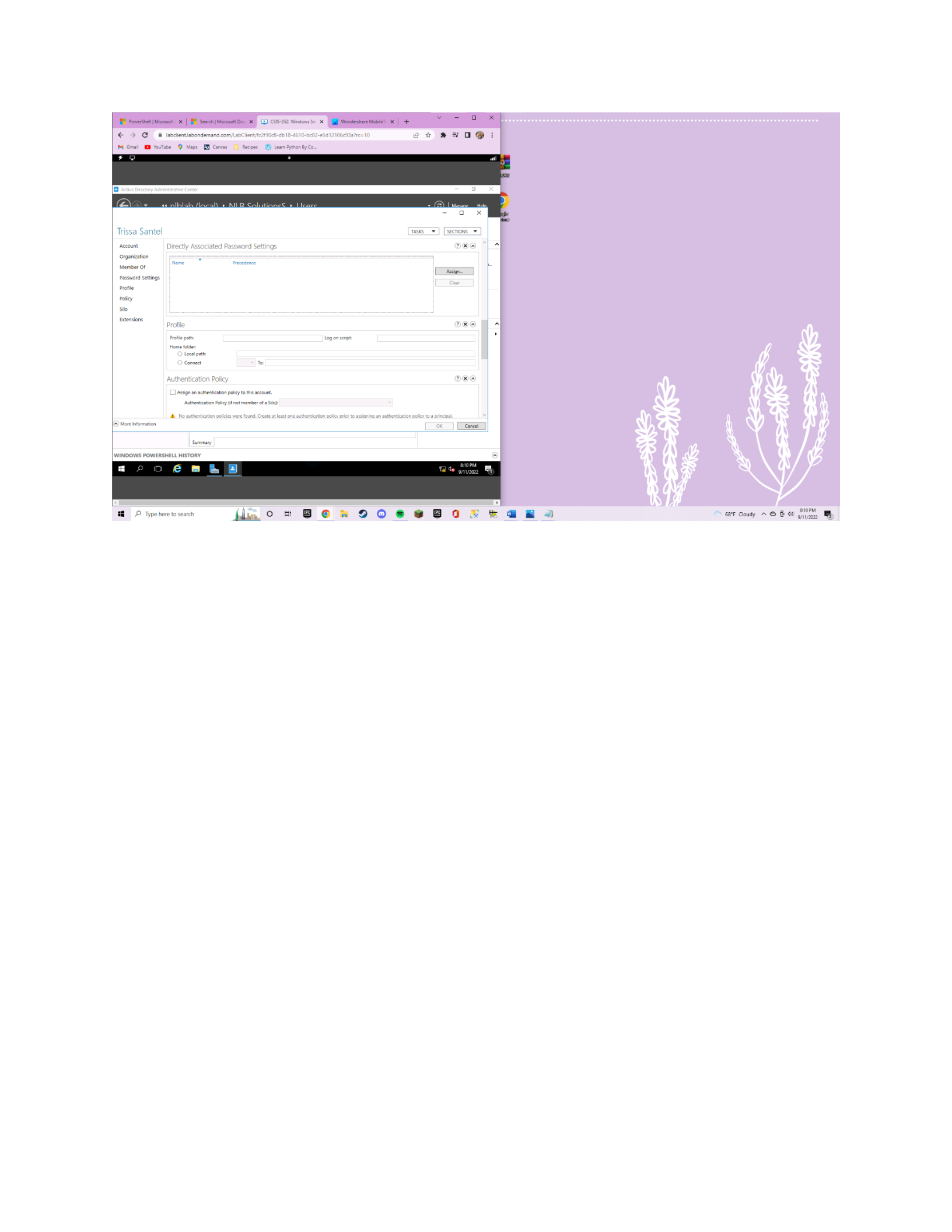
user and computers” and created a new organizational unit. I named the unit Users and in that
folder, I created a new user account. I also created a new user called security groups and in that
folder, I created a group that has read and write access to my shared folder. In this security
group, I added my user so that the user can access the read and write data. One of the last steps
I took was to double-check if everything is available and working smoothly. By going into AD

5
sites and services, under servers, I was able to see that my domain controller was in there. Then
I went into my DNS manager to check the DNS (Abid, 2022).
Using PowerShell For NRPT Rule
The Name Resolution Policy Table (NRPT) is a Windows client and server operating
system function that enables policy-based name resolution request routing. The NRPT can be
used to specify distinct DNS servers for certain namespaces instead of sending all name-
resolution queries to the DNS server set on the computer's network adapter (Hicks, 2018).
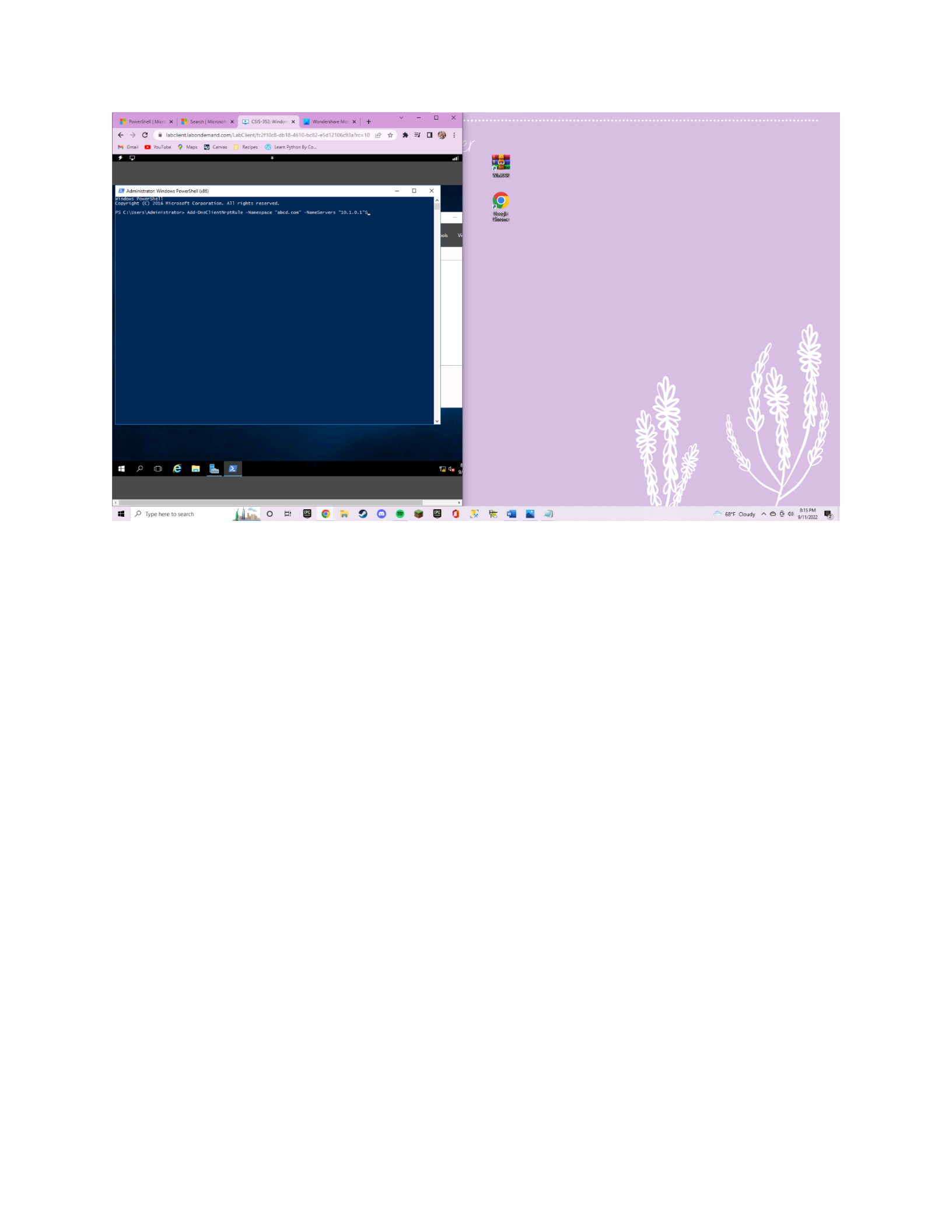
Lastly, I used PowerShell to create an Add-DnsClientNrptRule that would configure the
server to 10.1.0.1 as the DNS for the namespace abcd.com (Add-DnsClientNrptRule, n.d.). I also
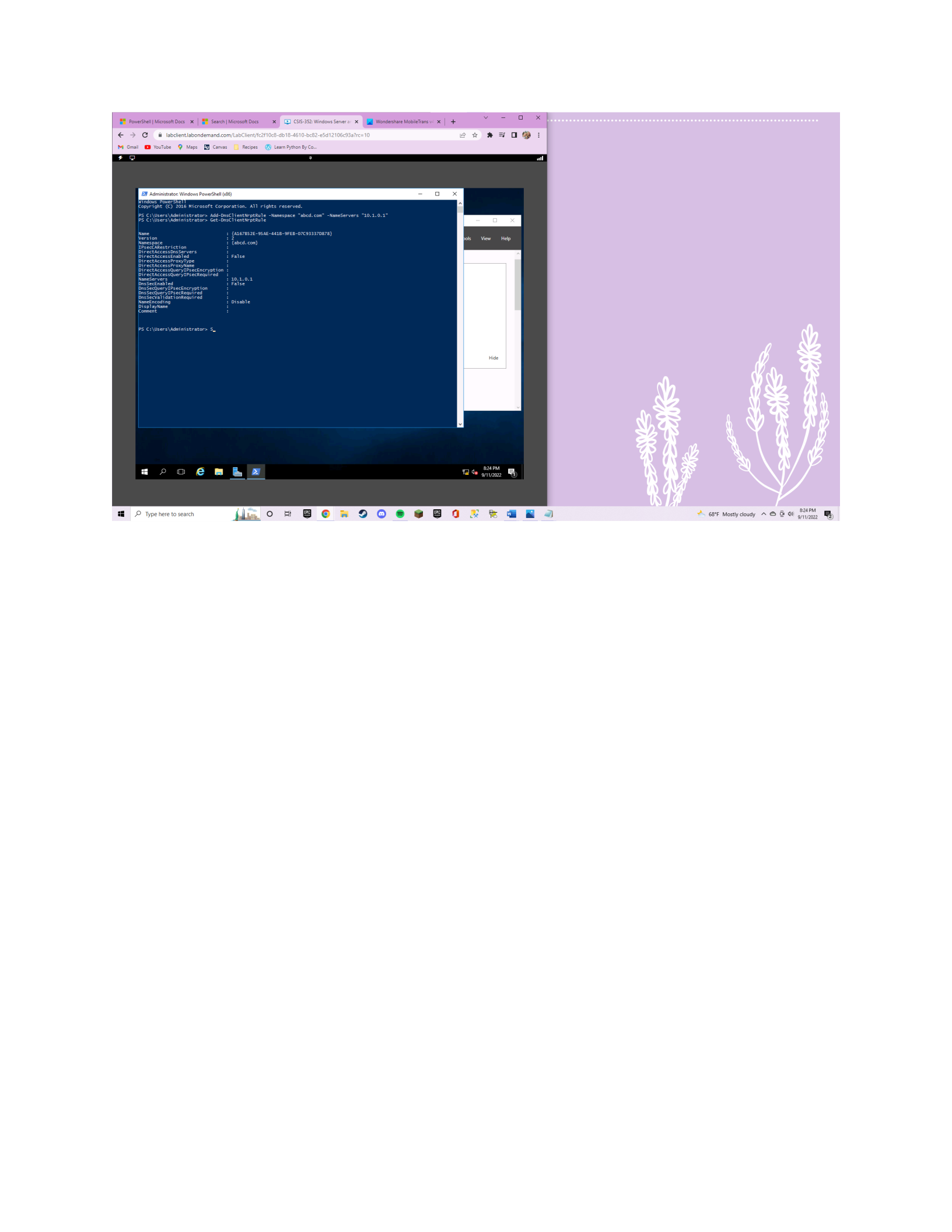
added a Get-DnsClientNrptRule (Get-DnsClientNrptRule, n.d.).
Conclusion
Overall, this project was very time-consuming and exhausting, it challenged me a lot but
I do think I will retain this information and be able to use it in the future. Because of its syntax
and comprehensible PowerShell commands, Windows Server is simple to use. It makes efficient
use of computer resources with the virtualization capacity, as shown during the installation of
the virtual machine and the setup of the Windows Server. After the installation process, the
instructions said to set up a domain controller on the server. I followed along with the video
from NLB solutions (2016) to configure my domain controller. This provided me with very useful
information to complete the configuration of my domain. I was then instructed to add a name

6
resolution policy table rule using windows Powershell. I used Microsoft docs to guide me
through the process of configuring the DNS server for the provided namespace (Add-
DnsClientNrptRule, n.d.). And Lastly, I referenced Microsoft docs again to get the name resolution policy
table rule that was just put in place (Get-DnsClientNrptRule, n.d.). During the installation process,
domain controller configuration, and inputting of the NRPT I referenced the book to see if I was
doing everything correctly (Tomsho, 2018).
I want to end my reflection with a Bible verse that was encouraging to me when I was
struggling through this lab, 1 Corinthians 15:58. “Therefore, my dear brothers and sisters, stand
firm. Let nothing move you. Always give yourselves fully to the work of the Lord, because you know that
your labor in the Lord is not in vain” (1991).

7
References
Abid, E. B. (2022, May 19). How to setup a domain controller on windows server. Cloud
Infrastructure Services. Retrieved September 12, 2022, from
https://cloudinfrastructureservices.co.uk/setup-a-domain-controller-on-windows-
server/
Add-DnsClientNrptRule (dnsclient). (n.d.). Retrieved September 12, 2022, from
https://docs.microsoft.com/en-us/powershell/module/dnsclient/add-dnsclientnrptrule?
view=winserver2012r2-ps
Get-DnsClientNrptPolicy (dnsclient). (n.d.). Retrieved September 12, 2022, from
https://docs.microsoft.com/en-us/powershell/module/dnsclient/get-dnsclientnrptrule?
view=winserver2012r2-ps
Hicks, R. (2018, April 23). Always on VPN and the name Resolution Policy Table (NRPT). Richard
M. Hicks Consulting, Inc. Retrieved September 12, 2022, from
https://directaccess.richardhicks.com/2018/04/23/always-on-vpn-and-the-name-
resolution-policy-table nrpt/#:~:text=The%20Name%20Resolution%20Policy%20Table
%20(NRPT)%20is%20a%20function%20of,based%20name%20resolution%20request
%20routing.
International Bible Society. (1991). The NIV: The making of a contemporary translation.

8
Kranjac, S., & Stefanovic, V. (2019). Installation, storage, and compute with windows server
2016: Microsoft 70-740 MCSA exam guide: Implement and configure storage and
compute functionalities in windows server 2016 (1st ed.). Packt Publishing Ltd. Retrieved
September 12, 2022, from https://ebookcentral-proquest-
com.ezproxy.liberty.edu/lib/liberty/reader.action?docID=5721806&query=
Krause, J. (2016). Mastering windows server 2016. Packt Publishing, Limited. .). Retrieved
September 12, 2022, from https://learning.oreilly.com/library/view/mastering-windows-
server/9781785888908/ch02.html#ch02lvl2sec21
NLB Solutions. (2016, Sep. 28). 02. How to promote a Domain Controller in Windows Server
2016 (Step by Step guide) [Video]. YouTube. https://www.youtube.com/watch?
v=0LVn0h22tE8
NLB Solutions. (2016, Sep. 28). 01. How to install Windows Server 2016 (Step by Step guide)
[Video]. YouTube. https://www.youtube.com/watch?v=lgOlK9sgY08&t=14s
Tomsho, G. (2018). Mcsa Guide to installation, storage, and compute with Windows Server
2016: Mcse/Mcsa: Exam #70-740. Cengage.

9
Screenshots
EM
Search|
Mic
X
|
©B
HowtoSe:
x EJ
Ramoscsis
x
|
Ramos.Csi°
x
|
€@
Installing’
x
|
Inbox
CSIS352:5)
x
<€°o¢
f@
labclient.labondemand.com/LabClient/fc2f10c8-db
18-46
10-bc82-e5d12106c93a?rc=10
M
Gmail
@@
YouTube
Maps
[Canvas
[|
Recipes
(@
Learn
Python By
Co..
Windows
Server:
2016
POPES
MUES
English
(United
States)
EI
Meg
English
(United
States)
EI
TE
csis-3s2
x
@
70-41000
x
|
+
Instructions
Resources
Help
Windows
Server
2016
Username
Password
DVD
Drive
Windows
Server
2016
Ctri+Alt*Delete
10
[BSI
382:
Windows
Serer
an
X.
€
D>
S_&
tadetentisnondemand.com/LabClent/f-20e8-cb18-4510
sd
12106c93a7re=10
M
Gmail
@
YouTube
@
Maps
Canvas [1
Recipes
(GD
Learn Pynon
By
Co.
Dashboard
WELCOME
TO
SERVER
MANAGER
Local
Server
—
All
Servers
File
and
Storage Ser
Select
destination
server
DESTINATION
SERVER
Sect
a
server
or
a
itu
hard
sk
on
which
to
inal
cles
and
features
©
Selects
sever
from
the
server
poo!
Sever
Poo!
feel
SY
hide
Tene
WAdéress
Operating
System
—
1
Comput)
found
“Ths
page
shows
sever
that
are
runing
Windows
Server
2012
o
a
newer
release
of
Windows
Sever,
nd
that
have
been
sede
by
using
the
A
Servers
command
in
Sener Manage.
Offline
servers
2nd
evi
aedes
sever
from
whien
cats
collcton
seh
incomplete
ae
nt
shown
7o4eM
sv
HEP
Type
hereto
search
i
on
BOownSo@aeaeBaokv
te
aga
®
Rain
off
andon
A
@&
&
40
11
IEF
PowerShel|
MicrosoR
Docs
x
J
Search|
MicosoDocs
MEI
CSIS-352:
Windows
Serer
an-
| if
Wonderhare
MobieTians
wi
x
|
€ >
S_&
tadetentisnondemand.com/LabClent/f-210e8-cb18-£610-be82-25d12105e93?re=10
no
M
Gmail
€@
YouTube
@
Maps
Canvas
@
eam
Pyron
By
Co
‘WELCOME
TO
SERVER
MANAGER
Local
Server
Al
Servers
-
othe
loca)
eorver
Cre
id
roles
and
features
fer
servers
to
manage
ROLES
AND
SERVER
GROUPS
oles
|
Sener
groupe
|
Server
2D
Type
here
to
search
Rain
off
and
on
Aeaw
sv
12
IEF
PoweStel|MizoroR
Docs
x
|
BF
Sewch|MicsoRDoce
X21
CSI-352:
Windows
Seneran>
x
i
Wondenhore
Mobieans
4
x
|
»
—-—
a *
€ >
SB
iabeientiabondemand.com/LabCiient/
0ct-db
18-4610-be82-e5412106c
re=10
M
Gri
@
ourete
Q
Mocs
BB
Canvas
no
@
eam
Pyron
By
Co
Fe
Add
Roles
and
Fetwes
Wea
Installation
progress
oe
View
netalation
progress
@
Fesere
instanton
‘etive
Directory
Domain
Services
‘5roup
Policy
Management
emote
Server
Administration
Toole
Role
Administration
Tooke
‘ADS
and
AD
LDS
Tools
‘Atwve
Directory
module
for
Windows
PowerShel
ADDS
Tooke
‘Active
Decry
Administrative
Center
[AD
DS
Snap-ns
and
Command-Line
Tools
"You
cn
lose
this
wizard
without
interupting
running
aks.
View
task
progress
a
open
this
page
again
by
ching
Notifications
in
the
command
ba,
apd
then
Task
Details
oor
configuration
settings
2D
Type
here
to
search
i
tainotanden
A
8
5
40
OM
13
IE
PowerShell
Microsc’
x
|
IM
Search|
Microsoft
Dc
x
[EI
CSIS-352:
Windows:
& jj
Wondershare
Mobile
x
|
+
€
>
GC
@
labclientlabondemand.com/LabClient/fc2#10c8-db18-4610-bc82-e5d12106c93a?rc=
10
M
Gmail
@@
YouTube
@
Maps
Canvas
[/]
Recipes
(®
Learn
Python By
Co..
TARGET
SERVER
WIN-VKI7JK42FK9
Progress
Waiting
for
DNS
installation
to
finish
©)
View
detailed
operation
results
(A.
Windows
Server
2016
domain
controllers
have
a
default
forthe
security setting
named
“Allow
cryptography
algorithms
compatible
wth
Windows
NT
40°
that
prevents
weaker
cryptography
algorithms
when
establishing
security
channel
sessions.
For
more
information
about
this
setting,
see
Knowledge
Base
article
942564
(http://
_go.microsoft.com/fwlink/?Linkld=
104751).
This
computer
has
at
least
one
physical
network
adapter
that
does
not
have
static
IP
address(es)
assigned
to
its
IP
Properties.
If
both
IPv4
and
IPV6
are
enabled
for a
network
‘adapter,
both
IPv4
and
IPV6
static
IP
addresses
should
be
assigned
to
both
IPv
and
IPV6
Properties
of
the
physical
network
adapter.
Such
static IP
address(es)
assignment
should
be
done
to
all
the
physical
network
adapters
for
reliable
Domain
Name
System
(ONS)
operation.
A
delegation
for
this
DNS
server
cannot
be
created
because
the
authoritative
parent
zone
cannot
be
found
or
it
does
not run
Windows
DNS
server.
If
you
are
integrating
with
an
existing DNS
infrastructure,
you
should
manually
create
a
delegation
to
this
DNS
server
in
the parent
zone
to
ensure
reliable
name
resolution
from
outside
the
domain
“niblab.com”.
Otherwise,
no
action
is
required.
More
about
installation
options
Install
Cancel
=
T3IPM
P
Type
here
to
search
ga
2
F
Raintostop
~
©
FO)
gin
BB
14
IP
Powel
Micon)
|
fF
Search|
Micon
O-
X
¢eo¢
a
M
Gri
[ESI
382:
Windows®
x il
Wondershare
Mobi
x
|b
~
7s
*
labclienttbondamand.com/LabcClient/fe21
@
YouTube
9
Map
Dh
comes
@
eam
Pyron
By
Co
nO
(ie
AiG
Fle
and
Storage
Services
ROLES
AND
SERVER
GROUPS
PD
Type
here
to
search
9
Cloudy
©
©
&
4)
grimon
15
IEF
Powersne|
Miroso:
x
BE
Search|
MirosO=
5
CSI-352.Wintows
il
Wondershare
Mobile
|
ot
€
F
EB
tavctentsabondemand
com/LabClent/f2t10c8-db18-4610-pc82-eSd1210693a7rc=1
or
TOM:
M
Gmail
@
YouTube
@
Maps
Canvas [1
Recipes
(GD
Learn
Pynon
By
Co.
nO
(ie
1
New
Object
Orgenzatonel
Unt
4
q
‘en
(NeW
Sees
rontanerfor
do.
resonant
oe
dn
fiero
fontaine
fer up.
Ca
or
HED
Te
here
to
search
69"
Cloudy
AO
Gao
JM
mB
16
IP
Powel
Micars
|
BF
Seach]
Moro
O=
XL)
C5952
wines
xl
Wonder
Mable
|
€>¢
a
labcient
abondamand.com/LabtClient/fc2#10ct-b18-4610-be82
ek
®
@
eam
Pyron
By
Co
M
Gri
@
Mocs
Canvas [1
Recipes
nO
(ie
a
Fle
Action
View
Help
¢%lamiolaa
Active
Directory
Users
nd
Com)
(Saved
Queries
New
Object-
User,
Bower
seehcots
stern
sa
oe
tench
esd
ore
3B
dmoncetotes
fa
tae
3
haeer
5
bee
ee
+
a
Nts
ie”
ee
se
oon
rane:
Ties
Sotelenbab
com
HED
Te
here
to
search
697
Cloudy
©
@
Gao)
EM
mm
17
IEF
Powersne|
Miroso:
x
BE
Search|
MirosO=
5
CSI-352.Wintows
il
Wondershare
Mobile
|
ot
€
>
GA
iabclientlabondemand.com/LabClient/fc2#10c8-db18-4610-bcB2-e5d12106c93a?rc=1
ee
eT
OB:
M
Gmail
@
YouTube
@
Maps
Canvas [1
Recipes
(GD
Learn Pynon
By
Co.
nO
(ie
[Active
Directory
Users
and
Computers
Fle
Action
View
Help
ooo
¢O/XSeS/ETRaerTae
By
Active
Directory
Uses
nd
Com)
ame
Descition
P|
i
Sees
cueies
©
Duin
1
Computers
|S]
Domain
Contrler:
5
FereignSecuriy
Princip
5
Managed
SericeAccou
Uses
El
NUB
Sclitionss
13]
Uses
$3
Type
here
to
search
SF
Cowy
©
8
grime
FB
18
€
>
SB
tabeientiabondemand.com/LabClient/f-210c8-db18-4610-be82-e5d12106c93a?re=10
1M
Gra
@
YouTube
Mops
Comes
[Recipe
Gleam
Pyonfy
Co.
Trissa
Santel
‘Account
Directly
Associated
Password
Settings
‘organization
=
Name
Preceaence
Member
of
Password
Settings
Profile
Profile
Profile
pats
Home
folder:
©
Leal
pate
©
Connect
‘Authentication
Policy
[Ll
ssign
an
authentication
pby
tts
eeount
‘Asthenation
Pol
net
ember
of
Siok
.
‘A.
No
authentication
plies
were
fund,
rete
test
one
authentication
pov
erate
assiarna an
authentication
poet
apna
|=
Moc
nformavon
Summary
WINDOWS
POWERSHELL
HISTORY
es
BE
ype
here
to
search
jis
oF
BOnO9OCO@OSRBCKX
EEE
ST
19
vos
a x
IP
Powel
Mex
%
|
BE
Search|
Mcrae
XG
C535
Wins
x
WondenreNen
¥|
-eSd12106e33a%e=10
1
tr
Me
=
OD
€
>
S_
&
tadetentiane:
1and.com/LabClent/fe210c8-cb18-451
M
Gmail
@
YouTube
@
Maps
BB
Canvas
[1
Recipes
(GD
Learn Pynon
By
Co.
HE
©
TWpe
here
to
search
lies
OC
*
BOnDOOOSROVCRe
EH
I
68F
Cloudy
©
©
34)
2PM
mm
20
vo-
ag
x
IE
PowerShell
|
Microsoft
Docs
x
|
JH
Search
|
Microsoft
Docs
%
[EI
CSIS-352:
Windows
Server
2:
x
{jl
Wondershare
MobileTrans
vs
x
|
++
€
D>
CG)
@
[abclientlabondemand.com/LabClient/fc2f10c8-db
18-46
10-bc82-e5d12106c93a?rc=10
ew
M
Gmail
@@
YouTube
@
Maps
Canvas
[/]
Recipes
(®
Learn
Python By
Co..
BY
Administrator:
Windows
PowerShell
(x86)
mre
Daas
nENTpERUT
ae
Cyan
2
Type
here
to
search
fbi
oft
BOowgoo6c6e@eBaekt
&Baea
Y.
68'F
Mostly
cloudy
A
&
Gy)
uM
BB
21

