



Methodologies for Continuous
Security
Version Control
Version control is the practice of tracking and managing source code changes. From a
centralized repository, distributed professionals can work in different features,
sometimes changing the same piece of code without blocking each other’s work. The
version control software will identify and solve these issues.
Version control systems (VCS) track every modification sent to the repository and also
promote collaborative review -- which can serve as an additional layer of checks if you
instruct reviewers to look for insecure code. You can roll back the code to an earlier
version in case of mistakes, speeding up fixes. Git is a free and open-source VCS tool
developed by Linus Torvalds to manage the Linux kernel source and is, currently, the
most popular implementation.
You can set up your Git server or opt for a software as a service (SaaS) alternative such
as GitHub, GitLab, and BitBucket. Whatever your choice, remember to protect the VCS as
it is the heart of the software supply chain.
TIP
GitHub and GitLab each as a Security Center, a portal describing the best practices to safeguard your organization’s
instance. Check whether your provider has similar documentation and follow their advice.
On-premise servers may seem like the most secure option, but consider that your team
will be in charge of safeguarding the entire setup, from password storage to users’ file
uploads and email configuration. The work can be an unnecessary security burden,
increasing costs and decreasing agility. It is a strategic decision that needs to take into
account the business risk tolerance level.
If you’re already embracing SaaS, keep in mind that you are still responsible for
essential security management such as access and permission control and the definition
of safer methods to connect to Git, preferably using 2FA authentication mechanisms.
Your team is also in charge of data backup, and some services may require the hiring of
third-party tools.
Although they started as a Git-managed service, providers such as GitHub and GitLab
extended their offer and became complete software development and delivery
platforms, with CI/CD pipelines and artifacts registries. These tools also may offer
advanced security features such as code scanning, license compliance, dependency
review, and secrets detection.

Once source code is committed into a git repository, it can organically spread into
multiple machines, so you should avoid hardcoded secrets: passwords, certificates,
OAuth tokens, API keys, and so on. The SolarWinds hack illustrates the negative impacts
of such a practice. In March 2021, the company’s top executives blamed an intern for
copying their private repository into a public GitHub repository, including the
hardcoded password solarwind123. Attackers used the leaked information to cause
global breaches, including data from Microsoft and Fireeye, and the US government,
including the Department of Homeland Security and the Treasury Department. Chapter
X discusses secret management in more detail.
DevOps teams commonly adopt a Git workflow known as Gitflow, which defines a strict
branching model designed around project releases and continuous delivery. Instead of a
single main branch, a complementary branch named develop is created. Each new
feature is developed in its own branch, using develop as its parent branch. When a
feature is complete, it gets merged back into develop. Figure 3-1 exemplifies a merge
request being analyzed by a reviewer.
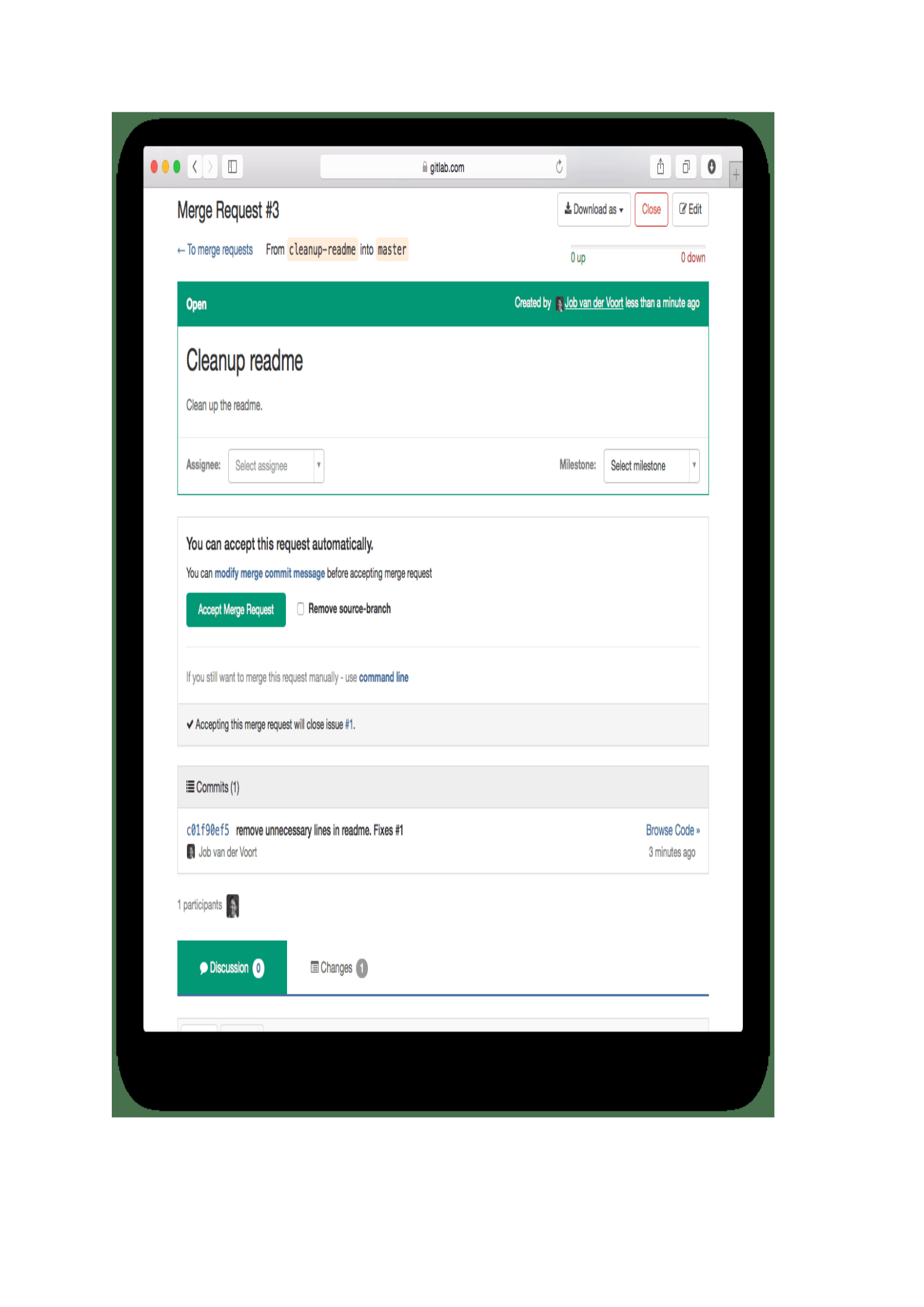
Figure 3-1. A request to merge a feature branch into the main one, inside the GitLab platform.
If you are new to Git, I recommend two books: Version Control with Git, by Raju Gandhi
(O’Reilly, 2021), and Head First Git, by Prem Kumar Ponuthorai and Jon Loeliger
(O’Reilly, 2021).
Infrastructure as Code ( IaC )
To achieve continuous security, we also need a Git repository to keep our infrastructure
as code definitions. There, we’ll store or update the declarative descriptions that deploy
the necessary resources -- like containers, Kubernetes cluster, or AWS instances, for
example. Changes are made and reviewed inside the VCS, and when approved, an
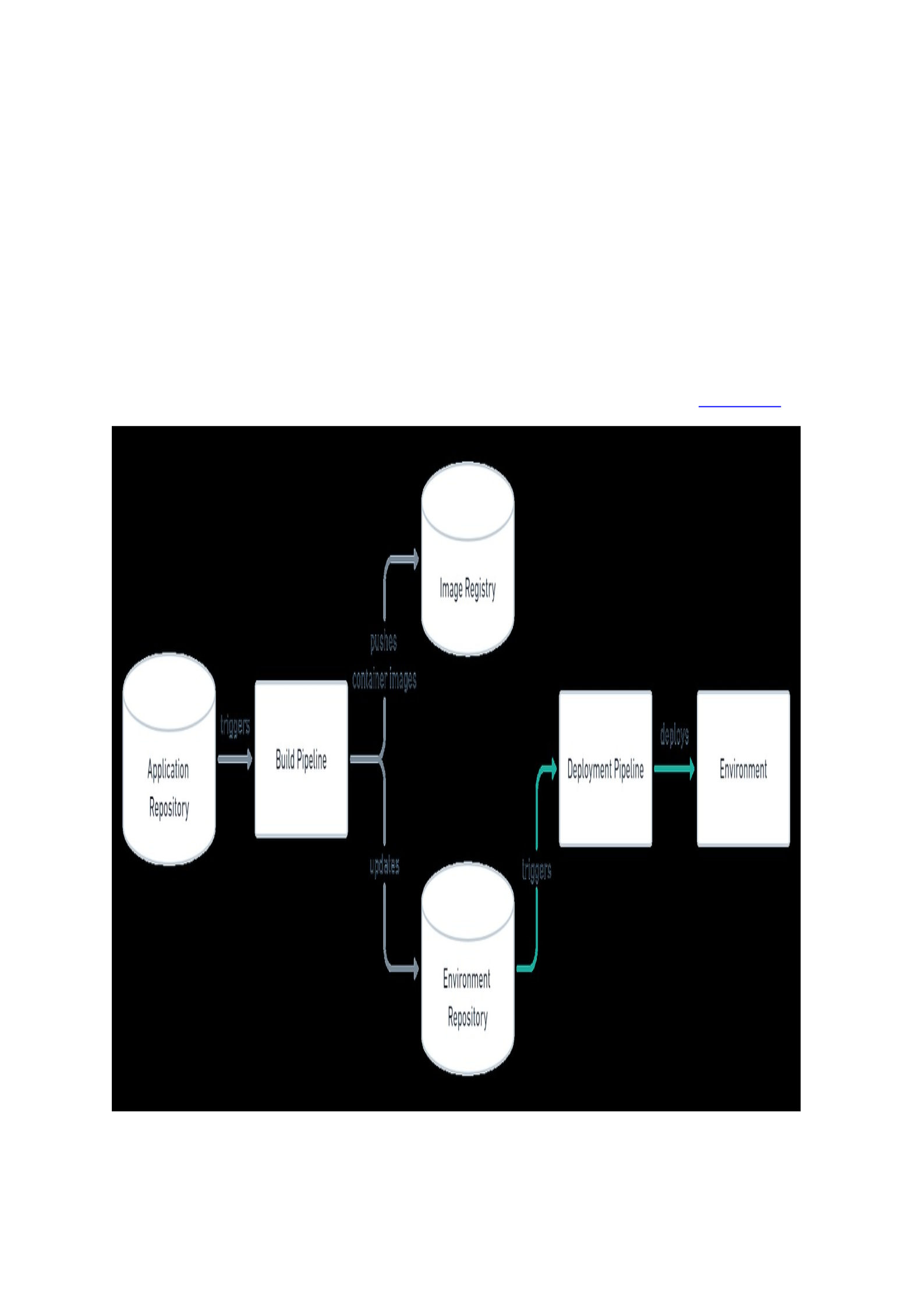
automated process deploys everything, ensuring that your infrastructure reflects the
desired state defined inside the deployment manifest, as demonstrated in Figure 3-2.
Figure 3-2. Two repositories, one for application code and another for infrastructure definitions are used. The build
pipeline updates the environment repository, triggering the deployment pipeline.

There is no need to direct access servers, meaning no more ssh keys management and
individual permissions. With Git’s complete history of changes, we can quickly establish
authorship and present the traceability and compliance required by security
frameworks such as the ISO270001 and NIST.
To include testimonial
Declarative description means that only the desired state is defined, without the need to
inform the steps to achieve it, as we would do in a shell script. The user declares how
many machines will be deployed, in which cloud provider and zones to use, for example.
The tool behind the automation task knows how to execute all necessary operations.
Popular tools include Ansible and Terraform, and public cloud providers also have their
own flavor: AWS CloudFormation, Azure Resource Manager, and Google Cloud
Deployment Manager, to name a few. You can see below the example of an AWS
resource declarative definition using Terraform:
$ cat main.tf
terraform {
required_providers {
aws = {
source = "hashicorp/aws"
version = "~> 3.27"
}
}
required_version = ">= 0.14.9"
}
provider "aws" {
profile = "default"
region = "us-west-2"
}
resource "aws_instance" "app_server" {
ami = "ami-830c94e3"
instance_type = "t2.micro"
tags = {
Name = "ExampleAppServerInstance"
}
}
Diff tools detect any divergence caused by configuration made directly in a Kubernetes
cluster, for example, and notify the team. They can identify and reconcile the state. If a
security breach does occur, IaC’s immutable nature makes it easier and more reliable to
fix the vulnerability. We can build a new environment from scratch, independent of the
compromised one. With a shorter downtime, much faster incident response, and a
complete set of artifacts to audit in a post-mortem.
The books Infrastructure as Code, by Kief Morris (O’Reilly, 2020) and Cloud-Native
Infrastructure, by Justin Garrison and Kris Nova (O’Reilly, 2017) are seminal pieces that
I can strongly recommend.
Security as Code
These efforts to automate the software development and delivery pipeline gave rise to a
new possibility: security as code. Here, the same declarative approach is used. Users
describe what kind of infrastructure policies they want, and the tools behind the

automation figure out how to prevent access to resources such as cloud instances
provision or how to enforce cost policies. With security as code, we can improve
compliance, make efficient deployments, and have fine-grained control over the
infrastructure.
A note on fine-grained control: InfoSec professionals can be tempted to be gatekeepers
again once they learn how to create tighter controls in DevOps methodologies and tools.
Remember that DevSecOps is more than safeguarding technology! It is a cultural change
whose ultimate goal is to have development, security, and operations teams working
together to create business value through the fast delivery of secure software. Do not
spoil the party!
The sizeable cloud bill due that almost every CIO has received once their life could be
avoided through a policy to find and terminate unused resources or to control costs
based on pricing, as shown below:
$ cat limit-proposed-monthly-cost.sentinel
# This policy uses the Sentinel tfrun import to restrict the
# proposed monthly cost that would be incurred if the current
# plan were applied
# Import common-functions/tfrun-functions/tfrun-functions.sentinel
# with alias "run"
import "tfrun-functions" as run
# The standard decimal import
import "decimal"
# Monthly Limit
limit = decimal.new(1000)
# Call the validation function
# Warnings will be printed for violations
cost_validated = run.limit_proposed_monthly_cost(limit)
# Main rule
main = rule {
cost_validated
}
Examples of security as code or policy as code tools include the Open Policy Agent
(OPA), Aqua’s Apolicy, and HashiCorp’s Sentinel. Cloud providers also offer their way to
create policies, but one of the shortcomings of using these GUIs is vendor lock-in. As
your application and infrastructure resources are agnostic, so should be your security
as code tooling.
I’ll show you how to implement security as code in Chapter X.
Continuous Integration and Continuous
Deployment (CI/CD)
As mentioned before, to achieve a continuous security strategy, Git will be our
centralized source of truth, both for application and infrastructure code. Once new code
is pushed into the repository, the CI/CD pipeline automatically reacts, initiating a series
of pre-configured tasks or actions.
Continuous integration is when software developers merge their code changes, often
into a central code repository. After the merge happens, automated builds are tested

and run to ensure the code changes are valid. The GitHub workflow below installs
Python dependencies, run tests in a Ubuntu container, and lint the application with a
variety of Python versions:
$ cat pythonapp-build.yml
name: Python package
on:
push:
branches: [ main ]
pull_request:
branches: [ main ]
jobs:
build:
runs-on: ubuntu-latest
strategy:
fail-fast: false
matrix:
python-version: [3.7, 3.8, 3.9]
steps:
- uses: actions/checkout@v2
- name: Set up Python ${{ matrix.python-version }}
uses: actions/setup-python@v2
with:
python-version: ${{ matrix.python-version }}
- name: Install dependencies
run: |
python -m pip install --upgrade pip
python -m pip install flake8 pytest
if [ -f requirements.txt ]; then pip install -r requirements.txt; fi
- name: Lint with flake8
run: |
flake8 . --count --select=E9,F63,F7,F82 --show-source --statistics
- name: Test with pytest
run: |
pytest
Continuous delivery describes a similar process where code changes are released to the
develop environment, using automation to prepare the code for release. If the CD
pipeline is successful, a pull request is created and the code is then deployed into
production.
The code example below shows a GitHub action created to run a Snyk vulnerability
scanner upon a Docker image. We will learn more about this in Chapter 5.
$ cat snyk-action.yaml
name: Example workflow for Docker using Snyk
on: push
jobs:
security:
runs-on: ubuntu-latest
steps:
- name: Run Snyk to check Docker image for vulnerabilities
uses: snyk/actions/docker@master
env:
SNYK_TOKEN: ${{ secrets.SNYK_TOKEN }}
with:
image: your/image-to-test
Using the CI/CD pipeline, we’ll create security tests to be performed every time new
code is committed into the repository. These tests can happen at different stages of our

development: when someone pushes new code into a feature branch or when a merge
to the main branch is requested, for example.
I’ll discuss some of the industry-standard practices, but when to add tests into your
pipeline is an important engineer decision to make with your Quality Assurance (QA)
team, to certify that your CI/CD pipeline is streamlined with minimal delays. You’ll take
into consideration variables such as application architecture (monolith or
microservices), source code size, number of developers involved, and product maturity.
Keep in mind, however, that we want to “shift left” security as soon as possible, giving
the fast feedback that your DevOps team needs.
TIP
The Infrastructure & Ops Superstream Series: CI/CD will help you understand how CI/CD works.
Observability
As mentioned in Chapter 2, InfoSec has an especial relationship with security
monitoring tools. Triggers are set up inside these softwares to alert the security staff
when an event occurs or when a certain threshold is reached. When they represent a
valid security threat, the team works to identify the incident root cause and remediate
it.
Nevertheless, traditional security monitoring tools take a large amount of time to set up,
hunt down and solve incidents. The problem is magnified by the amount of monitoring
data provided by layers upon layers of network, virtualization, containerization, making
it difficult for security teams to suitably visualize their environment, identify threats
and fix vulnerabilities in a reasonable amount of time.
The principle behind observability tools is to provide us with more than individual
metrics, but intelligence: visibility of the whole stack security state, with a correlation of
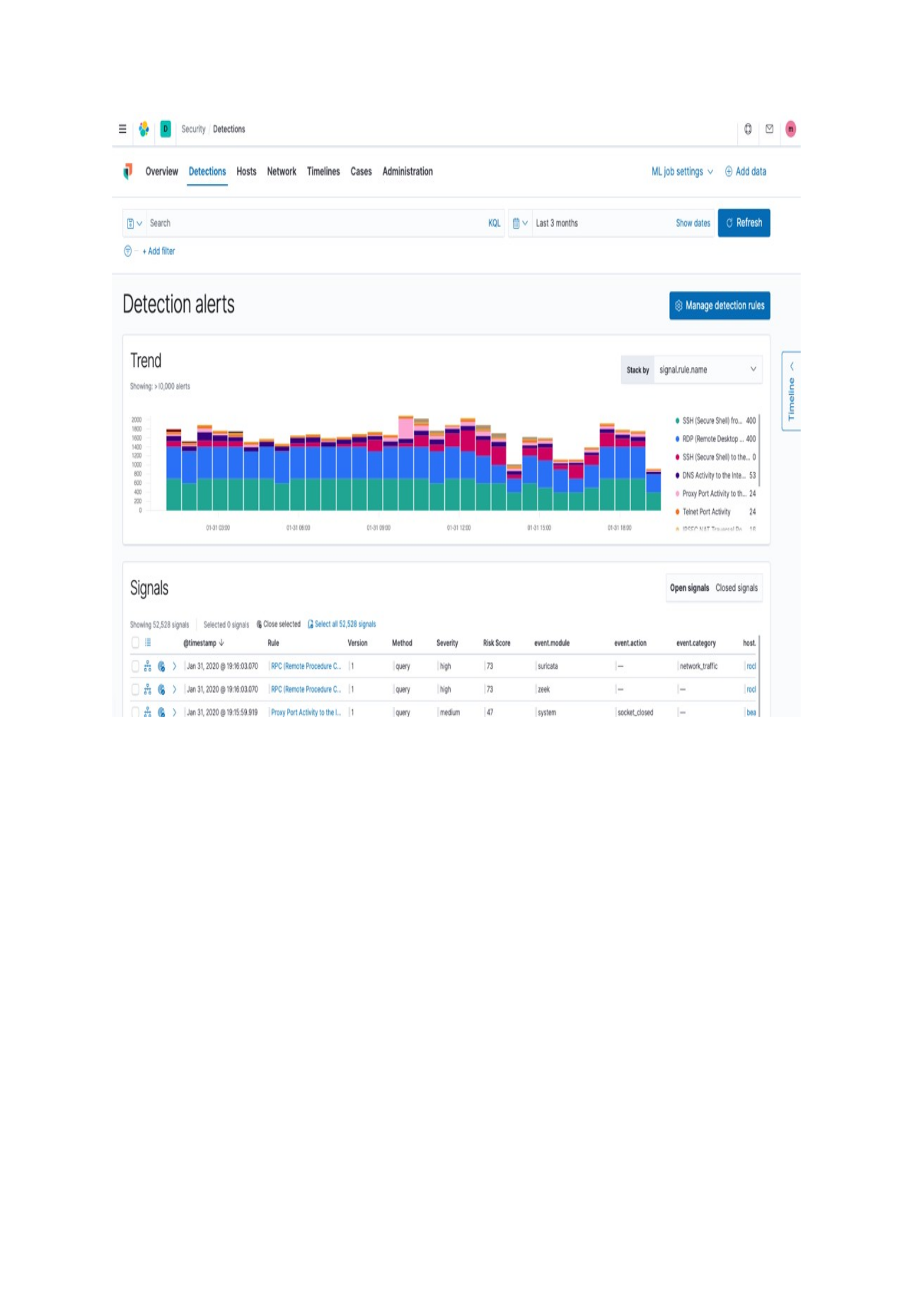
facts and remediation measures. We want to enable our team to hunt a moment in time
and have all the related data points explored, as demonstrated by the figure below:
Extensibility
To keep our software supply chain pipeline stream we can integrate security
observability into the development workflow, with a minimum of fuss. Some security
solutions provide extensibility through APIs and monitoring is established with the
application deployment itself, saving configuration time and promoting safer
environments.
The code below demonstrates part of a configuration to monitor container security,
using Prometheus.
$ cat prometheus-container-monitoring.yaml
global:
scrape_interval: 15s
scrape_configs:
- job_name: "prometheus"
Static_configs:
- targets: ["localhost:9090"]
- targets: ["localhost:9532"]
TIP

The book Observability Engineering, by Charity Majors, Liz Fong-Jones, George Miranda (O’Reilly, 2022) explains
what constitutes good observability, shows you how to make improvements from what you’re doing today, and
provides practical dos and don’ts.
We will deep dive into security observability and extensibility in Chapter X.
Summary
In this chapter, we explored the core methodologies that support DevOps practices:
version control systems (VCS) and its most famous implementation, Git, infrastructure
as code and its extension, security as code. Finally, we discussed observability and how
extensibility through code and APIs promotes safer environments.
In the next chapter, the book adopts a more hands-on approach, bringing these
methodologies together to show how to include code security into our software
development and delivery pipeline.
TIP
Cloud providers such as AWS and Google Cloud offer a whole range of fully managed services, from version control
systems to CI/CD pipelines, including security as code products and observability tools. Check out this blog post to
have a preview of how you could build an end-to-end DevSecOps CI/CD pipeline using AWS products.

Chapter 4. Code Security
A NOTE FOR EARLY RELEASE READERS
With Early Release ebooks, you get books in their earliest form—the author’s raw and
unedited content as they write—so you can take advantage of these technologies long
before the official release. If there is a GitHub repo associated with the book, it will be
made active after final publication. If you have comments about how we might improve
the content and/or examples in this book, or if you notice missing or inaccurate
material within this chapter, please reach out to the editor at [email protected].
To support application delivery at DevOps speed, security checks need to be continuous,
automated, and baked into the CI/CD so developers can get and act on notifications as
earlier as possible. With at least 80% of attacks now being leveraged at the application
layer, continuous security becomes a strategic effort to find and remediate issues in
unsafe code. For Eugene Dzihanau, senior director of security at EPAM Systems
“attackers try to find the path of least resistance, and currently, the application security
vector allows for efficient attacks with minimal cost”.
Most of these security vulnerabilities are introduced by simple programming mistakes,
typically caused by understaffed development teams, too busy to double-check their
code. The automated security check can identify These errors early in the process
before the unsecured code is even pushed into the repository. And the more bugs the
automated processes can find, the more time experts have to use their knowledge to
focus on more complex attack vectors and ensure in-depth application security testing.
DevSecOps teams can enforce upfront manual code review, a common process for many
agile and open-source projects. When peer code reviews become part of the engineering
culture, you can take advantage and include checking for potentially dangerous coding.
As a backstop, security scanners are integrated into the CI/CD pipeline to automatically
find security flaws, vulnerabilities, and coding bad practices.
There are different points in your software development and delivery pipeline where
you can add these code reviews: before code is pushed into feature branches before
commits get merged into the main branch and before code changes are deployed.
Secure Software Development Lifecycle (S-
SDL)
Before we deep dive into automated security reviews, keep in mind that they can
empower developers and scale up vulnerability detection, but code security must be
viewed as more than an automation challenge. A complementary approach to
DevSecOps is the S-SDL, a collection of best practices focused on adding security to the
standard SDLC, from its design to deployment. You can find a large body of literature
dedicated to application security, but at the bare minimum, make sure your

development team has learned about secure coding principles described in the OWASP
Secure Coding Guidelines:
1. Input validation
2. Output encoding
3. Authentication and password management
4. Session management
5. Access control
6. Cryptographic practices
7. Error handling and logging
8. Data protection
9. Communication security
10. System configuration
11. Database security
12. File management
13. Memory management
14. General coding practices
The Carnegie Mellon University’s Software Engineering Institute (SEI) Secure Coding
Standards and Mozilla’s Secure Coding Guidelines are also seminal references.
Software Developer Kit (SDK) or DevKits
One of the practices of S-SDLC that I like to lay emphasis on is DevKits since they are
cheap, effective, and the fastest way to start your continuous security process.
Organizations make software development kits (SDK) or DevKits available to help
developers easily create their development environments. DevKits are collections of
software development tools and programs provided in one installable package. You can
leverage these kits to help developers easily integrate security into their daily lives. For
example, if your organization uses a default IDE and language, it’s easy to look out for
security extensions to bundle them together, instructing developers to use from their
first day working in the company.
DevKits can also include documentation, code samples, and safe libraries that
developers can use to check and build and maintain applications without security flaws.
Lintian extensions to go inside the IDE is a simple but effective way to prevent coding
mistakes that can lead to security flaws. Figure 4-1 shows the plugin SonarLint inside
the Intellij IDE:
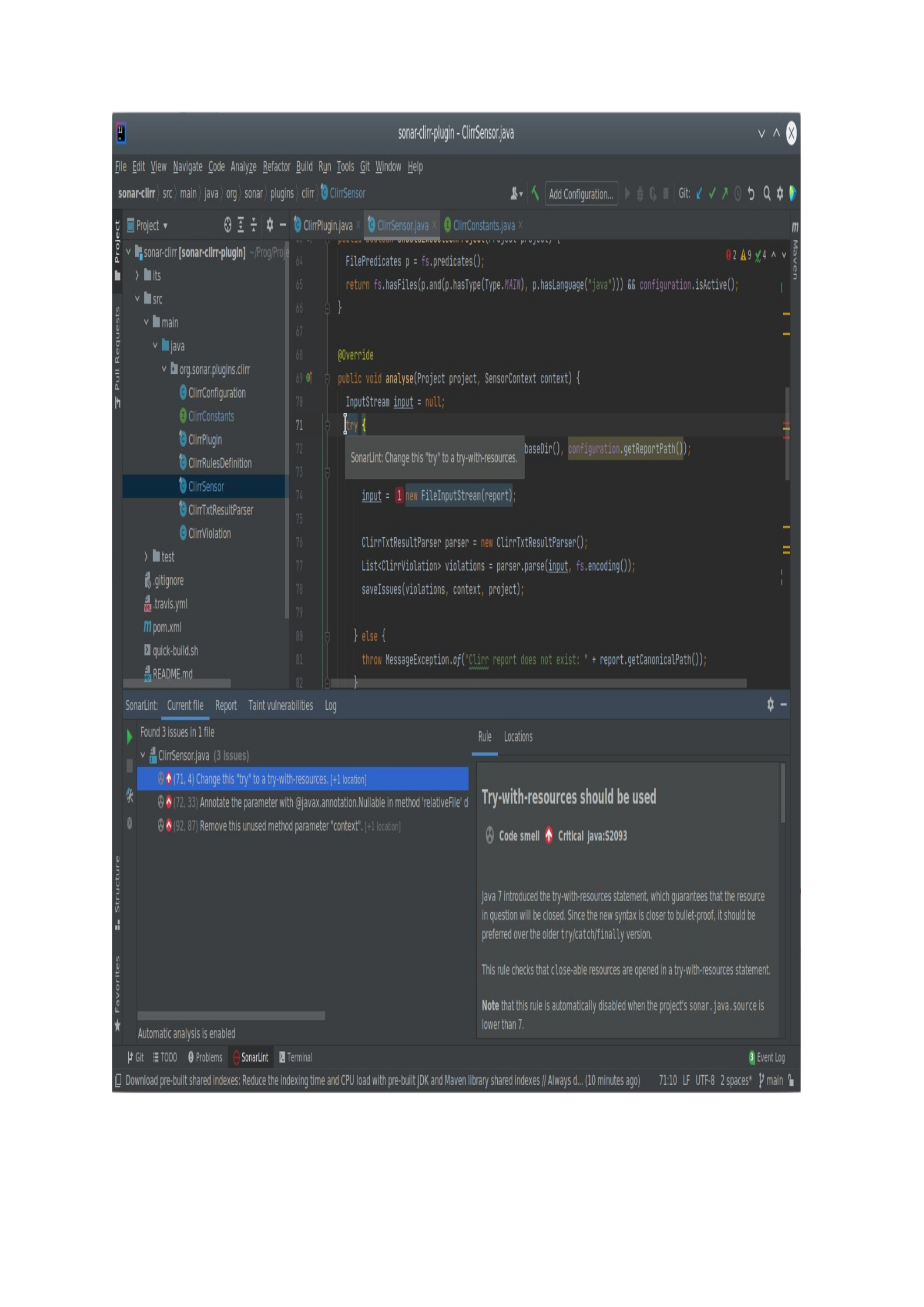
Figure 4-1. Lintian tools help developers to find programming language violations and improve their code.

Manual Security Reviews
Second, asking team members to review each other’s code is probably the most effective
approach for DevSecOps environments. You can enforce code reviews before merge
requests and define how many users should approve it before the code can be accepted,
as shown in Figure 4-2:
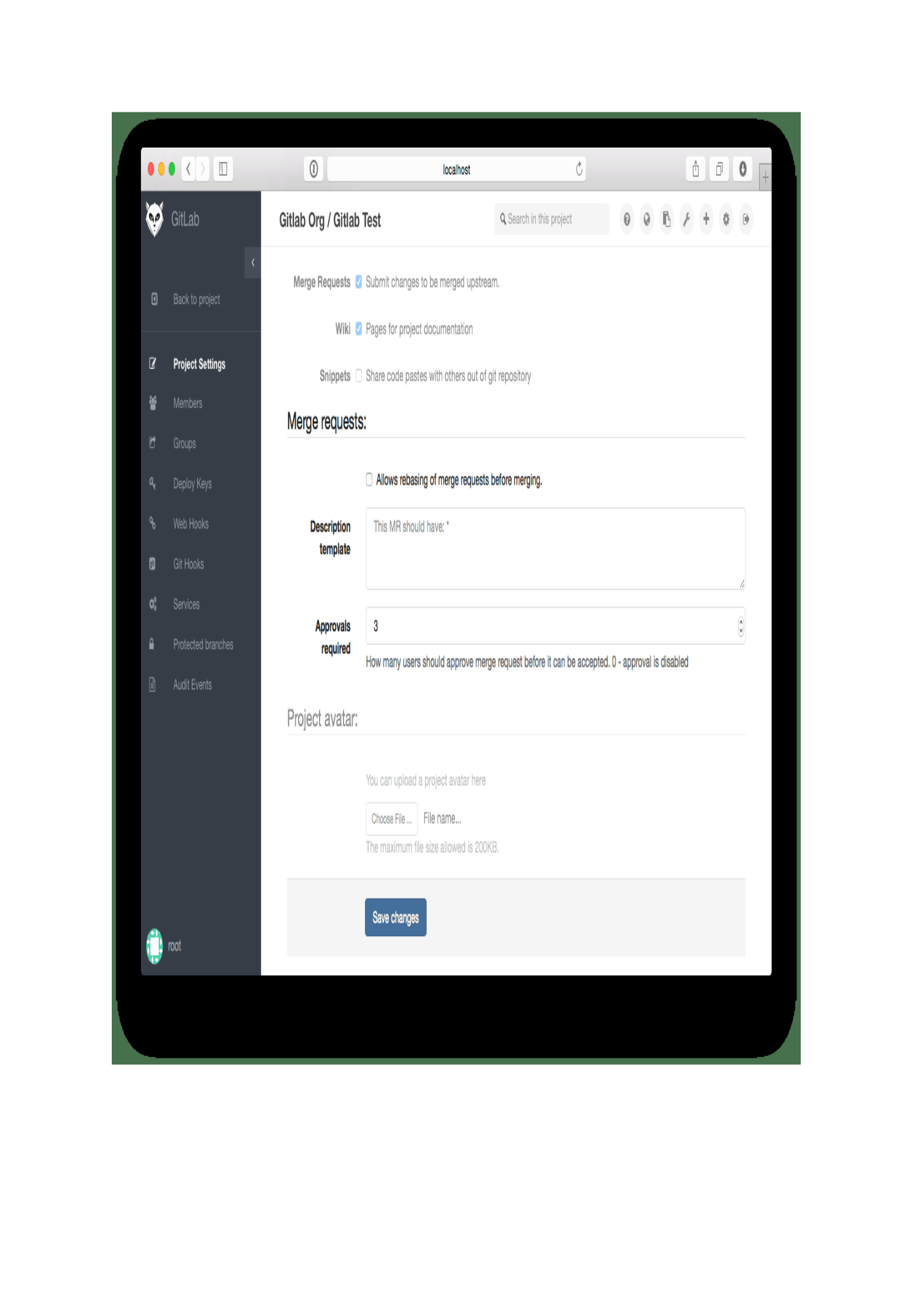
Figure 4-2. Each repository can have its own merge requests policies, and be configured to a certain level of enforced
review, according to the risks associated with the application in question.
This kind of review can be done often, in small bites, without adding significant delays
or costs and can incorporate security checking, as required by compliance policies

established in regulations such as the PCI DSS, HIPPA, central bank regulations, and
other auditing frameworks.
Some organizations create dedicated Application Security Teams and instruct
developers to ask for their assistance with security scans or comments. While these
domain experts can have a deeper understanding of secure coding practices and be a
starting strategy for an emerging program, the central point behind DevSecOps is to
spread the security skills necessary to create an application that is resistant to
compromise across the workforce.
Thus, I particularly prefer security champions programs. This practice enlists security-
minded employees of all different disciplines from across the company for security
training and guidance. Once trained, these security champions become the voice for
safer methods within their various teams. While senior-level employees make great
security champions, it’s essential that junior and mid-level professionals are also invited
to join these programs. By teaching newbies, tech leaders can advance the sense of
transparency and shared responsibility while those just starting out encourage other
newcomers to think differently, creating the DevSecOps culture we aim for.
TIP
In this talk, Simon Maple, field CTO at Snyk, examines how organizations can build an effective security champions
program to scale security skills.
Another interesting practice is to formulate code review guidelines, to advise
developers and managers on the expected manner to include security checks along with
code reviews. The GitLab Code Review Guideline is an excellent baseline, including
guidance on the language to be used (ask questions; don’t make demands, for example)
and the reviewer roulette idea, that randomly picks a reviewer and a maintainer to
make the peer review. For security guidelines, check the OWASP Code Review Guide. Its
topics include risk-based intelligence to security code reviews, through threat modeling.
Automated Security Tests
Automated security tests leverage the fact that it’s fast and scales well to numerous
applications. If you are starting your continuous security process, my recommendation
is to perform an application bootcamp, running the tests described below, to establish a
common security roadmap for your team. Try to eliminate as many as possible of the
simpler vulnerabilities to create a sense of victory within the team. Then, progressively
customize the automated tests for each application and increase their frequency of
execution to detect more bugs and regressions earlier, as close as possible to their
inception.
If you are interested in learning more about continuous security but do not have an
application at hand to test, the OWASP Benchmark is a fully runnable open source web
application, written in Java Maven that contains thousands of exploitable test cases,
which can be analyzed by any type of Application Security Testing (AST) tool, including
SAST, dependency scanners, DAST and so on. While it does not include all

vulnerabilities types from the OWASP Top 10, the intent is that all the vulnerabilities
deliberately included in and scored by the Benchmark are actually exploitable.
Enterprises can also benefit from the OWASP Benchmark as a decision tool. You can run
your selected security tool against the OWASP Benchmark source code and check if it
discovers and properly diagnoses the same results reported in the BenchmarkScore
tool.
Static Application Security Test (SAST)
Static Application Security Testing (SAST) tools, also known as source code analysis
tools, are designed to scan source code or compiled binaries, detecting vulnerabilities,
from the inside. Its biggest advantage is speed: a lightweight tool that can run within the
developer’s IDE, shifting left to the earliest point of the feedback cycle, at the beginning
of the CI pipeline, before a code commit, and also along with all the other phases,
performing different types of analysis.
Figure 4-3 shows a SAST scanner output example, inside the Visual Code IDE, which
usually identifies the source file and line containing the security flaw, along with its
category such as cross-site scripting, weak encryption, and so on:
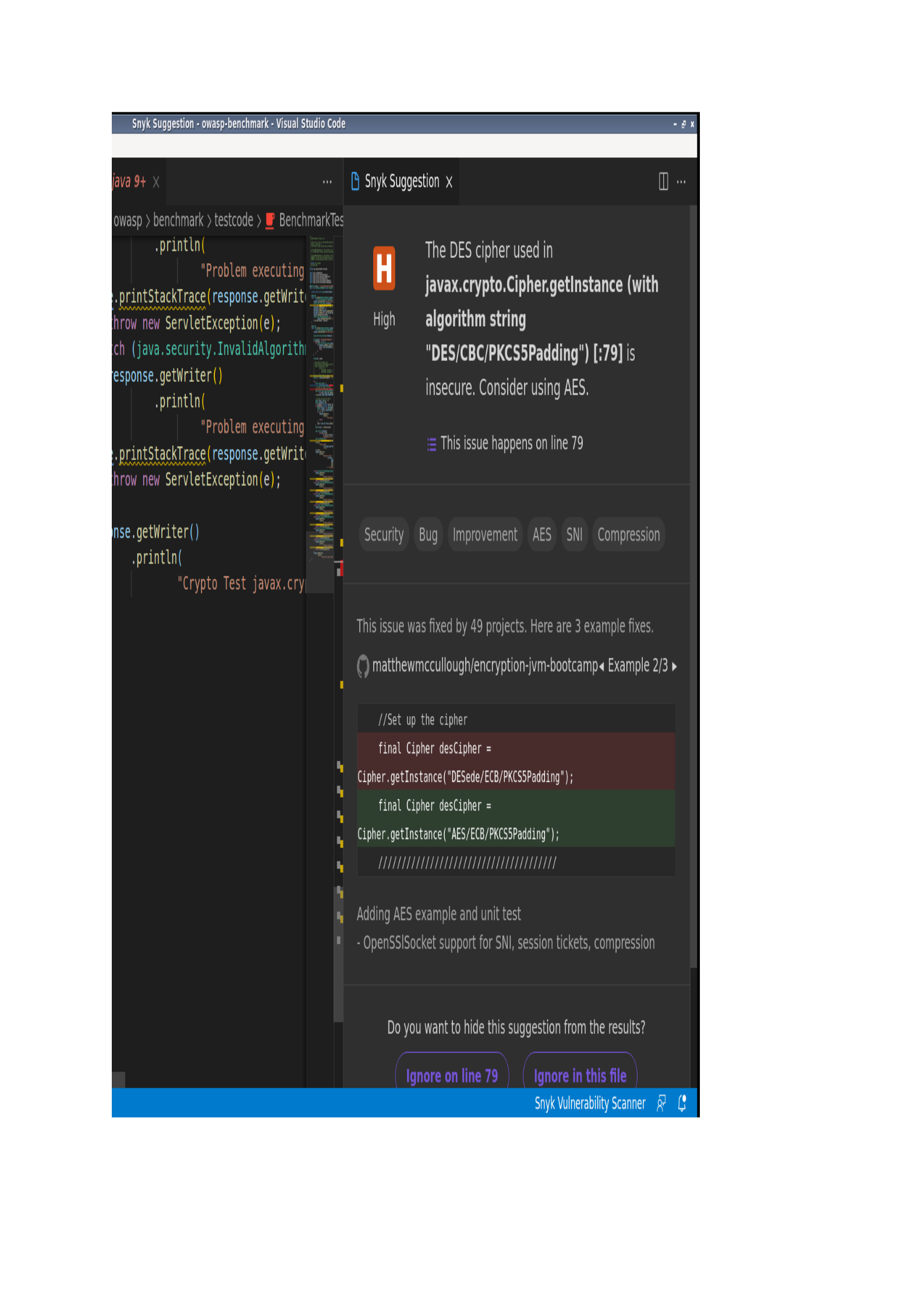
Figure 4-3. The Snyk vulnerability scanner suggests multiple examples of fixes, found in similar projects.

Despite its considerable benefits, SAST presents weaknesses such as a high number of
false positives, which can be overlooked if not properly address. These tools also can
not find misconfiguration issues, which consolidates the need to combine the multiple
tests described here into our CI/CD pipelines.
As mentioned before, my preferred strategy is to conduct an application security
bootcamp at the beginning of each project, to address the most critical vulnerabilities
and then fix each new issue as it appears, during small chunks of code reviews.
Finally, SAST is a language-dependent tool. While you can find plenty of options for
languages such as Java and C#, more niche programming languages like Nim and
ReScript have limited options. OWASP and NIST maintain indexes of SAST analyzers,
classified along with the language supported and the license under which the software
is available. OWASP also gathered a second list containing only commercial automated
vulnerability detection tools that are free for open source projects, to encourage the
improvement of code security and quality. In this GitHub repository, the community
compiles a catalog of SAST tools. As usual, be careful with software provenance as it can
be leveraged for unauthorized access into your environment.
Secret Detection
A common but unsafe application development practice is the unintentional commit of
secrets and credentials such as encryption keys, API tokens, and other sensitive data
like U.S social security numbers, to remote repositories. If third parties have access to
the source, or if the project is public, the sensitive information is then exposed and can
be leveraged by malicious users to gain access to resources.
The industry of tools to detect hardcoded secrets is nascent and we are witnessing the
surface of effective software, that can prevent secrets from being committed or
monitoring public and private repositories to detect secrets. Mature solutions can check
for more than 200 types of secrets and include filenames such as id_rsa, .env, filetypes
like .key, .cert, and so on.
While the Solarwinds attack, mentioned in Chapter 3, can demonstrate the full potential
and the damage extension of a secret leakage, authors have shown the prevalence of
secret exposure on platforms such as GitHub on a daily basis, demonstrating the
importance of secrets management. GitGuardian, the company behind one of the leading
secret detection solutions, has been scanning every single public commit made on
GitHub for secrets since 2017 and disclosed more than two million corporate secrets, as
demonstrated in the 2021 State of Secrets Sprawl.
The solution is free for public repositories and you can add a new job to your GitHub
workflow using the GitGuardian/gg-shield-action:
name: GitGuardian scan
on: [push, pull_request]
jobs:
scanning:
name: GitGuardian scan
runs-on: ubuntu-latest
steps:
- name: Checkout
uses: actions/checkout@v2
with:
fetch-depth: 0 # fetch all history so multiple commits can be scanned
- name: GitGuardian scan
uses: GitGuardian/gg-shield-action@master
env:
GITHUB_PUSH_BEFORE_SHA: ${{ github.event.before }}
GITHUB_PUSH_BASE_SHA: ${{ github.event.base }}
GITHUB_PULL_BASE_SHA: ${{ github.event.pull_request.base.sha }}
GITHUB_DEFAULT_BRANCH: ${{ github.event.repository.default_branch }}
GITGUARDIAN_API_KEY: ${{ secrets.GITGUARDIAN_API_KEY }}
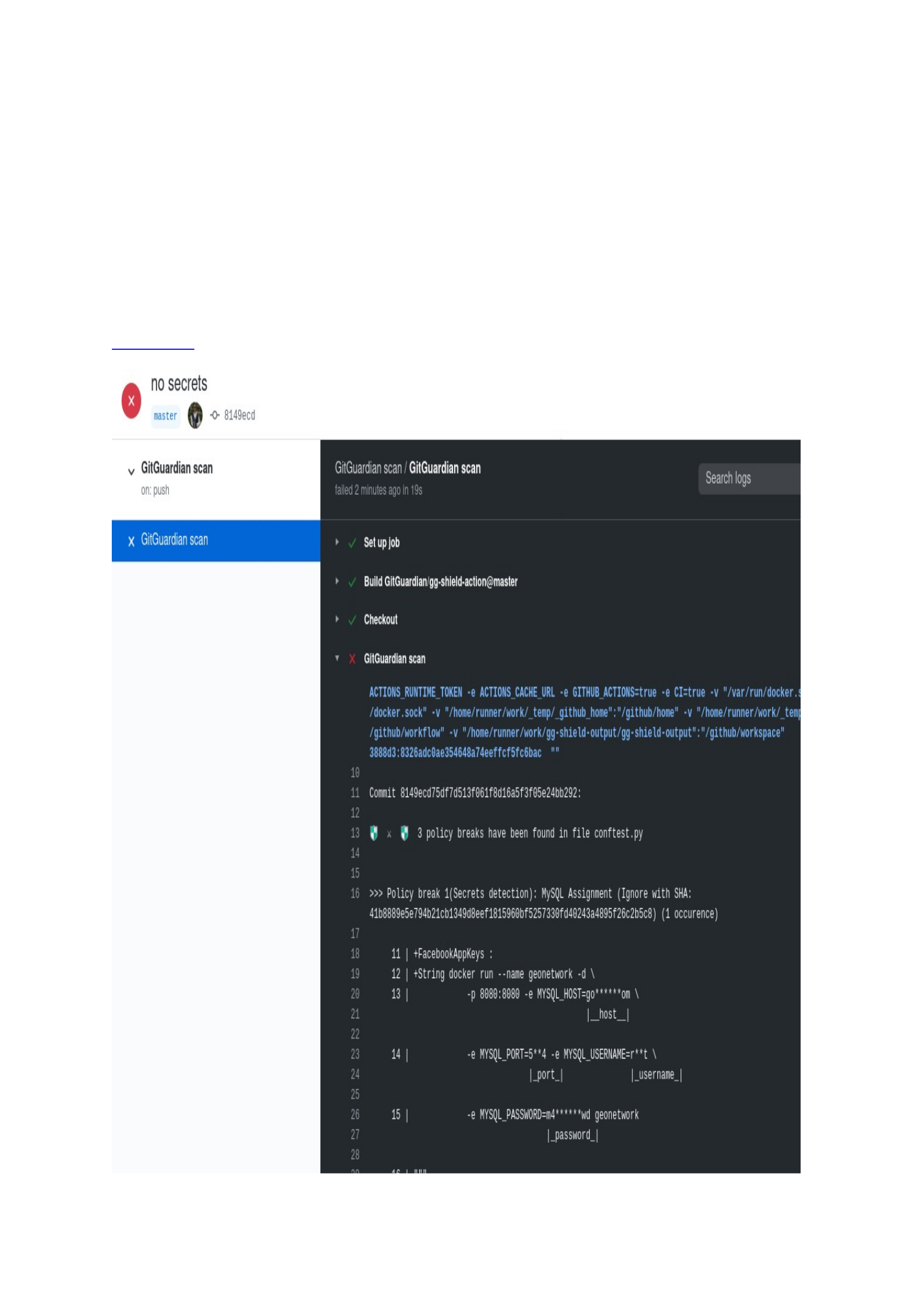
Figure 4-4 demonstrates an example of GitGuardian scan:

Figure 4-4. GitGuardian scan alerts that three secrets were found.
Alternative tools such as Git-Secrets, Gitleaks, and Spectral can be added as a pre-
commit job in your CI/CD pipeline but can also scan directories or config files.
Some tools such as Yelp’s Detect Secrets, allow you to create a separation of concern:
accepting that there may currently be secrets hiding in your repository, that will be
your baseline of secrets, but preventing this issue from getting any larger, without
dealing with the potentially massive effort of removing existing secrets. It does this by
running periodic diff outputs against heuristically crafted regex statements, to identify
whether any new secret has been committed. This feature should be used with caution,
considering the latent risks involved.
Dependency Scanning
Open-source components can scale up development, enabling teams to deliver value
more rapidly and frequently. Yet, they also bring in security flaws that can lead to
significant business and financial losses if not addressed properly. The CVE-2017-5638
vulnerability, in a very popular open-source Java library named Apache Struts, was
known since February 14, 2017. A fix was released three weeks after that by Apache
and the following day, exploits started to circulate on the Internet. Weeks later
hundreds of millions of customer records from the credit reporting agency Equifax were
exfiltrated, a breach enabled by a widely known vulnerability that could be patched. The
company WhiteSource estimates that as many as 97% of all open source vulnerabilities
have a fix, so developers simply need to patch or download the latest version.
TIP
You can learn more about the Equifax data breach in this article by Josh Fruhlinger, which details the attack’s causes,
timeline, and financial impacts. Here, John Oliver, from the Last Week Tonight discusses the company’s attempts to
mitigate the damage.
To prevent such scenarios, dependency scanning, also referred as software composition
analysis (SCA) tools, track, analyze and identify publicly disclosed vulnerabilities within
your application’s open-source components. Like SAST, SCA tools also address
vulnerabilities management but cover different sets of vulnerabilities. It does this by
determining if there is a Common Platform Enumeration (CPE) identifier for a given
dependency which, if found, will be linked to an associated CVE entry.
While many SAST providers offer SCA solutions, they are not as comprehensive and
effective as a dedicated SCA solution is. SCA tools can also detect software licenses,
deprecated dependencies, as well as vulnerabilities, and potential exploits. The scanning
process generates a bill of materials (BOM), providing a complete inventory of a
project’s software assets.
SCA tools can be integrated within IDEs, CI/CD pipelines, and also in post-deployment
recurring checks, for vulnerabilities discovered years after release. Sonatype, Black
Duck, and Snyk (demonstrated in Figure 4-5) are acclaimed software composition
analysis tools. For open-source alternatives, check the OWASP Dependency-Check tool.
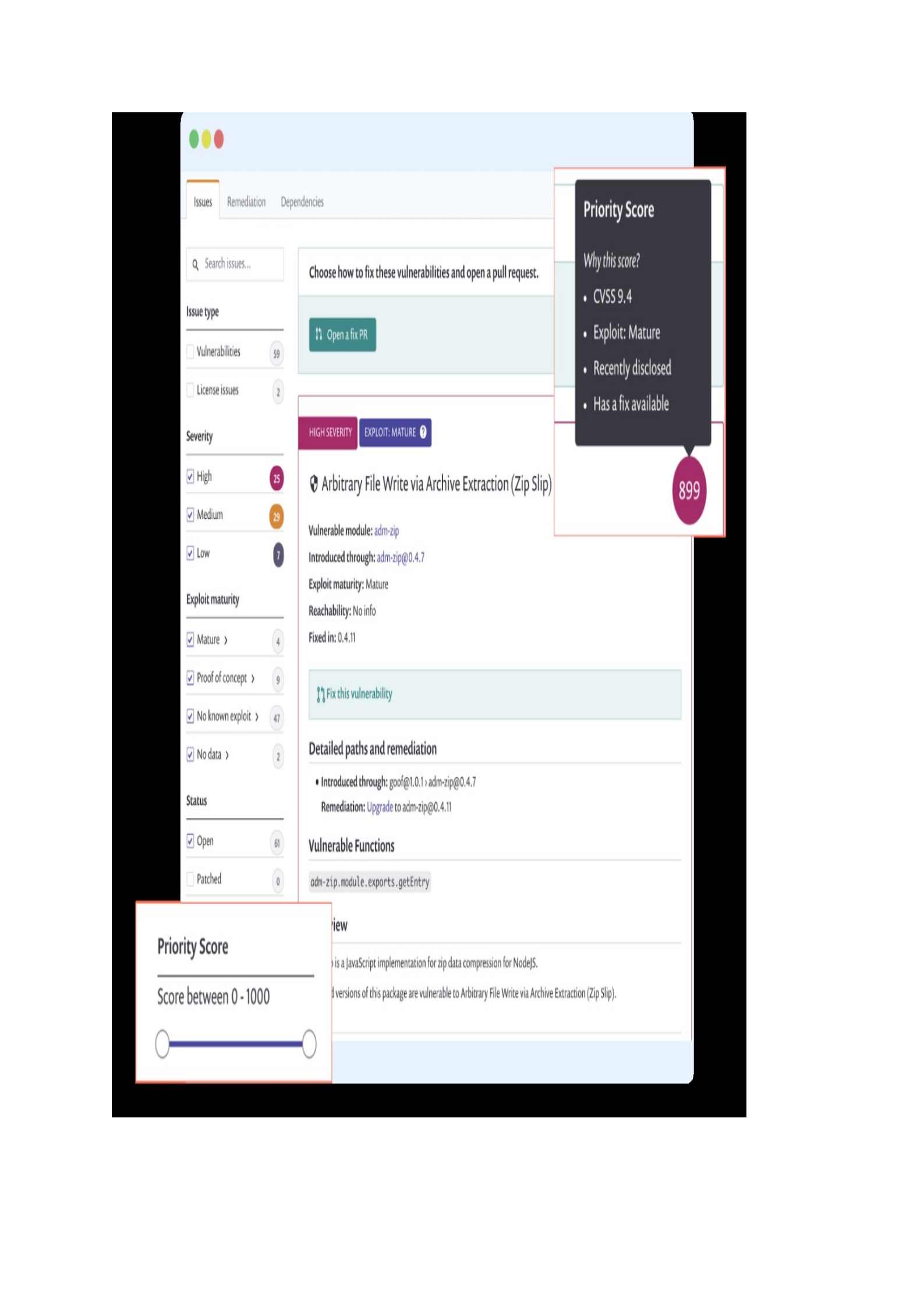
Figure 4-5. The Snyk SCA solution flags a recently disclosed vulnerability in a dependency and suggests a remediation
strategy.

Dynamic Application Security Test (DAST)
DAST, also known as web application vulnerability scanners, are automated tools that
scan web applications from the outside, in deployed environments. As such, these tools
do not require code visibility and you can test even applications developed using the
most niche programming languages. In a sense, they are in the opposite spectrum of
SAST tools, with these applied in the early stages of the CI pipeline and DAST testing
running in a stage or testing environment, before the official release of new versions.
DAST can perform two types of analysis:
Passive scan: in its default behavior, DAST tools execute the baseline scan
and don’t actively attack the application.
Passive and active scan: DAST can be set up to execute an active scan to
attack your application and provide a more comprehensive security report.
DAST offers the benefit of being language agnostic and also fewer false positives since it
tests your running application so there is a higher possibility that the number of
vulnerabilities found to be real. Yet, they have a slower testing process due to the
elevated number of input permutations tried, in an attempt to brute force signup
credentials, for example.
It’s a recommended practice to run DAST tools on test or staging environments as the
scanner can slow down your application performance and impact your business
performance. On feature branches, DAST scans the review app, a temporary application
environment based on the branch’s code so developers, designers, QA, product
managers, and other reviewers can actually see and interact with code changes as part
of the review process. The app gains a unique URL and is deleted after DAST has run.
From my experience, once you are performing all the other automated security tests,
from IDE-integrated security checks, enforced safe code reviews to SAST, the number of
vulnerabilities issues will dramatically reduce so, in time, you can execute DAST checks
on a biweekly basis or upon the imminence of major releases.
The DAST industry is quite mature and there is a large number of tools available. The
OWASP project brought together a list of both commercial and open-source options and
you can use the OWASP Benchmark to assess the scanner’s accuracy. The OWASP Zed
Attack Proxy is the most used open-source alternative and you can easily set up a job on
your pipeline.
Check the following example use to add a passive scan as a GitHub action, remembering
to substitute the target URL to your test environment:
steps:
- name: ZAP Scan
with:
target: 'https://www.zaproxy.org'
To add a passive and active scan, including attempts to attack your review app, use:
on: [push]
jobs:
zap_scan:
runs-on: ubuntu-latest
name: Scan the webapplication
steps:
- name: Checkout
uses: actions/checkout@v2
with:
ref: master
- name: ZAP Scan
with:
token: ${{ secrets.GITHUB_TOKEN }}
docker_name: 'owasp/zap2docker-stable'
target: 'https://www.zaproxy.org'
rules_file_name: '.zap/rules.tsv'
cmd_options: '-a'
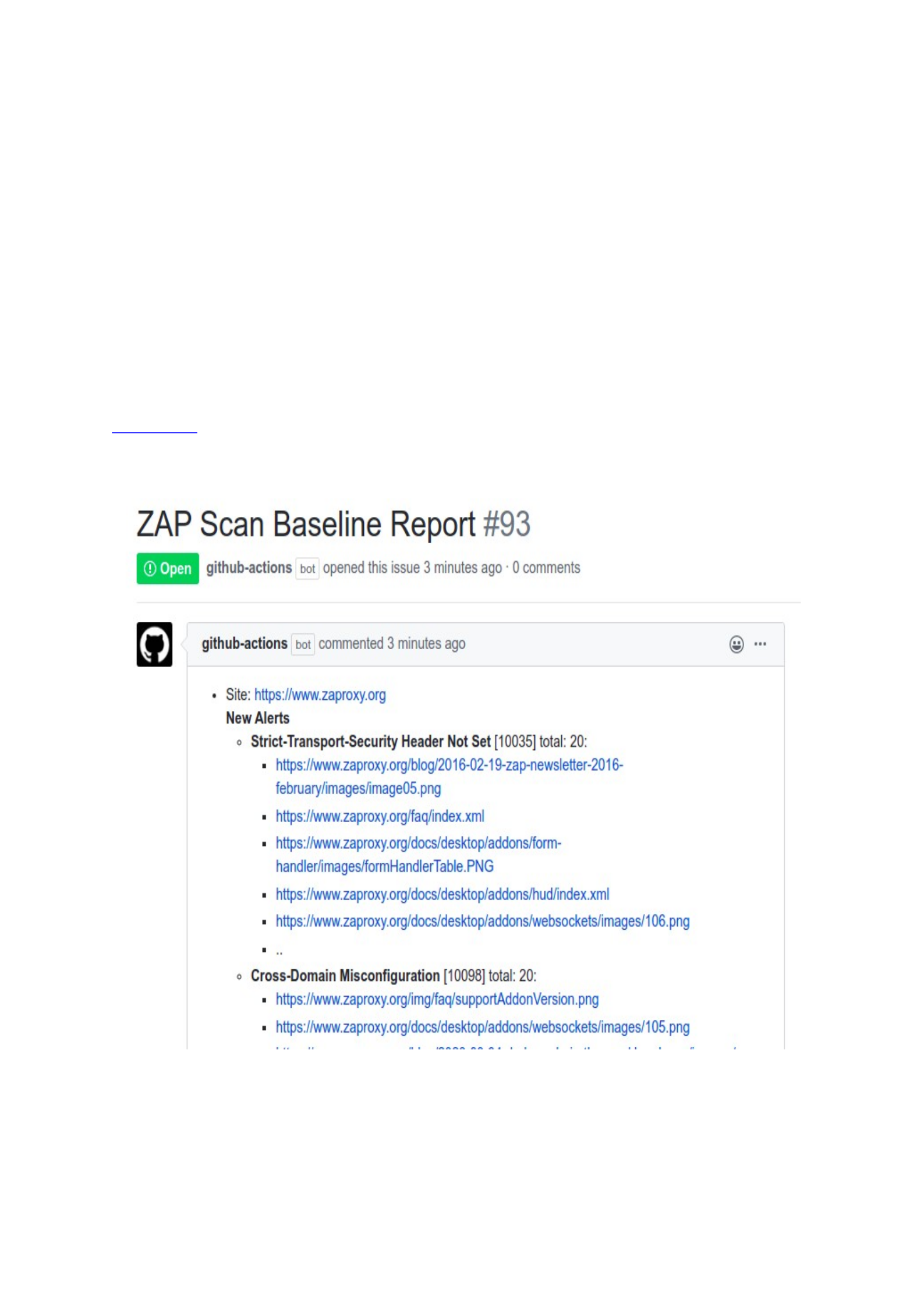
Figure 4-6 shows the report created by the GitHub Action after a scan, notifying the
users via an opened issue in the code repository, allowing the team to add comments
and follow up actions to fix the security flaw:
Figure 4-6. A GitHub action bot automatically opens an issue with the ZAP scan report

Web API Fuzz Testing
Application programming interfaces (APIs) are the hear of today’s innovation, used
from banks and fintech companies to transportation and governmental institutions,
exposing sensitive information. APIs are a critical part of modern environments that are
progressively becoming opening paths to vulnerabilities, leading Gartner to predict that
APIs will soon surpass web applications and will become the most frequent target point
of attack within organizations.
Reactive security testing and firewalls are especially insufficient and inefficient
approaches to safeguard them, lacking the API’s implementation context.
To discover bugs and potential security vulnerabilities in web API, fuzz testings baked
into the pipeline sets operation parameters to unpredicted values, in an attempt to
promote unexpected behavior and security flaws in the API backend. As the fuzz testing
can perform modifying actions such as changing and deleting data, it should never run
in a production environment, but only in a test server.
Likewise, the API under analysis must be excluded from changes beyond those made
from the fuzzing scanner, for the duration of the test, as any modifications made can
cause imprecise reports. A pipeline properly configured makes the deployment of new
environments effortless, and it must be easy to set up a new server to run the API fuzz
testing. You can create a new stage in your pipeline configuration file, called fuzz, to run
after the test or staging phases.
Web API fuzzing scanner differs according to the API types in execution (REST API,
SOAP, GraphQL, and so on). For example, Microsoft RESTler is a stateful REST API
fuzzing tool, checking for a specific class of reliability bugs, an intelligence that allows
the tool to explore service states reachable only through specific request sequences.
The open-source SoapUI framework offers integration with CI/CD pipelines and
performs a wide range of security testing besides fuzzing scan, including boundary-
scan: the tool sends data at the boundary of allowed values or in direct opposition,
seeking to cause erratic behavior or the display of sensitive data.
Summary
In this chapter we deep dive into the automated security tests that can be incorporated
inside the CI/CD pipeline to scale up vulnerabilities detection, to create the process of
continuous security. Such tools must be viewed as complementary efforts to secure
software development life cycle (S-SDLC) practices, that emphasize security by design
and secure coding skills.

Chapter 5. Container Security
A NOTE FOR EARLY RELEASE READERS
With Early Release ebooks, you get books in their earliest form—the author’s raw and
unedited content as they write—so you can take advantage of these technologies long
before the official release. If there is a GitHub repo associated with the book, it will be
made active after final publication. If you have comments about how we might improve
the content and/or examples in this book, or if you notice missing or inaccurate
material within this chapter, please reach out to the editor at [email protected].
Application containers are immutable mechanisms that enable us to separate our
applications from our infrastructure so we can build them once and deploy them
anywhere. They allow us to multiply and scale out quickly, or move our systems as
needed, as many times as necessary.
A container creates a layer with your application and all the dependencies needed to
run as a stand-alone object. Different from system container environments, where you
run an entire Linux operating system, in an application container you are encouraged to
build them with as little code as is necessary to run the application.
They are defined through code and you can manage your infrastructure in an automated
way, inside of a CI/CD pipeline. By default, a container is relatively well isolated from
other containers and its host machine but misconfigurations and the use of vulnerable
components can lead to security threats to your environments.
If you are new to application containers, the Docker toolset is the easiest to give your
first steps, but keep in mind that there is a whole set of container tools out there and
Docker is just one of them. Once you learn the security principles below, you can
replicate them in other engines such as Podman, which distinguishes itself because of its
isolation and user privilege features.
TIP
Check out Peter McKee’s talk on how to get started with Docker, if you are new to the container world. Then, you can
get a detailed overview of the technology from the Docker official documentation.
Containers can run as standalone or be managed under a cluster orchestrator such as
Kubernetes, Rancher, Nomad, OpenShift, among others. The cluster provides tools for
scaling, networking, securing, and maintaining your containerized applications,
automating the process of running workloads in different machines, in multiple zones,
for example.
TIP
If the container ecosystem confuses you as it does to many of us, in this article, Tom Donohue explains the difference
between Docker, the container runtime interface (CRI) and the Open Container Initiative (OCI).
This chapter covers security best practices for the development and distribution phase
of our CI/CD pipelines, covering threats to the container image itself and the software
inside of it as well as the container image storage concerns.

During deployment, we’ll be concerned with the container networking and storage and
them, during runtime, we’ll look into the interaction between containers, the
orchestrator, the host operating system, and other containers on the same host.
5.1 Container Image
A container image is a template with instructions to create a runnable container. Within
it, you’ll find multiple layers of files and components that will encapsulate and execute
an application in isolation from the host’s operational system. As a container is defined
by its image as well as configuration options, the vulnerabilities found in each layer can
bring security risks.
Container image provenance
As people get into the world of containers, It’s tempting to source images on the
Internet, especially on DockerHub or GitHub. They usually have the components your
application needs and a simple “docker pull image-latest” can save hours of
product development. Yet, public containers may contain outdated components or
configuration mistakes that could lead to a breach.
On Docker Hub, you can refine your search results to show only official images or
images maintained by verified publishers, a seal of approval provided to entities that
follow a set of good practices defined by the company Docker Inc. However, your
organization may have stronger security requirements and, in this case, not even official
images might be the best fit.
TIP
The concept of provenance comes from museums and the art trade. These industries often need to establish the
authorship, the authenticity as well as legal validity of a chain of custody of an object. Digital artifacts provenance has
gained interest in the security community particularly to build innovative intrusion detection techniques to counter
Advanced Persistent Threats (APTs). These types of attacks are complex to detect due to their “low-and-slow”
patterns and the recurrent use of zero-day exploits.
Container Image Vulnerability Scanner
Once you have found an image from a trusted source, the next step is to identify if it has
known security flaws. Vulnerability scanners analyze the contents of a container and
compare them against Common Vulnerabilities and Exposures (CVE) databases and
good practices, such as the Docker Benchmark established by the Center for Internet
Security (CIS).
Many companies establish their own software developer kits (SDKs), including a
container vulnerability scanner, making it easier for the team to scan container images
built in their desktops, giving them the chance to fix them before they push to a source
code repository. Many SaaS private container registries also already have a security
scanner integrated into their offer and you can also set up this tool into your own
registry, as we’ll see later in this chapter.

There are a number of container image vulnerability scanners, both open-source and
commercially available. From May 2020, Docker Inc. partnered with Snyk to offer native
vulnerability detection for images. To scan an image, you can use its name or ID:
$ docker scan myimage
Testing myimage...
Organization: docker-desktop-test
Package manager: deb
Project name: docker-image|myimage
Docker image: myimage
Licenses: enabled
✓ Tested 92 dependencies for known issues, found 63 issues.
Sometimes an image is based on another image, with some additional customization.
This is defined in a Dockerfile, a text document with all instructions to assemble an
image. The variable FROM points that this image is based on the golang parent image:
$ cat Dockerfile
FROM golang
COPY /src/myapp /myapp
RUN go myapp
Add the tag --file to inform the path to a Dockerfile. You’ll get a detailed scan report and
remediation guidelines such as alternative parent images with lower levels of
vulnerabilities. If you trust the underlying image from which your container was
constructed, you can use the flag --exclude-base to instruct the scanner to ignore
vulnerabilities in this layer. The tag --severity only reports vulnerabilities of a
determined level or higher (from the options low, medium, or high):
$ docker scan debian --file=./Dockerfile --severity-threshold=high
Testing debian...
â High severity vulnerability found in systemd/libsystemd0
Description: Privilege Chaining
Info: https://snyk.io/vuln/SNYK-DEBIAN10-SYSTEMD-345386
Introduced through: systemd/libsystemd0@241-7~deb10u8, util-linux/bsdutils@1:2.33.1-0.1,
From: systemd/libsystemd0@241-7~deb10u8
From: util-linux/bsdutils@1:2.33.1-0.1 > systemd/libsystemd0@241-7~deb10u8
and 4 more...
Image layer: Introduced by your base image (scratch)
…
Tested 92 dependencies for known issues, found 9 issues
To see all the flags supported, run the command docker scan --options.
TIP
If you want to download the Dockerfile of an image previously pulled from Docker Hub, go to the website and search
for the image name. On the image page, locate the supported tags and respective Dockerfile links. I strongly
recommend you to check the Dockerfile if you decide to use a public image, searching for security misconfigurations.
Nonetheless, the maintainer may have decided not to share, which can be a red flag.
Two scanners using different databases can produce different results, so it’s a good idea
to include multiple options in your pipeline. Trivy, powered by Aqua Security, can
execute static analysis of vulnerabilities not only in container images but also in other

artifacts such as filesystems and git repositories. Let’s walk through the installation
steps in a Debian host:
$ sudo apt-get install wget apt-transport-https gnupg lsb-release
$ wget -qO - https://aquasecurity.github.io/trivy-repo/deb/public.key | sudo apt-key add -
$ echo deb https://aquasecurity.github.io/trivy-repo/deb $(lsb_release -sc) main | sudo tee -a
/etc/apt/sources.list.d/trivy.list
$ sudo apt-get update
$ sudo apt-get install trivy
Now, let’s scan an Nginx container image. If the docker-cli does not find the image
locally, Trivy will automatically search and scan it in the remote Docker repository.
$ trivy image --severity=HIGH nginx
2021-08-02T16:37:09.924-0300 INFO Detected OS: debian
2021-08-02T16:37:09.924-0300 INFO Detecting Debian vulnerabilities...
2021-08-02T16:37:09.939-0300 INFO Number of PL dependency files: 1
nginx (debian 10.10)
====================
Total: 26 (HIGH: 26)
...
The first scan will finish within seconds and, in this case, reported 162 vulnerabilities,
from which 2 were critical and 16 medium. The full report also lists the CVE attributed
to the vulnerability and a brief description, with a link for more information, as shown
in the example below:
LIBRARY
VULNERABILIT
Y ID
SEVERI
TY
INSTALLED
VERSION
FIXED
VERSION
TITLE
gcc-8-
base
CVE-2018-
12886
HIGH 8.3.0-6 gcc: spilling of stack
protection address in cfgexpand.c
and function.c leads to…
-->avd.aquasec.com/nvd/cve-
2018-12886
libc6 CVE-2020-
1751
2.28-10 glibc: array overflow in
backtrace functions for powerpc
-->avd.aquasec.com/nvd/cve-
2020-1751
Alternatives to container scanners include Clair, which supports Docker and other Open
Container Initiative (OCI) image formats, and the Docker Bench for Security, a script
based on the above mentioned CIS Docker Benchmark. As your project complexity
increases, giving the use of many open source tools and libraries, you can benefit from
Grype. This scan works along with Syft, a CLI tool to build a detailed software bill of
materials (SBOM) of your project and can be used to track and disclose unknown
dependencies.
We can introduce container image scanning tools in multiple points of your CI/CD
pipeline, depending on when you need to access the vulnerability results. To shift left
security as close as possible to your developers, consider incorporating scanning steps,
using different tools, immediately after application code is committed to a feature
branch and a new container image is built in your pipeline. You may add a new step
before deployment, to act as a second layer of defense.
Let’s see how to use Grype inside of a GitHub Action:
1. Go to GitHub, create a new repository and then commit a simple Dockerfile,
with just one line: FROM debian-slim;
Now, click in the tab Actions and create a new workflow, with the following content:
name: Grype
on: push
jobs:
grype:
runs-on: ubuntu-latest
steps:
- uses: actions/checkout@v2
- name: Build a Docker image
run: docker build -t myimage .
- name: Scan image
uses: anchore/scan-action@v2
with:
image: "myimage"
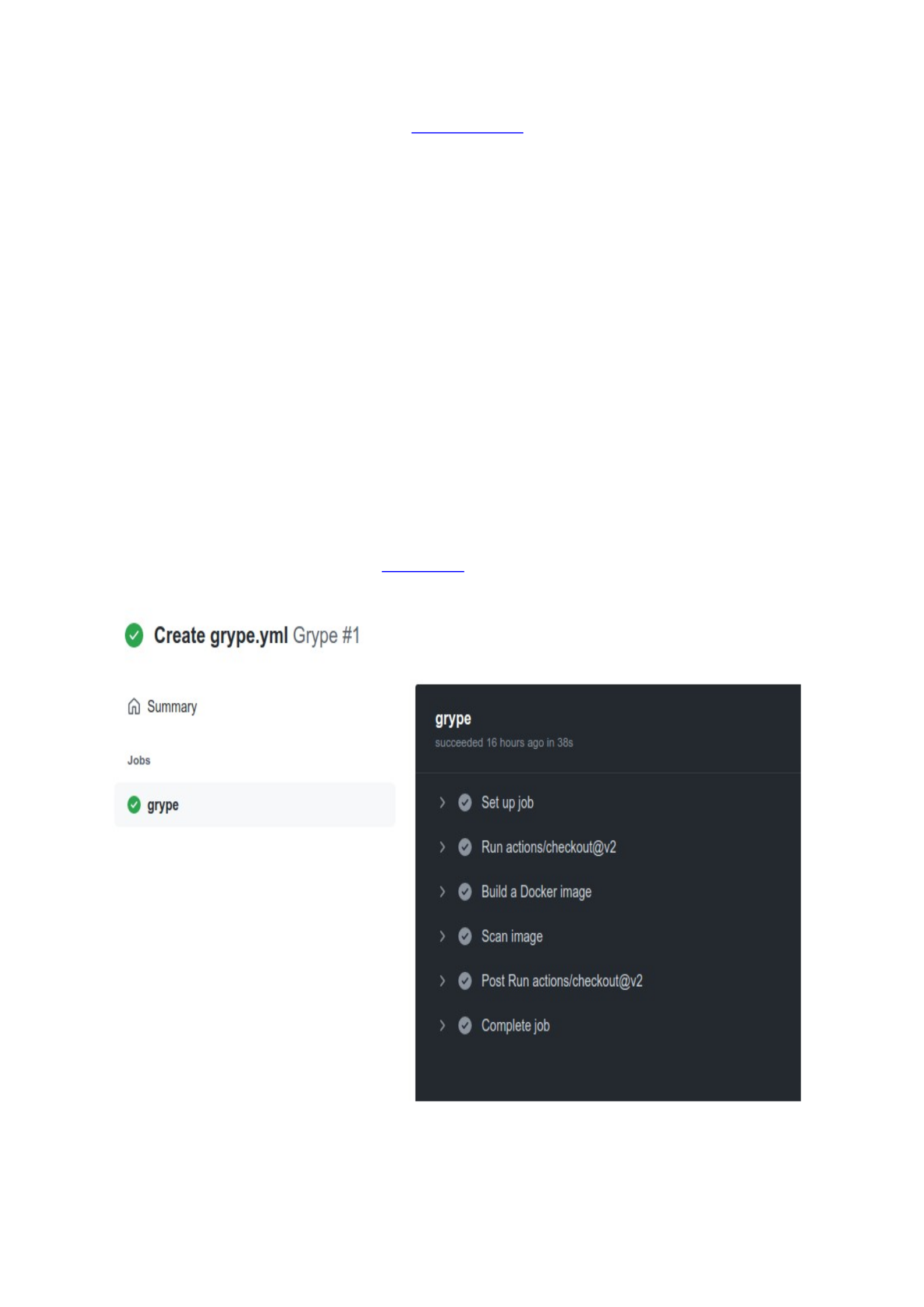
2. Commit it with the name grype.yaml and look for the new workflow called
Grype. When you click upon it, you will see the job details and the results of
each step, as shown in Figure 5-4.1:
Figure 5-1. The steps of a GitHub Action, created to check for vulnerabilities in container images, right after build.
We can optimize this action, configuring it to break the pipeline if the scanner locates a
vulnerability higher than medium, for example.

TIP
Now that you know how to scan container images for vulnerabilities, run some of them over a container image based
on Debian and on another based on Alpine. You’ll see that the second usually report fewer vulnerabilities. Is it
because Debian is more insecure or because it has a larger attack surface?
Minimal or Slim images
Some images are simpler to use as they come with a reasonable amount of pre-installed
packages and operating system libraries. But they also add a long list of vulnerabilities
to track down as we saw above. To reduce your security risk, go a step further and
choose a minimal or slim image.
At the time of writing, the latest Nginx’s official image is constructed upon a Debian
Linux container, in its buster-slim version.
FROM
debian
:buster-slim
This means that any runnable Nginx container-based in this image has also the common
tools available in a Debian distribution such as the apt package manager and some
shells. Use the following command to pull the image and open an interactive shell inside
of it:
$ docker run -it nginx /bin/sh
Unable to find image 'nginx:latest' locally
latest: Pulling from library/nginx
...
Once inside the container, check if the apt package is installed:
# apt
apt 1.8.2.3 (amd64)
Usage: apt [options] command
...
To use lightweight images based on Alpine Linux is a very common technique amongst
the developers that also improve build time and loading performance. Most of the
official images available on Docker Hub also offer a version based on Alpine. Add the tag
to your docker pull command:
$ docker pull nginx:alpine
alpine: Pulling from library/nginx
...
Now let’s list the two Nginx container images and compare the size of the one based in
Debian against the Alpine one:
$ docker image ls -a | grep nginx
REPOSITORY TAG IMAGE ID CREATED SIZE
nginx latest 08b152afcfae 3 days ago 133MB
nginx alpine b9e2356ea1be 2 weeks ago 22.8MB
Even though we reduced the amount of pre-installed packages and operating system
libraries, there is always a risk of open vulnerabilities caused by libraries underneath.

From a security perspective and to keep the immutability of your runner container,
once you have installed the packages, you do not want someone else installing new
things and Alpine Linux-based images still have apk and shells, for example. They are
required for the build stage but are not necessary for the application to run. Google
solved this problem by introducing distroless images.
Distroless base images
Google and other tech giants restrict the content of their runtime container to what’s
really necessary. In distroless base images you’ll not find the programs expected in a
standard Linux distribution such as package managers nor even interactive shells.
Without a shell, you can execute your application conventionally, but you can not attach
to the container while it is running. That is a significant security improvement, as you
have now closed the most obvious door for attackers to gain entry within your
container, if they find a door on your source code, for example.
$ docker pull gcr.io/distroless/base-debian10
Using default tag: latest
latest: Pulling from distroless/base-debian10
0d7d70899875: Pull complete
e31777b27d40: Pull complete
Digest: sha256:97f9cbf81590c7dd878d7e10c20116fa7488c2fb91b3c839df1ebdcb61ab13ca
Status: Downloaded newer image for gcr.io/distroless/base-debian10:latest
gcr.io/distroless/base-debian10:latest
When we try to open an interactive Bourne shell on a distroless image, the container
daemon returns the following error:
$ docker run -it gcr.io/distroless/base-debian10 /bin/sh
docker: Error response from daemon: OCI runtime create failed: container_linux.go:349: starting
container process caused "exec: \"/bin/sh\": stat /bin/sh: no such file or directory": unknown.
ERRO[0000] error waiting for container: context cancelled
If we try to use /bin/bash, the system exhibits the same message. As distroless images
by default do not contain a shell, the Dockerfile ENTRYPOINT command, when defined,
must be specified in vector form, to avoid the container runtime prefixing with a shell:
ENTRYPOINT ["myapp"]
TIP
To know more about distroless images, watch this talk from Matthew Moore where he explains how distroless
containers work and how to build them.
All distroless images are signed by cosign and I recommend verifying them before
building your image. Install cosign and use the distroless public key to verify distroless
image with the following command inside of your pipeline:
cosign verify -key cosign.pub $IMAGE_NAME
Scratch Containers
If your security policies require, prefer to create your organization’s parent images.
Docker offers an empty image called scratch as a starting point for building containers.

You’ll see later in this chapter that a well-written Dockerfile can prevent an attack, so
invest some time in learning how to do it in the original documentation.
Note that, while you can refer to it in your Dockerfile, it is impossible to pull or run the
scratch image from DockerHub. As there are no files, the only commands you can run
are system calls, and your executables need to be self-contained or statically compiled.
Finally, without binaries, you’ll not be able to attach to a scratch container unless you
add one shell.
TIP
In this talk, Riz Rice demonstrates how to build a container from scratch.
Rootless Containers
Before the Docker engine v19.03, unless you explicitly specify, Docker containers ran
automatically under the user root. And as a container in execution shares the same
kernel with the host machine, a user with root privileges inside a container is also a root
user on the parent operational system. Attackers could then exploit a vulnerability in a
package, library, or in your application to break the container isolation and gain access
to other services or resources.
Following the principle of least privilege, we can change the ownership of the
application files to an unprivileged user:
$ cat Dockerfile
FROM alpine
COPY ./src/myapp /app/
WORKDIR /app
RUN chown 1000:1000 /app
USER 1000
ENTRYPOINT /app/
Build it and then set the image to run the container under the same user ID:
$ docker build --tag my-image:latest .
$ docker run -ti --user 1000 my-image:latest /bin/sh
$ apk add curl
ERROR: Unable to lock database: Permission denied
ERROR: Failed to open apk database: Permission denied
In the last command, I tried to install the package curl within the running container,
unsuccessfully. Non-root container images add an extra layer of security but can limit
the work of developers, so they are recommended for production environments.
Middle Layers
Whatever you decide to use as your base image, chances are you will need to add your
code and various tools and libraries to make things work. These middle layers also need
to be monitored for vulnerabilities and configuration mistakes that may lead to
breaches. Be aware of everything that comes after the FROM variable, like the
commands COPY, ADD, and more specifically, RUN commands.

The following code is an extract of the Dockerfile of an official image. You won’t
consider giving full permission to everyone to write, read and execute on a web server’s
directory and this is a practice to strongly avoid, even if you are using a container,
RUN set -eux; \
mkdir myapp; \
chown -R www-data:www-data myapp; \
chmod -R 777 my-app
Multistage Buildings
It was a widespread practice to have one Dockerfile for development, which contained
everything needed to build your application, and another for production. With multi-
stage builds, you can create multiple stages and only copy the result to your final
production images.
Inside the Dockerfile, we can define multiple FROM statements, using different bases,
for example, and selectively copy the final artifacts from one stage to another, leaving
behind everything you don’t want in the final product.
$ cat Dockerfile
# Builder stage
FROM golang as builder
WORKDIR /myapp
COPY src .
RUN go build .
# Final stage, copying artifacts from the builder stage
FROM gcr.io/distroless/base-debian10
COPY --from=builder /myapp/compiled_app /bin/compiled_app
ENTRYPOINT ["/bin/compiled_app"]
Prevent data leaks
Your Dockerfile will be available to everyone who has access to the repository so avoid
storing hardcoded passwords or API tokens inside of it. Many developers resort to
passing these variables during the build process but a simple skopeo or docker
history command can recover the commands used to create the image, exposing your
credentials.
Use secrets to store sensitive application data used by services. Depending on your
environment size and complexity and also security requirements, consider using a
secrets management software such as Vault or the AWS Secrets Manager, that offers
advanced features such as audit logs for every interaction with a secret as well as
replication policies. Figure 5-4.2 exemplifies a secret stored inside of the Google Cloud
Secrets Manager:
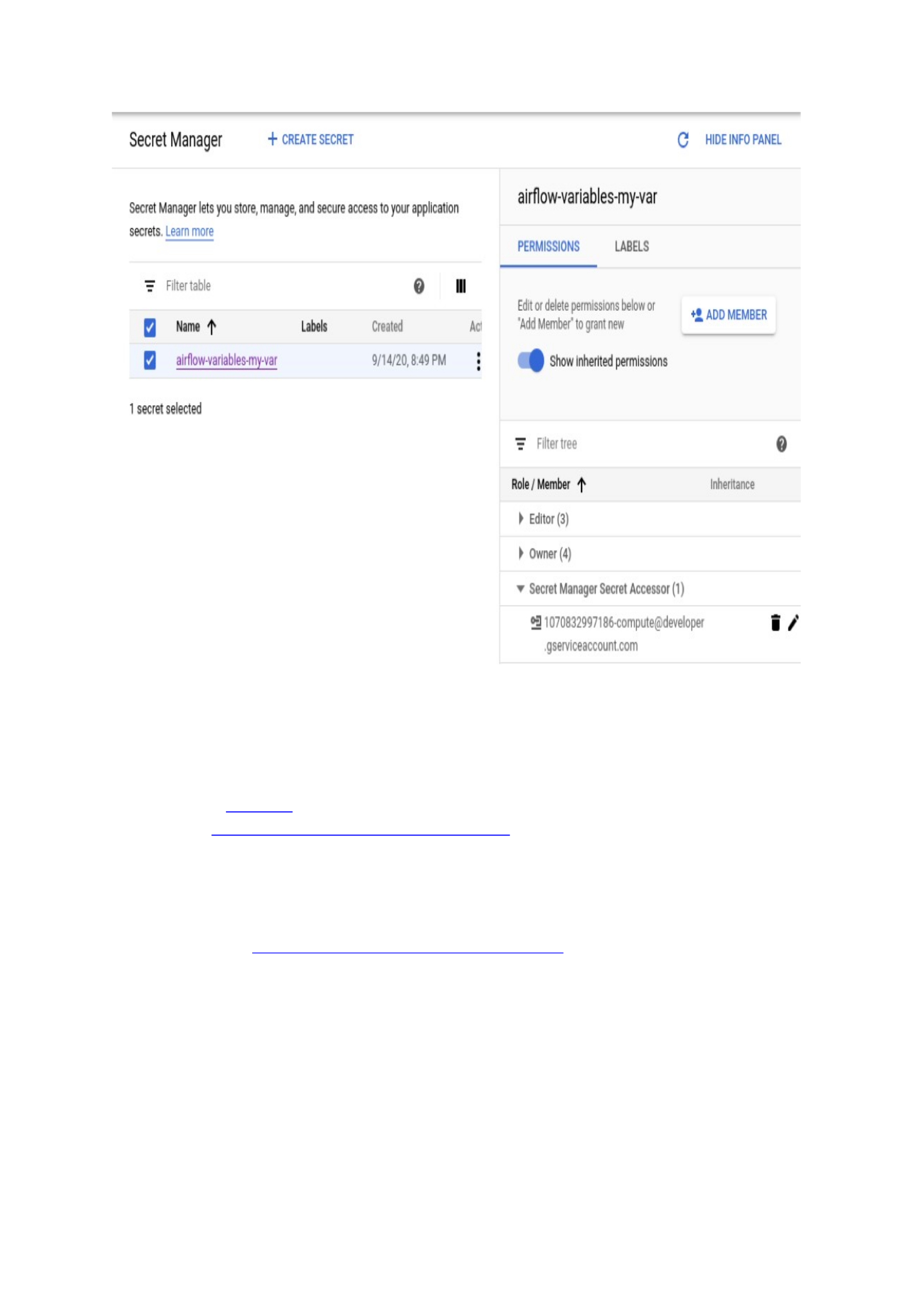
Figure 5-2. With Google Cloud Secrets Manager you can manage permissions and audit access, for example.
Use a Dockerfile linter
A well-configured Dockerfile can keep a security threat away from your environment.
Tools such as hadolint, will validate if your Dockerfile follows the recommendations of
the Docker “Best practices for writing Dockerfiles” guide. You can run it locally on your
computer and add it as an extension in your IDE, to lint your file as you write it.
$ docker run --rm -i hadolint/hadolint < Dockerfile
WARNING
Here you can find the hadolint extension for the Visual Studio (VS) Code. The extension uses the hadolint binary
installed in the system. If the binary does not exist in $PATH, the extension will not work as expected.
Your organization can also integrate the linter parsing as a step inside a CI/CD pipeline
and configure it to check if the projects use only parent images from your desired
container registry (we’ll discuss container registries in more detail later in this
chapter):
$ hadolint --trusted-registry my-company.com:500 <Dockerfile>
# Warn when using untrusted FROM images

Protect your Dockerfile
As to any code that enters your CI/CD pipeline, reviewers must check for changes in
your container image’s Dockerfiles, and builds must be tested before any changes are
approved. If a vulnerability enters your pipeline, it will be replicated to the entire
software supply chain. A private container registry can be used as an additional layer of
protection.
5.2 Container Registry
When you execute docker pull <imagename>, the docker command-line interface
(CLI) looks for locally stored images. If it doesn’t find it, it will download the official
image from the widely known container repository Docker Hub. The command is a
shortcut for docker pull docker.com/<imaginename>:latest. The URL
docker.com/<imagename> is the link for the image and latest is the tag that
identifies the version that you want to use.
A container registry is a repository or collection of repositories, used to upload (push)
and download (pull) container images and their different tagged versions. Public
registries are great for open source and commercial publishers that want to distribute
their product or for individuals and small teams that want to get up and running as
quickly as possible.
However, as teams grow, regulations and policies can arise, bringing greater security
issues like patching, privacy, and access control. Highly regulated industries such as
banking and governments may have air-gapped data centers. Organizations then can
decide to set up their own private container registry, either remotely hosted or on-
premises, to push images previously approved by the security team and also store your
own base images.
TIP
In this light walk, Haining Zhang, creator, and architect of Project Harbor, an open-source container registry walks us
through what a container registry is and how it works.
Harbor and Project Quay are open-source alternatives and SaaS options include Amazon
Elastic Container Registry (ECR), Azure Container Registry, Google Container Registry
(GCR), and Red Hat Quay. The company Docker Inc has commercial plans for private
registries and, finally, as mentioned in the previous chapter, GitLab and GitHub also
include a private registry in their offers.
Again, it is a strategic decision which choice to make, but remember to include your
private container registry in your list of assets to safeguard and control access. Is the
authentication mechanism compatible with your organization’s requirements? Will
every member of the team have access to push images into the repositories or some
may only pull images? Can you fine-grain permission by project/repository? Another
good practice is to have multiple private registries, one for development and run the
security tests you may need and another for the production-ready images.
Registry Vulnerability Scan and Management
In a regular workflow, a commit to your VCS would trigger the build of a new container
image. If the build is successful and passed your vulnerability scanning requirements,
the image would then be pushed to your registry. Your organization can run its own
open-source Harbor server, for example, and set up a vulnerability scanner inside of it,
as demonstrated in the official documentation.
Nonetheless, private container registries are now usually part of a larger ecosystem and
your CI/CD platform may also offer one so knowing what security features you want
from a private registry is important. Some registries, like Harbor, offer not only registry
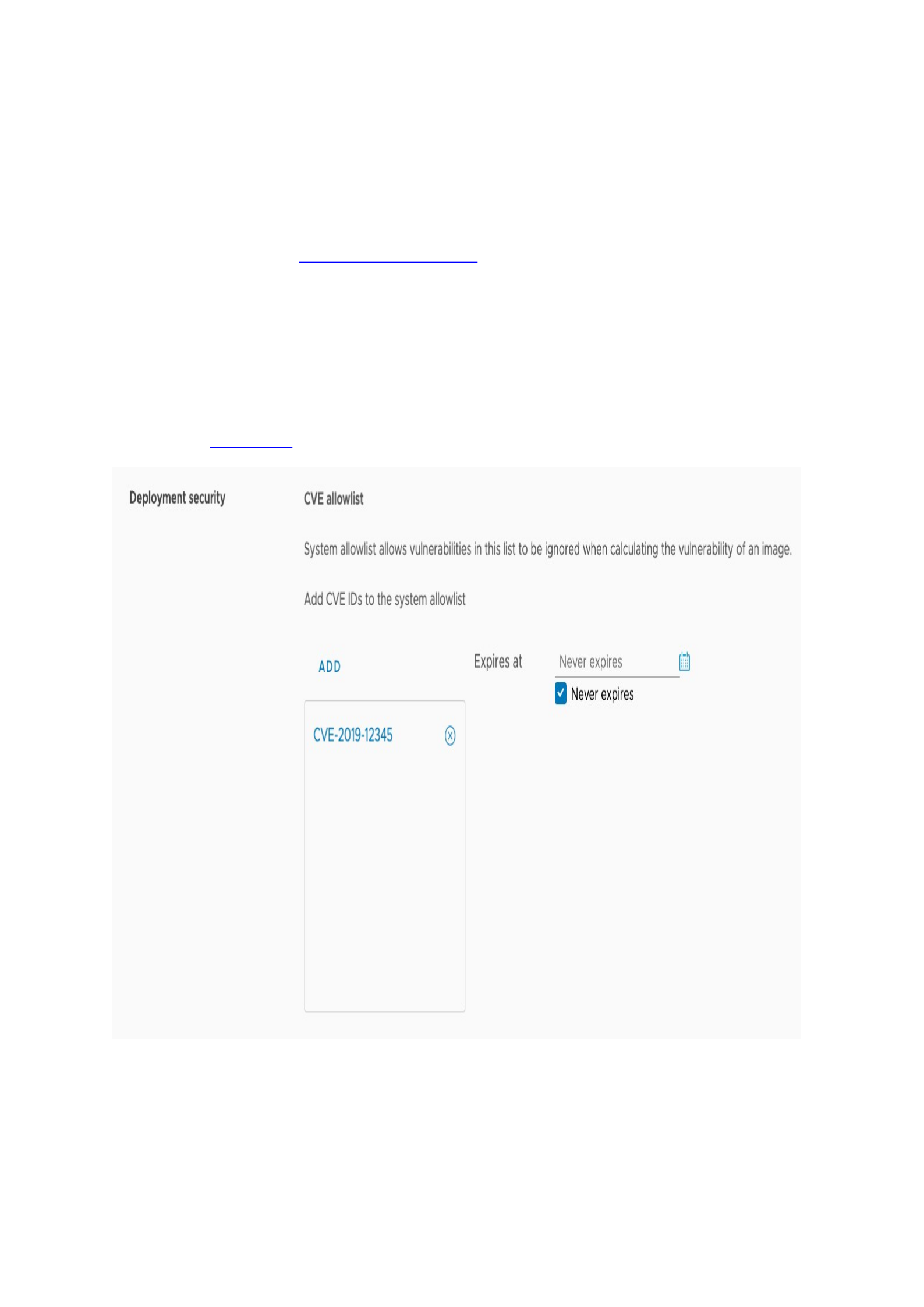
vulnerability scanners but also have what is called deployment security, which can
prevent artifacts from being pulled if vulnerabilities are discovered.
It also enables the creation of CVEs allowlists, to ignore during vulnerability scanning,
as shown in Figure 5-4.3:
Figure 5-3. The creation of CVEs allowlist inside the Harbor registry administration dashboard.
You can take your requirements even further and configure your private registry to
accept only images signed by your development, testing, and security teams to sign
images. Then, you can add an admission control to prevent unsigned images to be
deployed into production, as we’ll see in Chapter X. Content trust
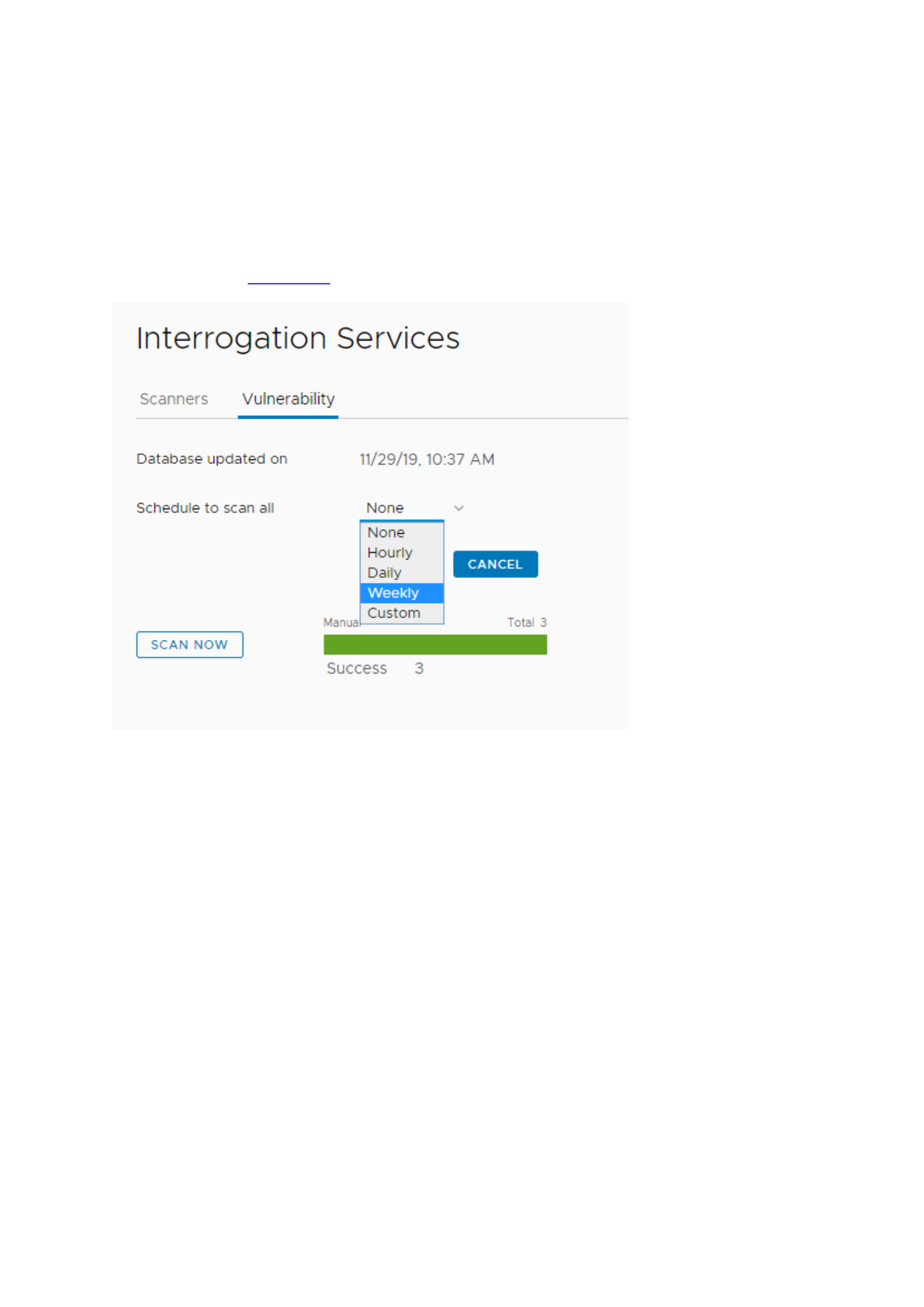
If your registry does not have these security features, it may be easy to bypass the
vulnerability scanner. To prevent a vulnerable image from running we can resort to
supply chain security policies to allow only approved images to enter into our cluster
orchestrator, for example, what I’ll talk about in Chapter X. Security as code.
Finally, it’s a good idea to regularly scan images in case a new vulnerability has been
found in a package that’s used by an image that hasn’t been rebuilt in a while, as
demonstrated in Figure 5-4.4:
Figure 5-4. Container images already accepted into your private container registry may include vulnerabilities
discovered after their push so it’s a good practice to scan them from time to time and also before deployment into a
production environment.
Tags Governance
When building images, developers usually identify them with proper tags which codify
the version information such as latest or 1.2. While convenient, mutable tags can lead to
a “Time-of-check vs Time-of-use (TOCTOU)” problem. Imagine that developer A created
a secure base image for your organization and tagged it as latest, pushing it into your
private registry. Now developer B creates a new and insecure base image, also
identifying it as latest. Every new image that refers to the parent image latest will be
rebuilt using the last version pushed to the repository by developer B.
There are different ways to mitigate tag mutability issues you can:
1. Pull images using the image digest instead of named tags. You can use
docker images --digests to obtain it.
2. Enable tag immutability in your container registry to prevent that someone
pushes a tag that already exists.

3. Use an admission controller in your container orchestrator to prevent
specific images to be deployed. We’ll consider this strategy in Chapter X,
when we see runtime security policies.
5.3 Container Network Security
In this chapter, we’ll cover network security principles for standalone containers as
networking in orchestrated environments using Swarm or Kubernetes operates in a
different manner, as we’ll see in Chapter 5. Cluster Security.
Due to its distributed nature, for most of the cases, we do not want containers to have a
fixed IP address. The Docker daemon then handles all the network configuration inside
of a container, including IP designation. Run a new Docker and inspect the container to
check which IP is designed for it at the moment:
$ docker run -dit --name containerA -p 80:80 nginx
$ docker inspect containerA | grep IPAddress
"IPAddress": "172.17.0.2",
If you already have any other service running on port 80 of your host, select a different
port, for example, 8080. Now, open a web browser pointing to it. Remember that if you
change the port, you will have to add it, using http://127.0.0.1:8083, for example.
Unless you have a firewall in your perimeter, you’ll see that the Nginx service is up and
running and exposed to any connected network (including the Internet if that is the
case), through the host IP address and not the container IP. This is possible because
Docker uses a network driver called bridge, which forwards traffic between the layers.
Now execute a second container, based on Alpine and again, find its IP address:
$ docker run -dit --name containerB alpine
$ docker inspect containerB
"IPAddress": "172.17.0.3",
Open a shell inside of containerA and ping ContainerB’s IP address:
$ docker attach containerA
# ping 172.17.0.3
PING 172.17.0.3 (172.17.0.3): 56 data bytes
64 bytes from 172.17.0.3: seq=0 ttl=64 time=0.200 ms
64 bytes from 172.17.0.3: seq=1 ttl=64 time=0.097 ms
64 bytes from 172.17.0.3: seq=2 ttl=64 time=0.097 ms
...
ContainerA and containerB are both connected to the bridge network and can talk to
each other. To check all containers connected to the network bridge, execute the
following command. First, you’ll see the network setup:
$ docker inspect network bridge
...
"Name": "bridge",
"Id": "8c828b23e630ba...d76d927a29d818abbf1c20cefe",
"Created": "2021-07-13T16:48:05.82879136-03:00",
"Scope": "local",
"Driver": "bridge",
"EnableIPv6": false,

"IPAM": {
"Driver": "default",
"Options": null,
"Config": [
{
"Subnet": "172.17.0.0/16",
"Gateway": "172.17.0.1"
}
]
},
...
Next, you can see all the containers attached to this network:
"Containers": {
"929a09e22912c877e0dfa70978c26d161f04f0c1250563a26f1367e899242902": {
"Name": "containerA",
"EndpointID": "f6c1f44b2392796143...31ceb964271cffc97c8c6a311984b",
"MacAddress": "02:42:ac:11:00:02",
"IPv4Address": "172.17.0.2/16",
"IPv6Address": ""
},
"c6eb64edeecf72df2aae05a69a3023845a7eaa781740f5497be53b7b755584fc": {
"Name": "containerB",
"EndpointID": "3947da01399938f18...247f8fb199694827bb15fc5e558f9c",
"MacAddress": "02:42:ac:11:00:03",
"IPv4Address": "172.17.0.3/16",
"IPv6Address": ""
}
}
It’s worth explicitly pointing out that two components can communicate with each
other only if they are connected to the same network. Docker has some reserved
networks and you can list them using:
$ docker network ls
NETWORK ID NAME DRIVER SCOPE
8c828b23e630 bridge bridge local
ba6a17f9d70e docker_gwbridge bridge local
6b5819411c4b host host local
d169a4871cdf none null local
Users can create their own network, to isolate containers. Let’s create a new network
called LearningDevSecOps and use the same bridge driver. If you inspect the newly
created network, you’ll see no containers attached to it.
$ docker network create --driver bridge LearningDevSecOps
Now, run a new containerC and attach it to the network created above. Then, open a
shell inside of it and try to ping the container B again:
$ docker run -dit --name containerC --network LearningDevSecOps nginx ash
$ docker container exec -ti containerC /bin/sh
# ping 172.17.0.3
PING 172.17.0.3 (172.17.0.3): 56 data bytes

There is no response from containerB because they are in different networks. Although
containerC is isolated from the other containers, the services run inside of it still can be
exposed, as we are using the network driver bridge. To stop any network traffic we can
resort to the driver none.
Or you can use this little trick that I really like to use in my test environments, to limit
the response only to localhost ;):
$ docker run -it --name containerA -p 127.0.0.1:80:80 nginx
As we can see, a well-configured container network can be an additional layer of
protection. Take a deep dive into docker networks and be especially aware of the host
network. Remember that we had to map and expose port 80 to make the Nginx service
available to other hosts and networks? The driver host removes the network isolation
between the container and the Docker host, and uses the host’s networking directly,
exposing all ports connected to a container. This is the easiest way to test containers
and so is especially risky.
If you’re running Docker on a host that is exposed to the Internet, you will probably
want to have iptables policies in place to prevent unauthorized access so it’s a good idea
to learn how to work with Docker and IPtables. Nonetheless, most container security is
made using Layer 7 tools, through policies and runtime protection, as we’ll see in
chapter X.
At least, you have to know that Docker installs two custom iptables chains named
DOCKER-USER and DOCKER to ensure that incoming packets are always checked first
by these two chains and so you have to double-check your policies. Ports opened by
containers have become one of the more common vulnerabilities found during pentests
and it can be easily avoided.
Summary
In this chapter, we examined the starting security principles to adopt in a containerized
environment. We’ll continue to examine best practices to protect our containers in the
next chapters, especially in chapter 5. Cluster Security, as we explore orchestrated
container deployments. In chapter X, we’ll see how to improve container security during
runtime, so in case our containers are compromised, the range of activities available to
an attacker is limited.
For those interested in furthering their skills about the combination of Linux kernel
features that make containerization possible, such as namespaces, control groups, and
capabilities, I highly recommend the book Container Security, by Liz Rice (O’Reilly,
2020). She explains many of the building block technologies and mechanisms that are
commonly used in container-based systems, and how to use them to achieve safer
environments.

Chapter 6. Case Studies
A NOTE FOR EARLY RELEASE READERS
With Early Release ebooks, you get books in their earliest form—the author’s raw and
unedited content as they write—so you can take advantage of these technologies long
before the official release. If there is a GitHub repo associated with the book, it will be
made active after final publication. If you have comments about how we might improve
the content and/or examples in this book, or if you notice missing or inaccurate
material within this chapter, please reach out to the editor at [email protected].
The concept behind DevSecOps is not new to the IT industry and many companies are
already far in their transformation journey to shift from a reactive approach to security
to a proactive one.
As we’ll see in the following cases studies, leadership and culture management are
central to promoting an environment of high trust between teams that will result in a
setting of security shared ownership. As security teams alone cannot avoid incidents
and their effort must be concentrated on improving the organization’s ability to respond
to these events, only after this first step is complete that the discussion must turn into
tools to implement continuous security
And as one of these cases studies show, even a mature DevSecOps program will not
prevent incidents. Any security controls we put in place will eventually fail. Instead, the
goal of any DevSecOps strategy must be how to make our organization’s most valuable
products and data resilient to attacks and how to a culture of fear to one of readiness.
Netflix: Secure Paved Roads
Netflix cultural values of ‘context not control’ and ‘freedom and responsibility’ highly
influence how the company manages its security. The streaming service, which relies
heavily on the judgment of its engineers, relationship building, and automation, is
currently one of the leading enterprises in the use of security and resilience
engineering. With multiple tools and documentation published, and many organizations
look for Netflix to learn from their state of art methodologies.
At Netflix, the security team’s goal is to enable developers to move quickly. To reach this
objective, members are distributed into three categories:
Operational Appsec: conducts traditional appsec activities like bug bounty
triage, pen-testing, threat modeling, vulnerability management, and product
security incident response.
Appsec Automation—aims to build an extensive app inventory and
implement self-service security advice.

Security Partnerships—aims to drive comprehensive security improvements
to mitigate risk.
While operational appsec activities are valuable, they are highly interrupt-driven. This
doesn’t align well with the focused engineering work needed to scale Netflix services
and that is the reason behind the app sec automation team. The security partnership
work is to provide the engineers with the appropriate security context that will enable
them to make decisions. “By focusing on relationships with other teams, they build trust
and ensure that everyone understands the company’s security priorities”, says Brian D.
Payne, Engineering Director, Product & Application Security at Netflix.
Context, not control: A member of the product security team may file a bug report, but
the fixing pull request is more likely to be created by each individual team. Ultimately,
they are the ones responsible for using the resources and securing what they create.
Netflix looks to hire great employees and then trust them to do their job well. They are
light on policy, and instead, just ask people to work in the best interest of the company.
There is a very high bar for members of the security team as well.
Freedom and responsibility: At Netflix, people can feel comfortable starting and leading
large initiatives without approval from a central authority. Jason Chan, former VP of
Security explains: “you really want to distribute decision-making as much as you can.
[As a leader], I want to be making as few decisions as possible, and the best way to
facilitate that is to make sure that people have context about what’s important to the
company, what’s important to the team.”
One of Netflix’s current technology challenges lies in the construction of an app
ecosystem to allow the Studio to scale. As the number of their engineering grows, the
value of automation to scale also increases. “In the past, we have primarily invested in
automation for vulnerability identification (static code scanning, dynamic testing, grep
for anti-patterns, etc) in line with the common “DevSecOps” approach. Lately, we have
shifted focus towards driving adoption of the Security Paved Road practices across our
application inventory”, says Astha Singhal, Engineering Director, Application Security.
Instead of trying to transform software engineers into security experts, Netflix wants
them to focus on build features and products. Thus, the company decided on a
productized approach, to make participating in security as easy as possible. As
engineers adopt a variety of different tech stacks (different programming languages,
libraries, micro-service dependencies, etc), they build an authentication solution that
works across any tech stack. For Chan, “If we can solve those problems elegantly and
performantly and efficiently for them, then what we’d like them to do is opt into our
systems versus trying to solve on their own. If we have this nice smooth paved road that
gets you to your destination, you’re likely to opt-in there.”
This is the concept behind the “Secure Paved Roads”: instead of a number of processes
and tools to secure multiple apps, engineers have paved road products that handle
security issues. Netflix security teams are constructing products to kill the security
checklists and also establish, for example, the architectural property of guaranteed
authentication.

“For a typical paved road application with no unusual security complications, a team
could go from “git init” to a production-ready, fully authenticated, internet accessible
application in a little less than 10 minutes. The automation of the infrastructure setup,
combined with reducing risk enough to streamline security review saves developers
days, if not weeks, on each application”, declared one of Netflix Technology Blog posts.
A productized approach also meant that more users make the amortized platform
investment more valuable, they also bring more ideas and clarity for new features,
which in turn attract more internal users. This scale and standardization also show
compelling annualized savings in risk and incident response costs.
HSBC: DevSecOps transformational change
driven by behavioral change
For HSBC, a large and highly regulated enterprise, DevSecOps adoption started with
behavioral change at the C-level, to transform the fabric of the organizational culture.
With the challenge of fintechs and their faster time to market, the global bank faced
distributed teams and cultural complexities to deliver robust and dynamic solutions.
The bank, which operates across 64 countries, serves over 40 million customers and the
DevOps teams support more than 7000+ services. HSBC wanted to remain a sustainable
and strong organization, but emerge as a data-driven, agile enterprise. Customers not
only expect faster responses but also expect banks to predict what they want,
highlighting the need for a robust technology model in place. The bank was regularly
beaten by challenger startups, with a smaller time to market.
“Once we understand where the challenges and opportunities were, we had a number of
boot camps to identify where we, as leaders, could improve to lead that kind of change.
From there, we had regular meetings to check progress. We created self-contained
teams focusing on creating new, shiny, market-driven functionalities and products.
They had all the tools and information to make decisions and spent less time
delivering”, said Donald Patra, EVP & CIO, HSBC Americas.
Nonetheless, these classical transformation projects usually have the audacious goal of
delivering a minimal viable product (MVP) in 12 weeks. This represents a unique set of
security challenges, especially when the organization decides to use IaaS and PaaS for
faster provision and scale-up. HSBC operates in a regulated environment, with
mandatory activities such as security architecture design, risk acceptance processes,
secret management review, data storage standards, and penetration tests, for example.
For Chris Rutter, Principal Security Consultant, if these security activities and reviews
are left for the last week, it will not be enough time. “On week 16, the security design
review will find high impact architectural issues, an app penetration test will report
severe vulnerabilities and secret management will not comply with company standards.
Reviews, fixes, and verifications will be thrown over the wall and take weeks. The
business executives will finally sign off on risk acceptance and with the project four
weeks late, it’s no surprise that everyone hates security.”

To solve the problem and promote organizational change, leaders saw engagement and
cross-functional teams as key. They paired a software developer with security skills at
every step of the architectural design process. Security controls became part of the user
stories and part of the products’ acceptance criteria. These engineers would threat
model every design, every week with a subject matter specialist.
As the bank regulations require evidence of reviews and implemented controls, they
established automated security acceptance tests in pipelines and build standardized
libraries and patterns. Every time someone uses encryption, for example, it is a pre-
approved library. HSBC security team’s mission now is to reduce compliance lead time.
They are seen as a group of experts, feeding into the project, rather than blockers.
For Patra, it’s critical to start with small victories to demonstrate the business value of
DevSecOps, but cultural re-organization and mindset shift is critical for the sustenance
of the change as new normal. Without it, the transformation is not sustainable. “It will
take time, but big businesses need to be more agile to compete with startups. We
fireproof our model with the release of critical and secure solutions during the peak of
the pandemic”, concluded the VP.
VTEX: We Are Trusted
VTEX, a Brazilian-born enterprise digital commerce platform, enables global brands and
retailers such as Whirlpool, Electrolux, Sony, L´Oréal, Coca-Cola, and Nestlé to achieve
faster time-to-market, reach their customers across any channel, and uncover new
growth areas to accelerate and transform their commerce business.
In 2019, the platform closed a USD 140 million investment round deal with SoftBank’s
LATAM fund and purchased UniteU, an American e-commerce company, in order to
accelerate its global expansion and innovation rate. VTEX products include a patent-
pending passwordless checkout called SmartCheckout, an architectural network of
microservices to deliver continuous updates, and the company’s VTEX IO serverless
development framework that enables clients to develop scalable, production-ready web
applications for global commerce without infrastructure complexity.
Founded in 2000, the company now operates in more than 32 countries in North and
South America, Asia, Europe, and the UK, where VTEX’s new headquarters is located. In
2021, VTEX became a New York Stock Exchange-listed company and raised US$361
million in an initial public offering (IPO).
One of the VTEX intends to use the net proceeds is to achieve their 2024 product
milestone, “We are trusted”. As a global platform, VTEX shares with its clients the
responsibility to keep their customer’s data secure and private, according to each
countries’ data and privacy regulations. The company risk tolerance is quite low and
compliance lead time has become a competitive advantage. So there is a considerable
business gain in automating security analysis and controls.
In order to achieve this vision, one of the first decisions was to centralize operations
and security under the same leadership. VTEX invited Gustavo Franco, an IT executive

with more than 20 years of experience scaling SRE teams in Google and VMware, and
me, to work together. Together, we achieved our first victory: shared ownership and
common goals.
The SRE and security teams no longer see themselves as siloed groups, with different
objectives. We all share the same objective: be trusted and deliver a reliable and secure
environment. SRE is as responsible as security to implement secured services and
products and the same goes for security - our definitions of secure also include
reliability. In other words, we are all working together to achieve better software
delivery performance and hence, our efforts are oriented towards DORA’s four key
metrics: delivery lead time, deployment frequency, change fail rate, and more
importantly, mean time to restore service.
The company is also working to improve its software engineer experience, working to
productize infrastructure and security. The platform comprises 70+ services, each of
them with its own environment and lifecycle. “The era of siloed software has ended and
our challenge is to scale up our delivery in a secure manner. VTEX is at the center of this
revolution, helping enterprises drive digital commerce transformation and build
customized experiences for their consumers,” said Geraldo Thomaz, VTEX co-CEO.
Capital One: Start, Fail Fast and Restart
Capital One, a Virginia-based bank with a popular credit card business embraced the
cloud and automate software quality and security controls to reduce human errors.
Their DevOps group supports a developer community of close to 7,000 engineers. On a
platform running more than half a million automation pipelines and some 50,000 build,
test and deploy activities daily, the organization needed to simplify audit and
compliance.
“We build our pipelines to be centered around a batch of software delivery principles so
things like static analysis, unit testing, performance testing run automatically. We are on
a point where Capital One is comfortable with you releasing your code and knowing
that when it goes to production it’s going to be solid, it’s going to work and you’ve
covered all your bases with what could go wrong”, said John Casanova, former Senior
Cloud Engineer at Capital One.
Yet, those mechanisms are only part of a DevSecOps strategy that needs continuous
improvement, and years later, Capital One was ensnared in one of the largest-ever hacks
to hit a financial services firm.
The breach took place in July 2019 when vast amounts of personal data about Capital
One credit card customers and individuals were accessed. 140,000 Social Security
numbers, about 80,000 linked bank account numbers, credit scores, payment history,
and other financial information were stolen. Paige A. Thompson bragged about her hack
on Slack and on a public GitHub post. Another user privately emailed the company and
informed the financial giant.

The FBI then arrested Thompson, a software engineer formerly employed by AWS, the
company that provided data storage to Capital One, on a charge of computer fraud and
abuse. She created a scanning software that allowed the identification of customers of
the cloud computing company who had misconfigured their Web Application Firewall
(WAF), allowing her to bypass it and obtain administrative credentials. The account had
enough privileges to decrypt, view and copy data. Thompson used this access not only
to steal information but also to mine crypto coins.
“It’s easy to blame Capital One’s engineers for the loss of data, but the truth is that IAM
role misconfigurations are very common in AWS accounts. Unfortunately, very few
developers take the time to carefully list each permission, and oftentimes a wildcard is
used in many more places than it should be, resulting in unintended access”, according
to CloudSploit.
The Office of the Comptroller of the Currency (OCC), which is part of the US Department
of the Treasury, has imposed a civil money penalty of $ 80 million on Capital One
Financial Corp for “failing to establish effective risk assessment processes and to
prevent the massive data breach that compromised the personal information of about
100 million US citizens”.
The regulator observed that the bank failed to appropriately design and implement
certain network security controls, adequate data loss prevention controls, and effective
dispositioning of alerts. The bank’s internal audit also failed to identify numerous
control weaknesses and gaps in the cloud infrastructure.
“While the OCC encourages responsible innovation in all banks it supervises, sound risk
management and internal controls are critical to ensuring bank operations remain safe
and sound and adequately protect their customers.”
After a slew of companies was featured for bucket leaks in the news, AWS also took
steps to help their customers to configure their buckets as intended. Nonetheless, the
responsibility for preventing data leaks remains solely with cloud customers.
Thompson was charged by a federal grand jury in the US District Court in Seattle on two
counts of unauthorized intrusion into stored data of more than 30 different companies,
including Capital One.
U.S. Air Force: The DoD Enterprise DevSecOps
R eference D esign
While most organisations start their DevSecOps journey within a small environment, to
demonstrate value, Nicolas M. Chaillan, former Chief Software Officer of the U.S. Air
Force, decided to take a singular path: get Kubernetes to securely run on an F-16 jet.
“I tackled the weapon systems so General Officer and Senior Executives will pay
attention, and that’s where you usually end up getting the funding. So if you get people
excited and show you can do it, then you can demonstrate there is something there,”
says Chaillan.

The jet’s legacy hardware increased the challenge. “We had to be able to boot
Kubernetes with Istio on the jet within two minutes, because that’s a requirement for
the jet if something goes wrong, and it has to be able to spin back up within two
minutes,” adds the CSO. Within 45 days, the SoniKube team based at Hill Air Force Base
accomplished that goal.
“We got the cluster on Istio running and then we launched five or six microservices,”
Chaillan says. “A lot of the jet runs in older programming languages, and so being able to
run Go, Python, and Java was pretty exciting.” The former CSO wanted to “learn fast, fail
fast, and don’t fail twice for the same reason.
Software delivery could take anywhere from three to ten years for big weapons systems
before the US Department of Defense started its DevSecOps initiative. “It was mostly
teams using waterfall, no minimum viable product, no incremental delivery, and no
feedback loop from end-users… and cybersecurity was mostly an afterthought,” he says.
The CSO and Peter Ranks, Deputy Chief Information Officer for Information Enterprise,
DoD CIO, created then the DoD Enterprise DevSecOps reference design, with a mandate
to use CNCF-compliant Kubernetes clusters and other open source technologies. “The
DoD Enterprise DevSecOps reference design defines the gates on the DevSecOps
pipeline,” says Chaillan.
Currently, 37 teams are building applications on top of Kubernetes: “We have teams
doing this at every side of the weapons systems, from the space systems to the nuclear
systems to the jets,” he says. “As long as teams are compliant with that reference design,
they can get a DoD-wide continuous ATO (authority to operate)…and anytime software
is going to pass the gates, it is automatically accredited. So you can push software
multiple times a day.”
Given their nature, most of these programs are classified, but some results can be
shared, such as the Navy’s Compile to Combat in 24 Hours program: “Kubernetes is
enabling them to do a push to production on the ship while being disconnected [at sea],”
Chaillan says.
“All the classification levels can be run where the data is, which is where you need it. So
having that turnkey where you can go and have the environment ready... if a team like F-
16 comes and says, ‘I need cloud computing, storage, a Kubernetes distribution, a source
code repo, a bunch of different tools for the CI/CD pipeline, and five DevSecOps
engineers,’ they can get all that within 30 days.”
For Chaillan, DevSecOps has been a big enabler for the U.S Air Force. He estimates that
the 37 programs in operation have saved off more than 100 years of years saved off
planned program time.

