


Creating a program in java using an IDE
We are going to be using the IntellijIDEA Community IDE to create a new project and compile a
simple hello world program.
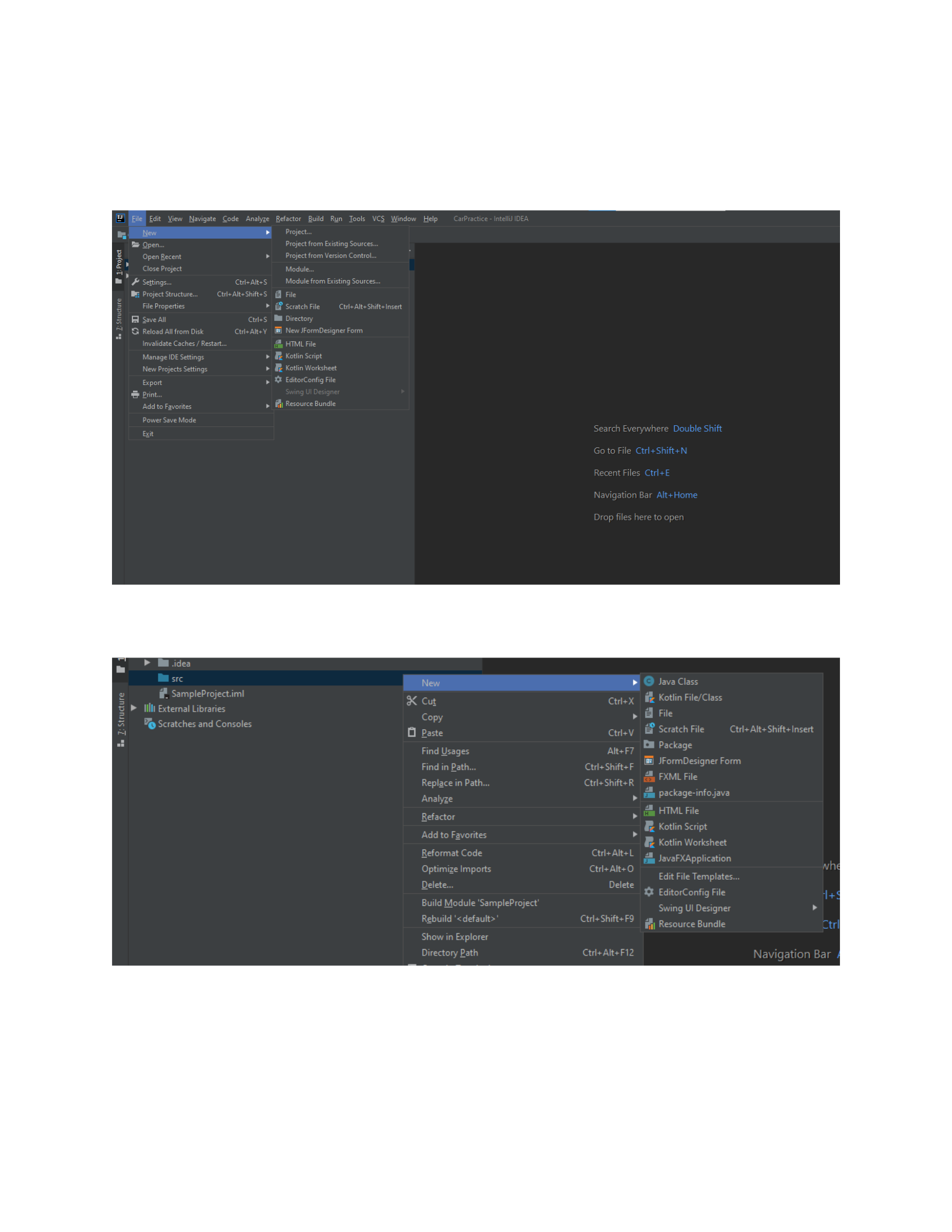
The project creation is really simple in this software, we just need to select the new project option from
the file dropdown menu.
Once the project is created, we will create a class to run our code in, we do this by selecting the src
folder (that was created with the project instance), right click, new, and select Java Class
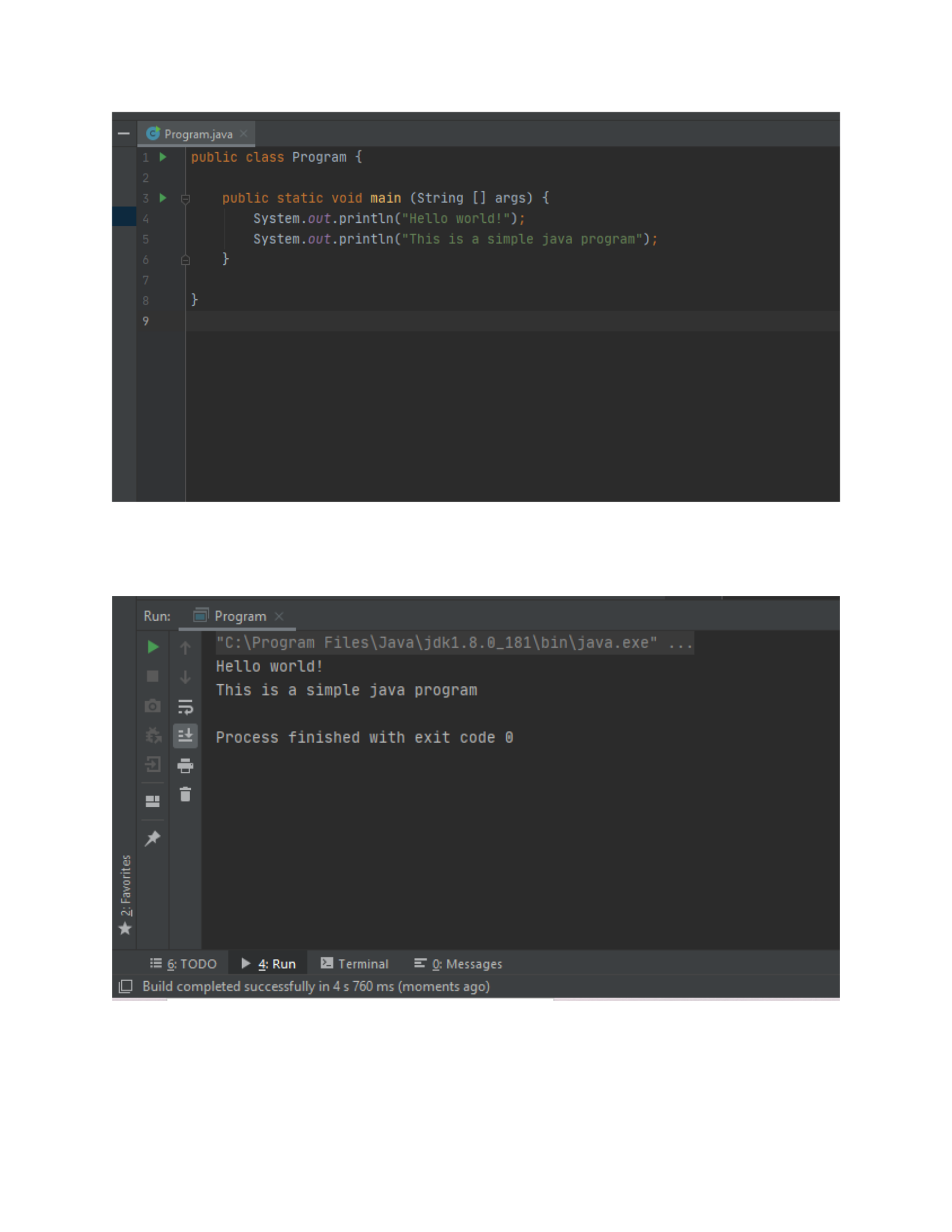
Here is the code to our first program, it will just print out the “Hello world” and “This is a simple java
program” statements to the console by using the static println method that takes advantage of the
output buffer to show things as a message string.
And finally, we can see the output of our program when we run it, and it demonstrates the expected
previously mentioned behaviour.
Primitive vs reference variable types
In java (and similar object-oriented programming languages) there are two main ways of storing
data in variables, and these are the primitive and reference data types. Let us go one step at a time
to be able to properly differentiate the two, starting by asking the following question.
How is data stored in a program?
To store data of any type for its use within a program, you need to access the computer’s RAM,
all of your variables will be stored there, and to do so, the program needs to perform an operation
called memory allocation; there are two types of memory allocation methods, allocation on the
stack (all the information is allocated in consecutive blocks of memory with a fixed size at compile
time one after the other, thus the name), and allocation on the heap (the information is usually
stored in different regions of memory, but the size of the memory block can be dynamic, and the
allocation happens at runtime), speaking generally, having stack-allocated variables is better for
performance, but heap-allocated variables are more flexible, well, turns out we can actually
identify the primitive and reference data types with this knowledge, primitive types will always be
allocated on the stack, as opposed to reference types which will reside on the heap.
Generally, we can consider class types / objects, arrays, and interfaces to be reference types,
and any other data type (such as int, float, double, boolean) to be primitive types.
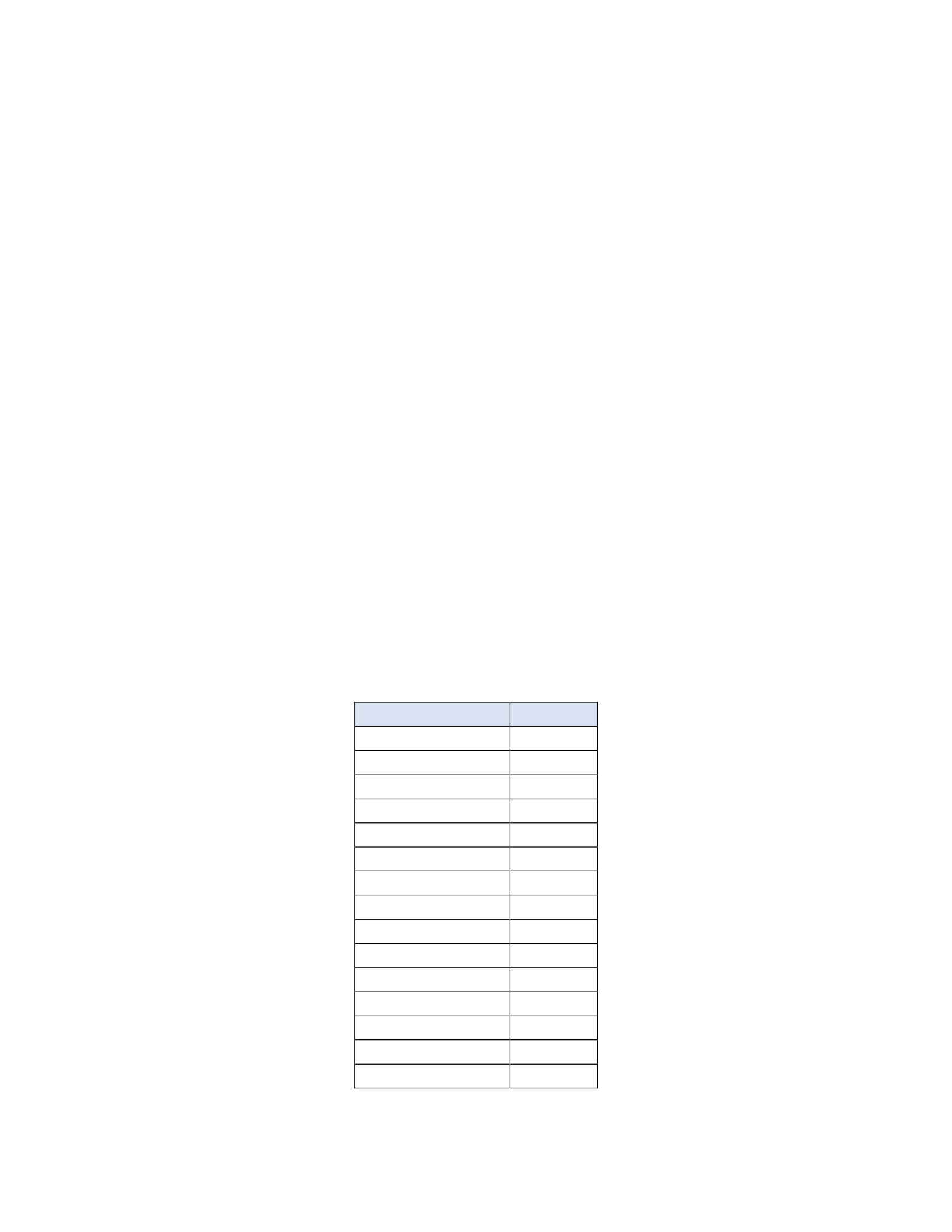
Below is a table with the information regarding the most common data types and structures and
what side they belong to:
Data type
Family
int
Primitive
Integer
Reference
boolean
Primitive
Boolean
Reference
<AnyType>[]
Reference
ArrayList<AnyType>
Reference
float
Primitive
Double
Reference
double
Primitive
Scanner
Reference
char
Primitive
String
Reference
long
Primitive
byte
Primitive
LinkedList
Reference
You might have noticed that for each primitive type there is usually a reference one, and that is
just to add another layer of functionality to the data you are working with, for example, the Integer
class provides methods for converting Strings into integers, or maybe to be used as a reference for
an ArrayList or any other generics based type, things that simply can’t be done through a primitive
data type (whose only job is to store the raw information given to it in memory).
Differences between instance and local variables.
To talk about instance and local variables, we first need to understand the concept of scopes, a
scope is a region of your code that you can define at compile time, any variable that you use within
that scope will only be usable inside of said region, so, for example, let’s say you’re writing a
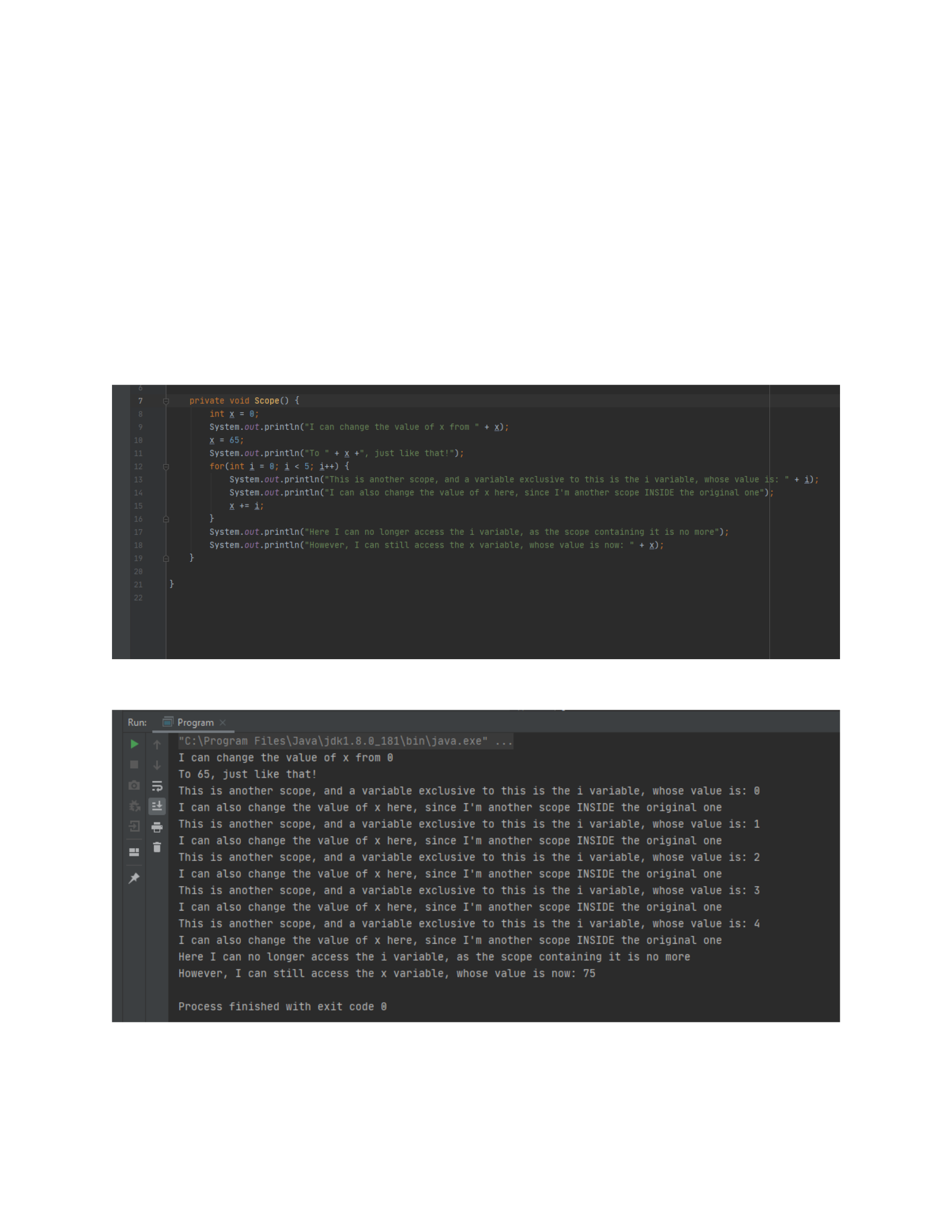
function:
The output of this function will be:
Every single variable in that example was limited to their respective scope, the “i” variable being
limited to what was inside the for loop, and the x variable limited to the function itself, if we were
to reference the x variable outside of the function, we’d get a compiler error just like this:
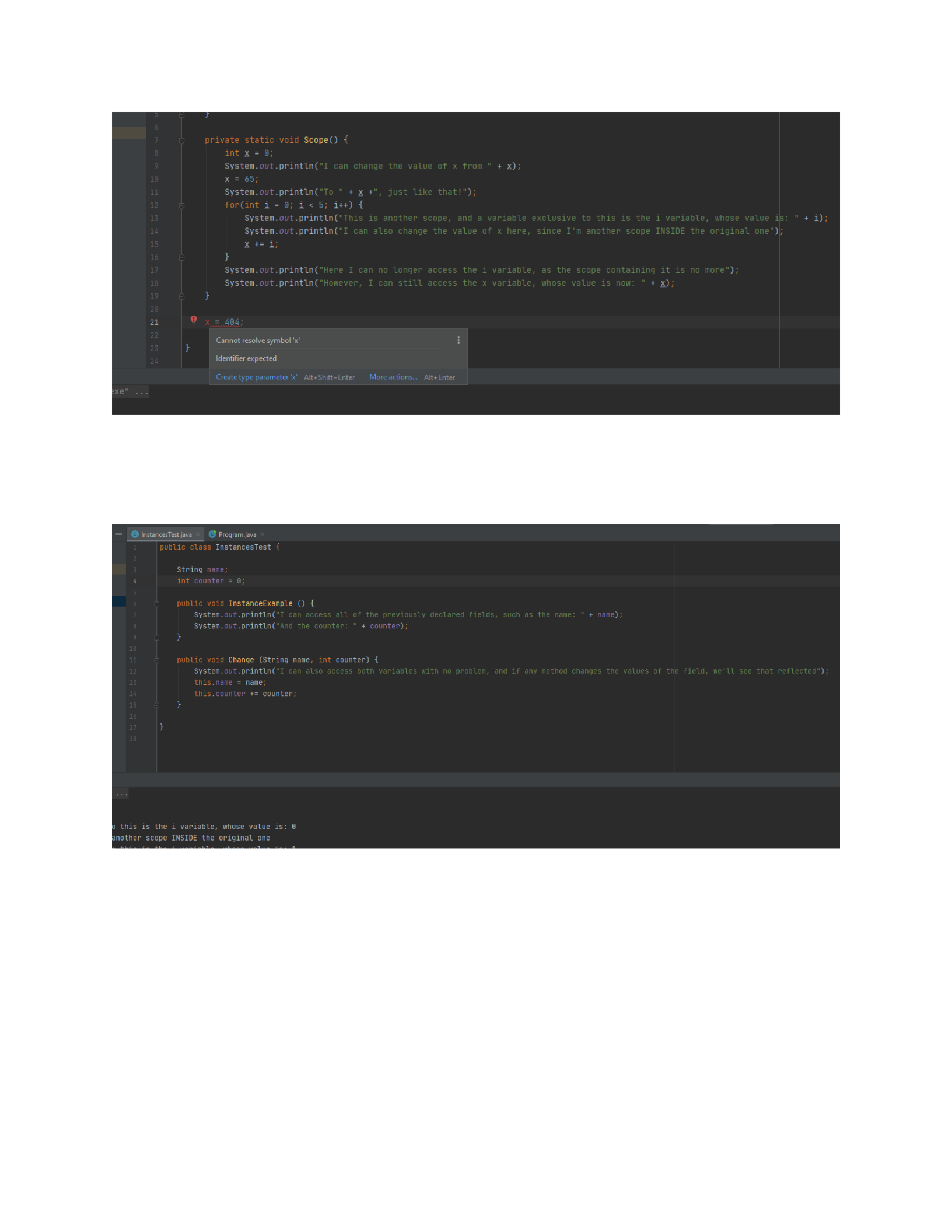
These variables are called local variables.
As for instance variables, we can define them as fields or properties of a class object that will be
usable in every single scope of that class, so they allow us to do something like this:
If we call both functions through a driver class, we can see that every single change will impact
both methods.
We will create an instance of the class to test this:
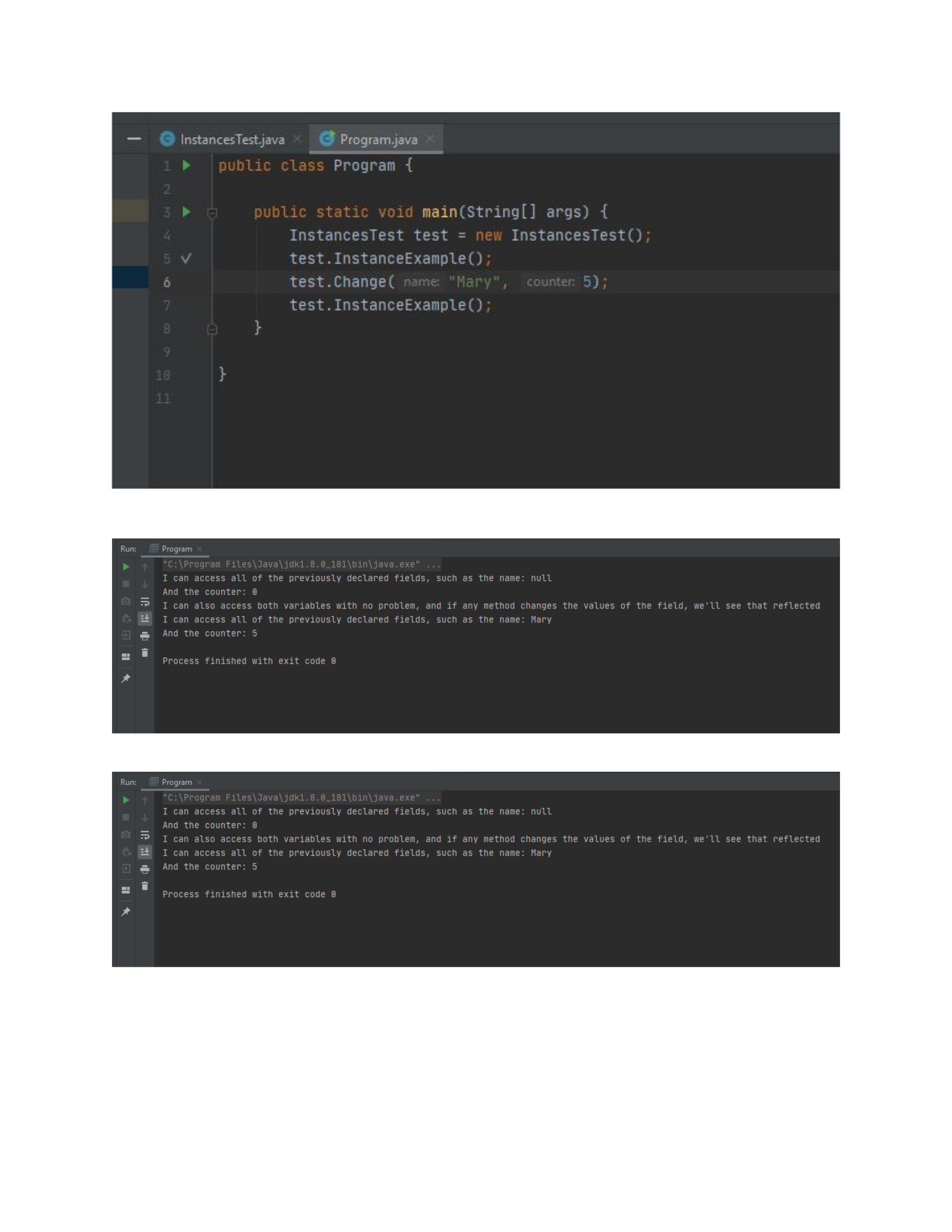
The output will be as follows:
As we can clearly see, the changes in one function will affect the behaviour of the other one.

Creating a java program with multiple classes and constructors.
We will create a simple application to perform simple mathematical vector operations such as the
dot product, the distance between one vector and another, getting their magnitudes, etc, We are
later in this document improve on this application by using polymorphism and inheritance, so we
will create the base abstract class for that here as well (but keep in mind that is only there for future
use).
The code is the following:
Vector base class:
//Parent class (abstract as this will only be used as a template for our two
Vector types)
public abstract class Vector {
//Common fields
protected float x, y, z;
//Base constructor
public Vector(float x, float y) {
this.x = x;
this.y = y;
}
//Common getters and setters
public float GetX () {
return x;
}
public float GetY () {
return y;
}
public void SetX (float x) {
this.x = x;
}
public void SetY (float y) {
this.y = y;
}
//Common methods
public float DistanceTo (Vector b) { return 0f; }
public float Magnitude () { return 0f; }
public float Dot (Vector b) { return 0f; }
@Override
public String toString() {
return "Vector(" + x + ", " + y +")";
}
}
This class is abstract, therefore an instance of it cannot be created, this only serves as a template
for our next vector classes.

Vector2 class:
public class Vector2 extends Vector {
//Constructor derived from the base class
public Vector2(float x, float y) {
super(x, y);
}
//Override methods with specific instructions based on math formulas
@Override
public float DistanceTo(Vector b) {
return (float) Math.sqrt(Math.pow(b.x - x, 2) + Math.pow(b.y - y,
2));
}
@Override
public float Magnitude() {
return (float)Math.sqrt(Math.pow(x, 2) + Math.pow(y, 2));
}
@Override
public float Dot(Vector b) {
return x * b.x + y * b.y;
}
}
Here we implement all the expected functionality of a mathematical two-dimensional vector.
Driver class:
import java.awt.*;
import java.util.Scanner;
public class Program {
static Scanner input = new Scanner(System.in);
public static void main(String[] args) {
Vector2 vector2d, secondVector2d;
System.out.println("\tVector program test:");
float x, y;
System.out.println("Please enter the first vector's X value: ");
x = input.nextFloat();
System.out.println("Please enter the first vector's Y value: ");
y = input.nextFloat();
vector2d = new Vector2(x, y);
System.out.println("Please enter the second vector's X value: ");
x = input.nextFloat();
System.out.println("Please enter the second vector's Y value: ");
y = input.nextFloat();
secondVector2d = new Vector2(x, y);
Menu(vector2d, secondVector2d);
}
private static void Menu (Vector a, Vector b) {
System.out.println("\tSelect the operation you want to perform: ");

System.out.println("1) Distance between the vectors");
System.out.println("2) Get the magnitude of both vectors");
System.out.println("3) Get the Dot product of the vectors");
System.out.println("4) Display their information");
int sel = input.nextInt();
switch (sel) {
case 1:
System.out.println("Distance: " + a.DistanceTo(b));
break;
case 2:
System.out.println("Magnitude of vector 1: " +
a.Magnitude());
System.out.println("Magnitude of vector 2: " +
b.Magnitude());
break;
case 3:
System.out.println("Dot product between the vectors: " +
a.Dot(b));
break;
case 4:
System.out.println("First vector's information: ");
System.out.println(a.toString());
System.out.println("Second vector's information: ");
System.out.println(b.toString());
break;
default:
System.out.println("Invalid option!");
break;
}
}
}
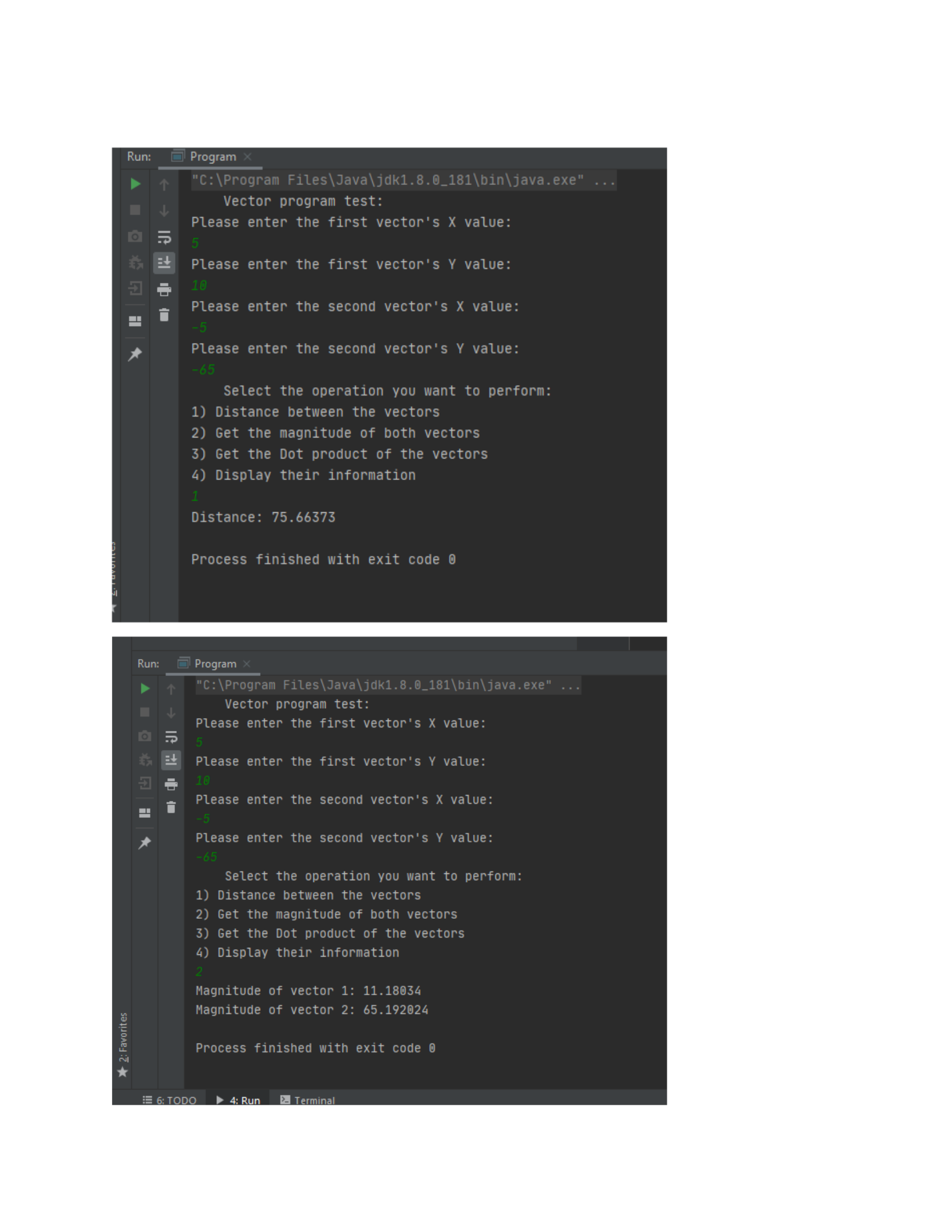
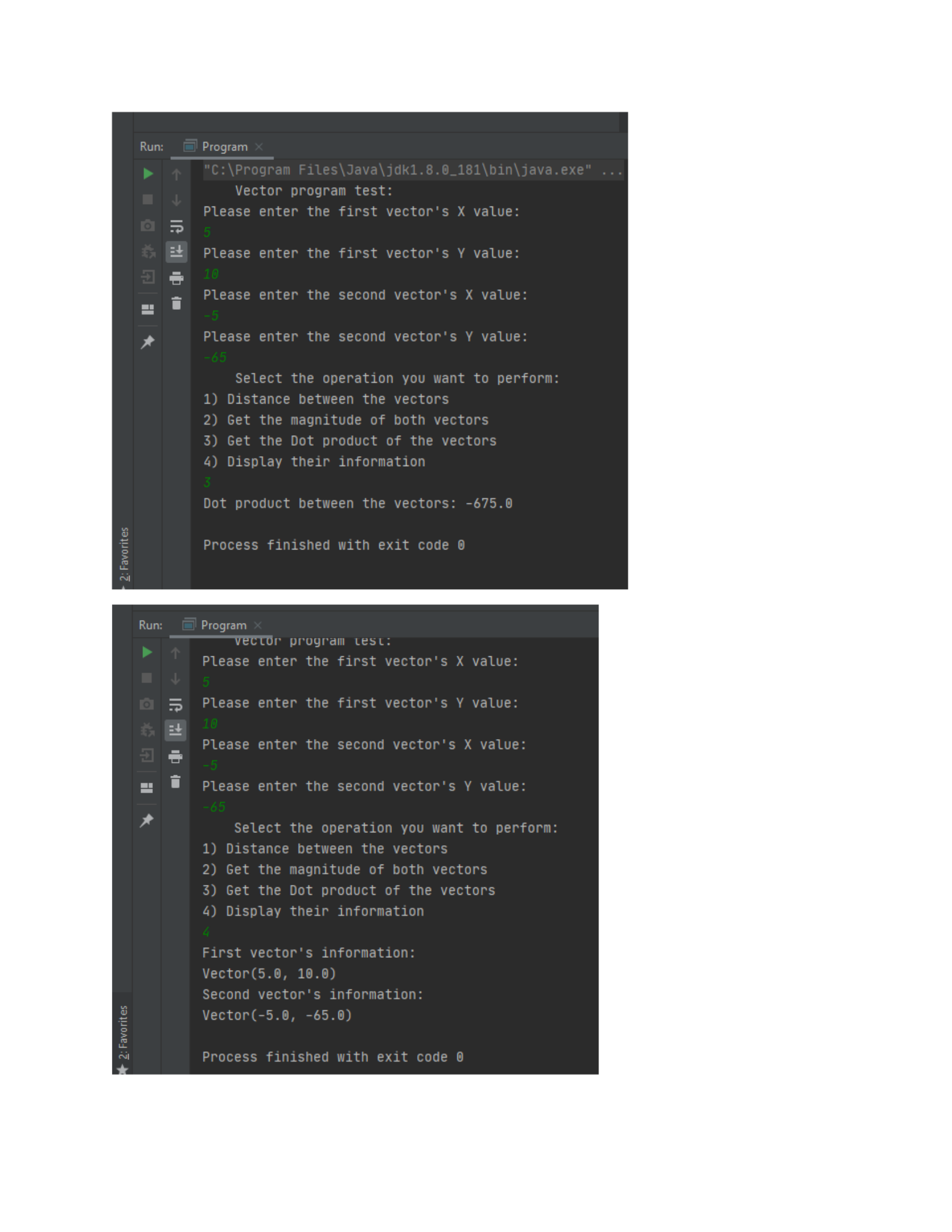
A couple of example outputs of this program are:

Program that uses data types, loops, conditional statements, function strings,
arrays, inheritance, and polymorphism.
Let us expand upon our previous program to accomplish this; first, we will add a new Vector class
to handle three-dimensional vectors:
Vector3 class’ code:
public class Vector3 extends Vector {
//Constructor derived from the base class
public Vector3(float x, float y, float z) {
super(x, y);
this.z = z;
}
//Type-specific getter and setter
public float GetZ () {
return this.z;
}
public void SetZ (float z) {
this.z = z;
}
//Override methods with specific instructions based on math formulas
@Override
public float DistanceTo(Vector b) {
return (float) Math.sqrt(Math.pow(b.x - x, 2) + Math.pow(b.y - y, 2)
+ Math.pow(b.z - z, 2));
}
@Override
public float Magnitude() {
return (float)Math.sqrt(Math.pow(x, 2) + Math.pow(y, 2) + Math.pow(z,
2));
}
@Override
public float Dot(Vector b) {
return x * b.x + y * b.y + z * b.z;
}
@Override
public String toString() {
return "Vector(" + x + ", " + y + ", " + z + ")";
}
}
As we can see, this implements a lot of the previously defined methods to the class but adding the
extra dimension to provide accurate calculations and distinctive properties, this already applies
multiple classes, constructors, inheritance, and polymorphism.

Next, we modify our driver class to work with the two types of vectors, and we will sprinkle a
little bit of array management and conditionals to make sure the user can have a better experience:
import java.util.Scanner;
public class Program {
static Scanner input = new Scanner(System.in);
public static void main(String[] args) {
Vector2[] vectors2d = null;
Vector3[] vectors3d = null;
int n;
System.out.println("\tVector program test:");
System.out.println("What type of vector would you like to use?");
System.out.println("1) Vector 2");
System.out.println("2) Vector 3");
while(vectors2d == null && vectors2d == null) {
switch (input.nextInt()) {
case 1:
System.out.println("Enter the amount of vectors that you
would like to work with: ");
n = input.nextInt();
vectors2d = new Vector2[n];
for (int i = 0; i < n; i++) {
System.out.println("\tInput for vector #" + (i + 1) +
":");
vectors2d[i] = TwoDimensionalInitializer();
}
break;
case 2:
System.out.println("Enter the amount of vectors that you
would like to work with: ");
n = input.nextInt();
vectors3d = new Vector3[n];
for (int i = 0; i < n; i++) {
System.out.println("\tInput for vector #" + (i + 1) +
":");
vectors3d[i] = ThreeDimensionalInitializer();
}
break;
default:
System.out.println("Invalid option, please try again!");
break;
}
}
if (vectors2d != null)
Menu(vectors2d);
else
Menu(vectors3d);
}

private static Vector2 TwoDimensionalInitializer () {
float x, y;
System.out.println("Please enter the vector's X value: ");
x = input.nextFloat();
System.out.println("Please enter the vector's Y value: ");
y = input.nextFloat();
return new Vector2(x, y);
}
private static Vector3 ThreeDimensionalInitializer () {
float x, y, z;
System.out.println("Please enter the vector's X value: ");
x = input.nextFloat();
System.out.println("Please enter the vector's Y value: ");
y = input.nextFloat();
System.out.println("Please enter the vector's Z value: ");
z = input.nextFloat();
return new Vector3(x, y, z);
}
private static void Menu (Vector[] vl) {
while(true) {
int fIndex, sIndex;
System.out.println("\tSelect the operation you want to perform:
");
System.out.println("1) Distance between the vectors");
System.out.println("2) Get the magnitude of both vectors");
System.out.println("3) Get the Dot product of the vectors");
System.out.println("4) Display their information");
System.out.println("5) Exit the application");
int sel = input.nextInt();
switch (sel) {
case 1:
System.out.println("First vector to evaluate (starting
from zero): ");
fIndex = input.nextInt();
System.out.println("Second vector to evaluate (starting
from zero): ");
sIndex = input.nextInt();
System.out.println("Distance: " +
vl[fIndex].DistanceTo(vl[sIndex]));
break;
case 2:
System.out.println("First vector to evaluate (starting
from zero): ");
fIndex = input.nextInt();
System.out.println("Second vector to evaluate (starting
from zero): ");
sIndex = input.nextInt();
System.out.println("Magnitude of vector 1: " +
vl[fIndex].Magnitude());
System.out.println("Magnitude of vector 2: " +
vl[sIndex].Magnitude());
break;

case 3:
System.out.println("First vector to evaluate (starting
from zero): ");
fIndex = input.nextInt();
System.out.println("Second vector to evaluate (starting
from zero): ");
sIndex = input.nextInt();
System.out.println("Dot product between the vectors: " +
vl[fIndex].Dot(vl[sIndex]));
break;
case 4:
for (int i = 0; i < vl.length; i++) {
System.out.println("\tInformation for vector #" + (i
+ 1) + ":");
vl[i].toString();
}
break;
case 5:
return;
default:
System.out.println("Invalid option!");
break;
}
}
}
}
This re-worked class checks what type of, and how many vectors the user would like to be working
with, then we initialize one the arrays with all the proper vector data, and passed the initialized
array to the menu function which performs an infinite loop (unless the “exit application” option is
pressed) to display a couple operations that can be performed with the vectors, allowing the user
to choose which ones are going to be involved by indexing them as a normal array.
Relevance of the course.
As we move towards the future it becomes clearer than ever that our industry will change, it will
evolve to become more dependant on modern computers, therefore having the knowledge to create
software for these upcoming systems opens up a million possibilities in terms of getting a job. And
having Java been taught in particular is extremely useful to understand the most common
programming model (object oriented programming), as enterprise-level applications make use of
said model and language all around the world.

