



Monolith versus Microservice Architectures
High-level architecture is the software’s all-encompassing code design. When
described with a diagram, a high-level architecture usually looks like a few to
dozens of interconnected shapes with short labels, an abstraction that usually
represents the entire codebase. In this chapter, we’ll use “architecture” inter-
changeably with “high-level architecture” (in other contexts, software architecture
can refer to code design at lower levels).
In this chapter, I won’t be covering every high-level architecture. Instead, I’ll
concentrate on two dis- tinct high-level architectures: monolith and microservices.
Talking about the ways they’re different will lead us through concepts applicable to
high-level architecture in general.
5.1 Monolith Architecture
Monolith software is one interconnected codebase that cannot easily be divided
into multiple indepen- dent components that run separately and are individually
useful.

If you’re trying to think of an example of a monolith and nothing is coming to mind,
that’s probably because this architecture is so common that it can arise without
having to plan. Your first computer pro- gram was probably a small monolith. If you
keep adding more code/files/classes/components, the soft- ware becomes a bigger
monolith—unless you change the architecture.
5.2 Microservice Architecture
Microservices are separate applications, each of which runs in a separate
process and could be indi- vidually useful. This section describes core
characteristics of software that uses the microservice archi- tecture. The
subheadings are borrowed from Lewis & Fowler (2014). Martin Fowler’s
Microservices Guide (Fowler, 2019) provides additional discussion.
5.2.1 “Smart End Points and Dumb Pipes”
The communication pipe within a microservice architecture is simple, and the
services themselves take care of translating and otherwise processing messages.
For example, microservices commonly commu- nicate through a REST API, which
allows these kinds of messages: GET, POST (create), PUT (update), or DELETE. The
contents of the messages can be complex, but it’s the job of the services to deal
with that.
5.2.2 “Componentization via Services”
In a microservice architecture, components are services. The Lewis and Fowler
(2014) definition of a component is “a unit of software that is independently
replaceable and upgradeable.” A service provides functionality while running in its
own process. A monolith typically has code with tight coupling and components that
run in the same process.
“Dumb pipes” does not imply simple message contents.
Even though it provides a service, a library is not a service if you’re including its code in your code.

Advantages of splitting components into services:
•Independence: Each individual service can be updated, tested, launched, and
stopped without requiring the same from other components of the software. In
contrast, with some monolithic soft- ware, all tests must be run each time a
developer commits to a change, which can make for a long wait. If a service
fails, any software depending on it will be without that service, but the rest of
the software needn’t be affected.
•Standardized component communication: Service communication pipes can be
simple and the same each time. This can make for less thinking, fewer
mistakes, and less violation of encapsula- tion when connecting two
components—just use the pipe.
Disadvantages of splitting components into services:
•More expensive communication: Components in a monolith can communicate
via direct calls (fast, lightweight); in contrast, microservices often
communicate over a network. Microservice requests typically need to
include request metadata, and because the pipes are “dumb,” responses might
contain extra data (slower, heavier).
•Potentially less secure communication: Communication over a network can be
more prone to interception and alteration.
5.2.3 “Organized around Business Capabilities”
You may have heard of the client-server architecture, in which multiple instances of
client-side software communicate with server-side software, which communicates
with a database. That architecture is orga- nized around technology. Another way to
put that: someone unfamiliar with the differences between client-side software,
server-side software, and a database would not get much out of seeing a diagram of
this architecture.
In contrast, microservices are organized around business capabilities. This term has
multiple definitions. Michell’s (2011) integrated definition of a business capability
fits what we’re talking about: “the poten- tial of a business resource (or groups of
resources) to produce customer value by acting on their environ- ment via a process
using other tangible and intangible resources.”

Examples of business capabilities:
•The manufacturer can slice a 20-foot by 40-foot rectangle of wheat dough into 0.5-
cm strips in 1.2 seconds, which will later become packaged noodles someone
can buy for lunch in a grocery store.
•A loan officer can lead a customer through the process of securing a loan, enabling
the customer to start a small business.
•A pet food distributor can regularly ship nutritionally balanced cat food to stores
around the coun- try.
•The software can make a video file compatible with mobile devices.
One implication of being focused on business capabilities is that each microservice
can have its own tech stack (including its own database).
5.2.4 “Decentralized Data Management”
In a microservice architecture, each service typically has its own database
instead of sharing a central- ized database. This is part of decoupling the software’s
components, which has many benefits including failure containment. A
disadvantage is that if two microservices need to share data, the two copies of that
data can become inconsistent (e.g., because one database has not yet received the
update). Microser- vice databases are said to have eventual consistency, which
means that, with time, each microservice will have the most up-to-date information,
but meanwhile, there could be a mismatch (perhaps one that will annoy or mislead
human users).
5.2.5 “Decentralized Governance”
Microservices need only be compatible at their interfaces (communication pipe),
leaving flexibility in how each is implemented. For example, each service can
be written in a different language, reducing the weight of tech stack decisions and
decreasing the need to compromise on those decisions. For each service, teams can
choose the optimal programming language, framework, architecture, and more. The
technologies of each microservice can be independently changed. Conversely, in a
monolith, teams might only need to maintain a small set of technologies (e.g., if
there’s only one framework, only one frame- work will need updates installed) and
might not need as broad of expertise (e.g., having working knowl- edge of five

programming languages). Also, when code is more or less part of the same
codebase, it might be easier to maintain the same standards across the code.

5.2.6 “Design for Failure”
When services run in different processes on different machines and were created by
different teams using different technologies and standards, that can change how
developers think. Instead of keeping the whole ship afloat, thinking can shift
toward service-specific monitoring, logging, and design decisions about what to
do when a service fails—including what to tell the user. In contrast, with a
monolith, more thought might be put into how to revert quickly if a deployment fails
(because failure might mean no part of the monolith works). Monoliths can also be
designed for failure, but that’s not as natural a tendency as with microservices.
5.3 Monolith Compared to Microservices
This section recaps and expands upon differences between monolith and
microservice architectures (Fowler, 2015; Lewis & Fowler, 2014).
5.3.1 How Does Communication Happen within a Monolith versus between
Microservices?
In a monolith, communication (e.g., between classes and components) can happen
in many ways, includ- ing through direct calls and over a network. With
microservices, communication typically happens over a network such as through
HTTP requests/responses, through “dumb,” standardized communication pipes.
While microservices communication pipes are less complex, that means the end
points need to be smarter. Also, communication over a network can be less reliable
and less secure.
5.3.2 How Is a Monolith Deployed versus Microservices?
Monolithic software often needs to be deployed all at once. Microservices can be
independently deployed and can potentially be stopped without stopping connected
services.
5.3.3 How Is a Monolith Scaled versus Microservices?
If your monolithic software needs more resources to be able to support how much
it’s being used, it can be copied onto multiple machines. Each machine must have
enough space, memory, processing speed, and the like to support the entire
monolith.

If your microservices software needs more resources, you have more options. For
example, the services that are used more can be replicated more times.
5.3.4 How Is a Monolith Tested versus Microservices?
In microservice software, each service can be independently tested. In a monolith,
the way you test is influenced by dependencies within the code, which could reach
broadly across the software (and make for slow tests).
5.3.5 How Is a Monolith Upgraded versus Microservices?
Each microservice can be written in a different language (e.g., one in Python,
another in Java, another in C++, etc.) and can run in different contexts (e.g.,
machines with different operating systems, libraries, versions of libraries, and so
on). In theory, this means they can be independently upgraded.
With a monolith, upgrading may require more care. Each component must be
compatible with the new context (but this is also sometimes true with
microservices).
5.3.6 How Is the Database Used in a Monolith versus Microservices?
Monolithic software might have just one database, potentially a very large one. This
can create a bot- tleneck if multiple parts of the software need to access the
database in parallel and can make for slow database backups/restores, among other
drawbacks. If you only have one database, however, that’s just one place for
managing database access accounts and one database to maintain/back
up/restore/etcetera. In contrast, each microservice typically has its own data
storage.
5.4 Summary
Monolith and microservice architectures have different advantages and
disadvantages. In a microservice architecture, each service is its own application
and can be independently managed. Communication mechanisms between modules
can be standardized. In a monolith, however, the codebase can be deployed all at
once and components can communicate directly, which can be more reliable, less
expen- sive, and provide better consistency than communicating between multiple
applications over a network.

5.5 Case Study: Microservice Architecture
The Oregon State University (OSU) Center for Applied Systems and Software (CASS)
is a nonprofit that gives students real-world software development experience
through its work with clients such as the Oregon Department of Transportation
(ODOT).
CASS and ODOT decided to convert ODOT’s statewide computer-aided dispatch
software, Transporta- tion Operation Center System (TOCS), from a monolith to
microservices. TOCS helps dispatchers share road emergency information with
responders and the public. The part of TOCS that CASS started with was the
outdated home screen.
From a user perspective, the main problem with the TOCS home screen was
inflexibility. Dispatcher cen- ters in different parts of Oregon had different needs
(e.g., some centers dealt with more icy roads, others withs more fender-benders)
but had to use the same home screen, which could not be easily configured.
From a developer perspective, the monolith had multiple technological drawbacks
that made it difficult to respond to TOCS users’ needs:
•It was difficult to keep software components decoupled, especially since
many different devel- opers worked on the software. They were building up
technical debt, which meant that developers might need to focus on clearing
that debt instead of implementing new TOCS features.
•CASS could only deploy TOCS a few times a year because the software
had to be tested and deployed in its entirety (a long process) and it was
essential for the software to remain stable, espe- cially during times of year
with more weather and road hazards. This meant dispatch centers had to wait
a long time for new features (e.g., individualized home screens).
•There was a lot of pressure on the database because the TOCS software at
all the dispatch cen- ters was transacting with the same database and causing
performance issues.
•Technology choices were limited because every part of the software had to
be compatible with the .NET Framework. Even worse, their technology stack
was becoming deprecated because Microsoft stopped releasing updates to
the .NET Framework after version 4.8. CASS chose the microservice
architecture as a solution to all these problems.
Figure 5.1 depicts the new architecture of the TOCS homepage, which integrates
with the monolith. The WinGui Gateway application is responsible for preparing data
from the services so it can be used by the New Home Screen UI. It uses the .NET 6

stack, which gives developers access to modern features. The Message Broker
(Apache ActiveMQ) application talks to the services and the Gateway. Because the
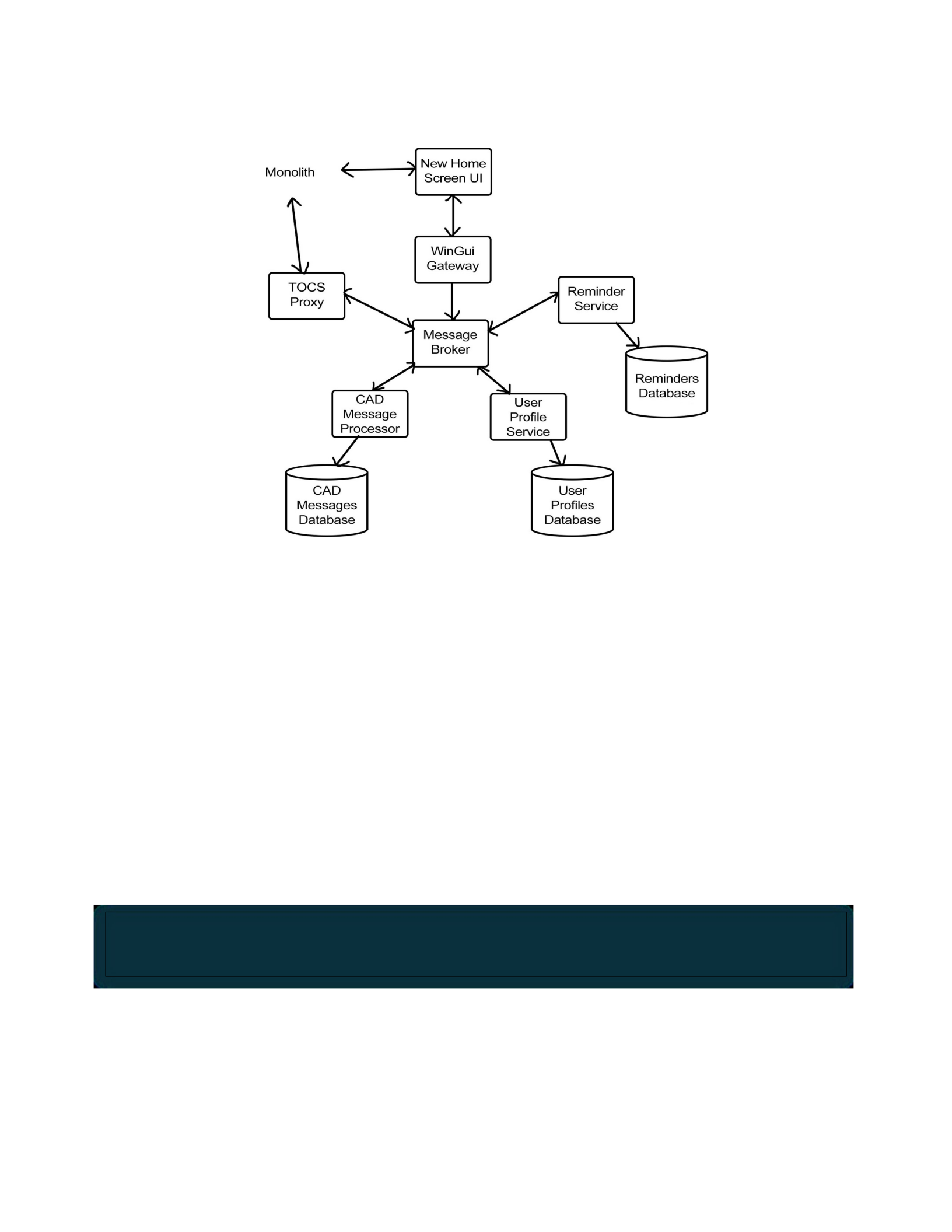
Message Broker uses a standard protocol, AMQP, it would be feasible to change the
Message Broker technology in the future. Each service is also a separate application
and has its own database. CASS found that one advantage of a dedicated database
was that they could use JSON for the Profile Service, which was more appropriate
than the relational database used within the monolith.
Figure 5.1 Microservice Architecture of ODOT’s TOCS Home Screen
Inclusivity Heuristics
The Inclusivity Heuristics are guidelines for designing technology to work well
for a diversity of users. Using the heuristics to build inclusive technology is a way
to practice inclusive design: it is “a methodology . . . that enables and draws on the
full range of human diversity. Most importantly, this means including and learning
from people with a range of perspectives” (Microsoft).
The Inclusivity Heuristics, in their current form, give advice for how to support five
cognitive facets involved in how people interact with technology for the first time
(Burnett et al., 2016).
1. Attitude toward risk (risk-averse to risk-tolerant).
2. Computer self-efficacy (low to high).
3. Information processing style (comprehensive to selective).
4. Learning style (process-oriented to mindful tinkering to tinkering).
The full definitions of these facets are available in GenderMag Project et al. (2021).

5. Motivations (task-motivated to motivated by tech interest).

A cognitive style is a cognitive facet value. For example, my cognitive styles are
medium attitude toward risk, high computer self-efficacy, selective information
processing style, a highly variable learning style, and task motivation.
The Inclusivity Heuristics help software practitioners support the full range of
cognitive styles for each cognitive facet.
7.1 Background
The Inclusivity Heuristics, also called the Cognitive Style Heuristics or the
GenderMag Heuristics (Bur- nett et al., 2021), were developed by human-computer
interaction researchers at Oregon State University as part of the GenderMag Project.
The research behind the heuristics is more than 40 publications about gender
differences in how people use technology. In the future, the heuristics will
potentially expand to include research about other diversity dimensions, such
socioeconomic diversity (Hu et al., 2021) and age diversity (McIntosh et al., 2021).
Heuristics, such as the Inclusivity Heuristics and Nielsen’s Heuristics (Nielsen,
1994), are meant to be used within a usability inspection method called heuristic
evaluation (Nielsen & Molich, 1990). In a heuristic evaluation, multiple evaluators
independently check whether a technology design follows the heuristics. They make
note of any issues and compare results. The output is a combined set of usability
issues.
7.2 Inclusivity Heuristics Personas
A unique characteristic of the Inclusivity Heuristics is they are framed from the
perspective of supporting three personas: Abi, Pat, and Tim. A persona is a
representation of a user or a group of users. Abi, Pat, and Tim each have different
cognitive styles. Figure 7.1 lists each persona’s cognitive styles.
You can find the full versions of the Abi, Pat, and Tim personas and the GenderMag Method at Gen-
derMag.org.
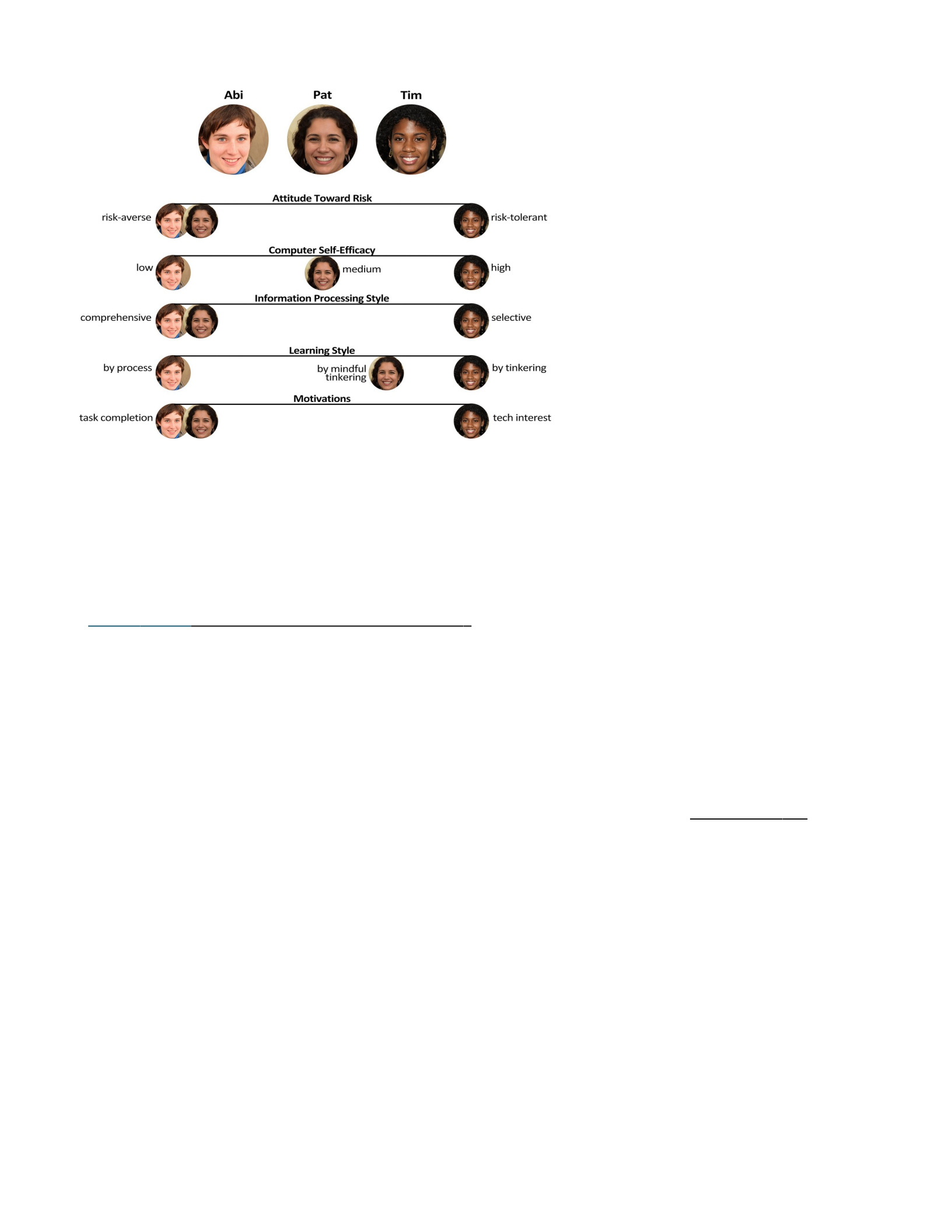
Figure 7.1 Cognitive Styles of Abi, Pat, and Tim
Note. The personas can have any gender and picture.
7.3 The Inclusivity Heuristics
Each of the eight heuristics are listed and described below, with examples.
7.3.1 Heuristic #1 (of 8)
Explain (to Users) the Benefits of Using New and Existing Features
Abi and Pat have a pragmatic approach toward technology, using it only when
necessary for their specific tasks. They have limited spare time and prefer to stick
to familiar features, enabling them to maintain focus on the task at hand. Unless
they can clearly understand how certain features will help them com- plete their
tasks, they might not use them.
Abi is risk-averse toward technology. Abi tends to avoid features with unknown time
costs and other risks.
Similarly, Pat is also cautious about using new features, but open to trying out
features to determine whether they’re relevant to completing their task.
In contrast, Tim is enthusiastic about discovering and exploring new, cutting-edge
features. Moreover, Tim is willing to take risks and may use features without prior
knowledge of their costs or even their exact functionality.
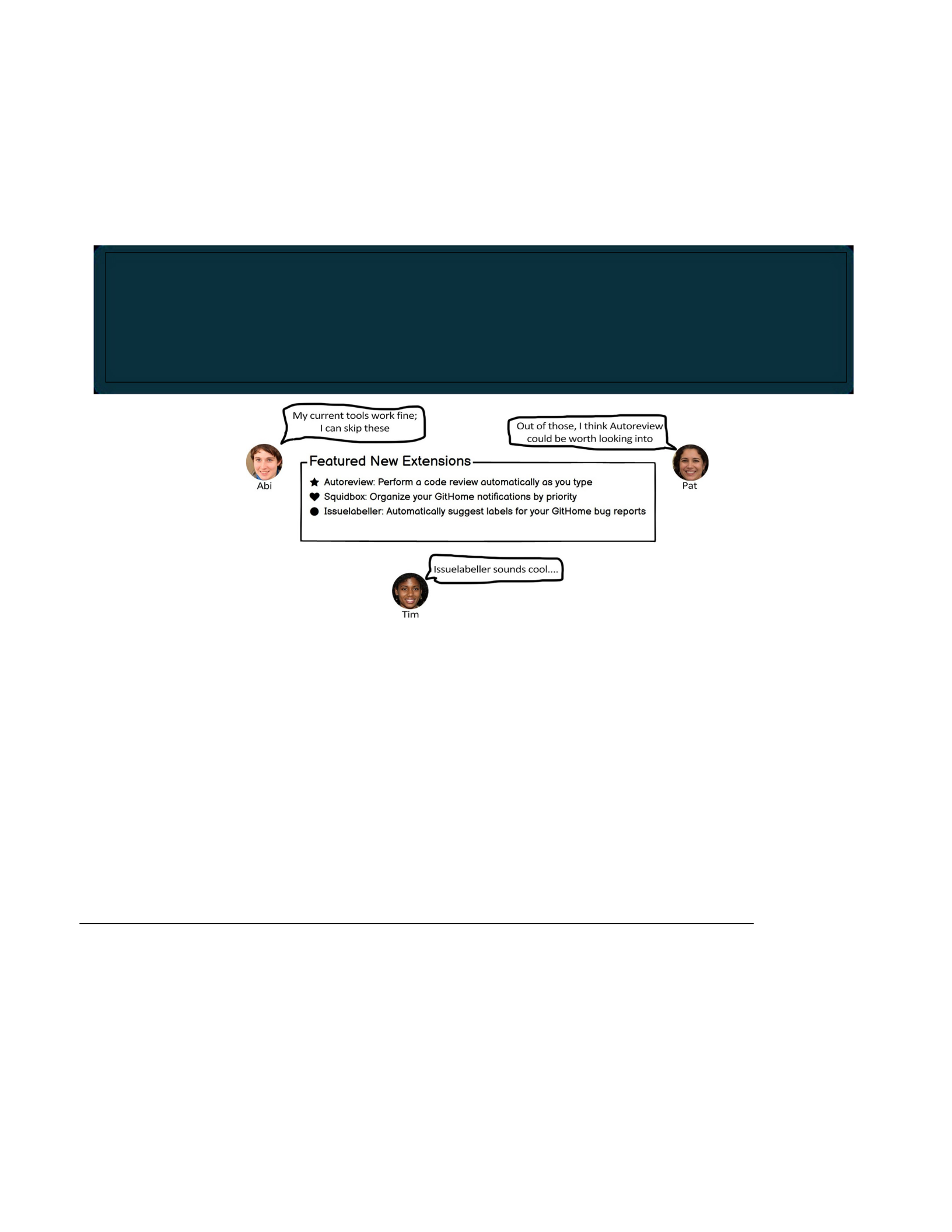
Figure 7.2 provides an example design that reflects this heuristic and how Abi, Pat,
and Tim might react to it.
Figure 7.2 Inclusivity Heuristic #1 Design Example
Note. The designs help Abi, Pat, and Tim decide whether they want to use the
features. Abi and Pat seek features that help them with their task. Tim seeks
features that are interesting.
7.3.2 Heuristic #2 (of 8)
Explain (to Users) the Costs of Using New and Existing Features
Abi and Pat prefer to reduce risk by avoiding features that might require significant
time and effort.
Tim is more open to taking risks and may be willing to invest additional time and
effort into using fea- tures, even if they aren’t directly related to the current task.
To support the personas’ motivations and risk tolerance, make it easy for Abi and Pat to quickly see the
benefits of features and decide if they want to use them, and give Tim the ability to quickly fig- ure out
what new and unique features do, so these users can explore those features if they’re inter- ested.

Figure 7.3 provides an example design that reflects this heuristic and how Abi, Pat,
and Tim might react to it.
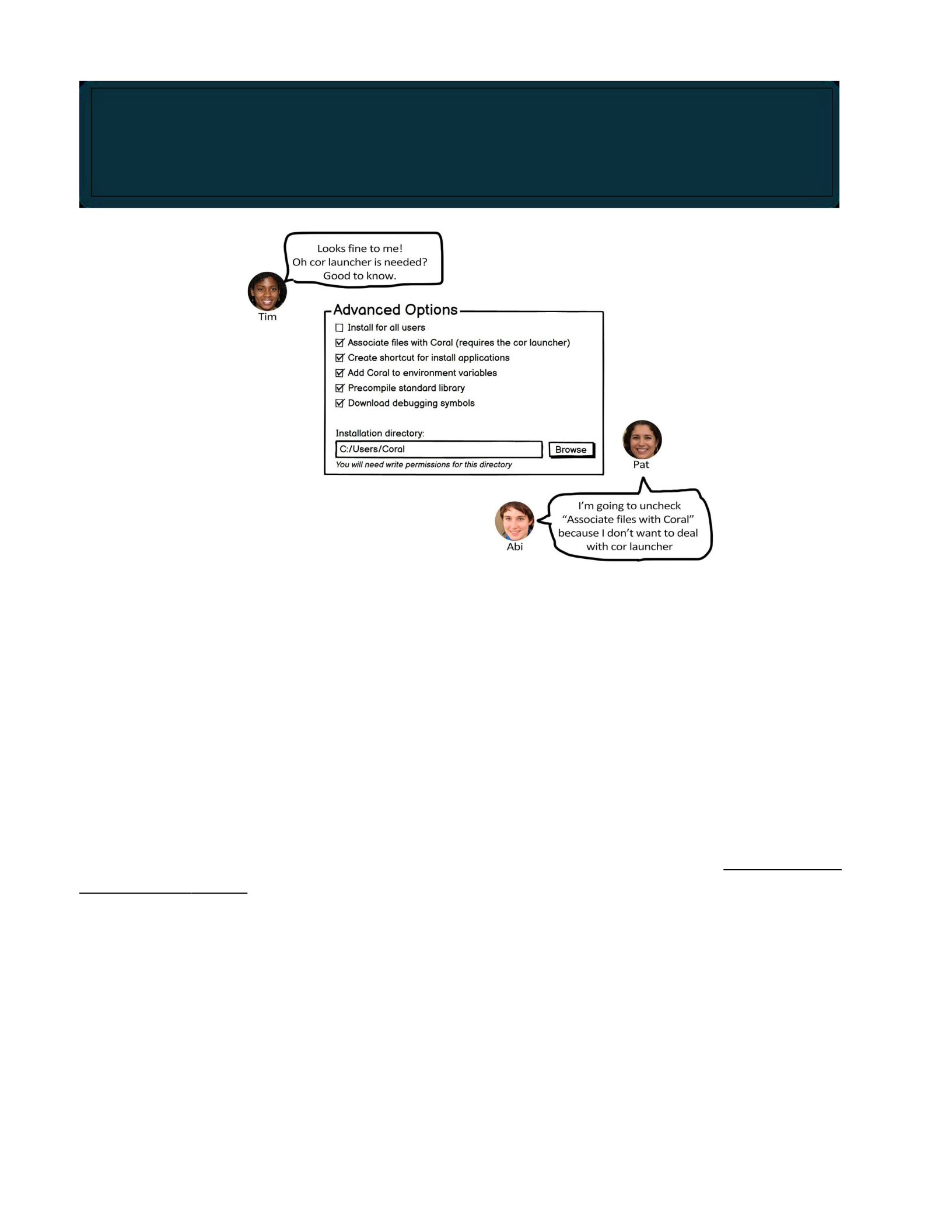
Figure 7.3 Inclusivity Heuristic #2 Design Example
Note. Indicating that “cor launcher” is required helps Abi and Pat decide whether
they want to proceed or quit, and helps Tim understand what other technical
configuration might be required.
7.3.3 Heuristic #3 (of 8)
Let Users Gather as Much Information as They Want, and No More Than
They Want
Abi and Pat approach decision-making by diligently gathering and thoroughly
reviewing relevant infor- mation before acting.
Tim prefers to dive right into the first option that catches their interest and pursue
it. They will backtrack if necessary.
Figure 7.4 provides an example design that reflects this heuristic and how Abi, Pat,
and Tim might react to it.
To support the personas’ attitudes toward risk, give them the ability to assess whether a feature might
require excessive time and effort so that Abi and Pat can avoid it or proceed with caution, and so Tim
understands the relative amount of risk a feature comes with.
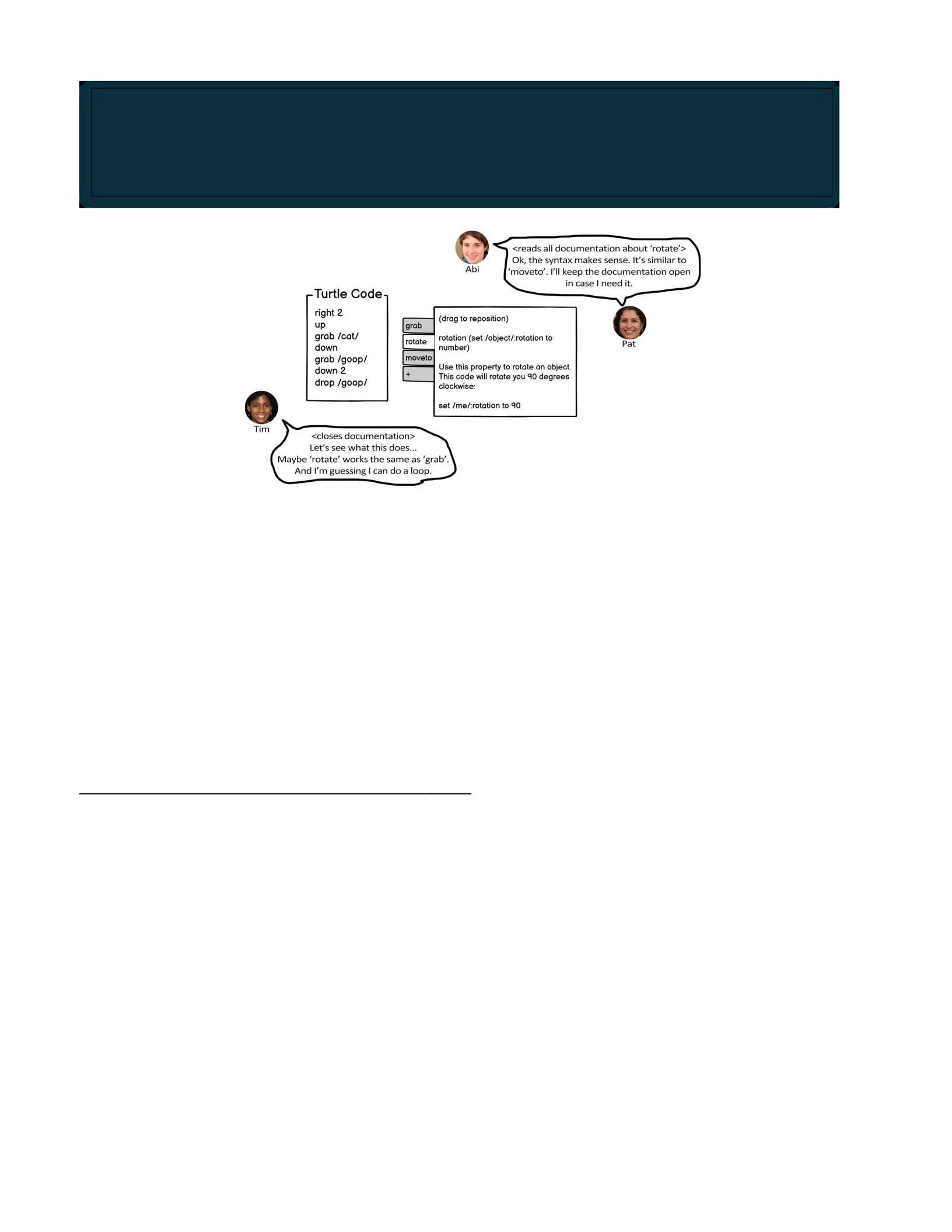
Figure 7.4 Inclusivity Heuristic #3 Design Example
Note. The design allows users to access documentation, and keep it open, while
coding. This helps Abi and Pat fully understand the syntax before using it. Tim can
choose to close the documentation.
7.3.4 Heuristic #4 (of 8)
Keep Familiar Features Available
Abi, who has lower computer self-efficacy and is more risk-averse than Tim, tends
toward self-blame and will stop using unfamiliar features if problems arise. Abi
prefers to avoid potentially wasting time trying to make unfamiliar features work.
Pat, with moderate technological self-efficacy, adopts a different approach. When
faced with problems while using unfamiliar features, Pat will attempt alternative
methods to succeed for a while. Being risk- averse, however, Pat prefers to rely on
familiar features, which are more predictable in terms of expected outcomes and
time required.
In contrast, Tim has higher computer self-efficacy and is more risk-tolerant
compared to Abi. If problems arise with unfamiliar features, Tim tends to blame the
technology itself and may invest considerable extra time exploring various
workarounds to overcome the problem.
To support the personas’ information processing styles, make it easy for Abi and Pat to gather as much
information as they want, and give Tim the ability to quickly gather the useful information they need
without having to process a lot of information they don’t care about.

Figure 7.5 provides an example design that reflects this heuristic and how Abi, Pat,
and Tim might react to it.
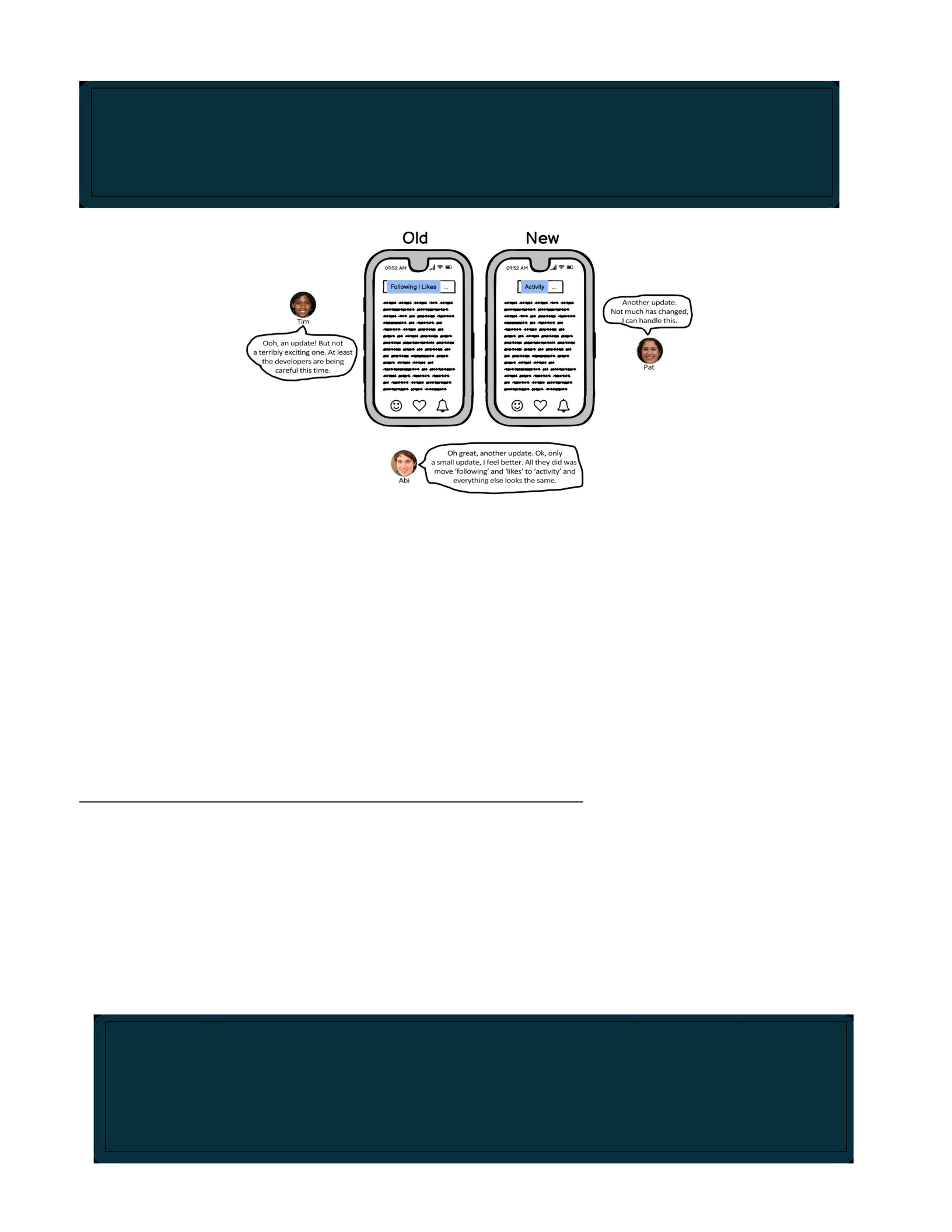
Figure 7.5 Inclusivity Heuristic #4 Design Example
Note. The design update is minimal, keeping most features the same. This helps Abi
and Pat detect the familiar features with which they’re comfortable, and helps Tim
detect which features they have already explored.
7.3.5 Heuristic #5 (of 8)
Make Undo/Redo and Backtracking Available
Abi and Pat, being risk-averse, tend to avoid taking actions in technology that may
be difficult to undo or reverse. In contrast, Tim, who is risk-tolerant, is willing to take
actions in technology that might be incorrect or require reversal.
Figure 7.6 provides an example design that reflects this heuristic and how Abi, Pat,
and Tim might react to it.
To support the personas’ computer self-efficacies and attitudes toward risk while also promoting continued use
of the technology without unnecessary time wastage, allow Abi, Pat, and Tim to engage with familiar
features that they have previously used.
To support the personas’ attitudes toward risk, offer Abi and Pat the option to undo/redo actions and
backtrack, ensuring they feel at ease when taking actions that have uncertain consequences. This way,
they can be confident knowing they can easily reverse these actions if needed. In addi- tion, these
features allow Tim to recover from mistakes.
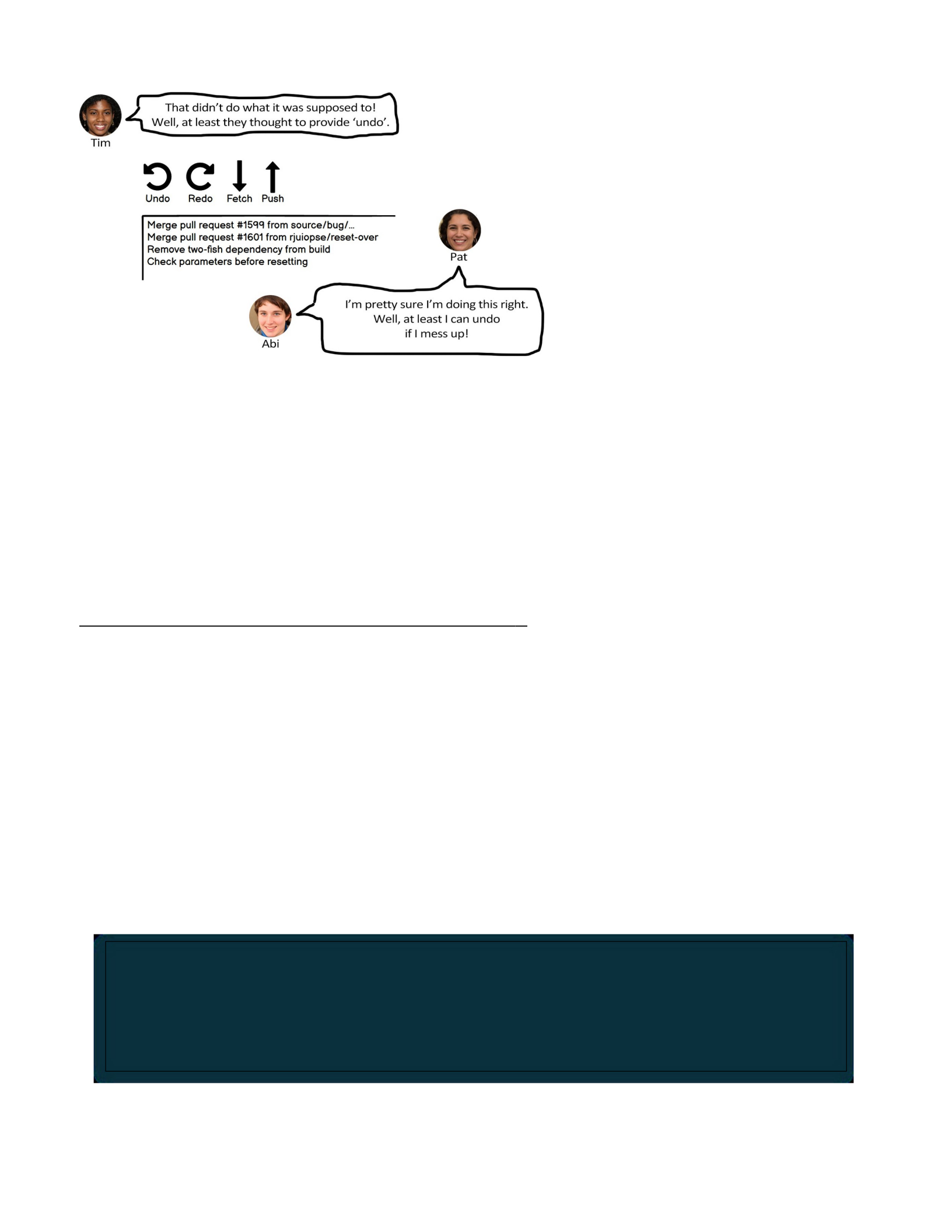
Figure 7.6 Inclusivity Heuristic #5 Design Example
Note. The design allows users to undo or redo their last action. This helps Abi and
Pat feel assured that using the functionality is safe, and helps Tim backtrack in case
they make a mistake.
7.3.6 Heuristic #6 (of 8)
Provide an Explicit Path through the Task
Abi, as a process-oriented learner, prefers to approach tasks in a systematic and
step-by-step way.
Tim and Pat, however, who are more inclined toward tinkering as their learning
style, prefer not to be confined by strict and predetermined processes. They thrive
when they have the freedom to explore and experiment without rigid constraints.
Figure 7.7 provides an example design that reflects this heuristic and how Abi, Pat,
and Tim might react to it.
To support the personas’ learning styles, offer Abi a well-defined and explicit task process that pro- vides
clarity and structure. For Tim and Pat, provide them with the flexibility to bypass step-by-step processes
and tutorials that are not necessary for learning the technology. This allows them to explore and learn in
a way that suits their preferred approach.
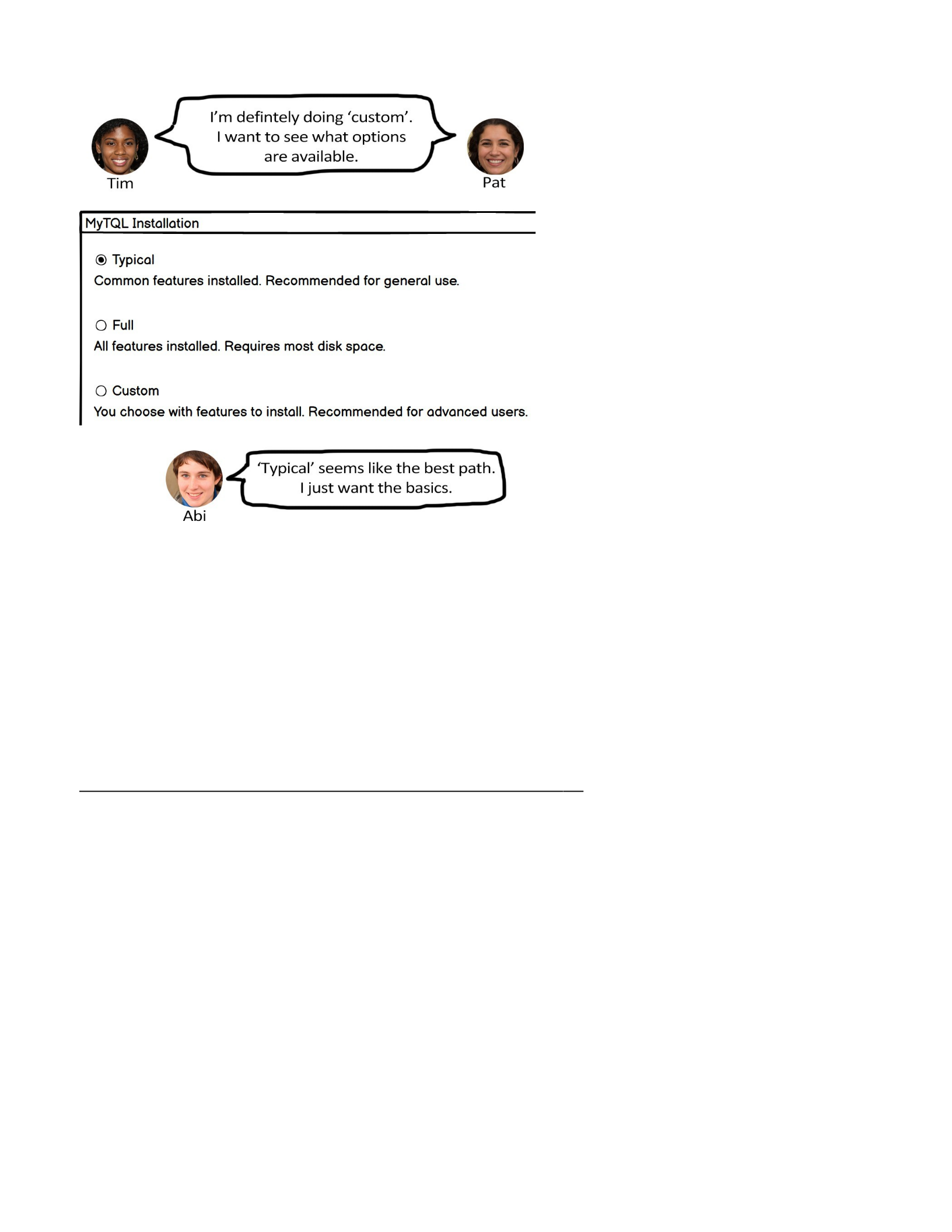
Figure 7.7 Inclusivity Heuristic #6 Design Example
Note. The design gives users a clear choice between three paths. A structured
process helps Abi feel comfortable. Pat and Tim can select “custom” if they’d like to
tinker.
7.3.7 Heuristic #7 (of 8)
Provide Ways to Try Out Different Approaches
Abi, with lower computer self-efficacy compared to Tim, tends toward self-blame
when problems arise in technology. As a result, Abi may stop using the tech
altogether.
Pat, with moderate self-efficacy in technology, takes a different approach. When
faced with problems while using technology, Pat will attempt alternative methods to
succeed for a period.
In contrast, Tim, with higher computer self-efficacy than Abi, tends to blame the
technology itself if a problem arises. Abi will then explore numerous workarounds in
order to overcome the issue.
Figure 7.8 provides an example design that reflects this heuristic and how Abi, Pat,
and Tim might react to it.
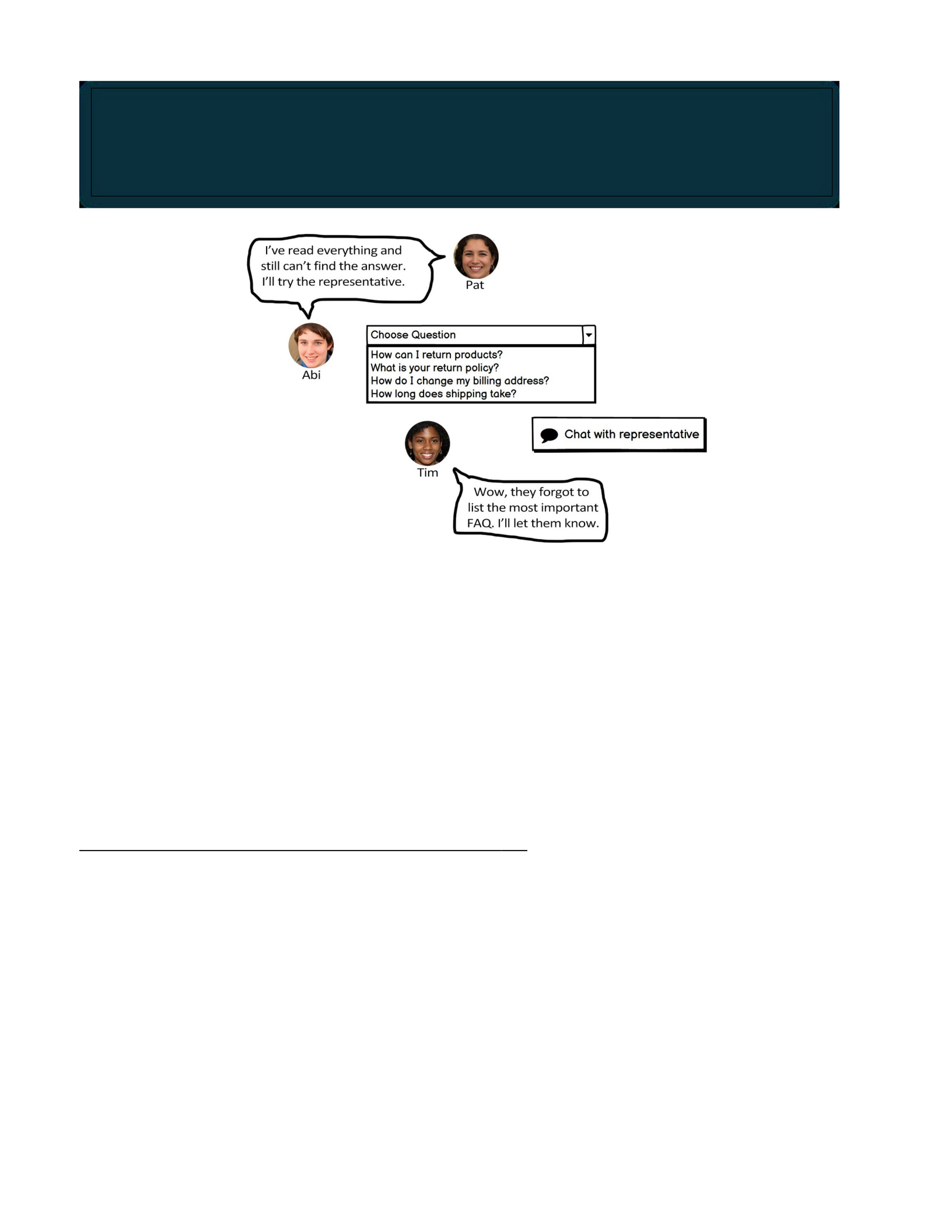
Figure 7.8 Inclusivity Heuristic #7 Design Example
Note. The design allows users to chat with a person in case they can’t find their
question on the list. This helps Abi and Pat because they know they have a backup
plan. It also helps Tim, who might want to report the problem.
7.3.8 Heuristic #8 (of 8)
Encourage Tinkerers to Tinker Mindfully
Tim’s learning style revolves around tinkering, but at times Tim becomes
excessively engrossed in tin- kering, leading to long distractions.
Pat, in contrast, embraces a learning approach that involves actively experimenting
with new features. Pat does so mindfully, however, taking the time to reflect on
each step taken during the learning process.
Figure 7.9 provides an example design that reflects this heuristic and how Tim might
react to it.
To support the personas’ computer self-efficacies, provide Abi with alternative approaches when difficulties
with the current approach arise. This will also encourage Tim and Pat to explore multiple strategies to
solve problems.

To support Tim’s learning style, encourage Tim to avoid excessive tinkering, such as by adding an extra
click. This helps minimize mistakes, allows for better absorption of important information, and helps Tim
stay focused on the task at hand.

Figure 7.9 Inclusivity Heuristic #8 Design Example
Note. The design helps Tim avoid making mistakes while tinkering.
Code Smells and Refactoring
Code smells are indications that the code needs to be reorganized—a sign your
software is undergoing code decay. Your code might need attention if you’re having
thoughts like these:
•“I would never show this code during an interview.”
•“I’m going to start over and rewrite this code from scratch.”
•“Every time I look at this code, I have to re-figure-out what it does.”
•“These comments don’t match the code . . .”
•“Why is this code repeated in three different places?”
•“I want to switch out this component, but that’ll break X, Y, and Z in this
other place, and I don’t want to deal with that.”
If you want to learn more about any of the code smells and refactorings described in this chapter or want
to know additional ways your code can smell, Martin (2009), Shvets, and Fowler and Beck (2019) are
good resources.

Types of codes smells we’ll cover (including how to fix them):
•Code smells about comments.
•Code smells about functions.
•General code smells (e.g., about the code within functions).
8.1 Why Care about Code Smells?
Reasons to pay attention to and fix code smells:
•Smelly code can be harder for you and others to maintain because the
code is unclear. When code is hard to maintain, developers tend to work
around it or re-create the same functionality elsewhere.
•Smelly code leads to smellier code. When you let your code become
disorganized, you are giving yourself and others the message that smelly code
is acceptable. Disorganized code also tends to give us an excuse to be lazy
coders. A web development example: if you’ve used CSS, you may have
encountered frustrating situations where the style you’re trying to apply is not
work- ing—somewhere in the code (e.g., other CSS, HTML, or JS), your style is
being overridden. Instead of tracking down the competing code or markup, you
use the “!important” property, which forces the style to be applied. The
codebase is a mess anyway, so who cares? Your future self.
•Smelly code builds up technical debt. If the code is working, there’s never a
reason to change it, right? Wrong. Each time you write sloppy code, you are
contributing to your project’s technical debt. Maybe it works now, but as sloppy
software grows, it will get more difficult to deal with. That can mean your
company needing to hire more developers to keep productivity up. Instead,
productivity can go down because now the old developers are struggling to
teach the new develop- ers, and everyone is continuing to write sloppy code
(Martin, 2009). Ultimately, the software may have to be redeveloped entirely
(which doesn’t always solve the problem). Or the project could fail.
8.2 Your Code Stinks—Now What?

If you can (e.g., your manager allows it), strongly consider refactoring. Refactoring
is when you improve your code without changing what the code does. Refactoring is
a way to pay down technical debt.
The remainder of this chapter is about code smells and how to clean them up. This
is not an exhaustive list. You can find more advice in the references at the end of
the chapter.

8.3 Comments
When we first learned to code, many of us didn’t write comments: solving problems
and coding is fun; no time for boring comments! Then, we got more experience,
started coding with others, were formally trained to code, or attempted to continue
an old project, and we saw why comments are useful—and then some of us jumped
to the other extreme: too many comments. We explained functions with paragraphs
of prose, or even commented each line. It’s tedious, but it’s the right thing to do,
right? Unfortunately (and fortunately), too many comments can be as bad as
none.
8.3.1 Drawbacks of Having Many Comments
•Comments get out of date quickly. If we update the code, then procrastinate
on the comments, what we leave can be misleading (to others and our future
selves). Also, more comments mean greater likelihood some will be ignored,
giving us the smelly situation of some accurate and some inaccurate
comments. In that case, why would we trust any of the comments?
•Writing comments for straightforward code can distract from the important
comments. If the code was difficult to write, is long, is unique, is complex, or
has a “gotcha,” comments can help call attention to idiosyncrasies of the code.
•Writing lots of comments could indicate the code needs to be simplified.
Ideally, most of the code you write will be self-explanatory, so frequent
comments are not needed.
Don’t fall into the trap of adding excessive comments to your code before an interview! Some
prospective employers specifically look for over-commented code (or can’t help but see it) as an
indicator of poor programming habits.

8.3.2 Code Smells about Comments
Below is a concise list of common code smells about comments and what to do
about them (how to refactor).
•Obsolete Comment (no longer describes the code). Remove or update.
1
2
3
4
5
•Commented-Out Code (somebody thought they’d need that code later, but
the commented-out block is now getting out of date and in the way). Remove.
If you’re feeling risk-averse, save a backup or use a version-control system.
1
2
3
4
# SMELLY
def updateWorldState(): """
updateTime() # might need later updatePlayers()
updatePoints() """
for p in players:
p.updateState()
Commenting out code often comes with poor assumptions (e.g., you’ll need the code later, others
will understand why you commented it out, the surrounding code will continue having the same
purpose, and so on).
# SMELLY
"""
Uses the TwoFish block cipher with 256 bit key size
"""

5
6
7
8
9
•Redundant Comment (states what would already be immediately apparent
to a programmer of any level). Remove. Less is more.
1
2
•Long Comment (multiple sentences, complicated, goes into a lot of detail).
Simplify the code to make it more self-explanatory; shorten or remove
comment.
1
2
3
# SMELLY
getLength() # gets the length
# SMELLY
"""
This is the first function I made in this module, and
it
takes the user’s Unicode text input, converts it to
ASCII, then that creates a visualization of a type-

4
8.4 Functions
A natural way to code is to start writing a function and then, as the program gets
more complicated, keep adding to it. For example, if your program’s GUI only has a
start and a stop button, the function for populating the screen with UI elements only
needs to draw those two buttons. Then, when you add a menu and a settings
button, you could update the function to draw those elements, too. You then add
user accounts and decide that function is a fine place to check if the user is logged
in, their level of inactivity, show a pop-up about cool new features . . . and your
function balloons. Understanding the small details of how the function works can
even make one feel proud—until the code becomes unmaintainable and bug-
ridden.
8.4.1 Code Smells about Functions
Follow these refactoring suggestions to increase code readability,
maintainability, and modularity.
•Long Function (more than 10 lines or so). Break into multiple functions. Aim
for five lines or fewer.
If you’re only writing a short program, does coding style matter? Treating code as disposable is a self-
fulfilling prophecy.
Software made of three to four line functions is amazing to behold!
writer typing the input. Problem is, as you might
imagine, sometimes there’s no good conversion to ASCII,
so some meaning is lost.
"""

•Function with Many Jobs (doing more than what its name suggests, doing
things that aren’t closely related, doing many things). Break into multiple
functions.
1
2
3
4
5
6
7
# BEFORE
def updateGUI():
updateTime()
updateTimeDisplay()
updateScores()
updateScoreDisplay()
refreshWindow()

8
9
10
11
12
13
14
15
16
17
•Function with Many Parameters (more than four, some say more than
three). As appropriate, pass an object that combines the parameters, make
calls within the function to get the parameter data, break into multiple
functions, or find another way of reducing the number of parameters.
1
2
3
4
# BEFORE
initOutdoorPlace(floraList, faunaList, temperature, wind-
Speed, cloudiness, rockiness, birdNoises, grassLength)
# AFTER
initOutdoorPlace(world1data)
Zero function parameters is even better than four!
# AFTER
def updateState() :
updateTime()
updateScores()
def updateGUI():
updateTimeDisplay()
updateScoreDisplay()
refreshWindow()

5
8.5 Code
Code gets messy fast if you’re not paying attention. One reason is because many
of us weren’t trained to be neat with code when we first learned it. To write tidy
code, you may have to frequently stop and think about its design or be strict with
yourself about refactoring regularly. Over time, you might adopt better habits.

8.5.1 Code Smells about Code in General
•Duplicate Code (same code in multiple places). Consolidate into one place,
but watch out for cre- ating unwanted dependencies.
1
2
3
4
5
6
7
8
9
10
11
12
13
14
15
16
17
18
19
20
21
22
# BEFORE
def updateLevelOfAlarm(npc):
if (npc.isWalking() && npc.isAlive() &&
npc.isFriendly())
setLevelOfAlarm(0)
else
setLevelOfAlarm(500) react(npc)
def react(npc):
if (npc.isWalking() && npc.isAlive() &&
npc.isFriendly())
keepWalking()
else
runAway()
# AFTER
def react(npc):
if (npc.isHarmless())
setLevelOfAlarm(0) keepWalking()
else
setLevelOfAlarm(500) runAway()
def setLevelOfAlarm(level):
alarmLevel = level
def isHarmless(npc):

23
24
25
26
27
28
•Long Lines (more than 100 characters or so). Shorten by breaking into
multiple lines, converting to a function call, defining new variables, and so on.
Thresholds like “100 characters” or “five lines” are arbitrary. Generally, shorter is better, but not
even that rule can be applied everywhere. For example, “syntactic sugar” is the term for con- cise
and elegant code syntax, usually built into the programming language. It can make your code
shorter, but what’s the point if nobody can understand it!

1
2
3
4
5
•Inconsistent Conventions (formatting code differently in different places, or
untidily). Follow whatever style conventions the code is already using. If it’s a
new project, plan to be self-consistent or follow accepted conventions for the
language you’re using.
1
2
3
4
5
6
7
8
9
10
11
12
# BEFORE
if (whale.isSinging) { activateAudioRecordingDevice();
} else {
recording_device_off_confirmation_check();
}
if (starfish.blockingCamera)
{
AirCannon.Spray(camera.coordinates);
}
# AFTER
if (Whale.isSinging) { activateAudioRecordingDevice();
} else {
confirmRecordingDeviceOff();
}
if (Starfish.isBlockingCamera)
{ AirCannon.spray(Camera.coordinates);
}
When adding to another person’s code, it’s best to follow their coding style conventions even if you
prefer a different way. If their code style is sloppy and inconsistent, however, consider whether
there’s a polite way to fix the problem.
# BEFORE
if (rectangle.coordinate[1][0] - rectangle.coordinate [2]
[0] > 500 && rectangle.coordinate[2][1] - rectan-
gle.coordinate[3][1] > 500 && rectangle.isSquare()):
# AFTER
if (rectangle.isSquare() && rectangle.width > 500):

13
14
15
16
17
18
19
20
21
22
•Vague Naming (does not communicate what the function, variable, etc. is
for). Rename it, even if the name is long. Long names can sometimes replace
comments.
Wouldn’t it be nice if code read like a book?

1
2
3
4
5
6
# BEFORE
a = 100
b = 2
# AFTER
retail_price = 100

