


CSCI 631
LAB ASSIGNMENT INSTRUCTIONS
INSTRUCTIONS
You will complete labs associated with the course material. Each lab will have specific
instructions for tasks, along with deliverables, to be completed in the virtual lab environment.
Gather Data With Nikto
Scenario
Sensitive Data Exposure is a general term that simply means exposure of data that should
otherwise not be viewed by a regular user. This can include pages accessible to the general
public that should be removed or hidden, backups, development files, verbose error
messages, and many other types of sensitive data. Typically it is best to ensure that these
files and information is removed from the web application so that no one is able to view it.
There are a number of tools that can be used to find this information. The first one we will
look at is Nikto. Nikto can do some vulnerability scanning, but in this lab we will focus on
its ability to find sensitive data.
Log in to the Kali machine with the username student and the password student.
This lab is equipped with an auto-scoring technology designed to track your progress as
you successfully complete the lab. A short-cut is available on the Desktop to check your
score. Double-click on the short-cut and a web browser window will open displaying your
current score. You can periodically refresh the page as you complete more of the lab to see
your current score.
The final score is calculated and recorded when you either complete or cancel the lab. If
you save your lab, the score is held until you resume the lab and cancel or complete it.
Click on the Terminal icon, the second from the top on the left hand side dock. Maximize
the Terminal window.
Type the following command to launch Nikto on the mutillidae site:
nikto -host http://mutillidae/mutillidae/
The -host option tells Nikto which web server to test. In it, we can specify a URL. In this
case, we specify not only the hostname, but also the subdirectory. It will test for the
presence of certain directories, but it will not test for "mutillidae" as that is not a common
directory present on web applications. After the end of this task, feel free to run Nikto
again without the mutillidae directory and compare to the results from this run.
CSCI 631
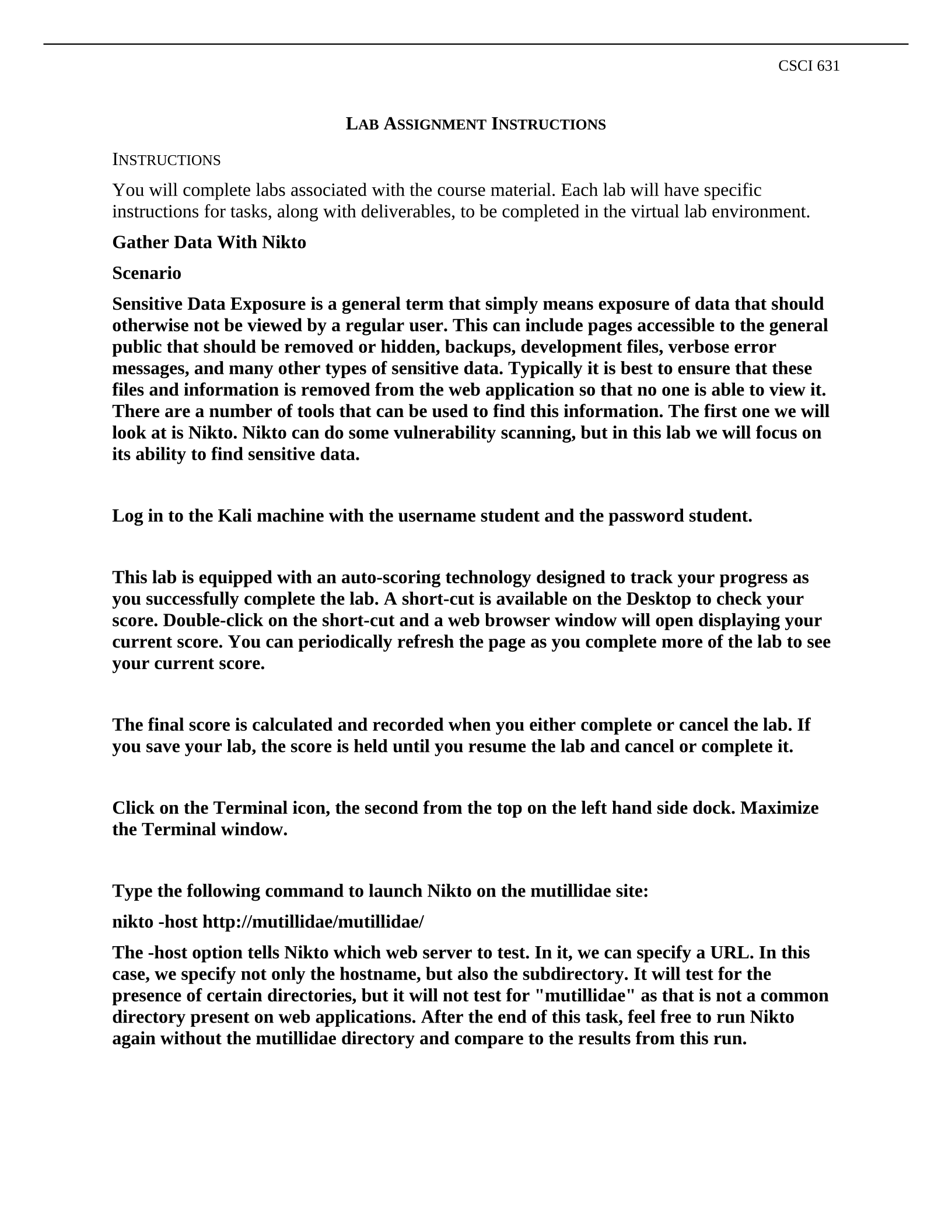
Once Nikto completes scroll to the top of the results. There are many results, mainly due to
one particular vulnerability that shows up many times, namely the Remote File Inclusion
(RFI). For this lab, you can ignore all occurrences of that finding. The first finding of
interest is the robots.txt file. This file is used to tell search engine spiders to ignore certain
files and directories. It is good to keep sensitive information out of search engines, but
listing them in this file tells attackers where interesting information might be.
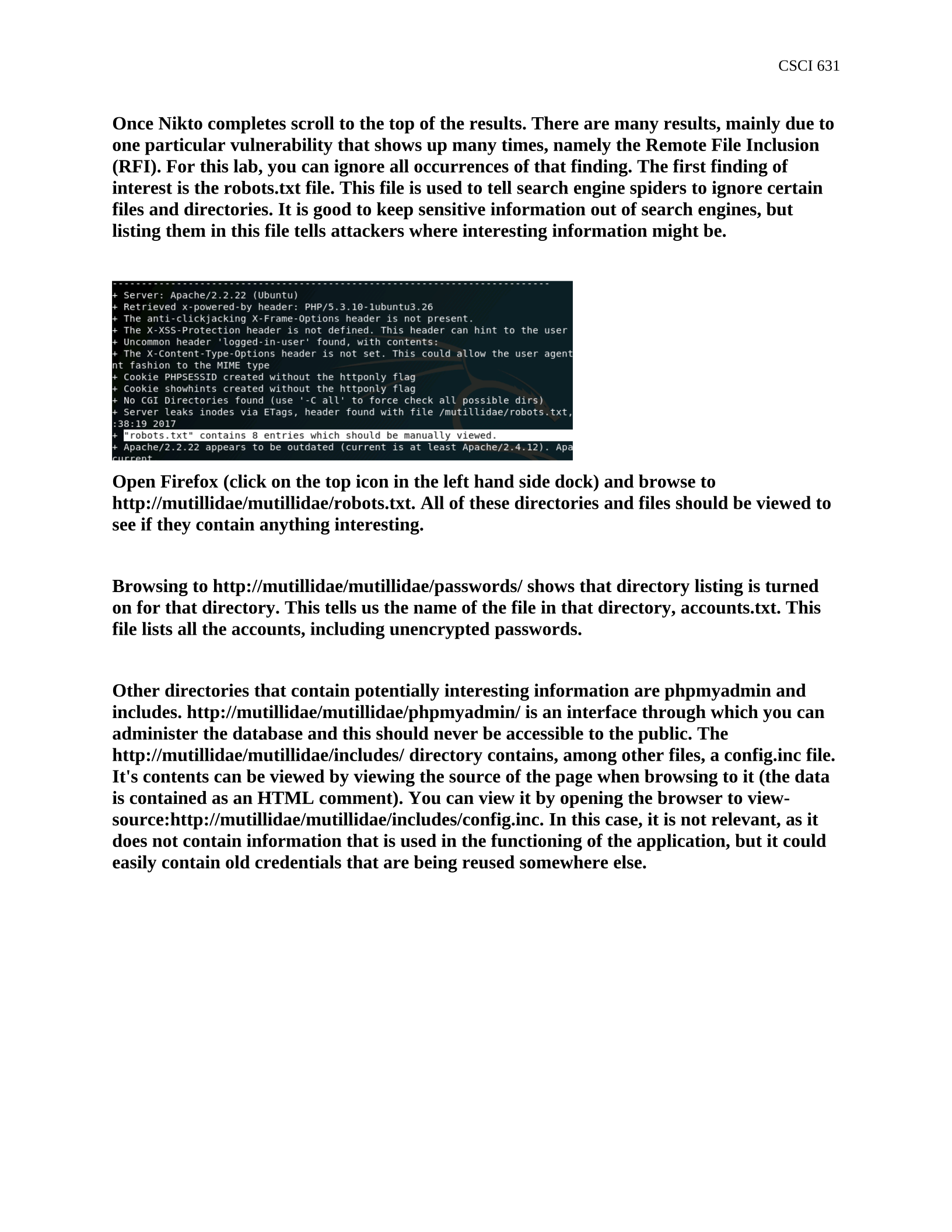
Open Firefox (click on the top icon in the left hand side dock) and browse to
http://mutillidae/mutillidae/robots.txt. All of these directories and files should be viewed to
see if they contain anything interesting.
Browsing to http://mutillidae/mutillidae/passwords/ shows that directory listing is turned
on for that directory. This tells us the name of the file in that directory, accounts.txt. This
file lists all the accounts, including unencrypted passwords.
Other directories that contain potentially interesting information are phpmyadmin and
includes. http://mutillidae/mutillidae/phpmyadmin/ is an interface through which you can
administer the database and this should never be accessible to the public. The
http://mutillidae/mutillidae/includes/ directory contains, among other files, a config.inc file.
It's contents can be viewed by viewing the source of the page when browsing to it (the data
is contained as an HTML comment). You can view it by opening the browser to view-
source:http://mutillidae/mutillidae/includes/config.inc. In this case, it is not relevant, as it
does not contain information that is used in the functioning of the application, but it could
easily contain old credentials that are being reused somewhere else.
CSCI 631
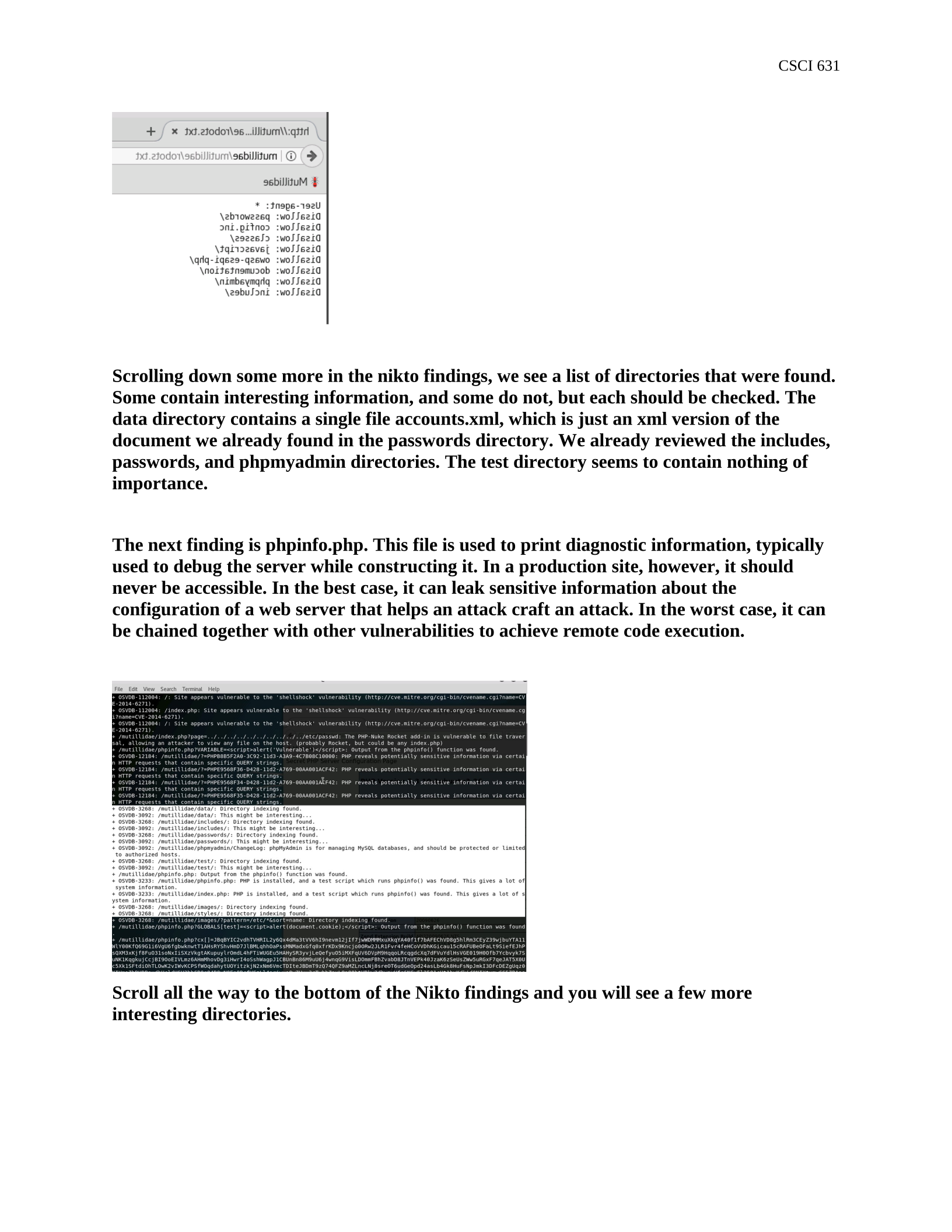
Scrolling down some more in the nikto findings, we see a list of directories that were found.
Some contain interesting information, and some do not, but each should be checked. The
data directory contains a single file accounts.xml, which is just an xml version of the
document we already found in the passwords directory. We already reviewed the includes,
passwords, and phpmyadmin directories. The test directory seems to contain nothing of
importance.
The next finding is phpinfo.php. This file is used to print diagnostic information, typically
used to debug the server while constructing it. In a production site, however, it should
never be accessible. In the best case, it can leak sensitive information about the
configuration of a web server that helps an attack craft an attack. In the worst case, it can
be chained together with other vulnerabilities to achieve remote code execution.
Scroll all the way to the bottom of the Nikto findings and you will see a few more
interesting directories.

CSCI 631
The webservices directory contains files and information related to the operation of the
API. This may or may not be important to have on the site, depending on the target
audience of the site.
The .git directory, however, is most likely not needed. The git directory will likely contain
all the code for the site and allow an attacker to clone the site. This will give access to not
only the current source code, but also al lteh historical changes that have been made. Often,
developers hard code passwords into the application for development purposes but then
remove it for production. However, using git to access the history will allow an attacker to
view that change and see the passwords that were removed.
This lab will not walk through cloning the git repository, but feel free to pull down the
directory and clone the repository and view the files. You can view the configuration files
directly, including some password information. You can also view any historical changes
that were made to the files.
Gather Data with Dirbuster
Scenario
Nikto scans for common issues, but it won't be able to find everything. Dirbuster also won't be
able to find everything, but it will give a much broader view of what is contained on the website.
Dirbuster uses a wordlist to scan for the existence of files and directories. If it is contained in the
wordlist, it will be found by Dirbuster. In this exercise, we will scan the web application with
Dirbuster and see what it tells us.
1. In the terminal window, execute the command:
dirbuster
It will open a GUI.
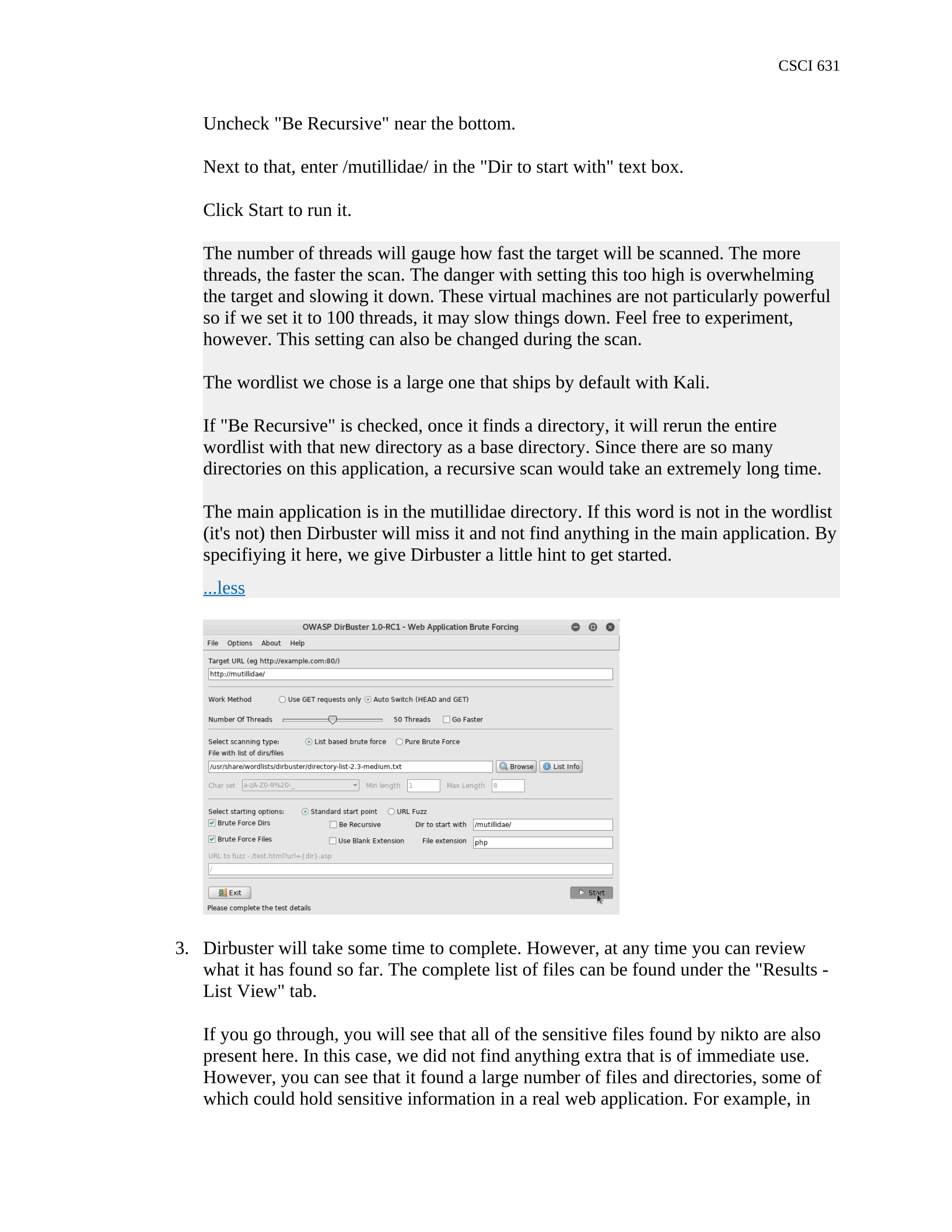
2. In the Target URL text box, enter http://mutillidae/
Move the Number of Threads Slider to 50.
In the "File with list of dirs/files" navigate to /usr/share/wordlists/dirbuster/ and
select directory-list-2.3-medium.txt
CSCI 631
Uncheck "Be Recursive" near the bottom.
Next to that, enter /mutillidae/ in the "Dir to start with" text box.
Click Start to run it.
The number of threads will gauge how fast the target will be scanned. The more
threads, the faster the scan. The danger with setting this too high is overwhelming
the target and slowing it down. These virtual machines are not particularly powerful
so if we set it to 100 threads, it may slow things down. Feel free to experiment,
however. This setting can also be changed during the scan.
The wordlist we chose is a large one that ships by default with Kali.
If "Be Recursive" is checked, once it finds a directory, it will rerun the entire
wordlist with that new directory as a base directory. Since there are so many
directories on this application, a recursive scan would take an extremely long time.
The main application is in the mutillidae directory. If this word is not in the wordlist
(it's not) then Dirbuster will miss it and not find anything in the main application. By
specifiying it here, we give Dirbuster a little hint to get started.
...less
3. Dirbuster will take some time to complete. However, at any time you can review
what it has found so far. The complete list of files can be found under the "Results -
List View" tab.
If you go through, you will see that all of the sensitive files found by nikto are also
present here. In this case, we did not find anything extra that is of immediate use.
However, you can see that it found a large number of files and directories, some of
which could hold sensitive information in a real web application. For example, in
CSCI 631
typical applications, finding install.php could be an issue, as it may allow
reinstallation and reconfiguration of credential information. In this case,
installation.php only contains installation instructions.
Close Dirbuster when finished.
Gather Data with Verbose Error Message
Scenario
The final issue we will investigate is overly verbose error messages. The general idea is that
error messages can potentially contain a lot of sensitive information about how the
application works and is put together. In this exercise, we will induce an error and see what
information is displayed and see if that can be of aid to an attacker.
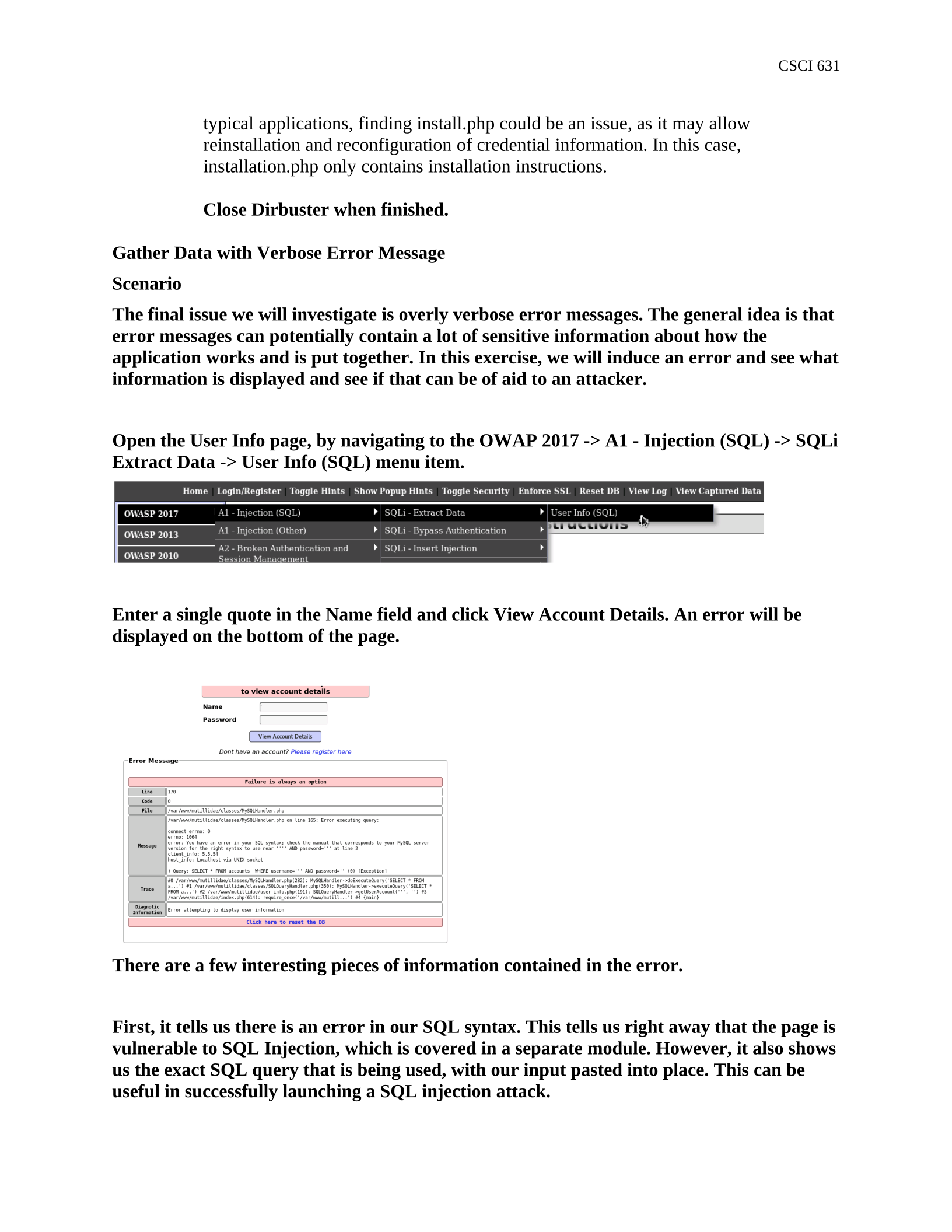
Open the User Info page, by navigating to the OWAP 2017 -> A1 - Injection (SQL) -> SQLi
Extract Data -> User Info (SQL) menu item.
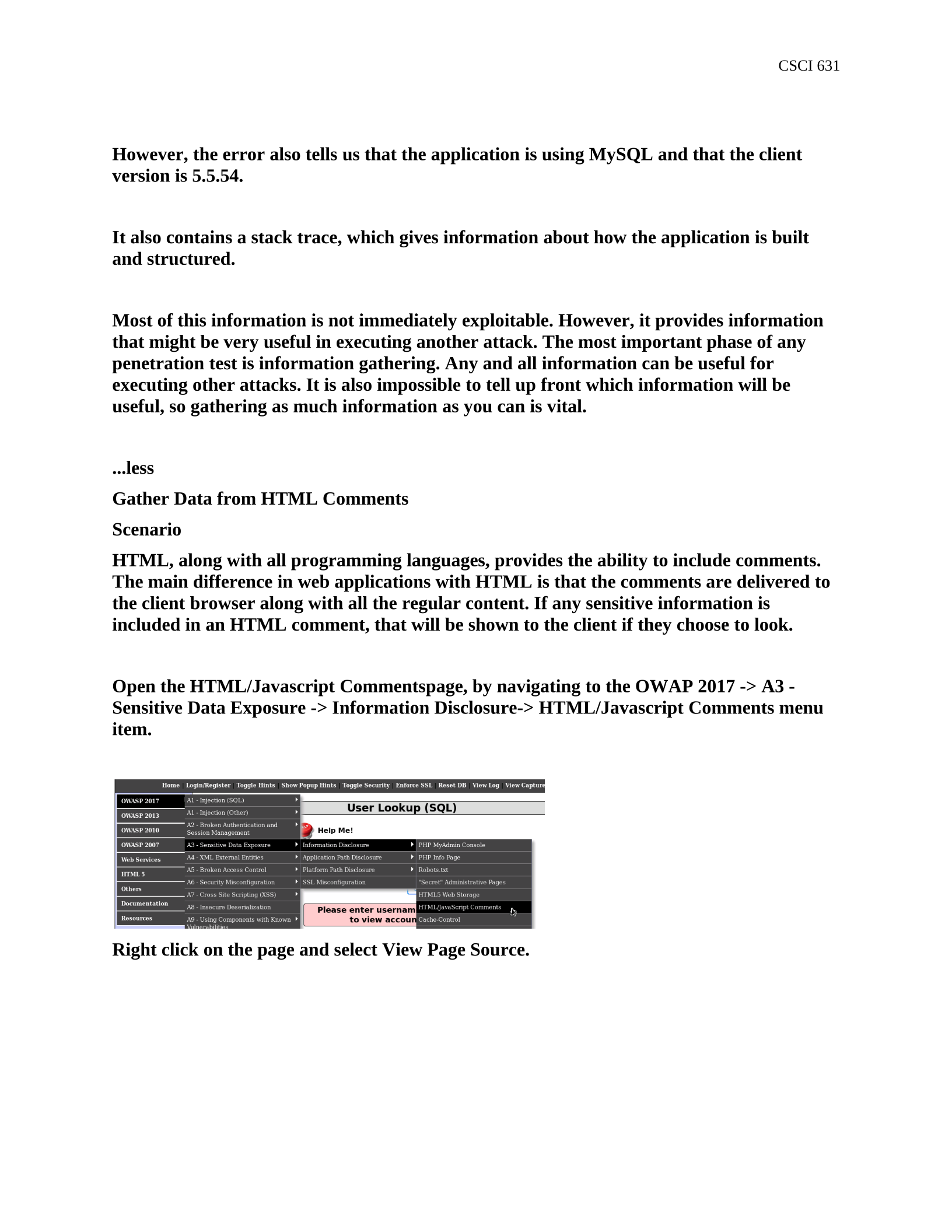
Enter a single quote in the Name field and click View Account Details. An error will be
displayed on the bottom of the page.
There are a few interesting pieces of information contained in the error.
First, it tells us there is an error in our SQL syntax. This tells us right away that the page is
vulnerable to SQL Injection, which is covered in a separate module. However, it also shows
us the exact SQL query that is being used, with our input pasted into place. This can be
useful in successfully launching a SQL injection attack.
CSCI 631
However, the error also tells us that the application is using MySQL and that the client
version is 5.5.54.
It also contains a stack trace, which gives information about how the application is built
and structured.
Most of this information is not immediately exploitable. However, it provides information
that might be very useful in executing another attack. The most important phase of any
penetration test is information gathering. Any and all information can be useful for
executing other attacks. It is also impossible to tell up front which information will be
useful, so gathering as much information as you can is vital.
...less
Gather Data from HTML Comments
Scenario
HTML, along with all programming languages, provides the ability to include comments.
The main difference in web applications with HTML is that the comments are delivered to
the client browser along with all the regular content. If any sensitive information is
included in an HTML comment, that will be shown to the client if they choose to look.
Open the HTML/Javascript Commentspage, by navigating to the OWAP 2017 -> A3 -
Sensitive Data Exposure -> Information Disclosure-> HTML/Javascript Comments menu
item.
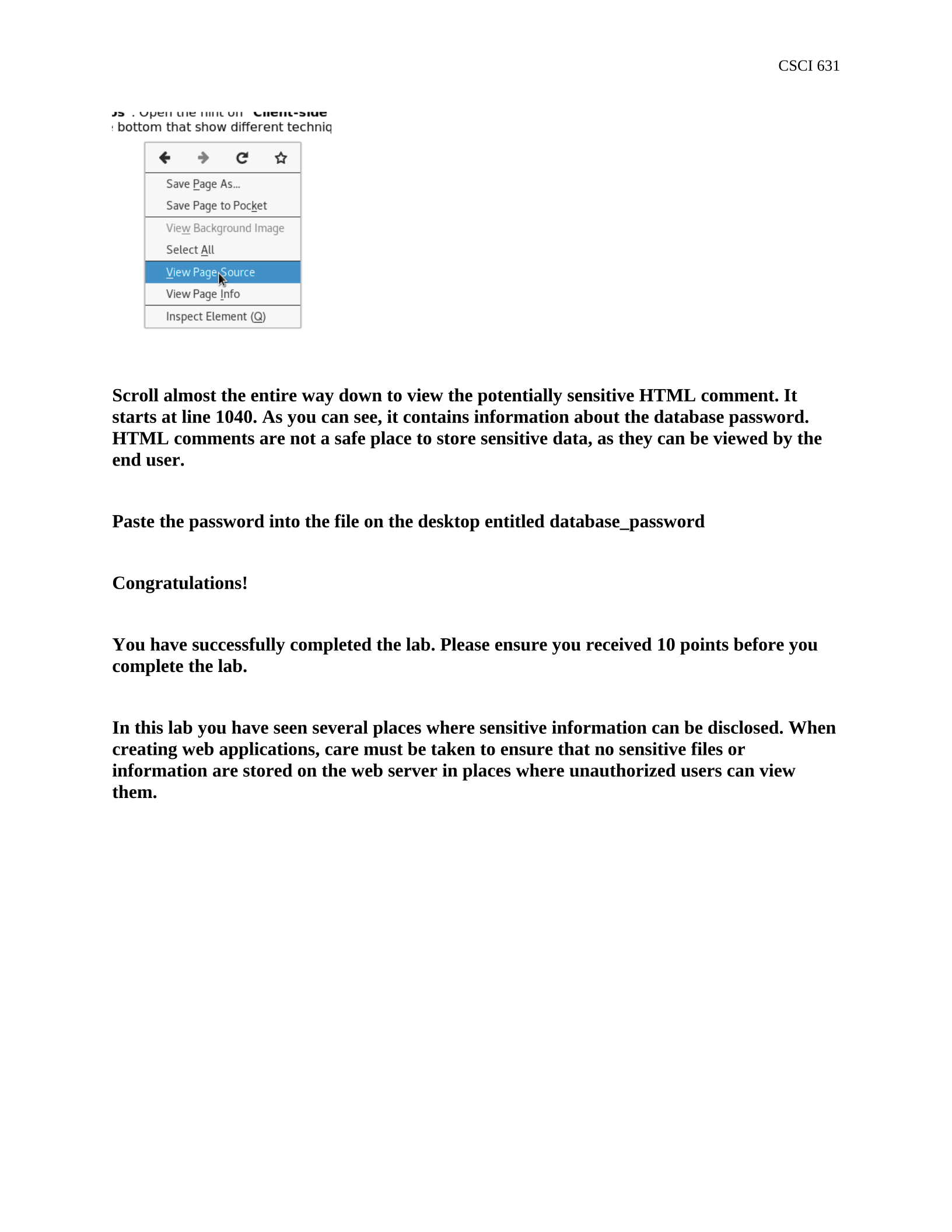
Right click on the page and select View Page Source.
CSCI 631
Scroll almost the entire way down to view the potentially sensitive HTML comment. It
starts at line 1040. As you can see, it contains information about the database password.
HTML comments are not a safe place to store sensitive data, as they can be viewed by the
end user.
Paste the password into the file on the desktop entitled database_password
Congratulations!
You have successfully completed the lab. Please ensure you received 10 points before you
complete the lab.
In this lab you have seen several places where sensitive information can be disclosed. When
creating web applications, care must be taken to ensure that no sensitive files or
information are stored on the web server in places where unauthorized users can view
them.
Powered by TCPDF (www.tcpdf.org)

