


1
Chapter 1: Introduction to the Study
Introduction
This research study is focused on the experiences of secondary educators in
finding, evaluating, and using digital resources in the classroom to better understand their
challenges, strategies, and support needs. The Office of Educational Technology's
national technology plan update includes the promise of providing high-quality digital
learning content and resources for students as a part of its infrastructure goals to support
learning (United States Department of Education, Office of Educational Technology,
2017). Key to achieving this goal is ensuring educators can curate and share digital
learning content; especially through the use of openly licensed educational resources
(OER; U.S. Department of Education, Office of Educational Technology, 2017). As a
technology coach, I have developed robust search and technology skills, but despite my
capabilities, recent attempts to curate content for teachers made me realize the increasing
difficulty of doing so in the current digital landscape. Finding appropriate and engaging
resources has become more difficult due the sheer magnitude of digital resources
available.
The Internet, email, web applications, and social media have all contributed to a
state of information overload and traditional methods are no longer sufficient for
managing it (Mahdi et al., 2020). While teachers have an abundance of information
literally at their fingertips, it can be a struggle to make sense of it and to use it for
instruction. A university study looked at how OER's were used in higher ed and provided
solutions for successful curation. One solution included a resource toolkit which included

2
support on where to find resources, how to evaluate, and a sample curation tool with a
column to reflect and annotate the resource making it more beneficial for the end user
(Horn et al., 2018). Research at the university level has looked at the issue but there is
little research focusing on secondary educators (de los Arcos et al., 2016; Dezuanni et al.,
2017; Diekema & Olsen, 2014; Ungerer, 2016; Yasmeen et al., 2019).
In this study, I focused on listening to teacher voices to learn how they manage
information. This management includes finding, evaluating, organizing, creating, and
sharing to meet student needs. The recent pandemic created conditions where the task is
even more difficult as teachers are tasked with creating content for students learning in a
variety of environments: virtually, blended, and face-to-face. Mishra's and Kohler’s
technological pedagogical content knowledge (TPACK) and Siemens’ connectivism
frameworks offer a shared lens to explore teacher practice allowing for the development
of strategies and supports to enable teachers to provide the conditions that allow students
to grow into critical consumers and effective communicators. The results allow for the
development of tailored professional development (PD) to support teachers in managing
resources with the goal of creating learning conditions where students can thrive.
This chapter presents the background and purpose of the study and the need for
research on the topic from a secondary educator perspective. It also includes the study
purpose, research question addressed, and a brief overview of the conceptual framework
which is discussed in detail in Chapter 3. The chapter concludes with the definitions,
assumptions, and scope of the study.

3
Background
Educators have access to a plethora of digital resources in addition to
opportunities to create content (Shelton & Archambault, 2018). Working with digital
information and resources can be overwhelming and requires competencies both to
consume and to contribute (Bawden & Robinson, 2017; Kervin et al., 2019; Koltay,
2017). There are many sites offering curated collections for educator use, both company
and teacher created (de los Arcos et al., 2016; E. A. Horn et al., 2018). Digital resources
provide benefits such as collaboration and engagement but choosing and managing the
use of these resources can be difficult (Farooq & Matteson, 2016; Gough et al., 2017;
Kervin et al., 2019; J. Kim, 2018; Mnkandla & Minnaar, 2017; Vickers et al., 2015). This
management involves digital content curation which is a primary competency for
educators and offers learning benefits (Bates, 2015; Gadot & Baruch, 2018; J. Kim, 2018;
Mihailidis, 2015; Tsybulsky, 2020; Ungerer, 2016).
A connectivist teacher needs the capacity to critically evaluate and manage online
information in addition to the ability to guide students to resources without limiting
learning (Foroughi, 2015). Seimens (2008) described a curatorial teacher in terms of
providing a type of map to aid students in exploring and connecting to content in a
meaningful and effective way. Digital curation involves "the use of digital tools to select,
preserve, collect, sort, categorize, and share digital assets" (Tsybulsky, 2020, p. 1). In the
past, the term was used in the context of libraries and museums but now is frequently
referred to in the field of education. Teachers give a new lens to the curated material to
make it meaningful for students and their learning (de los Arcos et al., 2016; Tsybulsky,

4
2020). In reviewing the literature, I found research from the health and medical education
fields, business education fields, and university studies (see Cunnane & Corcoran, 2018;
McCorkle & Alexander, 2019; Shaw et al., 2016). However, there is a gap in the
literature for how secondary teachers use and curate information for teaching and
learning. Asking questions to discover best practice would be informative and valuable.
Ideas for future research include addressing the gap in the literature regarding
disadvantages and challenges inherent to curation (Cherrstrom & Boden, 2019, 2020).
Studies of the curation process and its effect on digital skills could be beneficial
(Tsybulsky, 2020). If educators are to prepare students for their futures, the ways they are
using and managing digital information for teaching and learning, the strategies they have
found that work, and what supports are successful or missing needs to be understood.
Problem Statement
Ayteş (2020) defined digital content creation as the action of “finding, following,
saving, organizing, interpreting and sharing the available digital sources around a topic”
(p. 1). Antonio and Tuffley (2015) added the importance of critical evaluation to the
definition. Due to recent COVID-19 concerns, many districts are operating in blended or
virtual learning environments (Krueger & Snelling, 2020). School personnel are still
assessing how the shift has affected teachers (Krueger & Snelling, 2020). Managing
digital resources is even more critical when teaching in a blended environment (de los
Arcos et al., 2016; Parks et al., 2016; Pulham et al., 2018; Pulham & Graham, 2018).
There is a need to explore secondary educators’ experiences in finding, evaluating, and
using digital resources in the classroom to better understand their challenges, strategies,

5
and support needs to transition to online learning. This study included participants who
are secondary teachers across the United States.
Purpose of the Study
The purpose of this basic qualitative study was to explore secondary educators’
experiences in finding, evaluating, and using digital resources in the classroom to better
understand their challenges, strategies, and support needs. To address the study problem,
semistructured in-depth interviews with 15 secondary teachers from around the United
States were conducted. The findings in the study addressed the gap noted in the literature
in understanding secondary teachers’ challenges, strategies, and support needs relating to
using digital resources. It also uncovered information on challenges teachers experienced
providing digital content during the recent COVID-19 pandemic and strategies and
support needed to meet similar situations in the future.
Research Questions
The following research questions were informed by the study purpose, research
method and design:
RQ1: What are the experiences of secondary educators when finding, evaluating,
and using digital resources in the classroom?
RQ2: What strategies do secondary teachers use for finding, evaluating, and using
digital resources in the classroom?
RQ3: What support do secondary teachers need to find, evaluate, and use digital
resources in the classroom?

6
Conceptual Framework
The TPACK framework guided this study. TPACK involves a researcher seeking
to understand how technology is used by looking at more than just the technology, but
also the content knowledge and pedagogical knowledge involved in its use (Mishra &
Koehler, 2006). Surveys and open-ended questionnaires have been used to allow
participants to share experiences with educational technology and find evidence of
teacher TPACK (Koehler et al., 2013). Siemens’ (2005) theory of connectivism provided
the framework for studying the flexible nature of digital media and the connections made
in using the tools for learning. Analyzing and understanding the use of social and digital
networks is necessary to understand learning in this digital age (Sa’adi, 2016).
Kultawanich et al. (2015) explored connectivism as a learning process and concluded that
a core component was the teacher role in curating information, filtering, and modeling
best practice. I explored this role to better understand teacher challenges, strategies, and
support needs.
Nature of the Study
To address the study problem, I used a basic qualitative study to explore
educators' experiences, strategies, and support in finding, evaluating, and using digital
resources in the classroom. Semistructured in-depth interviews were conducted with
secondary teachers in the United States. Participants were recruited from LinkedIn,
Twitter, and educator Facebook Groups such as the National Network of State Teachers
of the Year (NNSTOY) to answer the research questions. Participants included secondary
teachers in the United States who teach in either a face-to-face or blended teaching

7
environment and who use digital resources in the classroom. Participants had at least 1
year of teaching experience. Interviews were conducted through video conferencing and
were recorded and transcribed to look for themes related to the research problem.
Participants were encouraged but not required to provide digital artifacts to include
samples of curated content. Both manual and software-assisted analysis were used to
analyze the data. Curry suggested that studying the role of organizational context in
implementing new technology is appropriate (Yale University, 2015). Careful selection
of data collection methods and the sequencing of the methods are important
considerations when conducting qualitative research (Ravitch & Carl, 2016).
Definitions
Included below are the definitions of term associated with the research study.
Blended Learning: Blended learning combines face-to-face instruction with
computer mediated or online instruction (Graham et al., 2019; M. B. Horn et al., 2014;
Liao, 2015; Stevens et al., 2018).
Connectivism: A learning theory proposed by Siemens (2005) that explains how
learners obtain knowledge in light of emerging technologies.
Curation: Curation (digital) is the process of managing information to increase its
value for the use of others now and in the future (Poole, 2017). To curate is to blend ideas
on a topic and share with additional value added to aid others in understanding the
information (S. Hu et al., 2018).
Information Literacy: The Association of College and Research Libraries (year)
defined information literacy as “the set of integrated abilities encompassing the reflective

8
discovery of information, the understanding of how information is produced and valued,
and the use of information in creating new knowledge and participating ethically in
communities of learning” (p. 8).
Information Overload: Information overload involves problems in finding
relevant information due to the increased amount of available content (Mahdi et al.,
2020).
In-service teachers: Licensed teachers who are actively employed in an
educational institution.
TPACK: The TPACK model describes three knowledge domains, including
pedagogical knowledge (PK), content knowledge (CK), and technological knowledge
(TK; Koehler et al., 2013).
Open Educational Resources (OER): These educational resources reside in the
public domain on the Internet and include textbooks, videos, podcasts, and any other
learning related materials such as teachers’ guides, lesson plan recreations, experiments,
demonstrations, and curricula (Butcher, 2015).
Prosumers: A term indicating someone who consumes and produces.
Assumptions
This study was based on four assumptions discussed here. The first assumption
was that qualitative interviews are an appropriate method for the study’s purpose. The
second assumption was that in the current pandemic situation, most teachers would be
using some type of technology resource to teach in all educational settings to include
face-to-face, blended, and virtual environments. The third assumption was that

9
participants would cooperate throughout the research process. The final assumption was
that participants would be open and honest in answering the interview questions.
Scope and Delimitations
The study was conducted in the United States with secondary educators who use
digital resources for instruction. Semistructured interviews with open-ended questions
were used to collect the research information. Facebook educator groups such as the
NNSTOY and VOYA Science Technology Engineering and Math (STEM) Educators
were used to find participants. The fact that participants came from online groups already
indicated that were using technology resources to connect to other educators. I also
reached out to social media groups to find additional participants who may not be a part
of the Facebook groups but were connected to the educators in the group because of work
location.
Limitations
The study involved teachers from across the United States, so it did not focus on
one school district or state. The small sample size was necessary due to the time involved
in conducting interviews. The sample size limited the amount of data captured but still
provided a chance for quality in-depth descriptive data. The study was limited to
secondary teachers so I did not consider elementary educator experiences.
Significance
The significance of the study lies in its ability to identify existing challenges and
effective strategies for using and finding, evaluating, and using digital resources in the
secondary classroom. Research conducted on managing digital resources is most often

10
conducted in higher education or involves library media specialists (Dougan, 2016; Gadot
& Baruch, 2018; Jung & Lee, 2015; Mohr & Shelton, 2017; Su-I Hou, 2017; Tsybulsky,
2020; Vickers et al., 2015). Secondary teachers' experiences in this area have not been
explored as often or the studies focus on a single resource (Blaine, 2019; Gough et al.,
2017; Jung & Lee, 2015; Martin & Carr, 2015; Vermette et al., 2019).
To design effective PD and to determine best practice, educator experiences with
managing and engaging with digital content need to be understood (Bikson et al., 2017;
Graham et al., 2019; Luo & Murray, 2018; Mohr & Shelton, 2017; Parks et al., 2016; Su-
I Hou, 2017; Taranto & Buchanan, 2020; Veletsianos et al., 2018). This knowledge may
help educators partner with foundations and content providers for mutual benefit (Bikson
et al., 2017; Ksiazek et al., 2016). Findings provide an original contribution to the
research in education technology and may allow for development of more effective use of
digital resource pedagogy for secondary educators. The possibility of positive social
change is strong since the research provides technology coaches and other lead educators
with a better understanding of current secondary teacher challenges and strategies. This
may lead to development of targeted professional development to meet educator needs.
Summary
Though quality digital resources are available for educators to use in teaching, the
overwhelming amount of information and resources can make it difficult to find what is
needed. In the current pandemic environment, more teachers are teaching in blended
environments which sometimes require new digital resources. This chapter introduced the
study problem, describing the lack of research on the specific topic and addressing the

11
benefits to educators of exploring the topic. The conceptual frameworks of TPACK and
connectivism were previewed along with research on curation in education. These topics
will be described and analyzed in Chapter 2. The section introduced the study purpose,
research questions, conceptual framework, definitions, assumptions, scope and
delimitations, limitations, and significance of the study.
Chapter 2 will describe the literature search strategies and the journals and
keywords used to complete the comprehensive review. Literature on the two frameworks
and how they shaped the study are covered. In addition, five themes are outlined with
current literature described in support of the study design and methodology which is
developed in Chapter 3. Chapter 4 includes demographics and data collection methods
along with data analysis divided into nine themes. Chapter 5 includes the findings,
limitations, and recommendations.

12
Chapter 2: Literature Review
The purpose of this basic qualitative study was to explore secondary educators’
experiences in finding, evaluating, and using digital resources in the classroom to better
understand their challenges, strategies, and support needs. Much of the literature has been
in higher education rather than in secondary education. Additionally, student and
preservice teacher experiences are documented in most studies instead of current
secondary teacher experiences involving the use of digital resources. Little research was
found on the topic of digital information management that specifically pointed to
strategies used to evaluate, manage, and use digital resources. The literature on secondary
educators curating information is limited because this skill is usually associated with
librarians; though it is now applicable to all who encounter the vast number of digital
resources available for teaching and learning. Although not directly related to secondary
education, research findings from other disciplines in which managing digital information
is key to work success, can help in topic exploration and understanding. A wider search
for digital information management and strategies explores the strategies, professional
development needs, and experiences of those who rely on digital information for teaching
and learning. There is a need to explore secondary educators’ experiences in finding,
evaluating, and using digital resources in the classroom to better understand their
challenges, strategies, and support needs to transition to online learning.
Literature Search Strategy
I started the literature review by using Walden University library’s databases,
such as Academic Search Complete, EBSCOhost, ERIC, SAGE, and Education Research

13
Complete, searching for peer-reviewed journal articles published in the last 5 years that
focused on secondary educator experiences in managing digital resources. I also used
Walden’s Google Scholar interface to find information that linked back to the Walden
databases. Frequent meetings with the Walden Resource librarians provided new tips and
strategies and led me to add ProQuest Central, Sage Premier, and Thoreau to my database
list. Keywords used for the searches included information overload, information
overwhelm, information management, curation, digital media, social media curation,
personal information management, teaching, challenges implementing digital media in
high school instruction, and teacher challenges in curating social media for instruction.
My initial goal was to understand educator experiences in finding, evaluating, and using
digital resources. An additional goal was to discover peer-reviewed articles that explored
the importance of educators' ability to manage vast amounts of information to teach and
the strategies used to find, evaluate, and use the abundant resources available online.
In addition to keyword searches, articles used for this study came from journals
including but not limited to Computers and Education, Journal of Educational
Technology Systems, E-Learning and Digital Media, Journal of Research on Technology
in Education, Journal of Educational Technology, Educational Technology, Research
and Development, The International Journal of Information and Learning Technology,
and Journal of Research in Innovative Teaching and Learning. I also used reference lists
from journal articles, Google scholar listings, and related dissertations. These lists
pointed me to additional online journals such as Contemporary Educational Technology,

14
Journal of Online Learning Research, and the Journal of Education for Library and
Information Science which included further relevant scholarly articles.
The study also includes references on the TPACK framework and Siemens’
(2005) theory of connectivism. The literature review is divided into five sections: (a)
digital information overload, (b) digital information curation and management, (c)
blended learning needs (d) strategies for digital information use, and (e) professional
development and support. In Sections 1, 2, and 3, I reviewed articles on information
overload and management in both face to face and blended learning environments,
describing the need to investigate this topic as it relates to education. In parts four and
five, I reviewed literature involving strategies and support needs for educators. The
literature reviewed supports the study focus: The need to explore secondary educators’
experiences in finding, evaluating, and using digital resources in the classroom to better
understand their challenges, strategies, and support needs. The articles specific to
secondary educators were limited, older than 5 years, or from other countries. These
limited findings signify the need for additional research specific to secondary educators’
experiences in the United States in managing digital resources.
Conceptual Framework
For my study, the TPACK framework offered a lens to examine the data from
teacher interviews through specific knowledge domains. These knowledge domains help
to categorize teachers’ experiences and strategies when selecting digital learning
resources. The interview data was analyzed and categorized through the domains which
include pedagogical knowledge (PK), content knowledge (CK), and technological

15
knowledge (TK) and the interactions between the domains (see Koehler et al., 2013). The
framework was useful in understanding how strengths in each of these domains relate to
teacher experiences and support needs related to finding, evaluating, and using digital
resources in the classroom.
Content knowledge (CK) is the “what” and includes the facts, concepts and
theories that make up a teacher’s subject area (Dalal et al., 2017). Pedagogical knowledge
(PK) is the “how” and includes methods of teaching such as strategies and assessments.
PCK is the intersection of pedagogical and content knowledge domains and could be
demonstrated by how a teacher scaffolds content for learners. Technological knowledge
involves how teachers select, evaluate, and integrate technology. This technology was not
limited to devices but also included the content reflected in resources such as apps and
online digital content. TCK is the intersection of the technological and content
knowledge domains and involves how technology is used in a subject area for learning.
TPK is the intersection of technological and pedagogical knowledge and involved how
teachers choose and manage technology for students. The entire model considers how a
teacher might combine the digital resources to enhance teaching and support student
learning in the most effective way. This involves collaboration and sharing in addition to
demonstrating mastery of content. The understanding that comes from the intersection of
all the domains is the TPACK framework. TPACK helps to remind teachers to focus on
all the domains and not just the technology piece (Xie et al., 2018).

16
Background and Current Research on TPACK
The TPACK model has been used to look at the knowledge domains teachers
need to select appropriate digital materials to meet learner needs. Another domain has
recently been added to TPACK to include standards knowledge making an expanded
model named TPACK+S (see Xie et al., 2018). Researchers have looked at the
importance of evaluating digital content through the lens of the TPACK domains and the
increase in free and open source materials will increase the importance of developing an
authentic and dependable process for evaluating these digital resources (Xie et al., 2018).
In actual practice, the TPACK domains overlap and present in an integrated way.
Additional research could help in understanding what digital resources are essential for
teaching and learning (Heitink et al., 2016).
Teachers in a recent study participated in a year-long course on evaluating digital
content for instruction (Cheng & Xie, 2018). Secondary teacher participants have been
found to have a higher level of content knowledge (CK) due to the ability to focus on a
single subject (Cheng & Xie, 2018). Digital content evaluation involves higher order
thinking in addition to TPACK (Xie et al., 2017). Teachers' values and beliefs play a
significant role in how teachers perceive barriers to technology integration and benefits
seen from technology may increase these beliefs (Cheng & Xie, 2018; Vongkulluksn et
al., 2018). The intersection of the knowledge domains, especially technological and
content knowledge (TPK) can be increased through professional development. Hopefully,
an increase in TPACK may lead to improvements in a teacher's ability to find and
evaluate digital content that is engaging and purposeful for students (Dalal et al., 2017).
17
Increasing educators' TPACK through PD and other supports can reduce stress caused by
technology integration implementation (Özgür, 2020). Some say TPACK does not take
into account the new landscape of technology such as cloud technology (Hsu & Chen,
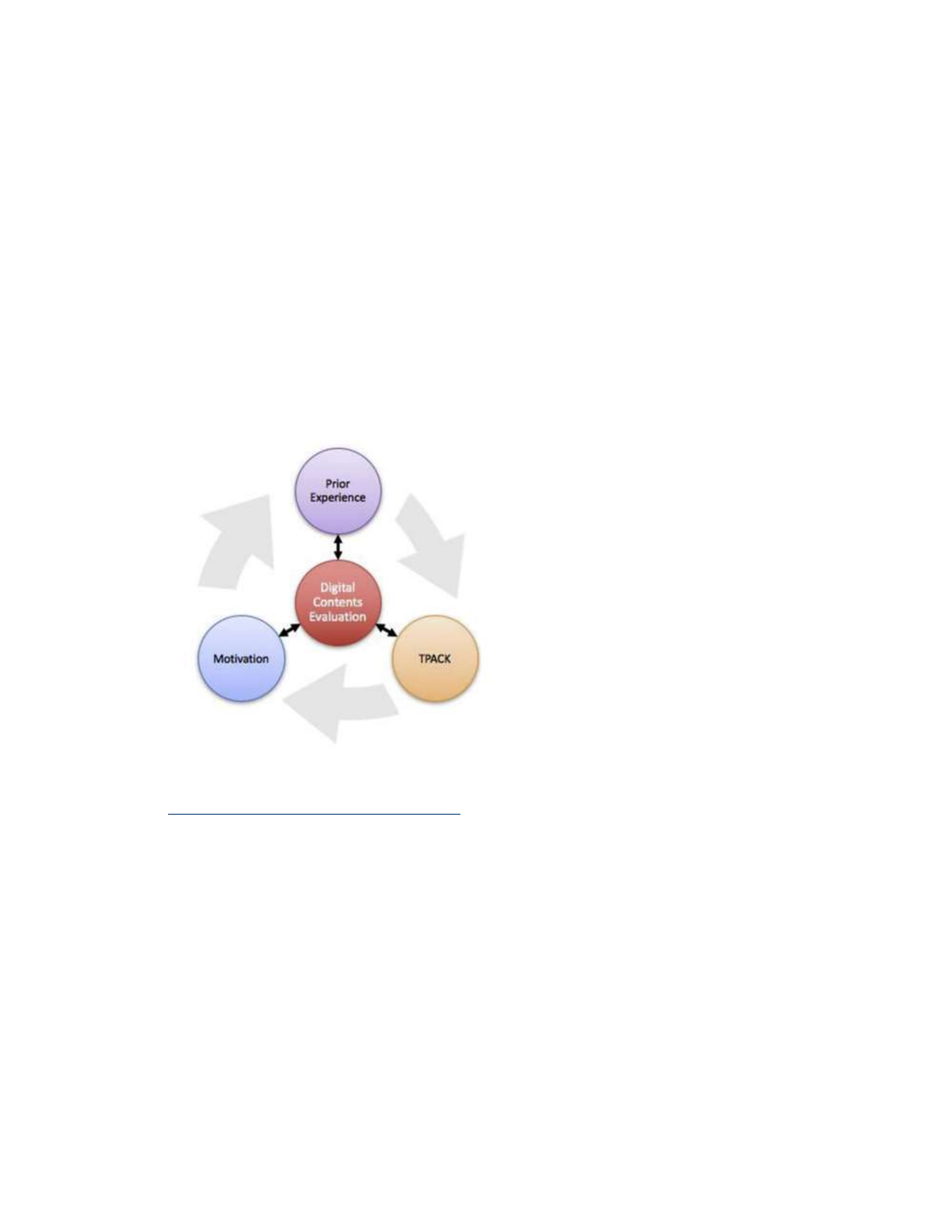
2019). Digital content evaluation involves prior experience and motivation in addition to
TPACK as shown in Figure 1 (M. K. Kim et al., 2017).
Figure 1
Digital Content Evaluation Competency Development
Note: From “Building teacher competency for digital content evaluation”, by M. K. Kim,
K. Xie, and S. L. Cheng, 2017, Teaching and Teacher Education, 66, 309–324.
https://doi.org/10.1016/j.tate.2017.05.0
Siemens (2005) Connectivism Theory
A second framework that guided the study was Siemens connectivism theory.
Connectivism was proposed as a learning theory by Siemens (2005) on his blog,
elearningspaces.org and after incorporating feedback he received, he updated it in 2005 to
the current learning theory. Siemens argued that past learning theories do not account for
learning in the digital age. No longer is learning only from personal experience but from

18
connections. He pointed out that learners in the digital age are challenged to make
meaning and form connections. These connections between sources of information can
result in useful information that is necessary and valued in our society today. Siemens
proposed that new tools would change the way people work and function. He also
recognized that education has been hesitant to acknowledge the impact these tools can
have on learning (Siemens, 2005). Though this is still true in some circles, the current
pandemic has increased the necessity and therefore the pace of implementing the digital
learning resources needed for students and teachers to thrive. How teachers use and
manage these resources and what connectivist strategies are used are key areas of focus
for this study. Eight principles make up the learning theory and are listed below
(Siemens, 2005).
1. Learning and knowledge rests in diversity of opinions.
2. Learning is a process of connecting specialized nodes or information sources.
3. Learning may reside in non-human appliances.
4. Capacity to know more is more critical than what is currently known.
5. Nurturing and maintaining connections is needed to facilitate continual learning.
6. Ability to see connections between fields, ideas, and concepts is a core skill.
7. Currency (accurate, up-to-date knowledge) is the intent of all connectivist
learning activities.
8. Decision making is itself a learning process. Choosing what to learn and the
meaning of incoming information is seen through the lens of a shifting reality.

19
While there is a right answer now, it may be wrong tomorrow due to alterations in
the information climate affecting the decision.
Though all the principles play a role in this research, Siemens’ (2005) last
principle is core to this study. The act of curating digital information for learning
involves strategic decision making. Through this lens, I sought to understand the
strategies teachers use to overcome challenges in the choice and use of digital classroom
resources. Connectivism theory directly relates to how teachers manage and curate
information for learning. Connecting with each other and connecting information in
meaningful ways is an important skill in the information age for both teachers and
learners (Utecht & Keller, 2019). Connectivism addresses the limitations in previous
theories such as behaviorism, cognitivism, and constructivism that do not consider
learning in a digital information landscape (Bell, 2011). The speed of information growth
outpaces people’s ability to manage, interpret, and use it (Siemens, 2008).
The ability to make critical connections among the vast sources of information
and data available and to apply it to classroom learning is of vital importance to
education (Utecht & Keller, 2019). Connectivism involves value measuring and
networked environments where learning stems from the interaction and communication
of knowledge and resources (Banihashem & Aliabadi, 2017). One of the most visible
applications of connectivism has been the massive open online courses (MOOCs;
(Goldie, 2016; Mattar, 2018; Wang et al., 2018). These online learning opportunities
offer many benefits to distance learners. MOOCs are connectivist in nature and benefit
from curated content sharing (Traxler, 2018). Connectivism learning theory has been

20
used as the foundation for designing other collaborative courses which include outcomes
that demonstrate connectivist principles such as collecting, applying, and sharing digital
media in teaching and learning by creating a shared digital repository (Thota, 2015).
Thota (2015) focused on university level course examples and the challenges faced in
connectivist learning environments. Connectivism was used as a model of teaching and
learning when studying the use of blogging in a university setting (Garcia et al., 2015).
Online university courses benefit from connectivism principles (Reese, 2015). Now that
online learning is more necessary at all levels, it is important to explore how secondary
teachers are managing digital resources for student learning through this connectivist
lens. My study provides examples from the secondary environment which is a gap found
in the current research.
While many researchers focus on understanding connectivism and successful
applications of the theory (see Downes, 2019), some argue that connectivism is not
sufficient to be the lone theory informing learning in a digital learning environment (see
Bell, 2011; Duke et al., 2013; Kop & Hill, 2008; Mattar, 2018). Though connectivism
does not replace other learning theories, it embodies parts of other theories and can be
considered both a learning theory and an instructional theory (Kropf, 2013). Mattar
(2018) suggested it could function as an extension of constructivism to address that
theory's limits. Research providing evidence of the tenets of connectivism that
demonstrate the impact on learners and educators would be valuable (Corbett & Spinello,
2020). The theory has strengthened in acceptance over the years and will continue to
21
increase in importance as our access to networked technologies and resources grows
(Corbett & Spinello, 2020).
Connectivism learning theory allows for best practice in advancing learning and
instruction (Reese, 2015). One strategy for successful implementation of connectivism is
to avoid giving students information that they can get themselves (Rice, 2018).
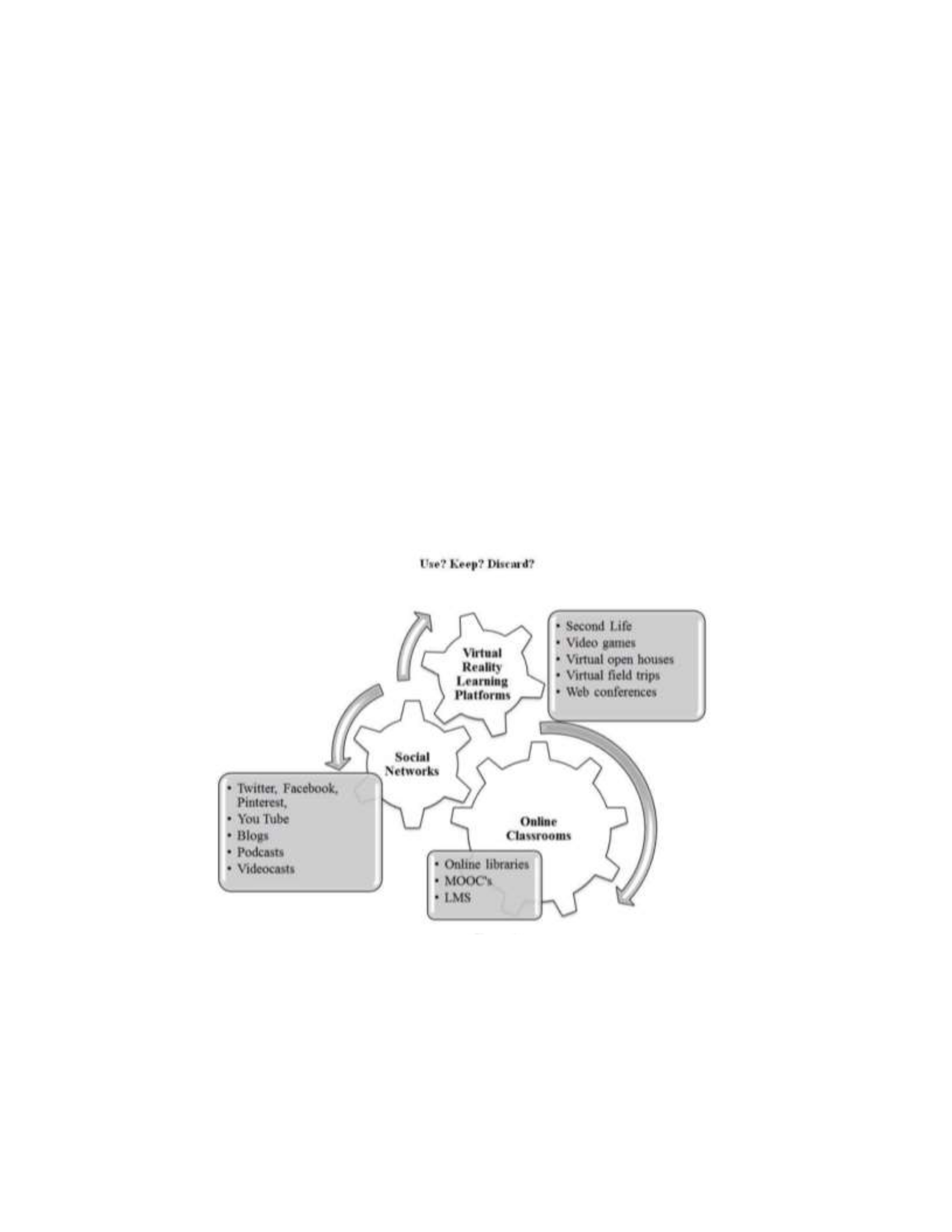
Connectivism suggests that learners obtain knowledge through information reservoirs as
shown in Figure 2 (Kropf, 2013).
Figure2
21st Century’s Three Major Information Reservoirs
Note: From “Connectivism: 21st century’s new learning theory” by D. C. Kropf, 2013,
European Journal of Open, Distance and E-Learning, 16(2), 13–24.
Connectivism offers a learning theory that emphasizes the virtual resources more
than physical resources recognizing the importance of networks in helping others connect

22
to knowledge (Guder, 2010). Though the need to catalog or curate information is still
important, it can be done by multiple members of a learning community (Guder, 2010).
Students should have the opportunity to explore, research, and create (Reese, 2015).
According to Foroughi (2015), educational researchers must investigate what skills
teachers and students need to succeed in this connectivist and digital learning
environment.
Evidence of the acceptance of connectivism as a learning theory is its inclusion on
the list of learning theories online at http://www.learningtheories (Goldie, 2016).
Numerous studies have explored and recognized connectivism as a valid and useful
learning theory (Flynn et al., 2015; Wang et al., 2018). Connectivism provides a lens
through which education can seek solutions to global challenges (Shukie, 2019). A shift
to a connectivist learning approach is needed to better prepare students for future success
(Kivunja, 2014). The connectivism principles should be applied in course design across
the board to engage learners and improve learning outcomes (Reese, 2015). More
research to determine what supports are needed to increase teachers' confidence in
implementing connectivist learning principles would be valuable (Ostashewski & Reid,
2015). My study explored teacher experiences to find strategies used and supports needed
to find, manage, and use resources in ways that give students these opportunities.
Literature Review Related to Key Concepts and Variable
Digital Information Overload
Information overload as a concept is not new, though not to the extent we see
today (Rudd & Rudd, 1986; Yates et al., 2017). When examining recent search analysis

23
of educators using a support website, findings showed an increase of 30 times over the
previous year. The number of views relating to the topic of organizing content in the
digital learning environment increased 6 times from one month to the next (Cavanaugh
& DeWeese, 2020). The abundance of information can cause digital amnesia and other
difficulties in evaluating resources appropriately and can affect quality of life (Gui et al.,
2017; Petrașuc & Popescul, 2019). Teachers use social media to share tips on specific
remote learning tools such as Zoom and Flipgrid (Trust et al., 2020). This practice adds to
the large amount of data teachers are exposed to when searching for resources. A recent
study found that social networks, though beneficial, are a factor influencing information
overload (Roetzel, 2018).
Many online learning products and offerings include reviews which teachers can
use to evaluate the resource. Reading product reviews can cause information overload,
overwhelming consumers and rendering them unable to make a decision (H. Hu &
Krishen, 2019). In reviewing education content, might this same type of overwhelm and
inability to decide occur? Teachers around the world admit that finding quality resources
among the vast amount of free choices is a challenge (de los Arcos et al., 2016; Diekema
& Olsen, 2014; E. A. Horn et al., 2018). There is a difference between information
overconsumption and dealing with information overload. Solutions offered include
strategies such as twigging, delegation, and training (Koltay, 2017; Rudd & Rudd, 1986).
Some indicators show that highly educated individuals are better able to cope with the
latter (Gui & Büchi, 2019).

24
A recent study found that little was known about how K-12 teachers use the
abundance of digital resources for day to day classroom interactions (Vermette et al.,
2019). Knowing how educators find, use, and personalize resources in addition to the
barriers faced in doing so can aid designers and support providers in offering improved
and tailored support (Vermette et al., 2019). Difficulty in finding information due to the
enormous amounts available is not limited to education but is present across disciplines
(Bawden & Robinson, 2017). The ability to cope with information overload should be
considered an important skill related to well-being (Gui et al., 2017). Identifying and
teaching skills and competencies to overcome information overload would help mitigate
the problem (Benselin & Ragsdell, 2016; Yasmeen et al., 2019).
Digital Information Curation and Management
Cherrstrom and Boden (2019) discuss the expanding role of curation in education
and the need for future research to explore adult educators and how and why they curate
for student learning. In the literature review, the authors observed an obvious expansion
of curation to include content curation for teaching and learning that involved formal and
informal collaborative partnerships (Cherrstrom & Boden, 2019). Teachers curate for
many reasons to include insufficient resources provided by a district curriculum. When
teachers recreate collections or create content they have been referred to as prosumers (S.
Hu et al., 2018). Martin and Carr (2015) surveyed 701 K-12 educators regarding
multimedia and technology use to learn what they are using to create or curate
multimedia and its effectiveness for student learning. Recommendations were to compare
technology use between different school levels and between rural and urban in addition to

25
finding out the benefits of additional tools and resources. A qualitative study of K-12
teachers found that they did not taking advantage of already curated repositories and
lacked the curation skills needed to use the resources to positively impact teaching and
learning (Diekema & Olsen, 2014).
Curation is a critical competency. Educator curation allows for personalization of
the teaching and learning process and increases authenticity (Deschaine & Sharma, 2015;
Ungerer, 2016). When curating learning resources for students, providing them in a way
that reduces cognitive load may allow students to better absorb and process the
information (Walkington & Bernacki, 2018). Future research is needed to learn more
about the digital literacy competencies needed to curate information and how activities
compare to traditional classroom assessments. More formal pedagogies to support
incorporation of curation type activities in the classroom are needed (Mihailidis, 2015;
Ungerer, 2016). Content curation is a powerful way to provide quality resources for the
learning environment instead of using only in-house resources (de los Arcos et al., 2016;
Sharma & Deschaine, 2016). Digital curation can involve a large expenditure of time, but
efforts may be recognized when the benefits are realized (Ungerer, 2016).
Curators should add value to the organized collection of information (Tsybulsky,
2020). The act of sharing the curated content is vital to the process as this is the part that
allows others to benefit (Ungerer, 2016). Social media is used to curate digital
information yet much of the research has been in higher education versus the K-12
environment (Greenhow et al., 2019; Tsybulsky, 2020). Social bookmarking and other
social media sharing is a way to share curated content but many educators at the

26
university level still resort to using the organization-provided content (Traxler, 2018).
Multiple examples show curation use by students to engage them in the learning process
and to prepare them for college or career (Cherrstrom & Boden, 2019, 2020; Shaw et al.,
2016; Tsybulsky, 2020). Little research exists about secondary teachers’ content use
(Shaw et al., 2016). Digital curation tools and resources are not new but the application of
curated tools for learning is more of an innovation (Ungerer, 2016). This study explored
secondary teachers to see how or if they curate content for learning, strategies they may
use, and what supports best prepare teachers to participate in this shift in provided
content.
Blended Learning Needs
Teaching in a blended learning model requires skills that are not required in
traditional courses (Stevens et al., 2018). The blended learning curation process involves
selecting appropriate resources for the different levels of online teaching (Bryson &
Andres, 2020). Despite previous experience in blended learning, teachers in a recent
study were overwhelmed with teaching online and needed substantial support (Trust &
Whalen, 2020). With more hybrid learning and constantly changing digital tools, it is
more important than ever for teachers to understand and use digital tools effectively
(Bates, 2015; Graham et al., 2019). One study included 2290 in-service teachers in a
district in the Eastern United States. The researchers looked at the needed competencies
for teaching effectively in a blended environment. With an increase in blended learning
needs, they found a need for more testing of teacher readiness (Graham et al., 2019).
There is a need to look at high school teachers who teach blended and in 1:1

27
environments. Qualitative interview questions could provide details that could improve
the instrument and find out more in-depth information (Graham et al., 2019). Stevens,
Borup and Barbour (2018) examined a year-long PD program for high school social
studies teachers and librarians using the College, Career, and Civic Life (C3) framework
for Social Studies and TPACK to look at effectiveness of the program to help teachers
overcome barriers in teaching in a blended environment. The authors recommended
future studies to help identify best practices. Parks, Oliver and Carson (2016) found a
need for blended learning support and recommended an investigation of PD offerings and
delivery to determine what types allow successful implementation of blending learning.
Online and blended learning involves both resource creation and resource curation
(Sandars et al., 2020). Since the start of the Covid-19 pandemic, quick adoption of
curation methods has been necessary. When there is a lack of relevant resources, teachers
resort to active curation to fill the void (S. Hu et al., 2018). Bryson and Andres (2020)
found that curated materials were bundled and linked to a learning map to guide students
through the learning resources and to identify connections between resources and
learning targets or outcomes. Two types of curation were required - digital resources to
support self-study and resources to support online and real-time learning. Further curation
occurred with students helping to co-create and bundle resources (Bryson & Andres,
2020). There are challenges involving blended learning research which include possible
bias in those conducting the research and the difficulty in defining what constitutes
success in blended learning (Stevens et al., 2018). Gaining teacher perspectives could
aide in defining successful practices. Shifting to blended and online learning can be

28
transformational but relies on successful curation of learning experiences to be at the
heart of the shift (Bryson & Andres, 2020).
Strategies for Digital Information Use
It is important to find strategies to combat information overload (Giunti & Atkins,
2020). In a recent study of K-12 teachers, the top challenge mentioned when shifting to
remote teaching was feeling overwhelmed with the amount of available online resources
and tools (Trust & Whalen, 2020). Additionally, they were challenged by a lack of
knowledge about these online/remote teaching and communication tools (Trust &
Whalen, 2020). In this same study, teachers reported that asking colleagues, conducting
internet searches, and reviewing district and outside organization resources were the top
ways in which they prepared for online teaching (Trust & Whalen, 2020). Finding
content is time-consuming.
Sometimes online collections and learning activities created by content providers
are not designed by educators and must be tweaked to be used or teachers may create
their own content to complement what they find (Dezuanni et al., 2017). Davis (2017)
discusses productive vs consumptive curation and how it might affect curation practices.
Users decide on connections which in turn affects the content they find and share (Davis,
2017). One study found that teachers use social media feeds to follow topics that match
classroom content, saving and sharing the content when it fits (Dezuanni et al., 2017).
Another study found that crowdsourcing the rich annotation of digital resources, using
text, audio, and video annotations, has proven to be an effective way to increase the value
of and the ease in finding and using digital resources (Chen & Tsay, 2017). Finding other

29
successful curation processes and strategies would be helpful to educators. Successful
educational curators can serve as change agents (Flintoff et al., 2014). Teachers use
already curated lists, general search engines, and one-on-one or small informal group
peer advice when navigating digital information resources (Vermette et al., 2019). Kim
(2018) asked what content, strategies, and methods are needed to support curation
competency development. The study used portfolios for assessment and involved library
information services.
Teachers use a variety of social media platforms and strategies for curating
information (Willet & Carpenter, 2020). Curation through tagging has been explored
(Barton, 2018; Greenhalgh & Koehler, 2017). Tagging is a powerful way to find and
share content during the curation process and many of the curation tools incorporate this
feature (Sharma & Deschaine, 2016). Twitter has been used successfully by teachers for
just-in-time teaching and learning (Greenhalgh & Koehler, 2017). The challenge of
identifying and teaching best practices in digital curation is difficult due to constant
change inherent in the field (J. Kim, 2018). Interviews could be valuable in understanding
teacher interactions with tools like Reddit (Willet & Carpenter, 2020). Ungerer (2016)
evaluates digital curation tools through the lens of the SECTIONS model proposed by
Bates and Poole (2003). This model considers criteria that includes students’ education
level, ease of use and reliability, costs, teaching and learning, interactivity, organizational
issues, novelty, and speed of incorporation. Curated resources can supplement course
resources with culturally responsive content (Karimi et al., 2019, 2020). A study of
higher education faculty found that keywords, tagging, bookmarks, and labels are some

30
of the strategies used to organize information though retrieving information still proves
difficult for educators who could benefit from PD to improve these skills (Yasmeen et al.,
2019). A study of K-12 teachers recommended that research focused on educator
preferences, criteria used in finding relevant information, and how social
recommendations fit into the process would be beneficial (Diekema & Olsen, 2014).
Additional research on how educators apply digital curation in relation to pedagogy is
needed (Trust & Whalen, 2020; Ungerer, 2016).
Professional Development and Support
Transitioning from print to digital resources can be difficult for teachers and
requires access to quality content in addition to thorough PD to help teachers with
successfully evaluating, selecting and integrating the digital content (Xie et al., 2017).
U.S. teachers have less collaboration time than teachers in other countries (Darling-
Hammond & Hyler, 2020). More support is needed to include offering teachers the
opportunity to see examples and strategies from their colleagues (Vermette et al., 2019).
Rethinking schedules to allow blocks of collaboration time could help teachers in finding
resources and developing innovative teaching practices to support our new normal
(Darling-Hammond & Hyler, 2020). PD that is collaborative in nature such as in the form
of Professional Learning Communities (PLCs) is more beneficial to educators and to the
students they serve (Meeuwen et al., 2020). The study questions provide the opportunity
to learn from teachers about any collaborative strategies used and if they were beneficial
to managing digital information. Sharing teacher ideas and strategies is necessary to
support their growth in using digital tools and this support becomes even more important

31
as more students use computers as often as a pencil for a learning tool (Vermette et al.,
2019).
Teachers need support when finding and evaluating digital information (Johnson
et al., 2020; C. C. Shelton & Archambault, 2019). PD on TPACK is necessary to help
teachers evaluate digital content. PD with a TPACK foundation can be helpful if it is
organized, has clear expectations, and is relevant to a teacher’s practice (Dalal et al.,
2017; Xie et al., 2017). PD can be used dynamically to create instructional materials to
meet current needs such as those created by the COVID19 pandemic (Sadler et al., 2020).
It is important to learn from teachers what types of professional development and support
allow teachers to improve in finding digital content that is engaging and purposeful for
students. Supports such as specialists and training on rubrics and other evaluation
instruments can help move teachers to higher levels of TPACK competence (M. K. Kim
et al., 2017).
Collections may already be available for teachers to use curated by school
librarians who are skilled in curation and can offer PD for teachers who need help using
resources for instruction (Welz, 2017). In addition to individual teacher professional
development, instructional designers should also be involved in supporting the
development of resources for online and blended learning (Johnson et al., 2020). A
mixed-methods study that included interviews with information technology experts found
that users would benefit from industry professionals serving as middlemen to curate
information and to provide built-in filtering options (Giunti & Atkins, 2020). Blended
learning PD should allow for collaboration, practice, and reflection (Stevens et al., 2018).

32
Collecting and sharing best practice in blended learning would benefit PD initiatives
(Stevens et al., 2018).
PD should be engaging and meaningful to teachers and refrain from adding to the
already-present information overload to impact real learning (Kennedy, 2016). Long term
professional development is more effective in changing teacher beliefs which can in turn
hep them to be more willing to implement positive change (Tondeur et al., 2017). Conole
(2018) discussed the importance of Continuing Professional Development (CPD) based
on the 7 C’s of the Learning Design Framework to help teachers benefit and use digital
technologies.
The Create part of the framework involves teachers understanding how to
repurpose existing materials or to design original material to share. Teachers could
benefit from a framework and PD to learn how to use digital resources in different
contexts (Karimi et al., 2020). One study found that the connectivist approach resulted in
the ability to provide quality digital teaching resources for classrooms and professional
development (Chan et al., 2015). Research on how teachers used technology for
emergency remote teaching could help in developing better supports and PD for
educators (Trust & Whalen, 2020). Shared educator insights on curated materials can
help others better understand how they were used and how they might be used effectively
with different student populations (Karimi et al., 2019, 2020).
Summary and Conclusions
This chapter provided a comprehensive review of the literature that influences this
study. The review started with a selection of studies discussion the TPACK framework

33
and Siemens’ (2005) theory of connectivism. These frameworks offer a lens through
which to explore the research problem. The next five sections reviewed studies involving
one of five themes related to the study problem and purpose. The sections included
literature discussing digital information overload, digital information curation and
management, blended learning needs, strategies for digital information use, and
professional development and support. Digital information overload is an increasing
problem in today’s world leading to the need to find strategies to manage and use the
information (Cavanaugh & DeWeese, 2020; Gui et al., 2017; Petrașuc & Popescul,
2019). Curation is a critical competency requiring support (Mihailidis, 2015; Ungerer,
2016). Literature included studies involving teaching in both face to face and blended
learning environments, describing the need to investigate this topic as it relates to
education. In the final sections, the selection of literature focuses on recent strategies
used and supports needed for managing digital information. The final section included a
discussion on professional development as it relates to the topic study and significance.
The articles specific to secondary educators were limited, older than five years, or from
other countries. These limited findings signify the need for additional research specific to
secondary educators’ experiences in the United States in managing digital resources. The
literature reviewed supports the qualitative study focus: the need to explore secondary
educators’ experiences in finding, evaluating, and using digital resources in the classroom
in order to better understand their challenges, strategies, and support needs. Chapter 3
provides details on the design and implementation of the basic qualitative study.

34
Chapter 3: Research Method
The purpose of this basic qualitative study was to explore secondary educators’
experiences in finding, evaluating, and using digital resources in the classroom to better
understand their challenges, strategies, and support needs. Because all qualitative
research is interpretive, it is acceptable to label this type of study simply as a basic
qualitative study (see Merriam & Tisdell, 2016). This chapter includes discussion on the
research design and rationale for the study, the researcher’s role, methodology,
participant selection, instrumentation, data collection, data analysis, trustworthiness, and
ethical procedures. The chapter concludes with a summary of the elements of the research
method and process.
Research Design and Rationale
The purpose of this basic qualitative study was to explore secondary educators’
experiences in finding, evaluating, and using digital resources in the classroom to better
understand their challenges, strategies, and support needs. The following research
questions were informed by the study purpose, research method and design.
RQ1: What are the experiences of secondary educators when finding, evaluating,
and using digital resources in the classroom?
RQ2: What strategies do secondary teachers use for finding, evaluating, and using
digital resources in the classroom?
RQ3: What support do secondary teachers need to find, evaluate, and use digital
resources in the classroom?

35
After considering the study’s purpose and research questions, I chose a qualitative
research method for my approach. Qualitative researchers are interested in exploring
lived experiences and perspectives and the interpretations of those experiences (Ravitch
& Carl, 2016). Basic qualitative studies look at people's interpretation of their
experiences and the meaning they attach to them. Data is collected through open-ended
interviews or document analysis in this type of study (Merriam & Tisdell, 2016). The
qualitative approach is an appropriate fit for this study as it is flexible and gives
participants a meaningful voice. Qualitative research allows participants to serve as
"story-tellers" which can result in the illumination of important issues that may not be
uncovered in less flexible research methods (Kozleski, 2017). Qualitative research can
also lead to more expansive results that include multiple ways of knowing and learning
(Kozleski, 2017). During teacher interviews, ideas may be uncovered that would not be
found otherwise. For example, responses might involve strategies that serve underserved
populations or culturally responsive digital resources might be shared. These topics may
be uncovered by probing questions and participant descriptions that would not be
obtained using other research methods. The basic qualitative method selection emerged
from the research questions, study goals, and research context.
Quantitative research was not appropriate for this study as it does not fit the study
design. Quantitative research involves analyzing data numerically using statistics and
mathematics (Ravitch & Carl, 2016). The research questions in this study are best
answered with rich descriptive data which can be obtained through interviews with
follow-up probes for clarification. The research questions were designed to look at

36
teacher experiences as a whole versus a quantitative approach which would be used if the
research questions were relational or causal with a hypothesis to test.
Role of the Researcher
My interest in this topic is rooted in my personal experience as a technology
integration coach and as a researcher. In my role as technology coach, I am the same
level as a certificated teacher. I serve as an objective interviewer of secondary teachers to
discover how they find, evaluate, and use digital resources in the classroom in order to
better understand their challenges, strategies, and support needs.
I am a member of several teacher educator groups on social media including
NNSTOY, VOYA STEM Educators, National Board for Professional Teaching
Standards, and other educator-focused groups. Though these groups are used to seek
participants for the study, I do not hold any authority over the participants in any of the
groups. For the purposes of this qualitative case study, my role as investigator was to
interview, record, and analyze data. I protected participants from harm and maintained
confidentiality through open and honest communication, member checks, and personal
identification of biases as described by Merriam and Tisdell (2016), Thomas (2017), and
Ravitch and Carl (2016). Participants were able to review transcripts to validate
transcription and to provide feedback and comments. I kept a reflective journal to
increase awareness of potential biases and other ethical concerns and to record thoughts
and assumptions.

37
Methodology
Participant Selection
The basic qualitative study used open-ended semistructured interviews for data
gathering and analysis. The population included in-service secondary teachers who use
digital resources for teaching in person and/or online. The process for the selection of
participants was purposeful to ensure participants were unique in their ability to answer
the research questions (Ravitch & Carl, 2016). The goal of purposeful sampling and
qualitative study is not to generalize but to answer the research questions to gain
understanding (Ravitch & Carl, 2016). By inviting participants from a pool of teachers
engaged online, I hoped to glean answers to the research questions that could inform the
design of future supports that meet educator needs. Included teachers had experience
teaching with digital resources for at least 1 year. I used social media to invite
participants interested in participating and selected from those who met the criteria to
take part in the study.
If potential recruits chose not to participate, no further contact was involved that
was study related. I planned to select from 10 to 15 participants for this study. The actual
study involved 15 secondary teachers. Depending on the diversity of the sample,
saturation could have required up to 30 participants, but it was more likely that 10 to 15
would be appropriate for my study (see Burkholder et al., 2016). Some researchers are
hesitant to use the word saturation because of the implication of one truth (Ravitch &
Carl, 2016). I set aside the time and resources to include additional participants if
saturation was not reached but I had sufficient data at 15 participants. A purposeful

38
random sample from educators recruited in online social media spaces was used.
Purposeful random sampling is useful in reducing bias when small samples are used due
to the limited availability of time and resources (Ravitch & Carl, 2016).
Instrumentation
Data collection instruments for this study included a consent form, interview
protocol, interview questions, interview guide, recording of interview, and follow up
email to participants. Once the informed consent was completed, participants were
invited to choose an interview appointment time from an online appointment scheduler.
Interviews took place through video conferencing and phone calls and were recorded for
transcription. Participants were made aware of the recording in the introduction to the
interview and were reminded that they could opt out of the study at any time.
I developed the interview guide (Appendix A) as described by Rubin and Rubin
(2011) to align with the research questions. A follow up email included a transcript of the
interview for participant review. The interview questions are aligned to the research
questions to ensure the sufficiency of the data collection. An open-ended question was
included at the end as a good practice to allow participants to add additional comments
(see Ravitch & Carl, 2016). I tested multiple versions of the questionnaire with friends
and family to find the best instrument (see Lambert, 2012).
Procedures for Recruitment, Participation, and Data Collection
Participants were recruited from educator Facebook Groups including NNSTOY,
VOYA STEM, and other Educator groups. Twitter and LinkedIn were used to recruit
additional participants. Participants included secondary teachers in the United States who

39
teach in either a face-to-face or blended teaching environment and who use digital
resources in the classroom. Participants had at least 1 year of teaching experience. An
online form was provided to volunteers to determine those teachers who meet the study
criteria. Those who did completed an online informed consent. Once the consent was
completed, participants received a link to an online appointment scheduler to schedule an
interview time slot. Interviews were conducted through video conferencing and audio
from the conference was recorded and transcribed to look for themes related to the
research problem. A phone option was offered for those who were unable or unwilling to
participate in a video interview. Three participants opted for the phone-only option.
Participants were offered the option to provide digital artifacts to include samples of
curated content, but it was not required.
Interviews were designed to last 45 minutes, but participants were asked to set
aside an hour to allow time for questions at the beginning and end of the interview. Once
the interview transcription was complete, a copy of the transcription was emailed to the
participant for checking. A thank you email was sent at the completion of the process.
Data Analysis Plan
Both manual and software-assisted analysis methods were used to analyze the
data. First, the interviews were transcribed into written words using the Otter.ai
transcription software. I then listened to the audio to make necessary corrections in the
transcription. I examined all data applicable to the research problem with the realization
that it was not be possible to identify and code every theme or concept represented in the
interview data (see Rubin & Rubin, 2011). Visual representations of data are used to

40
share results and findings. As Saldana (2015) advised, I used a hybrid coding method to
include a priori codes and inductive codes. The NVivo program was used to assist in
analyzing the data.
Trustworthiness
Credibility
Credibility means that the findings of the study are believable given the data
presented (Merriam & Tisdell, 2016). One way credibility is demonstrated is by making
sure the interview participants chosen are knowledgeable about the research issues
(Rubin & Rubin, 2011). The participants for this study were in-service secondary
teachers who use digital resources and therefore were qualified to elaborate on the
research questions. Rubin and Rubin (2011) caution of the need to ensure participants
accurately speak about their experiences. Question phrasing is designed to prevent
participants from possibly distorting or omitting information and to be non-threatening.
There were also enough overlapping questions to allow for consistency checks.
Transferability
Transferability is supported by using thick descriptions and maximum variation
(Merriam & Grenier, 2019). To ensure transferability, it is important to share details on
exactly how the study was conducted including participant descriptions, data collection
methods, time periods, and limitations. I shared details about this study including
possible limitations to ensure transferability. By documenting my findings, sharing my
insights, and providing the reasoning behind my conclusions and analysis, I have
increased the trustworthiness of my findings.

41
Dependability
Dependability means that there is evidence of consistency in data collection,
analysis, and reporting. Demonstrating that the data collection method is reasonable, and
that the collected data answers the research questions helps to provide dependability for a
study (Ravitch & Carl, 2016). The study interview questions are aligned to the research
questions and are designed to provide detailed descriptive data. Memos were used
throughout the study to make note of any researcher bias.
Confirmability
Conformability requires that other informed researchers would come to the same
conclusions when examining the same qualitative data (Babbie, 2017; Schwandt et al.,
2007). Collaborating with others for a research study is one strategy that could help with
validity. I collaborated with my chair and committee members to discuss and receive
feedback on the processes and methods used.
Ethical Procedures
The Walden University Institutional Review Board (IRB) approval was required
and obtained before any participant recruitment or data gathering occurred. The IRB
approval number is 12-16-20-0727365 and was included on the consent form for
participants. Recruiting posts clearly described the research topic and all participants
were provided an informed consent to make participants aware of their rights and the
requirements of study participation. Participants were reminded that they were free to
refuse participation and/or withdraw from the study. Pseudonyms were used in place of
actual participant names to protect participants. I attempted to eliminate potential

42
research bias by creating the semistructured interview questions and probes, being aware
of misinterpreting interview data, remaining consistent during the interview/data
collection process, and including all data when analyzing the results. In addition, I
excluded participants who work at the site where I currently serve as a technology coach
because of the possibility of a conflict of interest.
I informed participants that all data was stored on the researcher’s personal
computer with two-step password protection and that once the study is completed, study
data would be transferred to a USB drive and stored under lock and key for a period of
five years at the researchers’ home. After that time, data will be destroyed in line with
Walden University’s policy. To ensure both internal and external transparency,
researchers must be honest with participants about all aspects of the study and must
disclose limitations when sharing the final results (see Ravitch & Carl, 2016). Written
assurance to participants stated that any information gathered through the study will
remain confidential.
Summary
This section described the study methodology. Topics discussed included a clear
description of the research design and rationale for the study, the researcher’s role,
methodology, participant selection, instrumentation, data collection, data analysis,
trustworthiness, and ethical procedures. A basic qualitative study was conducted with 15
secondary educators who met the study criteria. In-depth semistructured interviews were
used for data gathering and analysis. The population included in-service secondary
teachers who use digital resources for teaching in person and/or online. Data analysis

43
involved manual and software-assisted analysis. The issues of trustworthiness were
addressed to include credibility, transferability, dependability, and confirmability. Ethical
considerations discussed included IRB approval and participant and data protection and
procedures.

44
Chapter 4: Results
The purpose of this basic qualitative study was to explore secondary educators’
experiences in finding, evaluating, and using digital resources in the classroom to better
understand their challenges, strategies, and support needs. To address the study problem,
a basic qualitative interview study was conducted. The following research questions were
used to guide the basic qualitative study:
RQ1: What are the experiences of secondary educators when finding, evaluating, and
using digital resources in the classroom?
RQ2: What strategies do secondary teachers use for finding, evaluating, and using digital
resources in the classroom?
RQ3: What support do secondary teachers need to find, evaluate, and use digital
resources in the classroom?
This chapter includes specifics regarding the setting, data collection, data
analysis, results, and evidence of the trustworthiness of this research.
Setting
The setting for this study was a virtual setting that included secondary teachers in
the United States who responded to recruiting posts. The interviews were conducted with
secondary teachers in the United States who volunteered to participate using the Zoom
conferencing tool or a phone call depending on participant preference. Sixty-six percent
of the participants were from Alabama with the others from California, Illinois,
Tennessee, and Wisconsin. The interviews were conducted during December 2020 and
January 2021 during teacher holiday breaks. These interviews were conducted during an

45
on-going pandemic which may have resulted in teacher video-conferencing fatigue. Two
teacher participants had or were recovering from the COVID-19 virus. All participants
have experience teaching in both virtual and face-to-face environments. Most are
currently teaching in a blended or hybrid environment due to the current global
pandemic, with some having all virtual students in addition to the hybrid environment,
and two currently teaching all virtual despite having taught only face-to-face in previous
years.
Demographics
The participants for this study included 15 secondary teachers in the United
States. Participants taught a variety of subjects and grade levels including math, science,
language arts, social studies, visual arts, world language, and career tech. The average
number of years of teaching experience among participants was 15.9 ranging from 2 to
37 years. Demographic information is shown in Table 1. Pseudonyms were used to
protect participant confidentiality.

46
Table 1
Research Participant Demographics
Participant
Subject
Years Teaching
Location
Brooke
Science
16
Tennessee
Alexa
Language Arts
16
Alabama
Kayla
Language Arts
20
Alabama
Regina
Social Studies
15
California
Jacob
Career Tech
32
Illinois
Brian
Math
2
Alabama
John
World Language
20
Alabama
Pete
Science
37
Alabama
Tina
Language Arts
25
Alabama
Sloan
Math
9
Alabama
William
Visual Arts
3
Illinois
Diana
Math
19
Alabama
Beverly
Math
3
Alabama
Sheila
Career Tech
17
Wisconsin
Michael
Science
5
Alabama

47
Data Collection
The data included 15 semistructured interviews conducted virtually through video
conferencing and phone interviews. After receiving IRB approval 12-16-20-0727365, I
posted recruiting information targeted to teacher groups on Facebook, Twitter, and
LinkedIn. There were 18 teachers who showed interest in volunteering for the study. Of
that number, all met the criteria for participation but only 15 scheduled and completed the
interview. Participants signed up for interview appointments based on their availability.
The interviews took place between December 20, 2020 and January 6, 2021. I
reminded participants of the statements on the informed consent ensuring confidentiality
and anonymity. The virtual interviews lasted between 30 and 60 minutes. I used Zoom
and a phone app to record the audio and Otter.ai to transcribe the interviews. I listened to
each interview and manually checked transcription to correct any errors or mismatches. I
also took hand-written notes on a printed interview guide. I used member checking by
emailing participants the completed transcription for verification and to allow participants
to voluntarily share any artifacts relevant to the study. There were no variations form the
data collection plan outlined in Chapter 3, nor were there any unusual circumstances
during data collection.
Data Analysis
I asked secondary teachers my research questions about their experiences,
strategies, and needed supports with finding, evaluating, organizing, and sharing digital
resources. I used a semistructured interview guide with open-ended questions and
probing questions when needed, to gather the data needed to answer the research

48
questions. Secondary teachers’ perspectives were explored through the lens of Siemens’
(2005) connectivism theory and the TPACK framework (Mishra & Koehler, 2006).
The data analysis process for this qualitative study was performed in two stages.
First, I used a priori codes from the framework and research questions to code data and
look for categories and themes. Additional codes emerged as I continued to read through
the data. These codes were then grouped into emerging categories as described by
Saldana (2015). The categories included: Finding, Social Media Sites and Repositories,
Evaluating, Organizing, Sharing, Connecting, Professional Development, and Support.
Second, I created a spreadsheet with these categories and as I listened to the recorded
interviews again, I took notes and captured quotes while categorizing them into one or
two of the categories. After looking through the data again, it became clear that two
additional areas should be addressed. These areas were digital resources and pandemic. I
noticed several responses related to these two areas and it was important to capture them
to create context for the remaining categories. Many times participants do not directly
name a concept but when describing it based on specific characteristics, it is possible for
the researcher to assign a code or theme to it (Rubin & Rubin, 2011). I also captured
quotes and thick descriptions that illustrated particular themes. I was mindful of the
importance of properly representing the participants’ experiences throughout the analysis
process. See Table 2 for a complete list of themes and subthemes.

49
Table 2
List of Themes and Subthemes
Themes
Subthemes
Digital Resources
Pandemic
Finding
Social Media Sites & Repositories
Evaluating
Organizing
Strategies in organizing
Challenges in organizing
Sharing
Challenges in sharing
Sharing tied to positive student outcomes
Connecting
Professional Development
Support
Results
The results for this qualitative study are reported by themes that emerged while
investigating the data. I begin with a discussion of how digital resources was described to
the participants and how participants described digital resources during the interview
process. Next, I include results that specifically mention the current pandemic, as this
situation affected responses due to teachers working in new environments such as virtual
and blended learning environments that they did not all experience prior to the pandemic.
The remaining results are discussed by themes garnered from the initial framework

50
categories and from the research questions. These additional themes included: Finding,
Evaluating, Organizing, Sharing, Connecting, Professional Development, and Support.
Theme 1: Digital Resources
I started each interview with a description from my interview guide of what
digital resources could include. I read, “Digital resources for this study could include
resources such as online articles, blogs, podcasts, videos, images, online collections and
repositories, social media feeds, or other content mentioned by participants.” It was
interesting to see the variety of digital resources used by teachers. Some teachers
mentioned helpful online tools such as Brian who uses Doodly whiteboard animation
software to get concepts across. Some described the use of multimedia that included
movies like Hidden Figures to teach math or popular songs to teach English while
connecting students to music they enjoy. John mentioned using real French commercials
as a resource for students to learn a foreign language from native speakers. Others
described tools to connect, such as Trello, or to organize, such as bookmarks and Google
docs or folders. Some tools like YouTube were used to find content and to share it
through curated playlists for extra help. Brian uses WooTube, a useful math channel, as
part of a curated list of channels he shares with students for optional extra help. Many
tools such as online repositories or quiz sites were used after seeing a recommendation on
social media or hearing about it from a school colleague. John mentioned using Quizizz
because he saw how other teachers on social media were using it and wanted to use its
live polling feature to increase student engagement. In some cases, a teacher used a tool
for a different purpose than intended. For example, Brian uses Zoom to create

51
instructional videos versus to connect for a video conference. He said that it provided
better presentation and editing tools than his previous video editor. All participants had
now used some type of video conferencing software to include Google Meet, Zoom, and
Microsoft TEAMS due to the new teaching environment related to the current pandemic.
Tina mentioned that live streaming and recording were helpful to students. Tina summed
it up with a thought-provoking comment saying, “I think we need to use resources to
better us, but not to replace us.” Some of the digital tools mentioned in the interviews are:
Desmos, Edgenuity, EdPuzzle, Flipgrid, Geogebra, GimKit, Gizmos, Jamboard, Kahoot,
Merge Cube, Nearpod, Padlet, Pear Deck, Poplet, Quia, Quizzizz, ReadWorks,
Screencastify, Trello, and Whiteboard.Fi.
Theme 2: Pandemic
The current global pandemic increased the need for digital resources and better
organizing methods, especially when sharing with students. Tina described the situation
like this, “I feel like this year is so much about survival…this year is not necessarily how
to get more innovative with resources. It's how to make the resources work with our
COVID situation.” Sloan mentioned that after the pandemic, she uses technology all the
time, even with traditional students. Most mentioned that the pandemic forced them to
use digital resources and tools they had not used in the past and that they felt more
confident now because of it. Diana mentioned that the pandemic cut short 9 weeks of
time and that kids needed remediation. She noted,
I hate to blame everything on the pandemic, but, you know, we cut short nine
weeks last year. So, I have these kids that, you know, I mean, I know people are

52
giving grace and everything, but for them to be successful for the rest of their high
school and college, that still needed to have certain skills. So, I knew I needed to
find something engaging for them.
Diana and Beverly both mentioned gaps in learning from the pandemic and the need to
use digital resources to help fill those gaps. These two teachers are from more
economically disadvantaged schools than most of the other participants, which could be
an area for future research.
Teachers also mentioned that the pandemic made the need for streamlined
curriculum more critical. Tina explains this as one of her technology goals,
Everything that I create with technology, my coworkers also use it. That has been
my charge this year … to streamline our curriculum, where you don't have to be
in the classroom to be able to use it... I spend a lot of time kind of taking our units
and streamlining them.
She felt like many of these tools and sharing practices should continue after the pandemic
commenting,
This will continue after pandemic or should, … In the past, kids are absent or sick
for a week… they really lose the instruction. … I think now we're going to be a
lot more cognizant of… many ways we can do a better job sharing with kids who
are not physically present…I think we are going to be better teachers because of
all this, and I think we'll use technology better.
As reflected in these teacher responses, the pandemic increased the supports needed for
using digital resources for teaching.

53
Theme 3: Finding
The problem most often mentioned in relation to this concept was a lack of time.
John described it this way, “The wealth of things that is out there is more than I can ever
use, more than I can ever consume, and more than I can ever even explore." Teachers
described differences in finding practices between when they were new to teaching a
subject to when they were more established in teaching it. Most looked to colleagues in
the building first, and then to district provided resources, professional organizations,
trusted teachers on social media, or repositories. Sloan discussed district resources
saying,
The apps that are already with our school district, I trust them. Like Gizmos is an
actual site that our school district purchased, as well as Desmos, the fact that our
school district purchased… but as for if I was using something off Teachers Pay
Teachers, you have to test those out first because that's coming from everywhere.
Brian stated,
I would say the majority of the resources that I find that I use are either on
YouTube, or…connecting with past mentors, and…I'm part of the UTeach
network. So, I get those newsletters and stuff like that.…They're usually trying
to… give us resources…to use. So, anything that I picked up from conferences
just talking to other teachers’--stuff like that.
Many of the teachers, like Brian, mentioned that teacher connections helped in finding
the resources they needed.

54
All participants agreed that there were plenty of digital resources to choose from,
maybe even too many. Three teachers described the process of finding resources
sometimes leads to going down a “rabbit hole”. Most agreed they needed more time, with
one teacher adding that he could use a secretary to help with finding and organizing
resources. Most search for digital resources by content standards. Pete says that
sometimes you get lucky and find something quickly and sometimes it takes hours. He
describes it saying, “Sometimes… you just you find something you think it's gonna be
good and then you look through it and it really doesn't hit…what I really want. It sounds
good, but it's not.” Teachers mentioned a constant struggle between finding quality
resources while limiting the searching time to a manageable level.
Many teachers mentioned Facebook Groups targeting specific content or teacher
subject area. One group was called “Teaching During Covid”. Others mentioned groups
that included: Tennessee Teachers Looking for Resources, Teaching Tolerance, Facing
History and Ourselves, Equal Justice Initiative, AP Literature, Marketing Educators,
Business Educators, Delta Math, Schoology group, NBCT group, French Teachers in the
U.S., and Bitmoji for Educators. Some participants mentioned following teachers on
social media that they heard about from colleagues or at conferences. Some look through
public content in repositories. The science teachers interviewed mentioned the need to
find online simulations since they could not do experiments easily with virtual students.
Michael describes how he uses a simulation site called PhET, “Normally I did
demonstrations in class…or we would do hands on labs, that's not possible for full time
virtual students. So, I've always used PhET for some things, but this year, I've used it a

55
lot more for sure.” The Facebook groups were a strong source of support and resources
for most of the teachers in the study.
Brian mentions finding a lesson on transformations in Desmos that a teacher made
public. He says, “After I found it, I worked through the slides…and worked through the
lesson, myself, and then I posted it…we went through it and class and I built lesson
around it.” Most were not aware of many of the free Open Education Resources (OER)
repositories I shared during the interview process. One teacher has students find and
curate resources. They all drop resources with descriptions into a shared document, the
teacher reviews them, and then the students can access it throughout the year. Most
teachers felt the need to remix resources to fit specific needs. Tina notes, “That's stuff I
create… I really can't find examples of that…maybe that's my perfectionism, but I will
look at what's out there and then I'll go do my thing with it.” All teachers mentioned that
they wanted to use places that made it easy to find resources. Regina follows one teacher
online because “He is very organized and very easy to find. And I rely 90% on his stuff.”
Sloan also agrees that she needs an easy way to search by standard and grade level.
Sheila says that resources need to be easy to find. The varied experiences mentioned
highlighted teacher needs for connecting with others, testing resources, and remixing
resources to fit specific classroom needs.
Strategies for Finding
Many strategies for finding quality resources were uncovered during the interview
process. William uses video evidence of successful lessons that he finds on Twitter
commenting that it helps him to hone his own practice. Michael searches Google for a

56
specific type of physics problem which leads to a set of problems. He then backs up to
the site that hosted the problem set and usually finds good resources there. He bookmarks
the site for later use. Michael suggests that teachers should have a solid idea of what they
want to do before starting to look. Many participants mentioned district hosted portals as
a starting point such as Clever, Classlink, and Schoology Resources. Others mentioned
finding resources in the tool site repositories housed on sites like Desmos, Gizmos,
Nearpod, EdPuzzle, and others.
Two teachers mentioned difficulties in finding resources due to the unique nature
of their career tech courses. These teachers looked to industry sites to find resources.
Jacob says,
I don't really feel like I have any place to look. And so, I look at industry level
stuff. I'm always constantly looking for ideas like in the film industry, or NASA,
or medical research or really, I look out as far as I can. I'm like, so how do I figure
out how to scale that down and bring it to my kids.
William gets students to help in finding and curating resources. He describes the process,
Most years what I will do is I will have my kids sit down and I will say ‘Hey, I
need you all,’ we're in a big, shared document, ‘I want you to start dropping
resources that you find interesting. And give a small description.’ And these
resources can be fine art, visual arts, to even science and different things like that.
And I just want this huge scope of different resources. They all drop them in, I
review them. And then we create a very nice document with the link in the
description that the students can access throughout the year.

57
Beverly relates how she succeeded in reaching a struggling virtual student by using a
YouTube video that used basketball to explain the math concept of combining like terms.
She found the video using Google with the search words “combining like terms” and
“YouTube” and then searched through the videos until she found one that met her needs
to connect to the student. She describes her success,
After he watched the video, and there were some practice problems in the video.
... I'm like, okay, so who's on the same team? He could pick them out in a while.
Can we combine these two? He's like, No, I'm like, why not? They're not on the
same team. Boom! They don't have the same Jersey on, so…it clicked much more
than me saying Xbox, yam or whatever I could have said.
The various strategies in finding resources included using Twitter recommendations,
targeted Google searches, district hosted portals, industry resources searches, and student
curation. The strategies proved useful to study participants.
Challenges in Finding
Though most were able to find needed resources, there were still some challenges.
Sheila reflects,
I have a hard time. I think trying to find just short enough units that you can …
embed in to refresh the curriculum, but then also stay within my timeframe ... I
think that's hard. I feel like when you're trying to just piece little bits together,
sometimes the continuity isn't there. Sometimes the length of time that you have
to fit it in, is difficult. … when it's not your own, that you haven't created, it feels
a little disjointed…It looks great on paper, but then, when you go to deliver it, it's

58
…not quite what you were hoping it was going to be or as engaging or easy for
the kids to grasp.
All participants felt mentioned the lack of time as a challenge keeping them from looking
for new resources.
Social Media Sites and Repositories
I presented a list of social media sites and repositories at the end of the interview
to get feedback on teacher interaction with any of the sites. Sites I presented to interview
participants are found in the interview guide in Appendix A. Some of the sites were used
by many of the participants while others were used by few to none. Pinterest was
mentioned by a few participants. Reddit was not used by any of the participants and
LinkedIn was not used to find resources. I did not include Instagram on the interview
guide, but a few teachers mentioned following teachers on this platform. The other social
media sites are shown below with selected teacher comments.
Teacher Pay Teachers (TPT) was mentioned by all of the participants. The
majority felt it was very useful and found quality resources they could use in their
classrooms. A few teachers felt it was ineffective--only offering worksheets. Those who
used it mentioned that it was more useful to them when they were a new teacher or new
to teaching the content as it provided a good starting point. Beverly says, “My very first
year I had this whole anxiety about teaching, I bought a whole a whole curriculum
from…Teachers Pay Teachers. And so, I still have it because it covers all of the standards
for seventh grade math.” Some teachers moved away from using it as much as they began
to create their own content or found other sources. Some teachers could use district

59
money to purchase from TPT while others were forbidden to use school money for TPT
purchases. Alexa responds, “I find a lot of stuff on Teachers Pay Teachers…I find like
digital breakouts and stuff like that. That is by far my favorite place to go.” She said after
her district no longer allowed her to use her school money to purchase, she visited it less.
She remarked “I liked it because it kept my units new and refreshed. I was always getting
new ideas.” In describing her experience finding a useful resource on TPT Diana notes,
I had to do a lot of research prior to make sure that it was going to do… I love
Teachers Pay Teachers, I have put stuff on Teachers Pay Teachers, but you also
have to be very careful that it's [not] just surface and not really going to let you
know where…misconceptions are in their learning. So, I was very pleased with
this particular one. And this was the first year I had seen anything from her.
While many of the teachers found value in this site, Tina described a different experience
with TPT saying,
I go to organizations I trust. I don't like teachers …paying money and
downloading from Teachers Pay Teachers and giving kids a bunch of run-off
copies of worksheets. And they can't differentiate that for their ESL kids or their
special ed kids. So, they're not differentiating at all. Because they bought
something from Teachers Pay Teachers. And it's a lot of work for … our ESL
teacher because…we have teachers bringing her stacks of Teachers Pay Teachers
worksheets and saying how I am supposed to use this with my ESL kids. …if
you'd create your own curriculum, you could differentiate it.

60
Overall, TPT was a useful site with a variety of resources meeting the needs of most of
the teachers in the study.
Twitter
A good number of the participants used Twitter for finding resources. Alexa said,
“I follow some really good English teachers on Instagram and Twitter.” When asked how
she knew who to follow she said,
I honestly do not remember…several years ago, I went to a workshop called
"Keeping the Wonder" and … I started following the people that were presenting
there… once I started following one teacher, they started…highlighting and
recommending other teachers …I…do not remember how I found out to follow
the first one…maybe I found their resource on Teachers Pay Teachers…and they
said … check me out on Instagram or Twitter, and I followed them. And that...got
me started.
Sloan mentioned finding resources when participating in an EdChat. She said, “I'll be an
educational chat that happens. And we're just talking about a resource and I’ll go look it
up.” William said,
I follow a lot of other professionals on Twitter and so they will give…tidbits
about things that they've done in the classroom, maybe some video
evidence…and I will take those ideas and try to implement them as well…. It’s
just a good resource for … polishing my own teaching practice at times.
Jacob says,

61
I can fly through Twitter in a heartbeat. And I'm like, okay, I know people I
follow people that have interesting stuff. And there are certain…keywords or
graphics that catch my eye. And they usually lead me where I want to go…. I
started out with a core group…if I see they recommend or they retweet stuff
regularly, then I know that they find value in their stuff. And I go there.
Sheila talks about her Twitter use saying, “Once in a while, but it's not my go to. It's only
a few people that I have…followed…that…post something that catches my eye. But most
of the time … it's Facebook or Pinterest, or Teachers Pay Teachers and YouTube.” Diana
says,
I do look at Twitter because I follow…Sarah Vanderworth. … Dan Finkel…I
follow a lot of educators …. Joe Boaler… So, I do a lot on Twitter. But mainly,
that's more for people that I admire…more role model stuff, not teachers as much
in the classroom. Because I don't know every teacher in the classroom.
Brian, Brooke, John, Kayla, Regina, and Tina did not use Twitter.
Facebook
Ten of the teachers mentioned specific uses of Facebook for finding resources.
Pete, Sloan, Tina, Michael, and William did not mention using Facebook to find
resources. Brian notes, “The entire math department is using this Delta Math for
homework. And there's a Delta math Facebook page. And I'm a part of that.” As
mentioned in the finding section, teachers found a multitude of resources from Facebook
groups including: Teaching During Covid, Tennessee Teachers Looking for Resources,
Teaching Tolerance, Facing History and Ourselves, Equal Justice Initiative, AP

62
Literature, Marketing Educators, Business Educators, Delta Math, Middle School Math
Teachers, Teaching With Schoology, NBCT group, French Teachers in the U.S., and
Bitmoji for Educators to name a few. Diana describes her use of Facebook saying,
I'm constantly coming through looking. What have others encountered? What
have they found to work? In fact, I just found out about some new game GIZmet
or something like that. That is like an among us game, which is a big thing with
the kids in middle school right now. So, Facebook's probably the biggest.
Facebook groups provided many quality resources for teachers in the study.
YouTube
Most participants used YouTube videos at some point. Michael uses YouTube
videos to help explain concepts and for enrichment. Sometimes he Google’s the topic
with the name of a specific YouTuber he follows to find the perfect resource. A few
teachers mentioned podcasts under YouTube and Jacob hosts his own podcast. Brooke
mentioned that she uses ClipGrab to get parts of YouTube videos because YouTube is
blocked at her school. Alexa used YouTube to find specific videos to accompany books
they read as a class. Regina uses it to replace out of date VHS tapes from the History
Channel and National Geographic. Brian gives students lists of YouTubers to follow such
as Eddie Woo (WooTube) and he also uses it to share content he creates using Doodly, a
white board animation software. Pete uses Bozeman Science and the Amoeba Sisters
video channels to reinforce science concepts. He also uses a Frank Gregorio playlist
which describes itself in this way: “Here, you will find dramatic, visually stunning video
"trailers" in the natural sciences choreographed to powerful music, designed to motivate

63
and inspire students at the beginning of a lesson to the wonders of Biology, Earth
Sciences, Physics, Astronomy, Chemistry, Environmental Science and Math.” Beverly
said she uses YouTube for everything. She notes, “This is also helpful for our kids... to
actually … play out the steps actually, like going through the steps is easier than just
seeing them written down. So, I definitely like to use YouTube.” William creates video
lessons and playlists but screens every video before adding to a playlist versus just
sharing another teacher’s playlist. Diana uses videos from Dan Finkel and Joe Boaler
which were featured in TedTalks but also have other channel videos. Sheila uses
YouTube to see how other teachers use digital tools. She says she is a visual learner and
seeing tool demonstrated on videos helps her know how to use them with her students.
Michael uses physics specific videos he finds. He says,
There are some very good physics specific YouTubers…that either explain the
concept concisely and with visuals that are really nice or maybe they just talk
about a topic…I also use YouTube for…like, Hey, if you're really interested in
this topic, and want to dive in further, here's a YouTube video that you can go
watch. Like, it's kind of outside the scope of the class.
The other teachers mentioned using YouTube to find resources but did not give specifics.
Repositories
I shared an Open Education Resources (OER) repository list with teachers asking
they were aware of the resources or if there were others not listed that they used
frequently. If they were aware of one of the resources listed, I asked them to describe
how they used it. Of the eight free repositories listed, most teachers were only aware of

64
one or two. Most had heard of Khan Academy and two teachers said it was useful to them
while others said the students did not enjoy it. A few had used PBS Learning Media,
Google Applied Digital Skills, and the Smithsonian Learning Lab. The entire list is
shown on the interview guide in Appendix A. Participants shared a host of other
resources, some free and some paid. These are shown in Table 3.
Table 3
Participant Shared Digital Resources
Resource
Link
Description
Alludo
https://www.alludolearni
ng.com/
The Alludo personalized microlearning
platform gives everyone in your district
the professional development they need
to take your district to the next level.
Amoeba sisters,
https://www.youtube.com
/user/AmoebaSisters
Short biology videos
Amy Brown Sciences
https://www.amybrownsc
ience.com/
Hello! I'm a biology and chemistry
teacher of 31 years, wife, mom, science
nerd, nature lover, adventurist, and TpT
seller. I just love getting kids hooked on
science!
Art of Ed
https://theartofeducation.
edu/magazine/technology
/online-resources/
BozeMan Science
http://www.bozemanscie
nce.com/
Paul Andersen has created hundreds of
science videos. His video essentials for
AP Biology, AP Chemistry, AP
Environmental Science, and AP Physics
1&2 are aligned to the AP curriculum.
He also has created a series of videos on
the Next Generation Science Standards.

65
Center for Interactive
Learning and
Collaboration
https://www.cilc.org/
Free webinars. CILC connects learners
of all ages with educators from around
the world.
Topics include STEM, Social Studies,
Literacy, and Art/Music
All programs free-of-charge and in
webinar format
Frank Gregorio
https://www.youtube.com
/channel/UCWxJwdNjOF
OUvKAhsYo41lg
This channel is dedicated to providing
teachers and students a powerful new
resource to combat student apathy. Here,
you will find dramatic, visually stunning
video "trailers" in the natural sciences
choreographed to powerful music,
designed to motivate and inspire students
at the beginning of a lesson to the
wonders of Biology, Earth Sciences,
Physics, Astronomy, Chemistry,
Environmental Science and Math.
GimKit
https://www.gimkit.com/
Created by a high school student-I built
GimKit to be the game I wanted to play
in class! While working on GimKit I
developed a passion for making learning
memorable. I graduated in June 2019
and kept working on GimKit because of
the positive impact I know it can have
for teachers and students.
Gizmos
https://www.explorelearn
ing.com/
Gizmos are interactive math and science
simulations for grades 3-12. Over 400
Gizmos aligned to the latest standards
help educators bring powerful new
learning experiences to the classroom.
Google Arts and Culture
https://artsandculture.goo
gle.com/
Google Arts & Culture is a non-profit
initiative. We work with cultural
institutions and artists around the world.
Together, our mission is to preserve and
bring the world’s art and culture online
so it’s accessible to anyone, anywhere.

66
Hacking STEM Lessons &
Hands-On Activities
https://www.microsoft.co
m/en-
us/education/education-
workshop
Build affordable inquiry and project-
based activities to visualize data across
science, technology, engineering, and
math (STEM) curriculum. Middle school
standards-based lesson plans written by
teachers for teachers.
iCivics
https://www.icivics.org/
iCivics exists to engage students in
meaningful civic learning. We provide
teachers with well-written, inventive,
and free resources that enhance their
practice and inspire their classrooms.
IF Profs
ifprofs.org
IFprofs is open to all professionals
working in the field of French-speaking
education. IFprofs members can find
resources, interact with colleagues, and
share their professional experience. They
can access information related to their
country space and follow what is
happening across the global community.
It's Not Rocket Science
https://itsnotrocketscienc
eclassroom.com/
Comprehensive resources for busy
science teachers
Kesler Science
https://www.keslerscienc
e.com/
The Kesler Science Membership
provides you access our entire library of
middle school science resources. Never
stress about lesson planning again.
Legends of Learning
https://www.legendsoflea
rning.com/
Over 2000 fun, curriculum aligned, math
and science games created to engage
students and assist teachers using hybrid
learning, blended learning & distance
learning models.

67
Mathematics Assessment
Project (Math Shell
Center)
https://www.map.mathsh
ell.org/
The Mathematics Assessment Project is
part of the Math Design Collaborative
initiated by the Bill & Melinda Gates
Foundation. The project set out to design
and develop well-engineered tools for
formative and summative assessment
that expose students’ mathematical
knowledge and reasoning, helping
teachers guide them towards
improvement and monitor progress. The
tools are relevant to any curriculum that
seeks to deepen students' understanding
of mathematical concepts and develop
their ability to apply that knowledge to
non-routine problems.
Misson US
https://www.mission-
us.org/
Mission US is an award-winning
educational media project that immerses
young people in transformational
moments from U.S. history.
Modern States
https://modernstates.org/
Take tuition-free, high quality courses
online from top institutions for college
credit.
NCTE-National Council of
Teachers of English
https://ncte.org/resources/
The Secondary Section enhances the
professional lives of English language
arts educators and the quality of
education of their students by providing
multiple forums for significant dialogue
on historical, current, and emerging
topics of interest to secondary English
language arts educators.
NCTM-National Council
of Teachers of
Mathematics
https://illuminations.nctm
.org/Search.aspx?view=s
earch&gr=6-8_9-12
Lessons and Interactives from the
National Council for Teachers of
Mathematics
Next Gen Personal Finance
https://www.ngpf.org/
FREE Resources for Your Personal
Finance Class
PhET Simulations
https://phet.colorado.edu/
Interactive Simulations for Science and
Math
Physics Classroom
physicsclassroom.com
Physics simulations and other resources.
Scale of the Universe
https://www.appannie.co
m/en/apps/ios/app/10624
23259/
iPad App

68
Seneca Learning
https://senecalearning.co
m/en-US/
Free bite-sized content and interactive
questions to keep students engaged
Simple K12
simplek12.com
Online professional development.
Anytime. Anywhere… even at home in
your pajamas!
Skillshare
https://teams.skillshare.co
m/schools/
Skillshare helps high school and college
students develop the tangible skills
necessary to solve problems creatively
and better prepare for college or
employment
Smithsonian
https://www.si.edu/educa
tion
Smithsonian is a laboratory for learning
and innovation. All facets of the
Smithsonian—19 museums, 14
education and research centers and the
National Zoo—are committed to
reaching communities near and far.
Speaking of History
http://www.speakingofhis
tory.com/intro.htm
Collection of resources for American
history teachers by Eric Langorst.
Students of History (Luke
Rosa)
https://www.studentsofhi
story.com/
Complete curriculum plans for Civics,
World, and US History. Each includes
hundreds of the most engaging resources
at your fingertips. Every day, every
lesson is fully planned out and ready to
go for in-class or Distance Learning with
videos, projects, primary source analysis
activities, online textbooks, and more.
WISELearn
https://wlresources.dpi.wi
.gov/
Wisconsin Department of Public
Instruction's dynamic digital library and
network. Explore our resources and join
Wisconsin educators dedicated to
curriculum, instruction, professional
learning, and collaboration. Extensive
Library, Powerful Findability
Zoom In
http://zoomin.edc.org/
Empowering students to think deeply
and write critically about pivotal
moments in US history

69
Theme 4: Evaluating
Deciding whether to use a resource started with where they looked for it. As
mentioned in the finding section above, most teachers look to people and organizations
they trust to find the resources. When discussing evaluating resources, Tina says, “I will
go to my professional development places that I trust, like, National Council of Teachers
of English. I'll look on websites that I know are for my professional organization.” Every
participant mentioned meeting content standards as a must for any resource involving
content. Price was also a consideration. All teachers preferred free resources but would
pay if it met all of their criteria. However, most participants preferred districts to pay for
resources. Teachers also wanted resources that matched content and fit their teaching
styles and student populations. Most teachers advised and practiced trying the resource
themselves and/or trying with a small group of students first. Participants also mentioned
looking for positive teacher reviews, ease of use, and ease of navigation. Multiple
teachers mentioned that it is much better if it is easy for students to sign in without
creating new accounts such as signing in with Google sign-in. Sloan elaborates on her
needs,
Easy access with an easy way I could search, I search by standard a grade level--
definitely. Needs to have a way… that I could just put a link…and students could
just go and …[use] Google Sign-on that's like my life saver, when students can
sign on using their Google account.
Other responses discussed additional evaluation criteria such as the resource must
make the students do work, should provide feedback to the students and to the teacher,

70
and should be district supported. For the most part, teachers trust a resource if their
district provides it. Sloan notes, “I always start with what our district has purchased
already.” Participants advised that it is best not to use too many different resources but to
get good at a few things.
Participants felt resources need to be customizable and easy for differentiation for
accessibility for ESL and others. Tina comments,
As Educators, we can no longer just think about what we're doing in the
classroom, everything has to be able to be user friendly, at home. For a child on a
second grade reading level or a child on a 12th grade reading level, ESL, not ESL.
They've all got to be able to use our curriculum.
Participants also discussed the need for resources to be flexible in accommodating
changing schedules, which have been more common in the pandemic. Sheila mentioned
that her school changed to a block schedule and her current plans were for a shorter time
frame. In addition, resources need to work for students no matter whether they were in
person or virtual. Sheila describes the situation,
We're teaching face to face and virtual. So, when they're not in class. They're
virtual. And they're logged in at the same time into our Google meet. So
that…was very stressful in the beginning, and very hard to do. Plus, we switched
from an eight-period day to a block. So, all of my planning…was way off. And
my timing and everything that I had was…new. It was like, new teacher day one.
All participants discussed the importance of trying it out before trusting that it is a
good resource. Pete notes, “I can't put a link on a page without reviewing it myself. So, I

71
just kind of will go through it and see if it…fits the mark.” Alexa uses her school-age
daughter to test digital breakout resources. Sloan tests resources herself or with family
members and friends. John tests out resources himself and also listens to what others are
saying online. A few teachers mentioned trying it on one class that was smaller or more
capable before trying it with other groups. William advises teachers to do the research on
a digital resource and make sure it does what it is supposed to do. He elaborates here,
Small focus groups, I think are essential, because if anyone's going to give you
feedback on how well they're going to do, it's the students themselves.… I usually
try to pick a variety who are going to be able to give me good feedback and tell
me, ‘Hey, I ran into this issue’, or ‘I don't get this’ …and then usually from there,
it makes … pushing that artifact out a lot easier, you can kind of foresee some
issues, and be able to tackle that pretty quickly." Evaluation is not a one-time
thing. It should be reflective.
William explains, “Because technology is constantly changing…I have my reflection, but
when I revisit it, three months later, tons have changed. So now I'm building off that
reflection, and you know, kind of creating a working thought process, which is nice.
Each teacher mentioned student engagement as one of the criteria necessary for
using a resource with students. Some mentioned that video length is important and that
short videos are better than videos that go on and on. Sheila shares her thoughts on
evaluating a resource commenting,
I think it has to be something that when I'm introduced to it, I can see an
immediate application for it. So, I think it's going to be user friendly. Cost is

72
definitely a factor if I'm going to have to find funding or not, okay, because we do
our budgets in the February for the next year…once that money is allocated, it's
allocated, and it's tough to get it. It has to be something that I think that the
students are going to find engaging, because being an elective class that's super
important to have them engaged, otherwise, they're not going to talk about the
classes, take the classes, and that is gonna hurt the program.
Most of the participants mentioned ease of navigation as important for use for themselves
and for students. John says,
Another thing that I look for is, how easy is it for the students to navigate it? You
know, when I'm looking at the Kahoots and Desmos…all the various puzzles and
things like that, I want to know, how easy is it going to be for my kids to get into
it...I appreciate resources where the students can create accounts, and then things
can be tracked across time. But I don't want the kids to have to create a new
account every time they go to something.
As mentioned previously, participants discussed the need to fit the current
blended and virtual learning situations which means that now resources need to offer self-
paced options with meaningful feedback for both students and teachers. PearDeck and
EdPuzzle were two resources mentioned that help meet this need. Diana describes her
process in finding a resource that met this need:
I just had to preview and…see exactly what was going to be the most beneficial
for my students, where they would have to demonstrate perseverance, but yet it
wouldn't frustrate them…. I’m all about productive struggle, [it’s] a lot easier for

73
that to happen when you're in the classroom though--Because I can see what
they're doing and ask them questions. I can't ask them questions when I'm not
with them.
She goes on to explain how a digital breakouts resource solved her problem. She notes,
I came across an educator who had created great digital breakouts that gave
options without it being multiple choice so that they weren't just guessing but they
had ways to know if they were right or wrong in order to unlock the code and
move on, and it was scaffolded.
Some online repositories and tools also met the need for self-paced resource with
feedback including Desmos, Gizmos, GimKit, and Kahoot.
Multiple teachers mentioned need for resources to be accessible. Beverly
describes difficulties at the beginning of the pandemic saying, “Well, when we first
started, it was difficult for me to figure out how to get the material to the students.” She
described issues caused by COVID and her district’s decision to wait to pass out
resources left her with no textbooks and some students with no access.
Another aspect of accessibility mentioned in participant responses involved
special populations Tina mentioned the importance of making resources accessible to
ESL students and those on all reading levels. She discussed the need for a resource to
work for her exact demographic of students. John mentioned authenticity as important
when evaluating resources saying,
One of the biggest things that I look for is… authenticity. You know, that's a real
big, real big word in world language. Authenticity, meaning that something was

74
built by native speakers. And it was intended for native speakers. So, in other
words, it's not something that was just designed by a French teacher somewhere
who was going hey, this is something that I think my students in class will be able
to handle.
He introduces it to his students saying, “We're watching commercials today. And these
commercials are commercials that actually run on TV, in French speaking cultures.” He
reiterates, “Authenticity is a big thing.”
Some participants discussed the need for resources to be evaluated based on
student tech comfort level. Brian evaluates by asking questions, “Does it confuse the kids
more than helps the kids? …So those are my two: Is it easy to use or… is there too much
of a learning curve? And then…does it actually help?” He goes on to say,
For example, can students create an equation based on an ellipse? Can they now
do that after using this resource? Well, if they can't, if that was the objective, you
know, this resource did not help the way you thought it was going to.
Additional criteria became more critical during the pandemic as John describes
here, “I also really look for …and this year, this became really relevant for us, is
something that offers synchronous and asynchronous…access….If I create an activity, I
want students to be able to access both.” John also mentioned the need for a resource to
provide reports. He notes, “Depending on what the resource is, if it's a student response
tool, then I want something where I can get reports…I can easily get those.” Michael also
mentioned the importance of a resource giving feedback to students in addition to teacher
feedback. Some teachers enjoy a tool that allows students to provide feedback in a variety

75
of ways. Brooke enjoys using Flipgrid for student video feedback and John uses it for
students to collaborate with students in other countries. Jacob appreciates a tool that can
give instantaneous feedback and summative feedback. Pete adds another important way
he evaluates a resource saying,
I really just know what I need…to help my lesson move along. In other words, the
last thing I want to do is just talk at my students all the time, even when I'm in
class. And that's the last thing I want to do when they're online, too. I want to
make sure that they're doing the work, not me doing the work.
Strategies for Evaluating
William and Pete and others mentioned trying a resource with students and
getting student feedback from small groups first. William also mentioned doing your
research. Other suggestion included looking at tutorials for how others have used the
resource to see how much can be done with it. Brian advises,
I think the biggest thing with evaluation is setting your expectations beforehand.
In other words, what you expect the students to accomplish from this thing…We
can easily just throw up a resource and be like, hey, use this resource. It's cool.
…There's a lot of different things that I think are just cool. But… what is it that I
want my students actually to take out of this? And if you go in knowing that…you
can evaluate a little bit better.
Challenges in Evaluating
Participants continually mentioned the lack of time as a challenge in all areas.
Sheila shares,

76
One struggle is having the time to sit down and sift through. Now we've got so
much at our fingertips and the resources that we have, that finding time to sit
down and just sift through it all, and then really make it fit is one of the biggest
challenges. I think that I have.
When asked who should organize and evaluate, or curate the resources, Jacob reflects,
They have…access to all these incredible tools now. But no one's really taught
them how to organize, to build…this toolkit for success.…They had depended on
textbook companies for years to do that for them…. you got the textbook, and
then you got those cool supplemental resources of DVDs and workbooks and
overlays. …Those days are pretty much over. And now you don't have anybody
that vets them. And so, are you showing anything really of educational value, or
not? …back even in the days of textbooks, at least, you had a set of standards for
vetting that doesn't really exist right now, in a lot of places. So, it's kind of like the
Wild West out there.
Theme 5: Organizing
Organizing ended up involving two realms- a teacher organizing their own digital
resources and a teacher organizing resources for students. Most had no professional
development on the topic of how to organize digital resources, and all mentioned
difficulties in organizing at some level. Michael describes himself as “a poor organizer”
and mentioned dropping links in a document but not adding descriptions. Kayla described
her organization method as if one dumped out a file cabinet all over the floor. William
shares his process saying,

77
I probably could do better at this, I'm not gonna lie, I bookmark a lot of it, or I'll
save links. I actually have a Google Drive doc that's full of just links
with…descriptions of things that I like…. getting it to students. I typically just
drop it in a Google Drive doc and put it on google classroom and say, ‘This is
what it does. This is…what you look at, and here's some support resources.’ I
have lost some that I've wanted back, I will admit… I would say organizationally,
I need to do a little bit better. … it comes with comes with learning; I suppose.
For organizing their own resources, some mentioned the use of browser bookmarks,
others used google docs, slides, and sheets, and others used google drive folders or
archived LMS classrooms. Beverly says,
A bookmark is my friend. … I'm sure there are better ways, but I know I
bookmark things a lot. And I try to keep a notebook of my ideas of things that I
want to implement. I started that last year, because one of my mentor teachers was
like, you should write down everything you want to do…So…I keep a notebook.
A number of participants mentioned that they would appreciate someone curating for
them. Some teachers mentioned that their districts organized resources for them on
bookmarks, websites, or district repositories. Teachers mentioned Clever, Classlink, and
Launchpad. Some participants mentioned organizing resources inside a product like
Nearpod, Gizmos or Desmos. A few teachers used YouTube playlists. Some used a
combination of these organizing tools while others had no real organizational strategy.
Teachers mentioned the need to have resources shared in such a way that the
resource purpose is clear and easy to use by anyone, anywhere. Another thing frequently

78
mentioned was to have all the resources in one place. When organizing for students, one
strategy participants used included putting material into one file with some type of flow.
This is sometimes called a hyperdoc, which involves organizing material usually using a
Google doc or a Google Slides presentation that includes instructions and a flow for
student consumption. Tina describes her efforts to make resources usable for students
saying, “So that was one of my goals for this year was … make everything very usable
for them. And so, I can take…a hyperdoc and put my instructions and all their
instructional videos, for … me and others, and all the resources they'll need and it's in one
place." Pete describes his system saying, “I'm trying to have them do the least amount of
clicks on things as possible. So, in other words, I don't put when I set up an assignment,
they will get they will get one page and on that page, it has every link and then you know,
of course I make it a Google doc and they can answer right on it and so they just turned in
that one thing.” Kayla also mentioned organizing in this manner using slides. However,
she sometimes has 3 or more versions of the slide deck based on the audience. One
version is used to keep ideas and reflect on ways to improve the lesson in the future.
William agrees that organizing should be a reflective process. He organizes with chrome
bookmarks and on a Google Doc with resource descriptions. Later he revisits the
document to reflect on how the resource worked and ideas for the future. He describes it
this way,
I myself am still a little unorganized, but the description part of it, that does help
me by putting, ‘This hit this standard,’ ‘This was for this lesson,’ ‘This is how I
used it,’ and then that reflective part, I think the reflective part's the biggest one.

79
William models resource organization on Pinterest. He has his own boards that students
can follow, and he encourages students to create their own boards. He directs students to
their boards when they get stuck on something and need help. Some teachers kept notes
on paper in lesson planners and on calendars to use for future reflection.
Organizing became more important during the pandemic and many teachers
mentioned changing organization of materials for students to make it easier for them to
find and use. Most mentioned that they used some type of Learning Management System
(LMS) to organize materials for students and sometimes for themselves. LMS platforms
mentioned included Google Classroom and Schoology. The pandemic and its resulting
reliance on digital resources increased the use of the LMS for sharing and organizing for
all the participants. Some teachers organized by unit or topic and others by time such as
by week or day. Sloan talks about her organizing system,
Well, it starts out by units so it's units first. And then once they click the unit it
breaks that entire unit down by weeks. There are usually nine weeks in a unit, so I
do nine weeks and then once they click each individual week, it individualized for
each day.
Teachers switched between organizing methods based on student needs. Michael
talked about how the district setup a Google Classroom model with organization ideas
that he ended up using and finding helpful for his own classroom. Figure 3 shows a
screenshot from one participant’s Google Classroom to demonstrate how she organized
the content for students.
80
Figure 3
Screenshot from Teacher’s Google Classroom
Strategies in organizing
Regarding how she helps stay organized Diana says, “I do a lot of color coding,
because that's just how my brain thinks.” She goes on to describe how she color codes
based on delivery method. “For example, if it's asynchronous, it's in one color. If it's …
synchronous, it's in a different color. If I'm doing it … through breakout rooms, it's in a
different color.” Jacob describes his method using Google,
It works really well as either a Google doc or a Google sheet if I'm going to do a
lot of stuff they probably go on a sheet and otherwise they go in a Google doc.
You don't have to worry about…the hard drive breaking and losing your stuff and
if you're traveling you can do it anywhere anytime--it's ubiquitous. … it's easy to
query and easy to search… [ I use] Google Slides … if I'm dropping images in.

81
John describes his system this way, “I'm bookmarking in Chrome and then the other one
is I save things…from my Facebook groups. And I have a pretty big set of
saved…Facebook categories…. more in Chrome, but even two places feels like too
many.” Regarding his bookmark folders he says,
I'll have topical folders…where I've got links, usually to very specific things, but
then I'll have folders that I'll mark off and say…this is my videos folder and all of
these sites in here have loads of videos… reading folders… student response tool
folders, assessment tool folders.
His advice to teachers is, “The biggest thing is to decide on one system and stay with it.”
Challenges in Organizing
Jacob is concerned about how teachers stay abreast of changes in digital resources
and how we plan for it. He describes his concern here.
How do [teachers] stay abreast of changes with digital artifacts? You know, it
moves so fast. And so, what are they doing? … you listed all of these things here,
…the thing that I get a little bit concerned about is…storage. I think Google is
going to be a constant for a while. … people use Moodle for a long time… then
you’ve got to transfer all that stuff…and people get really frustrated with that.…
Jacob goes on to mention the importance of a digital resource growth plan. He says,
How are you managing a growth plan? …like… DVDs, I don't know how many
DVDs I’ve got … I can hardly find a DVD player that works right now. So, what
am I going to do with all of those at some point? …To me, a migration plan for all
this stuff is a big deal.

82
John describes a similar problem with a teacher he follows online for resources. She was
using a wiki but then that went away, and she started using Wakelet. He shares his
frustration,
One of the things she does keeping resources for everybody and making them
accessible. But every few years, she changes where she puts them. And that just
drives me absolutely nuts. Because I can't ever really figure out where to go and
look for things because it needs to be easy. If I'm going to go look for stuff. It
needs to be easy.
He goes on to say,
She also puts things on Pinterest, but I don't understand…why she would have
multiple places where she would put them.…the moving them from one place to
another place part is what … melts my mind and makes me go okay, I don't I just
don't know that I could go digging [for the resources].
Tina describes the struggle in organizing for students.
I'm still working on organizing google classroom, and making it usable, because
kids just struggle, … between the hyperdocs and organizing their folders for them,
just the way that I'm labeling things where they find things very quickly by date. I
guess that's…something I'm going to keep trying to work on for their sake.
Theme 6: Sharing
Sharing digital resources with colleagues and with students is related to
organizing in many of the teacher responses. Teacher confidence level is also tied to
sharing as reflected in the responses. Some of the teachers mentioned being comfortable

83
sharing with peers but not always wanting to share more broadly. A few participants said
they would sometimes make a resource public in a particular product. One teacher
mentioned that he is an introvert and sometimes didn’t share because he does not want to
appear pushy. Most participants shared resources by email. Michael mentioned he did not
want too much shared with him at one time. Teachers shared in a variety of ways. Some
created Pinterest boards for other teachers or students to follow and one even encouraged
students to create their own Pinterest boards. Pete and William both mention having
students follow their Pinterest boards. A few mentioned sharing YouTube playlists with
students or colleagues. Most did not spend a lot of time curating the content for others
when sharing. This goes back to teacher responses that mention a lack of organization
strategies or the lack of time needed to organize resources effectively for using or for
sharing. William mentioned wanting to start a blog to share but hasn’t had the time.
Teacher lack of time and/or lack of confidence keeps them from sharing. William
says he doesn’t always share because he doesn’t feel the final product is ever polished
enough and is always a work in progress. Kayla notes that it may take multiple times or
people to share an idea because the first time might not be the right time to be able to
listen. Brooke also mentioned that it took multiple introductions to Flipgrid before she
was comfortable trying it out. She felt like as an older teacher she needed more support
than younger teachers. However, younger teachers I interviewed mentioned learning
many things from mentor teachers.
Few teachers mentioned using tagging or repositories for sharing, but some
mentioned that they liked newsletters or when colleagues shared via email or social

84
media. Other sharing came most often through personal learning communities (PLCs).
Small bytes were easier to digest. Michael said he digests it better when one idea is
shared about every 1 to 2 weeks. He describes it this way,
If someone is spoon feeding me a description once a week, or once every two
weeks… I will read that. And it might click for me, like, Oh, that's something that
I can use. I don't want that person to have to do that…But I have found that when
I have found things that I want to use, that's … how it happened.
Teacher responses indicated that they were more likely to use something shared
by someone they know versus visiting a repository. Though no one mentioned getting
formal feedback from students, it seemed clear from responses that they were adjusting
ways of sharing based on student response or performance. Most sharing with students
came through an LMS such as Google Classroom. Teachers mentioned trying to organize
the content for kids using topics that were either by unit or week or other time period or a
combination. Tina said it was important not to overwhelm students with too many
resources.
Challenges in Sharing
Sometimes a teacher did not share with teachers or students because of the
seemingly difficult process. For example, Pete needed to make short videos for science
demonstrations. He used his phone which required time to upload to a place where
students could access them. In addition, his phone would run out of space and he would
have to delete past videos. This made it time consuming and difficult to do all the time,

85
and since older videos were deleted, he would not have them for future use. Kayla
describes the time involved in something that seemed simple saying,
With having to move so many things onto a digital platform because of the
pandemic. Things that I think…shouldn't take me very long actually do take a
long time, just the number of clicks that it takes to create an EdPuzzle the way
that I want to, … well, not even the creating of it, once I've created an EdPuzzle,
just to be able to get that EdPuzzle posted, for each one of my classes. It just
requires a lot of a lot of different steps.
William makes videos showing students how to use a site or resource. Sharing
with students comes with challenges, too. William describes a time when he shared a link
and it only worked for half the students. It had worked for the test group and then didn't
work for students who were remote and then it didn't work for some in person after
pushing it out. Decided he couldn’t use that resource after much troubleshooting. A
visual arts teacher notes that he screens every YouTube video instead of giving students
someone to follow because some content may not be appropriate, especially in art.
Teachers reluctant to share to avoid appearing pushy, they feel resource not “polished”
enough, or because they are concerned about sharing something that was remixed from
others’ work and not being able to probably attribute credit. Sheila says, “So I'm not
comfortable if it's something that I've created, I'm absolutely willing to share. But if it's
something that I've pieced together, which I tend to do…. [I’m concerned] I’m not giving
him credit.”
Sharing Tied to Positive Student Outcomes

86
Sharing with students had to be different with in person kids versus virtual.
Michael describes a situation where he delivers a presentation in class and can get
feedback from the students, but his recorded version shared with virtual students did not
provide the same experience. He describes the experience,
I can even record myself working out the example problems, but then when they
get to the part where they're supposed to do something, … I'm not there to make
sure that they do it. They can … skip that …which is, I assume, is what they will
do. And then also [for the in-person kids] …I'm like, okay, you try it. I'll walk
around and see if they get it. And then I'll give them the answer to see that they've
doing it correctly. So obviously, the problem is when they are doing it virtually,
I'm not there to wait till they do it, and then provide the answer. So, I can provide
the answer, but then they're not going to do it
Michael found a solution in a digital resource called Pear Deck that was shared by a
colleague,
It…happened…randomly. A teacher at [school name], just emailed everyone like,
‘Hey, I'm sure you're thinking about this. I like this thing.’ And I was like, ‘Oh,
this sounds great.’ It's a Google Slides add on…You have to kind of like redo all
your questions …but it's a nice way for the students to do it. Then … I can have
… a student paced mode…So, when I do it in class, I can flip through it at my
own pace. But if a student is at home, they can go through at their own pace. And
then I can go back later and look at all the answers they put.

87
Tina also benefitted from coworker’s ideas. She describes ideas she received from a new
colleague who had been a 12th grade teacher but moved to middle school. She shares:
He mentioned hyperdocs and so I researched hyperdocs. Now I'm using them all
the time. He… got me started …doing Socratic seminars with Jamboard. He
mentioned that he… had done a Socratic seminar with Jamboard. I was like, well,
that's great, because then I can get everybody talking--not just my talkative kids. I
started doing the inner outer circles with if you're on the inside, you're talking and
if you're on the outside, you're on the Jamboard. So, …I get 100% engagement,
rather than kids taking turns talking. So, … everyone’s involved in the dialogue.
Things like that, he'll throw something out and then I'll go play with it.
Sometimes sharing a tool brings about positive student outcomes. Kayla describes how
she started using a daily check-in Google form shared by a colleague to help students stay
on track.
When they went to a blended model.… I find with students is so often, they'll take
a zero on a small assignment and a big assignment and a medium assignment.
…They'll just keep taking these zeros. They seem to have no idea what that's
doing to their grade. Then they have this … moment at the end of the semester.
And they all of a sudden want to fix it. … I had them do on this daily check
…and, and it really kept a lot of students… in line.
The checkout form is shown in Figure 4.
88
Figure 4
Google Form Daily Check-In
All the teachers mentioned the need to record lessons to share with students.
Some even used live streaming and recording and many were supported by colleagues or
coaches in learning these new skills. Tina shares,

89
We live stream through Google meet, and then recorded and then uploaded. So
that's incredibly helpful. And I know some of our teachers are doing that every
day, … I'll do Screencastify and just upload it. But for math…teachers [are] doing
that pretty much every day because they need to see her work out the problems
multiple times.
Regarding the benefits of continuing this sharing practice post pandemic, Tina notes,
Kids are absent or sick for a week, or whatever, they really lose a chunk, they
really lose the instruction…I think now we're going to be a lot more cognizant
of… ways we can do a better job sharing with kids who are not physically
present…and it's for reteaching… I think we are going to be better teachers
because of all this.
These examples show how digital resource ideas shared from a colleague or tech coach
benefitted student engagement and hopefully student learning.
Theme 7: Connecting
One refrain that kept repeating in the teacher responses was the need to connect
with similar content teachers and the benefits that came from it. Connecting with
colleagues helped teachers in finding, evaluating, and sharing digital resources. Most
reported that time allotted to this was needed and would be beneficial. Most described
experiences connecting with teachers in building, some mentioned conferences. Some felt
conferences were necessary, while others felt like meaningful connections come from
long term involvement versus a few days conference. Some felt a connection to online
teachers who shared resources. Teacher sharing can directly benefit students. Tina’s

90
Hyperdoc and Jamboard examples above show how these ideas increased student
engagement and ability to move through the lessons more easily while meeting the needs
of both virtual and face-to-face students. The examples shared showed how these
connections and sharing of ideas helped meet the needs of all learning environments at
once, a need created from the current global pandemic. Michael received a tip from a
colleague via email about PearDeck. He tried it and it allowed him to share content with
virtual students in a similar way to how in-person students experienced the content. This
was a problem he had been trying to solve and the email came just in time to offer a
solution. He mentioned that a lot of time was involved to re-create his lessons in
PearDeck so all were not yet converted, but he hoped to have time in the future to convert
them all so they could be used to offer a student-paced option for all lessons. Useful ideas
can be shared across grade levels. In two cases, participants mentioned how a high school
teacher shared an idea that worked in middle school. Tina (English teacher) and Regina
(History teacher) both mentioned this as a successful connection resulting in a positive
student outcome. Regina describes her sharing scenario this way,
Even before the pandemic, the high school teacher, at a history school meeting, a
district meeting said, ‘Hey, you know, Regina, you should really think about
doing this. This is what I do at the high school.’ And I said, Okay, I'll check it out.
Maybe eventually, if I ever have time, and then boom, March hit, the pandemic
hits, and I'm like, oh, my goodness, I have to have everything digital.
His recommendation of a site called “Students of History” ended up being something her
district purchased for all the middle school teachers.

91
Connecting with colleagues and technology coaches also proved to offer benefits.
Tina mentioned a coach spending 3 days solving a sharing problem for her. Michael
mentioned enjoying ideas sent in a bi-weekly coach email. Sloan mentioned the need for
more time with her coach. Brooke said her coach was patient and taught her one on one
when she needed it. Connecting is tied to sharing. Some teachers, like Sloan and Pete find
resources by participating in Twitter chats. William discusses sharing saying, “If we can
move this to a digital realm, yeah, I'd love to bridge some of those gaps and see what
other art teachers you know, think about certain resources and how they approach using
it.” Connecting through conferences and networks was mentioned as key to finding,
evaluating, and sharing resources. Brian says,
Being a part of different teacher groups and forums is huge…connecting with
other teachers and sharing info. So, one thing I really hate about COVID is not
being able to go to conferences, because…, the networking you do…I've pulled
so much from other teachers that aren't even in my district …. I would say the
biggest thing is just expanding your network.
Diana elaborates on the importance of connection as she tells of a success she had in
finding a way to teach patterns, something that had been a hands-on class activity, to her
now virtual students:
In my district, we have a very strong network, probably my closest teacher that I
work with is actually an hour away from me school wise, but we email and text
and tag each other all the time. … minimum, we talk three, four times a
week…and then the teachers in my building, the math teachers we're very, very

92
close. We are constantly are going back and forth to each other. ‘Hey, I tried this.’
‘You need to try this’…in fact, I found out about gizmos this year. … But the
seventh-grade teacher said, ‘Oh my gosh, I use this Gizmos, and they have a
second one that I think would be great for eighth grade that had to do with solving
equations.’ So, … we just share those ideas… …If we didn't have that network,
…it would be obviously be much harder, because I honestly didn't realize
something like that existed like Gizmos.
These examples demonstrate the important role networks play in helping teachers solve
problems within this new teaching environment. Brian adds this example,
I've been blessed to be in some really great groups and had some discussions that
I would not have that if I was doing a one on one, I just would never have had
these discussions and learned different things. For example, the ACT thing I did
back in November, teachers were talking about different mnemonics that they use.
And so, there's one teacher… ‘Oh, …I use this mnemonic… to teach this, or I use
this to teach this.’ And I would not have had that. …if it was just a one-on-one
session.
When asked if that could work virtually, he said he had recently used Zoom to do this. He
described Zoom as having helpful breakout rooms where you can have small group
discussions and then bring that back to the large group. He comments, “I found that to be
extremely helpful. …better discussions come out of those.” In the interview he mentioned
his wish that Google Meet had a similar feature since he could only use Meet with his

93
students. At the time of the interview, Google Meet did have that feature but he was not
aware of it. Pete was also involved in networks but says this,
Those are kind of hard to maintain. …I was in a group where we…met on
Saturdays for…15 or 20 minutes. And … there was somebody in Texas, and there
was somebody in Minnesota. And …definitely that there was something to be
said for that. If you can't connect with people at your own school that are kind of
in your own realm of how you kind of do things, it's always at least I think now
it's kind of easier, at least you can find somebody outside of your own school or
your school system across the nation that you can …connect with.
Tina also agrees that collaboration with colleagues and the tech coach is beneficial. She
describes a collaboration experience saying,
I'll have an idea… something I really want to do this year, and I couldn't figure
out how to make it work. So, I got the tech coach. I would say a lot of my good
ideas with technology come from collaborative either working with [teacher on
team] or thinking I want to do something and not knowing how it's going to work
and getting the tech coach to help me flesh it out.
William describes the importance of informal collaboration saying,
In terms of experiences, I work with…the multimedia group at our school. And
they … have developed really good systems for finding and evaluating stuff. And
I've …worked under their wing that first year and learned a ton…It wasn't
considered PD, because…it was in a working environment. But if it weren’t for

94
working in that environment, I don't think I would be using technology the way I
am now.
Kayla shows how a colleague visit helped her saying,
Probably the most useful things that I have had has been just having colleagues
who pop in and help me one on one with things like [name] is in the classroom
right next to me, I would never have explored or used EdPuzzle had she not
insisted on showing it to me. And she was very, very quick at being able to show
it to me. So, I didn't feel overwhelmed by taking on some new something another,
you know, but then I have another colleague, [name], who, together, we shared
the creation of what we wanted to present through EdPuzzle. So, we divided up
the duties, you know, and that helps.
Theme 8: Professional Development
Most participants discussed how blended and virtual environments required
additional digital resources and organizational skills that were not required in the face-to-
face environment and most were not prepared for and had not been trained to deliver and
organize content in these new ways. Participant responses to questions involving support
and Professional Development (PD) indicated it was nonexistent for organizing or
evaluating. Teachers did not feel they needed help finding resources. They noted that
resources were plentiful, and they felt comfortable in the places they searched for quality
resources. Regarding PD on using digital resource tools, a few mentioned some success
in self-paced offerings, others enjoyed learning from conferences, some said one-on-one
was the best fit for them, and others described some helpful just-in-time PD offered by

95
peers or tech coaches. Sheila mentioned how she enjoyed an Edcamp style PD format
offered during school hours on Wednesday’s when students learned virtually. She loved
that teachers had choice and flexibility and shared with each other. She was able to find
resources she needed and learn how they could be used by participating in this PD.
Others like Brooke and Tina appreciated personal attention from an instructional
technology coach. Multiple teachers mentioned that it is important to do a few things well
versus trying everything.
Throughout the interviews, teachers mentioned challenges that they thought did
not have a solution when, as a tech coach, I was aware of a possible solution. Some
examples included alternatives to filming content on a phone that was running out of
storage, using Google File Stream in the same way as a network drive had been used in
the past, using Google Slides presentations as a Microsoft school, ways to streamline
curriculum so it works for anyone anywhere, and other issues mentioned by teachers. It
was difficult to refrain from offering solutions and to just continue listening to responses
when issues like this arose.
Participants continued to mention the need for time to collaborate and share what
is working and what else is needed. They wanted to spend this time with teachers who
teach the same type of content and students. Regarding PD, John mentioned that time to
connect could be paired with a structure of expected outcomes. He describes the idea this
way,
As far as support, maybe just a really minimal structure. What is the need?
…What options did you find to address that need? … What did you think about

96
those options? …. Now, how are you going to implement it? You know, just to
kind of move things along.
He went on to say that this should be supported with the money to adopt resources
decided on by the group. As seen in many teacher responses, district purchased resources
recommended by teachers were beneficial to teachers and students.
Tina mentioned setting PD goals and seeking help from tech coach and colleagues to
reach those goals. A few teachers mentioned how seeing a lesson modeled could be
helpful. Tina notes, “I'd like to use the Spheros…but I've never really had an idea of how
they could be used in my curriculum. Maybe if…tech coaches come model how to use
them…but I've never reached out and asked for that.”
Regina found personal connections over time most helpful. She elaborates here.
Most PD is only for…one or two days. So, the relationships you're going to build
in one or two days is…minimal…The one PD that I did do that really built a
community of teachers that would… talk to each other and…really help each
other was a PD…called "Teaching American History"…. It was a grant…funded
by [a] Senator … Our local, county said…we're going to take 40 teachers…
across the country… to Washington, DC, … to New York…to Boston…And of
course, those 40 teachers…totally bonded … we tried to brainstorm how as a
community we can help each other and make history… better for our
community…We would meet …12 times a year. …. If you're meeting that often,
it… amounted to something.

97
Two teachers discussed success with district purchased self-paced PD. The programs
mentioned were Alludo and Simple K12. Both felt the programs were effective in
teaching digital tools. Brooke said her tech coach offered self-paced PD that was also
effective. She said that the coach would offer topics for a specific time period for PD
credits if teachers submitted an artifact to demonstrate completion of the training.
Theme 9: Support
Support needs changed throughout a teacher’s career and also varied based on
newness of a teacher to teaching and/or to a subject area or to a new teaching
environment such as in person versus virtual or hybrid. Most participants needed help
with organization. Kayla shared, “I have such a big hot mess right now. I think I need a
professional just sit down and help me go through all of these folders and sort of stuff
out.… what I have going on is the equivalent of if I had file folders full of stuff and had
just thrown them all over the room.” Participants mentioned other support needs that
included: time to collaborate, things that save time such as a tech coach troubleshooting a
problem or someone finding a resource based on teacher and student needs, and the need
to see successful organizational strategies that are working for teachers who teach the
same subject in a similar environment. Pete says a secretary could help. He says, "So you
know all those times when I spend hours on a Sunday or on an in an afternoon looking
for something? … those are the kind of things that I can get them to do." Sloan mentions,
“I think the problem with districts is that they don't have enough instructional
technologists actually coming to the school to let teachers really play with these tools and
apps, so they just sit there. Teachers are not aware of how to use them or even aware that

98
they're there.” Migration issues when platforms change or when districts change what is
allowed is something teachers mentioned that disrupts organization methods. Jacob
mentioned that it would be good to have a migration plan with alternatives publicized
when tools are no longer available or allowed. Sloan stated that she loved using blogger
and then the district blocked it, so she switched to Schoology discussion boards to fill that
need.
Skye and Diana both mentioned the need for more instructional technology staff.
Tina gave an example where technology staff was helpful to her in sharing a lesson with
students. “Because I've had some ideas that I didn't know how to make them work and
she spent three days troubleshooting one of my ideas, trying to make it work like three
solid days. And she finally got it… But I never could have done that.” Sloan would like
to see lessons modeled where the teacher is able to participate as a student if possible.
Michael mentioned that the past teacher sharing her materials via Dropbox was very
helpful when he started but that he doesn’t need it much now. Michael mentioned the
value in a tech coach sharing one resource bi-weekly. This prevents overload but lets him
stay in the know about new things he might could try. Pete noted, “If I could get a few
more resources where it really was kind of organized by content and by standards, that
would just be so helpful. Just across the whole United States. If I was a science teacher,
especially if I was a new one too."
Though teachers did not specifically mention needed support in some areas, my
knowledge as a technology coach allowed me to discern that teachers were unaware of
support needs in some cases. Throughout the interviews, problems were mentioned as

99
unsolvable that I knew had existing solutions. For example, one teacher mentioned that if
a resource were not in a particular format, she could not use it. However, it is easy to
convert items from Google Slides to PowerPoint so for the most part they are usable in
either format. Another teacher wished for breakout rooms in Google Meet and they
already exist.
Sometimes teachers do not know exactly what to ask for. Pete says,
It's kind of like [principal says] if you could tell me how to help you. And I said,
[name], I just don't know, sometimes I'm in the midst of doing something. It's
like, I'm sitting there in my class. And I go, like, oh, I've got a really great lesson
today. And all sudden, it hits me, Hey, you got to make these, this video and add
this document. You know, and so I … just have to do it.
Tina sums up the current support needs by saying, “I feel like this year is so much about
survival. And this year is not necessarily how to get more innovative with resources. It's
how to make the resources work with our COVID situation.”
Evidence of Trustworthiness
As discussed in Chapter 3, qualitative researchers rely on the qualities of
credibility, transferability, dependability, and confirmability to ensure the study’s
conclusions and findings are valid and avoid any ethical dilemmas I describe below the
steps I took throughout the research process to safeguard the trustworthiness of the study.
Credibility
To ensure credibility, I completed several steps. I made sure that the participants
chosen, in-service secondary teachers who use digital resources, were knowledgeable

100
about the research topic as described by Rubin and Rubin (2011). I also made sure the
interview guide was designed to be non-threatening to allow participants to share without
possibly distorting or omitting information. I used probing questions to clarify answers. I
sent follow-up emails to all participants with the interview transcript for an accuracy
check. The email included an opportunity for participants to provide changes or
additional artifacts to support answers. Three participants responded with additional
information or artifacts. One participant asked for a personal mention of an illness to be
deleted from the transcript. I used triangulation and peer review with a qualified peer and
my dissertation chair to further ensure credibility. I excluded participants from my work
site to remove any conflict of interest since I serve as a technology coach for the teachers
there. When using quotes or paraphrase of participant responses, I re-listened to the audio
to ensure I stayed true to the participant’s intent.
Transferability
To ensure transferability, it is important to share details on exactly how the study
was conducted including participant descriptions, data collection methods, time periods,
and limitations. This allows research audiences to use facets of the research design and
conclusions (Ravitch & Carl, 2016). I provided rich descriptions of how this study was
conducted to include the setting and participants. I also included the interview guide in
the appendix for easy replication. I used thick descriptions from participants and
explained the contextual relevance while reporting and analyzing the data. By
documenting my findings, sharing my insights, and providing the reasoning behind my
conclusions and analysis, I have increased the trustworthiness of my findings.

101
Dependability
I included actual quotes from participants whenever possible to aid in reducing
researcher bias and interpretive authority as suggested by Ravitch and Carl (2016). I also
employed validity strategies to include participant validation and thick description during
data analysis and interpretation. Throughout the process I used memos and reflective
journaling to describe and reflect on the process which aids in transparency and helps to
mitigate problems with bias during data analysis and interpretation (Ravitch & Carl,
2016). Supporting artifacts added to the dependability of the study as they added an
additional data source for data triangulation as described by Ravitch and Carl (2016).
Confirmability
To ensure confirmability, I used multiple strategies. I started with the frameworks
and research questions for initial coding. I reviewed data multiple times coding it
manually, then using NVivo software to code, then grouping codes, and then relistening
to interviews and making changes to original coding. I supplemented the audio transcripts
with written notes and memos taken during the interviews and during multiple re-
listening to recorded interviews. I also consulted my chair to ensure my research
questions were reflected in the interview guide used with participants.
Summary
This chapter included the data collection and analysis process used for the study.
In addition, specific measures used to ensure study validity were outlined and findings for
each research question were described. Responses were gathered during a global

102
pandemic where all participants had a change to the teaching environment they had
experienced in past years. The interview responses described revealed teacher challenges,
successes, strategies, and thoughts regarding finding, evaluating, organizing, and sharing
digital resources. From reviewing the data, key findings related to RQ1 show that
secondary teacher experiences in finding and evaluating digital resources demonstrate
reliance on connecting with similar educators while struggling with organization and
curation of the resources. Key findings related to RQ2 show that secondary teacher
experiences employ effective strategies for finding and evaluating digital resources but
struggle with sharing with students and teachers and with organizing digital resources for
themselves and for students. Key findings related to RQ3 show that secondary teachers
require different types of support for blended learning environments versus in-person
environments and PD needs involve collaboration time and curation strategies offered in
multiple, flexible formats. In the next chapter, I present my interpretations of the
participants’ responses in relation to the research questions and emergent themes.

103
Chapter 5: Discussion, Conclusions, and Recommendations
The purpose of this basic qualitative study was to explore secondary educators’
experiences in finding, evaluating, and using digital resources in the classroom to better
understand their challenges, strategies, and support needs. When I originally chose this
topic, I was concerned about the growing number of digital resources and how teachers
were able to manage them in their teaching environments. I could not have known that by
the time my study would be ready for data collection, there would be a global pandemic
with most teachers having been forced to teach in a blended or virtual environment where
quality digital resources were essential and the learning curve was steep for many.
As a technology integration coach, I had seen teachers' successes and struggles
over the years and had experienced my own struggles with managing digital resources.
Though I heard many stories of experiences from elementary teachers, I did not have an
understanding for where secondary teachers struggled in this area. The literature review
shows that others had investigated some of these same concepts, but very few focused on
secondary teachers, and of those, few focused on the concepts involved in digital content
curation. It was my hope that by giving secondary teachers a voice and letting them share
their concerns, successes, strategies, and needs, that those who have the capacity to make
the changes needed to support these teachers, would be provided with valuable data
gleaned from the synthesizing of their voices.
The study was conducted to address the gap noted in the literature in
understanding secondary teachers’ challenges, strategies, and support needs relating to
using digital resources and to provide information on challenges teachers experienced

104
providing digital content during the recent COVID-19 pandemic and strategies and
support needed for the future. This study came at a moment where teachers could still
remember how it felt to teach in the in-person environment, while having been recently
immersed in blended and virtual environments. This meant that responses were timely in
offering perspectives on immediate needs for a new blended learning instructor, initial
struggles, ongoing struggles, what helped and what did not. Their voices helped answer
the study research questions:
RQ1: What are the experiences of secondary educators when finding, evaluating, and
using digital resources in the classroom?
RQ2: What strategies do secondary teachers use for finding, evaluating, and using digital
resources in the classroom?
RQ3: What support do secondary teachers need to find, evaluate, and use digital
resources in the classroom?
Key findings included the importance and benefits of secondary teacher
collaboration with like-minded educators, a struggle with organizing and curating digital
resources, proven strategies for finding, evaluating, and sharing digital resources with
room for support, and a need for PD that involve collaboration time and curation
strategies offered in multiple, flexible formats.
It is my hope that these shared stories and experiences will result in benefits to
others in finding, evaluating, organizing, and sharing resources to improve the learning
experiences for teachers and their students everywhere. The next section includes my

105
interpretation of the participant response data along with connections showing that this
data is supported by the research literature cited in Chapter 2.
Interpretation of the Findings
Secondary teachers’ perspectives were explored through the lens of Siemens’
(2005) connectivism theory and the TPACK (Mishra & Koehler, 2006) framework.
Selected discoveries from this study confirm, disconfirm, or extend the findings from the
literature. I analyzed these results by theme based on the research literature and the
research questions. The interpretations below are shown through the lens of the study
frameworks first, followed by themes found in the interview data that confirm the peer-
reviewed literature discussed in Chapter 2.
RQ1
The first research question asked about the experiences of secondary educators
when finding, evaluating, and using digital resources in the classroom. The findings
confirmed teacher strengths in TPACK and the need for connection to networks to be
successful. Findings are interpreted through these lenses in detail in the following
paragraphs which is followed by a discussion on how the question findings are supported
by the literature themes of digital information overload and digital curation and
management.
Frameworks
TPACK. Interview data was analyzed through the TPACK framework. TCK is
the intersection of the technological and content knowledge domains and involves how
technology is used in a subject area for learning (Koehler et al., 2013). TPK is the

106
intersection of technological and pedagogical knowledge and involved how teachers
choose and manage technology for students. Throughout the interviews, teachers
reiterated that they knew what they wanted and looked for digital resources connected to
standards. Teachers were confident in their content knowledge. This supports Cheng and
Xie’s (2018) findings regarding secondary teachers and the high level of content
knowledge due to the ability to focus on a single subject. This relates to the CK piece of
the TPACK framework.
A few of the participants mentioned having become more confident with
technology use during the pandemic due to being forced to try new ways of teaching
using digital resources. This supports findings from Dalal et al. (2017). Evaluating digital
content involved teacher prior experience and motivation as described by Kim et al.
(2017). Teachers reported the need to be motivated and ready to hear about a resource
based on the success of others using it and needed to test it out themselves and have
experience with it to feel confident using it. As mentioned in the literature review,
TPACK+S was added to include standards knowledge (Xie et al., 2018). Throughout the
themes of finding and evaluating responses included a focus on the standards. These
findings support the literature discussed in this area and the findings of Xie et al. (2018).
Connectivism. Siemens (2005) pointed out that education had been hesitant to
acknowledge the impact of new digital tools. It appears from the responses that the recent
pandemic has forced secondary educators to acknowledge this impact. In the literature
review, I focused on the management and curation of resources and the sharing through
networks. As discussed by Utecht and Keller (2019), sharing information through teacher

107
connections on using digital resources in meaningful ways is an important and beneficial
skill for teachers and in turn benefited their students. Responses also reflected Siemens
(2008) study, pointing out that the information growth outpaces people’s ability to
manage, interpret, and use it. This study provided numerous examples from the
secondary education environment which helps to fill the gap in the current research
pointed out in the literature review. Rice (2018) identified that a successful strategy to
implement connectivism is to avoid giving students information they can get themselves.
Teacher responses showed that some teachers are using this idea successfully, using
information reservoirs as described by Kropf (2013) and collaboration as discussed by
Guder (2010) and Reese (2015).
These connectivist strategies are illustrated by William who has students follow
and create Pinterest boards and who has students find quality resources and collaborate
on a shared resource document. As Foroughi (2015) suggested, listening to teachers
through this research was important and provided valuable information on what teachers
need to be successful in the digital learning environment. Reese (2015) suggested that the
connectivist principles be applied in course design. The responses from this study showed
a need for better course design which would involve the organization of digital resources
for students to be successful. Regina noted that she benefited from purchasing a full
curriculum designed by a teacher that included tests, study guides, lessons, guided notes,
and auto grading assessments. She said the package made it easy to implement flipped
classroom and was engaging for her students. She discussed it here:

108
A Virginia teacher who came up an entire [curriculum]...he took a whole year off
from school, this was way before the pandemic many years ago. And he created a
whole history curriculum for secondary… it's pretty straightforward. The kids
have been pretty successful with it so far. So, I'm really happy with it…. And it's
totally standards based because he's from Virginia, and I'm in California. And you
know, sometimes the standards might be a little bit different, it's fine… he's
covering the same stuff. I've taught for 15 years.
These teacher reflections and experiences support the importance of connections and
teacher networks in using digital resources successfully in the classroom. The strong
connections mentioned by each of the teachers helped them to find and share strategies
that resulted in the use of quality and engaging digital resources for student learning.
Digital Information Overload (Finding and Connecting). The task of finding
information did not appear to be a problem for teachers. Teachers responses showed they
did use social media to share tips on specific remote learning tools as Trust et al. (2020)
reported. However, the teachers in this study were more likely to find a shared resource
on social media than to share it themselves. Teacher responses indicated in rich
descriptions the places they looked for digital resources and the process they used to find
acceptable resources. Good teaching is not just about the resource. It is about connecting
ideas and seeing how others use a resource to engage students around a concept and then
building on that and sharing. Kayla’s lesson on 1984 has expanded over the years to
include Sound of Silence cover songs, and digital copies of old southern history textbooks
and newspapers. These resources help her engage students in discussion and connections

109
to the real world. Discussing the unit, she explained, “I'm especially proud of [it], that's
one that I've worked on for years. So, you know, it's just it, it improves every single
year.” Time for this type of resource development should be creatively built into the
schedule.
Though many teachers mentioned trying to avoid a rabbit hole regarding the large
amount of digital information out there, many had found strategies that worked for them
when finding information. However, organizing that information was something all
respondents struggled with and something where they had not received any PD. The
teachers agreed that this was a support need and this supports the research mentioned in
the literature review by Benselin and Ragsdell (2016) and Yasmeen et al. (2019).
Digital Information Curation and Management (Organizing, Sharing). This
study’s findings supported Cherrstrom and Boden’s (2019) research on the reasons
teacher curate information including insufficient resources provided by a district
curriculum. A finding similar to Diekema and Olsen (2014) found that teachers did not
take advantage of a number of already curated repositories.
In the literature, Deschaine and Sharma (2015) and Ungerer (2016) both discussed
curation as a critical competency. The five C’s of digital curation proposed by Deschaine
and Sharma (2015) that were crucial for university professors are the same things
secondary teachers mentioned in the interviews. Collecting, categorizing, critiquing,
conceptualizing, which consists of reorganizing and repurposing, and circulating, which
is attributed to sharing and making accessible, were seen in multiple participant responses
as teachers shared the need to make material their own, to revisit and reflect on resources,

110
and to share them with colleagues and students to promote learning. Participant responses
regarding support needs validated findings from Mihailidis (2015) and Ungerer (2016)
about the need for more formal pedagogies in this area. Teachers need and want help.
They are willing to learn from others. Seeing and hearing about different strategies that
work for others who teach the same way they do is helpful. Teachers are able to curate
somewhat, but many shared that they could use help in finding ways to effectively curate
content for themselves, their colleagues, and their students.
The study findings also supported research from de los Arcos et al. (2016) and
Sharma and Deschaine (2016) regarding the power of content curation in helping provide
quality resources in addition to in-house resources. Participants mentioned spending a
good bit of time curating resources, but in most cases were able to show the benefits
through student engagement or other learning benefits. These findings confirm findings
from Ungerer’s (2016) research.
The research findings discuss specifics of the variety of social media tools used
by secondary teachers to curate digital resources which was necessary according to
Greenhow et al.(2019) and Shaw et al. (2016) and extends the Tsybulsky’s (2020)
research from students to secondary teachers.
Blended Learning Needs (Evaluating, Pandemic). As mentioned by Stevens et
al.(2018), teachers reported the need for new skills when teaching in a blended
environment. Feelings of overwhelm and a need to find and redesign digital resources
and to master new digital tools was evident in the findings and supports recent research
(Bates, 2015; Bryson & Andres, 2020; Graham et al., 2019; Trust & Whalen, 2020).

111
Teachers reported the need to create new and specific resources to meet the new
blended and virtual learning needs, as outlined by Sandars et al. (2020). Study results
confirmed findings by Bryson and Andres (2020) and Hu et al. (2018) where teachers
actively curated content to find new resources relevant to the new environment and
discussed the need to provide a learning path or map to guide students through the
resources. Some teachers accomplished this using hyperdocs, some with Google slides,
some with daily check in forms and others with daily LMS posts. Teachers reiterated the
requirement that a digital resource require perseverance but would not be so frustrating
that students would not be able to continue. This would also depend on student comfort
level with technology and/or content so resources could be organized and scaffolded with
these criteria in mind.
As cautioned by Stevens et al. (2018), the challenge in defining what success
looks like in blended learning is there, but the rich descriptive responses give needed
evidence to support successful strategies using digital resources that were shown to
improve student engagement and learning from these secondary teacher perspectives.
More research could confirm this by looking at student learning growth data related to the
digital resources used and concepts taught.
RQ2
The second research question asked about strategies secondary teachers use for
finding, evaluating, and using digital resources in the classroom. As discussed above,
connecting and networking both inside and outside of the school building is of extreme

112
importance in finding quality resources. Discussion on the question findings supported by
the literature theme related to strategies follows.
Strategies for Digital Information Use
Study responses confirmed research by Giunti and Atkins (2020) and Trust and
Whalen (2020) regarding the need for strategies to combat information overload and
feelings of overwhelm. Phrases like “going down a rabbit hole” and “need more time”
and comments about not knowing how to use the remote learning tools at first were
common in the data. Findings mirror Trust and Whalen’s data reporting that teachers
asked colleagues, conducted searches, and looked inside district and outside district to
find resources to prepare for this new way of teaching. As noted by Dezuanni et al.
(2017), many teachers felt the need to tweak activities they found or to create their own
content after looking online. Tina explained, “I will Google things and then look at what
other people have done and then I'll go make something myself.” Many saved social
media feed content into social media repositories like Facebook and Pinterest. The study
responses did not show as much use of the crowdsourcing methods using annotation as
mentioned by Chen and Tsay (2017). This might be an area where professional
development is needed to make teachers aware of this strategy and how it could be
useful.
As mentioned by Kim (2018), it is challenging to identify best practice due to
constant change in this field. Two teachers, John and Jacob mentioned concerns
regarding this concept. The responses to the question of how teachers evaluate resources
are almost identical to the SECTIONS model proposed by Bates and Poole (2003) and is

113
discussed in the literature by Ungerer (2016). Teachers mentioned evaluation
considerations that included: student ease of use, reliability, cost, teaching and learning
benefits, interactivity, which they described as engagement, and organization which the
sometimes described as navigation. Though they did not directly mention the speed of
incorporation, the responses lead one to assume this would be favorable during resource
evaluation. Yasmeen et al. (2019) mentioned that higher education faculty used
keywords, tagging, bookmarks, and labels to organize information, but organization still
proved difficult and required additional PD. This study found teachers using keywords
and bookmarks, but tagging was not mentioned. All the teachers said they would find
benefit in PD on organizing, though it had not been offered in the past.
RQ3
The third research question asked about the supports secondary teachers need to
find, evaluate, and use digital resources in the classroom. In the previous section, the
need for additional support for blended and virtual teaching was described. Additional
findings discussed below show that teachers need time to collaborate, flexible PD options
that include choice, strategies to teach in a blended environment, and strategies to help in
organizing digital resources for themselves and for their students. Discussion on the
question findings supported by the literature theme of professional development and
support follows.
Professional Development and Support
Responses showed teachers did benefit from PD both formal and informal
through peers, which reduced stress and allowed for successful technology integration as

114
found by Özgür (2020). Some of the strongest connections from the research findings to
the literature come from the professional development and support area. As found by Xie
et al. (2017), the transition from print to digital resources was difficult for some and
required support in evaluating, selecting and integrating content. As Darling-
Hammond and Hyler (2020) reported, teachers have less collaboration time than those in
other countries, yet collaboration with colleagues was mentioned as one of the main
needs teachers had and one of the best places they found resources and support. These
findings support research by Vermette et al. (2019). Teachers in the study continued to
mention the value of connecting through PLC’s, informal and formal collaboration and
indicated the need for additional time to do this. These findings confirm research done by
Meeuwen et al. (2020) and Darling-Hammond and Hyler (2020). Study responses
showed specific examples of how teacher collaboration and sharing resulted in benefits to
students again confirming research by Meeuwen et al. (2020).
Supports mentioned in research by Kim et al. (2017) such as specialists and
training on evaluation instruments were mentioned by study participants as valuable and
needed. Examples of teachers benefitting from technology coaches or requesting
additional specialist report were found in the data.
As Johnson et al. (2020) mentioned, instructional designers could be of help in
developing resources. Though this study did not involve specific mention of this, the
responses could lead one to infer that if content were designed properly for the blended
environment, it would be useful for teachers. Currently teachers are redesigning what
they find to fit the blended environment.

115
Stevens et al. (2018) mentioned that blended learning PD should allow for
collaboration, practice, and reflection. Many of the teachers in the study mentioned the
need for collaboration and the need to practice what they learn and even participate in the
PD as a student for this practice time. Reflective practices were described as beneficial to
teachers in the study. PD where teachers share best practice would be beneficial as
Stevens proposes and study responses show that teachers would welcome this format.
Tondeur et al. (2017) found that long-term PD is more effective and there are
descriptions in the data of teachers who benefited from long-term collaborative PD with
the same group of teachers. Conole (2018) discussed the 7 C’s of learning design and the
create part of the framework involved repurposing existing materials . This work, along
with the work of Karimi et al. (2020) points to possible PD that would benefit teachers as
they report the need to learn to use digital resources in new ways for online teaching.
Limitations of the Study
My role as a technology coach could have been and unintentional limitation to the
study as it could have provided a biased lens to the interpretation of the participant
answers. In Chapter 3, I described strategies used to diminish any potential bias. These
strategies included reflective journaling, triangulation, and participant artifacts. I also
followed up with participants to ensure accurate representation and capture of interview
responses. An additional limitation included the fact that only one semistructured
interview was conducted per participant. This design did not allow for follow up
questions or clarification with participants. While some participants emailed follow-up

116
information, most did not. So, I was able to look at some teacher examples, but not all, to
verify interpretation of interview answers.
A final limitation involved the recruiting and timing of the study. The study was
conducted during a pandemic which meant that teachers were already overwhelmed with
participating in video conference calls and with teaching in formats to which they were
not accustomed. This could have resulted in less detailed answers and less follow up with
examples of resources and requested organization screenshots.
Recommendations
As a teacher and later technology integration coach for the past 24 years, I have
observed and collaborated with teachers on all levels from kindergarten to college level
in looking at strategies to deliver engaging content that meets the needs of both teachers
and students. Many times, it seemed we continued to do things the way they had always
been done and innovation came slowly. However, this pandemic forced educators to
change practice and use digital resources in ways that allowed for flexibility in delivery
and assessment. In listening to their voices, it appears that most of the work is on the
teacher to curate and customize the resources they need. Future studies should look at
instructional design and how online courses should allow teachers to choose vetted
resources based on teacher and student needs. This study could be replicated to gather
more teacher experiences. The study could be improved by including a questionnaire as a
follow-up to clarify and add to the interview responses. Kayla’s email provided valuable
and rich insights that were triggered from the interview but would not have been gleaned
if she had not taken the initiative to share them. Observing organization methods inside

117
the LMS, drive folders, and browser bookmarks would also provide more rich visual data
for future studies in this area. Future studies could look at differences between early
career and later career educators and between suburban and rural school settings. Future
studies should consider the secondary student perspective possibly tied to the teacher
respondent.
Implications
The potential impact for positive social change is to support teachers in managing
digital resources for student instruction. Though the sample size was small for this study,
it contains important details from teacher voices regarding their struggles and successes
in using digital resources to teach in the blended and virtual environments now common
due to the ongoing pandemic. This study can contribute to the existing literature by
highlighting teacher challenges and professional development needs in relation to
finding, evaluating, organizing, and sharing digital resources. The recommendations can
assist technology coaches and other education leaders in developing informed, targeted
professional development that will benefit students and teachers. Districts can make wise
purchases that are tested and proven useful by secondary teachers. PD can focus on these
district-purchased resources. During this research, I heard teachers mention things they
thought were not possible but that were currently possible. We can do better in meeting
the needs of secondary teachers in managing digital resources. My recommendations are
broken down into four areas and include:

118
Collaboration
1. Districts and administrators should build in frequent time for teachers to share
ideas with colleagues whether in person, virtually or through repositories
managed by tech coaches, librarians, or others.
2. The collaboration time should meet teacher needs, allowing flexibility in format
offered, time, and delivery while requiring mild scaffolding that documents
accountability.
3. Allow collaboration to occur in virtual settings. Keep best practices from the
pandemic where teachers felt the need to collaborate on meeting the demands of
blended and virtual learning. Use teacher new comfort with Zoom to host
department-based trainings via web on district digital resources like LMS,
textbook resources, etc. This allows for expanded collaboration and the chance for
teachers to learn from anywhere.
Sharing
1. Encourage teachers to share in-progress work. Get teachers accustomed to seeing
unfinished digital resources, virtually visiting other teachers—connecting and
reflecting.
2. Share in a way (curated) that is usable, clear, and helpful to others. Many
programing sites like MIT’s Scratch program, offer remixing and reflection
memos as an option. With so many teachers acknowledging they re-mix resources
to make them their own, this idea could be tailored to educational digital resource
sharing.

119
3. Allow and support easy collaborative classroom visits by letting teachers join
other teacher's online classrooms to see lessons, see how it is organized, and see
how students respond. Tools like Lil Sis make this easy to do.
4. Take advantage of teachers’ new competencies with recording and use them to
allow teachers to share more with others. Tools like Screencastify and Flipgrid
can make this easier.
Digital Resources and Evaluation
1. Instructional designers should incorporate student learning paths and teacher
customization into the digital resources and courses they design.
2. Vetted digital resources could take the place of the traditional textbook and must
be flexible and teacher and student tested.
3. Repositories should consider the SECTIONS evaluation model and include
teacher input through a clear and standard reviewing system.
4. Districts should host repositories that are easy to navigate, well-organized, and
personalized to teacher needs.
5. Districts should vet resources based on teacher inputs and then support those
resources realizing different needs for different teaching environments.
6. Consider using AI to help in resource evaluation. Collect teacher evaluation
criteria and allow machine learning to learn what resources teachers with similar
evaluation criteria ultimately find and use successfully after searching. Build in
teacher reflection and feedback to improve the system.

120
7. Tech coaches serving secondary educators should share new information on
digital resources in small bites, share the same idea multiple times, and in
multiple communication formats while focusing on allowing teachers to excel at a
few things. Timing is important. Sometimes teachers are not ready to hear an idea
but will be ready later when it is more relevant.
8. Digital Resources collections or recommendations should come with teacher
reflections on use and troubleshooting tips.
9. Train teachers to use an evaluation rubric as described by Kim et al. (2017)
making sure to include items mentioned in the research such as ease of
navigation, easy sign in, free or paid, engaging, meets standards, supported by
district/admins, recommended/reviews, endorsed by national organization, proper
level of difficulty, customizable.
10. Instructional design should be flexible allowing for teacher customization and
multiple ways of viewing content to meet teacher and student needs.
11. Repository - a usable repository should be searchable by demographic and
accessibility features (ESL, reading level, etc.)
Professional Development and Support
1. PD offerings should be flexible and informal and should include quality
independent study options whether district developed or purchased.
2. PD credit should be given for peer-to-peer interactions with documented results.
3. PD Sharing - Tech coaches and others responsible for PD should make it easy for
teachers to share their experiences with digital resources. For example, for

121
teachers afraid about remixing others’ work, consider PD on Creative Commons.
Also, teach curation skills, tagging, etc.
4. PD should include encouraging and making it easy for teachers to see how other
teachers use digital resources. This could include a virtual visit to an online LMS
to see how it is organized, virtual visits through a “Welcome Calendar” or
encouraging teachers to share screencasts describing, for example, how they
organize and why it works
5. Just-in-Time PD to help teachers like Pete learn better and easy ways to create
and share video. Offer a place to find answers to an immediate problem, maybe in
help desk format.
6. Organizing tips include collecting screenshots provided to teachers by LMS type
or by resource type so they could see different ways of doing it - shared by
teachers from various subjects, grades, LMS, etc. Include examples of
organization options for students to see and use and based on skill level - color
coding, folders, calendar, tagging, etc.
7. Add time saving PD such as training on RSS feeds which could notify teachers
when resources meet their criteria allowing resources to come to them instead of
them having to seek them out.
Conclusion
This study looked at secondary teacher experiences in finding, evaluating,
organizing, and sharing digital resources. The results are clear. Teachers know what they
need, and if given time, can remix digital resources to create quality resources that meet

122
the needs of students. Teachers have knowledge worth sharing if sharing it could be easy.
Teachers need more time to collaborate when teaching in blended environments. Best
practices gleaned from this collaboration time can benefit students. Teachers need
districts to take the lead in making it easy to find and use resources that are proven to
help students learn and succeed. Quality digital resources are critical to successful
teaching and learning in blended and virtual environments and can lead to engaging and
effective lessons when used correctly. PD on organization and curation is needed and
beneficial. Implementing the suggestions discussed could benefit secondary teachers and
their students in all teaching environments.

