



1 | P a g e
I. Introduction
1.1 Background
The U.S. Chief Information Officer, Vivek Kundra (2011), advocated for cloud
computing in the 2011 Federal Cloud Computing Strategy. The document described cloud
computing detailing why the federal government plans to use it and how they can employ it.
Later in an excerpt from the “February 2017 SAF/CIO A6 Air Force Information Dominance
Flight Plan” Bender (2017) stated that the Air Force must harness cloud computing to increase
mission effectiveness and cybersecurity while reducing costs. The call to action involved
evaluating, resourcing, and employing cloud services to enable mission assurance. Multiple
excerpts from the federal and Air Force level have driven the Air Force to seek migration to
cloud computing.
The National Institute of Standards and Technology (NIST) defines Cloud computing as
“a model for enabling ubiquitous, convenient, on-demand network access to a shared pool of
configurable computing resources (e.g., networks, servers, storage, applications, and services)
that can be rapidly provisioned and released with minimal management effort or service provider
interaction (Mell, 2012, p. 2).” The cloud model comprises five characteristics, three service
models, and four deployment models which will all be discussed in further detail in the literature
review.
Cloud is becoming a top agenda item for CEOs. “The winners of tomorrow will be the
ones that navigate this change rapidly, make the right choices and engage with the appropriate
partners to augment their own capabilities (Tung, 2021, p. 1).” With the emphasis on migrating
to cloud computing in commercial organizations, the Air Force was not far behind. In 2017, Air

2 | P a g e
Force Life Cycle Management Center (AFLCMC) chartered Cloud One. Cloud One offers
Cloud Service Provider (CSP) environments that are proven to be secure and reliable. Cloud
One grants government applications to enjoy the cloud computing benefits that are available to
commercial cloud consumers. Cloud One services and hosting platform is now the leading
USAF provider for cloud computing platforms, technologies, approaches, and solutions. The
Assistant Secretary of the Air Force stated in 2019, “It is time we put our heads, data, and
cutting-edge capabilities in Cloud One so that our future airmen fight with electron speed and
lightning bolt power (Roper, 2019, p. 2)”
1.2 Problem Statement
With all the known benefits of cloud computing, the Air Force has migrated over one
hundred applications to Cloud One. While the process for migration to commercial clouds and
operation in commercial clouds have been researched, the process of cloud migration and the
performance of Cloud One has yet to be studied in detail for Air Force mission applications.
Analyzing the cost of personnel, application technical performance, application requirements
fulfillment, operational security risks, and cost savings will lead to the ability to measure
implementation results versus predicted benefits. The assessment of these characteristics will
provide decision-makers cloud migration and post migration performance feedback from mission
application owners. The feedback will identify any issues in the process and highlight possible
improvements for policy and future migrations. This may help senior leaders’ efforts to migrate
more Air Force mission applications to Cloud One.

3 | P a g e
1.3 Research Questions
This research aims to gauge the personnel requirements, performance and technical
requirements fulfillment, risks, and other factors associated with migration to Cloud One. The
questions are what we studied to provide empirical answers to our research.
1. How does Cloud One migration change personnel requirements?
2. How does Cloud One migration increase or decrease technical performance for
applications?
3. How does Cloud One migration increase or decrease the fulfillment of mission
application requirements?
4. How does Cloud One migration increase or decrease operational or security risks?
5. What are the cost savings due to migration?
1.4 Methodology
We designed a questionnaire to answer the research questions. We designed the study
using subject matter expert inputs and existing literature to focus our research questions. Over
one hundred application owners that have migrated to Cloud One were provided an opportunity
to participate by providing data about their migration experience. Representatives from six
different mission applications chose to participate. Application representatives answered a
questionnaire and participated in follow-up interviews to provide data for the study. The data is
primarily qualitative. We used the data to produce theories through a process called a grounded
theory. Ground theory allowed us to derive a theory from the data rather than make the data fit a
predetermined hypothesis.

4 | P a g e
1.5 Scope and Limitations
Data collection relies on honest feedback and those willing to answer the questionnaire.
The sample size was limited by voluntary respondent participation. The scope of this study only
involves the research questions listed.
1.6 Thesis Overview
This thesis is organized into five chapters. Chapter I entails the background on cloud
computing, the problem statement, research questions, methodology, and scope and limitations.
Chapter II is the literature review describing past research on cloud computing, cloud computing
characteristics, and the Cloud One program. Chapter III will detail the methods used to complete
the study. Chapter IV will include the results and analysis of the study. Chapter V will
summarize the findings and provide recommendations for further research.

5 | P a g e
II. Literature Review
2.1 Overview
Before exploring the Cloud One environment, and to better understand perspectives and
other components of cloud computing, we first provide pertinent literature about the commercial
cloud environment. What is cloud computing? National Institute of Standards and Technology
(NIST) refers to cloud computing as a “model for enabling convenient, on-demand network
access to a shared pool of configurable computing resources that can be rapidly provisioned and
released with minimal management effort or service provider interaction (Mell, 2012, p. 2).” The
cloud model comprises five characteristics, three service models, and four deployment models.
The five characteristics are on-demand self-service, broad network access, resource
pooling, rapid elasticity, and measured service. On-demand self-service involves the ability of
the consumer to acquire computing capabilities (e.g., server time and network storage) without
requiring personal interaction with the service provider and whenever the customer wants.
Broad network access allows access through multiple customer platforms, such as mobile
phones, laptops, tablets, and workstations. Resource pooling enables providers to provide
resources (e.g., storage, processing memory, and network bandwidth) to multiple consumers.
Resources are assigned to consumers and reassigned by consumer demand. Rapid elasticity
allows capabilities to expand at a high rate based on consumer demand. It will enable the end
user to scale out when demand is high and scale in when demand is low. Measured service
enables the control and transparency of resources to the consumer and provider.
Ruparelia (2016) describes cloud computing from a technical perspective (virtualization)
and a conceptual perspective (cloud services). Virtualization technology is a vital component of
cloud computing. Application virtualization and server virtualization are the two fundamental

6 | P a g e
types of virtualization (Ruparelia, 2016). With application virtualization, the application is
hosted on one high-grade virtual machine for many users. The users share the application costs,
allowing for a lower price for the end user. The end user does not have to purchase high-grade
virtual machines, which is another cost-saving. Also, end users are not tied to one location or
device when the application data is stored in the cloud. The application can be reached through
an internet browser, or a mobile app. Server virtualization allows several virtual machines to
exist on common physical hardware (networks, storage, or computing machines). One computer
can access several virtual machines. Each virtual machine can have a unique operating system
from each other and its combination of applications. This consolidation of many physical
machines into a smaller number of physical machines lowers space needs, cuts maintenance
costs, cuts cooling and electricity costs, and cuts procurement costs.
Virtualization helps us understand part of what cloud computing is. Virtualization is not
cloud computing. Virtualization can serve as the infrastructure of cloud computing. Additional
features must be added to facilitate the features that the NIST describes as cloud computing: on-
demand self-service, rapid elasticity, and measured service provision. Reporting, billing,
demand management, and usage tracking are all features that help turn virtualization into an
infrastructure-as-a-service offering (Ruparelia, 2016).
There are three types of cloud service provision described in the NIST definition of cloud
computing, including Software as a Service (SaaS), Platform as a Service (PaaS), and
Infrastructure as a Service (IaaS). SaaS allows the consumer to use the providers’ applications
through a web browser or program interface on a cloud network. PaaS allows the consumer to
launch their own created or procured applications supported by the provider (programming
languages, libraries, services, and tools supported by the provider). IaaS allows the consumer to
7 | P a g e
utilize provider resources (processing, storage, networks, etc.) to run their software. Both SaaS
and PaaS free the consumer from managing most underlying cloud infrastructure. At the same
time, IaaS does not control the underlying cloud infrastructure, but the consumer can naturally
control operating systems, storage, and deployed applications.
Ruparelia (2016) describes two more cloud service provisions that should be added to the
NIST definition. The two additions are Business Process as a Service (BPaaS) and Information
as a Service (INaaS). Each of the five cloud service provisions can be sorted into four
architecture domains (shown in Table 1). The four architecture domains are technology
architecture, applications architecture, information architecture, and business architecture
(Ruparelia, 2016). Technology architecture entails IT infrastructure, middleware, and operating
systems. Both IaaS and PaaS fall under technology architecture. Application architecture
encompasses software applications and their interactions and relationships with business
processes, and SaaS falls under application architecture. Information architecture concerns data
assets and their management. INaaS falls under information architecture. Business architecture
applies to relevant business processes and governance frameworks. BPaaS falls under business
architecture.
Table 1: Architecture domains and cloud service models (Ruparelia, 2016)
Business Architecture BPaaS (Business Process as a Service)
Information Architecture INaaS (Information as a Service)
Applications architecture SaaS (Software as a Service)
Technology Architecture PaaS (Platform as a Service)
IaaS (Infrastructure as a Service)

8 | P a g e
NIST describes four deployment models of cloud computing: public, private, community,
and hybrid (Ruparelia, 2016). Anyone with internet service can access a public cloud. A
disadvantage to this deployment model is security. A private cloud provides services to one
entity, such as a government organization or a business enterprise. A private cloud model allows
the cloud service from an entity's private network. A community deployment model allows
multiple entities with a common interest to pool their resources. A hybrid deployment model
enables a cloud service to utilize computing resources from other clouds when its resources are
at capacity.
Now that cloud computing has been better defined, we will briefly highlight some
advantages and disadvantages that we will discuss more thoroughly in later sections of Chapter
II. There are several advantages to cloud computing. The pros are accessing processing power
from multiple remote computers, which enables faster computation speed and more storage
capacity. Also, since services are web-based, customers can access services from anywhere.
Cloud computing has been chosen as a solution for organizations with varying demand levels
due to its scalability.
Cloud computing can serve as a cost saver for customers. There is an initial
configuration fee that is very low compared to many services that require licenses (BCS, 2012).
The model is a “pay as you use” system, which includes support and maintenance fees. These
fees are often less than the more conventional software license model. Also, the cloud may
reduce the need for customers to maintain subject matter experts (SMEs), reducing customer
costs (BCS, 2012).
Cloud computing has a couple of disadvantages (BCS, 2012). Since customers must use
the web for their services, any internet access impediments will slow down or halt access to

9 | P a g e
those services. With mission-critical services, this can be a problem. Also, cloud computing, in
comparison to locally hosted software applications, is dependent day to day on the cloud supplier
for access to the IT services. Finally, as discussed in a later section, there can be data protection
and security concerns.
2.2 Why Migrate?
There has been a massive transition in the workplace. Two significant trends are
currently taking place in most offices: workstations are being replaced by zero or thin clients,
and ubiquitous computing, which is the ability for employees to use any device for work
(Ruparelia, 2016). Laptops and desktops are being replaced by machines that do not have local
storage applications. Zero and thin clients do not have any local disk or data storage mechanism.
A workstation without local storage depends on cloud-based applications. The benefit of
eliminating local storage and using a cloud-based data store is hopefully more secure data
storage (Ruparelia, 2016). Also, if the zero or thin client is stolen or damaged, data would not be
compromised, and replacement would be cheaper since applications and storage are in the cloud.
Ubiquitous computing allows employees to access workplace information from any device and
location. This has also enabled mass telework for companies globally. This change in
workplace culture means the transition of the IT department into somewhat of a cloud service
broker that “maintains a service catalog of allowable cloud computing applications for an
employee to use for work purposes (Ruparelia, 2016, p. 63).”
2.3 Different Cost Models of Cloud Computing
Before Cloud Computing, companies used a capital expenditure (CapEx) model
(Ruparelia, 2016). This means companies pay for computing resources up front that may only be
used occasionally. Cloud Computing allows companies to only pay for the computing resources

10 | P a g e
that it uses. The Cloud allows a pay-as-you-use billing method that changes a company from a
CapEx model to an operating expenditure (OpEx) model.
There are several pricing models for cloud computing. They can be generally categorized
into utility, service, performance, and marketing-oriented models (Ruparelia, 2016). Utility
models allow a customer to pay for their usage that is metered. Utility models are usually
defined by consumption (amount of resources the consumer used), transaction (metered by
transactions instead of resources), or subscription (a regular fee each month).
Service Price models are divided into three models: fixed price, volume, and tiered
(Ruparelia, 2016). The fixed price model is mainly a risk transference model as the price is fixed
based on the service level agreement (SLA) reached with the cloud provider. Volume-Based
price models can be related to several parameters, such as bandwidth, the number of transactions
per minute or hour, or the number of users. Since volume changes over time, the price would
vary. Tiered Price models have tiered pricing based on SLA, volume, or amount spent. For
example, discounts may be provided the more spent, but the more a person may pay, the more
stringent the SLA.
Performance Price Models rely on metrics or benchmarks to decide the price point.
Often this model aligns the companies’ goals with the service provider to create a true
partnership. With performance price models, there are three models within this category: the
outcome, business-linked, and gain-share price models. Outcome-based models use metrics that
measure the value of cloud computing. Business-linked price models measure the contribution
that cloud computing makes to the key performance indicators (KPI) that affect the business
model (Ruparelia, 2016). Gain-Share Price Model allows the cloud service provider to be
rewarded by profit sharing if the SLAs are met.

11 | P a g e
Marketing Price models are driven by marketing rather than performance. The two that
fall into this category are the freemium price model and the razor-and-blades price model.
Freemium price model has two types: one is when the consumer tries a free version and buys the
more enhanced, and the second type is when the consumer receives free service, but the
advertisements towards the consumer make up for the free service (Ruparelia, 2016). The razor-
and-blade price model starts with a base component and a reusable component that must be
renewed for service.
The cost models are not mutually exclusive. They can be combined to produce a hybrid
model. Also, there are risks to the pay-as-you-use model. This method has proven to be a
source of conflict between some organizations and their Cloud Service Providers (CSPs) (Lanz,
2021). With pay-as-you-use prices inherently variable, CSPs should substantiate the charges to
the organization. Even with substantiation, organizations may have trouble reconciling invoice
charges since there may not be records of activities to match. Organizations may have to rely on
budget variances and trend analysis to assist in tracking/predicting charges (Lanz, 2021). Senior
managers must make the best decision on which payment method is the best for his or her
organization. With Air Force applications migrating to cloud computing, it will be important for
organizations to become knowledgeable of their price model and use the transparency of the pay-
as-you-use model to reconcile charges with usage.
2.4 Personnel Requirements
Cloud computing changes where and how resources are applied, including human
resources (Carstensen, Morgenthal, & Golden, 2012). Organizational changes are a concern that
comes with cloud computing migration, and if unmanaged, they will negatively impact the
organization (Carstensen, Morgenthal, & Golden, 2012). Carstensen lists some ways that a

12 | P a g e
decision-maker may apply human resources differently. A senior manager may decide to no
longer manage his or her own data center but seek cloud-based solutions. A senior manager may
hire new personnel to seize the opportunity on emerging solutions such as analytics and disaster
recovery. Teleworking may now become a better option. Also, a senior manager may decide
that field offices are no longer necessary.
Included with human resources application is the application of IT roles within a
company. Cloud computing also influences IT roles in different ways. By default, cloud
computing does not generate an IT requirement for a change of process or a modification of skill
sets (Carstensen, Morgenthal, & Golden, 2012). “The fact that the change occurs is in response
to the types of changes that cloud computing enables (Carstensen, Morgenthal, & Golden, 2012,
p. 191).” For example, changes may be made to disaster recovery (DR) and continuity of
operations (COOP) due to cloud computing creating significantly cheaper costs and complexity
associated with reducing recovery time point objectives. Before the cloud, the more uptime, the
more expensive the solutions. Since the cloud offers a more feasible option, organizations may
seek to take advantage of these options. Taking advantage of new opportunities due to the
options that cloud computing enables is an example of the changes an IT department may make.
In addition to IT changing processes, specific traditional roles are more compatible with
cloud computing than others. A system administrator may have to increase their understanding
of multiple operating system platforms and use automation tools more effectively. The role of a
network administrator may not be as compatible with cloud computing since most of the critical
network installation, configuration, and maintenance will be conducted by the cloud service
provider. The role of the software engineer may have to consider network latency, memory
sizes, disk I/O speeds, and processor capabilities more carefully to make applications easier to

13 | P a g e
migrate to the cloud. The role of the storage engineer varies depending on the cloud service
model and the deployment model. For businesses moving to IaaS, there may be little need for
storage engineers since their skills are inclined towards demand rather than capacity and
designed for use (Carstensen, Morgenthal, & Golden, 2012). Although they may not be as
valuable in the IaaS cloud service model, in a private deployment model, the storage engineer is
critical “since the storage area network (SAN) is essentially the lifeblood of the private Cloud
(Carstensen, Morgenthal, & Golden, 2012, p. 194)”. The role of the security engineer will
increase quicker in cloud migration than some other roles due to the threats associated with cloud
computing. The role of the data center operator will decrease in all deployment models since
cloud computing lowers the total complexity of managing the data center. The role/need for
architects will increase due to the increased need to build, support, and design for the cloud. The
personnel/role changes seen within commercial organizations will be applicable to Air Force
applications migrating to the cloud. Also, the Air Force organizations that do not manage their
IT internally may lack the expertise or subject matter experts required for successful cloud
migration and sustainment.
2.5 Application Technical Performance/Requirements Fulfillment
Cloud options are known for several tangible abilities. There are both nonfunctional and
technical characteristics (Bardsiri & Hashemi, 2014). These characteristics can be measured
through different metrics. This section will list cloud computing characteristics and the
coordinating metrics.
Nonfunctional characteristics of cloud computing consist of elasticity, reliability, quality
of service, agility and adaptability, and availability (Bardsiri & Hashemi, 2014). He posits that
elasticity applies to the ability of infrastructure to adjust and modify, such as the quantity and

14 | P a g e
size of data used by a program. Reliability ensures the continuity of a program without loss.
Agility and adaptability apply to the on-time response to adjustments in demand, the scale of
resources, and adjustments to modifications. Availability refers to the ability to present
information redundancy (Bardsiri & Hashemi, 2014). Redundancy is the duplication of
hardware or software components to protect against single points of failure.
Technological characteristics include virtualization, multi-tenancy,
security/privacy/compliance, data management, Application Programming Interfaces (API)
programming enhancements, and metering (Bardsiri & Hashemi, 2014). Virtualization “hides
the engineering complication from the consumer and allows improved flexibleness (Bardsiri &
Hashemi, 2014, p. 29).” Multi-tenancy infers that the actual location of data is unknown, and
equal resources can be allocated simultaneously to several users. Security/privacy/compliance is
vital for cloud computing and protecting potentially critical information and code. Data
management is another vital characteristic of systems where information is widely dispersed.
APIs/programming enhancements are equipment to use cloud options (Bardsiri & Hashemi,
2014). Metering is needed to provide pricing and billing.
Metrics take characteristics and allow the tangible measurement of them. Table 2 lists
cloud characteristics and their measurements.

15 | P a g e
Table 2: Cloud Options Metrics (Bardsiri & Hashemi, 2014)
2.6 Operational and Security Risks
Cloud computing brings new risks to consider. “Risk managers must address the internal
political challenge of business-line executives migrating applications from on-premises legacy
applications to SaaS that may benefit their line of business (Lanz, 2022, p. 52-53).” Lanz
highlights how risk mitigation when migrating to the cloud is often left to a third-party entity
over which the organization has little control. It is easy to become fully invested in risk
minimization due to the application being run on well-known cloud infrastructure such as
Amazon Web Services (AWS), Azure, and Google Cloud (Lanz, 2022).
“Large institutions, which have many types of sensitive information to protect and many
cloud solutions to choose from, must balance potential benefits against, for instance, risks of
Features Metrics
Is SSL Applicable
Communication Latency over SSL
Audit ability
Meaning
Sensitivity
Effectiveness
Confidentiality
Flexibility
Accuracy
Response time
Service Constancy
Accuracy of Service
Fault Tolerance
Maturity
Recoverability
Mean Hit Time(s)
Memory bit/Byte Speed (MB/s, GB/s)
Random Memory Update Rate
Response Time (ms)
Completeness o/ Variant Set
Coverage of Variability
Operability
Attractiveness
Learn ability
Meant Time to Change
Description
All plans, systems, and equipment used to defend the infrastructure of
Cloud Systems
Data Security
Authentication
The act of validating whether someone or something is who or what
it's declard to be. At minimum there is one type of indentification
utilized.
Availability The accessibility the user has to the services.
Reliability The power of a service to remain functional for a duration without
malfunction.
Memory Designed for rapid use of temporarily stored information that may be
obtained from slow-accessed hard disk drive
The level of efficiency in adjusting the solutions for the utilization of
every service based software.
Adaptability
Usability
The level to which a service could be used by particular consumers to
gain certain aims with usefulness, effectiveness and also approval in
a certain background of usage.
The capability to make modifications to a product rapidly and cost-
effectively. The customization might generate difficulties as a result
of when service interfaces are released and used by programs.
Modifiability

16 | P a g e
breaches of data confidentiality, identity, access integrity, and system availability (Kaplan et al.,
2013, p. 1).” Also, organizations must appropriately separate responsibilities between each of the
actors in a cloud relationship. Organizations face challenges with their cloud service provider
(CSP) relationship, which may be attributed to the technical complexity of the cloud, a new
vocabulary associated with the cloud, or the minimization of responsibilities expected of the
organization/end user in cloud vendor marketing (Lanz, 2021).
When choosing to employ cloud computing, organizations surrender some of the control
of their data and inherently trust it to the cloud service provider.
Key cloud providers, such as Amazon and Microsoft, provide extensive information
tools, training, and third-party reports to facilitate the adoption of their services. By
doing so, other CSPs, such as SaaS providers, leverage the reputations of these providers
in selling their services. Unfortunately, some SaaS buyers do not realize that the security
provided by Amazon or Microsoft may not carry through to the SaaS or its customers
(Lanz, 2021, p. 26).
Preventing significant risk due to cloud computing involves knowing the relationship type with
the CSP and being cognizant of how the CSP protects data and the customer’s responsibilities in
the contract.
Much cloud computing risk research mentions the CSP relationship, as mentioned in the
last paragraph, but a few studies have provided research on the top risks of cloud computing.
Due to the lack of cloud computing risk research, Arnab Dutta conducted a survey to determine
the top ten threats to cloud computing. After an extensive literature review, the top threats were
determined by proposing a set of thirty-nine potential cloud computing risks (Dutta, 2013).

17 | P a g e
These risks were sorted into four main risks, including operational risks, technical risks, legal
risks, and organizational risks. This risk ontology is utilized to create a questionnaire.
Information Technology (IT) experts were polled on which of the thirty-nine proposed events
were perceived as risk and the perceived importance of the risk based on occurrence, level of
impact, and frequency of occurrence (Dutta, 2013). A risk score is created, and each event is
ranked by risk score and listed in Table 3.
Table 3: Arnab Dutta’s Top 10 critical risk events for enterprise cloud computing (Dutta, 2013)
A more recent study by the Cloud Security Alliance (CSA) highlights the top eleven
cloud computing risks. This study focuses more on the configuration and authentication of cloud
computing than vulnerabilities and malware. Also, many CSP risks, such as denial of service,
shared technology vulnerabilities, and CSP data loss and system vulnerabilities, have dropped off
the list (CSA, 2019). This alteration in the list suggests a maturation of security professionals
and an understanding of the cloud. The risks that result from senior management cloud strategy
and implementation decisions are increasing in concern (CSA, 2019). Table 4 shows CSA’s top
eleven cloud computing risks.
Rank Risk Category Risk
1 Legal Privacy of enterprise or customer data is jeopardized in the cloud.
2 Legal Inconsistent data protection laws adopted by different countries where cloud data are generated and stored
3 Organizational Difficult for user companies to change cloud vendors even in the case of service dissatisfaction (also known as vendor lock-in)
4 Organizational User companies lack disaster recovery and contingency plans to deal with unexpected technical issues in a cloud environment.
5 Legal Enterprise data re-migration difficulties at the end of the cloud contract
6 Operational Inadequate user training/knowledge of cloud services and usage
7 Operational Cloud applications become temporarily unavailable or out-of-service.
8 Operational Increasing hidden costs due to non-transparent operating models in the cloud
9 Technical Denial-of-Service (DoS) attacks in the cloud environment
10 Technical Unauthorized access to enterprise data/applications in the cloud

18 | P a g e
Table 4: Cloud Service Alliance (CSA) Top 11 Threats to Cloud Computing (CSA, 2019)
In 2018, a DoD Cloud strategy was published. The DoD established its stance on the
risks of cloud computing. The DoD will embrace the security mechanisms built into the modern
commercial clouds. The focus of security has to “shift from the perimeter edge of the network to
actively controlling the use of the data itself (Department of Defense, 2018, p. 4).” DoD will
utilize not only commercial cloud service security (encryption algorithms and key management)
but also tag data which will allow for it to be tracked and protected at the necessary levels. The
DoD cloud strategy lauds the security advantages of the commercial cloud, but it warns that “the
transition from traditional IT management to the managed cloud service model alters the balance
of visibility (Department of Defense, 2018, p. 4).”
2.7 Costs of Cloud Migration
A study conducted by Pennsylvania State University identifies an initial set of key factors
which affect the costs of a cloud deployment choice. Hosting options were considered that are
offered by both Amazon and Windows Azure, including both IaaS (EC2 instances) and SaaS
options (Amazon RDS and SQL Azure). “An Amazon EC2 instance is a virtual server in
Amazon’s elastic compute cloud (EC2) for running applications on the Amazon Web Services
(AWS) infrastructure (Wigmore, 2021, p. 1).” “Amazon Relational Database Service (Amazon
RDS) is a collection of managed services that makes it simple to set up, operate, and scale
1 Data Breaches
2 Misconfiguration and inadequate change control
3 Lack of cloud security architecture and strategy
4 Insufficient identity, credentials, access, and key management
5 Account hijacking
6 Insider threats
7 Insecure interfaces and application programming interfaces (APIs)
8 Weak control plan
9 Metastructure and applistructure failures
10 Limited cloud usage visibility
11 Abuse and nefarious use of cloud services
19 | P a g e
databases in the cloud (Amazon, 2007, p. 1).” “Azure SQL Database is a fully managed
platform as a service (PaaS) database engine that handles most of the database management
functions such as upgrading, patching, backups, and monitoring without user involvement
(Microsoft, 2022, p. 1).”
These different cloud hosting options, along with in-house computing (hardware and
infrastructure owned by the company), were combined in five different combinations to test their
performance on two benchmark applications. The five different combinations (1) fully in-house,
(2) fully EC2, (3) EC2 + RDS, (4) in-house + RDS, and (5) in-house + SQL Azure) and their
descriptions are denoted in Table 5 (Tak et al., 2011). The two applications are from transaction
processing performance councils (TPC) which are database benchmarks representative of
production-ready environments. TPC-W is a benchmark that emulates a bookstore, and TPC-E
is a benchmark that emulates online transaction processing in a brokerage firm. Tak compared
the two applications in the five different hosting environments using a Net Present Value (NPV)
calculation. The NPV calculation involves several projections/assumptions for “hardware and
software upgrades to up-to-date products at typical re-fresh cycles (4 years for both hardware and
software) (Tak et al., 2011, p. 3).”
Table 5: Hosting Options compared by Tak (Tak et al., 2011)
Hosting Options
1 Fully In House Hardware and infrastructure owned by the company
2 Fully EC2 The entire application is migrated to the Amazon cloud within
appropriately provisioned EC2 instances
3 EC2 + RDS Similar to fully EC2 except for the database which uses Amazon’s
RDS SaaS
4 In-House + RDS A vertical partitioning where the database is migrated to Amazon’s
cloud to use its RDS SaaS while the remaining components are in-
house
5 In-House + SQL
Azure
A vertical partitioning similar to option four with RDS replaced with
Microsoft’s SQL Azure SaaS

20 | P a g e
Tak et al. (2011) ran Net Present Value (NPV) calculations over a 10-year time horizon
for TPC-W. During the ten years, small (20 tps) and medium (100 tps) workload intensities
affect costs for each of the five hosting options and are compared across the 10-year time
horizon. Two scenarios for workload intensity growth are also compared which are stagnant and
20% increase per year in intensity growth rates (Tak et al., 2011). They found that cloud
computing options are more cost-effective for small workloads whereas in-house provisioning is
more cost-effective for medium to large workloads. For smaller workloads, in-house
provisioning had more capacity than needed, and they remain under-utilized while the cloud can
match the needs of small workloads (Tak et al., 2011). Cloud-based options are cost-effective
for medium workloads only if the application needs to be supported for 2-3 years. Well-
provisioned servers can be utilized by medium and large workload intensities making in-house
procurement cost-effective (Tak et al., 2011).
Tak found that NPV increased significantly slower for in-house than cloud-based options
(Tak et al., 2011). Tak assumed Moore’s law which allows the assumption that unless the
workload growth exceeds or matches the hardware capacity growth, the number of servers
required in-house will decrease yearly (Tak et al., 2011). By its nature, Cloud computing is
engineered to be at a certain computing power, so the cloud options don’t improve in computing
power over time (Tak et al., 2011).
Data transfer costs were a significant contributor to the costs of cloud-based options (Tak
et al., 2011). Tak found that 30-70% of TPC-W's costs are data transfer costs. Options 4 and 5
both had a higher range percentage of data transfer costs. This suggests that vertical partitioning
may not be the appropriate selection for an application that exchanges data with the external

21 | P a g e
world (Tak et al., 2011). Another factor for cloud options cost in the study is storage capacity.
TPC-E which has large storage needs of about 4.5TB has significant costs with full-in-house
provisioning (Tak et al., 2011). Full-in-house provisioning forces large investments into
Redundant Array of Independent Disks (RAID) to accommodate storage whereas the cost goes
down significantly with full EC2 (Tak et al., 2011). Renting storage from EC2 is much cheaper
than the cost of procuring that immense amount of storage in-house which causes the overall
costs to improve by 50% (Tak et al., 2011). Also, if applications are built using high
licensing/maintenance fees, cloud options can be cost-effective. The software licensing fee for
SQL Server and Windows significantly contributed to TPC-E. “Using pay-per-use SaaS DB
allows the elimination of SQL server licensing fees (Tak et al., 2011, p. 4).”
Overall, Tak found that the characteristics of different applications such as workload
intensity, growth rate, storage capacity, and software licensing costs “produce a complex combined
effect on overall costs (Tak et al., 2011, p. 6).” Tak suggests that deciding whether an application
should move to the cloud is a case-by-case situation (Tak et al., 2011). This will apply directly to
Air Force applications since they are not uniform and have different workloads.
Tak leaves additional room for future work. He specifically talks about incorporating
indirect costs in future research. Armbrust et al. add to the discussion the costs of power,
cooling, and the cost of building. The Berkley study adds that these costs are essential when
comparing the cost of cloud options to hardware options. The costs of CPU, storage, and
bandwidth double when the costs are calculated over the lifetime of the building used to house
the hardware (Armbrust et al. 2009). Also, as applications move to the cloud, the need for in-
house IT expertise should diminish as it relates to maintaining software and hardware (Lee et al.

22 | P a g e
2012). Details such as these would be needed from the organizations that have migrated to fully
understand the cost tradeoffs for applications.
2.8 Cloud Migration Obstacles
The migration to cloud computing poses obstacles. Armbrust et al. (2009) provide a list
of the top ten obstacles to migration. The first three are technical obstacles to the actual adoption
of cloud computing, the following five are also technical obstacles but an obstacle to the growth
of cloud computing after adoption, and the last two are policy and business obstacles (Armbrust
et al., 2009).
The first obstacle organizations worry about is service availability to the consumer.
There are recorded outages for AWS, App Engine, and Gmail, all associated with the cloud
(Armbrust et al., 2009). These outages range from 1.5 hours to 8 hours in duration (Armbrust et
al., 2009). Armbrust believes the only way to limit the outages is to eliminate the single source
of failure by having multiple cloud service providers (Armbrust et al., 2009). The second
obstacle to the migration to the cloud is data lock-in. APIs are not standardized, so customers
can not easily exchange data between service providers. Armbrust illustrates an issue where an
online storage service lost access to as much as 45% of customers’ data (Armbrust et al., 2009).
Data confidentiality and auditability have been the third obstacle to cloud migration.
Organizations are often concerned about putting their sensitive information in the cloud.
The fourth obstacle is the data transfer bottlenecks. A data bottleneck is insufficient data
handling capacity to handle the current traffic volume. Data transfer costs are expensive at $100
to $150 per TB transferred (Armbrust et al., 2009). The fifth obstacle is performance
unpredictability. Armbrust highlights the input/output (I/O) interference between virtual
machines, which shows the unpredictability. The sixth obstacle is scalable storage. Earlier in

23 | P a g e
this paper, scalability is highlighted as a benefit of cloud computing as it refers to computation or
demand from consumers. The item still in question is how scalability can best be applied to
persistent storage (Armbrust et al., 2009). The seventh obstacle is bugs in large-scale distributed
systems. Large-scale distributed systems are essential to cloud computing. “A distributed system
is a collection of autonomous computing elements that appears to its users as a single coherent
system (Van Steen & Tanenbaum, 2018).” Removing errors in large-scale distributed systems is
a challenge. The eighth obstacle is scaling quickly. Pay as you go refers to the storage and
network bandwidth charged by the count bytes (Armbrust et al., 2009). Computation power is
charged differently. For example, Google scales automatically in response to load increases and
decreases, and users are charged by the number of cycles used. In contrast, AWS is charged by
the hour for the number of instances occupied (Armbrust et al., 2009). This is why the ability to
scale quickly up and down saves money.
The ninth obstacle is reputation fate sharing. Reputation fate sharing applies to the desire
of the cloud service provider to avoid one customer’s bad behavior affecting the reputation of the
cloud (Armbrust et al., 2009). Also, the cloud service provider would like the legal liability to
remain with the customer.
The tenth obstacle listed is software licensing. Software licensing currently restricts the
computers on which software can run (Armbrust et al., 2009). For that reason, Amazon and
Microsoft offer pay-as-you-go software licensing.

24 | P a g e
Table 6: Cloud Migration Obstacle (Armbrust et al., 2009)
Cloud Migration Obstacles
Service Availability
Data Lock-In
Data Confidentiality
Data Transfer Bottlenecks
Performance Unpredictability
Scalable Storage
Bugs in Large-Scale Distributed Systems
Scaling Quickly
Reputation Fate Sharing
Software Licensing
2.9 Cloud One (Air Force Implementation)
Air Force Life Cycle Management Center (AFLCMC) chartered Cloud One in 2017
which stood up the United States Air Force’s (USAF) most robust cloud services and hosting
platform (“Cloud One”, n.d.). Cloud One is now the leading USAF provider of cloud computing
platforms, technologies, approaches, and solutions (“Cloud One”, n.d.). Cloud One was created
with the mission to provide common secure computing environments, standardized platforms,
application migration and support services, and data management. Multiple senior leaders in the
USAF community have stated the benefit and urgent need for Cloud One and the access that it
provides to secure government cloud computing. The Assistant Secretary of the Air Force stated
in 2019 “It is time we put our heads, data, and cutting-edge capabilities in Cloud One so that our
future airmen fight with electron speed and lightning bolt power (Roper, 2019, p. 2).” The Air
Force Chief Software Officer was quoted in 2021 on the “plethora of services” that Cloud One
offers that will “accelerate the accreditation process, ensure continuing compliance with security
controls, and facilitate rapid future deployment of capabilities (Knausenberger, 2021, p. 2).”

25 | P a g e
Cloud offers Cloud Service Provider (CSP) environments that are proven to be secure
and reliable. What is Cloud One? Cloud One grants government applications to enjoy the cloud
computing benefits that are available to commercial cloud consumers. Cloud One utilizes a PaaS
model which, as mentioned earlier, allows the Cloud User to launch their own created or
procured applications supported by the provider. Cloud One boasts its “ideal balance of mission
application self-management and best practice, Defense Information Systems Agency (DISA)-
approved guardrails, allowing the consumer to focus on their application, instead of spending
valuable time managing the hosting environment and underlying infrastructure (“Cloud One”,
n.d., p. 1).”
Cloud One provides a subset of commercial cloud services. Mission application owners
have access to auto-scaling to meet demand. Cloud One offers data backup and recovery.
Application responsiveness and downtime are mitigated through load balancing of traffic.
System updates and patch support are also a service of Cloud One. Applications are monitored
automatically and provide automatic alerting. Each of these services is DISA-approved and is
said to offer optimized performance at the lowest possible cost (pay-as-you-use). Cloud One
also offers tailored services that are common for USAF/DoD requirements and environments.
These services include compliance and accreditation, Cyber Security Service Provider (CSSP)
integration, monitoring/logging, operating analytics, DevSecOps (software development,
security, and information technology operations), automated security and vulnerability
management, identity/access management, collaboration, and support (“Cloud One”, n.d.).
Cloud One currently has over one hundred systems in production meaning over one
hundred applications have fully migrated. The Cloud One team is asking other mission
applications to migrate over to Cloud One. Jay Bonci, Chief Technology Officer for the U.S. Air

26 | P a g e
Force, states the Air Force’s largest challenge has been convincing system owners to migrate to
the Cloud One platform. “This often requires spending extra funds or rearranging budgets for
this migration, and they are not always inclined to do so (Perez, 2022, p. 1).” Although there are
obstacles, Cloud One has many selling points for mission application owners. One of the selling
points is that Cloud One claims that mission applications will inherit 40% of their
security/control needs from Cloud One that already have authorization to operate (“Cloud One”,
n.d.). Cloud One also offers to assist in migrating mission applications to the cloud. This is their
Migration-as-a-Service (MaaS) model. The MaaS model utilizes Cloud One services to get
existing applications “cloud-ready” (“Cloud One”, n.d.). Cloud One also allows mission
application owners or a vendor of their choice to migrate their applications with Cloud One’s
technical resources embedded in their team using Cloud One’s Hybrid model.
2.10 Chapter II Summary
The migration to cloud computing has been a dynamic change in commercial
organizations, and Air Force organizations can expect Cloud One migration to be just as
dynamic if not more. Cloud computing alters organizational norms when it comes to technology.
One norm it alters is the way resources are measured and paid for. Cloud computing also
changes the norms when it comes to an organization’s personnel requirements in order to migrate
and maintain the cloud. While cloud computing brings about new opportunities for
organizations, it also brings about new concerns for operational and security risks. Inherently
with cloud service providers, the consumers release some control of their data. These new
opportunities must be balanced against the risks. With all of the dynamic changes to an
organization after migration and the inherent differences in organizations, migration will not be
one-size-fits-all for Air Force mission applications.

27 | P a g e
Currently, Cloud One has over ninety mission applications active in the cloud. The
Cloud One team is asking other mission applications to migrate over to Cloud One. Although
there is information on the cost, performance, personnel requirements, risks, and migration of the
commercial sector and cloud options, there is limited recorded information on the same topics
for Cloud One. As such, there is a gap in the literature regarding data/feedback for mission
applications that have migrated to Cloud One.

28 | P a g e
III. Methods
3.1 Overview
Chapter III provides the methodology we used to analyze the cost, personnel
requirements, application technical performance, application requirements fulfillment, and
operational and security risks of cloud migration. This section will describe the collection of
data through interviews with mission application representatives. This section will also explain
the approach to the analysis in Chapter IV.
3.2 Study Design
We designed the study using subject matter expert inputs and literature defining possible
effects of Cloud One migration. Five characteristics were investigated pertaining to Cloud One
migration. The characteristics were chosen based on the top risks to organizations utilizing
cloud computing by Dutta (2013) and the Cloud Service Alliance. The characteristics are
personnel requirements, application technical performance, requirements fulfillment, operational
and security risks, and cost.
The first characteristic in the study represents added or subtracted personnel requirements
due to Cloud One Migration. Also, this characteristic will provide knowledge on whether a
different type/skill of personnel is required after Cloud One migration. The second characteristic
in the study will provide insight into the technical performance of the application due to Cloud
One migration. The questions under this characteristic ask about the details of average uptime,
user satisfaction, and performance issues. The third characteristic provides information on
whether the application, once migrated to Cloud One, fills the requirement of the application
owner. The questions under this characteristic provide this by asking about the ease of fulfilling

29 | P a g e
application requirements. This characteristic also asks about information or changes that would
have better prepared the application for Cloud One Migration. The fourth characteristic will
define any operational and security risks that Cloud One may produce or solve. The fifth
characteristic will detail the cost portion of the study. The questions for this characteristic ask
about projected cost savings and the percentage of cost savings realized.
When the questions were provided to the participants, each question had columns
denoting whether questions are open-ended or not, the exact type of response required (yes/no,
desired units for an answer, etc.), and whether the question is qualitative or quantitative. This
standardization helps provide uniform answers that can be compared efficiently across a large
data pool. Please see the list with the questions that were provided to the participants.
Cloud Migration Questions
Personnel Requirements
1a. What were the labor categories of support staff/program office staff before cloud migration?
1b. What are the labor categories of support staff/program office staff after cloud migration?
2a. What were the personnel counts before cloud migration?
2b. What are the personnel counts after cloud migration?
3. How many additional cloud-specific support personnel were hired after migration?
Application Technical Performance
4a. What was the average uptime before migration to the cloud?
4b. What is the average uptime after migration to the cloud?

30 | P a g e
5a. What was the average user satisfaction before cloud migration?
5b. What is the average user satisfaction after cloud migration?
6a. What performance issues, if any, did your application experience before cloud migration
(latency, app crashing, unexpected app behavior)?
6b. What performance issues, if any, did your application experience after cloud migration
(latency, app crashing, unexpected app behavior)?
Application Requirements Fulfillment
7a. What requirements were easier to fill before cloud migration?
7b. What requirements are easier to fill after Cloud migration?
8. What information or preparation would have better prepared the org and users for migration?
9. What change (policy/reg/etc.) or additional information would be most beneficial to
improve future migration efforts?
Operational and Security Risks
10a. Has migration increased operational risks?
10b. Has migration decreased operational risks?
10c. Can you cite specific operational risks that the app has now due to migration?
11a. Has migration increased security risks?
11b. Has migration decreased security risks?
11c. Can you cite specific security risks that the app has now due to migration?

31 | P a g e
Cost
12a. What, if any, were the projected cost savings due to migration?
12b. Have the projected cost savings been realized?
12c. If so, what % of the projected cost savings have been realized?
12d. If not, are those projected cost savings still expected (or any on net)?
13. Please provide a copy of any Economic Analysis or Business Case Analysis that was used to
justify/validate migration.
3.3 Data Collection
Due to the study involving human participants, it is necessary to obtain approval from the
Institutional Review Board (IRB) and comply with guidance for research with human
participants. Each study member involved with the participants is required to complete training
on research ethics, as well as paperwork ensuring the team members will maintain research
integrity. Participants were assured that data will be secured on government systems and
equipment. Also, to ensure anonymity, participant names/contact information will not be
disclosed. All participants were informed that the study is voluntary and may choose not to
participate at any time.
The next step for data collection was gaining a pool of participants. We first sent out a
request for participation in our study to all the mission application representatives on a list from
the Cloud One program. This list of representatives included mission applications that were
already migrated, currently migrated, and scheduled to migrate. This list also included a few
applications that migrated to a cloud provider other than Cloud One. We asked the initial pool

32 | P a g e
only to confirm their interest in participating in the study. We sent 115 representatives the
invitation, 14 representatives accepted the invitation, 6 representatives denied the invitation, and
94 representatives did not reply. The invitation was sent twice by the research team.
Those representatives that accepted the request were sent a database via email with the
interview questions listed along with the desired specific type of response for standardization of
data collection. The representatives were given three weeks to consult their team and provide
answers to the questions via email. 6 of 14 representatives provided the answers to the
questionnaire via email.
3.4 Interviews
Each of the 6 participants was sent an email with an online scheduling link. The
participants chose the interview time slot that fits their availability. Each interview time slot was
allotted one hour in duration on Microsoft Teams. The participants were prompted to be
prepared to answer any clarifying questions about their questionnaire answers as well as any
other relevant questions. The research team interviewed each of the representatives that
accepted. Each mission application participant or group was provided a separate interview to
encourage open discussion of migration efforts. The representatives consisted of DoD civilians
and military. Their different skill sets include software engineer, program manager, and
members of the organizational leadership team.
Each interview started with the research team introducing themselves with their name and
purpose for conducting the survey. The participants/representatives were given a chance to
introduce themselves. The research team asked questions one at a time to the participants. The
questions began with clarifying answers from the questionnaire and soliciting additional
information to correspond with other representatives’ answers. The participants were allowed to

33 | P a g e
detail their experiences with cloud options and migration, even if it was outside of the scope of
the questions on the questionnaire. Any experiences that were common between more than one
participant were used as a future or follow-up question to the other participants to gauge the
frequency of the experience.
3.5 Grounded Theory
Due to the nature of the data collected, we selected grounded theory to generate theory
and insights from our data. Grounded theory involves deriving theory from data rather than
making the data fit a predetermined hypothesis (Glaser & Strauss, 1967). They utilized data
from social research. Social research studies social trends, dynamics, and principles between
individuals and within societies. This research is usually conducted through surveys,
experiments, field research, and textual or secondary data analysis. In grounded theory, data
gathering, and data analysis are simultaneous (Oktay, 2012). Glaser explains that the analysis of
data allows categories to be generated from patterns found in the data. Thereby the theory is
grounded in data and is not biased toward the researcher’s initial thoughts.
Grounded theory was designed to generate theory from real-world situations (Oktay,
2012). Glaser and Strauss stated theory grounded in data will earn the trust of practitioners and
laymen, as the latter often only accept theories that can explain their situation (Glaser & Strauss,
1967).
The process of grounded theory involves gathering rich data. The depth and scope of the
data make a difference (Charmaz, 2006). An intensive interview with a participant with relative
experience permits an in-depth conversation about the topic. In a grounded theory study, broad
open-ended, and unbiased questions are designed to encourage detailed conversation about the

34 | P a g e
topic (Charmaz, 2006). Grounded theory also can consist of textual analysis. This can be
elicited text through a questionnaire.
The analysis of grounded theory involves coding respondent data (Charmaz, 2006).
There are multiple phases to coding in the constant comparative method. The initial phase
names each line or segment of data (Charmaz, 2006). During this phase, “researchers aim to
assign to multiple data observations a common meaning that is captured or composed in a
conceptual category (Locke, 2001, p. 46).” The second phase is a more focused phase that
highlights the most significant or frequent initial codes. Then, researchers refine the pertinent
data to develop a theory, which is called theoretical sampling. Data collection ends when the
categories are “saturated” (Charmaz, 2006). Saturated is defined as when gathering fresh data
does not produce new insights.
3.6 Data Analysis
This study’s data consists of the initial questionnaires from each participant as well as the
transcripts from each interview. All the questionnaires were compiled into one master
document. The first phase of analysis consisted of coding each response on the questionnaire
line by line. “Coding” with respect to grounded theory is manually assigning keywords or
phrases to text for qualitative analysis. This document was constructed to be easily sortable by
code or subcodes that would be assigned to each line. This coding is a part of the grounded
theory process.
The initial level of coding is general in nature. All the general codes were produced, and
then the number of codes was refined iteratively. The goal is to ensure that the codes for each
line properly matched and that there were not multiple, or redundant, codes for the same general
comment. Next, the sub-coding was completed. The intent of the sub-coding is to provide more

35 | P a g e
specificity in conjunction with the general codes. The subcodes required careful attention to
ensure that they provide enough detail to differentiate ideas, but not so detailed that each line has
a separate subcode. The limiting of the number of general codes and subcodes is to allow for
clustering and the construction of theory from the clusters. Table 7 shows a list of all the general
codes used and the definitions of the codes as it relates to this study.
Table 7: General Codes
General Codes Definitions
Accessibility The availability of the user to its services
AWS Amazon Web Services (cloud service provider)
Billing The process by which the customer is charged
Blank The representative did not answer the question
Cost Details of the cost paid for migration or maintenance of the cloud service
Cost Savings Details of any cost savings due to Cloud One
Data Transfer Movement of data between networks
Elasticity Allows capabilities to expand based on demand
Forced
Additions
Any additions to the application needed for functionality in the cloud
In progress The representative has recently migrated and cannot yet answer this
question
Migration Types Details three different types of migration offered by Cloud One
Modifiability The capability to make modifications to a product rapidly and cost-
effectively
New application The application’s first time being hosted is using the cloud
No change No change to performance, risks, etc.
Operational
Risks
The risk of degradation to the performance or operation of the application
Personnel added Personnel added to the application’s staff after moving to Cloud One
Policy Comments about issues involving current policy or policy that could be
benefited from
Port Issue The customizability of the number of ports that Cloud One applications
have to choose from
Prior to
migration
Any answer denoting the status quo prior to migration to Cloud One
Redundancy The duplication of hardware or software components to protect against
single points of failure
Responsibility
Separation
Any issue involving confusion of task assignment between different
organizations whether it is Cloud One, the customer, or organizations the
customer would normally coordinate with

36 | P a g e
Security Risks Risks to security violations
Technical
Positions
Applications’ staff includes technical positions related to the migration of
the application to the cloud or maintaining the application on the cloud
Training Need Individuals on the staff require training in Cloud
Uptime A metric that denotes the time during which an application is operational
The second phase of analysis involves interviews. Five of the six participants’ interviews
were recorded. The first interview was not recorded due to technical issues, but there were notes
compiled by the research team. The recorded interviews were then transcribed using a
transcription tool. Once transcribed, each transcript was analyzed systematically to highlight the
lines that would be used for coding. Each interview began with the participant and research team
introductions, which were not included in the analysis. Then each mission application owner
was given a chance to explain their application. This excerpt was not provided to preserve the
confidentiality of the applications that were participants, as well as any mission application-
specific comments. Also, only the participants’ dialogue was highlighted to maintain the
standardization when added to the database. Filler words are also excluded, along with general
definitions. The goal was to include all comments about Cloud One and the impact of migration
while providing confidentiality to the mission application owners.
Each interview transcript was around 15-17 pages and upwards of 7000 words. Each of
the transcripts was highlighted according to the process denoted in the previous paragraph. Then
each participant’s transcript was manually transferred into the database. Follow-ups to the initial
questions were listed under that question and denoted as an interview. Statements from the
participants that were not follow-ups to initial questions were listed under that respective
participant’s other questions and denoted as interview questions. Once all the highlighted

37 | P a g e
statements from the interview transcripts were added to the database then each of the statements
was coded and then sub-coded.
After all the data are coded, Glaser and Strauss (1967) recommend integrating categories
and their properties. With respect to this study, we compared responses with responses and
generated codes based on the topic of the response. Those codes that are used more often will
show a pattern. Next we transitioned into the comparison of codes with their text properties
(Glaser & Strauss, 1967). Constant comparison of the properties of the codes by sorting the
database in different ways forming different categories or comparisons causes the “accumulated
knowledge pertaining to a property of a category to readily start to become integrated (Glaser &
Strauss, 1967, p. 109).” Therefore, theory develops as the properties and categories integrate
which allows the analyst to define theories of each comparison.

38 | P a g e
IV. Analysis
4.1 Introduction
This research aims to gauge the personnel requirements, performance and technical
requirements fulfillment, risks, and other factors associated with migration to Cloud One.
Representatives from six mission applications provided observations regarding their experience
with Cloud One migration. The representatives were asked questions by the research team about
the status quo before migration, experiences during migration, and migration results. This
research will both serve to inform decision-makers making the transition and provide feedback to
the Cloud One team from those in the field. To meet the aims of this research, we investigate the
following questions:
1. How does Cloud One migration change personnel requirements?
2. How does Cloud One migration increase or decrease technical performance for
applications?
3. How does Cloud One migration increase or decrease the fulfillment of mission
application requirements?
4. How does Cloud One migration increase or decrease operational or security risks?
5. What are the cost savings due to migration?
This chapter discusses the results from Grounded Theory analysis along with exploratory
analysis and how it relates to the research questions.

39 | P a g e
4.2 Exploratory Analysis
The exploratory analysis aims to establish a top-level interpretation of the effects of
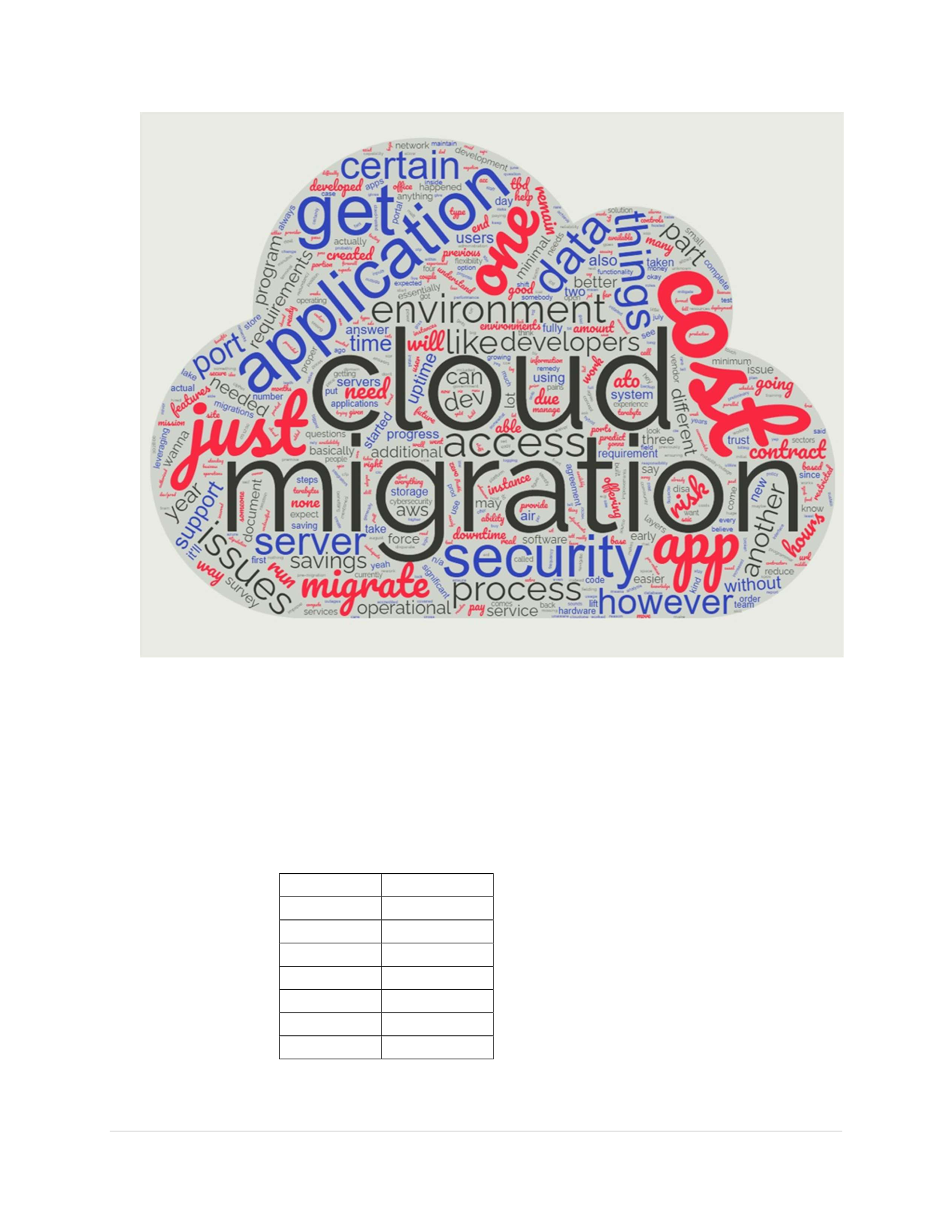
Cloud One migration on DoD applications. We accomplished this goal using the Word Clouds
in Figure 1 and Figure 2. We designed these Word Clouds by inputting the questionnaire and
interview answers into an online database. The result are Figures 1 and 2 in which the size of the
words in the cloud indicates word frequency, with the largest size being the most frequent. Word
Cloud 1 shows Cloud Migration as the largest, which is of course due to it being the main topic
of the research. On this Word Cloud, a few words stand out after the main topic such as
application, access, security, server, issues, migrate, process, app, cost, data, and port. The high
usage of these terms shows the most frequent topics of the interviews. In Word Cloud 1, there
are a lot of filler words, as well as the size of the lower-frequency words, which impeded
analysis past a certain point. Table 8 shows the word counts of the top words without filler
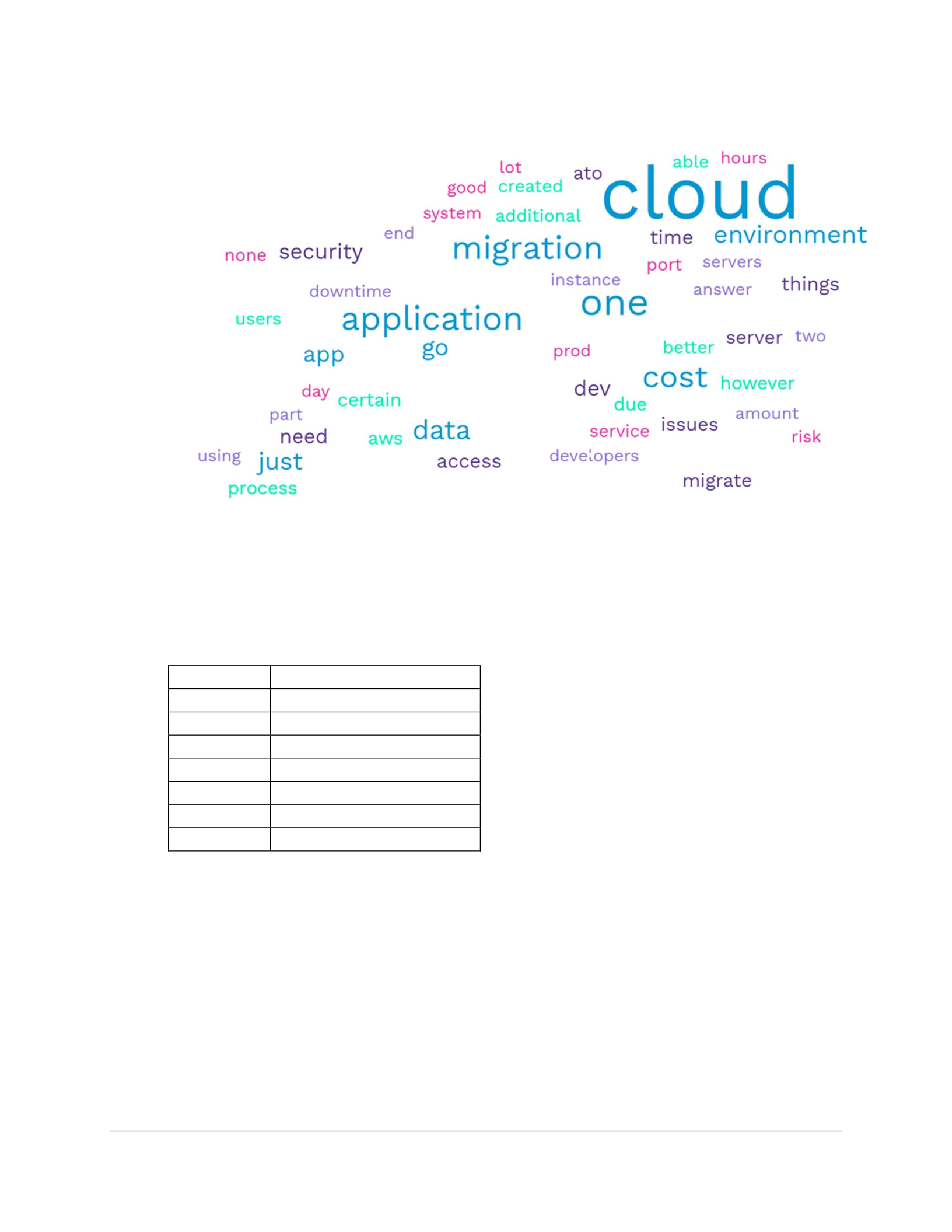
words. We decided to use a different program that would use fewer words in the Word Cloud
and eliminate some of the filler words from the Word Cloud. The result is Word Cloud 2.
Although Table 9 has similar top frequently used words as Table 8, Word Cloud 2 better shows
the frequency of words not as easily seen in Word Cloud 1 such as users, downtime, AWS,
developers, service, risk, environment, and ATO. Also, Word Cloud 2 shows descriptive words
such as good, additional, and better. Further investigation will reveal how these words interact
and form the results of the research.
40 | P a g e
Figure 1: Word Cloud 1
Table 8: Top Words with Frequency from Figure 1
Frequency
Word
98
cloud
39
one
32
application
30
migration
29
cost
22
data
18
environment
41 | P a g e
Figure 2: Word Cloud 2
Table 9: Top Words with Frequency from Figure 2
Frequency
Word
98
cloud
39
one
32
application
30
migration
29
cost
22
data
18
environment
4.3 Grounded Theory
Under the Grounded Theory process described in Chapter III, we applied Grounded
Theory to both the questionnaire and the interviews. Twenty-five different codes were used
to code 217 cells of questionnaire answers and interview comments.

42 | P a g e
Sort by Individual Code
We began analyzing by individual code. This allowed us to view the consistency of
codes across the different applications. Table 10 shows the frequency of codes used and the
respective percentage.
Table 10: Code Count by percentage
Accessibility – Upon sorting for this code across the six applications, we find that two of
the four (the code is used across four applications) participants saw an increase in
Codes Code Count Percentage
Uptime 21 10.66%
Security Risks 18 9.14%
Operational Risks 17 8.63%
Cost Savings 15 7.61%
Prior to Migration 14 7.11%
Accessibility 12 6.09%
Technical Positions 12 6.09%
In Progress 10 5.08%
No Change 10 5.08%
Cost 8 4.06%
Responsibility
Separation 8 4.06%
Modifiability 7 3.55%
AWS
6
3.05%
Port Issue 6 3.05%
Training Need 6 3.05%
Elasticity 5 2.54%
Personnel added 5 2.54%
Forced Additions 4 2.03%
Policy 4 2.03%
Migration Types 3 1.52%
New Application 2 1.02%
Billing 2 1.02%
Data Transfer 1 0.51%
Redundancy 1 0.51%

43 | P a g e
accessibility. In contrast, the other two saw a decrease. The positive responses detail
remote access and better access to servers. Due to the nature of the negative response,
further analysis of the negative replies was conducted to provide reasoning. One of the
two respondents provided a negative reply due to the additional need for Virtual Desktop
Infrastructure to complete the same functions before the cloud. The other issue is due to
application inaccessibility.
Amazon Web Services (AWS) – Four of the six applications listed Amazon Web
Services as their cloud service provider (CSP); the other two did not list their CSP. The
strict usage of AWS could be a concern due to the lack of appropriate competition or
technical limitations.
Billing – This code is used with two of the six tested applications. One of the
applications detailed the billing process as an annual subscription with monthly invoices
for the delta for services used over the subscription. This process mimics the pay-as-you-
use billing method we described in Chapter II. The other application listed billing as an
issue due to the difficulty of tracking actual expenses as opposed to resources utilized.
Cost – This code is used across four of the analyzed applications. The subcodes show
that applications reference cost in terms of migration, cost tradeoffs, cost of technical
positions, and pay-as-you-use billing. Three of the applications regard the initial
investment of migration as high and mention that it is the largest investment. One of the
applications details the tradeoff of higher costs to provide a more expensive Cloud One
option for more safety.
Cost Savings – This code is used across all six of the applications. Its universal use is
primarily due to Cost Savings being one of the initial questions asked of the

44 | P a g e
participants. Three of the six commented that there were no cost savings realized. One
of the six noted that it is too early to predict the cost savings but predicts that costs will
remain the same. The other two detail cost tradeoffs. More specifically, one of the
applications regards the tradeoff as higher costs for a more secure and stable option, and
the other views it as a higher cost for increased capability.
Data Transfer – One application listed data transfer as a requirement that was easier to fill
before cloud migration.
Elasticity – One of the applications listed storage as a reason for migrating to the cloud,
and this issue is solved by the elasticity of the cloud.
Forced Additions – Two of the six application responses were coded as forced additions
due to technical extras needed for migration to Cloud One. The applications detail
requiring VDI, switching their hardware and operating system, and changing the data
format.
In progress – Three application responses were coded as in progress due to either not
being finished with migration or recently migrated applications which left a few of the
questions not applicable to the participants.
Migration Types – This code is intended just for information purposes. One mission
application used this code. The representative defined the three migration types available
through Cloud One which are “migrate as a service,” “self-migration,” and “lift and
shift.”
Modifiability – This code is assigned to three of the six applications’ responses. Two of
the applications commented that modifiability is hampered due to Cloud
One. Specifically, the participant details, “Cloud One has security layers that may

45 | P a g e
impede seeing more cloud benefits.” The other application stated that Cloud One
increased modifiability. The participant indicated that modifications to the enhancement
of the application and adding modules were made more manageable.
New Application – One of the applications is new, meaning it has never been hosted
anywhere except Cloud One.
No change – This code is used across four of the six applications. Two of the
applications stated no change in the personnel hired after the cloud migration. The other
two applications with the code stated there was no change to security risks after the cloud
migration, and one noted there was no change to operational risks after migration.
Operational Risks – Three applications of the six state operational risks have decreased
after cloud migration. One of the applications even mentioned that they could buy a
server that does everything they need it to do but then they would be missing the
advantage of not having to worry about a power outage in the building containing the
server. We wanted to know why the other two applications stated that Cloud One did not
decrease their operational risks. To further investigate the potential reasoning behind
their negative responses, we sorted the code down to specific operational risk
questions. One of the applications commented that “the big risk is losing access to Cloud
One.” The other application commented that their negative response was due to the
forced addition of hardware since their development and production environment work
on different hardware.
Personnel Added – Three of the six applications added personnel after cloud migration,
and these hires were cloud-specific support personnel.

46 | P a g e
Policy – The policy code was used across three of six applications. One application
noted a policy gap as there was no policy for backup data and pulling data for the
migration. Another application stated that more information on Cloud migration,
maintenance, and Authority to Operate (ATO) would have been helpful.
Port Issue – Four of the six applications report needing more ports opened as opposed to
being restricted to just the 443 port.
Prior Migration – This code helped denote which comments were detailing the status quo
before Cloud One migration. The code was used across five applications.
Redundancy – One of the application responses is coded as redundancy. This application
stated that their redundancy increased. Redundancy is referred to as the duplication of
hardware or software components to protect against single points of failure.
Responsibility Separation – Three of the six applications listed problems with
responsibility separation after migration. Some of the responses are “more information
on what mission partners are expected to handle versus previous environment owners
(such as cybersecurity, network/comm, system administration),” “application was
hampered by the access to information from the Cloud One contractors,” and “What are
the roles as the mission app, which is us, and what are the roles for the cloud provider,
which is Cloud one or CCE?”
Security Risks – Three of the six applications indicated that security risks decreased due
to Cloud One migration. One of the responses stated, “So there are certain things we
could set up in the cloud that just make it easier for us to secure ourselves, I guess I
should say, better than we can do here locally by ourselves without standing up other
servers to do those types of things.” Two of the six applications indicated that security

47 | P a g e
risks are a tradeoff of increased risk envelope but increased risk mitigation tools.
Another response about security risk tradeoffs noted “Moving from closed network to
cloud-hosted increases the threat vector; however, cloud organic cybersecurity gives us
additional layers of security.” This shows that there are possible risk factors within both
methodologies and the participants respond to this based on their optimism level, or
viewpoint, which would explain the split.
Technical Positions – This code is used across five of the six applications regarding labor
categories. Five of the organizations either hired or already had technical positions on
staff. Among the technical positions hired were cloud administrator, cloud engineers,
programmer, data analyst, cyber security, system administrator, and server administrator.
The applications commented that they needed these technical positions for assistance
with migration.
Training Need – Four of the six applications requested the need for more Cloud One
training.
Uptime – One of the six applications declared uptime as an issue after moving to Cloud
One. Three of the six applications specifically noted the uptime as increased.

49 | P a g e
Table 11: Code Frequency by Participant
Legend: A “1” in a cell indicates at least one of that participant’s comments was coded with
the corresponding code; Cells left blank indicate the code was not used for the respective
participant’s comments
Table 12: Codes (Increasing or Decreasing due to migration)
Legend: Metrics are shown as an increase (↑) or decrease (↓) according to the corresponding
participant’s comments about the specific code; Percentage represent the percentage of
participants indicating an increase divided by the total number of answers provided; ↑↓ =
tradeoffs (also tradeoffs are calculate by # of tradeoffs/total number of answers); Cells left
blank indicate the code was not used for the respective participant’s comments
We have discussed the usage of each code across the participants. Table 11 and Table 12
will help navigate the codes by each respective participant (mission application).
Sort by Subject Matter looking at a cross-sectional view across the Participants
After sorting by individual code, we viewed the frequency of specific codes, as well as the
participants’ comments. The limitation of the code view described in the prior section was the
Code Participant 1 Participant 2 Participant 3 Participant 4 Participant 5 Participant 6 Percentage
Cost Savings 1 1 1 1 1 1 100.00%
Prior to migration 1 1 1 1 1 83.33%
Technical Positions 1 1 1 1 1 83.33%
AWS 1 1 1 1 66.67%
Cost 1 1 1 1 66.67%
No change 1 1 1 1 66.67%
Port Issue 1 1 1 1 66.67%
Training Need 1 1 1 1 66.67%
In progress 1 1 1 50.00%
Personnel added 1 1 1 50.00%
Policy 1 1 1 50.00%
Responsibility Separation 1 1 1 50.00%
Billing 1 1 33.33%
Forced Additions 1 1 33.33%
Data Transfer 1 16.67%
Elasticity 1 16.67%
Migration Types 1 16.67%
New application 1 16.67%
Code Participant 1 Participant 2 Participant 3 Participant 4 Participant 5 Participant 6 Percentage
Uptime ↑ ↓ ↑ ↑ 75.00%
Accessibility ↓ ↓ ↑ ↑ 50.00%
Operational Risks ↑ ↓ ↑ ↓ ↑ ↓ 50.00%
Security Risks ↑↓ ↓ ↓ ↑↓ ↓ 40.00%
Modifiability ↓ ↑ ↓ 33.33%

50 | P a g e
inability to compare the same subject matter across the participants. In this section, we sorted by
subject matter, a higher hierarchy of categorization, to compare and analyze the same subject
matter between participants. The results of that view are listed below.
Personnel Requirements – Three of the six applications mention adding personnel due
to Cloud One migration. This capability adds the requirement for technical expertise
that is not native to the average organization.
Application Technical Performance
o As noted in the individual code view, three of the six applications noted
increased uptime, and one declared uptime as a negative issue. In addition,
the remaining two were not able to provide statistics during this time during
the migration not being fully completed. Also, in this view, we can see that
the application with uptimes issues is an entirely new application that has not
been hosted outside the application. This outlier could be due to an
application development issue rather than a Cloud One migration issue.
o Three of the six applications note significant performance issues prior to
Cloud One migration, including numerous downtimes, network
instability/outage, and insufficient storage space. Cloud Migration solved
two; the other could not answer due to migration in progress.
Applications Requirement Fulfillment
o Three of six applications record requirements that were easier to fulfill before
Cloud One Migration. Respondents noted better accessibility to the
development environment for users, better access to servers to maintain the
software, and easier data transfer between networks before migration.

51 | P a g e
o Four of the six applications record requirements that are easier to fulfill after
Cloud One Migration, including application update and enhancement,
redundancy, remote access, and storage. Two of the three applications that
report requirements that were easier to fulfill before Cloud One Migration
have a tradeoff after migration since they also reported requirements that were
easier to fill after Cloud One Migration.
o One of the six applications states that Cloud One cannot fill some of its
requirements.
o All six of the applications listed information that would have better prepared
the organization for migration. Applications highlight the need for training
(data analytics and virtual networking), transparency on responsibility
separation, and updates on migration policies. Responsibility separation
highlights the fact that prior to the Cloud model organization’s technical
responsibilities may have rested with higher organizations in their chain or
there may be a need for transparency of what responsibilities are the users or
the Cloud One team.
Operational and Security Risks
o The six applications are split on the topic of whether operational risks have
increased due to Cloud One Migration. Only two of the three applications that
noted increased operational risks cited specifics. One of the risks cited is
access to Cloud One. The application that cited this is the same application
with uptime issues. The other risk is cited due to the disparate development
and production environments.

52 | P a g e
o Two applications state that migration has increased security risks and four state
that migration has decreased security risks. The two applications that state
increased also indicate a decrease in security risks due to a risk transfer to the
user’s organization. These are not new risks due to Cloud One Migration;
instead, the risk may have previously been held by an IT unit. Two of those that
indicated decreased security risk cited that the new tools/options that Cloud One
provides help to mitigate the risk.
Cost
o None of the applications indicated any empirical cost savings. One
application indicates expected cost savings but cites an initial increase due to
additional costs to mitigate disparate production and development
environments. Another application cites a cost tradeoff of higher prices for
increased capability.
Viewing by subject matter allowed the comparison of the participants by each individual
subject. In the next section, we use the key points from this section for a time-phased migration
analysis.
4.4 Time-phased Migration Analysis
In this section, we will divide the migration process into time phases: pre, during, and
post. The topics covered are listed by phase in Figure 3. The premigration summary will be
brief since this phase only sets the stage for the application’s status quo, while during and
after the migration is the majority focus of the research.
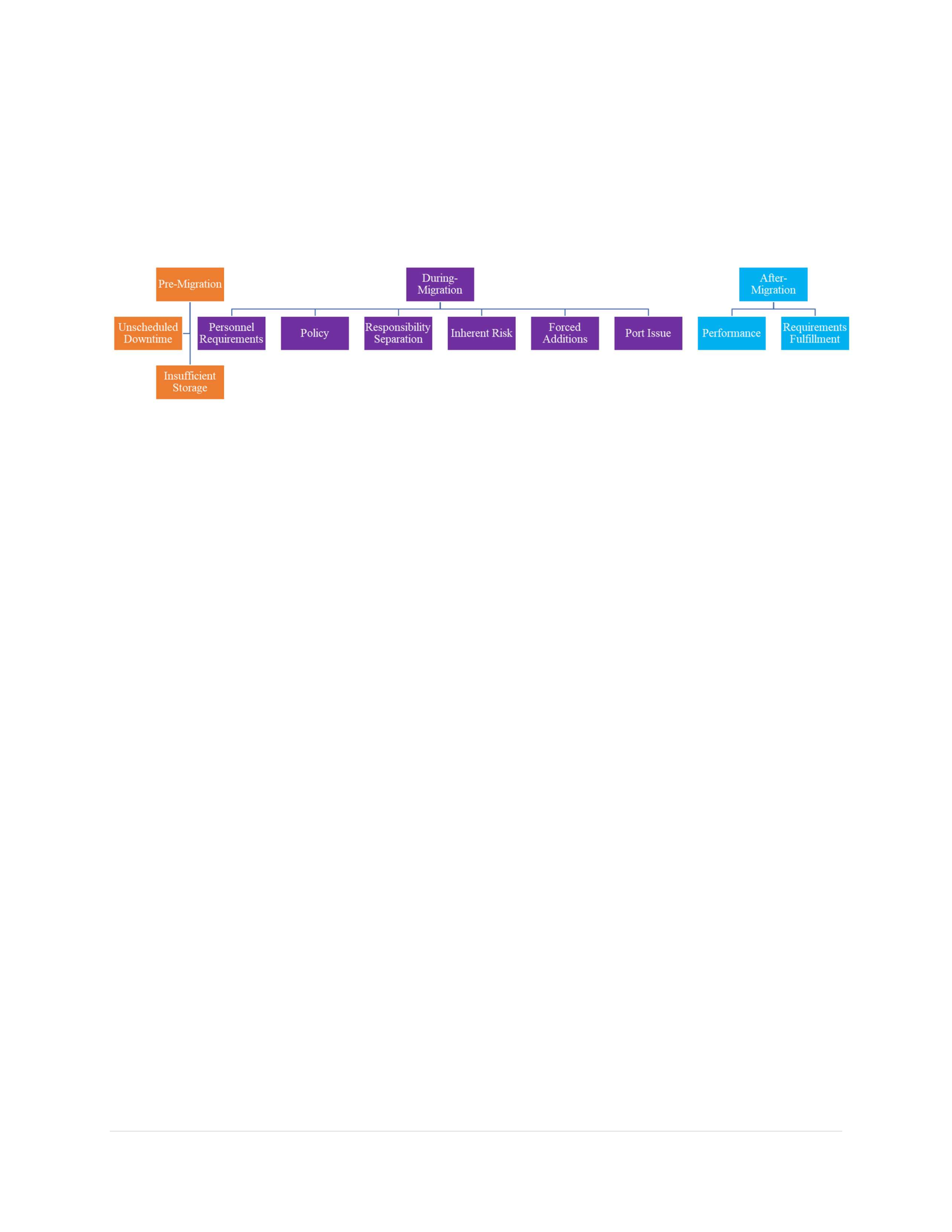
53 | P a g e
Figure 3: Timeline of Migration Topics
4.5 Pre-Migration
During premigration, mission applications experienced unscheduled downtime and
network instability. One application cites 100+ unscheduled downtime events over two years.
Even though there was unscheduled downtime, some mission applications did mention certain
functionality before migration as easier, such as data transfer. One mission application cites the
need for more storage and mentions it as the primary driver of their migration to the cloud.
4.6 During-Migration
During migration, organizations are faced with a changing reality from the status quo to
using Cloud One. Migration inherently brings about new needs and concerns as any large
organizational change does. Organizations often find the need for additional cloud-specific
personnel. The organizations that saw this need were due to different reasons, such as not having
the expertise to upgrade or make changes to the application once in the cloud, keeping the

54 | P a g e
application on the cloud via information assurance (IA) requirements, and even just assisting
with migration. Half of the mission applications included in the study sought out additional
cloud-specific personnel which can add a cost. Further research (sorting by “training need”
code) shows that two of three applications that did not hire cloud-specific personnel are coded
with “training need.” One of those applications notes that its team needed better Cloud One
support contractors (more timeliness and more accuracy) when there were technical questions
from the application staff. The other application noted having to train a member who was not
hired for the cloud due to the organization’s cloud SME leaving the organization. This indicates
that most organizations may need more training to perform new tasks after migration.
While the change of status quo highlighted new personnel/training needs for
organizations, these changes also may cause an organization to revisit its current policy and
share of responsibilities with other stakeholders and Cloud One in facets of its operation.
Modifications may include new policies and often changes to the old policy. Cloud One
Migration is no different. One common policy topic amongst mission applications is the
authority to operate (ATO). Mission applications must work through their chain to achieve ATO
before going live in Cloud One. Mission applications stated that there were delays/obstacles in
being granted ATO, which may have led to improperly projecting the cost of Cloud Migration.
Also, the scope of responsibility often changes when an organization moves to Cloud One. This
is even more important when most Air Force organizations rely on outside-of-organization cyber
resources. In the prior status quo, the IT for Air Force organizations is often primarily controlled
centrally instead of inherently within the organization that owns an application. Converting to
the cloud naturally places more ownership on the organization. We see the concerns of this in
comments by mission applications requesting “more information on what mission partners are

55 | P a g e
expected to handle versus previous environment owner (cybersecurity, network/comm, and
system administration).” Mission application owners also take on a more extensive risk portfolio
due to inheriting more ownership from a previous environment owner (centrally owned IT). One
application owner refers to the inheritance of risk as a “risk transfer to the mission application.”
Not only are previous risks inherited by the mission application, but so are new risks due to the
new environment. We noticed that mission applications see the new inherited risk from either a
half-empty or half-full perspective. For example, one mission application noted “moving from
closed network to cloud-hosted network increases the threat vector, however, cloud organic
cybersecurity tools give us additional layers of security.”
During migration, half of the applications were confronted with issues when their
application is “not an app that’s built to run in the cloud.” One mission application stated “So
the way Cloud One is built, Cloud One wants applications that are built to run in the cloud”.
This quotation links to the codes “forced additions” and “port issue.” Both codes described
comments from mission applications that show there have been some issues with fulfilling
applications’ specific requirements. One of the applications was forced to switch hardware due
to this previous environment utilizing separate hardware from Cloud One, which produced an
added cost. One application stated that users must request VDI access to do the same functions
without VDI in the status quo environment. Also, four of six applications stated that the Cloud
One standard 443 port was restrictive and not the port or only port required for their application.
An application noted that functionality has been challenging due to the interface requirements
with mission partners who utilize different ports. From the “during” analysis, we see that
mission application owners do not migrate without obstacles. Cloud migration creates new

56 | P a g e
obstacles to organizations because it changes the status quo, creates new requirements, changes
the organization’s culture, and also creates new knowledge gaps.
4.7 After-Migration
Now that we have discussed challenges during/due to migration, we will discuss the
effects after migration. The apparent impact to look for after Cloud One migration is the
evidence of performance and fulfillment of applications’ specific requirements. Earlier in the
subject matter analysis, we noted requirements fulfillment. Three of six applications in the
research regarded a specific requirement (accessibility to the development environment, better
access to servers to maintain the software, and data transfer between networks) as easier to fill
before Cloud One migration. We also mentioned that, in contrast, over half of the mission
applications noted specific requirements (application update and enhancement, redundancy,
remote access, and storage) that are easier to fill after Cloud One migration. A couple of
applications did list requirements that were easier to fill before and after Cloud One migration.
While analyzing the specific requirements that were easier to fill before migration versus those
after, we see that those requirements that were easier before are often the tasks of a developer or
someone in the cyber/IT department. This could be due to the transition from the status quo
network to the cloud and the insufficiency of the inherent skillset of the organization. Although
the requirements that are easier to fill after migration are mostly requirements that make an
interface more enjoyable for the user, it may take some time for the organization to overcome the
technical obstacle while their users receive a more immediate positive response. Along with
positive responses, mission applications mostly reported increased application technical
performance after Cloud One migration. Applications boasted increased uptime, increased
storage space, and better accessibility.

57 | P a g e
One characteristic not addressed much in this summary is cost or cost savings.
Applications detail billing as an annual subscription with a monthly bill for the delta. The annual
subscription has a rate for a certain amount of resources. The monthly delta is the price for the
resources used above the amount in the subscription for that given month. We were not provided
the reason behind any of the deltas due to a lack of data. A few applications list cost tradeoffs,
such as increased cost for increased capability. More detailed information is needed to make any
judgment about issues such as itemized billing, normalized comparison to status quo, and
consistent tracking. These issues are not supported by the available data.
Analyzing by phases (Pre-migration, During Migration, and Post-migration) examined
exactly where in the process that key issues or bottlenecks occur. This transitions into Chapter V
where we provide the key points of our results as it relates to the research questions.

58 | P a g e
V. Conclusion
5.1 Chapter V Introduction
“I think it’s very important to have a feedback loop, where you’re constantly thinking
about what you’ve done and how you could be doing it better.”
- Elon Musk
In the previous chapters, we defined cloud computing, discussed the history and benefits
of cloud computing, and introduced the Air Force’s cloud services and hosting platform, Cloud
One. We also developed a study using subject matter expert knowledge and literature to analyze
cloud migration through the lenses of personnel requirements, application technical performance,
application requirements fulfillment, operational risks, security risks, and cost. We used
questionnaires and interviews to build our data set. Our research team also introduced Grounded
Theory as our method of analysis and discussed the results of our analysis. This chapter
addresses our research questions, suggests focus areas for improvement, and identifies
opportunities for further research.
5.2 Research Questions Addressed
This research aims to gauge the personnel requirements, performance and technical
requirements fulfillment, risks, and other factors associated with migration to Cloud One. This
research will serve to inform decision-makers making the transition and provide feedback to the
Cloud One team from mission applications that have migrated. As a result of the direction of
this research, we investigated the following questions and offer our findings:

59 | P a g e
Question 1: How does Cloud One migration change personnel requirements?
Migration to Cloud One creates a need for further technical expertise, the training of
current members of the organization, or a combination of the two. This contradicts Carstensen
(2012) in his statement that cloud computing does not generate an IT requirement for a change of
process or a modification of skill sets. However, our research is in line with Dutta (2013) which
lists “inadequate user training/knowledge of cloud services and usage” as a top ten risk. The
change to personnel requirements for Air Force applications is due to a few typical reasons
occurring during migration and post-migration. During migration, organizations hire more
technical personnel such as developers or cloud administrators to help facilitate the migration to
Cloud One since this expertise was not inherent to the prior status quo organization. Post-
migration creates an ongoing requirement for organizations to either train members for cloud
maintenance and sustainment or hire additional cloud-specific personnel. This increased scope is
a change in the separation of responsibilities. The shift in ownership is due to transitioning from
primarily a centrally controlled IT setup to the cloud which places the ownership with the
organization. The individualized characteristics that define cloud computing change where the
responsibilities of IT rest. On-demand self-service (the ability of the consumer to acquire
computing capabilities whenever desired), rapid elasticity (the scale of capabilities based on
demand), and measured service (the control and transparency of resources) all lead to a more
decentralized level of ownership. This increase in scope leads to more opportunities to increase
and track performance and more vulnerabilities/risks (discussed more in research question four)
to the organization. Regardless, it requires a change to organizations’ personnel requirements to
both take advantage of opportunities that the cloud has to offer or mitigate the new
vulnerabilities that the cloud reveals.

60 | P a g e
Question 2: How does Cloud One migration increase or decrease technical performance for
applications?
Transitioning to cloud computing boasts a handful of performance characteristics in the
commercial sector. Cloud One aims to bring those performance characteristics to Air Force
applications. According to the research, Air Force applications do see an increase in technical
performance in the metrics associated with cloud computing in the commercial sector. Prior to
migration, organizations experienced technical performance issues such as unscheduled
downtime and network instability. One application cites over one-hundred unscheduled
downtime events over a two-year span. Migration to Cloud One did generally increase uptime
and network stability for organizations. Organizations also gain the ability to increase and
decrease resources based on consumer demand. One of the resources that the mission
application organizations mentioned was storage. With cloud computing, mission applications
can now have storage based on their need. This alleviates having an arbitrary amount of storage
allocated by a central entity or the need to purchase excess storage in case of possible demand.
Organizations report added flexibility due to the elasticity of storage. This has produced the
ability to store more data, therefore, enabling more analysis for improved performance. Mission
applications generally notice increased technical performance post-migration.
Question 3: How does Cloud One migration increase or decrease the fulfillment of mission
application requirements?
We researched application requirements during migration and post-migration to Cloud
One. During migration, applications tend to encounter obstacles in fulfilling requirements to
migrate their application to the cloud when application requirements do not fit the specifics of
Cloud One. The most common requirement fulfillment issue was the lack of ports custom to the
applications. Cloud One restricts applications to a standard 443 port. Mission applications

61 | P a g e
report this as too restrictive and require other ports due to their customers using more than the
443 port. Cloud One should open more ports if possible and highlight possible port issues early
in the process to aid the fulfillment of application requirements.
Post-migration naturally allows mission applications to compare the requirements that
were easier to fulfill prior to migration and those easier to fulfill post-migration. We found in
our research that ease of requirement fulfillment is not exclusive to before migration or post-
migration. Organizations noted tradeoffs. The requirements noted to be fulfilled with more ease
before migration are accessibility to the development environment, better access to servers to
maintain software, and data transfer between networks. The requirements noted to be fulfilled
with more ease after migration are application update enhancement, redundancy, remote access,
and storage). During analysis, we wanted to discover why certain requirements were more
difficult to fulfill after migration. When we note the sector of responsibility for those
requirements, we see that those requirements that were easier before are the tasks of a developer
or someone in the cyber/IT department. We conclude that instead of requirements being
inherently easier to fulfill in the prior status quo, there is a lag of expertise in organizations
tailored to operating in the cloud.
Question 4: How does Cloud One migration increase or decrease operational or security risks?
During migration, mission application leadership should allocate resources to research
the mitigation of possible new operational and security risks. The new risk scope in Air Force
applications can be due to a risk transfer from centrally monitored risks to organization-level
owned risks. Prior to migration, the organization is not responsible for risks to the network.
After migration, the mission application assumes a new risk profile as the organization then takes
ownership of risk. Lanz (2021) also states that organizations face challenges with their cloud

62 | P a g e
service provider which may be attributed to technical complexity of the cloud or the
minimization of responsibilities expected of the organization end/user. Another possibility for
new scope of risk stems from the idea that moving from a traditional network to a cloud-hosted
network inherently increases the threat vector leaving the application susceptible to data
breaches, account hijacking, insecure interfaces, and other similar issues (Cloud Security
Alliance (CSA), 2019). Although organizations’ risk scope has increased, organizations
recognize the additional layers of security that organic cloud cybersecurity provides. Increased
risk scope for increased capabilities and inherent risk mitigation ability can be seen as a tradeoff
with cloud migration.
Question 5: What are the cost savings due to migration?
The organizations spoke generally about cost savings. Most highlighted a large initial
cost for migration, but not specific amounts. Organizations also described a tradeoff of higher
costs for increased capabilities. The organizations in the study did not capture their expenses
before migration to compare to post-migration costs. Therefore, we did not have enough data to
come to a definitive conclusion on this research question.
5.3 Suggestions to the Field
This research focused on personnel requirements, application technical performance,
application requirements fulfillment, operational risks, security risks, and cost through the
migration process and post-migration. The research provided insight into feedback from the
field. This enables the research team to highlight a few focus areas for Cloud One migration
improvement.
1. We suggest that organizations hire cloud-specific personnel to assist with migration
and post-migration.

63 | P a g e
2. We suggest that Cloud One collaborates with mission application owners to enable a
solution for the port issue.
3. We also recommend that before migration all stakeholders involved should discuss the
separation of responsibilities and the ownership of risk.
5.4 Opportunities for Future Research
While the results of this research provide sufficient insight into personnel requirements,
application technical performance, application requirements fulfillment, operational risks, and
security risks, there are additional areas that are worth future research. The areas include
studying the cost of Cloud One migration. The actual cost of migration should be captured as
well as documenting what cost model is being used (consumption, transaction, or subscription).
Along with the cost of Cloud One ownership, this should be compared to total ownership in the
prior network setup. Also, metrics should be tracked and compared empirically pre and post
cloud migration. Lastly, research on the best parameters to use to conclude whether a mission
application should remain status quo or migrate to Cloud One.

