



6/11/09
Collections and Linked Lists
•This week the focus is on
–the concept of a collection
–the importance of separating the interface from
the implementation
–generic types and their use in collection classes
–the difference between fixed and dynamic
implementations
–dynamically linked lists
–the Java Collections API
6/11/09
Outline
•Introduction to Collections
•A Bag Collection
•Array Implementation of a Bag
•Linked Lists
•Linked Implementation of a Bag

6/11/09
Introduction to Collections
•We are used to collections of items:
stamps, CDs, keys, etc.
•A collection is an object that serves as a
repository for other objects
•A collection provides services to add,
remove, and manage the elements it
contains
•The underlying data structure used to
implement the collection is independent of
the operations provided

6/11/09
Introduction to Collections
•Collections can be separated into two
categories
–linear: elements are organized in a straight line
–nonlinear: elements are organized in
something other than a straight line
•Organization elements, relative to each
other, is usually determined by
–the order in which they were added to the
collection
–some inherent relationship among the
elements

6/11/09
Separating Interface from
Implementation
•An abstract data type (ADT) is a set of data
and the particular operations that are
allowed on that data
•An ADT is considered abstract because the
operations you can perform on it are
separated from the underlying
implementation
•A collection
–is an abstract data type
–defines interface operations through which the
user can manage the objects in the collection,

6/11/09
Separating Interface from
Implementation
•The details of how a collection is
implemented to fulfill that definition
should be an independent issue
•For every collection we examine, we
should consider
–How does the collection operate, conceptually?
–What operations are included in the interface
to the collection?
–What kinds of problems does the collection
help us solve?
–How might the collection be implemented?
6/11/09
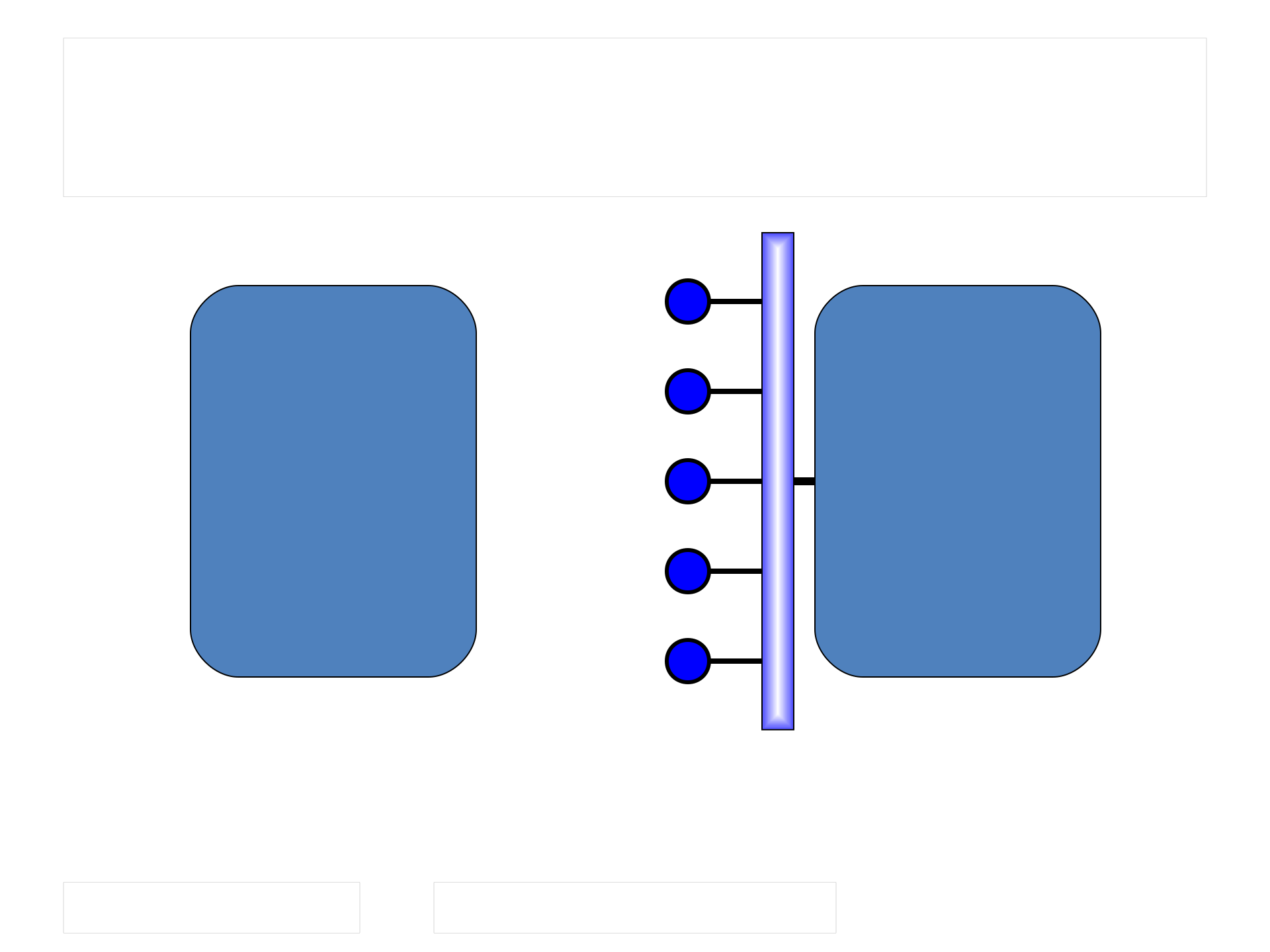
Separating Interface from
Implementation
Class that uses
the collection
Class that
implements
the collection
Interface to
collection
Services provided by collection
that adhere to an interface

6/11/09
Generic Types
•Java permits us to define a class based on
a generic type
•Our defined class will then be able to
operate on, store, and manage objects
whose type is not specified until the class
is instantiated
•Example: we can define a Group class that
stores and manages a group of objects.
•Using polymorphism, we can define Group
to store references to the Object class

6/11/09
Generic Types
•However, any type of object could then be
stored in our Group, resulting in a loss of
control
•A better approach is to define the Group to
store a generic type T (a convention,
though we can use any letter)
class group<T>
{
// declarations and code that manages objects of type T
}

6/11/09
Generic Types
•Instantiating a Group of Product objects
Group<Product> group1 = new Group<Product>;
•Instantiating a Group of Friend objects
Group<Friend> group2 = new Group<Friend>;
•A generic type T can not be instantiated
•Sometimes we want our stored items to be
Comparable
class Group<T extends Comparable<T>>
{
}
6/11/09
Outline
•Introduction to Collections
•A Bag Collection
•Array Implementation of a Bag
•Linked Lists
•Linked Implementation of a Bag
A Bag Collection
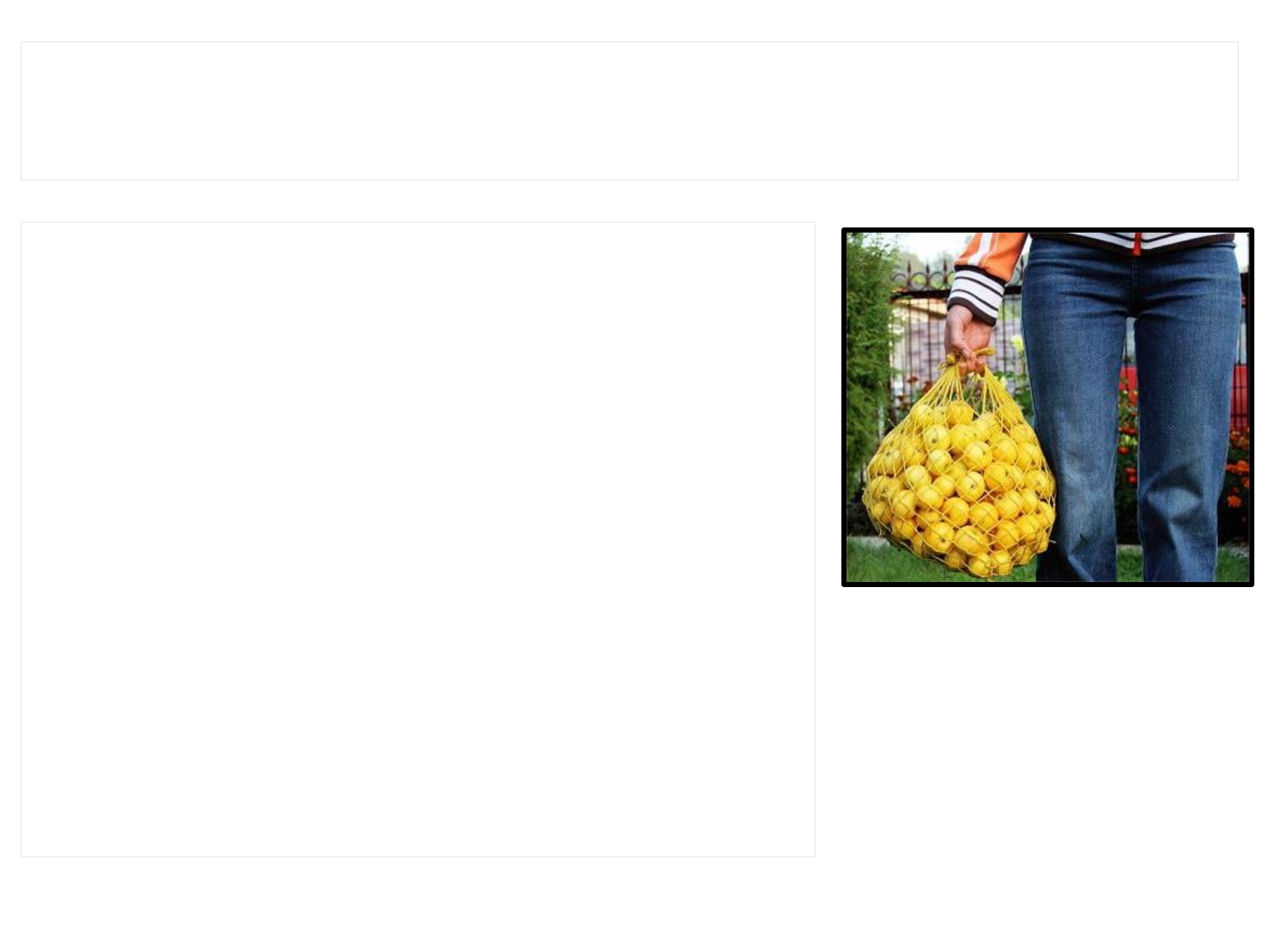
•A bag is a collection that
facilitates the selection of
random elements from the
group
•A bag is nonlinear; elements
in the bag have no particular
positional relationship to
each other
•The implementation of the
bag will store the elements
in an array or some other
6/11/09
javafoundations.Bag
Interface
//*******************************************************************
// Bag.java Java Foundations
//
// Defines the interface to a bag collection.
//*******************************************************************
package javafoundations;
public interface Bag<T> extends Iterable<T>
{
// Adds the specified element to the bag.
public void add (T element);
// Removes and returns a random element from the bag.
public T remove();
// Returns true if the bag contains no elements and false
// otherwise.
public boolean isEmpty();
// Returns the number of elements in the bag.
public int size();
// Returns a string representation of the bag.
public String toString();
}

6/11/09
A Bag Collection
•Notice that the interface is defined to
operation on type T objects
–the add method will add elements of type T
–the remove method will return elements of type
T
•The other methods support basic
operations on the collection
•Bag extends the Iterable interface, which
provides one method that returns an
Iterator object
Bingo Game
•A bag collection is
perfectly suited to
support a Bingo
game
•The collection will
hold BingoBall
objects and will use
an array as the basis
of the
implementation
•Our collection will be
known as an
B I N G O
9 25 34 48 69
15 19 31 59 74
2 28 FREE 52 62
7 16 41 58 70
12 20 38 47 64
6/11/09
Bingo.java
//********************************************************************
// Bingo.java Java Foundations
//
// Demonstrates the use of a bag collection.
//********************************************************************
import javafoundations.ArrayBag;
public class Bingo
{
//-----------------------------------------------------------------
// Creates all 75 Bingo balls and stores them in a bag. Then
// pulls several balls from the bag at random and prints them.
//-----------------------------------------------------------------
public static void main (String[] args)
{
final int NUM_BALLS = 75, NUM_PULLS = 20;
ArrayBag<BingoBall> bingoBag = new ArrayBag<BingoBall>();
BingoBall ball;
for (int num = 1; num <= NUM_BALLS; num++)
bingoBag.add (new BingoBall(num));
(more…)
6/11/09
Bingo.java
System.out.println ("Size: " + bingoBag.size() + "\n");
for (int num = 1; num <= NUM_PULLS; num++)
{
ball = bingoBag.remove();
System.out.println (ball);
}
}
}
6/11/09
BingoBall.java
//********************************************************************
// BingoBall.java Java Foundations
//
// Represents a ball used in a Bingo game.
//********************************************************************
public class BingoBall
{
private char letter;
private int number;
//-----------------------------------------------------------------
// Sets up this Bingo ball with the specified number and the
// appropriate letter.
//-----------------------------------------------------------------
public BingoBall (int num)
{
number = num;
if (num <= 15)
letter = 'B';
else
(more…)

6/11/09
BingoBall.java
if (num <= 30)
letter = 'I';
else
if (num <= 45)
letter = 'N';
else
if (num <= 60)
letter = 'G';
else
letter = 'O';
}
//-----------------------------------------------------------------
// Returns a string representation of this Bingo ball.
//-----------------------------------------------------------------
public String toString ()
{
return (letter + " " + number);
}
}
6/11/09
Outline
•Introduction to Collections
•A Bag Collection
•Array Implementation of a Bag
•Linked Lists
•Linked Implementation of a Bag

6/11/09
An Array Implementation of
a Bag
•An array can be used to store the
elements of our collection
•However, an array has a fixed size once it
is created
•Collections sometimes are limited to a
specific size
•We don’t wish to have our bag limited by
this constraint
•When the bag is “full” we want to support
reallocating space for the array to “grow”

6/11/09
javafoundations.ArrayBag
Class
//********************************************************************
// ArrayBag.java Java Foundations
//
// Represents an array implementation of bag collection.
//********************************************************************
package javafoundations;
import java.util.*;
import javafoundations.exceptions.EmptyCollectionException;
public class ArrayBag<T> implements Bag<T>
{
private final int DEFAULT_CAPACITY = 10;
private int count;
private T[] contents;
private static Random rand = new Random();
(more…)
6/11/09
javafoundations.ArrayBag
//-----------------------------------------------------------------
// Creates an empty bag using the default capacity.
//-----------------------------------------------------------------
public ArrayBag()
{
count = 0;
contents = (T[]) (new Object[DEFAULT_CAPACITY]);
}
//-----------------------------------------------------------------
// Adds the specified element to this bag by storing the element
// at the end of the list, expanding the array capacity if needed.
//-----------------------------------------------------------------
public void add (T element)
{
if (count == contents.length)
expandCapacity();
contents[count] = element;
count++;
}
(more…)
6/11/09
javafoundations.ArrayBag
//-----------------------------------------------------------------
// Removes a random element from this bag, shifting the last
// element into its place to keep the list contiguous. Throws
// EmptyCollectionException if this bag is empty.
//-----------------------------------------------------------------
public T remove() throws EmptyCollectionException
{
if (count == 0)
throw new EmptyCollectionException ("Remove operation " +
"failed. The bag is empty.");
int index = rand.nextInt(count);
T result = contents[index];
count--;
contents[index] = contents[count];
contents[count] = null;
return result;
}
(more…)

6/11/09
javafoundations.ArrayBag
//-----------------------------------------------------------------
// Returns true if this bag contains no elements, and false
// otherwise.
//-----------------------------------------------------------------
public boolean isEmpty()
{
return (count == 0);
}
//-----------------------------------------------------------------
// Returns the number of elements in this bag.
//-----------------------------------------------------------------
public int size()
{
return count;
}
(more…)
6/11/09
14.3 –
javafoundations.ArrayBag
//-----------------------------------------------------------------
// Returns an iterator for this bag.
//-----------------------------------------------------------------
public Iterator<T> iterator()
{
ArrayIterator<T> iter = new ArrayIterator<T>();
for (int index = 0; index < count; index++)
iter.add(contents[index]);
return iter;
}
//-----------------------------------------------------------------
// Returns a string representation of this bag.
//-----------------------------------------------------------------
public String toString()
{
String result = "Bag Contents:\n";
for (int index=0; index < count; index++)
result += contents[index] + "\n";
return result;
}
(more…)

6/11/09
14.3 –
javafoundations.ArrayBag
//-----------------------------------------------------------------
// Creates a new array to store the contents of this bag with
// twice the capacity of the old one.
//-----------------------------------------------------------------
private void expandCapacity()
{
T[] larger = (T []) (new Object[contents.length*2]);
int location = 0;
for (T element : contents)
larger[location++] = element;
contents = larger;
}
}

6/11/09
An Array Implementation of
a Bag
•Our collection class (ArrayBag) is a member
of the javafoundations package
•The elements in the collection are stored
in an array named contents and an integer
variable named count is used to
–keep track of the number of elements currently
in the bag
–identify the next open position in the array
where the next element would be inserted

6/11/09
An Array Implementation of
a Bag
•We can not instantiate an array of generic
types, so we instantiate an array of Object
references and cast it
contents = (T[]) (new Object[DEFAULT_CAPACITY]);
•The compiler warns us that this is an
unchecked cast, but this is just a warning
•The add method
–accepts an element of type T and stores it in
the array, but
–must first check the capacity of the array and
expand the capacity if needed

6/11/09
An Array Implementation of
a Bag
•The remove method returns a randomly
selected element from the array if at least
one element exists in the bag
•If no elements exist, an
EmptyCollectionException is thrown and
returns control to the calling method
•The value of count must be carefully and
consistently managed as it is important to
successfully managing the collection

6/11/09
Collection Iterators
•It’s common to traverse the elements of a
collection, “visiting” each one in turn
•The user decides what processing occurs
when each element is visited
•We use iterators in our collection to
perform various kinds of traversals
•Our collection’s iterator method returns
an Iterator object that can traverse the
contents of the bag
6/11/09
javafoundations.ArrayIterato
r
//********************************************************************
// ArrayIterator.java Java Foundations
//
// Represents an iterator over the elements of a collection.
//********************************************************************
package javafoundations;
import java.util.*;
public class ArrayIterator<T> implements Iterator<T>
{
private int DEFAULT_CAPACITY = 10;
private int count; // the number of elements in the iterator
private int current; // the current position in the iteration
private T[] items; // the iterator's storage for elements
//-----------------------------------------------------------------
// Sets up this iterator.
//-----------------------------------------------------------------
public ArrayIterator()
{
items = (T[]) (new Object[DEFAULT_CAPACITY]);
count = 0;
current = 0;
}
(more…)
6/11/09
javafoundations.ArrayIterato
r
//-----------------------------------------------------------------
// Adds the specified item to this iterator.
//-----------------------------------------------------------------
public void add (T item)
{
if (count == items.length)
expandCapacity();
items[count] = item;
count++;
}
//-----------------------------------------------------------------
// Returns true if this iterator has at least one more element to
// deliver in the iteration.
//-----------------------------------------------------------------
public boolean hasNext()
{
return (current < count);
}
(more…)
6/11/09
javafoundations.ArrayIterato
//-----------------------------------------------------------------
// Returns the next element in the iteration. If there are no more
// elements in this iteration, a NoSuchElementException is thrown.
//-----------------------------------------------------------------
public T next()
{
if (! hasNext())
throw new NoSuchElementException();
current++;
return items[current - 1];
}
//-----------------------------------------------------------------
// The remove operation is not supported in this collection.
//-----------------------------------------------------------------
public void remove() throws UnsupportedOperationException
{
throw new UnsupportedOperationException();
}
(more…)

6/11/09
javafoundations.ArrayIterato
r
//-----------------------------------------------------------------
// Exapands the capacity of the storage array
//-----------------------------------------------------------------
private void expandCapacity()
{
T[] larger = (T []) (new Object[items.length*2]);
int location = 0;
for (T element : items)
larger[location++] = element;
items = larger;
}
}

6/11/09
javafoundations.ArrayIterato
•Since the ArrayIterator implements the
Iterator interface, we must include the
hasNext, next, and remove methods
•The class is so named because it uses an
array as the underlying structure to hold
the elements in the iterator
•It’s generally not a good idea to remove an
element from a collection using an iterator
•Another advantage to of making a
collection Iterable is that then it can be
processed using the for-each loop
6/11/09
Outline
•Introduction to Collections
•A Bag Collection
•Array Implementation of a Bag
•Linked Lists
•Linked Implementation of a Bag

6/11/09
Linked Lists
•An array is one way we can implement a
linear collection
•Arrays however are limited in one sense
because they have a fixed size
•Resizing as needed must be done carefully
and is not an efficient implementation
•A linked structure is a data structure that
uses object reference variables to create
links between objects
•Linked structures are the primary
alternative to an array-based

6/11/09
Linked Lists
•A class can define as instance data an
object reference to another object of the
same class
•Example: suppose we have a class named
Person as follows
public class Person
{
private String name;
private String address;
private Person next; // a link to another Person
object

6/11/09
Linked Lists
•Using only this one class, a linked
structure can be created
–One Person object contains a link to another
Person object
–This second object contains a reference to a
third Person, etc.
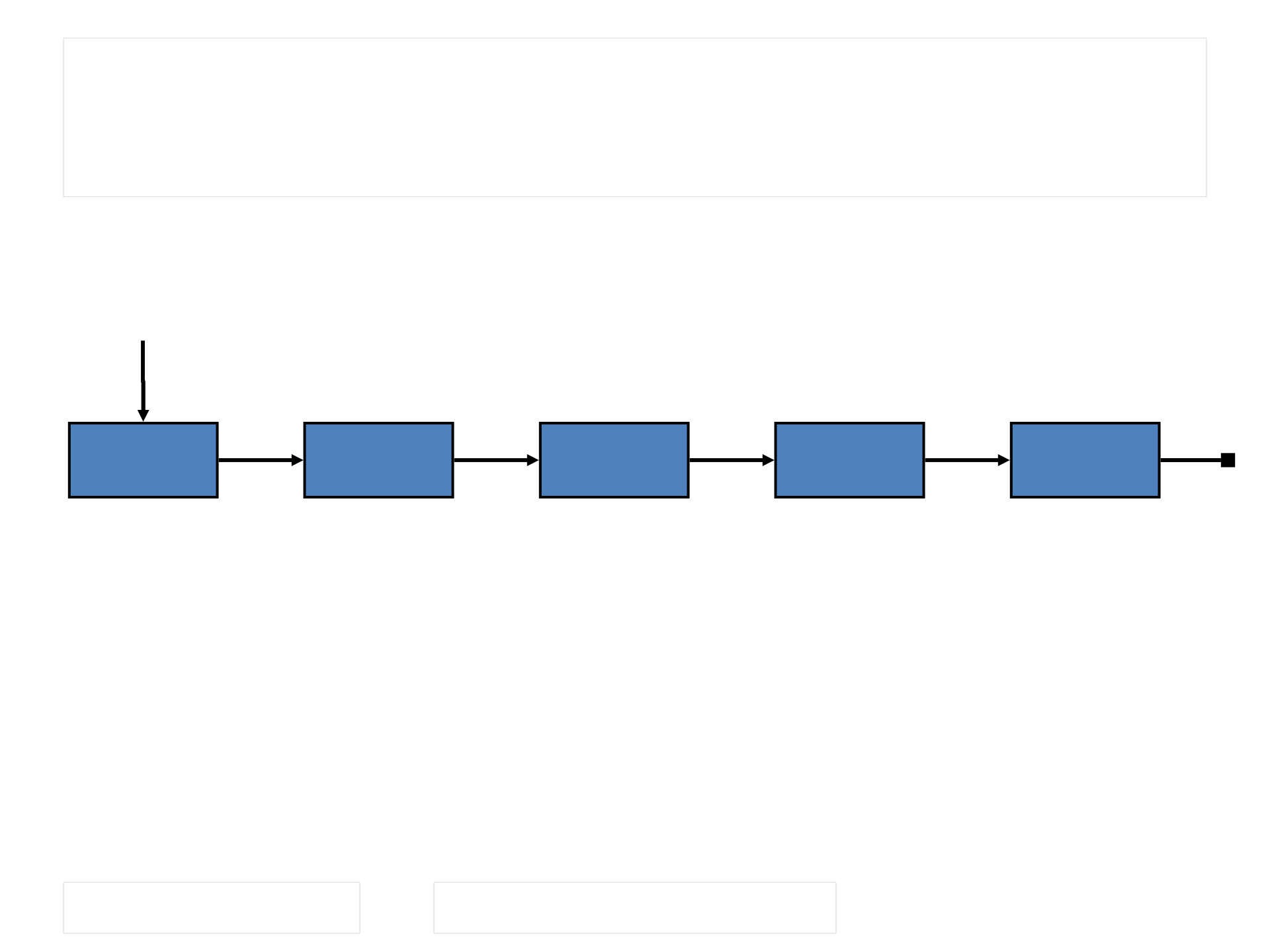
•This type of object is sometimes called
self-referential
•This kind of relationship forms the basis of
a linked list
–a linked structure in which one object refers to
6/11/09
Linked Lists
front
6/11/09
Linked Lists
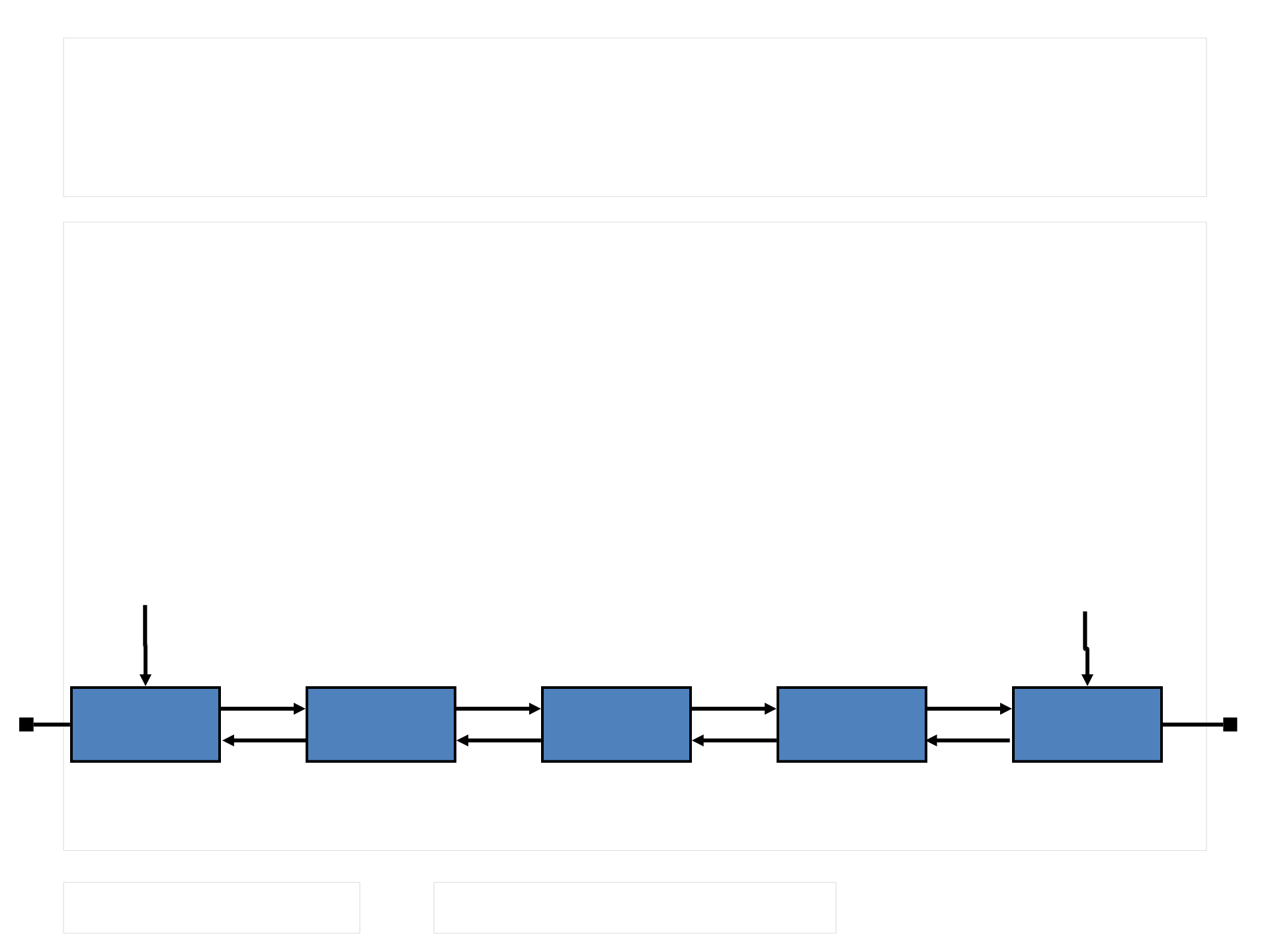
•A simple linked list is only one kind of
linked structure
•In a doubly linked list, each node in the list
stores both a reference to the next
element and a reference to the previous
one
front rear

6/11/09
Linked Lists
•Linked lists
–has no upper bound on its capacity other than
the limitations of memory in the computer
–is considered to be a dynamic structure because
its size grows and shrinks as needed to
accommodate the number of elements stored

6/11/09
Managing Linked Lists
•There are a few basic techniques involved
in managing nodes on the list, no matter
what the list is used to store
•Special care must be taken when dealing
with the first node in the list so that the
reference to the entire list is maintained
appropriately
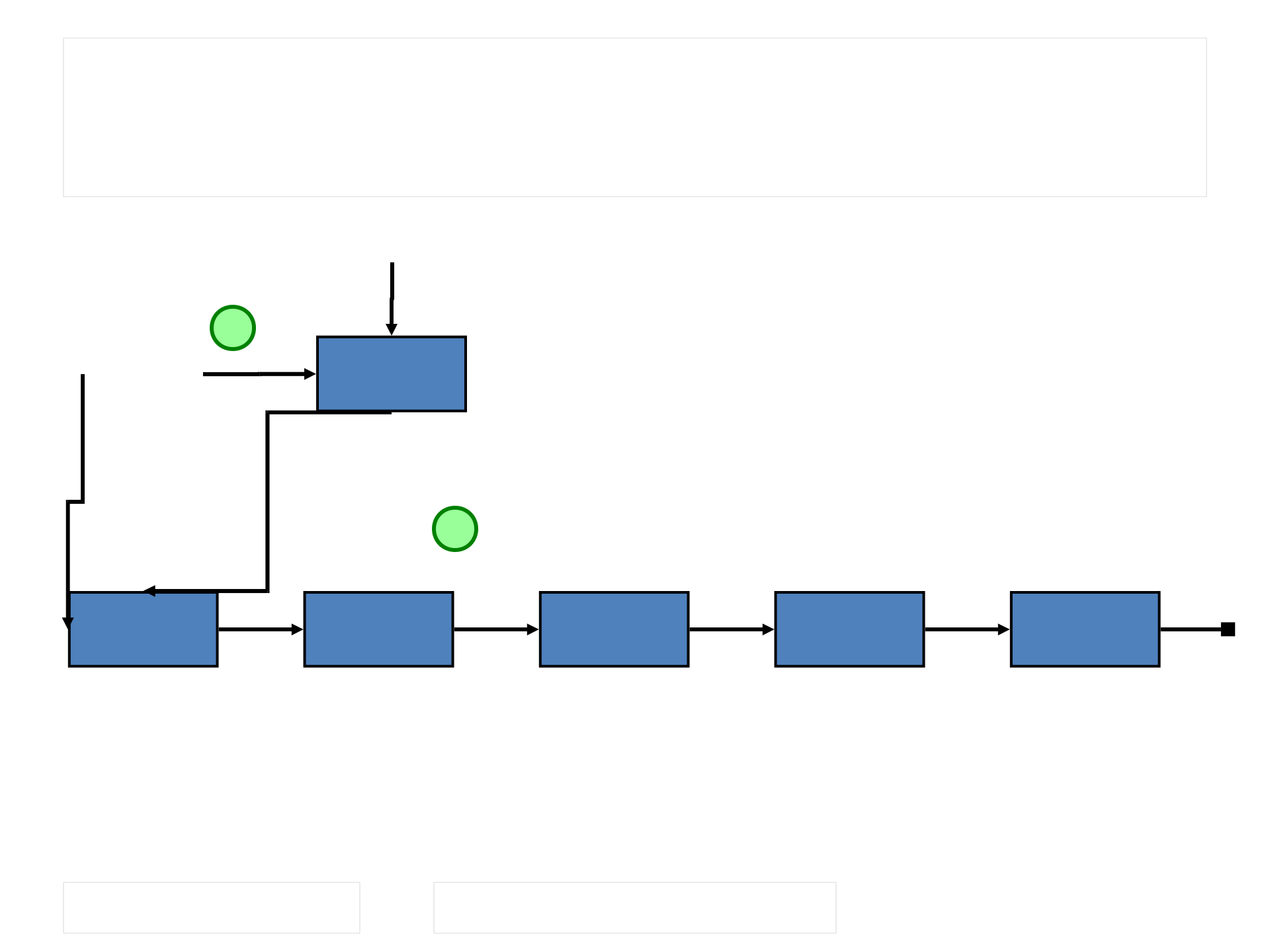
•A node may be inserted at any location
–at the front of the list,
–among the interior nodes, or
–at the end of the list
6/11/09
Inserting a node at the
front
front
nod
e
2
1
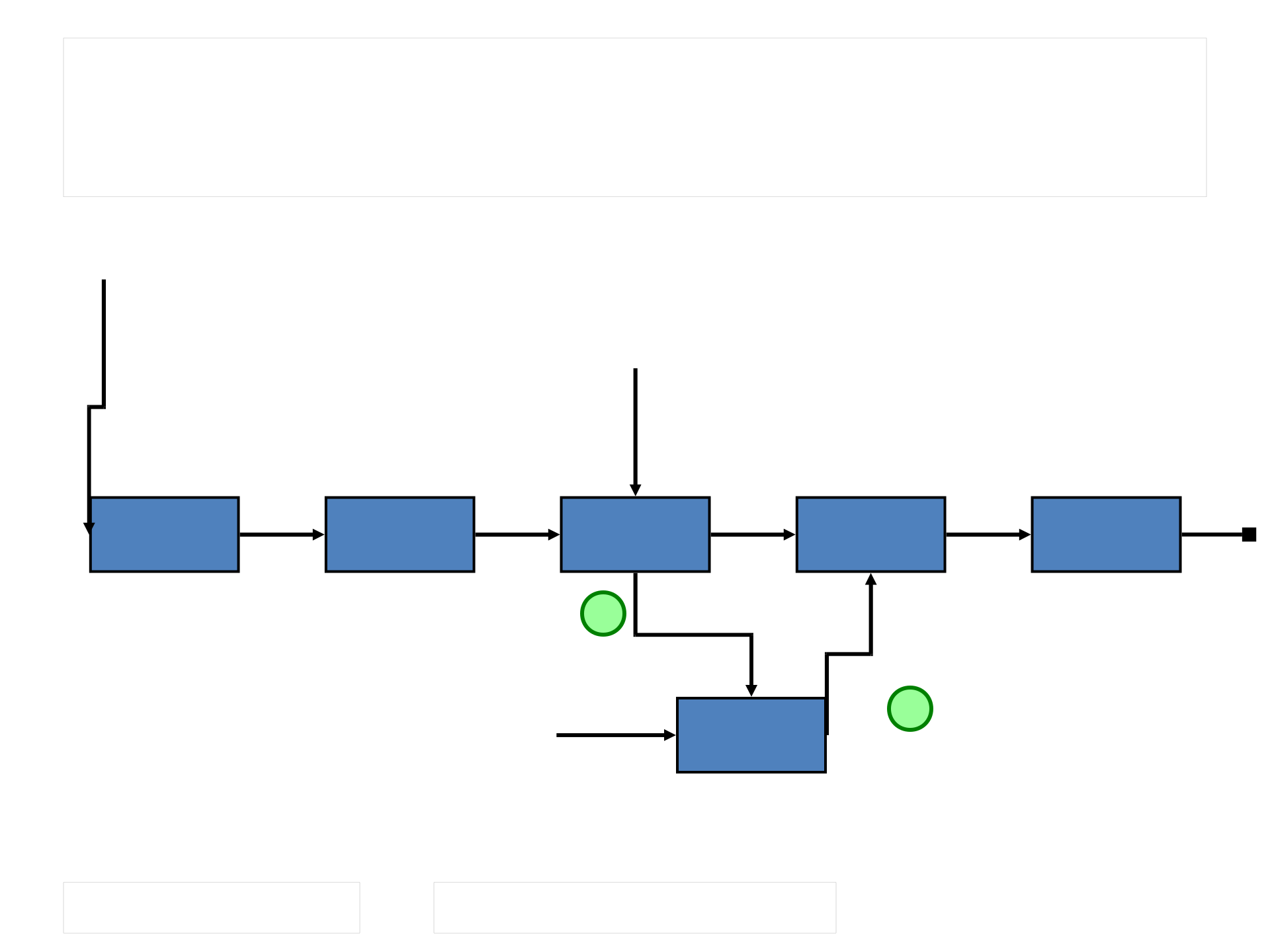
6/11/09
Inserting a node in the
middle
front
nod
e
current
1
2
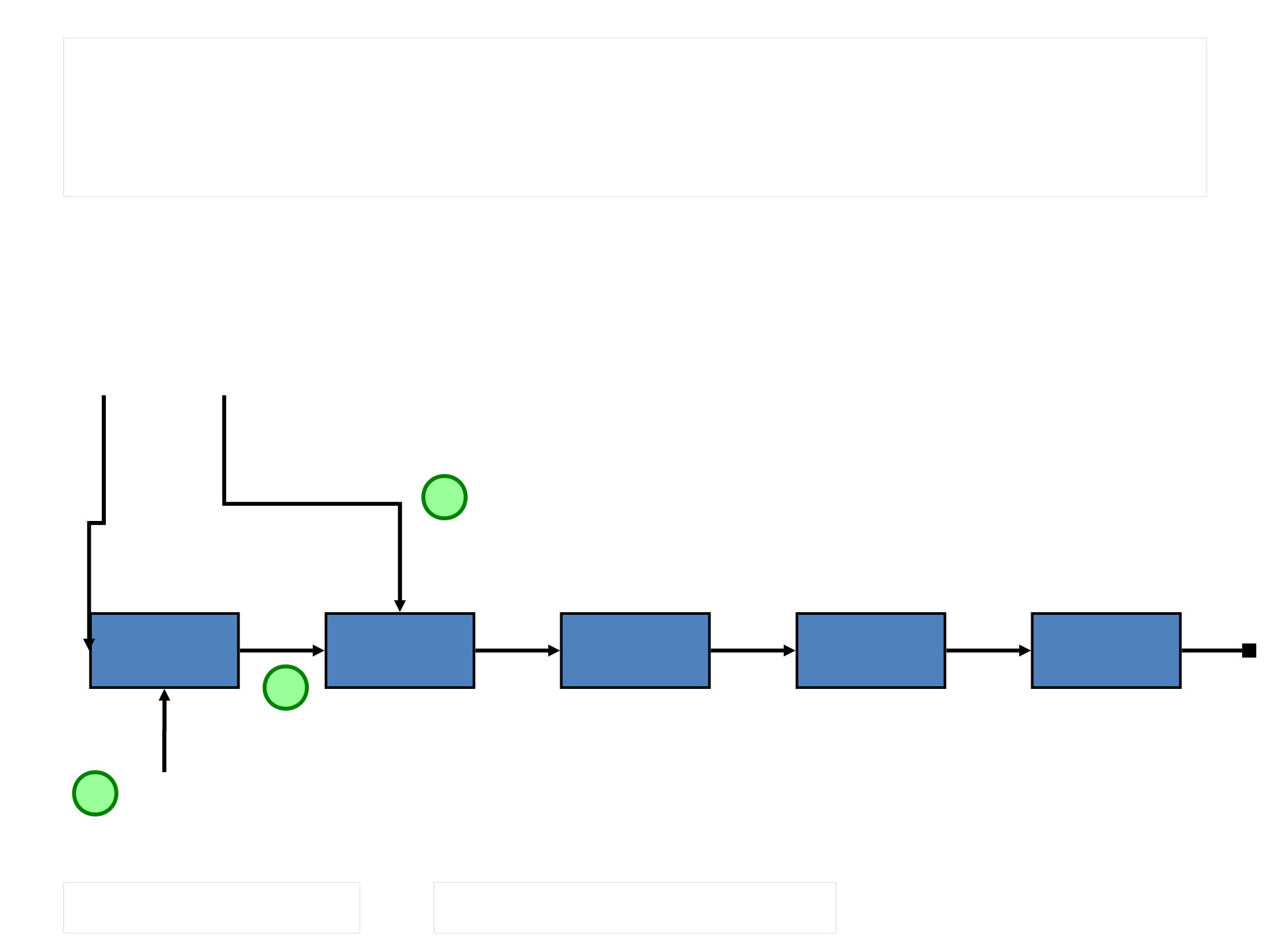
6/11/09
Deleting the first node in
the list
front
3
2
nod
e
1
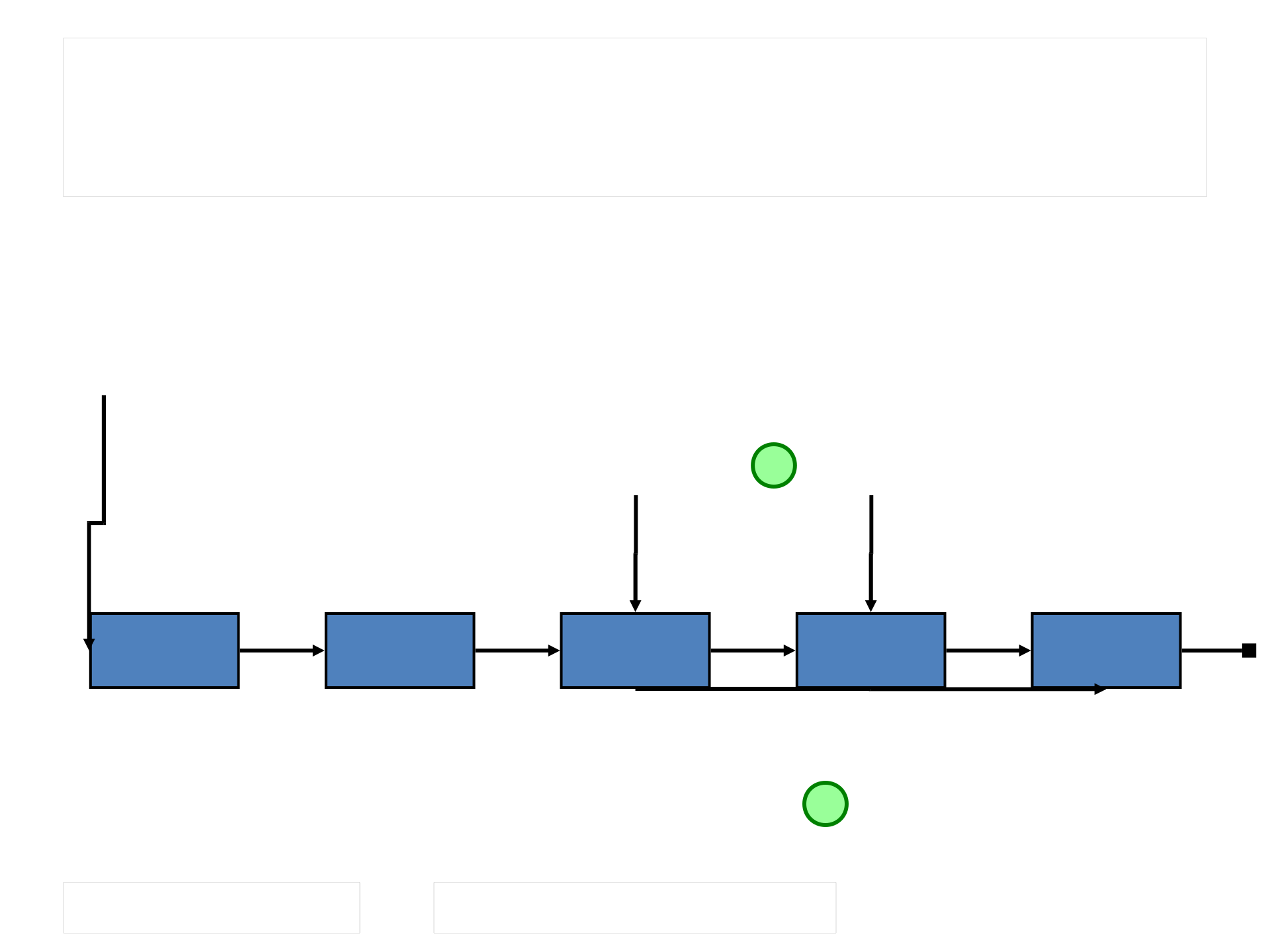
6/11/09
Deleting an interior node
front
2
current
1
previous

6/11/09
Elements Without Links
•We still need to examine one key aspect of
linked lists
•We need to separate the details of the
linked list structure from the elements that
the list stores
•The flaw in our earlier logic (see Person
class) is that the self-referential Person
class must be designed so that it “knows”
it may become a node in a linked list
•This violates the goal of separating the
implementation details from the parts of

6/11/09
Elements Without Links
•Solution: define a separate node class that
serves to link the elements together
•Node class is simple, it contains two
references
–one to the next node, and
–one to the element that is being stored
•The linked list nodes can still be managed
as discussed previously
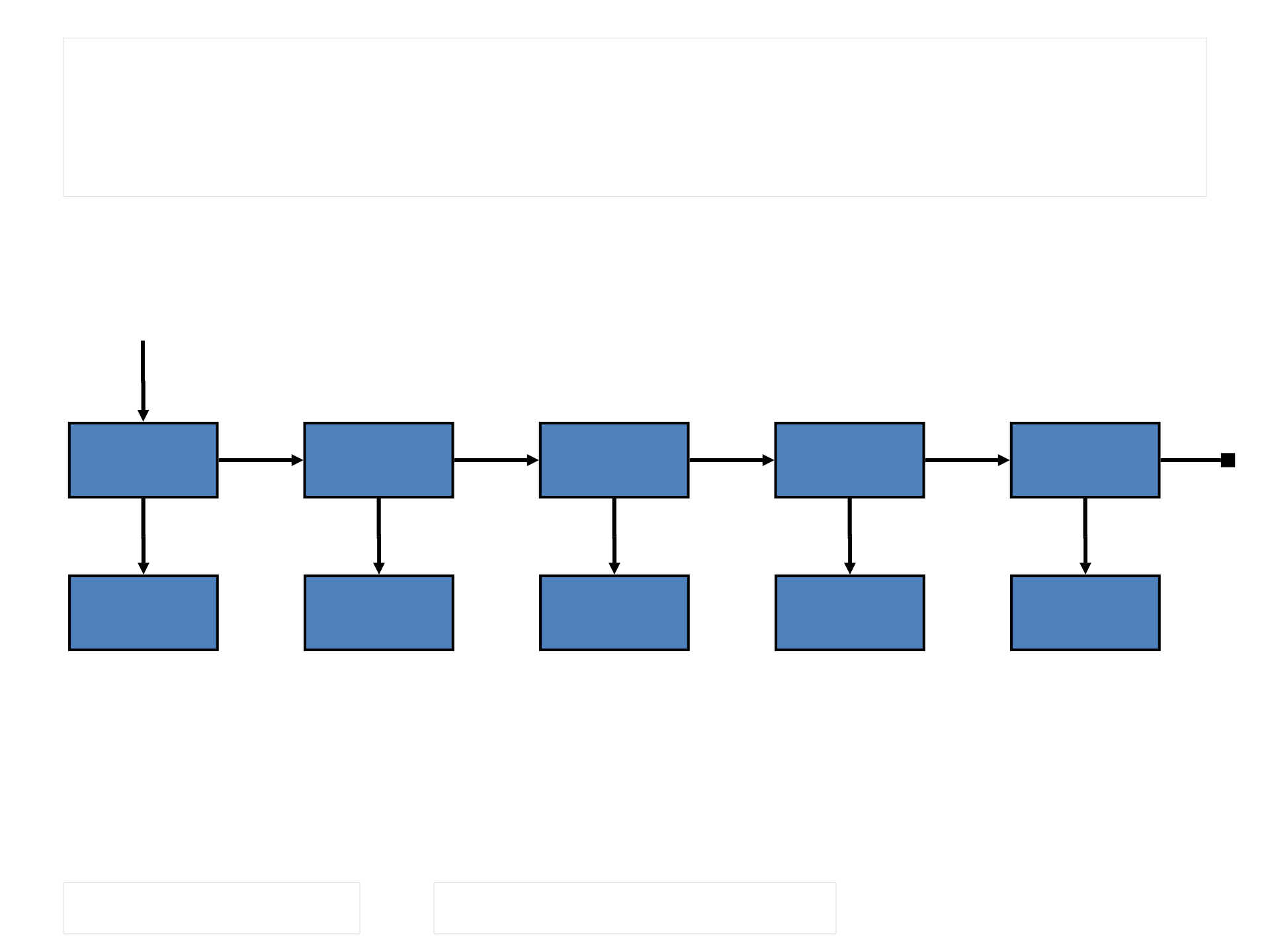
6/11/09
Elements Without Links
front
6/11/09
Outline
•Introduction to Collections
•A Bag Collection
•Array Implementation of a Bag
•Linked Lists
•Linked Implementation of a Bag

6/11/09
A Linked Implementation of
a Bag
•The LinearNode class holds a reference to
an element (data) and a reference to the
next node in the list
•We continue to use an integer variable to
keep track of the number of elements in
the collection
•The reference variable contents is a
reference to the head of the linked list of
nodes storing the elements in the bag
collection
6/11/09
javafoundations.LinearNode
//************************************************************
// LinearNode.java Java Foundations
//
// Represents a node in a linked list.
//************************************************************
package javafoundations;
public class LinearNode<T>
{
private LinearNode<T> next;
private T element;
//-----------------------------------------------------------------
// Creates an empty node.
//-----------------------------------------------------------------
public LinearNode()
{
next = null;
element = null;
}
(more…)
6/11/09
javafoundations.LinearNode
//-----------------------------------------------------------------
// Creates a node storing the specified element.
//-----------------------------------------------------------------
public LinearNode (T elem)
{
next = null;
element = elem;
}
//-----------------------------------------------------------------
// Returns the node that follows this one.
//-----------------------------------------------------------------
public LinearNode<T> getNext()
{
return next;
}
//-----------------------------------------------------------------
// Sets the node that follows this one.
//-----------------------------------------------------------------
public void setNext (LinearNode<T> node)
{
next = node;
}
(more…)

6/11/09
javafoundations.LinearNode
//-----------------------------------------------------------------
// Returns the element stored in this node.
//-----------------------------------------------------------------
public T getElement()
{
return element;
}
//-----------------------------------------------------------------
// Sets the element stored in this node.
//-----------------------------------------------------------------
public void setElement (T elem)
{
element = elem;
}
}
6/11/09
javafoundations.LinkedBag
//**************************************************************
// LinkedBag.java Java Foundations
//
// Represents a linked implementation of a bag collection.
//**************************************************************
package javafoundations;
import java.util.*;
import javafoundations.exceptions.EmptyCollectionException;
public class LinkedBag<T> implements Bag<T>
{
private int count = 0;
private LinearNode<T> contents;
private static Random rand = new Random();
//-----------------------------------------------------------------
// Creates an empty list.
//-----------------------------------------------------------------
public LinkedBag()
{
count = 0;
contents = null;
}
(more…)
6/11/09
javafoundations.LinkedBag
//-----------------------------------------------------------------
// Removes a random element from this bag. Throws an
// EmptyCollectionException if this bag is empty.
//-----------------------------------------------------------------
public T remove() throws EmptyCollectionException
{
T result = null;
if (count == 0)
throw new EmptyCollectionException ("Remove operation "
+ "failed. The bag is empty.");
int choice = rand.nextInt(count) + 1;
if (choice == 1)
{
result = contents.getElement();
contents = contents.getNext();
}
else
{
LinearNode<T> current = contents;
for (int i=1; i < choice-1; i++)
current = current.getNext();
result = current.getNext().getElement();
current.setNext(current.getNext().getNext());
}
(more…)
6/11/09
javafoundations.LinkedBag
//-----------------------------------------------------------------
// Adds the specified element to this bag by putting it on the
// front of the list.
//-----------------------------------------------------------------
public void add (T element)
{
LinearNode<T> node = new LinearNode<T>(element);
node.setNext(contents);
contents = node;
count++;
}
//-----------------------------------------------------------------
// Returns an iterator for this bag.
//-----------------------------------------------------------------
public Iterator<T> iterator()
{
ArrayIterator<T> iter = new ArrayIterator<T>();
LinearNode<T> current = contents;
while (current != null)
{
iter.add(current.getElement());
current = current.getNext();
}
return iter;
}
(more…)
6/11/09
javafoundations.LinkedBag
//-----------------------------------------------------------------
// The following methods are left as programming projects.
//-----------------------------------------------------------------
// public boolean isEmpty() { }
// public int size() { }
// public String toString() { }
}

6/11/09
Summary
•This week we focused on
–the concept of a collection
–the importance of separating the interface
from the implementation
–generic types and their use in collection
classes
–the difference between fixed and dynamic
implementations
–dynamically linked lists
–the Java Collections API

