



VOLATILE USE OF PERSISTENT MEMORY
Introduction
This discusses how applications that require a large quantity of volatile memory can
leverage high-capacity persistent memory as a complementary solution to dynamic
random-access memory (DRAM).
Applications that work with large data sets, like in-memory databases, caching
systems, and scientific simulations, are often limited by the amount of volatile memory
capacity available in the system or the cost of the DRAM required to load a complete
data set. Persistent memory provides a high capacity memory tier to solve these
memory-hungry application problems.
In the memory-storage hierarchy (described in Chapter 1), data is stored in tiers
with frequently accessed data placed in DRAM for low-latency access, and less
frequently accessed data is placed in larger capacity, higher latency storage devices.
Examples of such solutions include Redis on Flash.
For memory-hungy applications that do not require persistence, using the larger
capacity persistent memory as volatile memory provides new opportunities and
solutions.
Using persistent memory as a volatile memory solution is advantageous when an
application:
Has control over data placement between DRAM and other storage tiers
within the system
Does not need to persist data
Can use the native latencies of persistent memory, which may be slower than
DRAM but are faster than non-volatile memory express (NVMe) solid-state
drives (SSDs).
Background
Applications manage different kinds of data structures such as user data, key-value
stores, metadata, and working buffers. Architecting a solution that uses tiered memory
and storage may enhance application performance, for example, placing objects that are
accessed frequently and require low-latency access in DRAM while storing objects that
require larger allocations that are not as latency-sensitive on persistent memory.
Traditional storage devices are used to provide persistence.
Memory Allocation
As described in Chapters 1 through 3, persistent memory is exposed to the application
using memory-mapped files on a persistent memory-aware file system that provides
direct access to the application. Since malloc() and free() do not operate on
different types of memory or memory-mapped files, an interface is needed that provides
malloc() and free() semantics for multiple memory types. This interface is
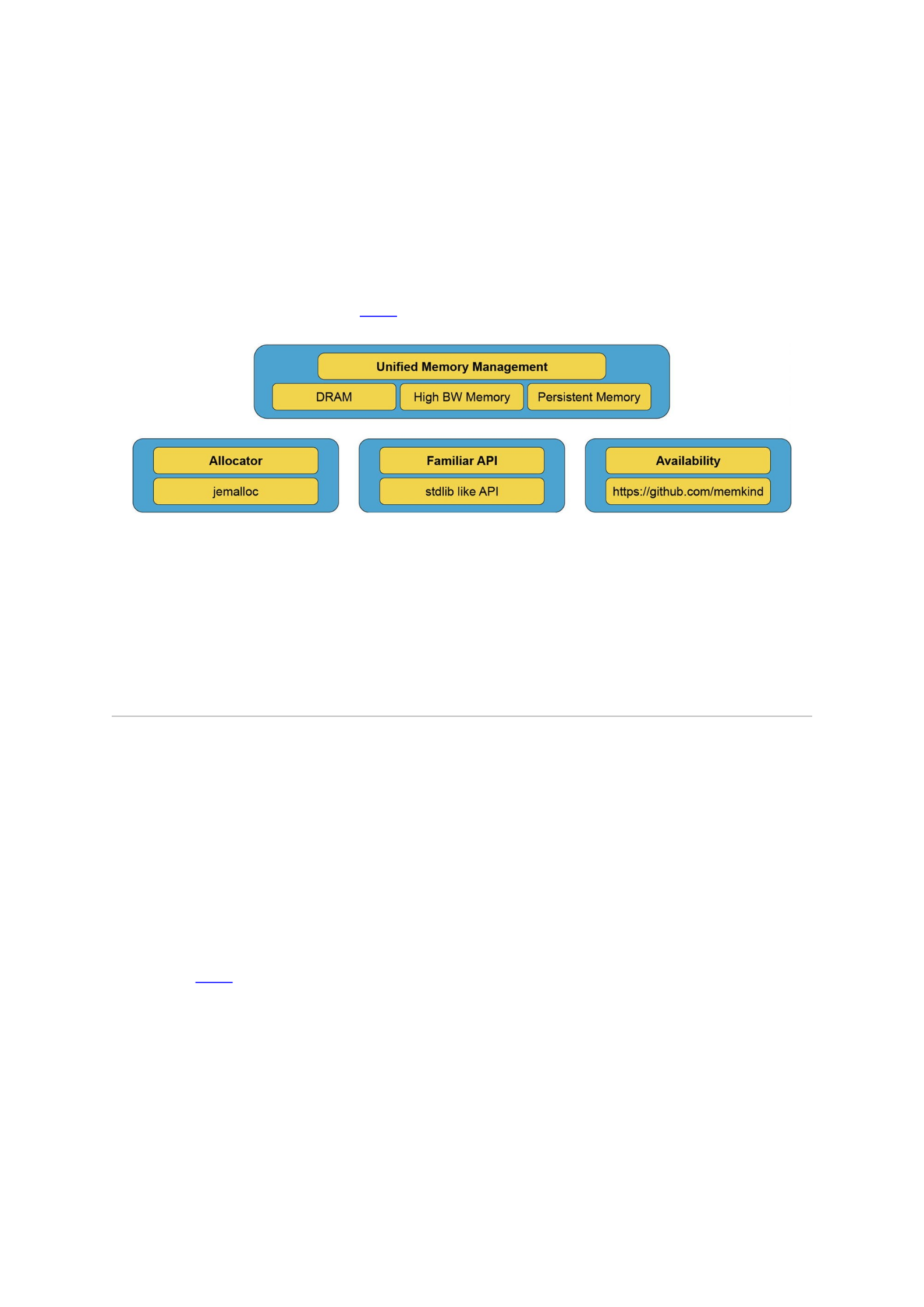
implemented as the memkind library (http://memkind.github.io/memkind/).
How it Works
The memkind library is a user-extensible heap manager built on top of jemalloc,
which enables partitioning of the heap between multiple kinds of memory. Memkind
was created to support different kinds of memory when high bandwidth memory
(HBM) was introduced. A PMEM kind was introduced to support persistent memory.
Different “kinds” of memory are defined by the operating system memory policies
that are applied to virtual address ranges. Memory characteristics supported by
memkind without user extension include the control of non-uniform memory access
(NUMA) and page sizes. Figure 10-1 shows an overview of libmemkind components and
hardware support.
Figure 10-1An overview of the memkind components and hardware support
The memkind library serves as a wrapper that redirects memory allocation requests
from an application to an allocator that manages the heap. At the time of publication,
only the jemalloc allocator is supported. Future versions may introduce and support
multiple allocators. Memkind provides jemalloc with different kinds of memory: A
static kind is created automatically, whereas a dynamic kind is created by an application
using memkind_create_kind().
Supported “Kinds” of Memory
The dynamic PMEM kind is best used with memory-addressable persistent storage
through a DAX-enabled file system that supports load/store operations that are not
paged via the system page cache. For the PMEM kind, the memkind library supports the
traditional malloc/free-like interfaces on a memory-mapped file. When an
application calls memkind_create_kind() with PMEM, a temporary file
(tmpfile(3)) is created on a mounted DAX file system and is memory-mapped into
the application’s virtual address space. This temporary file is deleted automatically
when the program terminates, giving the perception of volatility.
Figure 10-2 shows memory mappings from two memory sources: DRAM
(MEMKIND_DEFAULT) and persistent memory (PMEM_KIND).For allocations from
DRAM, rather than using the common malloc(), the application can call
memkind_malloc() with the kind argument set to MEMKIND_DEFAULT.
MEMKIND_DEFAULT is a static kind that uses the operating system’s default page size
for allocations. Refer to the memkind documentation for large and huge page support.
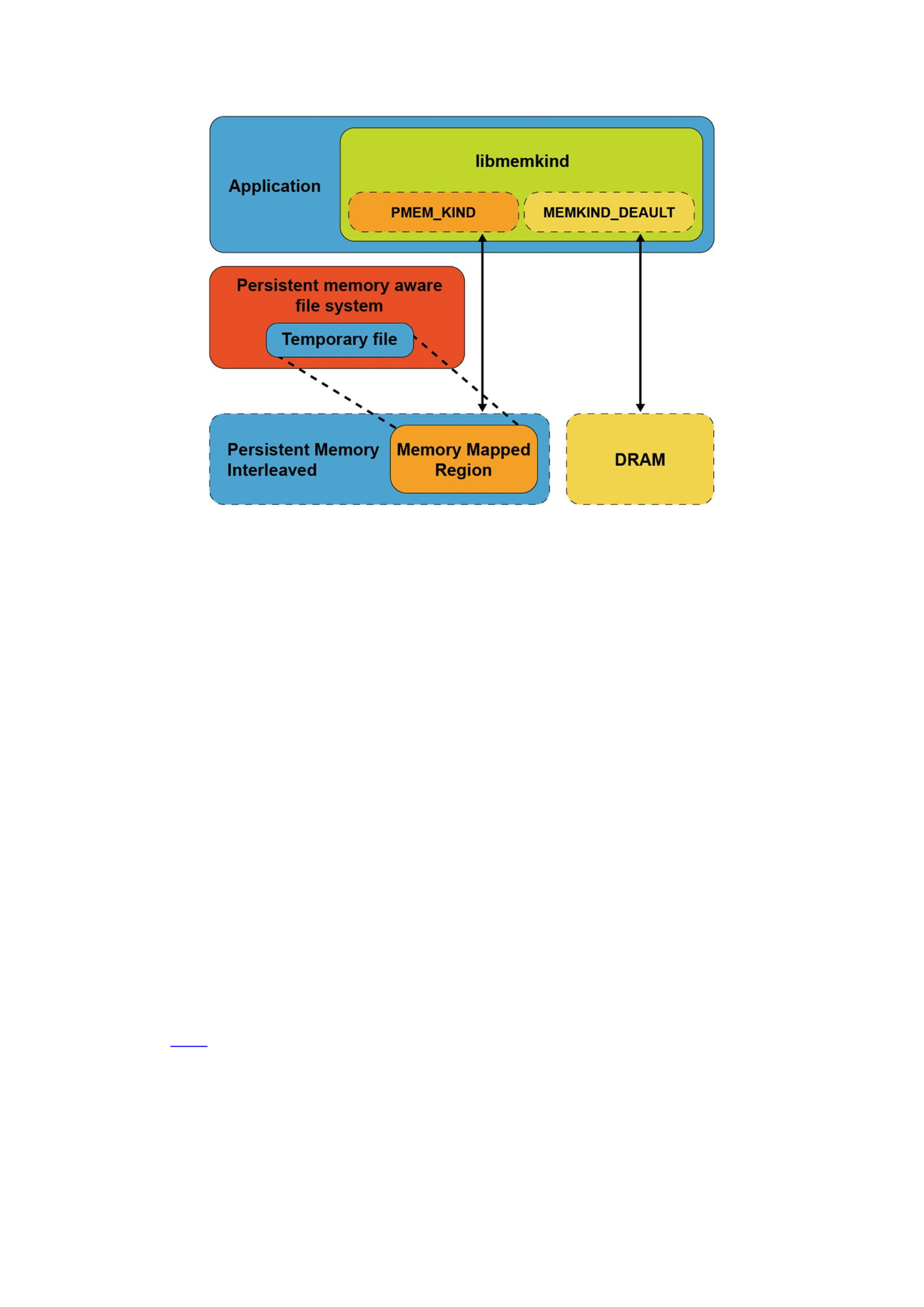
Figure 10-2An application using different “kinds” of memory
When using libmemkind with DRAM and persistent memory, the key points to
understand are:
Two pools of memory are available to the application, one from DRAM and
another from persistent memory.
Both pools of memory can be accessed simultaneously by setting the kind
type to PMEM_KIND to use persistent memory and MEMKIND_DEFAULT to
use DRAM.
jemalloc is the single memory allocator used to manage all kinds of
memory.
The memkind library is a wrapper around jemalloc that provides a unified
API for allocations from different kinds of memory.
PMEM_KIND memory allocations are provided by a temporary file
(tmpfile(3)) created on a persistent memory-aware file system. The file is
destroyed when the application exits. Allocations are not persistent.
Using libmemkind for persistent memory requires simple modifications to
the application.
The memkind API
The memkind API functions related to persistent memory programming are shown in
Listing 10-1 and described in this section. The complete memkind API is available in the
memkind man pages
(http://memkind.github.io/memkind/man_pages/memkind.html).
KIND CREATION MANAGEMENT:
int memkind_create_pmem(const char *dir, size_t max_size,
memkind_t *kind);

int memkind_create_pmem_with_config(struct memkind_config
*cfg, memkind_t *kind);
memkind_t memkind_detect_kind(void *ptr);
int memkind_destroy_kind(memkind_t kind);
KIND HEAP MANAGEMENT:
void *memkind_malloc(memkind_t kind, size_t size);
void *memkind_calloc(memkind_t kind, size_t num, size_t size);
void *memkind_realloc(memkind_t kind, void *ptr, size_t size);
void memkind_free(memkind_t kind, void *ptr);
size_t memkind_malloc_usable_size(memkind_t kind, void *ptr);
memkind_t memkind_detect_kind(void *ptr);
KIND CONFIGURATION MANAGEMENT:
struct memkind_config *memkind_config_new();
void memkind_config_delete(struct memkind_config *cfg);
void memkind_config_set_path(struct memkind_config *cfg, const
char *pmem_dir);
void memkind_config_set_size(struct memkind_config *cfg,
size_t pmem_size);
void memkind_config_set_memory_usage_policy(struct
memkind_config *cfg, memkind_mem_usage_policy policy);
Listing 10-1Persistent memory-related memkind API functions
Kind Management API
The memkind library supports a plug-in architecture to incorporate new memory kinds,
which are referred to as dynamic kinds. The memkind library provides the API to create
and manage the heap for the dynamic kinds.
Kind Creation
Use the memkind_create_pmem() function to create a PMEM kind of memory from
a file-backed source. This file is created as a tmpfile(3) in a specified directory
(PMEM_DIR) and is unlinked, so the file name is not listed under the directory. The
temporary file is automatically removed when the program terminates.
Use memkind_create_pmem() to create a fixed or dynamic heap size depending
on the application requirement. Additionally, configurations can be created and
supplied rather than passing in configuration options to the *_create_* function.
Creating a Fixed-Size Heap
Applications that require a fixed amount of memory can specify a nonzero value for the
PMEM_MAX_SIZE argument to memkind_create_pmem(), shown below. This
defines the size of the memory pool to be created for the specified kind of memory. The
value of PMEM_MAX_SIZE should be less than the available capacity of the file system
specified in PMEM_DIR to avoid ENOMEM or ENOSPC errors. An internal data structure
struct memkind is populated internally by the library and used by the memory
management functions.

int memkind_create_pmem(PMEM_DIR, PMEM_MAX_SIZE, &pmem_kind)
The arguments to memkind_create_pmem() are
PMEM_DIR is the directory where the temp file is created.
PMEM_MAX_SIZE is the size, in bytes, of the memory region to be passed to
jemalloc.
&pmem_kind is the address of a memkind data structure.
If successful, memkind_create_pmem() returns zero. On failure, an error number
is returned that memkind_error_message() can convert to an error message string.
Listing 10-2 shows how a 32MiB PMEM kind is created on a /daxfs file system.
Included in this listing is the definition of memkind_fatal() to print a memkind error
message and exit. The rest of the examples in this chapter assume this routine is defined
as shown below.
void memkind_fatal(int err)
{
char error_message[MEMKIND_ERROR_MESSAGE_SIZE];
memkind_error_message(err, error_message,
MEMKIND_ERROR_MESSAGE_SIZE);
fprintf(stderr, "%s\n", error_message);
exit(1);
}
/* ... in main() ... */
#define PMEM_MAX_SIZE (1024 * 1024 * 32)
struct memkind *pmem_kind;
int err;
// Create PMEM memory pool with specific size
err = memkind_create_pmem("/daxfs",PMEM_MAX_SIZE, &pmem_kind);
if (err) {
memkind_fatal(err);
}
Listing 10-2Creating a 32MiB PMEM kind
You can also create a heap with a specific configuration using the function
memkind_create_pmem_with_config() . This function uses a memkind_config
structure with optional parameters such as size, file path, and memory usage policy.
Listing 10-3 shows how to build a test_cfg using memkind_config_new(), then
passing that configuration to memkind_create_pmem_with_config() to create a
PMEM kind. We use the same path and size parameters from the Listing 10-2
example for comparison.
struct memkind_config *test_cfg = memkind_config_new();
memkind_config_set_path(test_cfg, "/daxfs");
memkind_config_set_size(test_cfg, 1024 * 1024 * 32);
memkind_config_set_memory_usage_policy(test_cfg,
MEMKIND_MEM_USAGE_POLICY_CONSERVATIVE);
// create a PMEM partition with specific configuration
err = memkind_create_pmem_with_config(test_cfg, &pmem_kind);
if (err) {
memkind_fatal(err);
}

Listing 10-3Creating PMEM kind with configuration
Creating a Variable Size Heap
When PMEM_MAX_SIZE is set to zero, as shown below, allocations are satisfied as long
as the temporary file can grow. The maximum heap size growth is limited by the
capacity of the file system mounted under the PMEM_DIR argument .
memkind_create_pmem(PMEM_DIR, 0, &pmem_kind)
The arguments to memkind_create_pmem() are:
PMEM_DIR is the directory where the temp file is created.
PMEM_MAX_SIZE is 0.
&pmem_kind is the address of a memkind data structure.
If the PMEM kind is created successfully, memkind_create_pmem() returns zero.
On failure, memkind_error_message() can be used to convert an error number
returned by memkind_create_pmem() to an error message string, as shown in the
memkind_fatal() routine in Listing 10-2.
Listing 10-4 shows how to create a PMEM kind with variable size.
struct memkind *pmem_kind;
int err;
err = memkind_create_pmem("/daxfs",0,&pmem_kind);
if (err) {
memkind_fatal(err);
}
Listing 10-4Creating a PMEM kind with variable size
Detecting the Memory Kind
Memkind supports both automatic detection of the kind as well as a function to detect
the kind associated with a memory referenced by a pointer.
Automatic Kind Detection
Automatically detecting the kind of memory is supported to simplify code changes when
using libmemkind. Thus, the memkind library will automatically retrieve the kind of
memory pool the allocation was made from, so the heap management functions listed in
Table 10-1 can be called without specifying the kind.
Table 10-1Automatic kind detection functions and their equivalent specified kind functions and operations
Operation Memkind API with Kind Memkind API Using Automatic Detection
free memkind_free(kind, ptr) memkind_free(NULL, ptr)
realloc memkind_realloc(kind, ptr, size) memkind_realloc(NULL, ptr, size)
Get size of allocated
memory
memkind_malloc_usable_size(kind, ptr) memkind_malloc_usable_size(NULL, ptr)
The memkind library internally tracks the kind of a given object from the allocator
metadata. However, to get this information, some of the operations may need to acquire
a lock to prevent accesses from other threads, which may negatively affect the
performance in a multithreaded environment.

Memory Kind Detection
Memkind also provides the memkind_detect_kind() function, shown below, to
query and return the kind of memory referenced by the pointer passed into the
function. If the input pointer argument is NULL, the function returns NULL. The input
pointer argument passed into memkind_detect_kind() must have been returned
by a previous call to memkind_malloc(), memkind_calloc(),
memkind_realloc(), or memkind_posix_memalign().
memkind_t memkind_detect_kind(void *ptr)
Similar to the automatic detection approach, this function has nontrivial
performance overhead. Listing 10-5 shows how to detect the kind type.
73 err = memkind_create_pmem(path, 0, &pmem_kind);
74 if (err) {
75 memkind_fatal(err);
76 }
77
78 /* do some allocations... */
79 buf0 = memkind_malloc(pmem_kind, 1000);
80 buf1 = memkind_malloc(MEMKIND_DEFAULT, 1000);
81
82 /* look up the kind of an allocation */
83 if (memkind_detect_kind(buf0) == MEMKIND_DEFAULT) {
84 printf("buf0 is DRAM\n");
85 } else {
86 printf("buf0 is pmem\n");
87 }
Listing 10-5pmem_detect_kind.c – how to automatically detect the ‘kind’ type
Destroying Kind Objects
Use the memkind_destroy_kind() function, shown below, to delete the kind object
that was previously created using the memkind_create_pmem() or
memkind_create_pmem_with_config() function .
int memkind_destroy_kind(memkind_t kind);
Using the same pmem_detect_kind.c code from Listing 10-5, Listing 10-6 shows
how the kind is destroyed before the program exits.
89 err = memkind_destroy_kind(pmem_kind);
90 if (err) {
91 memkind_fatal(err);
92 }
Listing 10-6Destroying a kind object
When the kind returned by memkind_create_pmem() or
memkind_create_pmem_with_config() is successfully destroyed, all the
allocated memory for the kind object is freed.
Heap Management API

The heap management functions described in this section have an interface modeled on
the ISO C standard API, with an additional “kind” parameter to specify the memory type
used for allocation.
Allocating Memory
The memkind library provides memkind_malloc(), memkind_calloc(), and
memkind_realloc() functions for allocating memory, defined as follows:
void *memkind_malloc(memkind_t kind, size_t size);
void *memkind_calloc(memkind_t kind, size_t num, size_t size);
void *memkind_realloc(memkind_t kind, void *ptr, size_t size);
memkind_malloc() allocates size bytes of uninitialized memory of the specified kind.
The allocated space is suitably aligned (after possible pointer coercion) for storage of
any object type. If size is 0, then memkind_malloc() returns NULL.
memkind_calloc() allocates space for num objects, each is size bytes in length. The
result is identical to calling memkind_malloc() with an argument of num * size.
The exception is that the allocated memory is explicitly initialized to zero bytes. If num
or size is 0, then memkind_calloc() returns NULL.
memkind_realloc() changes the size of the previously allocated memory referenced
by ptr to size bytes of the specified kind. The contents of the memory remain
unchanged, up to the lesser of the new and old sizes. If the new size is larger, the
contents of the newly allocated portion of the memory are undefined. If successful, the
memory referenced by ptr is freed, and a pointer to the newly allocated memory is
returned.
The code example in Listing 10-7 shows how to allocate memory from DRAM and
persistent memory (pmem_kind) using memkind_malloc(). Rather than using the
common C library malloc() for DRAM and memkind_malloc() for persistent
memory, we recommend using a single library to simplify the code.
/*
* Allocates 100 bytes using appropriate "kind"
* of volatile memory
*/
// Create a PMEM memory pool with a specific size
err = memkind_create_pmem(path, PMEM_MAX_SIZE, &pmem_kind);
if (err) {
memkind_fatal(err);
}
char *pstring = memkind_malloc(pmem_kind, 100);
char *dstring = memkind_malloc(MEMKIND_DEFAULT, 100);
Listing 10-7An example of allocating memory from both DRAM and persistent memory
Freeing Allocated Memory
To avoid memory leaks, allocated memory can be freed using the memkind_free()
function , defined as:
void memkind_free(memkind_t kind, void *ptr);
memkind_free() causes the allocated memory referenced by ptr to be made
available for future allocations. This pointer must be returned by a previous call to

memkind_malloc(), memkind_calloc(), memkind_realloc(), or
memkind_posix_memalign(). Otherwise, if memkind_free(kind, ptr) was
previously called, undefined behavior occurs. If ptr is NULL, no operation is performed.
In cases where the kind is unknown in the context of the call to memkind_free(),
NULL can be given as the kind specified to memkind_free(), but this will require an
internal lookup for the correct kind. Always specify the correct kind because the lookup
for kind could result in a serious performance penalty.
Listing 10-8 shows four examples of memkind_free() being used. The first two
specify the kind, and the second two use NULL to detect the kind automatically.
/* Free the memory by specifying the kind */
memkind_free(MEMKIND_DEFAULT, dstring);
memkind_free(PMEM_KIND, pstring);
/* Free the memory using automatic kind detection */
memkind_free(NULL, dstring);
memkind_free(NULL, pstring) ;
Listing 10-8Examples of memkind_free() usage
Kind Configuration Management
You can also create a heap with a specific configuration using the function
memkind_create_pmem_with_config(). This function requires completing a
memkind_config structure with optional parameters such as size, path to file, and
memory usage policy.
Memory Usage Policy
In jemalloc, a runtime option called dirty_decay_ms determines how fast it returns
unused memory back to the operating system. A shorter decay time purges unused
memory pages faster, but the purging costs CPU cycles. Trade-offs between memory and
CPU cycles needed for this operation should be carefully thought out before using this
parameter.
The memkind library supports two policies related to this feature:
1.
MEMKIND_MEM_USAGE_POLICY_DEFAULT
2. MEMKIND_MEM_USAGE_POLICY_CONSERVATIVE
The minimum and maximum values for dirty_decay_ms using the
MEMKIND_MEM_USAGE_POLICY_DEFAULT are 0ms to 10,000ms for arenas assigned
to a PMEM kind. Setting MEMKIND_MEM_USAGE_POLICY_CONSERVATIVE sets
shorter decay times to purge unused memory faster, reducing memory usage. To define
the memory usage policy, use memkind_config_set_memory_usage_policy(),
shown below:
void memkind_config_set_memory_usage_policy (struct
memkind_config *cfg, memkind_mem_usage_policy policy );

MEMKIND_MEM_USAGE_POLICY_DEFAULT is the default memory usage
policy.
MEMKIND_MEM_USAGE_POLICY_CONSERVATIVE allows changing the
dirty_decay_ms parameter.
Listing 10-9 shows how to use
memkind_config_set_memory_usage_policy() with a custom configuration.
73 struct memkind_config *test_cfg =
74 memkind_config_new();
75 if (test_cfg == NULL) {
76 fprintf(stderr,
77 "memkind_config_new: out of memory\n");
78 exit(1);
79 }
80
81 memkind_config_set_path(test_cfg, path);
82 memkind_config_set_size(test_cfg, PMEM_MAX_SIZE);
83 memkind_config_set_memory_usage_policy(test_cfg,
84 MEMKIND_MEM_USAGE_POLICY_CONSERVATIVE);
85
86 // Create PMEM partition with the configuration
87 err = memkind_create_pmem_with_config(test_cfg,
88 &pmem_kind);
89 if (err) {
90 memkind_fatal(err);
91 }
Listing 10-9An example of a custom configuration and memory policy use
Additional memkind Code Examples
The memkind source tree contains many additional code examples, available on GitHub
at https://github.com/memkind/memkind/tree/master/examples.
C++ Allocator for PMEM Kind
A new pmem::allocator class template is created to support allocations from
persistent memory, which conforms to C++11 allocator requirements. It can be used
with C++ compliant data structures from:
Standard Template Library (STL)
Intel® Threading Building Blocks (Intel® TBB) library
The pmem::allocator class template uses the memkind_create_pmem()
function described previously. This allocator is stateful and has no default constructor.
pmem::allocator methods
pmem::allocator(const char *dir, size_t max_size);

pmem::allocator(const std::string& dir, size_t max_size) ;
template <typename U> pmem::allocator<T>::allocator(const
pmem::allocator<U>&);
template <typename U> pmem::allocator(allocator<U>&& other);
pmem::allocator<T>::~allocator();
T* pmem::allocator<T>::allocate(std::size_t n) const;
void pmem::allocator<T>::deallocate(T* p, std::size_t n) const
;
template <class U, class... Args> void
pmem::allocator<T>::construct(U* p, Args... args) const;
void pmem::allocator<T>::destroy(T* p) const;
For more information about the pmem::allocator class template, refer to the
pmem allocator(3) man page.
Nested Containers
Multilevel containers such as a vector of lists, tuples, maps, strings, and so on pose
challenges in handling the nested objects.
Imagine you need to create a vector of strings and store it in persistent memory. The
challenges – and their solutions – for this task include:
1.
Challenge: The std::string cannot be used for this purpose because it is an alias of the
std::basic_string. The std::allocator requires a new alias that uses pmem:allocator.
Solution: A new alias called pmem_string is defined as a typedef of
std::basic_string when created with pmem::allocator.
2. Challenge: How to ensure that an outermost vector will properly construct nested
pmem_string with a proper instance of pmem::allocator.
Solution: From C++11 and later, the std::scoped_allocator_adaptor
class template can be used with multilevel containers. The purpose of this adaptor is
to correctly initialize stateful allocators in nested containers, such as when all levels
of a nested container must be placed in the same memory segment.
C++ Examples
This section presents several full-code examples demonstrating the use of
libmemkind using C and C++.
Using the pmem::allocator
As mentioned earlier, you can use pmem::allocator with any STL-like data
structure. The code sample in Listing 10-10 includes a pmem_allocator.h header file
to use pmem::allocator.
37 #include <pmem_allocator.h>
38 #include <vector>
39 #include <cassert>
40
41 int main(int argc, char *argv[]) {

42 const size_t pmem_max_size = 64 * 1024 * 1024; //64 MB
43 const std::string pmem_dir("/daxfs");
44
45 // Create allocator object
46 libmemkind::pmem::allocator<int>
47 alc(pmem_dir, pmem_max_size);
48
49 // Create std::vector with our allocator.
50 std::vector<int,
51 libmemkind::pmem::allocator<int>> v(alc);
52
53 for (int i = 0; i < 100; ++i)
54 v.push_back(i);
55
56 for (int i = 0; i < 100; ++i)
57 assert(v[i] == i);
Listing 10-10pmem_allocator.cpp: using pmem::allocator with std:vector
Line 43: We define a persistent memory pool of 64MiB.
Lines 46-47: We create an allocator object alc of type
pmem::allocator<int>.
Line 50: We create a vector object v of type std::vector<int,
pmem::allocator<int> > and pass in the alc from line 47 object as an
argument. The pmem::allocator is stateful and has no default
constructor. This requires passing the allocator object to the vector
constructor; otherwise, a compilation error occurs if the default constructor
of std::vector<int, pmem::allocator<int> > is called because
the vector constructor will try to call the default constructor of
pmem::allocator, which does not exist yet.
Creating a Vector of Strings
Listing 10-11 shows how to create a vector of strings that resides in persistent memory.
We define pmem_string as a typedef of std::basic_string with
pmem::allocator. In this example, std::scoped_allocator_adaptor allows
the vector to propagate the pmem::allocator instance to all pmem_string objects
stored in the vector object.
37 #include <pmem_allocator.h>
38 #include <vector>
39 #include <string>
40 #include <scoped_allocator>
41 #include <cassert>
42 #include <iostream>
43
44 typedef libmemkind::pmem::allocator<char> str_alloc_type;
45
46 typedef std::basic_string<char, std::char_traits<char>,
str_alloc_type> pmem_string;

47
48 typedef libmemkind::pmem::allocator<pmem_string>
vec_alloc_type;
49
50 typedef std::vector<pmem_string,
std::scoped_allocator_adaptor<vec_alloc_type> > vector_type;
51
52 int main(int argc, char *argv[]) {
53 const size_t pmem_max_size = 64 * 1024 * 1024; //64 MB
54 const std::string pmem_dir("/daxfs");
55
56 // Create allocator object
57 vec_alloc_type alc(pmem_dir, pmem_max_size);
58 // Create std::vector with our allocator.
59 vector_type v(alc);
60
61 v.emplace_back("Foo");
62 v.emplace_back("Bar");
63
64 for (auto str : v) {
65 std::cout << str << std::endl;
66 }
Listing 10-11vector_of_strings.cpp: creating a vector of strings
Line 46: We define pmem_string as a typedef of std::basic_string.
Line 48: We define the pmem::allocator using the pmem_string type.
Line 50: Using std::scoped_allocator_adaptor allows the vector
to propagate the pmem::allocator instance to all pmem_string objects
stored in the vector object.
Expanding Volatile Memory Using Persistent Memory
Persistent memory is treated by the kernel as a device. In a typical use-case, a persistent
memory-aware file system is created and mounted with the –o dax option, and files are
memory-mapped into the virtual address space of a process to give the application
direct load/store access to persistent memory regions.
A new feature was added to the Linux kernel v5.1 such that persistent memory can
be used more broadly as volatile memory. This is done by binding a persistent memory
device to the kernel, and the kernel manages it as an extension to DRAM. Since
persistent memory has different characteristics than DRAM, memory provided by this
device is visible as a separate NUMA node on its corresponding socket.
To use the MEMKIND_DAX_KMEM kind, you need pmem to be available using device
DAX, which exposes pmem as devices with names like /dev/dax*. If you have an existing
dax device and want to migrate the device model type to use DEV_DAX_KMEM, use:
$ sudo daxctl migrate-device-model
To create a new dax device using all available capacity on the first available region
(NUMA node), use:
$ sudo ndctl create-namespace --mode=devdax --map=mem
To create a new dax device specifying the region and capacity, use:

$ sudo ndctl create-namespace --mode=devdax --map=mem --
region=region0 --size=32g
To display a list of namespaces, use:
$ ndctl list
If you have already created a namespace in another mode, such as the default fsdax,
you can reconfigure the device using the following where namespace0.0 is the
existing namespace you want to reconfigure:
$ sudo ndctl create-namespace --mode=devdax --map=mem --force
-e namespace0.0
For more details about creating new namespace read
https://docs.pmem.io/ndctl-users-guide/managing-namespaces
%23creating-namespaces.
DAX devices must be converted to use the system-ram mode. Converting a dax
device to a NUMA node suitable for use with system memory can be performed using
following command:
$ sudo daxctl reconfigure-device dax2.0 --mode=system-ram
This will migrate the device from using the device_dax driver to the dax_pmem
driver. The following shows an example output with dax1.0 configured as the default
devdax type and dax2.0 is system-ram:
$ daxctl list
[
{
"chardev":"dax1.0",
"size":263182090240,
"target_node":3,
"mode":"devdax"
},
{
"chardev":"dax2.0",
"size":263182090240,
"target_node":4,
"mode":"system-ram"
}
]
You can now use numactl -H to show the hardware NUMA configuration. The
following example output is collected from a 2-socket system and shows node 4 is a new
system-ram backed NUMA node created from persistent memory:
$ numactl -H
available: 3 nodes (0-1,4)
node 0 cpus: 0 1 2 3 4 5 6 7 8 9 10 11 12 13 14 15 16 17 18 19
20 21 22 23 24 25 26 27 56 57 58 59 60 61 62 63 64 65 66 67 68
69 70 71 72 73 74 75 76 77 78 79 80 81 82 83
node 0 size: 192112 MB
node 0 free: 185575 MB
node 1 cpus: 28 29 30 31 32 33 34 35 36 37 38 39 40 41 42 43
44 45 46 47 48 49 50 51 52 53 54 55 84 85 86 87 88 89 90 91 92
93 94 95 96 97 98 99 100 101 102 103 104 105 106 107 108 109
110 111

node 1 size: 193522 MB
node 1 free: 193107 MB
node 4 cpus:
node 4 size: 250880 MB
node 4 free: 250879 MB
node distances:
node 0 1 4
0: 10 21 17
1: 21 10 28
4: 17 28 10
To online the NUMA node and have the Kernel manage the new memory, use:
$ sudo daxctl online-memory dax0.1
dax0.1: 5 sections already online
dax0.1: 0 new sections onlined
onlined memory for 1 device
At this point, the kernel will use the new capacity for normal operation. The new
memory shows itself in tools such lsmem example shown below where we see an
additional 10GiB of system-ram in the 0x0000003380000000-0x00000035ffffffff
address range:
$ lsmem
RANGE SIZE STATE REMOVABLE BLOCK
0x0000000000000000-0x000000007fffffff 2G online no 0
0x0000000100000000-0x000000277fffffff 154G online yes 2-78
0x0000002780000000-0x000000297fffffff 8G online no 79-82
0x0000002980000000-0x0000002effffffff 22G online yes 83-93
0x0000002f00000000-0x0000002fffffffff 4G online no 94-95
0x0000003380000000-0x00000035ffffffff 10G online yes 103-107
0x000001aa80000000-0x000001d0ffffffff 154G online yes 853-929
0x000001d100000000-0x000001d37fffffff 10G online no 930-934
0x000001d380000000-0x000001d8ffffffff 22G online yes 935-945
0x000001d900000000-0x000001d9ffffffff 4G online no 946-947
Memory block size: 2G
Total online memory: 390G
Total offline memory: 0B
To programmatically allocate memory from a NUMA node created using persistent
memory, a new static kind, called MEMKIND_DAX_KMEM, was added to libmemkind
that uses the system-ram DAX device.
Using MEMKIND_DAX_KMEM as the first argument to memkind_malloc(), shown
below, you can use persistent memory from separate NUMA nodes in a single
application. The persistent memory is still physically connected to a CPU socket, so the
application should take care to ensure CPU affinity for optimal performance.
memkind_malloc(MEMKIND_DAX_KMEM, size_t size)
Figure 10-3 shows an application that created two static kind objects:
MEMKIND_DEFAULT and MEMKIND_DAX_KMEM.
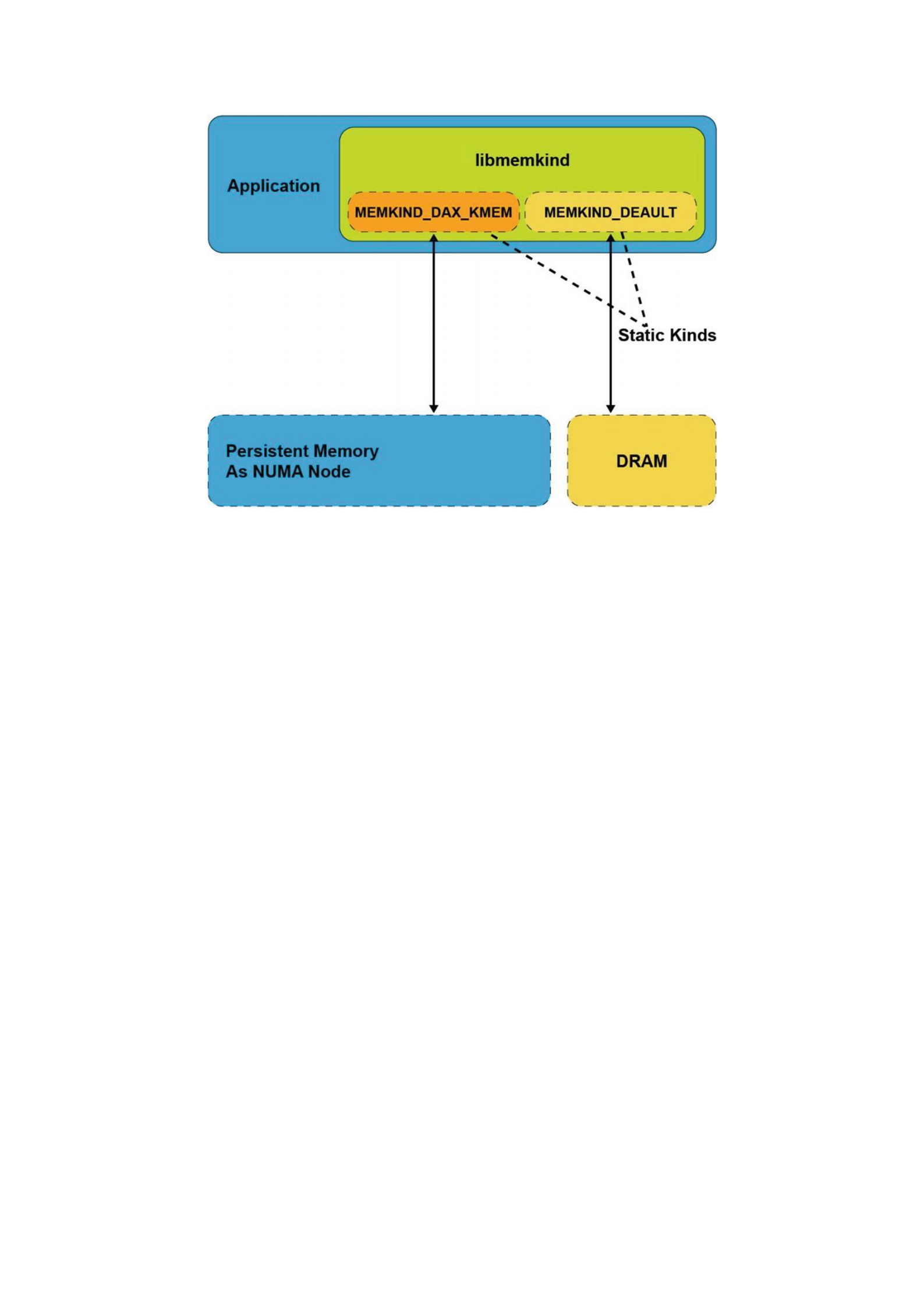
Figure 10-3An application that created two kind objects from different types of memory
The difference between the PMEM_KIND described earlier and
MEMKIND_DAX_KMEM is that the MEMKIND_DAX_KMEM is a static kind and uses
mmap() with the MAP_PRIVATE flag, while the dynamic PMEM_KIND is created with
memkind_create_pmem() and uses the MAP_SHARED flag when memory-mapping files
on a DAX-enabled file system.
Child processes created using the fork(2) system call inherit the MAP_PRIVATE
mappings from the parent process. When memory pages are modified by the parent
process, a copy-on-write mechanism is triggered by the kernel to create an unmodified
copy for the child process. These pages are allocated on the same NUMA node as the
original page.
libvmemcache: An Efficient Volatile Key-Value Cache for
Large-Capacity Persistent Memory
Some existing in-memory databases (IMDB) rely on manual dynamic memory
allocations (malloc, jemalloc, tcmalloc), which can exhibit external and
internal memory fragmentation when run for a long period of time, leaving large
amounts of memory un-allocatable. Internal and external fragmentation is briefly
explained as follows:
Internal fragmentation occurs when more memory is allocated than is
required, and the unused memory is contained within the allocated region.
For example, if the requested allocation size is 200 bytes, a chunk of 256
bytes is allocated.
External fragmentation occurs when variable memory sizes are allocated
dynamically, resulting in a failure to allocate a contiguous chunk of memory,
although the requested chunk of memory remains available in the system.
This problem is more pronounced when large capacities of persistent
memory are being used as volatile memory. Applications with substantially

long runtimes need to solve this problem, especially if the allocated sizes
have considerable variation. Applications and runtime environments handle
this problem in different ways, for example:
Java and .NET use compacting garbage collection
Redis and Apache Ignite* use defragmentation algorithms
Memcached uses a slab allocator
Each of the above allocator mechanisms has pros and cons. Garbage collection and
defragmentation algorithms require processing to occur on the heap to free unused
allocations or move data to create contiguous space. Slab allocators usually define a
fixed set of different sized buckets at initialization without knowing how many of each
bucket the application will need. If the slab allocator depletes a certain bucket size, it
allocates from larger sized buckets, which reduces the amount of free space. These
mechanisms can potentially block the application’s processing and reduce its
performance.
libvmemcache Overview
libvmemcache is an embeddable and lightweight in-memory caching solution with a
key-value store at its core. It is designed to take full advantage of large-capacity
memory, such as persistent memory, efficiently using memory mapping in a scalable
way. It is optimized for use with memory-addressable persistent storage through a
DAX-enabled file system that supports load/store operations. libvmemcache has
these unique characteristics:
The extent-based memory allocator sidesteps the fragmentation problem
that affects most in-memory databases, and it allows the cache to achieve
very high space utilization for most workloads.
Buffered LRU (least recently used) combines a traditional LRU doubly linked
list with a non-blocking ring buffer to deliver high scalability on modern
multicore CPUs.
A unique indexing critnib data structure delivers high performance and is
very space efficient.
The cache for libvmemcache is tuned to work optimally with relatively large value
sizes. While the smallest possible size is 256 bytes, libvmemcache performs best if the
expected value sizes are above 1 kilobyte.
libvmemcache has more control over the allocation because it implements a
custom memory-allocation scheme using an extents-based approach (like that of file
system extents). libvmemcache can, therefore, concatenate and achieve substantial
space efficiency. Additionally, because it is a cache, it can evict data to allocate new
entries in a worst-case scenario. libvmemcache will always allocate exactly as much
memory as it freed, minus metadata overhead. This is not true for caches based on
common memory allocators such as memkind. libvmemcache is designed to work
with terabyte-sized in-memory workloads, with very high space utilization.
libvmemcache works by automatically creating a temporary file on a DAX-enabled
file system and memory-mapping it into the application’s virtual address space. The
temporary file is deleted when the program terminates and gives the perception of
volatility. Figure 10-4 shows the application using traditional malloc() to allocate
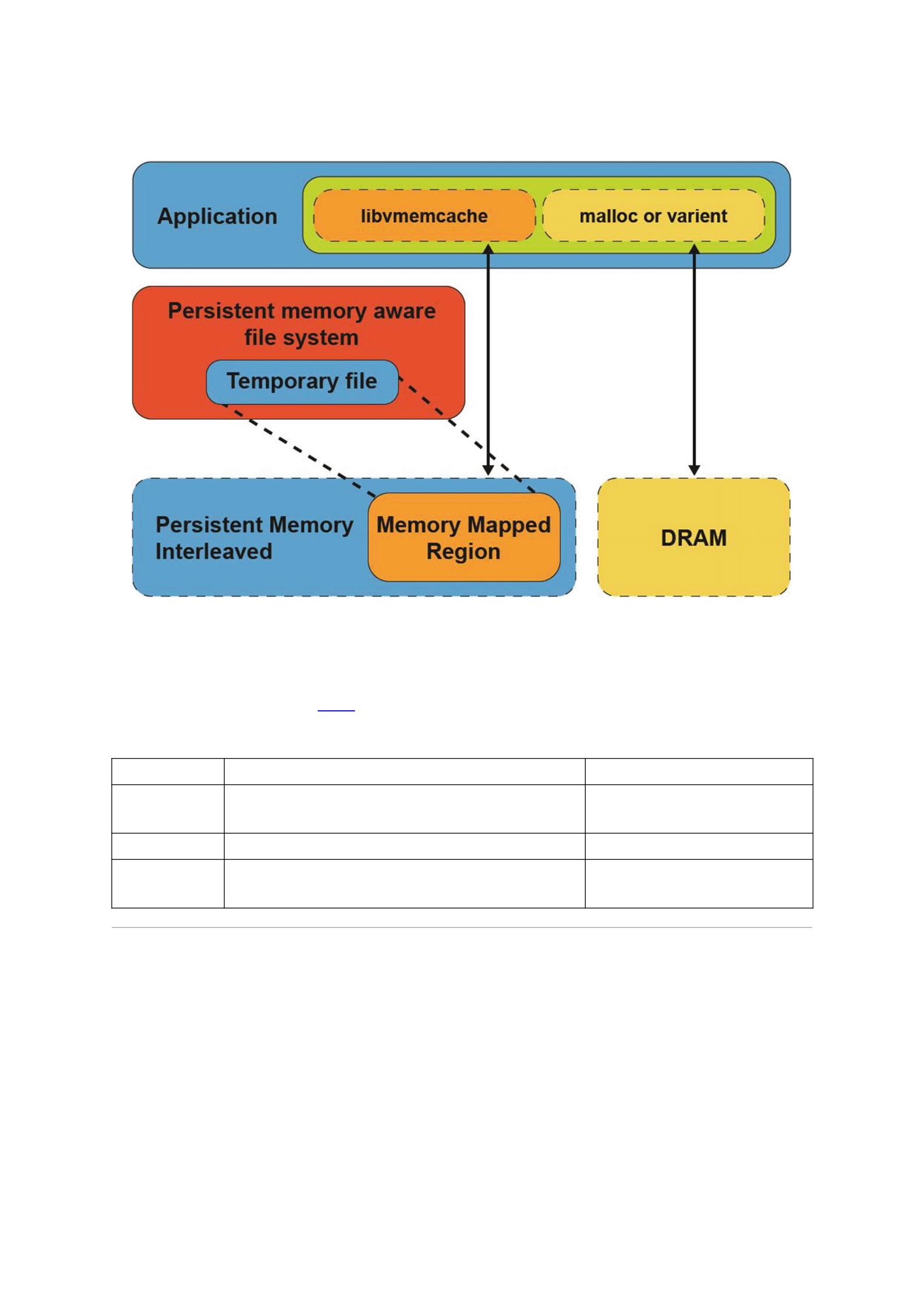
memory from DRAM and using libvmemcache to memory map a temporary file
residing on a DAX-enabled file system from persistent memory.
Figure 10-4An application using libvmemcache memory-maps a temporary file from a DAX-enabled file system
Although libmemkind supports different kinds of memory and memory
consumption policies, the underlying allocator is jemalloc, which uses dynamic
memory allocation. Table 10-2 compares the implementation details of libvmemcache
and libmemkind.
Table 10-2Design aspects of libmemkind and libvmemcache
libmemkind (PMEM) libvmemcache
Allocation
Scheme
Dynamic allocator Extent based (not restricted to sector,
page, etc.)
Purpose General purpose Lightweight in-memory cache
Fragmentation Apps with random size allocations/deallocations that run
for a longer period
Minimized
libvmemcache Design
libvmemcache has two main design aspects:
1.
Allocator design to improve/resolve fragmentation
issues
2. A scalable and efficient LRU policy
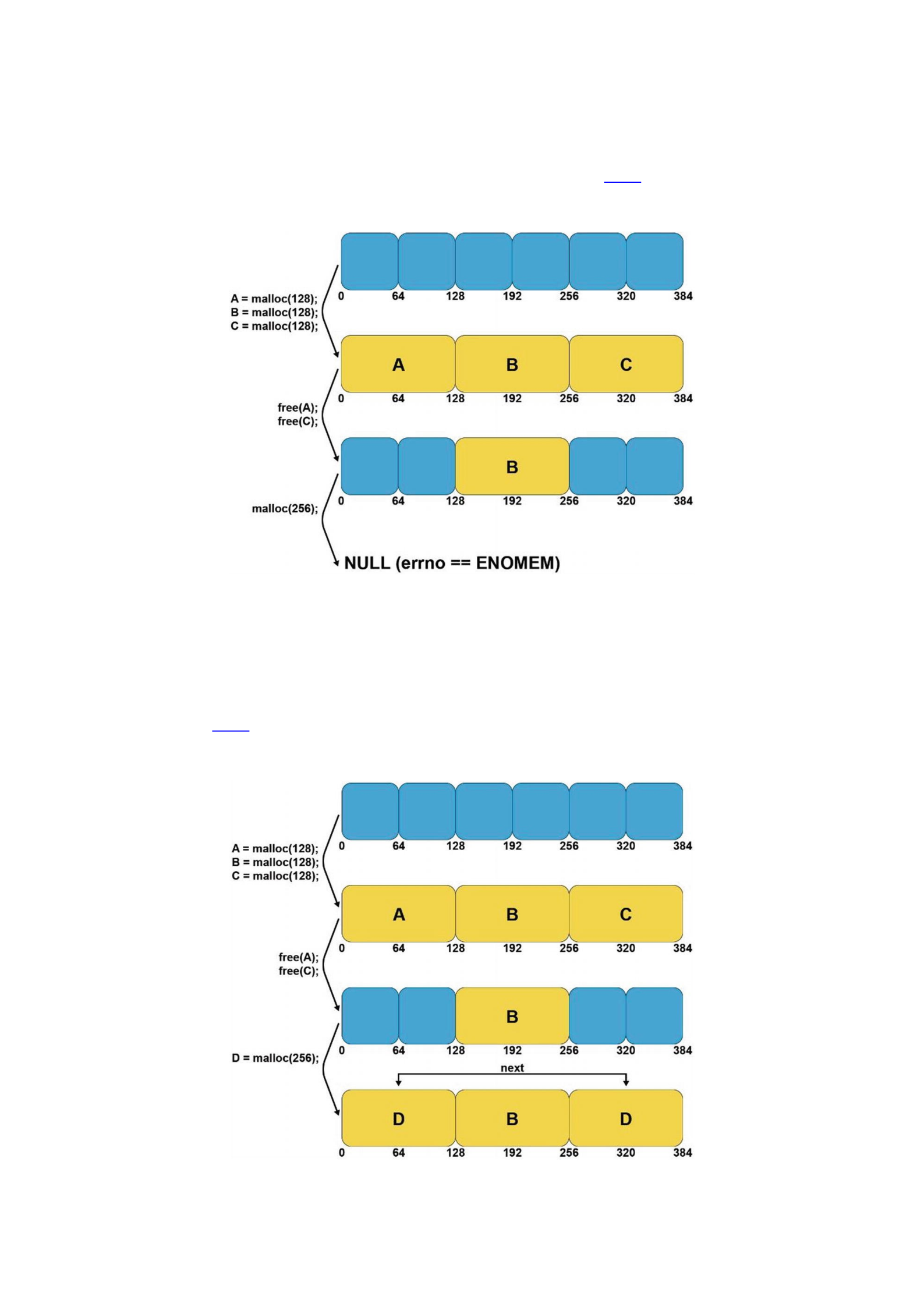
Extent-Based Allocator
libvmemcache can solve fragmentation issues when working with terabyte-sized in-
memory workloads and provide high space utilization. Figure 10-5 shows a workload
example that creates many small objects, and over time, the allocator stops due to
fragmentation.
Figure 10-5An example of a workload that creates many small objects, and the allocator stops due to fragmentation
libvmemcache uses an extent-based allocator, where an extent is a contiguous set
of blocks allocated for storing the data in a database. Extents are typically used with
large blocks supported by file systems (sectors, pages, etc.), but such restrictions do not
apply when working with persistent memory that supports smaller block sizes (cache
line). Figure 10-6 shows that if a single contiguous free block is not available to allocate
an object, multiple, noncontiguous blocks are used to satisfy the allocation request. The
noncontiguous allocations appear as a single allocation to the application.
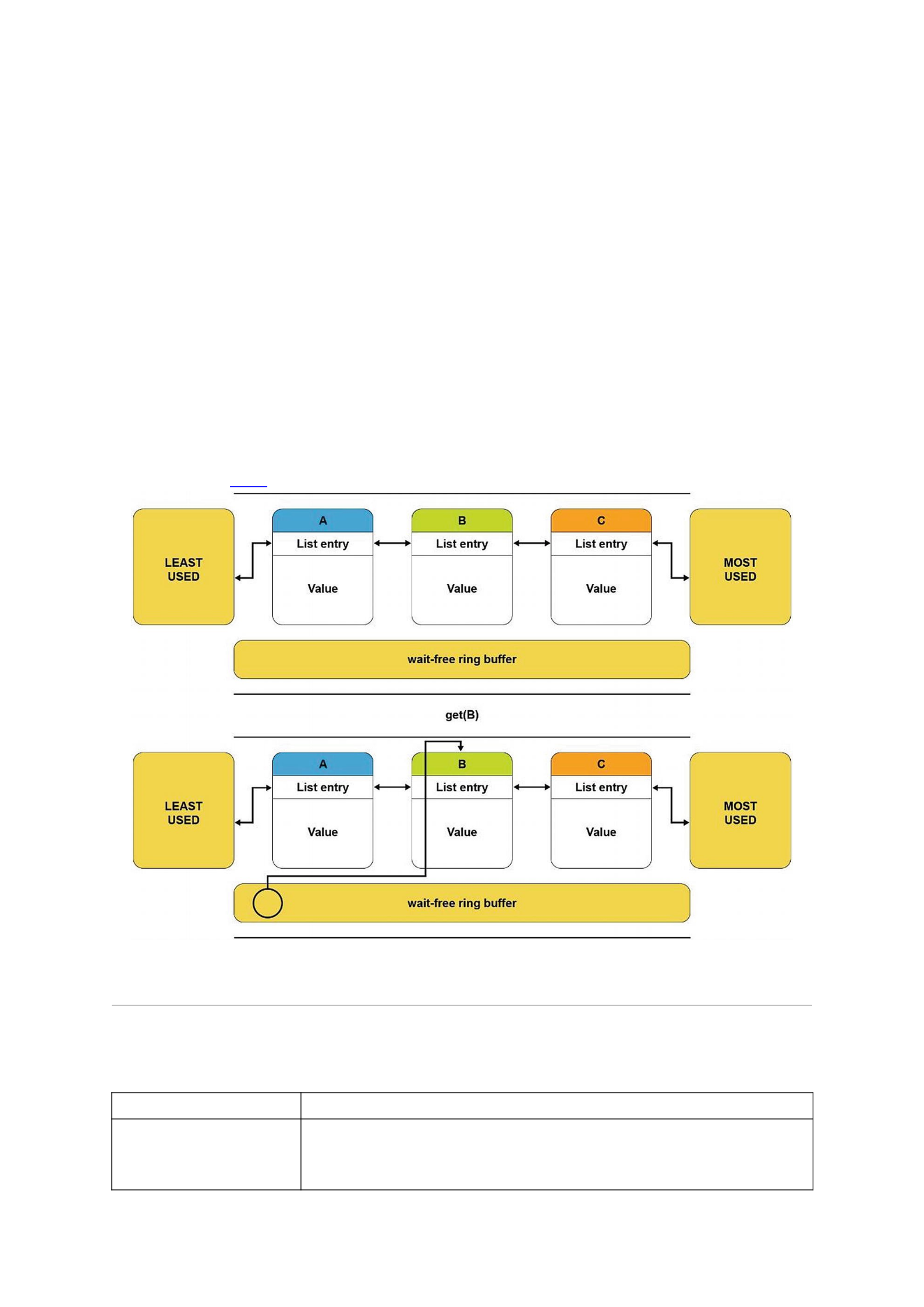
Figure 10-6Using noncontiguous free blocks to fulfill a larger allocation request
Scalable Replacement Policy
An LRU cache is traditionally implemented as a doubly linked list. When an item is
retrieved from this list, it gets moved from the middle to the front of the list, so it is not
evicted. In a multithreaded environment, multiple threads may contend with the front
element, all trying to move elements being retrieved to the front. Therefore, the front
element is always locked (along with other locks) before moving the element being
retrieved, which results in lock contention. This method is not scalable and is inefficient.
A buffer-based LRU policy creates a scalable and efficient replacement policy. A non-
blocking ring buffer is placed in front of the LRU linked list to track the elements being
retrieved. When an element is retrieved, it is added to this buffer, and only when the
buffer is full (or the element is being evicted), the linked list is locked, and the elements
in that buffer are processed and moved to the front of the list. This method preserves
the LRU policy and provides a scalable LRU mechanism with minimal performance
impact. Figure 10-7 shows a ring buffer-based design for the LRU algorithm.
Figure 10-7A ring buffer-based LRU design
Using libvmemcache
Table 10-3The libvmemcache functions
Function Name Description
vmemcache_new Creates an empty unconfigured vmemcache instance with default values:
Eviction_policy=VMEMCACHE_REPLACEMENT_LRU
Extent_size = VMEMCAHE_MIN_EXTENT

VMEMCACHE_MIN_POOL
vmemcache_add Associates the cache with a path.
vmemcache_set_size Sets the size of the cache.
vmemcache_set_extent_size Sets the block size of the cache (256 bytes minimum).
vmemcache_set_eviction_polic
y
Sets the eviction policy:1. VMEMCACHE_REPLACEMENT_NONE2.
VMEMCACHE_REPLACEMENT_LRU
vmemcache_add Associates the cache with a given path on a DAX-enabled file system or non-DAX-
enabled file system.
vmemcache_delete Frees any structures associated with the cache.
vmemcache_get Searches for an entry with the given key, and if found, the entry’s value is copied to
vbuf .
vmemcache_put Inserts the given key-value pair into the cache.
vmemcache_evict Removes the given key from the cache.
vmemcache_callback_on_evict Called when an entry is being removed from the cache.
vmemcache_callback_on_miss Called when a get query fails to provide an opportunity to insert the missing key.
To illustrate how libvmemcache is used, Listing 10-12 shows how to create an
instance of vmemcache using default values. This example uses a temporary file on a
DAX-enabled file system and shows how a callback is registered after a cache miss for a
key “meow.”
37 #include <libvmemcache.h>
38 #include <stdio.h>
39 #include <stdlib.h>
40 #include <string.h>
41
42 #define STR_AND_LEN(x) (x), strlen(x)
43
44 VMEMcache *cache;
45
46 void on_miss(VMEMcache *cache, const void *key,
47 size_t key_size, void *arg)
48 {
49 vmemcache_put(cache, STR_AND_LEN("meow"),
50 STR_AND_LEN("Cthulhu fthagn"));
51 }
52
53 void get(const char *key)
54 {
55 char buf[128];
56 ssize_t len = vmemcache_get(cache,
57 STR_AND_LEN(key), buf, sizeof(buf), 0, NULL);
58 if (len >= 0)
59 printf("%.*s\n", (int)len, buf);
60 else
61 printf("(key not found: %s)\n", key);
62 }
63

64 int main()
65 {
66 cache = vmemcache_new();
67 if (vmemcache_add(cache, "/daxfs")) {
68 fprintf(stderr, "error: vmemcache_add: %s\n",
69 vmemcache_errormsg());
70 exit(1);
71 }
72
73 // Query a non-existent key
74 get("meow");
75
76 // Insert then query
77 vmemcache_put(cache, STR_AND_LEN("bark"),
78 STR_AND_LEN("Lorem ipsum"));
79 get("bark");
80
81 // Install an on-miss handler
82 vmemcache_callback_on_miss(cache, on_miss, 0);
83 get("meow");
84
85 vmemcache_delete(cache);
Listing 10-12vmemcache.c: An example program using libvmemcache
Line 66: Creates a new instance of vmemcache with default values for
eviction_policy and extent_size.
Line 67: Calls the vmemcache_add() function to associate cache with a
given path.
Line 74: Calls the get() function to query on an existing key. This function
calls the vmemcache_get() function with error checking for
success/failure of the function.
Line 77: Calls vmemcache_put() to insert a new key.
Line 82: Adds an on-miss callback handler to insert the key “meow” into the
cache.
Line 83: Retrieves the key “meow” using the get() function.
Line 85: Deletes the vmemcache instance.
Taking advantage of the unique characteristics of persistent memory, such as byte
addressability, persistence, and update in place, allows us to build data structures that
are much faster than any data structure requiring serialization or flushing to a disk.
However, this comes at a cost. Algorithms must be carefully designed to properly persist
data by flushing CPU caches or using non-temporal stores and memory barriers to
maintain data consistency. This chapter describes how to design such data structures
and algorithms and shows what properties they should have.
Contiguous Data Structures and Fragmentation
Fragmentation is one of the most critical factors to consider when designing a data
structure for persistent memory due to the length of heap life. A persistent heap can live
for years with different versions of an application. In volatile use cases, the heap is
destroyed when the application exits. The life of the heap is usually measured in hours,
days, or weeks.
Using file-backed pages for memory allocation makes it difficult to take advantage of
the operating system–provided mechanisms for minimizing fragmentation, such as
presenting discontinuous physical memory as a contiguous virtual region. It is possible
to manually manage virtual memory at a low granularity, producing a page-level
defragmentation mechanism for objects in user space. But this mechanism could lead to
complete fragmentation of physical memory and an inability to take advantage of huge
pages. This can cause an increased number of translation lookaside buffer (TLB) misses,
which significantly slows down the entire application. To make effective use of
persistent memory, you should design data structures in a way that minimizes
fragmentation.
Internal and External Fragmentation
Internal fragmentation refers to space that is overprovisioned inside allocated blocks.
An allocator always returns memory in fixed-sized chunks or buckets. The allocator
must determine what size each bucket is and how many different sized buckets it
provides. If the size of the memory allocation request does not exactly match a
predefined bucket size, the allocator will return a larger memory bucket. For example, if
the application requests a memory allocation of 200KiB, but the allocator has bucket
sizes of 128KiB and 256KiB, the request is allocated from an available 256KiB bucket.
The allocator must usually return a memory chunk with a size divisible by 16 due to its
internal alignment requirements.
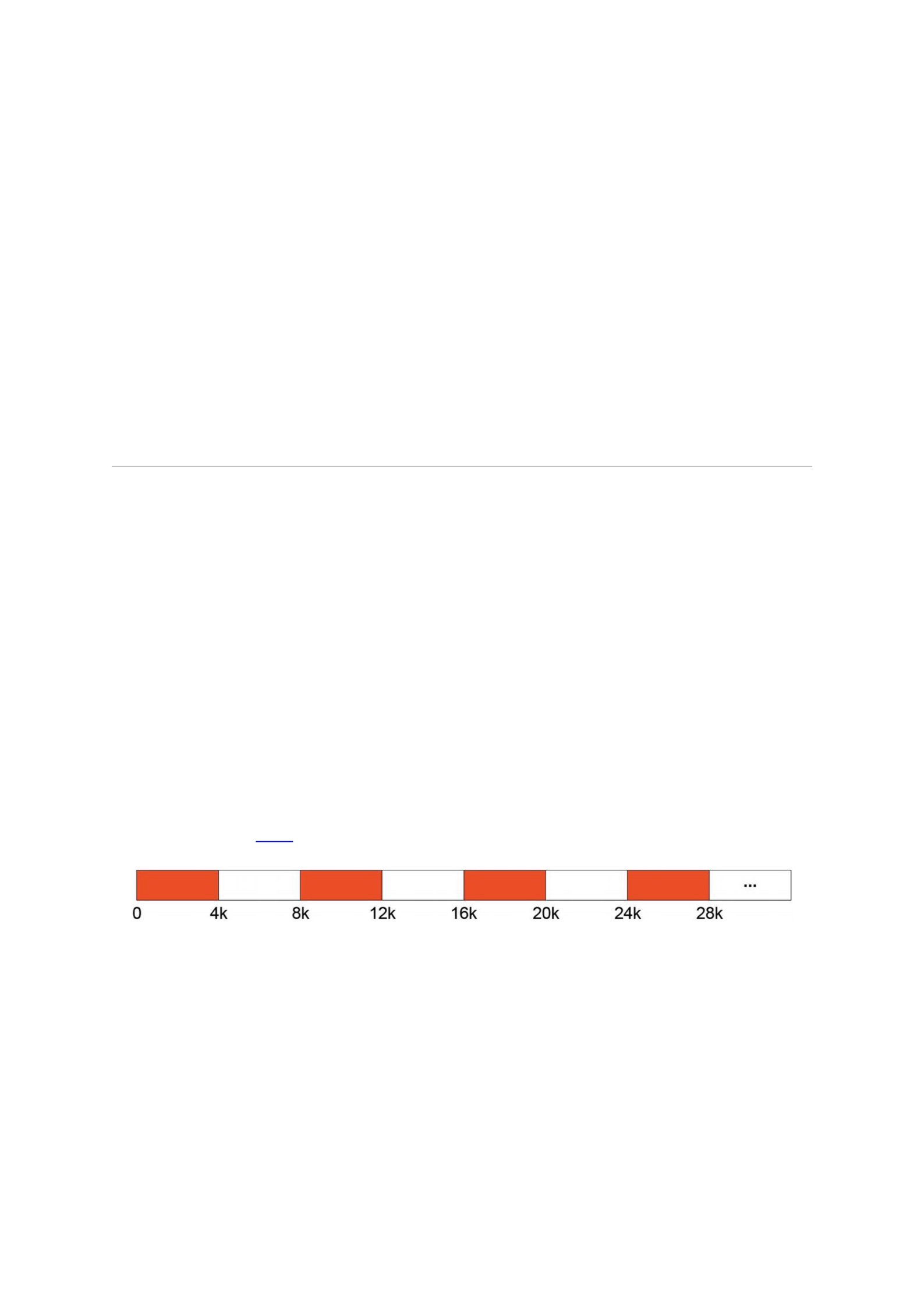
External fragmentation occurs when free memory is scattered in small blocks. For
example, imagine using up the entire memory with 4KiB allocations. If we then free
every other allocation, we have half of the memory available; however, we cannot
allocate more than 4KiB at once because that is the maximum size of any contiguous
free space. Figure 11-1 illustrates this fragmentation, where the red cells represent
allocated space and the white cells represent free space.
Figure 11-1External fragmentation
When storing a sequence of elements in persistent memory, several possible data
structures can be used:
Linked list: Each node is allocated from persistent memory.
Dynamic array (vector): A data structure that pre-allocates memory in
bigger chunks. If there is no free space for new elements, it allocates a new
array with bigger capacity and moves all elements from the old array to the
new one.
Segment vector: A list of fixed-size arrays. If there is no free space left in any
segment, a new one is allocated.
Consider fragmentation for each of those data structures:

For linked lists, fragmentation efficiency depends on the node size. If it is
small enough, then high internal fragmentation can be expected. During
node allocation, every allocator will return memory with a certain alignment
that will likely be different than the node size.
Using dynamic array results in fewer memory allocations, but every
allocation will have a different size (most implementations double the
previous one), which results in a higher external fragmentation.
Using a segment vector, the size of a segment is fixed, so every allocation has
the same size. This practically eliminates external fragmentation because we
can allocate a new one for each freed segment.1
Atomicity and Consistency
Guaranteeing consistency requires the proper ordering of stores and making sure data
is stored persistently. To make an atomic store bigger than 8 bytes, you must use some
additional mechanisms. This section describes several mechanisms and discusses their
memory and time overheads. For the time overhead, the focus is on analyzing the
number of flushes and memory barriers used because they have the biggest impact on
performance.
Transactions
One way to guarantee atomicity and consistency is to use transactions (described in
detail in Chapter 7). Here we focus on how to design a data structure to use transactions
efficiently. An example data structure that uses transactions is described in the “Sorted
Array with Versioning” section later in this chapter.
Transactions are the simplest solution for guaranteeing consistency. While using
transactions can easily make most operations atomic, two items must be kept in mind.
First, transactions that use logging always introduce memory and time overheads.
Second, in the case of undo logging, the memory overhead is proportional to the size of
data you modify, while the time overhead depends on the number of snapshots. Each
snapshot must be persisted prior to the modification of snapshotted data.
It is recommended to use a data-oriented approach when designing a data structure
for persistent memory. The idea is to store data in such a way that its processing by the
CPU is cache friendly. Imagine having to store a sequence of 1000 records that consist of
2 integer values. This has two approaches: Either use two arrays of integers as shown in
Listing 11-1, or use one array of pairs as shown in Listing 11-2. The first approach is
SoA (Structure of Arrays), and the second is AoS (Array of Structures).
struct soa {
int a[1000];
int b[1000];
};
Listing 11-1SoA layout approach to store data
std::pair<int, int> aos_records[1000];

Listing 11-2AoS layout approach to store data
Depending on the access pattern to the data, you may prefer one solution over the
other. If the program frequently updates both fields of an element, then the AoS solution
is better. However, if the program only updates the first variable of all elements, then
the SoA solution works best.
For applications that use volatile memory, the main concerns are usually cache
misses and optimizations for single instruction, multiple data (SIMD) processing. SIMD
is a class of parallel computers in Flynn’s taxonomy,2 which describes computers with
multiple processing elements that simultaneously perform the same operation on
multiple data points. Such machines exploit data-level parallelism, but not concurrency:
There are simultaneous (parallel) computations but only a single process (instruction)
at a given moment.
While those are still valid concerns for persistent memory, developers must
consider snapshotting performance when transactions are used. Snapshotting one
contiguous memory region is always better then snapshotting several smaller regions,
mainly due to the smaller overhead incurred by using less metadata. Efficient data
structure layout that takes these considerations into account is imperative for avoiding
future problems when migrating data from DRAM-based implementations to persistent
memory.
Listing 11-3 presents both approaches; in this example, we want to increase the first
integer by one.
37 struct soa {
38 int a[1000];
39 int b[1000];
40 };
41
42 struct root {
43 soa soa_records;
44 std::pair<int, int aos_records[1000];
45 };
46
47 int main()
48 {
49 try {
50 auto pop = pmem::obj::pool<root>::create("/daxfs/pmpool",
51 "data_oriented", PMEMOBJ_MIN_POOL, 0666);
52
53 auto root = pop.root();

54
55 pmem::obj::transaction::run(pop, [&]{
56 pmem::obj::transaction::snapshot(&root->soa_records);
57 for (int i = 0; i < 1000; i++) {
58 root->soa_records.a[i]++;
59 }
60
61 for (int i = 0; i < 1000; i++) {
62 pmem::obj::transaction::snapshot(
63 &root->aos_records[i].first);
64 root->aos_records[i].first++;
65 }
66 });
67
68 pop.close();
69 } catch (std::exception &e) {
70 std::cerr << e.what() << std::endl;
71 }
72 }
Listing 11-3Layout and snapshotting performance
Lines 37-45: We define two different data structures to store records of
integers. The first one is SoA – where we store integers in two separate
arrays. Line 44 shows a single array of pairs – AoS.
Lines 56-59: We take advantage of the SoA layout by snapshotting the entire
array at once. Then we can safely modify each element.
Lines 61-65: When using AoS, we are forced to snapshot data in every
iteration – elements we want to modify are not contiguous in memory.
Examples of data structures that use transactions are shown in the “Hash Table with
Transactions” and “Hash Table with Transactions and Selective Persistence” sections,
later in this chapter.
Copy-on-Write and Versioning
Another way to maintain consistency is the copy-on-write (CoW) technique. In this
approach, every modification creates a new version at a new location whenever you
want to modify some part of a persistent data structure. For example, a node in a linked
list can use the CoW approach as described in the following:

1.
Create a copy of the element in the list. If a copy is dynamically allocated in persistent
memory, you should also save the pointer in persistent memory to avoid a memory
leak. If you fail to do that and the application crashes after the allocation, then on the
application restart, newly allocated memory will be unreachable.
2. Modify the copy and persist the changes.
3. Atomically change the original element with the copy and persist the changes, then
free the original node if needed. After this step successfully completes, the element is
updated and is in a consistent state. If a crash occurs before this step, the original
element is untouched.
Although using this approach compared to transactions can be faster, it is
significantly harder to implement because you must manually persist data.
Copy-on-write usually works well in multithreaded systems where mechanisms like
reference counting or garbage collection are used to free copies that are no longer used.
Although such systems are beyond the scope of this book, Chapter 14 describes
concurrency in multithreaded applications.
Versioning is a very similar concept to copy-on-write. The difference is that here you
hold more than one version of a data field. Each modification creates a new version of
the field and stores information about the current one. The example presented in
“Sorted Array with Versioning” later in this chapter shows this technique in an
implementation of the insert operation for a sorted array. In the preceding example,
only two versions of a variable are kept, the old and current one as a two-element array.
The insert operations alternately write data to the first and second element of this
array.
Selective Persistence
Persistent memory is faster than disk storage but potentially slower than DRAM. Hybrid
data structures, where some parts are stored in DRAM and some parts are in persistent
memory, can be implemented to accelerate performance. Caching previously computed
values or frequently accessed parts of a data structure in DRAM can improve access
latency and improve overall performance.
Data does not always need to be stored in persistent memory. Instead, it can be
rebuilt during the restart of an application to provide a performance improvement
during runtime given that it accesses data from DRAM and does not require
transactions. An example of this approach appears in “Hash Table with Transactions
and Selective Persistence.”
Example Data Structures
This section presents several data structure examples that were designed using the
previously described methods for guaranteeing consistency. The code is written in C++
and uses libpmemobj-cpp. See Chapter 8 for more information about this library.
Hash Table with Transactions

We present an example of a hash table implemented using transactions and containers
using libpmemobj-cpp.
As a quick primer to some, and a refresher to other readers, a hash table is a data
structure that maps keys to values and guarantees O(1) lookup time. It is usually
implemented as an array of buckets (a bucket is a data structure that can hold one or
more key-value pairs). When inserting a new element to the hash table, a hash function
is applied to the element’s key. The resulting value is treated as an index of a bucket to
which the element is inserted. It is possible that the result of the hash function for
different keys will be the same; this is called a collision. One method for resolving
collisions is to use separate chaining. This approach stores multiple key-value pairs in
one bucket; the example in Listing 11-4 uses this method.
For simplicity, the hash table in Listing 11-4 only provides the const Value&
get(const std::string &key) and void put(const std::string &key,
const Value &value) methods. It also has a fixed number of buckets. Extending
this data structure to support the remove operation and to have a dynamic number of
buckets is left as an exercise to you.
38 #include <functional>
39 #include <libpmemobj++/p.hpp>
40 #include <libpmemobj++/persistent_ptr.hpp>
41 #include <libpmemobj++/pext.hpp>
42 #include <libpmemobj++/pool.hpp>
43 #include <libpmemobj++/transaction.hpp>
44 #include <libpmemobj++/utils.hpp>
45 #include <stdexcept>
46 #include <string>
47
48 #include "libpmemobj++/array.hpp"
49 #include "libpmemobj++/string.hpp"
50 #include "libpmemobj++/vector.hpp"
51
52 /**
53 * Value - type of the value stored in hashmap
54 * N - number of buckets in hashmap
55 */
56 template <typename Value, std::size_t N>
57 class simple_kv {

58 private:
59 using key_type = pmem::obj::string;
60 using bucket_type = pmem::obj::vector<
61 std::pair<key_type, std::size_t>>;
62 using bucket_array_type = pmem::obj::array<bucket_type, N>;
63 using value_vector = pmem::obj::vector<Value>;
64
65 bucket_array_type buckets;
66 value_vector values;
67
68 public:
69 simple_kv() = default;
70
71 const Value &
72 get(const std::string &key) const
73 {
74 auto index = std::hash<std::string>{}(key) % N;
75
76 for (const auto &e : buckets[index]) {
77 if (e.first == key)
78 return values[e.second];
79 }
80
81 throw std::out_of_range("no entry in simplekv");
82 }
83
84 void
85 put(const std::string &key, const Value &val)
86 {
87 auto index = std::hash<std::string>{}(key) % N;

88
89 /* get pool on which this simple_kv resides */
90 auto pop = pmem::obj::pool_by_vptr(this);
91
92 /* search for element with specified key - if found
93 * update its value in a transaction*/
94 for (const auto &e : buckets[index]) {
95 if (e.first == key) {
96 pmem::obj::transaction::run(
97 pop, [&] { values[e.second] = val; });
98
99 return;
100 }
101 }
102
103 /* if there is no element with specified key, insert
104 * new value to the end of values vector and put
105 * reference in proper bucket */
106 pmem::obj::transaction::run(pop, [&] {
107 values.emplace_back(val);
108 buckets[index].emplace_back(key, values.size() - 1);
109 });
110 }
111 };
Listing 11-4Implementation of a hash table using transactions
Lines 58-66: Define the layout of a hash map as a pmem::obj::array of
buckets, where each bucket is a pmem::obj::vector of key and index
pairs and pmem::obj::vector contains the values. The index in a bucket
entry always specifies a position of the actual value stored in a separate
vector. For snapshotting optimization, the value is not saved next to a key in
a bucket. When obtaining a non-const reference to an element in
pmem::obj::vector, the element is always snapshotted. To avoid
snapshotting unnecessary data, for example, if the key is immutable, we split

keys and values into separate vectors. This also helps in the case of updating
several values in one transaction. Recall the discussion in the “Copy-on-
Write and Versioning” section. The result could turn out to be next to each
other in a vector, and there could be fewer bigger regions to snapshot.
Line 74: Calculate hash in a table using standard library feature.
Lines 76-79: Search for entry with specified key by iterating over all buckets
stored in the table under index. Note that e is a const reference to the key-
value pair. Because of the way libpmemobj-cpp containers work, this has
a positive impact on performance when compared to non-const reference;
obtaining non-const reference requires a snapshot, while a const reference
does not.
Line 90: Get the instance of the pmemobj pool object, which is used to
manage the persistent memory pool where our data structure resides.
Lines 94-95: Find the position of a value in the values vector by iterating
over all the entries in the designated bucket.
Lines 96-98: If an element with the specified key is found, update its value
using a transaction.
Lines 106-109: If there is no element with the specified key, insert a value
into the values vector, and put a reference to this value in the proper bucket;
that is, create key, index pair. Those two operations must be completed in a
single atomic transaction because we want them both to either succeed or
fail.
Hash Table with Transactions and Selective Persistence
This example shows how to modify a persistent data structure (hash table) by moving
some data out of persistent memory. The data structure presented in Listing 11-5 is a
modified version of the hash table in Listing 11-4 and contains the implementation of
this hash table design. Here we store only the vector of keys and vector of values in
persistent memory. On application startup, we build the buckets and store them in
volatile memory for faster processing during runtime. The most noticeable performance
gain would be in the get() method .
40 #include <array>
41 #include <functional>
42 #include <libpmemobj++/p.hpp>
43 #include <libpmemobj++/persistent_ptr.hpp>
44 #include <libpmemobj++/pext.hpp>
45 #include <libpmemobj++/pool.hpp>
46 #include <libpmemobj++/transaction.hpp>
47 #include <libpmemobj++/utils.hpp>
48 #include <stdexcept>
49 #include <string>

50 #include <vector>
51
52 #include "libpmemobj++/array.hpp"
53 #include "libpmemobj++/string.hpp"
54 #include "libpmemobj++/vector.hpp"
55
56 template <typename Value, std::size_t N>
57 struct simple_kv_persistent;
58
59 /**
60 * This class is runtime wrapper for simple_kv_peristent.
61 * Value - type of the value stored in hashmap
62 * N - number of buckets in hashmap
63 */
64 template <typename Value, std::size_t N>
65 class simple_kv_runtime {
66 private:
67 using volatile_key_type = std::string;
68 using bucket_entry_type = std::pair<volatile_key_type, std::size_t>;
69 using bucket_type = std::vector<bucket_entry_type>;
70 using bucket_array_type = std::array<bucket_type, N>;
71
72 bucket_array_type buckets;
73 simple_kv_persistent<Value, N> *data;
74
75 public:
76 simple_kv_runtime(simple_kv_persistent<Value, N> *data)
77 {
78 this->data = data;
79

80 for (std::size_t i = 0; i < data->values.size(); i++) {
81 auto volatile_key = std::string(data->keys[i].c_str(),
82 data->keys[i].size());
83
84 auto index = std::hash<std::string>{}(volatile_key)%N;
85 buckets[index].emplace_back(
86 bucket_entry_type{volatile_key, i});
87 }
88 }
89
90 const Value &
91 get(const std::string &key) const
92 {
93 auto index = std::hash<std::string>{}(key) % N;
94
95 for (const auto &e : buckets[index]) {
96 if (e.first == key)
97 return data->values[e.second];
98 }
99
100 throw std::out_of_range("no entry in simplekv");
101 }
102
103 void
104 put(const std::string &key, const Value &val)
105 {
106 auto index = std::hash<std::string>{}(key) % N;
107
108 /* get pool on which persistent data resides */
109 auto pop = pmem::obj::pool_by_vptr(data);

110
111 /* search for element with specified key - if found
112 * update its value in a transaction */
113 for (const auto &e : buckets[index]) {
114 if (e.first == key) {
115 pmem::obj::transaction::run(pop, [&] {
116 data->values[e.second] = val;
117 });
118
119 return;
120 }
121 }
122
123 /* if there is no element with specified key, insert new value
124 * to the end of values vector and key to keys vector
125 * in a transaction */
126 pmem::obj::transaction::run(pop, [&] {
127 data->values.emplace_back(val);
128 data->keys.emplace_back(key);
129 });
130
131 buckets[index].emplace_back(key, data->values.size() - 1);
132 }
133 };
134
135 /**
136 * Class which is stored on persistent memory.
137 * Value - type of the value stored in hashmap
138 * N - number of buckets in hashmap
139 */

140 template <typename Value, std::size_t N>
141 struct simple_kv_persistent {
142 using key_type = pmem::obj::string;
143 using value_vector = pmem::obj::vector<Value>;
144 using key_vector = pmem::obj::vector<key_type>;
145
146 /* values and keys are stored in separate vectors to optimize
147 * snapshotting. If they were stored as a pair in single vector
148 * entire pair would have to be snapshotted in case of value update */
149 value_vector values;
150 key_vector keys;
151
152 simple_kv_runtime<Value, N>
153 get_runtime()
154 {
155 return simple_kv_runtime<Value, N>(this);
156 }
157 };
Listing 11-5Implementation of hash table with transactions and selective persistence
Line 67: We define the data types residing in volatile memory. These are
very similar to the types used in the persistent version in “Hash Table with
Transactions.” The only difference is that here we use std containers
instead of pmem::obj .
Line 72: We declare the volatile buckets array.
Line 73: We declare the pointer to persistent data
(simple_kv_persistent structure).
Lines 75-88: In the simple_kv_runtime constructor, we rebuild the
bucket’s array by iterating over keys and values in persistent memory. In
volatile memory, we store both the keys, which are a copy of the persistent
data and the index for the values vector in persistent memory.
Lines 90-101: The get() function looks for an element reference in the
volatile buckets array. There is only one reference to persistent memory
when we read the actual value on line 97.
Lines 113-121: Similar to the get() function, we search for an element
using the volatile data structure and, when found, update the value in a
transaction.
Lines 126-129: When there is no element with the specified key in the hash
table, we insert both a value and a key to their respective vectors in
persistent memory in a transaction.
Line 131: After inserting data to persistent memory, we update the state of
the volatile data structure. Note that this operation does not have to be
atomic. If a program crashes, the bucket array will be rebuilt on startup.
Lines 149-150: We define the layout of the persistent data. Key and values
are stored in separate pmem::obj::vector.
Lines 153-156: We define a function that returns the runtime object of this
hash table.
Sorted Array with Versioning
This section presents an overview of an algorithm for inserting elements into a sorted
array and preserving the order of elements. This algorithm guarantees data consistency
using the versioning technique.
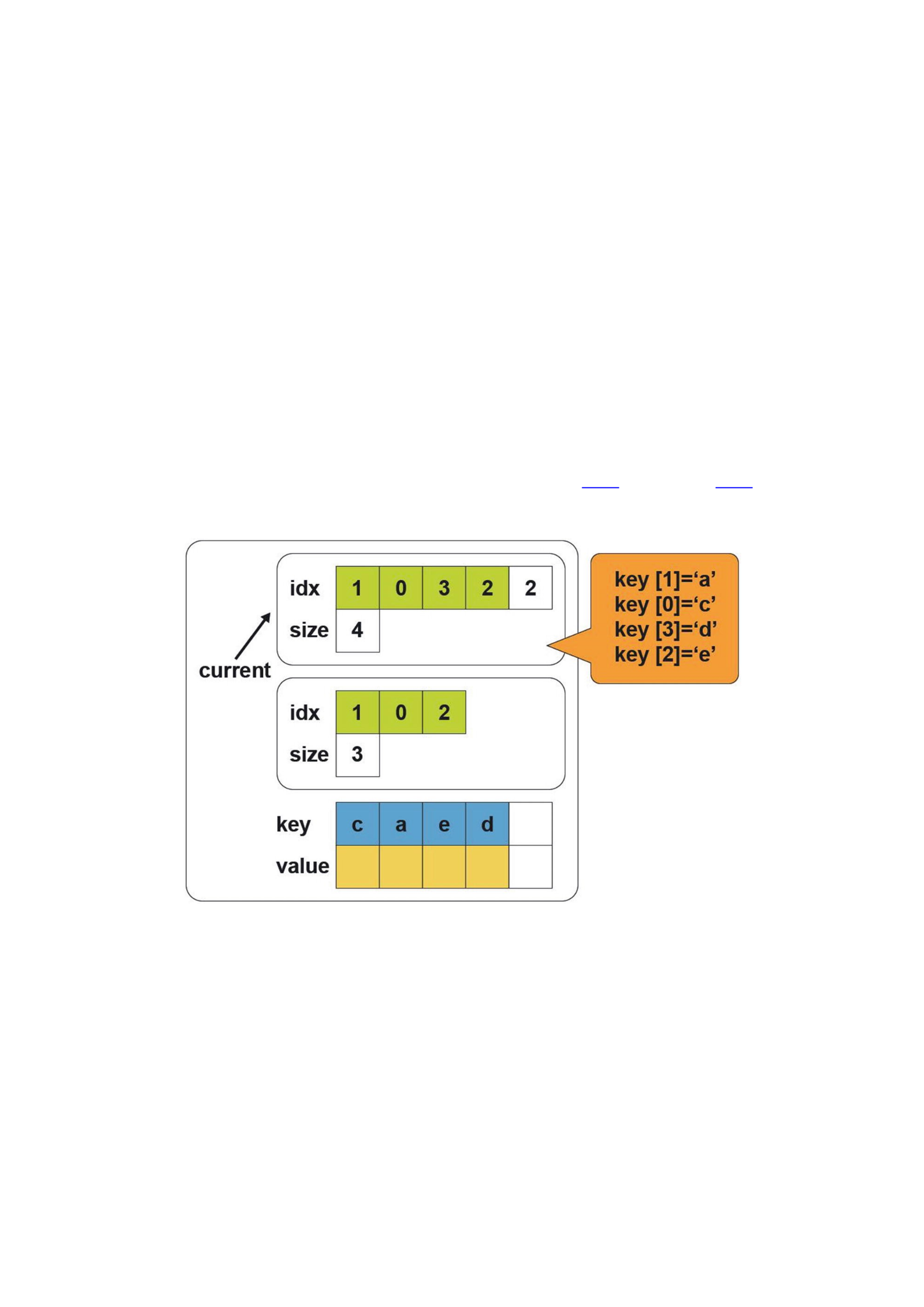
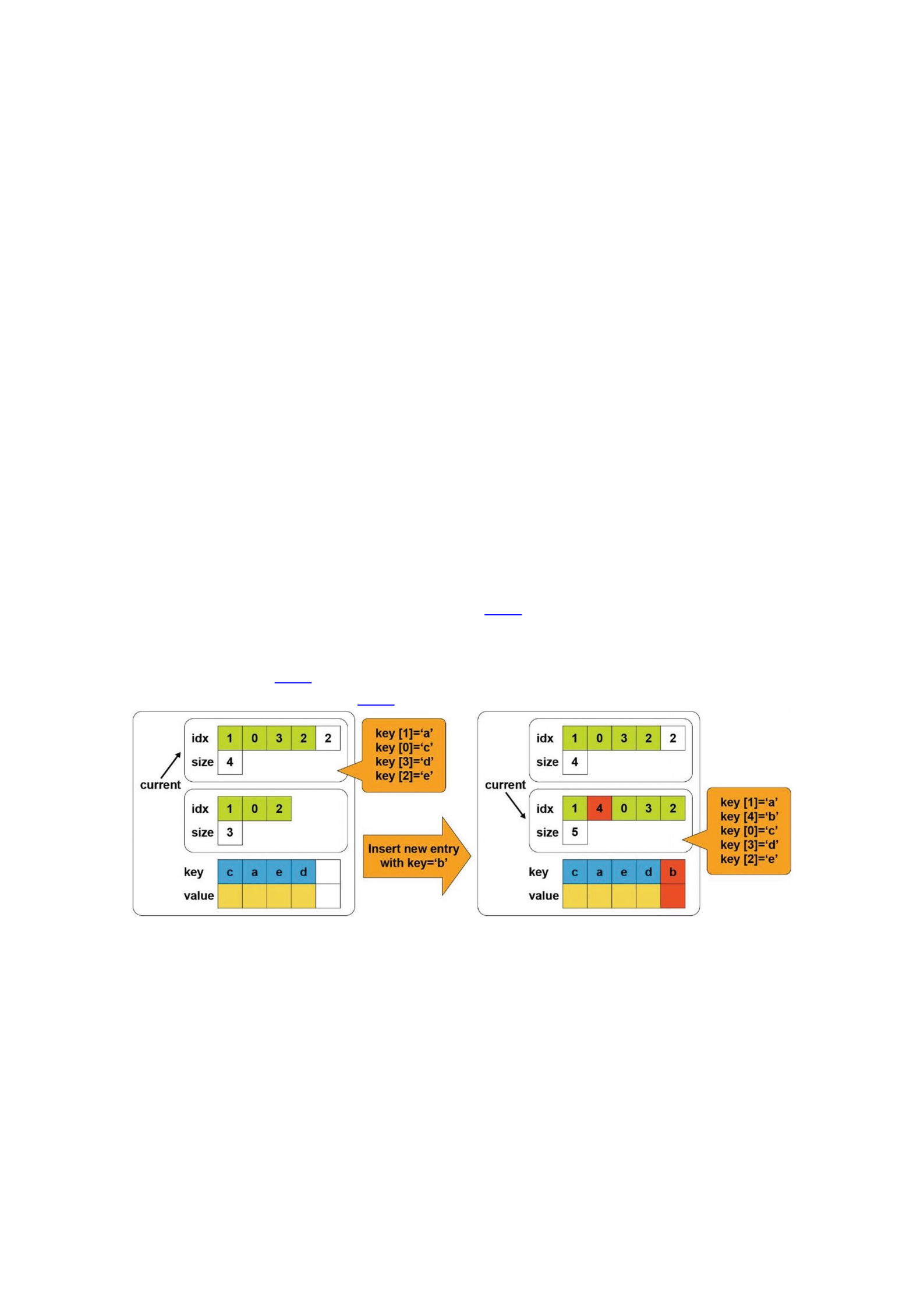
First, we describe the layout of our sorted array. Figure 11-2 and Listing 11-6 show
that there are two arrays of elements and two size fields. Additionally, one current
field stores information about which array and size variable is currently used.
Figure 11-2Sorted array layout
41 template <typename Value, uint64_t slots>
42 struct entries_t {
43 Value entries[slots];
44 size_t size;
45 };
46
47 template <typename Value, uint64_t slots>
48 class array {
49 public:
50 void insert(pmem::obj::pool_base &pop, const Value &);
51 void insert_element(pmem::obj::pool_base &pop, const Value&);
52
53 entries_t<Value, slots> v[2];
54 uint32_t current;
55 };
Listing 11-6Sorted array layout
Lines 41-45: We define the helper structure, which consists of an array of
indexes and a size.
Line 53: We define two elements array of entries_t structures.
entries_t holds an array of elements (entries array) and the number of
elements in the node as the size variable.
Line 54: This variable determines which entries_t structure from line 53
is used. It can be only 0 or 1. Figure 11-2 shows the situation where the
current is equal to 0 and points to the first element of the v array.
To understand why we need two versions of the entries_t structure and a
current field, Figure 11-3 shows how the insert operation works, and the corresponding
pseudocode appears in Listing 11-7.
Figure 11-3Overview of a sorted tree insert operation
57 template <typename Value, uint64_t slots>
58 void array<Value, slots>::insert_element(pmem::obj::pool_base &pop,
59 const Value &entry) {
60 auto &working_copy = v[1 - current];
61 auto &consistent_copy = v[current];
62

63 auto consistent_insert_position = std::lower_bound(
64 std::begin(consistent_copy.entries),
65 std::begin(consistent_copy.entries) +
66 consistent_copy.size, entry);
67 auto working_insert_position =
68 std::begin(working_copy.entries) +
std::distance(std::begin(consistent_copy.entries),
69 consistent_insert_position);
70
71 std::copy(std::begin(consistent_copy.entries),
72 consistent_insert_position,
73 std::begin(working_copy.entries));
74
75 *working_insert_position = entry;
76
77 std::copy(consistent_insert_position,
78 std::begin(consistent_copy.entries) + consistent_copy.size,
79 working_insert_position + 1);
80
81 working_copy.size = consistent_copy.size + 1;
82 }
83
84 template <typename V, uint64_t s>
85 void array<V,s>::insert(pmem::obj::pool_base &pop,
86 const Value &entry){
87 insert_element(pop, entry);
88 pop.persist(&(v[1 - current]), sizeof(entries_t<Value, slots>));
89
90 current = 1 - current;
91 pop.persist(¤t, sizeof(current));

92 }
Listing 11-7Pseudocode of a sorted tree insert operation
Lines 60-61: We define references to the current version of entries array and
to the working version.
Line 63: We find the position in the current array where an entry should be
inserted.
Line 67: We create iterator to the working array.
Line 71: We copy part of the current array to the working array (range from
beginning of the current array to the place where a new element should be
inserted).
Line 75: We insert an entry to the working array.
Line 77: We copy remaining elements from the current array to the working
array after the element we just inserted.
Line 81: We update the size of the working array to the size of the current
array plus one, for the element inserted.
Lines 87-88: We insert an element and persist the entire v[1-current]
element.
Lines 90-91: We update the current value and save it.
Let’s analyze whether this approach guarantees data consistency. In the first step,
we copy elements from the original array to a currently unused one, insert the new
element, and persist it to make sure data goes to the persistence domain. The persist
call also ensures that the next operation (updating the current value) is not reordered
before any of the previous stores. Because of this, any interruption before or after
issuing the instruction to update the current field would not corrupt data because the
current variable always points to a valid version.
The memory overhead of using versioning for the insert operation is equal to a size
of the entries array and the current field. In terms of time overhead, we issued only two
persist operations.
Persistent memory programming introduces new opportunities that allow
developers to directly persist data structures without serialization and to access them
in place without involving classic block I/O. As a result, you can merge your data models
and avoid the classic split between data in memory – which is volatile, fast, and byte
addressable – with data on traditional storage devices, which is non-volatile but slower.
Persistent memory programming also brings challenges. Recall our discussion about
power-fail protected persistence domains in Chapter 2: When a process or system
crashes on an Asynchronous DRAM Refresh (ADR)-enabled platform, data residing in
the CPU caches that has not yet been flushed, is lost. This is not a problem with volatile
memory because all the memory hierarchy is volatile. With persistent memory,
however, a crash can cause permanent data corruption. How often must you flush data?
Flushing too frequently yields suboptimal performance, and not flushing often enough
leaves the potential for data loss or corruption.
Chapter 11 described several approaches to designing data structures and using
methods such as copy-on-write, versioning, and transactions to maintain data integrity.
Many libraries within the Persistent Memory Development Kit (PMDK) provide
transactional updates of data structures and variables. These libraries provide optimal

CPU cache flushing, when required by the platform, at precisely the right time, so you
can program without concern about the hardware intricacies.
This programming paradigm introduces new dimensions related to errors and
performance issues that programmers need to be aware of. The PMDK libraries reduce
errors in persistent memory programming, but they cannot eliminate them. This
chapter describes common persistent memory programming issues and pitfalls and
how to correct them using the tools available. The first half of this chapter introduces
the tools. The second half presents several erroneous programming scenarios and
describes how to use the tools to correct the mistakes before releasing your code into
production.
pmemcheck for Valgrind
pmemcheck is a Valgrind (http://www.valgrind.org/) tool developed by Intel.
It is very similar to memcheck, which is the default tool in Valgrind to discover
memory-related bugs but adapted for persistent memory. Valgrind is an
instrumentation framework for building dynamic analysis tools. Some Valgrind tools
can automatically detect many memory management and threading bugs and profile
your programs in detail. You can also use Valgrind to build new tools.
To run pmemcheck, you need a modified version of Valgrind supporting the new
CLFLUSHOPT and CLWB flushing instructions . The persistent memory version of
Valgrind includes the pmemcheck tool and is available from
https://github.com/pmem/valgrind. Refer to the README.md within the
GitHub project for installation instructions.
All the libraries in PMDK are already instrumented with pmemcheck. If you use
PMDK for persistent memory programming, you will be able to easily check your code
with pmemcheck without any code modification.
Before we discuss the pmemcheck details, the following two sections demonstrate
how it identifies errors in an out-of-bounds and a memory leak example.
Stack Overflow Example
An out-of-bounds scenario is a stack/buffer overflow bug, where data is written or read
beyond the capacity of the stack or array. Consider the small code snippet in Listing 12-
1.
32 #include <stdlib.h>
33
34 int main() {
35 int *stack = malloc(100 * sizeof(int));
36 stack[100] = 1234;
37 free(stack);
38 return 0;
39 }

Listing 12-1stackoverflow.c: Example of an out-of-bound bug
In line 36, we are incorrectly assigning the value 1234 to the position 100, which is
outside the array range of 0-99. If we compile and run this code, it may not fail. This is
because, even if we only allocated 400 bytes (100 integers) for our array, the operating
system provides a whole memory page, typically 4KiB. Executing the binary under
Valgrind reports an issue, shown in Listing 12-2.
$ valgrind ./stackoverflow
==4188== Memcheck, a memory error detector
...
==4188== Invalid write of size 4
==4188== at 0x400556: main (stackoverflow.c:36)
==4188== Address 0x51f91d0 is 0 bytes after a block of size 400 alloc'd
==4188== at 0x4C2EB37: malloc (vg_replace_malloc.c:299)
==4188== by 0x400547: main (stackoverflow.c:35)
...
==4188== ERROR SUMMARY: 1 errors from 1 contexts (suppressed: 0
from 0)
Listing 12-2Running Valgrind with code Listing 12-1
Because Valgrind can produce long reports, we show only the relevant “Invalid
write” error part of the report. When compiling code with symbol information (gcc -
g), it is easy to see the exact place in the code where the error is detected. In this case,
Valgrind highlights line 36 of the stackoverflow.c file. With the issue identified in
the code, we know where to fix it.
Memory Leak Example
Memory leaks are another common issue. Consider the code in Listing 12-3.
32 #include <stdlib.h>
33
34 void func(void) {
35 int *stack = malloc(100 * sizeof(int));
36 }
37
38 int main(void) {
39 func();
40 return 0;

41 }
Listing 12-3leak.c: Example of a memory leak
The memory allocation is moved to the function func(). A memory leak occurs
because the pointer to the newly allocated memory is a local variable on line 35, which
is lost when the function returns. Executing this program under Valgrind shows the
results in Listing 12-4.
$ valgrind --leak-check=yes ./leak
==4413== Memcheck, a memory error detector
...
==4413== 400 bytes in 1 blocks are definitely lost in loss record 1 of 1
==4413== at 0x4C2EB37: malloc (vg_replace_malloc.c:299)
==4413== by 0x4004F7: func (leak.c:35)
==4413== by 0x400507: main (leak.c:39)
==4413==
==4413== LEAK SUMMARY:
...
==4413== ERROR SUMMARY: 1 errors from 1 contexts (suppressed: 0
from 0)
Listing 12-4Running Valgrind with code Listing 12-3
Valgrind shows a loss of 400 bytes of memory allocated at leak.c:35. To learn
more, please visit the official Valgrind documentation
(http://www.valgrind.org/docs/manual/index.html).
Intel Inspector – Persistence Inspector
Intel Inspector – Persistence Inspector is a runtime tool that developers use to detect
programming errors in persistent memory programs. In addition to cache flush misses,
this tool detects
Redundant cache flushes and memory fences
Out-of-order persistent memory stores
Incorrect undo logging for the PMDK
Persistence Inspector is included as part of Intel Inspector, an easy-to-use memory
and threading error debugger for C, C++, and Fortran that works with both Windows
and Linux operating systems. It has an intuitive graphical and command-line interfaces,
and it can be integrated with Microsoft Visual Studio. Intel Inspector is available as part
of Intel Parallel Studio XE (https://software.intel.com/en-us/parallel-
studio-xe) and Intel System Studio
(https://software.intel.com/en-us/system-studio).
This section describes how the Intel Inspector tool works with the same out-of-
bounds and memory leak examples from Listings 12-1 and 12-3.
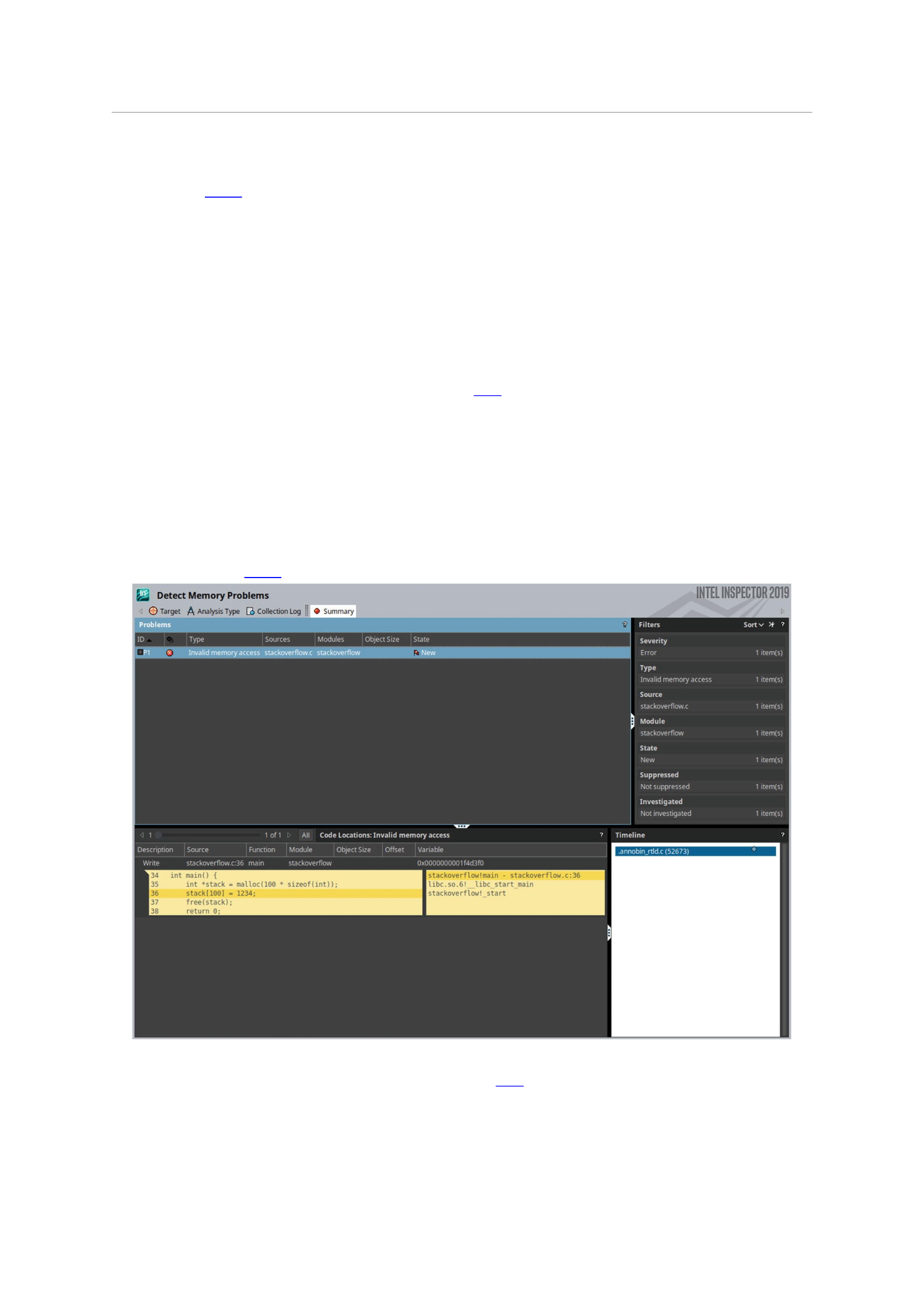
Stack Overflow Example
The Listing 12-5 example demonstrates how to use the command-line interface to
perform the analysis and collect the data and then switches to the GUI to examine the
results in detail. To collect the data, we use the inspxe-cl utility with the –c=mi2
collection option for detecting memory problems.
$ inspxe-cl -c=mi2 -- ./stackoverflow
1 new problem(s) found
1 Invalid memory access problem(s) detected
Listing 12-5Running Intel Inspector with code Listing 12-1
Intel Inspector creates a new directory with the data and analysis results, and prints
a summary of findings to the terminal. For the stackoverflow app, it detected one invalid
memory access.
After launching the GUI using inspxe-gui, we open the results collection through
the File Open Result➤ ➤ menu and navigate to the directory created by inspxe-cli.
The directory will be named r000mi2 if it is the first run. Within the directory is a file
named r000mi2.inspxe. Once opened and processed, the GUI presents the data
shown in Figure 12-1.
Figure 12-1GUI of Intel Inspector showing results for Listing 12-1
The GUI defaults to the Summary tab to provide an overview of the analysis. Since
we compiled the program with symbols, the Code Locations panel at the bottom shows
the exact place in the code where the problem was detected. Intel Inspector identified
the same error on line 36 that Valgrind found.
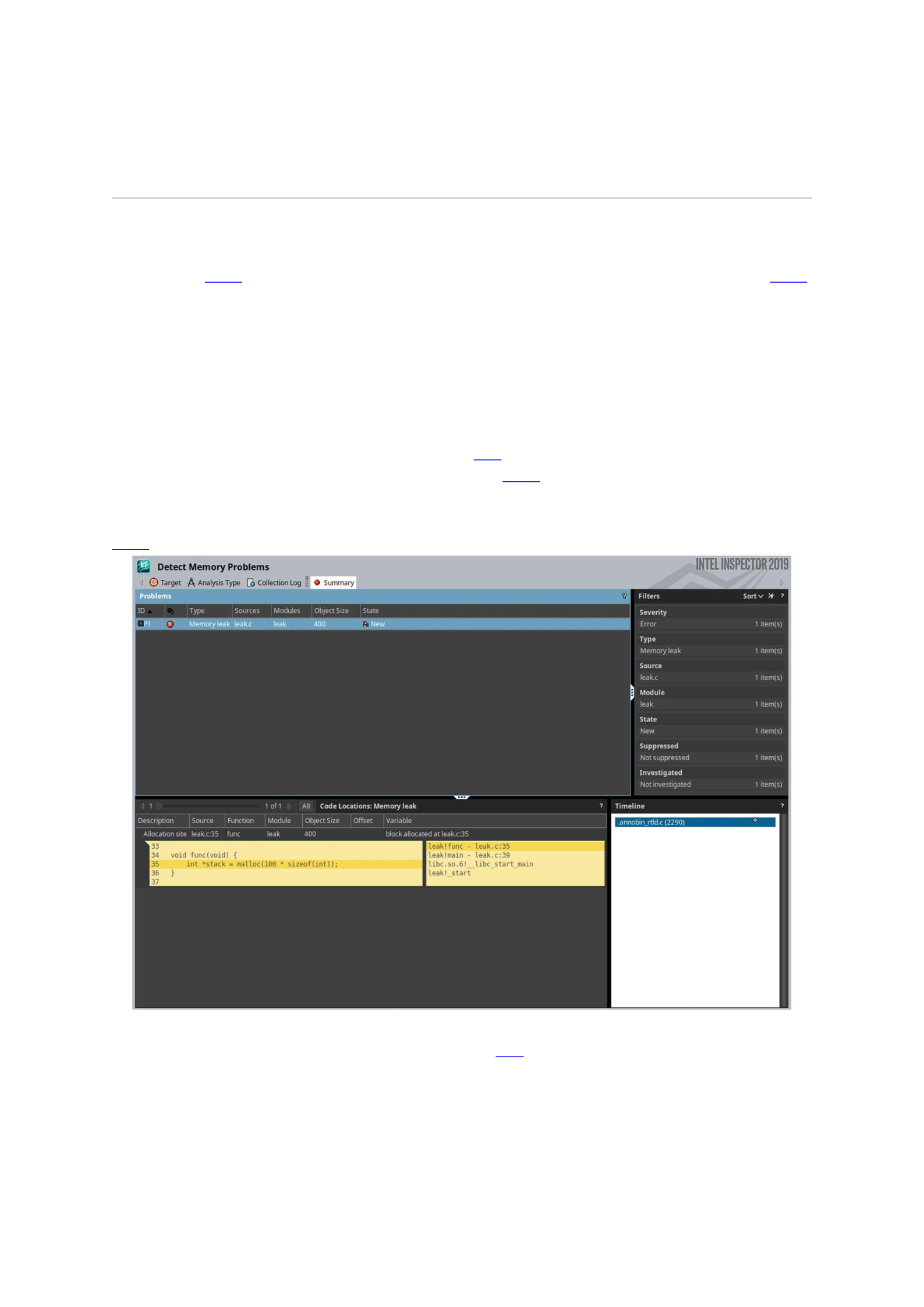
If Intel Inspector detects multiple problems within the program, those issues are
listed in the Problems section in the upper left area of the window. You can select each
problem and see the information relating to it in the other sections of the window.
Memory Leak Example
The Listing 12-6 example runs Intel Inspector using the leak.c code from Listing 12-2
and uses the same arguments from the stackoverflow program to detect memory
issues.
$ inspxe-cl -c=mi2 -- ./leak
1 new problem(s) found
1 Memory leak problem(s) detected
Listing 12-6Running Intel Inspector with code Listing 12-2
The Intel Inspector output is shown in Figure 12-2 and explains that a memory leak
problem was detected. When we open the r001mi2/r001mi2.inspxe result file in
the GUI, we get something similar to what is shown in the lower left section of Figure
12-2.
Figure 12-2GUI of Intel Inspector showing results for Listing 12-2
The information related to the leaked object is shown above the code listing:
Allocation site (source, function name, and module)
Object size (400 bytes)
The variable name that caused the leak
The right side of the Code panel shows the call stack that led to the bug (call stacks
are read from bottom to top). We see the call to func() in the main() function on line

39 (leak.c:39), then the memory allocation occurs within func() on line 35
(leak.c:35).
The Intel Inspector offers much more than what we presented here. To learn more,
please visit the documentation (https://software.intel.com/en-us/intel-
inspector-support/documentation).
Common Persistent Memory Programming Problems
This section reviews several coding and performance problems you are likely to
encounter, how to catch them using the pmemcheck and Intel Inspector tools, and how
to resolve the issues.
The tools we use highlight deliberately added issues in our code that can cause bugs,
data corruption, or other problems. For pmemcheck, we show how to bypass data
sections that should not be checked by the tool and use macros to assist the tool in
better understanding our intent.
Nonpersistent Stores
Nonpersistent stores refer to data written to persistent memory but not flushed
explicitly. It is understood that if the program writes to persistent memory, it wishes for
those writes to be persistent. If the program ends without explicitly flushing writes,
there is an open possibility for data corruption. When a program exits gracefully, all the
pending writes in the CPU caches are flushed automatically. However, if the program
were to crash unexpectedly, writes still residing in the CPU caches could be lost.
Consider the code in Listing 12-7 that writes data to a persistent memory device
mounted to /mnt/pmem without flushing the data.
32 #include <stdio.h>
33 #include <sys/mman.h>
34 #include <fcntl.h>
35
36 int main(int argc, char *argv[]) {
37 int fd, *data;
38 fd = open("/mnt/pmem/file", O_CREAT|O_RDWR, 0666);
39 posix_fallocate(fd, 0, sizeof(int));
40 data = (int *) mmap(NULL, sizeof(int), PROT_READ |
41 PROT_WRITE, MAP_SHARED_VALIDATE |
42 MAP_SYNC, fd, 0);
43 *data = 1234;
44 munmap(data, sizeof(int));

45 return 0;
46 }
Listing 12-7Example of writing to persistent memory without flushing
Line 38: We open /mnt/pmem/file.
Line 39: We make sure there is enough space in the file to allocate an integer
by calling posix_fallocate().
Line 40: We memory map /mnt/pmem/file.
Line 43: We write 1234 to the memory.
Line 44: We unmap the memory.
If we run pmemcheck with Listing 12-7, we will not get any useful information
because pmemcheck has no way to know which memory addresses are persistent and
which ones are volatile. This may change in future versions. To run pmemcheck, we
pass --tool=pmemcheck argument to valgrind as shown in Listing 12-8. The result
shows no issues were detected.
$ valgrind --tool=pmemcheck ./listing_12-7
==116951== pmemcheck-1.0, a simple persistent store checker
==116951== Copyright (c) 2014-2016, Intel Corporation
==116951== Using Valgrind-3.14.0 and LibVEX; rerun with -h for
copyright info
==116951== Command: ./listing_12-9
==116951==
==116951==
==116951== Number of stores not made persistent: 0
==116951== ERROR SUMMARY: 0 errors
Listing 12-8Running pmemcheck with code Listing 12-7
We can inform pmemcheck which memory regions are persistent using a
VALGRIND_PMC_REGISTER_PMEM_MAPPING macro shown on line 52 in Listing 12-9.
We must include the valgrind/pmemcheck.h header for pmemcheck, line 36, which
defines the VALGRIND_PMC_REGISTER_PMEM_MAPPING macro and others.
33 #include <stdio.h>
34 #include <sys/mman.h>
35 #include <fcntl.h>
36 #include <valgrind/pmemcheck.h>
37
38 int main(int argc, char *argv[]) {
39 int fd, *data;
40

41 // open the file and allocate enough space for an
42 // integer
43 fd = open("/mnt/pmem/file", O_CREAT|O_RDWR, 0666);
44 posix_fallocate(fd, 0, sizeof(int));
45
46 // memory map the file and register the mapped
47 // memory with VALGRIND
48 data = (int *) mmap(NULL, sizeof(int),
49 PROT_READ|PROT_WRITE,
50 MAP_SHARED_VALIDATE | MAP_SYNC,
51 fd, 0);
52 VALGRIND_PMC_REGISTER_PMEM_MAPPING(data,
53 sizeof(int));
54
55 // write to pmem
56 *data = 1234;
57
58 // unmap the memory and un-register it with
59 // VALGRIND
60 munmap(data, sizeof(int));
61 VALGRIND_PMC_REMOVE_PMEM_MAPPING(data,
62 sizeof(int));
63 return 0;
64 }
Listing 12-9Example of writing to persistent memory using Valgrind macros without flushing
We remove persistent memory mapping identification from pmemcheck using the
VALGRIND_PMC_REMOVE_PMEM_MAPPING macro. As mentioned earlier, this is useful
when you want to exclude parts of persistent memory from the analysis. Listing 12-10
shows executing pmemcheck with the modified code in Listing 12-9, which now
reports a problem.
$ valgrind --tool=pmemcheck ./listing_12-9
==8904== pmemcheck-1.0, a simple persistent store checker

...
==8904== Number of stores not made persistent: 1
==8904== Stores not made persistent properly:
==8904== [0] at 0x4008B4: main (listing_12-9.c:56)
==8904== Address: 0x4027000 size: 4 state: DIRTY
==8904== Total memory not made persistent: 4
==8904== ERROR SUMMARY: 1 errors
Listing 12-10Running pmemcheck with code Listing 12-9
See that pmemcheck detected that data is not being flushed after a write in
listing_12-9.c, line 56. To fix this, we create a new flush() function, accepting
an address and size, to flush all the CPU cache lines storing any part of the data using the
CLFLUSH machine instruction (__mm_clflush()). Listing 12-11 shows the modified
code.
33 #include <emmintrin.h>
34 #include <stdint.h>
35 #include <stdio.h>
36 #include <sys/mman.h>
37 #include <fcntl.h>
38 #include <valgrind/pmemcheck.h>
39
40 // flushing from user space
41 void flush(const void *addr, size_t len) {
42 uintptr_t flush_align = 64, uptr;
43 for (uptr = (uintptr_t)addr & ~(flush_align - 1);
44 uptr < (uintptr_t)addr + len;
45 uptr += flush_align)
46 _mm_clflush((char *)uptr);
47 }
48
49 int main(int argc, char *argv[]) {
50 int fd, *data;
51

52 // open the file and allocate space for one
53 // integer
54 fd = open("/mnt/pmem/file", O_CREAT|O_RDWR, 0666);
55 posix_fallocate(fd, 0, sizeof(int));
56
57 // map the file and register it with VALGRIND
58 data = (int *)mmap(NULL, sizeof(int),
59 PROT_READ | PROT_WRITE,
60 MAP_SHARED_VALIDATE | MAP_SYNC, fd, 0);
61 VALGRIND_PMC_REGISTER_PMEM_MAPPING(data,
62 sizeof(int));
63
64 // write and flush
65 *data = 1234;
66 flush((void *)data, sizeof(int));
67
68 // unmap and un-register
69 munmap(data, sizeof(int));
70 VALGRIND_PMC_REMOVE_PMEM_MAPPING(data,
71 sizeof(int));
72 return 0;
73 }
Listing 12-11Example of writing to persistent memory using Valgrind with flushing
Running the modified code through pmemcheck reports no issues, as shown in
Listing 12-12.
$ valgrind --tool=pmemcheck ./listing_12-11
==9710== pmemcheck-1.0, a simple persistent store checker
...
==9710== Number of stores not made persistent: 0
==9710== ERROR SUMMARY: 0 errors
Listing 12-12Running pmemcheck with code Listing 12-11

Because Intel Inspector – Persistence Inspector does not consider an unflushed
write a problem unless there is a write dependency with other variables, we need to
show a more complex example than writing a single variable in Listing 12-7. You need
to understand how programs writing to persistent memory are designed to know which
parts of the data written to the persistent media are valid and which parts are not.
Remember that recent writes may still be sitting on the CPU caches if they are not
explicitly flushed.
Transactions solve the problem of half-written data by using logs to either roll back
or apply uncommitted changes; thus, programs reading the data back can be assured
that everything written is valid. In the absence of transactions, it is impossible to know
whether or not the data written on persistent memory is valid, especially if the program
crashes.
A writer can inform a reader that data is properly written in one of two ways, either
by setting a “valid” flag or by using a watermark variable with the address (or the index,
in the case of an array) of the last valid written memory position.
Listing 12-13 shows pseudocode for how the “valid” flag approach could be
implemented.
1 writer() {
2 var1 = "This is a persistent Hello World
3 written to persistent memory!";
4 flush (var1);
5 var1_valid = True;
6 flush (var1_valid);
7 }
8
9 reader() {
10 if (var1_valid == True) {
11 print (var1);
12 }
14 }
Listing 12-13Pseudocode showcasing write dependency of var1 with var1_valid
The reader() will read the data in var1 if the var1_valid flag is set to True
(line 10), and var1_valid can only be True if var1 has been flushed (lines 4 and 5).
We can now modify the code from Listing 12-7 to introduce this “valid” flag. In
Listing 12-14, we separate the code into writer and reader programs and map two
integers instead of one (to accommodate for the flag). Listing 12-15 shows the reading
to persistent memory example.
33 #include <stdio.h>
34 #include <sys/mman.h>

35 #include <fcntl.h>
36 #include <string.h>
37
38 int main(int argc, char *argv[]) {
39 int fd, *ptr, *data, *flag;
40
41 fd = open("/mnt/pmem/file", O_CREAT|O_RDWR, 0666);
42 posix_fallocate(fd, 0, sizeof(int)*2);
43
44 ptr = (int *) mmap(NULL, sizeof(int)*2,
45 PROT_READ | PROT_WRITE,
46 MAP_SHARED_VALIDATE | MAP_SYNC,
47 fd, 0);
48
49 data = &(ptr[1]);
50 flag = &(ptr[0]);
51 *data = 1234;
52 *flag = 1;
53
54 munmap(ptr, 2 * sizeof(int));
55 return 0;
56 }
Listing 12-14Example of writing to persistent memory with a write dependency; the code does not flush
33 #include <stdio.h>
34 #include <sys/mman.h>
35 #include <fcntl.h>
36
37 int main(int argc, char *argv[]) {
38 int fd, *ptr, *data, *flag;
39

40 fd = open("/mnt/pmem/file", O_CREAT|O_RDWR, 0666);
41 posix_fallocate(fd, 0, 2 * sizeof(int));
42
43 ptr = (int *) mmap(NULL, 2 * sizeof(int),
44 PROT_READ | PROT_WRITE,
45 MAP_SHARED_VALIDATE | MAP_SYNC,
46 fd, 0);
47
48 data = &(ptr[1]);
49 flag = &(ptr[0]);
50 if (*flag == 1)
51 printf("data = %d\n", *data);
52
53 munmap(ptr, 2 * sizeof(int));
54 return 0;
55 }
Listing 12-15Example of reading from persistent memory with a write dependency
Checking our code with Persistence Inspector is done in three steps.
Step 1: We must run the before-unfortunate-event phase analysis (see Listing 12-
16), which corresponds to the writer code in Listing 12-14.
$ pmeminsp cb -pmem-file /mnt/pmem/file -- ./listing_12-14
++ Analysis starts
++ Analysis completes
++ Data is stored in folder "/data/.pmeminspdata/data/listing_12-14"
Listing 12-16Running Intel Inspector – Persistence Inspector with code Listing 12-14 for before-unfortunate-
event phase analysis
The parameter cb is an abbreviation of check-before-unfortunate-event, which
specifies the type of analysis. We must also pass the persistent memory file that will be
used by the application so that Persistence Inspector knows which memory accesses
correspond to persistent memory. By default, the output of the analysis is stored in a
local directory under the .pmeminspdata directory . (You can also specify a custom
directory; run pmeminsp -help for information on the available options.)
Step 2: We run the after-unfortunate-event phase analysis (see Listing 12-17). This
corresponds to the code that will read the data after an unfortunate event happens, such
as a process crash.
$ pmeminsp ca -pmem-file /mnt/pmem/file -- ./listing_12-15

++ Analysis starts
data = 1234
++ Analysis completes
++ Data is stored in folder "/data/.pmeminspdata/data/listing_12-15"
Listing 12-17Running Intel Inspector – Persistence Inspector with code Listing 12-15 for after-unfortunate-event
phase analysis
The parameter ca is an abbreviation of check-after-unfortunate-event. Again, the
output of the analysis is stored in .pmeminspdata within the current working
directory.
Step 3: We generate the final report. For this, we pass the option rp (abbreviation
for report) along with the name of both programs, as shown in Listing 12-18.
$ pmeminsp rp -- listing_12-16 listing_12-17
#===========================================
==================
# Diagnostic # 1: Missing cache flush
#-------------------
The first memory store
of size 4 at address 0x7F9C68893004 (offset 0x4 in /mnt/pmem/file)
in /data/listing_12-16!main at listing_12-16.c:51 - 0x67D
in /lib64/libc.so.6!__libc_start_main at <unknown_file>:<unknown_line> -
0x223D3
in /data/listing_12-16!_start at <unknown_file>:<unknown_line> - 0x534
is not flushed before
the second memory store
of size 4 at address 0x7F9C68893000 (offset 0x0 in /mnt/pmem/file)
in /data/listing_12-16!main at listing_12-16.c:52 - 0x687
in /lib64/libc.so.6!__libc_start_main at <unknown_file>:<unknown_line> -
0x223D3
in /data/listing_12-16!_start at <unknown_file>:<unknown_line> - 0x534
while
memory load from the location of the first store
in /data/listing_12-17!main at listing_12-17.c:51 - 0x6C8
depends on
memory load from the location of the second store

in /data/listing_12-17!main at listing_12-17.c:50 - 0x6BD
#===========================================
==================
# Diagnostic # 2: Missing cache flush
#-------------------
Memory store
of size 4 at address 0x7F9C68893000 (offset 0x0 in /mnt/pmem/file)
in /data/listing_12-16!main at listing_12-16.c:52 - 0x687
in /lib64/libc.so.6!__libc_start_main at <unknown_file>:<unknown_line> -
0x223D3
in /data/listing_12-16!_start at <unknown_file>:<unknown_line> - 0x534
is not flushed before
memory is unmapped
in /data/listing_12-16!main at listing_12-16.c:54 - 0x699
in /lib64/libc.so.6!__libc_start_main at <unknown_file>:<unknown_line> -
0x223D3
in /data/listing_12-16!_start at <unknown_file>:<unknown_line> - 0x534
Analysis complete. 2 diagnostic(s) reported.
Listing 12-18Generating a final report with Intel Inspector – Persistence Inspector from the analysis done in
Listings 12-16 and 12-17
The output is very verbose, but it is easy to follow. We get two missing cache flushes
(diagnostics 1 and 2) corresponding to lines 51 and 52 of listing_12-16.c. We do
these writes to the locations in the mapped persistent memory pointed by variables
flag and data . The first diagnostic says that the first memory store is not flushed
before the second store, while, at the same time, there is a load dependency of the first
store to the second. This is exactly what we intended.
The second diagnostic says that the second store (to the flag) itself is never actually
flushed before ending. Even if we flush the first store correctly before we write the flag,
we must still flush the flag to make sure the dependency works.
To open the results in the Intel Inspector GUI, you can use the -insp option when
generating the report, for example:
$ pmeminsp rp -insp -- listing_12-16 listing_12-17
This generates a directory called r000pmem inside the analysis directory
(.pmeminspdata by default). Launch the GUI running inspxe-gui and open the
result file by going to File Open Result➤ ➤ and selecting the file
r000pmem/r000pmem.inspxe. You should see something similar to what is shown
in Figure 12-3.
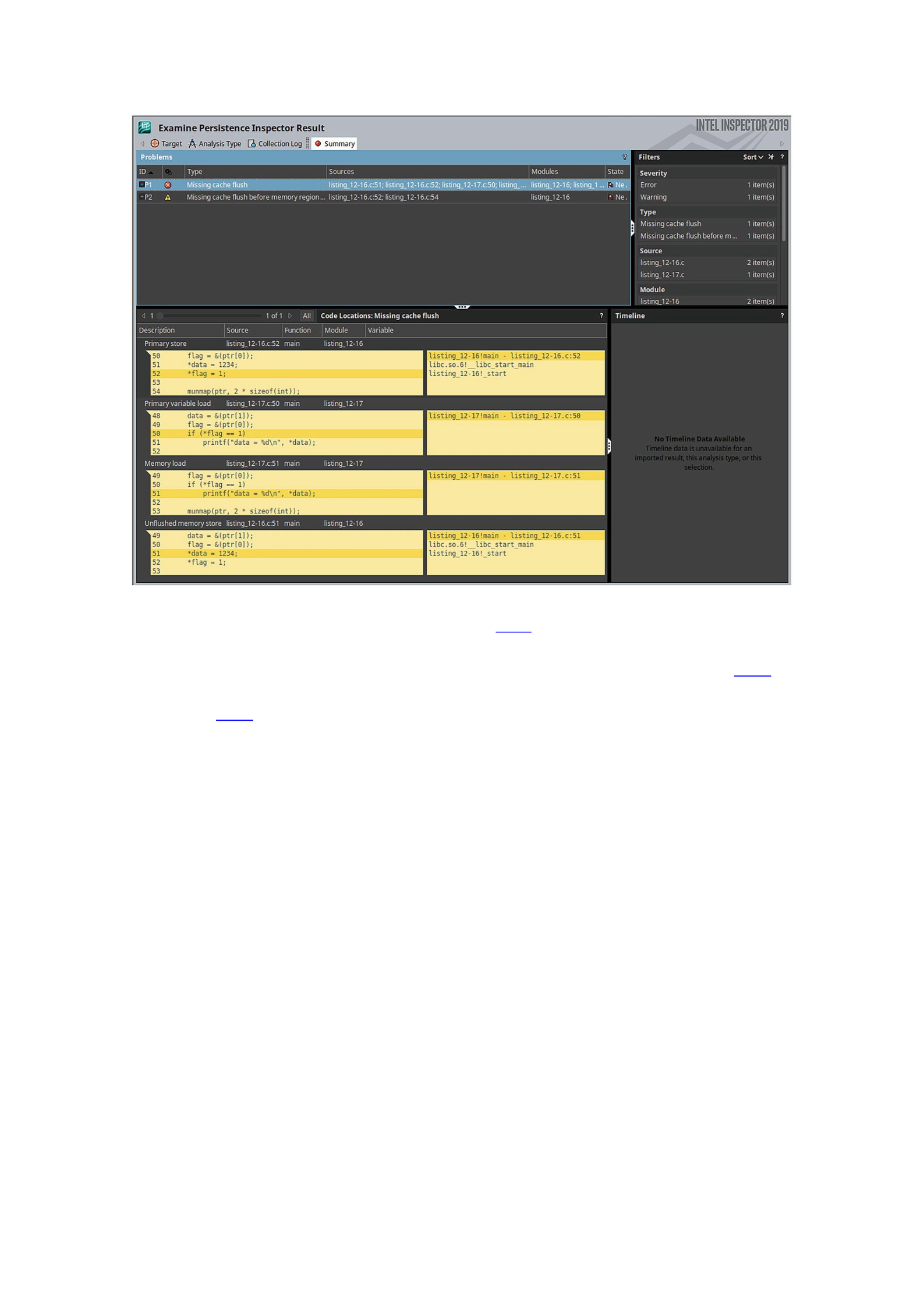
Figure 12-3GUI of Intel Inspector showing results for Listing 12-18 (diagnostic 1)
The GUI shows the same information as the command-line analysis but in a more
readable way by highlighting the errors directly on our source code. As Figure 12-3
shows, the modification of the flag is called “primary store.”
In Figure 12-4, the second diagnosis is selected in the Problems pane, showing the
missing flush for the flag itself.
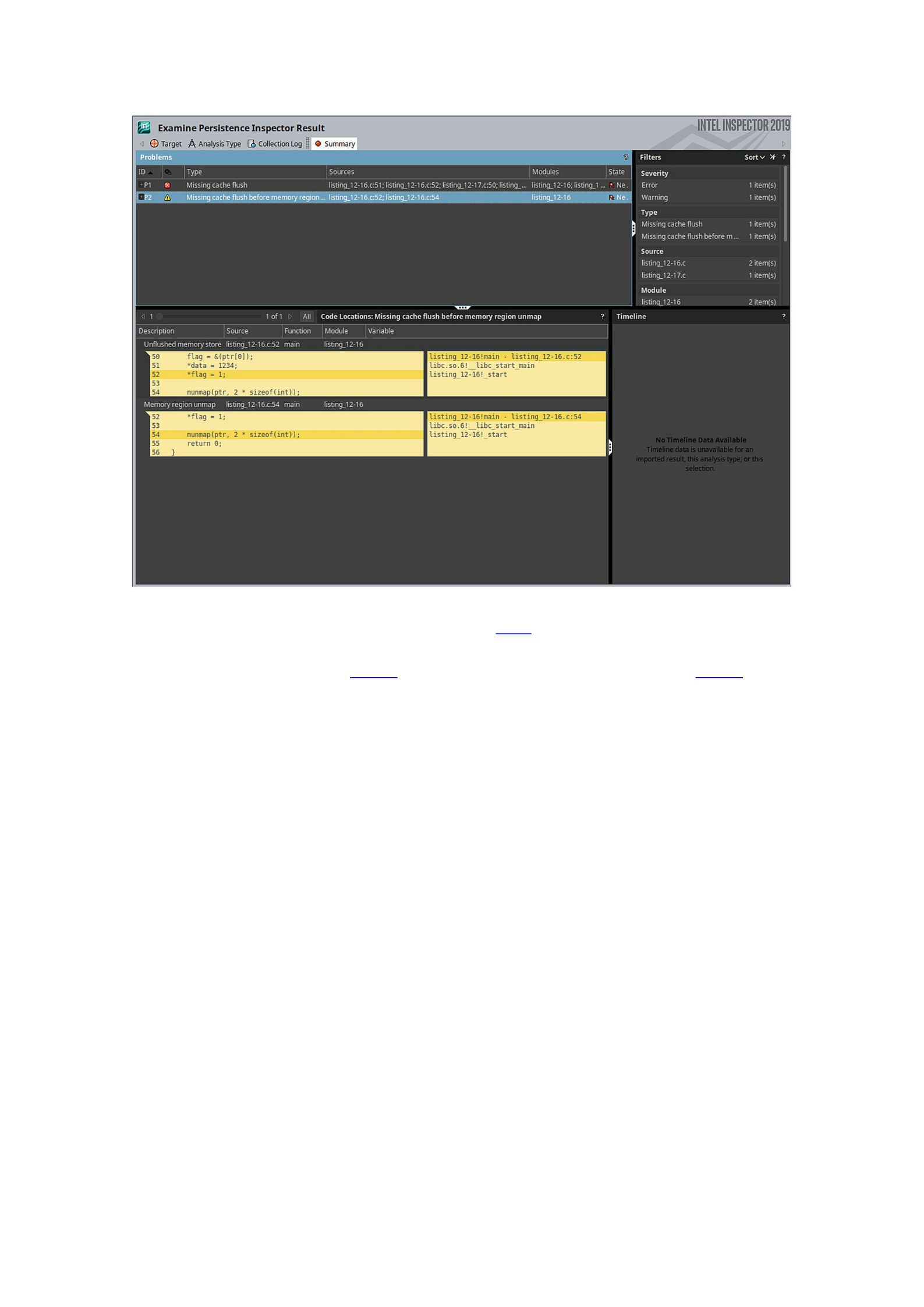
Figure 12-4GUI of Intel Inspector showing results for Listing 12-20 (diagnostic #2)
To conclude this section, we fix the code and rerun the analysis with Persistence
Inspector. The code in Listing 12-19 adds the necessary flushes to Listing 12-14.
33 #include <emmintrin.h>
34 #include <stdint.h>
35 #include <stdio.h>
36 #include <sys/mman.h>
37 #include <fcntl.h>
38 #include <string.h>
39
40 void flush(const void *addr, size_t len) {
41 uintptr_t flush_align = 64, uptr;
42 for (uptr = (uintptr_t)addr & ~(flush_align - 1);
43 uptr < (uintptr_t)addr + len;
44 uptr += flush_align)
45 _mm_clflush((char *)uptr);
46 }

47
48 int main(int argc, char *argv[]) {
49 int fd, *ptr, *data, *flag;
50
51 fd = open("/mnt/pmem/file", O_CREAT|O_RDWR, 0666);
52 posix_fallocate(fd, 0, sizeof(int) * 2);
53
54 ptr = (int *) mmap(NULL, sizeof(int) * 2,
55 PROT_READ | PROT_WRITE,
56 MAP_SHARED_VALIDATE | MAP_SYNC,
57 fd, 0);
58
59 data = &(ptr[1]);
60 flag = &(ptr[0]);
61 *data = 1234;
62 flush((void *) data, sizeof(int));
63 *flag = 1;
64 flush((void *) flag, sizeof(int));
65
66 munmap(ptr, 2 * sizeof(int));
67 return 0;
68 }
Listing 12-19Example of writing to persistent memory with a write dependency. The code flushes both writes
Listing 12-20 executes Persistence Inspector against the modified code from Listing
12-19, then the reader code from Listing 12-15, and finally running the report, which
says that no problems were detected.
$ pmeminsp cb -pmem-file /mnt/pmem/file -- ./listing_12-19
++ Analysis starts
++ Analysis completes
++ Data is stored in folder "/data/.pmeminspdata/data/listing_12-19"
$ pmeminsp ca -pmem-file /mnt/pmem/file -- ./listing_12-15
++ Analysis starts

data = 1234
++ Analysis completes
++ Data is stored in folder "/data/.pmeminspdata/data/listing_12-15"
$ pmeminsp rp -- listing_12-19 listing_12-15
Analysis complete. No problems detected.
Listing 12-20Running full analysis with Intel Inspector – Persistence Inspector with code Listings 12-19 and 12-
15
Stores Not Added into a Transaction
When working within a transaction block, it is assumed that all the modified persistent
memory addresses were added to it at the beginning, which also implies that their
previous values are copied to an undo log. This allows the transaction to implicitly flush
added memory addresses at the end of the block or roll back to the old values in the
event of an unexpected failure. A modification within a transaction to an address that is
not added to the transaction is a bug that you must be aware of.
Consider the code in Listing 12-21 that uses the libpmemobj library from PMDK. It
shows an example of writing within a transaction using a memory address that is not
explicitly tracked by the transaction.
33 #include <libpmemobj.h>
34
35 struct my_root {
36 int value;
37 int is_odd;
38 };
39
40 // registering type 'my_root' in the layout
41 POBJ_LAYOUT_BEGIN(example);
42 POBJ_LAYOUT_ROOT(example, struct my_root);
43 POBJ_LAYOUT_END(example);
44
45 int main(int argc, char *argv[]) {
46 // creating the pool
47 PMEMobjpool *pop= pmemobj_create("/mnt/pmem/pool",
48 POBJ_LAYOUT_NAME(example),

49 (1024 * 1024 * 100), 0666);
50
51 // transation
52 TX_BEGIN(pop) {
53 TOID(struct my_root) root
54 = POBJ_ROOT(pop, struct my_root);
55
56 // adding root.value to the transaction
57 TX_ADD_FIELD(root, value);
58
59 D_RW(root)->value = 4;
60 D_RW(root)->is_odd = D_RO(root)->value % 2;
61 } TX_END
62
63 return 0;
64 }
Listing 12-21Example of writing within a transaction with a memory address not added to the transaction
NoteFor a refresh on the definitions of a layout, root object, or macros used in Listing
12-21, see Chapter 7 where we introduce libpmemobj.
In lines 35-38, we create a my_root data structure, which has two integer members:
value and is_odd. These integers are modified inside a transaction (lines 52-61),
setting value=4 and is_odd=0. On line 57, we are only adding the value variable to
the transaction, leaving is_odd out. Given that persistent memory is not natively
supported in C, there is no way for the compiler to warn you about this. The compiler
cannot distinguish between pointers to volatile memory vs. those to persistent memory.
Listing 12-22 shows the response from running the code through pmemcheck .
$ valgrind --tool=pmemcheck ./listing_12-21
==48660== pmemcheck-1.0, a simple persistent store checker
==48660== Copyright (c) 2014-2016, Intel Corporation
==48660== Using Valgrind-3.14.0 and LibVEX; rerun with -h for copyright
info
==48660== Command: ./listing_12-21
==48660==

==48660==
==48660== Number of stores not made persistent: 1
==48660== Stores not made persistent properly:
==48660== [0] at 0x400C2D: main (listing_12-25.c:60)
==48660== Address: 0x7dc0554 size: 4 state: DIRTY
==48660== Total memory not made persistent: 4
==48660==
==48660== Number of stores made without adding to transaction: 1
==48660== Stores made without adding to transactions:
==48660== [0] at 0x400C2D: main (listing_12-25.c:60)
==48660== Address: 0x7dc0554 size: 4
==48660== ERROR SUMMARY: 2 errors
Listing 12-22Running pmemcheck with code Listing 12-21
Although they are both related to the same root cause, pmemcheck identified two
issues. One is the error we expected; that is, we have a store inside a transaction that
was not added to it. The other error says that we are not flushing the store. Since
transactional stores are flushed automatically when the program exits the transaction,
finding two errors per store to a location not included within a transaction should be
common in pmemcheck.
Persistence Inspector has a more user-friendly output, as shown in Listing 12-23.
$ pmeminsp cb -pmem-file /mnt/pmem/pool -- ./listing_12-21
++ Analysis starts
++ Analysis completes
++ Data is stored in folder "/data/.pmeminspdata/data/listing_12-21"
$
$ pmeminsp rp -- ./listing_12-21
#===========================================
==================
# Diagnostic # 1: Store without undo log
#-------------------
Memory store
of size 4 at address 0x7FAA84DC0554 (offset 0x3C0554 in
/mnt/pmem/pool)
in /data/listing_12-21!main at listing_12-21.c:60 - 0xC2D

in /lib64/libc.so.6!__libc_start_main at <unknown_file>:<unknown_line> -
0x223D3
in /data/listing_12-21!_start at <unknown_file>:<unknown_line> - 0x954
is not undo logged in
transaction
in /data/listing_12-21!main at listing_12-21.c:52 - 0xB67
in /lib64/libc.so.6!__libc_start_main at <unknown_file>:<unknown_line> -
0x223D3
in /data/listing_12-21!_start at <unknown_file>:<unknown_line> - 0x954
Analysis complete. 1 diagnostic(s) reported.
Listing 12-23Generating a report with Intel Inspector – Persistence Inspector for code Listing 12-21
We do not perform an after-unfortunate-event phase analysis here because we are
only concerned about transactions.
We can fix the problem reported in Listing 12-23 by adding the whole root object to
the transaction using TX_ADD(root), as shown on line 53 in Listing 12-24.
32 #include <libpmemobj.h>
33
34 struct my_root {
35 int value;
36 int is_odd;
37 };
38
39 POBJ_LAYOUT_BEGIN(example);
40 POBJ_LAYOUT_ROOT(example, struct my_root);
41 POBJ_LAYOUT_END(example);
42
43 int main(int argc, char *argv[]) {
44 PMEMobjpool *pop= pmemobj_create("/mnt/pmem/pool",
45 POBJ_LAYOUT_NAME(example),
46 (1024 * 1024 * 100), 0666);
47
48 TX_BEGIN(pop) {
49 TOID(struct my_root) root

50 = POBJ_ROOT(pop, struct my_root);
51
52 // adding full root to the transaction
53 TX_ADD(root);
54
55 D_RW(root)->value = 4;
56 D_RW(root)->is_odd = D_RO(root)->value % 2;
57 } TX_END
58
59 return 0;
60 }
Listing 12-24Example of adding an object and writing it within a transaction
If we run the code through pmemcheck, as shown in Listing 12-25, no issues are
reported.
$ valgrind --tool=pmemcheck ./listing_12-24
==80721== pmemcheck-1.0, a simple persistent store checker
==80721== Copyright (c) 2014-2016, Intel Corporation
==80721== Using Valgrind-3.14.0 and LibVEX; rerun with -h for copyright
info
==80721== Command: ./listing_12-24
==80721==
==80721==
==80721== Number of stores not made persistent: 0
==80721== ERROR SUMMARY: 0 errors
Listing 12-25Running pmemcheck with code Listing 12-24
Similarly, no issues are reported by Persistence Inspector in Listing 12-26.
$ pmeminsp cb -pmem-file /mnt/pmem/pool -- ./listing_12-24
++ Analysis starts
++ Analysis completes
++ Data is stored in folder "/data/.pmeminspdata/data/listing_12-24"
$
$ pmeminsp rp -- ./listing_12-24
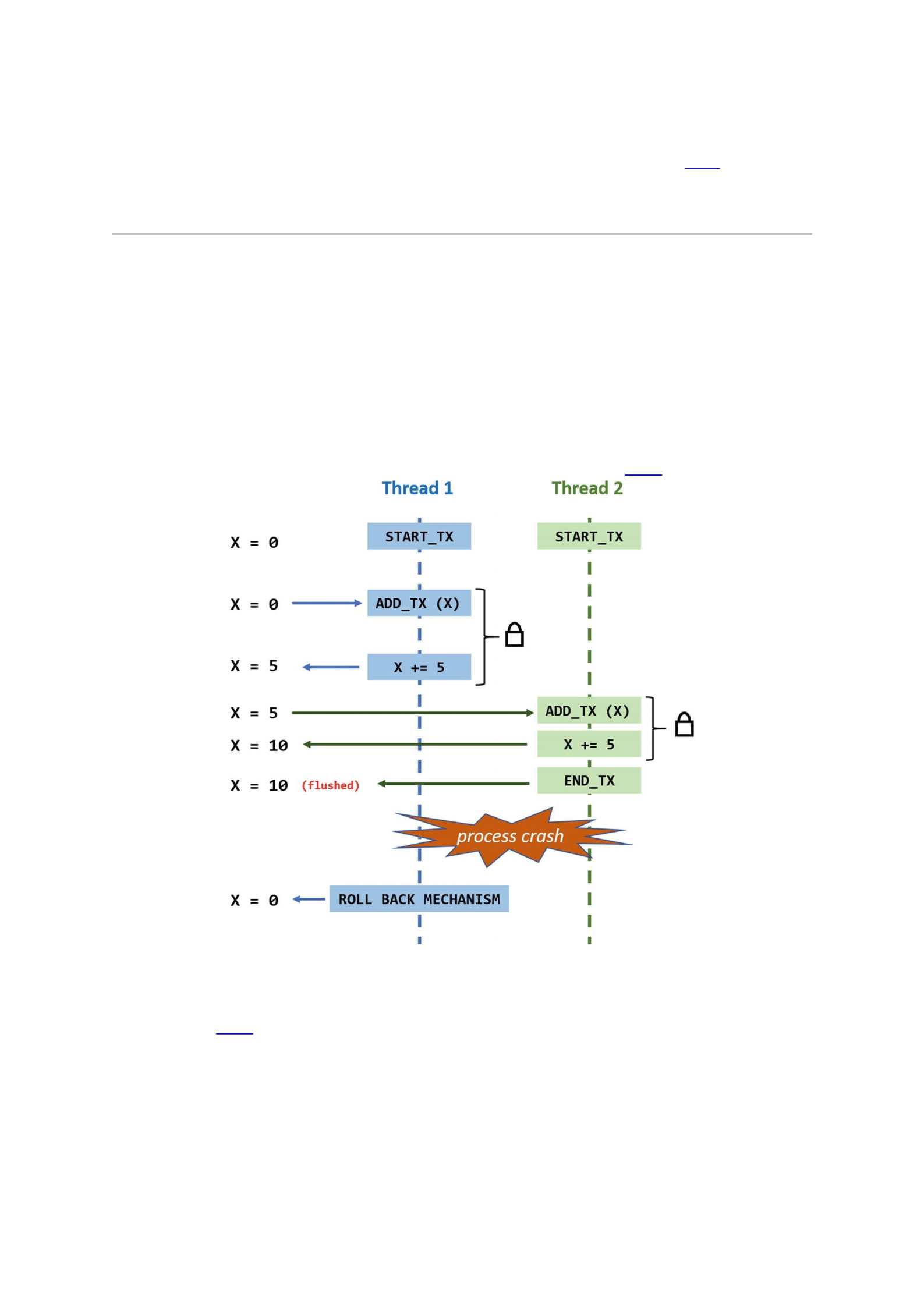
Analysis complete. No problems detected.
Listing 12-26Generating report with Intel Inspector – Persistence Inspector for code Listing 12-24
After properly adding all the memory that will be modified to the transaction, both
tools report that no problems were found.
Memory Added to Two Different Transactions
In the case where one program can work with multiple transactions simultaneously,
adding the same memory object to multiple transactions can potentially corrupt data.
This can occur in PMDK, for example, where the library maintains a different
transaction per thread. If two threads write to the same object within different
transactions, after an application crash, a thread might overwrite modifications made
by another thread in a different transaction. In database systems, this problem is known
as dirty reads . Dirty reads violate the isolation requirement of the ACID (atomicity,
consistency, isolation, durability) properties, as shown in Figure 12-5.
Figure 12-5The rollback mechanism for the unfinished transaction in Thread 1 is also overriding the changes
made by Thread 2, even though the transaction for Thread 2 finishes correctly
In Figure 12-5, time is shown in the y axis with time progressing downward. These
operations occur in the following order:
Assume X=0 when the application starts.
A main() function creates two threads: Thread 1 and Thread 2. Both
threads are intended to start their own transactions and acquire the lock to
modify X.

Since Thread 1 runs first, it acquires the lock on X first. It then adds the X
variable to the transaction before incrementing X by 5. Transparent to the
program, the value of X (X=0) is added to the undo log when X was added to
the transaction. Since the transaction is not yet complete, the application has
not yet explicitly flushed the value.
Thread 2 starts, begins its own transaction, acquires the lock, reads the value
of X (which is now 5), adds X=5 to the undo log, and increments it by 5. The
transaction completes successfully, and Thread 2 flushes the CPU caches.
Now, x=10.
Unfortunately, the program crashes after Thread 2 successfully completes its
transaction but before Thread 1 was able to finish its transaction and flush
its value.
This scenario leaves the application with an invalid, but consistent, value of x=10.
Since transactions are atomic, all changes done within them are not valid until they
successfully complete.
When the application starts, it knows it must perform a recovery operation due to
the previous crash and will replay the undo logs to rewind the partial update made by
Thread 1. The undo log restores the value of X=0, which was correct when Thread 1
added its entry. The expected value of X should be X=5 in this situation, but the undo
log puts X=0. You can probably see the huge potential for data corruption that this
situation can produce.
We describe concurrency for multithreaded applications in Chapter 14. Using
libpmemobj-cpp, the C++ language binding library to libpmemobj, concurrency
issues are very easy to resolve because the API allows us to pass a list of locks using
lambda functions when transactions are created. Chapter 8 discusses libpmemobj-
cpp and lambda functions in more detail.
Listing 12-27 shows how you can use a single mutex to lock a whole transaction.
This mutex can either be a standard mutex (std::mutex) if the mutex object resides
in volatile memory or a pmem mutex (pmem::obj::mutex) if the mutex object
resides in persistent memory.
transaction::run (pop, [&] {
...
// all writes here are atomic and thread safe
...
}, mutex);
Listing 12-27Example of a libpmemobj++ transaction whose writes are both atomic – with respect to persistent
memory – and isolated – in a multithreaded scenario. The mutex is passed to the transaction as a parameter
Consider the code in Listing 12-28 that simultaneously adds the same memory
region to two different transactions.
33 #include <libpmemobj.h>
34 #include <pthread.h>
35
36 struct my_root {

37 int value;
38 int is_odd;
39 };
40
41 POBJ_LAYOUT_BEGIN(example);
42 POBJ_LAYOUT_ROOT(example, struct my_root);
43 POBJ_LAYOUT_END(example);
44
45 pthread_mutex_t lock;
46
47 // function to be run by extra thread
48 void *func(void *args) {
49 PMEMobjpool *pop = (PMEMobjpool *) args;
50
51 TX_BEGIN(pop) {
52 pthread_mutex_lock(&lock);
53 TOID(struct my_root) root
54 = POBJ_ROOT(pop, struct my_root);
55 TX_ADD(root);
56 D_RW(root)->value = D_RO(root)->value + 3;
57 pthread_mutex_unlock(&lock);
58 } TX_END
59 }
60
61 int main(int argc, char *argv[]) {
62 PMEMobjpool *pop= pmemobj_create("/mnt/pmem/pool",
63 POBJ_LAYOUT_NAME(example),
64 (1024 * 1024 * 10), 0666);
65
66 pthread_t thread;

67 pthread_mutex_init(&lock, NULL);
68
69 TX_BEGIN(pop) {
70 pthread_mutex_lock(&lock);
71 TOID(struct my_root) root
72 = POBJ_ROOT(pop, struct my_root);
73 TX_ADD(root);
74 pthread_create(&thread, NULL,
75 func, (void *) pop);
76 D_RW(root)->value = D_RO(root)->value + 4;
77 D_RW(root)->is_odd = D_RO(root)->value % 2;
78 pthread_mutex_unlock(&lock);
79 // wait to make sure other thread finishes 1st
80 pthread_join(thread, NULL);
81 } TX_END
82
83 pthread_mutex_destroy(&lock);
84 return 0;
85 }
Listing 12-28Example of two threads simultaneously adding the same persistent memory location to their
respective transactions
Line 69: The main thread starts a transaction and adds the root data
structure to it (line 73).
Line 74: We create a new thread by calling pthread_create() and have it
execute the func() function . This function also starts a transaction (line
51) and adds the root data structure to it (line 55).
Both threads will simultaneously modify all or part of the same data before
finishing their transactions. We force the second thread to finish first by
making the main thread wait on pthread_join().
Listing 12-29 shows code execution with pmemcheck, and the result warns us that
we have overlapping regions registered in different transactions.
$ valgrind --tool=pmemcheck ./listing_12-28
==97301== pmemcheck-1.0, a simple persistent store checker
==97301== Copyright (c) 2014-2016, Intel Corporation

==97301== Using Valgrind-3.14.0 and LibVEX; rerun with -h for copyright
info
==97301== Command: ./listing_12-28
==97301==
==97301==
==97301== Number of stores not made persistent: 0
==97301==
==97301== Number of overlapping regions registered in different
transactions: 1
==97301== Overlapping regions:
==97301== [0] at 0x4E6B0BC: pmemobj_tx_add_snapshot (in
/usr/lib64/libpmemobj.so.1.0.0)
==97301== by 0x4E6B5F8: pmemobj_tx_add_common.constprop.18
(in /usr/lib64/libpmemobj.so.1.0.0)
==97301== by 0x4E6C62F: pmemobj_tx_add_range (in
/usr/lib64/libpmemobj.so.1.0.0)
==97301== by 0x400DAC: func (listing_12-28.c:55)
==97301== by 0x4C2DDD4: start_thread (in /usr/lib64/libpthread-
2.17.so)
==97301== by 0x5180EAC: clone (in /usr/lib64/libc-2.17.so)
==97301== Address: 0x7dc0550 size: 8 tx_id: 2
==97301== First registered here:
==97301== [0]' at 0x4E6B0BC: pmemobj_tx_add_snapshot (in
/usr/lib64/libpmemobj.so.1.0.0)
==97301== by 0x4E6B5F8: pmemobj_tx_add_common.constprop.18
(in /usr/lib64/libpmemobj.so.1.0.0)
==97301== by 0x4E6C62F: pmemobj_tx_add_range (in
/usr/lib64/libpmemobj.so.1.0.0)
==97301== by 0x400F23: main (listing_12-28.c:73)
==97301== Address: 0x7dc0550 size: 8 tx_id: 1
==97301== ERROR SUMMARY: 1 errors
Listing 12-29Running pmemcheck with Listing 12-28
Listing 12-30 shows the same code run with Persistence Inspector, which also
reports “Overlapping regions registered in different transactions” in diagnostic 25. The

first 24 diagnostic results were related to stores not added to our transactions
corresponding with the locking and unlocking of our volatile mutex; these can be
ignored.
$ pmeminsp rp -- ./listing_12-28
...
#===========================================
==================
# Diagnostic # 25: Overlapping regions registered in different
transactions
#-------------------
transaction
in /data/listing_12-28!main at listing_12-28.c:69 - 0xEB6
in /lib64/libc.so.6!__libc_start_main at <unknown_file>:<unknown_line> -
0x223D3
in /data/listing_12-28!_start at <unknown_file>:<unknown_line> - 0xB44
protects
memory region
in /data/listing_12-28!main at listing_12-28.c:73 - 0xF1F
in /lib64/libc.so.6!__libc_start_main at <unknown_file>:<unknown_line> -
0x223D3
in /data/listing_12-28!_start at <unknown_file>:<unknown_line> - 0xB44
overlaps with
memory region
in /data/listing_12-28!func at listing_12-28.c:55 - 0xDA8
in /lib64/libpthread.so.0!start_thread at <unknown_file>:<unknown_line>
- 0x7DCD
in /lib64/libc.so.6!__clone at <unknown_file>:<unknown_line> - 0xFDEAB
Analysis complete. 25 diagnostic(s) reported.
Listing 12-30Generating a report with Intel Inspector – Persistence Inspector for code Listing 12-28
Memory Overwrites
When multiple modifications to the same persistent memory location occur before the
location is made persistent (that is, flushed), a memory overwrite occurs. This is a
potential data corruption source if a program crashes because the final value of the

persistent variable can be any of the values written between the last flush and the crash.
It is important to know that this may not be an issue if it is in the code by design. We
recommend using volatile variables for short-lived data and only write to persistent
variables when you want to persist data.
Consider the code in Listing 12-31, which writes twice to the data variable inside
the main() function (lines 62 and 63) before we call flush() on line 64.
33 #include <emmintrin.h>
34 #include <stdint.h>
35 #include <stdio.h>
36 #include <sys/mman.h>
37 #include <fcntl.h>
38 #include <valgrind/pmemcheck.h>
39
40 void flush(const void *addr, size_t len) {
41 uintptr_t flush_align = 64, uptr;
42 for (uptr = (uintptr_t)addr & ~(flush_align - 1);
43 uptr < (uintptr_t)addr + len;
44 uptr += flush_align)
45 _mm_clflush((char *)uptr);
46 }
47
48 int main(int argc, char *argv[]) {
49 int fd, *data;
50
51 fd = open("/mnt/pmem/file", O_CREAT|O_RDWR, 0666);
52 posix_fallocate(fd, 0, sizeof(int));
53
54 data = (int *)mmap(NULL, sizeof(int),
55 PROT_READ | PROT_WRITE,
56 MAP_SHARED_VALIDATE | MAP_SYNC,
57 fd, 0);
58 VALGRIND_PMC_REGISTER_PMEM_MAPPING(data,

59 sizeof(int));
60
61 // writing twice before flushing
62 *data = 1234;
63 *data = 4321;
64 flush((void *)data, sizeof(int));
65
66 munmap(data, sizeof(int));
67 VALGRIND_PMC_REMOVE_PMEM_MAPPING(data,
68 sizeof(int));
69 return 0;
70 }
Listing 12-31Example of persistent memory overwriting – variable data – before flushing
Listing 12-32 shows the report from pmemcheck with the code from Listing 12-31.
To make pmemcheck look for overwrites, we must use the --mult-stores=yes
option.
$ valgrind --tool=pmemcheck --mult-stores=yes ./listing_12-31
==25609== pmemcheck-1.0, a simple persistent store checker
==25609== Copyright (c) 2014-2016, Intel Corporation
==25609== Using Valgrind-3.14.0 and LibVEX; rerun with -h for copyright
info
==25609== Command: ./listing_12-31
==25609==
==25609==
==25609== Number of stores not made persistent: 0
==25609==
==25609== Number of overwritten stores: 1
==25609== Overwritten stores before they were made persistent:
==25609== [0] at 0x400962: main (listing_12-31.c:62)
==25609== Address: 0x4023000 size: 4 state: DIRTY
==25609== ERROR SUMMARY: 1 errors
Listing 12-32Running pmemcheck with Listing 12-31

pmemcheck reports that we have overwritten stores. We can fix this problem by
either inserting a flushing instruction between both writes, if we forgot to flush, or by
moving one of the stores to volatile data if that store corresponds to short-lived data.
At the time of publication, Persistence Inspector does not support checking for
overwritten stores. As you have seen, Persistence Inspector does not consider a missing
flush an issue unless there is a write dependency. In addition, it does not consider this a
performance problem because writing to the same variable in a short time span is likely
to hit the CPU caches anyway, rendering the latency differences between DRAM and
persistent memory irrelevant.
Unnecessary Flushes
Flushing should be done carefully. Detecting unnecessary flushes, such as redundant
ones, can help improve code performance. The code in Listing 12-33 shows a redundant
call to the flush() function on line 64.
33 #include <emmintrin.h>
34 #include <stdint.h>
35 #include <stdio.h>
36 #include <sys/mman.h>
37 #include <fcntl.h>
38 #include <valgrind/pmemcheck.h>
39
40 void flush(const void *addr, size_t len) {
41 uintptr_t flush_align = 64, uptr;
42 for (uptr = (uintptr_t)addr & ~(flush_align - 1);
43 uptr < (uintptr_t)addr + len;
44 uptr += flush_align)
45 _mm_clflush((char *)uptr);
46 }
47
48 int main(int argc, char *argv[]) {
49 int fd, *data;
50
51 fd = open("/mnt/pmem/file", O_CREAT|O_RDWR, 0666);
52 posix_fallocate(fd, 0, sizeof(int));

53
54 data = (int *)mmap(NULL, sizeof(int),
55 PROT_READ | PROT_WRITE,
56 MAP_SHARED_VALIDATE | MAP_SYNC,
57 fd, 0);
58
59 VALGRIND_PMC_REGISTER_PMEM_MAPPING(data,
60 sizeof(int));
61
62 *data = 1234;
63 flush((void *)data, sizeof(int));
64 flush((void *)data, sizeof(int)); // extra flush
65
66 munmap(data, sizeof(int));
67 VALGRIND_PMC_REMOVE_PMEM_MAPPING(data,
68 sizeof(int));
69 return 0;
70 }
Listing 12-33Example of redundant flushing of a persistent memory variable
We can use pmemcheck to detect redundant flushes using --flush-check=yes
option, as shown in Listing 12-34.
$ valgrind --tool=pmemcheck --flush-check=yes ./listing_12-33
==104125== pmemcheck-1.0, a simple persistent store checker
==104125== Copyright (c) 2014-2016, Intel Corporation
==104125== Using Valgrind-3.14.0 and LibVEX; rerun with -h for
copyright info
==104125== Command: ./listing_12-33
==104125==
==104125==
==104125== Number of stores not made persistent: 0
==104125==
==104125== Number of unnecessary flushes: 1

==104125== [0] at 0x400868: flush (emmintrin.h:1459)
==104125== by 0x400989: main (listing_12-33.c:64)
==104125== Address: 0x4023000 size: 64
==104125== ERROR SUMMARY: 1 errors
Listing 12-34Running pmemcheck with Listing 12-33
To showcase Persistence Inspector, Listing 12-35 has code with a write dependency,
similar to what we did for Listing 12-11 in Listing 12-19. The extra flush occurs on line
65.
33 #include <emmintrin.h>
34 #include <stdint.h>
35 #include <stdio.h>
36 #include <sys/mman.h>
37 #include <fcntl.h>
38 #include <string.h>
39
40 void flush(const void *addr, size_t len) {
41 uintptr_t flush_align = 64, uptr;
42 for (uptr = (uintptr_t)addr & ~(flush_align - 1);
43 uptr < (uintptr_t)addr + len;
44 uptr += flush_align)
45 _mm_clflush((char *)uptr);
46 }
47
48 int main(int argc, char *argv[]) {
49 int fd, *ptr, *data, *flag;
50
51 fd = open("/mnt/pmem/file", O_CREAT|O_RDWR, 0666);
52 posix_fallocate(fd, 0, sizeof(int) * 2);
53
54 ptr = (int *) mmap(NULL, sizeof(int) * 2,
55 PROT_READ | PROT_WRITE,
56 MAP_SHARED_VALIDATE | MAP_SYNC,

57 fd, 0);
58 data = &(ptr[1]);
59 flag = &(ptr[0]);
60
61 *data = 1234;
62 flush((void *) data, sizeof(int));
63 *flag = 1;
64 flush((void *) flag, sizeof(int));
65 flush((void *) flag, sizeof(int)); // extra flush
66
67 munmap(ptr, 2 * sizeof(int));
68 return 0;
69 }
Listing 12-35Example of writing to persistent memory with a write dependency. The code does an extra flush for
the flag
Listing 12-36 uses the same reader program from Listing 12-15 to show the
analysis from Persistence Inspector. As before, we first collect data from the writer
program, then the reader program, and finally run the report to identify any issues.
$ pmeminsp cb -pmem-file /mnt/pmem/file -- ./listing_12-35
++ Analysis starts
++ Analysis completes
++ Data is stored in folder "/data/.pmeminspdata/data/listing_12-35"
$ pmeminsp ca -pmem-file /mnt/pmem/file -- ./listing_12-15
++ Analysis starts
data = 1234
++ Analysis completes
++ Data is stored in folder "/data/.pmeminspdata/data/listing_12-15"
$ pmeminsp rp -- ./listing_12-35 ./listing_12-15
#===========================================
==================
# Diagnostic # 1: Redundant cache flush
#-------------------

Cache flush
of size 64 at address 0x7F3220C55000 (offset 0x0 in /mnt/pmem/file)
in /data/listing_12-35!flush at listing_12-35.c:45 - 0x674
in /data/listing_12-35!main at listing_12-35.c:64 - 0x73F
in /lib64/libc.so.6!__libc_start_main at <unknown_file>:<unknown_line> -
0x223D3
in /data/listing_12-35!_start at <unknown_file>:<unknown_line> - 0x574
is redundant with regard to
cache flush
of size 64 at address 0x7F3220C55000 (offset 0x0 in /mnt/pmem/file)
in /data/listing_12-35!flush at listing_12-35.c:45 - 0x674
in /data/listing_12-35!main at listing_12-35.c:65 - 0x750
in /lib64/libc.so.6!__libc_start_main at <unknown_file>:<unknown_line> -
0x223D3
in /data/listing_12-35!_start at <unknown_file>:<unknown_line> - 0x574
of
memory store
of size 4 at address 0x7F3220C55000 (offset 0x0 in /mnt/pmem/file)
in /data/listing_12-35!main at listing_12-35.c:63 - 0x72D
in /lib64/libc.so.6!__libc_start_main at <unknown_file>:<unknown_line> -
0x223D3
in /data/listing_12-35!_start at <unknown_file>:<unknown_line> - 0x574
Listing 12-36Running Intel Inspector – Persistence Inspector with Listing 12-35 (writer) and Listing 12-15
(reader)
The Persistence Inspector report warns about the redundant cache flush within the
main() function on line 65 of the listing_12-35.c program file – “main at
listing_12-35.c:65”. Solving these issues is as easy as deleting all the unnecessary
flushes, and the result will improve the application’s performance.
Kind Creation
Use the memkind_create_pmem() function to create a PMEM kind of memory from
a file-backed source. This file is created as a tmpfile(3) in a specified directory
(PMEM_DIR) and is unlinked, so the file name is not listed under the directory. The
temporary file is automatically removed when the program terminates.

Use memkind_create_pmem() to create a fixed or dynamic heap size depending
on the application requirement. Additionally, configurations can be created and
supplied rather than passing in configuration options to the *_create_* function.
Creating a Fixed-Size Heap
Applications that require a fixed amount of memory can specify a nonzero value for the
PMEM_MAX_SIZE argument to memkind_create_pmem(), shown below. This
defines the size of the memory pool to be created for the specified kind of memory. The
value of PMEM_MAX_SIZE should be less than the available capacity of the file system
specified in PMEM_DIR to avoid ENOMEM or ENOSPC errors. An internal data structure
struct memkind is populated internally by the library and used by the memory
management functions.
int memkind_create_pmem(PMEM_DIR, PMEM_MAX_SIZE, &pmem_kind)
The arguments to memkind_create_pmem() are
PMEM_DIR is the directory where the temp file is created.
PMEM_MAX_SIZE is the size, in bytes, of the memory region to be passed to
jemalloc.
&pmem_kind is the address of a memkind data structure.
If successful, memkind_create_pmem() returns zero. On failure, an error number
is returned that memkind_error_message() can convert to an error message string.
Listing 10-2 shows how a 32MiB PMEM kind is created on a /daxfs file system.
Included in this listing is the definition of memkind_fatal() to print a memkind error
message and exit. The rest of the examples in this chapter assume this routine is defined
as shown below.
void memkind_fatal(int err)
{
char error_message[MEMKIND_ERROR_MESSAGE_SIZE];
memkind_error_message(err, error_message,
MEMKIND_ERROR_MESSAGE_SIZE);
fprintf(stderr, "%s\n", error_message);
exit(1);
}
/* ... in main() ... */
#define PMEM_MAX_SIZE (1024 * 1024 * 32)
struct memkind *pmem_kind;
int err;
// Create PMEM memory pool with specific size
err = memkind_create_pmem("/daxfs",PMEM_MAX_SIZE, &pmem_kind);
if (err) {
memkind_fatal(err);
}
Listing 10-2Creating a 32MiB PMEM kind
You can also create a heap with a specific configuration using the function
memkind_create_pmem_with_config() . This function uses a memkind_config
structure with optional parameters such as size, file path, and memory usage policy.
Listing 10-3 shows how to build a test_cfg using memkind_config_new(), then

passing that configuration to memkind_create_pmem_with_config() to create a
PMEM kind. We use the same path and size parameters from the Listing 10-2
example for comparison.
struct memkind_config *test_cfg = memkind_config_new();
memkind_config_set_path(test_cfg, "/daxfs");
memkind_config_set_size(test_cfg, 1024 * 1024 * 32);
memkind_config_set_memory_usage_policy(test_cfg,
MEMKIND_MEM_USAGE_POLICY_CONSERVATIVE);
// create a PMEM partition with specific configuration
err = memkind_create_pmem_with_config(test_cfg, &pmem_kind);
if (err) {
memkind_fatal(err);
}
Listing 10-3Creating PMEM kind with configuration
Creating a Variable Size Heap
When PMEM_MAX_SIZE is set to zero, as shown below, allocations are satisfied as long
as the temporary file can grow. The maximum heap size growth is limited by the
capacity of the file system mounted under the PMEM_DIR argument .
memkind_create_pmem(PMEM_DIR, 0, &pmem_kind)
The arguments to memkind_create_pmem() are:
PMEM_DIR is the directory where the temp file is created.
PMEM_MAX_SIZE is 0.
&pmem_kind is the address of a memkind data structure.
If the PMEM kind is created successfully, memkind_create_pmem() returns zero.
On failure, memkind_error_message() can be used to convert an error number
returned by memkind_create_pmem() to an error message string, as shown in the
memkind_fatal() routine in Listing 10-2.
Listing 10-4 shows how to create a PMEM kind with variable size.
struct memkind *pmem_kind;
int err;
err = memkind_create_pmem("/daxfs",0,&pmem_kind);
if (err) {
memkind_fatal(err);
}
Listing 10-4Creating a PMEM kind with variable size
Detecting the Memory Kind
Memkind supports both automatic detection of the kind as well as a function to detect
the kind associated with a memory referenced by a pointer.
Automatic Kind Detection
Automatically detecting the kind of memory is supported to simplify code changes when
using libmemkind. Thus, the memkind library will automatically retrieve the kind of

memory pool the allocation was made from, so the heap management functions listed in
Table 10-1 can be called without specifying the kind.
Table 10-1Automatic kind detection functions and their equivalent specified kind functions and operations
Operation Memkind API with Kind Memkind API Using Automatic Detection
free memkind_free(kind, ptr) memkind_free(NULL, ptr)
realloc memkind_realloc(kind, ptr, size) memkind_realloc(NULL, ptr, size)
Get size of allocated
memory
memkind_malloc_usable_size(kind, ptr) memkind_malloc_usable_size(NULL, ptr)
The memkind library internally tracks the kind of a given object from the allocator
metadata. However, to get this information, some of the operations may need to acquire
a lock to prevent accesses from other threads, which may negatively affect the
performance in a multithreaded environment.
Memory Kind Detection
Memkind also provides the memkind_detect_kind() function, shown below, to
query and return the kind of memory referenced by the pointer passed into the
function. If the input pointer argument is NULL, the function returns NULL. The input
pointer argument passed into memkind_detect_kind() must have been returned
by a previous call to memkind_malloc(), memkind_calloc(),
memkind_realloc(), or memkind_posix_memalign().
memkind_t memkind_detect_kind(void *ptr)
Similar to the automatic detection approach, this function has nontrivial
performance overhead. Listing 10-5 shows how to detect the kind type.
73 err = memkind_create_pmem(path, 0, &pmem_kind);
74 if (err) {
75 memkind_fatal(err);
76 }
77
78 /* do some allocations... */
79 buf0 = memkind_malloc(pmem_kind, 1000);
80 buf1 = memkind_malloc(MEMKIND_DEFAULT, 1000);
81
82 /* look up the kind of an allocation */
83 if (memkind_detect_kind(buf0) == MEMKIND_DEFAULT) {
84 printf("buf0 is DRAM\n");
85 } else {
86 printf("buf0 is pmem\n");
87 }
Listing 10-5pmem_detect_kind.c – how to automatically detect the ‘kind’ type
Destroying Kind Objects
Use the memkind_destroy_kind() function, shown below, to delete the kind object
that was previously created using the memkind_create_pmem() or
memkind_create_pmem_with_config() function .
int memkind_destroy_kind(memkind_t kind);

Using the same pmem_detect_kind.c code from Listing 10-5, Listing 10-6 shows
how the kind is destroyed before the program exits.
89 err = memkind_destroy_kind(pmem_kind);
90 if (err) {
91 memkind_fatal(err);
92 }
Listing 10-6Destroying a kind object
When the kind returned by memkind_create_pmem() or
memkind_create_pmem_with_config() is successfully destroyed, all the
allocated memory for the kind object is freed.
Heap Management API
The heap management functions described in this section have an interface modeled on
the ISO C standard API, with an additional “kind” parameter to specify the memory type
used for allocation.
Allocating Memory
The memkind library provides memkind_malloc(), memkind_calloc(), and
memkind_realloc() functions for allocating memory, defined as follows:
void *memkind_malloc(memkind_t kind, size_t size);
void *memkind_calloc(memkind_t kind, size_t num, size_t size);
void *memkind_realloc(memkind_t kind, void *ptr, size_t size);
memkind_malloc() allocates size bytes of uninitialized memory of the specified kind.
The allocated space is suitably aligned (after possible pointer coercion) for storage of
any object type. If size is 0, then memkind_malloc() returns NULL.
memkind_calloc() allocates space for num objects, each is size bytes in length. The
result is identical to calling memkind_malloc() with an argument of num * size.
The exception is that the allocated memory is explicitly initialized to zero bytes. If num
or size is 0, then memkind_calloc() returns NULL.
memkind_realloc() changes the size of the previously allocated memory referenced
by ptr to size bytes of the specified kind. The contents of the memory remain
unchanged, up to the lesser of the new and old sizes. If the new size is larger, the
contents of the newly allocated portion of the memory are undefined. If successful, the
memory referenced by ptr is freed, and a pointer to the newly allocated memory is
returned.
The code example in Listing 10-7 shows how to allocate memory from DRAM and
persistent memory (pmem_kind) using memkind_malloc(). Rather than using the
common C library malloc() for DRAM and memkind_malloc() for persistent
memory, we recommend using a single library to simplify the code.
/*
* Allocates 100 bytes using appropriate "kind"
* of volatile memory
*/
// Create a PMEM memory pool with a specific size
err = memkind_create_pmem(path, PMEM_MAX_SIZE, &pmem_kind);

if (err) {
memkind_fatal(err);
}
char *pstring = memkind_malloc(pmem_kind, 100);
char *dstring = memkind_malloc(MEMKIND_DEFAULT, 100);
Listing 10-7An example of allocating memory from both DRAM and persistent memory
Freeing Allocated Memory
To avoid memory leaks, allocated memory can be freed using the memkind_free()
function , defined as:
void memkind_free(memkind_t kind, void *ptr);
memkind_free() causes the allocated memory referenced by ptr to be made
available for future allocations. This pointer must be returned by a previous call to
memkind_malloc(), memkind_calloc(), memkind_realloc(), or
memkind_posix_memalign(). Otherwise, if memkind_free(kind, ptr) was
previously called, undefined behavior occurs. If ptr is NULL, no operation is performed.
In cases where the kind is unknown in the context of the call to memkind_free(),
NULL can be given as the kind specified to memkind_free(), but this will require an
internal lookup for the correct kind. Always specify the correct kind because the lookup
for kind could result in a serious performance penalty.
Listing 10-8 shows four examples of memkind_free() being used. The first two
specify the kind, and the second two use NULL to detect the kind automatically.
/* Free the memory by specifying the kind */
memkind_free(MEMKIND_DEFAULT, dstring);
memkind_free(PMEM_KIND, pstring);
/* Free the memory using automatic kind detection */
memkind_free(NULL, dstring);
memkind_free(NULL, pstring) ;
Listing 10-8Examples of memkind_free() usage
Kind Configuration Management
You can also create a heap with a specific configuration using the function
memkind_create_pmem_with_config(). This function requires completing a
memkind_config structure with optional parameters such as size, path to file, and
memory usage policy.
Memory Usage Policy
In jemalloc, a runtime option called dirty_decay_ms determines how fast it returns
unused memory back to the operating system. A shorter decay time purges unused
memory pages faster, but the purging costs CPU cycles. Trade-offs between memory and
CPU cycles needed for this operation should be carefully thought out before using this
parameter.
The memkind library supports two policies related to this feature:

1.
MEMKIND_MEM_USAGE_POLICY_DEFAULT
2. MEMKIND_MEM_USAGE_POLICY_CONSERVATIVE
The minimum and maximum values for dirty_decay_ms using the
MEMKIND_MEM_USAGE_POLICY_DEFAULT are 0ms to 10,000ms for arenas assigned
to a PMEM kind. Setting MEMKIND_MEM_USAGE_POLICY_CONSERVATIVE sets
shorter decay times to purge unused memory faster, reducing memory usage. To define
the memory usage policy, use memkind_config_set_memory_usage_policy(),
shown below:
void memkind_config_set_memory_usage_policy (struct
memkind_config *cfg, memkind_mem_usage_policy policy );
MEMKIND_MEM_USAGE_POLICY_DEFAULT is the default memory usage
policy.
MEMKIND_MEM_USAGE_POLICY_CONSERVATIVE allows changing the
dirty_decay_ms parameter.
Listing 10-9 shows how to use
memkind_config_set_memory_usage_policy() with a custom configuration.
73 struct memkind_config *test_cfg =
74 memkind_config_new();
75 if (test_cfg == NULL) {
76 fprintf(stderr,
77 "memkind_config_new: out of memory\n");
78 exit(1);
79 }
80
81 memkind_config_set_path(test_cfg, path);
82 memkind_config_set_size(test_cfg, PMEM_MAX_SIZE);
83 memkind_config_set_memory_usage_policy(test_cfg,
84 MEMKIND_MEM_USAGE_POLICY_CONSERVATIVE);
85
86 // Create PMEM partition with the configuration
87 err = memkind_create_pmem_with_config(test_cfg,
88 &pmem_kind);
89 if (err) {
90 memkind_fatal(err);
91 }
Kind Creation
Use the memkind_create_pmem() function to create a PMEM kind of memory from
a file-backed source. This file is created as a tmpfile(3) in a specified directory
(PMEM_DIR) and is unlinked, so the file name is not listed under the directory. The
temporary file is automatically removed when the program terminates.
Use memkind_create_pmem() to create a fixed or dynamic heap size depending
on the application requirement. Additionally, configurations can be created and
supplied rather than passing in configuration options to the *_create_* function.

Creating a Fixed-Size Heap
Applications that require a fixed amount of memory can specify a nonzero value for the
PMEM_MAX_SIZE argument to memkind_create_pmem(), shown below. This
defines the size of the memory pool to be created for the specified kind of memory. The
value of PMEM_MAX_SIZE should be less than the available capacity of the file system
specified in PMEM_DIR to avoid ENOMEM or ENOSPC errors. An internal data structure
struct memkind is populated internally by the library and used by the memory
management functions.
int memkind_create_pmem(PMEM_DIR, PMEM_MAX_SIZE, &pmem_kind)
The arguments to memkind_create_pmem() are
PMEM_DIR is the directory where the temp file is created.
PMEM_MAX_SIZE is the size, in bytes, of the memory region to be passed to
jemalloc.
&pmem_kind is the address of a memkind data structure.
If successful, memkind_create_pmem() returns zero. On failure, an error number
is returned that memkind_error_message() can convert to an error message string.
Listing 10-2 shows how a 32MiB PMEM kind is created on a /daxfs file system.
Included in this listing is the definition of memkind_fatal() to print a memkind error
message and exit. The rest of the examples in this chapter assume this routine is defined
as shown below.
void memkind_fatal(int err)
{
char error_message[MEMKIND_ERROR_MESSAGE_SIZE];
memkind_error_message(err, error_message,
MEMKIND_ERROR_MESSAGE_SIZE);
fprintf(stderr, "%s\n", error_message);
exit(1);
}
/* ... in main() ... */
#define PMEM_MAX_SIZE (1024 * 1024 * 32)
struct memkind *pmem_kind;
int err;
// Create PMEM memory pool with specific size
err = memkind_create_pmem("/daxfs",PMEM_MAX_SIZE, &pmem_kind);
if (err) {
memkind_fatal(err);
}
Listing 10-2Creating a 32MiB PMEM kind
You can also create a heap with a specific configuration using the function
memkind_create_pmem_with_config() . This function uses a memkind_config
structure with optional parameters such as size, file path, and memory usage policy.
Listing 10-3 shows how to build a test_cfg using memkind_config_new(), then
passing that configuration to memkind_create_pmem_with_config() to create a
PMEM kind. We use the same path and size parameters from the Listing 10-2
example for comparison.
struct memkind_config *test_cfg = memkind_config_new();

memkind_config_set_path(test_cfg, "/daxfs");
memkind_config_set_size(test_cfg, 1024 * 1024 * 32);
memkind_config_set_memory_usage_policy(test_cfg,
MEMKIND_MEM_USAGE_POLICY_CONSERVATIVE);
// create a PMEM partition with specific configuration
err = memkind_create_pmem_with_config(test_cfg, &pmem_kind);
if (err) {
memkind_fatal(err);
}
Listing 10-3Creating PMEM kind with configuration
Creating a Variable Size Heap
When PMEM_MAX_SIZE is set to zero, as shown below, allocations are satisfied as long
as the temporary file can grow. The maximum heap size growth is limited by the
capacity of the file system mounted under the PMEM_DIR argument .
memkind_create_pmem(PMEM_DIR, 0, &pmem_kind)
The arguments to memkind_create_pmem() are:
PMEM_DIR is the directory where the temp file is created.
PMEM_MAX_SIZE is 0.
&pmem_kind is the address of a memkind data structure.
If the PMEM kind is created successfully, memkind_create_pmem() returns zero.
On failure, memkind_error_message() can be used to convert an error number
returned by memkind_create_pmem() to an error message string, as shown in the
memkind_fatal() routine in Listing 10-2.
Listing 10-4 shows how to create a PMEM kind with variable size.
struct memkind *pmem_kind;
int err;
err = memkind_create_pmem("/daxfs",0,&pmem_kind);
if (err) {
memkind_fatal(err);
}
Listing 10-4Creating a PMEM kind with variable size
Detecting the Memory Kind
Memkind supports both automatic detection of the kind as well as a function to detect
the kind associated with a memory referenced by a pointer.
Automatic Kind Detection
Automatically detecting the kind of memory is supported to simplify code changes when
using libmemkind. Thus, the memkind library will automatically retrieve the kind of
memory pool the allocation was made from, so the heap management functions listed in
Table 10-1 can be called without specifying the kind.
Table 10-1Automatic kind detection functions and their equivalent specified kind functions and operations
Operation Memkind API with Kind Memkind API Using Automatic Detection
free memkind_free(kind, ptr) memkind_free(NULL, ptr)

realloc memkind_realloc(kind, ptr, size) memkind_realloc(NULL, ptr, size)
Get size of allocated
memory
memkind_malloc_usable_size(kind, ptr) memkind_malloc_usable_size(NULL, ptr)
The memkind library internally tracks the kind of a given object from the allocator
metadata. However, to get this information, some of the operations may need to acquire
a lock to prevent accesses from other threads, which may negatively affect the
performance in a multithreaded environment.
Memory Kind Detection
Memkind also provides the memkind_detect_kind() function, shown below, to
query and return the kind of memory referenced by the pointer passed into the
function. If the input pointer argument is NULL, the function returns NULL. The input
pointer argument passed into memkind_detect_kind() must have been returned
by a previous call to memkind_malloc(), memkind_calloc(),
memkind_realloc(), or memkind_posix_memalign().
memkind_t memkind_detect_kind(void *ptr)
Similar to the automatic detection approach, this function has nontrivial
performance overhead. Listing 10-5 shows how to detect the kind type.
73 err = memkind_create_pmem(path, 0, &pmem_kind);
74 if (err) {
75 memkind_fatal(err);
76 }
77
78 /* do some allocations... */
79 buf0 = memkind_malloc(pmem_kind, 1000);
80 buf1 = memkind_malloc(MEMKIND_DEFAULT, 1000);
81
82 /* look up the kind of an allocation */
83 if (memkind_detect_kind(buf0) == MEMKIND_DEFAULT) {
84 printf("buf0 is DRAM\n");
85 } else {
86 printf("buf0 is pmem\n");
87 }
Listing 10-5pmem_detect_kind.c – how to automatically detect the ‘kind’ type
Destroying Kind Objects
Use the memkind_destroy_kind() function, shown below, to delete the kind object
that was previously created using the memkind_create_pmem() or
memkind_create_pmem_with_config() function .
int memkind_destroy_kind(memkind_t kind);
Using the same pmem_detect_kind.c code from Listing 10-5, Listing 10-6 shows
how the kind is destroyed before the program exits.
89 err = memkind_destroy_kind(pmem_kind);
90 if (err) {
91 memkind_fatal(err);
92 }

Listing 10-6Destroying a kind object
When the kind returned by memkind_create_pmem() or
memkind_create_pmem_with_config() is successfully destroyed, all the
allocated memory for the kind object is freed.
Heap Management API
The heap management functions described in this section have an interface modeled on
the ISO C standard API, with an additional “kind” parameter to specify the memory type
used for allocation.
Allocating Memory
The memkind library provides memkind_malloc(), memkind_calloc(), and
memkind_realloc() functions for allocating memory, defined as follows:
void *memkind_malloc(memkind_t kind, size_t size);
void *memkind_calloc(memkind_t kind, size_t num, size_t size);
void *memkind_realloc(memkind_t kind, void *ptr, size_t size);
memkind_malloc() allocates size bytes of uninitialized memory of the specified kind.
The allocated space is suitably aligned (after possible pointer coercion) for storage of
any object type. If size is 0, then memkind_malloc() returns NULL.
memkind_calloc() allocates space for num objects, each is size bytes in length. The
result is identical to calling memkind_malloc() with an argument of num * size.
The exception is that the allocated memory is explicitly initialized to zero bytes. If num
or size is 0, then memkind_calloc() returns NULL.
memkind_realloc() changes the size of the previously allocated memory referenced
by ptr to size bytes of the specified kind. The contents of the memory remain
unchanged, up to the lesser of the new and old sizes. If the new size is larger, the
contents of the newly allocated portion of the memory are undefined. If successful, the
memory referenced by ptr is freed, and a pointer to the newly allocated memory is
returned.
The code example in Listing 10-7 shows how to allocate memory from DRAM and
persistent memory (pmem_kind) using memkind_malloc(). Rather than using the
common C library malloc() for DRAM and memkind_malloc() for persistent
memory, we recommend using a single library to simplify the code.
/*
* Allocates 100 bytes using appropriate "kind"
* of volatile memory
*/
// Create a PMEM memory pool with a specific size
err = memkind_create_pmem(path, PMEM_MAX_SIZE, &pmem_kind);
if (err) {
memkind_fatal(err);
}
char *pstring = memkind_malloc(pmem_kind, 100);
char *dstring = memkind_malloc(MEMKIND_DEFAULT, 100);
Listing 10-7An example of allocating memory from both DRAM and persistent memory

Freeing Allocated Memory
To avoid memory leaks, allocated memory can be freed using the memkind_free()
function , defined as:
void memkind_free(memkind_t kind, void *ptr);
memkind_free() causes the allocated memory referenced by ptr to be made
available for future allocations. This pointer must be returned by a previous call to
memkind_malloc(), memkind_calloc(), memkind_realloc(), or
memkind_posix_memalign(). Otherwise, if memkind_free(kind, ptr) was
previously called, undefined behavior occurs. If ptr is NULL, no operation is performed.
In cases where the kind is unknown in the context of the call to memkind_free(),
NULL can be given as the kind specified to memkind_free(), but this will require an
internal lookup for the correct kind. Always specify the correct kind because the lookup
for kind could result in a serious performance penalty.
Listing 10-8 shows four examples of memkind_free() being used. The first two
specify the kind, and the second two use NULL to detect the kind automatically.
/* Free the memory by specifying the kind */
memkind_free(MEMKIND_DEFAULT, dstring);
memkind_free(PMEM_KIND, pstring);
/* Free the memory using automatic kind detection */
memkind_free(NULL, dstring);
memkind_free(NULL, pstring) ;
Listing 10-8Examples of memkind_free() usage
Kind Configuration Management
You can also create a heap with a specific configuration using the function
memkind_create_pmem_with_config(). This function requires completing a
memkind_config structure with optional parameters such as size, path to file, and
memory usage policy.
Memory Usage Policy
In jemalloc, a runtime option called dirty_decay_ms determines how fast it returns
unused memory back to the operating system. A shorter decay time purges unused
memory pages faster, but the purging costs CPU cycles. Trade-offs between memory and
CPU cycles needed for this operation should be carefully thought out before using this
parameter.
The memkind library supports two policies related to this feature:
1.
MEMKIND_MEM_USAGE_POLICY_DEFAULT
2. MEMKIND_MEM_USAGE_POLICY_CONSERVATIVE

The minimum and maximum values for dirty_decay_ms using the
MEMKIND_MEM_USAGE_POLICY_DEFAULT are 0ms to 10,000ms for arenas assigned
to a PMEM kind. Setting MEMKIND_MEM_USAGE_POLICY_CONSERVATIVE sets
shorter decay times to purge unused memory faster, reducing memory usage. To define
the memory usage policy, use memkind_config_set_memory_usage_policy(),
shown below:
void memkind_config_set_memory_usage_policy (struct
memkind_config *cfg, memkind_mem_usage_policy policy );
MEMKIND_MEM_USAGE_POLICY_DEFAULT is the default memory usage
policy.
MEMKIND_MEM_USAGE_POLICY_CONSERVATIVE allows changing the
dirty_decay_ms parameter.
Listing 10-9 shows how to use
memkind_config_set_memory_usage_policy() with a custom configuration.
73 struct memkind_config *test_cfg =
74 memkind_config_new();
75 if (test_cfg == NULL) {
76 fprintf(stderr,
77 "memkind_config_new: out of memory\n");
78 exit(1);
79 }
80
81 memkind_config_set_path(test_cfg, path);
82 memkind_config_set_size(test_cfg, PMEM_MAX_SIZE);
83 memkind_config_set_memory_usage_policy(test_cfg,
84 MEMKIND_MEM_USAGE_POLICY_CONSERVATIVE);
85
86 // Create PMEM partition with the configuration
87 err = memkind_create_pmem_with_config(test_cfg,
88 &pmem_kind);
89 if (err) {
90 memkind_fatal(err);
91 }
Out-of-Order Writes
When developing software for persistent memory, remember that even if a cache line is
not explicitly flushed, that does not mean the data is still in the CPU caches. For example,
the CPU could have evicted it due to cache pressure or other reasons. Furthermore, the
same way that writes that are not flushed properly may produce bugs in the event of an
unexpected application crash, so do automatically evicted dirty cache lines if they
violate some expected order of writes that the applications rely on.
To better understand this problem, explore how flushing works in the x86_64 and
AMD64 architectures. From the user space, we can issue any of the following
instructions to ensure our writes reach the persistent media:
CLFLUSH
CLFLUSHOPT (needs SFENCE)
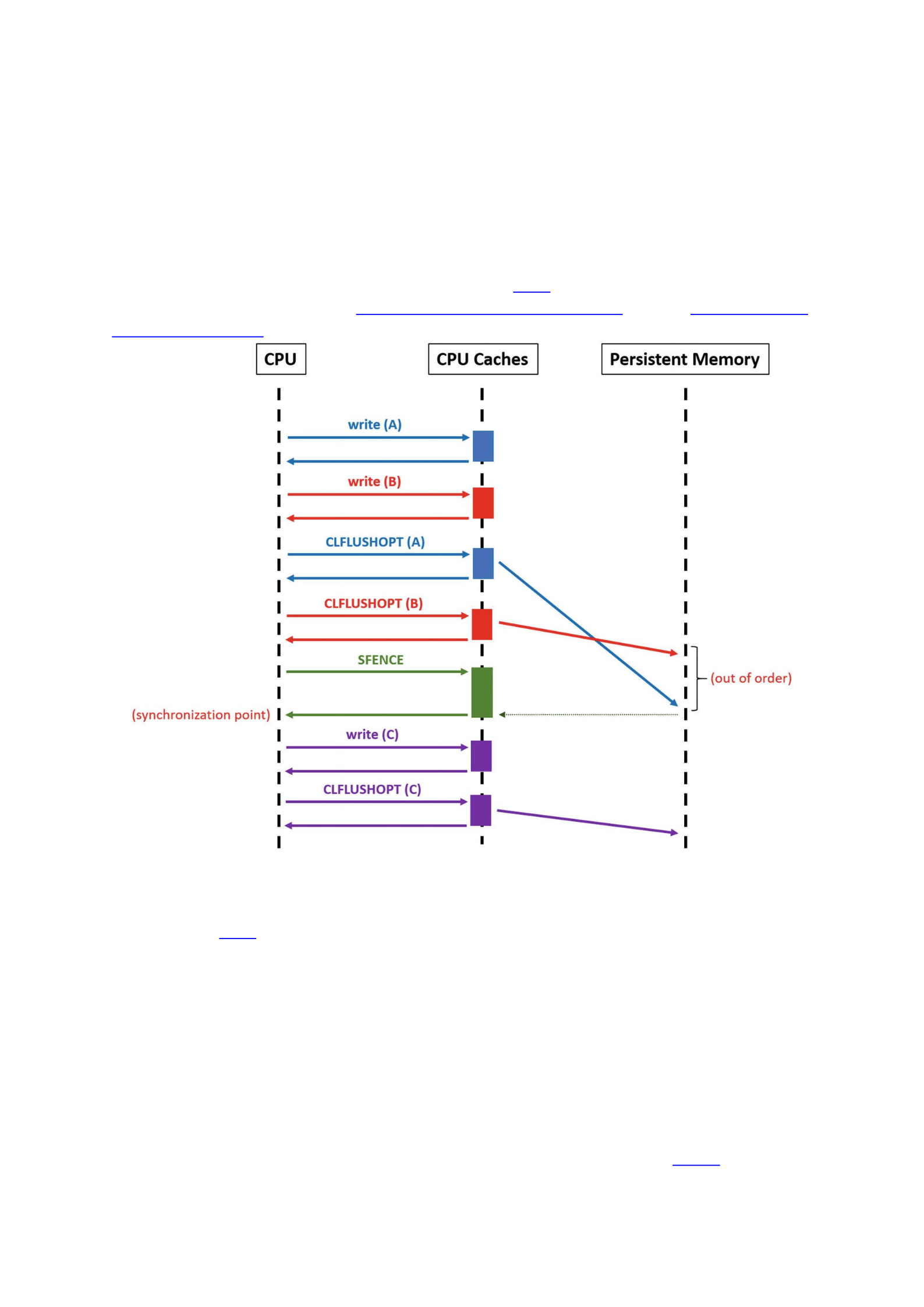
CLWB (needs SFENCE)
Non-temporal stores (needs SFENCE)
The only instruction that ensures each flush is issued in order is CLFUSH because
each CLFLUSH instruction always does an implicit fence instruction (SFENCE). The
other instructions are asynchronous and can be issued in parallel and in any order. The
CPU can only guarantee that all flushes issued since the previous SFENCE have
completed when a new SFENCE instruction is explicitly executed. Think of SFENCE
instructions as synchronization points (see Figure 12-6). For more information about
these instructions, refer to the Intel software developer manuals and the AMD software
developer manuals.
Figure 12-6Example of how asynchronous flushing works. The SFENCE instruction ensures a synchronization
point between the writes to A and B on one side and to C on the other side
As Figure 12-6 shows, we cannot guarantee the order with respect to how A and B
would be finally written to persistent memory. This happens because stores and flushes
to A and B are done between synchronization points. The case of C is different. Using the
SFENCE instruction , we can be assured that C will always go after A and B have been
flushed.
Knowing this, you can now imagine how out-of-order writes could be a problem in a
program crash. If assumptions are made with respect to the order of writes between
synchronization points, or if you forget to add synchronization points between writes
and flushes where strict order is essential (think of a “valid flag” for a variable write,
where the variable needs to be written before the flag is set to valid), you may
encounter data consistency issues. Consider the pseudocode in Listing 12-37.
1 writer () {

2 pcounter = 0;
3 flush (pcounter);
4 for (i=0; i<max; i++) {
5 pcounter++;
6 if (rand () % 2 == 0) {
7 pcells[i].data = data ();
8 flush (pcells[i].data);
9 pcells[i].valid = True;
10 } else {
11 pcells[i].valid = False;
12 }
13 flush (pcells[i].valid);
14 }
15 flush (pcounter);
16 }
17
18 reader () {
19 for (i=0; i<pcounter; i++) {
20 if (pcells[i].valid == True) {
21 print (pcells[i].data);
22 }
23 }
24 }
Listing 12-37Pseudocode showcasing an out-of-order issue
For simplicity, assume that all flushes in Listing 12-37 are also synchronization
points; that is, flush() uses CLFLUSH. The logic of the program is very simple. There
are two persistent memory variables: pcells and pcounter. The first is an array of
tuples {data, valid} where data holds the data and valid is a flag indicating if
data is valid or not. The second variable is a counter indicating how many elements in
the array have been written correctly to persistent memory. In this case, the valid flag
is not the one indicating whether or not the array position was written correctly to
persistent memory. In this case, the flag’s meaning only indicates if the function
data() was called, that is, whether or not data has meaningful data.

At first glance, the program appears correct. With every new iteration of the loop,
the counter is incremented, and then the array position is written and flushed. However,
pcounter is incremented before we write to the array, thus creating a discrepancy
between pcounter and the actual number of committed entries in the array. Although
it is true that pcounter is not flushed until after the loop, the program is only correct
after a crash if we assume that the changes to pcounter stay in the CPU caches (in that
case, a program crash in the middle of the loop would simply leave the counter to zero).
As mentioned at the beginning of this section, we cannot make that assumption. A
cache line can be evicted at any time. In the pseudocode example in Listing 12-37, we
could run into a bug where pcounter indicates that the array is longer than it really is,
making the reader() read uninitialized memory.
The code in Listings 12-38 and 12-39 provide a C++ implementation of the
pseudocode from Listing 12-37. Both use libpmemobj-cpp from the PMDK. Listing
12-38 is the writer program, and Listing 12-39 is the reader.
33 #include <emmintrin.h>
34 #include <unistd.h>
35 #include <stdio.h>
36 #include <string.h>
37 #include <stdint.h>
38 #include <libpmemobj++/persistent_ptr.hpp>
39 #include <libpmemobj++/make_persistent.hpp>
40 #include <libpmemobj++/make_persistent_array.hpp>
41 #include <libpmemobj++/transaction.hpp>
42 #include <valgrind/pmemcheck.h>
43
44 using namespace std;
45 namespace pobj = pmem::obj;
46
47 struct header_t {
48 uint32_t counter;
49 uint8_t reserved[60];
50 };
51 struct record_t {
52 char name[63];
53 char valid;

54 };
55 struct root {
56 pobj::persistent_ptr<header_t> header;
57 pobj::persistent_ptr<record_t[]> records;
58 };
59
60 pobj::pool<root> pop;
61
62 int main(int argc, char *argv[]) {
63
64 // everything between BEGIN and END can be
65 // assigned a particular engine in pmreorder
66 VALGRIND_PMC_EMIT_LOG("PMREORDER_TAG.BEGIN");
67
68 pop = pobj::pool<root>::open("/mnt/pmem/file",
69 "RECORDS");
70 auto proot = pop.root();
71
72 // allocation of memory and initialization to zero
73 pobj::transaction::run(pop, [&] {
74 proot->header
75 = pobj::make_persistent<header_t>();
76 proot->header->counter = 0;
77 proot->records
78 = pobj::make_persistent<record_t[]>(10);
79 proot->records[0].valid = 0;
80 });
81
82 pobj::persistent_ptr<header_t> header
83 = proot->header;

84 pobj::persistent_ptr<record_t[]> records
85 = proot->records;
86
87 VALGRIND_PMC_EMIT_LOG("PMREORDER_TAG.END");
88
89 header->counter = 0;
90 for (uint8_t i = 0; i < 10; i++) {
91 header->counter++;
92 if (rand() % 2 == 0) {
93 snprintf(records[i].name, 63,
94 "record #%u", i + 1);
95 pop.persist(records[i].name, 63); // flush
96 records[i].valid = 2;
97 } else
98 records[i].valid = 1;
99 pop.persist(&(records[i].valid), 1); // flush
100 }
101 pop.persist(&(header->counter), 4); // flush
102
103 pop.close();
104 return 0;
105 }
Listing 12-38Example of writing to persistent memory with an out-of-order write bug
33 #include <stdio.h>
34 #include <stdint.h>
35 #include <libpmemobj++/persistent_ptr.hpp>
36
37 using namespace std;
38 namespace pobj = pmem::obj;
39

40 struct header_t {
41 uint32_t counter;
42 uint8_t reserved[60];
43 };
44 struct record_t {
45 char name[63];
46 char valid;
47 };
48 struct root {
49 pobj::persistent_ptr<header_t> header;
50 pobj::persistent_ptr<record_t[]> records;
51 };
52
53 pobj::pool<root> pop;
54
55 int main(int argc, char *argv[]) {
56
57 pop = pobj::pool<root>::open("/mnt/pmem/file",
58 "RECORDS");
59 auto proot = pop.root();
60 pobj::persistent_ptr<header_t> header
61 = proot->header;
62 pobj::persistent_ptr<record_t[]> records
63 = proot->records;
64
65 for (uint8_t i = 0; i < header->counter; i++) {
66 if (records[i].valid == 2) {
67 printf("found valid record\n");
68 printf(" name = %s\n",
69 records[i].name);

70 }
71 }
72
73 pop.close();
74 return 0;
75 }
Listing 12-39Reading the data structure written by Listing 12-38 to persistent memory
Listing 12-38 (writer) uses the VALGRIND_PMC_EMIT_LOG macro to emit a
pmreorder message when we get to lines 66 and 87. This will make sense later when we
introduce out-of-order analysis using pmemcheck.
Now we will run Persistence Inspector first. To perform out-of-order analysis, we
must use the -check-out-of-order-store option to the report phase. Listing 12-
40 shows collecting the before and after data and then running the report.
$ pmempool create obj --size=100M --layout=RECORDS /mnt/pmem/file
$ pmeminsp cb -pmem-file /mnt/pmem/file -- ./listing_12-38
++ Analysis starts
++ Analysis completes
++ Data is stored in folder "/data/.pmeminspdata/data/listing_12-38"
$ pmeminsp ca -pmem-file /mnt/pmem/file -- ./listing_12-39
++ Analysis starts
found valid record
name = record #2
found valid record
name = record #7
found valid record
name = record #8
++ Analysis completes
++ Data is stored in folder "/data/.pmeminspdata/data/listing_12-39"
$ pmeminsp rp -check-out-of-order-store -- ./listing_12-38 ./listing_12-39
#===========================================
==================
# Diagnostic # 1: Out-of-order stores
#-------------------

Memory store
of size 4 at address 0x7FD7BEBC05D0 (offset 0x3C05D0 in
/mnt/pmem/file)
in /data/listing_12-38!main at listing_12-38.cpp:91 - 0x1D0C
in /lib64/libc.so.6!__libc_start_main at <unknown_file>:<unknown_line> -
0x223D3
in /data/listing_12-38!_start at <unknown_file>:<unknown_line> - 0x1624
is out of order with respect to
memory store
of size 1 at address 0x7FD7BEBC068F (offset 0x3C068F in
/mnt/pmem/file)
in /data/listing_12-38!main at listing_12-38.cpp:98 - 0x1DAF
in /lib64/libc.so.6!__libc_start_main at <unknown_file>:<unknown_line> -
0x223D3
in /data/listing_12-38!_start at <unknown_file>:<unknown_line> - 0x1624
Listing 12-40Running Intel Inspector – Persistence Inspector with Listing 12-38 (writer) and Listing 12-39
(reader)
The Persistence Inspector report identifies an out-of-order store issue. The tool says
that incrementing the counter in line 91 (main at listing_12-38.cpp:91) is out
of order with respect to writing the valid flag inside a record in line 98 (main at
listing_12-38.cpp:98).
To perform out-of-order analysis with pmemcheck, we must introduce a new tool
called pmreorder. The pmreorder tool is included in PMDK from version 1.5 onward.
This stand-alone Python tool performs a consistency check of persistent programs using
a store reordering mechanism. The pmemcheck tool cannot do this type of analysis,
although it is still used to generate a detailed log of all the stores and flushes issued by
an application that pmreorder can parse. For example, consider Listing 12-41.
$ valgrind --tool=pmemcheck -q --log-stores=yes --log-stores-
stacktraces=yes
--log-stores-stacktraces-depth=2 --print-summary=yes
--log-file=store_log.log ./listing_12-38
Listing 12-41Running pmemcheck to generate a detailed log of all the stores and flushes issued by Listing 12-38
The meaning of each parameter is as follows:
-q silences unnecessary pmemcheck logs that pmreorder cannot parse.
--log-stores=yes tells pmemcheck to log all stores.
--log-stores-stacktraces=yes dumps stacktrace with each logged
store. This helps locate issues in your source code.
--log-stores-stacktraces-depth=2 is the depth of logged
stacktraces. Adjust according to the level of information you need.

--print-summary=yes prints a summary on program exit. Why not?
--log-file=store_log.log logs everything to store_log.log.
The pmreorder tool works with the concept of “engines.” For example, the
ReorderFull engine checks consistency for all the possible combinations of reorders
of stores and flushes. This engine can be extremely slow for some programs, so you can
use other engines such as ReorderPartial or NoReorderDoCheck. For more
information, refer to the pmreorder page, which has links to the man pages
(https://pmem.io/pmdk/pmreorder/).
Before we run pmreorder, we need a program that can walk the list of records
contained within the memory pool and return 0 when the data structure is consistent,
or 1 otherwise. This program is similar to the reader shown in Listing 12-42.
33 #include <stdio.h>
34 #include <stdint.h>
35 #include <libpmemobj++/persistent_ptr.hpp>
36
37 using namespace std;
38 namespace pobj = pmem::obj;
39
40 struct header_t {
41 uint32_t counter;
42 uint8_t reserved[60];
43 };
44 struct record_t {
45 char name[63];
46 char valid;
47 };
48 struct root {
49 pobj::persistent_ptr<header_t> header;
50 pobj::persistent_ptr<record_t[]> records;
51 };
52
53 pobj::pool<root> pop;
54
55 int main(int argc, char *argv[]) {

56
57 pop = pobj::pool<root>::open("/mnt/pmem/file",
58 "RECORDS");
59 auto proot = pop.root();
60 pobj::persistent_ptr<header_t> header
61 = proot->header;
62 pobj::persistent_ptr<record_t[]> records
63 = proot->records;
64
65 for (uint8_t i = 0; i < header->counter; i++) {
66 if (records[i].valid < 1 or
67 records[i].valid > 2)
68 return 1; // data struc. corrupted
69 }
70
71 pop.close();
72 return 0; // everything ok
73 }
Listing 12-42Checking the consistency of the data structure written in Listing 12-38
The program in Listing 12-42 iterates over all the records that we expect should
have been written correctly to persistent memory (lines 65-69). It checks the valid
flag for each record, which should be either 1 or 2 for the record to be correct (line 66).
If an issue is detected, the checker will return 1 indicating data corruption.
Listing 12-43 shows a three-step process for analyzing the program:
1.
Create an object type persistent memory pool, known as a memory-mapped file, on
/mnt/pmem/file of size 100MiB, and name the internal layout “RECORDS.”
2. Use the pmemcheck Valgrind tool to record data and call stacks while the program is
running.
3. The pmreorder utility processes the store.log output file from pmemcheck
using the ReorderFull engine to produce a final report.
$ pmempool create obj --size=100M --layout=RECORDS /mnt/pmem/file
$ valgrind --tool=pmemcheck -q --log-stores=yes --log-stores-
stacktraces=yes --log-stores-stacktraces-depth=2 --print-summary=yes --
log-file=store.log ./listing_12-38

$ pmreorder -l store.log -o output_file.log -x
PMREORDER_TAG=NoReorderNoCheck -r ReorderFull -c prog -p
./listing_12-38
Listing 12-43First, a pool is created for Listing 12-38. Then, pmemcheck is run to get a detailed log of all the
stores and flushes issued by Listing 12-38. Finally, pmreorder is run with engine ReorderFull
The meaning of each pmreorder option is as follows:
-l store_log.log is the input file generated by pmemcheck with all the
stores and flushes issued by the application.
-o output_file.log is the output file with the out-of-order analysis
results.
-x PMREORDER_TAG=NoReorderNoCheck assigns the engine
NoReorderNoCheck to the code enclosed by the tag PMREORDER_TAG
(see lines 66-87 from Listing 12-38). This is done to focus the analysis on the
loop only (lines 89-105 from Listing 12-38).
-r ReorderFull sets the initial reorder engine. In our case,
ReorderFull.
-c prog is the consistency checker type. It can be prog (program) or lib
(library).
-p ./checker is the consistency checker.
Opening the generated file output_file.log , you should see entries similar to
those in Listing 12-44 that highlight detected inconsistencies and problems within the
code.
WARNING:pmreorder:File /mnt/pmem/file inconsistent
WARNING:pmreorder:Call trace:
Store [0]:
by 0x401D0C: main (listing_12-38.cpp:91)
Listing 12-44Content from “output_file.log” generated by pmreorder showing a detected inconsistency during the
out-of-order analysis
The report states that the problem resides at line 91 of the listing_12-38.cpp writer
program. To fix listing_12-38.cpp, move the counter incrementation after all the
data in the record has been flushed all the way to persistent media. Listing 12-45 shows
the corrected part of the code.
86 for (uint8_t i = 0; i < 10; i++) {
87 if (rand() % 2 == 0) {
88 snprintf(records[i].name, 63,
89 "record #%u", i + 1);
90 pop.persist(records[i].name, 63);
91 records[i].valid = 2;
92 } else
93 records[i].valid = 1;

94 pop.persist(&(records[i].valid), 1);
95 header->counter++;
96 }

