


Help with JavaScript
 Ghazi33
Hello, I need help right now with my JavaScript problem.
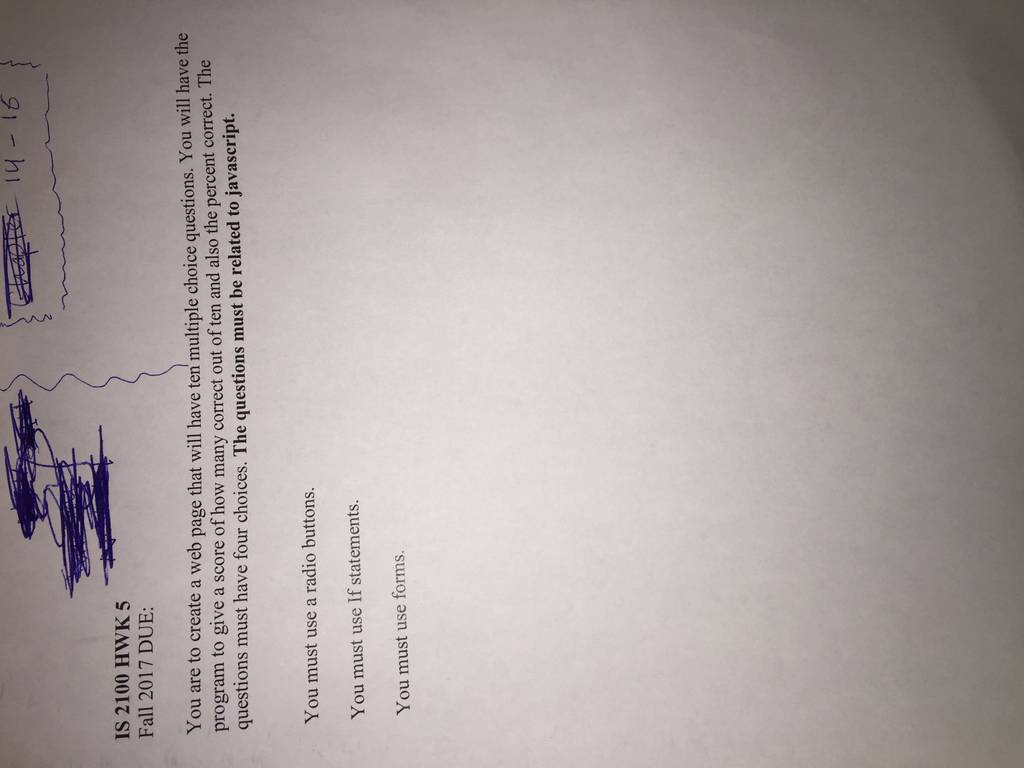
I have attached the question below. If you cant do it now please do not request to do the HM.
i have done part of it but i did not works.
Here is my code.
<html>
<head>
<script type="text/javascript">
function processScore(f){
var score = 0
if (document.Q1.q1RB[0].checked) {
score = score+1
}
if else (document.Q2.q2RB[1].checked) {
score = score +1
}
if else (document.Q3.q3RB[2].checked) {
score = score+1
}
if else (document.Q4.q4RB[3].checked) {
score = score+1
}
else if (document.Q5.q5RB[5].checked) {
score = score+1
}
else if (document.Q6.q6RB[6].checked) {
score = score+1
}
if (document.Q7.q7RB[7].checked) {
score = score+1
}
if (document.Q8.q8RB[8].checked) {
score = score+1
}
if (document.Q9.q9RB[9].checked) {
score = score+1
}
if (document.Q10.q10RB[10].checked) {
score = score+1
}
document.answers.Q1Box.value="c"
document.answers.Q2Box.value="d"
document.answers.Q3Box.value="c"
document.answers.Q4Box.value="b"
document.answers.Q5Box.value="d"
document.answers.Q6Box.value="a"
document.answers.Q7Box.value="c"
document.answers.Q8Box.value="a"
document.answers.Q9Box.value="a"
document.answers.Q10Box.value="b"
document.answers.ScoreBox.value=score
}
</script>
<body>
<form id="Q1" name="Q1">
1.How to write an IF statement for executing some code if "i" is NOT equal to 5? <br/>
<input type="radio" name="q1RB"> a.if i =! 5 then <br/>
<input type="radio" name="q1RB"> b. if (i <> 5) <br/>
<input type="radio" name="q1RB"> c. if (i != 5) <br/>
<input type="radio" name="q1RB"> c. if i <> 5 <br/>
</form>
<form id="Q2" name="Q2">
2. Inside which HTML element do we put the JavaScript? <br/>
<input type="radio" name="q2RB"> a.<javascript> <br/>
<input type="radio" name="q2RB"> b.<js> <br/>
<input type="radio" name="q2RB"> c. <scripting> <br/>
<input type="radio" name="q2RB"> d. <script> <br/>
</form>
<form id="Q3" name="Q3">
3. Where is the correct place to insert a JavaScript?
<input type="radio" name="q3RB"> a.The <head> section <br/>
<input type="radio" name="q3RB"> b.The <body> section <br/>
<input type="radio" name="q3RB"> c. Both the <head> and <body> section <br/>
<input type="radio" name="q3RB"> d. In a new file <br/>
</form>
<form id="Q4" name="Q4">
4. How do you write "Hello World" in an alert box?
<input type="radio" name="q4RB"> a.msg("Hello World"); <br/>
<input type="radio" name="q4RB"> b.alert("Hello World"); <br/>
<input type="radio" name="q4RB"> c.msgBox("Hello World"); <br/>
<input type="radio" name="q4RB"> d. alertBox("Hello World"); <br/>
</form>
<form id="Q5" name="Q5">
5. How to write an IF statement in JavaScript?
<input type="radio" name="q5RB"> a.if i == 5 then <br/>
<input type="radio" name="q5RB"> b.if i = 5 <br/>
<input type="radio" name="q5RB"> c. if i = 5 then <br/>
<input type="radio" name="q5RB"> d. if (i == 5) <br/>
</form>
<form id="Q6" name="Q6">
6. How can you add a comment in a JavaScript?
<input type="radio" name="q6RB"> a.//This is a comment <br/>
<input type="radio" name="q6RB"> b.'This is a comment <br/>
<input type="radio" name="q6RB"> c. <!--This is a comment--> <br/>
<input type="radio" name="q6RB"> d. /*This is a comment */ <br/>
</form>
<form id="Q7" name="Q7">
7.How do you declare a JavaScript variable?
<input type="radio" name="q7RB"> a.v carName; <br/>
<input type="radio" name="q7RB"> b.variable carName; <br/>
<input type="radio" name="q7RB"> c. var carName; <br/>
<input type="radio" name="q7RB"> d. int carName; <br/>
</form>
<form id="Q8" name="Q8">
8. How do you create a function in JavaScript?
<input type="radio" name="q8RB"> a.function myFunction() <br/>
<input type="radio" name="q8RB"> b.function:myFunction() <br/>
<input type="radio" name="q8RB"> c. function = myFunction() <br/>
<input type="radio" name="choiceRB"> d. public function () <br/>
</form>
<form id="Q9" name="Q9">
9.How does a FOR loop start?
<input type="radio" name="q9RB"> a. for (i = 0; i <= 5; i++) <br/>
<input type="radio" name="q9RB"> b.for (i = 0; i <= 5) <br/>
<input type="radio" name="q9RB"> c. for i = 1 to 5<br/>
<input type="radio" name="q9RB"> d. for (i <= 5; i++)<br/>
</form>
<form id="Q10" name="Q10">
10.Which operator is used to assign a value to a variable?
<input type="radio" name="q10RB"> a. * <br/>
<input type="radio" name="q10RB"> b. = <br/>
<input type="radio" name="q10RB"> c. X <br/>
<input type="radio" name="q10RB"> d. - <br/>
</form>
<form id="answers" name="answers">
<input type="button" name="b1" value = "Grade me"
onclick="processScore()">
<br/>
you scored:
<input type="text" name="ScoreBox" size="1"> out of 1 <br/>
</form>
</body>
</html>
 9 years ago
 20
20
- Writing: Persuasion Essay (Quality Work Only)
- Multiple choice Test
- racial inequalities in education
- Annonymous
- academic English excellent
- Assignment 1: Database Consultant Services
- Assignment
- BUS 434 Compensation & Benefits Management
- business
- Cost-flow assumptionsâFIFO, LIFO, and weighted average using a periodic system The following data are available for Sellco for the fiscal...

