


INTERVIEW PROJECT 2
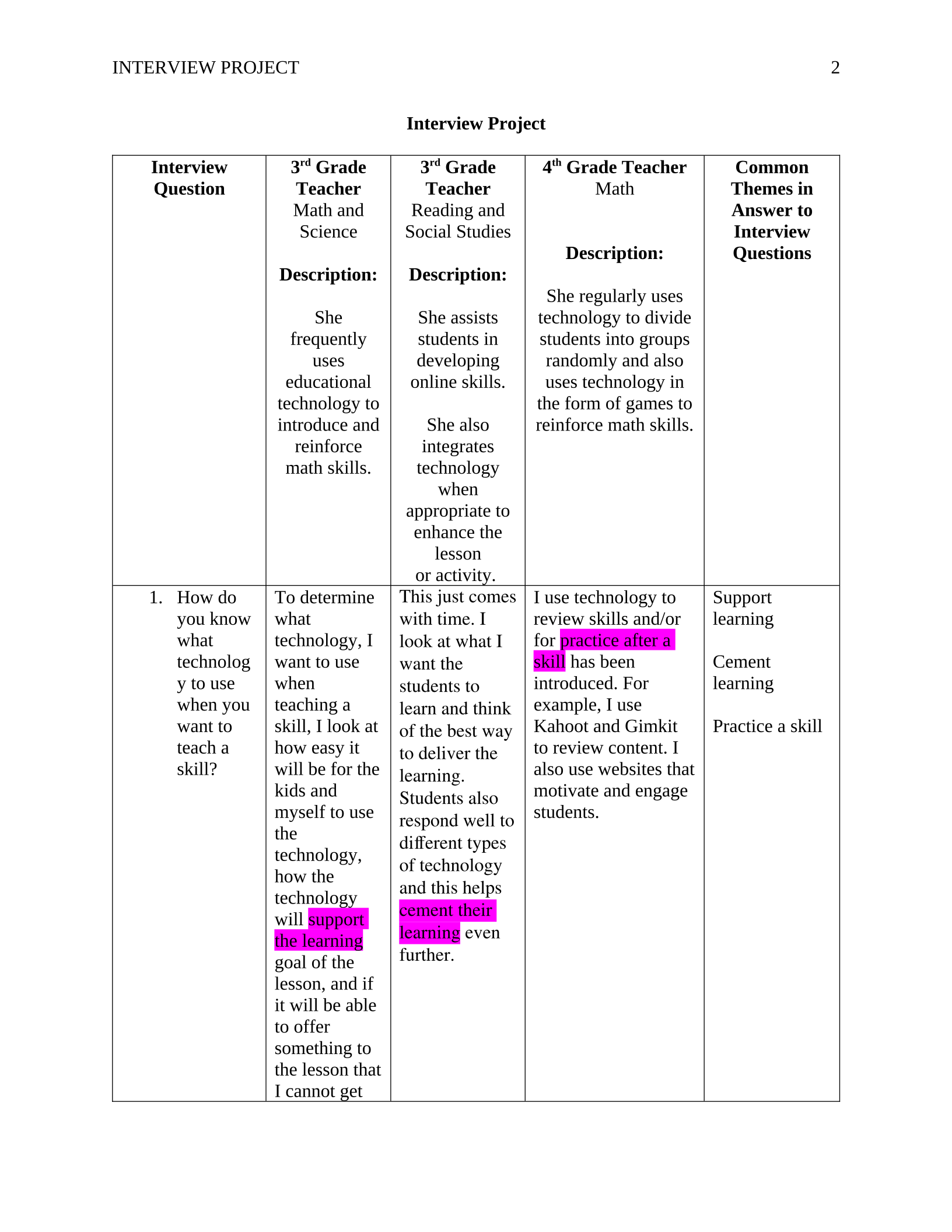
Interview Project
Interview
Question
3rd Grade
Teacher
Math and
Science
Description:
She
frequently
uses
educational
technology to
introduce and
reinforce
math skills.
3rd Grade
Teacher
Reading and
Social Studies
Description:
She assists
students in
developing
online skills.
She also
integrates
technology
when
appropriate to
enhance the
lesson
or activity.
4th Grade Teacher
Math
Description:
She regularly uses
technology to divide
students into groups
randomly and also
uses technology in
the form of games to
reinforce math skills.
Common
Themes in
Answer to
Interview
Questions
1. How do
you know
what
technolog
y to use
when you
want to
teach a
skill?
To determine
what
technology, I
want to use
when
teaching a
skill, I look at
how easy it
will be for the
kids and
myself to use
the
technology,
how the
technology
will support
the learning
goal of the
lesson, and if
it will be able
to offer
something to
the lesson that
I cannot get
This just comes
with time. I
look at what I
want the
students to
learn and think
of the best way
to deliver the
learning.
Students also
respond well to
different types
of technology
and this helps
cement their
learning even
further.
I use technology to
review skills and/or
for practice after a
skill has been
introduced. For
example, I use
Kahoot and Gimkit
to review content. I
also use websites that
motivate and engage
students.
Support
learning
Cement
learning
Practice a skill
INTERVIEW PROJECT 3
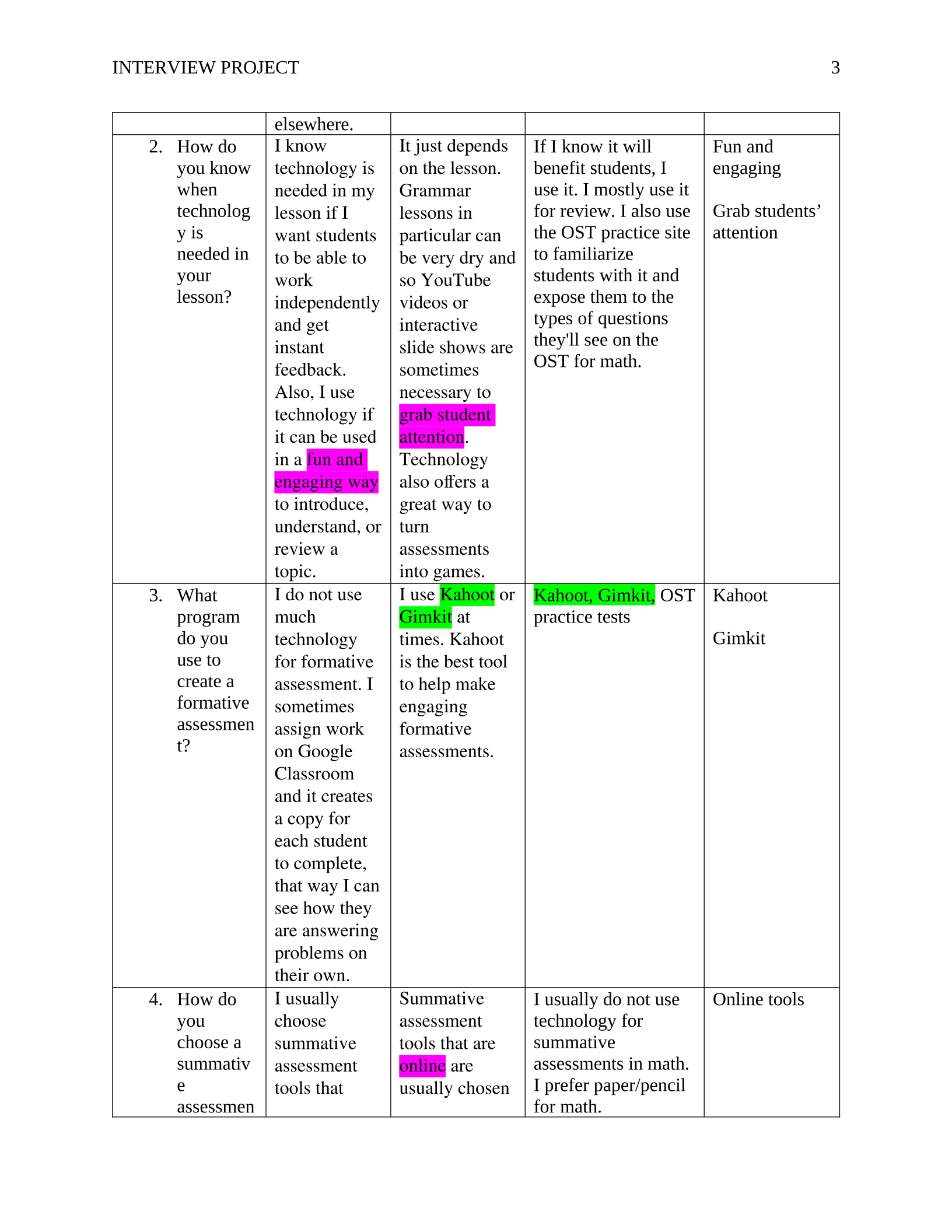
elsewhere.
2. How do
you know
when
technolog
y is
needed in
your
lesson?
I know
technology is
needed in my
lesson if I
want students
to be able to
work
independently
and get
instant
feedback.
Also, I use
technology if
it can be used
in a fun and
engaging way
to introduce,
understand, or
review a
topic.
It just depends
on the lesson.
Grammar
lessons in
particular can
be very dry and
so YouTube
videos or
interactive
slide shows are
sometimes
necessary to
grab student
attention.
Technology
also offers a
great way to
turn
assessments
into games.
If I know it will
benefit students, I
use it. I mostly use it
for review. I also use
the OST practice site
to familiarize
students with it and
expose them to the
types of questions
they'll see on the
OST for math.
Fun and
engaging
Grab students’
attention
3. What
program
do you
use to
create a
formative
assessmen
t?
I do not use
much
technology
for formative
assessment. I
sometimes
assign work
on Google
Classroom
and it creates
a copy for
each student
to complete,
that way I can
see how they
are answering
problems on
their own.
I use Kahoot or
Gimkit at
times. Kahoot
is the best tool
to help make
engaging
formative
assessments.
Kahoot, Gimkit, OST
practice tests
Kahoot
Gimkit
4. How do
you
choose a
summativ
e
assessmen
I usually
choose
summative
assessment
tools that
Summative
assessment
tools that are
online are
usually chosen
I usually do not use
technology for
summative
assessments in math.
I prefer paper/pencil
for math.
Online tools
INTERVIEW PROJECT 4
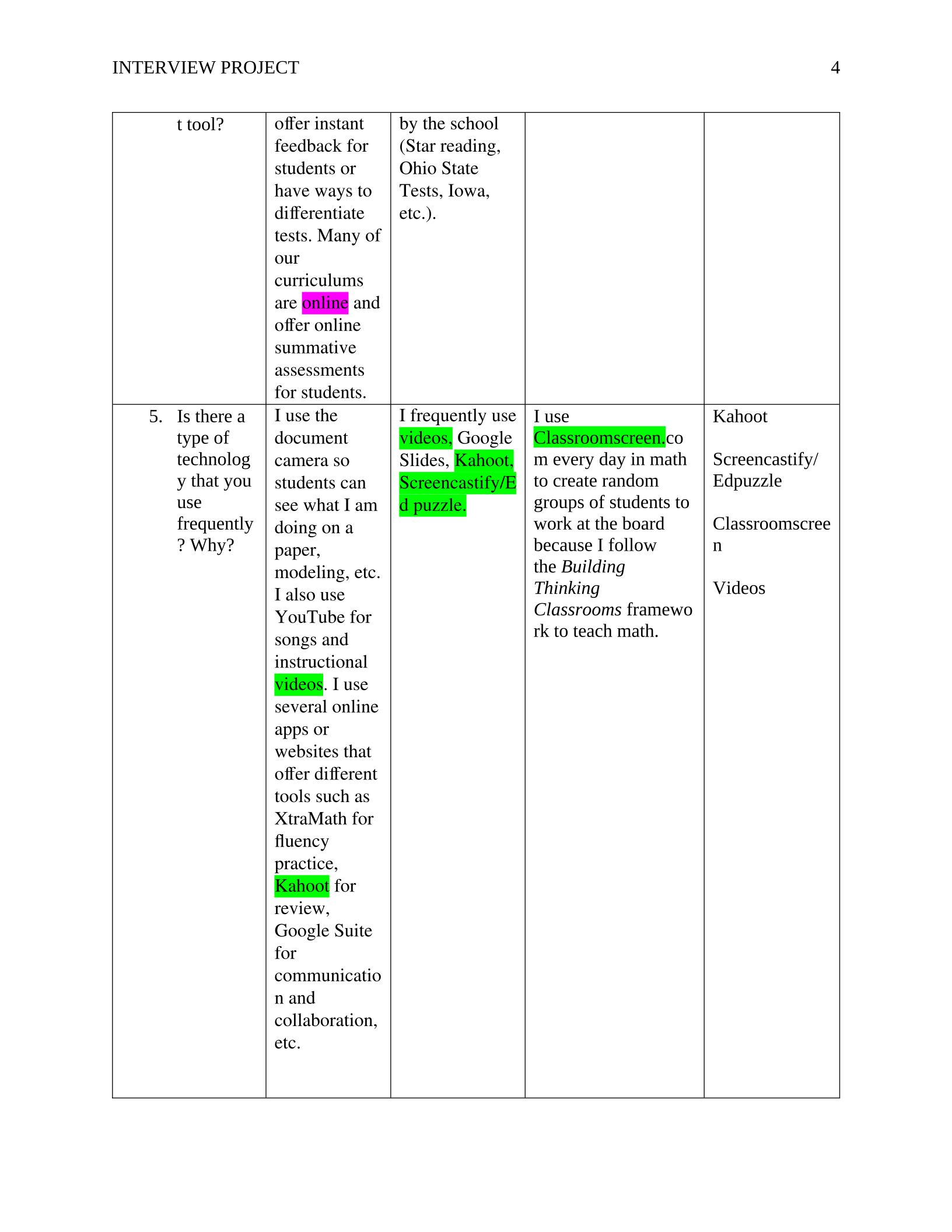
t tool? offer instant
feedback for
students or
have ways to
differentiate
tests. Many of
our
curriculums
are online and
offer online
summative
assessments
for students.
by the school
(Star reading,
Ohio State
Tests, Iowa,
etc.).
5. Is there a
type of
technolog
y that you
use
frequently
? Why?
I use the
document
camera so
students can
see what I am
doing on a
paper,
modeling, etc.
I also use
YouTube for
songs and
instructional
videos. I use
several online
apps or
websites that
offer different
tools such as
XtraMath for
fluency
practice,
Kahoot for
review,
Google Suite
for
communicatio
n and
collaboration,
etc.
I frequently use
videos, Google
Slides, Kahoot,
Screencastify/E
d puzzle.
I use
Classroomscreen.co
m every<day in math
to create random
groups of students to
work at the board
because I follow
the<Building
Thinking
Classrooms<framewo
rk to teach math.<
Kahoot
Screencastify/
Edpuzzle
Classroomscree
n
Videos
INTERVIEW PROJECT 5
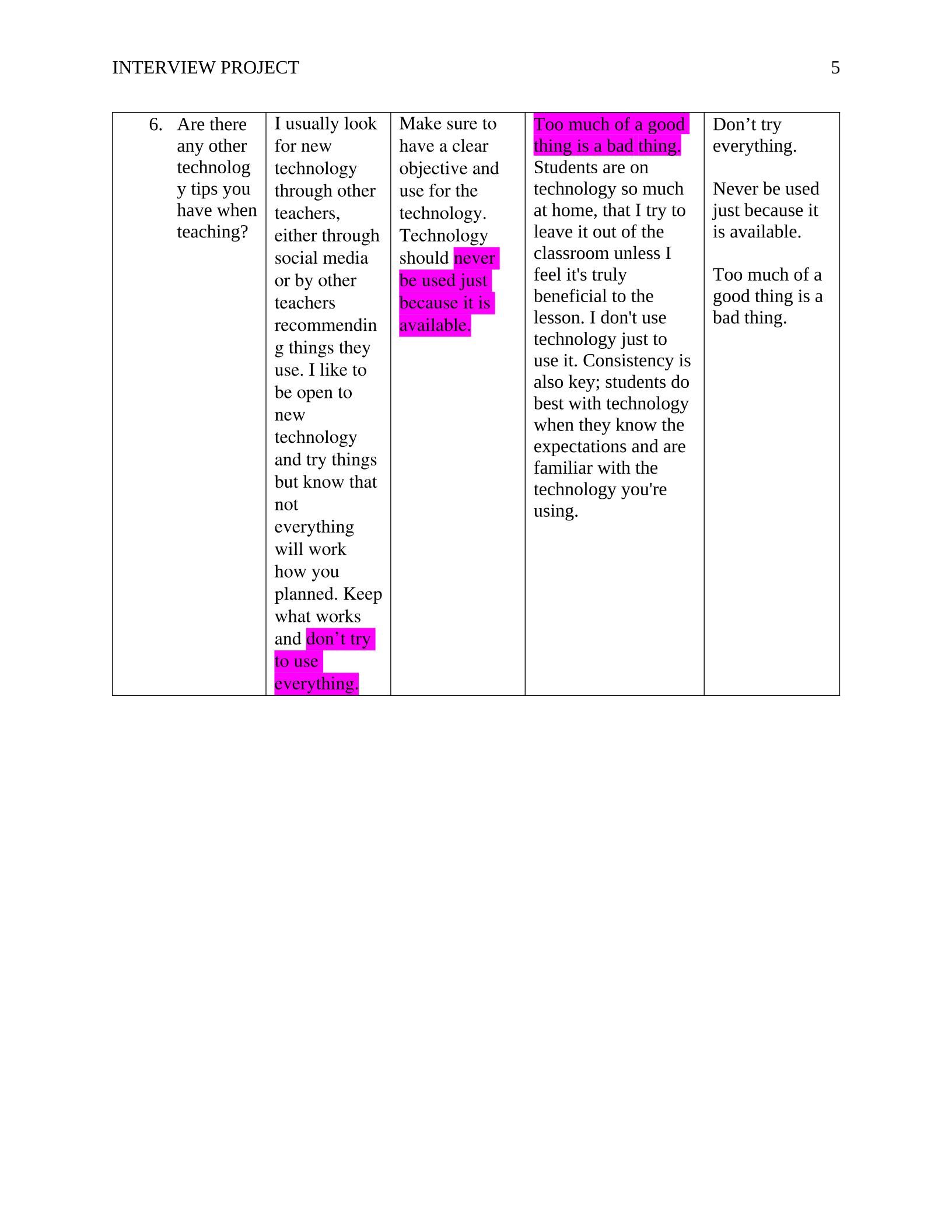
6. Are there
any other
technolog
y tips you
have when
teaching?
I usually look
for new
technology
through other
teachers,
either through
social media
or by other
teachers
recommendin
g things they
use. I like to
be open to
new
technology
and try things
but know that
not
everything
will work
how you
planned. Keep
what works
and don’t try
to use
everything.
Make sure to
have a clear
objective and
use for the
technology.
Technology
should never
be used just
because it is
available.
Too much of a good
thing is a bad<thing.
Students are on
technology so much
at home, that I try to
leave it out of the
classroom unless I
feel it's truly
beneficial to the
lesson. I don't use
technology just to
use it. Consistency is
also key; students do
best with technology
when they know the
expectations and are
familiar<with the
technology you're
using.
Don’t try
everything.
Never be used
just because it
is available.
Too much of a
good thing is a
bad thing.
Powered by TCPDF (www.tcpdf.org)

