



Module 4 MindTap Lab
Attackers use programs referred to as Trojans to stealthily enter a target system with the intent
to disrupt, steal, or manipulate data. Usually some form of social engineering must take place in order
for a Trojan to be installed on a device. Means include, but are not limited to, malicious e-mail
attachments, spoofed web URLs, and embedded programs in online advertisements. Once installed on a
target device, the malicious code remains undetected by appearing to be a normal file. Trojan horse
attacks differ from others because for the most part they require legitimate installation by an
unexpecting user.
Trojan horse attacks take many forms each with a specific but equally damaging outcome.
Remote access Trojans seek to give an attacker control over a victim system. Trojans that can send data
back to the attacker collect sensitive information such as usernames, passwords, e-mail addresses, and
credit card information. Not all Trojans are as passive as the ones mentioned above. Some Trojans serve
no other purpose than to destroy the systems they are installed. Famously in 2010 the Trojan horse
attack that installed the computer worm known as Stuxnet was delivered via an infected USB drive. The
Stuxnet virus systematically destroyed Windows based devices and specifically attacked the Iranian
nuclear program.
The Remote access Trojan Freak88 is a tool that can be used to perform an attack known as a
Distributed Denial of service (DDoS) attack. By installing the Freak88 server Trojan on various systems,
the tool can be used to pull of an attack known as the ping of death to cripple a target system. A Trojan
attack like Freak88 carries the power to bring down services like banks, video streaming, and many more.
This type of attack can quickly cause monetary damages in hardware replacement and loss of service.
To combat the use of Trojans, system security experts must utilize Trojan detectors. The first step
in detecting Trojans is to avoid an infection in the first place. In a business environment employees must
be trained not to open or download any e-mails or files that look suspicious or are not from a trusted
source. This type of training can be implemented via web-based training where the users can see first
hand what types of things to avoid. If a Trojan has already made its way onto a system that the only way
to detect its presence is to actively monitor the system for any abnormal data flows. Using a tool like
NetStat, security professionals can view TCP connections, IP routing tables, and what ports are active on
the network. By know the parameters of the security policies in place, traffic being utilized by a Trojan
can be isolated and shutdown. Ny tracing back source and destination information, the attackers can be
identified, and the target device can be quarantined and either replaced or repaired.
A proactive approach is really the only thing that can be effective against this type of attack.
Layering defense strategies and monitoring the network is a great start. Having a backup plan incase of
an attack is a necessity. It is no longer the case of if it will happen, it is when.

Panther2:
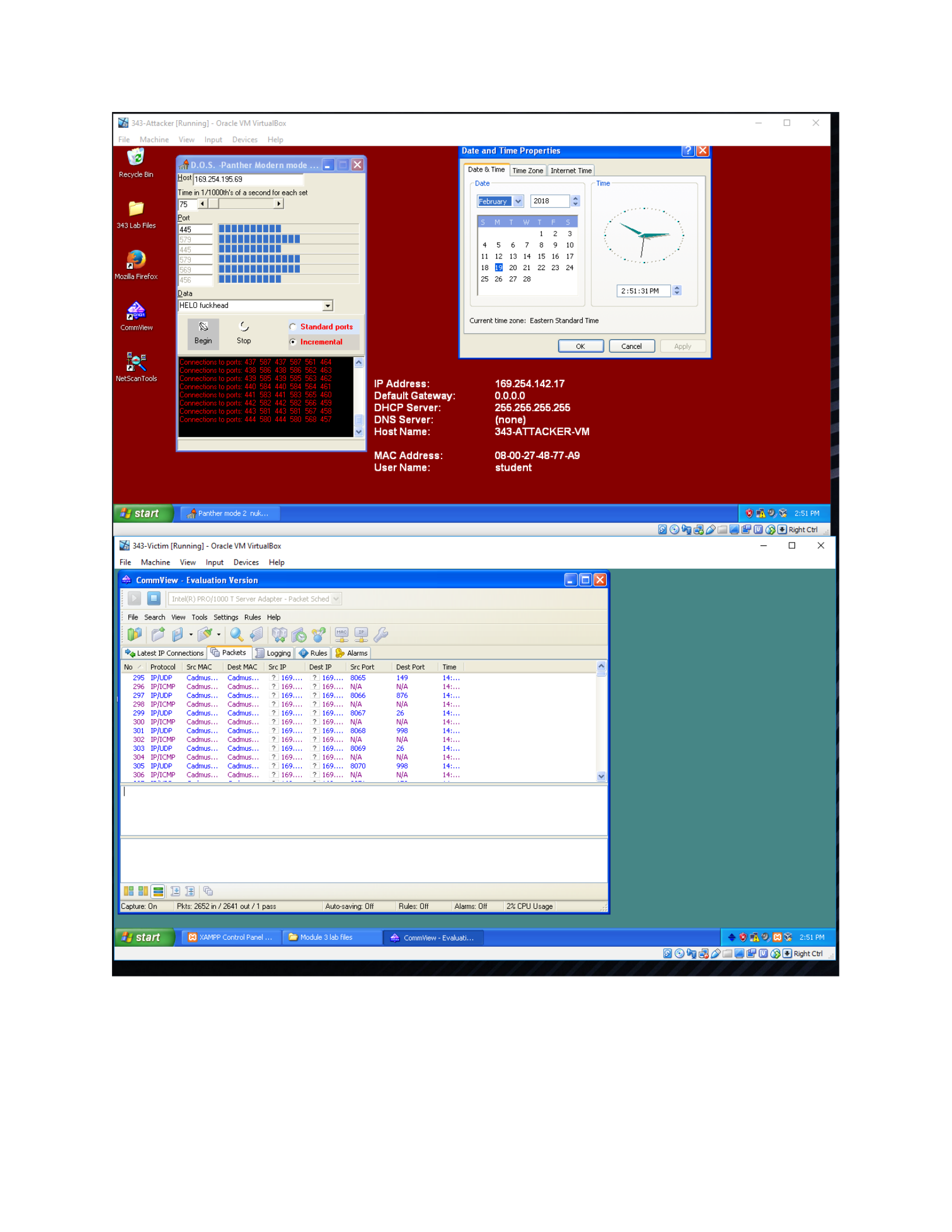
Panther2 is a tool that allows an attacker to perform a Denial of Service attack on a victim by
identifying the target IP address. Once the application has been installed on the attacker’s system
starting the DoS is simple. In the application the attacker only has to enter the victim IP address and
select the type of data for the DoS Attack. For this Lab I chose to use the data labeled “PING 127.0.0.1.”
On the attacker device you immediately start seeing the Panther2 application scrolling through ports that
are incrementing multiple times a second. Having the packet sniffer open on the victim device shows
thousands of packets trying to be processing. While the attack is being performed no noticeable
performance change is noticed on the victim computer. I can see all the incoming packets but it seems as
though it is not enough to affect the operation of the victim pc. I a realistic application of this attack the
data attacking the victim device would be coming from a bot net of attacking computers. In this lab you
can see how the attack works, but it is not enough to overcome the victim system. It would be
interesting to see how this would affect a device that is actually under attack.
From a network defense standpoint, it seems like this tool is using every open port to ping the
target device. A good packet filtering firewall that can block all unused ports seems like it could be
effective against this specific tool. It should be standard security practices to close any and all unused
ports on a network. Leaving them open only opens the system up to an attack. As with most of these
labs the network defender is at the mercy of the attacker. All the attacker needs to do is find one
oversight, one flaw in the system, while the defenders must try and account for all known, and unknown
vulnerabilities and risks.
HHost|
169,254.19:
Time
in
1/1000
ct
second
for
exch
set
fs
st
>I
|Port
5
5 6
M2
13 14 18 16 17
1
20
21
22 23 24
25
2
27 28
a
asian
|¢
HELO
fuckhead
Current
time
zane:
Eastern
Standard
Time
©
&
©
Standard
ports
Bein
Stop
©
Incremental
Cecencet
Tes
169.254.142.17
Dern
NE
KK
Peas
Pe
WW)
PECs
Grn)
Dae
RCE
UE
Nee
LCE
Leelee
rae)
teeta
Ws
student
[Paes
BSOEBEO
OwRatcn
[ZB
343-Victim
[Running]
-
Oracle
VM
VirtualBox
= a x
File
Machine
View
Input
Devices
Help
Cuter
ete
l
File
Search
View
Tools
Settings
Rules
Help
a
P\@
&
&
mk5
~¥OC\SS
%e
Latest
IP
Connections
Packets
|)
No
/
Protocol
SreMAC
Dest
MAC
SrcIP
Dest
IP
SrePort
Dest
Port
Te
296
IPJICMP
Cadmus...
Cadmus,
169...
2/168...
M/A,
Nia
Logging
|
@
Rules
|
Bp
Alarms
298
IPJICMP
Cadmus...
Cadmus,
168.
169...
NYA Nia
300
IPJICMP
Cadmus...
Cadmus,
168.
169...
NYA Nia
302
IPJICMP
Cadmus...
Cadmus,
168.
169...
NYA Nia
304
IPJICMP
Cadmus...
Cadmus,
168.
169...
NYA Nia
306
IPJICMP
Cadmus...
Cadmus,
168.
169...
NYA
ja
(Capture:
On
Pkts:
26621n
/
2641
out
/1
pass
Auto-saving:
Off Rules: Off
Alas:
Off
2%
CPU
Usage

