



Currying and Partial Application
Currying and Partial Application are two more functional concepts that come
straight out of old maths papers. The former has absolutely nothing to do
with Indian food, delicious though it is1 in fact it’s named after the pre-
eminent American mathematician Haskell Brooks Curry, after whom no few
fewer than three programming languages are named2.
Currying came from Haskell Curry’s work on combinatory logic, which
served as one of the bases for modern functional programming. Rather than
give a dry formal definition, I’ll explain by example. This is a bit of
vaguely C#-like pseudocode for an add function:
public interface ICurriedFunctions
{
decimal Add(decimal a, decimal b);
}
var curry = // some logic for obtaining an implementation

of the interface
var answer = curry.Add(100, 200);
In this example, we’d expect answer to simply be 300 (i.e. 100+200), which
is indeed what it would be.
What if I were only to provide a single parameter, however? Like this:
public interface ICurriedFunctions
{
decimal Add(decimal a, decimal b);
}
var curry = // some logic for obtaining an implementation
of the interface
var answer = curry.Add(100); // What could it be?
In this scenario, if this were a hypothetical curried function, what do you
think you’d have returned to you in answer?
There’s a rule of thumb I’ve devised when working in functional
programming - if there’s a question, the answer is likely to be “functions”.
Which is the case here.
If this were a curried function, then the the answer variable would be a
function. It would be a modified version of the original Add function, but
with the first parameter now set in stone as the value 100 - effectively making
it a new function, one that adds 100 to whatever you provide.
You might use it like this:
public interface ICurriedFunctions
{
decimal Add(decimal a, decimal b);
}
var curry = // some logic for obtaining an implementation
of the interface

var add100 = curry.Add(100); // Func<decimal,decimal>, adds
100 to the input
var answerA = add100(200); // 300 -> 200+100
var answerB = add100(0); // 100 -> 0+100
var answerC = add100(900); // 1000 -> 900+100
It’s basically a way to start with a function that has a number of parameters,
and from it, create mutiple, more specific versions of that function. One
single base function can become many different functions, not unlike the OO
concept of inheritance.
What exactly is the point of currying, though? How do you use it?
Let me explain…
Currying and large functions
In the “Add” example I gave above, we’ve only got a single pair of
parameters, and so there are only two possibilities for what we could possibly
do with them when Currying is possible:
1. Supply the first parameter, get back a function
2. Supply both parameters and get back a value
How would currying handle a function with greater than 2 base parameters?
For this I’ll use an example of a simple CSV parser - i.e. something that takes
a CSV text file, breaks it into records by line, then uses some delimeter
(typically a comma) to break it up again into individual properties within the
record.
Let’s imagine I’d written a parser function to load in a batch of book data:
// Input in the format:
//
//title,author,publicationDate
//The Hitch-Hiker's Guide to the Galaxy,Douglas Adams,1979

//Dimension of Miracles,Robert Sheckley,1968
//The Stainless Steel Rat,Harry Harrison,1957
//The Unorthodox Engineers,Colin Kapp,1979
public IEnumerable<Book> ParseBooks(string fileName) =>
File.ReadAllText(fileName)
.Split("\r\n")
.Skip(1) // Skip the header
.Select(x => x.split(",").ToArray())
.Select(x => new Book
{
Title = x[0],
Author = x[1],
PublicationDate = x[2]
});
var bookData = parseBooks(true, Environment.NewLine, ",",
"books.csv");
This is all well and good, except that the next two sets of books have
different formats. Books2.csv uses pipes instead of commas to separate
fields, and Books3.csv comes from a Linux environment and has “\n” line
endings instead of the Windows style “\r\n”.
We could get around this by creating 3 different functions that are near
replicas of each other. I’m not keen on unnecessary replication though, since
it adds too many problems for future developers that want to maintain the
codebase.
A more reasonable solution is to add in parameters for everything that could
possibly change. Like this:
public IEnumerable<Book> ParseBooks(
string
lineBreak,
bool skipHeader,
string fieldDelimiter,
string fileName
) =>
File.ReadAllText(fileName)
.Split(lineBreak)
.Skip(skipHeader ? 1 : 0)

.Select(x => x.split(fieldDelimiter).ToArray())
.Select(x => new Book
{
Title = x[0],
Author = x[1],
PublicationDate = x[2]
});
var bookData = parseBooks(true, Environment.NewLine, ",",
"books.csv");
Now, If I wanted to follow the non-functional approach to the use of this
function, I’d have to fill in every parameter every possible style of CSV file,
like this:
var bookData1 = parseBooks(true, Environment.NewLine, ",",
"books.csv");
var bookData2 = parseBooks(true, Environment.NewLine,
"|","books2.csv");
var bookData3 = parsebooks(false, "\n", ",", "books3.csv");
What Currying actually means is to supply the functions one at a time. Any
calls to a curried function results either in a new function with one parameter
fewer, or else a concrete value if all parameters for the base function have
been supplied.
The calls with the full set of supplied parameters, from the previous code
sample, could be replaced like this:
// First some magic that curries the parseBooks function
// I'll look into implementation details later, let's just
// understand the theory for now.
var curriedParseBooks = parseBooks.Curry();
// these two have 3 parameters - string, string, string
var parseSkipHeader = curriedParseBooks(true);
var parseNoHeader = curriedParseBooks(false);
// 2 parameters

var parseSkipHeaderEnvNl =
parseSkipHeader(Environment.NewLine);
var parseNoHeaderLinux = parseNoHeader("\n");
// 1 parameter each
var parseSkipHeaderEnvNlCommarDel =
parseSkipHeaderEnvNl(",");
var parseSkipHeaderEnvNlPipeDel =
parseSkipHeaderEnvNl("|");
var parseNoHeaderLinuxCommarDel = parseNoHeaderLinux(",");
// Actual data, Enumerables of Book data
var bookData1 = parseSkipHeaderEnvNlCommarDel("books.csv");
var bookData2 = parseSkipHeaderEnvNlPipeDel("books2.csv");
var bookData3 = parseNoHeaderLinuxCommarDel("books3.csv");
The point is that Currying turns a function with X parameter, into a sequence
of X functions, each of which has a single parameter - the last one returning
the final result.
You could even write the function calls above like this - if you really, really
wanted to!:
var bookData1 = parseBooks(true)(Environment.NewLine)(",")
("books.csv")
var bookData2 = parseBooks(true)(Environment.NewLine)("|")
("books2.csv")
var bookData3 = parseBooks(true)("\n")(",")("books3.csv")
The point of the first example of currying is that we’re gradually building up
a hyper-specific version of the function that only takes a file name as a
parameter. In addition to that, we’re storing all of the intermediate versions
for potential re-use in building up other functions.
What we’re effectively doing here is building up functions like a wall made
of lego bricks, where each brick is a function. Or, if you want to think about
it another way, there’s a family tree of functions, with each choice made at
each stage causing a branch in the family:
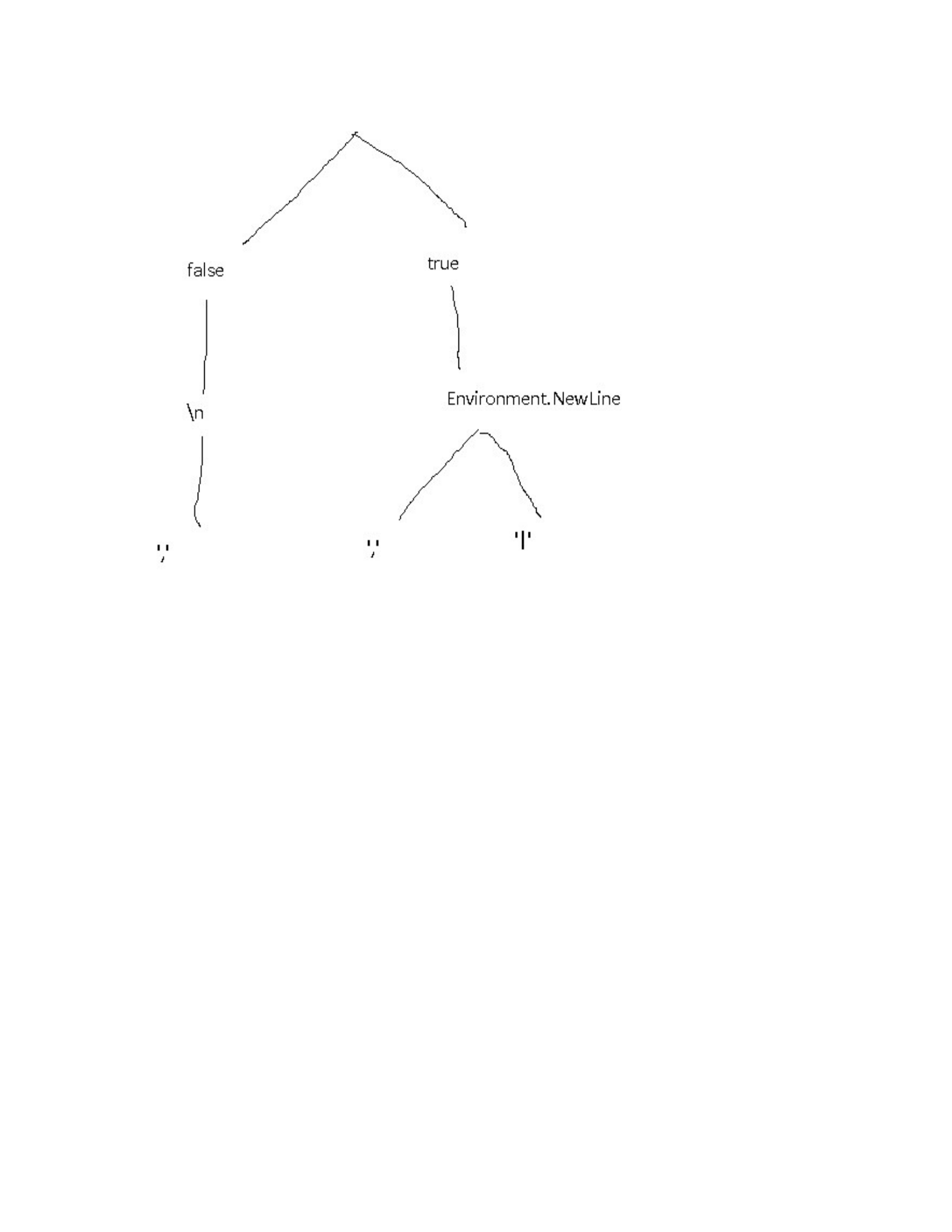
Figure 8-1. A The family tree of the parseBooks functions
Another example that might have uses in production is splitting up a logging
function into multiple, more specific functions:
// For the sake of this exercise, the parameters are
// an enum (log type - warning, error, info, etc.) and a
string
// containing a message to store in the log file
var logger = getLoggerFunction()
var curriedLogger = logger.Curry();
var logInfo = curriedLogger(LogLevel.Info);
var logWarning = curriedLogger(LogLevel.Warning);
var logError = curriedLogger(LogLevel.Error);
// You'd use them then, like this:
logInfo("This currying lark works a treat!");

There are a few useful features of this approach:
We’ve actually only created one single function at the end of the day,
but from it, managed to create at least 3 usable variations which can be
passed around, requiring only a filename to be usable. That’s taking
code re-use to an extra level!
There are also all of the intermediate functions available too. These can
either be used directly, or as a starting point for creating additional new
functions.
There’s another use for currying in C# as well. I’ll discuss that in the next
section.
Currying and Higher-Order functions
What if I wanted to use currying to create a few functions to convert between
celsius and fahrenheit. What I’d do is start with curried versions of each of
the basic arithmetic operations, like this:
// once again, the Currying process is just magic for now.
// Keep reading for the implementation
var add = ((x,y) => x + y).Curry();
var subtract = ((x,y) => y - x).Curry();
var multiply = ((x,y) => x * y).Curry();
var divide = ((x,y) => y / x).Curry();
Using this, along with the map function from a previous chapter, we can
create a fairly consise set of function definitions:
var celsiusToFahrenheit = x =>
x.Map(multiply(9))
.Map(divide(5))
.Map(add(32));
var fahrenheitToCelsius = x=>
x.Map(subtract(32))

.Map(multiply(5))
.Map(divide(9));
Whether you find any of this useful if largely dependent on use case - what
you’re actually trying to achieve an whether currying fits in with it.
It’s available for you in C# now, as you can see. If, that is, we can find a way
to implement it in C#…
Currying in .NET
So, the big question: More functional-based languages can do this natively
with all functions in your codebase, can we do anything like this in .NET?
The short answer is no-ish.
The longer answer is yes, sort of. It’s not as elegant as in a functional
language (e.g. F#) where this is all available out of the box. We either need
to hard-code it, create a static class, or else hack around with the language a
bit and jump through a few hoops.
The hard-coded method assumes that you will only ever use the function in a
curried manner, like this:
var Add = (decimal x) => (decimal y) => x + y;
var Subtract = (decimal x) => (decimal y) => y - x;
var Multiply = (decimal x) => (decimal y) => x * y;
var Divide = (decimal x) => (decimal y) => y / x;
Note that there are two sets of arrows in each function, meaning that we’ve
defined one Func delegate that returns another -i.e. the actual type is
Func<decimal,Func<decimal,decimal>>. Thank goodness for
implicit typing with the var keyword!
The second option is to create a static class that can be referenced from
anywhere in the codebase. You can call it what you’d like, but I’m going
with F for Functional.

public static class F
{
public static Func<T1, Func<T2, TOut>> Curry<T1, T2,
TOut>(
Func<T1, T2, TOut> functionToCurry) =>
(T1 x) => (T2 y) => functionToCurry(x, y);
public static Func<T1, Func<T2, Func<T3, TOut>>>
Curry<T1, T2, T3, TOut>(
Func<T1, T2, T3, TOut> functionToCurry) =>
(T1 x) => (T2 y) => (T3 z) => functionToCurry(x, y, z);
public static Func<T1, Func<T2, Func<T3, Func<T4,
TOut>>>> Curry<T1, T2, T3, T4, TOut>(
Func<T1, T2, T3, T4, TOut> functionToCurry) =>
(T1 x) => (T2 y) => (T3 z) => (T4 a) =>
functionToCurry(x, y, z, a);
}
This effecively places layers of Func delegates between calls to the end
function that’s being curried, and the areas of code that use it that way.
The down side to this method is that we’ll have to create a curry method for
every possible number of parameters. My example covers functions with 2, 3
or 4 parameters. Functions with more than that would need another Curry
method constructed, based on the same formula.
The other issue is that Visual Studio is unable to implicitly determine the
type for the function being passed in, so it’s necessary to define the function
to be curried within the call to F.Curry, declaring the type of each parameter,
like this:
var Add = F.Curry((decimal x, decimal y) => x + y);
var Subtract = F.Curry(decimal x, decimal y) => y - x);
var Multiply = F.Curry(decimal x, decimal y) => x * y);
var Divide = f.Curry(decimal y, decimal y) => y / x);
The final option - and my preferred option - is to use extension methods to
cut down somewhat on the boilerplate code necessary. The definitions would
look like this for 2, 3 and 4 parameter functions:

public static class Ext
{
public static Func<T1,Func<T2, T3>> Curry<T1,T2,T3>
(
this Func<T1,T2,T3> @this) =>
(T1 x) => (T2 y) => @this(x, y);
public static
Func<T1,Func<T2,Func<T3,T4>>>Curry<T1,T2,T3,T4>(
this Func<T1,T2,T3,T4> @this) =>
(T1 x) => (T2 y) => (T3 z) => @this(x, y,
z);
public static
Func<T1,Func<T2,Func<T3,Func<T4,T5>>>>Curry<T1,T2,T3,T4,T5
> (
this Func<T1,T2,T3,T4,T5> @this) =>
(T1 x) => (T2 y) => (T3 z) => (T4 a) =>
@this(x, y, z, a);
}
That’s a fairly ugly block of code, isn’t it? Good news is you can just shove
that somewhere deep down at the back of your codebase, and largely forget
it exists.
The usage would be like this:
// specifically define the function on one line
// it has to be stored as a `Func` delegate, rather than a
// Lambda expression
var Add = (decimal x, decimal y) => x + y;
var CurriedAdd = Add.Curry();
var add10 = CurriedAdd(10);
var answer = add10(100);
// answer = 110
So that’s currying. The eagle-eyed among you may have noticed that this
chapter is called “Currying and Partial Application”.
What on earth is Partial Application? Well…since you asked so very

nicely…
Partial Application
Partial application works along a very similar line to Currying, but there’s a
subtle difference. The two terms are often even used - incorrectly - in
exchange for each other.
Currying deals exclusively with converting a function with a set of
parameters into a series of successive function calls, each with a single
paramater (the technical term is a unary function).
Partial appliction on the other hand allows you to apply as many
parameters in one go as you want. With data emerging if all of the
parameters are filled in.
Returning to my earlier example of the parse function, these are the
formats we’re working with:
book1 - windows line endings, header, commas for fields
book2 - Windows line endings, header, pipe for fields
book3 - Linux ling endings, no header, commas for fields
With the currying approach, we’re creating intermediate steps for setting each
parameter of Book3, even though it’s ultimately the only use of each of those
parameters. We’re also doing the same for the SkipHeader and Line endings
parameters for book1 and book2, even thought they’re the same.
It could be done like this to save space:
var curriedParseBooks = parseBooks.Curry();
var parseNoHeaderLinuxCommarDel = curriedParseBooks(false) ("\
n")(",");
var parseWindowsHeader = curriedParseBooks(true)
(Environment.NewLine);
var parseWindowsHeaderComma = parseWindowsHeader(",");

var parseWindowsHeaderPipe = parseWindowsHeader("|");
// Actual data, Enumerables of Book data
var bookData1 = parseWindowsHeaderComma("books.csv");
var bookData2 = parseWindowsHeaderPipe("books2.csv");
var bookData3 = parseNoHeaderLinuxCommarDel("books3.csv");
But it’s much cleaner if we can just use partial application to apply the 2
parameters neatly.
// I'm using an extension method called Partial to apply
// parameters.
Check out the next section for
implementation details
var parseNoHeaderLinuxCommarDel = ParseBooks.Partial(false,"\
n",",");
var parseWindowsHeader =
curriedParseBooks.Partial(true,Environment.NewLine);
var parseWindowsHeaderComma =
parseWindowsHeader.Partial(",");
var parseWindowsHeaderPipe =
parseWindowsHeader.Partial("|");
// Actual data, Enumerables of Book data
var bookData1 = parseWindowsHeaderComma("books.csv");
var bookData2 = parseWindowsHeaderPipe("books2.csv");
var bookData3 = parseNoHeaderLinuxCommarDel("books3.csv");
I think that’s pretty elegant as a solution, and it still allows us to have re-
usable intermediate functions where we need them, but still only a single base
function.
In the next section, I’ll show you how to actually implement this.
Partial Application in .NET
This is the bad news. There’s absolutely no way whatsoever to elegantly
implement Partial Application in C#. What you’re going to have to do is

create an extension method for each and every combination of the number of
parameters going in to the number of parameters going out.
In the example I just gave, I’d need:
4 parameters to 1 for parseNoHeaderLinuxCommarDel
4 paramters to 2 for parseWindowsHeader
2 parameters to 1 for parseWindowsHeaderComma and
parseWindowsHeaderPipe
Here’s what each of those examples would look like:
public static ext
{
// 4 parameters to 1
public static Func<T4,TOut>
Partial<T1,T2,T3,T4,TOut>Partial(
this Func<T1,T2,T3,T4,TOut> f,
T1 one, T2 two, T3 three) => (T4 four) => f(one, two,
three, four);
// 4 parameters to 2
public static
Func<T3,T4,TOut>Partial<T1,T2,T3,T4,TOut>Partial(
this Func<T1,T2,T3,T4,TOut> f,
T1 one, T2 two) => (T3 three, T4 four) => f(one, two,
three, four);
// 2 parameters to 1
public static Func<T2, TOut> Partial<T1,T2,TOut>(
this Func<T1,T2,TOut> f, T1 one) =>
(T2 two) => f(one, two);
}
If you decide that partial application is a technique you’d like to persue, then
you could either add Partial methods to your codebase as you feel they’re
needed, or else put aside a block of time to create as many as you think
you’re ever likely to need.
This is all well and good, except that the next two sets of books have
different formats. Books2.csv uses pipes instead of commas to separate

fields, and Books3.csv comes from a Linux environment and has “\n” line
endings instead of the Windows style “\r\n”.
We could get around this by creating 3 different functions that are near
replicas of each other. I’m not keen on unnecessary replication though, since
it adds too many problems for future developers that want to maintain the
codebase.
A more reasonable solution is to add in parameters for everything that could
possibly change. Like this:
public IEnumerable<Book> ParseBooks(
string
lineBreak,
bool skipHeader,
string fieldDelimiter,
string fileName
) =>
File.ReadAllText(fileName)
.Split(lineBreak)
.Skip(skipHeader ? 1 : 0)

.Select(x => x.split(fieldDelimiter).ToArray())
.Select(x => new Book
{
Title = x[0],
Author = x[1],
PublicationDate = x[2]
});
var bookData = parseBooks(true, Environment.NewLine, ",",
"books.csv");
Now, If I wanted to follow the non-functional approach to the use of this
function, I’d have to fill in every parameter every possible style of CSV file,
like this:
var bookData1 = parseBooks(true, Environment.NewLine, ",",
"books.csv");
var bookData2 = parseBooks(true, Environment.NewLine,
"|","books2.csv");
var bookData3 = parsebooks(false, "\n", ",", "books3.csv");
What Currying actually means is to supply the functions one at a time. Any
calls to a curried function results either in a new function with one parameter
fewer, or else a concrete value if all parameters for the base function have
been supplied.
The calls with the full set of supplied parameters, from the previous code
sample, could be replaced like this:
// First some magic that curries the parseBooks function
// I'll look into implementation details later, let's just
// understand the theory for now.
var curriedParseBooks = parseBooks.Curry();
// these two have 3 parameters - string, string, string
var parseSkipHeader = curriedParseBooks(true);
var parseNoHeader = curriedParseBooks(false);
// 2 parameters

var parseSkipHeaderEnvNl =
parseSkipHeader(Environment.NewLine);
var parseNoHeaderLinux = parseNoHeader("\n");
// 1 parameter each
var parseSkipHeaderEnvNlCommarDel =
parseSkipHeaderEnvNl(",");
var parseSkipHeaderEnvNlPipeDel =
parseSkipHeaderEnvNl("|");
var parseNoHeaderLinuxCommarDel = parseNoHeaderLinux(",");
// Actual data, Enumerables of Book data
var bookData1 = parseSkipHeaderEnvNlCommarDel("books.csv");
var bookData2 = parseSkipHeaderEnvNlPipeDel("books2.csv");
var bookData3 = parseNoHeaderLinuxCommarDel("books3.csv");
The point is that Currying turns a function with X parameter, into a sequence
of X functions, each of which has a single parameter - the last one returning
the final result.
You could even write the function calls above like this - if you really, really
wanted to!:
var bookData1 = parseBooks(true)(Environment.NewLine)(",")
("books.csv")
var bookData2 = parseBooks(true)(Environment.NewLine)("|")
("books2.csv")
var bookData3 = parseBooks(true)("\n")(",")("books3.csv")
The point of the first example of currying is that we’re gradually building up
a hyper-specific version of the function that only takes a file name as a
parameter. In addition to that, we’re storing all of the intermediate versions
for potential re-use in building up other functions.
What we’re effectively doing here is building up functions like a wall made
of lego bricks, where each brick is a function. Or, if you want to think about
it another way, there’s a family tree of functions, with each choice made at
each stage causing a branch in the family:
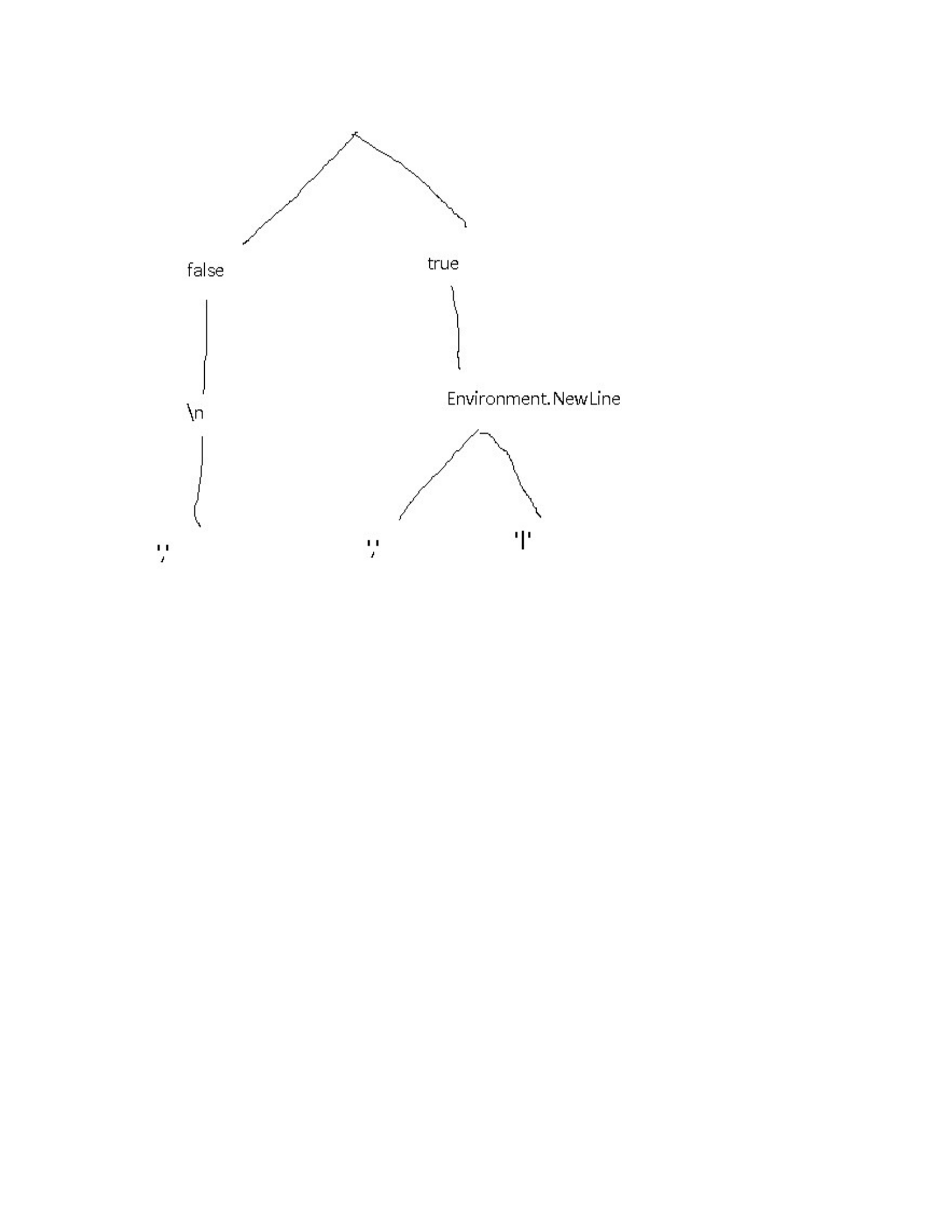
Figure 8-1. A The family tree of the parseBooks functions
Another example that might have uses in production is splitting up a logging
function into multiple, more specific functions:
// For the sake of this exercise, the parameters are
// an enum (log type - warning, error, info, etc.) and a
string
// containing a message to store in the log file
var logger = getLoggerFunction()
var curriedLogger = logger.Curry();
var logInfo = curriedLogger(LogLevel.Info);
var logWarning = curriedLogger(LogLevel.Warning);
var logError = curriedLogger(LogLevel.Error);
// You'd use them then, like this:
logInfo("This currying lark works a treat!");

There are a few useful features of this approach:
We’ve actually only created one single function at the end of the day,
but from it, managed to create at least 3 usable variations which can be
passed around, requiring only a filename to be usable. That’s taking
code re-use to an extra level!
There are also all of the intermediate functions available too. These can
either be used directly, or as a starting point for creating additional new
functions.
There’s another use for currying in C# as well. I’ll discuss that in the next
section.
This is all well and good, except that the next two sets of books have
different formats. Books2.csv uses pipes instead of commas to separate
fields, and Books3.csv comes from a Linux environment and has “\n” line
endings instead of the Windows style “\r\n”.
We could get around this by creating 3 different functions that are near
replicas of each other. I’m not keen on unnecessary replication though, since
it adds too many problems for future developers that want to maintain the
codebase.
A more reasonable solution is to add in parameters for everything that could
possibly change. Like this:
public IEnumerable<Book> ParseBooks(
string
lineBreak,
bool skipHeader,
string fieldDelimiter,
string fileName
) =>
File.ReadAllText(fileName)
.Split(lineBreak)
.Skip(skipHeader ? 1 : 0)

.Select(x => x.split(fieldDelimiter).ToArray())
.Select(x => new Book
{
Title = x[0],
Author = x[1],
PublicationDate = x[2]
});
var bookData = parseBooks(true, Environment.NewLine, ",",
"books.csv");
Now, If I wanted to follow the non-functional approach to the use of this
function, I’d have to fill in every parameter every possible style of CSV file,
like this:
var bookData1 = parseBooks(true, Environment.NewLine, ",",
"books.csv");
var bookData2 = parseBooks(true, Environment.NewLine,
"|","books2.csv");
var bookData3 = parsebooks(false, "\n", ",", "books3.csv");
What Currying actually means is to supply the functions one at a time. Any
calls to a curried function results either in a new function with one parameter
fewer, or else a concrete value if all parameters for the base function have
been supplied.
The calls with the full set of supplied parameters, from the previous code
sample, could be replaced like this:
// First some magic that curries the parseBooks function
// I'll look into implementation details later, let's just
// understand the theory for now.
var curriedParseBooks = parseBooks.Curry();
// these two have 3 parameters - string, string, string
var parseSkipHeader = curriedParseBooks(true);
var parseNoHeader = curriedParseBooks(false);
// 2 parameters

var parseSkipHeaderEnvNl =
parseSkipHeader(Environment.NewLine);
var parseNoHeaderLinux = parseNoHeader("\n");
// 1 parameter each
var parseSkipHeaderEnvNlCommarDel =
parseSkipHeaderEnvNl(",");
var parseSkipHeaderEnvNlPipeDel =
parseSkipHeaderEnvNl("|");
var parseNoHeaderLinuxCommarDel = parseNoHeaderLinux(",");
// Actual data, Enumerables of Book data
var bookData1 = parseSkipHeaderEnvNlCommarDel("books.csv");
var bookData2 = parseSkipHeaderEnvNlPipeDel("books2.csv");
var bookData3 = parseNoHeaderLinuxCommarDel("books3.csv");
The point is that Currying turns a function with X parameter, into a sequence
of X functions, each of which has a single parameter - the last one returning
the final result.
You could even write the function calls above like this - if you really, really
wanted to!:
var bookData1 = parseBooks(true)(Environment.NewLine)(",")
("books.csv")
var bookData2 = parseBooks(true)(Environment.NewLine)("|")
("books2.csv")
var bookData3 = parseBooks(true)("\n")(",")("books3.csv")
The point of the first example of currying is that we’re gradually building up
a hyper-specific version of the function that only takes a file name as a
parameter. In addition to that, we’re storing all of the intermediate versions
for potential re-use in building up other functions.
What we’re effectively doing here is building up functions like a wall made
of lego bricks, where each brick is a function. Or, if you want to think about
it another way, there’s a family tree of functions, with each choice made at
each stage causing a branch in the family:
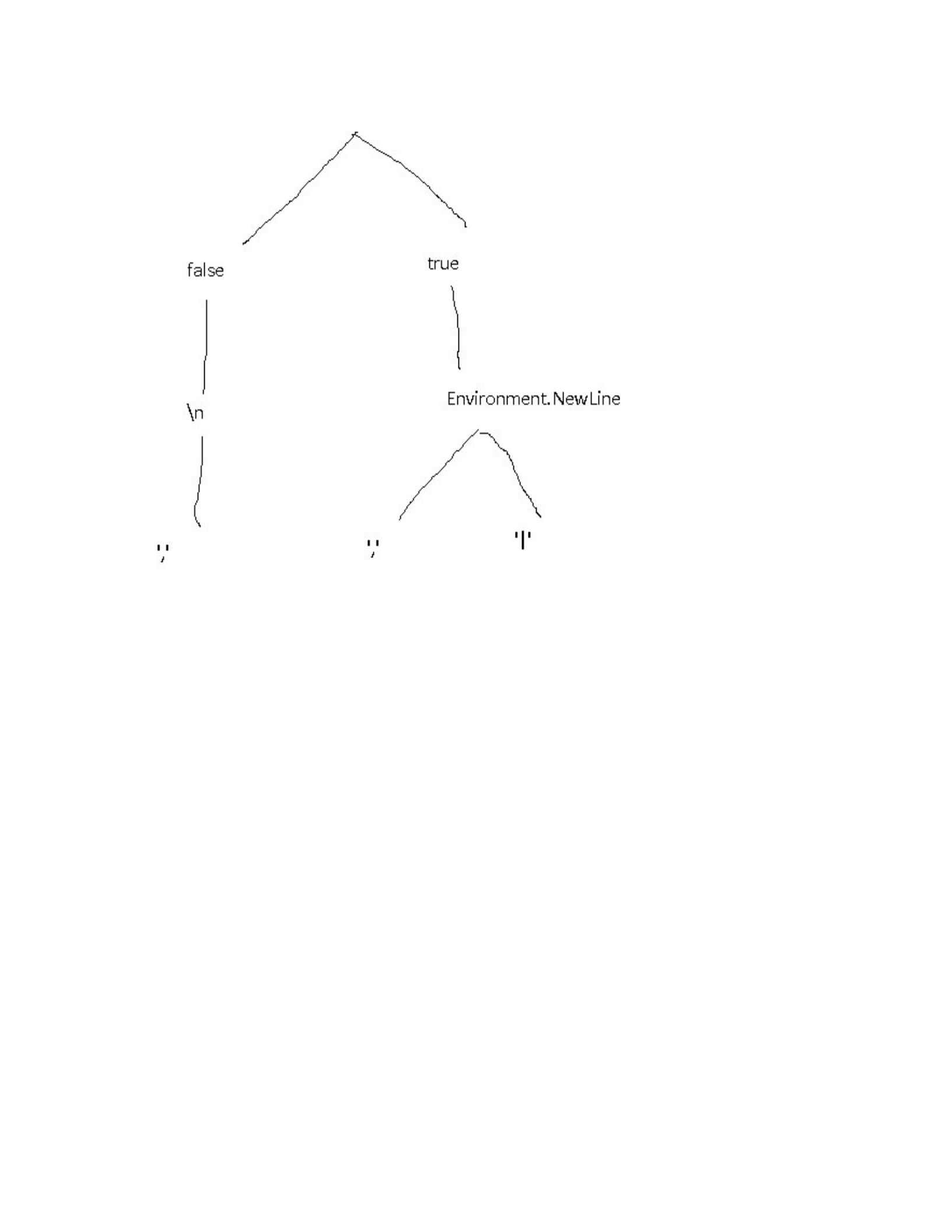
Figure 8-1. A The family tree of the parseBooks functions
Another example that might have uses in production is splitting up a logging
function into multiple, more specific functions:
// For the sake of this exercise, the parameters are
// an enum (log type - warning, error, info, etc.) and a
string
// containing a message to store in the log file
var logger = getLoggerFunction()
var curriedLogger = logger.Curry();
var logInfo = curriedLogger(LogLevel.Info);
var logWarning = curriedLogger(LogLevel.Warning);
var logError = curriedLogger(LogLevel.Error);
// You'd use them then, like this:
logInfo("This currying lark works a treat!");

There are a few useful features of this approach:
We’ve actually only created one single function at the end of the day,
but from it, managed to create at least 3 usable variations which can be
passed around, requiring only a filename to be usable. That’s taking
code re-use to an extra level!
There are also all of the intermediate functions available too. These can
either be used directly, or as a starting point for creating additional new
functions.
There’s another use for currying in C# as well. I’ll discuss that in the next
section.
This is all well and good, except that the next two sets of books have
different formats. Books2.csv uses pipes instead of commas to separate
fields, and Books3.csv comes from a Linux environment and has “\n” line
endings instead of the Windows style “\r\n”.
We could get around this by creating 3 different functions that are near
replicas of each other. I’m not keen on unnecessary replication though, since
it adds too many problems for future developers that want to maintain the
codebase.
A more reasonable solution is to add in parameters for everything that could
possibly change. Like this:
public IEnumerable<Book> ParseBooks(
string
lineBreak,
bool skipHeader,
string fieldDelimiter,
string fileName
) =>
File.ReadAllText(fileName)
.Split(lineBreak)
.Skip(skipHeader ? 1 : 0)

.Select(x => x.split(fieldDelimiter).ToArray())
.Select(x => new Book
{
Title = x[0],
Author = x[1],
PublicationDate = x[2]
});
var bookData = parseBooks(true, Environment.NewLine, ",",
"books.csv");
Now, If I wanted to follow the non-functional approach to the use of this
function, I’d have to fill in every parameter every possible style of CSV file,
like this:
var bookData1 = parseBooks(true, Environment.NewLine, ",",
"books.csv");
var bookData2 = parseBooks(true, Environment.NewLine,
"|","books2.csv");
var bookData3 = parsebooks(false, "\n", ",", "books3.csv");
What Currying actually means is to supply the functions one at a time. Any
calls to a curried function results either in a new function with one parameter
fewer, or else a concrete value if all parameters for the base function have
been supplied.
The calls with the full set of supplied parameters, from the previous code
sample, could be replaced like this:
// First some magic that curries the parseBooks function
// I'll look into implementation details later, let's just
// understand the theory for now.
var curriedParseBooks = parseBooks.Curry();
// these two have 3 parameters - string, string, string
var parseSkipHeader = curriedParseBooks(true);
var parseNoHeader = curriedParseBooks(false);
// 2 parameters

var parseSkipHeaderEnvNl =
parseSkipHeader(Environment.NewLine);
var parseNoHeaderLinux = parseNoHeader("\n");
// 1 parameter each
var parseSkipHeaderEnvNlCommarDel =
parseSkipHeaderEnvNl(",");
var parseSkipHeaderEnvNlPipeDel =
parseSkipHeaderEnvNl("|");
var parseNoHeaderLinuxCommarDel = parseNoHeaderLinux(",");
// Actual data, Enumerables of Book data
var bookData1 = parseSkipHeaderEnvNlCommarDel("books.csv");
var bookData2 = parseSkipHeaderEnvNlPipeDel("books2.csv");
var bookData3 = parseNoHeaderLinuxCommarDel("books3.csv");
The point is that Currying turns a function with X parameter, into a sequence
of X functions, each of which has a single parameter - the last one returning
the final result.
You could even write the function calls above like this - if you really, really
wanted to!:
var bookData1 = parseBooks(true)(Environment.NewLine)(",")
("books.csv")
var bookData2 = parseBooks(true)(Environment.NewLine)("|")
("books2.csv")
var bookData3 = parseBooks(true)("\n")(",")("books3.csv")
The point of the first example of currying is that we’re gradually building up
a hyper-specific version of the function that only takes a file name as a
parameter. In addition to that, we’re storing all of the intermediate versions
for potential re-use in building up other functions.
What we’re effectively doing here is building up functions like a wall made
of lego bricks, where each brick is a function. Or, if you want to think about
it another way, there’s a family tree of functions, with each choice made at
each stage causing a branch in the family:
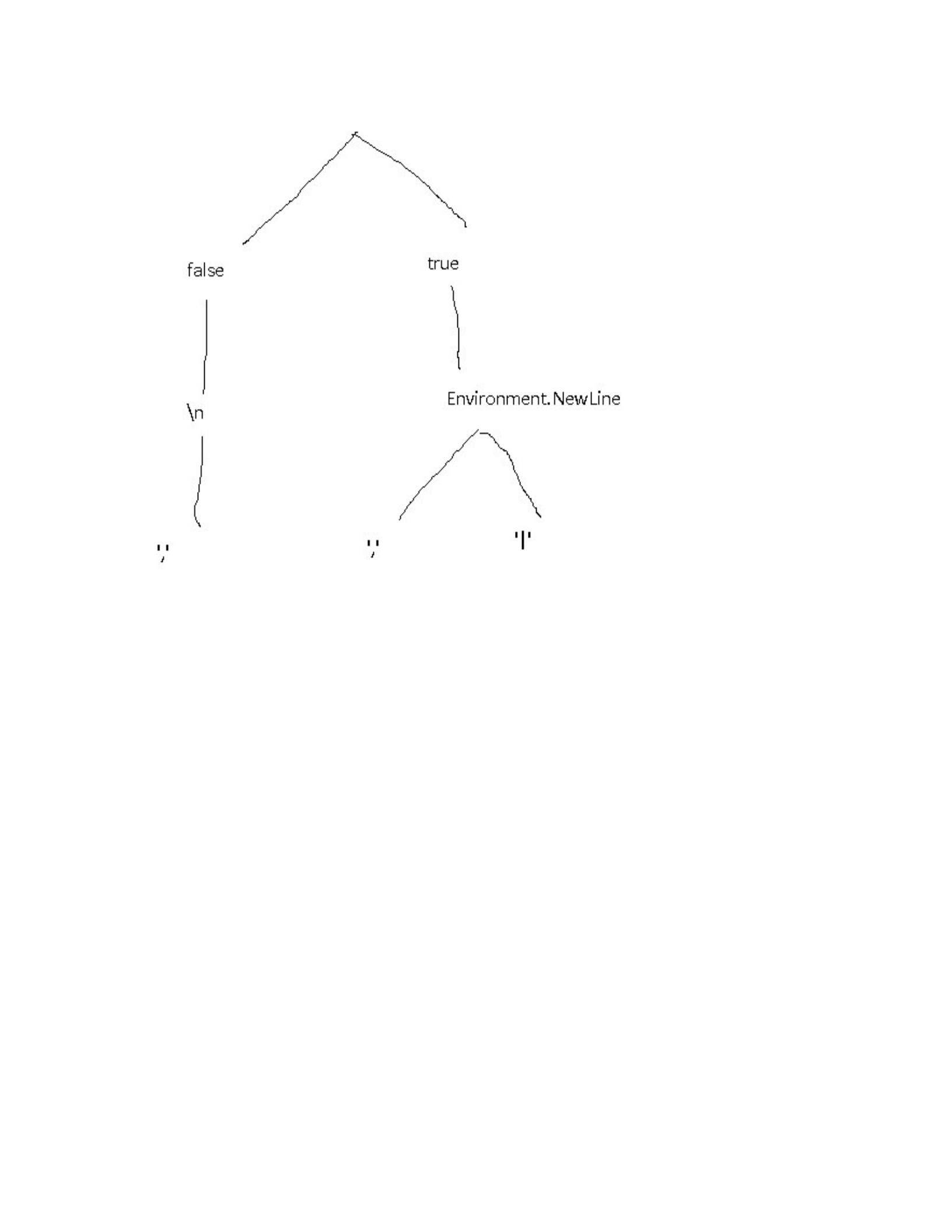
Figure 8-1. A The family tree of the parseBooks functions
Another example that might have uses in production is splitting up a logging
function into multiple, more specific functions:
// For the sake of this exercise, the parameters are
// an enum (log type - warning, error, info, etc.) and a
string
// containing a message to store in the log file
var logger = getLoggerFunction()
var curriedLogger = logger.Curry();
var logInfo = curriedLogger(LogLevel.Info);
var logWarning = curriedLogger(LogLevel.Warning);
var logError = curriedLogger(LogLevel.Error);
// You'd use them then, like this:
logInfo("This currying lark works a treat!");

There are a few useful features of this approach:
We’ve actually only created one single function at the end of the day,
but from it, managed to create at least 3 usable variations which can be
passed around, requiring only a filename to be usable. That’s taking
code re-use to an extra level!
There are also all of the intermediate functions available too. These can
either be used directly, or as a starting point for creating additional new
functions.
There’s another use for currying in C# as well. I’ll discuss that in the next
section.
This is all well and good, except that the next two sets of books have
different formats. Books2.csv uses pipes instead of commas to separate
fields, and Books3.csv comes from a Linux environment and has “\n” line
endings instead of the Windows style “\r\n”.
We could get around this by creating 3 different functions that are near
replicas of each other. I’m not keen on unnecessary replication though, since
it adds too many problems for future developers that want to maintain the
codebase.
A more reasonable solution is to add in parameters for everything that could
possibly change. Like this:
public IEnumerable<Book> ParseBooks(
string
lineBreak,
bool skipHeader,
string fieldDelimiter,
string fileName
) =>
File.ReadAllText(fileName)
.Split(lineBreak)
.Skip(skipHeader ? 1 : 0)

.Select(x => x.split(fieldDelimiter).ToArray())
.Select(x => new Book
{
Title = x[0],
Author = x[1],
PublicationDate = x[2]
});
var bookData = parseBooks(true, Environment.NewLine, ",",
"books.csv");
Now, If I wanted to follow the non-functional approach to the use of this
function, I’d have to fill in every parameter every possible style of CSV file,
like this:
var bookData1 = parseBooks(true, Environment.NewLine, ",",
"books.csv");
var bookData2 = parseBooks(true, Environment.NewLine,
"|","books2.csv");
var bookData3 = parsebooks(false, "\n", ",", "books3.csv");
What Currying actually means is to supply the functions one at a time. Any
calls to a curried function results either in a new function with one parameter
fewer, or else a concrete value if all parameters for the base function have
been supplied.
The calls with the full set of supplied parameters, from the previous code
sample, could be replaced like this:
// First some magic that curries the parseBooks function
// I'll look into implementation details later, let's just
// understand the theory for now.
var curriedParseBooks = parseBooks.Curry();
// these two have 3 parameters - string, string, string
var parseSkipHeader = curriedParseBooks(true);
var parseNoHeader = curriedParseBooks(false);
// 2 parameters

var parseSkipHeaderEnvNl =
parseSkipHeader(Environment.NewLine);
var parseNoHeaderLinux = parseNoHeader("\n");
// 1 parameter each
var parseSkipHeaderEnvNlCommarDel =
parseSkipHeaderEnvNl(",");
var parseSkipHeaderEnvNlPipeDel =
parseSkipHeaderEnvNl("|");
var parseNoHeaderLinuxCommarDel = parseNoHeaderLinux(",");
// Actual data, Enumerables of Book data
var bookData1 = parseSkipHeaderEnvNlCommarDel("books.csv");
var bookData2 = parseSkipHeaderEnvNlPipeDel("books2.csv");
var bookData3 = parseNoHeaderLinuxCommarDel("books3.csv");
The point is that Currying turns a function with X parameter, into a sequence
of X functions, each of which has a single parameter - the last one returning
the final result.
You could even write the function calls above like this - if you really, really
wanted to!:
var bookData1 = parseBooks(true)(Environment.NewLine)(",")
("books.csv")
var bookData2 = parseBooks(true)(Environment.NewLine)("|")
("books2.csv")
var bookData3 = parseBooks(true)("\n")(",")("books3.csv")
The point of the first example of currying is that we’re gradually building up
a hyper-specific version of the function that only takes a file name as a
parameter. In addition to that, we’re storing all of the intermediate versions
for potential re-use in building up other functions.
What we’re effectively doing here is building up functions like a wall made
of lego bricks, where each brick is a function. Or, if you want to think about
it another way, there’s a family tree of functions, with each choice made at
each stage causing a branch in the family:
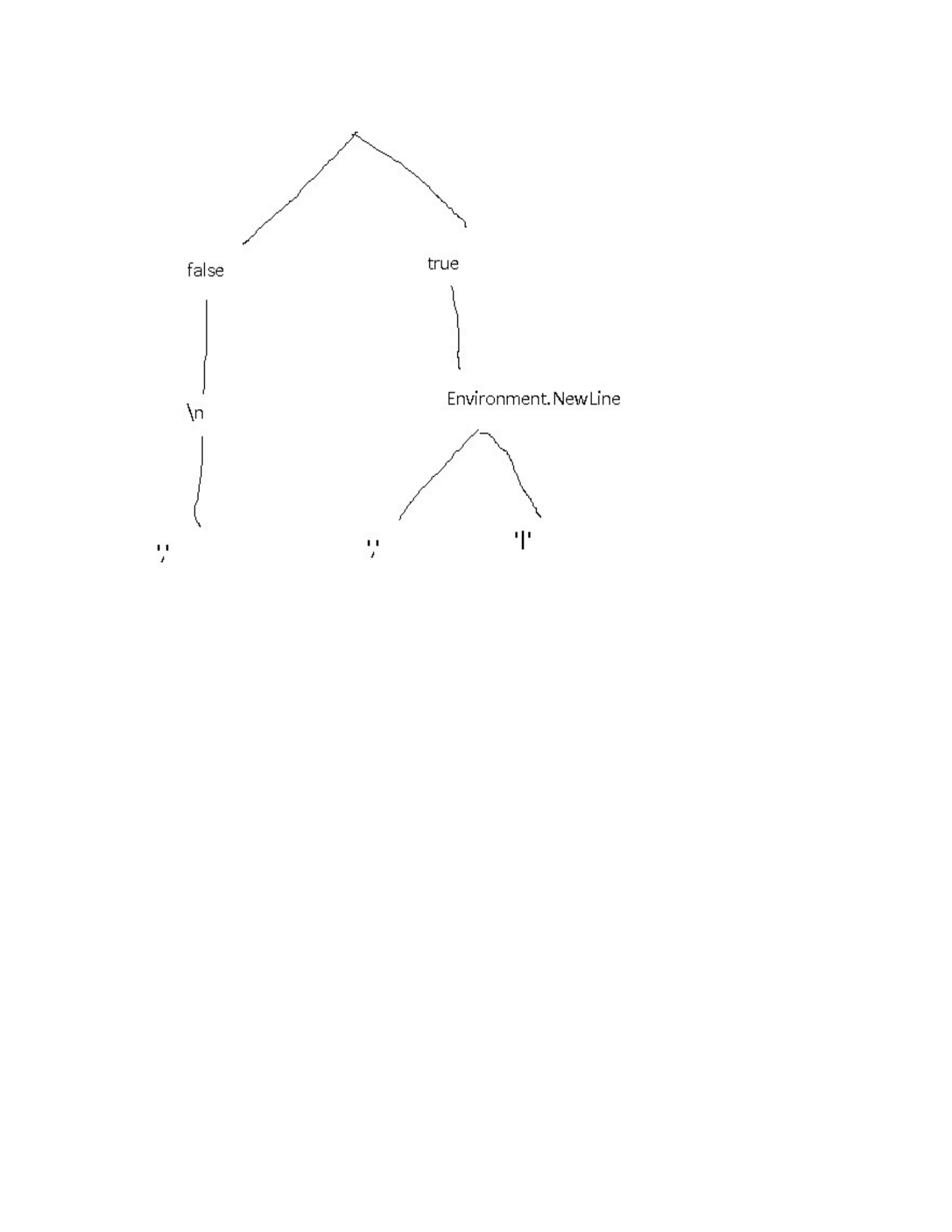
Figure 8-1. A The family tree of the parseBooks functions
Another example that might have uses in production is splitting up a logging
function into multiple, more specific functions:
// For the sake of this exercise, the parameters are
// an enum (log type - warning, error, info, etc.) and a
string
// containing a message to store in the log file
var logger = getLoggerFunction()
var curriedLogger = logger.Curry();
var logInfo = curriedLogger(LogLevel.Info);
var logWarning = curriedLogger(LogLevel.Warning);
var logError = curriedLogger(LogLevel.Error);
// You'd use them then, like this:
logInfo("This currying lark works a treat!");

There are a few useful features of this approach:
We’ve actually only created one single function at the end of the day,
but from it, managed to create at least 3 usable variations which can be
passed around, requiring only a filename to be usable. That’s taking
code re-use to an extra level!
There are also all of the intermediate functions available too. These can
either be used directly, or as a starting point for creating additional new
functions.
There’s another use for currying in C# as well. I’ll discuss that in the next
section.
This is all well and good, except that the next two sets of books have
different formats. Books2.csv uses pipes instead of commas to separate
fields, and Books3.csv comes from a Linux environment and has “\n” line
endings instead of the Windows style “\r\n”.
We could get around this by creating 3 different functions that are near
replicas of each other. I’m not keen on unnecessary replication though, since
it adds too many problems for future developers that want to maintain the
codebase.
A more reasonable solution is to add in parameters for everything that could
possibly change. Like this:
public IEnumerable<Book> ParseBooks(
string
lineBreak,
bool skipHeader,
string fieldDelimiter,
string fileName
) =>
File.ReadAllText(fileName)
.Split(lineBreak)
.Skip(skipHeader ? 1 : 0)

.Select(x => x.split(fieldDelimiter).ToArray())
.Select(x => new Book
{
Title = x[0],
Author = x[1],
PublicationDate = x[2]
});
var bookData = parseBooks(true, Environment.NewLine, ",",
"books.csv");
Now, If I wanted to follow the non-functional approach to the use of this
function, I’d have to fill in every parameter every possible style of CSV file,
like this:
var bookData1 = parseBooks(true, Environment.NewLine, ",",
"books.csv");
var bookData2 = parseBooks(true, Environment.NewLine,
"|","books2.csv");
var bookData3 = parsebooks(false, "\n", ",", "books3.csv");
What Currying actually means is to supply the functions one at a time. Any
calls to a curried function results either in a new function with one parameter
fewer, or else a concrete value if all parameters for the base function have
been supplied.
The calls with the full set of supplied parameters, from the previous code
sample, could be replaced like this:
// First some magic that curries the parseBooks function
// I'll look into implementation details later, let's just
// understand the theory for now.
var curriedParseBooks = parseBooks.Curry();
// these two have 3 parameters - string, string, string
var parseSkipHeader = curriedParseBooks(true);
var parseNoHeader = curriedParseBooks(false);
// 2 parameters

var parseSkipHeaderEnvNl =
parseSkipHeader(Environment.NewLine);
var parseNoHeaderLinux = parseNoHeader("\n");
// 1 parameter each
var parseSkipHeaderEnvNlCommarDel =
parseSkipHeaderEnvNl(",");
var parseSkipHeaderEnvNlPipeDel =
parseSkipHeaderEnvNl("|");
var parseNoHeaderLinuxCommarDel = parseNoHeaderLinux(",");
// Actual data, Enumerables of Book data
var bookData1 = parseSkipHeaderEnvNlCommarDel("books.csv");
var bookData2 = parseSkipHeaderEnvNlPipeDel("books2.csv");
var bookData3 = parseNoHeaderLinuxCommarDel("books3.csv");
The point is that Currying turns a function with X parameter, into a sequence
of X functions, each of which has a single parameter - the last one returning
the final result.
You could even write the function calls above like this - if you really, really
wanted to!:
var bookData1 = parseBooks(true)(Environment.NewLine)(",")
("books.csv")
var bookData2 = parseBooks(true)(Environment.NewLine)("|")
("books2.csv")
var bookData3 = parseBooks(true)("\n")(",")("books3.csv")
The point of the first example of currying is that we’re gradually building up
a hyper-specific version of the function that only takes a file name as a
parameter. In addition to that, we’re storing all of the intermediate versions
for potential re-use in building up other functions.
What we’re effectively doing here is building up functions like a wall made
of lego bricks, where each brick is a function. Or, if you want to think about
it another way, there’s a family tree of functions, with each choice made at
each stage causing a branch in the family:
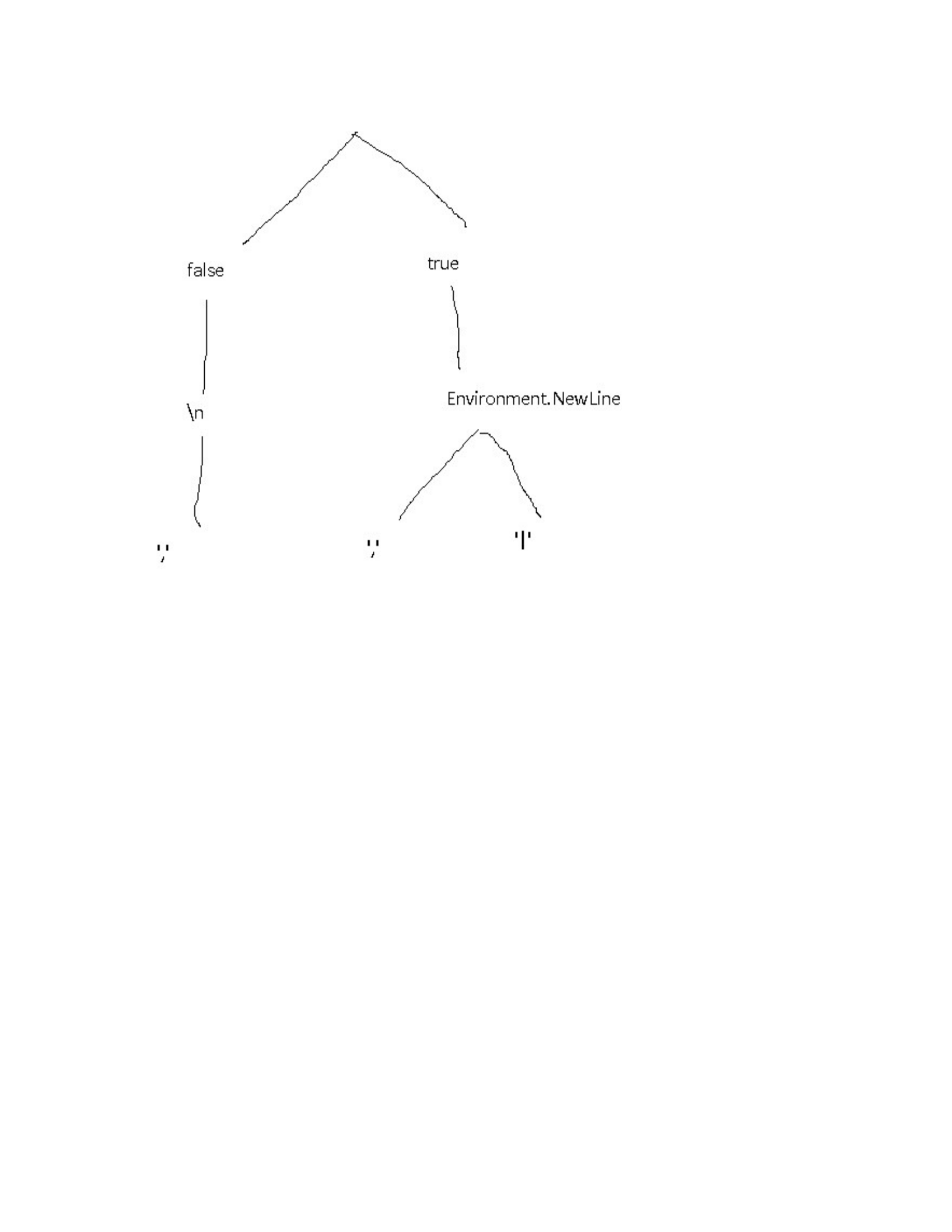
Figure 8-1. A The family tree of the parseBooks functions
Another example that might have uses in production is splitting up a logging
function into multiple, more specific functions:
// For the sake of this exercise, the parameters are
// an enum (log type - warning, error, info, etc.) and a
string
// containing a message to store in the log file
var logger = getLoggerFunction()
var curriedLogger = logger.Curry();
var logInfo = curriedLogger(LogLevel.Info);
var logWarning = curriedLogger(LogLevel.Warning);
var logError = curriedLogger(LogLevel.Error);
// You'd use them then, like this:
logInfo("This currying lark works a treat!");

There are a few useful features of this approach:
We’ve actually only created one single function at the end of the day,
but from it, managed to create at least 3 usable variations which can be
passed around, requiring only a filename to be usable. That’s taking
code re-use to an extra level!
There are also all of the intermediate functions available too. These can
either be used directly, or as a starting point for creating additional new
functions.
There’s another use for currying in C# as well. I’ll discuss that in the next
section.
This is all well and good, except that the next two sets of books have
different formats. Books2.csv uses pipes instead of commas to separate
fields, and Books3.csv comes from a Linux environment and has “\n” line
endings instead of the Windows style “\r\n”.
We could get around this by creating 3 different functions that are near
replicas of each other. I’m not keen on unnecessary replication though, since
it adds too many problems for future developers that want to maintain the
codebase.
A more reasonable solution is to add in parameters for everything that could
possibly change. Like this:
public IEnumerable<Book> ParseBooks(
string
lineBreak,
bool skipHeader,
string fieldDelimiter,
string fileName
) =>
File.ReadAllText(fileName)
.Split(lineBreak)
.Skip(skipHeader ? 1 : 0)

.Select(x => x.split(fieldDelimiter).ToArray())
.Select(x => new Book
{
Title = x[0],
Author = x[1],
PublicationDate = x[2]
});
var bookData = parseBooks(true, Environment.NewLine, ",",
"books.csv");
Now, If I wanted to follow the non-functional approach to the use of this
function, I’d have to fill in every parameter every possible style of CSV file,
like this:
var bookData1 = parseBooks(true, Environment.NewLine, ",",
"books.csv");
var bookData2 = parseBooks(true, Environment.NewLine,
"|","books2.csv");
var bookData3 = parsebooks(false, "\n", ",", "books3.csv");
What Currying actually means is to supply the functions one at a time. Any
calls to a curried function results either in a new function with one parameter
fewer, or else a concrete value if all parameters for the base function have
been supplied.
The calls with the full set of supplied parameters, from the previous code
sample, could be replaced like this:
// First some magic that curries the parseBooks function
// I'll look into implementation details later, let's just
// understand the theory for now.
var curriedParseBooks = parseBooks.Curry();
// these two have 3 parameters - string, string, string
var parseSkipHeader = curriedParseBooks(true);
var parseNoHeader = curriedParseBooks(false);
// 2 parameters

var parseSkipHeaderEnvNl =
parseSkipHeader(Environment.NewLine);
var parseNoHeaderLinux = parseNoHeader("\n");
// 1 parameter each
var parseSkipHeaderEnvNlCommarDel =
parseSkipHeaderEnvNl(",");
var parseSkipHeaderEnvNlPipeDel =
parseSkipHeaderEnvNl("|");
var parseNoHeaderLinuxCommarDel = parseNoHeaderLinux(",");
// Actual data, Enumerables of Book data
var bookData1 = parseSkipHeaderEnvNlCommarDel("books.csv");
var bookData2 = parseSkipHeaderEnvNlPipeDel("books2.csv");
var bookData3 = parseNoHeaderLinuxCommarDel("books3.csv");
The point is that Currying turns a function with X parameter, into a sequence
of X functions, each of which has a single parameter - the last one returning
the final result.
You could even write the function calls above like this - if you really, really
wanted to!:
var bookData1 = parseBooks(true)(Environment.NewLine)(",")
("books.csv")
var bookData2 = parseBooks(true)(Environment.NewLine)("|")
("books2.csv")
var bookData3 = parseBooks(true)("\n")(",")("books3.csv")
The point of the first example of currying is that we’re gradually building up
a hyper-specific version of the function that only takes a file name as a
parameter. In addition to that, we’re storing all of the intermediate versions
for potential re-use in building up other functions.
What we’re effectively doing here is building up functions like a wall made
of lego bricks, where each brick is a function. Or, if you want to think about
it another way, there’s a family tree of functions, with each choice made at
each stage causing a branch in the family:
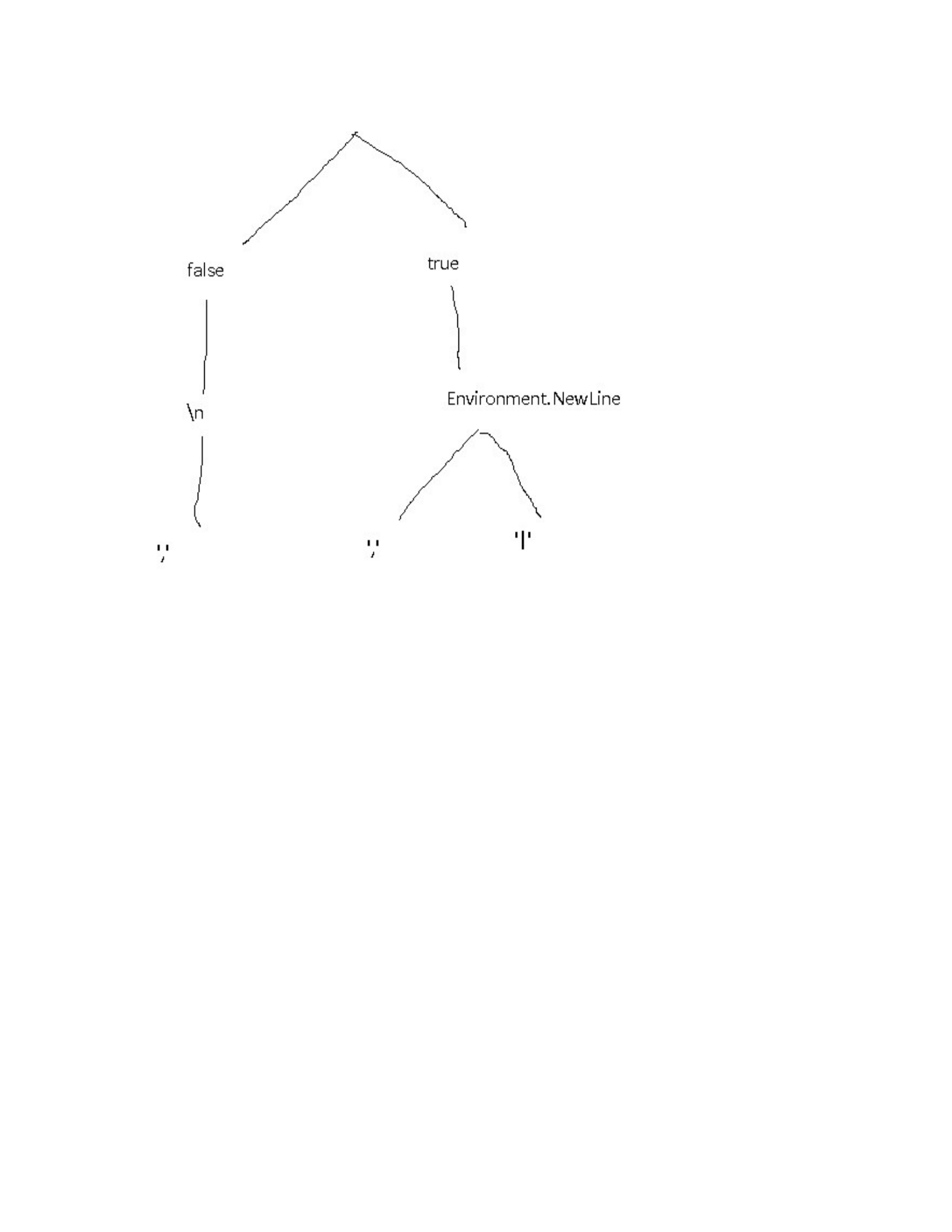
Figure 8-1. A The family tree of the parseBooks functions
Another example that might have uses in production is splitting up a logging
function into multiple, more specific functions:
// For the sake of this exercise, the parameters are
// an enum (log type - warning, error, info, etc.) and a
string
// containing a message to store in the log file
var logger = getLoggerFunction()
var curriedLogger = logger.Curry();
var logInfo = curriedLogger(LogLevel.Info);
var logWarning = curriedLogger(LogLevel.Warning);
var logError = curriedLogger(LogLevel.Error);
// You'd use them then, like this:
logInfo("This currying lark works a treat!");

There are a few useful features of this approach:
We’ve actually only created one single function at the end of the day,
but from it, managed to create at least 3 usable variations which can be
passed around, requiring only a filename to be usable. That’s taking
code re-use to an extra level!
There are also all of the intermediate functions available too. These can
either be used directly, or as a starting point for creating additional new
functions.
There’s another use for currying in C# as well. I’ll discuss that in the next
section.
This is all well and good, except that the next two sets of books have
different formats. Books2.csv uses pipes instead of commas to separate
fields, and Books3.csv comes from a Linux environment and has “\n” line
endings instead of the Windows style “\r\n”.
We could get around this by creating 3 different functions that are near
replicas of each other. I’m not keen on unnecessary replication though, since
it adds too many problems for future developers that want to maintain the
codebase.
A more reasonable solution is to add in parameters for everything that could
possibly change. Like this:
public IEnumerable<Book> ParseBooks(
string
lineBreak,
bool skipHeader,
string fieldDelimiter,
string fileName
) =>
File.ReadAllText(fileName)
.Split(lineBreak)
.Skip(skipHeader ? 1 : 0)

.Select(x => x.split(fieldDelimiter).ToArray())
.Select(x => new Book
{
Title = x[0],
Author = x[1],
PublicationDate = x[2]
});
var bookData = parseBooks(true, Environment.NewLine, ",",
"books.csv");
Now, If I wanted to follow the non-functional approach to the use of this
function, I’d have to fill in every parameter every possible style of CSV file,
like this:
var bookData1 = parseBooks(true, Environment.NewLine, ",",
"books.csv");
var bookData2 = parseBooks(true, Environment.NewLine,
"|","books2.csv");
var bookData3 = parsebooks(false, "\n", ",", "books3.csv");
What Currying actually means is to supply the functions one at a time. Any
calls to a curried function results either in a new function with one parameter
fewer, or else a concrete value if all parameters for the base function have
been supplied.
The calls with the full set of supplied parameters, from the previous code
sample, could be replaced like this:
// First some magic that curries the parseBooks function
// I'll look into implementation details later, let's just
// understand the theory for now.
var curriedParseBooks = parseBooks.Curry();
// these two have 3 parameters - string, string, string
var parseSkipHeader = curriedParseBooks(true);
var parseNoHeader = curriedParseBooks(false);
// 2 parameters

var parseSkipHeaderEnvNl =
parseSkipHeader(Environment.NewLine);
var parseNoHeaderLinux = parseNoHeader("\n");
// 1 parameter each
var parseSkipHeaderEnvNlCommarDel =
parseSkipHeaderEnvNl(",");
var parseSkipHeaderEnvNlPipeDel =
parseSkipHeaderEnvNl("|");
var parseNoHeaderLinuxCommarDel = parseNoHeaderLinux(",");
// Actual data, Enumerables of Book data
var bookData1 = parseSkipHeaderEnvNlCommarDel("books.csv");
var bookData2 = parseSkipHeaderEnvNlPipeDel("books2.csv");
var bookData3 = parseNoHeaderLinuxCommarDel("books3.csv");
The point is that Currying turns a function with X parameter, into a sequence
of X functions, each of which has a single parameter - the last one returning
the final result.
You could even write the function calls above like this - if you really, really
wanted to!:
var bookData1 = parseBooks(true)(Environment.NewLine)(",")
("books.csv")
var bookData2 = parseBooks(true)(Environment.NewLine)("|")
("books2.csv")
var bookData3 = parseBooks(true)("\n")(",")("books3.csv")
The point of the first example of currying is that we’re gradually building up
a hyper-specific version of the function that only takes a file name as a
parameter. In addition to that, we’re storing all of the intermediate versions
for potential re-use in building up other functions.
What we’re effectively doing here is building up functions like a wall made
of lego bricks, where each brick is a function. Or, if you want to think about
it another way, there’s a family tree of functions, with each choice made at
each stage causing a branch in the family:
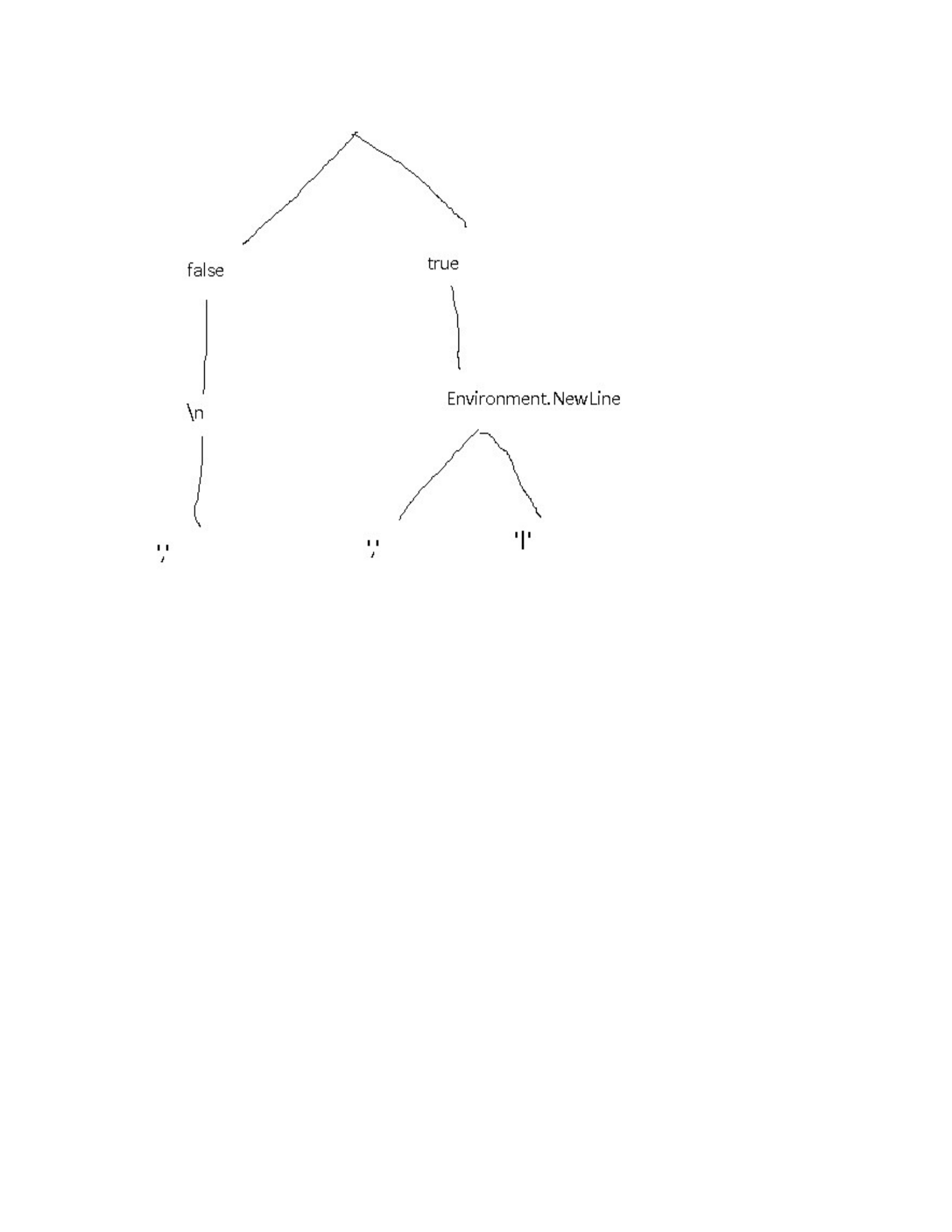
Figure 8-1. A The family tree of the parseBooks functions
Another example that might have uses in production is splitting up a logging
function into multiple, more specific functions:
// For the sake of this exercise, the parameters are
// an enum (log type - warning, error, info, etc.) and a
string
// containing a message to store in the log file
var logger = getLoggerFunction()
var curriedLogger = logger.Curry();
var logInfo = curriedLogger(LogLevel.Info);
var logWarning = curriedLogger(LogLevel.Warning);
var logError = curriedLogger(LogLevel.Error);
// You'd use them then, like this:
logInfo("This currying lark works a treat!");

There are a few useful features of this approach:
We’ve actually only created one single function at the end of the day,
but from it, managed to create at least 3 usable variations which can be
passed around, requiring only a filename to be usable. That’s taking
code re-use to an extra level!
There are also all of the intermediate functions available too. These can
either be used directly, or as a starting point for creating additional new
functions.
There’s another use for currying in C# as well. I’ll discuss that in the next
section.
This is all well and good, except that the next two sets of books have
different formats. Books2.csv uses pipes instead of commas to separate
fields, and Books3.csv comes from a Linux environment and has “\n” line
endings instead of the Windows style “\r\n”.
We could get around this by creating 3 different functions that are near
replicas of each other. I’m not keen on unnecessary replication though, since
it adds too many problems for future developers that want to maintain the
codebase.
A more reasonable solution is to add in parameters for everything that could
possibly change. Like this:
public IEnumerable<Book> ParseBooks(
string
lineBreak,
bool skipHeader,
string fieldDelimiter,
string fileName
) =>
File.ReadAllText(fileName)
.Split(lineBreak)
.Skip(skipHeader ? 1 : 0)

.Select(x => x.split(fieldDelimiter).ToArray())
.Select(x => new Book
{
Title = x[0],
Author = x[1],
PublicationDate = x[2]
});
var bookData = parseBooks(true, Environment.NewLine, ",",
"books.csv");
Now, If I wanted to follow the non-functional approach to the use of this
function, I’d have to fill in every parameter every possible style of CSV file,
like this:
var bookData1 = parseBooks(true, Environment.NewLine, ",",
"books.csv");
var bookData2 = parseBooks(true, Environment.NewLine,
"|","books2.csv");
var bookData3 = parsebooks(false, "\n", ",", "books3.csv");
What Currying actually means is to supply the functions one at a time. Any
calls to a curried function results either in a new function with one parameter
fewer, or else a concrete value if all parameters for the base function have
been supplied.
The calls with the full set of supplied parameters, from the previous code
sample, could be replaced like this:
// First some magic that curries the parseBooks function
// I'll look into implementation details later, let's just
// understand the theory for now.
var curriedParseBooks = parseBooks.Curry();
// these two have 3 parameters - string, string, string
var parseSkipHeader = curriedParseBooks(true);
var parseNoHeader = curriedParseBooks(false);
// 2 parameters

var parseSkipHeaderEnvNl =
parseSkipHeader(Environment.NewLine);
var parseNoHeaderLinux = parseNoHeader("\n");
// 1 parameter each
var parseSkipHeaderEnvNlCommarDel =
parseSkipHeaderEnvNl(",");
var parseSkipHeaderEnvNlPipeDel =
parseSkipHeaderEnvNl("|");
var parseNoHeaderLinuxCommarDel = parseNoHeaderLinux(",");
// Actual data, Enumerables of Book data
var bookData1 = parseSkipHeaderEnvNlCommarDel("books.csv");
var bookData2 = parseSkipHeaderEnvNlPipeDel("books2.csv");
var bookData3 = parseNoHeaderLinuxCommarDel("books3.csv");
The point is that Currying turns a function with X parameter, into a sequence
of X functions, each of which has a single parameter - the last one returning
the final result.
You could even write the function calls above like this - if you really, really
wanted to!:
var bookData1 = parseBooks(true)(Environment.NewLine)(",")
("books.csv")
var bookData2 = parseBooks(true)(Environment.NewLine)("|")
("books2.csv")
var bookData3 = parseBooks(true)("\n")(",")("books3.csv")
The point of the first example of currying is that we’re gradually building up
a hyper-specific version of the function that only takes a file name as a
parameter. In addition to that, we’re storing all of the intermediate versions
for potential re-use in building up other functions.
What we’re effectively doing here is building up functions like a wall made
of lego bricks, where each brick is a function. Or, if you want to think about
it another way, there’s a family tree of functions, with each choice made at
each stage causing a branch in the family:
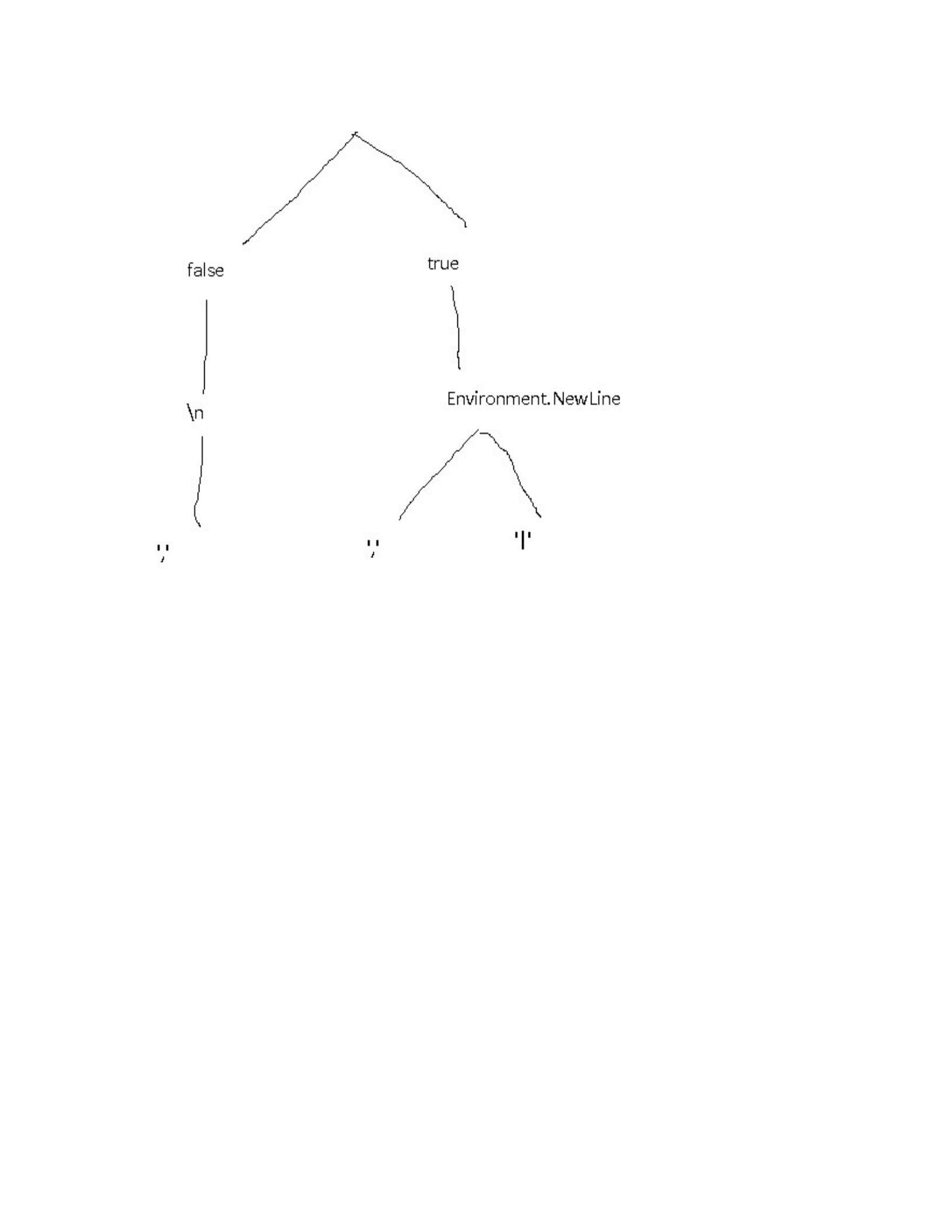
Figure 8-1. A The family tree of the parseBooks functions
Another example that might have uses in production is splitting up a logging
function into multiple, more specific functions:
// For the sake of this exercise, the parameters are
// an enum (log type - warning, error, info, etc.) and a
string
// containing a message to store in the log file
var logger = getLoggerFunction()
var curriedLogger = logger.Curry();
var logInfo = curriedLogger(LogLevel.Info);
var logWarning = curriedLogger(LogLevel.Warning);
var logError = curriedLogger(LogLevel.Error);
// You'd use them then, like this:
logInfo("This currying lark works a treat!");

There are a few useful features of this approach:
We’ve actually only created one single function at the end of the day,
but from it, managed to create at least 3 usable variations which can be
passed around, requiring only a filename to be usable. That’s taking
code re-use to an extra level!
There are also all of the intermediate functions available too. These can
either be used directly, or as a starting point for creating additional new
functions.
There’s another use for currying in C# as well. I’ll discuss that in the next
section.
This is all well and good, except that the next two sets of books have
different formats. Books2.csv uses pipes instead of commas to separate
fields, and Books3.csv comes from a Linux environment and has “\n” line
endings instead of the Windows style “\r\n”.
We could get around this by creating 3 different functions that are near
replicas of each other. I’m not keen on unnecessary replication though, since
it adds too many problems for future developers that want to maintain the
codebase.
A more reasonable solution is to add in parameters for everything that could
possibly change. Like this:
public IEnumerable<Book> ParseBooks(
string
lineBreak,
bool skipHeader,
string fieldDelimiter,
string fileName
) =>
File.ReadAllText(fileName)
.Split(lineBreak)
.Skip(skipHeader ? 1 : 0)

.Select(x => x.split(fieldDelimiter).ToArray())
.Select(x => new Book
{
Title = x[0],
Author = x[1],
PublicationDate = x[2]
});
var bookData = parseBooks(true, Environment.NewLine, ",",
"books.csv");
Now, If I wanted to follow the non-functional approach to the use of this
function, I’d have to fill in every parameter every possible style of CSV file,
like this:
var bookData1 = parseBooks(true, Environment.NewLine, ",",
"books.csv");
var bookData2 = parseBooks(true, Environment.NewLine,
"|","books2.csv");
var bookData3 = parsebooks(false, "\n", ",", "books3.csv");
What Currying actually means is to supply the functions one at a time. Any
calls to a curried function results either in a new function with one parameter
fewer, or else a concrete value if all parameters for the base function have
been supplied.
The calls with the full set of supplied parameters, from the previous code
sample, could be replaced like this:
// First some magic that curries the parseBooks function
// I'll look into implementation details later, let's just
// understand the theory for now.
var curriedParseBooks = parseBooks.Curry();
// these two have 3 parameters - string, string, string
var parseSkipHeader = curriedParseBooks(true);
var parseNoHeader = curriedParseBooks(false);
// 2 parameters

var parseSkipHeaderEnvNl =
parseSkipHeader(Environment.NewLine);
var parseNoHeaderLinux = parseNoHeader("\n");
// 1 parameter each
var parseSkipHeaderEnvNlCommarDel =
parseSkipHeaderEnvNl(",");
var parseSkipHeaderEnvNlPipeDel =
parseSkipHeaderEnvNl("|");
var parseNoHeaderLinuxCommarDel = parseNoHeaderLinux(",");
// Actual data, Enumerables of Book data
var bookData1 = parseSkipHeaderEnvNlCommarDel("books.csv");
var bookData2 = parseSkipHeaderEnvNlPipeDel("books2.csv");
var bookData3 = parseNoHeaderLinuxCommarDel("books3.csv");
The point is that Currying turns a function with X parameter, into a sequence
of X functions, each of which has a single parameter - the last one returning
the final result.
You could even write the function calls above like this - if you really, really
wanted to!:
var bookData1 = parseBooks(true)(Environment.NewLine)(",")
("books.csv")
var bookData2 = parseBooks(true)(Environment.NewLine)("|")
("books2.csv")
var bookData3 = parseBooks(true)("\n")(",")("books3.csv")
The point of the first example of currying is that we’re gradually building up
a hyper-specific version of the function that only takes a file name as a
parameter. In addition to that, we’re storing all of the intermediate versions
for potential re-use in building up other functions.
What we’re effectively doing here is building up functions like a wall made
of lego bricks, where each brick is a function. Or, if you want to think about
it another way, there’s a family tree of functions, with each choice made at
each stage causing a branch in the family:
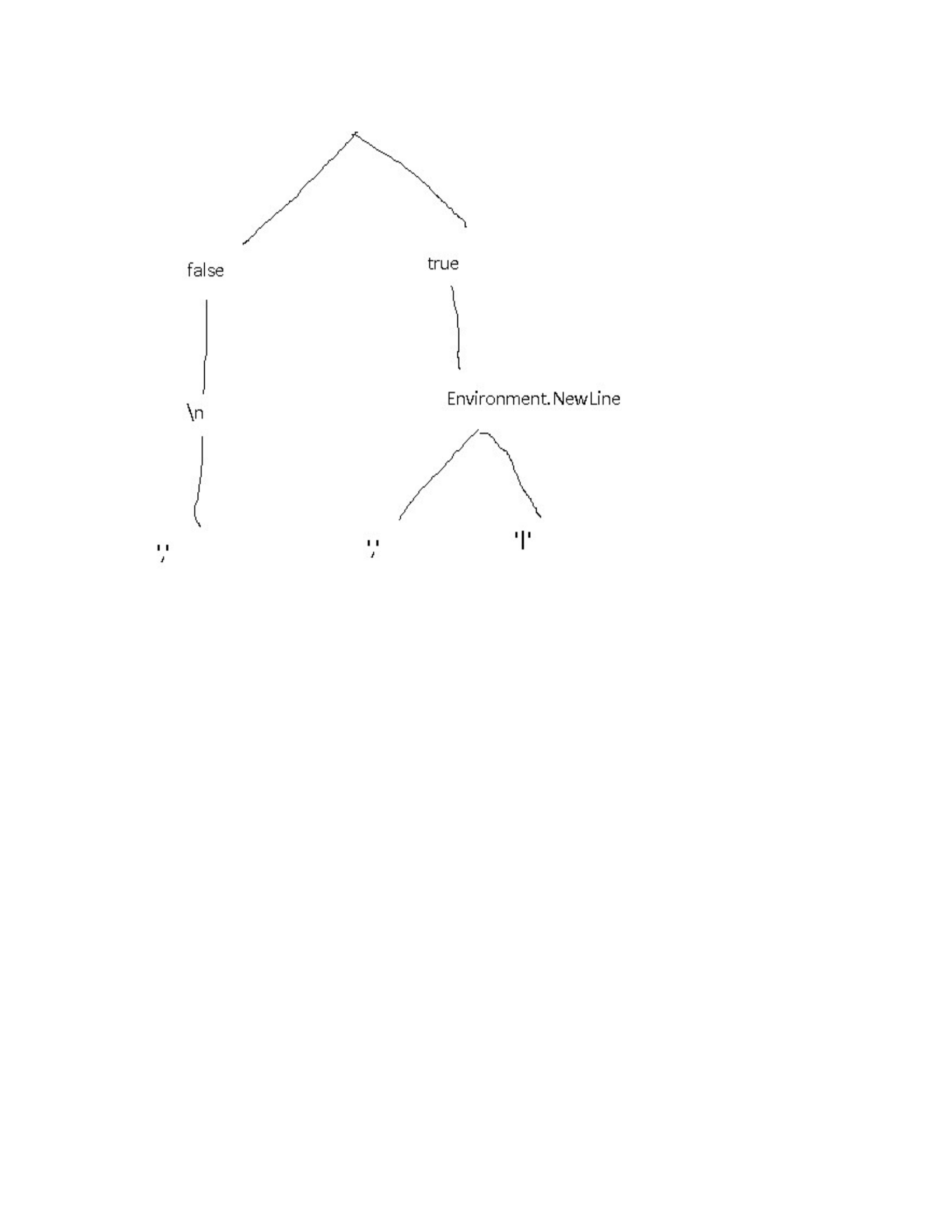
Figure 8-1. A The family tree of the parseBooks functions
Another example that might have uses in production is splitting up a logging
function into multiple, more specific functions:
// For the sake of this exercise, the parameters are
// an enum (log type - warning, error, info, etc.) and a
string
// containing a message to store in the log file
var logger = getLoggerFunction()
var curriedLogger = logger.Curry();
var logInfo = curriedLogger(LogLevel.Info);
var logWarning = curriedLogger(LogLevel.Warning);
var logError = curriedLogger(LogLevel.Error);
// You'd use them then, like this:
logInfo("This currying lark works a treat!");

There are a few useful features of this approach:
We’ve actually only created one single function at the end of the day,
but from it, managed to create at least 3 usable variations which can be
passed around, requiring only a filename to be usable. That’s taking
code re-use to an extra level!
There are also all of the intermediate functions available too. These can
either be used directly, or as a starting point for creating additional new
functions.
There’s another use for currying in C# as well. I’ll discuss that in the next
section.
This is all well and good, except that the next two sets of books have
different formats. Books2.csv uses pipes instead of commas to separate
fields, and Books3.csv comes from a Linux environment and has “\n” line
endings instead of the Windows style “\r\n”.
We could get around this by creating 3 different functions that are near
replicas of each other. I’m not keen on unnecessary replication though, since
it adds too many problems for future developers that want to maintain the
codebase.
A more reasonable solution is to add in parameters for everything that could
possibly change. Like this:
public IEnumerable<Book> ParseBooks(
string
lineBreak,
bool skipHeader,
string fieldDelimiter,
string fileName
) =>
File.ReadAllText(fileName)
.Split(lineBreak)
.Skip(skipHeader ? 1 : 0)

.Select(x => x.split(fieldDelimiter).ToArray())
.Select(x => new Book
{
Title = x[0],
Author = x[1],
PublicationDate = x[2]
});
var bookData = parseBooks(true, Environment.NewLine, ",",
"books.csv");
Now, If I wanted to follow the non-functional approach to the use of this
function, I’d have to fill in every parameter every possible style of CSV file,
like this:
var bookData1 = parseBooks(true, Environment.NewLine, ",",
"books.csv");
var bookData2 = parseBooks(true, Environment.NewLine,
"|","books2.csv");
var bookData3 = parsebooks(false, "\n", ",", "books3.csv");
What Currying actually means is to supply the functions one at a time. Any
calls to a curried function results either in a new function with one parameter
fewer, or else a concrete value if all parameters for the base function have
been supplied.
The calls with the full set of supplied parameters, from the previous code
sample, could be replaced like this:
// First some magic that curries the parseBooks function
// I'll look into implementation details later, let's just
// understand the theory for now.
var curriedParseBooks = parseBooks.Curry();
// these two have 3 parameters - string, string, string
var parseSkipHeader = curriedParseBooks(true);
var parseNoHeader = curriedParseBooks(false);
// 2 parameters

var parseSkipHeaderEnvNl =
parseSkipHeader(Environment.NewLine);
var parseNoHeaderLinux = parseNoHeader("\n");
// 1 parameter each
var parseSkipHeaderEnvNlCommarDel =
parseSkipHeaderEnvNl(",");
var parseSkipHeaderEnvNlPipeDel =
parseSkipHeaderEnvNl("|");
var parseNoHeaderLinuxCommarDel = parseNoHeaderLinux(",");
// Actual data, Enumerables of Book data
var bookData1 = parseSkipHeaderEnvNlCommarDel("books.csv");
var bookData2 = parseSkipHeaderEnvNlPipeDel("books2.csv");
var bookData3 = parseNoHeaderLinuxCommarDel("books3.csv");
The point is that Currying turns a function with X parameter, into a sequence
of X functions, each of which has a single parameter - the last one returning
the final result.
You could even write the function calls above like this - if you really, really
wanted to!:
var bookData1 = parseBooks(true)(Environment.NewLine)(",")
("books.csv")
var bookData2 = parseBooks(true)(Environment.NewLine)("|")
("books2.csv")
var bookData3 = parseBooks(true)("\n")(",")("books3.csv")
The point of the first example of currying is that we’re gradually building up
a hyper-specific version of the function that only takes a file name as a
parameter. In addition to that, we’re storing all of the intermediate versions
for potential re-use in building up other functions.
What we’re effectively doing here is building up functions like a wall made
of lego bricks, where each brick is a function. Or, if you want to think about
it another way, there’s a family tree of functions, with each choice made at
each stage causing a branch in the family:
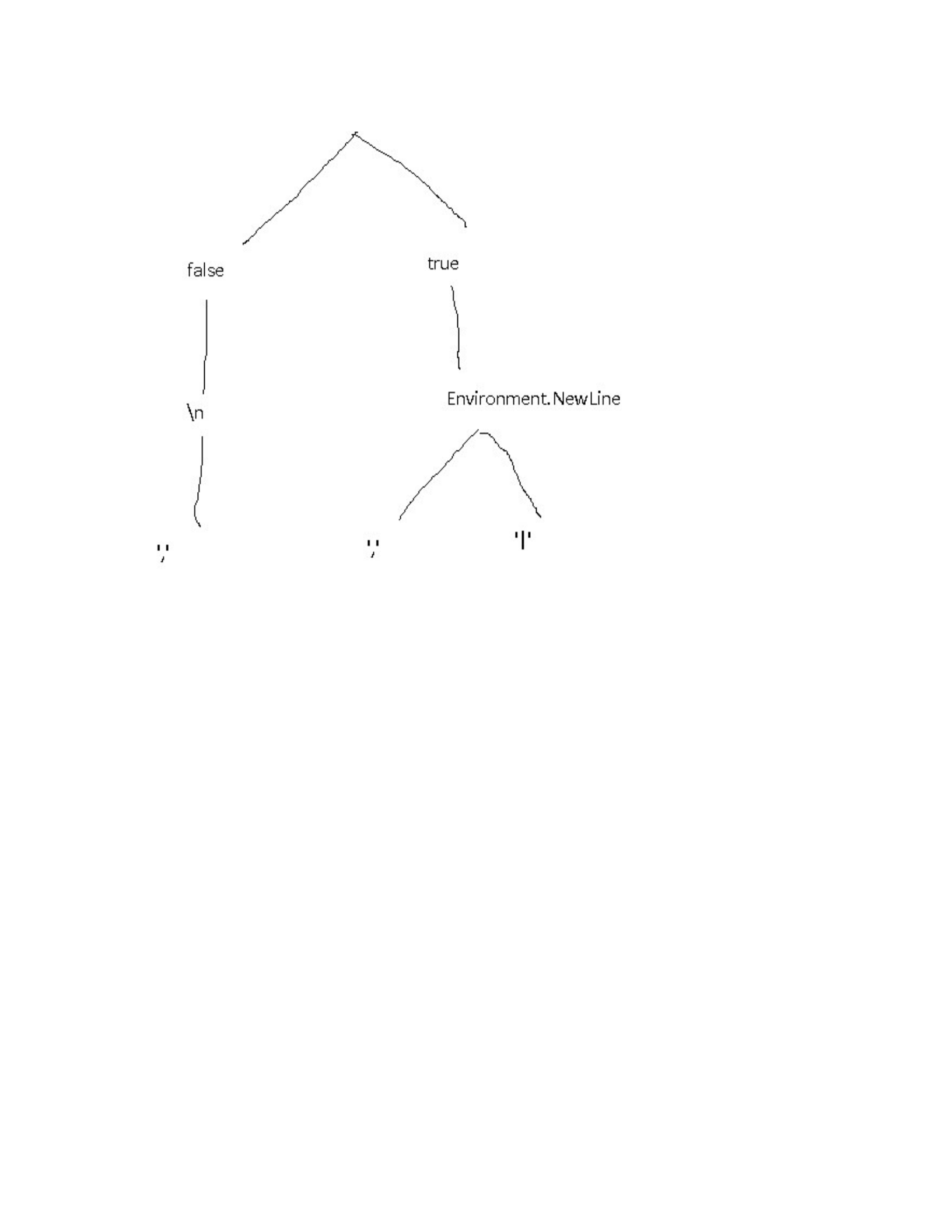
Figure 8-1. A The family tree of the parseBooks functions
Another example that might have uses in production is splitting up a logging
function into multiple, more specific functions:
// For the sake of this exercise, the parameters are
// an enum (log type - warning, error, info, etc.) and a
string
// containing a message to store in the log file
var logger = getLoggerFunction()
var curriedLogger = logger.Curry();
var logInfo = curriedLogger(LogLevel.Info);
var logWarning = curriedLogger(LogLevel.Warning);
var logError = curriedLogger(LogLevel.Error);
// You'd use them then, like this:
logInfo("This currying lark works a treat!");

There are a few useful features of this approach:
We’ve actually only created one single function at the end of the day,
but from it, managed to create at least 3 usable variations which can be
passed around, requiring only a filename to be usable. That’s taking
code re-use to an extra level!
There are also all of the intermediate functions available too. These can
either be used directly, or as a starting point for creating additional new
functions.
There’s another use for currying in C# as well. I’ll discuss that in the next
section.
This is all well and good, except that the next two sets of books have
different formats. Books2.csv uses pipes instead of commas to separate
fields, and Books3.csv comes from a Linux environment and has “\n” line
endings instead of the Windows style “\r\n”.
We could get around this by creating 3 different functions that are near
replicas of each other. I’m not keen on unnecessary replication though, since
it adds too many problems for future developers that want to maintain the
codebase.
A more reasonable solution is to add in parameters for everything that could
possibly change. Like this:
public IEnumerable<Book> ParseBooks(
string
lineBreak,
bool skipHeader,
string fieldDelimiter,
string fileName
) =>
File.ReadAllText(fileName)
.Split(lineBreak)
.Skip(skipHeader ? 1 : 0)

.Select(x => x.split(fieldDelimiter).ToArray())
.Select(x => new Book
{
Title = x[0],
Author = x[1],
PublicationDate = x[2]
});
var bookData = parseBooks(true, Environment.NewLine, ",",
"books.csv");
Now, If I wanted to follow the non-functional approach to the use of this
function, I’d have to fill in every parameter every possible style of CSV file,
like this:
var bookData1 = parseBooks(true, Environment.NewLine, ",",
"books.csv");
var bookData2 = parseBooks(true, Environment.NewLine,
"|","books2.csv");
var bookData3 = parsebooks(false, "\n", ",", "books3.csv");
What Currying actually means is to supply the functions one at a time. Any
calls to a curried function results either in a new function with one parameter
fewer, or else a concrete value if all parameters for the base function have
been supplied.
The calls with the full set of supplied parameters, from the previous code
sample, could be replaced like this:
// First some magic that curries the parseBooks function
// I'll look into implementation details later, let's just
// understand the theory for now.
var curriedParseBooks = parseBooks.Curry();
// these two have 3 parameters - string, string, string
var parseSkipHeader = curriedParseBooks(true);
var parseNoHeader = curriedParseBooks(false);
// 2 parameters

var parseSkipHeaderEnvNl =
parseSkipHeader(Environment.NewLine);
var parseNoHeaderLinux = parseNoHeader("\n");
// 1 parameter each
var parseSkipHeaderEnvNlCommarDel =
parseSkipHeaderEnvNl(",");
var parseSkipHeaderEnvNlPipeDel =
parseSkipHeaderEnvNl("|");
var parseNoHeaderLinuxCommarDel = parseNoHeaderLinux(",");
// Actual data, Enumerables of Book data
var bookData1 = parseSkipHeaderEnvNlCommarDel("books.csv");
var bookData2 = parseSkipHeaderEnvNlPipeDel("books2.csv");
var bookData3 = parseNoHeaderLinuxCommarDel("books3.csv");
The point is that Currying turns a function with X parameter, into a sequence
of X functions, each of which has a single parameter - the last one returning
the final result.
You could even write the function calls above like this - if you really, really
wanted to!:
var bookData1 = parseBooks(true)(Environment.NewLine)(",")
("books.csv")
var bookData2 = parseBooks(true)(Environment.NewLine)("|")
("books2.csv")
var bookData3 = parseBooks(true)("\n")(",")("books3.csv")
The point of the first example of currying is that we’re gradually building up
a hyper-specific version of the function that only takes a file name as a
parameter. In addition to that, we’re storing all of the intermediate versions
for potential re-use in building up other functions.
What we’re effectively doing here is building up functions like a wall made
of lego bricks, where each brick is a function. Or, if you want to think about
it another way, there’s a family tree of functions, with each choice made at
each stage causing a branch in the family:
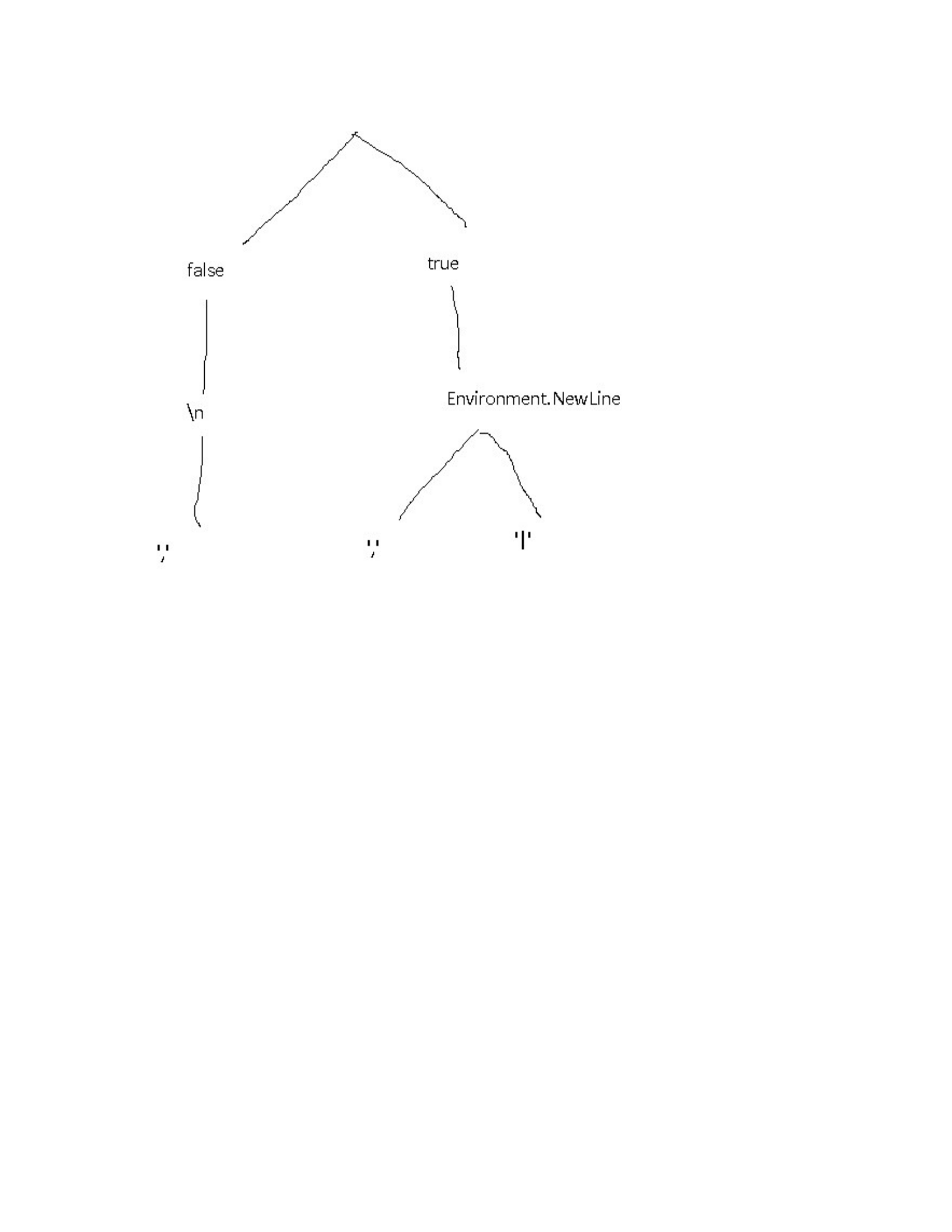
Figure 8-1. A The family tree of the parseBooks functions
Another example that might have uses in production is splitting up a logging
function into multiple, more specific functions:
// For the sake of this exercise, the parameters are
// an enum (log type - warning, error, info, etc.) and a
string
// containing a message to store in the log file
var logger = getLoggerFunction()
var curriedLogger = logger.Curry();
var logInfo = curriedLogger(LogLevel.Info);
var logWarning = curriedLogger(LogLevel.Warning);
var logError = curriedLogger(LogLevel.Error);
// You'd use them then, like this:
logInfo("This currying lark works a treat!");

There are a few useful features of this approach:
We’ve actually only created one single function at the end of the day,
but from it, managed to create at least 3 usable variations which can be
passed around, requiring only a filename to be usable. That’s taking
code re-use to an extra level!
There are also all of the intermediate functions available too. These can
either be used directly, or as a starting point for creating additional new
functions.
There’s another use for currying in C# as well. I’ll discuss that in the next
section.
This is all well and good, except that the next two sets of books have
different formats. Books2.csv uses pipes instead of commas to separate
fields, and Books3.csv comes from a Linux environment and has “\n” line
endings instead of the Windows style “\r\n”.
We could get around this by creating 3 different functions that are near
replicas of each other. I’m not keen on unnecessary replication though, since
it adds too many problems for future developers that want to maintain the
codebase.
A more reasonable solution is to add in parameters for everything that could
possibly change. Like this:
public IEnumerable<Book> ParseBooks(
string
lineBreak,
bool skipHeader,
string fieldDelimiter,
string fileName
) =>
File.ReadAllText(fileName)
.Split(lineBreak)
.Skip(skipHeader ? 1 : 0)

.Select(x => x.split(fieldDelimiter).ToArray())
.Select(x => new Book
{
Title = x[0],
Author = x[1],
PublicationDate = x[2]
});
var bookData = parseBooks(true, Environment.NewLine, ",",
"books.csv");
Now, If I wanted to follow the non-functional approach to the use of this
function, I’d have to fill in every parameter every possible style of CSV file,
like this:
var bookData1 = parseBooks(true, Environment.NewLine, ",",
"books.csv");
var bookData2 = parseBooks(true, Environment.NewLine,
"|","books2.csv");
var bookData3 = parsebooks(false, "\n", ",", "books3.csv");
What Currying actually means is to supply the functions one at a time. Any
calls to a curried function results either in a new function with one parameter
fewer, or else a concrete value if all parameters for the base function have
been supplied.
The calls with the full set of supplied parameters, from the previous code
sample, could be replaced like this:
// First some magic that curries the parseBooks function
// I'll look into implementation details later, let's just
// understand the theory for now.
var curriedParseBooks = parseBooks.Curry();
// these two have 3 parameters - string, string, string
var parseSkipHeader = curriedParseBooks(true);
var parseNoHeader = curriedParseBooks(false);
// 2 parameters

var parseSkipHeaderEnvNl =
parseSkipHeader(Environment.NewLine);
var parseNoHeaderLinux = parseNoHeader("\n");
// 1 parameter each
var parseSkipHeaderEnvNlCommarDel =
parseSkipHeaderEnvNl(",");
var parseSkipHeaderEnvNlPipeDel =
parseSkipHeaderEnvNl("|");
var parseNoHeaderLinuxCommarDel = parseNoHeaderLinux(",");
// Actual data, Enumerables of Book data
var bookData1 = parseSkipHeaderEnvNlCommarDel("books.csv");
var bookData2 = parseSkipHeaderEnvNlPipeDel("books2.csv");
var bookData3 = parseNoHeaderLinuxCommarDel("books3.csv");
The point is that Currying turns a function with X parameter, into a sequence
of X functions, each of which has a single parameter - the last one returning
the final result.
You could even write the function calls above like this - if you really, really
wanted to!:
var bookData1 = parseBooks(true)(Environment.NewLine)(",")
("books.csv")
var bookData2 = parseBooks(true)(Environment.NewLine)("|")
("books2.csv")
var bookData3 = parseBooks(true)("\n")(",")("books3.csv")
The point of the first example of currying is that we’re gradually building up
a hyper-specific version of the function that only takes a file name as a
parameter. In addition to that, we’re storing all of the intermediate versions
for potential re-use in building up other functions.
What we’re effectively doing here is building up functions like a wall made
of lego bricks, where each brick is a function. Or, if you want to think about
it another way, there’s a family tree of functions, with each choice made at
each stage causing a branch in the family:
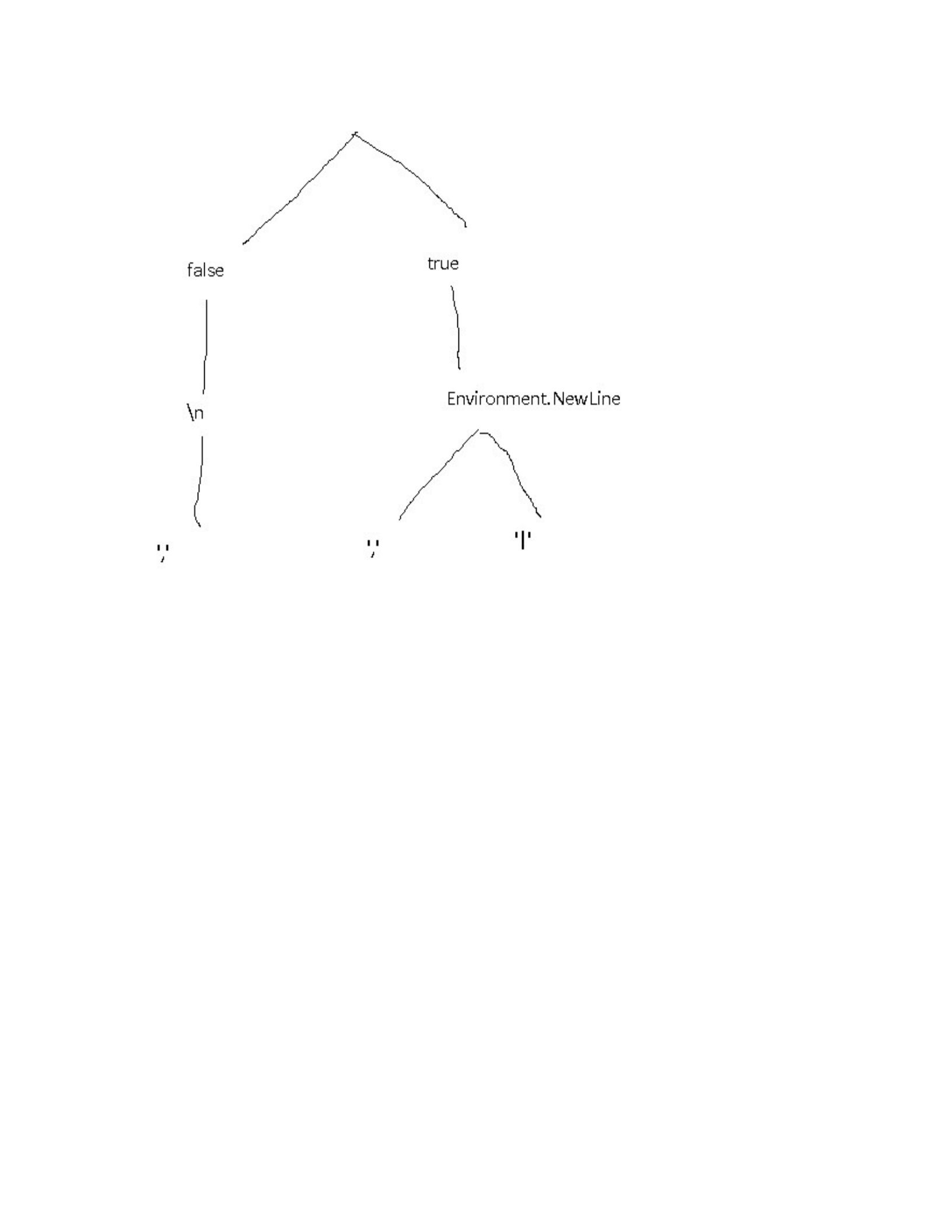
Figure 8-1. A The family tree of the parseBooks functions
Another example that might have uses in production is splitting up a logging
function into multiple, more specific functions:
// For the sake of this exercise, the parameters are
// an enum (log type - warning, error, info, etc.) and a
string
// containing a message to store in the log file
var logger = getLoggerFunction()
var curriedLogger = logger.Curry();
var logInfo = curriedLogger(LogLevel.Info);
var logWarning = curriedLogger(LogLevel.Warning);
var logError = curriedLogger(LogLevel.Error);
// You'd use them then, like this:
logInfo("This currying lark works a treat!");

There are a few useful features of this approach:
We’ve actually only created one single function at the
end of the day, but from it, managed to create at least 3
usable variations which can be passed around, requiring
only a filename to be usable. That’s taking code re-use
to an extra level!
There are also all of the intermediate functions available
too. These can either be used directly, or as a starting
point for creating additional new functions.
There’s another use for currying in C# as well. I’ll discuss that
in the next section.

