


1
1 INTRODUCTION
Platform as a Service (PaaS) and Infrastructure as a Service (IaaS) vendors (collectively
referred to as cloud vendors) are not all equal. Cloud vendors all provide similar services, but
the differences can have a significant impact on specific applications. Private implementations
provide similar services with different characteristics. One difficulty for an organization in
selecting the appropriate cloud implementation is that there are so many options. It can be
difficult to determine which application characteristics will impact the choice of implementation,
especially when trying to move a currently running application to another hosting environment.
The purpose of this research is to analyze cloud platform characteristics and application
system requirements to create a model for scoring a deployment platform against the
requirements. This research provides a model that identifies crucial application characteristics
and characteristics of cloud implementations. The model is used to map the crucial application
characteristics with the service provided by a particular cloud implementation. The model is
then used to analyze the interaction of the application with the platform and select the best option
based on a suitability score. The utility of the model is tested against three different cloud
implementations relevant to the application. The model describes best practice for the process of
selecting which cloud implementations are best suited for the specific application and
organization needs.
2
Virtualization platforms, whether public or private, add a layer of abstraction over the
physical hardware. Public implementations of these platforms provide customers access to an
effectively unlimited resource pool subject to the constrictions of the specific implementation.
These virtualized environments are often referred to as “clouds”. Why are clouds being chosen?
What benefits do they provide? The National Institute of Standards and Technology (NIST)
defines cloud computing as: “a model for enabling ubiquitous, convenient, on-demand network
access to a shared pool of configurable computing resources (e.g., networks, servers, storage,
applications, and services) that can be rapidly provisioned and released with minimal
management effort or service provider interaction.” (Mell & Grance, 2011) This means that an
organization or individual can have ready access to quick and seemingly unlimited computing
resources. There is automation around cloud platforms that make it easier for consumers using
the cloud to provision virtualized resources without intervention from an administrator.
Research Objectives
The primary objective of this research is to define and test a process that facilitates
matching application and organization requirements to platform implementation features. A
scoresheet is used for evaluating how well a particular platform implementation fits the
application requirements.
Hypothesis:
It is practical to parameterize and document the characteristics of specific applications in
terms of their execution and deployment requirements.
It is practical to parameterize and document the characteristics of cloud platform
implementations.
3
A mapping can be defined between platform and application such that the application
characteristics can be matched against cloud provider characteristics to verify the suitability of
the specific cloud implementation to support the execution and management of the application.
The mapping can be applied to score the suitability of a cloud implementation to support
a specific application.
Requirements/Assumptions
This thesis assumes that an application to be deployed has been designed, even though the
application can be in any stage of development, from the design phase to running in production.
The decision of whether to virtualize, use physical hardware, or both, needs to have been
decided. If physical hardware is the best answer, then the method can be used to select a vendor
with bare metal provisioning. This thesis provides guidance to a practitioner to decide if a cloud
provider fulfills the requirement for the application. This thesis does not promote any particular
cloud vendor over another. This thesis does not address migrating to a new cloud vendor.
4
2 LITERATURE REVIEW
As virtualization platforms or cloud computing have become more of a commodity, many
more organizations have been utilizing them. According to the RightScale 2016 State of the
Cloud Survey, 95% of respondents are using cloud computing and 71% are using a Hybrid
cloud. On average, companies using cloud computing are using 3 public and 3 private clouds for
production or experimental use. (Weins, 2016) This is a significant increase from 2013 where
54% of organizations were using public or private clouds. (Cohen, 2013) With more
organizations using cloud implementations there are more organizations and technologies that
have emerged to fulfill these cloud needs. There is not a “one size fits all” solution that will
support every application. Selecting the right provider is difficult and confusing because of the
number of choices. Unfortunately, making the wrong choice can be costly in both time and
money.
What is a Cloud?
An important thing to remember when discussing cloud computing is that a cloud is not
tied to a data center. Data centers are in a physical location, either a building or a room and
consist of servers, network equipment, storage, HVAC, power, backup power, virtualization, and
other critical equipment. Clouds are a virtual environment that makes the services of one or
more data centers available through a single interface and billing structure. A cloud requires at

5
least one data center (or data centers) to run but a data center may or may not implement a cloud.
Virtualization in itself is not a cloud. Clouds add a layer of abstraction between a user and data
centers.
When deploying a new server in a data center an administrator will either select a physical
server or create a new server in their virtualization environment. The OS is installed, IP
addresses are assigned and additional software is installed. The logical server is then typically
bound to a specific set of physical servers. When a new server is deployed in a cloud
environment, the process is similar but the administrator will use cloud management tools to
specify the new server and the cloud infrastructure will take care of the rest, even if the server is
deployed on bare metal (a physical server). The actual physical location of the server will often
be unknown. Randy Bias wrote a haiku about deploying servers in a cloud environment:
“Where are you servers? Out there. Somewhere. In the clouds. You don’t know. You
don’t care.”
When deploying into a cloud, there is less emphasis on where the server is deployed but
rather that it is deployed and running (Bias, 2008). The virtual or physical server could be on
any physical hardware within any rack or server room row, or it could also be in a completely
different Data center. In a cloud environment, the physical location really does not matter except
for network connectivity considerations. Latency can be a significant issue for some
applications.
Picking an environment that matches the needs of the application and organization is
crucial in maintaining a well running application. Understanding if the load on the application
will stay consistent or fluctuate will help determine the environment characteristics. If the load
is going to stay constant, then the application can be deployed in the data center on a handful of
6
servers. However, the application may need to be more robust and have the ability to handle any
amount of traffic whenever it is needed. The application would need to be able to scale by
adding resources to the application as the demand for the application increases. Under these
conditions a cloud environment is probably going to be the best choice.
Types of Clouds
There are several types of cloud environments: public clouds, community clouds, private
clouds and hybrid clouds with distinct service models, Software as a Service (SaaS), Platform as
a Service (PaaS) and Infrastructure as a Service (IaaS). Each implementation provides a different
paradigm of control and access.
2.2.1 Public Clouds
A public cloud is intended for use by the general public and provides the infrastructure,
including AC power, and physical systems administration. Public clouds provide servers that are
immediately available as the need arises, which reduces an organization’s requirement to provide
idle or unutilized servers to manage load and provide redundancy. The disadvantage to public
clouds is that there is less control for the organization. The cloud provider makes all of the
decisions on how the cloud infrastructure can be used. There is also a perception of weaker
security because it is out in the web instead of safely behind on-premise firewalls (Networks,
2013). However, since the cloud provider may invest more into security in both hardware and
personnel, a cloud may actually be more secure than a server deployed privately.
7
A primary motivation for using public cloud services is that an organization can quickly
provision an environment to host a web application with very little investment, while a data
center requires a large upfront cost to get up and running. David Gewirtz, a cyber-security
expert and author, relates an experience: “Investment in infrastructure was a huge barrier of
entry to our competitors. We invested not only in hardware, but in specialized content
management software.” (Gewirtz, n.d.) To get up and running in a data center, an organization
needs to invest in space, power, IT equipment, data connections, HVAC and more. These
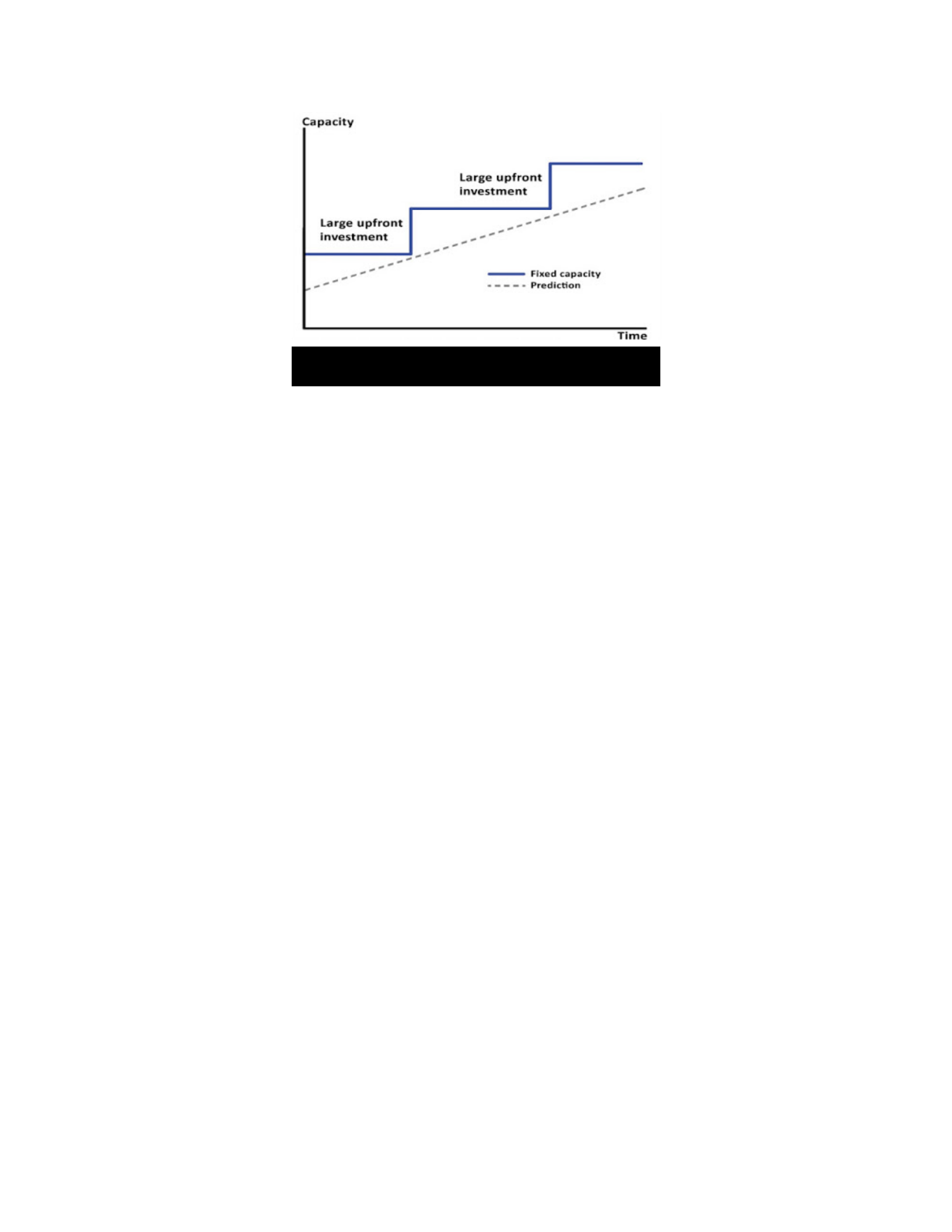
services require significant upfront costs. A data center also needs to predict the capacity needed
and how much it can grow, as seen in Figure 2.2.1. A data center makes a large upfront
investment to accommodate the capacity.
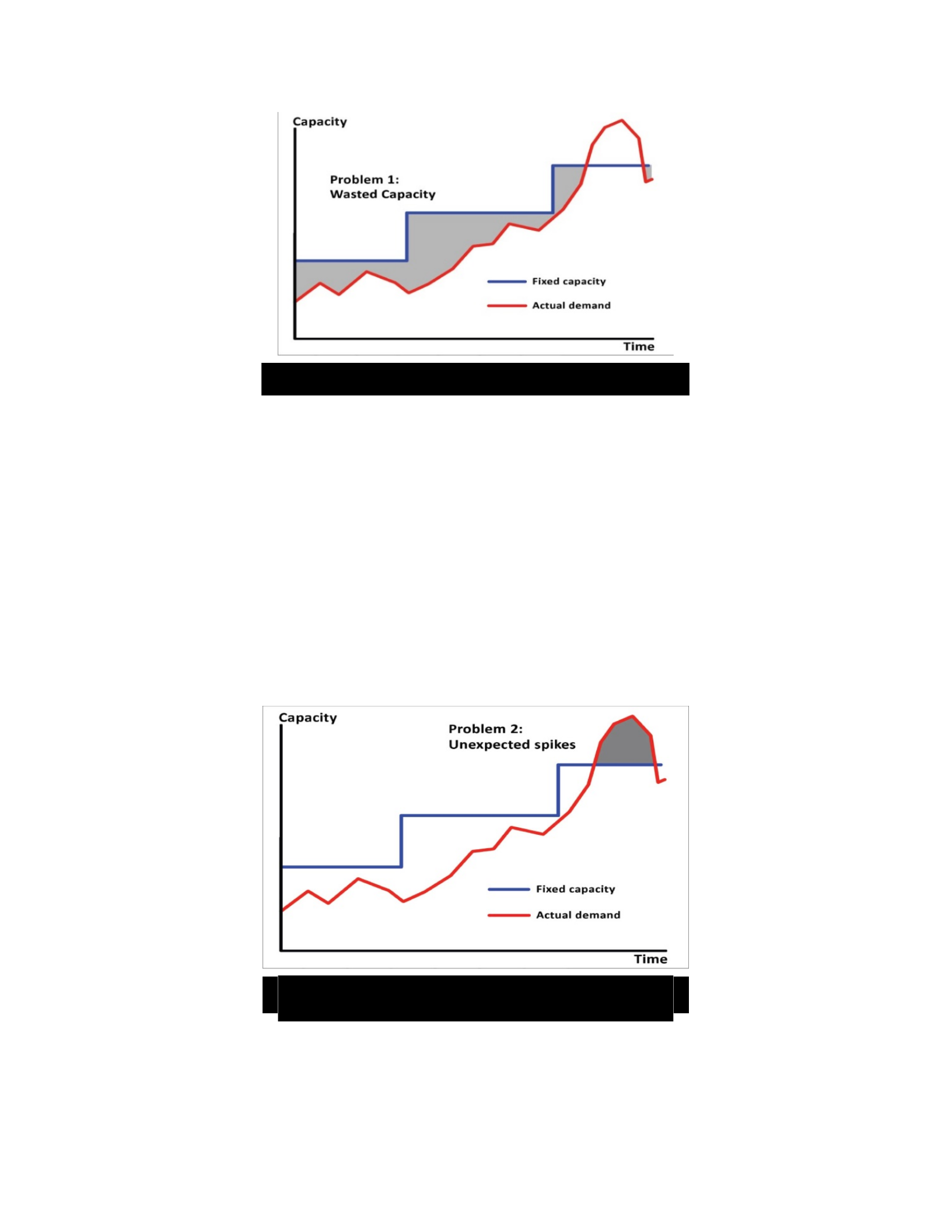
The most common situation is that the system does not have a constant load. The load
fluctuates, which means the capacity necessary for the service fluctuates and capacity is wasted
as seen in Figure 2.2.2. The servers are not delivering at full capacity and will mostly sit idle
waiting for data to process.
Figure 2.2.1 Predicting Growth and Capacity
8
Another common situation with data centers is with unexpected loads on the system.
While the load can be estimated, it is unpredictable and can fluctuate frequently. If there is an
unexpected spike in load that is beyond the capacity of what the infrastructure can handle as
shown in Figure 2.2.3, the overhead can either shutdown the site or fail to service potential
customers which results in loss of revenue.
Figure 2.2.2 Wasted Data Center Capacity
Figure 2.2.3 Unexpected Spikes
9
The loss of traffic can be very dangerous for an organization; especially a startup company
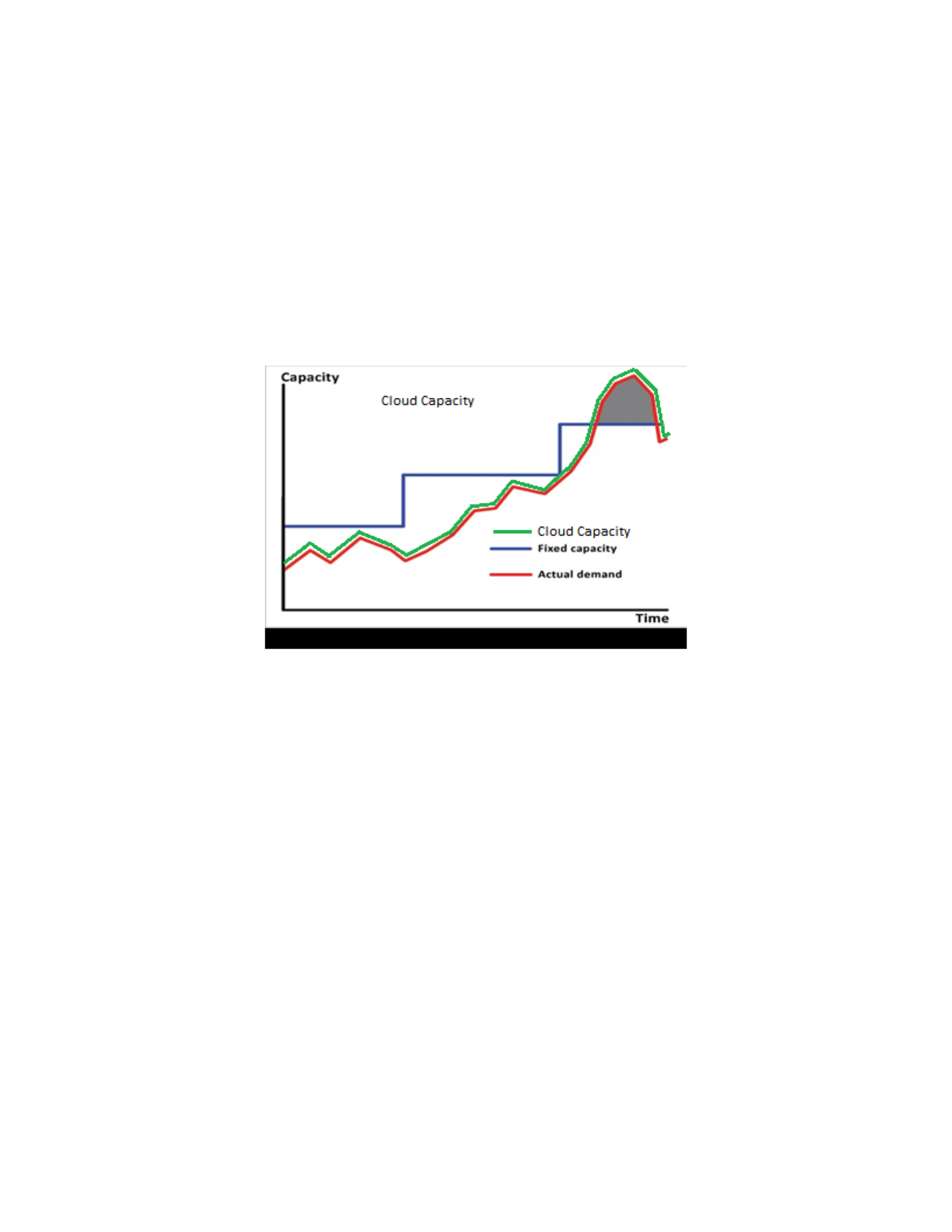
where revenue and customer perception is critical. Public clouds provide almost unlimited
resources that can be used on demand. An organization does not need to be concerned about
having sufficient processing power to handle the work load because public clouds provide the
ability to scale up to match the load on the service, as shown in Figure 2.2.4.
2.2.2 Private Clouds
Private clouds are provisioned for a single organization and allow an organization to have
control over all aspects of their environment (Mell & Grance, 2011). They allow an
implementation to conform specifically to organization needs and allow an organization to use
exactly what it needs from the cloud environment without purchasing features that are not
needed. Private clouds provide a greater control over security and privacy because the
infrastructure is in a controlled environment. Private clouds, however, are costly. “To build a
private cloud service, an organization needs to invest in hardware or use already existing systems
Figure 2.2.4 Public Cloud Capacity

10
whereas a public cloud service is all handled off site. Private clouds also require system
administrators which leads to higher administration costs.” (Networks, 2013)
However, running a cloud in-house provides many advantages. The most significant of
these is that the organization has complete control over the environment. They have the ability
to pick the equipment, technologies and ensure that the data has complete isolation from other
organizations. There are many applications and organizations that have restrictions on their data.
If an organization has to classify their data as “secret” or “confidential”, the data may not be able
to be stored outside of the organization’s infrastructure. Some countries have regulations on
where organization data can be stored. Some countries have restrictions on what data can cross
their borders. Hosting a private cloud allows an organization to ensure that they are in
compliance with these regulations.
Some applications require specialized equipment or services to function. Others have
restrictive licensing that prevent them from being run in a public cloud environment. One
example is legacy software that requires a physical piece of hardware, such as a dongle, required
for the software to function. There are some organizations that use specialized equipment that
cloud vendors just do not support. These types of applications and hardware need to be hosted in
an environment suited to their needs.
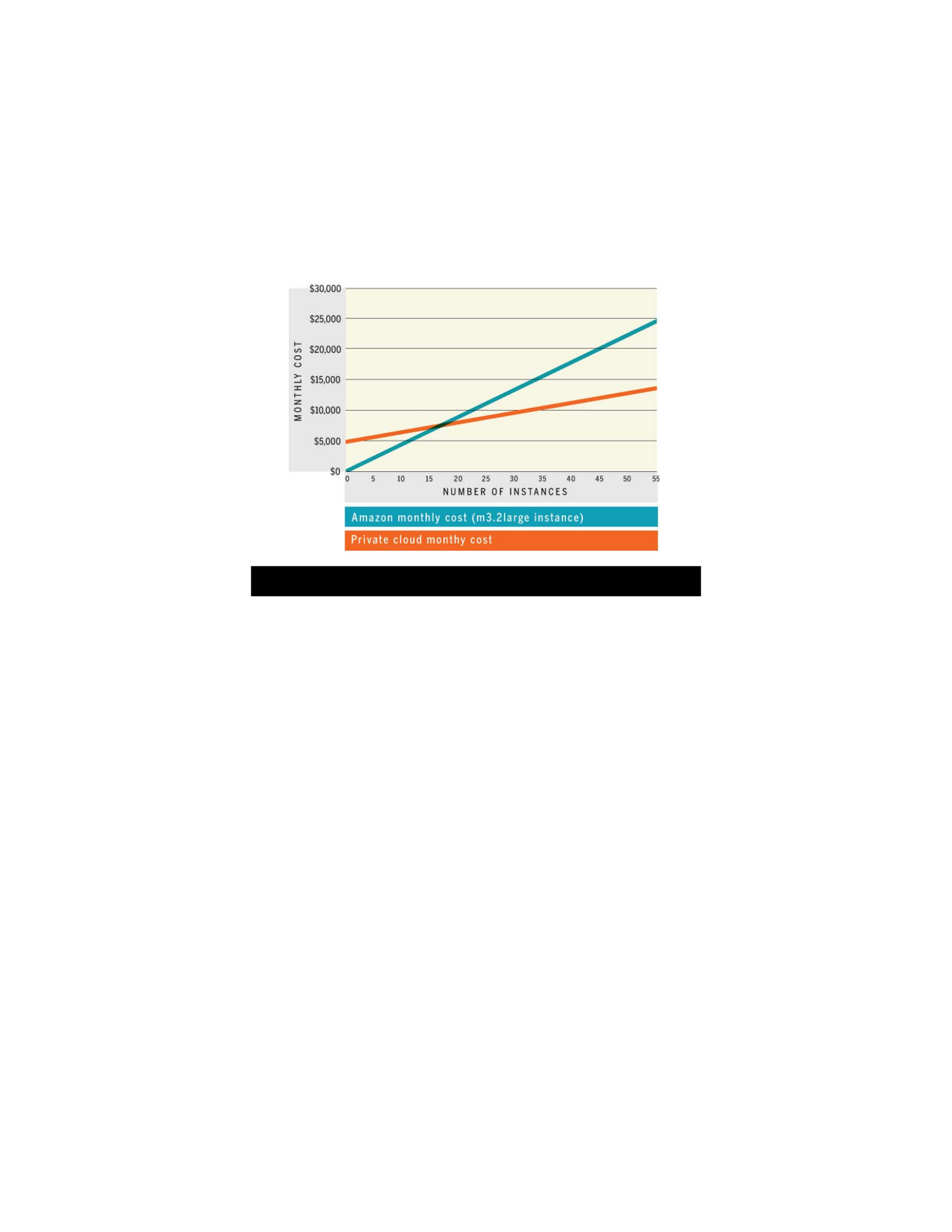
Depending on application load, running a private cloud may be cheaper than a public
cloud. A case study from Network World in 2014 says “if an organization is spending more than
$7,644 in Amazon’s cloud each month, then it can be less expensive to operate a private cloud.”
(Butler, 2014) See Figure 2.2.5. The opportunity cost is constantly shifting as public cloud
services, private cloud software and physical hardware prices change. Since these costs are
volatile, they need to be considered and monitored. Butler continues to say that there are just too
11
many factors to consider when trying to put an overall cost a public cloud compared to running a
private cloud. Some of these costs are monetary costs such as servers, IT equipment, HVAC,
electrical, data, etc., while some costs are more difficult to determine such as latency.
An International Data Corporation (IDC) analyst, Melanie Posey, says that even though
public cloud vendors have incentives for volume discount pricing, “If the infrastructure for the
workload needs to run 24/7/365, then there’s not much point in paying for it on a pay-as-you-go
basis.” (Butler, 2014)
2.2.3 Hybrid Clouds
Hybrid clouds are a combination of two or more distinct cloud infrastructures (private,
public or community). Hybrids can consist of any combination of cloud services; two different
private clouds, a private cloud and a public cloud or a public cloud and a community cloud
(Mell & Grance, 2011). “The hybrid approach allows an organization to take advantage of the
Figure 2.2.5 Amazon EC2 Instances VS Private Cloud

12
scalability and cost-effectiveness that a public cloud computing environment offers without
exposing mission-critical applications and data to third-party vulnerabilities.” (Rouse, 2013)
There are many ways that hybrid clouds can be implemented to make sure the application
is running as efficiently as possible. An approach is when some of the application lives in a
private cloud or data center and some of the application lives in a public cloud. Another
approach is to use cloud storage for backing up an application and the application data. Another
way is to use cloud compute capacity to handle unexpected spikes, such as special sales or events
or to handle holiday traffic. When load is consistent it is easy to provide the necessary capacity
that a less expensive private cloud can handle while a public cloud is available for when the
application experiences unexpected spikes in load.
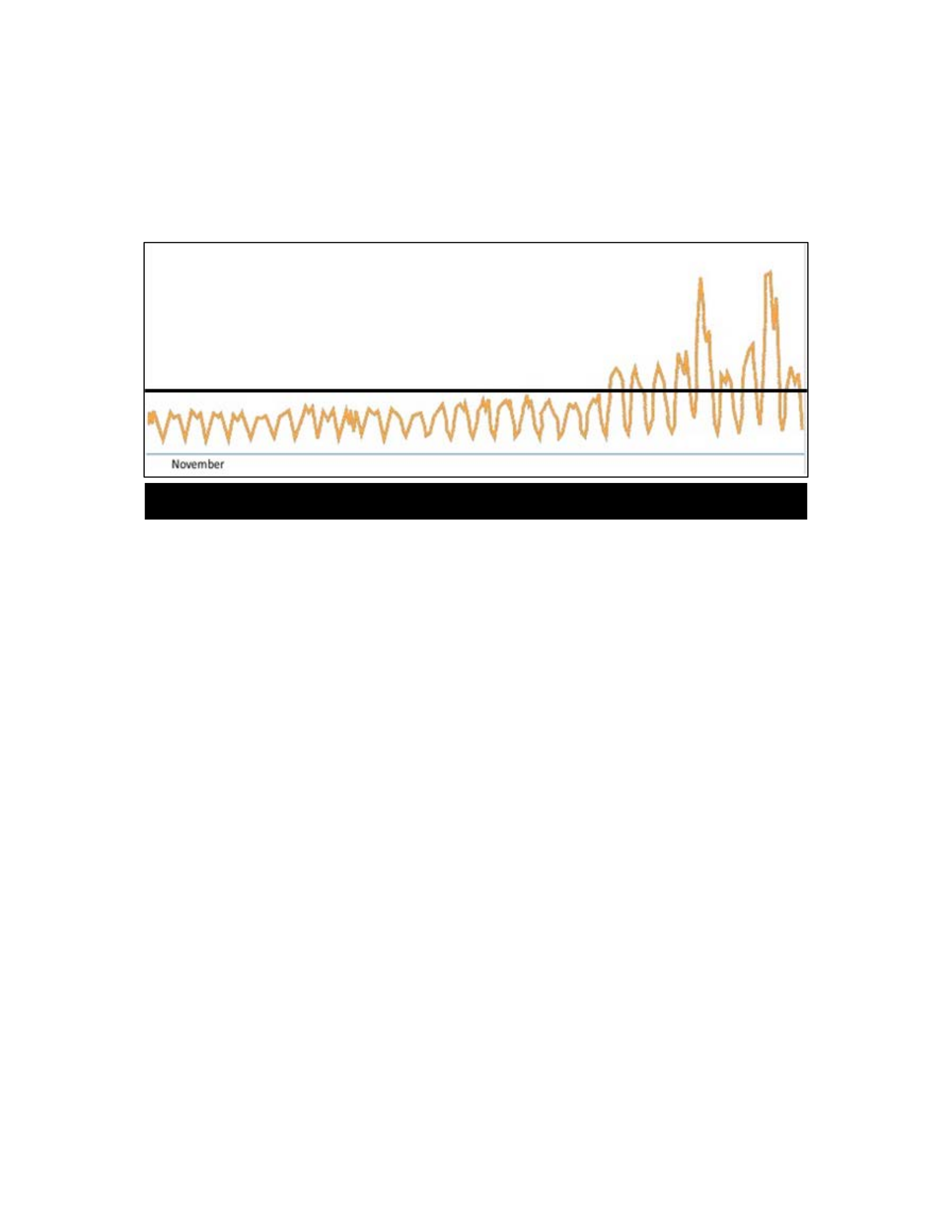
Figure 2.2.6 shows an example of unexpected or unknown traffic and is specifically the
traffic load of Amazon.com for the month of November. The figure has been modified for this
example. The black line represents the overall server capacity that a data center can handle and
the orange line represents the actual load of the system. Under normal load the Amazon servers
can handle the traffic with little wasted capacity, but when load spikes for Black Friday and
Cyber Monday, the load increases beyond the capacity of the data center. There are two options,
provide more infrastructure or lose the traffic. There are costs associated with both options. If
there were sufficient servers purchased to handle peak load there would be significant unused
capacity for the majority of the year. However, if the data center were able to automatically
burst into a public cloud to offset the extra load there would be minimal additional cost while
allowing the website to perform as expected and handle the spike in load. When load returns to
normal, there isn’t excess capacity being wasted by idle servers. Adding support for hybrid
13
clouds adds complexity to the management of the system but it allows the system to perform
efficiently and provide the performance required.
2.2.4 Community Clouds
Community clouds are provisioned for a specific group of users with a common goal. In a
community cloud the physical hardware is owned by one or more of the consumers and the
resources are shared between all of them. These users all share a common goal or have a
common concern such as mission, or security requirements (Mell & Grance, 2011). One
example of a community cloud is Space Monkey. Space Monkey is a cloud storage provider like
Dropbox, but when data is stored to the local Space Monkey devices, data chunks are securely
replicated across multiple peer Space Monkey devices. There isn’t one organization that hosts
all of the data used by customers, the hardware is hosted and shared across multiple consumers’
networks. The hardware and bandwidth costs are spread across the consumers, reducing the
costs for each consumer (Needleman, 2012). Space Monkey is considered a community cloud
because it is exclusive to the members of the community, data is owned and hosted by the
Figure 2.2.6 Unexpected Load

14
consumers and the consumers have a common goal, which is to have secure and redundant cloud
storage.
2.2.5 Software as a Service (SaaS)
SaaS provides an application or service to a consumer. The provider provides all of the
infrastructure and maintenance for the application. The consumer is able to access the
application or service through various client interfaces such as a thin client (like a web browser)
or through a program interface. The consumer has no control over the underlying infrastructure
such as networks, servers, operating systems, etc. (Mell & Grance, 2011). Some SaaS services
include online search engines (such as Google or Bing), many social media websites, and online
email applications.
2.2.6 Platform as a Service (PaaS)
PaaS provides a consumer with the ability to deploy consumer created or acquired
applications onto cloud infrastructure managed by a provider. The consumer utilizes
programming languages, libraries, services tools and other services supported by the provider.
The consumer does not have any control over the underlying infrastructure, they just have
control over the deployed applications and possibly some configuration settings (Mell & Grance,
2011). Some examples of PaaS systems are Engine Yard, AWS Elastic Beanstalk, and Heroku
(Apprenda, n.d.). With these services an application is submitted and the provider will deploy
the application and take care of the hardware, security, failover and many other services required
by the application. The consumer will have little to no insight on how the application is
managed, just what goes into the application.
15
2.2.7 Infrastructure as a Service (IaaS)
IaaS provides the capability for a consumer to provision processing, storage, networks and
other fundamental computing resources in a cloud environment. The consumer is able to run and
manipulate those resources to varying degrees. The consumer has some control over the
operating systems, network components (such as firewalls), storage, etc., but do not have access
to the underlying cloud infrastructure. Consumers can create virtual servers and resources
quickly and as needed (Mell & Grance, 2011). There are cloud providers that provide bare metal
servers as part of their service. Some example IaaS providers include AWS EC2, Microsoft
Azure, VMWare vCloud, and Rackspace Open Cloud (TechTarget, 2015). The consumer can
install and deploy software as required while the provider maintains the hardware and the
infrastructure.
Application Analysis
Enterprise Architecture Analysis with XML (de Boer, Bonsangue, Jacob, Stam, & van der
Torre, 2005) discusses how to begin with a high level representation of the application, then how
to dig down into the complexities of the application. With application analysis, the user starts
with the concrete components in their most basic form. Performing a static analysis then focuses
on the symbolic representation of the application elements and their relationships. Abstracting
them from other architectural aspects will create a better understanding of a complex
architecture. Then a dynamic analysis of the architecture can be performed to develop the more
complex and detailed breakdown of the system as a whole. The analysis allows a better
understanding of the individual concepts and relationships to validate the correctness of the
architecture. This reduces the possibility of misinterpretations and enrich architectural
descriptions with relevant information (de Boer et al., 2005). The analysis is preferred to reveal

16
the complexities of a system. The user starts on the basic function of the application and then
moves to components such as load balancers, high availability etc. After the basics of the
application are understood and agreed upon, discussions are held on why the more complex
features need to be added and what purpose they fulfil. This gets into both the application
requirements and organization requirements and how they relate to each other.
It is important to gain an understanding of who the stakeholders are in selecting a cloud
when gathering organizational requirements and what they are trying to accomplish.
Stakeholders can be individuals or organizations who have vested interest in the project. The
stakeholders help determine when the project is complete and if it was completed successfully.
(Dardenne, van Lamsweerde, & Fickas, 1993; Nuseibeh & Easterbrook, 2000; Sharp,
Finkelstein, & Galal, 1999)
One must clearly define and identify the requirements. They need to be unaffected by
phenomena that are unrelated to decisions outside of the system of interest. (Johnson,
Lagerström, Närman, & Simonsson, 2007) For example, profitability would not be a valid
organization requirement. There are many factors that affect the profits of an organization, some
of which are not within the scope of the system. There are some requirements of the system that
affect profitability. Profitability can be broken down into components that can be controlled by
the choices of the organization. One component is the cost of running the cloud. Lower
operating costs increase profits. Profitability can’t be directly controlled by selecting the system,
but attributes of the system can have a direct impact on profits.
Virtualization
Another part of application analysis is to determine the server requirements of the
application. Physical servers, virtualized servers and virtualized applications all provide

17
different features. Some applications may need physical and dedicated servers and hardware
while other applications can use virtualization.
Some would argue that there are reasons not to virtualize a system and to keep it running
on physical hardware. In “10 Things You Shouldn’t Virtualize.” (Matteson, 2013) Scott
Matteson discusses a few points on what not to virtualize. Services that the virtual environment
or physical environment are dependent on, such as a domain controller that is required to log in
to the systems, should not be virtualized. If the virtual environment goes down, when it is time
to restore the system, the domain controller will not be available for logging in to get it working
again.
There are some software licenses that do not permit virtualization and some systems that
do not perform as well on virtualized servers. Both Matterson and Rubens discuss when
applications require physical hardware and when the system requires extreme performance
because virtualization adds some overhead. In regards to choosing to virtualize, Paul Rubens
says not to virtualize if the budget is not available to do it right, by purchasing the tools,
management systems and redundancy required (Rubens, 2012).
Some cloud vendors, such as Rackspace, offer dedicated bare metal servers (Rackspace,
n.d.-a), which can be helpful for non-virtualized deployments. But, in a chat conversation with a
Rackspace support person in December, 2015, it was learned that customers are not allowed to
connect any sort of physical device to the hardware due to security reasons. It can also take a
day to provision their Rapid Deployment Dedicated servers and around 10 days to have a
Customizable Dedicated server provisioned and ready for customer access. AWS does not offer
bare metal servers, but they do provide dedicated virtualization. AWS’s goal is to deliver
performance that is indistinguishable from bare metal (Butler, 2015). This offering serves two
18
purposes, to allow customers to have dedicated hardware that only has their VMs running on it
and allows customers to control more features of some of the hardware (AWS, n.d.-a). Be aware
that metal or dedicated instances may come with a price premium and cost more than the other
cloud virtual servers offered. Now that virtualization has had more time to mature, many reasons
not to virtualize have evaporated.
There are different types of hypervisor virtualization, including: bare-metal hypervisors,
hosted hypervisors, container OS and more. The hypervisor is responsible for ensuring that the
resources of the physical machine are appropriately shared and protected. Bare-metal
hypervisors are a very small OS and most of the hardware components are shared with the VMs.
A hosted hypervisor runs on an existing OS and has access to the same physical hardware that
the host OS has access to. The hosted hypervisor can act like a bare-metal hypervisor, but it is
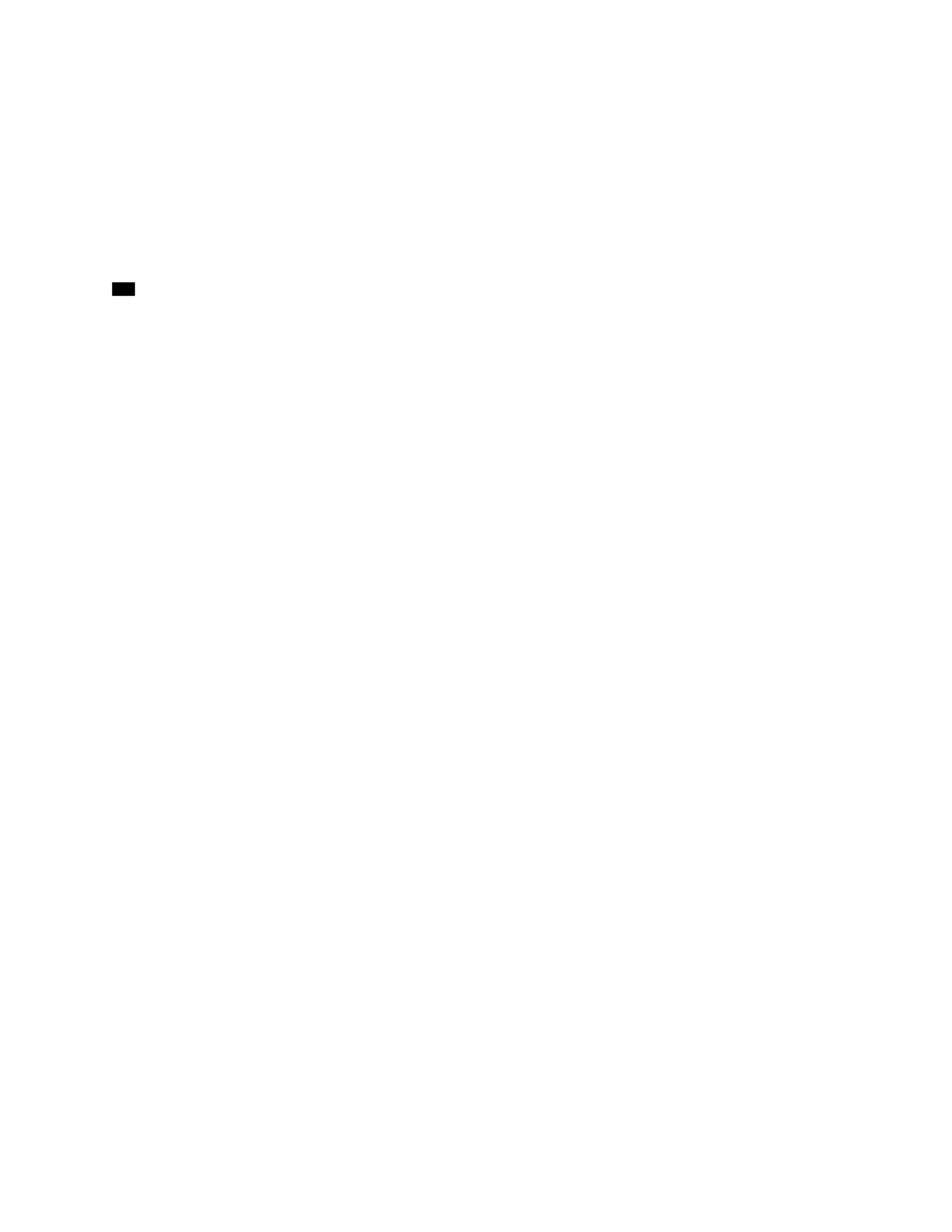
restricted by the host OS (Barham et al., 2003; LeBlanc, 2014). Container OSs, such as Docker
and Rocket, share the kernel of the underlying OS and only contain the necessary software to run
the application which allows for a very small container footprint. See Figure 2.4.1 Comparing
Virtual Machines and Containers.
Figure 2.4.1 Comparing Virtual Machines and Containers
19
Virtualization adds a layer of abstraction between the OS and physical hardware. It
optimizes the utilization of the physical server by allowing multiple OSs to run on one physical
server, reducing the number of physical servers required.
Selecting a Cloud
After identifying the specific application requirements, interactions required with cloud
implementations become clearer. In Selecting the Right Cloud, David Linthicum mentions 4
steps to selecting a cloud (David, 2009).
The core steps are:
1. List the candidate platforms
2. Analyze and test the candidate platforms
3. Select the target platforms
4. Deploy to the target platforms.
First, gather the candidate platforms that potentially support the application architecture
and that have the capability to run the application. There are no hard fast rules around what
constitutes a cloud so there are many different solutions that could work for the application with
three service models, SaaS, PaaS, and IaaS. The SaaS model provides applications to customers
accessible through a client interface such as a web browser. PaaS provides a space where
customers can deploy and run their applications while the underlying infrastructure is maintained
by the cloud provider. IaaS provides the consumer the capability to manage the computing
resources and have limited control over the underlying infrastructure (Mell & Grance, 2011).
Cloud providers range from the AWS IaaS which provides command line root access to virtual
servers to Google App Engine (PaaS) which limits which files can be written to directories. It is
important to explore many different types of clouds ranging from public clouds, private clouds,

20
or hybrid clouds. This step includes sifting through application architecture and organization
requirements from a cloud.
After selecting the cloud that best fits the application requirements and organization
requirements, test the cloud solutions to verify that the selected solution performs as expected.
After a thorough testing there should be a good understanding of the platform’s capabilities and
how well it fits the application and organizational needs. If it is still unclear as to which platform
to select, the cloud service itself should be analyzed for: hidden costs, customer support,
policies, ease of switching vendors, disaster recovery, and many more factors. After finalizing
on a cloud solution, formulate a strategy to switching to the new service, whether it is a gradual
change or jumping right in.
CloudCmp is a tool that can be used to compare cloud providers. The tool can be used to
measure the performance of different cloud vendors without needing to move the whole
application to the new cloud (Li, Yang, Kandula, & Zhang, 2010). This tool would be very
helpful for narrowing down choices for a cloud implementation. However, the tool does not
provide a direct method of matching application requirements to a cloud implementation.
It is difficult to compare two cloud implementations. In a comparison of VMWare and
OpenStack, two private cloud implementations, OpenStack claims that “Comparing the two is
like comparing apples to oranges.” (OpenStack & VMware, n.d.) While the two have different
philosophies on the organization side, the technology side provides similar cloud functionality.
The implementation may be different but it still provides the necessary components to run
applications in a cloud.

21
3 METHODOLOGY
The methodology described is broken down into 5 sections:
1. Analyzing the application
2. Analyzing cloud features
3. Mapping application requirements to cloud features
4. Scoring the suitability of a cloud to an application
5. Selecting a cloud
The application being analyzed must exist or needs to be well defined. The model
expedites the process of identifying attributes required by the application. The attributes are
arranged in a checklist to be matched to cloud characteristics. Cloud platform candidates for the
application are selected. A list of cloud features is created for each cloud platform. A score
sheet is generated to identify the interface points between the application and cloud features.
The score sheet will identify cloud components that will not be used for the application so
unnecessary features will be excluded from the analysis.
Each application requirement is given a weight according to how critical it is to the
application. The cloud features are given a suitability score based on how well they fulfill the
application and organization requirements. The suitability scores are added together to generate
an overall cloud score. The score sheet will identify when a cloud will not be able to
accommodate the requirements of the application. The overall cloud score is a good indicator for
22
which cloud best fits the application. High scores in non-critical areas inflate the cloud score.
This inflation raises the cloud score even if scores in critical areas are low.
The methodology is validated by selecting 3 applications for cloud analysis. Application
and organization requirements check lists are generated for the three applications. Cloud feature
lists are created from 3 cloud platforms. The cloud platforms are then mapped and scored
against the applications. The cloud score is generated to identify the best cloud platform for each
of the applications. The applications are implemented on the cloud platforms. The methodology
is tested and evaluated by peers. A questionnaire is used to gauge the effectiveness of the
methodology.
Application Analysis
The characteristics of the application are parameterized and documented in terms of
execution and deployment requirements. The documentation expedites the process of identifying
attributes required by the application. The attributes are arranged in a checklist to be matched to
cloud characteristics. The checklist focuses the investigation on the application requirements.
The checklist is used to match the application requirements to the cloud features. A basic
checklist for common application attributes has been created as a starting point for the
application analysis. The basic checklist contains the following attributes:
1. CPU
2. RAM
3. IOPS
4. Other system resources
5. Operating systems

23
6. Specialized hardware
7. Database solution
8. Other 3rd party applications
The basic checklist is only a starting point for evaluation. As the application is analyzed
the requirements list will expand. There are many attributes that comprise an application. A full
checklist needs to be generated for the application being analyzed. If there is not a justifiable
reason for a requirement it should not be added to the list. Analyzing an application to determine
the requirements does not have to be complicated, but it can be time consuming.
An important decision that needs to be made is whether to virtualize or use physical
hardware. It is outside the scope of this research to determine when to virtualize and when not to
virtualize. If the application has a requirement to virtualize, the type of virtualization needs to be
identified. If bare metal is an application requirement, it is important to identify cloud providers
that can fulfill those needs. For example, Rackspace provides bare metal provisioning and AWS
provides dedicated servers. Some cloud vendors charge more for dedicated servers.
Step 1: The minimal application components are identified. The personnel that
understand the application, such as architects, developers, operations, management and build
engineers are gathered. The purpose of the application and what it does is determined. A high
level block diagram is created of the application components to be deployed. Deployable
components include applications, databases, cache or other requirements which will be installed
or configured. These components do not include lower level requirements of the application
such as specific programming language libraries or modules because they are already included in
the application packages. The relationship between each of the components is identified (de Boer
et al., 2005). Only essential components for the application to function are included in the first
24
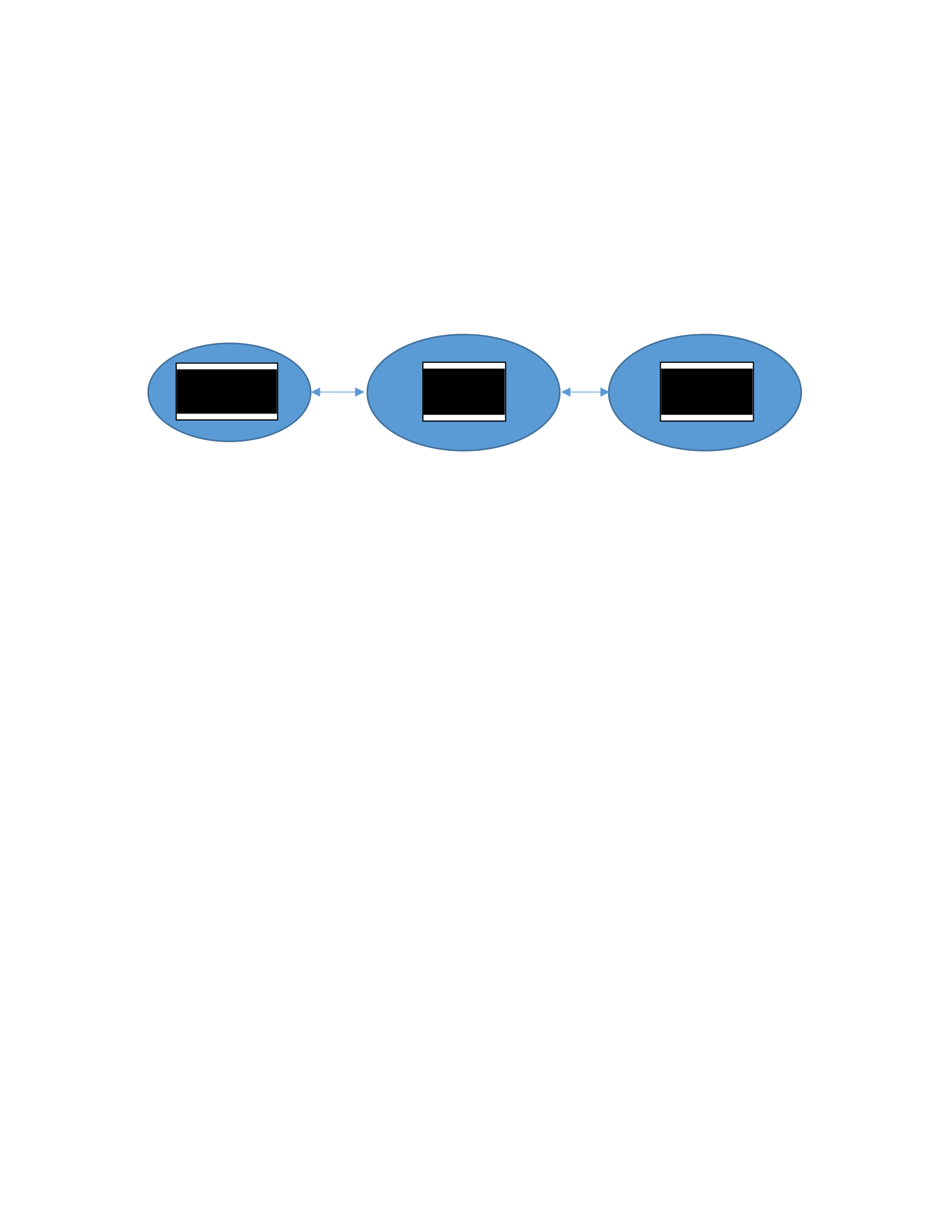
diagram. For example, a basic web application, with a web interface, a backend API server and
a MySQL server could be diagrammed as shown in Figure 3.1.1. The diagram identifies all of
the deployable components that make up the application. Components such as load balancers
and a MySQL replication cluster will be diagrammed in a later step.
Step 2: Application requirements are enumerated. Additional application requirements
are gathered through organizational requirements for the application. Organizational
requirements are not required to run the application but fulfil the needs of the organization.
Goals, expectations and reasons for moving to a cloud platform are included in organizational
requirements. This model identifies key points that are required from the organization. For
example:
1. Cache solution
2. Cost of the solution (implementing, operating, maintaining)
3. SLA requirements
4. Availability
5. Redundancy
6. Backups
7. Disaster Recovery
Figure 3.1.1 Example Interface Diagram
Web
Interface
API
Server MySQL

25
8. Deployment requirements (continuous integration, dev ops, etc.)
9. Security
The organizational requirements are added to the list of application requirements.
Stakeholders of the project should be included when determining organizational requirements.
Stakeholders will help define the goals and success criteria of the project.
User stories and use cases describe how stakeholders will interact with the system. User
stories and use cases assist in defining how the application is expected to react in specific
situations. These expected reactions will be matched to cloud features that meet these needs.
This is an example in the case of the basic web application. The application in the old
environment was running under a load with an estimated 200 concurrent users. The new
environment is expected to have fluctuating traffic between 200 and 1,000 concurrent users
throughout the day. The application requirement of being performant entails many components
such as scaling servers, application cache, database optimization, data indexing and much more.
The following is a list of questions that can be asked about scaling:
1. Will the servers scale vertically or horizontally?
2. What triggers a scaling action?
3. Is scaling based on number of users, network traffic, system resources, application
response times or other metrics?
4. Can scaling be anticipated based on a schedule?
5. What processes need to happen after scaling such as connecting with load balancers
or other services?
6. Are there other pertinent questions?
26
Answers need to take many factors into consideration such as application capabilities,
cloud vendor capabilities, etc. It may not be an option to scale vertically if it causes downtime.
Scaling horizontally only works if the application is designed for it.
Taking the time to design and document the application and organization requirements is
an important task. It can be a time consuming process to get a full list of application
requirements. Clear design documentation is needed to properly scope out the project. Use
cases can drive the infrastructure and why decisions were made. The requirements are gathered
in the check list of application requirements. The application requirements will be assigned a
weight on how critical the requirement is to the application during the cloud suitability score
steps.
Parameterizing and documenting the characteristics of the application and organization
requirements is required to select the best cloud vendor. This clear vision will simplify how to
identify which cloud characteristics best fit the application.
Analyzing Cloud Features
Not all cloud vendors are the same. They implement similar features in different ways.
Analyzing a cloud platform is critical to understand the features being offered.
Step 1: Some cloud vendors that are candidates for hosting the application are selected.
The characteristics of the cloud platform implementations are parameterized and documented.
Feature lists for vendor offerings are prepared, emphasizing where they relate to the application.
Clouds have many features, but not all the features are needed for the application. There may be
some clouds that offer so many features that it is not reasonable to list everything the cloud

27
provides. In this case, only the features that require further analysis guided by the application
requirements are listed.
Cloud vendors use different terminology to describe similar features. This can make it
difficult to find how the cloud vendors relate. However, one can match similar features even if it
is done manually. For example, AWS and Rackspace both have a cloud storage solution. AWS
calls their solution Simple Storage Solution or S3 while Rackspace calls their solution Cloud
Files. They both store files in reliable, secure and accessible storage.
Step 2: Service level attributes the cloud offers are investigated. Additional attributes to
investigate include:
1. What is the pricing structure?
2. What is the customer rating of customer support?
3. What kind of support response time can be expected?
4. What tiers of support do they have and what are their SLA?
5. How often are security updates or patches applied?
6. How long does it take for a new server to be provisioned and booted?
7. Does the platform support the virtualization required?
8. Does the platform support bare metal required for the application? (If required)
9. How much unexpected downtime has the platform has experienced?
10. How much down time can be expected?
11. What security standards are implemented?
The pricing structure in public or community clouds can affect how applications operate.
Capacity may be reduced in off peak hours and increased during peak hours. If the cloud
platform charges by the hour then servers may need to be shut down. If the cloud platform

28
charges for a set amount of capacity, then servers may not have to be turned off. Services which
are not supplied by the cloud vendor are listed. These services will require custom solutions.
Step 3: Deeper cloud feature investigation. If it seems that a cloud vendor does not fulfil
a requirement of the application, more research may be needed. Looking deeper into
documentation of the cloud features or asking support personnel may be required. For example,
the initial list of cloud features in AWS did not mention a solution for configuration
management. Further investigation discovered OpsWorks, which is the AWS implementation of
Chef. The process of looking deeper is useful in determining how helpful and accessible the
documentation and support staff are. Rackspace provides an online chat client where help desk
personnel are available to answer questions about their services. AWS and VMWare do not have
this feature.
Support is a cloud attribute that should be evaluated. However, support may be an
important requirement for some organizations but not others. Customer reviews and feedback
can be influential in selecting a cloud. User reviews of the cloud platform, what they say about
the cloud, what is liked and disliked should be considered. Customer reviews can provide
insight about cloud features. This feedback may provide clearer understanding if a cloud feature
will actually work for the application. With support there are often different levels of support.
Different service levels need to be considered for how much involvement the organization will
want from the cloud provider. Both Rackspace and AWS offer services to help set up an
application as part of maintenance. Rackspace has a feature for an additional fee where they will
manage the application running in the cloud.

29
There may be times where the initial list of cloud vendors do not fulfill the needs of the
application. Cloud vendors that will not meet the application requirements need to be eliminated
as soon as possible. Other cloud vendors may need to be analyzed.
Step 4: Private cloud vs. public cloud. Choosing to run a private cloud is not a decision
that should be taken lightly. Private clouds can be hosted in private or public datacenters. A lot
of time and management is required to maintain a private cloud. In a public cloud, these tasks
are managed by the cloud provider. Even with the extra maintenance, a private cloud can be a
better option for the application. There are many challenges with running a private cloud which
goes beyond the scope of this thesis. Here are a few considerations when running a private
cloud:
1. Calculate the necessary capacity required for the application.
2. Consider hardware an organization may already have.
3. Determine if current hardware and infrastructure is sufficient to support the cloud.
4. Determine if sufficient space is available to host the new hardware.
If there is not sufficient space for the new hardware, additional space needs to be planned.
Internet service provider connections may need to be updated to accommodate application
traffic. Cloud platform licensing and support requirements needs to be determined.
Private clouds require more maintenance for the organization than public clouds. Some
maintenance may not be directly related to the application. These tasks include maintenance on
cloud software, hardware (CPU, RAM, HDD, Power Supplies, etc.), networks, backups and
many more. Maintenance tasks must be taken into consideration when investigating private
cloud platforms. These details can impact selecting the cloud platform.

30
Monetary costs are an important but difficult requirement to estimate. Comparing costs
between hosted clouds and on-premise private clouds is especially difficult. It is more
straightforward to estimate costs for public clouds than for private clouds. Public clouds pricing
models can vary but have defined pricing models. Common pricing models are “pay as you go”,
subscription, “pay for resources” and many others. “Pay as you go” sets a fixed price for
resources consumed. Subscription is based on a set price for a period of time. “Pay for
resources” is when a customer pays for the amount of bandwidth or storage utilized (Al-Roomi,
Al-Ebrahim, Buqrais, & Ahmad, 2013). Predicting costs for services that charge based on usage
is just an estimate. Prices often differ at runtime.
There are many factors that are involved with determining costs of an on-premise private
cloud solution. This paper does not go into all of those factors, but some of the factors include
equipment costs, licensing costs, facility costs and many others.
An important aspect with all clouds, public and private, is the cost to set up, maintain and
run a service in a cloud. Most cloud vendors have a calculator to help estimate costs. The
amount of network traffic to and from the application can be difficult to estimate. Some cloud
vendors offer discounts when customers agree to longer term contracts. AWS offers reserved
instance, Rackspace offers dedicated servers and vSphere offers longer licensing periods.
Longer term licensing almost always cost less compared to shorter terms. Some vendors offer
additional discounts when they know their services will be used long term.
Mapping Application Requirements to Cloud Features
After the list of cloud features have been gathered, a cloud mapping and scoring table is
created. The scoring table is used to identify the interface points between the application and

31
cloud. The mapping will determine how the cloud features match the application requirements.
An example of a cloud mapping and scoring table is shown in Table 3.4.1.
Cloud Suitability Scoring
Multiple cloud implementations can be analyzed using the score sheet. The score sheet is a
numerical ranking system on how well each of the cloud characteristics meets the needs of the
application requirement. The score sheet also helps identify when a cloud will not be able to
accommodate the requirements of the application.
Table 3.4.1 Sample Cloud Mapping and Scoring Table
Application
Requirements
Weight
(1-2) Cloud 1 Score
(0-5) Total Cloud2 Score
(0-5) Total … Cloud
X
Application
Requirement 1 1
Cloud 1
Feature A
and F
Cloud 2 Feature A
Application
Requirement 2 1.5 Cloud 1
Feature B Cloud 2 Feature B
Application
Requirement 3 2 Cloud 1
Feature C
Cloud 2 Feature C
and E
Application
Requirement 4 1.6 Cloud 1
Feature D Cloud 2 Feature D
…
Totals
A table is created with the list of application requirements in the first column. The second
column will weigh how critical the requirement is to the application and to the organization. A
small range is selected for the weight, such as 0 to 1 or 1 to 2. Each application feature is
assigned a score based on the importance of the requirement. While all requirements are
important, some are more critical than others. A low weight means that is a nice to have feature.

32
A higher weight means the application or organization cannot be without it. For example, if an
application is running on Apache, the operating system may not be a critical requirement.
Apache can run on many operating systems such as Windows, Linux and Unix. In this case, the
operating system may be weighted low. If the application communicates with a MySQL
database, MySQL would be assigned a higher weight. Each application and organization is
unique. Each requirement is weighed according to the organization’s needs. Weights will vary
between organizations and applications.
The cloud features that fulfil the application requirement are listed in the third column.
One or more cloud features can fulfil an application requirement. One cloud feature can fulfil
one or more application requirements.
A scale to rank each cloud feature is entered into the fourth column. This scale is used to
determine how well each cloud feature meets the needs of the application requirement. The scale
can be from 0 to 10, 0 to 5, or any other scale selected. This ranking will be specific for the
organization performing the analysis. The ranking needs to be determined and consistent for all
of the application features. The lowest number would mean that the cloud cannot provide what
is needed for the application and a workaround cannot be implemented. The highest rank would
be that the cloud provides the exact solution for what is needed. The middle ranges from “there
is a way to implement a feature that would work” to “the cloud provides a solution that is close
enough to what is needed”.
As an example for a range 0 through 5: A score of 0 would mean that there isn’t a way to
implement something that would work. A score of 1 could be mean a work around can be
created or that it is close to what is needed. A score of 3 could mean that a solution can be
implemented. The solution may not be provided by the cloud vendor or the cloud vendor may
33
provide something that is not ideal, but could work. A score of 4 would be that the cloud
provides a solution that is close to what is needed. A score of 5 would be that it provides the
exact solution for the application. Similar scales will work for solutions that do not tie directly to
a feature of the cloud, but how well it meets an organization requirement. Operating cost can be
ranked on a scale of 0 to 5. If an organizational requirement is that the solution be open source, a
score of 0 could mean that it falls outside budget limits. A score of 3 could mean that it falls
within an acceptable cost range. A score of 5 may be that it is a free and an open source
solution. The meaning of the scores will vary between organizations, but they need to be
consistent.
In the cloud mapping and scoring table, other cloud features are included that are important
features of the cloud, such as support, up time, recovery time, etc. Each cloud feature is assigned
a score. The fifth column is used to calculate the cloud feature score which is described below.
The process is repeated for each cloud platform being analyzed as shown in Figure 3.1.1.
Selecting a Cloud
There may be multiple cloud implementations that fulfil the application requirements. The
overall score of a cloud is used to narrow down the results.
In the fifth column, the cloud feature score is multiplied by the weight. The scores are
added at the bottom of the column; this is the cloud score. Table 3.5.1 is an example of a
completed cloud score sheet. The cloud with the highest score is most likely the best cloud for
the application. The scores of each cloud should be reviewed. It needs to be determined if there
is a cloud platform that scores low in one or more critical areas. There is potential that a cloud
scored high in many less critical areas but low in critical areas. Clouds that score low in critical
areas may need to be removed from the list of potential cloud platforms, even if they have the
34
highest cloud score. If a cloud scores high for many less critical features, it may be beneficial to
create a custom solution for critical requirements. If a cloud feature receives a score of 0, the
cloud should be disqualified or a hybrid cloud solution would need to be selected. If there are
two or more clouds that are very similar in score, see if one cloud scores higher in more critical
areas. This can be done through an analysis of each of the scores. One analysis technique would
be to double the weight of each application requirement and see how it affects the cloud totals.
If one cloud is affected more than another, it means it scores higher in more critical areas. There
are times where it is best to run a hybrid cloud and select the best features from multiple cloud
platforms. There are times where it is more beneficial to run one geographical area in a public
cloud and another area in a private cloud.
Table 3.5.1 Completed Cloud Score Sheet
Application
Requirements Weight AWS Score
(0-5) Total Rackspace Score
(0-5) Total
Shared Cache 1.2 Elasticache 5 5 No Provided
solution 1 2
Database
Failover 1.7 RDS Multi/AZ,
Read Replicas 5 5 Cloud
Databases 4 4
Database
Backups 1.8 RDS Snapshots 5 5 Cloud
Databases 4 4
Load
Balancer 1.6 ELB 4 4.8 Cloud Load
Balancers 5 6
Cloud Score 19.8 16

35
4 TEST CASES
SirsiDynix BLUEcloud
The first application to be analyzed is SirsiDynix’s BLUEcloud. BLUEcloud is a multi-
tenant, SaaS solution for SirsiDynix customers. It extends library services and streamlines
processes for all SirsiDynix library platforms (SirsiDynix, n.d.).
4.1.1 Application Analysis
BLUEcloud is a Java application running on Tomcat. Even though there are many
components of BLUEcloud, only a small subset of the application will be analyzed. The
components to be analyzed are:
•Single sign on (CAS) server
•Centralized service containing configuration and customer data, (CuRe)
•BLUEcloud search service (BCSS)
•Elasticsearch indexing service
•BLUEcloud central management service and interface (BCCentral)
The services communicate with each other through web API’s. Only CAS, CuRe and
BCSS communicate with the MySQL database directly. The breakdown of the BLUEcloud
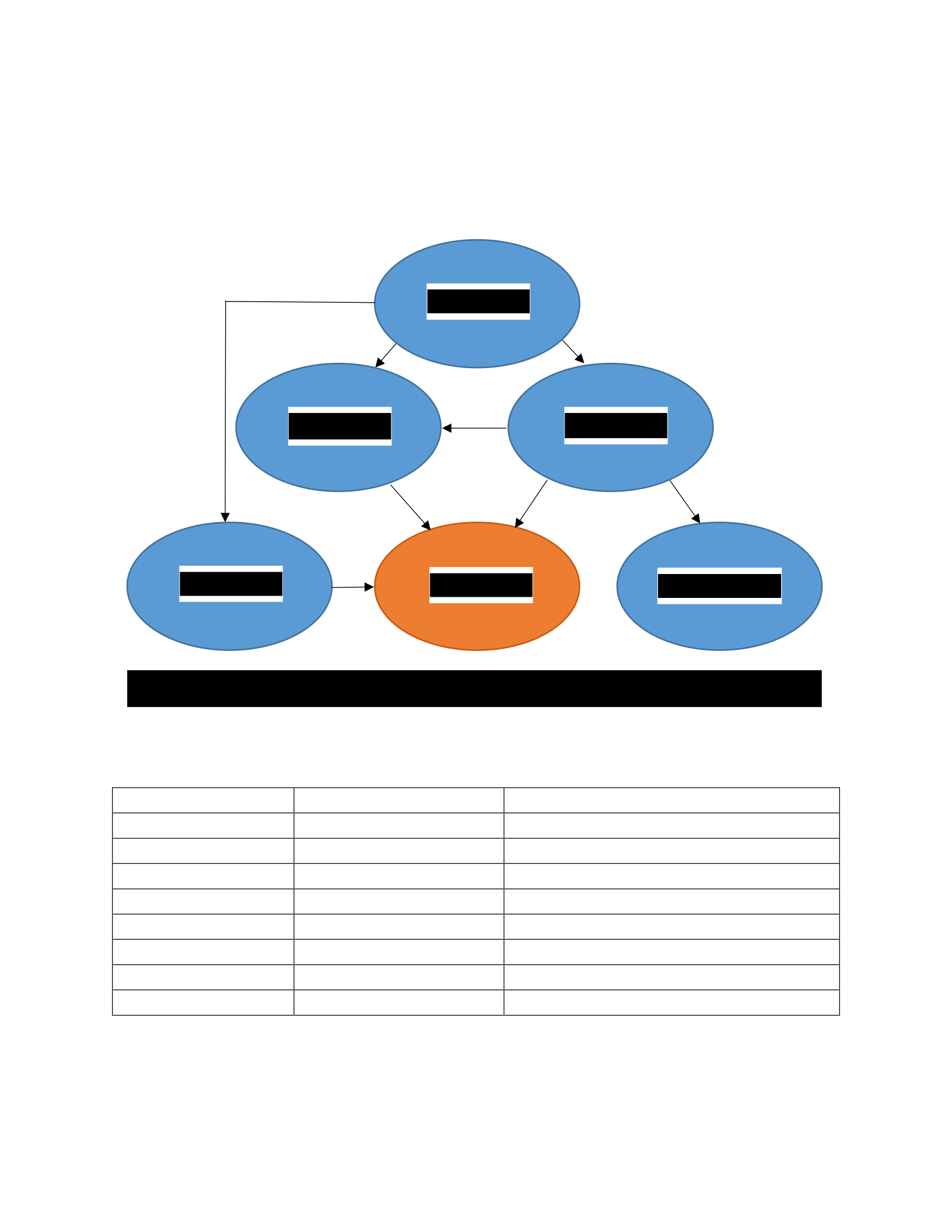
services being analyzed are shown in Figure 4.1.1. CuRe, CAS, BCCentral, and BCSS run on
Tomcat. Tomcat will run on most OSs, but the operations and development teams have decided
36
to run BLUEcloud on a Linux platform. This is due to familiarity and experience with Linux.
These additional requirements can be found in Table 4.1.1.
Table 4.1.1 SirsiDynix BLUEcloud Base Requirements
Requirement Role Why it is needed
Java
Programming language
Development familiarity
Tomcat
Web server
Required to deploy Java applications
Linux
Operating System
Support staff familiarity
Compute nodes
Virtual Resources
Run OS and applications
Local storage
Data Storage
Store persistent data
MySQL Database
Database
Store persistent data and configuration
ElasticSearch nodes
Indexing software
Index data for responsive results
Network
Infrastructure
Allow customers to interact with software
Figure 4.1.1 SirsiDynix BLUEcloud Block Diagram
BCCentral
BCSS CuRe
CAS Elasticsearch
MySQL

37
The organizational requirements are identified next. Existing user stories and use cases
help drive the system requirements. Here are some examples of how user stories and use cases
drive system requirements.
The applications are accessed by customers and store customer data. This data needs to
remain secure. Information security is a necessary requirement of the system. Part of security is
to limit the access to the servers and ports through firewalls. The application and infrastructure
must meet strict security standards.
The application is multi-tenant with many customers and processes running for each
customer. The organizational requirement is for the application to be responsive and handle the
load of multiple customers at a time. To maintain application responsiveness the following will
be implemented:
1. Horizontal scaling to manage fluctuating load.
2. Vertical scaling during maintenance periods as required
3. Load balancers to distribute the traffic across nodes
4. Shared cache server
Horizontal scaling and vertical scaling requires application response times and system
resources to be monitored. As response times and system resources reach certain thresholds, a
horizontal scaling action will be triggered. The load balancer will add the application to the pool
of available servers. After the load on the system has decreased, the added services will be
removed. Turning off servers saves on compute power and prevents idle servers. This process
saves on costs if using a public cloud that charges by the hour or CPU cycles consumed.
Vertical scaling will be used during maintenance periods for services that cannot utilize
horizontal scaling.

38
Horizontal scaling requires a VM template when provisioning new servers. Pre-loading
and maintaining a VM template with the necessary components for the application will shorten
the provisioning process. The template needs to be flexible enough so it can be used by multiple
services. The image will have essential software packages pre-installed to decrease provisioning
time. Bootstrapping scripts are created to install the necessary services.
The shared cache server will cache temporary data for the application. This data includes
cached query results and session data. The cache allows traffic to easily be switched between
servers while maintaining session data. This data is temporary data and will not be stored in the
database.
Table 4.1.2 Additional Requirements for BLUEcloud
Dependency Role Why it is needed
Java Programming platform Development familiarity
Tomcat Web server Required to deploy Java applications
Linux Operating System Support staff familiarity
Compute nodes Virtual Resources Run OS and applications
Local storage Data Storage Store persistent data
MySQL Database Database Store persistent data and configuration
ElasticSearch nodes Search indexing Index data for responsive results
Redundancy/High Availability Fault tolerance Eliminate single points of failure
Load Balancer Load Balancer Distribute traffic across backend servers
Shared storage Shared file system Store objects
Horizontal Scaling High Availability
Ensure application has sufficient capacity
for load
Security Requirements Data integrity and security Ensure data is safe
Availability/Capacity to sustain load High Availability
Ensure the service has the necessary
resources to sustain the load.
MySQL will need to be highly available and fault tolerant. MySQL replication will be
used to eliminate a single point of failure. These examples are a starting point for the

39
conversations required to identify all of the features required for BLUEcloud. Additional
conversations identified additional features for BLUEcloud. A full list of the application can be
found in Appendix A: BLUEcloud Requirements List. During the cloud suitability score steps
these requirements will be assigned a weight on how critical the requirement is to the
application. A small section of the additional requirements can be found in Table 4.1.2. The
hardware requirements are detailed in Table 4.1.3.
Table 4.1.3 BLUEcloud Environment Requirements
Servers CPU Cores RAM (GB) HDD (GB) Quantity
Applications
1
4
8
24
Applications 16 30 350 24
Applications 8 30 60 16
Database: 8 61 100 4
Cache: 1 3 8 16
Total 584 1588 10080
Shared Storage (GB)
8192
4.1.2 Analyzing Cloud Features
Three clouds have been selected for analysis as potential candidates for SirsiDynix
BLUEcloud: Amazon Web Services (AWS), Rackspace and vCloud. The Amazon AWS
products page was used to gather the features of AWS (AWS, 2015). The page has a very
concise summary of products offered by AWS with links to more details of each feature. The
products page has most of the AWS features in a convenient location. The list can be found in
Appendix B: AWS Evaluation. Some details and cloud features were not included in the
products page. Additional searching found features such as security features and additional
tools. AWS provides many features, some of which weren’t required for the application.

40
Additional research discovered more details about the features that are needed for the
application.
A similar process was followed with Rackspace and VMWare vCloud. These feature
lists can be found in Appendix C: Rackspace Evaluation and Appendix D: VMware vCloud
Evaluation. Rackspace has a feature page which listed most of the features of the Rackspace
cloud with a brief description of the application.
VMWare was the most difficult to find the offered features. The vCloud Suite site
(VMware, n.d.-a) shows a limited number of features. The data sheets were used to find
information about the features offered.
4.1.3 Map Application Requirements to Cloud Features
A mapping was created to determine how each application requirement was fulfilled by a
cloud feature. Initially the deployment field did not have a matching cloud feature for AWS.
After further investigation OpsWorks and Beanstalk were discovered. These features meet the
application requirement for deployment.
The SirsiDynix BLUEcloud mapping is found in Appendix E: SirsiDynix BLUEcloud
Mapping, with a subsection of the table in Table 4.1.4. Side by side comparison is used to
compare the application and the cloud. The table is used to see how each cloud compares to the
application.
The estimated costs to run the application in the cloud are included in the table. Cloud
vendors often provide a tool to help estimate costs to run in the cloud. SirsiDynix BLUEcloud
requires two production deployments, one beta testing deployment and a development testing
deployment. Server requirements are based from Table 4.1.3. The tools used to calculate the
41
costs are AWS simple monthly calculator (AWS, n.d.-b), Rackspace cloud pricing calculator
(Rackspace, n.d.-b) and the VMware ROI TOC Calculator for Server and Desktop Virtualization
(VMware, n.d.-b). The cost results are included in Table 4.1.4.
Table 4.1.4 BLUEcloud Cloud Mapping
Application
Requirements
AWS Rackspace vCloud
Compute nodes EC2 Cloud Servers/On Metal VMs
MySQL Database RDS Cloud Databases No Provided Solution
Load Balancer ELB Cloud Load Balancers
NSX (Logical routing, logical
load balancer)
Availability/Capacity to
sustain load
Auto Scaling Groups Auto Scale
vRealize Operations(capacity
metering)
Shared storage S3 Cloud Files Virtual SAN
Horizontal Scaling Auto Scaling Groups Auto Scale
vSphere, vRealize
Operations, SiteManager
Server Firewall
restrictions
Security Groups Security Groups
NSX (Logical Firewall, NSX
Gateway)
VM Template AMI Cloud Images
vRealize Automation
(Service Catalog), vSphere
Templates
ElasticSearch nodes AWS Elasticsearch No Provided solution No Provided Solution
3 yr. Monetary costs
(Estimated) 1,188,000 (On-demand) $1,695,600 (Cloud
servers)
$1,234,000
Licensing(Assuming
sufficient hardware)
4.1.4 Cloud Suitability Scoring
Each application requirement was assigned a weight based on how critical the requirement
is to the application and to the organization. The scale used for BLUEcloud is from 1 to 2. Each
application requirement is assigned a weight within the scale. The scale for the cloud feature
score is 1 through 5. Each cloud feature was assigned a score according to suitability of the
feature for the application requirement. Each cloud score was multiplied by the weight of the
application to get the cloud feature total. The sum of the cloud feature for each cloud produces

42
the cloud score. The full table is in Appendix F: SirsiDynix BLUEcloud Score Sheet. An
example can be found in Table 4.1.5. The table shows cloud features with significant score
differences between cloud platforms.
Table 4.1.5 SirsiDynix BLUEcloud Scoring
Application
Requirement
s
Weight AWS Score
1-5 Total Rackspace Score
1-5
Tot
al vCloud Score
1-5 Total
Shared Cache 1.2 Elasticache 5 6
No
Provided
solution
1 1.2 No Provided
Solution 1 1.2
Database
Failover 1.7
RDS
Multi/AZ,
Read
Replicas
5 8.5 Cloud
Databases 4 6.8 No Provided
Solution 1 1.7
Database
Backups 1.8 RDS
Snapshots 5 9 Cloud
Databases 4 7.2
VM
Snapshots,
vSphere Data
Protection,
Custom
Automation
2 3.6
Load Balancer 1.6 ELB 4 6.4 Cloud Load
Balancers 5 8
NSX (Logical
routing,
logical load
balancer)
5 8
3 yr. Monetary
costs
(Estimated)
1.2
1,188,000
(On-demand)
5
6
$1,695,600
(Cloud
servers)
3
3.6
$1,234,000
Licensing
(Assuming
sufficient
hardware)
4
4.8
Totals 185.7 161 149.4
With the shared cache score, AWS provides the exact solution needed through Elasticache.
Elasticache provides a performant and reliable caching solution. Rackspace and vCloud do not
provide a caching solution. They require a self-managed implementation of cache services.
Database failover is a critical component of BLUEcloud. AWS provides multi-AZ
databases. Multi-AZ databases provision a standby replica that can take load and read/write
commands if the primary database is not available. This failover has a few seconds delay to

43
complete. Rackspace provides a MySQL solution that can create read replicas of the database.
The failover solution is not as complete as the AWS solution. VSphere requires a custom
implementation which is why it received a score of 2. AWS also has a more complete solution
for database backups. AWS RDS received a higher score than the other clouds because it
provides a method that creates database backups automatically. Rackspace requires the customer
to set up a command line cron job to create MySQL dumps of the database.
Rackspace and vSphere scored higher for their load balancing solution. These clouds
have a load balancing solution that can route traffic based on the URL. The load balancing
solution provided by AWS does not have the capability to perform URL based routing. It only
performs port forwarding which requires more load balancing instances.
Based on the cloud score, AWS had the highest score. There are many AWS cloud
characteristics that closely fulfil the application requirements. The mapping was used to score
the suitability of a cloud implementation to support the application. This cloud score was based
on application requirements and organizational requirements. The application can run on any of
these clouds, however AWS provides a more complete feature set that is best for SirsiDynix
BLUEcloud.
4.1.5 BLUEcloud Implementation Results
AWS had the highest cloud score for SirsiDynix BLUEcloud. SirsiDynix has been
running BLUEcloud in AWS since the summer of 2013 (Barney, 2013). Most of the AWS
features identified in the cloud mapping were implemented for BLUEcloud. The features not
used by SirsiDynix BLUEcloud are AWS Elasticsearch, OpsWorks and Elastic Beanstalk. AWS

44
Elasticsearch and OpsWords were either in beta or had not been available when BLUEcloud was
first implemented.
Elastic Beanstalk is not being used by BLUEcloud because it did not meet the deployment
requirements of the application. Custom deployment scripts were written using AWS APIs
instead of Elastic Beanstalk. The deployment scripts allow the application to dynamically link to
services such as RDS and ElastiCache. The scripts allow for automated deployments with
limited manual intervention.
Route 53 was not implemented with BLUEcloud. The domains required by BLUEcloud
were already established with SirsiDynix DNS servers.
Cloud Watch has many capabilities but does not have checks for all of the application
requirements. One difficulty with Cloud Watch is it checks at minimum intervals of 5 min or 1
min for an additional cost. This timing can work for some metrics such as average CPU usage.
Custom Cloud Watch metrics were created for monitoring other resources such as disk usage.
Cloud Watch integrates and drives Auto Scaling to trigger scaling actions. When system
resources such as CPU, RAM or disk usage reach a threshold for a defined amount of time, a
scaling action is triggered. Depending on the level, servers scale up or down.
An organizational standard is to use Nagios for system monitoring. Nagios was
configured to pull data from Cloud Watch and monitor the applications directly. Standardizing
on monitoring tools provides one location to monitor all SirsiDynix servers, not just BLUEcloud.
Cloud Watch was not used to monitor application logs, even though application logs can be
monitored with the service. Other application log monitoring software was implemented to meet
organization standards.
45
Since the beginning of this thesis research, there have been changes with BLUEcloud
architecture, application processes and organization requirements. The changes have been
significant enough that SirsiDynix is re-evaluating AWS as a cloud provider and will investigate
which cloud will be the best fit for BLUEcloud.
SirsiDynix Analytics Analysis
SirsiDynix Analytics provides customers with analytical reports for customer data.
4.2.1 Application Analysis
Customers install an agent on their system which periodically pulls specific data from the
customer’s system. Jobs are scheduled through Analytics to have a Hadoop cluster transform the
data into a format that can be consumed by MicroStrategy. Customers use MicroStrategy to
create reports on the data gathered about the usage of their software and their services.
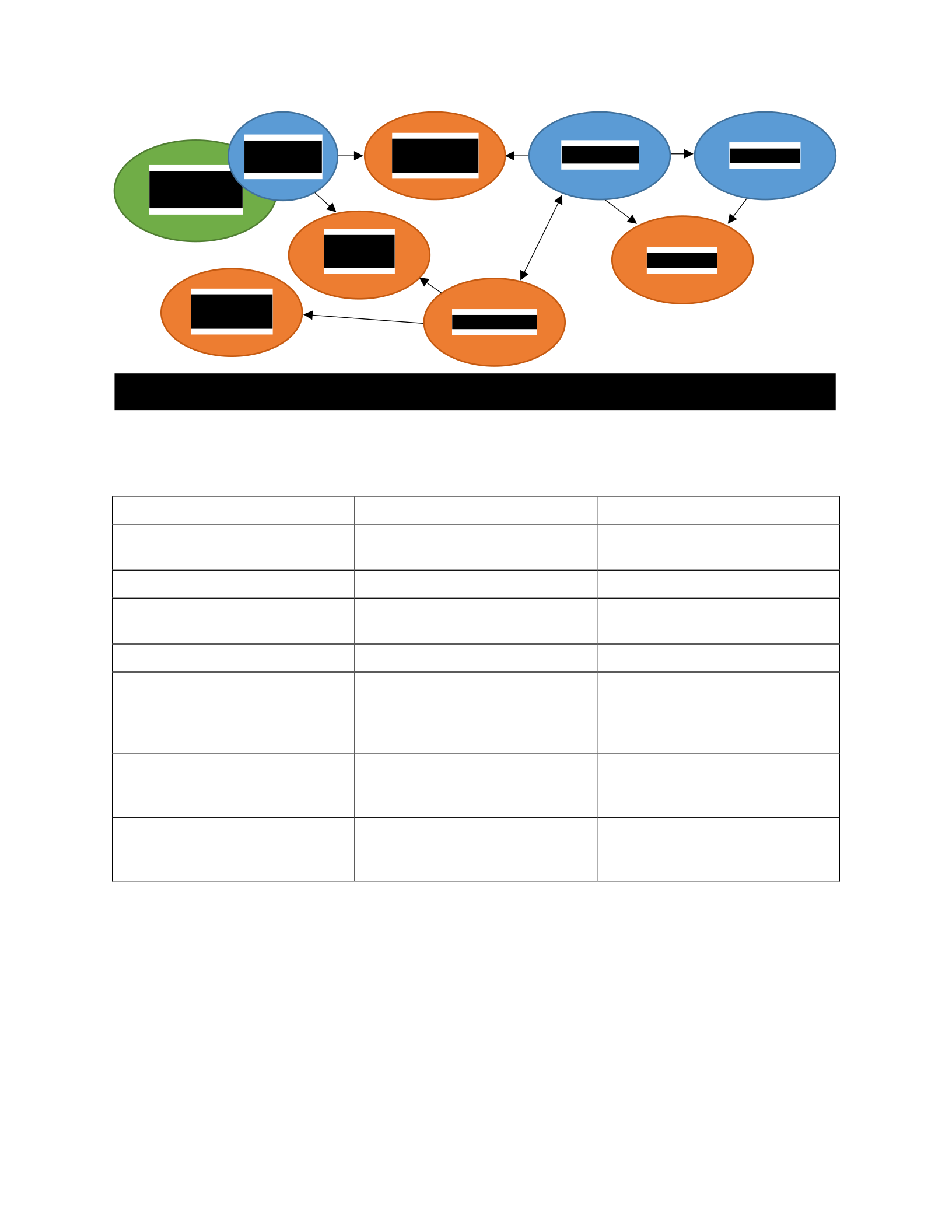
Analytics application components are identified and mapped in Figure 4.2.1. Analytics
communicates with BLUEcloud CuRe and a MySQL database. The customer agent
communicates with Analytics through a messaging queue system. The customer agent uploads
the configured customer data to a file storage system. Analytics communicates with a Hadoop
cluster to manage Hadoop jobs. The Hadoop jobs transforms the data for MicroStrategy.
Customers use MicroStrategy to customize reports. Details about these components can be
found in Table 4.2.1.
46
Table 4.2.1 Analytics Base Requirements
Customers range all over the globe including, but not limited to: USA, Central America,
Australia, New Zealand, Europe, Canada, China and more. Customer contracts and international
data laws add constraints of where and how customer data can be stored. Customer data needs to
be located within specific country borders to comply with these laws. For example, data from
Requirement
Role
Why it is needed
MySQL Database Database
Store persistent data and
configuration
Customer Agent
Interface with customer systems
Upload customer data to Analytics
Messaging Queue Messaging Broker
Communicate between services and
orchestrate tasks
Hadoop
Process and store large data sets
Run and store customer transforms
MicroStrategy Analytical Reporting
Deploy sophisticated analytical and
security reports to meet the
business intelligence demands of an
organization
File Storage File storage
Allow customers to upload data to
be transformed into a common
format
Analytics Process manager
Manage the processes for
uploading, transforming and
presenting analytical data
Hadoop
Analytics CuRe
MySQL
File
Storage
Customer
Server
Customer
Agent
Micro-
Strategy
Messaging
Queue
Figure 4.2.1 Analytics Block Diagram

47
some European customers need to be hosted in Europe. Data from customers in Canada and
China need to stay within the Canadian and Chinese borders. Data is required to be controlled
and localized in specific geographical areas. Complying with international data laws is a priority
requirement.
Analytics application itself shouldn’t experience much fluctuating load. The load is
experienced within the Hadoop cluster, MicroStrategy servers and in-data storage. The load on
the system is consistent and the load will increase in a predictable manner. As more customers
subscribe to the analytics service and as customer data is added, the load will increase gradually.
Automatically scaling is not a requirement of the system; load can be planned for in advance.
Scaling not only pertains to CPU and RAM requirements, but to storage space as well. The
server requirements are listed in Table 4.2.2.
Table 4.2.2 Analytics Environment Requirements
Servers CPU Cores RAM(GB) HDD(GB) Quantity
Impala
4
32
300
18
Spark 8 32 300 15
Manager
4
16
90
6
MicroStrategy 4 32 200 18
Cache, Application,
and Queue
1 4 10 36
MySQL 2 4 50 6
MicroStrategy Web
Server
2 8 50 12
Total: 360 128 1000 111
Shared storage
20TB

48
4.2.2 Analyzing Cloud Features
The clouds that will be analyzed for this application will be the same as BLUEcloud:
AWS, Rackspace and VMWare vCloud. These cloud feature lists have been created and will be
used for SirsiDynix Analytics. The application analysis and cloud mappings can all be found in
Appendix G: SirsiDynix Analytics Analysis and Cloud Mapping.
4.2.3 Map Application Requirements to Cloud Features
In determining costs for vCloud, it is assumed that there is already sufficient hardware
and manpower to operate the facility and the only additional costs will be the cost to upgrade
from vSphere Enterprise to vCloud Enterprise. The vendor cost calculating tools from each
vender were used to estimate costs: AWS Simple Monthly Calculator (AWS, n.d.-b),
Rackspace Cloud Pricing Calculator (Rackspace, n.d.-b) and VMware ROI TCO Calculator for
Server and Desktop Virtualization (VMware, n.d.-b). The servers required to run all of the
necessary environments are shown in Table 4.2.2. The data was used to estimate the costs for
each vendor. VMWare vCloud was estimated based off of licensing alone. If no solution is
provided by the cloud vendor, there may be additional licensing costs associated with 3rd party
tools selected. The full cloud mapping table is in Appendix G: SirsiDynix Analytics Analysis
and Cloud Mapping with a subset in Table 4.2.3.
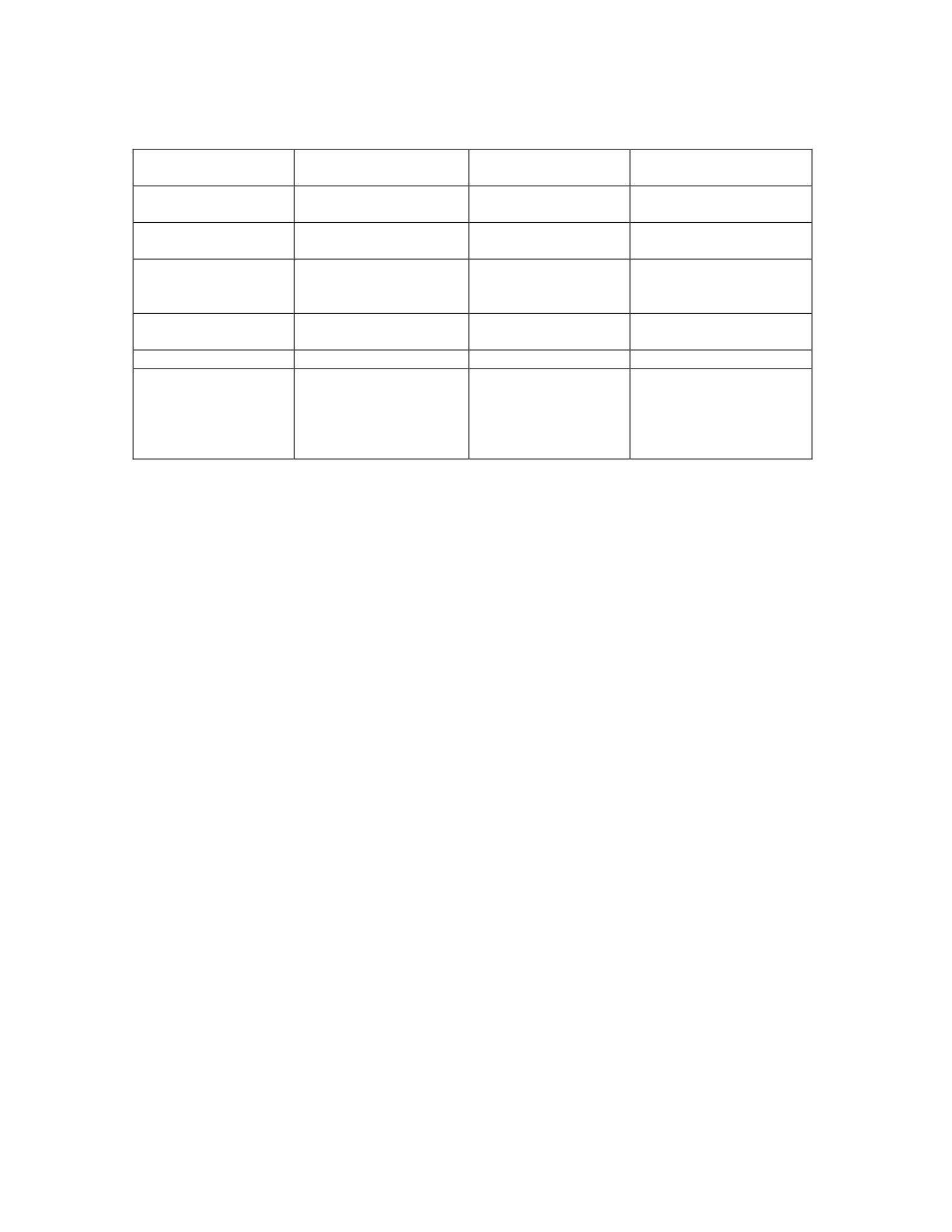
49
Table 4.2.3 Application Requirements and Cloud Mapping
Application
Requirements
AWS Rackspace vCloud
shared storage (store
transformed files)
S3 Cloud Files No Provided Solution
client service access ELB Cloud Load Balancers
NSX(Logical Load
balancer)
Monetary costs $1,188,000/3 years On-
demand
$1,695,600/3 years
Cloud servers
$1,234,000 /3 yrs.
Licensing(Assuming
sufficient hardware)
International
Requirements
AWS Regions Global infrastructure Multiple sites
Control of the data
Minimal
Minimal
complete control
International
restrictions (Canada,
European, china, us,
Australia)
regions, North America,
Ireland, Sydney, China
(Request required), Not
available - Only Partners
in Canada
Regions, Hong Kong,
Not in Canada
wherever a datacenter is
located
4.2.4 Cloud Suitability Scoring
The most important requirements for Analytics are international data requirements and
data control. These areas will have a higher weight in the cloud scoring. The next most
important features are large data storage and the Hadoop Cluster. The full cloud scoring table is
found in Appendix H: SirsiDynix Analytics Cloud Scoring and a small section is listed in Table
4.2.4.
Even though vCloud scored the lowest, it scored the highest in the critical areas of data
location and control. Both AWS and Rackspace scored high in many medium to low ranking
requirements. However, both AWS and Rackspace scored low in the most critical areas. AWS
does not have a region in Canada. Rackspace does not have a region in Canada or China. The
low scores in international restrictions and control over the data are reasons to disqualify AWS
and Rackspace as choices. They do not provide the required control over the data required for
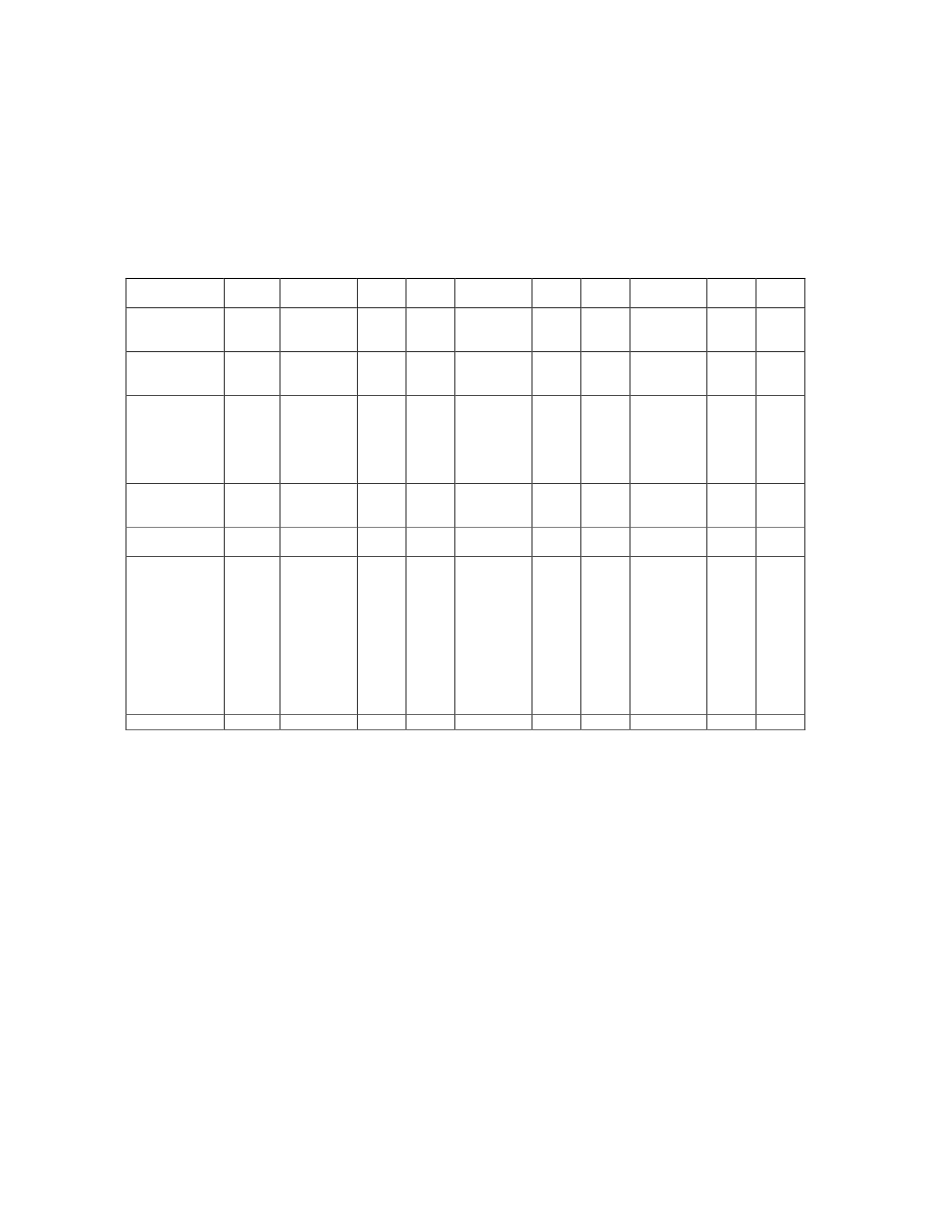
50
the application requirements. The vCloud is selected as the best fit cloud for Analytics. The
scores in critical areas are a bigger factor than having the lowest cloud score.
Table 4.2.4 SirsiDynix Analytics Cloud Scoring
Application
Requirements
Weight AWS
Score
0-5
Total Rackspace
Score
0-5
Total vCloud
Score
0-5
Total
Hadoop cluster 1.6 AWS
MapReduce 4 6.4 Cloud Bid
Data 4 6.4
No
Provided
Solution
1 1.6
Large data
storage 1.8 S3 5 9 Cloud Files 5 9
No
Provided
Solution
1 1.8
3 yr. Monetary
costs
(Estimated) 1.5
$1,195,200
(On-
Demand) 4 6
$1,724,400
(Cloud
Servers)
3 4.5
$689,000
Licensing
(assuming
sufficient
hardware)
4 6
International
Requirements 2 AWS
Regions 4 8
Global
infrastructu
re
4 8 Multiple
sites 5 10
Control of the
data
2 Minimal 2 4 Minimal 2 4
complete
control
5 10
International
restrictions
(US, Canada,
European,
China,
Australia)
2
regions,
North
America,
Ireland,
Sydney,
China
(Request
required),
Not
available in
Canada
1 2
Regions,
Hong
Kong, Not
in Canada
1 2
wherever a
datacenter
is located
4 8
Totals:
97
91.8
81.8
4.2.5 SirsiDynix Analytics Implementation Results
SirsiDynix Analytics started in AWS. Customer contractual obligations and additional
organizational requirements made it apparent that Analytics required a private cloud. It has been
determined by SirsiDynix that Analytics would be migrated to a private VMWare vCloud. The
methodology was not yet complete at the time of analyzing Analytics. There were many
components of the methodology that were used in determining the best cloud for Analytics.
Local cloud vendors could have been evaluated for the application. Customer contractual,

51
international and organizational requirements required the implementation of a private cloud.
The migration is currently in progress and has been successful in the North America region with
the rest of the world wide deployments to follow. While the initial migration is complete, there
is still functionality and VMware specific features that will be continued to be added to the
Analytics environment.
SirsiDynix wanted to manage the environment with cloud features. A hosted private cloud
was implemented using VMWare vCloud. Implementing a private cloud allows for consistent
environments across regions. SirsiDynix has faced some challenges switching from a public
cloud to a private cloud. It is outside of the scope of the thesis to go into all of the challenges of
running a private cloud. The primary challenges are the initial configuration of the hardware and
software, and keeping up with the hardware requirements. Expanding hardware in a private
cloud requires planning and anticipation. In a hosted cloud, additional hardware is acquired with
the click of a button while hosting in a private cloud requires planning. Time is required for
ordering and installing additional hardware before it can be used.
Migrating to VMWare vCloud has allowed SirsiDynix to optimize computing resources for
the application to increase performance. There have been many points in performance
improvements because of the migration. One of these comes from the ability to tune the VM
resources to what the application needs instead of being restricted to fixed hardware increments.
The ability to manage and monitor the network traffic and resources has helped to understand
resource usage and how to increase performance.
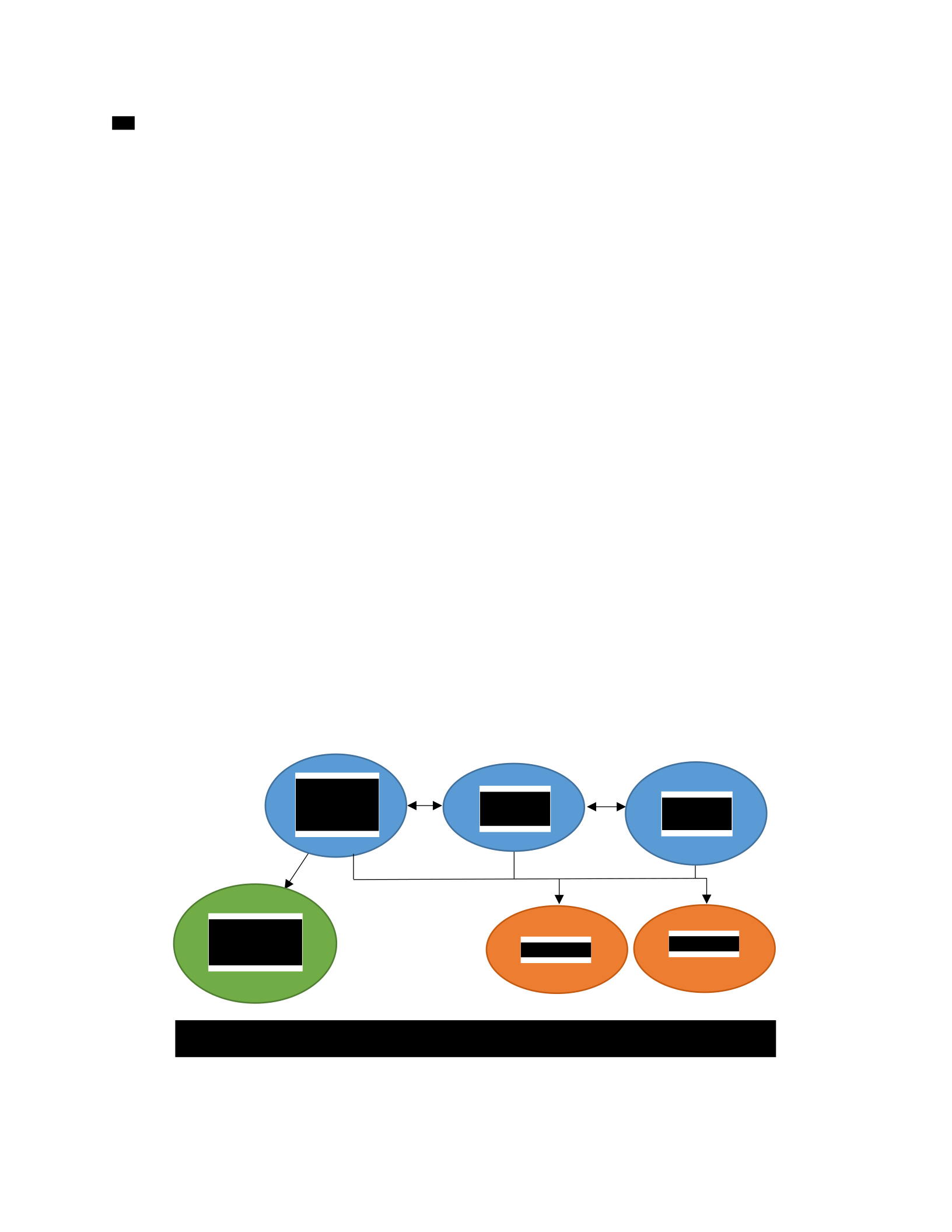
52
Recipe Site
The third application is a cooking recipe search engine. It has just finished the design
phase and is about to start development.
4.3.1 Application Analysis
The basic application requirements are found in Figure 4.3.1. The site consists of a
website front end which interfaces with a search service backend. The application will run on
Ruby on Rails and utilize a MySQL and NoSQL database. As appropriate, legal and with
permission, the site will partner with other recipe sites and blogs. The partnership will allow
recipes to be pulled from these sites and convert them to be formatted for the recipe site. This
service is being labeled as the discovery and transform service. This service will not be
accessible by customers. It will load recipe data and prepare it to be searchable. Additional
requirements are listed in Table 4.3.1. During the cloud suitability score steps these
requirements will be assigned a weight on how critical the requirement is to the application.
Figure 4.3.1 Recipe Site Block Diagram
NoSQL
Discovery
and
Transform
Web
Front
MySQL
3rd Party
Sites
Search
Service
53
Table 4.3.1 Recipe Site Application Requirements
Requirement
Role
Why it is needed
Ruby on Rails
Web server
Required to deploy Ruby applications
MySQL
Database
Store persistent data and configuration
NoSQL
Database
Store persistent data and configuration
Message Queue system
Messaging Broker
Communicate between services and
orchestrate tasks
Container virtualization
Application Deployment
Deployment consistency
Continuous integration
Application Deployment
Deliver features and fixes for
customers
Load balancing
Load Balancer
Distribute traffic across backend
servers
DB backups
Disaster recovery
Disaster recovery
DB replication/redundancy
High Availability
Ensure availability of database
High Availability
High Availability
Ensure availability for customers.
Firewall
Security
Restrict access to servers
Server Monitoring
Server Monitoring
Monitor and report on the status of the
servers
Application Logging
Application logging
Monitor and report on the status of the
application
Configuration Management
System
Deployment methods
Deployment consistency
High availability will prevent most unplanned outages. High availability will allow the
system to utilize automation to recover failed services. Availability is ensured through
redundancy and load balancing for the web front, search service and databases. The discovery
and transform service does not need to be highly available. The service will not be accessed by
end users and will run on a nightly schedule as needed.
The organization requires the application to be updated regularly with features and
patches. Application logging is required to identify issues as they occur. Continuous integration
and container virtualization will allow for quick updates and patches.
54
It is unclear what the overall system requirements and load will be because the site has
not been developed yet, but the system will need to be able to scale to handle a fluctuating load.
The anticipated server requirements are listed in Table 4.3.2.
Table 4.3.2 Recipe Site Server Requirements
Servers CPU Cores RAM (GB) HDD (GB) Quantity
Applications 4 4 8 12
MySQL Database 4 4 20 2
NoSQL Database 2 2 20 3
Total 62 62 196 17
Shared Storage (GB) 100
4.3.2 Analyzing Cloud Features
The clouds that will be analyzed for this application will be the same as BLUEcloud:
AWS, Rackspace and VMWare vCloud. These cloud feature lists have been created and will be
used for SirsiDynix Analytics. The application analysis and cloud mappings can all be found in
Appendix G: SirsiDynix Analytics Analysis and Cloud Mapping.
4.3.3 Map Application Requirements to Cloud Features
Ruby on Rails is an application requirement which will be maintained through container
virtualization. The cloud will only need to support running containers and does not need to
support Ruby on Rails directly. The requirement is managed through the container.
The cloud mapping for the recipe site can be found in Appendix I: Recipe Site Analysis
and Cloud Mapping. A subset of features can be found in Table 4.3.3. AWS and Rackspace
have similar features. Rackspace’s DevOps Services fulfils many of the application
55
requirements. For an additional fee Rackspace will manage processes relating to continuous
integration, DevOps, application logging and server monitoring. Rackspace offers three levels of
support. The levels range from an advisory role to a managed and cooperative role. The
organization does not have to invest as much on internal staff to learn these roles. AWS provides
tools to assist in the DevOps and Continuous integration process. VMware offers vRealize
Automation and vRealize Operations to manage DevOps and Continuous integration processes.
These features require additional personnel or training to manage this process.
Table 4.3.3 Recipe Site Cloud Mapping
Application
requirements AWS Rackspace vCloud
NoSQL Dynamo DB Object Rocket NoSQL No Provided Solution
Container virtualization
EC2 Containers
No Provided Solution
No Provided Solution
Continuous integration AWS CodeDeploy,
OpsWorks DevOps Services vRealize Operations
Server Monitoring Cloud Watch DevOps Services
vRealize
operations(Capacity
metering)
Application Logging Cloud Watch DevOps Services vRealize Operations
Configuration
Management System OpsWorks DevOps Services vRealize Operations
3 yr. Monetary costs
(Estimated)
$34,095 $62,650 $106,000
Support
Business level
(Enterprise is not within
budget)
DevOps Services Included Support
4.3.4 Cloud Suitability Scoring
An advantage of starting development of an application in a cloud is the application and
organizational processes can be built around the cloud. Some organizations integrate the
applications and processes around the cloud features. Other organizations prefer to keep the

56
application and organizational processes separate from the cloud. This allows the application to
be cloud independent. The cloud scoring can be found in Appendix J: Recipe Site Cloud Score
Sheet and section of the scoring can be found in Table 4.3.4.
Table 4.3.4 Recipe Site Analysis
Application
requirements Weight AWS Score Total Rackspace Score Total vCloud Score Total
Container
virtualization 2 EC2
Containers 5 10
No
Provided
Solution
1 2
No
Provided
Solution
1 2
Continuous
integration 1.4
AWS
CodeDeploy,
OpsWorks
4 5.6 DevOps
Services 5 7 vRealize
Operations 5 1.4
Server
Monitoring
1.6 Cloud Watch 4 6.4
DevOps
Services
5 8
vRealize
Operations
5 1.6
Application
Logging
1.7 Cloud Watch 3 5.1
DevOps
Services
5 8.5
vRealize
Operations
5 1.7
Configuration
Management
System
1.6 OpsWorks 4 6.4 DevOps
Services 5 8 vRealize
Operations 5 1.6
Support 2 Business
Level 4 8 DevOps
Services 5 10 Included
Support 4 8
3 yr.
Monetary
costs
1.5 $34,095 5 7.5 $62,650 4 6
$106,000
(Licensing
only)
2 3
106.7
108.5
47.1
Rackspace and AWS offer features to simplify workflows. Rackspace offers DevOps
Professional Services to assist with the DevOps process. Service levels range from Advisory
which assists in optimizing the processes, to Maintenance which manages infrastructure
automation and more. AWS Developer Tools such as AWS CodeCommit, CodeDeploy and
CodePipeline are tools managed by AWS for continuous integration. Both fit the requirements
of the application. Rackspace DevOps Services received a higher score because it is a solution
that Rackspace can manage. VMware has powerful features but the organization requires less
upfront maintenance. VMware will be re-evaluated as organization requirements change.

57
AWS EC2 container services fulfils the needs for container virtualization. The other
platforms do not offer container services.
The server requirements are found in Table 4.3.2. When calculating costs, Support for
AWS was calculated for Business level because Enterprise support did not fit in the budget.
AWS 3 year estimated costs with Business level support is $34,095. AWS 3 year estimated costs
with Enterprise level support is over $500,000. The costs estimated for vCloud are for licensing
only.
AWS and Rackspace received high cloud scores. Rackspace was chosen as the best fit
cloud. DevOps services fulfills many application and organization requirements. It allows the
organization to focus on features and not the process.
4.3.5 Recipe Site Implementation Results
The application is still in the design phase and the requirements are not yet solid enough or
developed enough to deploy at this time. If the application were ready for deployment
Rackspace would be the best fit.
The methodology for analyzing applications and mapping them to cloud identifies how
Rackspace services can be implemented for the recipe site. The most significant feature is
DevOps Services. These services will alleviate the complexities of running a continuous
integration system. This focus allows the organization to focus on deploying features to
customers in a timely and less error prone process. The manpower to implement a system is no
longer required and that time and effort can be focused on improving the application.

58
Survey Results
A survey was sent out to a group of peers to validate the usefulness of the methodology.
The survey sent included a summary of the methodology defined in the thesis and instructions on
how to use the methodology. Sample application requirements, mapping and scoring were taken
from SirsiDynix BLUEcloud evaluation. The cloud feature tables for AWS, Rackspace, and
VMWare vCloud were also included. The recipients were asked to answer ten questions to
measure the effectiveness of the methodology.
For questions 1 – 7, please rate each question from 1 to 10, 1 being low, such as very
difficult or strongly dislike and 10 being high as in very easy or strongly liked.
1. Do the steps make sense?
2. Do the steps flow logically?
3. Are the steps easy to follow?
4. How easy is it to perform these steps?
5. Is this methodology helpful in picking a cloud vendor?
6. Is it helpful to have a list of cloud vendor features?
7. How accurate is the provided analysis of the cloud vendors?
For questions 8 – 10, please respond with any feedback you may have.
8. What do you like about this process?
9. What would you change about this process?
10. Any additional comments:

59
The full survey can be found in Appendix K: Survey. The survey was completed by
peers ranging from developers to directors. The results of the survey were compiled and are in
Appendix L: Survey Results. The feedback from the survey was generally positive. The
feedback was incorporated to improve the methodology. These changes are documented with
the survey results.
Table 4.4.1 Survey Results for Questions 1-7
Survey Results
Average
1. Do the steps make sense?
8
8
9
7
8
9
8.167
2. Do the steps flow logically? 8 8 8 8 8 8 8
3. Are the steps easy to follow? 9 8 8 8 8 10 8.5
4. How easy is it to perform these steps? 5 8 4 7 7 8 6.5
5. Is this methodology helpful in picking a cloud vendor?
7
10
9
9
8
9
8.67
6. Is it helpful to have a list of cloud vendor features?
8
10
10
10
9
10
9.5
7. How accurate is the provided analysis of the cloud vendors?
7
10
9
8
6
8
8
The results to questions 1 – 7 are shown in Table 4.4.1. The respondents included a
developer, development architect and development director from two different organizations.
Responses to questions 8 – 10 provided additional feedback and are found in Appendix L:
Survey Results.
The responses were generally similar for the questions, especially questions 1 – 3 and
question 6. Questions 1 – 3 indicate that respondents thought the steps made sense and were
fairly easy to follow. Question 4 indicates that even though the method is easy to understand,
performing the steps is more difficult. Selecting a cloud vendor is not a trivial task and this
response was expected. The process of identifying each component of an application requires
many people from many levels of the organization.

60
The results from question 6 through 10 indicate that providing a list of cloud vendor
features is beneficial to start with if it is accurate. The lists provided were not descriptive of
what the feature actually does. The cloud feature lists have been updated in the methodology to
include a description of the features. The results show the process of discovering the features of
a cloud vendor is very important. Cloud vendors improve their platform by providing new
features. These changes require research to maintain a current list of features. Cloud features
can look good in the documentation, but the feature may not perform as expected upon
implementation. The methodology was updated with this feedback.
It is important to be detailed with the application requirements list. For example, the
application requirement of MySQL server can be broken down to: MySQL server, backups,
restores, High-Availability (HA), etc. Each of these features of MySQL can be mapped to a
cloud feature and scored individually.
The results to question 5 confirm that this methodology is helpful in selecting a cloud
vendor. Concerns form the feedback indicate it can be tricky to compare many cloud vendors.
Cloud platforms are complex systems and are difficult to compare as a whole. The methodology
simplifies the process by comparing how the cloud vendors fulfil the needs of application
requirements. The methodology does not determine which cloud is best overall. This distinction
is essential for a successful outcome. Comments mentioned that ease of implementation should
be considered when selecting a cloud vendor.
Questions 8 – 10 provided useful feedback. Many comments mentioned the need for
some details with the application requirements and cloud features lists. Researching and
defining the application requirements and cloud features is an important step to selecting a cloud
vendor. This has been incorporated into the methodology by adding columns for additional

61
details for the requirements and features. Other feedback is to group the application
requirements into categories such as system resources, security requirements, monitoring, etc.
Feedback indicates that the survey needs to clarify what “weight” means for application
requirements. The weight of the application requirement is how important or critical the
requirement is to the application. This weight is subjective according to the organization.
Clarification was suggested on terminology for how to score cloud features. Those sections have
been updated to reflect these suggestions.
Feedback about the methodology summary was missing information or discussion points.
This information was already in the original methodology. This missing information is because
the survey was a simplified version of the methodology.
Results
The methodology was successful in matching application and organization requirements
to cloud platform implementation features. The methodology is flexible enough to work for any
application because it is not tied to any specific application or vendor. Organization
requirements are unique and have an impact on selecting a cloud. Listing application
requirements and cloud features makes it possible to create the cloud mapping. The cloud
mapping makes it possible to compare cloud vendors. Most cloud vendors have similar features.
Each cloud also has unique features. These unique features complicate comparing cloud vendors
directly to each other. Comparing cloud vendors is possible when in the context of an
application. The cloud map is used to select the cloud vendor that best fits the application.
A concern for some organizations is vendor lock-in. Vendor lock-in is when the
application is integrated with features specific to the vendor. To move vendors or technologies

62
would take significant effort and redesign. The methodology can be implemented to avoid
vendor lock-in. The organization needs to determine if avoiding vendor lock-in is a requirement.
Survey feedback helped to improve the methodology. The application requirements
checklist required more details for the requirement. Feature lists need more details for each of
the features. The more detailed list provides better insight into each feature. These details
increase the accuracy of mapping features to requirements. The survey identified that cloud
features may not work as expected during implementation. If this happens a custom
implementation is needed.
The cloud vendor selection process takes some time, but selecting a cloud vendor or
vendors is an important task. Time and research are required to select the right cloud vendor.
Thoroughly researching cloud vendors is required. Moving from cloud to cloud can be very
costly. The methodology pointed out new things every time it is applied. It is a driving force to
learn more about application analysis and cloud analysis by those applying the methodology.
This methodology was helpful in analyzing applications and clouds. The methodology is also a
driving force for learning, a teaching guide and a tool for dealing with the unique challenges of
each application.

63
5 CONCLUSIONS AND RECOMMENDATIONS
Conclusions
A methodology was defined, tested and analyzed to match an application to a cloud
platform. This is done through 5 steps:
1. Analyzing the application
2. Analyzing cloud features
3. Mapping application requirements to cloud features
4. Scoring the suitability of a cloud to an application
5. Measuring the success of the methodology
Application and organizational requirements are gathered into a checklist. Cloud
platforms are analyzed to list cloud features. The requirements and features are mapped together
on a scoresheet. The application requirements are given a weight according to how critical they
are to the application. The cloud features are scored according to how well the feature meets the
application needs. The weight of the requirement is multiplied by the rank of the feature. The
scores are added together to get the overall cloud score. The scoresheet is used for evaluating
how well a cloud implementation fits the application requirements. Multiple cloud platforms are
analyzed to select the best cloud fit. The methodology was then used with two production
applications, SirsiDynix BLUEcloud and SirsiDynix Analytics, and one application still in the
design phase called the Recipe Site. The methodology was evaluated by a group of peers in the

64
form of a survey. Both SirsiDynix BLUEcloud and SirsiDynix Analytics have been successfully
implemented and are running in production in the chosen cloud.
The steps outlined in the methodology to match an application with a cloud platform
were very successful. Each step helped to better understand the application and organization
requirements. The steps identified how application requirements fit with a cloud provider.
Multiple clouds vendors can be compared to find the best fit cloud for the application.
The survey results provided insights on how to improve the methodology. One of the
major contributions of this thesis is generating initial lists of cloud features. Comments in the
survey results confirm that having a pre-made list of cloud features was helpful in understanding
the methodology and accelerates the process. The initial cloud feature list did not provide
enough details to understand individual cloud features. A pre-created list of cloud features with
a brief description of the features would be more beneficial. This type of list has potential to be a
detriment because it may not include enough details about the cloud feature. The research shows
that going through the process of analyzing a cloud is a very important part of the decision
making process. Having a list of the cloud features with a description will only be helpful as an
initial starting point or as a summary of the completed research. The list can be used in reports
or in disseminating information to others within the organization. The list should not be the only
source of information when selecting cloud features.
This methodology is an organizing framework for learning. It is not just helpful in
analyzing applications and clouds. It is a teaching guide and a tool for dealing with the unique
challenges of each application. The process does not describe in detail the additional research
and learning that is required to successfully match an application with a cloud. The basic list is a
start to asking the right questions and expanding requirements and features. It is easier to modify
65
an existing list than start the process with nothing. The methodology described is not necessarily
a step by step method. It is an evolving process that is able to adapt to each unique situation that
is being analyzed. The requirements unique to the application are identified as the methodology
is used. Discussions about requirements and features during the process guides the organization
to discover all of the requirements.
The checklists created also help manage change. They are a starting point on where to
manage changes as these changes occur. Technology is continuously evolving and as change
happens, organizations need to be flexible enough to change with it. This methodology can be
used as an iterative process as technology, organization requirements, application requirements
and contractual requirements change to continuously ensure the best fit cloud for an application
and organization. In the process of writing the methodology, the cloud vendors analyzed have
released features that may change the results of the best fit cloud. As an example, VMware has
released vSphere Integrated Containers (VIC) and Photon OS as solutions for container
virtualization (Hogan, 2016).
Hypotheses Conclusions
The conclusions of this research from validating the methodology and undergoing a peer
review of the methodology have confirmed and accepted the four hypotheses as stated as the
goals of the research:
1. It is practical to parameterize and document the characteristics of specific
applications in terms of their execution and deployment requirements.
Creating a list of application requirements and survey results confirms this research goal.
Understanding application attributes is crucial to running an application successfully.

66
2. It is practical to parameterize and document the characteristics of cloud platform
implementations.
Analyzing cloud vendors generating lists of cloud features and survey results confirms this
research goal. The research indicates that the cloud feature lists with details is very helpful in
mapping an application to a cloud.
3. A mapping can be defined between platform and application such that the
application characteristics can be matched against cloud provider characteristics to
verify the suitability of the specific cloud implementation to support the execution
and management of the application.
Implementation and survey results confirm this research goal. Mapping the application
requirements to cloud provider features is the most important step in selecting a cloud provider.
4. The mapping can be applied to score the suitability of a cloud implementation to
support a specific application.
Implementation and survey results confirm this research goal. Independent evaluation of
applications using the methodology match real world examples of selecting cloud vendors. The
mapping is used to select the best fit cloud, even if the highest scoring cloud may not be the best
fit cloud. The weighting and scoring methodology defined identifies the best fit cloud.
SirsiDynix Experience
The examples used from SirsiDynix were conducted independently from the method used
by SirsiDynix. Experience from the process brought about an awareness of the need for a
methodology in how to select a cloud vendor. Some of the steps and methods used by

67
SirsiDynix were included and formalized in this methodology. SirsiDynix created the list of the
application features and how each of those features were fulfilled by a cloud feature. Alternative
solutions were listed if the cloud did not have a feature that specifically fulfilled the requirement.
The results of the method used by SirsiDynix and the methods implemented in this thesis to
select a cloud came to the same conclusions. SirsiDynix has been running both BLUEcloud and
Analytics successfully in production in the selected cloud. Requirements for BLUEcloud have
evolved and SirsiDynix is in the process of migrating BLUEcloud to a VMWare vCloud
environment.
This methodology would be helpful in deciding, understanding and documenting the
reasons why decisions were made to move BLUEcloud to a VMWare vCloud environment.
There are features that were provided by AWS that do not have an equivalent in VMWare. This
methodology can be used to compare and select the features needed and how well they fit each
application requirement.
The methodology for selecting a cloud vendor emphasizes how important organizational
requirements are for selecting a cloud vendor. Customer contractual obligations were not
previously considered as a primary driving force for selecting a cloud. SirsiDynix recognized
the need to become its own cloud provider. With the addition of BLUEcloud and Analytics,
SirsiDynix has evolved their SaaS solution (SirsiDynix, 2016) to better fit the application and
organizational requirements. There have been large coordination efforts between departments to
expand the existing SaaS solution for BLUEcloud and Analytics.
68
Recommendations
The primary recommendation is that an organization deciding to implement or move an
application to a cloud platform should start with this methodology. Every application and
organization has different requirements to ensure that their application is a success. The best
way to ensure success is to have representation from across the organization. The knowledge
and understanding will make the application the most successful. This method will help those
individuals understand the requirements of the application and how those requirements are
fulfilled by cloud implementations.
The next recommendation is for cloud vendors to make sure they maintain easy access to a
summary of their features. This summary should then link to more details of their features. Both
AWS and Rackspace have good summaries with links to more details about their features.
VMWare took more research and was more complicated to find a list of all of the features they
offer. These details were spread across multiple pdf documents for the different products
offered.
Future Work
There are parts of the methodology that could be improved. The goal of this methodology
was to formalize a method to select a cloud vendor or vendors that will best fit the application
and organization requirements.
The following are examples of future work in reference to this methodology:
1. Further testing from more organizations and applications.
2. Further evaluating across a broader range of cloud vendors.
3. Further validation from professionals related to this filed.

69
4. Further research of when it is more cost effective to implement on a private cloud
compared to a public cloud.
5. Creation of a tool to make the process of analysis and scoring easier.
6. Investigation of vendor lock-in, determine to what degree organizations are dependent
on cloud vendors, and when it is better to use a cloud vendor feature instead of
deploying a custom solution.
7. Investigation into how to determine if a cloud feature will work as intended during
implementation.
8. Further research into managing a private cloud and what it entails.

70
REFERENCES
Al-Roomi, M., Al-Ebrahim, S., Buqrais, S., & Ahmad, I. (2013). Cloud Computing Pricing
Models: A Survey. International Journal of Grid and Distributed Computing, 6(5), 93–
106. Retrieved from http://www.sersc.org/journals/IJGDC/vol6_no5/9.pdf
Apprenda. (n.d.). PaaS Examples: Platform as a Service Providers | Apprenda. Retrieved from
https://apprenda.com/library/paas/paas-examples-platformasaservice-options-to-consider/
AWS, A. (n.d.-a). Amazon EC2 Dedicated Hosts. Retrieved December 10, 2015, from
https://aws.amazon.com/ec2/dedicated-hosts/
AWS, A. (n.d.-b). Amazon Web Services Simple Monthly Calculator. Retrieved January 13,
2016, from http://calculator.s3.amazonaws.com/index.html
AWS, A. (2015). Cloud Products & Services - Amazon Web Services (AWS). Retrieved
November 26, 2015, from https://aws.amazon.com/products/
Barham, P., Dragovic, B., Fraser, K., Hand, S., Harris, T., Ho, A., … Warfield, A. (2003). Xen
and the art of virtualization. ACM SIGOPS Operating Systems Review, 37(5), 164.
http://doi.org/10.1145/1165389.945462
Barney, A. (2013). SirsiDynix Announces BLUEcloud Suite at COSUGI 2013 | SirsiDynix.com.
Retrieved December 1, 2016, from http://www.sirsidynix.com/press/announces-bluecloud-
suite-at-cosugi-2013
Bias, R. (2008). Clouds are not Datacenters | Cloudscaling. Retrieved from
http://www.cloudscaling.com/blog/cloud-computing/clouds-are-not-datacenters/
Butler, B. (2014). Is there a point where a private cloud is cheaper than the public cloud? |
Network World. Retrieved from http://www.networkworld.com/article/2825994/cloud-
computing/is-there-a-point-where-a-private-cloud-is-cheaper-than-the-public-cloud.html
Butler, B. (2015). Would Amazon ever offer a bare metal public cloud? | Network World.
Retrieved December 10, 2015, from http://www.networkworld.com/article/3011453/public-
cloud/would-amazon-ever-offer-a-bare-metal-public-
cloud.html?phint=newt=networkworld_daily_news_alert&phint=idg_eid=20d3cccbc7a87f4
9c0544c3d4a4e006b#tk.NWWNLE_nlt_daily_pm_2015-12-02&siteid=&phint=tpc

71
Cohen, R. (2013). The Cloud Hits the Mainstream: More than Half of U.S. Businesses Now Use
Cloud Computing - Forbes. Retrieved from
http://www.forbes.com/sites/reuvencohen/2013/04/16/the-cloud-hits-the-mainstream-more-
than-half-of-u-s-businesses-now-use-cloud-computing/
Dardenne, A., van Lamsweerde, A., & Fickas, S. (1993). Goal-directed requirements acquisition.
Science of Computer Programming, 20(1-2), 3–50. http://doi.org/10.1016/0167-
6423(93)90021-G
David, L. (2009). Selecting the Right Cloud. Info World Cloud Computing Deep Dive, 2–9.
Retrieved from
http://idge.staticworld.net/idge/insider/infoworld_cloudcomputing_premium.pdf
de Boer, F. S., Bonsangue, M. M., Jacob, J., Stam, A., & van der Torre, L. (2005). Enterprise
Architecture Analysis with XML. In Proceedings of the 38th Annual Hawaii International
Conference on System Sciences (p. 222b–222b). IEEE.
http://doi.org/10.1109/HICSS.2005.242
Docker. (2016). What is Docker? Retrieved October 22, 2016, from
https://www.docker.com/what-docker
Fleischmann, C., & Liddle, M. (2014). Day 2 - Amazon EC2 Masterclass - Getting the most
from Amazon EC2. Retrieved April 14, 2015, from
http://www.slideshare.net/AmazonWebServices/awsapww-day2amazonec2masterclass
Ganesan, H. (2013). Cloud, Big Data and Mobile: April 2013. Retrieved from
http://harish11g.blogspot.com/2013_04_01_archive.html
Gewirtz, D. (n.d.). Rethinking CAPEX and OPEX in a cloud-centric world. Retrieved from
http://www.zdnet.com/article/rethinking-capex-and-opex-in-a-cloud-centric-world/
Hogan, C. (2016). Compare and Contrast: Photon Controller vs VIC (vSphere Integrated
Containers) - Cloud-Native AppsCloud-Native Apps - VMware Blogs. Retrieved October
22, 2016, from http://blogs.vmware.com/cloudnative/compare-contrast-photon-controller-
vs-vic-vsphere-integrated-containers/
Johnson, P., Lagerström, R., Närman, P., & Simonsson, M. (2007). Enterprise architecture
analysis with extended influence diagrams. Information Systems Frontiers, 9(2-3), 163–180.
http://doi.org/10.1007/s10796-007-9030-y
LeBlanc, R.-L. (2014). Analysis of Data Center Network Convergence Technologies. All Theses
and Dissertations. Brigham Young University. Retrieved from
http://scholarsarchive.byu.edu/etd/4150

72
Li, A., Yang, X., Kandula, S., & Zhang, M. (2010). CloudCmp: Comparing Public Cloud
Providers. Retrieved August 10, 2015, from
http://delivery.acm.org/10.1145/1880000/1879143/p1-
li.pdf?ip=128.187.103.98&id=1879143&acc=ACTIVE
SERVICE&key=B63ACEF81C6334F5.E4A70A1B77145BCF.4D4702B0C3E38B35.4D47
02B0C3E38B35&CFID=544244588&CFTOKEN=69995939&__acm__=1441781966_af1c
4a52b2ecff89480b
Matteson, S. (2013). 10 things you shouldn’t virtualize - TechRepublic. Retrieved December 2,
2015, from http://www.techrepublic.com/blog/10-things/10-things-you-shouldnt-virtualize/
Mell, P., & Grance, T. (2011). NIST SP 800-145, The NIST Definition of Cloud Computing -
SP800-145.pdf. Retrieved from http://csrc.nist.gov/publications/nistpubs/800-145/SP800-
145.pdf
Needleman, R. (2012). Dropbox rival Space Monkey puts “cloud” in your house. Retrieved from
http://www.cnet.com/news/dropbox-rival-space-monkey-puts-cloud-in-your-house/
Networks, A. (2013). Public or Private Cloud: The Choice is Yours. Retrieved from
http://www.aerohive.com/pdfs/Aerohive-Whitepaper-Public-or-Private-Cloud.pdf
Nuseibeh, B., & Easterbrook, S. (2000). Requirements engineering. In Proceedings of the
conference on The future of Software engineering - ICSE ’00 (pp. 35–46). New York, New
York, USA: ACM Press. http://doi.org/10.1145/336512.336523
OpenStack, & VMware. (n.d.). VMWare and OpenStack - Pure Play OpenStack. Retrieved
September 10, 2015, from https://www.mirantis.com/why-mirantis/openstack-
technology/comparing-vmware-and-openstack/
Rackspace. (n.d.-a). Dedicated Server Hosting & Management | Rackspace. Retrieved December
9, 2015, from http://www.rackspace.com/dedicated-servers
Rackspace. (n.d.-b). Rackspace Cloud Pricing Calculator - Estimate Your Cost Quickly.
Retrieved January 13, 2016, from https://www.rackspace.com/calculator
Rouse, M. (2013). Hybrid Cloud. Retrieved from
http://searchcloudcomputing.techtarget.com/definition/hybrid-cloud
Rubens, P. (2012). Top 10 Reasons Not to Virtualize. Retrieved December 3, 2015, from
http://www.serverwatch.com/server-trends/top-10-reasons-not-to-virtualize.html
Sharp, H., Finkelstein, A., & Galal, G. (1999). Stakeholder identification in the requirements
engineering process. In Proceedings. Tenth International Workshop on Database and
Expert Systems Applications. DEXA 99 (pp. 387–391). IEEE.
http://doi.org/10.1109/DEXA.1999.795198
SirsiDynix. (n.d.). BLUEcloud LSP. Retrieved April 14, 2016, from
http://www.sirsidynix.com/lsp

73
SirsiDynix. (2016). SaaS | SirsiDynix.com. Retrieved from
http://www.sirsidynix.com/services/saas
TechTarget. (2015). What is Infrastructure as a Service (IaaS)? - Definition from WhatIs.com.
Retrieved from http://searchcloudcomputing.techtarget.com/definition/Infrastructure-as-a-
Service-IaaS
VMware. (n.d.-a). vCloud Suite, vSphere-Based Private Cloud: VMware. Retrieved from
http://www.vmware.com/products/vcloud-suite.html
VMware. (n.d.-b). VMware ROI TCO Calculator for Server and Desktop Virtualization.
Retrieved January 13, 2016, from http://roitco.vmware.com/vmw/CP/CP?tbx=0
Weins, K. (2016). Cloud Computing Trends: 2016 State of the Cloud Survey. Retrieved October
22, 2016, from http://www.rightscale.com/blog/cloud-industry-insights/cloud-computing-
trends-2016-state-cloud-survey

74
APPENDICES

75
APPENDIX A: BLUECLOUD REQUIREMENTS LIST
Requirement
What it is (Role?)
Why it is needed/picked
Java
Programming platform
Development familiarity
Tomcat
Web server
Required to deploy Java
applications
Linux
Operating System
Support staff familiarity
Cache
Performance optimization
Compute nodes
Virtual Resources
Run OS and applications
Local storage
Data Storage
Store persistent data
Network
Infrastructure
Allow customers to interact
with software
MySQL Database
Database
Store persistent data and
configuration
Database Failover
High Availability
Ensure availability of
database
Database Backups
Disaster recovery
Disaster recovery
Redundancy/HA
High Availability
Ensure availability for
customers.
Load Balancer
Load Balancer
Distribute traffic across
backend servers
Application Health
Checks
Application monitoring
Verify the application is
healthy and can receive
traffic
Availability/Capacity to
sustain load
High Availability
Ensure the service has the
necessary resources to
sustain the load.
Shared storage
Shared file system
Store objects
DNS
Server name resolution
Server name resolution
Vertical Scaling
Performance optimization
Ensure servers are optimized
for application performance
Horizontal Scaling
High Availability
Ensure application has
sufficient capacity for load
Server Firewall
restrictions
Security
Restrict access to servers
Auto Recovery
High availability
If there are issues with an
application replace or fix the
server the application is
running on
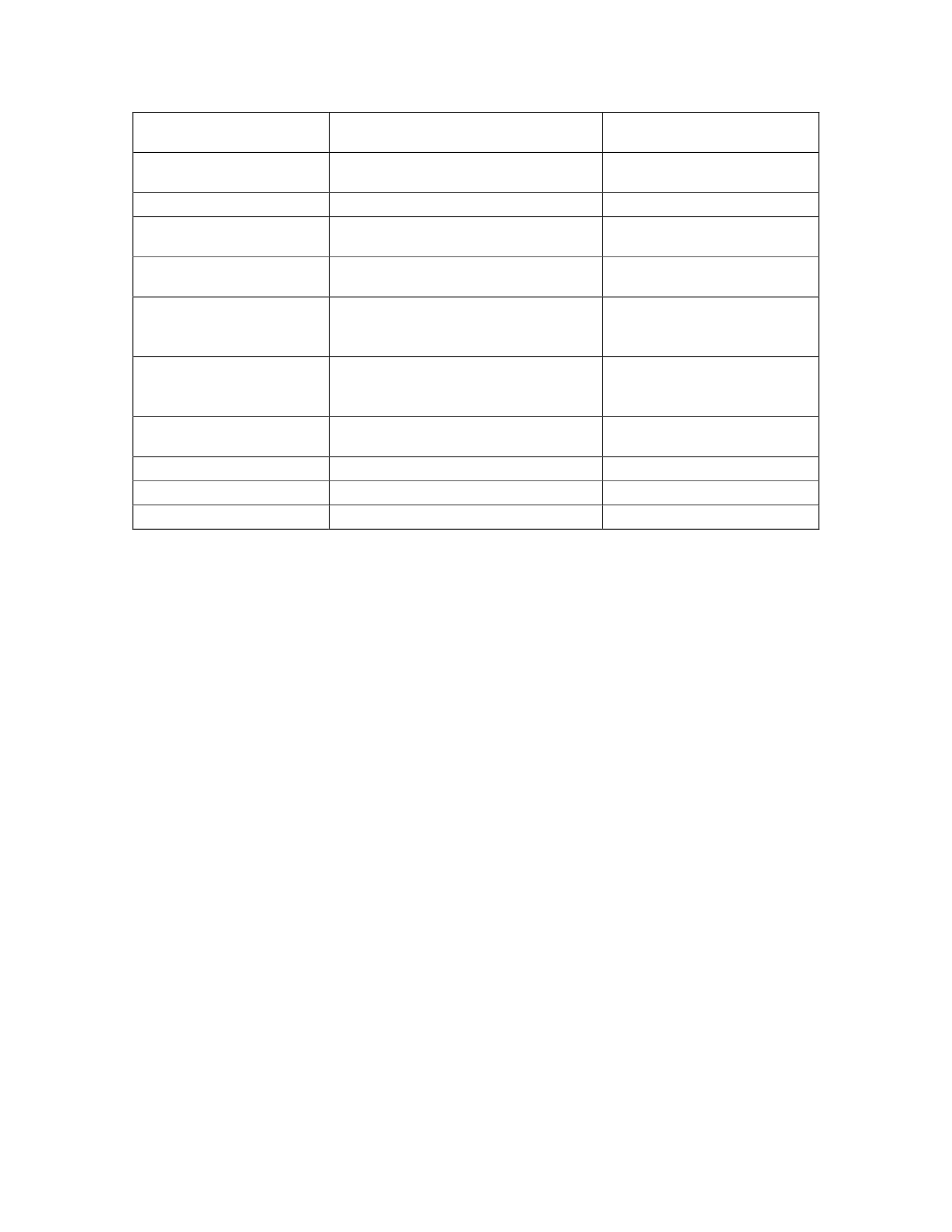
76
VM Template
Base image with shared components
Speed up provisioning of
new servers
Monitoring
Application and server Monitoring
Monitor and report on the
status of the application
Logging
Application and server logging
Record errors
ElasticSearch nodes
Search indexing
Index data for responsive
results
ElasticSearch Clustering
Performance optimization
Distributes indexing across
nodes
Regional Installs
Performance optimization,
contractual agreements
Reduces latency for
customers and international
requirements
International
Requirements
Performance optimization,
contractual agreements
Reduces latency for
customers and international
requirements
Non-Production
Environments
Development and Testing
Development and Testing
Deployment Methods
Deployment and provisioning
Consistency for customers
Security Requirements
Data security and integrity
Data security and integrity
Monetary costs
Manage operating costs
Manage operating costs

77
APPENDIX B: AWS EVALUATION
Feature
Description
Compute
Elastic Compute Cloud
(EC2)
Resizable compute capacity in the cloud.
EC2 Containers
Highly scalable, high performance container management service that
supports Docker containers
Elastic Beanstalk
Service for deploying and scaling web applications and services
Auto Scaling
Maintain application availability and allows Amazon EC2 to scale
capacity up or down automatically according to conditions you
define.
Load Balancing
Automatically distributes incoming application traffic across multiple
Amazon EC2 instances.
Amazon Machine Images
(AMI)
A template for the root volume for the instance.
Storage & Content
Delivery
S3
Secure, durable, highly-scalable cloud storage
CloudFront
Global content delivery network (CDN) service that accelerates
delivery of your websites, APIs, video content or other web assets.
Elastic Block Storage
(EBS)
Persistent block level storage volumes for use with Amazon EC2
instances
File System Storage
Simple, scalable file storage for use with Amazon EC2 instances
Glacier
Secure, durable, and extremely low-cost cloud storage service for
data archiving and long-term backup
Data Transport
Data transport solution that uses secure appliances to transfer large
amounts of data into and out of the AWS cloud.
Integrated Storage
Service connecting an on-premises software appliance with cloud-
based storage to provide seamless and secure integration between an
organization’s on-premises IT environment and AWS’s storage
infrastructure.
Database
Relational Database
Service (RDS)
Set up, operate, and scale a relational database in the cloud.
Database Migration
Migrate databases to AWS easily and securely.
Dynamo DB
Fast and flexible NoSQL database service for all applications that
need consistent, single-digit millisecond latency at any scale.

78
ElastiCache
Deploy, operate, and scale an in-memory data store or cache in the
cloud.
Redshift
Fast, fully managed, petabyte-scale data warehouse that makes it
simple and cost-effective to analyze data using existing business
intelligence tools.
Networking
Virtual Private Cloud
Logically isolated section of the Amazon Web Services (AWS) cloud
where AWS resources are launched in a definable virtual network.
Direct Connections
Dedicated network connection from your premises to AWS.
Load Balancing
Automatically distributes incoming application traffic across multiple
Amazon EC2 instances.
DNS - Route 53
Highly available and scalable cloud Domain Name System (DNS)
web service.
Analytics
Elastic Map Reduce
(EMR)
Quickly and cost-effectively process vast amounts of data.
Data Pipelines
Reliably process and move data between different AWS compute and
storage services, as well as on-premise data sources, at specified
intervals.
Elasticsearch
Deploy, operate, and scale Elasticsearch in the AWS Cloud.
Streaming Data
Platform for streaming data on AWS, offering powerful services to
make it easy to load and analyze streaming data, and also providing
the ability for you to build custom streaming data applications for
specialized needs.
Machine Learning
Makes it easy for developers of all skill levels to use machine
learning technology.
Business Intelligence
Very fast, cloud-powered business intelligence (BI) service that
makes it easy for all employees to build visualizations, perform ad-
hoc analysis, and quickly get business insights from their data.
Data Warehouse
Fast, fully managed, petabyte-scale data warehouse that makes it
simple and cost-effective to analyze all your data using your existing
business intelligence tools.
Enterprise Applications
Desktop Virtualization
Fully managed, secure desktop computing service which runs on the
AWS cloud.
Email & Calendaring
Secure, managed business email and calendar service with support
for existing desktop and mobile email clients.
Document Sharing &
Feedback
Fully managed, secure enterprise storage and sharing service with
strong administrative controls and feedback capabilities that improve
user productivity.
Mobile Services
Mobile Hub
Add and configure features for your mobile apps, including user
authentication, data storage, backend logic, push notifications,
content delivery, and analytics.
API Gateway
Create, publish, maintain, monitor, and secure APIs at any scale.
Cognito
Add user sign-up and sign-in to your mobile and web apps.

79
Device Farm
App testing service that lets you test and interact with your Android,
iOS, and web apps on many devices at once, or reproduce issues on a
device in real time.
Mobile Analytics
Measure app usage and app revenue.
Mobile SDK
Helps build high quality mobile apps quickly and easily.
Simple Notification
Service (SNS)
Fast, flexible, fully managed push notification service that lets you
send individual messages or to fan-out messages to large numbers of
recipients
Internet of Things
IoT
Managed cloud platform that lets connected devices easily and
securely interact with cloud applications and other devices.
Developer Tools
Source Code
Management
Fully-managed source control service that makes it easy for
companies to host secure and highly scalable private Git repositories.
CodeDeploy
Automates code deployments to any instance, including Amazon EC2
instances and instances running on-premises.
CodePipeline
Continuous delivery service for fast and reliable application updates.
Management Tools
CloudWatch
Monitoring service for AWS cloud resources and the applications run
on AWS.
CloudFormation
Easy way to create and manage a collection of related AWS
resources, provisioning and updating them in an orderly and
predictable fashion.
CloudTrail
Web service that records AWS API calls for your account and
delivers log files to you.
AWS Config
An AWS resource inventory, configuration history, and configuration
change notifications to enable security and governance.
OpsWorks
Configuration management service that helps you configure and
operate applications of all shapes and sizes using Chef.
Service Catalog
Allows organizations to create and manage catalogs of IT services
that are approved for use on AWS.
Trusted Advisor
An online resource to help you reduce cost, increase performance,
and improve security by optimizing your AWS environment, Trusted
Advisor provides real time guidance to help you provision your
resources following AWS best practices.
Security & Identity
Access Control
Securely control access to AWS services and resources for your
users.
Identity Management
Microsoft Active Directory (AD) in the AWS cloud, or connect your
AWS resources with an existing on-premises Microsoft Active
Directory.
Security Assessment
Automated security assessment service that helps improve the
security and compliance of applications deployed on AWS.
Key Storage &
Management
Dedicated Hardware Security Module (HSM) appliances within the
AWS cloud.

80
Web Application Firewall
Web application firewall that helps protect your web applications
from common web exploits that could affect application availability,
compromise security, or consume excessive resources.
Application Services
API Management
Create, publish, maintain, monitor, and secure APIs at any scale.
App Streaming
Deliver Windows applications to any device.
Search
Simple and cost-effective to set up, manage, and scale a search
solution for your website or application.
Transcoding
Media transcoding in the cloud.
Email
Cost-effective email service
Notifications
Fast, flexible, fully managed push notification service that lets you
send individual messages or to fan-out messages to large numbers of
recipients.
Queueing (SQS)
Fast, reliable, scalable, fully managed message queuing service.
Workflow
Build, run, and scale background jobs that have parallel or sequential
steps.
Regional Network
Regions
Independent global locations to reduce data latency
Availability zones
Each region has multiple, isolated locations with highly-available
data centers.
Support
Basic
24x7 access to
customer service, documentation, whitepapers, and
support forums
Developer
Business hours access
to Cloud Support Associates
via email
Business
24x7 access
to Cloud Support Engineers
via email, chat & phone
Enterprise
24x7 access
to Sr. Cloud Support Engineers
via email, chat & phone

81
APPENDIX C: RACKSPACE EVALUATION
Feature
Description
Compute
Cloud Servers
Rackspace Virtual Cloud Servers are high-performance, reliable
servers designed to help grow and scale your business quickly
and easily.
OnMetal
OnMetal Cloud Servers give bare-metal speeds, consistent
performance and the scalability of the cloud in a single-tenant
environment.
Cloud Images
Wide range of Linux, Windows, networking and custom images.
Network
Cloud Networks
Fully isolated, single-tenant, SDN Cloud Networks to connect
your web site or application to a database.
Cloud DNS
Using our Cloud Control Panel and API to list, add, modify, and
remove domains, subdomains, and records, as well as import and
export domains and records
Cloud Load Balancers
Cloud Load Balancers manage online traffic by distributing
workloads across multiple servers and resources—automatically
or on demand.
RackConnect
Dedicated hosting and the scalability of the cloud, connect your
dedicated servers to the fully managed cloud
Storage
Cloud Block Storage
Cloud Load Balancers manage online traffic by distributing
workloads across multiple servers and resources
Cloud Backup
Cloud Backup safeguards your business by helping to protect the
important files your website or application needs. Quickly get
back to normal operations by rapidly restoring files after a
system failure or file loss.
Cloud Files
Improve web experience and reduce server load by
automatically moving content closer to your users around the
globe. Store as many files as you want—even very large files.
Cloud CDN
Improve web experience and reduce server load by
automatically moving content closer to your users around the
globe.
Infrastructure &
Developer Tools
Cloud Orchestration
Powered by OpenStack Heat, build your own custom templates
or quickly deploy one of our production-ready templates from
our Application Catalog.

82
Auto Scale
Automatically grow or shrink your environment to handle
changes in your site’s traffic.
Rackspace Monitoring
Know how your systems are performing at all times with
customizable enterprise-grade monitoring.
Cloud Queues
Easily connect your distributed applications without installing
complex software. Create queues and then start posting and
claiming unlimited messages
Data Services
Object Rocket NoSQL
We offer fast, scalable, reliable, and automated instances of the
most popular NoSQL databases so you can focus on your
cutting-edge application, not your database.
Cloud Databases
Performance-optimized database for your application. deploy
MySQL, Percona Server, or MariaDB
Cloud Big Data
A robust environment powered by Apache™ Hadoop® and
Spark that's sized to fit your high-volume data processing needs
and your budget.
General
Global infrastructure
Enterprise-grade global data centers located in Chicago, Dallas,
Northern Virginia, London, Hong Kong and Sydney.
Support
Managed Infrastructure
Our team will provide on-call guidance and best practice
recommendations and help you improve the availability,
scalability and security of your OpenStack cloud.
SysOps
Enjoy all the features of Managed Infrastructure, plus we’ll
handle the System Administrator tasks, routine maintenance and
troubleshooting of your OpenStack cloud.
DevOps Automation
Advisory Workshop
Collaborative workshop sessions to assess your business
objectives, pain points, application architectures and
organizational culture. We provide recommendations and
strategic roadmaps to help you reach your aspirational states.
On Demand
A platform and tools-agnostic offering with services available on
a host of platforms using a host of technologies.
Maintenance
Collaboration with you on changes to your environment,
providing expert advice and handling infrastructure automation
and CI/CD configuration change implementations.

83
APPENDIX D: VMWARE VCLOUD EVALUATION
Feature
Description
VMWare vCloud
vSphere
Get the best performance, availability, and efficiency
from your infrastructure and applications
vSphere Hypervisor
Hypervisor
vSphere vMotion
Live migrate workloads between
VMware based clouds
Virtual Symmetric
Multiprocessing
Enables a single virtual machine to use multiple physical
processors simultaneously
Virtual Machine File System
(VMFS)
Repositories for virtual machines
vSphere High Availaibity
High availability capability that utilizes server
health information and migrates VMs from degraded
hosts
before problem occurs
vSphere Fault tolerance
Continuous availability by having identical virtual
machines run on separate hosts.
vSphere Data Protection
(backup and replication)
Backup and restore a virtual machines
vShield Endpoint (antivirus
and antimalware solutions)
Antivirus and antimalware solutions
vSphere Content Library
(templates etc.)
Library items are VM templates, vApp templates, or
other VMware objects
SiteManager
Industry-leading disaster recovery software to enable
application availability and mobility across sites
Non-disruptive recovery
testing
Perform automated failover testing as
frequently as needed in an isolated network to avoid
impact to production
applications and ensure regulatory compliance through
detailed reports.
Automated orchestration
workflows (DR failover or
migration)
Perform a DR failover or a planned
migration, and failback recovered virtual machines to the
original site
vRealize Operations
Intelligent operations management from applications to
infrastructure across physical, virtual and cloud
smart alerts
Right-sizing, capacity metering, trending, resource
optimization, etc.
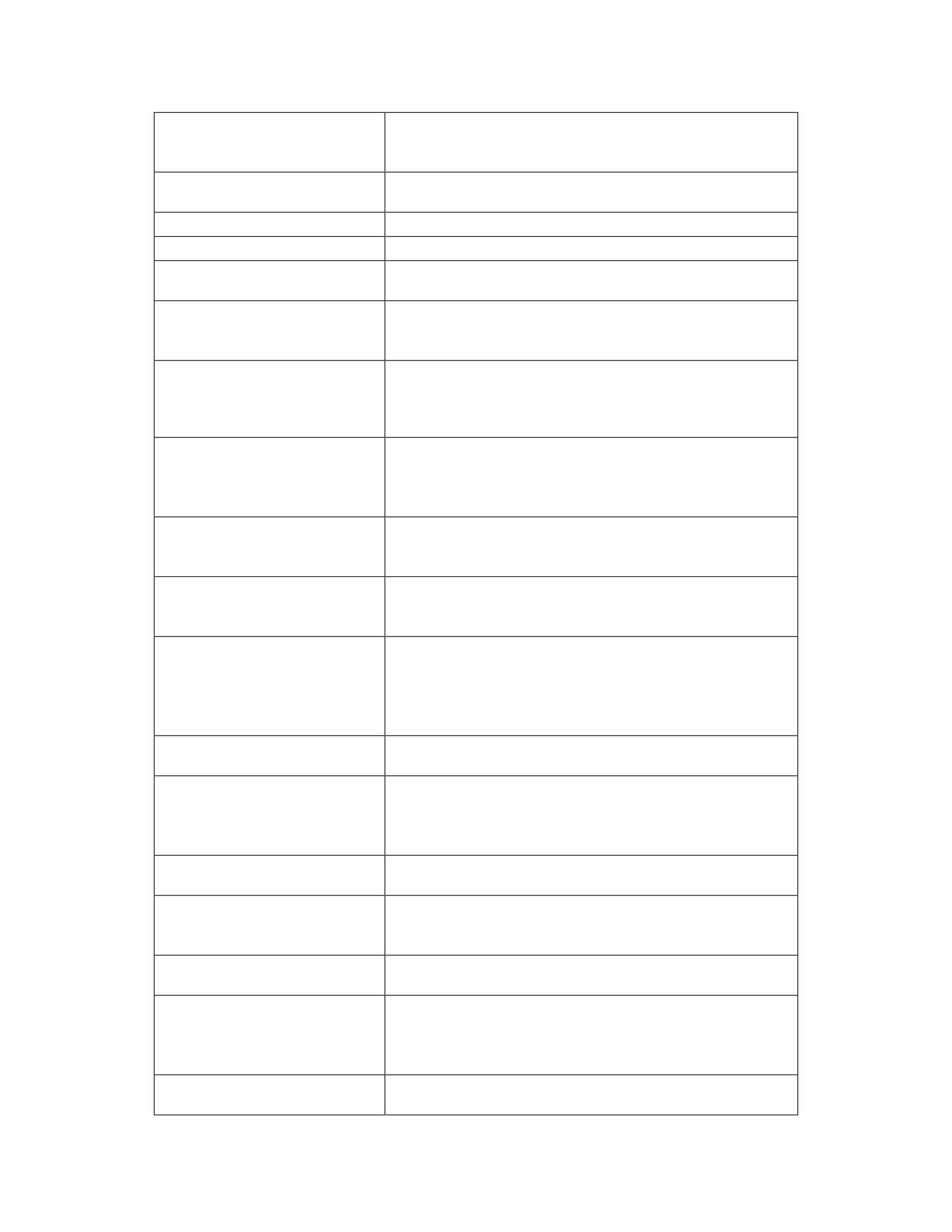
84
monitoring of OS resources
(advanced/enterprise)
Provides information about securing your vSphere®
environment for VMware® vCenter® Server and
VMware ESXi
Capacity metering
Right-sizing, capacity metering, trending, resource
optimization, etc.
vSphere hardening
Enable pre-defined and custom compliance alerts
vRealize Automation
Deploy across a multi-vendor hybrid cloud infrastructure,
Service catalog
Personalized service catalog for infrastructure,
application and custom services.
Multi-vendor, hybrid cloud
infrastructure
Release automation and continuous delivery to enable
frequent, reliable software releases while reducing
operational risks.
Blueprint model and design
Streamline the design process by assembling applications
from pre-built components using a visual canvas with a
drag and drop interface
Code Stream (application
release automation)
Automatically and continuously track the cost of on-
premises vSphere virtual infrastructure, as well as easily
assess how much the business is spending across multiple
public cloud providers and accounts.
vRealize Business
Automates cloud costing, consumption analysis and
comparison, delivering the insight needed to efficiently
deploy and manage cloud environments.
Service costing
Automating cost comparisons on current and planned
workloads helps IT organizations quickly evaluate cloud
options and improve decision making.
planning and budgeting
VRealize Log Insight delivers heterogeneous and highly
scalable log management with intuitive, actionable
dashboards, sophisticated analytics and broad third-party
extensibility, providing deep operational visibility and
faster troubleshooting
scenario planning and
forecasting
Secure, dedicated hybrid cloud platform built on
VMware vSphere
vRealize Log Insight
Heterogeneous and highly scalable log management with
intuitive, actionable dashboards, sophisticated analytics
and broad third-party extensibility, providing deep
operational visibility and faster troubleshooting
vCloud Air
Secure, dedicated hybrid cloud platform built on
VMware vSphere.
Virtual SAN
Enable logical layer 2 overlay extensions across
a routed (L3) fabric within and across data
center boundaries
NSX
Support for VXLAN to VLAN bridging for
seamless connection to physical workload
logical switching
Dynamic routing between virtual networks
performed in a distributed manner in the
hypervisor kernel, scale-out routing with
active-active failover with physical router
NSX Gateway
Distributed stateful firewalling, embedded in the
hypervisor kernel
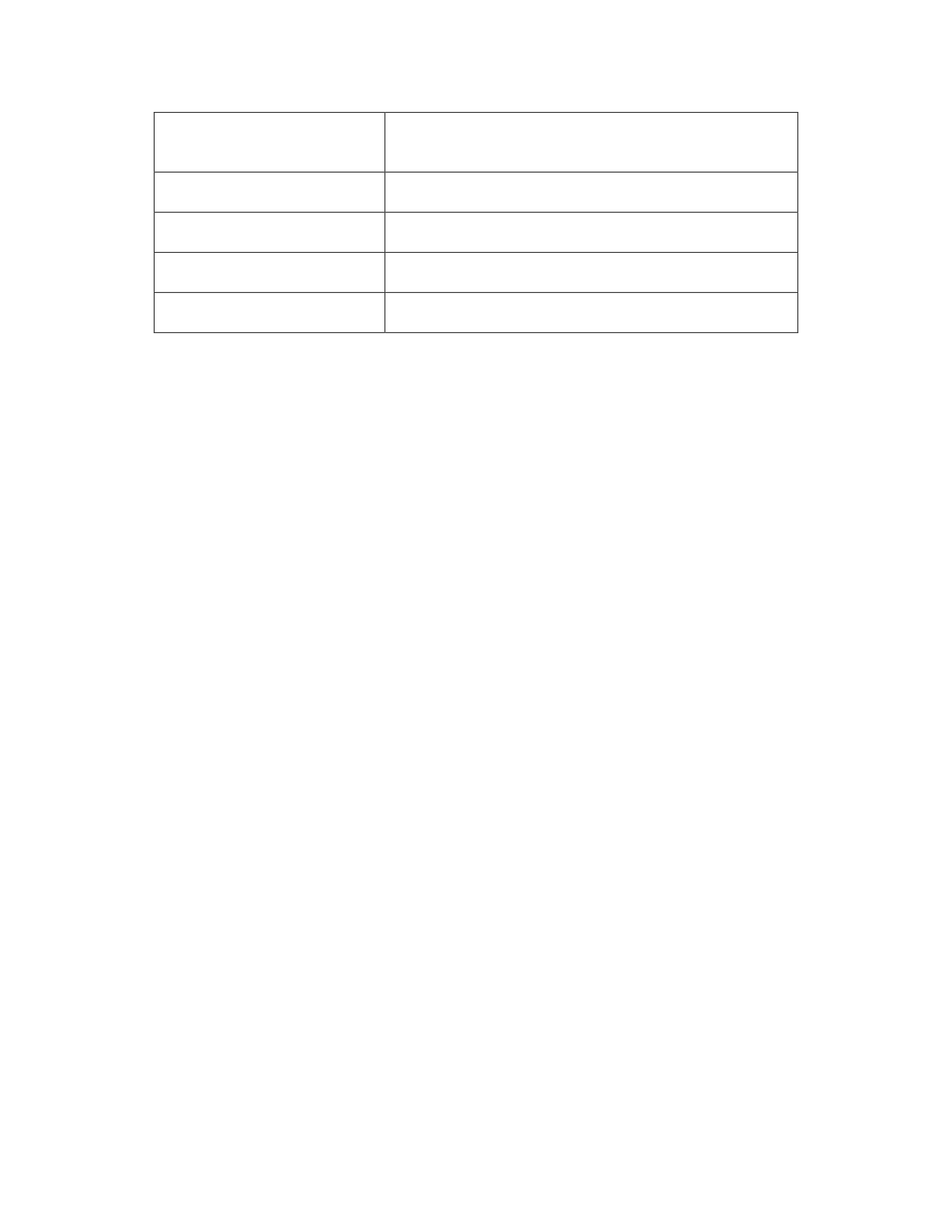
85
logical routing
L4–L7 load balancer with SSL offload and pass-
through, server health checks, and App Rules for
programmability and traffic manipulation
logical firewall
Site-to-site and remote-access VPN capabilities,
unmanaged VPN for cloud gateway services
logical load balancer
RESTful API for integration into any cloud
management platform or custom automation
logical VPN
Site-to-site and remote-access VPN capabilities,
unmanaged VPN for cloud gateway services.
NSX Api
RESTful API for integration into any cloud
management platform or custom automation
86
APPENDIX E: SIRSIDYNIX BLUECLOUD MAPPING
Application
Requirements
AWS Rackspace vCloud
Java AMI Cloud Images VMs
Tomcat AMI Cloud Images VMs
OS AWS Linux, RHEL,
Solaris, Windows
CentOS, Debian,
RHEL, Ubuntu,
Windows
RHEL, CentOS,
Debian, Ubuntu,
Windows, Solaris
Cache Elasticache
No Provided
solution
No Provided Solution
Compute nodes EC2
Cloud Servers/On
Metal
VMs
Local storage EBS
Cloud Block
Storage
VMs
MySQL Database RDS Cloud Databases No Provided Solution
Database Failover
RDS Multi/AZ, Read
Replicas
Cloud Databases No Provided Solution
Database Backups RDS Snapshots Cloud Databases
VM Snapshots,
vSphere Data
Protection, Custom
Automation
Redundancy/HA ELB, Multiple AZ,
regions
Global
infrastructure
vCloud Air, Site
Manager(Automated
Orchestration
Workflows, DR
failover or migration)
Load Balancer ELB Cloud Load
Balancers
NSX (Logical
routing, logical load
balancer)
Health Checks
(verifying that
application can
receive traffic)
ELB Health checks
Cloud Load
Balancers Health
checks
NSX(logical load
balancer)
Availability/Capac
ity to sustain load Auto Scaling Groups Auto Scale
vRealize
Operations(capacity
metering)
Shared storage
S3
Cloud Files
Virtual SAN
DNS
Route 53
Cloud DNS
NSX

87
Vertical Scaling
Launch
Configuration, resize
from web console
Cloud Servers
(resize from
console)
vSphere, vRealize
Operations,
SiteManager
Horizontal Scaling Auto Scaling Groups Auto Scale
vSphere, vRealize
Operations,
SiteManager
Server Firewall
restrictions Security Groups Security Groups
NSX (Logical
Firewall, NSX
Gateway)
Auto Recovery Auto Scaling Groups Auto Scale
SiteManager,
vRealize Operations,
VM Template AMI Cloud Images
vRealize Automation
(Service Catalog),
vSphere Templates
Monitoring Cloud Watch Cloud Monitoring
vRealize
operations(Capacity
metering)
Application
Logging
Cloud Watch
No Provided
solution
vRealize Log Insight
ElasticSearch
nodes
AWS Elasticsearch
No Provided
solution
No Provided Solution
ElasticSearch
Clustering
AWS Elasticsearch
No Provided
solution
No Provided Solution
Regional Installs AWS Regions
Global
infrastructure
Multiple sites
International
Requirements
AWS Regions
Global
infrastructure
Multiple sites
Deployment
Methods
AWS OpsWorks,
Beanstalk,
Rackspace Devops
Blueprint model and
design, Code Stream
Security
Requirements
Security Groups, Security Groups NSX
3 yr. Monetary
costs (Estimated)
1,188,000 (On-
demand)
$1,695,600 (Cloud
servers)
$1,234,000
Licensing(Assuming
sufficient hardware)
hardware
maintenance
Cloud controlled Cloud controlled Locally controlled

88
APPENDIX F: SIRSIDYNIX BLUECLOUD SCORE SHEET
Completed score sheet for SirsiDynix BLUEcloud
89
Application
Requirements
weight AWS
Score
0-5
Total Rackspace
Score
0-5
Total vCloud
Score
0-5
Total
Java
1
AMI
5
5
Cloud Images
5
5
VMs
5
5
Tomcat
1
AMI
5
5
Cloud Images
5
5
VMs
5
5
OS
1
AWS Linux,
RHEL, Solaris,
Windows
5
5
CentOS, Debian,
RHEL, Ubuntu,
Windows
5
5
RHEL, CentOS, Debian,
Ubuntu, Windows,
Solaris
5
5
Shared Cache
1.2
Elasticache
5
6
No Provided
solution
1
1.2
No Provided Solution
1
1.2
Compute nodes
1
EC2
5
5
Cloud
Servers/OnMetal
5
5
VMs
5
5
Local storage
1
EBS
5
5
Cloud Block
Storage
5
5
VMs
5
5
MySQL Database
1.9
RDS
5
9.5
Cloud Databases
5
9.5
No Provided Solution
1
1.9
Database Failover
1.7
RDS Multi/AZ,
Read Replicas
5
8.5
Cloud Databases
4
6.8
No Provided Solution
1
1.7
Database Backups
1.8
RDS Snapshots
5
9
Cloud Databases
4
7.2
VM Snapshots, vSphere
Data Protection, Custom
Automation
2
3.6
Redundancy/HA
1.8
ELB, Multiple
AZ, regions
5
9
Global
infrastructure
5
9
vCloud Air, Site
Manager(Automated
Orchestration
Workflows, DR failover
or migration)
5
9
Load Balancer
1.6
ELB
4
6.4
Cloud Load
Balancers
5
8
NSX (Logical routing,
logical load balancer)
5
8
Health Checks
(verifying that
application can
receive traffic)
1
ELB Health
checks
5
5
Cloud Load
Balancers Health
checks
5
5
NSX(logical load
balancer)
5
5
Availability/Capaci
ty to sustain load
1.8
Auto Scaling
Groups
5
9
Auto Scale
5
9
vRealize
Operations(capacity
metering)
5
9
Shared storage
1
S3
5
5
Cloud Files
5
5
Virtual SAN
5
5
DNS
1
Route 53
5
5
Cloud DNS
5
5
NSX
5
5
Vertical Scaling
1
Launch
Configuration,
resize from web
console
4
4
Cloud Servers
(resize from
console)
4
4
vSphere, vRealize
Operations, SiteManager
4
4
90
Horizontal Scaling
1.6
Auto Scaling
Groups
5
8
Auto Scale
5
8
vSphere, vRealize
Operations, SiteManager
5
8
Server Firewall
restrictions
1.9
Security Groups
5
9.5
Security Groups
5
9.5
NSX (Logical Firewall,
NSX Gateway)
5
9.5
Auto Recovery
1.5
Auto Scaling
Groups
5
7.5
Auto Scale
5
7.5
SiteManager, vRealize
Operations,
5
7.5
VM Template
1.1
AMI
5
5.5
Cloud Images
5
5.5
vRealize Automation
(Service Catalog),
vSphere Templates
5
5.5
Monitoring
1.7
Cloud Watch
5
8.5
Cloud
Monitoring
5
8.5
vRealize
operations(Capacity
metering)
5
8.5
Application
Logging
1
Cloud Watch
3
3
No Provided
solution
1
1
vRealize Log Insight
5
5
ElasticSearch
nodes
1.9
AWS
Elasticsearch
5
9.5
No Provided
solution
1
1.9
No Provided Solution
1
1.9
ElasticSearch
Clustering
1.5
AWS
Elasticsearch
5
7.5
No Provided
solution
1
1.5
No Provided Solution
1
1.5
Regional Installs
1.4
AWS Regions
4
5.6
Global
infrastructure
4
5.6
Multiple sites
3
4.2
International
Requirements
1.4
AWS Regions
3
4.2
Global
infrastructure
3
4.2
Multiple sites
5
7
3 yr. Monetary
costs (Estimated)
1.2
1,188,000 (On-
demand)
5
6
$1,695,600
(Cloud servers)
3
3.6
$1,234,000
Licensing(Assuming
sufficient hardware)
4
4.8
totals:
185.7
161
149.4
91
APPENDIX G: SIRSIDYNIX ANALYTICS ANALYSIS AND CLOUD MAPPING
Application
Requirements
AWS Rackspace vCloud
Queue system
AWS SQS
Cloud Queues
No Provided Solution
Hadoop cluster
AWS MapReduce
Cloud Bid Data
No Provided Solution
shared storage
(store transformed
files)
S3 Cloud No Provided Solution
Java
AMI
Cloud Images
VMs
Tomcat
AMI
Cloud Images
VMs
client service
access
ELB Cloud Load Balancers
NSX(Logical Load
balancer)
MicroStrategy
No Provided
Solution
No Provided Solution No Provided Solution
Monetary costs 1,188,000/3 years
On-demand
$1,695,600/3 years
Cloud servers
$1,234,000 /3 yrs.
Licensing(Assuming
sufficient hardware and
existing vSphere
Enterprise license)
Load Balancer ELB Cloud Load Balancers
NSX(Logical Load
balancer)
Health Checks
(verifying that
application can
receive traffic)
ELB Health checks Cloud Load Balancers
Health checks
NSX(logical load
balancer)
Monitoring Cloud Watch Cloud Monitoring
vRealize
operations(Capacity
metering)
Application
Logging
Cloud Watch No Provided solution No Provided Solution
MySQL Database
RDS
Cloud Databases
No Provided Solution
Database Failover
RDS Multi/AZ,
Read Replicas
Cloud Databases No Provided Solution
Database Backups RDS Snapshots Cloud Databases
VM Snapshots, vSphere
Data Protection, Custom
Automation
DNS
Route 53
Cloud DNS
NSX
Load Balancer
Elastic Load
Balancer
Cloud Load Balancers
NSX (Logical routing,
logical load balancer)
92
International
Requirements
AWS Regions Global infrastructure Multiple sites
Java
AMI
Cloud Images
VMs
Tomcat
AMI
Cloud Images
VMs
OS
AWS Linux,
RHEL, Solaris,
Windows
CentOS, Debian,
RHEL, Ubuntu,
Windows
RHEL, CentOS, Debian,
Ubuntu, Windows,
Solaris
Redundancy/HA ELB, Multiple AZ,
regions Global infrastructure
vCloud Air, Site
Manager(Automated
Orchestration Workflows,
DR failover or migration)
Load Balancer ELB Cloud Load Balancers
NSX (Logical routing,
logical load balancer)
Control of the data
Minimal
Minimal
complete control
Country restrictions
(Canada, Europe,
China, US,
Australia)
regions, North
America, Ireland,
Sydney, China
(Request required),
Not available -
Only Partners in
Canada
Regions, Hong Kong,
Not in Canada
Wherever a datacenter is
located

93
APPENDIX H: SIRSIDYNIX ANALYTICS CLOUD SCORING
Completed score sheet for SirsiDynix Analytics
94
Application
Requirements
Weight AWS
Score
0-5
Total Rackspace
Score
0-5
Total vCloud
Score
0-5
Total
Queue system
1.3
AWS SQS
4
5.2
Cloud Queues
4
5.2
No Provided Solution
1
1.3
Hadoop cluster 1.6
AWS
MapReduce
4 6.4 Cloud Bid Data 4 6.4 No Provided Solution 1 1.6
Large data
storage
1.8 S3 5 9 Cloud Files 5 9 No Provided Solution 1 1.8
VM Template
1
AMI
5
5
Cloud Images
5
5
VMs
5
5
client service
access
1.7 ELB 5 8.5
Cloud Load
Balancers
5 8.5
NSX(Logical Load
balancer)
5 8.5
MicroStrategy 1.6
No Provided
Solution
1 1.6 No Provided Solution 1 1.6 No Provided Solution 1 1.6
Monetary costs 1.5
1,188,000/3
years On-
demand
4 6 $1,695,600/3 years
Cloud servers 3 4.5
$1,234,000 /3 yrs.
Licensing(Assuming
sufficient hardware and
existing vSphere
Enterprise license)
4 6
Load Balancer 1 ELB 4 4
Cloud Load
Balancers
5 5
NSX(logical load
balancer)
5 5
Monitoring 1.4 Cloud Watch 5 7 Cloud Monitoring 5 7
vRealize
operations(Capacity
metering)
5 7
Application
Logging
1.4 Cloud Watch 3 4.2 No Provided solution 1 1.4 No Provided Solution 1 1.4
MySQL Database
1
RDS
5
5
Cloud Databases
5
5
No Provided Solution
1
1
Database
Failover
1
RDS Multi/AZ,
Read Replicas
5 5 Cloud Databases 4 4 No Provided Solution 1 1
Database
Backups 1.3 RDS Snapshots 5 6.5 Cloud Databases 4 5.2
VM Snapshots, vSphere
Data Protection,
Custom Automation
2 2.6
DNS
1
Route 53
5
5
Cloud DNS
5
5
NSX
5
5
International
Requirements
2 AWS Regions 4 8 Global infrastructure 4 8 Multiple sites 5 10
OS 1
AWS Linux,
RHEL, Solaris,
Windows
5 5
CentOS, Debian,
RHEL, Ubuntu,
Windows
5 5
RHEL, CentOS,
Debian, Ubuntu,
Windows, Solaris
5 5
Control of the
data
2 Minimal 2 4 Minimal 2 4 Complete control 5 10
95
International
restrictions
(Canada, Europe,
china, us,
Australia)
2
regions, North
America,
Ireland,
Sydney, China
(Request
required), Not
available -
Only Partners
in Canada
1 2 Regions, Hong Kong,
Not in Canada 1 2 Wherever a datacenter
is located 4 8
3 yr. Monetary
costs (Estimated)
1.5 $1,195,200
(On-Demand) 4 6 $1,724,400 (Cloud
Servers) 3 4.5
$689,000 Licensing
(assuming sufficient
hardware)
5 6
Totals:
97
91.8
81.8

96
APPENDIX I: RECIPE SITE ANALYSIS AND CLOUD MAPPING
Application
requirements AWS Rackspace vCloud
Ruby on Rails NA NA NA
MySQL RDS Cloud Databases
No Provided
Solution
NoSQL Dynamo DB Object Rocket NoSQL
No Provided
Solution
Message Queue
system
SQS Cloud Queues
No Provided
Solution
Container
virtualization
EC2 Containers No Provided Solution
No Provided
Solution
Continuous integration AWS CodeDeploy,
OpsWorks DevOps Services No Provided
Solution
Load balancing Elastic Load Balancing Cloud Load Balancers
NSX (Logical
routing, logical load
balancer)
DB backups RDS/Dynamo DB Cloud Databases/Rocket
NoSQL
No Provided
Solution
DB replication/
redundancy RDS/Dynamo DB Cloud Databases/Rocket
NoSQL
No Provided
Solution
High Availability AutoScale/ELB Auto Scale/Cloud Load
Balancers
SiteManager,
vRealize Operations
Firewall Security Groups Cloud Networks NSX
Server Monitoring Cloud Watch DevOps Services
vRealize
operations(Capacity
metering)
Application Logging Cloud Watch DevOps Services
No Provided
Solution
Configuration
Management System OpsWorks DevOps Services No Provided
Solution
3 yr. Monetary costs
(Estimated)
$34,095
(Enterprise support would be
$570,000+)
$62,650 $106,000
Support
Business level
(Enterprise is not within the
budget)
DevOps Services Included Support

97
APPENDIX J: RECIPE SITE CLOUD SCORE SHEET
Completed scoresheet for Recipe Site
98
Application
requirements
Weight AWS Score Total Rackspace Score Total vCloud Score Total
Ruby on Rails
2
NA
-
-
NA
-
-
NA
-
-
MySQL
1.9
RDS
5
9.5
Cloud Databases
5
9.5
No Provided Solution
1
1.9
NoSQL
1.9
Dynamo DB
5
9.5
Object Rocket NoSQL
5
9.5
No Provided Solution
1
1.9
Message Queue
system
1 SQS 5 5 Cloud Queues 5 5 No Provided Solution 1 1
Container
virtualization
2 EC2 Containers 5 10 No Provided Solution 1 2 No Provided Solution 1 2
Continuous
integration 1.4
AWS
CodeDeploy,
OpsWorks
4 5.6 DevOps Services 5 7 vRealize Operations 4 1.4
Load balancing 1.3 Elastic Load
Balancing 4 5.2 Cloud Load Balancers 5 6.5
NSX (Logical
routing, logical load
balancer)
5 6.5
DB backups 1.6
RDS/Dynamo
DB
5 8
Cloud Databases/Rocket
NoSQL
5 8 No Provided Solution 1 1.6
DB replication
/redundancy
1.4
RDS/Dynamo
DB
5 7
Cloud Databases/Rocket
NoSQL
5 7 No Provided Solution 1 1.4
Availability 1.2 AutoScale/ELB 5 6
Auto Scale/Cloud Load
Balancers
5 6
SiteManager,
vRealize Operations,
5 6
Firewall
1.5
Security Groups
5
7.5
Cloud Networks
5
7.5
NSX
5
7.5
Server Monitoring
1.6
Cloud Watch
4
6.4
DevOps Services
5
8
vRealize Operations
4
1.6
Application Logging
1.7
Cloud Watch
3
5.1
DevOps Services
5
8.5
vRealize Log Insight
5
1.7
Configuration
Management System
1.6 OpsWorks 4 6.4 DevOps Services 5 8 vRealize Operations 4 1.6
Support
2
Business Level
4
8
DevOps Services
5
10
Included Support
4
8
3 yr. Monetary costs 1.5 $34,095 5 7.5 $62,650 4 6
$106,000 (Licensing
only)
2 3
106.7
108.5
47.1

99
APPENDIX K: SURVEY
Introduction
The purpose of my research is to analyze cloud implementation characteristics and
application system requirements to create a model for scoring a platform against these
requirements. This model can then be used to match the crucial application characteristics with
the interface provided by a particular cloud implementation. This will then make it possible to
formalize the process of selecting which cloud implementations are best suited for the specific
application and organizational needs. This method will evaluate which cloud vendor, from a
selection of cloud vendors, best matches an application. To validate this research I would like
some peers to review and test my methodology then fill out a short survey about my
methodology. What I need from you is to evaluate my method of matching an application to a
cloud environment. If you are familiar with SirsiDynix BLUEcloud, it has been used in part for
examples and can be used in the evaluation. If you aren’t familiar with BLUEcloud, then select
another cloud application that you are familiar with.
First, create a table or a list of requirements to run the cloud environment in a production
environment and what an organization expects from the application. Features may include but
aren’t limited to:
1. CPU
2. RAM
3. IOPS
4. Operating Systems

100
5. Database
6. Web server
7. Cache solution
8. Other 3rd party apps
9. Etc.
An example for some of the SirsiDynix BLUEcloud application can be found in BLUEcloud
Application Requirements Example
BLUEcloud.
Second, identify most or all of the features of two or more cloud vendors. This is again
just a list or table of cloud features. Three examples have been provided, AWS, Rackspace and
VMWare. This would be features such as database solutions provided, or files storage solutions,
and more. Sample lists can be found in sections AWS Cloud Features List, Rackspace Cloud
Features List, and
VMWare Cloud Features List.
Third, match which of the cloud features, if any, fulfil the requirement of the application.
Create a table with columns for the application requirements identified in step 1, then a column
for each cloud vendor. In the cloud vendor column, identify which cloud feature best fulfils the
application requirement. For example, if the application requires a MySQL database, then AWS
RDS and Rackspace Cloud Databases both fulfil this requirement, while VMWare doesn’t
provide a solution, but a solution can be implemented in VMWare by running your own MySQL
database. A small subset of the application requirements to the cloud features of the BLUEcloud
application can be found in BLUEcloud Mapping.
Fourth, then put a weight on each application feature on how important it is for the
application. Add a column next to the application requirements to identify the weight. This
would be a number range of your choosing, in my examples I use the range from 1 to 2. For
example, the BLUEcloud application mostly runs on Tomcat, which means the specific operating

101
system may not be that critical and so it would only get a score of one. But the application
requires a relational database such as MySQL, so it may receive a higher weight around 1.8.
Next to each cloud feature create two columns for the feature score and the total. In the score
column, rate each cloud feature on how well it fulfills the application requirement and multiply it
by the weight to get the feature score. I used a weight range from 1 to 5 in my examples.
Because AWS and Rackspace provide a MySQL solution, RDS and Cloud Databases. They may
both score a 5 in this category because it could be a complete solution needed. Then in the total
column, multiply the feature score by the weight. So the RDS feature score of 5 multiplied by
the weight of 1.8 means that the cloud feature total would be 9. However, VMWare doesn’t
provide a relational database solution, so it would score a 1 because a solution could be
implemented. Next add up all of the cloud feature totals to get the cloud vendor score. An
example of the BLUEcloud scoring can be found in table BLUEcloud Scoring Example.
Using this score, the highest cloud score is most likely the best cloud for the application.
Cases where the highest total may not be the best cloud is if there are one or more critical
features that the cloud doesn’t provide, but does well in other areas. For example, if AWS
scored higher than Rackspace, but you want to be able to hand off your DevOps support to the
cloud vendor, you will want to pick Rackspace over AWS.
AWS Cloud Features List
Compute
Virtual Servers
Containers
1-Click Web App Deployment
Event-driven Compute Functions
Auto Scaling
Load Balancing
Storage & Content Delivery
102
Object Storage
CDN
Block Storage
File System Storage
Archive Storage
Data Transport
Integrated Storage
Database
Relational
Database Migration
NoSQL
Caching
Data Warehouse
Networking
Virtual Private Cloud
Direct Connections
Load Balancing
DNS - Route 53
Analytics
Hadoop
Data Pipelines
Elasticsearch
Streaming Data
Machine Learning
Business Intelligence
Data Warehouse
Enterprise Applications
Desktop Virtualization
Email & Calendaring
Document Sharing & Feedback
Mobile Services
Mobile Development
API Management
Identity
App Testing
Mobile Analytics
Notifications
Development
Internet of Things
IoT
Developer Tools
Source Code Management
Code Deployment
Continuous Delivery
Management Tools
Monitoring & Logs
Resource Templates
Usage & Resource Auditing
Dev/Ops Resource Management

103
Service Catalog
Performance Optimization
Security & Identity
Access Control
Identity Management
Security Assessment
Key Storage & Management
Web Application Firewall
Application Services
API Management
App Streaming
Search
Transcoding
Email
Notifications
Queueing (SQS)
Workflow
Regional Network
Regions
Availability zones
Rackspace Cloud Features List
Compute
Cloud Servers
OnMetal
Network
Cloud Networks
Cloud DNS
Cloud Load Balancers
RackConnect
Storage
Cloud Block Storage
Cloud Backup
Cloud Files
Cloud CDN
Infrastructure & Developer Tools
Cloud Orchestration
Auto Scale
Rackspace Monitoring
Cloud Queues
Data Services
Object Rocket NoSQL
Cloud Databases
Cloud Big Data
General
Global infrastructure

104
VMWare Cloud Features List
VMWare vCloud
vSphere
vSphere Hypervisor
vSphere vMotion
Virtual Symmetric Multiprocessing
Virtual Machine File System (VMFS)
vSphere High Availaibity
vSphere Fault tolerance
vSphere Data Protection (backup and replication)
vShield Endpoint (antivirus and antimalware solutions)
vSphere Content Library (templates etc.)
SiteManager
Non-disruptive recovery testing
Automated orchestration workflows (DR failover or migration)
Automated recovery of network and security settings
Custom automation
vRealize Operations
smart alerts
monitoring of OS resources (advanced/enterprise)
Capacity metering (right-sizing, capacity metering, trending, resource optimization, etc.)
vSphere hardening
vRealize Automation
Service catalog
Multi-vendor, hybrid cloud infrastructure
Blueprint model and design
Code Stream (application release automation)
NSX
logical switching
NSX Gateway
logical routing
logical firewall
logical load balancer
logical VPN
NSX API
vRealize Business
Service costing
planning and budgeting
scenario planning and forecasting
vRealize Log Insight
vCloud Air
Virtual SAN
105
BLUEcloud Application Requirements Example
Base Server images
Java
Tomcat
OS
Cache
Compute nodes
Local storage
MySQL Database
Database Failover
Database Backups
Redundancy/HA
Load Balancer
Availability/Capacity to sustain load
Shared storage
DNS
Changing Disk size
Vertical Scaling
Horizontal Scaling
Server Firewall restrictions
Auto Recovery
Monitoring
Logging
ElasticSearch nodes
ElasticSearch Clustering
Regional Installs
International Requirements
Non-Production Environments
Deployment Methods
Security Requirements
BLUEcloud Mapping Example
Application
Requirement
s
AWS
Rackspace
vCloud
Tomcat
AMI
Cloud Images
VMs
Cache
Elasticache
No Provided
solution
No Provided Solution
MySQL
Database
RDS
Cloud Databases
No Provided Solution
Load Balancer
ELB
Cloud Load
Balancers
NSX (Logical routing, logical load
balancer)
Availability/C
apacity to
sustain load
Auto Scaling
Groups
Auto Scale
vRealize Operations(capacity
metering)
Shared storage
S3
Cloud Files
Virtual SAN
DNS
Route 53
Cloud DNS
NSX
106
Horizontal
Scaling
Auto Scaling
Groups
Auto Scale
vSphere, vRealize Operations,
SiteManager
Base Server
images
AMI
Cloud Images
vRealize Automation (Service
Catalog), vSphere Templates
BLUEcloud Scoring Example
Application
Requirements
Weight AWS Score
1-5 Total Rackspace Score
1-5 Total vCloud Score
1-5 Total
Tomcat 1 AMI 5 5
Cloud
Images
5 5 VMs 5 5
Cache 1.2 Elasti
cache 5 6
No
Provided
solution
2 2.4
No
Provided
Solution
2 2.4
MySQL Database 1.9 RDS 5 9.5 Cloud
Databases 5 9.5
No
Provided
Solution
2 3.8
Load Balancer 1.6 ELB 4 6.4 Cloud Load
Balancers 5 8
NSX
(Logical
routing,
logical
load
balancer
)
5 8
Base Server
images 1.1 AMI 5 5.5 Cloud
Images 5 5.5
vRealize
Automat
ion
(Service
Catalog),
vSphere
Templat
es
5 5.5
Totals
:
32.4 30.4 24.7

107
Survey:
For questions 1 – 7, please rate each question from 1 to 10, 1 being low, such as very difficult or
strongly dislike and 10 being high as in very easy or strongly liked.
1. Do the steps make sense?
2. Do the steps flow logically?
3. Are the steps easy to follow?
4. How easy is it to perform these steps?
5. Is this methodology helpful in picking a cloud vendor?
6. Is it helpful to have a list of cloud vendor features?
7. How accurate is the provided analysis of the cloud vendors?
For questions 8 – 10, please respond with any feedback you may have.
8. What do you like about this process?
9. What would you change about this process?
10. Any additional comments:

108
APPENDIX L: SURVEY RESULTS
For questions 1 – 7, please rate each question from 1 to 10, 1 being low, such as very difficult or
strongly dislike and 10 being high as in very easy or strongly liked.
Survey Results
Average
1. Do the steps make sense? 9 8 8 7 8 8
2. Do the steps flow logically?
8
8
8
8
8
8
3. Are the steps easy to follow?
8
9
8
8
8
8.2
4. How easy is it to perform these steps?
4
5
8
7
7
6.2
5. Is this methodology helpful in picking a cloud vendor? 9 7 10 9 8 8.6
6. Is it helpful to have a list of cloud vendor features?
10
8
10
10
9
9.4
7. How accurate is the provided analysis of the cloud vendors?
9
7
10
8
6
8
For questions 8 – 10, please respond with any feedback you may have.
8. What do you like about this process?
The process seems intuitive and helpful. It seems kind of tricky to compare tons of systems. I'm
thinking that the complexity of what is offered by each system is going to be hard to compare.
Specifically AWS. It is such a huge ecosystem it's tricky to know what it does and doesn't offer;
and sometimes there are hidden pitfalls that aren't discovered until late in the process of
implementing that solution.
Understanding the differences along with knowing what is wanted/needed is essential in picking
a solution, the hardest of these being the determination of what is needed. Having listings of
what features are provided by vendors and understanding their differences are essential to having
a successful outcome.
The process requires that the application requirements be fully enumerated before a platform is
chosen. The weights and scores provide a definite and internally agreed upon measure of the
importance of a requirement and a particular platforms ability to meet that requirement.
Captures most of the core technical components.
9. What would you change about this process?

109
Perhaps more instruction on how to gather requirements and how to weight the application. I
think the weights are going to make things tricky. What does the weight mean? Importance?
Required? If its importance then that makes sense, but I wonder if having another value of
"Required" would be helpful.
a. Split the initial Features Requirement list into several elements:
i. Low level environment (CPI, RAM, IOPS, OS, min service guarantees (e.g. 4 9's
uptime), etc.)
ii. App Support Services (caching, db, scaling, redundancy / fail-over, provisioning,
shared storage, etc.)
iii. Security aspects – isolation of components in case of breach, segregation of
access based on need to know, etc.
iv. Monitoring Services – usage, peak analysis, notifications – i.e. the needs of the
staff who will be responsible for keeping the thing up and running in the field.
v. Service Costs
vi. 'Other' (international reach, support offerings)
b. Clarification on the "Fourth…" paragraph on page 2. 'weight' gets used confusingly –
both for the importance of a feature (1-2) and the feature score column (1-5) which is also called
a weight. (May be a single sentence change, of "I used a weight range from 1 to 5 in my
examples" to "I used a feature score from 1 to 5 in my examples".
c. Feature Score might need a '0' value – i.e. not supported at all by the potential cloud
environment provider). Related might be adding some specific mechanism that would
immediately rule out a potential provider if some feature wasn't available at all.
d. Considerations around the above (c.) might also simplify / modify the discussion in the
paragraph on p 3 where "For example, if AWS scored higher than…". I might also submit that if
you choose to not go with the highest scored potential, then you haven't set up your requirements
and their weights correctly – go back and modify and re-calculate. e.g. if two solutions both
support MySQL, but one includes more automatic maintenance than the other, a straight ranking
may not highlight that – unless you make the automatic maintenance part of the original app
requirements with some weight associated. i.e. this may become an iterative evaluation as
varying vendor capabilities come to light.
e. I'm not sure what all the entries in the 1.2 AWS table refer to. For example, you include
that Database includes 'Relational', but you don't specifically indicate which (MySQL, etc.). I.E.
not enough info in that list of features to actually do an evaluation against your requirements.
Just supporting an 'RDBMS' isn't necessarily sufficient – it may need to be an explicit type of
RDBMS.
Knowing that a vendor provides some form of a feature in their solution is often times not
enough. Knowing how a feature operates and how easy it is to use and implement should have
weight as well. Some features might have limitations other vendors do not have. Also cost
should be part of the weighting since two vendors may have the same “feature” but one might be
an add-on where the other is included in the overall licensing. Some may have different use
costs.
Allow for a single platform to be evaluated in different configurations with the associated costs
recorded as a separate score.

110
Although it’s harder to quantify but having cost estimates would be extremely valuable not only
the cost to implement but to maintain and support. I also think more information around the
weighting aspects would be helpful as this could sway the outcome. I also think a section on
supported regions would help is determining the best option.
10. Any additional comments:
A discussion on cost seems an important aspect that's missing.
I think having a larger selection of potential application requirement examples would be helpful.
You might also indicate that someone who is familiar with the architecture of the software
MUST be involved – it can't be a purely management decision. Often decisions get made at a
high level, without deep enough investigation. Some discussion about this might be
appropriate.)
I was a bit confused when first looking at this summary since some of these vendors provide
different offerings. I did not know that VMware offered leasing in their cloud space. So initially
I was looking at their features as ones used to create a cloud.
The process accounts for application requirements but that may cause beneficial but non-
essential platform specific features, such as vMotion or access to additional services provided by
a platform, to be overlooked.
I would envision that this process could be implemented as a web site with descriptions and
forms or wizards in helping to drive the final outcome that could be continually used to justify
cloud implementation. For example, let’s say we are currently using vCloud but over time using
the web site / process we determine that a different option could be justified in switching
solutions.

