


Nursing homework help
 lele1820
 HowtogettheletterafrompointAtopointB.html1.zip
How to get the letter a from point A to point B.html
|
So here’s how data gets from one place to another, roughly, in the most simple terms, at the most basic level. Every device that works on a network, computer, tablet, cell phone, has an address. Two actually. One is the physical address. The device gets this address from the factory when they make it. It may look something like this: D4-3D-7E-34-5A-28. This is how other devices on the same network can find each other. It also has a second address that gets assigned to it by the network. It’s called the network address and it looks something like this: 192.168.3.2. There is a new version of this number and it’s much longer, but the principle is the same. Part of this number is the network number and identifies what network the device is on, and the other part is the host number that identifies your device. In this case, the hardware device is on network 192.168.2 (the first three numbers in the address) and it's device number 2 (the last number in the address). Very simply put, any machine anywhere in the world can find my device by first looking for network 192.168.3 and then looking for device 2. Of course, lots of other things happen, too, but for our purposes this is what you need to know. |
|
|
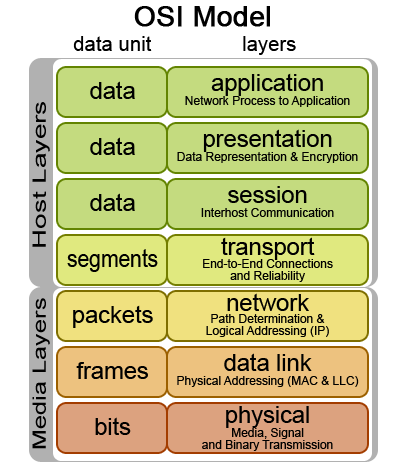
Now what does it send? All data, ultimately, is nothing more than indicators of a letter or a number. But you can’t send a letter or a number over wire or on fiber optics or Wi-Fi. You can only send voltage or pulses of light or radio waves. So I have to use a code to indicate letters and numbers. The letter “a,” for example, is light (or electricity) off, on, on, off four times and then on again. In human terms this might look like this: 01100001. The process of going from your idea of the letter "a" to flashes of light happens in steps called Layers. Here’s an example: Let’s say I want to send an email with just the letter “a” in it. First I open an application that I can use to send mail, and then type “a” which the computer will eventually see as 01100001 or light or electricity off, on, on… you get the idea. But the application has to do something else, too. It has to explain to the computer that’s going to get the information that it’s an email and not a session of a video game or Harry Styles singing As It Was. Why? Because when the computer at the other end gets the data, it’s just a jumble of on and off signals. It needs to know that it has to view this in an application capable of reading email. It does this by adding protocol information like SMTP. This just tells the computer that you need an application that also uses SMTP to read the email. If you are a networking student, you will recognize this as the Application layer in the OSI model. If you are not, don’t worry too much about it. Then the computer has to actually convert “a” to 01100001 which we’ll call Binary Code. It also has to convert the protocol information to binary as well to tell the computer you are sending it to that it needs an application that can read the mail. If there is compression or encryption that scrambles things so that bad people can’t read it, that happens here, too. IT students - this is called the Presentation Layer. Then the computer has to anticipate things like the computer at the other end wanting a password or needing some special information to allow it to enter. This is called the Session Layer and that information is also added, again in the form of ones and zeros. |
|
|
By this time it becomes clear to everyone that the message has too many ones and zeros to all go at once, so the message is divided up into segments and each segment is given enough information to get to its destination on its own, including how many other segments the computer at the other end can expect and in what order they should assemble them. If you have ever received a package in the mail with a label on it that says “box 2 of 3” then you know what this is all about. This is called the Transport layer and it uses protocols as well. TCP is a common protocol that numbers and arranges segments and also allows for the receiving computer to ask for lost segments to be resent. Now the computer adds the network and host addressed I talked about earlier to each segment of ones and zeros. This happens at the network layer and it turns the segment of ones and zeros into what’s called a packet. Think of wrapping up something into a packet and putting an address on it. That’s essentially what this layer does. One of the protocols it uses to do this is called IP. The last thing it adds to the packets is the physical address and information about how it’s all going to get dumped on the network. This is called the Data Link layer and that information turns the packet into a frame designed for the kind of media that you’re going to use such as fiber optics or radio waves on a wi-fi network. Finally, the Physical layer takes the bits of data, now in the form of voltage or light or radio waves, and sends it on its way. All the devices in between the sending and the receiving device strip off layers and rewrite them as needed to make sure everything gets where it’s supposed to be. Then the computer at the other end discards everything until all that’s left is the letter “a” on the application designed to read it. |
|
|
|

