Oper Excell 3
 yk1993
 Businessandbeyondbook_111-162.pdf
Chapter 5: Networking and Communication
Learning Objectives
Upon successful completion of this chapter, you will be
able to:
• understand the history and development of
networking technologies;
• define the key terms associated with networking
technologies;
• understand the importance of broadband
technologies; and
• describe organizational networking.
Introduction
In the early days of computing, computers were seen as devices
for making calculations, storing data, and automating business
processes. However, as the devices evolved, it became apparent that
many of the functions of telecommunications could be integrated
into the computer. During the 1980s, many organizations began
Chapter 5: Networking and Communication | 99
combining their once-separate telecommunications and
information systems departments into an Information Technology
(IT) department. This ability for computers to communicate with
one another and to facilitate communication between individuals
and groups has had a major impact on the growth of computing over
the past several decades.
Computer networking began in the 1960s with the birth of the
Internet. However, while the Internet and web were evolving,
corporate networking was also taking shape in the form of local
area networks and client-server computing. The Internet went
commercial in 1994 as technologies began to pervade all areas of the
organization. Today it would be unthinkable to have a computer that
did not include communications capabilities. This chapter reviews
the different technologies that have been put in place to enable this
communications revolution.
A Brief History of the Internet
In the Beginning: ARPANET
The story of the Internet, and networking in general, can be traced
back to the late 1950s. The United States was in the depths of the
Cold War with the USSR as each nation closely watched the other
to determine which would gain a military or intelligence advantage.
In 1957, the Soviets surprised the U.S. with the launch of Sputnik,
propelling us into the space age. In response to Sputnik, the U.S.
Government created the Advanced Research Projects Agency
(ARPA), whose initial role was to ensure that the U.S. was not
surprised again. It was from ARPA, now called DARPA
((Defense Advanced Research Projects Agency), that the Internet
first sprang.
100 | Information Systems for Business and Beyond (2019)
ARPA was the center of computing research in the 1960s, but
there was just one problem. Many of the computers could not
communicate with each other. In 1968 ARPA sent out a request
for proposals for a communication technology that would allow
different computers located around the country to be integrated
together into one network. Twelve companies responded to the
request, and a company named Bolt, Beranek, and Newman (BBN)
won the contract. They immediately began work and were able to
complete the job just one year later.
ARPA Net 1969 Professor Len Kleinrock of UCLA along with a group of graduate
students were the first to successfully send a transmission over
the ARPANET. The event occurred on October 29, 1969 when they
attempted to send the word “login” from their computer at UCLA to
the Stanford Research Institute. You can read their actual notes. The
first four nodes were at UCLA, University of California, Stanford,
and the University of Utah.
Chapter 5: Networking and Communication | 101
The Internet and the World Wide Web
Over the next decade, the ARPANET grew and gained popularity.
During this time, other networks also came into existence. Different
organizations were connected to different networks. This led to a
problem. The networks could not communicate with each other.
Each network used its own proprietary language, or protocol (see
sidebar for the definition of protocol) to send information back and forth. This problem was solved by the invention of Transmission
Control Protocol/Internet Protocol (TCP/IP). TCP/IP was designed
to allow networks running on different protocols to have an
intermediary protocol that would allow them to communicate. So
as long as your network supported TCP/IP, you could communicate
with all of the other networks running TCP/IP. TCP/IP quickly
became the standard protocol and allowed networks to
communicate with each other. It is from this breakthrough that we
first got the term Internet, which simply means “an interconnected network of networks.”
Sidebar: An Internet Vocabulary Lesson
Network communication is full of some very technical concepts
based on simple principles. Learn the following terms and you’ll be
able to hold your own in a conversation about the Internet.
• Packet The fundamental unit of data transmitted over the Internet. When a host (PC, workstation, server, printer, etc.)
intends to send a message to another host (for example, your
PC sends a request to YouTube to open a video), it breaks the
message down into smaller pieces, called packets. Each packet
has the sender’s address, the destination address, a sequence
102 | Information Systems for Business and Beyond (2019)
number, and a piece of the overall message to be sent.
Different packets in a single message can take a variety of
routes to the destination and they can arrive at different times.
For this reason the sequence number is used to reassemble the
packets in the proper order at the destination.
• Switch A network device that connects multiple hosts together and forwards packets based on their destination within the
local network which is commonly known as a Local Area
Network (LAN).
• Router A device that receives and analyzes packets and then routes them towards their destination. In some cases a router
will send a packet to another router. In other cases it will send
it directly to its destination. Routers are used to connect one
network to another network.
• IP Address Every device on the Internet (personal computer, a tablet, a smartphone, etc.) is assigned a unique identifying
number called an IP (Internet Protocol) address. Originally, the
IPv4 (version 4) standard was used. It had a format of four
numbers with values ranging from 0 and 255 separated by a
period. For example, the domain Dell.com has the IPv4 address
107.23.196.166. The IPv4 standard has a limit of 4,294,967,296
possible addresses. As the use of the Internet has grown, the
number of IP addresses needed has increased to the point
where the use of IPv4 addresses will be exhausted. This has led
to the new IPv6 standard.The IPv6 standard is formatted as
eight groups of four hexadecimal digits, such as
2001:0db8:85a3:0042:1000:8a2e:0370:7334. The IPv6 standard
has a limit of 3.4×1038 possible addresses. For example, the
domain LinkedIn.com has an IPv6 address of:
[2620:109:c002::6cae:a0a]. You probably noticed that the
address has only five groups of numbers. That’s because IPv6
allows the use of two semi-colons ( :: ) to indicate groups that
are all zeroes and do not need to be displayed. For more detail
about the IPv6 standard, see this Wikipedia article.
• Domain name If you had to try to remember the IP address of
Chapter 5: Networking and Communication | 103
every web site you wanted to access, the Internet would not be
nearly as easy to use. A domain name is a human-friendly
name, convenient for remembering a website. These names
generally consist of a descriptive word followed by a dot
(period) and the Top-Level Domain (TLD). For example,
Wikipedia’s domain name is wikipedia.org. Wikipedia describes
the organization and .org is the TLD. Other well-known TLDs
include .com, .net, and .gov. For a list and description of top level domain names, see this Wikipedia article.
• DNS DNS stands for “domain name server or system.” DNS acts as the directory of websites on the Internet. When a request to
access a host with a domain name is given, a DNS server is
queried. It returns the IP address of the host requested,
allowing for proper routing.
• Packet-switching When a message’s packets are sent on the Internet, routers try to find the optimal route for each packet.
This can result in packets being sent on different routes to
their destination. After the packets arrive they are re-
assembled into the original message for the recipient. For
more details on packet-switching, see this interactive web
page.
• Protocol A protocol is the set of rules that govern how communications take place on a network. For example, File
Transfer Protocol (FTP) are the communication rules for
transferring files from one host to another. TCP/IP, discussed
earlier, is known as a protocol suite since it contains numerous
protocols.
104 | Information Systems for Business and Beyond (2019)
Internet Users Worldwide, December 2017.
(Public Domain. Courtesy of the Miniwatts Marketing Group) The 1980s witnessed a significant growth in Internet
usage. Internet access came primarily from government, academic,
and research organizations. Much to the surprise of the engineers,
the early popularity of the Internet was driven by the use of
electronic mail (see the next sidebar ).
Initially, Internet use meant having to type commands, even
including IP addresses, in order to access a web server. That all
changed in 1990 when Tim Berners-Lee introduced his World Wide
Web project which provided an easy way to navigate the Internet
through the use of hypertext. The World Wide Web gained even more steam in 1993 with the release of the Mosaic browser which
allowed graphics and text to be combined as a way to present
information and navigate the Internet.
The Dot-Com Bubble
In the 1980s and early 1990s, the Internet was being managed by
the National Science Foundation (NSF). The NSF had restricted
commercial ventures on the Internet, which meant that no one
could buy or sell anything online. In 1991, the NSF transferred its
role to three other organizations, thus getting the US government
out of direct control over the Internet and essentially opening up
commerce online.
This new commercialization of the Internet led to what is now
known as the dot-com bubble. A frenzy of investment in new dot-
Chapter 5: Networking and Communication | 105
com companies took place in the late 1990s with new tech
companies issuing Initial Public Offerings (IPO) and heating up the
stock market. This investment bubble was driven by the fact that
investors knew that online commerce would change everything.
Unfortunately, many of these new companies had poor business
models and anemic financial statements showing little or no profit.
In 2000 and 2001, the bubble burst and many of these new
companies went out of business. Some companies survived,
including Amazon (started in 1994) and eBay (1995). After the dot-
com bubble burst, a new reality became clear. In order to succeed
online, e-business companies would need to develop business
models appropriate for the online environment.
Web 2.0
In the first few years of the World Wide Web, creating and hosting a
website required a specific set of knowledge. A person had to know
how to set up a web server, get a domain name, create web pages in
HTML, and troubleshoot various technical issues.
Starting in the early 2000s, major changes came about in how the
Internet was being used. These changes have come to be known as
Web 2.0. Here are some key characteristics in Web 2.0.
• Universal access to Apps
• Value is found in content, not display software
• Data can be easily shared
• Distribution is bottom up, not top down
• Employees and customers can use access and use tools on
their own
• Informal networking is encouraged since more contributors
results in better content
• Social tools encourage people to share information 1
106 | Information Systems for Business and Beyond (2019)
Social networking, the last item in the list, has led to major
changes in society. Prior to Web 2.0 major news outlets investigated
and reported important news stories of the day. But in today’s world
individuals are able to easily share their own views on various
events. Apps such as Facebook, Twitter, Youtube, and personal blogs
allow people to express their own viewpoint.
Sidebar: E-mail Is the “Killer” App for the Internet
As discussed in chapter 3, a “killer app” is a use of a device that
becomes so essential that large numbers of people will buy the
device just to run that application. The killer app for the personal
computer was the spreadsheet, enabling users to enter data, write
formulas, and easily make “what if” decisions. With the introduction
of the Internet came another killer app – E-mail.
The Internet was originally designed as a way for the Department
of Defense to manage projects. However, the invention of electronic
mail drove demand for the Internet. While this wasn’t what
developers had in mind, it turned out that people connecting with
people was the killer app for the Internet. As we look back today, we
can see this being repeated again and again with new technologies
that enable people to connect with each other.
Sidebar: The Internet and the World Wide Web
1. [1]
Chapter 5: Networking and Communication | 107
Are Not the Same Thing
Many times the terms “Internet” and “World Wide Web,” or even
just “the web,” are used interchangeably. But really, they are not the same thing.
The Internet is an interconnected network of networks. Services such as email, voice and video, file transfer, and the World Wide
Web all run across the Internet.The World Wide Web is simply one part of the Internet. It is made up of web servers that have HTML
pages that are being viewed on devices with web browsers.
The Growth of High Speed Internet
In the early days of the Internet, most access was accomplished via
a modem over an analog telephone line. A modem was connected
to the incoming phone line when then connected to a computer.
Speeds were measured in bits-per-second (bps), with speeds
growing from 1200 bps to 56,000 bps over the years. Connection to
the Internet via modems is called dial-up access. As the web became more interactive, dial-up hindered usage when users wanted to
transfer more and more data. As a point of reference, downloading
a typical 3.5 MB song would take 24 minutes at 1200 bps and 2
minutes at 28,800 bps.
High speed Internet speeds, by definition, are a minimum of
256,000 bps, though most connections today are much faster,
measured in millions of bits per second (megabits or Mbps) or even
billions (gigabits). For the home user, a high speed connection is
usually accomplished via the cable television lines or phone lines
using a Digital Subscriber Line (DSL). Both cable and DSL have
similar prices and speeds, though price and speed can vary in local
communities. According to the website Recode, the average home
108 | Information Systems for Business and Beyond (2019)
broadband speed ranges from 12 Mbps and 125 Mbps.2
Telecommunications companies provide T1 and T3 lines for greater
bandwidth and reliability.
High speed access, also known as broadband, is important
because it impacts how the Internet is used. Communities with
high speed Internet have found residences and businesses increase
usage of digital resources. Access to high speed Internet is now
considered a basic human right by the United Nations, as declared
in their 2011 statement:
“Broadband technologies are fundamentally transforming the way
we live,” the Broadband Commission for Digital Development, set up
in 2017 by the UN Educational Scientific and Cultural Organization
(UNESCO) and the UN International Telecommunications Union
(ITU), said in issuing “The Broadband Challenge” at a leadership
summit in Geneva.
“It is vital that no one be excluded from the new global knowledge
societies we are building. We believe that communication is not just
a human need – it is a right.”3
Wireless Networking
Thanks to wireless technology, access to the Internet is virtually
everywhere, especially through a smartphone.
Wi-Fi
Wi-Fi takes an Internet signal and converts it into radio waves.
2. [2]
3. [3]
Chapter 5: Networking and Communication | 109
These radio waves can be picked up within a radius of
approximately 65 feet by devices with a wireless adapter. Several
Wi-Fi specifications have been developed over the years, starting
with 802.11b in 1999, followed by the 802.11g specification in 2003
and 802.11n in 2009. Each new specification improved the speed and
range of Wi-Fi, allowing for more uses. One of the primary places
where Wi-Fi is being used is in the home. Home users access Wi-Fi
via in-home routers provided by the telecommunications firm that
services the residence.
Mobile Network
As the cellphone has evolved into the smartphone, the desire for
Internet access on these devices has led to data networks being
included as part of the mobile phone network. While Internet
connections were technically available earlier, it was really with
the release of the 3G networks in 2001 (2002 in the US) that
smartphones and other cellular devices could access data from the
Internet. This new capability drove the market for new and more
powerful smartphones, such as the iPhone, introduced in 2007. In
2011, wireless carriers began offering 4G data speeds, giving the
cellular networks the same speeds that customers were accustomed
to getting via their home connection.
Beginning in 2019, some part of the world began seeing the
implementation of 5G communication networks. Speeds associated
with 5G will be greater than 1 GB/second, providing connection
speeds to handle just about any type of application. Some have
speculated that the 5G implementation will lead households to
eliminate the purchase of wired Internet connections for their
homes, just using 5G wireless connections instead.
110 | Information Systems for Business and Beyond (2019)
3G, 4G, and 5G Comparison
3G 4G 5G
Deployed 2004-2005 2006-2010 By 2020
Bandwidth 2 mbps 200 mbps > 1 gbps,
Service
Integrated high-quality audio, video and data
Dynamic information access, variable devices
Dynamic information access, variable devices with all capabilities
(James Dean, Raconteur, December 7, 2014) 4
Sidebar: Why Doesn’t My Cellphone Work When I Travel Abroad?
As mobile phone technologies have evolved, providers in different
countries have chosen different communication standards for their
mobile phone networks. There are two competing standards in the
US: GSM (used by AT&T and T-Mobile) and CDMA (used by the
other major carriers). Each standard has its pros and cons, but
the bottom line is that phones using one standard cannot easily
switch to the other. This is not a big deal in the US because mobile
networks exist to support both standards. But when traveling to
other countries, you will find that most of them use GSM networks.
The one exception is Japan which has standardized on CDMA. It is
possible for a mobile phone using one type of network to switch
to the other type of network by changing out the SIM card, which
controls your access to the mobile network. However, this will not
4. [4]
Chapter 5: Networking and Communication | 111
work in all cases. If you are traveling abroad, it is always best to
consult with your mobile provider to determine the best way to
access a mobile network.
Bluetooth
While Bluetooth is not generally used to connect a device to the
Internet, it is an important wireless technology that has enabled
many functionalities that are used every day. When created in 1994
by Ericsson, it was intended to replace wired connections between
devices. Today, it is the standard method for wirelessly connecting
nearby devices. Bluetooth has a range of approximately 300 feet
and consumes very little power, making it an excellent choice for
a variety of purposes. Some applications of Bluetooth include:
connecting a printer to a personal computer, connecting a mobile
phone and headset, connecting a wireless keyboard and mouse to a
computer, or connecting your mobile phone to your car, resulting in
hands free operation of your phone.
112 | Information Systems for Business and Beyond (2019)
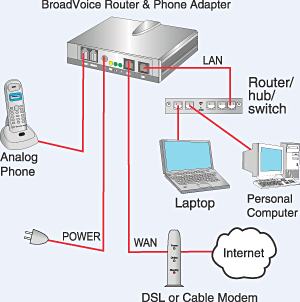
Typical VoIP communicati on
VoIP
Voice over IP (VoIP) allows analog signals to be converted to digital
signals, then transmitted on a network. By using existing
technologies and software, voice communication over the Internet
is now available to anyone with a browser (think Skype, WebEx,
Google Hangouts). Beyond this, many companies are now offering
VoIP-based telephone service for business and home use.
Chapter 5: Networking and Communication | 113
Organizational Networking
LAN and WAN
Scope of business networks While the Internet was evolving and creating a way for
organizations to connect to each other and the world, another
revolution was taking place inside organizations. The proliferation
of personal computers led to the need to share resources such
as printers, scanners, and data. Organizations solved this problem
through the creation of local area networks (LANs), which allowed
computers to connect to each other and to peripherals.
A LAN is a local network, usually operating in the same building
or on the same campus. A Wide Area Network (WAN) provides
connectivity over a wider area such as an organization’s locations in
different cities or states.
114 | Information Systems for Business and Beyond (2019)
Client-Server
Client-server computing provides stand-alone devices such as
personal computers, printers, and file servers to work together. The
personal computer originally was used as a stand-alone computing
device. A program was installed on the computer and then used to
do word processing or calculations. With the advent of networking
and local area networks, computers could work together to solve
problems. Higher-end computers were installed as servers, and
users on the local network could run applications and share
information among departments and organizations.
Intranet
An intranet, as the name implies, provides web-based resources
for the users within an organization. These web pages are not
accessible to those outside the company. The pages typically
contain information useful to employees such as policies and
procedures. In an academic setting the intranet provides an
interface to learning resources for students.
Extranet
Sometimes an organization wants to be able to collaborate with
its customers or suppliers while at the same time maintaining the
security of being inside its own network. In cases like this a
company may want to create an extranet, which is a part of a company’s network that can be made available securely to those
outside of the company. Extranets can be used to allow customers
to log in and place orders, or for suppliers to check their customers’
inventory levels.
Chapter 5: Networking and Communication | 115
Sometimes an organization will need to allow someone who is not
located physically within its internal network to gain secure access
to the intranet. This access can be provided by a virtual private
network (VPN). VPNs will be discussed further in Chapter 6 which
focuses on Information Security).
Sidebar: Microsoft’s SharePoint Powers the Intranet
As organizations begin to see the power of collaboration between
their employees, they often look for solutions that will allow them
to leverage their intranet to enable more collaboration. Since most
companies use Microsoft products for much of their computing,
some are using Microsoft’s SharePoint to support employee
collaboration.
SharePoint provides a communication and collaboration platform
that integrates seamlessly with Microsoft’s Office suite of
applications. Using SharePoint, employees can share a document
and edit it together, avoiding the need to email the document for
others to review. Projects and documents can be managed
collaboratively across the organization. Corporate documents are
indexed and made available for search.
Cloud Computing
Cloud computing was covered in Chapter 3. The universal
availability of the Internet combined with increases in processing
116 | Information Systems for Business and Beyond (2019)
power and data-storage capacity have made cloud computing a
viable option for many companies. Using cloud computing,
companies or individuals can contract to store data on storage
devices somewhere on the Internet. Applications can be “rented”
as needed, giving a company the ability to quickly deploy new
applications. The I.T. department benefits from not having to
maintain software that is provided on the cloud.
Sidebar: Metcalfe’s Law
Just as Moore’s Law describes how computing power is increasing
over time, Metcalfe’s Law describes the power of networking.
Metcalfe’s Law states that the value of a telecommunications
network is proportional to the square of the number of connected
users of the system, or N2. If a network has 10 nodes, the inherent
value is 100, or 102.
Metcalfe’s Law is attributed to Robert Metcalfe, the co-inventor of
Ethernet. It attempts to address the added value provided by each
node on the network. Think about it this way: If none of your friends
were on Instagram, would you spend much time there? If no one
else at your school or place of work had e-mail, would it be very
useful to you? Metcalfe’s Law tries to quantify this value.
Summary
The networking revolution has completely changed how personal
computers are used. Today, no one would imagine using a computer
that was not connected to one or more networks. The development
Chapter 5: Networking and Communication | 117
of the Internet and World Wide Web, combined with wireless
access, has made information available at our fingertips. The Web
2.0 revolution has made everyone potential authors of web content.
As networking technology has matured, the use of Internet
technologies has become a standard for every type of organization.
The use of intranets and extranets has allowed organizations to
deploy functionality to employees and business partners alike,
increasing efficiencies and improving communications. Cloud
computing has truly made information available everywhere.
Study Questions
1. What were the first four locations hooked up to the Internet
(ARPANET)?
2. What does the term packet mean? 3. Which came first, the Internet or the World Wide Web?
4. What was revolutionary about Web 2.0?
5. What was the so-called killer app for the Internet?
6. What does the term VoIP mean?
7. What is a LAN?
8. What is the difference between an intranet and an extranet?
9. What is Metcalfe’s Law?
Exercises
1. What is the difference between the Internet and the World
Wide Web? Create at least three statements that identify the
differences between the two.
2. Who are the broadband providers in your area? What are the
118 | Information Systems for Business and Beyond (2019)
prices and speeds offered?
3. Pretend you are planning a trip to three foreign countries in
the next month. Consult your wireless carrier to determine if
your mobile phone would work properly in those countries.
What would the costs be? What alternatives do you have if it
would not work?
Labs
1. Check the speed of your Internet connection by going to the
following web site: speedtest.net
What is your download and upload speed?
2. What is the IP address of your computer? How did you find it?
Hint for Windows: Go to the start icon and click Run. Then
open the Command Line Interface by typing: cmd Then type: ipconfigWhat is your IPv4 address?What is your IPv6 address?
3. When you enter an address in your web browser, a Domain
Name Server (DNS) is used to lookup the IP address of the site
you are seeking. To locate the DNS server your computer is
using, type: nslookupWrite down the name and address of your DNS server.Use the nslookup command to find the address for a favorite web site. For example, to find the IP
address of espn type: nslookup espnWrite down your website’s name and address. Note: it is on the line following the name of
the web site you entered.
4. You can use the tracert (trace route) command to display the path from your computer to the web site’s IP address you used
in the previous lab. For example, tracert 199.181.132.250Be patient as tracert contacts each router in the path to your website’s server. A “Request timed out” message indicates the
tracing is taking too long, probably due to a lack of bandwidth.
You can stop the trace by pressing Ctrl + C
Chapter 5: Networking and Communication | 119
5. The ping command allows you check connectivity between the local host (your computer) and another host. If you are unable
to connect to another host, the ping command can be used to
incrementally test your connectivity. The IP address 127.0.0.1 is
known as your home address (local host).Begin your test by
going to your command line interface (command promkpt) and
pinging your local host: ping 127.0.0.1You should get a series of “Reply from 127.0.0.1” messagesNext, ping the IP address you
used in lab #3.Sometimes a failed ping is not the result of a
lack of connectivity. Network administrators of some IP
addresses/hosts do not want their site pinged so they block all
ICMP packets. That’s the protocol used for pinging.
• The whois.domaintools.com site provides you with information
about a web site. For example, to find information about
google.com open your web browser and type:
whoisdomaintools.com Then in the Lookup window, type: google.comFind information about a favorite site of yours. Record the following: administrator name, phone number,
when the site was created, and the site’s name servers (the
names begin with “ns”).
• Network statistics can be displayed using the netstat command. In the command line window (see lab #2 for
instructions on how to get to the command line), type: netstat -eHow many bytes were sent and how many were received?Execute the command again and record your results.
You should see an increase in both received and sent bytes.To
see a complete list of options/switches for the netstat
command, type: netstat ?
1. Wolcott, M. (2017). What is Web 2.0? MoneyWatch. Retrieved from https://www.cbsnews.com/news/what-is-web-20/↵
2. Molla, R. (2017). These are the fastest and slowest Internet
120 | Information Systems for Business and Beyond (2019)
speeds”. Recode. Retrieved from https://www.recode.net/2017/ 6/9/15768598/states-fastest-slowest-internet-speeds↵
3. International Telecommunications Union. (2018, January 23). UN Broadband Commission sets goal broadband targets to
bring online the world’s 3.8 billion not connected to the
Internet. Retrieved from https://www.itu.int/en/
mediacentre/Pages/2018-PR01.aspx↵
4. “Dean, J. (2014). 4G vs 5G Mobile Technology. Raconteur Retrieved from https://www.raconteur.net/technology/4g-
vs-5g-mobile-technology.
Chapter 5: Networking and Communication | 121
Chapter 6: Information Systems Security
Learning Objectives
Upon successful completion of this chapter, you will be
able to:
• identify the information security triad;
• identify and understand the high-level concepts
surrounding information security tools; and
• secure yourself digitally.
Introduction
As computers and other digital devices have become essential to
business and commerce, they have also increasingly become a
target for attacks. In order for a company or an individual to use
a computing device with confidence, they must first be assured
that the device is not compromised in any way and that all
communications will be secure. This chapter reviews the
fundamental concepts of information systems security and
discusses some of the measures that can be taken to mitigate
122 | Chapter 6: Information Systems Security
The security triad
security threats. The chapter begins with an overview focusing on
how organizations can stay secure. Several different measures that a
company can take to improve security will be discussed. Finally, you
will review a list of security precautions that individuals can take in
order to secure their personal computing environment.
The Information Security Triad: Confidentiality, Integrity, Availability (CIA)
Confidentiality
Protecting information
means you want to want to be
able to restrict access to those
who are allowed to see it. This
is sometimes referred to as
NTK, Need to Know. Everyone
else should be disallowed from
learning anything about its
contents. This is the essence of
confidentiality. For example,
federal law requires that
universities restrict access to private student information. Access to
grade records should be limited to those who have authorized
access.
Chapter 6: Information Systems Security | 123
Integrity
Integrity is the assurance that the information being accessed has
not been altered and truly represents what is intended. Just as a
person with integrity means what he or she says and can be trusted
to consistently represent the truth, information integrity means
information truly represents its intended meaning. Information can
lose its integrity through malicious intent, such as when someone
who is not authorized makes a change to intentionally misrepresent
something. An example of this would be when a hacker is hired to
go into the university’s system and change a student’s grade.
Integrity can also be lost unintentionally, such as when a
computer power surge corrupts a file or someone authorized to
make a change accidentally deletes a file or enters incorrect
information.
Availability
Information availability is the third part of the CIA triad. Availability means information can be accessed and modified by anyone
authorized to do so in an appropriate timeframe. Depending on
the type of information, appropriate timeframe can mean different things. For example, a stock trader needs information to be available
immediately, while a sales person may be happy to get sales
numbers for the day in a report the next morning. Online retailers
require their servers to be available twenty-four hours a day, seven
days a week. Other companies may not suffer if their web servers
are down for a few minutes once in a while.
124 | Information Systems for Business and Beyond (2019)
Tools for Information Security
In order to ensure the confidentiality, integrity, and availability of
information, organizations can choose from a variety of tools. Each
of these tools can be utilized as part of an overall information-
security policy.
Authentication
The most common way to identify someone is through their
physical appearance, but how do we identify someone sitting behind
a computer screen or at the ATM? Tools for authentication are used
to ensure that the person accessing the information is, indeed, who
they present themselves to be.
Authentication can be accomplished by identifying someone
through one or more of three factors:
1. Something they know,
2. Something they have, or
3. Something they are.
For example, the most common form of authentication today is the
user ID and password. In this case, the authentication is done by
confirming something that the user knows (their ID and password).
But this form of authentication is easy to compromise (see sidebar)
and stronger forms of authentication are sometimes needed.
Identifying someone only by something they have, such as a key or a
card, can also be problematic. When that identifying token is lost or
stolen, the identity can be easily stolen. The final factor, something
you are, is much harder to compromise. This factor identifies a user
through the use of a physical characteristic, such as a retinal scan,
Chapter 6: Information Systems Security | 125
RSA SecureID token
fingerprint, or facial geometry. Identifying someone through their
physical characteristics is called biometrics.
A more secure way to authenticate a user is through multi-factor
authentication. By combining two or more of the factors listed above, it becomes much more difficult for someone to misrepresent
themselves. An example of this would be the use of an RSA SecurID
token. The RSA device is something you have, and it generates a
new access code every sixty seconds. To log in to an information
resource using the RSA device, you combine something you know,
such as a four-digit PIN, with the code generated by the device. The
only way to properly authenticate is by both knowing the code and having the RSA device.
Access Control
Once a user has been authenticated, the next step is to ensure that
they can only access the information resources that are appropriate.
This is done through the use of access control. Access control
determines which users are authorized to read, modify, add, and/
or delete information. Several different access control models exist.
Two of the more common are: the Access Control List (ACL) and
Role-Based Access Control (RBAC).
An information security employee can produce an ACL which
identifies a list of users who have the capability to take specific
actions with an information resource such as data files. Specific
126 | Information Systems for Business and Beyond (2019)
Comparison of ACL and RBAC
permissions are assigned to each user such as read, write, delete,
or add. Only users with those permissions are allowed to perform those functions.
ACLs are simple to understand and maintain, but there are several
drawbacks. The primary drawback is that each information resource
is managed separately, so if a security administrator wanted to add
or remove a user to a large set of information resources, it would be
quite difficult. And as the number of users and resources increase,
ACLs become harder to maintain. This has led to an improved
method of access control, called role-based access control, or RBAC. With RBAC, instead of giving specific users access rights to an
information resource, users are assigned to roles and then those
roles are assigned the access. This allows the administrators to
manage users and roles separately, simplifying administration and,
by extension, improving security.
The following image shows an ACL with permissions granted to
individual users. RBAC allows permissions to be assigned to roles,
as shown in the middle grid, and then in the third grid each user is
assigned a role. Although not modeled in the image, each user can
have multiple roles such as Reader and Editor.
Sidebar: Password Security
So why is using just a simple user ID and password not considered a
secure method of authentication? It turns out that this single-factor
Chapter 6: Information Systems Security | 127
authentication is extremely easy to compromise. Good password
policies must be put in place in order to ensure that passwords
cannot be compromised. Below are some of the more common
policies that organizations should use.
• Require complex passwords. One reason passwords are compromised is that they can be easily guessed. A recent study
found that the top three passwords people used were
password, 123456 and 12345678.[1] A password should not be simple, or a word that can be found in a dictionary. Hackers
first attempt to crack a password by testing every term in the
dictionary. Instead, a good password policy should require the
use of a minimum of eight characters, at least one upper-case
letter, one special character, and one digit.
• Change passwords regularly. It is essential that users change their passwords on a regular basis. Also, passwords may not be
reused. Users should change their passwords every sixty to
ninety days, ensuring that any passwords that might have been
stolen or guessed will not be able to be used against the
company.
• Train employees not to give away passwords. One of the primary methods used to steal passwords is to simply figure
them out by asking the users for their password. Pretexting occurs when an attacker calls a helpdesk or security
administrator and pretends to be a particular authorized user
having trouble logging in. Then, by providing some personal
information about the authorized user, the attacker convinces
the security person to reset the password and tell him what it
is. Another way that employees may be tricked into giving away
passwords is through e-mail phishing. Phishing occurs when a user receives an e-mail that looks as if it is from a trusted
source, such as their bank or employer. In the e-mail the user
is asked to click a link and log in to a website that mimics the
genuine website, then enter their ID and password. The userID
and password are then captured by the attacker.
128 | Information Systems for Business and Beyond (2019)
Encryption
Many times an organization needs to transmit information over the
Internet or transfer it on external media such as a flash drive. In
these cases, even with proper authentication and access control, it
is possible for an unauthorized person to gain access to the data.
Encryption is a process of encoding data upon its transmission
or storage so that only authorized individuals can read it. This
encoding is accomplished by software which encodes the plain text
that needs to be transmitted (encryption). Then the recipient
receives the cipher text and decodes it (decryption). In order for
this to work, the sender and receiver need to agree on the method
of encoding so that both parties have the same message. Known
as symmetric key encryption, both parties share the encryption key, enabling them to encode and decode each other’s messages.
An alternative to symmetric key encryption is public key
encryption. In public key encryption, two keys are used: a public key and a private key. To send an encrypted message, you obtain the
public key, encode the message, and send it. The recipient then uses
their private key to decode it. The public key can be given to anyone
who wishes to send the recipient a message. Each user simply needs
one private key and one public key in order to secure messages. The
private key is necessary in order to decrypt a message sent with the
public key.
Notice in the image how the sender on the left creates a plaintext
message which is then encrypted with a public key. The ciphered
text is transmitted through the communication channel and the
recipient uses their private key to decrypt the message and then
read the plain text.
Chapter 6: Information Systems Security | 129
Public Key Encryption
Sidebar: Blockchain and Bitcoin
Blockchain
Introduced in 2008 as part of a proposal for Bitcoin, Blockchain is
a peer-to-peer network which provides an open, distributed record
of transactions between two parties. A “peer-to-peer” network is
one where there is no server between the two nodes trying to
communicate. Essentially, this means that each node acts as a server
and a client.
130 | Information Systems for Business and Beyond (2019)
Supporters see blockchain as a tool to simplify all types of
transactions: payments, contracts, etc. Motivation comes from the
desire to remove the middleman (lawyer, banker, broker) from
transactions, making them more efficient and readily available
across the Internet. Blockchain is already being used to track
products through supply chains.
Blockchain is considered a foundational technology, potentially creating new foundations in economics and social systems. There
are numerous concerns about Blockchain and its adoption.
Consider the following:
• Speed of adoption. Initially there is a great deal of enthusiasm by a small group. However, adoption on a larger scale can take
a great number of years even decades for a worldwide
acceptance of a new method of doing business.
• Governance. The banking sector, both in individual countries (U. S. Federal Reserve System) and the world at large (the
International Monetary Fund), controls financial transactions.
One purpose of these organizations is an attempt to avoid
banking and financial systems collapse. Blockchain will result
in the governance of financial transactions shifting away from
these government-controlled institutions.
• Smart contracts. The smart contract will re-shape how businesses interact. It is possible for blockchain to
automatically send payment to a vendor the instant the
product is delivered to the customer. Such “self-executing”
contracts are already taking place in banking and venture
capital funding. 1
Many are forecasting some universal form of payment or value
transfer for business transactions. Blockchain and Bitcoin are being
used to transform banking in various locations around the world.
1. [9]
Chapter 6: Information Systems Security | 131
The following Bitcoin section includes a look at a new banking
venture in Tanzania, East Africa.
Bitcoin
Bitcoin logo
Bitcoin is a world wide payment system using cryptocurrency. It
functions without a central bank, operating as a peer-to-peer
network with transactions happening directly between vendors and
buyers. Records for transactions are recorded in the blockchain.
Bitcoin technology was released in 2009. The University of
Cambridge estimated there were 2.9 and 5.8 million unique users
of bitcoin in 2017.2 This web site provides more information about
bitcoin.
A major bitcoin project is underway in Tanzania. Business
transactions in this East African country are fraught with many
challenges such as counterfeit currency and a 28% transaction fee
on individuals who do not have a bank account. Seventy percent of
the country’s population fall into this category. Benjamin Fernandes,
2. [10]
132 | Information Systems for Business and Beyond (2019)
a Tanzanian and 2017 graduate of Stanford Graduate School of
Business, is co-founder of NALA, a Tanzanian firm working to bring
cryptocurrency to a country where 96% of the population have
access to mobile devices. NALA’s goal is to provide low cost
transactions to all of the country’s citizens through
cryptocurrency.3 You can read more of this cryptocurrency venture
here.
Backups
Another essential tool for information security is a comprehensive
backup plan for the entire organization. Not only should the data
on the corporate servers be backed up, but individual computers
used throughout the organization should also be backed up. A good
backup plan should consist of several components.
• Full understanding of the organization’s information resources. What information does the organization actually have? Where is it stored? Some data may be stored on the
organization’s servers, other data on users’ hard drives, some
in the cloud, and some on third-party sites. An organization
should make a full inventory of all of the information that
needs to be backed up and determine the best way to back it
up.
• Regular backups of all data. The frequency of backups should be based on how important the data is to the company,
combined with the ability of the company to replace any data
that is lost. Critical data should be backed up daily, while less
3. [11]
Chapter 6: Information Systems Security | 133
critical data could be backed up weekly. Most large
organizations today use data redundancy so their records are
always backed up.
• Offsite storage of backup data sets. If all backup data is being stored in the same facility as the original copies of the data,
then a single event such as an earthquake, fire, or tornado
would destroy both the original data and the backup. It is
essential the backup plan includes storing the data in an offsite
location.
• Test of data restoration. Backups should be tested on a regular basis by having test data deleted then restored from backup.
This will ensure that the process is working and will give the
organization confidence in the backup plan.
Besides these considerations, organizations should also examine
their operations to determine what effect downtime would have
on their business. If their information technology were to be
unavailable for any sustained period of time, how would it impact
the business?
Additional concepts related to backup include the following:
• Uninterruptible Power Supply (UPS). A UPS provides battery backup to critical components of the system, allowing them to
stay online longer and/or allowing the IT staff to shut them
down using proper procedures in order to prevent data loss
that might occur from a power failure.
• Alternate, or “hot” sites. Some organizations choose to have an alternate site where an exact replica of their critical data is
always kept up to date. When the primary site goes down, the
alternate site is immediately brought online so that little or no
downtime is experienced.
As information has become a strategic asset, a whole industry
has sprung up around the technologies necessary for implementing
a proper backup strategy. A company can contract with a service
134 | Information Systems for Business and Beyond (2019)
Diagram of a network configuration with firewalls, a router, and a DMZ.
provider to back up all of their data or they can purchase large
amounts of online storage space and do it themselves. Technologies
such as Storage Area Networks (SAN) and archival systems are now
used by most large businesses for data backup.
Firewalls
Firewalls are another method that an organization can use for
increasing security on its
network. A firewall can exist as
hardware or software, or both.
A hardware firewall is a device
that is connected to the
network and filters the packets
based on a set of rules. One
example of these rules would
be preventing packets entering
the local network that come
from unauthorized users. A software firewall runs on the operating
system and intercepts packets as they arrive to a computer.
A firewall protects all company servers and computers by
stopping packets from outside the organization’s network that do
not meet a strict set of criteria. A firewall may also be configured
to restrict the flow of packets leaving the organization. This may
be done to eliminate the possibility of employees watching YouTube
videos or using Facebook from a company computer.
A demilitarized zone (DMZ) implements multiple firewalls as part
of network security configuration, creating one or more sections of
their network that are partially secured. The DMZ typically contains
resources that need broader access but still need to be secured.
Chapter 6: Information Systems Security | 135
Intrusion Detection Systems
Intrusion Detection Systems (IDS) can be placed on the network for security purposes. An IDS does not add any additional security.
Instead, it provides the capability to identify if the network is being
attacked. An IDS can be configured to watch for specific types of
activities and then alert security personnel if that activity occurs. An
IDS also can log various types of traffic on the network for analysis
later. It is an essential part of any good security system.
Sidebar: Virtual Private Networks
Using firewalls and other security technologies, organizations can
effectively protect many of their information resources by making
them invisible to the outside world. But what if an employee
working from home requires access to some of these resources?
What if a consultant is hired who needs to do work on the internal
corporate network from a remote location? In these cases, a Virtual
Private Network (VPN) is needed.
136 | Information Systems for Business and Beyond (2019)
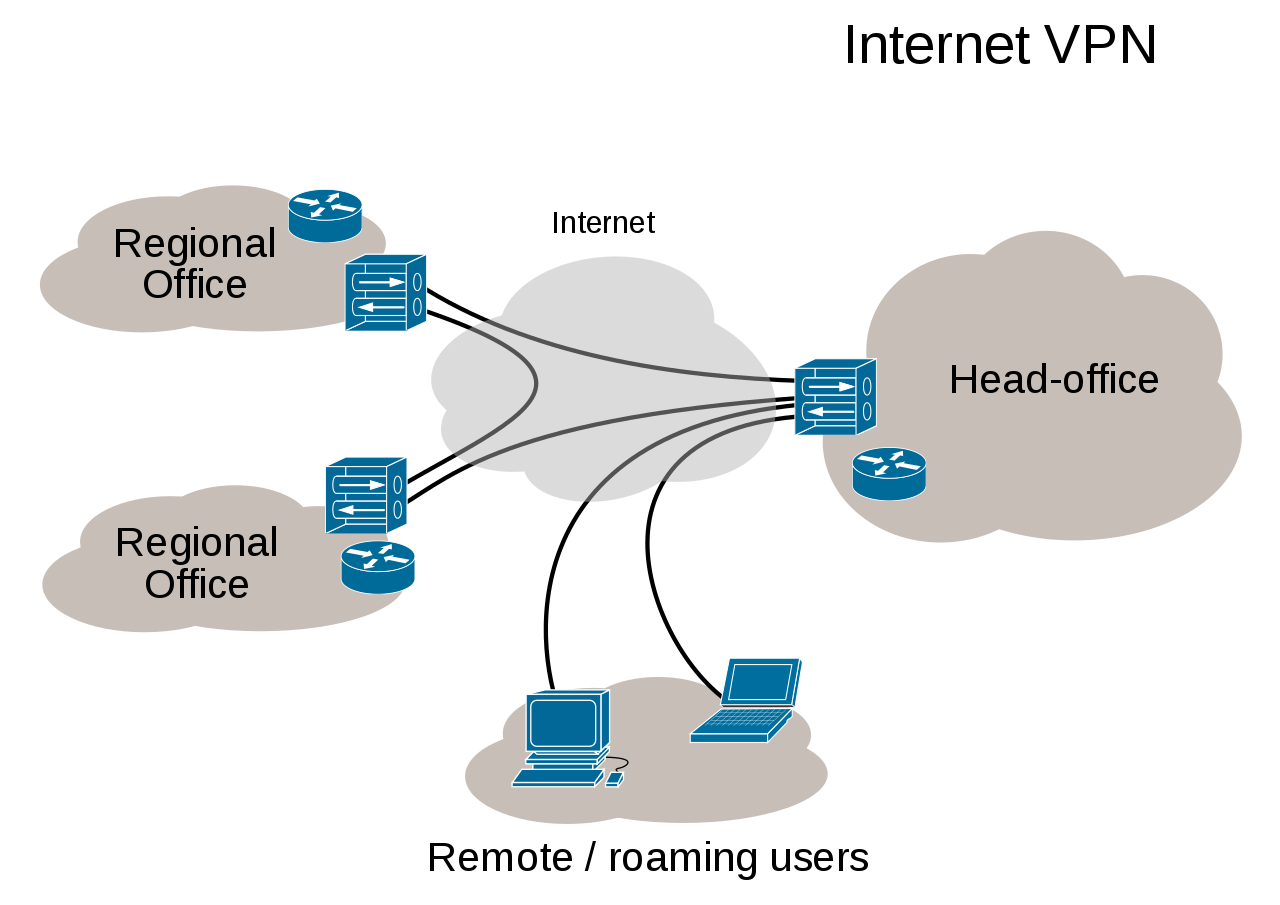
Diagram of VPN (click to enlarge). Attribution to Ludovic.ferre.
A VPN allows a user who is outside of a corporate network to
take a detour around the firewall and access the internal network
from the outside. Through a combination of software and security
measures, a VPN provides off-site access to the organization’s
network while ensuring overall security.
The Internet cloud is essentially an insecure channel through
which people communicate to various web sites/servers.
Implementing a VPN results in a secure pathway, usually referred
to as a tunnel, through the insecure cloud, virtually guaranteeing
secure access to the organization’s resources. The diagram
represents security by way of the functionality of a VPN as it
“tunnels” through the insecure Internet Cloud. Notice that the
remote user is given access to the organization’s intranet, as if the
user was physically located within the intranet.
Chapter 6: Information Systems Security | 137
Physical Security
An organization can implement the best authentication scheme in
the world, develop superior access control, and install firewalls and
intrusion detection, but its security cannot be complete without
implementation of physical security. Physical security is the
protection of the actual hardware and networking components that
store and transmit information resources. To implement physical
security, an organization must identify all of the vulnerable
resources and take measures to ensure that these resources cannot
be physically tampered with or stolen. These measures include the
following.
• Locked doors. It may seem obvious, but all the security in the world is useless if an intruder can simply walk in and physically
remove a computing device. High value information assets
should be secured in a location with limited access.
• Physical intrusion detection. High value information assets should be monitored through the use of security cameras and
other means to detect unauthorized access to the physical
locations where they exist.
• Secured equipment. Devices should be locked down to prevent them from being stolen. One employee’s hard drive
could contain all of your customer information, so it is
essential that it be secured.
• Environmental monitoring. An organization’s servers and other high value equipment should always be kept in a room
that is monitored for temperature, humidity, and airflow. The
risk of a server failure rises when these factors exceed
acceptable ranges.
• Employee training. One of the most common ways thieves steal corporate information is the theft of employee laptops
while employees are traveling. Employees should be trained to
secure their equipment whenever they are away from the
138 | Information Systems for Business and Beyond (2019)
office.
Security Policies
Besides the technical controls listed above, organizations also need
to implement security policies as a form of administrative control.
In fact, these policies should really be a starting point in developing
an overall security plan. A good information security policy lays out
the guidelines for employee use of the information resources of the
company and provides the company recourse in the event that an
employee violates a policy.
According to the SANS Institute, a good policy is “a formal, brief,
and high-level statement or plan that embraces an
organization’s general beliefs, goals, objectives, and acceptable
procedures for a specified subject area.” Policies require
compliance. Failure to comply with a policy will result in disciplinary
action. A policy does not list the specific technical details, instead it
focuses on the desired results. A security policy should be based on
the guiding principles of confidentiality, integrity, and availability.4
Web use is a familiar example of a security policy. A web use
policy lays out the responsibilities of company employees as they
use company resources to access the Internet. A good example of a
web use policy is included in Harvard University’s “Computer Rules
and Responsibilities” policy, which can be found here.
A security policy should also address any governmental or
industry regulations that apply to the organization. For example,
if the organization is a university, it must be aware of the Family
Educational Rights and Privacy Act (FERPA), which restricts access
to student information. Health care organizations are obligated to
4. [2]
Chapter 6: Information Systems Security | 139
follow several regulations, such as the Health Insurance Portability
and Accountability Act (HIPAA).
A good resource for learning more about security policies is the
SANS Institute’s Information Security Policy Page.
Sidebar: Mobile Security
As the use of mobile devices such as laptops and smartphones
proliferates, organizations must be ready to address the unique
security concerns that the use of these devices bring. One of the
first questions an organization must consider is whether to allow
mobile devices in the workplace at all. Many employees already have
these devices, so the question becomes: Should we allow employees
to bring their own devices and use them as part of their employment
activities? Or should we provide the devices to our employees?
Creating a BYOD (“Bring Your Own Device”) policy allows employees
to integrate themselves more fully into their job and can bring
higher employee satisfaction and productivity. In many cases, it
may be virtually impossible to prevent employees from having their
own smartphones or laptops in the workplace. If the organization
provides the devices to its employees, it gains more control over
use of the devices, but it also increases the burden of having to
administrate distribution and use.
Mobile devices can pose many unique security challenges to an
organization. Probably one of the biggest concerns is theft of
intellectual property. For an employee with malicious intent, it
would be a very simple process to connect a mobile device either to
a computer via the USB port, or wirelessly to the corporate network,
and download confidential data. It would also be easy to secretly
take a high-quality picture using a built-in camera.
When an employee does have permission to access and save
140 | Information Systems for Business and Beyond (2019)
company data on his or her device, a different security threat
emerges. Namely, that device now becomes a target for thieves.
Theft of mobile devices (in this case, including laptops) is one of the
primary methods that data thieves use.
So what can be done to secure mobile devices? Begin with a
good policy regarding their use. According to a 2013 SANS study,
organizations should consider developing a mobile device policy
that addresses the following issues: use of the camera, use of voice
recording, application purchases, encryption at rest, Wi-Fi
autoconnect settings, Bluetooth settings, VPN use, password
settings, lost or stolen device reporting, and backup. 5
Besides policies, there are several different tools that an
organization can use to mitigate some of these risks. For example,
if a device is stolen or lost, geolocation software can help the
organization find it. In some cases, it may even make sense to install
remote data removal software, which will remove data from a device
if it becomes a security risk.
Usability
When looking to secure information resources, organizations must
balance the need for security with users’ needs to effectively access
and use these resources. If a system’s security measures make it
difficult to use, then users will find ways around the security, which
may make the system more vulnerable than it would have been
without the security measures. Consider password policies. If the
organization requires an extremely long password with several
5. [3]
Chapter 6: Information Systems Security | 141
Stop.Think.Connect. poster (click to enlarge)
special characters, an employee may resort to writing it down and
putting it in a drawer since it will be impossible to memorize.
Personal Information Security
As a final topic for this
chapter, consider what
measures each of us, as
individual users, can take to
secure our computing
technologies. There is no way
to have 100% security, but
there are several simple steps
each individual can take to be
more secure.
• Keep your software up to date. Whenever a software vendor determines that a
security flaw has been
found in their software, an
update will be released so you can download the patch to fix
the problem. You should turn on automatic updating on your
computer to automate this process.
• Install antivirus software and keep it up to date. There are many good antivirus software packages on the market today,
including some that are free.
• Be smart about your connections. You should be aware of your surroundings. When connecting to a Wi-Fi network in a
public place, be aware that you could be at risk of being spied
on by others sharing that network. It is advisable not to access
your financial or personal data while attached to a Wi-Fi
hotspot. You should also be aware that connecting USB flash
142 | Information Systems for Business and Beyond (2019)
drives to your device could also put you at risk. Do not attach
an unfamiliar flash drive to your device unless you can scan it
first with your security software.
• Backup your data. Just as organizations need to backup their data, individuals need to so as well. The same rules apply.
Namely, do it regularly and keep a copy of it in another
location. One simple solution for this is to set up an account
with an online backup service to automate your backups.
• Secure your accounts with two-factor authentication. Most e-mail and social media providers now have a two-factor
authentication option. When you log in to your account from
an unfamiliar computer for the first time, it sends you a text
message with a code that you must enter to confirm that you
are really you. This means that no one else can log in to your
accounts without knowing your password and having your mobile phone with them.
• Make your passwords long, strong, and unique. Your personal passwords should follow the same rules that are recommended
for organizations. Your passwords should be long (at least 12
random characters) and contain at least two of the following:
uppercase and lowercase letters, digits, and special characters.
Passwords should not include words that could be tied to your
personal information, such as the name of your pet. You also
should use different passwords for different accounts, so that
if someone steals your password for one account, they still are
locked out of your other accounts.
• Be suspicious of strange links and attachments. When you receive an e-mail, tweet, or Facebook post, be suspicious of
any links or attachments included there. Do not click on the
link directly if you are at all suspicious. Instead, if you want to
access the website, find it yourself with your browser and
navigate to it directly. The I Love You virus was distributed via
email in May 2000 and contained an attachment which when
opened copied itself into numerous folders on the user’s
computer and modified the operating system settings. An
Chapter 6: Information Systems Security | 143
estimated 50,000 computers were affected, all of which could
have been avoided if users had followed the warning to not
open the attachment.
You can find more about these steps and many other ways to be
secure with your computing by going to Stop. Think. Connect. This
website is part of a campaign by the STOP. THINK. CONNECT.
Messaging Convention in partnership with the U.S. government,
including the White House.
Summary
As computing and networking resources have become more an
integral part of business, they have also become a target of
criminals. Organizations must be vigilant with the way they protect
their resources. The same holds true for individuals. As digital
devices become more intertwined in everyone’s life, it becomes
crucial for each person to understand how to protect themselves.
Study Questions
1. Briefly define each of the three members of the information
security triad.
2. What does the term authentication mean? 3. What is multi-factor authentication?
4. What is role-based access control?
5. What is the purpose of encryption?
144 | Information Systems for Business and Beyond (2019)
6. What are two good examples of a complex password?
7. What is pretexting?
8. What are the components of a good backup plan?
9. What is a firewall?
10. What does the term physical security mean?
Exercises
1. Describe one method of multi-factor authentication that you
have experienced and discuss the pros and cons of using
multi-factor authentication.
2. What are some of the latest advances in encryption
technologies? Conduct some independent research on
encryption using scholarly or practitioner resources, then
write a two- to three-page paper that describes at least two
new advances in encryption technology.
3. Find favorable and unfavorable articles about both blockchain
and bitcoin. Report your findings, then state your own opinion
about these technologies
4. What is the password policy at your place of employment or
study? Do you have to change passwords every so often? What
are the minimum requirements for a password?
5. When was the last time you backed up your data? What
method did you use? In one to two pages, describe a method
for backing up your data. Ask your instructor if you can get
extra credit for backing up your data.
6. Find the information security policy at your place of
employment or study. Is it a good policy? Does it meet the
standards outlined in the chapter?
7. How diligent are you in keeping your own information secure?
Review the steps listed in the chapter and comment on your
security status.
Chapter 6: Information Systems Security | 145
Labs
1. The Caesar Cipher. One of the oldest methods of encryption was used by Julius Caesar and involved simply shifting text a
specified number of positions in the alphabet. The number of
shifted positions is known as the key. So a key = 3 would
encrypt ZOO to CRR. Decrypt the following message which has
a key = 3: FRPSXWHU
2. The Vigenere Cipher. This cipher was used as recently as the Civil War by the Confederate forces. The key is slightly more
complex than the Caesar Cipher. Vigenere used the number of
letters after ‘A’ for his key. For example, if the key = COD, the
first letter in the cypher is shifted 2 characters (because “C” is
2 letters after the letter ‘A’), the second letter is shifted 14
letters (O being 14 letters after ‘A’), and the third letter is
shifted 3 letters (D being 3 letters after ‘A’). Then the pattern is
repeated for subsequent letters. Decrypt the following
message which has a key = COD: YSPGSWCHGCKQ
3. Frequency and Pattern Analysis. If you’ve ever watched Wheel of Fortune you know that contestants look for patterns and
frequencies in trying to solve a puzzle. Your job in this lab is to
analyze letter frequency and letter patterns to determine the
plaintext message which in this case is a single word. The key
is a simple substitution where the same letter in plaintext
always results in the same letter in the cyphertext. The most
frequently used letters in the English language are: E, A, O , I, T,
S, N. Pattern analysis includes knowing words that have double
letters such as “school.” Other patterns include “ing” at the end
of a word, “qu” and “th” as a pairs of letters.Cyphertext =
CAGGJWhat is the key and the plaintext?
1. Gallagher, S. (2012, November 3). Born to be
146 | Information Systems for Business and Beyond (2019)
breached. Arstechnica. Retrieved from http://arstechnica.com/information-technology/2012/11/
born-to-be-breached-the-worst-passwords-are-still-the-
most-common/
2. SANS Institute. (n.d.). Information Security Policy Templates. Retrieved from http://www.sans.org/security-resources/
policies/Policy_Primer.pdf on May 31, 2013.
3. SANS. (n.d.). SCORE: Checklists and Step by Step Guides. Retrieved from http://www.sans.org/score/checklists/
mobile-device-checklist.xls
4. Iansiti, M. and Lakhani, K. R. (2017, January). The truth about
blockchain. Harvard Business Review. Retrieved from https://hbr.org/2017/01/the-truth-about-blockchain↵
5. Wikipedia. (n.d.). Bitcoin. Harvard Business Review. Retrieved from https://en.wikipedia.org/wiki/Bitcoin↵
6. Fernandes, B. (2017, October 20). Personal telephone
interview↵
Chapter 6: Information Systems Security | 147
PART II: INFORMATION SYSTEMS FOR STRATEGIC ADVANTAGE
Part II: Information Systems for Strategic Advantage | 149
- Information Systems for Business and Beyond (2019)
- Information Systems for Business and Beyond (2019)
- Title Page
- Copyright
- Book Contributors
- Changes from Previous Edition
- How you can help
- Introduction
- Part I: What is an information system?
- Chapter 1: What Is an Information System?
- Chapter 2: Hardware
- Chapter 3: Software
- Chapter 4: Data and Databases
- Chapter 5: Networking and Communication
- Chapter 6: Information Systems Security
- Part II: Information Systems for Strategic Advantage
- Chapter 7: Does IT Matter?
- Chapter 8: Business Processes
- Chapter 9: The People in Information Systems
- Chapter 10: Information Systems Development
- Part III: Information Systems Beyond the Organization
- Chapter 11: Globalization and the Digital Divide
- Chapter 12: The Ethical and Legal Implications of Information Systems
- Chapter 13: Trends in Information Systems
- Index