


Search Functionality using LINQ The file, “Countries.txt” contains a list of countries from around the world. Place this file in your bin/debug directory.
Search Functionality using LINQ
The file, “Countries.txt” contains a list of countries from around the world. Place this file in your bin/debug directory.
In this assignment, you will create a Visual Basic program that reads the values from the Countries text file, displays those countries in a listbox, and allows the user to enter characters in a textbox to search for one or more countries in the listbox and display the results in another listbox. The number of countries returned from the search is displayed in a textbox below the results. The program also allows the user to sort the countries listbox in ascending or descending order. Finally, a clear button clears the results in the listbox, the search textbox, and the number of countries returned from the search textbox. A quit button is provided, which exits the application.
The figures below show the output of the Visual Basic program that performs the functionality described above.
Deliverables:
Write a Visual Basic program that displays the information below and performs the functionality described above.
Using the IO.File.ReadAllLines method, read the contents of the countries.txt file into an array.
When the form loads, display the contents of the array in the Coutnries listbox.
When the user enters something in the Search Country textbox and presses the “Go” button, the program should search the array upon which the countries listbox is displayed.Use a LINQ query to do this.Note that the user may type in a full country name as illustrated in Figure 1 below, or he may enter only part of the name (even one letter), and the listbox should be populated with all countries that start with the same letter(s) as those entered by the user.Figure 2 below illustrates the search for all countries that begin with the letter “D”.
Be sure to make your search NON-case sensitive.That is, if the user enters “UnItEd sTateS” in the textbox, it should still retrieve the country “United States”. [Hint: If you convert the value that the user enters into uppercase and search for values that are converted to uppercase, this allows for a match to be found.]
Using LINQ queries, write the code such that when the user clicks the Sort Ascending button, the countries displayed in the Countries listbox is sorted from A-Z.Conversely, when the user clicks the Sort Descending button, the listbox should be sorted from Z-A.Although this feature can be accomplished using the properties of the listbox, your code should be written using LINQ queries to perform these functions.
[Hint: Before you set the datasource property of your listbox to the results of your LINQ query, you must first remove the datasource linkage to the original array by setting .datasource = nothing.]
5. Using a certain property of listboxes, determine the number of search results displayed in the Results listbox and display that number in the textbox shown below the listbox.Note:Do NOT use a LINQ query for this task.
6. Use appropriate software development guidelines, such as clearing the results listbox before populating it with new data when the Go button is clicked and including a title on the form.
Countries List:
Afghanistan
Albania
Algeria
American Samoa
Andorra
Angola
Anguilla
Antarctica
Antigua and Barbuda
Argentina
Armenia
Aruba
Australia
Austria
Azerbaijan
Bahamas
Bahrain
Bangladesh
Barbados
Belarus
Belgium
Belize
Benin
Bermuda
Bhutan
Bolivia
Bosnia and Herzegovina
Botswana
Brazil
Brunei Darussalam
Bulgaria
Burkina Faso
Burundi
Cambodia
Cameroon
Canada
Cape Verde
Cayman Islands
Central African Republic
Chad
Chile
China
Christmas Island
Cocos (Keeling) Islands
Colombia
Comoros
Democratic Republic of the Congo (Kinshasa)
Congo, Republic of (Brazzaville)
Cook Islands
Costa Rica
Ivory Coast
Croatia
Cuba
Cyprus
Czech Republic
Denmark
Djibouti
Dominica
Dominican Republic
East Timor (Timor-Leste)
Ecuador
Egypt
El Salvador
Equatorial Guinea
Eritrea
Estonia
Ethiopia
Falkland Islands
Faroe Islands
Fiji
Finland
France
French Guiana
French Polynesia
French Southern Territories
Gabon
Gambia
Georgia
Germany
Ghana
Gibraltar
Great Britain
Greece
Greenland
Grenada
Guadeloupe
Guam
Guatemala
Guinea
Guinea-Bissau
Guyana
Haiti
Holy See
Honduras
Hong Kong
Hungary
Iceland
India
Indonesia
Iran (Islamic Republic of)
Iraq
Ireland
Israel
Italy
Jamaica
Japan
Jordan
Kazakhstan
Kenya
Kiribati
Korea, Democratic People's Rep. (North Korea)
Korea, Republic of (South Korea)
Kosovo
Kuwait
Kyrgyzstan
Lao, People's Democratic Republic
Latvia
Lebanon
Lesotho
Liberia
Libya
Liechtenstein
Lithuania
Luxembourg
Macau
Macedonia, Rep. of
Madagascar
Malawi
Malaysia
Maldives
Mali
Malta
Marshall Islands
Martinique
Mauritania
Mauritius
Mayotte
Mexico
Micronesia, Federal States of
Moldova, Republic of
Monaco
Mongolia
Montenegro
Montserrat
Morocco
Mozambique
Myanmar, Burma
Namibia
Nauru
Nepal
Netherlands
Netherlands Antilles
New Caledonia
New Zealand
Nicaragua
Niger
Nigeria
Niue
Northern Mariana Islands
Norway
Oman
Pakistan
Palau
Palestinian territories
Panama
Papua New Guinea
Paraguay
Peru
Philippines
Pitcairn Island
Poland
Portugal
Puerto Rico
Qatar
Reunion Island
Romania
Russian Federation
Rwanda
Saint Kitts and Nevis
Saint Lucia
Saint Vincent and the Grenadines
Samoa
San Marino
Sao Tome and Principe
Saudi Arabia
Senegal
Serbia
Seychelles
Sierra Leone
Singapore
Slovakia (Slovak Republic)
Slovenia
Solomon Islands
Somalia
South Africa
South Sudan
Spain
Sri Lanka
Sudan
Suriname
Swaziland
Sweden
Switzerland
Syria, Syrian Arab Republic
Taiwan (Republic of China)
Tajikistan
Tanzania officially the United Republic of Tanzania
Thailand
Tibet
Timor-Leste (East Timor)
Togo
Tokelau
Tonga
Trinidad and Tobago
Tunisia
Turkey
Turkmenistan
Turks and Caicos Islands
Tuvalu
Uganda
Ukraine
United Arab Emirates
United Kingdom
United States
Uruguay
Uzbekistan
Vanuatu
Vatican City State (Holy See)
Venezuela
Vietnam
Virgin Islands (British)
Virgin Islands (U.S.)
Wallis and Futuna Islands
Western Sahara
Yemen
Zambia
Zimbabwe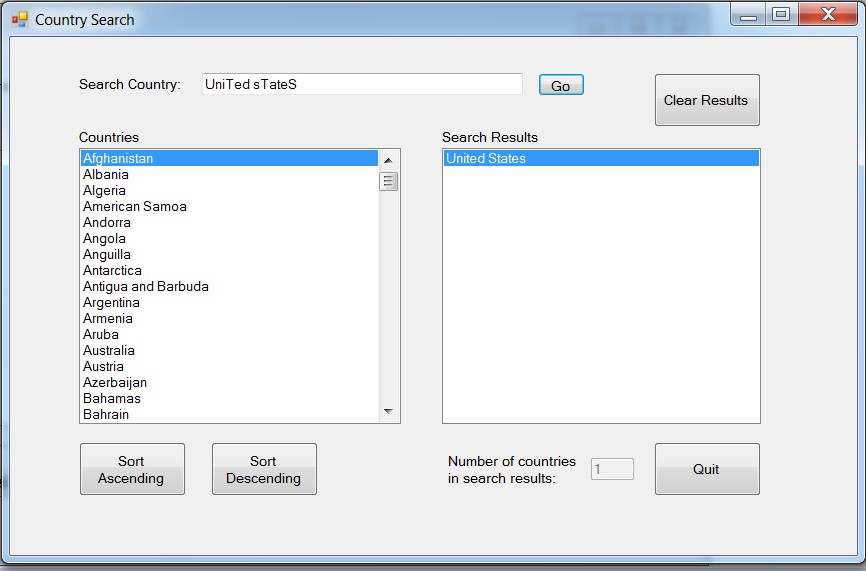
 12 years ago
Purchase the answer to view it

 windowsapplication1.zip

